All posts by Lennart Poettering

MSI S270 Laptop Linux Kernel Driver

Post Syndicated from Lennart Poettering original https://0pointer.net/blog/projects/s270-kernel.html

Earlier this year I worked on reverse engineering the
brightness control of my MSI
S270 laptop
. Turning this work into a proper kernel driver was still left
to be done. Until yesterday… The result of yesterday’s work are two kernel patches I already posted
for upstream inclusion.

If you want to test these drivers, download the latest kernel patches:

  1. acpi-ec-transaction.patch
  2. acpi-s270.patch

The two patches apply to kernel 2.6.17. After patching activate “MSI S270
Laptop Extras” under “Device Drivers”/”Misc devices” and recompile and install.
After loading the s270 module, you now have a backlight class driver
exposing its innards in /sys/class/backlight/s270bl/. For
changing the screen brightness issue as root:

echo 8 > /sys/class/backlight/s270bl/brightness

This will set the screen brightness to maximum. The integer range is 0..8.

In addition to this backlight class driver we export a platform driver which
allows reading the current state of the WLAN/Bluetooth subsystem. The platform
drivers also allows toggling the automatic brightness control feature:

cat /sys/devices/platform/s270pf/wlan                 # Show WLAN status
cat /sys/devices/platform/s270pf/bluetooth            # Show Bluetooth status
echo 1 > /sys/devices/platform/s270pf/auto_brightness # Enable automatic brightness control

If the driver refuses to load (returning ENODEV) and you are sure you have
an MSI S270 the machine is probably not recognized correctly by its DMI data.
In that case you can pass force=1 to the driver which will force the
driver load even when the DMI data doesn’t match. YMMV. If everything works
correctly please make sure to send me the output of dmidecode, so that
I can add the DMI data to the list of known laptops in the driver.

There might even be a chance that this driver works on other MSI laptop
models, too (such as S260). YMMV. But don’t come running when the driver causes
your machine to explode! MSI laptops such as the S270 or S260 are often sold as
OEM hardware under different brands (such as Cytron/TCM/Medion/Tchibo MD96100
or “SAM2000”), so if your laptop looks remotely like this one and dmidecode |
grep MICRO-STAR
yields at least a single line, and you are adventurous
than you might want to test this driver on it. And don’t forget to send me your
dmidecode output if it works for you!

Unfortunately HAL (at least in my version 0.5.7) doesn’t support the generic
backlight device class yet, which means no gnome-power-manager support
for now.

Although this driver is based on reverse engineered data it should be
legally safe even in the US. After I did my initial work on the S270 controls
MSI supplied me with a register table of their ACPI Embedded Controller
(which is what this driver interfaces with) and one of their engineers even
tested my work.

Last but not least I created a mailing list for
discussion of Linux on the MSI S270
. Please join if you run Linux on one of
these machines! I will announce future driver work for the S270 there.

Apple Bonjour adopts the Apache License 2.0

Post Syndicated from Lennart Poettering original https://0pointer.net/blog/projects/bonjour-apache-license.html

Yesterday Apple Bonjour has
been
released
under the Apache License 2.0, replacing the old much criticized (because
non-free) APSL licensing.

What does this mean for Avahi? First of all
although the Apache
License
is much better than the APSL it still isn’t GPL
compatible (at least in the eyes of the FSF), which effectively means that
Bonjour still cannot be used by more than 66% of the Free Software
projects available. Secondly Avahi is more powerful in most areas than Bonjour
ever was. (In fact, there is only a single feature where Bonjour surpasses us:
writable “Wide Area DNS-SD”). Avahi uses all the “hot” Free technologies like
D-Bus and a has much better integration in the Linux networking subsystem. Avahi is more secure (chroot()…)
Avahi is compatible API- and ABI-wise with Bonjour, but not the other way
round. Avahi is now part of every major Linux distribution.

Avahi is actively developed. The aforementioned Wide Area DNS-SD is currently
being worked on by Federico Lucifredi. Since I will write my master thesis
about mDNS scalability a lot of additional development will be done for Avahi
in the next month.

In short: Avahi is here to stay. Apple’s move to the Apache license is too little, too late.

Update: the Bonjour client libraries are BSD licensed, so the 66% argument doesn’t hold.

ZeroConf in Ubuntu

Post Syndicated from Lennart Poettering original https://0pointer.net/blog/projects/zeroconf-ubuntu.html

(Disclaimer: I am not an Ubuntu user myself. But I happen to be the lead developer of Avahi.)

It came to my attention that Ubuntu is
discussing
whether
to
enable Zeroconf/Avahi in default installations. I would like to point out a few
things:

The “No Open Ports” policy: This policy (or at least the
way many people interprete it) seems to be thought out by someone who
doesn’t have much experience with TCP/IP networking. While it might make sense
to enforce this for application-level protocols like HTTP or FTP it doesn’t
make sense to apply it to transport-level protocols such as DHCP, DNS or in
this case mDNS (the underlying protocol of Zeroconf/Avahi/Bonjour):

  • Even the simplest DNS lookup requires the opening of an UDP port for a
    short period of time to be able to recieve the response. This is usually not
    visible to the administrator, because the time is too short to show up in
    netstat -uln, but nonetheless it is an open port. (UDP is not
    session-based (like TCP is) so incoming packets are accepted regardless where
    they come from)
  • DHCP clients listen on UDP port 68 during their entire lifetime (which in
    most cases is the same as the uptime of the machine). DHCP may be misused for
    much worse things than mDNS. Evildoers can forge DHCP packets to change IP
    addresses and routing of machines. This is definitely something that cannot be
    done with mDNS.

All three protocols, DNS, DHCP and mDNS, require a little bit of trust in
the local LAN. They (usually) don’t come with any sort of authentication and
they all are very easy to forge. The impact of forged mDNS packets is clearly
less dangerous than forged DHCP or DNS packets. Why? Because mDNS doesn’t
allow you to change the IP address or routing setup (which forged DHCP allows)
and because it cannot be used to spoof host names outside the .local
domain (which forged DNS allows).

Enforcing the “No Open ports” policy everywhere in Ubuntu would require that
both DNS and DHCP are disabled by default. However, as everybody probably
agrees, this would be ridiculous because a standard Ubuntu installation
couldn’t even be used for the most basic things like web browsing.

Oh, and BTW: DNS lookups are usually done by an NSS plugin which is loaded
by the libc into every process which uses gethostbyname() (the function for doing host name resolutions). So, in
effect every single process that uses this function has an open port for a
short time. And the DNS client code runs with user priviliges, so an exploit
really hurts. dhclient (the DHCP client) runs as root during the entire
runtime, so an exploit of it hurts even more. Avahi in contrast runs as its own user and
chroot()s
.

It is not my intention to force anyone to use my
software
. However, enforcing the “No Open Ports” policy unconditionally is
not a good idea. Currently Ubuntu makes exceptions for DHCP/DNS and so
it should for mDNS.

I do agree that publishing all kinds of local services with Avahi in a
default install is indeed problematic. However, if the “No Open Ports” policy
is enforced on all other application-level software, there shouldn’t be any
application that would want to register a service with Avahi.

Starting Avahi “on-demand” is not an option either, because it offers useful
services even when no local application is accessing is. Most notably this is
host name resolution for the local host name. (Hey, yeah, Zeroconf is more than
just stealing music.)

Remember: Zeroconf is about
Zero Configuration. Requiring the user to toggle some obscure
configuration option before he can use Zeroconf would make it a paradox.
Zeroconf was designed to make things “just work”. If it isn’t enabled by
default it is impossible to reach that goal.

Oh, and I enabled commmenting in my blog, if anyone wants to flame me on this…

Announcing SECCURE

Post Syndicated from Lennart Poettering original https://0pointer.net/blog/projects/seccure.html

Yesterday my brother released his second Free Software package, the SECCURE Elliptic Curve Crypto Utility for Reliable Encryption. (Recursive acronyms, yay!)

The seccure toolset implements a selection of asymmetric algorithms based on elliptic curve cryptography (ECC). In particular, it offers public key encryption / decryption and signature generation / verification. ECC schemes offer a much better key size to security ratio than classical systems (RSA, DSA). Keys are short enough to make direct specification of keys on the command line possible (sometimes this is more convenient than the management of PGP-like key rings). seccure builds on this feature and therefore is the tool of choice whenever lightweight asymmetric cryptography — independent of key servers, revocation certificates, the Web of Trust, or even configuration files — is required.

Anyone willing to work on the Debian RFP?

(The first Free Software package of him is ssss, an implementation of Shamir’s secret sharing scheme)

GUADEC Sound BOF Slides

Post Syndicated from Lennart Poettering original https://0pointer.net/blog/projects/pulse-slides.html

Marc-Andre was so kind to upload the improvised mini-slides we had prepared for GUADEC’s sound BOF. Unfortunately there is no recording of the BOF, so this is all we can offer for those interested but who were not able to attend GUADEC.

In related news: Thanks to jat there is now a native PulseAudio driver for MPD (in SVN), and I updated the MPlayer patch, which adds a native PulseAudio driver to MPlayer.

Re: PulseAudio and GNOME

Post Syndicated from Lennart Poettering original https://0pointer.net/blog/projects/pulse-davidz-reply.html

davidz: Shams King is
currently working on HAL support in PulseAudio. He’s planning to extend
our module-combine
to automatically combine all available hardware sound cards found with
HAL into a single virtual sound sink. That way, if the user plugs in
an USB loudspeaker set it will automatically output the same audio as
the internal speakers did before. I believe this is the behaviour most
non-technical users would expect from a well designed system.

Right now PulseAudio sink names cannot be used to identify the
underlying hardware devices, since they are generic names like
alsa_output or oss_output2. However, it might be a
good idea to use the ALSA device name
(i.e. alsa_output_hw_0_0) or even the HAL identifier if it is
available. If this
dialog
uses the normal GStreamer PropertyProbe API to
query the available devices (and does not use HAL directly), we should
be able to support this easily in gst-pulse
(right now we support this interface in GstPulseMixer, but not yet in
GstPulseSink).

Marc-Andre, I wonder how the differentiation between “Sound events”, “Music and
Movies” and “Audio/Video Conferencing” touches the “role”/”class” model of GSmartMix?

Regarding power saving and PulseAudio: First of all, PulseAudio
right now is intended to be run per-session, just like esd
was. However, there is some incomplete support for running it as
system-wide instance.

I think instead of integrating PulseAudio with
gnome-power-manager the way you described it is probably a better idea
to close the sound device when it is idle regardless if we are in
power saving mode or not, and hope that the driver authors fix their
stuff to not produce any click or pop sounds when the device is opened
or closed. To be honest, all driver/sound card combinations I have
access to work properly in this area.

In ALSA you usually open devices in O_RDONLY or O_WRONLY mode (and not
in O_RDWR) anyway, so falling back to it is not really necessary.

Photos from Vilanova/Barcelona

Post Syndicated from Lennart Poettering original https://0pointer.net/blog/photos/barcelona.html

I finally found the time to sort my photos from Vilanova i la Geltrú and Barcelona.

My Windows of Barcelona series:

Windows of Barcelona

A few other nice shots:

Photo #361
Photo #371
Photo #366
Photo #381
Photo #386

Photo #222
Photo #210
Photo #125
Photo #137
Photo #5

Photo #311
Photo #301
Photo #317
Photo #281
Photo #269

Photo #268
Photo #89
Photo #49
Photo #35
Photo #95

These are:
1st row: Casa Milà; dito; dito; dito; dito;
2nd row: Palau de la Música Catalana; dito; Mies van der Rohe Pavilion; dito; Vilanova Lighthouse;
3rd row: Sagrada Família; dito; dito; Hospital de Sant Pau; dito;
4th row: Sagrada Família, seen from Sant Pau; City Center/Barri Gòtic; dito; dito; Plaça Reial

A panoramic view of Barcelona photographed from the Montjuic towards the north:

Barcelona Panorama

Those “thunderclouds” on the right side of the image are actually a
result of not using the same exposure settings on all photos that are
part of the panorama. Which is a mistake I didn’t repeat with my
second panoramic view, which again shows Barcelona from the Montjuic, but this time towards the east:

Barcelona Panorama 2

Dont miss the the entire album!

PulseAudio 0.9.2 released

Post Syndicated from Lennart Poettering original https://0pointer.net/blog/projects/pulse-release.html

We’re proud to announce the first release of PulseAudio after the name change from
Polypaudio. Besides a variety of sed -i -e s/polyp/pulse/g changes it
mostly contains minor bugfixes. Get
it while it is hot!

In related news PulseAudio now gained its own domain and a new Trac-based homepage: http://pulseaudio.org/. And thanks to Rafael Jannone and Pierre Ossman we now have a logo:

PulseAudio Logo

Together with PulseAudio 0.9.2 we released updated versions of all the auxiliary GUI
tools
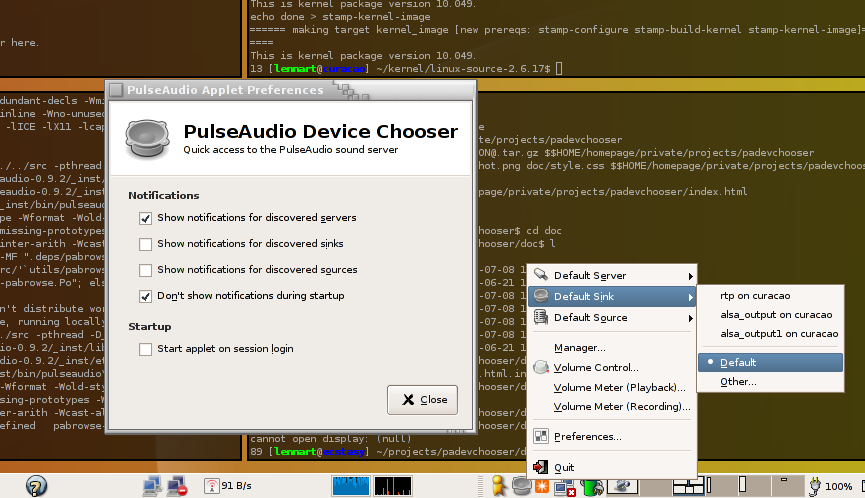
. A new utility has been released as well, named PulseAudio Device
Chooser
. It installs a tray icon and allows the user to quickly change
the sound server attached to the local X11 display, showing a list of servers that
is accumulated using ZeroConf service browsing. In addition it allows you to
quickly start one of the other GUI tools and shows notification whenever a new
PulseAudio server/sink/source appears on the network. Everybody loves
screenshots:

PulseAudio Device Chooser Screenshot

Attending GUADEC

Post Syndicated from Lennart Poettering original https://0pointer.net/blog/projects/guadec-2006.html

Due to the generosity of the GNOME Foundation I have been able to get to the GUADEC 2006 this year. I’d like to thank Jeff Waugh and Quim Gil for the “last-minute” funding of my trip to Vilanova, and all the sponsors who actually are providing the funds. If anyone wants to talk to me about Avahi and/or PulseAudio (aka Polypaudio) (or any of my other projects), just try to find and speak to me. (Bungalow 870)

In related news, the new PulseAudio homepage will be “inaugurated” soon, becoming the official new home of PulseAudio/Polypaudio as soon as we release 0.9.2, which hopefully will be pretty soon.

TPFKAPA: The Project Formerly Known as Polypaudio

Post Syndicated from Lennart Poettering original https://0pointer.net/blog/projects/pulse.html

It came to our attention that some people really disliked the name of Polypaudio, because
it reminded them of that medical condition,
though the software was actually named after the sea dweller. I actually
liked that double entendre, but many did not and expressed concerns that the name
would hinder Polypaudio’s adoption. After a long discussion on
#polypaudio we came to the conclusion that a name change is a good
idea in this case. Name changes are usually a bad idea, but this time it’s
worth it, we think.

The new name we agreed on is PulseAudio, or shorter just Pulse. It has
the nice advantage that it abbreviates to pa, just as Polypaudio did. This
allows us to keep source code compatiblity (and binary compatibility to a
certain degree) with the current releases of Polypaudio, because the symbol
prefix can stay pa_. In addition the auxiliary tools paman, pavucontrol, pavumeter need not to
be renamed.

We will try to make the transition as smooth as possible and would like to
apologize to all the packagers, who need to rename their packages now.

The next release of Polypaudio (0.9.2) will be a bugfix release and be the first to bear the new name: PulseAudio 0.9.2.

Polypaudio is dead. Long live PulseAudio!

Polypaudio article on LWN

Post Syndicated from Lennart Poettering original https://0pointer.net/blog/projects/polypaudio-lwn.html

The current issue of the Linux
Weekly News
features a short article about Polypaudio. (The article is not (yet)
accessible for free, come back in a week if you aren’t an LWN subscriber.)

Quoting:

With its support for a wide variety of popular audio utilities, actively developed code, and broad capabilities, the Polypaudio project fills an important role in Linux-based audio development.

Polypaudio 0.9.0 released

Post Syndicated from Lennart Poettering original https://0pointer.net/blog/projects/polypaudio-0.9.0.html

We are proud to announce Polypaudio
0.9.0
. This is a major step ahead since we decided to freeze the
current API. From now on we will maintain API compability (or at least
try to). To emphasize this starting with this release the shared
library sonames are properly versioned. While Polypaudio 0.9.0 is not
API/ABI compatible with 0.8 it is protocol compatible.

Other notable changes beyond bug fixing, bug fixing and bug fixing
are: a new Open Sound System /dev/dsp wrapper named
padsp and a module module-volume-restore have been
added.

padsp works more or less like that ESOUND tool known as
esddsp. However, it is much cleaner in design and thus works
with many more applications than the original tool. Proper locking is
implemented which allows it to work in multithreaded applications. In
addition to mere /dev/dsp emulation it wraps
/dev/sndstat and /dev/mixer. Proper synchronization
primitives are also available, which enables lip-sync movie playback
using padsp on mplayer. Other applications that are
known to work properly with padsp are aumix,
libao, XMMS, sox. There are some things
padsp doesn’t support (yet): that’s most notably recording,
and mmap() wrapping. Recording will be added in a later
version. mmap() support is available in esddsp but
not in padsp. I am reluctant to add support for this, because
it cannot work properly when it comes to playback latency
handling. However, latency handling this the primary reasoning for
using mmap(). In addition the hack that is included in
esddsp works only for Quake2 and Quake3, both being Free
Software now. It probably makes more sense to fix those two games than
implementing a really dirty hack in padsp. Remember that you
can always use the original esddsp tools since Polypaudio
offers full protocol compatibility with ESOUND.

module-volume-restore is a small module that stores the
volume of all playback streams and restores them when the applications
which created them creates a new stream. If this module is loaded,
Polypaudio will make sure that you Gaim sounds are always played at
low volume, while your XMMS music is always played at full volume.

Besides the new release of Polypaudio itself we released a bunch of
other packages to work with the new release:

  • gst-polyp
    0.9.0
    , a Polypaudio plugin for GStreamer 0.10. The
    plugin is quite sophisticated. In fact it is probably the only
    sink/source plugin for GStreamer that reaches the functionality of the
    ALSA plugin that is shipped with upstream. It implements the
    GstPropertyProbe and GstImplementsInterface
    interfaces, which allow gnome-volume-meter and other
    GStreamer tools to control the volume of a Polypaudio server. The sink
    element listens for GST_EVENT_TAG events, and can thus use
    ID3 tags and other meta data to name the playback stream in the
    Polypaudio server. This is useful to identify the stream in the Polypaudio
    Volume Control
    . In short: Polypaudio 0.9.0 now offers first class
    integration into GStreamer.
  • libao-polyp
    0.9.0
    , a simple plugin for libao, which is used for audio playback by tools like ogg123 and Gaim, besides others.
  • xmms-polyp
    0.9.0
    , an output plugin for XMMS. As special feature it uses the
    currently played song name for naming the audio stream in
    Polypaudio.
  • Polypaudio Manager 0.9.0, updated for Polypaudio 0.9.0
  • Polypaudio Volume Control 0.9.0, updated for Polypaudio 0.9.0
  • Polypaudio Volume Meter 0.9.0, updated for Polypaudio 0.9.0

A screenshot showing most of this in action:

Polypaudio Screenshot.

This screenshot shows: the Polypaudio Manager, the Polypaudio
Volume Control, the Polypaudio Volume Meter, the XMMS plugin, the
GStreamer plugin used by Rhythmbox and gstreamer-properties,
pacat playing some noise from /dev/urandom,
padsp used on MPlayer. (This screenshot actually shows some
post-0.9.0 work, like the icons used by the application windows)

A big bear hugged one and then there were two

Post Syndicated from Lennart Poettering original https://0pointer.net/blog/projects/howl.html

Scott Herscher decided to cease development of HOWL.
That means only Avahi and Bonjour are left as
widely known mDNS/DNS-SD implementations.

Scott, your work on HOWL has not been in vain. Many Linux/Free Software
people (including me) learned to know Zeroconf with your software. Without the
troubles surrounding the licensing, I would never have started what is now
known as Avahi, and HOWL would still be the number one of the Linux mDNS/DNS-SD
implementations.

The HOWL legacy will live on, since Avahi includes a HOWL compatibility layer which will be kept around for a while.

A year and a few weeks ago Trent and I decided to merge our efforts and
form Avahi from our seperate works. I wonder how much time it will take us
until we see a similar R.I.P. note from the Bonjour camp, on our route to
AVAHI WORLD DOMINATION. 😉

In contrast to what Scott wrote in his announcement, Avahi is far from being
strictly Linux. Avahi has been ported to FreeBSD, OpenBSD, MacOSX and recently
(not yet official) Solaris. (However, he’s right with what he writes
about me.)