Post Syndicated from Robert Cepa original https://blog.cloudflare.com/timescaledb-art/
At Cloudflare, PostgreSQL and ClickHouse are our standard databases for transactional and analytical workloads. If you’re part of a team building products with configuration in our Dashboard, chances are you’re using PostgreSQL. It’s fast, versatile, reliable, and backed by over 30 years of development and real-world use. It has been a foundational part of our infrastructure since the beginning, and today we run hundreds of PostgreSQL instances across a wide range of configurations and replication setups.
ClickHouse is a more recent addition to our stack. We started using it around 2017, and it has enabled us to ingest tens of millions of rows per second while supporting millisecond-level query performance. ClickHouse is a remarkable technology, but like all systems, it involves trade-offs.
In this post, I’ll explain why we chose TimescaleDB — a Postgres extension — over ClickHouse to build the analytics and reporting capabilities in our Zero Trust product suite.
After a decade in software development, I’ve grown to appreciate systems that are simple and boring. Over time, I’ve found myself consistently advocating for architectures with the fewest moving parts possible. Whenever I see a system diagram with more than three boxes, I ask: Why are all these components here? Do we really need all of this?
As engineers, it’s easy to fall into the trap of designing for scenarios that might never happen. We imagine future scale, complex failure scenarios, or edge cases, and start building solutions for them upfront. But in reality, systems often don’t grow the way we expect, or don’t have to. Designing for large scale can be deferred by setting the right expectations with customers, and by adding guardrails like product limits and rate limits. Focusing on launching initial versions of products with just a few essential parts, maybe two or three components, gives us something to ship, test, and learn from quickly. We can always add complexity later, but only once it’s clear we need it.
Whether I specifically call it YAGNI, or Keep it simple, stupid, or think about it as minimalism in engineering, the core idea is the same: we’re rarely good at predicting the future, and every additional component we introduce carries a cost. Each box in the system diagram is something that can break itself or other boxes, spiral into outages, and ruin weekend plans of on-call engineers. Each box also requires documentation, tests, observability, and service level objectives (SLOs). Oftentimes, teams need to learn a new programming language just to support a new box.
Two years ago, I was tasked with building a new product at Cloudflare: Digital Experience Monitoring (DEX). DEX provides visibility into device, network, and application performance across Zero Trust environments. Our initial goal was clear — launch an MVP focused on fleet status monitoring and synthetic tests, giving customers actionable analytics and troubleshooting. From a technical standpoint, fleet status and synthetic tests are two types of structured logs generated by the WARP client. These logs are uploaded to an API, stored in a database, and ultimately visualized in the Cloudflare Dashboard.
As with many new engineering teams at Cloudflare, DEX started as a “tiger team”: a small group of experienced engineers tasked with validating a new product quickly. I worked with the following constraints:
-
Team of three full-stack engineers.
-
Daily collaboration with 2-3 other teams.
-
Can launch in beta, engineering can drive product limits.
-
Emphasis on shipping fast.
To strike a balance between usefulness and simplicity, we made deliberate design decisions early on:
-
Fleet status logs would be uploaded from WARP clients at fixed 2-minute intervals.
-
Synthetic tests required users to preconfigure them by target (HTTP or traceroute) and frequency.
-
We capped usage: each device could run up to 10 synthetic tests, no more than once every 5 minutes.
-
Data retention of 7 days.
These guardrails gave us room to ship DEX months earlier and gather early feedback from customers without prematurely investing in scalability and performance.
We knew we needed a basic configuration plane — an interface in the Dashboard for users to create and manage synthetic tests, supported by an API and database to persist this data. That led us to the following setup:
-
HTTP API for managing test configurations.
-
PostgreSQL for storing those configurations.
-
React UI embedded in the Cloudflare Dashboard.
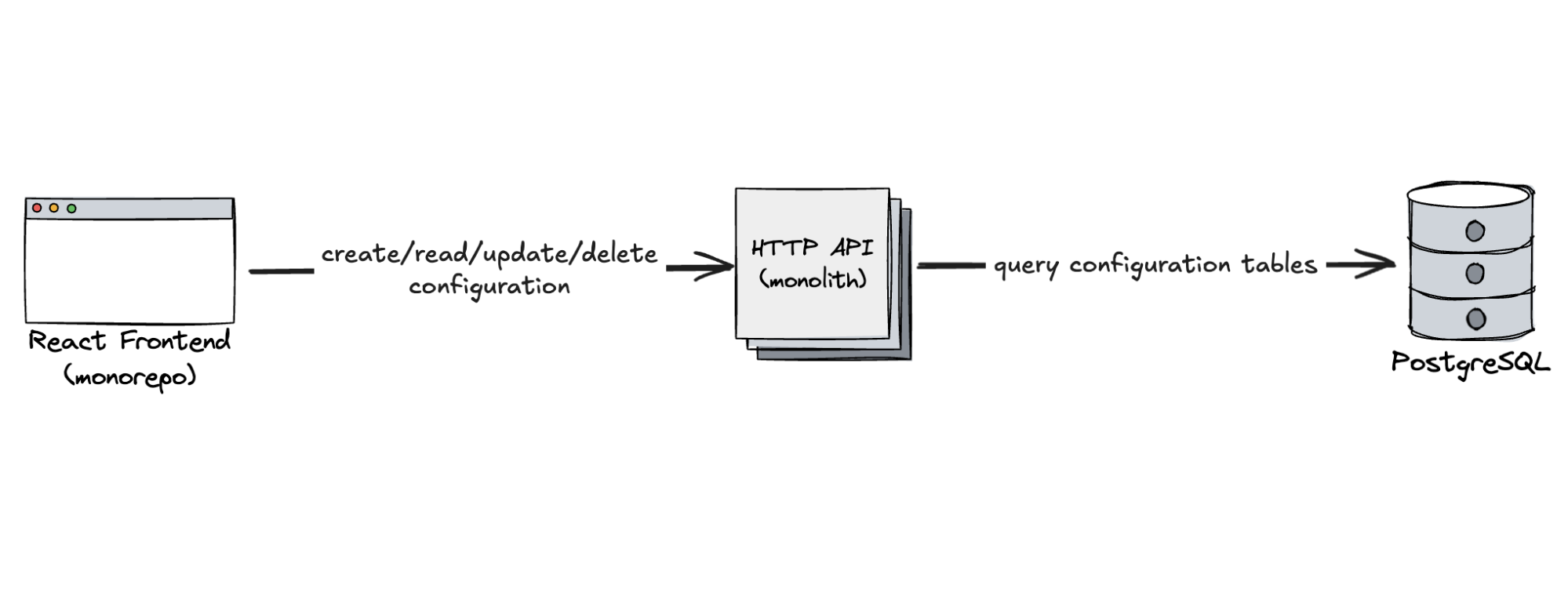
Just three components — simple, focused, and exactly what we needed. Of course, each of these boxes came with real complexity under the hood. PostgreSQL was deployed as a high-availability cluster: one primary, one synchronous replica for failover scenarios, and several asynchronous replicas distributed across two geographies. The API was deployed on horizontally scaled Kubernetes pods across two geographies. The React app was served globally as standard via Cloudflare’s network. Thanks to our platform teams, all of that complexity was abstracted away, allowing us to think in terms of just three essential parts, but it really shows that each box can come with a huge cost behind the scenes.
Next, we needed to build the analytics plane — an ingestion pipeline to collect structured logs from WARP clients, store them, and visualize them for our customers in the Dashboard. I was personally excited to explore ClickHouse for this. I have seen its performance in other projects and was eager to experiment with it. But as I dug into the internal documentation on how to get started with ClickHouse, reality set in:
Writing data to Clickhouse
Your service must generate logs in a clear format, using Cap’n Proto or Protocol Buffers. Logs should be written to a socket for logfwdr to transport to PDX, then to a Kafka topic. Use a Concept:Inserter to read from Kafka, batching data to achieve a write rate of less than one batch per second.
Oh. That’s a lot. Including ClickHouse and the WARP client, we’re looking at five boxes to be added to the system diagram. This architecture exists for good reason, though. The default and most commonly used table engine in ClickHouse, MergeTree, is optimized for high-throughput batch inserts. It writes each insert as a separate partition, then runs background merges to keep data manageable. This makes writes very fast, but not when they arrive in lots of tiny batches, which was exactly our case with millions of individual devices uploading one log event every 2 minutes. Too many small writes can trigger write amplification, resource contention, and throttling.
So it became clear that ClickHouse is a sports car and to get value out of it we had to bring it to a race track, shift into high gear, and drive it at top speed. But we didn’t need a race car — we needed a daily driver for short trips to a grocery store. For our initial launch, we didn’t need millions of inserts per second. We needed something easy to set up, reliable, familiar, and good enough to get us to market. A colleague suggested we just use PostgreSQL, quoting “it can be cranked up” to handle the load we were expecting. So, we took the leap!
First design of configuration and analytics plane for DEX:
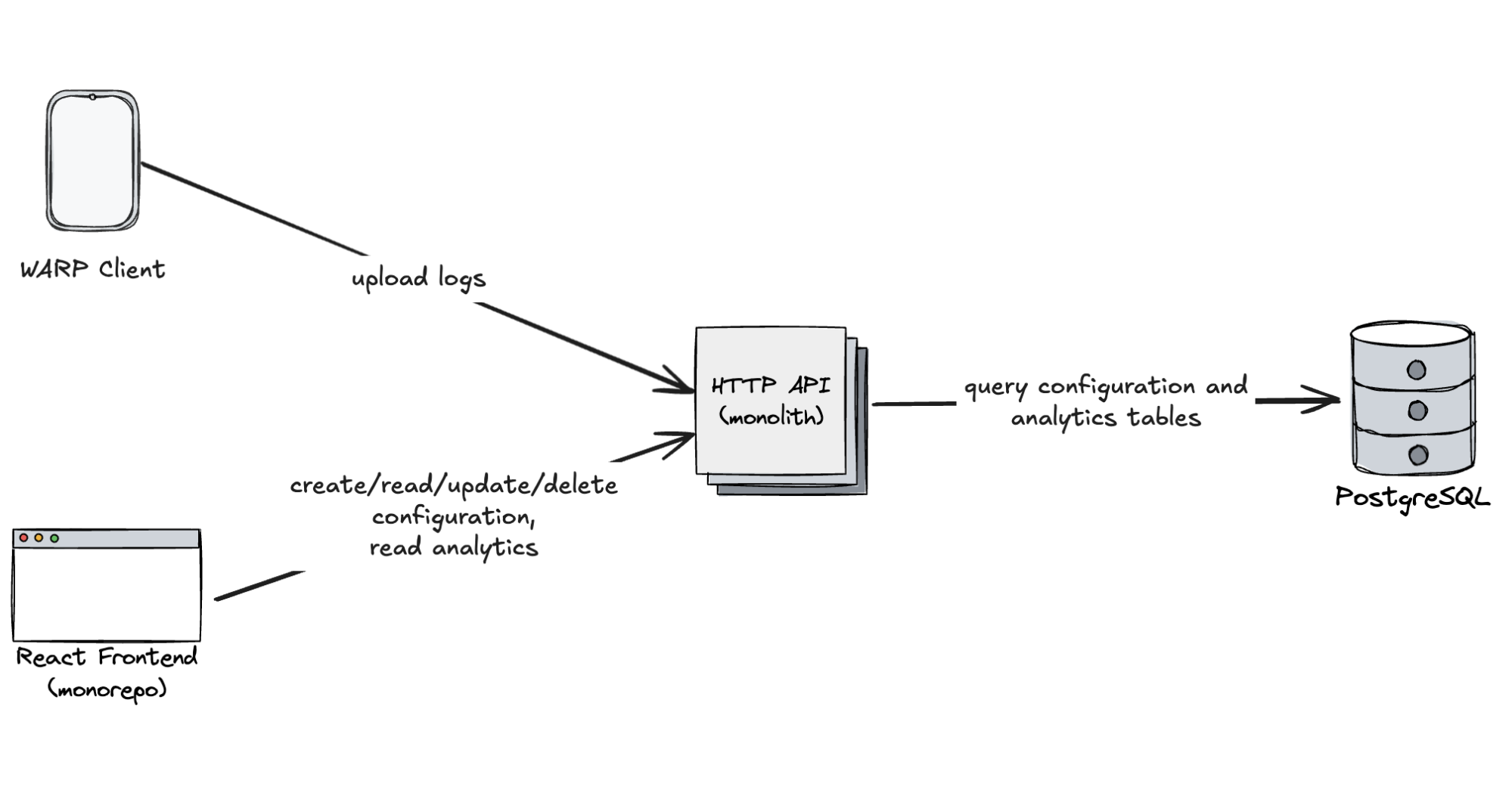
Structurally, there’s not much difference between configuration data and analytical logs. Logs are simply structured payloads — often in JSON — that can be transformed into a columnar format and persisted in a relational database.
Here’s an example of a device state log:
{
  “timestamp”: “2025-06-16T22:50:12.226Z”,
  “accountId”: “025779fde8cd4ab8a3e5138f870584a7”,
  “deviceId”: “07dfde77-3f8a-4431-89f7-acfcf4ead4fc”,
  “colo”: “SJC”,
  “status”: “connected”,
  “mode”: “warp+doh”,
  “clientVersion”: “2024.3.409.0”,
  “clientPlatform”: “windows”,
}
To store these logs, we created a simple PostgreSQL table:
CREATE TABLE device_state (
	"timestamp" TIMESTAMP WITH TIME ZONE NOT NULL,
	account_id TEXT NOT NULL,
	device_id TEXT NOT NULL,
	colo TEXT,
	status TEXT,
	mode TEXT,
	client_version TEXT,
	client_platform TEXT
);
You might notice that this table doesn’t have a primary key. That’s intentional, because time-series data is almost never queried by a unique ID. Instead, we query by time ranges and filter by various attributes (e.g. account ID or device ID). Still, we needed a way to deduplicate logs in case of client retries.
We created two indexes to optimize for our most common queries:
CREATE UNIQUE INDEX device_state_device_account_time ON device_state USING btree (device_id, account_id, “timestamp”);
CREATE INDEX device_state_account_time ON device_state USING btree (account_id, “timestamp”);
The unique index ensures deduplication: each (device, account, timestamp) tuple represents a single, unique log. The second index supports typical time-window queries at the account level. Since we always query by account_id (represents individual customers) and timestamp, they are always a part of the index.
We inserted data from our API using UPSERT query:
INSERT INTO device_state (…) VALUES (…) ON CONFLICT DO NOTHING;
PostgreSQL’s B-tree indexes support multiple columns, but column order has a major impact on query performance.
From PostgreSQL documentation about multicolumn indexes:
A multicolumn B-tree index can be used with query conditions that involve any subset of the index’s columns, but the index is most efficient when there are constraints on the leading (leftmost) columns. The exact rule is that equality constraints on leading columns, plus any inequality constraints on the first column that does not have an equality constraint, will be used to limit the portion of the index that is scanned. Constraints on columns to the right of these columns are checked in the index, so they save visits to the table proper, but they do not reduce the portion of the index that has to be scanned.
What’s interesting in time series workloads is that the queries usually have inequality constraints on the time column, and then equality constraints on all other columns.
A typical query to build line charts and pie charts visualizing data in a time interval often looks like this:
SELECT
  DATE_TRUNC(‘hour’, timestamp) as hour,
  account_id,
  device_id,
  status,
  COUNT(*) as total
FROM device_state
WHERE
  account_id = ‘a’ AND
  device_id = ‘b’ AND
  timestamp BETWEEN ‘2025-07-01’ AND ‘2025-07-02’
GROUP BY hour, account_id, device_id, status;
Notice our WHERE clause — it has equality constraints on account_id and device_id, and two inequality constraints on timestamp. If we had built our index in the order of (timestamp, account_id, device_id), only the “timestamp” section of the index could’ve been used to reduce the index section to be scanned, and account_id and device_id would have to be fully scanned, with values that are not ‘a’ or ‘b’ filtered out after scanning.
Additionally, the runtime complexity of search in btree is O(log n) — the search will get slower as the size of your table (and all indexes) grows, so another optimization is to reduce the portion of the index that needs to be scanned. Even for columns with equality constraints, you can greatly reduce query times by ordering columns by cardinality. We’ve seen up to 100% improvement in SELECT query performance when we simply changed the order of account_id and device_id in our multicolumn index.
To get the best performance for time range queries, we follow these rules for order of columns:
-
The timestamp column is always last.
-
Other columns are leading columns, ordered by their cardinalities starting with the highest cardinality column.
Because we took a step back during system design and avoided optimizing for the future, thanks to our minimal and focused architecture, we went from zero to a working DEX MVP in under four months.
Early metrics were promising, providing reasonable throughput capabilities and latency for API requests:
-
~200 inserts/sec at launch.
-
Query latencies in the hundreds of milliseconds for most customers.
Post-launch, we focused on collecting feedback while monitoring system behavior. As adoption grew, we scaled to 1,000 inserts/sec, and our tables grew to billions of rows. That’s when we started to see performance degradation — particularly for large customers querying 7+ day time ranges across tens of thousands of devices.
As DEX grew to billions of device logs, one of the first performance optimizations we explored was precomputing aggregates, also known as downsampling.
The idea is that if you know the shape of your queries ahead of time — say, grouped by status, mode, or geographic location — you can precompute and store those summaries in advance, rather than querying the raw data repeatedly. This dramatically reduces the volume of data scanned and the complexity of the query execution.
To illustrate this in an example, let’s consider DEX Fleet Status:
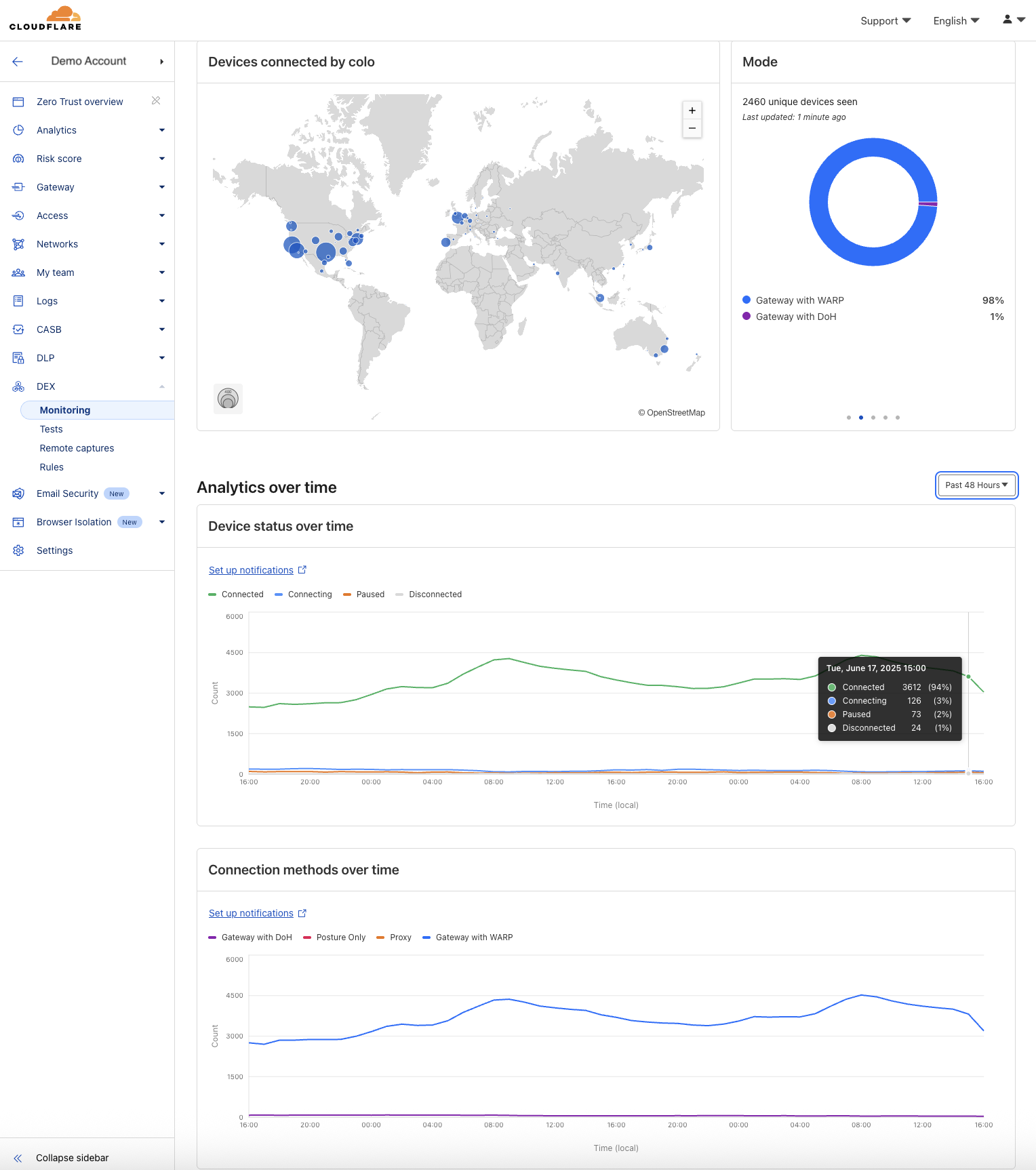
In our DEX Fleet Status dashboard, we render common visualizations like:
-
Number of connected devices by data center location (colo)
-
Device status and connection mode over time
These charts typically group logs by status, mode, or colo, either over a 1-hour window or across the full time range.
Our largest customers may have 30,000+ devices, each reporting logs every 2 minutes. That’s millions of records per day per customer. But the columns we’re visualizing (e.g. status and mode) only have a few distinct values (4–6). By aggregating this data ahead of time, we can collapse millions of rows into a few hundred per interval and query dramatically smaller, narrower tables.
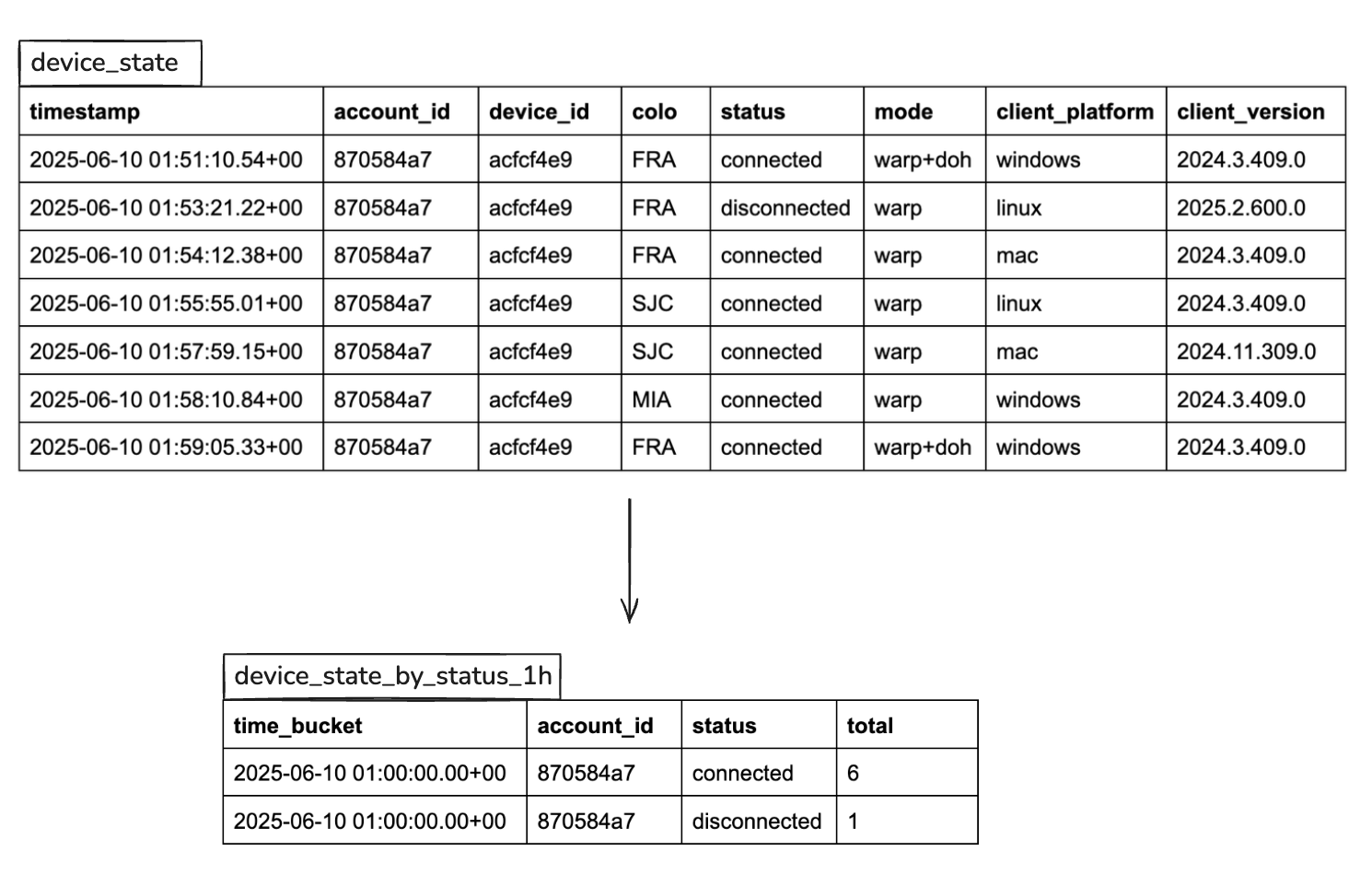
This made a huge impact: we saw up to 1000x query performance improvement and charts that previously took several seconds now render instantly, even for 7-day views across tens of thousands of devices.
Implementing this technique in PostgreSQL is challenging. While PostgreSQL does support materialized views, they didn’t fit our needs out of the box because they don’t refresh automatically and incrementally. Instead, we used a cron job that was periodically running custom aggregation queries for all pre-aggregate tables (we had 6 of them). Our Database platform team had a lightweight framework built for data retention purposes that we plugged into. Still, any schema change required cross-team coordination, and we invested considerable time in optimizing aggregation performance. But the results were worth it: fast, reliable queries for the majority of customer use cases.
Pre-computed aggregates are great, but they’re not the answer to everything. As we were adding more table columns for new DEX features, we needed to invest time in creating new pre-aggregated tables. Additionally, some features required queries with combined filters, which required querying the raw data that included all the columns. But we didn’t have good enough performance in raw tables.
One technique we considered to improve performance on raw tables was table partitioning. In PostgreSQL, tables are stored in one large file (large tables are split to 1 GB segment files). With partitioning, you can break a large table into smaller child tables, each covering a slice of data (e.g. one day of logs). PostgreSQL then scans only the relevant partitions based on your query’s timestamp filter. This can dramatically improve query performance in some cases.
What was particularly interesting for us was range-partitioning on the timestamp column, because our customers wanted longer data retention, up to one year, and storing one year of data in one large table would have destroyed query performance.
CREATE TABLE device_state (
    …
) PARTITION BY RANGE (timestamp);

CREATE TABLE device_state_20250601 PARTITION OF device_state
    FOR VALUES FROM ('2025-06-01') TO ('2025-06-02');
CREATE TABLE device_state_20250601 PARTITION OF device_state
    FOR VALUES FROM ('2025-06-02') TO ('2025-06-03');
CREATE TABLE device_state_20250601 PARTITION OF device_state
    FOR VALUES FROM ('2025-06-03') TO ('2025-06-04');
Unfortunately, PostgreSQL doesn’t automatically manage partitions — you must manually create each one as shown above, so we would have needed to build a full partition management system to automate this.
We ended up not adopting it because in the end, partitioning didn’t solve our core problem: speeding up frequent dashboard queries on recent raw data up to past 7 days.
As our raw PostgreSQL setup began to show its limits, we started exploring other options to improve query performance. That’s when we discovered TimescaleDB. What particularly caught my attention was columnstore and sparse indexes, common techniques in OLAP databases like ClickHouse. It seemed to be the solution for our raw performance problem. On top of that:
-
It’s Postgres: TimescaleDB is packaged as a PostgreSQL extension and it seamlessly coexists with it, granting access to the entire Postgres ecosystem. We can still use vanilla Postgres tables for transactional workloads, and TimescaleDB hypertables for analytical tasks, offering convenience of one database for everything.
-
Automatic partition management: Unlike Postgres, which requires manual table partitioning, TimescaleDB’s hypertables are partitioned by default and automatically managed.
-
Automatic data pre-aggregation/downsampling: Tedious processes in native Postgres, such as creating and managing downsampled tables, are automated in TimescaleDB through continuous aggregates. This feature eliminates the need for custom-built cron jobs and simplifies the development and deployment of pre-computed aggregates.
-
Realtime data pre-aggregation/downsampling: A common problem with async aggregates is that they can be out-of-date, because aggregation jobs can take a long time to complete. TimescaleDB addresses the issue of outdated async aggregates with its realtime aggregation by seamlessly integrating the most recent raw data into rollup tables during queries.
-
Compression: Compression is a cornerstone feature of TimescaleDB. Compression can reduce table size by more than 90% while simultaneously enhancing query performance.
-
Columnstore performance for real-time analytics: TimescaleDB’s hybrid row/columnar engine, Hypercore, enables fast scans and aggregations over large datasets. It’s fully mutable, so we can backfill with UPSERTs. Combined with compression, it delivers strong performance for analytical queries while minimizing storage overhead.
-
Rich library of analytics tools and functions: TimescaleDB offers a suite of tools and functions tailored for analytical workloads, including percentile approximation, count of unique values approximation, time-weighted averages, etc…
One especially compelling aspect: TimescaleDB made aggregation and data retention automatic, allowing us to simplify our infrastructure and remove a box from the system architecture entirely.
We deployed a self-hosted TimescaleDB instance on our canary PostgreSQL cluster to run an apples-to-apples comparison against vanilla Postgres. Our production backend was dual-writing to both systems.
As expected, installing TimescaleDB was trivial. Simply load the library and run the following SQL query:
CREATE EXTENSION IF NOT EXISTS timescaledb;Then we:
-
Created raw tables
-
Converted them to hypertables
-
Enabled columnstore features
-
Set up continuous aggregates
-
Configured automated policies for compression and retention
Here’s a condensed example for device_state logs:
– Create device_state table.
CREATE TABLE device_state (
	…
);

– Convert it to a hypertable.
SELECT create_hypertable ('device_state', by_range ('timestamp', INTERVAL '1 hour'));

– Add columnstore settings
ALTER TABLE device_state SET (
    timescaledb.enable_columnstore,
    timescaledb.segmentby = ‘account_id’
);

– Schedule recurring compression jobs
CALL add_columnstore_policy(‘device_state’, after => INTERVAL '2 hours', schedule_interval => INTERVAL '1 hour');

– Schedule recurring data retention jobs
SELECT add_retention_policy(‘device_state’, INTERVAL '7 days');

– Create device_state_by_status_1h continuous aggregate
CREATE MATERIALIZED VIEW device_state_by_status_1h
WITH (timescaledb.continuous) AS
SELECT
  time_bucket (INTERVAL '1 hour', TIMESTAMP) AS time_bucket,
  Account_id,
  Status,
  COUNT(*) as total
FROM device_state
GROUP BY 1,2,3
WITH no data;

– Enable realtime aggregates
ALTER MATERIALIZED VIEW ‘device_state_by_status_1h’
SET (timescaledb.materialized_only=FALSE);

– Schedule recurring continuous aggregate jobs to refresh past 10 hours every 10 minutes
SELECT add_continuous_aggregate_policy (
  ‘device_state_by_status_1h’,
  start_offset=>INTERVAL '10 hours',
  end_offset=>INTERVAL '1 minute',
  schedule_interval=>INTERVAL '10 minutes',
  buckets_per_batch => 1
);
After a two-week backfill period, we ran side-by-side benchmarks using real production queries from our dashboard. We tested:
-
3 time windows: past 1 hour, 24 hours, and 7 days
-
3 columnstore modes: uncompressed, compressed, and compressed with segmenting
-
Datasets containing 500 million to 1 billion rows
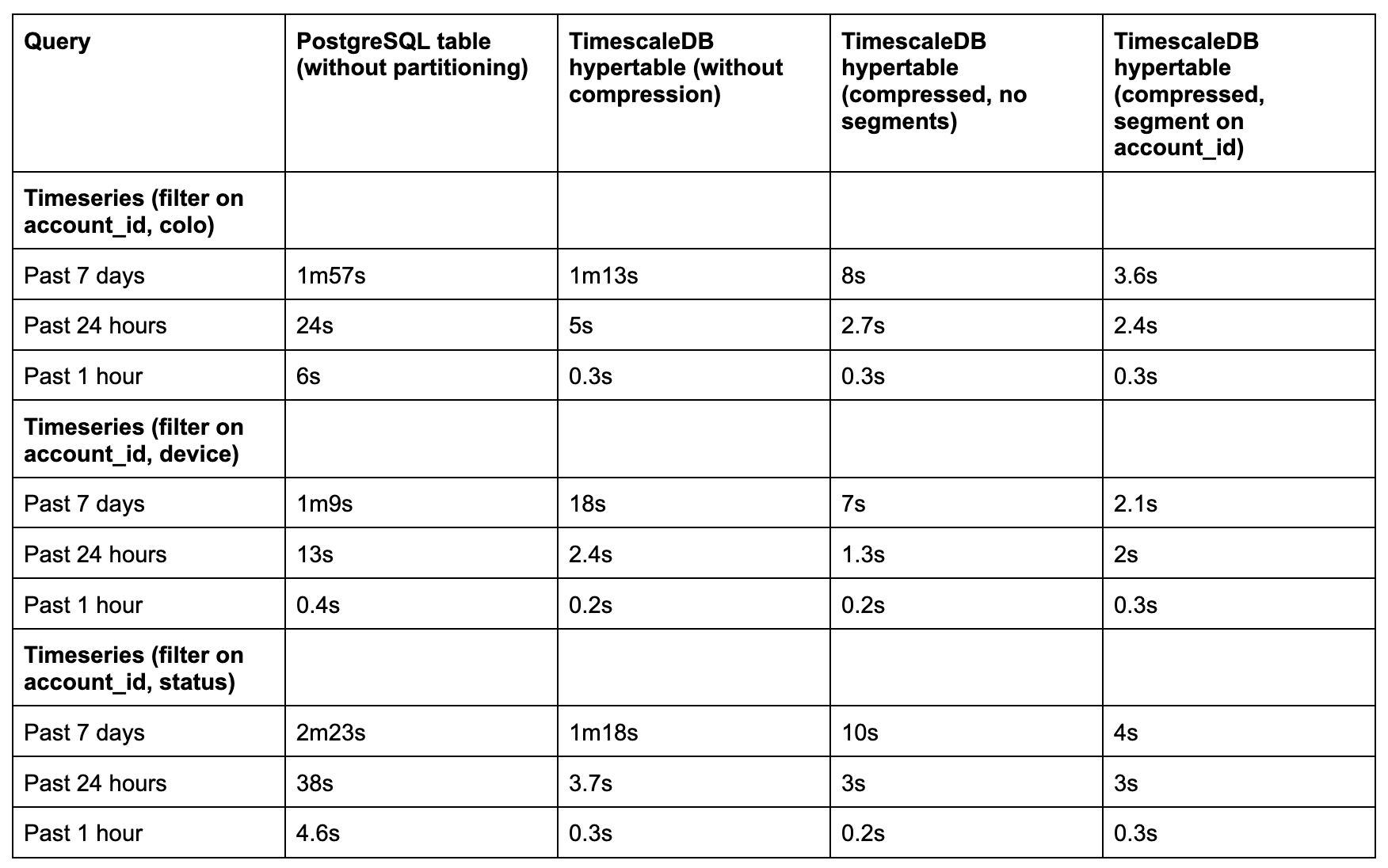
We saw 5x to 35x performance improvements, depending on query type and time range:
-
For short windows (1–24 hours), even uncompressed hypertables performed well.
-
For longer windows (7 days), compression and columnstore settings (especially with segmentby) made all the difference.
-
Sparse indexes were critical. Once PostgreSQL’s btree indexes broke down at scale, Timescale’s minmax sparse indexes and columnar layout outperformed.
On top of query performance, we saw impressive compression ratios, up to 33x:
SELECT
    pg_size_pretty(before_compression_total_bytes) as before,
    pg_size_pretty(after_compression_total_bytes) as after,
    ROUND(before_compression_total_bytes / after_compression_total_bytes::numeric, 2) as compression_ratio
FROM hypertable_compression_stats('device_state');

before: 1616 GB
after: 49 GB
compression_ratio: 32.83
That meant we could retain 33x more data for the same cost.
Two main things: compression and sparse indexes.
It might seem counterintuitive that querying compressed data, which requires decompression, can be faster than querying raw data. But in practice, input/output (I/O) is the major bottleneck in most analytical workloads. The reduction in disk I/O from compression often outweighs the CPU cost of decompressing. In TimescaleDB, compression transforms a hypertable into a columnar format: values from each column are grouped in chunks (typically 1,000 at a time), stored in arrays, and then compressed into binary form. More detailed explanation in this TimescaleDB blog post.
You might wonder how this is possible in PostgreSQL, which is traditionally row-based. TimescaleDB has a really clever solution for it by utilizing PostgreSQL TOAST pages. The way it works is after tuples of 1000 values are compressed, they’re moved to external TOAST pages. The columnstore table itself then basically becomes a table of pointers to TOAST, where actual data is stored and only retrieved lazily, column-by-column.
The second factor is sparse minmax indexes. The idea behind sparse indexes is that rather than storing every single value in an index, store every N-th value. This makes them much smaller and more efficient to query in very large datasets. TimescaleDB implements minmax sparse indexes, where for each compressed tuple of 1,000 values it creates two additional metadata columns, storing min and max values. The query engine then looks at these columns to determine whether a value could possibly be found in a compressed tuple before attempting to decompress it.
What we found later, unfortunately, after we did our evaluation of TimescaleDB, is that sparse indexes need to be explicitly enabled via timescaledb.orderby option. Otherwise, TimescaleDB sets it to some default value, which may not always be the most efficient for your queries. We added all columns that we filter on to orderby setting:
– Add columnstore settings
ALTER TABLE device_state SET (
    timescaledb.enable_columnstore,
    timescaledb.segmentby = ‘account_id’,
    timescaledb.orderby = ‘timestamp,device_id,colo,mode,status,client_version,client_platform
);Following the success with DEX, other teams started exploring TimescaleDB for its simplicity and performance. One notable example is the Zero Trust Analytics & Reporting (ART) team.
The ART team is responsible for generating analytics and long-term reports — spanning months or even years — for Zero Trust products such as Access, Gateway, CASB, and DLP. These datasets live in various ClickHouse and PostgreSQL clusters that we wanted to replicate into a singular home that is specifically designed to unify related, but not co-located data points, together and modeled to address our customer’s analytical needs.
We chose to use TimescaleDB as the aggregation layer on top of raw logs stored elsewhere. We built a system of crawlers using cron jobs that periodically query the multitude of clusters for hourly aggregates across all customers. These aggregates are ingested into TimescaleDB, where we use continuous aggregates to further roll them up into daily and monthly summaries for reporting.
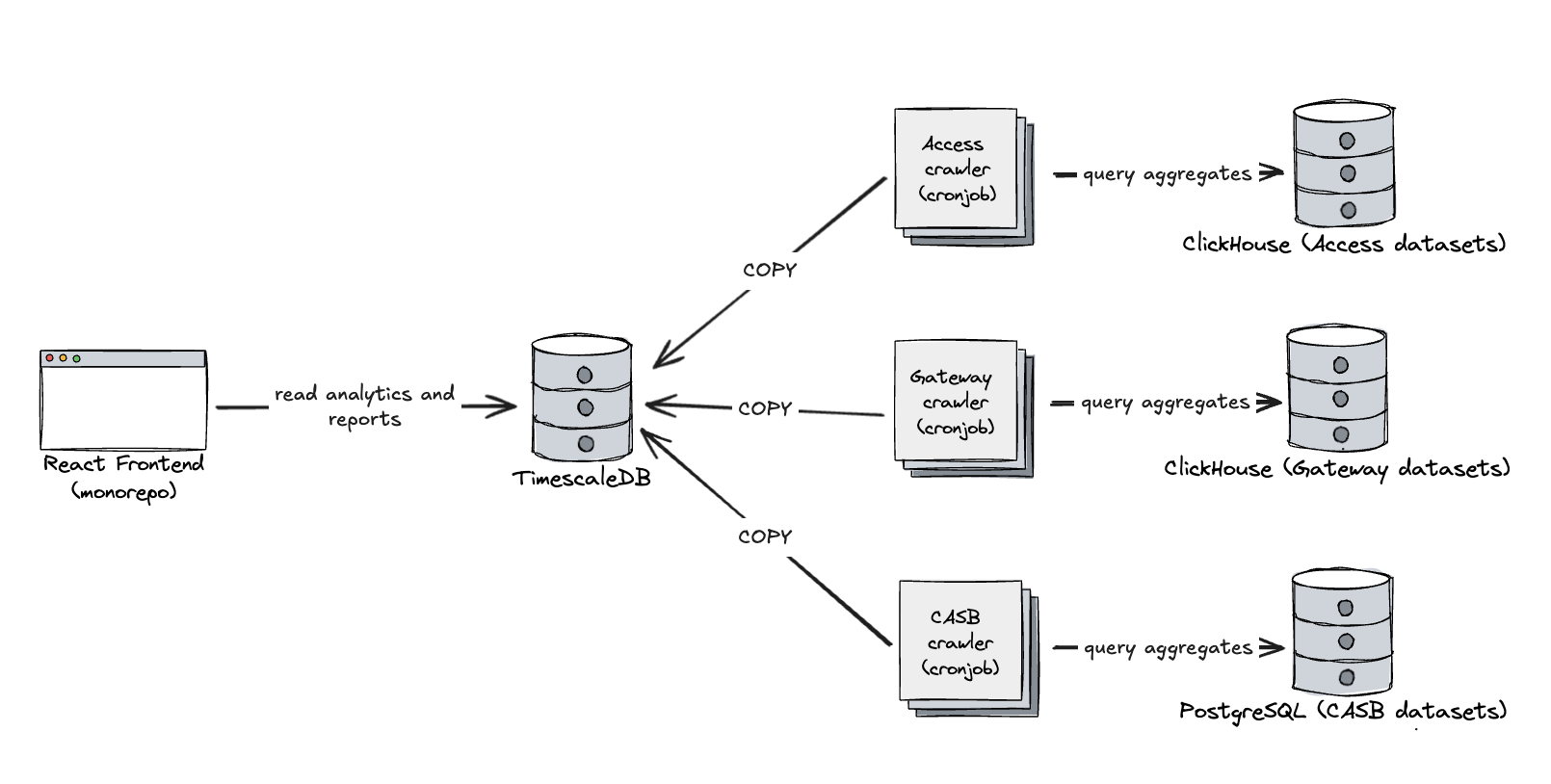
Access and Gateway datasets are massive, often ingesting millions of rows per second. To support arbitrary filters in reporting, crawler queries group by all relevant fields, including high-cardinality columns like IP addresses. This means the downsampling ratio is low, and in some cases, we’re inserting ~100,000 aggregated rows per second. TimescaleDB handles this load just fine, but to support it we made some adjustments:
-
We switched from bulk INSERTS to COPY. This significantly improved ingestion throughput. We didn’t benchmark it ourselves, but plenty of benchmarks show that COPY performs much better with large batches.
-
We disabled synchronous replication. In our case, temporary data loss is acceptable — our crawlers are idempotent and can reprocess missing data as needed.
-
We also disabled fsync. Again, durability is less of a concern for this use case, so skipping disk syncs helped with ingest performance.
-
We dropped most indexes in hypertables, only kept one on (account_id, timestamp), and relied on aggressive compression and sparse indexes. The absence of indexes helped with insert rates and didn’t have a significant impact on query performance, because only a very small part of the table was uncompressed and relied on traditional btree indexes.
You can see this system in action at Cloudflare Zero Trust Analytics.
Prioritizing core value and resisting the urge to prematurely optimize can accelerate time to market—and sometimes take you on an unexpected journey that leads to better solutions than you’d originally planned. In the early days of DEX, taking a step back to focus on what truly mattered helped us discover TimescaleDB, which turned out to be exactly what we needed.
Not every team needs a hyper-specialized race car that requires 100 octane fuel, carbon ceramic brakes, and ultra-performance race tires: while each one of these elements boost performance, there’s a real cost towards having those items in the form of maintenance and uniqueness. For many teams at Cloudflare, TimescaleDB strikes a phenomenal balance between the simplicity of storing your analytical data under the same roof as your configuration data, while also gaining much of the impressive performance of a specialized OLAP system.
Check out TimescaleDB in action by using our robust analytics, reporting, and digital experience monitoring capabilities on our Zero Trust platform. To learn more, reach out to your account team or sign up directly here.