Post Syndicated from Shashiraj Jeripotula original https://aws.amazon.com/blogs/devops/supercharge-your-cloud-operations-with-the-kiro-power-for-aws-devops-agent/
When an alarm fires at 2 AM, the first thing most engineers do is grep logs, check recent deployments, and trace code paths. However, the context they need — metrics, traces, topology, configurations — lives in a separate browser tabs and applications. What if your IDE could bring that cloud intelligence directly to your code, understand the full picture, and help you fix the issue end-to-end? Introducing, The Kiro power for AWS DevOps Agent removes that context switching by connecting your IDE directly to the AWS DevOps Agent, so you can investigate incidents, identify root causes, and generate fixes, all from the same place you write code.
This post is for developers and operators who develop applications using Kiro and want to troubleshoot production issues faster without leaving their editor. We’ll walk through how the power works, what it can do, and a step-by-step example of resolving a real incident.
The Kiro power for AWS DevOps Agent connects Kiro, the AI-powered IDE from Amazon, to the AWS DevOps Agent. It brings the production intelligence and release management in AWS DevOps Agent directly into your development environment — where you already plan, architect, debug, and ship code.
With this power installed, you can review your changes for production risks, investigate production incidents, optimize costs, review architecture, map service topology, and generate remediation code — all through natural language conversation, enhanced with the local context of your workspace.
Challenges in cloud operations today
Operating modern cloud applications means navigating a maze of interconnected services. A single user-facing error might require tracing through Amazon Elastic Container Service (Amazon ECS) tasks, Application Load Balancers, AWS Lambda functions, Amazon DynamoDB tables, and dozens of Amazon CloudWatch metric dimensions. Operators face persistent challenges:
- Context switching — Investigating an incident requires jumping between the IDE, the AWS Management Console, log viewers, trace explorers, and documentation. Each switch costs time and breaks concentration during high-pressure incidents.
- Siloed knowledge — Understanding which metrics matter, which services depend on each other, and what “normal” looks like for a given application often lives in runbooks that are outdated or in the heads of senior engineers. New team members face a steep learning curve.
- Remediation gap — Even after identifying a root cause, translating findings into a working fix — an AWS CloudFormation parameter change, a scaling policy update, or an AWS Identity and Access Management (IAM) policy correction — requires switching contexts again and manually applying changes.
These challenges compound when teams operate across multiple AWS accounts and environments. Kiro powers address these challenges by bringing operational intelligence directly into the IDE where developers already work.
Challenges in modern software delivery
AI coding agents have changed how fast code gets written, but the code review, testing, and pipeline processes that move code to production were designed for human pace and haven’t kept up. Teams face two persistent challenges:
- Review capacity — AI-assisted development produces changes faster than human reviewers can evaluate them. Changes that don’t adhere to internal standards, dependency breaks, and access-control gaps that would have been caught by human reviews can slip through at machine pace.
- Invisible dependencies — Applications span multiple repositories, shared infrastructure, and cross-team API contracts. A parameter rename in one repository silently breaks downstream consumers, and no single reviewer holds the full dependency graph in their head.
Faster code generation without corresponding delivery automation simply moves the bottleneck downstream. The Kiro power for AWS DevOps Agent addresses this by bringing release management intelligence into the IDE so you can review changes for production risks and run exploratory release testing of your web and API applications. Any issues can be immediately mitigated before you even push your code changes.
What are Kiro powers?
A Kiro power is a curated package that gives Kiro specialized capabilities in a specific domain, in this case, AWS operations. When installed, the power provides Kiro with tool connections to your AWS environment, domain-specific knowledge (best practices, error recovery patterns), and instructions for routing your requests to the right workflow. Critically, the power combines your local workspace context (code, git history, configuration files) with cloud-side intelligence (metrics, topology, deployment history) — so Kiro understands both what your code does and how your infrastructure behaves. For a deeper look at the powers framework, see Getting started with Kiro powers
Each power typically includes:
- MCP server configuration — Connects Kiro to external tools and data through the Model Context Protocol, providing read and write access to cloud resources
- Steering files — Domain-specific instructions that teach Kiro how to route intents, choose the right workflow, and handle edge cases
- Contextual knowledge — Domain-specific guidance captured in markdown spec files and lifecycle hooks that encode best practices, common patterns, and error recovery strategies (as described in the blog, Introducing powers).
The Kiro power for AWS DevOps Agent
The Kiro power for AWS DevOps Agent packages the full capabilities of AWS DevOps Agent into a single install for Kiro. Once enabled, Kiro gains the ability to converse with a specialized AI agent that has deep knowledge of your AWS infrastructure, your operational history, and AWS best practices.
You can do the following with this power:
- Investigate incidents — Describe the symptoms in natural language (“ECS tasks are failing with OOM errors on my-service”) and Kiro orchestrates a deep investigation across CloudWatch metrics, AWS X-Ray traces, Amazon ECS task events, and recent deployments to identify the root cause.
- Optimize costs — Ask “What cost savings are available for my ECS services?” and receive specific, data-backed recommendations with estimated monthly savings based on actual utilization metrics from your account.
- Review architecture — Request a topology map or security audit of your services. The agent queries your infrastructure and returns findings with actionable improvement suggestions.
- Chat across agent spaces — Operate across multiple AWS DevOps Agent agent spaces from a single Kiro session using AWS SigV4. Each agent space can represent a different team, application, or AWS account — and you can switch between them naturally.
- Generate remediation code — After identifying a root cause, Kiro can generate the fix directly in your workspace. Because it has access to both the investigation findings and your local code, the remediation is specific to your application, not generic boilerplate.
- Run a release readiness review — After finishing a batch of code changes, have the DevOps Agent review the changes for dependency risks, deviations from your standards and best practices, and expansion of access controls in CloudFormation that go beyond best practices. It also builds and runs your code in an AWS-managed sandbox to better assess any production risks.
- Perform exploratory release testing for deployed applications — If you deploy your web or API application to a production-like environment, Kiro can have the DevOps Agent run an exploratory tests on it. Any bugs or regressions found can be fixed without leaving the IDE.
How it works
The power provides two complementary workflows that Kiro selects automatically based on your request:
- Chat (updates in seconds) — For instant answers about cost, architecture, topology, and knowledge discovery. Kiro creates a conversation with the DevOps Agent and streams responses in real time. Follow-up questions retain full context within the same session.
- Investigation (completes in minutes) — For complex incidents requiring deep analysis. The DevOps Agent examines CloudWatch metrics, X-Ray traces, deployment history, and service topology, then delivers a root cause analysis with prioritized recommendations.
The following diagram shows how Kiro combines local workspace context with the DevOps Agent’s cloud intelligence:
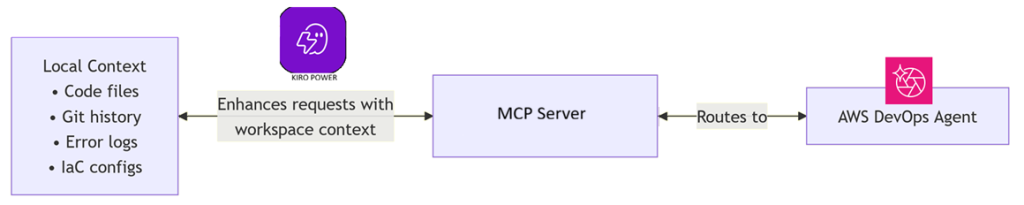
Figure 1: Kiro combines local workspace context with the DevOps Agent’s cloud intelligence through the AWS DevOps Agent MCP Server.
Prerequisites
Before using the power, ensure you have:
- AWS credentials configured (AWS IAM Identity Center recommended) if using AWS SigV4.
- Kiro installed and a workspace set up
- An AWS DevOps Agent agent space configured with data sources (CloudWatch, X-Ray, or other integrations)
- Create an access token or have AWS SigV4 configured. The access tokens feature must be enabled on your Agent Space for access tokens to work.
- For access tokens, you must have IAM permissions to manage access tokens (aidevops:CreateAccessToken, aidevops:RevokeAccessToken, aidevops:RotateAccessToken).
- Enable access tokens
- Review the security best practices detailed in the connect to DevOps Agent Remote Server documentation.
- Sign in to the AWS Management Console and open the AWS DevOps Agent console.
- Choose your Agent Space.
- Choose the Configuration tab.
- In the Access tokens section, choose Enable.
- Confirm the action.
- Enable access tokens
-
- Create a token
- Open the DevOps Agent web app for your Agent Space, then from the navigation menu, choose Settings, then choose Access Tokens.
- Choose Create access token.
- Enter a name for the token.
- Choose a scope:
- read – View investigations, recommendations, chats, and Agent Space resources.
- operate – Full access. Includes everything in read, plus send messages, create chats, and manage backlog tasks and recommendations.
- Set an expiration (1 to 60 days).
- Copy the token value and store it in a safe, secure location. You cannot retrieve it again.
- After creating a token, the web app displays a configuration example that you can copy directly into your client.
- Create a token
The power works with any agent space that has active data sources. The more data sources connected, the richer the investigations and recommendations.
Getting started with the Kiro power for AWS DevOps Agent
Setting up the power takes only a few steps. You can install it directly or follow these steps:
- Open Kiro and choose the Powers icon in the sidebar.
- In the AVAILABLE panel, find AWS DevOps Agent.
- Choose Install.
- The power appears in the INSTALLED panel, and choose Try power.
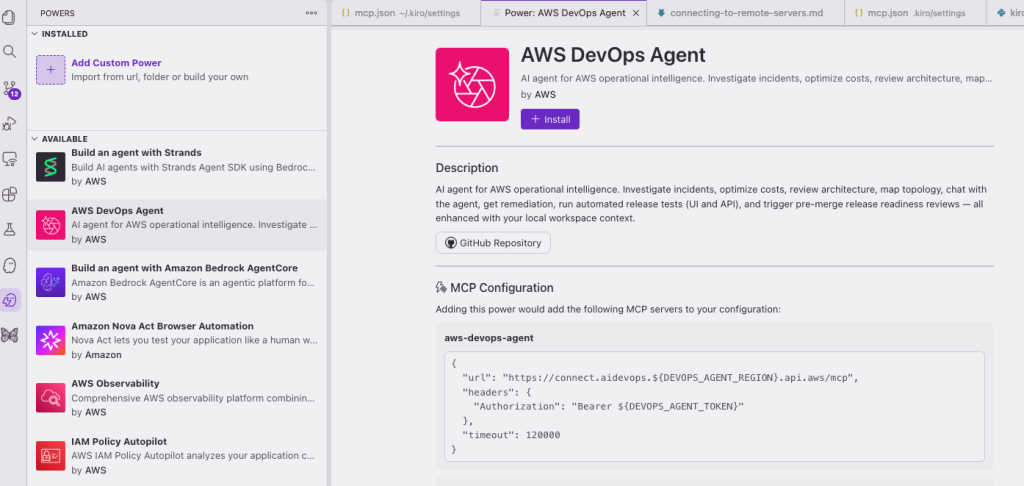
Figure 2: Kiro powers panel showing the Kiro power for AWS DevOps Agent
Verify Installation
After installation, you should see the Kiro power for AWS DevOps Agent listed in the powers section of the Kiro panel. Navigate to mcp.json file and change these values accordingly, and save the config file.
- DEVOPS_AGENT_TOKEN=<your-token>
- DEVOPS_AGENT_REGION=<your-agent-space-region>
In the MCP Servers panel, you will see DevOps Agent MCP connected and also displays list of tools. The power activates automatically when you mention relevant keywords like incident, cost optimization, architecture review, or topology in your conversation.
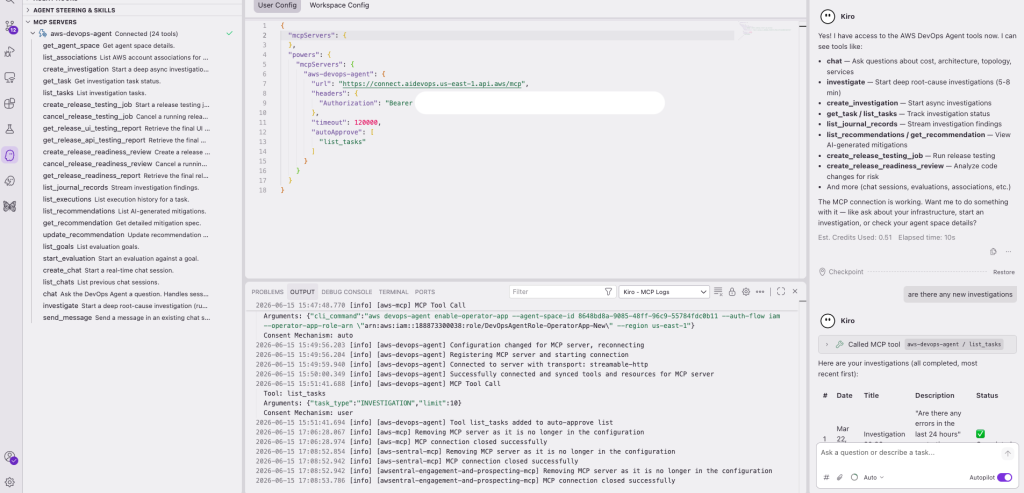
Figure 3: MCP Servers panel showing the AWS DevOps Agent MCP and connected tools
Walkthrough: Investigating a production incident
Let’s walk through a realistic scenario. Your team receives a CloudWatch alarm: an Amazon ECS service is returning HTTP 503 errors and task restarts have spiked.
Step 1: Describe the problem
In Kiro, you type:
“My ECS service checkout-api is throwing 503 errors. The alarm fired 10 minutes ago. Here’s the error from my logs: Connection pool exhausted, max connections 50 reached.”
Because Kiro has access to your workspace, it automatically includes relevant context — your task definition, your connection pool configuration from application.yml, and your recent git commits.
Step 2: Kiro starts the investigation
Kiro routes this to the investigation workflow. You see real-time progress as findings stream in:
- Planning investigation approach…
- Querying CloudWatch metrics, ECS task events, X-Ray traces…
- Analyzing connection pool metrics against task count…
- Root cause identified: Connection pool sized for single task, but service scaled to 5 tasks sharing a database connection limit
Step 3: Review findings and recommendations
The DevOps Agent returns a detailed analysis:
Root cause: The database connection limit (50) is shared across all ECS tasks. When the auto-scaling policy added tasks at 08:47 UTC, each task attempted to open 50 connections, exceeding the Amazon RDS max_connections parameter (100).
Recommendation and Mitigation: Reduce the per-task connection pool to max_connections / max_tasks (100 / 5 = 20 per task), or increase the RDS instance class to support more connections.
Step 4: Generate and apply the fix
You ask Kiro to implement the recommendation. Because it has access to your application.yml and your AWS CloudFormation template, it generates a targeted fix:
- Updates spring.datasource.service.maximum-pool-size from 50 to 20 in your application configuration
- Adds a comment explaining the calculation
- Suggests an RDS parameter group change if you want to increase capacity instead
The fix is applied directly in your workspace, ready for review and commit.
Operating across multiple agent spaces
If your team manages multiple applications, each with its own DevOps Agent agent space, you can switch between them naturally. Kiro lists available agent spaces and routes your question to the right one.
Conclusion
The Kiro power for AWS DevOps Agent brings the full operational intelligence of AWS DevOps Agent into the IDE where you already work. By combining your local workspace context with cloud-side analysis, it closes the loop from detection to remediation without context switching.
Whether you are triaging a production incident, optimizing costs across services, or onboarding a new team member who needs to understand your infrastructure, the power provides contextual answers grounded in your actual AWS environment.
Install the Kiro power for AWS DevOps Agent today and experience AI-powered cloud operations in your IDE. To learn more, visit the Interfacing with AWS DevOps Agent and the Kiro powers documentation.
 |
Tipu Qureshi Tipu Qureshi is a Senior Principal Technologist in AWS Agentic AI, focusing on operational excellence and incident response automation. He works with AWS customers to design resilient, observable cloud applications and autonomous operational systems. |
 |
Shashiraj Jeripotula (Raj) Shashiraj Jeripotula (Raj) is a San Francisco-based Principal Partner Solutions Architect at AWS. He works with ISV and AWS partners to build deep integrations across observability, AI, and agentic development tooling — helping developers leverage AI agents, Model Context Protocol (MCP), and shift-left observability to build responsible, production-ready AI systems on AWS. |