Post Syndicated from Thiyagarajan Mani original https://aws.amazon.com/blogs/security/identity-aware-ai-data-agents-with-aws-lake-formation-and-trusted-identity-propagation/
You’re building a data agent that lets business users ask questions about lakehouse data in natural language. You’ve already built governance policies that control who can access which datasets. The challenge is making the agent respect those rules without rebuilding them in your application code.
When a user asks a question, the agent maps it to data and constructs a query. The tool runs under its own AWS Identity and Access Management (IAM) role, so AWS Lake Formation sees the tool’s credentials, not the person behind the request. This leaves you with two inadequate options: restrict tool access (limiting self-service analytics) or rebuild access controls in application code (moving governance out of the data layer).
In this post, we show you a different approach: identity-aware AI data agents that propagate each user’s identity through every hop, from the user, through the agent, into the tool, so Lake Formation evaluates the user’s grants. Your application code makes no authorization decisions, existing Lake Formation policies work without modifications, and AWS CloudTrail records the actual person who accessed the data.
In this post, you learn how to:
- Set up per-user data access controls for AI agents querying your lakehouse without rewriting your existing Lake Formation governance policies by configuring Amazon Bedrock AgentCore to carry each user’s identity through trusted identity propagation (TIP).
- Ensure auditability and compliance by performing a server-side token exchange inside AWS Lambda that converts the identity token into Lake Formation credentials scoped to the real user, with CloudTrail recording every query.
- Validate the pattern end-to-end by testing with multiple users and confirming per-user query results and CloudTrail audit evidence.
The building blocks in this post, OAuth 2.0 token delegation, AWS IAM Identity Center, Lake Formation, and Lambda are well-documented individually. The new constraint is that a foundation model (FM) now sits in the middle of the propagation chain. The FM is the agent’s brain, it decides which tools to call and what arguments to pass and anything that enters its context (prompts, tool schemas, arguments) is accessible within that trust boundary. So, the user’s identity token must reach the tool, but it must do so on the HTTP transport layer, bypassing the FM’s reasoning layer entirely. This post demonstrates the three Amazon Bedrock AgentCore configurations that achieve that.
Whether you’re building agents on Strands, LangGraph, or a similar framework, this post gives you a deployable pattern on Amazon Bedrock AgentCore. Security engineers will find the identity-transport and audit properties relevant, and data platform owners will see how existing Lake Formation grants extend to AI workloads with no changes.
Solution overview
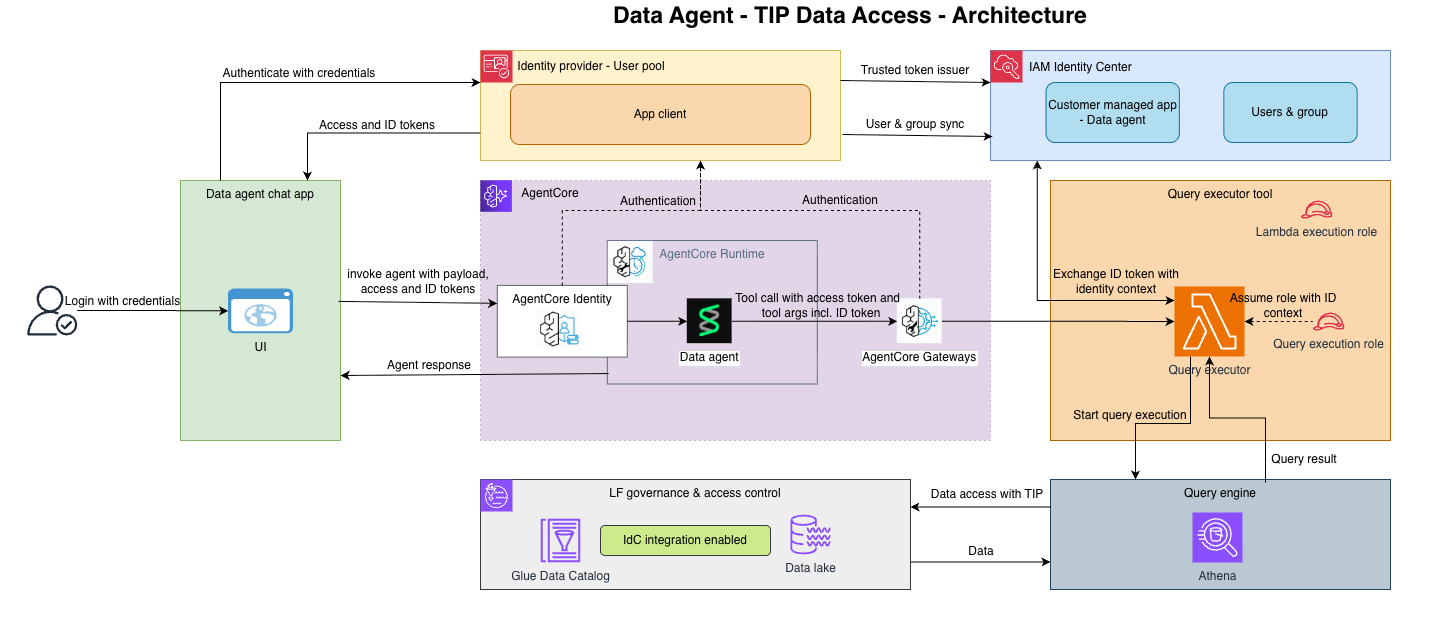
With this pattern (shown in Figure 1), your data agent can query Lake Formation governed data with per-user access controls, full CloudTrail audit trails, and no changes to your existing governance policies. Here’s how it works.
- Two tokens travel through the system. An
access_tokenauthenticates the request at each trust boundary (Bedrock AgentCore Runtime, Bedrock AgentCore Gateway). Anid_tokencarries your identity and is exchanged, server-side, for the identity context that Lake Formation evaluates. - A separate TIP role carries only the IAM permissions needed to call service APIs, it has no Lake Formation data grants.
- Lake Formation evaluates only the propagated user identity, not the TIP role.
The request flow is:
- User to UI: The user authenticates with an OpenID Connect (OIDC) identity provider (IdP). This post uses Amazon Cognito, but you can use any OIDC provider, such as Okta. The UI receives an
id_tokenand anaccess_token. - UI to Bedrock AgentCore Runtime: The UI calls the agent running in AgentCore Runtime over HTTPS. The
access_tokengoes in the standardAuthorizationheader. Theid_tokengoes in a custom header:X-Amzn-Bedrock-AgentCore-Runtime-Custom-IdToken. The HTTP body contains only the user’s prompt. - AgentCore Runtime to agent code: The runtime validates the
access_tokenagainst the configured JSON Web Token (JWT) authorizer, then passes the request to the agent container with both headers accessible throughcontext.request_headers. - Agent to Bedrock AgentCore Gateway: The agent opens a Model Context Protocol (MCP) connection to an AgentCore gateway, including both headers on the connection. The AgentCore gateway validates the
access_tokenand forwards the custom header to its Lambda target. - AgentCore Gateway to Lambda: The propagated headers arrive in
context.client_context.custom[‘bedrockAgentCorePropagatedHeaders’]. - Lambda to the data layer: Lambda validates the
id_token, exchanges it for an identity context, assumes a role with that context, and runs the Amazon Athena query under the user’s identity.
Lake Formation evaluates grants against the real user. Athena returns only the rows and columns that the user is entitled to see. CloudTrail records the assumed role with an onBehalfOf entry identifying the human.
Now that you’ve seen the end-to-end flow, the following sections walk through each piece, starting with what you need to have in place before you build.
Prerequisites
This post assumes you have the working knowledge of OAuth 2.0, IAM, and Lake Formation grants.
- An IAM Identity Center instance with a trusted token issuer (TTI) configured to accept your OIDC IdP’s tokens.
- An OAuth Application in IAM Identity Center configured for
CreateTokenWithIAMwith the JWT Bearer grant. - Lake Formation governing your AWS Glue Data Catalog, with grants already assigned to users or groups.
- An Athena workgroup and an Amazon Simple Storage Service (Amazon S3) bucket for query results.
- An OIDC IdP. The reference implementation uses Amazon Cognito as the demo IdP, but the pattern is IdP-agnostic. Auth0, Microsoft Entra ID, Okta, Ping, or any OIDC-compliant provider works identically, if your TTI accepts its tokens.
This post doesn’t walk through setting up any of these components. The existing AWS documentation covers each one. For more information, see the links in the preceding list and the related resources at the end of this post.
The three Bedrock AgentCore configuration steps
Three Bedrock AgentCore features make this pattern work. Together they form the chain of custody for the user’s id_token from the moment it arrives at the Bedrock AgentCore Runtime to the moment Lambda uses it.
Configure the runtime request header allow list
Bedrock AgentCore Runtime doesn’t pass request headers into the agent container by default. You opt in by declaring an allow list, either through agentcore configure or directly in the runtime configuration:
AgentCore Runtime supports two types of forwarded headers:
- The standard
Authorizationheader for OAuth inbound JWT authentication (access_token), and - Custom headers prefixed with
X-Amzn-Bedrock-AgentCore-Runtime-Custom-
The id_token in this pattern uses a custom header. Inside the agent, the allow listed headers arrive as a dictionary object on the request context.
The following Python code runs in the agent container:
The agent code reads the id_token from the HTTP transport and forwards it (also on the HTTP transport) to the next hop. It doesn’t treat the token as a tool argument and doesn’t inject it into a prompt.
Key takeaway: The runtime allow list is the first gate. Without it, the id_token doesn’t reach your agent code.
Configure AgentCore Gateway metadata for header propagation
An AgentCore Gateway is the Model Context Protocol (MCP) endpoint the agent talks to. When AgentCore Gateway invokes a Lambda target, it doesn’t forward arbitrary request headers by default. You configure which headers to propagate using metadataConfiguration.allowedRequestHeaders on the target:
Notice that the tool schema doesn’t include an id_token parameter; there’s no token parameter on any tool. The FM doesn’t see, select, or pass an id_token because the token isn’t part of the tool’s contract. It travels parallel to the tool call, on the HTTP connection, through metadataConfiguration.
This is a critical property for security. If you put the id_token in the tool schema instead, the FM becomes responsible for passing it, which means the token lands in prompts, traces, memory, and logs. Keeping the token off the tool contract keeps it out of the FM entirely.
Key takeaway: The metadataConfiguration of the AgentCore gateway is the second gate. It controls which headers cross from the agent into the Lambda function without touching the tool schema.
Read propagated headers in Lambda
On the Lambda side, the propagated header arrives not in the event body but in the client context, under a specific key.
The following Python code runs in the Lambda function:
The event dictionary contains the tool’s declared parameters and nothing else. You reach the id_token only through context.client_context.custom[‘bedrockAgentCorePropagatedHeaders’]. That’s the handoff point.
Key takeaway: The id_token arrives through the client context rather than tool arguments; the FM has no access to it. The Lambda is the only component that reads the token.
Perform the server-side token exchange
After Lambda has the id_token, it validates the token and exchanges it for an identityContext. This step uses standard IAM Identity Center TIP mechanics. That it happens inside Lambda rather than anywhere else is what keeps the identity context from crossing a process boundary.
Two properties come out of this exchange:
- The
identityContextis created and consumed inside a single Lambda invocation. It doesn’t get returned to the agent, the gateway, or the UI. - The resulting
boto3.Sessionholds short-lived credentials whose underlying identity assertion is the real user. When the session calls Athena, the query runs with the user’s identity propagated. Lake Formation sees the user, not the Lambda function’s role.
Everything after this, including the Athena query and result formatting, is standard boto3.
Configure Lake Formation grants
You need one grant to the IAM Identity Center user or group. That’s the whole story at the Lake Formation layer.
This is the grant Lake Formation evaluates at query time. You add column-level and row-level filters to the same user or group the same way. Nothing here is aware of or specific to AI agents. If you already have a Lake Formation grants model for human users, you already have the grants this pattern needs.
Understanding the TIP role: The TIP role that Lambda assumes has no Lake Formation data grants. It holds only IAM permissions to call the service APIs: athena:* for query runs, glue:* for catalog reads, lakeformation:GetDataAccess for the query plan handshake, and Amazon S3 access for the Athena output bucket. When Lambda assumes this role with an identityContext attached through ProvidedContexts, Lake Formation evaluates only the propagated user identity against its grants. The role itself is transparent to the authorization decision.
In the more common agent runs as a role pattern, the role carries the grants, which is why per-user governance breaks. Here the role carries no grants; it’s a session vehicle, not an authorization subject.
Test the pattern end-to-end
Two users, same question, different outcomes.
User A has SELECT on trip_details. They ask the agent for five records from the table.
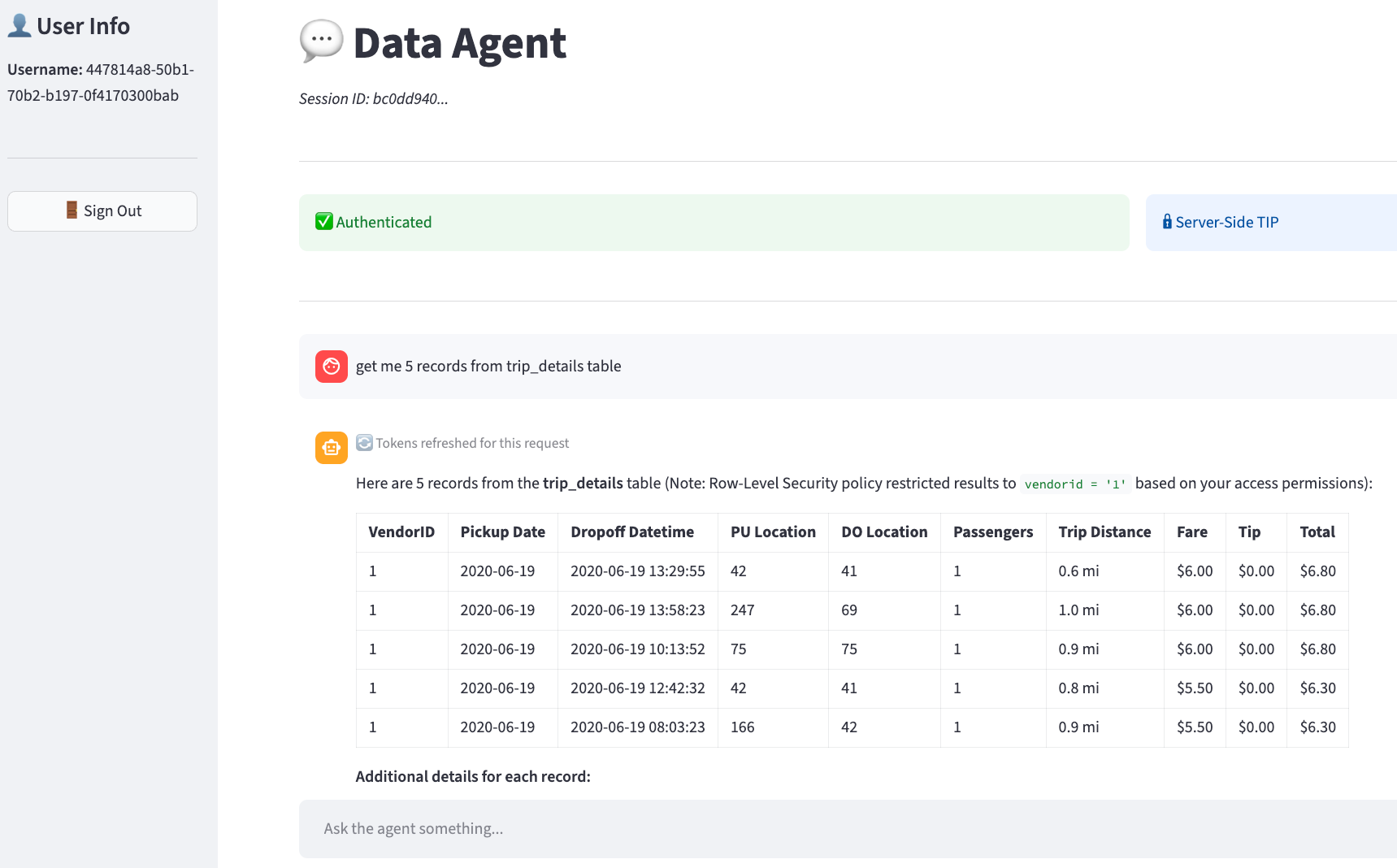
Figure 2: Five records are requested and returned by the agent
User B has no grant on trip_details. They ask the same question.
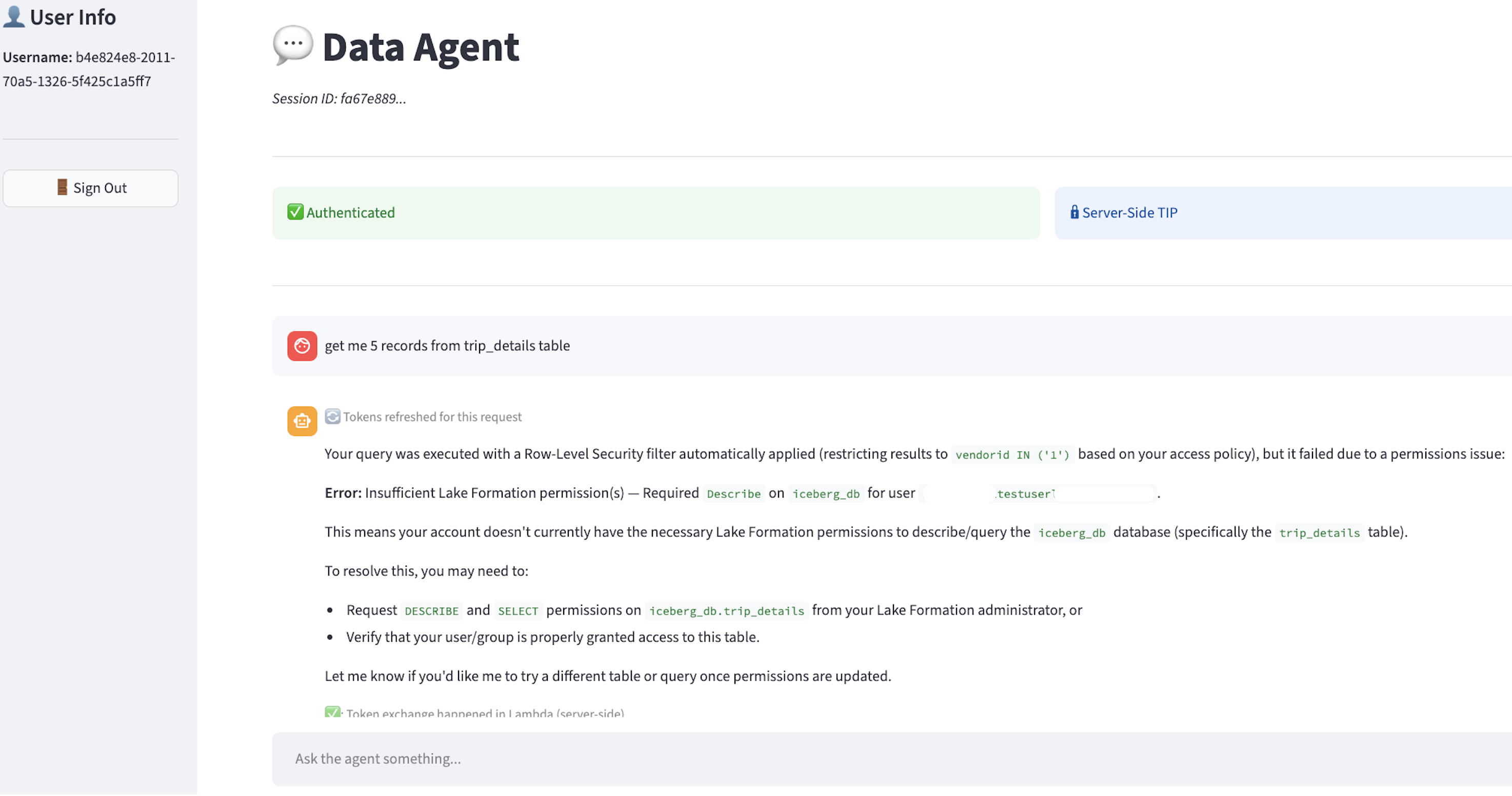
Figure 3: User doesn’t have access to the data
No code changed between the two interactions. No parameter was toggled. Lake Formation made the decision based on the propagated identity.
The CloudTrail record for the AssumeRole call shows the delegation:
The onBehalfOf block closes the audit loop. Each query the agent runs on a user’s behalf has a CloudTrail record naming that user, with no additional instrumentation in your code.
Security properties
Four properties follow from this architecture. These are the core value propositions of the identity-aware pattern:
- The id_token never reaches the foundation model: It travels on HTTP headers at every hop, and Lambda reads it from
context.client_context.custom. It’s not a parameter on any tool. The FM has no path to it: not in tool arguments, not in prompts, not in memory, not in traces. - The identity context stays inside a single Lambda invocation: It’s derived from the
id_token, used immediately in anAssumeRolecall, and discarded. It doesn’t go back to the agent, the gateway, or the UI. - Authorization decisions live in Lake Formation, against the real user only: The TIP role the Lambda function assumes has no data grants. Lake Formation evaluates the propagated user identity. No code path in the agent, gateway, or Lambda function performs authorization logic.
- The audit trail requires no extra work: The CloudTrail
AssumeRoleevent withonBehalfOfidentifies the human user for every query. You get the same audit fidelity you would have for human users accessing data directly.
Deploy the pattern
To deploy this pattern, you need to configure four things:
- An OIDC IdP with a TTI in IAM Identity Center accepting its tokens, and an Identity Center OAuth Application configured for
CreateTokenWithIAM. - Bedrock AgentCore Runtime running your agent container with
requestHeaderAllowlistcoveringAuthorizationand your customid_tokenheader. - Bedrock AgentCore Gateway with a Lambda target whose
metadataConfiguration.allowedRequestHeadersincludes theid_tokenheader. The Lambda target’s tool schema has noid_tokenparameter. - Lambda reading the
id_tokenfromcontext.client_context.custom[‘bedrockAgentCorePropagatedHeaders’], performing the token exchange throughsso-oidc:CreateTokenWithIAM, and callingsts:AssumeRolewithProvidedContextsto get the TIP-bearing session.
Conclusion
When an AI agent queries a governed lakehouse, the data layer needs to know who’s asking, not which role the agent is running under. This post showed you how to resolve that by treating the agent as an OAuth delegated actor. The user’s token travels alongside the agent’s HTTP transport but doesn’t enter the model’s context, and the token exchange that produces query-time credentials happens server-side inside Lambda, scoped to a single invocation.
The three Bedrock AgentCore features that make this composable (requestHeaderAllowlist on runtime, metadataConfiguration.allowedRequestHeaders on gateway, and bedrockAgentCorePropagatedHeaders on Lambda) are specific to building on Bedrock AgentCore. Everything downstream of Lambda is IAM Identity Center and Lake Formation functionality.
If you’re building agents that read governed data, you don’t have to choose between a single over-permissioned service role and per-user code paths. The identity the data layer evaluates can be the real user, the audit trail can name the real user, and the foundation model doesn’t need to know the user’s token exists.
The result is a clean separation: the user’s identity travels end-to-end, the model never sees it, and the data layer enforces it exactly as if the user queried directly.
Related resources
- Trusted Identity Propagation with AWS IAM Identity Center
- AWS Lake Formation User Guide
- Amazon Bedrock AgentCore Runtime custom headers
- Amazon Bedrock AgentCore Gateway header propagation
- RFC 7523 – JWT Bearer Profiles for OAuth 2.0
- Amazon Bedrock AgentCore Runtime A2A protocol contract
If you have feedback about this post, submit comments in the Comments section below.