Post Syndicated from Vijay Naik original https://aws.amazon.com/blogs/architecture/how-samsung-achieved-real-time-pricing-with-aws-lambda-response-streaming/
This post is co-authored with Sathish Kumar and Christopher Chan from Samsung ecommerce.
In high-traffic ecommerce, achieving real-time pricing is critical to prevent price inconsistency. Pricing inconsistency creates cart shock and erodes trust. This isn’t broken software, it’s a symptom of architectural latency that you can address using AWS Lambda Response Streaming and Amazon CloudFront for systems aggregating data from multiple backend sources.
In this post, we walk through the legacy architecture challenges, the stateless streaming solution, key implementation patterns, and performance results—a pattern you can apply if you’re building high-traffic APIs that aggregate data from multiple backend sources.
Samsung.com is Samsung’s primary direct-to-consumer channel, selling smartphones, TVs, appliances, and accessories, each with multiple variants, offers, and regional pricing. This complexity makes real-time price accuracy especially important.
Samsung’s All Deals and Product Finder pages showcase these products during high-traffic events like Black Friday. To maintain low latency for these high-density Product Listing Pages (PLPs) and comparison tables, the legacy infrastructure relied on asynchronous caching, which introduced a desynchronization gap where the cached price drifted from the authoritative pricing engine.
Problem: Legacy middleware caching created a 1-hour desynchronization gap between the authoritative pricing engine and customer-facing pages.
Our approach: We dismantled the stateful Data Aggregation (DA) architecture and built a real-time Bulk Arbitration Engine (a stateless orchestration layer that queries the Pricing Engine directly at request time) using AWS Lambda Response Streaming and Amazon CloudFront edge caching.
Challenge: The Data Aggregation trap
When product listing pages need to display pricing for over 30 item combinations simultaneously, the latency of calling the Pricing Engine for each item combination individually becomes untenable. To solve this, we built a backend for frontend (BFF) service to do a “Data Aggregation. This DA service was designed to decouple the frontend from the heavy Pricing Engine.
It relied on a scheduled Cron Worker that ran hourly to fetch the entire product catalog. The worker would then precompute prices for every possible permutation of products and store them in a local cache.
While this improved read speeds, it created two significant failures:
1. The Permutation Explosion – The DA service had to precompute every combination just in case a customer viewed it.
- The Math: 30 products × (Variants × Offers × Add-ons) = Thousands of records per page
- Storage Impact: Cache grew exponentially with each new product variant added
- Waste: Most precomputed combinations were never requested
2. The Synchronization Lag – Because the Cron job ran only once per hour, price changes (for example, flash sales) lagged significantly. Customers continued to see old prices until the next scheduled sync.
- Business Impact: Flash sales showed incorrect old pricing until the next run time
- Customer Trust: Cart shock when checkout price differed from product page price
- Competitive Disadvantage: Competitors with real-time pricing gained market share
Legacy Data Aggregation architecture
Architecture diagram showing the legacy Data Aggregation layer between the Pricing Engine and CloudFront CDN.
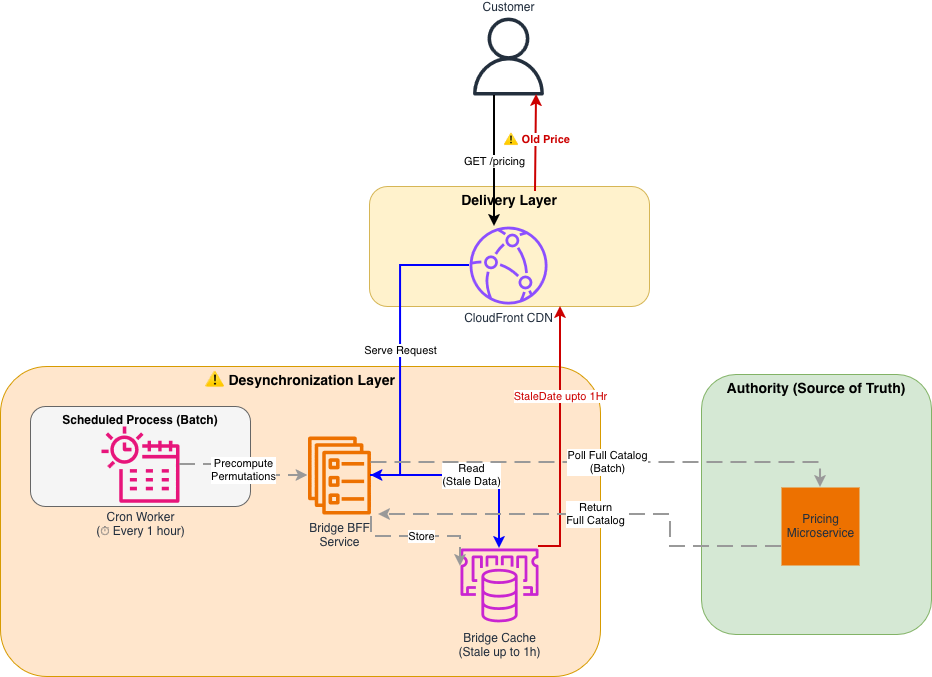
Figure 1: Legacy Data Aggregation (DA) Architecture The legacy system relied on a scheduled Cron job, creating a distinct “Desynchronization Layer” between the Authority (Pricing) and the Customer. Precomputation of all product permutations consumed significant storage and compute resources.
The solution: Stateless streaming architecture
Intermediate layers storing data will eventually diverge from the source, so we collaborated with our AWS Technical Account Manager (TAM) and service teams to architect a new solution: the Bulk Arbitration Engine, a stateless orchestration layer that queries the Pricing Engine directly at request time.
The new architecture follows a Pass-Through pattern:
1. Client Request: The browser requests prices for 30 specific SKUs using a single HTTP GET request.
2. Streaming Orchestration: An AWS Lambda function fans out these 30 requests to the Pricing Engine in parallel.
3. Immediate Response: As the Pricing Engine returns data, the Lambda streams it immediately to the client without buffering.
Why Lambda Response Streaming?
We evaluated several alternatives before settling on this approach:
- Traditional request-response pattern (buffered) – A standard Lambda invocation buffers the full response before returning it to the client, which negates the latency benefit of parallel fan-out. For 30 concurrent SKU lookups, this added seconds of wait time.
- EC2 with improved caching – This was the legacy approach. Caching layers will eventually drift from the source of truth, which was the core problem we needed to solve.
- Lambda Response Streaming – This was the only option that let us fan out requests in parallel, stream results as they arrived (reducing time-to-first-byte), and remain fully stateless with no intermediate cache to maintain or invalidate.
New stateless streaming architecture

Architecture diagram showing the stateless streaming solution with CloudFront connected directly to Lambda.
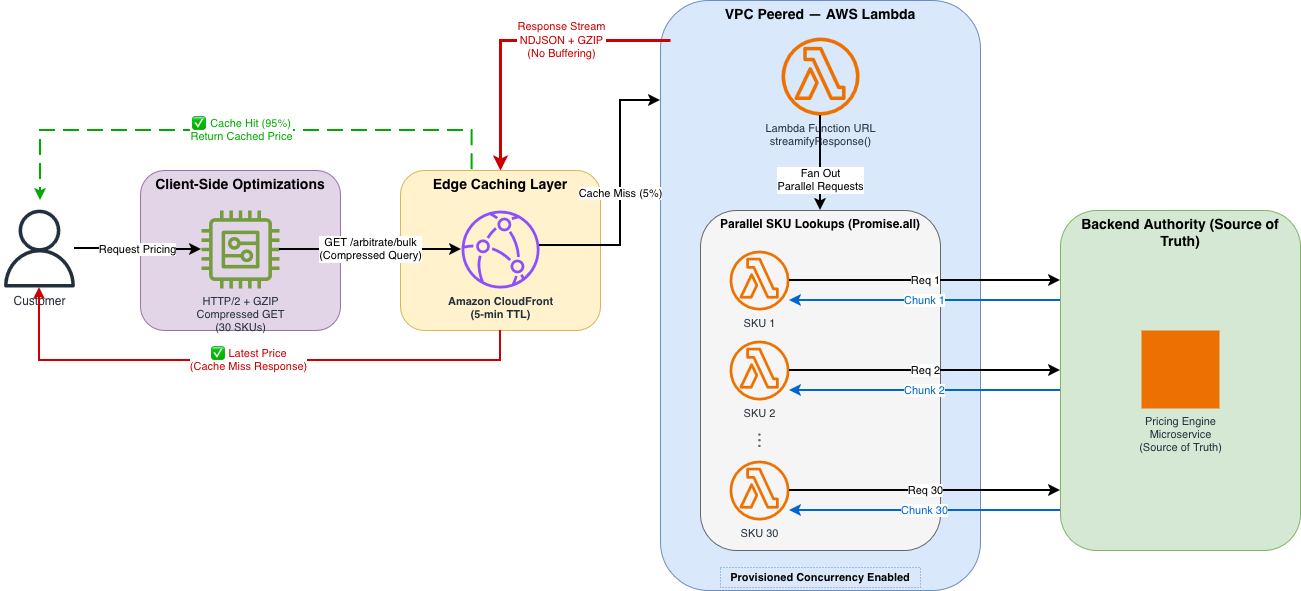
Figure 2: Stateless Streaming Architecture The new architecture eliminates the middleware cache. A high-performance stream connects the user directly to the pricing source of truth. CloudFront edge locations cache the response for 95% of traffic, while remaining requests go directly to Lambda for real-time pricing.
Implementation walkthrough
Transitioning to this new architecture required solving two specific technical constraints regarding CDN behavior and cold starts. We implemented the solution in three steps.
Step 1: Implementing the streaming handler
The core of our solution is the Node.js Lambda handler wrapped in awslambda.streamifyResponse(). This allows us to pipe data through a transformation and compression stream directly to the client as it becomes available.
We used a custom NDJSONTransform to convert pricing objects into newline-delimited JSON (NDJSON), allowing the browser to parse and render each price as it arrives rather than waiting for the complete response.
Helper function to fan-out the requests in parallel:
The handler also uses helper functions for parsing the compressed query string (parseCompressedQueryString), fetching individual SKU prices with connection pooling (fetchPricingForSKU), and flushing metrics to Amazon CloudWatch (flushMetrics).
Key implementation details:
awslambda.streamifyResponse()wraps the handler so it streams data in real time instead of waiting for the full response from the pricing engine.NDJSONTransformconverts objects to newline-delimited JSON (one object per line)- GZIP (GNU zip) compression with
Z_BEST_SPEED(Level 1) prioritizes speed over compression ratio pipeline()handles error propagation and stream cleanup- Response headers include Cache-Control for CloudFront caching
Step 2: Compressing the request data into a GET request
We needed to send complex request data (30 SKUs, context metadata) to the API.
Constraint: CloudFront and standard HTTP specs treat POST requests as non-idempotent, meaning they are not cacheable by default.
Our approach: We developed a dense, compressed query string format to fit the complex request data into a standard GET request. Format: g=group1(p=SKU-A:1:p=SKU-B:2)…
This allowed us to strictly use GET requests, keeping the request URI within standard length limits (~800 bytes) while carrying the same data as a 3-4KB JSON body.
Client-Side Code: Building the Compressed Query String
On page load, the client calls fetchPricingStream with up to 30 SKUs and an onChunk callback that updates each product’s DOM (Document Object Model) element as pricing chunks arrive. Helper functions handle updating individual price elements, displaying variant information, and gracefully degrading with a user-friendly message if pricing is temporarily unavailable.
Step 3: Configuring CloudFront for uncacheable requests
To allow CloudFront to cache these complex GET requests effectively, we configured a precise Cache Policy that includes all query strings and specific headers.
The CloudFront distribution itself is configured with HTTPS-only viewer protocol, the cache policy and origin request policy as shown in the preceding section, and points to the Lambda as its origin through HTTPS.
Cache policy highlights:
- 5-minute default TTL balances freshness and cache efficiency
- Query strings included in cache key (different SKU combos = separate cache entries)
- Header allowlisting allows custom pricing variants
- Automatic GZIP compression reduces bandwidth
- 5–30 minute TTL range provides flexibility for different content
Performance optimization results
We optimized the system through four distinct phases, testing each configuration with K6 load test scripts (500 concurrent users, 30 items per request) to simulate high-traffic events like Black Friday.
Phase 1: The baseline (Global VPN)
We tested our initial proof-of-concept with the default network configuration, where all outbound traffic (including requests to AWS services like Lambda) was routed through a global VPN, forcing traffic onto the public network and back into the AWS backbone, adding unnecessary network hops and delays. The Lambda used a standard buffered response with no compression. The results were suboptimal (4,500ms P90) because connection overhead dominated the request.
- DNS resolution: approximately 50 ms
- TCP handshake: approximately 100 ms
- TLS negotiation: approximately 150 ms
- Total connection overhead: approximately 300 ms per call
This overhead created a massive bottleneck for latency before business logic even ran.
Phase 2: Amazon VPC Peering and warm starts
To remove the network penalty, we acted on two fronts:
- First: Moved the Lambda inside an Amazon Virtual Private Cloud (Amazon VPC) peered directly to the pricing origin, cutting DNS and TLS overhead to near zero for internal calls.
- Second: Enabled Provisioned Concurrency for Lambda to remove the 500–1000 ms cold start latency.
With these changes, P90 latency dropped to 1,000 ms, a 4.5x improvement, but still not real-time enough.
Phase 3: HTTP/2 and GZIP compression
The remaining bottleneck was the sheer size of the data transfer. We targeted two optimizations:
- HTTP/2 Multiplexing: Enabled HTTP/2 multiplexing to reuse a single TCP connection for the 30 parallel SKU lookups, saving seconds of cumulative handshake time.
- GZIP Compression: Applied GZIP compression (Level 1 / Z_BEST_SPEED), which reduced the response size by 76 percent (170KB → 40KB).
These two optimizations brought P90 latency down to 218 ms.
Phase 4: Production (edge caching)
In the final phase, we layered CloudFront edge caching on top of the optimized Lambda. Because we had successfully converted our request data to a GET request (Step 2), we could now cache the computed prices for 95 percent of incoming traffic.The final P90 latency landed at 50 ms.In practice, the 95 percent cache hit ratio means only 1 in 20 requests actually invokes the Lambda function; the rest are served directly from CloudFront edge locations closest to the customer. During peak events like Black Friday, this translates to millions of requests served at edge speed without touching the origin, keeping both latency and compute costs minimal.
Performance metrics table
| Metric | Phase 1 (Baseline) | Phase 2 (VPC) | Phase 3 (HTTP/2) | Phase 4 (Production) |
|---|---|---|---|---|
| P50 Latency | 1,670 ms | 501 ms | 176 ms | 35 ms |
| P90 Latency | 4,500 ms | 1,000 ms | 218 ms | 50 ms |
| P99 Latency | 5,100 ms | 2,400 ms | 500 ms | 150 ms |
| Cache Hit Ratio | <1% | <1% | <1% | 95% |
| Response Size | 170 KB | 170 KB | 40 KB | 40 KB |
| Concurrent Users | 500 | 500 | 500 | 500 |
| P90 Improvement vs Baseline | 1x | 4.5x | 20x | 90x |
The following chart shows P90 latency improvements across each optimization phase.
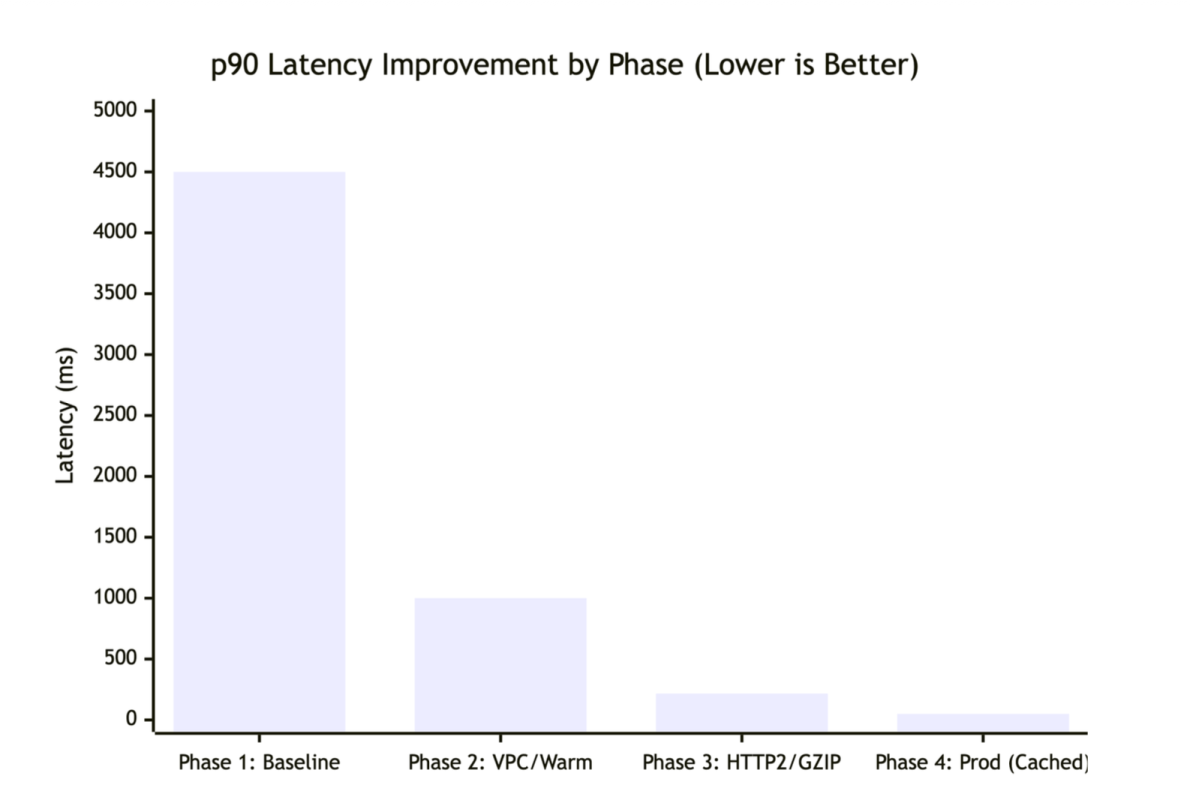
Latency improvements across four optimization phases.
K6 load test configuration:
Resilience, scale, and security considerations
Beyond latency, we designed the system to handle failure gracefully, scale under load, and protect data in transit.
Batching limits
The 30-item limit per request is intentional. If a page requires more (for example, 50 items), the client logic splits them into multiple parallel batches.–We chose 30 because of the following:
- Lambda execution time under 5 seconds
- Prevents timeout issues during high latency
- Balances parallel requests vs. Lambda concurrency limits
- Typical product listing pages show 20–30 items
Partial failures
The streaming architecture is resilient. If pricing for one item fails, the stream doesn’t crash; it continues processing the remaining items, so the user still sees a mostly complete page.
Partial failure handling:
Data protection
- While constructing the query string on the client exposes the request structure, this data (SKUs, variants) is already public. The actual pricing logic and business rules remain securely protected within the Pricing Engine.
- Data in transit encrypted with TLS 1.3.
- Amazon VPC endpoint connection to pricing engine (no internet exposure).
- No sensitive data logged (PII, pricing algorithms excluded).
- CloudTrail logs API calls for audit trail.
Conclusion
Stale pricing forces engineering teams to choose between freshness and scale. With the Data Aggregation pattern, we attempted to maintain both but compromised on data integrity due to the lag inherent in scheduled synchronization.By using AWS Lambda Response Streaming and Amazon CloudFront, we removed the need for a synchronization layer entirely. The result is a system that delivers the 50 ms latency required for a smooth user experience while supporting price consistency between the product page and checkout.
Beyond performance, this architecture significantly reduced operational footprint: compute fleet shrank from over 100 auto-scaled instances during peak events to only 5–10 Lambda functions, lowering maintenance and operational costs. This outcome was the result of close collaboration between Samsung’s ecommerce engineering team, our AWS Technical Account Manager (TAM), and the Lambda and CloudFront service teams, who helped architect the solution, review design decisions, and guide Samsung through production readiness. This technique applies to similar high-traffic data aggregation scenarios: product catalogs, inventory systems, recommendation engines, or services that combine multiple backend responses in real-time.
To get started, identify your highest-latency aggregation endpoints, evaluate whether your request data can be converted to cacheable GET requests and implement Lambda Response Streaming for a single endpoint before migrating your full API
Resources: – AWS Lambda Response Streaming documentation – Lambda Response Streaming tutorial – Amazon CloudFront Developer Guide – CloudFront cache policies
Learn more
For more on the concepts and technologies discussed in this post:
- Introducing AWS Lambda Response Streaming – The AWS Compute blog post that introduces the streaming pattern used in this solution
- Tutorial: Creating a Response Streaming Lambda Function – Step-by-step tutorial to build your first streaming Lambda function
- CloudFront Best Practices – Best practices for configuring CloudFront distributions
- NDJSON Format – The newline-delimited JSON specification used for incremental response parsing
- Node.js Streams API – The Node.js streams documentation underpinning the Transform and Pipeline patterns
- Terraform AWS Provider – Infrastructure as code provider used for the CloudFront and WAF configurations
- AWS Prescriptive Guidance: Load Testing – AWS guidance on load testing tools including K6