Tag Archives: Hi-Tech and Electronics

How Samsung achieved real-time pricing with AWS Lambda Response Streaming

Post Syndicated from Vijay Naik original https://aws.amazon.com/blogs/architecture/how-samsung-achieved-real-time-pricing-with-aws-lambda-response-streaming/

This post is co-authored with Sathish Kumar and Christopher Chan from Samsung ecommerce.

In high-traffic ecommerce, achieving real-time pricing is critical to prevent price inconsistency. Pricing inconsistency creates cart shock and erodes trust. This isn’t broken software, it’s a symptom of architectural latency that you can address using AWS Lambda Response Streaming and Amazon CloudFront for systems aggregating data from multiple backend sources.

In this post, we walk through the legacy architecture challenges, the stateless streaming solution, key implementation patterns, and performance results—a pattern you can apply if you’re building high-traffic APIs that aggregate data from multiple backend sources.

Samsung.com is Samsung’s primary direct-to-consumer channel, selling smartphones, TVs, appliances, and accessories, each with multiple variants, offers, and regional pricing. This complexity makes real-time price accuracy especially important.

Samsung’s All Deals and Product Finder pages showcase these products during high-traffic events like Black Friday. To maintain low latency for these high-density Product Listing Pages (PLPs) and comparison tables, the legacy infrastructure relied on asynchronous caching, which introduced a desynchronization gap where the cached price drifted from the authoritative pricing engine.

Problem: Legacy middleware caching created a 1-hour desynchronization gap between the authoritative pricing engine and customer-facing pages.

Our approach: We dismantled the stateful Data Aggregation (DA) architecture and built a real-time Bulk Arbitration Engine (a stateless orchestration layer that queries the Pricing Engine directly at request time) using AWS Lambda Response Streaming and Amazon CloudFront edge caching.

Challenge: The Data Aggregation trap

When product listing pages need to display pricing for over 30 item combinations simultaneously, the latency of calling the Pricing Engine for each item combination individually becomes untenable. To solve this, we built a backend for frontend (BFF) service to do a “Data Aggregation. This DA service was designed to decouple the frontend from the heavy Pricing Engine.

It relied on a scheduled Cron Worker that ran hourly to fetch the entire product catalog. The worker would then precompute prices for every possible permutation of products and store them in a local cache.

While this improved read speeds, it created two significant failures:

1. The Permutation Explosion – The DA service had to precompute every combination just in case a customer viewed it.

  • The Math: 30 products × (Variants × Offers × Add-ons) = Thousands of records per page
  • Storage Impact: Cache grew exponentially with each new product variant added
  • Waste: Most precomputed combinations were never requested

2. The Synchronization Lag – Because the Cron job ran only once per hour, price changes (for example, flash sales) lagged significantly. Customers continued to see old prices until the next scheduled sync.

  • Business Impact: Flash sales showed incorrect old pricing until the next run time
  • Customer Trust: Cart shock when checkout price differed from product page price
  • Competitive Disadvantage: Competitors with real-time pricing gained market share

Legacy Data Aggregation architecture

Architecture diagram showing the legacy Data Aggregation layer between the Pricing Engine and CloudFront CDN.
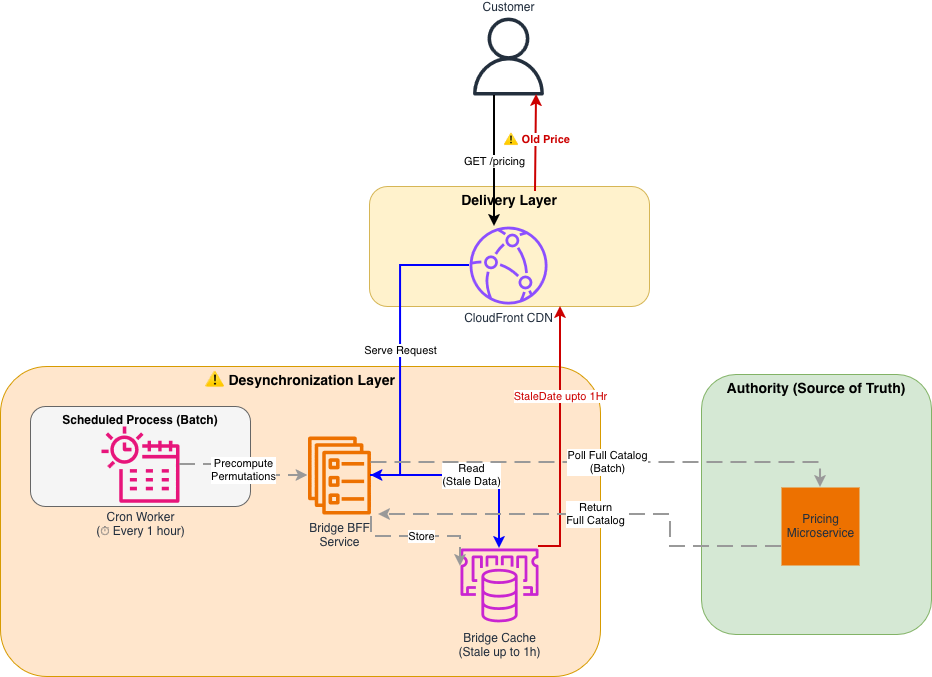
Architecture diagram showing the legacy Data Aggregation layer between the Pricing Engine and CloudFront CDN

Figure 1: Legacy Data Aggregation (DA) Architecture The legacy system relied on a scheduled Cron job, creating a distinct “Desynchronization Layer” between the Authority (Pricing) and the Customer. Precomputation of all product permutations consumed significant storage and compute resources.

The solution: Stateless streaming architecture

Intermediate layers storing data will eventually diverge from the source, so we collaborated with our AWS Technical Account Manager (TAM) and service teams to architect a new solution: the Bulk Arbitration Engine, a stateless orchestration layer that queries the Pricing Engine directly at request time.

The new architecture follows a Pass-Through pattern:

1. Client Request: The browser requests prices for 30 specific SKUs using a single HTTP GET request.

2. Streaming Orchestration: An AWS Lambda function fans out these 30 requests to the Pricing Engine in parallel.

3. Immediate Response: As the Pricing Engine returns data, the Lambda streams it immediately to the client without buffering.

Why Lambda Response Streaming?

We evaluated several alternatives before settling on this approach:

  • Traditional request-response pattern (buffered) – A standard Lambda invocation buffers the full response before returning it to the client, which negates the latency benefit of parallel fan-out. For 30 concurrent SKU lookups, this added seconds of wait time.
  • EC2 with improved caching – This was the legacy approach. Caching layers will eventually drift from the source of truth, which was the core problem we needed to solve.
  • Lambda Response Streaming – This was the only option that let us fan out requests in parallel, stream results as they arrived (reducing time-to-first-byte), and remain fully stateless with no intermediate cache to maintain or invalidate.

New stateless streaming architecture

New stateless Lambda Response Streaming architecture with CloudFront caching layer directly connected to Lambda function, which streams real-time responses from Pricing Engine without intermediate buffering. The diagram shows customer GET request to CloudFront, cache hit/miss routing decision, Lambda orchestration of parallel SKU lookups, and streaming response back through CloudFront edge.

Architecture diagram showing the stateless streaming solution with CloudFront connected directly to Lambda.
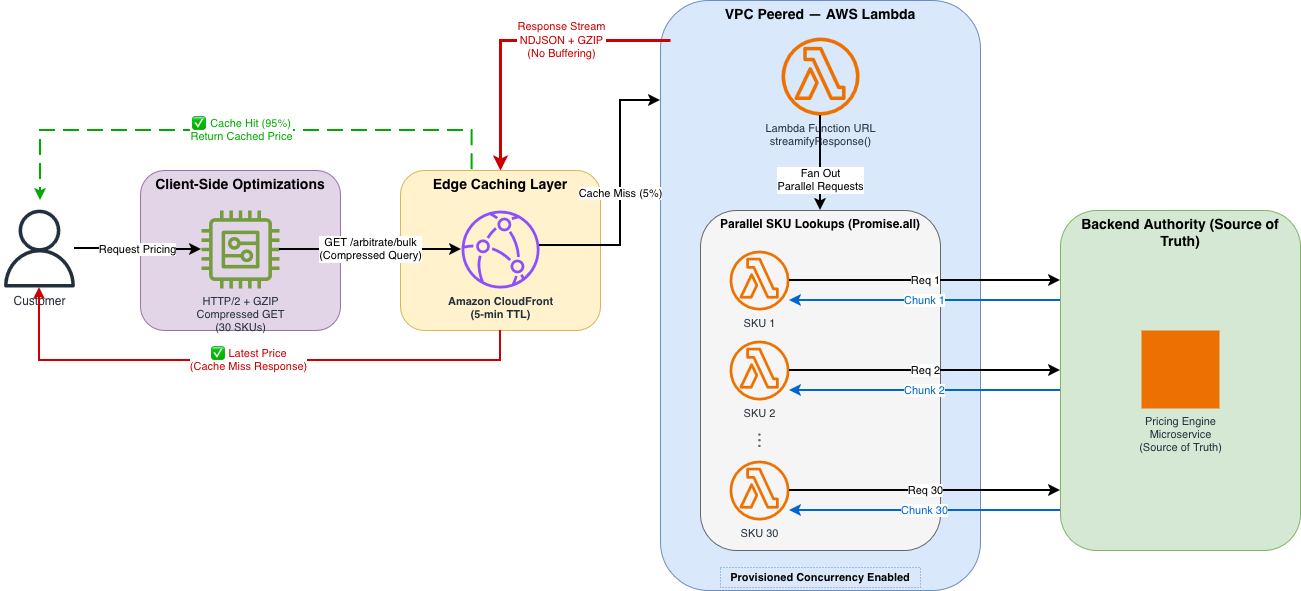
Architecture diagram showing the stateless streaming solution with CloudFront connected directly to Lambda

Figure 2: Stateless Streaming Architecture The new architecture eliminates the middleware cache. A high-performance stream connects the user directly to the pricing source of truth. CloudFront edge locations cache the response for 95% of traffic, while remaining requests go directly to Lambda for real-time pricing.

Implementation walkthrough

Transitioning to this new architecture required solving two specific technical constraints regarding CDN behavior and cold starts. We implemented the solution in three steps.

Step 1: Implementing the streaming handler

The core of our solution is the Node.js Lambda handler wrapped in awslambda.streamifyResponse(). This allows us to pipe data through a transformation and compression stream directly to the client as it becomes available.

We used a custom NDJSONTransform to convert pricing objects into newline-delimited JSON (NDJSON), allowing the browser to parse and render each price as it arrives rather than waiting for the complete response.

// Lambda Handler with Response Streaming
// File: lambda-handler.js

import * as awslambda from "aws-lambda";
import * as zlib from "zlib";
import { pipeline } from "stream/promises";
import { NDJSONTransform } from "./transforms/ndjson-transform.js";

// Constants
const PROCESSING_MODE = process.env.PROCESSING_MODE || "MODE_QUERYSTRING";
const MODE_QUERYSTRING = "MODE_QUERYSTRING";

// The Handler MUST be wrapped in streamifyResponse() to enable streaming
export const handler = awslambda.streamifyResponse(
  async (event, responseStream, _context) => {
    try {
      if (PROCESSING_MODE === MODE_QUERYSTRING) {
        // Set response metadata with status code and headers
        const httpResponseMetadata = {
          statusCode: 200,
          headers: {
            "Content-Type": "application/x-ndjson",
            "Content-Encoding": "gzip",
            "Cache-Control": "public, max-age=300", // 5 min cache
            "X-Custom-Header": "lambda-streaming",
          },
        };

        responseStream = awslambda.HttpResponseStream.from(
          responseStream,
          httpResponseMetadata
        );

        const ndjsonTransform = new NDJSONTransform();

        // Create gzip stream with fast compression level (Z_BEST_SPEED = Level 1)
        // Level 1 prioritizes speed over compression ratio for real-time responses
        const gzip = zlib.createGzip({
          level: zlib.constants.Z_BEST_SPEED,
        });

        // Process the request, writing to the gzip stream
        await processRequestUsingQueryString(event, ndjsonTransform, _context);

        // Pipeline: Transform → Compress → Send
        await pipeline(ndjsonTransform, gzip, responseStream);
      }

      // ... error handling
    } catch (error) {
      console.error("Lambda streaming error:", error);
      responseStream.destroy();
    } finally {
      await flushMetrics().catch(console.error);
    }
  }
);

Helper function to fan-out the requests in parallel:

// Process request: fan out SKU lookups in parallel
async function processRequestUsingQueryString(event, ndjsonTransform, context) {
  try {
    // Parse query string to extract SKU list
    const queryString = event.rawQueryString || "";
    const skus = parseCompressedQueryString(queryString);

    // Fetch pricing in parallel using Promise.all
    const pricingPromises = skus.map((sku) =>
      fetchPricingForSKU(sku).catch((err) => ({
        sku: sku.id,
        error: err.message,
      }))
    );

    const pricingResults = await Promise.all(pricingPromises);

    // Emit each result as a separate NDJSON line
    for (const result of pricingResults) {
      ndjsonTransform.write(result);
    }

    ndjsonTransform.end();
  } catch (error) {
    ndjsonTransform.destroy(error);
  }
}

The handler also uses helper functions for parsing the compressed query string (parseCompressedQueryString), fetching individual SKU prices with connection pooling (fetchPricingForSKU), and flushing metrics to Amazon CloudWatch (flushMetrics).

Key implementation details:

  • awslambda.streamifyResponse() wraps the handler so it streams data in real time instead of waiting for the full response from the pricing engine.
  • NDJSONTransform converts objects to newline-delimited JSON (one object per line)
  • GZIP (GNU zip) compression with Z_BEST_SPEED (Level 1) prioritizes speed over compression ratio
  • pipeline() handles error propagation and stream cleanup
  • Response headers include Cache-Control for CloudFront caching

Step 2: Compressing the request data into a GET request

We needed to send complex request data (30 SKUs, context metadata) to the API.

Constraint: CloudFront and standard HTTP specs treat POST requests as non-idempotent, meaning they are not cacheable by default.

Our approach: We developed a dense, compressed query string format to fit the complex request data into a standard GET request. Format: g=group1(p=SKU-A:1:p=SKU-B:2)…

This allowed us to strictly use GET requests, keeping the request URI within standard length limits (~800 bytes) while carrying the same data as a 3-4KB JSON body.

Client-Side Code: Building the Compressed Query String

// Client-side: Building the compressed query string format
// File: pricing-client.js

/**
 * Builds a compressed query string for bulk pricing requests
 * Format: g=group1(p=SKU-A:1:p=SKU-B:2:p=SKU-C:3)
 * @param {Array} skus - Array of SKU objects with { id, variant }
 * @param {Object} context - Customer context { customerId, region, sessionId }
 * @returns {string} Compressed query string
 */
function buildPricingQueryString(skus, context = {}) {
  if (!skus || skus.length === 0) {
    throw new Error("SKUs array cannot be empty");
  }

  if (skus.length > 30) {
    throw new Error("Maximum 30 SKUs per request. Split into multiple batches.");
  }

  // Build SKU portion: p=SKU-001:1:p=SKU-002:2
  const skuParts = skus
    .map((sku) => {
      const variant = sku.variant || 1;
      return `p=${sku.id}:${variant}`;
    })
    .join(":");

  // Build context portion (optional)
  let contextPart = "";
  if (context && Object.keys(context).length > 0) {
    const contextStr = Object.entries(context)
      .map(([key, value]) => `${key}=${value}`)
      .join(":");
    contextPart = `:c=${contextStr}`;
  }

  // Final format: g=group1(p=SKU-A:1:p=SKU-B:2:c=customerId=123:region=US-EAST-1)
  return `g=group1(${skuParts}${contextPart})`;
}

/**
 * Fetches pricing data with streaming NDJSON response parsing
 * Core pattern: read chunks, split by newlines, parse each line as JSON
 */
async function fetchPricingStream(skus, options = {}) {
  const queryString = buildPricingQueryString(skus);
  const url = `${options.baseUrl}?${queryString}`;
  const response = await fetch(url, {
    method: "GET",
    headers: { Accept: "application/x-ndjson" },
  });

  // Stream the response using the ReadableStream API
  const reader = response.body.getReader();
  const decoder = new TextDecoder();
  const pricingData = [];
  let buffer = "";

  while (true) {
    const { done, value } = await reader.read();
    if (done) break;

    // Decode chunk and append to buffer
    buffer += decoder.decode(value, { stream: true });

    // Split by newlines (NDJSON format: one JSON object per line)
    const lines = buffer.split("\n");

    // Keep the last incomplete line in buffer
    buffer = lines.pop() || "";

    // Parse each complete line as a JSON object
    for (const line of lines) {
      if (line.trim()) {
        const pricingObject = JSON.parse(line);
        pricingData.push(pricingObject);

        // Optional: update UI immediately as each price arrives
        if (options.onChunk) {
          options.onChunk(pricingObject);
        }
      }
    }
  }

  reader.releaseLock();
  return pricingData;
}

On page load, the client calls fetchPricingStream with up to 30 SKUs and an onChunk callback that updates each product’s DOM (Document Object Model) element as pricing chunks arrive. Helper functions handle updating individual price elements, displaying variant information, and gracefully degrading with a user-friendly message if pricing is temporarily unavailable.

Step 3: Configuring CloudFront for uncacheable requests

To allow CloudFront to cache these complex GET requests effectively, we configured a precise Cache Policy that includes all query strings and specific headers.

# Terraform: CloudFront Cache Policy Configuration
# File: cloudfront-cache-policy.tf

resource "aws_cloudfront_cache_policy" "pricing-cache-policy" {
  name = "${var.lambda_function_name}-cache-policy"

  # TTL Configuration
  default_ttl = 300  # 5 minutes
  max_ttl     = 1800 # 30 minutes
  min_ttl     = 300   # 5 minute

  parameters_in_cache_key_and_forwarded_to_origin {
    # Don't cache based on cookies (we don't use them)
    cookies_config {
      cookie_behavior = "none"
    }

    # Allowlist specific headers for cache key
    headers_config {
      header_behavior = "whitelist"
      headers {
        items = [
          "x-ecom-pricing-1",   # Custom headers (anonymized)
          "x-ecom-pricing-2",  
          "x-ecom-pricing-3"    
        ]
      }
    }

    # Include query strings in cache key
    # This verifies different SKU combinations have separate cache entries
    query_strings_config {
      query_string_behavior = "all"
    }

    # Enable automatic GZIP compression
    enable_accept_encoding_gzip = true
  }
}

# CloudFront Origin Request Policy (forward headers to Lambda)
resource "aws_cloudfront_origin_request_policy" "pricing-origin-policy" {
  name = "${var.lambda_function_name}-origin-policy"

  headers_config {
    header_behavior = "whitelist"
    headers {
      items = [
        "x-ecom-pricing-1",
        "x-ecom-pricing-2",
        "x-ecom-pricing-3"
      ]
    }
  }

  query_strings_config {
    query_string_behavior = "all"
  }

  cookies_config {
    cookie_behavior = "none"
  }
}

The CloudFront distribution itself is configured with HTTPS-only viewer protocol, the cache policy and origin request policy as shown in the preceding section, and points to the Lambda as its origin through HTTPS.

Cache policy highlights:

  • 5-minute default TTL balances freshness and cache efficiency
  • Query strings included in cache key (different SKU combos = separate cache entries)
  • Header allowlisting allows custom pricing variants
  • Automatic GZIP compression reduces bandwidth
  • 5–30 minute TTL range provides flexibility for different content

Performance optimization results

We optimized the system through four distinct phases, testing each configuration with K6 load test scripts (500 concurrent users, 30 items per request) to simulate high-traffic events like Black Friday.

Phase 1: The baseline (Global VPN)

We tested our initial proof-of-concept with the default network configuration, where all outbound traffic (including requests to AWS services like Lambda) was routed through a global VPN, forcing traffic onto the public network and back into the AWS backbone, adding unnecessary network hops and delays. The Lambda used a standard buffered response with no compression. The results were suboptimal (4,500ms P90) because connection overhead dominated the request.

  • DNS resolution: approximately 50 ms
  • TCP handshake: approximately 100 ms
  • TLS negotiation: approximately 150 ms
  • Total connection overhead: approximately 300 ms per call

This overhead created a massive bottleneck for latency before business logic even ran.

Phase 2: Amazon VPC Peering and warm starts

To remove the network penalty, we acted on two fronts:

  • First: Moved the Lambda inside an Amazon Virtual Private Cloud (Amazon VPC) peered directly to the pricing origin, cutting DNS and TLS overhead to near zero for internal calls.
  • Second: Enabled Provisioned Concurrency for Lambda to remove the 500–1000 ms cold start latency.

With these changes, P90 latency dropped to 1,000 ms, a 4.5x improvement, but still not real-time enough.

Phase 3: HTTP/2 and GZIP compression

The remaining bottleneck was the sheer size of the data transfer. We targeted two optimizations:

  • HTTP/2 Multiplexing: Enabled HTTP/2 multiplexing to reuse a single TCP connection for the 30 parallel SKU lookups, saving seconds of cumulative handshake time.
  • GZIP Compression: Applied GZIP compression (Level 1 / Z_BEST_SPEED), which reduced the response size by 76 percent (170KB → 40KB).

These two optimizations brought P90 latency down to 218 ms.

Phase 4: Production (edge caching)

In the final phase, we layered CloudFront edge caching on top of the optimized Lambda. Because we had successfully converted our request data to a GET request (Step 2), we could now cache the computed prices for 95 percent of incoming traffic.The final P90 latency landed at 50 ms.In practice, the 95 percent cache hit ratio means only 1 in 20 requests actually invokes the Lambda function; the rest are served directly from CloudFront edge locations closest to the customer. During peak events like Black Friday, this translates to millions of requests served at edge speed without touching the origin, keeping both latency and compute costs minimal.

Performance metrics table

Metric Phase 1 (Baseline) Phase 2 (VPC) Phase 3 (HTTP/2) Phase 4 (Production)
P50 Latency 1,670 ms 501 ms 176 ms 35 ms
P90 Latency 4,500 ms 1,000 ms 218 ms 50 ms
P99 Latency 5,100 ms 2,400 ms 500 ms 150 ms
Cache Hit Ratio <1% <1% <1% 95%
Response Size 170 KB 170 KB 40 KB 40 KB
Concurrent Users 500 500 500 500
P90 Improvement vs Baseline 1x 4.5x 20x 90x

The following chart shows P90 latency improvements across each optimization phase.
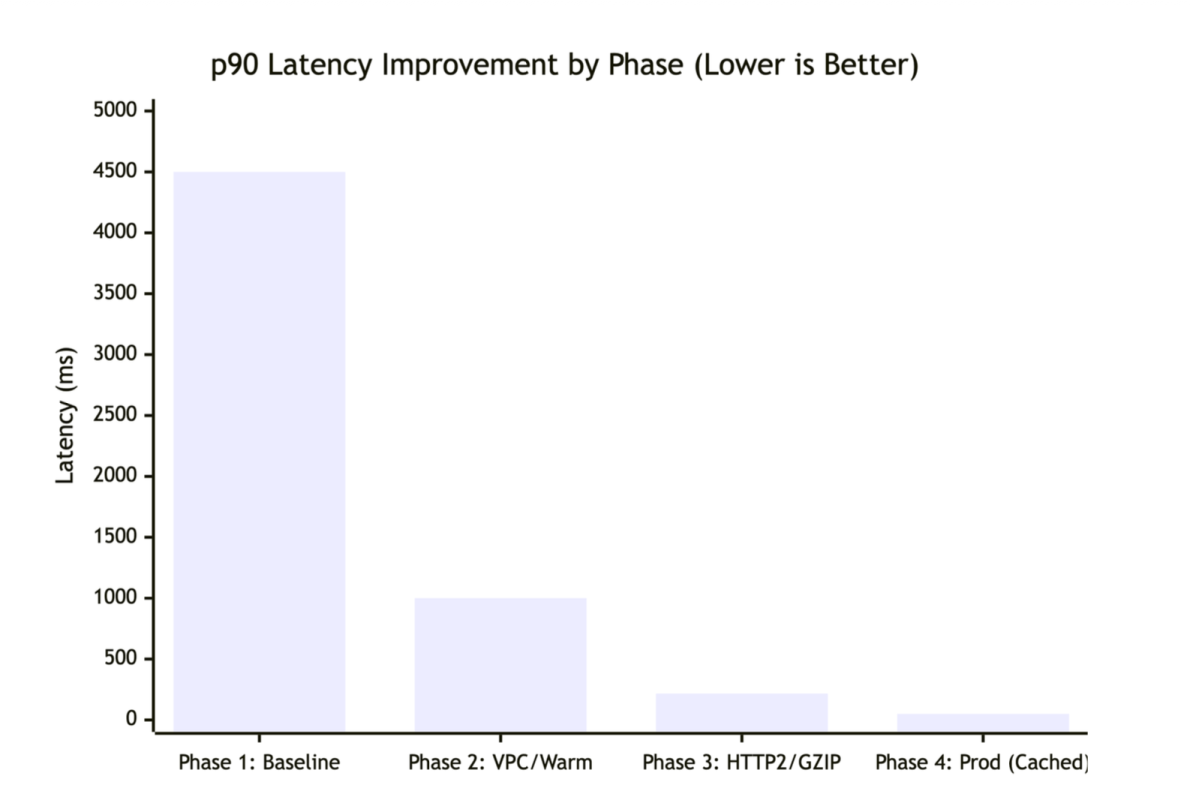
Latency improvements across four optimization phases

Latency improvements across four optimization phases.

K6 load test configuration:

// A sample K6 load test script
import http from 'k6/http';
import { check } from 'k6';

export let options = {
  stages: [
    { duration: '2m', target: 100 },  // Ramp up
    { duration: '5m', target: 500 },  // Stay at 500 concurrent users
    { duration: '2m', target: 0 },    // Ramp down
  ],
  thresholds: {
    http_req_duration: ['p(90)<100', 'p(99)<500'], // P90 < 100ms, P99 < 500ms
  },
};

export default function () {
  const url = 'https://api.example.com/pricing?g=group1(p=SKU-001:1:p=SKU-002:2:...)';
  const res = http.get(url);
  
  check(res, {
    'status is 200': (r) => r.status === 200,
    'response has content': (r) => r.body.length > 0,
  });
}

Resilience, scale, and security considerations

Beyond latency, we designed the system to handle failure gracefully, scale under load, and protect data in transit.

Batching limits

The 30-item limit per request is intentional. If a page requires more (for example, 50 items), the client logic splits them into multiple parallel batches.–We chose 30 because of the following:

  • Lambda execution time under 5 seconds
  • Prevents timeout issues during high latency
  • Balances parallel requests vs. Lambda concurrency limits
  • Typical product listing pages show 20–30 items
async function fetchLargePricingBatch(skus) {
  const BATCH_SIZE = 30;
  const batches = [];

  // Split into 30-item chunks
  for (let i = 0; i < skus.length; i += BATCH_SIZE) {
    batches.push(skus.slice(i, i + BATCH_SIZE));
  }

  // Fetch all batches in parallel
  const results = await Promise.all(
    batches.map((batch) =>
      fetchPricingStream(batch, { timeout: 30000 })
    )
  );

  // Flatten results
  return results.flat();
}

Partial failures

The streaming architecture is resilient. If pricing for one item fails, the stream doesn’t crash; it continues processing the remaining items, so the user still sees a mostly complete page.

Partial failure handling:

async function processRequestUsingQueryString(event, ndjsonTransform, context) {
  const skus = parseCompressedQueryString(event.rawQueryString);

  for (const sku of skus) {
    try {
      const pricing = await fetchPricingForSKU(sku);
      ndjsonTransform.write(pricing);
    } catch (error) {
      // Emit error object but continue processing other SKUs
      ndjsonTransform.write({
        sku: sku.id,
        variant: sku.variant,
        error: error.message,
        timestamp: new Date().toISOString(),
      });
    }
  }

  ndjsonTransform.end();
}

Data protection

  • While constructing the query string on the client exposes the request structure, this data (SKUs, variants) is already public. The actual pricing logic and business rules remain securely protected within the Pricing Engine.
  • Data in transit encrypted with TLS 1.3.
  • Amazon VPC endpoint connection to pricing engine (no internet exposure).
  • No sensitive data logged (PII, pricing algorithms excluded).
  • CloudTrail logs API calls for audit trail.

Conclusion

Stale pricing forces engineering teams to choose between freshness and scale. With the Data Aggregation pattern, we attempted to maintain both but compromised on data integrity due to the lag inherent in scheduled synchronization.By using AWS Lambda Response Streaming and Amazon CloudFront, we removed the need for a synchronization layer entirely. The result is a system that delivers the 50 ms latency required for a smooth user experience while supporting price consistency between the product page and checkout.

Beyond performance, this architecture significantly reduced operational footprint: compute fleet shrank from over 100 auto-scaled instances during peak events to only 5–10 Lambda functions, lowering maintenance and operational costs. This outcome was the result of close collaboration between Samsung’s ecommerce engineering team, our AWS Technical Account Manager (TAM), and the Lambda and CloudFront service teams, who helped architect the solution, review design decisions, and guide Samsung through production readiness. This technique applies to similar high-traffic data aggregation scenarios: product catalogs, inventory systems, recommendation engines, or services that combine multiple backend responses in real-time.

To get started, identify your highest-latency aggregation endpoints, evaluate whether your request data can be converted to cacheable GET requests and implement Lambda Response Streaming for a single endpoint before migrating your full API

Resources:AWS Lambda Response Streaming documentationLambda Response Streaming tutorialAmazon CloudFront Developer GuideCloudFront cache policies

Learn more

For more on the concepts and technologies discussed in this post:


About the authors

How HPE Aruba Supply Chain optimized cost and performance by migrating to an AWS modern data architecture

Post Syndicated from Hardeep Randhawa original https://aws.amazon.com/blogs/big-data/how-hpe-aruba-supply-chain-optimized-cost-and-performance-by-migrating-to-an-aws-modern-data-architecture/

This blog post is co-written with Hardeep Randhawa and Abhay Kumar from HPE.

HPE Aruba Networking, formerly known as Aruba Networks, is a Santa Clara, California-based security and networking subsidiary of Hewlett Packard Enterprise company. HPE Aruba Networking is the industry leader in wired, wireless, and network security solutions. Hewlett-Packard acquired Aruba Networks in 2015, making it a wireless networking subsidiary with a wide range of next-generation network access solutions.

Aruba offers networking hardware like access points, switches, routers, software, security devices, and Internet of Things (IoT) products. Their large inventory requires extensive supply chain management to source parts, make products, and distribute them globally. This complex process involves suppliers, logistics, quality control, and delivery.

This post describes how HPE Aruba automated their Supply Chain management pipeline, and re-architected and deployed their data solution by adopting a modern data architecture on AWS.

Challenges with the on-premises solution

As the demand surged with time, it was imperative that Aruba build a sophisticated and powerful supply chain solution that could help them scale operations, enhance visibility, improve predictability, elevate customer experience, and drive sustainability. To achieve their vision of a modern, scalable, resilient, secure, and cost-efficient architecture, they chose AWS as their trusted partner due to the range of low-cost, scalable, and reliable cloud services they offer.

Through a commitment to cutting-edge technologies and a relentless pursuit of quality, HPE Aruba designed this next-generation solution as a cloud-based cross-functional supply chain workflow and analytics tool. The application supports custom workflows to allow demand and supply planning teams to collaborate, plan, source, and fulfill customer orders, then track fulfillment metrics via persona-based operational and management reports and dashboards. This also includes building an industry standard integrated data repository as a single source of truth, operational reporting through real time metrics, data quality monitoring, 24/7 helpdesk, and revenue forecasting through financial projections and supply availability projections. Overall, this new solution has empowered HPE teams with persona-based access to 10 full-scale business intelligence (BI) dashboards and over 350 report views across demand and supply planning, inventory and order management, SKU dashboards, deal management, case management, backlog views, and big deal trackers.

Overview of the solution

This post describes how HPE Aruba automated their supply chain management pipeline, starting from data migration from varied data sources into a centralized Amazon Simple Storage Service (Amazon S3) based storage to building their data warehouse on Amazon Redshift with the publication layer built on a third-party BI tool and user interface using ReactJS.

The following diagram illustrates the solution architecture.

https://admin.pulse.aws/survey/Survey-2khLQ3YQTeQ1k3VcjAFdn5UsCYb/

In the following sections, we go through the key components in the diagram in more detail:

  1. Source systems
  2. Data migration
  3. Regional distribution
  4. Orchestration
  5. File processing
  6. Data quality checks
  7. Archiving processed files
  8. Copying to Amazon Redshift
  9. Running stored procedures
  10. UI integration
  11. Code Deployment
  12. Security & Encryption
  13. Data Consumption
  14. Final Steps

1. Source systems

Aruba’s source repository includes data from three different operating regions in AMER, EMEA, and APJ, along with one worldwide (WW) data pipeline from varied sources like SAP S/4 HANA, Salesforce, Enterprise Data Warehouse (EDW), Enterprise Analytics Platform (EAP) SharePoint, and more. The data sources include 150+ files including 10-15 mandatory files per region ingested in various formats like xlxs, csv, and dat. Aruba’s data governance guidelines required that they use a single centralized tool that could securely and cost-effectively review all source files with multiple formats, sizes, and ingestion times for compliance before exporting them out of the HPE environment. To achieve this, Aruba first copied the respective files to a centralized on-premises staging layer.

2. Data migration

Aruba chose AWS Transfer Family for SFTP for secure and efficient file transfers from an on-premises staging layer to an Amazon S3 based landing zone. AWS Transfer Family seamlessly integrates with other AWS services, automates transfer, and makes sure data is protected with encryption and access controls. To prevent deduplication issues and maintain data integrity, Aruba customized these data transfer jobs to make sure previous transfers are complete before copying the next set of files.

3. Regional distribution

On average, Aruba transfers approximately 100 files, with total size ranging from 1.5–2 GB into the landing zone daily. The data volume increases each Monday with the weekly file loads and at the beginning of each month with the monthly file loads. These files follow the same naming pattern, with a daily system-generated timestamp appended to each file name. Each file arrives as a pair with a tail metadata file in CSV format containing the size and name of the file. This metadata file is later used to read source file names during processing into the staging layer.

The source data contains files from three different operating Regions and one worldwide pipeline that needs to be processed per local time zones. Therefore, separating the files and running a distinct pipeline for each was necessary to decouple and enhance failure tolerance. To achieve this, Aruba used Amazon S3 Event Notifications. With each file uploaded to Amazon S3, an Amazon S3 PUT event invokes an AWS Lambda function that distributes the source and the metadata files Region-wise and loads them into the respective Regional landing zone S3 bucket. To map the file with the respective Region, this Lambda function uses Region-to-file mapping stored in a configuration table in Amazon Aurora PostgreSQL-Compatible Edition.

4. Orchestration

The next requirement was to set up orchestration for the data pipeline to seamlessly implement the required logic on the source files to extract meaningful data. Aruba chose AWS Step Functions for orchestrating and automating their extract, transform, and load (ETL) processes to run on a fixed schedule. In addition, they use AWS Glue jobs for orchestrating validation jobs and moving data through the data warehouse.

They used Step Functions with Lambda and AWS Glue for automated orchestration to minimize the cloud solution deployment timeline by reusing the on-premises code base, where possible. The prior on-premises data pipeline was orchestrated using Python scripts. Therefore, integrating the existing scripts with Lambda within Step Functions and AWS Glue helped accelerate their deployment timeline on AWS.

5. File processing

With each pipeline running at 5:00 AM local time, the data is further validated, processed, and then moved to the processing zone folder in the same S3 bucket. Unsuccessful file validation results in the source files being moved to the reject zone S3 bucket directory. The following file validations are run by the Lambda functions invoked by the Step Functions workflow:

  • The Lambda function validates if the tail file is available with the corresponding source data file. When each complete file pair lands in the Regional landing zone, the Step Functions workflow considers the source file transfer as complete.
  • By reading the metadata file, the file validation function validates that the names and sizes of the files that land in the Regional landing zone S3 bucket match with the files on the HPE on-premises server.

6. Data quality checks

When the files land in the processing zone, the Step Functions workflow invokes another Lambda function that converts the raw files to CSV format followed by stringent data quality checks. The final validated CSV files are loaded into the temp raw zone S3 folder.

The data quality (DQ) checks are managed using DQ configurations stored in Aurora PostgreSQL tables. Some examples of DQ checks include duplicate data check, null value check, and date format check. The DQ processing is managed through AWS Glue jobs, which are invoked by Lambda functions from within the Step Functions workflow. A number of data processing logics are also integrated in the DQ flow, such as the following:

  • Flag-based deduplication – For specific files, when a flag managed in the Aurora configuration table is enabled, the process removes duplicates before processing the data
  • Pre-set values replacing nulls – Similarly, a preset value of 1 or 0 would imply a NULL in the source data based on the value set in the configuration table

7. Archiving processed files

When the CSV conversion is complete, the original raw files in the processing zone S3 folder are archived for 6 months in the archive zone S3 bucket folder. After 6 months, the files on AWS are deleted, with the original raw files retained in the HPE source system.

8. Copying to Amazon Redshift

When the data quality checks and data processing are complete, the data is loaded from the S3 temp raw zone into the curated zone on an Redshift provisioned cluster, using the COPY command feature.

9. Running stored procedures

From the curated zone, they use AWS Glue jobs, where the Redshift stored procedures are orchestrated to load the data from the curated zone into the Redshift publish zone. The Redshift publish zone is a different set of tables in the same Redshift provisioned cluster. The Redshift stored procedures process and load the data into fact and dimension tables in a star schema.

10. UI integration

Amazon OpenSearch Service is also integrated with the flow for publishing mass notifications to the end-users through the user interface (UI). The users can also send messages and post updates via the UI with the OpenSearch Service integration.

11. Code Deployment

Aruba uses AWS CodeCommit and AWS CodePipeline to deploy and manage a bi-monthly code release cycle, the frequency for which can be increased on-demand as per deployment needs. The release happens across four environments – Development, Testing, UAT and Production – deployed through DevOps discipline, thus enabling shorter turnaround time to ever-changing user requirements and upstream data source changes.

12. Security & Encryption

User access to the Aruba SC360 portal is managed via SSO with MFA authentication and data security managed via direct integration of the AWS solution with HPE IT’s unified access management API. All the data pipelines between HPE on-premises sources and S3 are encrypted for enhanced security.

13. Data Consumption

Aruba SC360 application provides a ‘Private Space’ feature to other BI/Analytics teams within HPE to run and manage their own data ingestion pipeline. This has been built using Amazon Redshift data sharing feature, which has enabled Aruba to securely share access to live data in their Amazon Redshift cluster, without manually moving or copying the data. Thus, the HPE internal teams could build their own data workloads on core Aruba SC360 data while maintaining data security and code isolation.

14. Final Steps

The data is finally fetched into the publication layer, which consists of a ReactJS-based user interface accessing the data in the Amazon publish zone using Spring Boot REST APIs. Along with data from the Redshift data warehouse, notifications updated in the OpenSearch Service tables are also fetched and loaded into the UI. Amazon Aurora PostgreSQL is used to maintain the configuration values for populating the UI. To build BI dashboards, Aruba opted to continue using their existing third-party BI tool due to its familiarity among internal teams.

Conclusion

In this post, we showed you how HPE Aruba Supply Chain successfully re-architected and deployed their data solution by adopting a modern data architecture on AWS.

The new solution has helped Aruba integrate data from multiple sources, along with optimizing their cost, performance, and scalability. This has also allowed the Aruba Supply Chain leadership to receive in-depth and timely insights for better decision-making, thereby elevating the customer experience.

To learn more about the AWS services used to build modern data solutions on AWS, refer to the AWS public documentation and stay up to date through the AWS Big Data Blog.


About the authors

Hardeep Randhawa is a Senior Manager – Big Data & Analytics, Solution Architecture at HPE, recognized for stewarding enterprise-scale programs and deployments. He has led a recent Big Data EAP (Enterprise Analytics Platform) build with one of the largest global SAP HANA/S4 implementations at HPE.

Abhay Kumar is a Lead Data Engineer in Aruba Supply Chain Analytics and manages the Cloud Infrastructure for the Application at HPE. With 11+ years of experience in the IT industry domains like banking, supply chain and Abhay has a strong background in Cloud Technologies, Data Analytics, Data Management, and Big Data systems. In his spare time, he likes reading, exploring new places and watching movies.

Ritesh Chaman is a Senior Technical Account Manager at Amazon Web Services. With 14 years of experience in the IT industry, Ritesh has a strong background in Data Analytics, Data Management, Big Data systems and Machine Learning. In his spare time, he loves cooking, watching sci-fi movies, and playing sports.

Sushmita Barthakur is a Senior Solutions Architect at Amazon Web Services, supporting Enterprise customers architect their workloads on AWS. With a strong background in Data Analytics and Data Management, she has extensive experience helping customers architect and build Business Intelligence and Analytics Solutions, both on-premises and the cloud. Sushmita is based out of Tampa, FL and enjoys traveling, reading and playing tennis.