All posts by Will Childs-Klein

Post-quantum TLS in Python

Post Syndicated from Will Childs-Klein original https://aws.amazon.com/blogs/security/post-quantum-tls-in-python/

At Amazon Web Services (AWS), security is a top priority. Maintaining data confidentiality is a substantial component of operating environment security for AWS and our customers. Though not yet available, a cryptographically relevant quantum computer (CRQC) could be used to break public key algorithms that are used today to provide data confidentiality. To prepare for a world where CRQCs might exist, the National Institute of Standards and Technology (NIST) initiated a search for new algorithms that are robust against potential CRQCs. In August 2024, after eight years of intense scrutiny by the cryptography community, NIST selected three post-quantum cryptography (PQC) standards, including FIPS 203’s ML-KEM, to supplement and eventually replace classical public key algorithms.

A few recent AWS blog posts have discussed PQC at AWS, particularly post-quantum Transport Layer Security (PQ TLS) using ML-KEM:

In this post, we demonstrate how you can test PQ TLS in Python applications today.

Testing PQ TLS in Python

As described in detail elsewhere, AWS currently deploys PQ TLS in a hybrid configuration where a classical key exchange is used alongside ML-KEM to provide defense-in-depth for data confidentiality. ML-KEM has much larger keys than classical schemes, so hybrid TLS handshakes send and receive more data when establishing a connection. As with other protocol updates, it’s important to test hybrid TLS in your network to validate that security appliances and network devices can handle these connections appropriately. We hope that you find the provided AWS Sample useful for such tests.

To negotiate hybrid TLS, PQ-ready software is required on both ends of the connection: client and server. AWS is currently rolling out hybrid TLS on the server side transparently with no customer configuration required. On the client side, each language SDK’s story for enabling hybrid TLS will be slightly different.

The AWS SDK for Python (Boto3) relies the on the Python interpreter’s ssl module for TLS, which in turn uses the operating system’s cryptography library. For most Linux distributions, this is OpenSSL. OpenSSL recently announced support for hybrid TLS and has enabled it by default in version 3.5. However, OpenSSL 3.5 is not yet the default on most operating system distributions.

To unblock testing, we provide a container definition that installs OpenSSL 3.5 alongside a standard Python distribution, allowing Python applications to perform PQ hybrid TLS connections. The container definition also installs common packages such as boto3 and requests. We provide example Python code for basic interactions with: AWS services (using boto3 and the AWS Command Line Interface (AWS CLI)), arbitrary HTTPS endpoints (using requests), and TLS-secured TCP servers (using Python’s standard library ssl module).

In the following sections, we walk through how to use this container definition to test PQ TLS connections from Python applications to AWS services.

Build the container

You can build this container on your local machine, or you can build it in a cloud environment such as Amazon Elastic Compute Cloud (Amazon EC2) or AWS CloudShell. Note that if you want to exercise the network path between your machine and AWS, you must build and run the container locally. The only prerequisite for building the container is having Docker (or an equivalent container tool) installed. For simplicity, the following steps mostly assume that you’re running these commands in a Linux CloudShell environment.

  1. Clone the sample repo:
    git clone https://github.com/aws-samples/sample-post-quantum-tls-python
  2. Change into the sample’s directory and build the container by executing the following command:
    cd sample-post-quantum-tls-python && docker build . -t pq-tls-python

Run the container

To run the samples described earlier, execute the following:

docker run --rm \
    -e AWS_ACCESS_KEY_ID=$(aws configure get aws_access_key_id) \
    -e AWS_SECRET_ACCESS_KEY=$(aws configure get aws_secret_access_key) \
    -it pq-tls-python \
    test.sh

The preceding command assumes that you have an AWS CLI default profile with permission to call the AWS Secrets Manager ListSecrets API. With this permission, you can make a basic, read-only test call to Secrets Manager PQ-enabled API endpoints that won’t return sensitive or secret values. In CloudShell, you’ll need to set access key and secret key values with aws configure. In Amazon EC2, you can configure an instance profile and remove the access key and secret key environment.

After printing out the name and version of the cryptography library used by Python, test.sh will test hybrid TLS connections used to secure (in order):

  1. TCP sockets using Python’s socket and ssl modules
  2. HTTP requests using the requests library
  3. AWS API requests using boto3 and the AWS CLI

If the tests are successful you should see the following output:

Crypto library: OpenSSL 3.5.0 8 Apr 2025
Testing ssl socket... ok
Testing requests... ok
Testing boto3... ok
Testing AWS CLI... ok

You can inspect, modify, and extend the examples in the tests/ directory as needed for your experiments. Instead of running the provided test.sh script, you can access an interactive shell with the following command.

docker run --rm -it pq-tls-python

Make sure to rebuild the container if you add or modify the files for testing.

Confirm PQ TLS negotiation

To confirm that PQ hybrid TLS is negotiated, inspect the samples’ TLS handshakes to confirm that the PQ hybrid TLS key exchange is performed. To do this, you must capture host network traffic. In CloudShell, you can do this using the following command:

sudo tcpdump -A -i docker0 -w pq_tls.pcap

This will capture TCP traffic to port 443, the standard port for TLS. Modify the command as needed if you’re capturing traffic for a non-standard port. Alternatively, if you’re running the container locally, you can perform the packet capture in Wireshark’s GUI on a local network device, such as docker0 on Linux or en0 on MacOS.

Next, run the test suite in a separate terminal using the Docker run command from Run the container. As before, you should see the success messages in your terminal, and a new file named docker_443.pcap if you’re using tcpdump. You can download this file from CloudShell to view locally in Wireshark. Specifically, look for the key_share extension in client or server Hello handshake messages. If you’re using Wireshark to view the packet capture, you can specify the display filter tls.handshake to only show handshake messages. Your packet capture should look something like Figure 1:
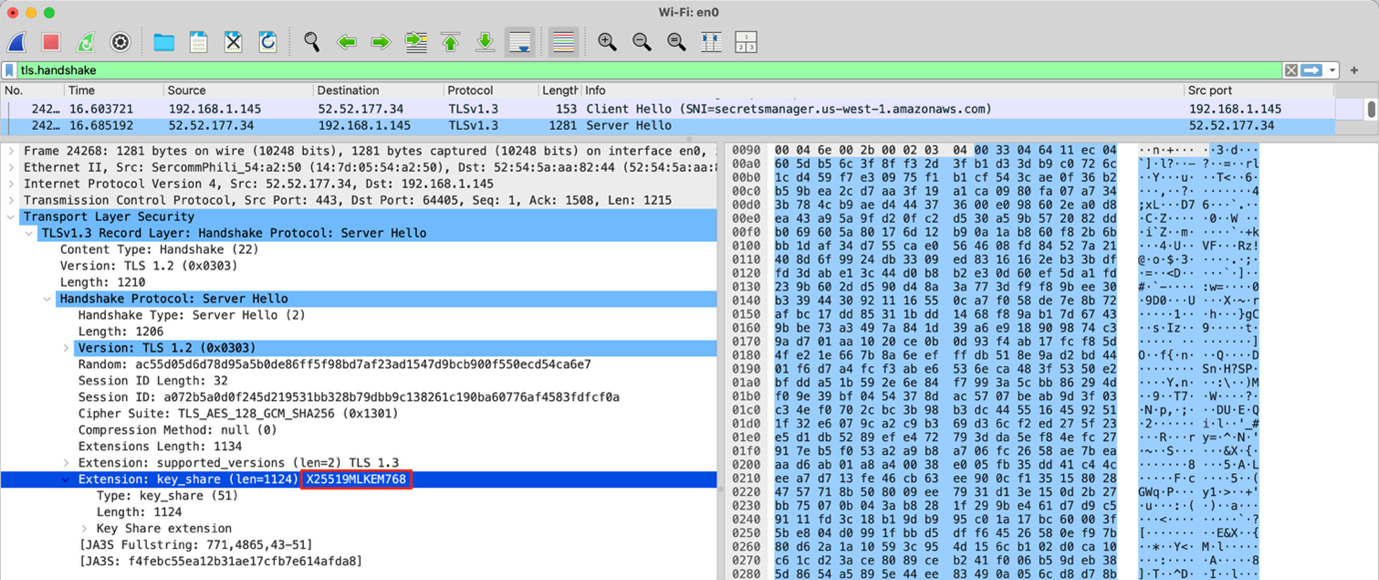
Figure 1: Wireshark view of packet capture

Figure 1: Wireshark view of packet capture

You can see in Figure 1 that X25519MLKEM768 is selected in the server Hello handshake message, showing that PQ hybrid TLS was successfully negotiated.

Conclusion

In this post, you’ve seen how to use a container definition to test PQ hybrid TLS in Python today. The linked AWS Sample shows how to establish PQ hybrid TLS connections for:

  • AWS API requests with boto3 or the AWS CLI
  • General HTTPS requests with requests
  • TLS-secured TCP sockets with Python’s socket and ssl modules

We encourage you to use the AWS Sample to start vetting your networks and Python applications in preparation for upcoming PQ hybrid TLS migrations. AWS is committed to supporting our customers through their migration journeys, and PQ hybrid TLS is no exception.

 
If you have feedback about this post, submit comments in the Comments section below. If you have questions about this post, contact AWS Support.
 

Will Childs-Klein
Will Childs-Klein

Will is a Senior Software Engineer at AWS Cryptography, where he focuses on developing cryptographic libraries, optimizing software performance, and deploying post-quantum cryptography. Previously at AWS, he worked on data storage and transfer services including Storage Gateway, Elastic File System, and DataSync.

Accelerating JVM cryptography with Amazon Corretto Crypto Provider 2

Post Syndicated from Will Childs-Klein original https://aws.amazon.com/blogs/security/accelerating-jvm-cryptography-with-amazon-corretto-crypto-provider-2/

Earlier this year, Amazon Web Services (AWS) released Amazon Corretto Crypto Provider (ACCP) 2, a cryptography provider built by AWS for Java virtual machine (JVM) applications. ACCP 2 delivers comprehensive performance enhancements, with some algorithms (such as elliptic curve key generation) seeing a greater than 13-fold improvement over ACCP 1. The new release also brings official support for the AWS Graviton family of processors. In this post, I’ll discuss a use case for ACCP, then review performance benchmarks to illustrate the performance gains. Finally, I’ll show you how to get started using ACCP 2 in applications today.

This release changes the backing cryptography library for ACCP from OpenSSL (used in ACCP 1) to the AWS open source cryptography library, AWS libcrypto (AWS-LC). AWS-LC has extensive formal verification, as well as traditional testing, to assure the correctness of cryptography that it provides. While AWS-LC and OpenSSL are largely compatible, there are some behavioral differences that required the ACCP major version increment to 2.

The move to AWS-LC also allows ACCP to leverage performance optimizations in AWS-LC for modern processors. I’ll illustrate the ACCP 2 performance enhancements through the use case of establishing a secure communications channel with Transport Layer Security version 1.3 (TLS 1.3). Specifically, I’ll examine cryptographic components of the connection’s initial phase, known as the handshake. TLS handshake latency particularly matters for large web service providers, but reducing the time it takes to perform various cryptographic operations is an operational win for any cryptography-intensive workload.

TLS 1.3 requires ephemeral key agreement, which means that a new key pair is generated and exchanged for every connection. During the TLS handshake, each party generates an ephemeral elliptic curve key pair, exchanges public keys using Elliptic Curve Diffie-Hellman (ECDH), and agrees on a shared secret. Finally, the client authenticates the server by verifying the Elliptic Curve Digital Signature Algorithm (ECDSA) signature in the certificate presented by the server after key exchange. All of this needs to happen before you can send data securely over the connection, so these operations directly impact handshake latency and must be fast.

Figure 1 shows benchmarks for the three elliptic curve algorithms that implement the TLS 1.3 handshake: elliptic curve key generation (up to 1,298% latency improvement in ACCP 2.0 over ACCP 1.6), ECDH key agreement (up to 858% latency improvement), and ECDSA digital signature verification (up to 260% latency improvement). These algorithms were benchmarked over three common elliptic curves with different key sizes on both ACCP 1 and ACCP 2. The choice of elliptic curve determines the size of the key used or generated by the algorithm, and key size correlates to performance. The following benchmarks were measured under the Amazon Corretto 11 JDK on a c7g.large instance running Amazon Linux with a Graviton 3 processor.

Figure 1: Percentage improvement of ACCP 2.0 over 1.6 performance benchmarks on c7g.large Amazon Linux Graviton 3

Figure 1: Percentage improvement of ACCP 2.0 over 1.6 performance benchmarks on c7g.large Amazon Linux Graviton 3

The performance improvements due to the optimization of secp384r1 in AWS-LC are particularly noteworthy.

Getting started

Whether you’re introducing ACCP to your project or upgrading from ACCP 1, start the onboarding process for ACCP 2 by updating your dependency manager configuration in your development or testing environment. The Maven and Gradle examples below assume that you’re using linux on an ARM64 processor. If you’re using an x86 processor, substitute linux-x86_64 for linux-aarch64. After you’ve performed this update, sync your application’s dependencies and install ACCP in your JVM process. ACCP can be installed either by specifying our recommended security.properties file in your JVM invocation or programmatically at runtime. The following sections provide more details about all of these steps.

After ACCP has been installed, the Java Cryptography Architecture (JCA) will look for cryptographic implementations in ACCP first before moving on to other providers. So, as long as your application and dependencies obtain algorithms supported by ACCP from the JCA, your application should gain the benefits of ACCP 2 without further configuration or code changes.

Maven

If you’re using Maven to manage dependencies, add or update the following dependency configuration in your pom.xml file.

<dependency>
  <groupId>software.amazon.cryptools</groupId>
  <artifactId>AmazonCorrettoCryptoProvider</artifactId>
  <version>[2.0,3.0)</version>
  <classifier>linux-aarch64</classifier>
</dependency>

Gradle

For Gradle, add or update the following dependency in your build.gradle file.

dependencies {
    implementation 'software.amazon.cryptools:AmazonCorrettoCryptoProvider:2.+:linux-aarch64'
}

Install through security properties

After updating your dependency manager, you’ll need to install ACCP. You can install ACCP using security properties as described in our GitHub repository. This installation method is a good option for users who have control over their JVM invocation.

Install programmatically

If you don’t have control over your JVM invocation, you can install ACCP programmatically. For Java applications, add the following code to your application’s initialization logic (optionally performing a health check).

com.amazon.corretto.crypto.provider.AmazonCorrettoCryptoProvider.install();
com.amazon.corretto.crypto.provider.AmazonCorrettoCryptoProvider.INSTANCE.assertHealthy();

Migrating from ACCP 1 to ACCP 2

Although the migration path to version 2 is straightforward for most ACCP 1 users, ACCP 2 ends support for some outdated algorithms: a finite field Diffie-Hellman key agreement, finite field DSA signatures, and a National Institute of Standards and Technology (NIST)-specified random number generator. The removal of these algorithms is not backwards compatible, so you’ll need to check your code for their usage and, if you do find usage, either migrate to more modern algorithms provided by ACCP 2 or obtain implementations from a different provider, such as one of the default providers that ships with the JDK.

Check your code

Search for unsupported algorithms in your application code by their JCA names:

  • DH: Finite-field Diffie-Hellman key agreement
  • DSA: Finite-field Digital Signature Algorithm
  • NIST800-90A/AES-CTR-256: NIST-specified random number generator

Use ACCP 2 supported algorithms

Where possible, use these supported algorithms in your application code:

  • ECDH for key agreement instead of DH
  • ECDSA or RSA for signatures instead of DSA
  • Default SecureRandom instead of NIST800-90A/AES-CTR-256

If your use case requires the now-unsupported algorithms, check whether any of those algorithms are explicitly requested from ACCP.

  • If ACCP is not explicitly named as the provider, then you should be able to transparently fall back to another provider without a code change.
  • If ACCP is explicitly named as the provider, then remove that provider specification and register a different provider that offers the algorithm. This will allow the JCA to obtain an implementation from another registered provider without breaking backwards compatibility in your application.

Test your code

Some behavioral differences exist between ACCP 2 and other providers, including ACCP 1 (backed by OpenSSL). After onboarding or migrating, it’s important that you test your application code thoroughly to identify potential incompatibilities between cryptography providers.

Conclusion

Integrate ACCP 2 into your application today to benefit from AWS-LC’s security assurance and performance improvements. For a full list of changes, see the ACCP CHANGELOG on GitHub. Linux builds of ACCP 2 are now available on Maven Central for aarch64 and x86-64 processor architectures. If you encounter any issues with your integration, or have any feature suggestions, please reach out to us on GitHub by filing an issue.

 
If you have feedback about this post, submit comments in the Comments section below.

Want more AWS Security news? Follow us on Twitter.

Will Childs-Klein

Will Childs-Klein

Will is a Senior Software Engineer at AWS Cryptography, where he focuses on developing cryptographic libraries, optimizing software performance, and deploying post-quantum cryptography. Previously at AWS, he worked on data storage and transfer services including Storage Gateway, Elastic File System, and DataSync.