How we built Pingora, the proxy that connects Cloudflare to the Internet

Post Syndicated from Yuchen Wu original https://blog.cloudflare.com/how-we-built-pingora-the-proxy-that-connects-cloudflare-to-the-internet/

How we built Pingora, the proxy that connects Cloudflare to the Internet

Introduction

How we built Pingora, the proxy that connects Cloudflare to the Internet

Today we are excited to talk about Pingora, a new HTTP proxy we’ve built in-house using Rust that serves over 1 trillion requests a day, boosts our performance, and enables many new features for Cloudflare customers, all while requiring only a third of the CPU and memory resources of our previous proxy infrastructure.

As Cloudflare has scaled we’ve outgrown NGINX. It was great for many years, but over time its limitations at our scale meant building something new made sense. We could no longer get the performance we needed nor did NGINX have the features we needed for our very complex environment.

Many Cloudflare customers and users use the Cloudflare global network as a proxy between HTTP clients (such as web browsers, apps, IoT devices and more) and servers. In the past, we’ve talked a lot about how browsers and other user agents connect to our network, and we’ve developed a lot of technology and implemented new protocols (see QUIC and optimizations for http2) to make this leg of the connection more efficient.

Today, we’re focusing on a different part of the equation: the service that proxies traffic between our network and servers on the Internet. This proxy service powers our CDN, Workers fetch, Tunnel, Stream, R2 and many, many other features and products.

Let’s dig in on why we chose to replace our legacy service and how we developed Pingora, our new system designed specifically for Cloudflare’s customer use cases and scale.

Why build yet another proxy

Over the years, our usage of NGINX has run up against limitations. For some limitations, we optimized or worked around them. But others were much harder to overcome.

Architecture limitations hurt performance

The NGINX worker (process) architecture has operational drawbacks for our use cases that hurt our performance and efficiency.

First, in NGINX each request can only be served by a single worker. This results in unbalanced load across all CPU cores, which leads to slowness.

Because of this request-process pinning effect, requests that do CPU heavy or blocking IO tasks can slow down other requests. As those blog posts attest we’ve spent a lot of time working around these problems.

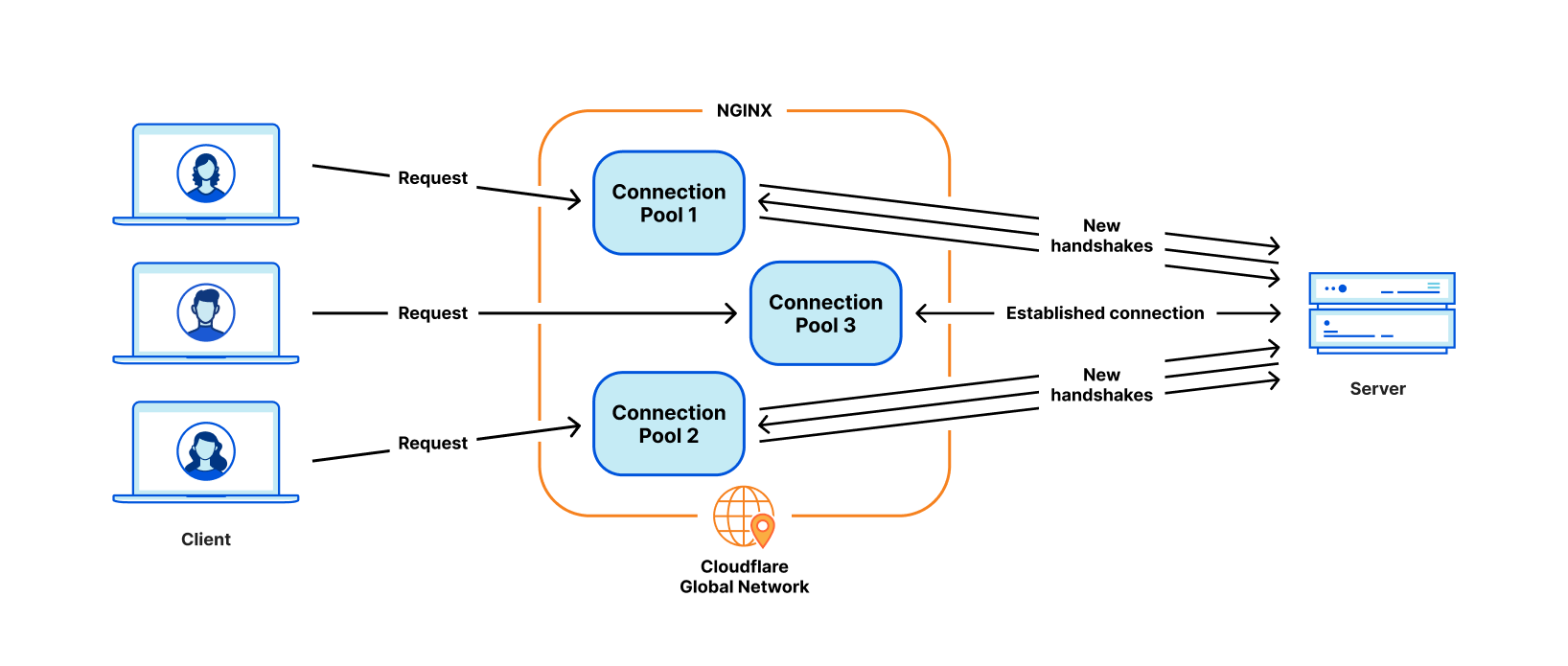
The most critical problem for our use cases is poor connection reuse. Our machines establish TCP connections to origin servers to proxy HTTP requests. Connection reuse speeds up TTFB (time-to-first-byte) of requests by reusing previously established connections from a connection pool, skipping TCP and TLS handshakes required on a new connection.

However, the NGINX connection pool is per worker. When a request lands on a certain worker, it can only reuse the connections within that worker. When we add more NGINX workers to scale up, our connection reuse ratio gets worse because the connections are scattered across more isolated pools of all the processes. This results in slower TTFB and more connections to maintain, which consumes resources (and money) for both us and our customers.

How we built Pingora, the proxy that connects Cloudflare to the Internet

As mentioned in past blog posts, we have workarounds for some of these issues. But if we can address the fundamental issue: the worker/process model, we will resolve all these problems naturally.

Some types of functionality are difficult to add

NGINX is a very good web server, load balancer or a simple gateway. But Cloudflare does way more than that. We used to build all the functionality we needed around NGINX, which is not easy to do while trying not to diverge too much from NGINX upstream codebase.

For example, when retrying/failing over a request, sometimes we want to send a request to a different origin server with a different set of request headers. But that is not something NGINX allows us to do. In cases like this, we spend time and effort on working around the NGINX constraints.

Meanwhile, the programming languages we had to work with didn’t provide help alleviating the difficulties. NGINX is purely in C, which is not memory safe by design. It is very error-prone to work with such a 3rd party code base. It is quite easy to get into memory safety issues, even for experienced engineers, and we wanted to avoid these as much as possible.

The other language we used to complement C is Lua. It is less risky but also less performant. In addition, we often found ourselves missing static typing when working with complicated Lua code and business logic.

And the NGINX community is not very active, and development tends to be “behind closed doors”.

Choosing to build our own

Over the past few years, as we’ve continued to grow our customer base and feature set, we continually evaluated three choices:

  1. Continue to invest in NGINX and possibly fork it to tailor it 100% to our needs. We had the expertise needed, but given the architecture limitations mentioned above, significant effort would be required to rebuild it in a way that fully supported our needs.
  2. Migrate to another 3rd party proxy codebase. There are definitely good projects, like envoy and others. But this path means the same cycle may repeat in a few years.
  3. Start with a clean slate, building an in-house platform and framework. This choice requires the most upfront investment in terms of engineering effort.

We evaluated each of these options every quarter for the past few years. There is no obvious formula to tell which choice is the best. For several years, we continued with the path of the least resistance, continuing to augment NGINX. However, at some point, building our own proxy’s return on investment seemed worth it. We made a call to build a proxy from scratch, and began designing the proxy application of our dreams.

The Pingora Project

Design decisions

To make a proxy that serves millions of requests per second fast, efficient and secure, we have to make a few important design decisions first.

We chose Rust as the language of the project because it can do what C can do in a memory safe way without compromising performance.

Although there are some great off-the-shelf 3rd party HTTP libraries, such as hyper, we chose to build our own because we want to maximize the flexibility in how we handle HTTP traffic and to make sure we can innovate at our own pace.

At Cloudflare, we handle traffic across the entire Internet. We have many cases of bizarre and non-RFC compliant HTTP traffic that we have to support. For example, hyper did not support HTTP status codes greater than 599 until late 2020, three years after people initially raised the issue and repeatedly argued that it was necessary. And we need more than being correct. We need a robust, permissive, customizable HTTP library that can survive the wilds of the Internet. The best way to guarantee that is to implement our own.

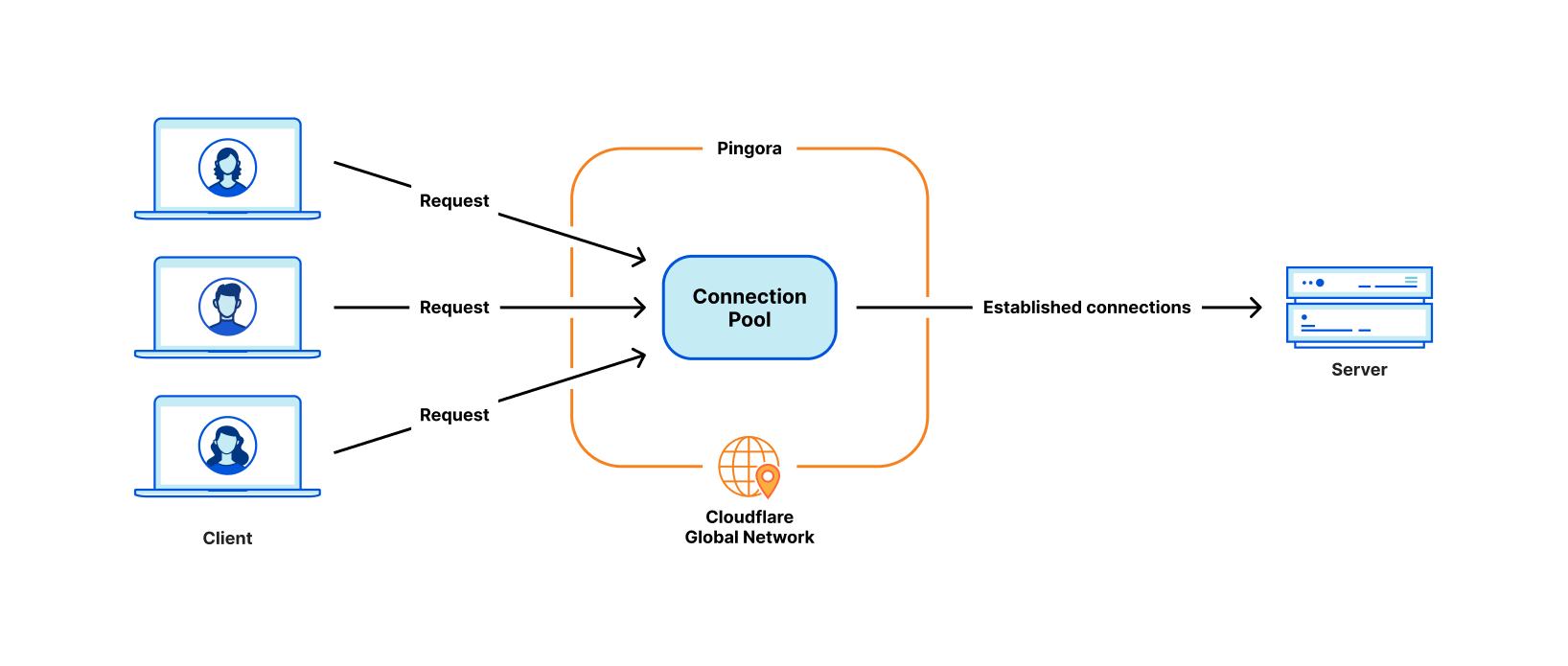
The next design decision was around our workload scheduling system. We chose multithreading over multiprocessing in order to share resources, especially connection pools, easily. We also decided that work stealing was required to avoid some classes of performance problems mentioned above. The Tokio async runtime turned out to be a great fit for our needs.

Finally, we wanted our project to be intuitive and developer friendly. What we build is not the final product, and should be extensible as a platform as more features are built on top of it. We decided to implement a “life of a request” event based programmable interface similar to NGINX/OpenResty. For example, the “request filter” phase allows developers to run code to modify or reject the request when a request header is received. With this design, we can separate our business logic and generic proxy logic cleanly. Developers who previously worked on NGINX can easily switch to Pingora and quickly become productive.

Pingora is faster in production

Let’s fast-forward to the present. Pingora handles almost every HTTP request that needs to interact with an origin server (for a cache miss, for example), and we’ve collected a lot of performance data in the process.

First, let’s see how Pingora speeds up our customer’s traffic. Overall traffic on Pingora shows 5ms reduction on median TTFB and 80ms reduction on the 95th percentile. This is not because we run code faster. Even our old service could handle requests in the sub-millisecond range.

The savings come from our new architecture which can share connections across all threads. This means a better connection reuse ratio, which spends less time on TCP and TLS handshakes.

How we built Pingora, the proxy that connects Cloudflare to the Internet

Across all customers, Pingora makes only a third as many new connections per second compared to the old service. For one major customer, it increased the connection reuse ratio from 87.1% to 99.92%, which reduced new connections to their origins by 160x. To present the number more intuitively, by switching to Pingora, we save our customers and users 434 years of handshake time every day.

More features

Having a developer friendly interface engineers are familiar with while eliminating the previous constraints allows us to develop more features, more quickly. Core functionality like new protocols act as building blocks to more products we can offer to customers.

As an example, we were able to add HTTP/2 upstream support to Pingora without major hurdles. This allowed us to offer gRPC  to our customers shortly afterwards. Adding this same functionality to NGINX would have required significantly more engineering effort and might not have materialized.

More recently we’ve announced Cache Reserve where Pingora uses R2 storage as a caching layer. As we add more functionality to Pingora, we’re able to offer new products that weren’t feasible before.

More efficient

In production, Pingora consumes about 70% less CPU and 67% less memory compared to our old service with the same traffic load. The savings come from a few factors.

Our Rust code runs more efficiently compared to our old Lua code. On top of that, there are also efficiency differences from their architectures. For example, in NGINX/OpenResty, when the Lua code wants to access an HTTP header, it has to read it from the NGINX C struct, allocate a Lua string and then copy it to the Lua string. Afterwards, Lua has to garbage-collect its new string as well. In Pingora, it would just be a direct string access.

The multithreading model also makes sharing data across requests more efficient. NGINX also has shared memory but due to implementation limitations, every shared memory access has to use a mutex lock and only strings and numbers can be put into shared memory. In Pingora, most shared items can be accessed directly via shared references behind atomic reference counters.

Another significant portion of CPU saving, as mentioned above, is from making fewer new connections. TLS handshakes are expensive compared to just sending and receiving data via established connections.

Safer

Shipping features quickly and safely is difficult, especially at our scale. It’s hard to predict every edge case that can occur in a distributed environment processing millions of requests a second. Fuzzing and static analysis can only mitigate so much. Rust’s memory-safe semantics guard us from undefined behavior and give us confidence our service will run correctly.

With those assurances we can focus more on how a change to our service will interact with other services or a customer’s origin. We can develop features at a higher cadence and not be burdened by memory safety and hard to diagnose crashes.

When crashes do occur an engineer needs to spend time to diagnose how it happened and what caused it. Since Pingora’s inception we’ve served a few hundred trillion requests and have yet to crash due to our service code.

In fact, Pingora crashes are so rare we usually find unrelated issues when we do encounter one. Recently we discovered a kernel bug soon after our service started crashing. We’ve also discovered hardware issues on a few machines, in the past ruling out rare memory bugs caused by our software even after significant debugging was nearly impossible.

Conclusion

To summarize, we have built an in-house proxy that is faster, more efficient and versatile as the platform for our current and future products.

We will be back with more technical details regarding the problems we faced, the optimizations we applied and the lessons we learned from building Pingora and rolling it out to power a significant portion of the Internet. We will also be back with our plan to open source it.

Pingora is our latest attempt at rewriting our system, but it won’t be our last. It is also only one of the building blocks in the re-architecting of our systems.

Interested in joining us to help build a better Internet? Our engineering teams are hiring.

[$] A Python security fix breaks (some) bignums

Post Syndicated from original https://lwn.net/Articles/907572/

Typically, an urgent security release of a project is not for a
two-year-old CVE, but such is the case for a recent
Python release
of four versions of the language. The bug is a
denial of service (DoS) that can be caused by converting enormous numbers to
strings—or vice versa—but it was not deemed serious enough to fix
when it
was first
reported. Evidently more recent reports, including a remote exploit of the
bug, have raised its importance—causing a rushed-out fix. But the
fix breaks some existing Python code, and the process of handling the
incident has left something to be desired, leading the project to look at
ways to improve its processes.

Security updates for Wednesday

Post Syndicated from original https://lwn.net/Articles/907983/

Security updates have been issued by CentOS (open-vm-tools), Debian (freecad and sqlite3), Fedora (qt5-qtwebengine and vim), SUSE (firefox, kernel, libzapojit, perl, postgresql14, and samba), and Ubuntu (dotnet6, dpdk, gdk-pixbuf, rust-regex, and systemd).

Patch Tuesday – September 2022

Post Syndicated from Greg Wiseman original https://blog.rapid7.com/2022/09/13/patch-tuesday-september-2022/

Patch Tuesday - September 2022

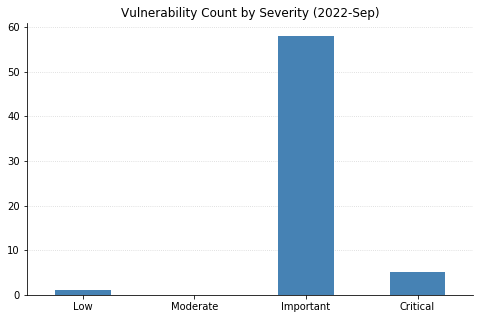
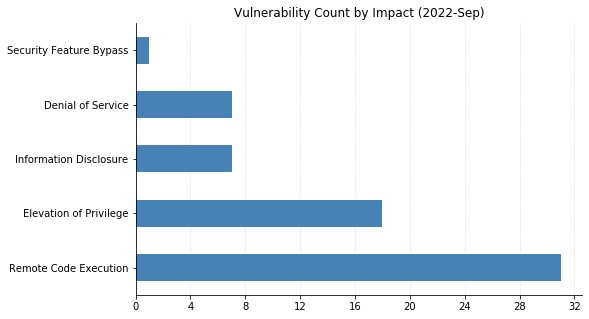
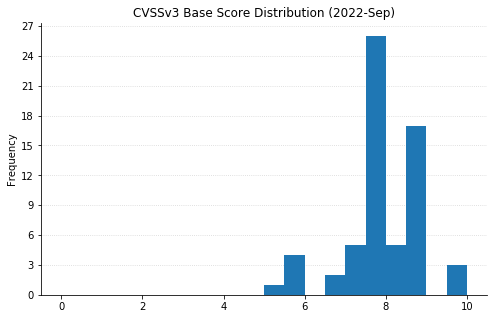
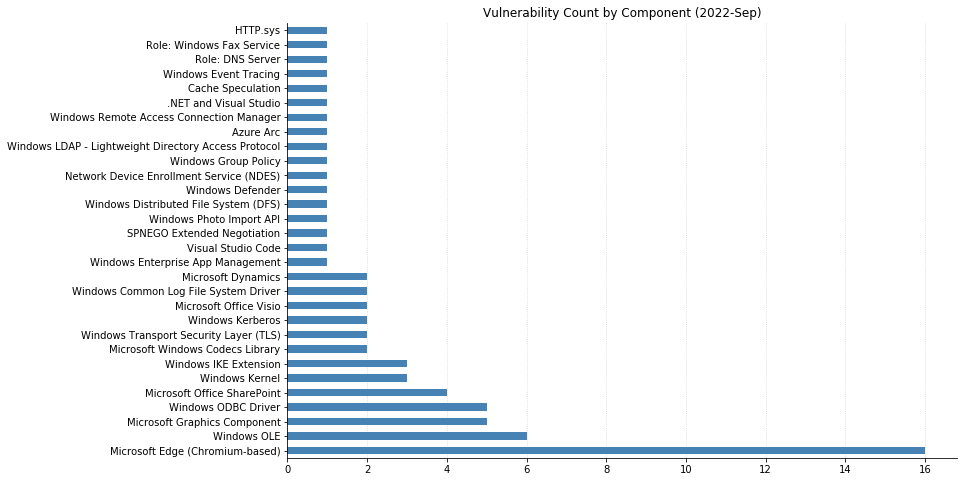
This month’s Patch Tuesday is on the lighter side, with 79 CVEs being fixed by Microsoft (including 16 CVEs affecting Chromium, used by their Edge browser, that were already available). One zero-day was announced: CVE-2022-37969 is an elevation of privilege vulnerability affecting the Log File System Driver in all supported versions of Windows, allowing attackers to gain SYSTEM-level access on an asset they’ve already got an initial foothold in. Interestingly, Microsoft credits four separate researchers/organizations for independently reporting this, which may be indicative of relatively widespread exploitation. Also previously disclosed (in March), though less useful to attackers, Microsoft has released a fix for CVE-2022-23960 (aka Spectre-BHB) for Windows 11 on ARM64.

Some of the more noteworthy vulnerabilities this month affect Windows systems with IPSec enabled. CVE-2022-34718 allows remote code execution (RCE) on any Windows system reachable via IPv6; CVE-2022-34721 and CVE-2022-34722 are RCE vulnerabilities in the Windows Internet Key Exchange (IKE) Protocol Extensions. All three CVEs are ranked Critical and carry a CVSSv3 base score of 9.8. Rounding out the Critical RCEs this month are CVE-2022-35805 and CVE-2022-34700, both of which affect Microsoft Dynamics (on-premise) and have a CVSSv3 base score of 8.8. Any such systems should be updated immediately.

SharePoint administrators should also be aware of four separate RCEs being addressed this month. They’re ranked Important, meaning Microsoft recommends applying the updates at the earliest opportunity. Finally, a large swath of CVEs affecting OLE DB Provider for SQL Server and the Microsoft ODBC Driver were also fixed. These require some social engineering to exploit, by convincing a user to either connect to a malicious SQL Server or open a maliciously crafted .mdb (Access) file.

Summary charts

Patch Tuesday - September 2022

Summary tables

Azure vulnerabilities

CVE Title Exploited? Publicly disclosed? CVSSv3 base score Has FAQ?
CVE-2022-38007 Azure Guest Configuration and Azure Arc-enabled servers Elevation of Privilege Vulnerability No No 7.8 Yes

Browser vulnerabilities

CVE Title Exploited? Publicly disclosed? CVSSv3 base score Has FAQ?
CVE-2022-38012 Microsoft Edge (Chromium-based) Remote Code Execution Vulnerability No No 7.7 Yes
CVE-2022-3075 Chromium: CVE-2022-3075 Insufficient data validation in Mojo No No N/A Yes
CVE-2022-3058 Chromium: CVE-2022-3058 Use after free in Sign-In Flow No No N/A Yes
CVE-2022-3057 Chromium: CVE-2022-3057 Inappropriate implementation in iframe Sandbox No No N/A Yes
CVE-2022-3056 Chromium: CVE-2022-3056 Insufficient policy enforcement in Content Security Policy No No N/A Yes
CVE-2022-3055 Chromium: CVE-2022-3055 Use after free in Passwords No No N/A Yes
CVE-2022-3054 Chromium: CVE-2022-3054 Insufficient policy enforcement in DevTools No No N/A Yes
CVE-2022-3053 Chromium: CVE-2022-3053 Inappropriate implementation in Pointer Lock No No N/A Yes
CVE-2022-3047 Chromium: CVE-2022-3047 Insufficient policy enforcement in Extensions API No No N/A Yes
CVE-2022-3046 Chromium: CVE-2022-3046 Use after free in Browser Tag No No N/A Yes
CVE-2022-3045 Chromium: CVE-2022-3045 Insufficient validation of untrusted input in V8 No No N/A Yes
CVE-2022-3044 Chromium: CVE-2022-3044 Inappropriate implementation in Site Isolation No No N/A Yes
CVE-2022-3041 Chromium: CVE-2022-3041 Use after free in WebSQL No No N/A Yes
CVE-2022-3040 Chromium: CVE-2022-3040 Use after free in Layout No No N/A Yes
CVE-2022-3039 Chromium: CVE-2022-3039 Use after free in WebSQL No No N/A Yes
CVE-2022-3038 Chromium: CVE-2022-3038 Use after free in Network Service No No N/A Yes

Developer Tools vulnerabilities

CVE Title Exploited? Publicly disclosed? CVSSv3 base score Has FAQ?
CVE-2022-26929 .NET Framework Remote Code Execution Vulnerability No No 7.8 Yes
CVE-2022-38013 .NET Core and Visual Studio Denial of Service Vulnerability No No 7.5 No
CVE-2022-38020 Visual Studio Code Elevation of Privilege Vulnerability No No 7.3 Yes

ESU vulnerabilities

CVE Title Exploited? Publicly disclosed? CVSSv3 base score Has FAQ?
CVE-2022-37964 Windows Kernel Elevation of Privilege Vulnerability No No 7.8 No

Microsoft Dynamics vulnerabilities

CVE Title Exploited? Publicly disclosed? CVSSv3 base score Has FAQ?
CVE-2022-35805 Microsoft Dynamics CRM (on-premises) Remote Code Execution Vulnerability No No 8.8 Yes
CVE-2022-34700 Microsoft Dynamics CRM (on-premises) Remote Code Execution Vulnerability No No 8.8 Yes

Microsoft Office vulnerabilities

CVE Title Exploited? Publicly disclosed? CVSSv3 base score Has FAQ?
CVE-2022-38008 Microsoft SharePoint Server Remote Code Execution Vulnerability No No 8.8 Yes
CVE-2022-38009 Microsoft SharePoint Server Remote Code Execution Vulnerability No No 8.8 Yes
CVE-2022-37961 Microsoft SharePoint Server Remote Code Execution Vulnerability No No 8.8 Yes
CVE-2022-35823 Microsoft SharePoint Remote Code Execution Vulnerability No No 8.1 Yes
CVE-2022-37962 Microsoft PowerPoint Remote Code Execution Vulnerability No No 7.8 Yes
CVE-2022-38010 Microsoft Office Visio Remote Code Execution Vulnerability No No 7.8 Yes
CVE-2022-37963 Microsoft Office Visio Remote Code Execution Vulnerability No No 7.8 Yes

System Center vulnerabilities

CVE Title Exploited? Publicly disclosed? CVSSv3 base score Has FAQ?
CVE-2022-35828 Microsoft Defender for Endpoint for Mac Elevation of Privilege Vulnerability No No 7.8 Yes

Windows vulnerabilities

CVE Title Exploited? Publicly disclosed? CVSSv3 base score Has FAQ?
CVE-2022-35841 Windows Enterprise App Management Service Remote Code Execution Vulnerability No No 8.8 Yes
CVE-2022-30196 Windows Secure Channel Denial of Service Vulnerability No No 8.2 Yes
CVE-2022-37957 Windows Kernel Elevation of Privilege Vulnerability No No 7.8 Yes
CVE-2022-37954 DirectX Graphics Kernel Elevation of Privilege Vulnerability No No 7.8 Yes
CVE-2022-38019 AV1 Video Extension Remote Code Execution Vulnerability No No 7.8 Yes
CVE-2022-35838 HTTP V3 Denial of Service Vulnerability No No 7.5 No
CVE-2022-38011 Raw Image Extension Remote Code Execution Vulnerability No No 7.3 Yes
CVE-2022-26928 Windows Photo Import API Elevation of Privilege Vulnerability No No 7 Yes
CVE-2022-34725 Windows ALPC Elevation of Privilege Vulnerability No No 7 Yes
CVE-2022-37959 Network Device Enrollment Service (NDES) Security Feature Bypass Vulnerability No No 6.5 Yes
CVE-2022-35831 Windows Remote Access Connection Manager Information Disclosure Vulnerability No No 5.5 Yes
CVE-2022-34723 Windows DPAPI (Data Protection Application Programming Interface) Information Disclosure Vulnerability No No 5.5 Yes
CVE-2022-23960 Arm: CVE-2022-23960 Cache Speculation Restriction Vulnerability No Yes N/A Yes

Windows ESU vulnerabilities

CVE Title Exploited? Publicly disclosed? CVSSv3 base score Has FAQ?
CVE-2022-34718 Windows TCP/IP Remote Code Execution Vulnerability No No 9.8 Yes
CVE-2022-34721 Windows Internet Key Exchange (IKE) Protocol Extensions Remote Code Execution Vulnerability No No 9.8 Yes
CVE-2022-34722 Windows Internet Key Exchange (IKE) Protocol Extensions Remote Code Execution Vulnerability No No 9.8 Yes
CVE-2022-35834 Microsoft OLE DB Provider for SQL Server Remote Code Execution Vulnerability No No 8.8 Yes
CVE-2022-35835 Microsoft OLE DB Provider for SQL Server Remote Code Execution Vulnerability No No 8.8 Yes
CVE-2022-35836 Microsoft OLE DB Provider for SQL Server Remote Code Execution Vulnerability No No 8.8 Yes
CVE-2022-35840 Microsoft OLE DB Provider for SQL Server Remote Code Execution Vulnerability No No 8.8 Yes
CVE-2022-34731 Microsoft OLE DB Provider for SQL Server Remote Code Execution Vulnerability No No 8.8 Yes
CVE-2022-34733 Microsoft OLE DB Provider for SQL Server Remote Code Execution Vulnerability No No 8.8 Yes
CVE-2022-34726 Microsoft ODBC Driver Remote Code Execution Vulnerability No No 8.8 Yes
CVE-2022-34727 Microsoft ODBC Driver Remote Code Execution Vulnerability No No 8.8 Yes
CVE-2022-34730 Microsoft ODBC Driver Remote Code Execution Vulnerability No No 8.8 Yes
CVE-2022-34732 Microsoft ODBC Driver Remote Code Execution Vulnerability No No 8.8 Yes
CVE-2022-34734 Microsoft ODBC Driver Remote Code Execution Vulnerability No No 8.8 Yes
CVE-2022-33679 Windows Kerberos Elevation of Privilege Vulnerability No No 8.1 Yes
CVE-2022-33647 Windows Kerberos Elevation of Privilege Vulnerability No No 8.1 Yes
CVE-2022-35830 Remote Procedure Call Runtime Remote Code Execution Vulnerability No No 8.1 Yes
CVE-2022-38005 Windows Print Spooler Elevation of Privilege Vulnerability No No 7.8 Yes
CVE-2022-30200 Windows Lightweight Directory Access Protocol (LDAP) Remote Code Execution Vulnerability No No 7.8 Yes
CVE-2022-37956 Windows Kernel Elevation of Privilege Vulnerability No No 7.8 Yes
CVE-2022-37955 Windows Group Policy Elevation of Privilege Vulnerability No No 7.8 Yes
CVE-2022-34729 Windows GDI Elevation of Privilege Vulnerability No No 7.8 Yes
CVE-2022-38004 Windows Fax Service Remote Code Execution Vulnerability No No 7.8 Yes
CVE-2022-34719 Windows Distributed File System (DFS) Elevation of Privilege Vulnerability No No 7.8 Yes
CVE-2022-37969 Windows Common Log File System Driver Elevation of Privilege Vulnerability Yes Yes 7.8 Yes
CVE-2022-35803 Windows Common Log File System Driver Elevation of Privilege Vulnerability No No 7.8 Yes
CVE-2022-35833 Windows Secure Channel Denial of Service Vulnerability No No 7.5 No
CVE-2022-34720 Windows Internet Key Exchange (IKE) Extension Denial of Service Vulnerability No No 7.5 No
CVE-2022-34724 Windows DNS Server Denial of Service Vulnerability No No 7.5 No
CVE-2022-37958 SPNEGO Extended Negotiation (NEGOEX) Security Mechanism Information Disclosure Vulnerability No No 7.5 Yes
CVE-2022-30170 Windows Credential Roaming Service Elevation of Privilege Vulnerability No No 7.3 Yes
CVE-2022-38006 Windows Graphics Component Information Disclosure Vulnerability No No 6.5 Yes
CVE-2022-34728 Windows Graphics Component Information Disclosure Vulnerability No No 5.5 Yes
CVE-2022-35832 Windows Event Tracing Denial of Service Vulnerability No No 5.5 No
CVE-2022-35837 Windows Graphics Component Information Disclosure Vulnerability No No 5 Yes

NEVER MISS A BLOG

Get the latest stories, expertise, and news about security today.

How a Principal Engineer Made His Journey to Cloud Security With Rapid7

Post Syndicated from Tal Avissar original https://blog.rapid7.com/2022/09/13/how-a-principal-engineer-made-his-journey-to-cloud-security-with-rapid7/

How a Principal Engineer Made His Journey to Cloud Security With Rapid7

The first programming language I learned in my childhood was Pascal. I was 12 years old at the time, and I quickly developed a passion for technology.

From a young age, I always knew I wanted to learn engineering and computer science. I wanted to solve big design and architecture problems while building new products that would influence the many people using software every day. The idea that we can use technology to build better tools inspires me, and I get excited about finding ways to help people work more efficiently.

Cybersecurity is such an interesting field because of the unique challenges and complexities associated with it. With my prior knowledge and background in security fundamentals and algorithms, joining Rapid7 felt like an exciting opportunity to grow my career.

An approachable start to a new challenge

Starting a role in a new industry can feel overwhelming, but Rapid7 has provided me the tools to make it a successful transition.

I joined Rapid7 as a Principal Engineer within our Cloud Security team. When I joined, I had some background in cybersecurity and security. Upon joining, I was immediately supported with the training programs and learning materials that helped me get up to speed and understand the business in more detail.

As a new hire, I had an excellent onboarding experience. The onboarding program gave me the chance to experience the unique culture and values of Rapid7, while also learning more about our industry, products, and the evolving needs of our customers. With the right tools, programs, and culture, I felt supported from day 1 to begin learning and immerse myself into the business and culture.

What sets Rapid7 apart

There are a lot of things that make Rapid7 unique as an employer. The people who work here are incredibly smart and kind, and the company places emphasis on learning and development, which shows they care about their people. It’s important for me to be in an environment where the business and leaders support their teams and care about giving them the right resources and tools they need to do the job, while also growing their own skills and knowledge. In engineering, the team gets access to the tools and tech stack requirements needed to fulfill our work.

Since I joined the company, I have experienced the reward of seeing the direct impact of my work. Being able to work autonomously to get the job done while having opportunities to mentor and coach others around me has been extremely rewarding. I love having the freedom to be creative, learn, and innovate new solutions. As I continue to grow within my career, I look forward to my next step in achieving my MSC degree in computer science. Being in an organization where I am creating products from scratch and using a cutting-edge tech stack helps contribute toward this goal.

I’ve learned a lot by taking a new step in my career and moving to a cloud security company. For those who are looking to do the same, I have a few pieces of advice to help you be successful:

  • Have an attitude of learning and growth.
  • There are many certifications you can get that will help introduce you to cloud technology. Check out certifications for GCP, AWS, and Azure to get comfortable.
  • Research and explore advanced concepts of security, encryption, and attack models. There is a lot of exciting activity happening in cybersecurity, and learning more about the industry can fuel your interest and help you understand the importance and impact your work in this field can have.

Interested in joining Tal on the Cloud Security team at Rapid7? Explore our open roles.

Additional reading:

NEVER MISS A BLOG

Get the latest stories, expertise, and news about security today.

[$] LXC and LXD: a different container story

Post Syndicated from original https://lwn.net/Articles/907613/

OCI containers are the most popular type
of Linux container, but they are not the only type, nor were they the
first. LXC (short for “LinuX
Containers”) predates Docker by several years, though it was also not the
first. LXC dates back to its first release in 2008; the earliest version of
Docker
, which was tagged in 2013, was actually a wrapper around LXC.
The LXC project is still going strong and shows no signs of winding
down; LXC 5.0 was released in July and comes with a promise of support until
2027.

Choose the k-NN algorithm for your billion-scale use case with OpenSearch

Post Syndicated from Jack Mazanec original https://aws.amazon.com/blogs/big-data/choose-the-k-nn-algorithm-for-your-billion-scale-use-case-with-opensearch/

When organizations set out to build machine learning (ML) applications such as natural language processing (NLP) systems, recommendation engines, or search-based systems, often times k-Nearest Neighbor (k-NN) search will be used at some point in the workflow. As the number of data points reaches the hundreds of millions or even billions, scaling a k-NN search system can be a major challenge. Applying Approximate Nearest Neighbor (ANN) search is a great way to overcome this challenge.

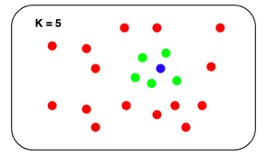
The k-NN problem is relatively simple compared to other ML techniques: given a set of points and a query, find the k nearest points in the set to the query. The naive solution is equally understandable: for each point in the set, compute its distance from the query and keep track of the top k along the way.

K-NN concept

The problem with this naive approach is that it doesn’t scale particularly well. The runtime search complexity is O(Nlogk), where N is the number of vectors and k is the number of nearest neighbors. Although this may not be noticeable when the set contains thousands of points, it becomes noticeable when the size gets into the millions. Although some exact k-NN algorithms can speed search up, they tend to perform similarly to the naive approach in higher dimensions.

Enter ANN search. We can reduce the runtime search latency if we loosen a few constraints on the k-NN problem:

  • Allow indexing to take longer
  • Allow more space to be used at query time
  • Allow the search to return an approximation of the k-NN in the set

Several different algorithms have been discovered to do just that.

OpenSearch is a community-driven, Apache 2.0-licensed, open-source search and analytics suite that makes it easy to ingest, search, visualize, and analyze data. The OpenSearch k-NN plugin provides the ability to use some of these algorithms within an OpenSearch cluster. In this post, we discuss the different algorithms that are supported and run experiments to see some of the trade-offs between them.

Hierarchical Navigable Small Worlds algorithm

The Hierarchical Navigable Small Worlds algorithm (HNSW) is one of the most popular algorithms out there for ANN search. It was the first algorithm that the k-NN plugin supported, using a very efficient implementation from the nmslib similarity search library. It has one of the best query latency vs. recall trade-offs and doesn’t require any training. The core idea of the algorithm is to build a graph with edges connecting index vectors that are close to each other. Then, on search, this graph is partially traversed to find the approximate nearest neighbors to the query vector. To steer the traversal towards the query’s nearest neighbors, the algorithm always visits the closest candidate to the query vector next.

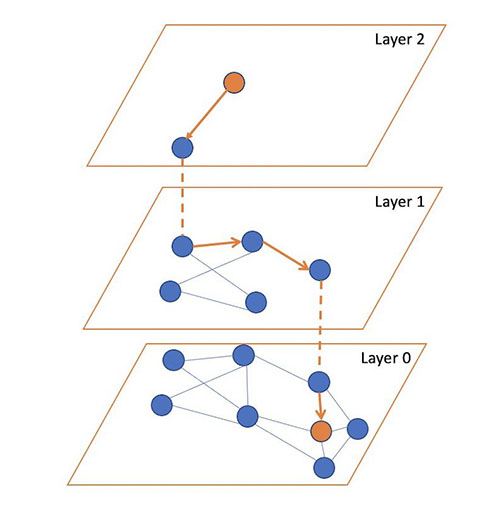
But which vector should the traversal start from? It could just pick a random vector, but for a large index, this might be very far from the query’s actual nearest neighbors, leading to poor results. To pick a vector that is generally close to the query vector to start from, the algorithm builds not just one graph, but a hierarchy of graphs. All vectors are added to the bottom layer, and then a random subset of those are added to the layer above, and then a subset of those are added to the layer above that, and so on.

During search, we start from a random vector in the top layer, partially traverse the graph to find (approximately) the nearest point to the query vector in that layer, and then use this vector as the starting point for our traversal of the layer below. We repeat this until we get to the bottom layer. At the bottom layer, we perform the traversal, but this time, instead of just searching for the nearest neighbor, we keep track of the k-nearest neighbors that are visited along the way.

The following figure illustrates this process (inspired from the image in original paper Efficient and robust approximate nearest neighbor search using Hierarchical Navigable Small World graphs).

You can tune three parameters for HNSW:

  • m – The maximum number of edges a vector will get in a graph. The higher this number is, the more memory the graph will consume, but the better the search approximation may be.
  • ef_search – The size of the queue of the candidate nodes to visit during traversal. When a node is visited, its neighbors are added to the queue to be visited in the future. When this queue is empty, the traversal will end. A larger value will increase search latency, but may provide better search approximation.
  • ef_construction – Very similar to ef_search. When a node is to be inserted into the graph, the algorithm will find its m edges by querying the graph with the new node as the query vector. This parameter controls the candidate queue size for this traversal. A larger value will increase index latency, but may provide a better search approximation.

For more information on HNSW, you can read through the paper Efficient and robust approximate nearest neighbor search using Hierarchical Navigable Small World graphs.

Memory consumption

Although HNSW provides very good approximate nearest neighbor search at low latencies, it can consume a large amount of memory. Each HNSW graph uses roughly 1.1 * (4 * d + 8 * m) * num_vectors bytes of memory:

  • d is the dimension of the vectors
  • m is the algorithm parameter that controls the number of connections each node will have in a layer
  • num_vectors is the number of vectors in the index

To ensure durability and availability, especially when running production workloads, OpenSearch indexes are recommended to have at least one replica shard. Therefore, the memory requirement is multiplied by (1 + number of replicas). For use cases where the data size is 1 billion vectors of 128 dimensions each and m is set to the default value of 16, the estimated amount of memory required would be:

1.1 * (4 * 128 + 8 * 16) * 1,000,000,000 * 2 = 1,408 GB.

If we increase the size of vectors to 512, for example, and the m to 100, which is recommended for vectors with high intrinsic dimensionality, some use cases can require a total memory of approximately 4 TB.

With OpenSearch, we can always horizontally scale the cluster to handle this memory requirement. However, this comes at the expense of raising infrastructure costs. For cases where scaling doesn’t make sense, options to reduce the memory footprint of the k-NN system need to be explored. Fortunately, there are algorithms that we can use to do this.

Inverted File System algorithm

Consider a different approach for approximating a nearest neighbor search: separate your index vectors into a set of buckets, then, to reduce your search time, only search through a subset of these buckets. From a high level, this is what the Inverted File System (IVF) ANN algorithm does. In OpenSearch 1.2, the k-NN plugin introduced support for the implementation of IVF by Faiss. Faiss is an open-sourced library from Meta for efficient similarity search and clustering of dense vectors.

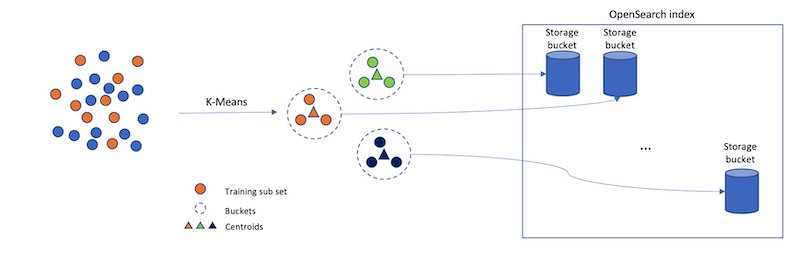
However, if we just randomly split up our vectors into different buckets, and only search a subset of them, this will be a poor approximation. The IVF algorithm uses a more elegant approach. First, before indexing begins, it assigns each bucket a representative vector. When a vector is indexed, it gets added to the bucket that has the closest representative vector. This way, vectors that are closer to each other are placed roughly in the same or nearby buckets.

To determine what the representative vectors for the buckets are, the IVF algorithm requires a training step. In this step, k-Means clustering is run on a set of training data, and the centroids it produces become the representative vectors. The following diagram illustrates this process.

Inverted file system indexing concept

IVF has two parameters:

  • nlist – The number of buckets to create. More buckets will result in longer training times, but may improve the granularity of the search.
  • nprobes – The number of buckets to search. This parameter is fairly straightforward. The more buckets that are searched, the longer the search will take, but the better the approximation.

Memory consumption

In general, IVF requires less memory than HNSW because IVF doesn’t need to store a set of edges for each indexed vector.

We estimate that IVF will roughly require the following amount of memory:

1.1 * (((4 * dimension) * num_vectors) + (4 * nlist * dimension)) bytes

For the case explored for HNSW where there are 1,000,000,000 128-dimensional vectors with one layer of replication, an IVF algorithm with an nlist of 4096 would take roughly 1.1 * (((4 * 128) * 2,000,000,000) + (4 * 4096 * 128)) bytes = 1126 GB.

This savings does come at a cost, however, because HNSW offers a better query latency versus approximation accuracy tradeoff.

Product quantization vector compression

Although you can use HNSW and IVF to speed up nearest neighbor search, they can consume a considerable amount of memory. When we get into the billion-vector scale, we start to require thousands of GBs of memory to support their index structures. As we scale up the number of vectors or the dimension of vectors, this requirement continues to grow. Is there a way to use noticeably less space for our k-NN index?

The answer is yes! In fact, there are a lot of different ways to reduce the amount of memory vectors require. You can change your embedding model to produce smaller vectors, or you can apply techniques like Principle Component Analysis (PCA) to reduce the vector’s dimensionality. Another approach is to use quantization. The general idea of vector quantization is to map a large vector space with continuous values into a smaller space with discrete values. When a vector is mapped into a smaller space, it requires fewer bits to represent. However, this comes at a cost—when mapping to a smaller input space, some information about the vector is lost.

Product quantization (PQ) is a very popular quantization technique in the field of nearest neighbor search. It can be used together with ANN algorithms for nearest neighbor search. Along with IVF, the k-NN plugin added support for Faiss’s PQ implementation in OpenSearch 1.2.

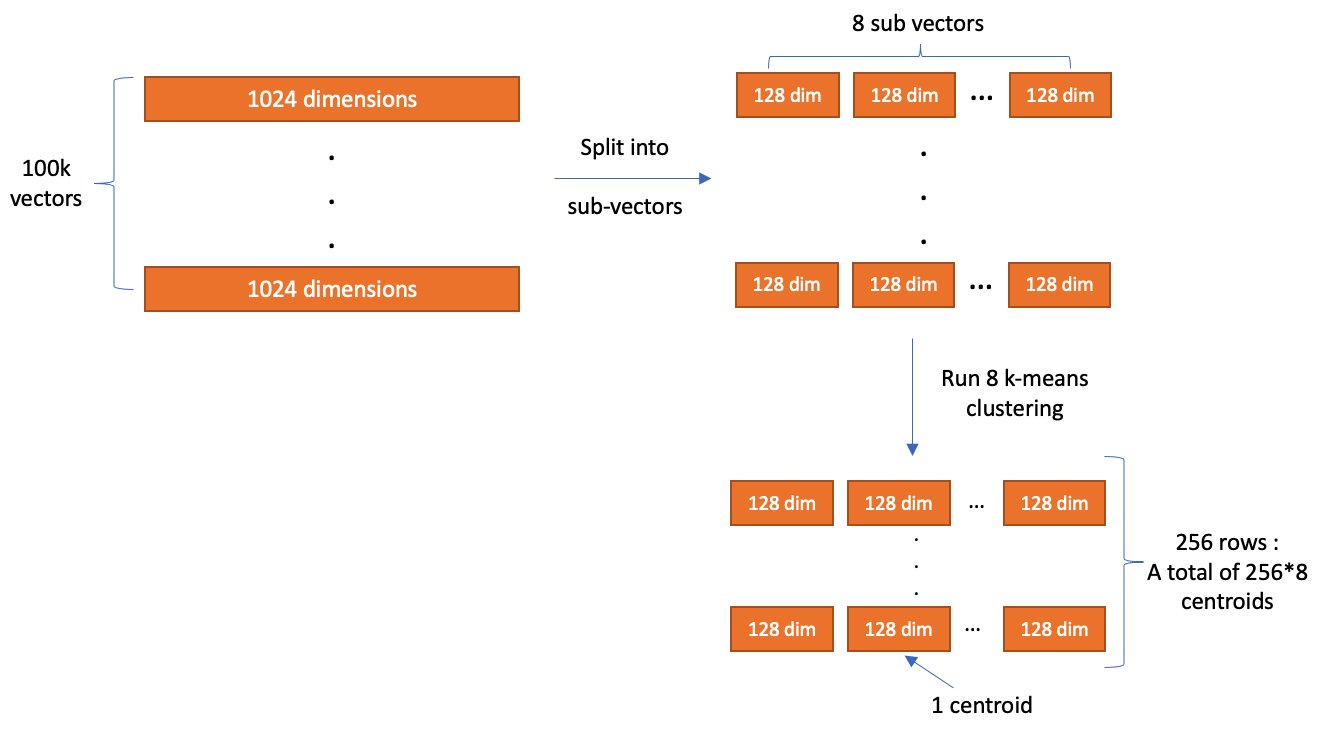
The main idea of PQ is to break up a vector into several sub-vectors and encode the sub-vectors independently with a fixed number of bits. The number of sub-vectors that the original vector is broken up into is controlled by a parameter, m, and the number of bits to encode each sub-vector with is controlled by a parameter, code_size. After encoding finishes, a vector is compressed into roughly m * code_size bits. So, assume we have a set of 100,000 1024-dimensional vectors. With m = 8 and code_size = 8, PQ breaks each vector into 8 128-dimensional sub-vectors and encode each sub-vector with 8 bits.

The values used for encoding are produced during a training step. During training, tables are created with 2code_size entries for each sub-vector partition. Next, k-Means clustering, with a k value of 2code_size, is run on the corresponding partition of sub-vectors from the training data. The centroids produced here are added as the entries to the partition’s table.

After all the tables are created, we encode a vector by replacing each sub-vector with the ID of the closest vector in the partition’s table. In the example where code_size = 8, we only need 8 bits to store an ID because there are 28 elements in the table. So, with dimension = 1024 and m = 8, the total size of one vector (assuming it uses a 32-bit floating point data type) is reduced from 4,096 bytes to roughly 8 bytes!

Product quantization encoding step

When we want to decode a vector, we can reconstruct an approximated version of it by using the stored IDs to retrieve the vectors from each partition’s table. The distance from the query vector to the reconstructed vector can then be computed and used in a nearest neighbor search. (It’s worth noting that, in practice, further optimization techniques like ADC are used to speed up this process for k-NN search).

Product quantization decoding step

Memory consumption

As we mentioned earlier, PQ will encode each vector into roughly m * code_size bits plus some overhead for each vector.

When combining it with IVF, we can estimate the index size as follows:

1.1 * ((((code_size/8) * m + overhead_per_vector) * num_vectors) + (4 * nlist * dimension) + (2 code_size * 4 * dimension) bytes

Using 1 billion vectors, dimension = 128, m = 8, code_size = 8, and nlist = 4096, we get an estimated total memory consumption of 70GB: 1.1 * ((((8 / 8) * 8 + 24) * 1,000,000,000) + (4 * 4096 * 128) + (2^8 * 4 * 128)) * 2 = 70 GB.

Running k-NN with OpenSearch

First make sure you have an OpenSearch cluster up and running. For instructions, refer to Cluster formation. For a more managed solution, you can use Amazon OpenSearch Service.

Before getting into the experiments, let’s go over how to run k-NN workloads in OpenSearch. First, we need to create an index. An index stores a set of documents in a way that they can be easily searched. For k-NN, the index’s mapping tells OpenSearch what algorithms to use and what parameters to use with them. We start by creating an index that uses HNSW as its search algorithm:

PUT my-hnsw-index
{
  "settings": {
    "index": {
      "knn": true,
      "number_of_shards": 10,
      "number_of_replicas" 1,
    }
  },
  "mappings": {
    "properties": {
      "my_vector": {
        "type": "knn_vector",
        "dimension": 4,
        "method": {
          "name": "hnsw",
          "space_type": "l2",
          "engine": "nmslib",
          "parameters": {
            "ef_construction": 128,
            "m": 24
          }
        }
      }
    }
  }
}

In the settings, we need to enable knn so that the index can be searched with the knn query type (more on this later). We also set the number of shards, and the number of replicas each shard will have. An index is made up of a collection of shards. Sharding is how OpenSearch distributes an index across multiple nodes in a cluster. For more information about shards, refer to Sizing Amazon OpenSearch Service domains.

In the mappings, we configure a field called my_vector of type knn_vector to store the vector data. We also pass nmslib as the engine to let OpenSearch know it should use nmslib’s implementation of HNSW. Additionally, we pass l2 as the space_type. The space_type determines the function used to compute the distance between two vectors. l2 refers to the Euclidean distance. OpenSearch also supports cosine similarity and the inner product distance functions.

After the index is created, we can ingest some fake data:

POST _bulk
{ "index": { "_index": "my-hnsw-index", "_id": "1" } }
{ "my_vector": [1.5, 2.5], "price": 12.2 }
{ "index": { "_index": "my-hnsw-index", "_id": "2" } }
{ "my_vector": [2.5, 3.5], "price": 7.1 }
{ "index": { "_index": "my-hnsw-index", "_id": "3" } }
{ "my_vector": [3.5, 4.5], "price": 12.9 }
{ "index": { "_index": "my-hnsw-index", "_id": "4" } }
{ "my_vector": [5.5, 6.5], "price": 1.2 }
{ "index": { "_index": "my-hnsw-index", "_id": "5" } }
{ "my_vector": [4.5, 5.5], "price": 3.7 }
{ "index": { "_index": "my-hnsw-index", "_id": "6" } }
{ "my_vector": [1.5, 5.5, 4.5, 6.4], "price": 10.3 }
{ "index": { "_index": "my-hnsw-index", "_id": "7" } }
{ "my_vector": [2.5, 3.5, 5.6, 6.7], "price": 5.5 }
{ "index": { "_index": "my-hnsw-index", "_id": "8" } }
{ "my_vector": [4.5, 5.5, 6.7, 3.7], "price": 4.4 }
{ "index": { "_index": "my-hnsw-index", "_id": "9" } }
{ "my_vector": [1.5, 5.5, 4.5, 6.4], "price": 8.9 }

After adding some documents to the index, we can search it:

GET my-hnsw-index/_search
{
  "size": 2,
  "query": {
    "knn": {
      "my_vector": {
        "vector": [2, 3, 5, 6],
        "k": 2
      }
    }
  }
}

Creating an index that uses IVF or PQ is a little bit different because these algorithms require training. Before creating the index, we need to create a model using the training API:

POST /_plugins/_knn/models/my_ivfpq_model/_train
{
  "training_index": "train-index",
  "training_field": "train-field",
  "dimension": 128,
  "description": "My model description",
  "method": {
      "name":"ivf",
      "engine":"faiss",
      "parameters":{
        "encoder":{
            "name":"pq",
            "parameters":{
                "code_size": 8,
                "m": 8
            }
        }
      }
  }
}

The training_index and training_field specify where the training data is stored. The only requirement for the training data index is that it has a knn_vector field that has the same dimension as you want your model to have. The method defines the algorithm that should be used for search.

After the training request is submitted, it will run in the background. To check if the training is complete, you can use the GET model API:

GET /_plugins/_knn/models/my_ivfpq_model/filter_path=model_id,state
{
  "model_id" : "my_ivfpq_model",
  "state" : "created"
}

After the model is created, you can create an index that uses this model:

PUT /my-hnsw-index
{
  "settings" : {
    "index.knn": true
    "number_of_shards" : 10,
    "number_of_replicas" : 1,
  },
  "mappings": {
    "properties": {
      "my_vector": {
        "type": "knn_vector",
        "model_id": "my_ivfpq_model"
      }
    }
  }
}

After the index is created, we can add documents to it and search it just like we did for HNSW.

Experiments

Let’s run a few experiments to see how these algorithms perform in practice and what tradeoffs are made. We look at an HNSW versus an IVF index using PQ. For these experiments, we’re interested in search accuracy, query latency, and memory consumption. Because these trade-offs are mainly observed at scale, we use the BIGANN dataset containing 1 billion vectors of 128 dimensions. The dataset also contains 10,000 queries of test data mapping a query to the ground truth closest 100 vectors based on the Euclidean distance.

Specifically, we compute the following search metrics:

  • Latency p99 (ms), Latency p90 (ms), Latency p50 (ms) – Query latency at various quantiles in milliseconds
  • recall@10 – The fraction of the top 10 ground truth neighbors found in the 10 results returned by the plugin
  • Native memory consumption (GB) – The amount of memory used by the plugin during querying

One thing to note is that the BIGANN dataset uses an unsigned integer as the data type. Because the knn_vector field doesn’t support unsigned integers, the data is automatically converted to floats.

To run the experiments, we complete the following steps:

  1. Ingest the dataset into the cluster using the OpenSearch Benchmarks framework (the code can be found on GitHub).
  2. When ingestion is complete, we use the warmup API to prepare the cluster for the search workload.
  3. We run the 10,000 test queries against the cluster 10 times and collect the aggregated results.

The queries return the document ID only, and not the vector, to improve performance (code for this can be found on GitHub).

Parameter selection

One tricky aspect of running experiments is selecting the parameters. There are too many different combinations of parameters to test them all. That being said, we decided to create three configurations for HNSW and IVFPQ:

  • Optimize for search latency and memory
  • Optimize for recall
  • Fall somewhere in the middle

For each optimization strategy, we chose two configurations.

For HNSW, we can tune the m, ef_construction, and ef_search parameters to achieve our desired trade-off:

  • m – Controls the maximum number of edges a node in a graph can have. Because each node has to store all of its edges, increasing this value will increase the memory footprint, but also increase the connectivity of the graph, which will improve recall.
  • ef_construction – Controls the size of the candidate queue for edges when adding a node to the graph. Increasing this value will increase the number of candidates to consider, which will increase the index latency. However, because more candidates will be considered, the quality of the graph will be better, leading to better recall during search.
  • ef_search – Similar to ef_construction, it controls the size of the candidate queue for graph traversal during search. Increasing this value will increase the search latency, but will also improve the recall.

In general, we chose configurations that gradually increased the parameters, as detailed in the following table.

Config ID Optimization Strategy m ef_construction ef_search
hnsw1 Optimize for memory and search latency 8 32 32
hnsw2 Optimize for memory and search latency 16 32 32
hnsw3 Balance between latency, memory, and recall 16 128 128
hnsw4 Balance between latency, memory, and recall 32 256 256
hnsw5 Optimize for recall 32 512 512
hnsw6 Optimize for recall 64 512 512

For IVF, we can tune two parameters:

  • nlist – Controls the granularity of the partitioning. The recommended value for this parameter is a function of the number of vectors in the index. One thing to keep in mind is that there are Faiss indexes that map to Lucene segments. There are several Lucene segments per shard and several shards per OpenSearch index. For our estimates, we assumed that there would be 100 segments per shard and 24 shards, so about 420,000 vectors per Faiss index. With this value, we estimated a good value to be 4096 and kept this constant for the experiments.
  • nprobes – Controls the number of nlist buckets we search. Higher values generally lead to improved recalls at the expense of increased search latencies.

For PQ, we can tune two parameters:

  • mControls the number of partitions to break the vector into. The larger this value is, the better the encoding will approximate the original, at the expense of raising memory consumption.
  • code_sizeControls the number of bits to encode a sub-vector with. The larger this value is, the better the encoding approximates the original, at the expense of raising memory consumption. The max value is 8, so we kept it constant at 8 for all experiments.

The following table summarizes our strategies.

Config ID Optimization Strategy nprobes m (num_sub_vectors)
ivfpq1 Optimize for memory and search latency 8 8
ivfpq2 Optimize for memory and search latency 16 8
ivfpq3 Balance between latency, memory, and recall 32 16
ivfpq4 Balance between latency, memory, and recall 64 32
ivfpq5 Optimize for recall 128 16
ivfpq6 Optimize for recall 128 32

Additionally, we need to figure out how much training data to use for IVFPQ. In general, Faiss recommends between 30,000 and 256,000 training vectors for components involving k-Means training. For our configurations, the maximum k for k-Means is 4096 from the nlist parameter. With this formula, the recommended training set size is between 122,880 and 1,048,576 vectors, so we settled on 1 million vectors. The training data comes from the index vector dataset.

Lastly, for the index configurations, we need to select the shard count. It is recommended to keep the shard size between 10–50 GBs for OpenSearch. Experimentally, we determined that for HNSW, a good number would be 64 shards and for IVFPQ, 42. Both index configurations were configured with one replica.

Cluster configuration

To run these experiments, we used Amazon OpenSearch Service using version 1.3 of OpenSearch to create the clusters. We decided to use the r5 instance family, which provides a good trade-off between memory size and cost.

The number of nodes will depend on the amount of memory that can be used for the algorithm per node and the total amount of memory required by the algorithm. Having more nodes and more memory will generally improve performance, but for these experiments, we want to minimize cost. The amount of memory available per node is computed as memory_available = (node_memory - jvm_size) * circuit_breaker_limit, with the following parameters:

  • node_memory – The total memory of the instance.
  • jvm_size – The OpenSearch JVM heap size. Set to 32 GB.
  • circuit_breaker_limit – The native memory usage threshold for the circuit breaker. Set to 0.5.

Because HNSW and IVFPQ have different memory requirements, we estimate how much memory is needed for each algorithm and determine the required number of nodes accordingly.

For HNSW, with m = 64, the total memory required using the formula from the previous sections is approximately 2,252 GB. Therefore, with r5.12xlarge (384 GB of memory), memory_available is 176 GB and the total number of nodes required is about 12, which we round up to 16 for stability purposes.

Because the IVFPQ algorithm requires less memory, we can use a smaller instance type, the r5.4xlarge instance, which has 128 GB of memory. Therefore, the memory_available for the algorithm is 48 GB. The estimated algorithm memory consumption where m = 64 is a total of 193 GB and the total number of nodes required is four, which we round up to six for stability purposes.

For both clusters, we use c5.2xlarge instance types as dedicated leader nodes. This will provide more stability for the cluster.

According to the AWS Pricing Calculator, for this particular use case, the cost per hour of the HNSW cluster is around $75 an hour, and the IVFPQ cluster costs around $11 an hour. This is important to remember when comparing the results.

Also, keep in mind that these benchmarks can be run using your custom infrastructure, using Amazon Elastic Compute Cloud (Amazon EC2), as long as the instance types and their memory size is equivalent.

Results

The following tables summarize the results from the experiments.

Test ID p50 Query latency (ms) p90 Query latency (ms) p99 Query latency (ms) Recall@10 Native memory consumption (GB)
hnsw1 9.1 11 16.9 0.84 1182
hnsw2 11 12.1 17.8 0.93 1305
hnsw3 23.1 27.1 32.2 0.99 1306
hnsw4 54.1 68.3 80.2 0.99 1555
hnsw5 83.4 100.6 114.7 0.99 1555
hnsw6 103.7 131.8 151.7 0.99 2055
Test ID p50 Query latency (ms) p90 Query latency (ms) p99 Query latency (ms) Recall@10 Native memory consumption (GB)
ivfpq1 74.9 100.5 106.4 0.17 68
ivfpq2 78.5 104.6 110.2 0.18 68
ivfpq3 87.8 107 122 0.39 83
ivfpq4 117.2 131.1 151.8 0.61 114
ivfpq5 128.3 174.1 195.7 0.40 83
ivfpq6 163 196.5 228.9 0.61 114

As you might expect, given how many more resources it uses, the HNSW cluster has lower query latencies and better recall. However, the IVFPQ indexes use significantly less memory.

For HNSW, increasing the parameters does in fact lead to better recall at the expense of latency. For IVFPQ, increasing m has the most significant impact on improving recall. Increasing nprobes improves the recall marginally, but at the expense of significant increases in latencies.

Conclusion

In this post, we covered different algorithms and techniques used to perform approximate k-NN search at scale (over 1 billion data points) within OpenSearch. As we saw in the previous benchmarks section, there isn’t one algorithm or approach that optimises for all the metrics at once. HNSW, IVF, and PQ each allow you to optimize for different metrics in your k-NN workload. When choosing the k-NN algorithm to use, first understand the requirements of your use case (How accurate does my approximate nearest neighbor search need to be? How fast should it be? What’s my budget?) and then tailor the algorithm configuration to meet them.

You can take a look at the benchmarking code base we used on GitHub. You can also get started with approximate k-NN search today following the instructions in Approximate k-NN search. If you’re looking for a managed solution for your OpenSearch cluster, check out Amazon OpenSearch Service.


About the Authors

Jack Mazanec is a software engineer working on OpenSearch plugins. His primary interests include machine learning and search engines. Outside of work, he enjoys skiing and watching sports.

Othmane Hamzaoui is a Data Scientist working at AWS. He is passionate about solving customer challenges using Machine Learning, with a focus on bridging the gap between research and business to achieve impactful outcomes. In his spare time, he enjoys running and discovering new coffee shops in the beautiful city of Paris.

Scaling Git’s garbage collection

Post Syndicated from Taylor Blau original https://github.blog/2022-09-13-scaling-gits-garbage-collection/

At GitHub, we store a lot of Git data: more than 18.6 petabytes of it, to be precise. That’s more than six times the size of the Library of Congress’s digital collections1. Most of that data comes from the contents of your repositories: your READMEs, source files, tests, licenses, and so on.

But some of that data is just junk: some bit of your repository that is no longer important. It could be a file that you force-pushed over, or the contents of a branch you deleted without merging. In general, this slice of repository data is anything that isn’t contained in at least one of your repository’s branches or tags. Normally, we don’t remove any unreachable data from repositories. But occasionally we do, usually to remove sensitive data, like passwords or SSH keys from your repository’s history.

The process for permanently removing unreachable objects from a repository’s history has a history of causing problems within GitHub, especially in busy repositories or ones with lots of objects. In this post, we’ll talk about what those problems were, why we had them, the tools we built to address them, and some interesting ways we’ve built on top of them. All of this work was contributed upstream to the open-source Git project. Let’s dive in.

Object reachability

In this post, we’re going to talk a lot about “reachable” and “unreachable” objects. You may have heard these terms before, but perhaps only casually. Since we’re going to use them a lot, it will help to have more concrete definitions of the two. An object is reachable when there is at least one branch or tag along which you can reach the object in question. An object is “reached” by crawling through history—from commits to their parents, commits to their root trees, and trees to their sub-trees and blobs. An object is unreachable when no such branch or tag exists.

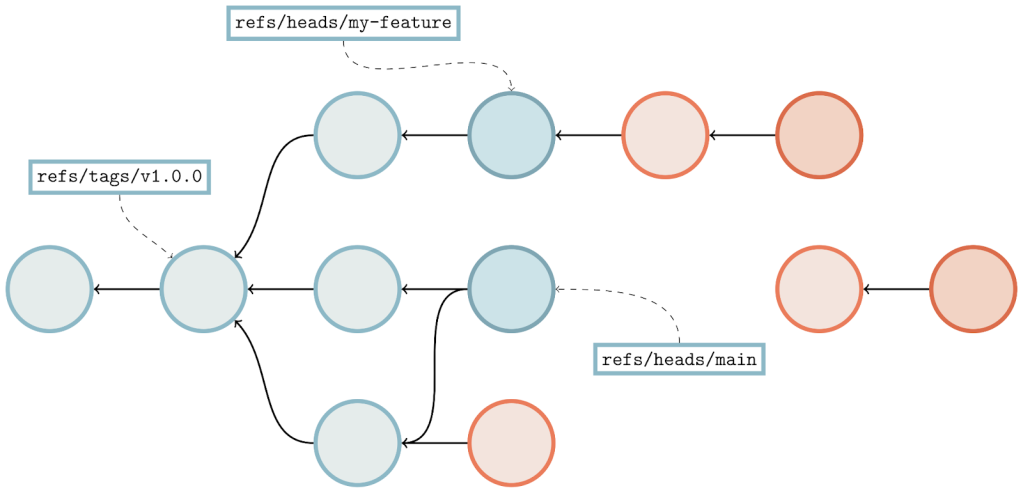
Sample object graph showing commits, with arrows connecting them to their parents. A few commits have boxes that are connected to them, which represent the tips of branches and tags.

Here, we’re looking at a sample object graph. For simplicity, I’m only showing commits (identified here as circles). Arrows point from commits to their parent(s). A few commits have boxes that are connected to them, which represent the tips of branches and tags.

The parts of the graph that are colored blue are reachable, and the red parts are considered unreachable. You’ll find that if you start at any branch or tag, and follow its arrows, that all commits along that path are considered reachable. Note that unreachable commits which have reachable ones as parents (in our diagram above, anytime an arrow points from a red commit to a blue one) are still considered unreachable, since they are not contained within any branch or tag.

Unreachable objects can also appear in clusters that are totally disconnected from the main object graph, as indicated by the two lone red commits towards the right-hand side of the image.

Pruning unreachable objects

Normally, unreachable objects stick around in your repository until they are either automatically or manually cleaned up. If you’ve ever seen the message, “Auto packing the repository for optimum performance,” in your terminal, Git is doing this for you in the background. You can also trigger garbage collection manually by running:

$ git gc --prune=<date>

That tells Git to trigger a garbage collection and remove unreachable objects. But observant readers might notice the optional <date> parameter to the --prune flag. What is that? The short answer is that Git allows you to restrict which objects get permanently deleted based on the last time they were written. But to fully explain, we first need to talk a little bit about a race condition that can occur when removing objects from a Git repository.

Object deletion raciness

Normally, deleting an unreachable object from a Git repository should not be a notable event. Since the object is unreachable, it’s not part of any branch or tag, and so deleting it doesn’t change the repository’s reachable state. In other words, removing an unreachable object from a repository should be as simple as:

  1. Repacking the repository to remove any copies of the object in question (and recomputing any deltas that are based on that object).
  2. Removing any loose copies of the object that happen to exist.
  3. Updating any additional indexes (like the multi-pack index, or commit-graph) that depend on the (now stale) packs that were removed.

The racy behavior occurs when a repository receives one or more pushes during this process. The main culprit is that the server advertises its objects at a different point in time from processing the objects that the client sent based on that advertisement.

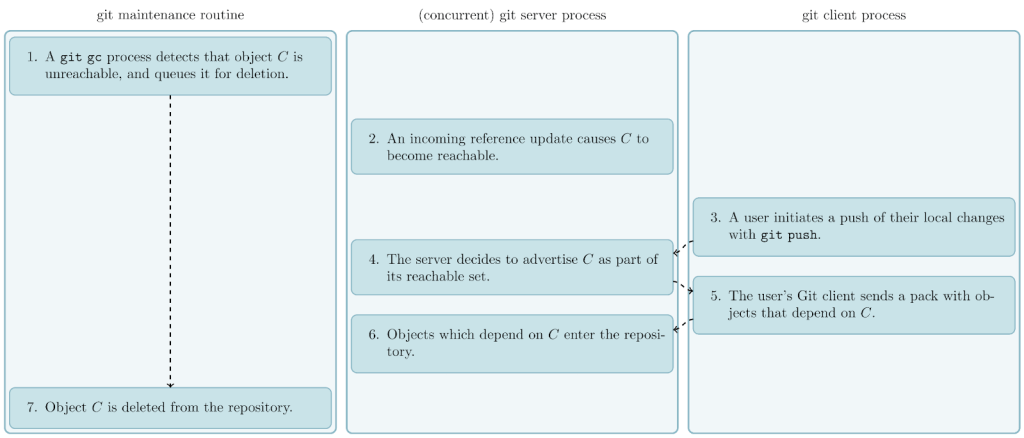
Consider what happens if Git decides (as part of running a git gc operation) that it wants to delete some unreachable object C. If C becomes reachable by some background reference update (e.g., an incoming push that creates a new branch pointing at C), it will then be advertised to any incoming pushes. If one of these pushes happens before C is actually removed, then the repository can end up in a corrupt state. Since the pusher will assume C is reachable (since it was part of the object advertisement), it is allowed to include objects that either reference or depend on C, without sending C itself. If C is then deleted while other reachable parts of the repository depend on it, then the repository will be left in a corrupt state.

Suppose the server receives that push before proceeding to delete C. Then, any objects from the incoming push that are related to it would be immediately corrupt. Reachable parts of the repository that reference C are no longer closed2 over reachability since C is missing. And any objects that are stored as a delta against C can no longer be inflated for the same reason.

Figure demonstrating that one side (responsible for garbage collecting the repository) decides that a certain object is unreachable, while another side makes that object reachable and accepts an incoming push based on that object—before the original side ultimately deletes that (now-reachable) object—leaving the repository in a corrupt state.

In case that was confusing, the above figure should help clear things up. The general idea is that one side (responsible for garbage collecting the repository) decides that a certain object is unreachable, while another side makes that object reachable and accepts an incoming push based on that object—before the original side ultimately deletes that (now-reachable) object—leaving the repository in a corrupt state.

Mitigating object deletion raciness

Git does not completely prevent this race from happening. Instead, it works around the race by gradually expiring unreachable objects based on the last time they were written. This explains the mysterious --prune=<date> option from a few sections ago: when garbage collecting a repository, only unreachable objects which haven’t been written since <date> are removed. Anything else (that is, the set of objects that have been written at least once since <date>) are left around.

The idea is that objects which have been written recently are more likely to become reachable again in the future, and would thus be more likely to be susceptible to the kind of race we talked about above if they were to be pruned. Objects which haven’t been written recently, on the other hand, are proportionally less likely to become reachable again, and so they are safe (or, at least, safer) to remove.

This idea isn’t foolproof, and it is certainly possible to run into the race we talked about earlier. We’ll discuss one such scenario towards the end of this post (along with the way we worked around it). But in practice, this strategy is simple and effective, preventing most instances of potential repository corruption.

Storing loose unreachable objects

But one question remains: how does Git keep track of the age of unreachable objects which haven’t yet aged out of the repository?

The answer, though simple, is at the heart of the problem we’re trying to solve here. Unreachable objects which have been written too recently to be removed from the repository are stored as loose objects, the individual object files stored in .git/objects. Storing these unreachable objects individually means that we can rely on their stat() modification time (hereafter, mtime) to tell us how recently they were written.

But this leads to an unfortunate problem: if a repository has many unreachable objects, and a large number of them were written recently, they must all be stored individually as loose objects. This is undesirable for a number of reasons:

  • Pairs of unreachable objects that share a vast majority of their contents must be stored separately, and can’t benefit from the kind of deduplication offered by packfiles. This can cause your repository to take up much more space than it otherwise would.
  • Having too many files (especially too many in a single directory) can lead to performance problems, including exhausting your system’s available inodes in the extreme case, leaving you unable to create new files, even if there may be space available for them.
  • Any Git operation which has to scan through all loose objects (for example, git repack -d, which creates a new pack containing just your repository’s unpacked objects) will slow down as there are more files to process.

It’s tempting to want to store all of a repository’s unreachable objects into a single pack. But there’s a problem there, too. Since all of the objects in a single pack share the same mtime (the mtime of the *.pack file itself), rewriting any single unreachable object has the effect of updating the mtimes of all of a repository’s unreachable objects. This is because Git optimizes out object writes for packed objects by simply updating the mtime of any pack(s) which contain that object. This makes it nearly impossible to expire any objects out of the repository permanently.

Cruft packs

To solve this problem, we turned to a long-discussed idea on the Git mailing list: cruft packs. The idea is simple: store an auxiliary list of mtime data alongside a pack containing just unreachable objects. To garbage collect a repository, Git places the unreachable objects in a pack. That pack is designated as a “cruft pack” because Git also writes the mtime data corresponding to each object in a separate file alongside that pack. This makes it possible to update the mtime of a single unreachable object without changing the mtimes of any other unreachable object.

To give you a sense of what this looks like in practice, here’s a small example:

a pack of Git objects (represented by rectangles of different colors)

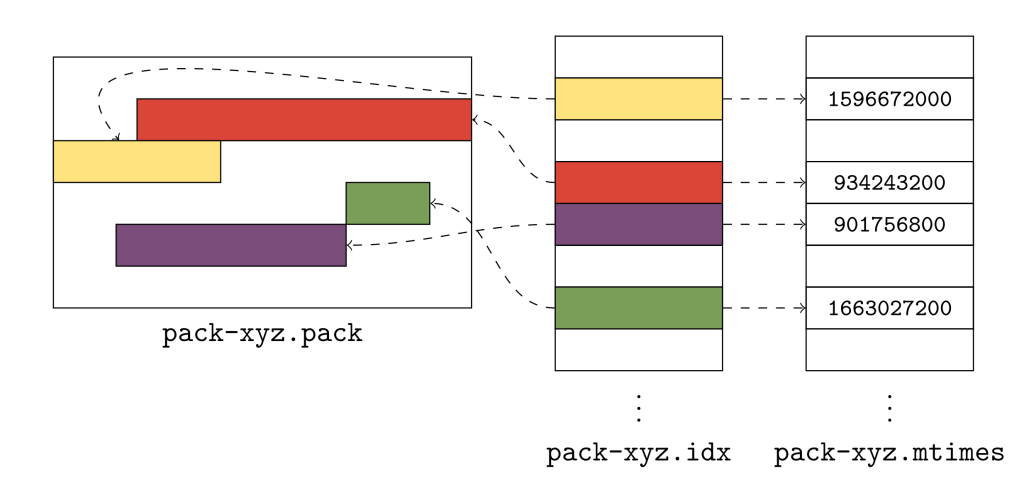
The above figure shows a pack of Git objects (represented by rectangles of different colors), its pack index, and the new .mtimes file. Together, these three files make up what Git calls a “cruft pack,” and it’s what allows Git to store unreachable objects together, without needing a single file for each object.

So, how do they work? Git uses the cruft pack to store a collection of object mtimes together in an array stored in the *.mtimes file. In order to discover the mtime for an individual object in a pack, Git first does a binary search on the pack’s index to discover that object’s lexicographic index. Git can then use that offset to read a 4-byte, unsigned integer in the .mtimes file. The .mtimes file contains a table of integers (one for each object in the associated *.pack file), each representing an epoch timestamp containing that object’s mtime. In other words, the *.mtimes file has a table of numbers, where each number represents an individual object’s mtime, encoded as a number of seconds since the Unix epoch.

Crucially, this makes it possible to store all of a repository’s unreachable objects together in a single pack, without having to store them as individual loose objects, bypassing all of the drawbacks we discussed in the last section. Moreover, it allows Git to update the mtime of a single unreachable object, without inadvertently triggering the same update across all unreachable objects.

Since Git doesn’t portably support updating a file in place, updating an object’s mtime (a process which Git calls “freshening”) takes place by writing a separate copy of that object out as a loose file. Of course, if we had to freshen all objects in a cruft pack, we would end up in a situation no better than before. But such updates tend to be unlikely in practice, and so writing individual copies of a small handful of unreachable objects ends up being a reasonable trade off most of the time.

Generating cruft packs

Now that we have introduced the concept of cruft packs, the question remains: how does Git generate them?

Despite being called git gc (short for “garbage collection”), running git gc does not always result in deleting unreachable objects. If you run git gc --prune=never, then Git will repack all reachable objects and move all unreachable objects to the cruft pack. If, however, you run git gc --prune=1.day.ago, then Git will repack all reachable objects, delete any unreachable objects that are older than one day, and repack the remaining unreachable objects into the cruft pack.

This is because of Git’s treatment of unreachable parts of the repository. While Git only relies on having a reachability closure over reachable objects, Git’s garbage collection routine tries to leave unreachable parts of the repository intact to the extent possible. That means if Git encounters some unreachable cluster of objects in your repository, it will either expire all or none of those objects, but never some subset of them.

We’ll discuss how cruft packs are generated with and without object expiration in the two sections below.

Cruft packs without object expiration

When generating a cruft pack with an object expiration of --date=never, our only goal is to collect all unreachable objects together into a single cruft pack. Broadly speaking, this occurs in three steps:

  1. Starting at all of the branches and tags, generate a pack containing only reachable objects.
  2. Looking at all other existing packs, enumerate the list of objects which don’t appear in the new pack of reachable objects. Create a new pack containing just these objects, which are unreachable.
  3. Delete the existing packs.

If any of that was confusing, don’t worry: we’ll break it down here step by step. The first step to collecting a repository’s unreachable objects is to figure out the parts of it that are reachable. If you’ve ever run git repack -A, this is exactly how that command works. Git starts a reachability traversal beginning at each of the branches and tags in your repository. Then it traverses back through history by walking from commits to their parents, trees to their sub-trees, and so on, marking every object that it sees along the way as reachable.

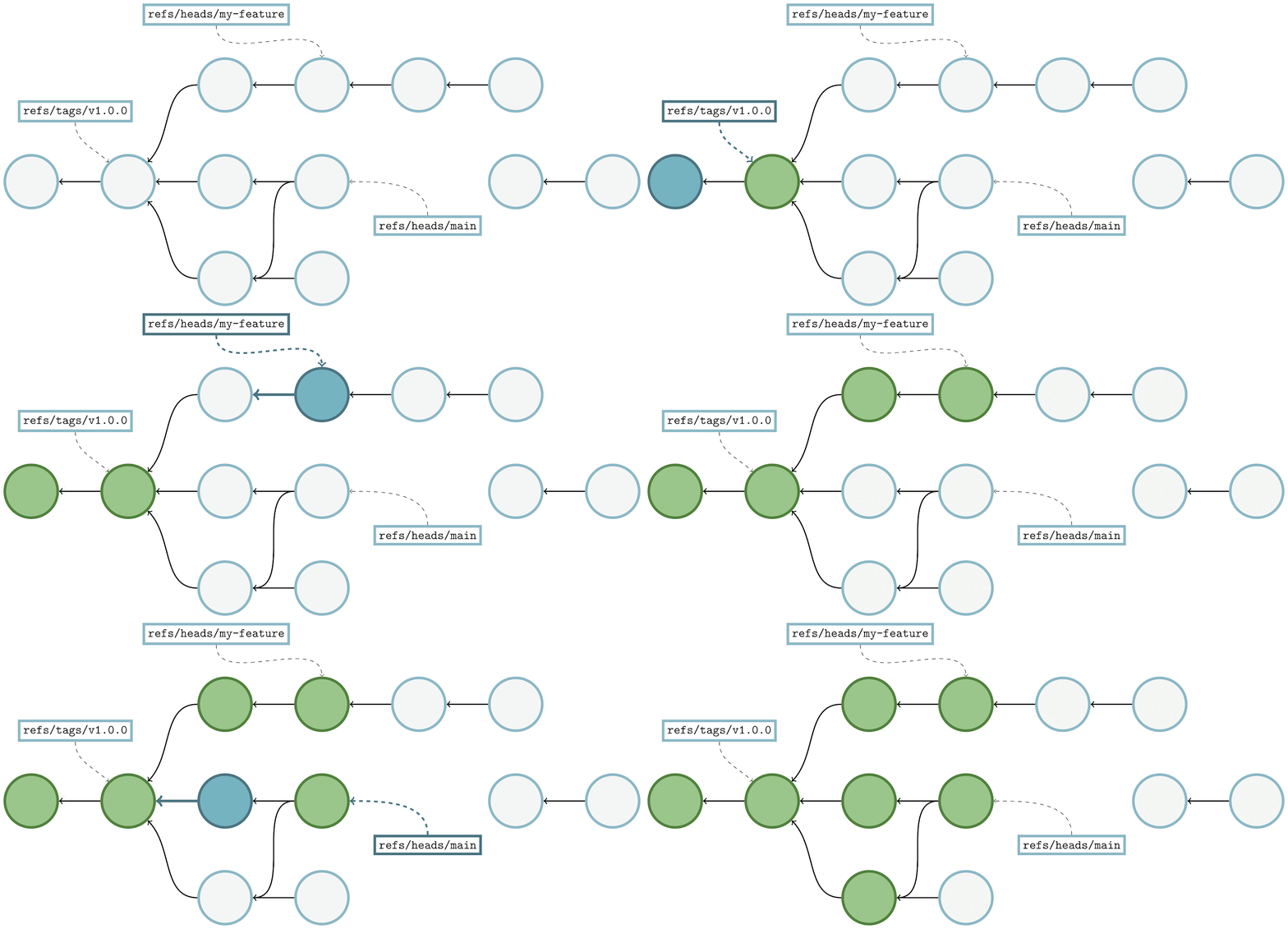
Demonstration of how Git walks through a commit graph, from commit to parent

Here, we’re showing the same commit graph from earlier in the post. Git’s goal at this point is simply to mark every reachable object that it sees, and it’s those objects that will become the contents of a new pack containing just reachable objects. Git starts by examining each reference, and walking from a commit to its parents until it either finds a commit with no parents (indicating the beginning of history), or a commit that it has already marked as reachable.

In the above, the commit being walked is highlighted in dark blue, and any commits marked as reachable are marked in green. At each step, the commit currently being visited gets marked as reachable, and its parent(s) are visited in the next step. By repeating this process among all branches and tags, Git will mark all reachable objects in the repository.

We can then use this set of objects to produce a new pack containing all reachable objects in a repository. Next, Git needs to discover the set of objects that it didn’t mark in the previous stage. A reasonable first approach might be to store the IDs of all of a repository’s objects in a set, and then remove them one by one as we mark objects reachable along our walk.

But this approach tends to be impractical, since each object will require a minimum of 20 bytes of memory in order to insert into this set. At the time of writing, the linux.git repository contains nearly nine million objects, which would require nearly 180 MB of memory just to write out all of their object IDs.

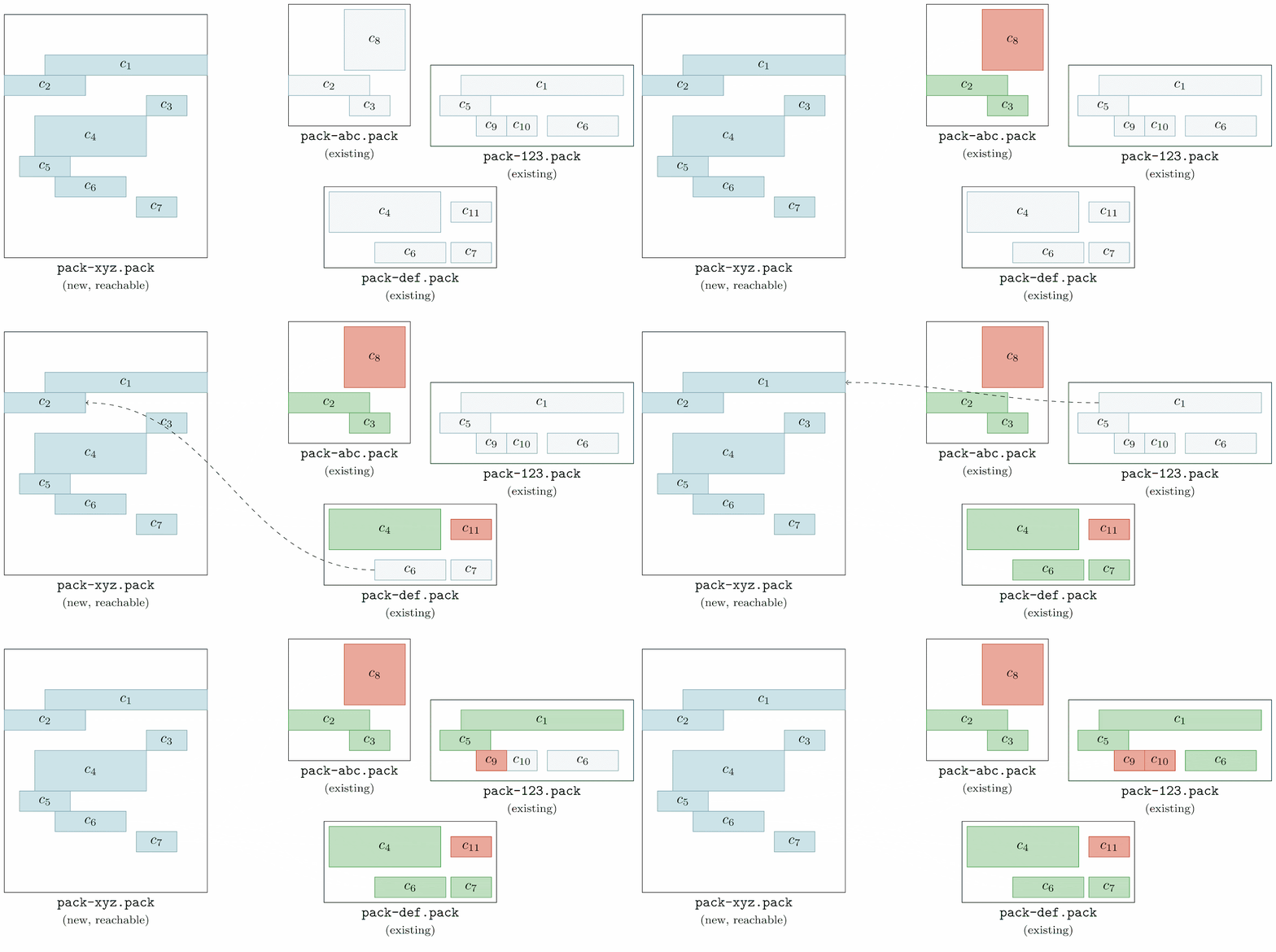
Instead, Git looks through all of the objects in all of the existing packs, checking whether or not each is contained in the new pack of reachable objects. Any object found in an existing pack which doesn’t appear in the reachable pack is automatically included in the cruft pack.

Animation demonstrating how  Git looks through all of the objects in all of the existing packs, checking whether or not each is contained in the new pack of reachable objects.

Here, we’re going one by one among all of the pre-existing packs (here, labeled as pack-abc.pack, pack-def.pack, and pack-123.pack) and inspecting their objects one at a time. We first start with object c8, looking through the reachable pack (denoted as pack-xyz.pack) to see if any of its objects match c8. Since none do, c8 is marked unreachable (which we represent by filling the object with a red background).

This process is repeated for each object in each existing pack. Once this process is complete, all objects that existed in the repository before starting a garbage collection are marked either green, or red (indicating that they are either reachable, or unreachable, respectively).

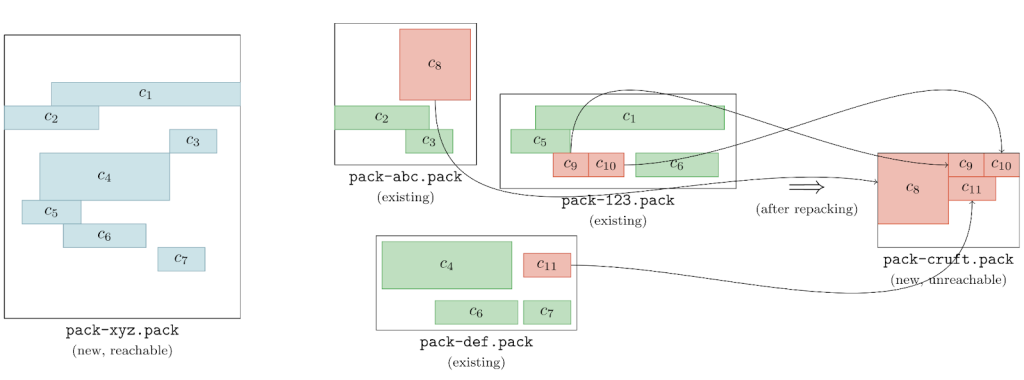
Git can then use the set of unreachable objects to generate a new pack, like below:

A set of labeled Git packs

This pack (on the far right of the above image, denoted pack-cruft.pack) contains exactly the set of unreachable objects present in the repository at the beginning of garbage collection. By keeping track of each unreachable object’s mtime while marking existing objects, Git has enough data to write out a *.mtimes file in addition to the new pack, leaving us with a cruft pack containing just the repository’s unreachable objects.

Here, we’re eliding some technical details about keeping track of each object’s mtime along the way, for brevity and simplicity. The routine is straightforward, though: each time we discover an object, we mark its mtime based on how we discovered the object.

  • If an object is found in a packfile, it inherits its mtime from the packfile itself.
  • If an object is found as a loose object, its mtime comes from the loose object file.
  • And if an object is found in an existing cruft pack, its mtime comes from reading the cruft pack’s *.mtimes file at the appropriate index.

If an object is seen more than once (e.g., an unreachable object stored in a cruft pack was freshened, resulting in another loose copy of the object), the mtime which is ultimately recorded in the new cruft pack is the most recent mtime of all of the above.

Cruft packs with object expiration

Generating cruft packs where some objects are going to expire out of the repository follows a similar, but slightly trickier approach than in the non-expiring case.

Doing a garbage collection with a fixed expiration is known as “pruning.” This essentially boils down to asking Git to pack the contents of a repository into two packfiles: one containing reachable objects, and another containing any unreachable objects. But, it also means that for some fixed expiration date, any unreachable objects which have an mtime older than the expiration date are removed from the repository entirely.

The difficulty in this case stems from a fact briefly mentioned earlier in this post, which is that Git attempts to prevent connected clusters of unreachable objects from leaving the repository if some, but not all, of their objects have aged out.

To make things clearer, here’s an example. Suppose that a repository has a handful of blob objects, all connected to some tree object, and all of these objects are unreachable. Assuming that they’re all old enough, then they will all expire together: no big deal. But what if the tree isn’t old enough to be expired? In this case, even though the blobs connected to it could be expired on their own, Git will keep them around since they’re connected to a tree with a sufficiently recent mtime. Git does this to preserve the repository’s reachability closure in case that tree were to become reachable again (in which case, having the tree and its blobs becomes important).

To ensure that Git preserves any unreachable objects which are reachable from recent objects Git handles this case of cruft pack generation slightly differently. At a high level, it:

  1. Generates a candidate list of cruft objects, using the same process as outlined in the previous section.
  2. Then, to determine the actual list of cruft objects to keep around, it performs a reachability traversal using all of the candidate cruft objects, adding any object it sees along the way to the cruft pack.

To make things a little clearer, here’s an example:

Animation of Git performing  a reachability traversal

After determining the set of unreachable objects (represented above as colored red) Git does a reachability traversal from each entry point into the graph of unreachable objects. Above, commits are represented by circles, trees by rectangles, and tree entries as rows within the larger rectangles. The mtimes are written below each commit.

For now, let’s assume our expiration date is d, so any object whose mtime is greater than d must stay (despite being unreachable), and anything older than d can be pruned. Git traverses through each entry and asks, “Is this object old enough to be pruned?” When the answer is “yes” Git leaves the object alone and moves on to the next entry point. When the answer is “no,” however, (ie., Git is looking at an unreachable object whose mtime is too recent to prune), Git marks that object as “rescued” (indicated by turning it green) and then continues its traversal, marking any reachable objects as rescued.

Objects that are rescued during this pass are written to the cruft pack, preserving their existence in the repository, leaving them to either continue to age, or have their mtimes updated before the next garbage collection.

Let’s take a closer look at the example above. Git starts by looking at object C(1,1), and notice that its mtime is d+5, meaning that (since it happens after our expiration time, d) it is too new to expire. That causes Git to start a reachability traversal beginning at C(1,1), rescuing every object it encounters along the way. Since many objects are shared between multiple commits, rescuing an object from a more recent part of the graph often ends up marking older objects as rescued, too.

After finishing the rescuing pass focused on C(1,1), Git moves on to look at C(0,2). But this commit’s mtime is d-10, which is before our expiration cutoff of d, meaning that it is safe to remove. Git can skip looking at any objects reachable from this commit, since none of them will be rescued.

Finally, Git looks at another connected cluster of the unreachable object graph, beginning at C(3,1). Since this object has an mtime of d+10, it is too new to expire, so Git performs another reachability traversal, rescuing it and any objects reachable from it.

Notice that in the final graph state that the main cluster of commits (the one beginning with C(0,2)) is only partially rescued. In fact, only the objects necessary to retain a reachability closure over the rescued objects among that cluster are saved from being pruned. So even though, for example, commit C(2,1) has only part of its tree entries rescued, that is OK since C(2,1) itself will be pruned (hence any non-rescued tree entries connected to it are unimportant and will also be pruned).

Putting it all together

Now that Git can generate a cruft pack and perform garbage collection on a repository with or without pruning objects, it was time to put all of the pieces together and submit the patches to the open-source Git project.

Other Git sub-commands, like repack, and gc needed to learn about cruft packs, and gain command-line flags and configuration knobs in order to opt-in to the new behavior. With all of the pieces in place, you can now trigger a garbage collection by running either:

$ git gc --prune=1.day.ago --cruft

or

$ git repack -d --cruft --cruft-expiration=1.day.ago

to repack your repository into a reachable pack, and a cruft pack containing unreachable objects whose mtimes are within the past day. More details on the new command-line options and configuration can be found here, here, here, and here.

GitHub submitted the entirety of the patches that comprise cruft packs to the open-source Git project, and the results were released in v2.37.0. That means that you can use the same tools as what we run at GitHub on your own laptop, to run garbage collection on your own repositories.

For those curious about the details, you can read the complete thread on the mailing list archive here.

Cruft packs at GitHub

After a lengthy process of testing to ensure that using cruft packs was safe to carry out across all repositories on GitHub, we deployed and enabled the feature across all repositories. We kept a close eye on repositories with large numbers of unreachable objects, since the process of breaking any deltas between reachable and unreachable objects (since the two are now stored in separate packs, and object deltas cannot cross pack boundaries) can cause the initial cruft pack generation to take a long time. A small handful of repositories with many unreachable objects needed more time to generate their very first cruft pack. In those instances, we generated their cruft packs outside of our normal repository maintenance jobs to avoid triggering any timeouts.

Now, every repository on GitHub and in GitHub Enterprise (in version 3.3 and newer) uses cruft packs to store their unreachable objects. This has made garbage collecting repositories (especially busy ones with many unreachable objects) tractable where it often required significant human intervention before. Before cruft packs, many repositories which required clean up were simply out of our reach because of the possibility of creating an explosion of loose objects which could derail performance for all repositories stored on a fileserver. Now, garbage collecting a repository is a simple task, no matter its size or scale.

During our testing, we ran garbage collection on a handful of repositories, and got some exciting results. For repositories that regularly force-push a single commit to their main branch (leaving a majority of their objects unreachable), their on-disk size dropped significantly. The most extreme example we found during testing caused a repository which used to take 186 gigabytes to store shrink to only take 2 gigabytes of space.

On github/github, GitHub’s main codebase, we were able to shrink the repository from around 57 gigabytes to 27 gigabytes. Even though these savings are more modest, the real payoff is in the objects we no longer have to store. Before garbage collecting, each replica of this repository had nearly 60 million objects, including years of test-merges, force-pushes, and all kinds of sources of unreachable objects. Each of these objects contributed to the I/O cost of repacking this repository. After garbage collecting, only 11.8 million objects remained. Since each object in a repository requires around 150 bytes of memory during repacking, we save around 7 gigabytes of RAM during each maintenance routine.

Limbo repositories

Even though we can easily garbage collect a repository of any size, we still have to navigate the inherent raciness that we described at the beginning of this post.

At GitHub, our approach has been to make this situation easy to recover from automatically instead of preventing it entirely (which would require significant surgery to much of Git’s code). To do this, our approach is to create a “limbo” repository whenever a pruning garbage collection is done. Any objects which get expired from the main repository are stored in a separate pack in the limbo repository. Then, the process to garbage collect a repository looks something like:

  1. Generate a cruft pack of recent unreachable objects in the main repository.
  2. Generate a second cruft pack of expired unreachable objects, stored outside of the main repository, in the “limbo” repository.
  3. After garbage collection has completed, run a git fsck in the main repository to detect any object corruption.
  4. If any objects are missing, recover them by copying them over from the limbo repository.

The process for generating a cruft pack of expired unreachable objects boils down to creating another cruft pack (using exactly the same process we described earlier in this post), with two caveats:

  • The expiration cutoff is set to “never” since we want to keep around any objects which we did expire in the previous step.
  • The original cruft pack is treated as a pack containing reachable objects since we want to ignore any unreachable objects which were too recent to expire (and, thus, are stored in the cruft pack in the main repository).

We have used this idea at GitHub with great success, and now treat garbage collection as a hands-off process from start to finish. The patches to implement this approach are available as a preliminary RFC on the Git mailing list here.

Thank you

This work would not have been possible without generous review and collaboration from engineers from within and outside of GitHub. The Git Systems team at GitHub were great to work with while we developed and deployed cruft packs. Special thanks to Torsten Walter, and Michael Haggerty, who played substantial roles in developing limbo repositories.

Outside of GitHub, this work would not have been possible without careful review from the open-source Git community, especially Derrick Stolee, Jeff King, Jonathan Tan, Jonathan Nieder, and Junio C Hamano. In particular, Jeff King contributed significantly to the original development of many of the ideas discussed above.

Notes


  1. It’s true. According to the Library of Congress themselves, their digital collection amounts to more than 3 petabytes in size [source]. The 18.6 petabytes we store at GitHub actually overcounts by a factor of five, since we store a handful of copies of each repository. In reality, it’s hard to provide an exact number, since data is de-duplicated within a fork network, and is stored compressed on disk. Either way you slice it, it’s a lot of data: you get the point. 
  2. Meaning that for any reachable object part of some repository, any objects reachable from it are also contained in that repository. 

Security updates for Tuesday

Post Syndicated from original https://lwn.net/Articles/907869/

Security updates have been issued by Debian (connman and python-oslo.utils), Fedora (libapreq2), Red Hat (booth, gnupg2, kernel, kernel-rt, mariadb:10.3, nodejs:14, nodejs:16, python3, ruby:2.7, and ruby:3.0), SUSE (chromium, opera, python2-numpy, and rubygem-kramdown), and Ubuntu (poppler).

Grey Time: The Hidden Cost of Incident Response

Post Syndicated from Joshua Harr original https://blog.rapid7.com/2022/09/13/grey-time-the-hidden-cost-of-incident-response/

Grey Time: The Hidden Cost of Incident Response

The time cost of incident response for security teams may be greater – and more complex – than we’ve been assuming. To see that in action, let’s look at a hypothetical scenario that should feel familiar to most cybersecurity analysts.

An everyday story

A security engineer, Casey, is tuning a SIEM to detect a specific threat that poses an increased risk to their organization. This project has been allotted some set amount of time to get completed. The research and testing that Casey must do in order to get the query and tuning correct, accurate, and effective are essential to the business. This is one of many projects this engineer has on their plate. They are getting into the research and starting to understand the attack at a level they will be able to begin writing some preliminary factors of the alert, and then…

An employee forwards an email that they believe to be phishy. Casey looks at the email and confirms it requires further investigation. However, the engineer must respond to the user by giving them the process to send the email as an attachment to look into headers and other details that could help identify the artifacts of a malicious email. After that, the engineer will do their assessment and respond appropriately to the event.

Now, 25 minutes have passed. Casey returns to focus on tuning the alert but needs to go back over the research a bit more to confirm where they left off. Another 10 minutes have passed, and they are back where they were then the phishing alert came in. Now they are gathering the right information for the project and trying to get the right people involved, then…

An EDR alert comes in. It is from a director’s laptop. This begins to take priority, as the director needs this laptop for their presentation to a customer, and they leave for the airport in 3 hours. Casey steps away to analyze the alert, eradicate the malware, and begin a scan across the organization to determine if the malware hash value is seen elsewhere. 30 minutes go by, because an incident report needs to be added to the ticket. Casey sits back down and, for another 20 minutes, must recalibrate their thoughts to focus on the task at hand.

Grey time

Scenarios like this are happening in almost every organization today. High-risk security projects are delayed because fires pop up and need to be responded to. In the scenario we’ve just laid out, this engineer has lost one hour and 25 minutes from their project work due to incidents. These incidents may have a risk to them if not dealt with promptly, but the project that this engineer is working on carries a high risk of impact if not completed.

Cal Newport, a computer science professor at Georgetown University, famously explained in his seminal book “Deep Work” that it takes each person a different amount of time to pivot from one task to another. It’s how our brains work. I’m calling that amount of time that it takes to pivot “grey time.” Grey time is not normally added into the time it takes to respond to incidents, but we should change that.

Whether it takes 30 seconds, 5 minutes, or 15 minutes to respond to an incident, you have to add 5 to 25 minutes of grey time to the process to pivot back to the work previously being performed. The longer the break from the task, the longer it may take to get back into the project fully. Grey time is just as detrimental to an organization as not responding to the incidents. There are quite a few statistics out there that help us quantify distractions and interruptions:

Incidents can be distractions or interruptions. The fact is that some events that security professionals respond to are benign and do not lead to actioning an incident response plan or prevent prioritized work from being completed.

Here is where Security Orchestration, Automation, and Response (SOAR) comes into play. Those manual tasks security professionals are doing that take time away from risk-informed projects to secure the business can be automated. If tasks cannot be automated fully, we can at least automate the process of pivoting from tool to tool. SOAR can eliminate the manual notation in a ticketing system and the documentation of an incident report. It can also reduce time to respond and help eliminate grey time.

Grey time reduction through SOAR

In an industry where alert fatigue and employee attrition are pervasive issues, the need is high for SOAR’s extensive automation capabilities. Think about the tasks in your organization that you would automate if you could, because they are taking up more time than necessary. We can do some quick math to find your organization’s annual cost of manual response for each of those tasks, including grey time.

  1. First, think of a repetitive action your team does repeatedly.
  2. Assign a “task minutes” ™ value, which is approximately how long it takes to do that task.
  3. Then, estimate the “task instances per week” (ti) value.
  4. Multiply by 52 to find your “task minutes per year.”
  5. Divide by 60 to find your “task hours per year.”
  6. Multiply by your average hourly employee rate for the team that works on that task to find your annual cost of manual response.

I encourage you to do this for each playbook or process you have.

  • Task minutes ™ x task instances per week (ti) = total task minutes per week (ttw)
  • tw x 52 = total task minutes per year (tty)
  • tty / 60 = total hours per year (ty)
  • ty x hourly employee rate (hr) = cost of manual response

What we haven’t done here is add in the grey time. On average, it takes about 23 minutes and 15 seconds to regain focus on a task after a distraction. So, with that in mind, let’s round out this post by quantifying our story from earlier.

Let’s say that Casey, our engineer, takes 30 minutes for each phishing email, and malware compromises take 15 minutes to contain and eradicate. Both incident reports take about 20 minutes. Let’s also say that the organization sees about 16 phishing instances per week (ti) and phishing with the reporting takes 50 minutes. Let’s add in the grey time at 20 minutes to make it 70 minutes ™.

  • 70 x 16 = 1,120 minutes (tw)
  • 1,120 x 52 = 58,240 minutes (tty)
  • 58,240 / 60 = 970.7 hours (ty)

Using the national average salary of an entry-level incident and intrusion analyst at $88,226, we can break that down to an hourly rate of $42.41. From there, 970.7 (ty) x 42.41 (hr) = $41,167.39.

That’s just over $41K spent on manual responses to phishing each year. What about the malware? I’ll shorthand it because I believe you get the picture. Let’s say malware incidents happen about 10 times a week.

  • 25 min + 20 min = 45 min (Tm)
  • 45 x 10 = 450 (TTw)
  • 450 x 52 = 23,400 (TTy)
  • 23,400 / 60 = 390 (THy)
  • 390 x $42.41 = $16,539.90
  • $16,539.90 + $41,167.39 = $57,707.29

That’s nearly a full-time employee salary for just two manual processes!

SOAR past grey time

SOAR is becoming increasingly needed within our information security programs. Not only are we wasting time on manual processes that could be automated, but we are adding grey time to our workday and decreasing the time we have to work on high-priority projects that are informed by business risk and necessary to protect revenue and business operations. With SOAR, you can refocus your efforts on risk-relevant tasks and limit manual task interruptions. You can also reduce grey time and increase the effectiveness of your security program. With SOAR, it’s all blue skies – and no grey time.

Additional reading:

NEVER MISS A BLOG

Get the latest stories, expertise, and news about security today.

The SSD Edition: 2022 Drive Stats Mid-year Review

Post Syndicated from original https://www.backblaze.com/blog/ssd-drive-stats-mid-2022-review/

Welcome to the midyear SSD edition of the Backblaze Drive Stats report. This report builds on the 2021 SSD report published previously and is based on data from the SSDs we use as storage server boot drives in our Backblaze Cloud Storage platform. We will review the quarterly and lifetime failure rates for these drives and, later in this report, we will also compare the performance of these SSDs to hard drives we also use as boot drives. Along the way, we’ll offer observations and insights to the data presented and, as always, we look forward to your questions and comments.

Overview

Boot drives in our environment do much more than boot the storage servers: they also store log files and temporary files produced by the storage server. Each day a boot drive will read, write, and delete files depending on the activity of the storage server itself. In our early storage servers, we used HDDs exclusively for boot drives. We began using SSDs in this capacity in Q4 2018. Since that time, all new storage servers, and any with failed HDD boot drives, have had SSDs installed.

Midyear SSD Results by Quarter

As of June 30, 2022, there were 2,558 SSDs in our storage servers. This compares to 2,200 SSDs we reported in our 2021 SSD report. We’ll start by presenting and discussing the quarterly data from each of the last two quarters (Q1 2022 and Q2 2022).

Notes and Observations

Form factors: All of the drives listed above are the standard 2.5” form factor, except the Dell (DELLVOSS VD) and Micron (MTFDDAV240TCB) models each of which are the M.2 form factor.

Most drives added: Since our last SSD report, ending in Q4 2021, the Crucial (model: CT250MX500SSD1) lead the way with 192 new drives added, followed by 101 new DELL drives (model: DELLBOSS VD) and 42 WDC drives (model: WDS250G2B0A).

New drive models: In Q2 2022 we added two new SSD models, both from Seagate, the 500GB model: ZA500CM10003 (3 drives), and the 250 GB model: ZA250NM1000 (18 drives). Neither has enough drives or drive days to reach any conclusions, although they each had zero failures, so nice start.

Crucial is not critical: In our previous SSD report, a few readers took exception to the high failure rate we reported for the Crucial SSD (model: CT250MX500SSD1) although we observed that it was with a very limited amount of data. Now that our Crucial drives have settled in, we’ve had no failures in either Q1 or Q2. Please call off the dogs.

One strike and you’re out: Three drives had only one failure in a given quarter, but the AFR they posted was noticeable: WDC model WDS250G2B0A – 10.93%, Micron – Model MTFDDAV240TCB – 4.52%, and the Seagate model: SSD – 3.81%. Of course if any of these models had 1 less failure their AFR would be zero, zip, bupkus, nada – you get it.

It’s all good man: For any given drive model in this cohort of SSDs, we like to see at least 100 drives and 10,000 drives-days in a given quarter as a minimum before we begin to consider the calculated AFR to be “reasonable”. That said, quarterly data can be volatile, so let’s next take a look at the data for each of these drives over their lifetime.

SSD Lifetime Annualized Failure Rates

As of the end of Q2 2022 there were 2,558 SSDs in our storage servers. The table below is based on the lifetime data for the drive models which were active as of the end of Q2 2022.

Notes and Observations

Lifetime annualized failure rate (AFR): The lifetime data is cumulative over the period noted, in this case from Q4 2018 through Q2 2022. As SSDs age, lifetime failure rates can be used to see trends over time. We’ll see how this works in the next section when we compare SSD and HDD lifetime annualized failure rates over time.

Falling failure rate?: The lifetime AFR for all of the SSDs for Q2 2022 was 0.92%. That was down from 1.04% at the end of 2021, but exactly the same as the Q2 2021 AFR of 0.92%.

Confidence Intervals: In general, the more data you have, and the more consistent that data is, the more confident you are in your predictions based on that data. For SSDs we like to see a confidence interval of 1.0% or less between the low and the high values before we are comfortable with the calculated AFR. This doesn’t mean that drive models with a confidence interval greater than 1.0% are wrong, it just means we’d like to get more data to be sure.

Speaking of Confidence Intervals: You’ll notice from the table above that the three drives with the highest lifetime annualized failure rates also have sizable confidence intervals.


Conversely, there are three drives with a confidence interval of 1% or less, as shown below:


Of these three, the Dell drive seems the best. It is a server-class drive in an M.2 form factor, but it might be out of the price range for many of us as it currently sells from Dell for $468.65. The two remaining drives are decidedly consumer focused and have the traditional SSD form factor. The Seagate model ZA250CM10003 is no longer available new, only refurbished, and the Seagate model ZA250CM10002 is currently available on Amazon for $45.00.

SSD Versus HDD Annualized Failure Rates

Last year we compared SSD and HDD failure rates when we asked: Are SSDs really more reliable than Hard Drives? At that time the answer was maybe. We now have a year’s worth of data available to help answer that question, but first, a little background to catch everyone up.

The SSDs and HDDs we are reporting on are all boot drives. They perform the same functions: booting the storage servers, recording log files, acting as temporary storage for SMART stats, and so on. In other words they perform the same tasks. As noted earlier, we used HDDs until late 2018, then switched to SSDs. This creates a situation where the two cohorts are at different places in their respective life expectancy curves.

To fairly compare the SSDs and HDDs, we controlled for average age of the two cohorts, so that SSDs that were on average one year old, were compared to HDDs that were on average one year old, and so on. The chart below shows the results through Q2 2021 as we controlled for the average age of the two cohorts.


Through Q2 2021 (Year 4 in the chart for SSDs) the SSDs followed the failure rate of the HDDs over time, albeit with a slightly lower AFR. But, it was not clear whether the failure rate of the SSD cohort would continue to follow that of the HDDs, flatten out, or fall somewhere in between.

Now that we have another year of data, the answer appears to be obvious as seen in the chart below, which is based on data through Q2 2022 data and gives us the SSD data for Year 5.

And the Winner Is…

At this point we can reasonably claim that SSDs are more reliable than HDDs, at least when used as boot drives in our environment. This supports the anecdotal stories and educated guesses made by our readers over the past year or so. Well done.

We’ll continue to collect and present the SSD data on a regular basis to confirm these findings and see what’s next. It is highly certain that the failure rate of SSDs will eventually start to rise. It is also possible that at some point the SSDs could hit the wall, perhaps when they start to reach their media wearout limits. To that point, over the coming months we’ll take a look at the SMART stats for our SSDs and see how they relate to drive failure. We also have some anecdotal information of our own that we’ll try to confirm on how far past the media wearout limits you can push an SSD. Stay tuned.

The SSD Stats Data

The data collected and analyzed for this review is available on our Hard Drive Test Data page. You’ll find SSD and HDD data in the same files and you’ll have to use the model number to locate the drives you want, as there is no field to designate a drive as SSD or HDD. You can download and use this data for free for your own purpose. All we ask are three things: 1) you cite Backblaze as the source if you use the data, 2) you accept that you are solely responsible for how you use the data, and 3) you do not sell this data to anyone—it is free.

You can also download the Backblaze Drive Stats data via SNIA IOTTA Trace Repository if desired. Same data; you’ll just need to comply with the license terms listed. Thanks to Geoff Kuenning and Manjari Senthilkumar for volunteering their time and brainpower to make this happen. Awesome work.

Good luck and let us know if you find anything interesting.

The post The SSD Edition: 2022 Drive Stats Mid-year Review appeared first on Backblaze Blog | Cloud Storage & Cloud Backup.

Ethereum Gateway support for Görli + Sepolia Testnets and the Ethereum Merge

Post Syndicated from Ainesh Arumugam original https://blog.cloudflare.com/ethereum-merge-and-testnet-gateways/

Ethereum Gateway support for Görli + Sepolia Testnets and the Ethereum Merge

Ethereum Gateway support for Görli + Sepolia Testnets and the Ethereum Merge

Today we are excited to announce support for the Ethereum Merge on the Ethereum network and that our Ethereum gateways now support the Görli and Sepolia test networks (testnets). Sepolia and Görli testnets can be used to test and develop full decentralized applications (dapps) or test upgrades to be deployed on the mainnet Ethereum network. These testnets also use the Ethereum protocol, with the major difference that the Ether transacted on the testnet has no value.

Ethereum is a decentralized blockchain with smart contract functionality which Cloudflare allows you to interact with through an HTTP API. For a quick primer on Ethereum and our gateway, please refer to our previous blog post on the Ethereum Gateway.

As preparation for the merge, the Ethereum Foundation has executed merges on multiple testnets to ensure that the actual mainnet merge will occur with minimal to no disruption. These testnets both successfully upgraded to Proof of Stake and Proof of Authority, respectively. Cloudflare’s Testnet Gateway handled the Görli-Prater merge without issue, ensuring that we will be ready and prepared for the upcoming Ethereum Merge for mainnet. Our testnet gateways are live and ready for use by Cloudflare Ethereum Gateway customers.

In this blog, we are going to discuss the consensus transition entailed by the Ethereum Merge, changes in the Cloudflare Ethereum Gateway, and how you can start using them today.

Consensus Mechanisms

Proof of Work is the original consensus mechanism of the Ethereum blockchain, popularized by Bitcoin. Miners compete to be the first to solve the puzzle, allowing them to update the blockchain with the latest transactions and receive a reward in exchange. The more miners and more processing power focused on solving these puzzles, the more secure the network. While this was first thought to help decentralization as it could be run on commodity hardware, users started to run highly powerful computer hardware, like ASICs and GPUs, to solve these complex math puzzles. This means the security of the network comes with a massive tradeoff. This massive network of Ethereum miners consume more than 80 terawatt Hours per year – more than the country of Chile. Clearly, this is not a sustainable mechanism for consensus, especially as use of cryptocurrency and web3 technologies becomes more widespread.

Proof of Stake is a consensus mechanism that lets users that have staked a specified amount of cryptocurrency run nodes to propose and validate blocks and receive a cryptocurrency reward. These nodes, commonly referred to as validators, are responsible for keeping the network secured and progressing. For every slot, one random validator node is chosen to be the proposer and a committee of random validator nodes is chosen to validate the proposed block. In the case of validators acting dishonestly or being unavailable, the validator will be penalized economically by having their stake “slashed”. Proof of Stake is significantly more sustainable – the Ethereum Foundation estimates that it will consume 99.95% less electricity than Proof of Work. Plus, it comes with the additional benefit that validators have a financial incentive to uphold the health of the blockchain.

Proof of Authority is very similar to Proof of Stake, as validators propose and validate blocks to progress their blockchain. However, a significant difference is that nodes can only become validators if they’re approved by an authority node, instead of putting up a stake. Cloudflare currently runs one such authority node for the now-deprecated Rinkeby testnet. This is a fairly uncommon consensus algorithm for public blockchains in comparison to Proof of Work and Proof of Stake, but is commonly used in trusted communities like internal networks for corporations and governments.

Cloudflare Ethereum Gateway

Ethereum Gateway support for Görli + Sepolia Testnets and the Ethereum Merge

At Cloudflare, we believe in using our own technologies to build our products, and the Ethereum Gateway is no exception. The Ethereum Gateway allows any customer to interact with the Ethereum network without needing to run their own dedicated node. A JSON-RPC call is first received by a Worker, serverless code deployed in all of our data centers, ensuring that queries from any geographic region are processed quickly, and that requests are normalized using the latest block number known to the Worker.

The Worker then passes the call to a Cloudflare Load Balancer, corresponding to the specified Ethereum mainnet or testnet, which sends the call to Ethereum Node proxies inside our Kubernetes cluster. The Ethereum Node proxies queue calls and distributes them to ready and synced Ethereum Nodes that have the requested block. Our Ethereum nodes consist of an execution client and a consensus client.

The consensus client is responsible for Proof of Stake consensus, and we’ve added it to prepare the gateway for the merge. Ethereum Nodes then communicate with the specified Ethereum network to fulfill the RPC request. To ensure maximal speed, reliability, and availability, we have built in redundant Ethereum Node proxy instances and Ethereum Nodes in our cluster.

The Merge

The Ethereum Merge is a long-awaited upgrade to the Ethereum network, changing the consensus method from the current and wasteful Proof of Work protocol to a more efficient Proof of Stake protocol. The merge also opens up the door for further developments to the Ethereum network, such as sharding, which promises to speed up transactions and lower costs.

The Ethereum Merge combines the current Ethereum Blockchain with the Ethereum Beaconchain, a Proof of Stake chain, when the Terminal Total Difficulty (TTD) is hit. Once the merge is completed, the Ethereum Beaconchain will be where consensus clients will communicate to propose and validate blocks. The existing blockchain will merge with the beaconchain, linking every block after the merge to a slot on the beaconchain. The blockchain will continue to handle Ethereum transactions and smart contracts.

Ethereum Gateway support for Görli + Sepolia Testnets and the Ethereum Merge

To prepare for the merge, a node operator must deploy a consensus client like Prysm or Lighthouse alongside their execution client. If this doesn’t occur prior to the merge, their node’s copy of the blockchain will stop syncing and the execution client will be stuck on the last block prior to the merge.

Sepolia and Görli Testnets

Ethereum Gateway support for Görli + Sepolia Testnets and the Ethereum Merge

As per our Ethereum gateway documentation, we have made it extremely easy to send JSON-RPC calls to your preferred testnet. After you have created your Ethereum gateway, change the network in the URL from mainnet to sepolia or goerli. For example, calling eth_blockNumber to the sepolia testnet for this example gateway will look like this:

$ curl -X POST -H "Content-Type: application/json" --data '{"jsonrpc": "2.0", "method": "net_version", "params": [], "id": 35}'  https://web3-trial.cloudflare-eth.com/v1/sepolia
{"jsonrpc":"2.0","result":"11155111","id":35}

This testnet support will help you ensure that your changes can be easily tested and hardened before deploying to the Ethereum Mainnet without incurring additional risk to your brand trust or product availability, all while not having to worry about operating your own infrastructure.

We want to ensure that anyone leveraging our Ethereum Gateway is able to achieve confidence and trust that whatever changes are pushed forward do not impact the end user experience. At the end of the day, the Internet is for end users and their experience and perception must always be kept within our purview at all times.

Rinkeby

As part of this announcement, we will be deprecating our Rinkeby signer with public address 0xf10326c1c6884b094e03d616cc8c7b920e3f73e0, which we operated to support the Ethereum ecosystem. We will stop Rinkeby testnet support on January 15, 2023, following the Ethereum Foundation’s move to deprecate the Rinkeby testnet.

Also, if you can’t wait to start building on our web3 gateways, check out our product documentation for more guidance.

FBI Seizes Stolen Cryptocurrencies

Post Syndicated from Bruce Schneier original https://www.schneier.com/blog/archives/2022/09/fbi-seizes-stolen-cryptocurrencies.html

The Wall Street Journal is reporting that the FBI has recovered over $30 million in cryptocurrency stolen by North Korean hackers earlier this year. It’s only a fraction of the $540 million stolen, but it’s something.

The Axie Infinity recovery represents a shift in law enforcement’s ability to trace funds through a web of so-called crypto addresses, the virtual accounts where cryptocurrencies are stored. These addresses can be created quickly without them being linked to a cryptocurrency company that could freeze the funds.

In its effort to mask the stolen crypto, Lazarus Group used more than 12,000 different addresses, according to Chainalysis. Unlike bank transactions that happen through private networks, movement between crypto accounts is visible to the world on the blockchain.

Advanced blockchain-monitoring tools and cooperation from centralized crypto exchanges enabled the FBI to trace the crypto to where Lazarus Group tried to cash out, investigators said.

The money was laundered through the Tornado Cash mixer.

Join the UK Bebras Challenge 2022 for schools

Post Syndicated from Dan Fisher original https://www.raspberrypi.org/blog/uk-bebras-challenge-2022/

The UK Bebras Challenge is back and ready to accept entries from schools for its annual event from 7 to 18 November.

UK Bebras 2022 logo.

More than 3 million students from 54 countries took part in the Bebras Challenge in 2021. Read on to find out how you can get your school involved.

What is Bebras?

Bebras a free, annual challenge that helps schools introduce computational thinking to their students. No programming is involved, and it’s completely free for schools to take part. All Bebras questions are self-marking. Schools can enter students from age 6 to 18 and know they’ll get interesting and challenging (but not too challenging) activities.

“This has been a really positive experience. Thank you. Shared results with head and Head of KS3. Really useful for me when assessing KS4 options.” – Secondary teacher, North Yorkshire

We’re making Bebras accessible by offering age-appropriate challenges for different school levels, and a challenge tailored for visually impaired students.

What is the idea behind Bebras?

We want young people to get excited about computing. Through Bebras, they will learn about computational and logical thinking by answering questions and solving puzzles.

Bebras questions are based on classic computing problems and presented in friendly, age-appropriate contexts. For example, an algorithm-based puzzle for learners aged 6 to 8 is presented in terms of a hungry tortoise find an efficient eating path across a lawn; for 16- to 18-year-olds, a difficult question based on graph theory asks students to sort out some quiz teams by linking quizzers who know each other.

Can you solve the example puzzle?

Here’s a question from the 2021 challenge for the Junior category (ages 10 to 12). You’ll find the correct answer at the bottom of this blog post. 

Science Fair

  • Bebras High School is having a science fair.
  • All the events in the fair need to follow a specific order, and only one event can be held at a time.
  • The diagram below shows all the events that must be included in the flow of the science fair.
A flow chart.
  • The arrows between events indicate that the event the arrow is drawn from has to occur before the event the arrow points to. For example, ‘Social Interaction’ can only happen after both ‘Opening Speeches’ and ‘Project Presentations’ have finished.

Question: What is the correct order of events for the science fair?

How do I get my school involved?

The Bebras challenge for UK schools takes place from 7 to 18 November. Register at bebras.uk/admin to get full access to the challenge.

By registering, you also get access to the back catalogue of questions, from which you can build your own quizzes to use in your school at any time during the year. All the quizzes are self-marking, and you can download your students’ results for your mark book. Schools have reported using the back catalogue of questions for end-of-term activities, lesson starters, and schemes of lessons about computational thinking.

You can also see more of our free resources for Computing and Computer Science teachers, and find out about our newest research project, which you can get involved in if you teach primary Computing.


There are actually two possible answers to the example puzzle:

Option 1 Option 2
Chorus Performance
Preparation of Stands
Opening Speeches
Project Presentations
Social Interaction
Referee Reviews
Awarding Prizes
Preparation of Stands
Chorus Performance
Opening Speeches
Project Presentations
Social Interaction
Referee Reviews
Awarding Prizes

The post Join the UK Bebras Challenge 2022 for schools appeared first on Raspberry Pi.

The collective thoughts of the interwebz