Post Syndicated from Anbang Wen original https://blog.cloudflare.com/big-pineapple-intro/


On April 1, 2018, Cloudflare announced the 1.1.1.1 public DNS resolver. Over the years, we added the debug page for troubleshooting, global cache purge, 0 TTL for zones on Cloudflare, Upstream TLS, and 1.1.1.1 for families to the platform. In this post, we would like to share some behind the scenes details and changes.
When the project started, Knot Resolver was chosen as the DNS resolver. We started building a whole system on top of it, so that it could fit Cloudflare’s use case. Having a battle tested DNS recursive resolver, as well as a DNSSEC validator, was fantastic because we could spend our energy elsewhere, instead of worrying about the DNS protocol implementation.
Knot Resolver is quite flexible in terms of its Lua-based plugin system. It allowed us to quickly extend the core functionality to support various product features, like DoH/DoT, logging, BPF-based attack mitigation, cache sharing, and iteration logic override. As the traffic grew, we reached certain limitations.
Lessons we learned
Before going any deeper, let’s first have a bird’s-eye view of a simplified Cloudflare data center setup, which could help us understand what we are going to talk about later. At Cloudflare, every server is identical: the software stack running on one server is exactly the same as on another server, only the configuration may be different. This setup greatly reduces the complexity of fleet maintenance.
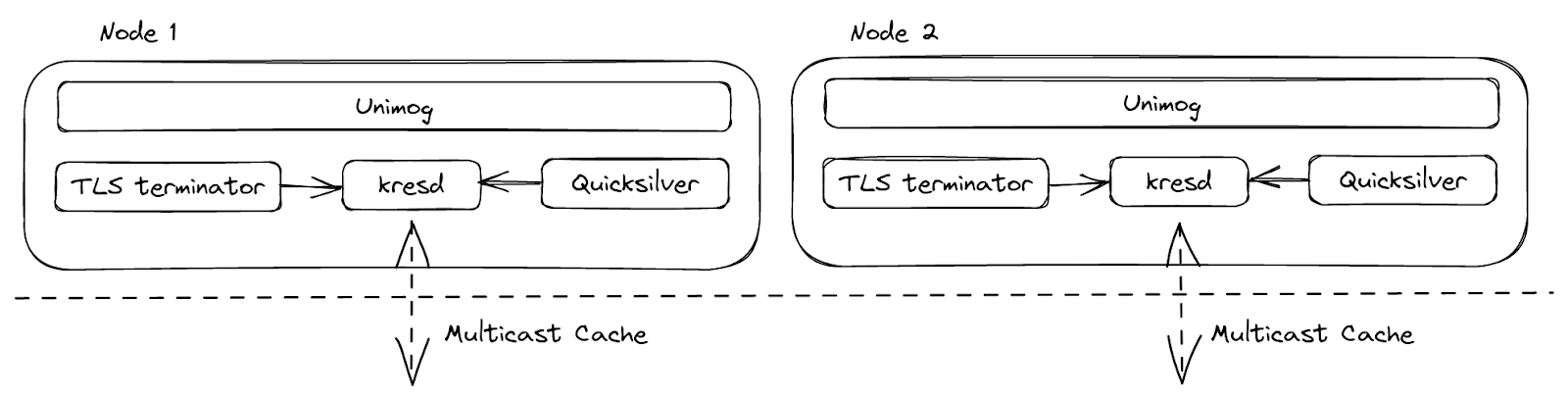
The resolver runs as a daemon process, kresd, and it doesn’t work alone. Requests, specifically DNS requests, are load-balanced to the servers inside a data center by Unimog. DoH requests are terminated at our TLS terminator. Configs and other small pieces of data can be delivered worldwide by Quicksilver in seconds. With all the help, the resolver can concentrate on its own goal – resolving DNS queries, and not worrying about transport protocol details. Now let’s talk about 3 key areas we wanted to improve here – blocking I/O in plugins, a more efficient use of cache space, and plugin isolation.
Callbacks blocking the event loop
Knot Resolver has a very flexible plugin system for extending its core functionality. The plugins are called modules, and they are based on callbacks. At certain points during request processing, these callbacks will be invoked with current query context. This gives a module the ability to inspect, modify, and even produce requests / responses. By design, these callbacks are supposed to be simple, in order to avoid blocking the underlying event loop. This matters because the service is single threaded, and the event loop is in charge of serving many requests at the same time. So even just one request being held up in a callback means that no other concurrent requests can be progressed until the callback finishes.
The setup worked well enough for us until we needed to do blocking operations, for example, to pull data from Quicksilver before responding to the client.
Cache efficiency
As requests for a domain could land on any node inside a data center, it would be wasteful to repetitively resolve a query when another node already has the answer. By intuition, the latency could be improved if the cache could be shared among the servers, and so we created a cache module which multicasted the newly added cache entries. Nodes inside the same data center could then subscribe to the events and update their local cache.
The default cache implementation in Knot Resolver is LMDB. It is fast and reliable for small to medium deployments. But in our case, cache eviction shortly became a problem. The cache itself doesn’t track for any TTL, popularity, etc. When it’s full, it just clears all the entries and starts over. Scenarios like zone enumeration could fill the cache with data that is unlikely to be retrieved later.
Furthermore, our multicast cache module made it worse by amplifying the less useful data to all the nodes, and led them to the cache high watermark at the same time. Then we saw a latency spike because all the nodes dropped the cache and started over around the same time.
Module isolation
With the list of Lua modules increasing, debugging issues became increasingly difficult. This is because a single Lua state is shared among all the modules, so one misbehaving module could affect another. For example, when something went wrong inside the Lua state, like having too many coroutines, or being out of memory, we got lucky if the program just crashed, but the resulting stack traces were hard to read. It is also difficult to forcibly tear down, or upgrade, a running module as it not only has state in the Lua runtime, but also FFI, so memory safety is not guaranteed.
Hello BigPineapple
We didn’t find any existing software that would meet our somewhat niche requirements, so eventually we started building something ourselves. The first attempt was to wrap Knot Resolver’s core with a thin service written in Rust (modified edgedns).
This proved to be difficult due to having to constantly convert between the storage, and C/FFI types, and some other quirks (for example, the ABI for looking up records from cache expects the returned records to be immutable until the next call, or the end of the read transaction). But we learned a lot from trying to implement this sort of split functionality where the host (the service) provides some resources to the guest (resolver core library), and how we would make that interface better.
In the later iterations, we replaced the entire recursive library with a new one based around an async runtime; and a redesigned module system was added to it, sneakily rewriting the service into Rust over time as we swapped out more and more components. That async runtime was tokio, which offered a neat thread pool interface for running both non-blocking and blocking tasks, as well as a good ecosystem for working with other crates (Rust libraries).
After that, as the futures combinators became tedious, we started converting everything to async/await. This was before the async/await feature that landed in Rust 1.39, which led us to use nightly (Rust beta) for a while and had some hiccups. When the async/await stabilized, it enabled us to write our request processing routine ergonomically, similar to Go.
All the tasks can be run concurrently, and certain I/O heavy ones can be broken down into smaller pieces, to benefit from a more granular scheduling. As the runtime executes tasks on a threadpool, instead of a single thread, it also benefits from work stealing. This avoids a problem we previously had, where a single request taking a lot of time to process, that blocks all the other requests on the event loop.
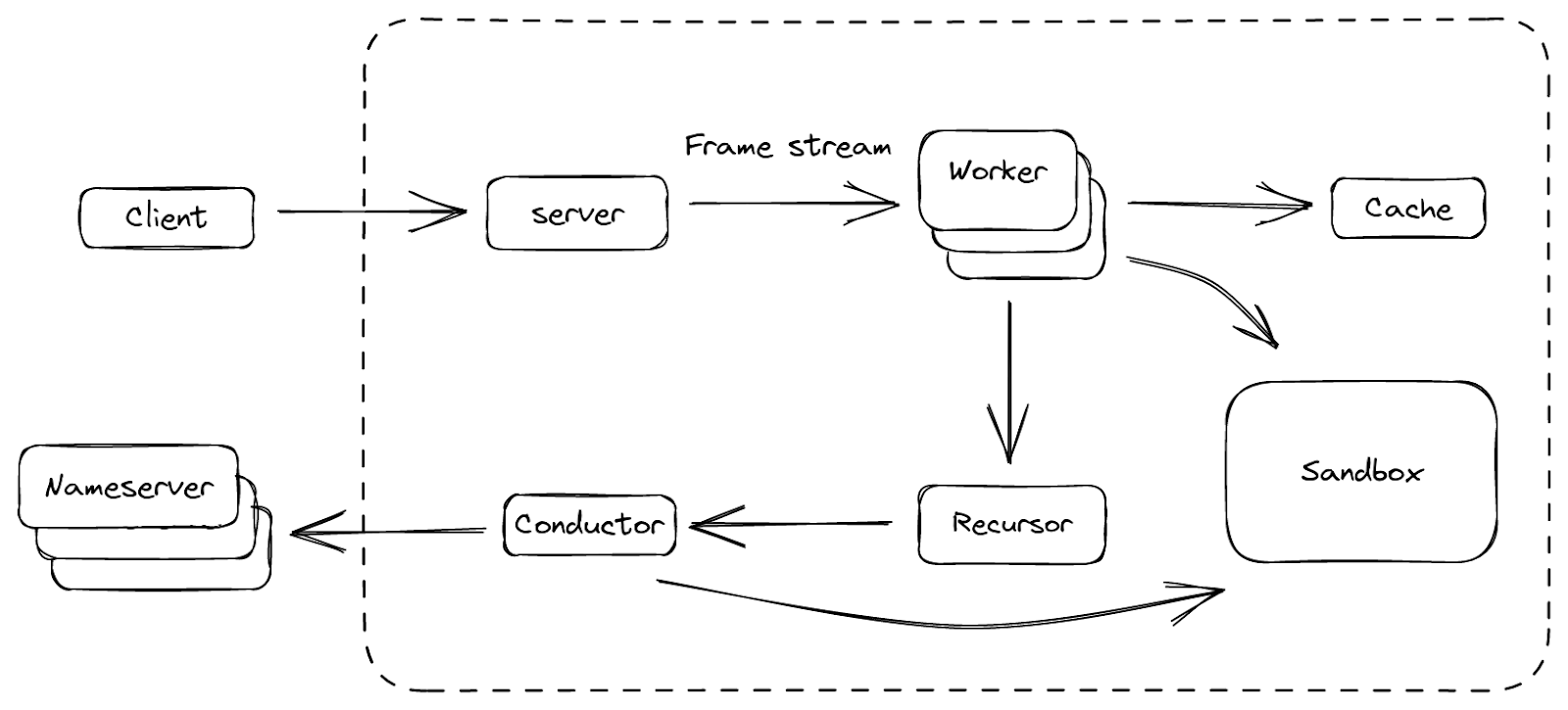
Finally, we forged a platform that we are happy with, and we call it BigPineapple. The figure above shows an overview of its main components and the data flow between them. Inside BigPineapple, the server module gets inbound requests from the client, validates and transforms them into unified frame streams, which can then be processed by the worker module. The worker module has a set of workers, whose task is to figure out the answer to the question in the request. Each worker interacts with the cache module to check if the answer is there and still valid, otherwise it drives the recursor module to recursively iterate the query. The recursor doesn’t do any I/O, when it needs anything, it delegates the sub-task to the conductor module. The conductor then uses outbound queries to get the information from upstream nameservers. Through the whole process, some modules can interact with the Sandbox module, to extend its functionality by running the plugins inside.
Let’s look at some of them in more detail, and see how they helped us overcome the problems we had before.
Updated I/O architecture
A DNS resolver can be seen as an agent between a client and several authoritative nameservers: it receives requests from the client, recursively fetches data from the upstream nameservers, then composes the responses and sends them back to the client. So it has both inbound and outbound traffic, which are handled by the server and the conductor component respectively.
The server listens on a list of interfaces using different transport protocols. These are later abstracted into streams of “frames”. Each frame is a high level representation of a DNS message, with some extra metadata. Underneath, it can be a UDP packet, a segment of TCP stream, or the payload of a HTTP request, but they are all processed the same way. The frame is then converted into an asynchronous task, which in turn is picked up by a set of workers in charge of resolving these tasks. The finished tasks are converted back into responses, and sent back to the client.
This “frame” abstraction over the protocols and their encodings simplified the logic used to regulate the frame sources, such as enforcing fairness to prevent starving and controlling pacing to protect the server from being overwhelmed. One of the things we’ve learned with the previous implementations is that, for a service open to the public, a peak performance of the I/O matters less than the ability to pace clients fairly. This is mainly because the time and computational cost of each recursive request is vastly different (for example a cache hit from a cache miss), and it’s difficult to guess it beforehand. The cache misses in recursive service not only consume Cloudflare’s resources, but also the resources of the authoritative nameservers being queried, so we need to be mindful of that.
On the other side of the server is the conductor, which manages all the outbound connections. It helps to answer some questions before reaching out to the upstream: Which is the fastest nameserver to connect to in terms of latency? What to do if all the nameservers are not reachable? What protocol to use for the connection, and are there any better options? The conductor is able to make these decisions by tracking the upstream server’s metrics, such as RTT, QoS, etc. With that knowledge, it can also guess for things like upstream capacity, UDP packet loss, and take necessary actions, e.g. retry when it thinks the previous UDP packet didn’t reach the upstream.
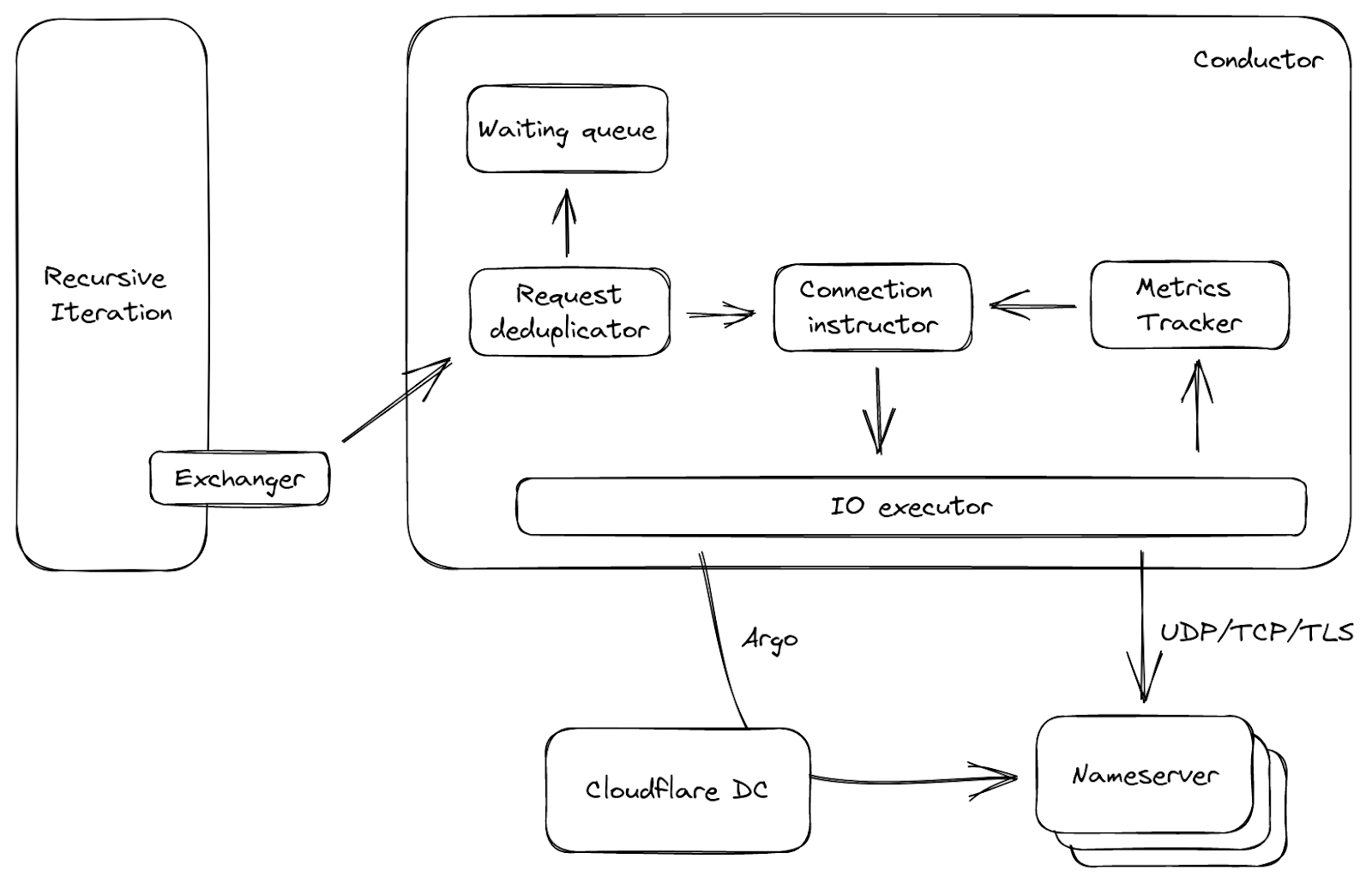
Figure 3 shows a simplified data flow about the conductor. It is called by the exchanger mentioned above, with upstream requests as input. The requests will be deduplicated first: meaning in a small window, if a lot of requests come to the conductor and ask for the same question, only one of them will pass, the others are put into a waiting queue. This is common when a cache entry expires, and can reduce unnecessary network traffic. Then based on the request and upstream metrics, the connection instructor either picks an open connection if available, or generates a set of parameters. With these parameters, the I/O executor is able to connect to the upstream directly, or even take a route via another Cloudflare data center using our Argo Smart Routing technology!
The cache
Caching in a recursive service is critical as a server can return a cached response in under one millisecond, while it will be hundreds of milliseconds to respond on a cache miss. As the memory is a finite resource (and also a shared resource in Cloudflare’s architecture), more efficient use of space for cache was one of the key areas we wanted to improve. The new cache is implemented with a cache replacement data structure (ARC), instead of a KV store. This makes good use of the space on a single node, as less popular entries are progressively evicted, and the data structure is resistant to scans.
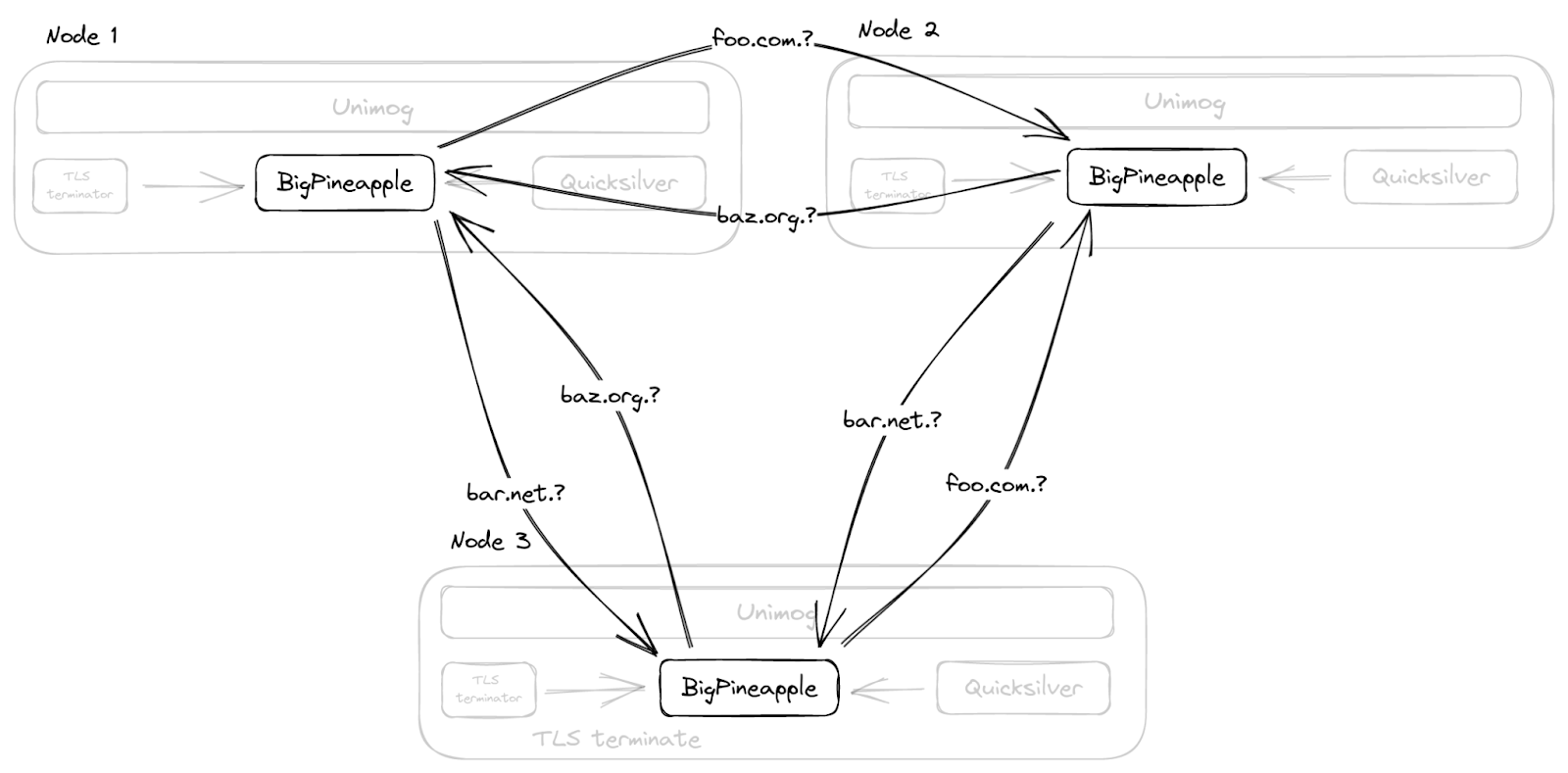
Moreover, instead of duplicating the cache across the whole data center with multicast, as we did before, BigPineapple is aware of its peer nodes in the same data center, and relays queries from one node to another if it cannot find an entry in its own cache. This is done by consistent hashing the queries onto the healthy nodes in each data center. So, for example, queries for the same registered domain go through the same subset of nodes, which not only increases the cache hit ratio, but also helps the infrastructure cache, which stores information about performance and features of nameservers.
Async recursive library
The recursive library is the DNS brain of BigPineapple, as it knows how to find the answer to the question in the query. Starting from the root, it breaks down the client query into subqueries, and uses them to collect knowledge recursively from various authoritative nameservers on the internet. The product of this process is the answer. Thanks to the async/await it can be abstracted as a function like such:
async fn resolve(Request, Exchanger) → Result<Response>;
The function contains all the logic necessary to generate a response to a given request, but it doesn’t do any I/O on its own. Instead, we pass an Exchanger trait(Rust interface) that knows how to exchange DNS messages with upstream authoritative nameservers asynchronously. The exchanger is usually called at various await points – for example, when a recursion starts, one of the first things it does is that it looks up the closest cached delegation for the domain. If it doesn’t have the final delegation in cache, it needs to ask what nameservers are responsible for this domain and wait for the response, before it can proceed any further.
Thanks to this design, which decouples the “waiting for some responses” part from the recursive DNS logic, it is much easier to test by providing a mock implementation of the exchanger. In addition, it makes the recursive iteration code (and DNSSEC validation logic in particular) much more readable, as it’s written sequentially instead of being scattered across many callbacks.
Fun fact: writing a DNS recursive resolver from scratch is not fun at all!
Not only because of the complexity of DNSSEC validation, but also because of the necessary “workarounds” needed for various RFC incompatible servers, forwarders, firewalls, etc. So we ported deckard into Rust to help test it. Additionally, when we started migrating over to this new async recursive library, we first ran it in “shadow” mode: processing real world query samples from the production service, and comparing differences. We’ve done this in the past on Cloudflare’s authoritative DNS service as well. It is slightly more difficult for a recursive service due to the fact that a recursive service has to look up all the data over the Internet, and authoritative nameservers often give different answers for the same query due to localization, load balancing and such, leading to many false positives.
In December 2019, we finally enabled the new service on a public test endpoint (see the announcement) to iron out remaining issues before slowly migrating the production endpoints to the new service. Even after all that, we continued to find edge cases with the DNS recursion (and DNSSEC validation in particular), but fixing and reproducing these issues has become much easier due to the new architecture of the library.
Sandboxed plugins
Having the ability to extend the core DNS functionality on the fly is important for us, thus BigPineapple has its redesigned plugin system. Before, the Lua plugins run in the same memory space as the service itself, and are generally free to do what they want. This is convenient, as we can freely pass memory references between the service and modules using C/FFI. For example, to read a response directly from cache without having to copy to a buffer first. But it is also dangerous, as the module can read uninitialized memory, call a host ABI using a wrong function signature, block on a local socket, or do other undesirable things, in addition the service doesn’t have a way to restrict these behaviors.
So we looked at replacing the embedded Lua runtime with JavaScript, or native modules, but around the same time, embedded runtimes for WebAssembly (Wasm for short) started to appear. Two nice properties of WebAssembly programs are that it allows us to write them in the same language as the rest of the service, and that they run in an isolated memory space. So we started modeling the guest/host interface around the limitations of WebAssembly modules, to see how that would work.
BigPineapple’s Wasm runtime is currently powered by Wasmer. We tried several runtimes over time like Wasmtime, WAVM in the beginning, and found Wasmer was simpler to use in our case. The runtime allows each module to run in its own instance, with an isolated memory and a signal trap, which naturally solved the module isolation problem we described before. In addition to this, we can have multiple instances of the same module running at the same time. Being controlled carefully, the apps can be hot swapped from one instance to another without missing a single request! This is great because the apps can be upgraded on the fly without a server restart. Given that the Wasm programs are distributed via Quicksilver, BigPineapple’s functionality can be safely changed worldwide within a few seconds!
To better understand the WebAssembly sandbox, several terms need to be introduced first:
- Host: the program which runs the Wasm runtime. Similar to a kernel, it has full control through the runtime over the guest applications.
- Guest application: the Wasm program inside the sandbox. Within a restricted environment, it can only access its own memory space, which is provided by the runtime, and call the imported Host calls. We call it an app for short.
- Host call: the functions defined in the host that can be imported by the guest. Comparable to syscall, it’s the only way guest apps can access the resources outside the sandbox.
- Guest runtime: a library for guest applications to easily interact with the host. It implements some common interfaces, so an app can just use async, socket, log and tracing without knowing the underlying details.
Now it’s time to dive into the sandbox, so stay awhile and listen. First let’s start from the guest side, and see what a common app lifespan looks like. With the help of the guest runtime, guest apps can be written similar to regular programs. So like other executables, an app begins with a start function as an entrypoint, which is called by the host upon loading. It is also provided with arguments as from the command line. At this point, the instance normally does some initialization, and more importantly, registers callback functions for different query phases. This is because in a recursive resolver, a query has to go through several phases before it gathers enough information to produce a response, for example a cache lookup, or making subrequests to resolve a delegation chain for the domain, so being able to tie into these phases is necessary for the apps to be useful for different use cases. The start function can also run some background tasks to supplement the phase callbacks, and store global state. For example – report metrics, or pre-fetch shared data from external sources, etc. Again, just like how we write a normal program.
But where do the program arguments come from? How could a guest app send log and metrics? The answer is, external functions.
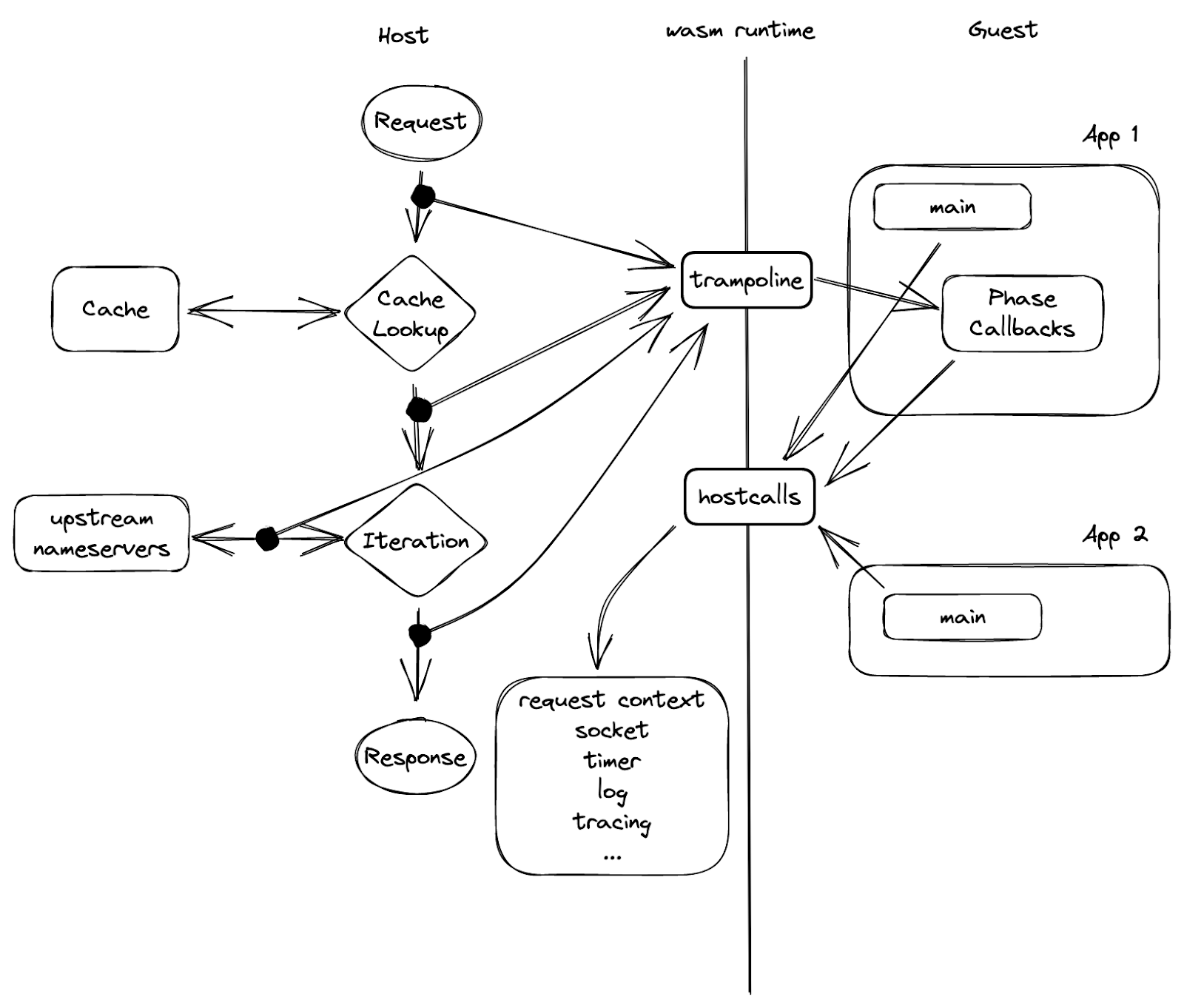
In figure 5, we can see a barrier in the middle, which is the sandbox boundary, that separates the guest from the host. The only way one side can reach out to the other, is via a set of functions exported by the peer beforehand. As in the picture, the “hostcalls” are exported by the host, imported and called by the guest; while the “trampoline” are guest functions that the host has knowledge of.
It is called trampoline because it is used to invoke a function or a closure inside a guest instance that’s not exported. The phase callbacks are one example of why we need a trampoline function: each callback returns a closure, and therefore can’t be exported on instantiation. So a guest app wants to register a callback, it calls a host call with the callback address “hostcall_register_callback(pre_cache, #30987)”, when the callback needs to be invoked, the host cannot just call that pointer as it’s pointing to the guest’s memory space. What it can do instead is, to leverage one of the aforementioned trampolines, and give it the address of the callback closure: “trampoline_call(#30987)”.
Isolation overhead
Like a coin that has two sides, the new sandbox does come with some additional overhead. The portability and isolation that WebAssembly offers bring extra cost. Here, we’ll list two examples.
Firstly, guest apps are not allowed to read host memory. The way it works is the guest provides a memory region via a host call, then the host writes the data into the guest memory space. This introduces a memory copy that would not be needed if we were outside the sandbox. The bad news is, in our use case, the guest apps are supposed to do something on the query and/or the response, so they almost always need to read data from the host on every single request. The good news, on the other hand, is that during a request life cycle, the data won’t change. So we pre-allocate a bulk of memory in the guest memory space right after the guest app instantiates. The allocated memory is not going to be used, but instead serves to occupy a hole in the address space. Once the host gets the address details, it maps a shared memory region with the common data needed by the guest into the guest’s space. When the guest code starts to execute, it can just access the data in the shared memory overlay, and no copy is needed.
Another issue we ran into was when we wanted to add support for a modern protocol, oDoH, into BigPineapple. The main job of it is to decrypt the client query, resolve it, then encrypt the answers before sending it back. By design, this doesn’t belong to core DNS, and should instead be extended with a Wasm app. However, the WebAssembly instruction set doesn’t provide some crypto primitives, such as AES and SHA-2, which prevents it from getting the benefit of host hardware. There is ongoing work to bring this functionality to Wasm with WASI-crypto. Until then, our solution for this is to simply delegate the HPKE to the host via host calls, and we already saw 4x performance improvements, compared to doing it inside Wasm.
Async in Wasm
Remember the problem we talked about before that the callbacks could block the event loop? Essentially, the problem is how to run the sandboxed code asynchronously. Because no matter how complex the request processing callback is, if it can yield, we can put an upper bound on how long it is allowed to block. Luckily, Rust’s async framework is both elegant and lightweight. It gives us the opportunity to use a set of guest calls to implement the “Future”s.
In Rust, a Future is a building block for asynchronous computations. From the user’s perspective, in order to make an asynchronous program, one has to take care of two things: implement a pollable function that drives the state transition, and place a waker as a callback to wake itself up, when the pollable function should be called again due to some external event (e.g. time passes, socket becomes readable, and so on). The former is to be able to progress the program gradually, e.g. read buffered data from I/O and return a new state indicating the status of the task: either finished, or yielded. The latter is useful in case of task yielding, as it will trigger the Future to be polled when the conditions that the task was waiting for are fulfilled, instead of busy looping until it’s complete.
Let’s see how this is implemented in our sandbox. For a scenario when the guest needs to do some I/O, it has to do so via the host calls, as it is inside a restricted environment. Assuming the host provides a set of simplified host calls which mirror the basic socket operations: open, read, write, and close, the guest can have its pseudo poller defined as below:
fn poll(&mut self, wake: fn()) -> Poll {
	match hostcall_socket_read(self.sock, self.buffer) {
    	    HostOk  => Poll::Ready,
    	    HostEof => Poll::Pending,
	}
}
Here the host call reads data from a socket into a buffer, depending on its return value, the function can move itself to one of the states we mentioned above: finished(Ready), or yielded(Pending). The magic happens inside the host call. Remember in figure 5, that it is the only way to access resources? The guest app doesn’t own the socket, but it can acquire a “handle” via “hostcall_socket_open”, which will in turn create a socket on the host side, and return a handle. The handle can be anything in theory, but in practice using integer socket handles map well to file descriptors on the host side, or indices in a vector or slab. By referencing the returned handle, the guest app is able to remotely control the real socket. As the host side is fully asynchronous, it can simply relay the socket state to the guest. If you noticed that the waker function isn’t used above, well done! That’s because when the host call is called, it not only starts opening a socket, but also registers the current waker to be called then the socket is opened (or fails to do so). So when the socket becomes ready, the host task will be woken up, it will find the corresponding guest task from its context, and wakes it up using the trampoline function as shown in figure 5. There are other cases where a guest task needs to wait for another guest task, an async mutex for example. The mechanism here is similar: using host calls to register wakers.
All of these complicated things are encapsulated in our guest async runtime, with easy to use API, so the guest apps get access to regular async functions without having to worry about the underlying details.
(Not) The End
Hopefully, this blog post gave you a general idea of the innovative platform that powers 1.1.1.1. It is still evolving. As of today, several of our products, such as 1.1.1.1 for Families, AS112, and Gateway DNS, are supported by guest apps running on BigPineapple. We are looking forward to bringing new technologies into it. If you have any ideas, please let us know in the community or via email.