Post Syndicated from Ajish Abraham original https://aws.amazon.com/blogs/architecture/preventing-data-exfiltration-in-machine-learning-environments-with-amazon-sagemaker-ai/
If you’re building machine learning solutions with sensitive data, you face a persistent challenge: preventing data exfiltration while enabling data scientists to work productively. iBusiness, an AI-driven fintech organization, needed its data scientists to work with sensitive data to fine-tune and improve machine learning models. As the data science team scaled, traditional air-gapped environments and monitored virtual desktops proved unsustainable, leading to high costs and operational complexity.
In this post, we demonstrate how iBusiness implemented a three-layered security architecture using Amazon SageMaker AI, virtual private cloud (VPC) endpoints, and Amazon WorkSpaces Secure Browser to prevent data exfiltration while maintaining data scientist productivity. You can adapt this approach to build secure machine learning environments that balance strict data protection with team scalability.
Historically, when access to sensitive data was required, iBusiness provided an isolated, air-gapped on-premises environment. However, with the shift to a remote workforce, this approach became impractical. The company locked down secure virtual desktops through device management policies and had them monitored by proctors to prevent inappropriate actions.
As the data science team scaled and expanded machine learning (ML) use cases, this approach proved unsustainable. Each user required a dedicated virtual desktop, even for temporary access, leading to increased costs. Additionally, maintaining ML tools, libraries, and patches in these locked-down environments was time-consuming and operationally complex.
To address these challenges, iBusiness adopted Amazon SageMaker Studio, a fully managed, web-based ML development environment. This removed the need to maintain in-house Jupyter environments while giving data scientists access to up-to-date tools. Furthermore, SageMaker AI’s integration with AWS services provided straightforward data sharing via AWS Lake Formation and Amazon Athena, reducing the need for manual data transfers.
Solution architecture
To achieve this, iBusiness implemented a three-layered security strategy that you can adapt for your own secure ML environments.
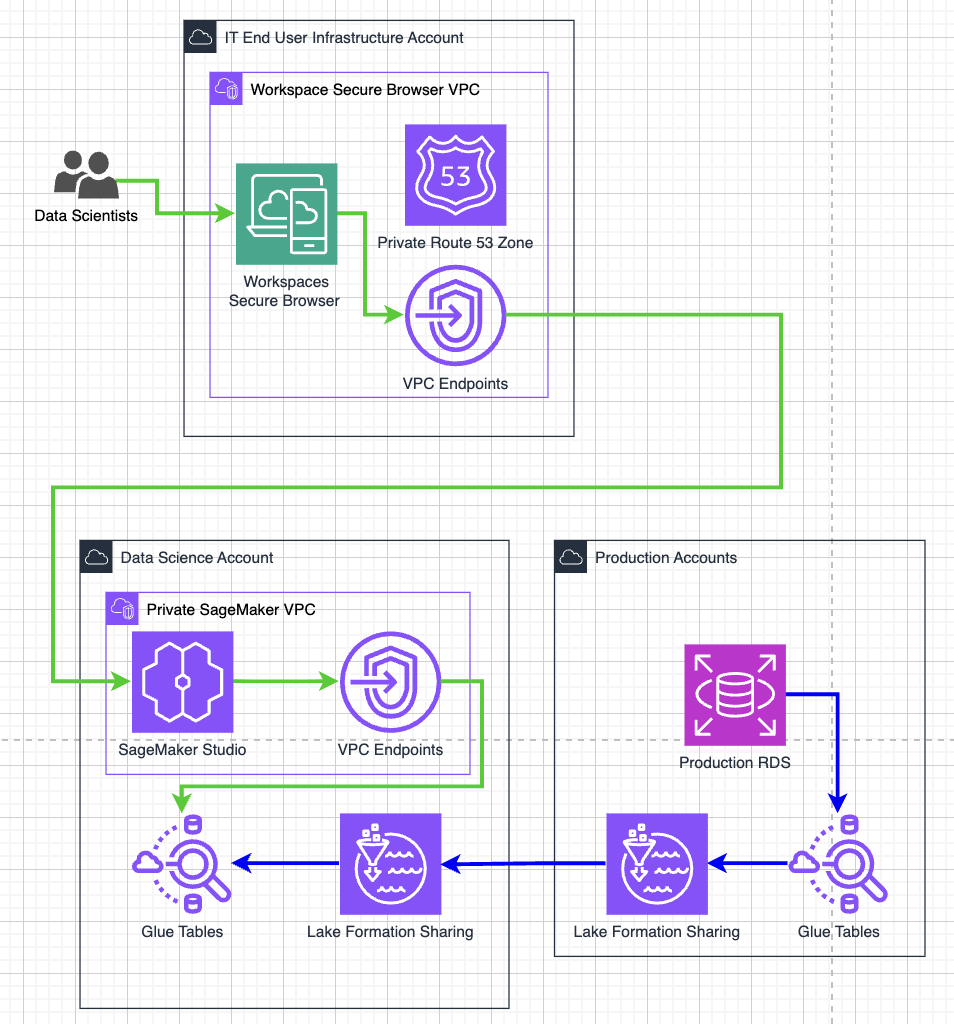
Figure 1: Three-layered security architecture for data exfiltration prevention
Layer 1: Securing access through WorkSpaces Secure Browser
iBusiness used Amazon WorkSpaces Secure Browser, a managed, locked-down browser environment. This managed service provides a controlled Chromium-based browser, offering a more cost-effective solution for the company’s use case.
The company configured the Secure Browser to run within a dedicated VPC and subnet in its IT infrastructure account, routing outbound traffic through a network address translation (NAT) gateway. In the secure data science account, iBusiness enforced AWS Identity and Access Management (IAM) policies that restrict access to requests originating only from AWS services or from the NAT gateway’s Elastic IP address. This configuration helps validate that access to the environment is only possible through the Secure Browser. It gives you confidence that data scientists cannot bypass security controls when you implement a similar approach.
Additionally, the Secure Browser was configured to disable file downloads and uploads, disable clipboard access, and disable printing. These controls help prevent data from being transferred to local machines.
Key Secure Browser controls configured:
- Disable file downloads and uploads.
- Disable clipboard access.
- Disable printing.
Layer 2: Restricting browser activity and cross-account access
Building on this foundation, iBusiness restricted activity within the Secure Browser itself to address potential exfiltration through web-based channels.
Although the browser provides a temporary working directory, iBusiness prevented its misuse by implementing strict URL allowlisting. Users can only access *.aws.amazon.com and specific SageMaker AI domains. Other websites, including email and external storage platforms, are blocked, preventing users from uploading data to external services.
Permitted URL patterns:
*.aws.amazon.com.- Specific SageMaker AI domains.
Preventing cross-account data exfiltration
To help verify users cannot move data to other AWS accounts, iBusiness implemented VPC endpoints for AWS Management Console and AWS IAM Identity Center services. These endpoints route traffic privately within the VPC with no internet exposure. They also enforce endpoint policies restricting access to iBusiness’s specific AWS account, giving you control over which accounts data scientists can access.
The company also configured a private Amazon Route 53 hosted zone to redirect console.aws.amazon.com, *.console.aws.amazon.com, and signon.aws.amazon.com to the company’s VPC endpoints instead of public endpoints. To further mitigate DNS-based exfiltration risks, iBusiness configured Amazon Route 53 Resolver DNS Firewall in the SageMaker AI VPC to block DNS queries to non-approved domains, ensuring that only resolution of required AWS service endpoints is permitted.
This configuration helps verify that users can only authenticate into iBusiness’s secured data science account and that access to other AWS accounts is blocked. To further enforce this, iBusiness applied an IAM policy that enhances the IAM policy from Layer 1. This policy helps confirm actions are sourced from an IAM principal originating from a VPC endpoint and denies actions when the target resource belongs to another AWS account, with minimal exceptions for privileged users.
Layer 3: Securing the SageMaker AI environment
As a final layer of defense, iBusiness secured the SageMaker AI environment itself to prevent data exfiltration through the development environment’s terminal and integrated development environment (IDE) access.
Because SageMaker AI provides terminal and IDE access, it could potentially be used to move data externally. To mitigate this risk, the company removed direct internet access from the SageMaker AI VPC with no NAT gateway or internet routes and configured VPC endpoints for the required AWS services.
This configuration confirms that SageMaker AI can access AWS services internally and function normally while simultaneously blocking direct outbound internet traffic. iBusiness further restricted VPC endpoint policies to allow access only to resources within the organization, providing an additional safeguard against cross-account data movement. VPC endpoint policies allow for granular access to specific AWS resources. For example, allowing users restricted access for s3:PutObject API calls to specific Amazon Simple Storage Service (Amazon S3) buckets depending on the use case.
SageMaker AI network configuration:
- No NAT gateway or internet routes in the SageMaker AI VPC.
- VPC endpoints configured for all required AWS services.
- Endpoint policies restricted to organization-owned resources only.
Conclusion
By implementing this three-layered security architecture, iBusiness achieved an 80% cost reduction, from $40+ per user monthly for individual VDI environments to $7 per user with Amazon WorkSpaces Secure Browser. The solution also transformed IT operations, reducing provisioning from a 2-day SLA to automatic setup within minutes while eliminating ongoing desktop maintenance overhead.
For data scientists, the approach improved both productivity and security by streamlining data access without compromising protection. This demonstrates how you can strengthen security controls while reducing costs and operational complexity.
Start by assessing your current data access controls, then progressively implement each security layer based on your organization’s specific compliance requirements and risk tolerance.