Tag Archives: Strands Agents

AWS Weekly Roundup: One-click Lambda setup prompt, OpenAI GPT-5.6 models on Bedrock, and more (July 20, 2026)

Post Syndicated from Channy Yun (윤석찬) original https://aws.amazon.com/blogs/aws/aws-weekly-roundup-one-click-lambda-setup-prompt-openai-gpt-5-6-models-on-bedrock-and-more-july-20-2026/

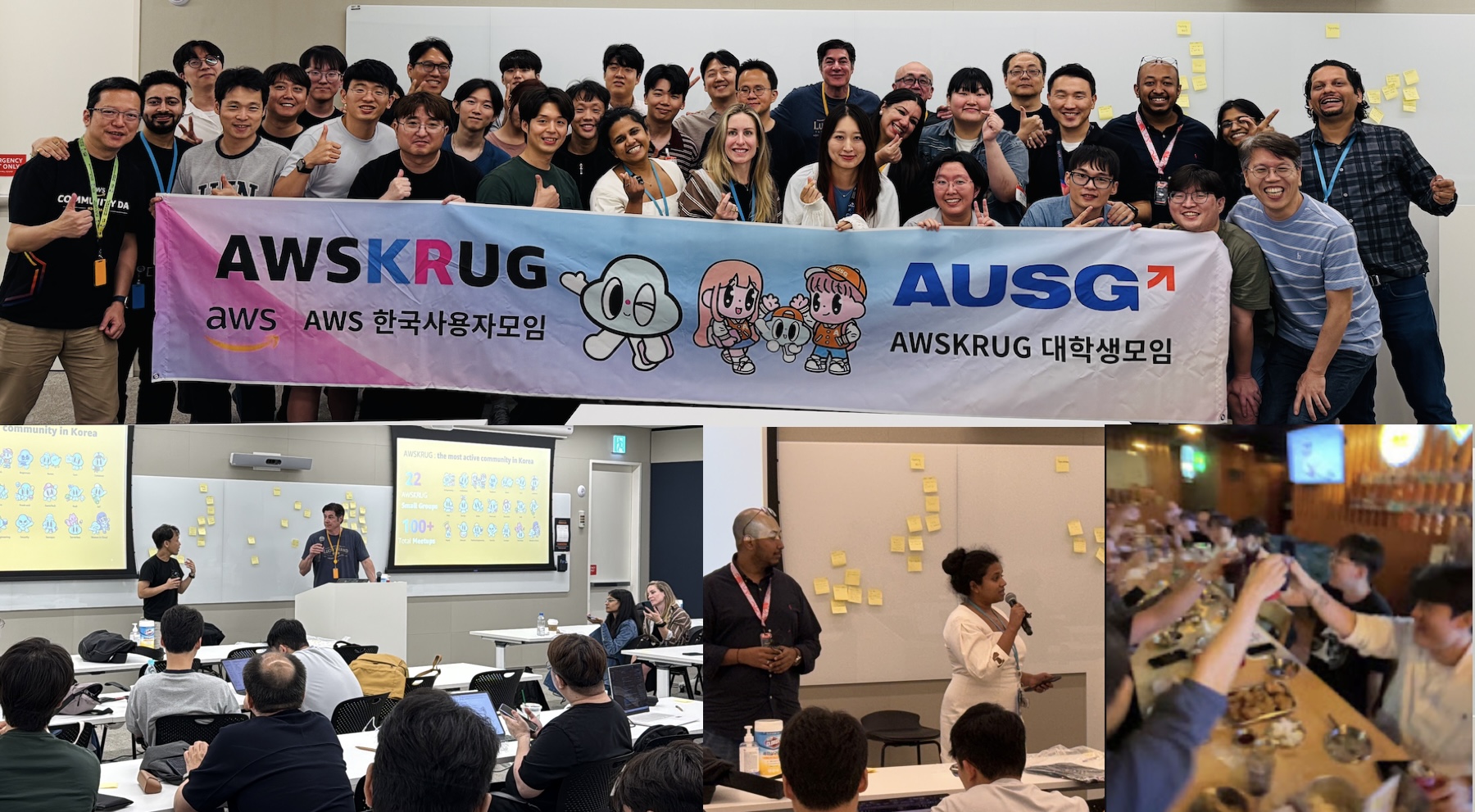
Last week, my team visited Seoul to meet AWS Korea User Group (AWSKRUG) leaders. AWSKRUG is the largest cloud developer community in Korea, with 20 meetup groups organized by topic and area that collectively host over 100 events each year, primarily in Seoul.

My team regularly visits countries across the Asia-Pacific region, listens to feedback from user group leaders, and works to support their communities. At this meeting, leaders honestly shared what they did well in the first half of the year, what needs improvement, and what they asked of AWS Developer Experience team. We also enjoyed a pleasant conversation during our Chimaek time together.

Now, let’s take a closer look at key launches of last week.

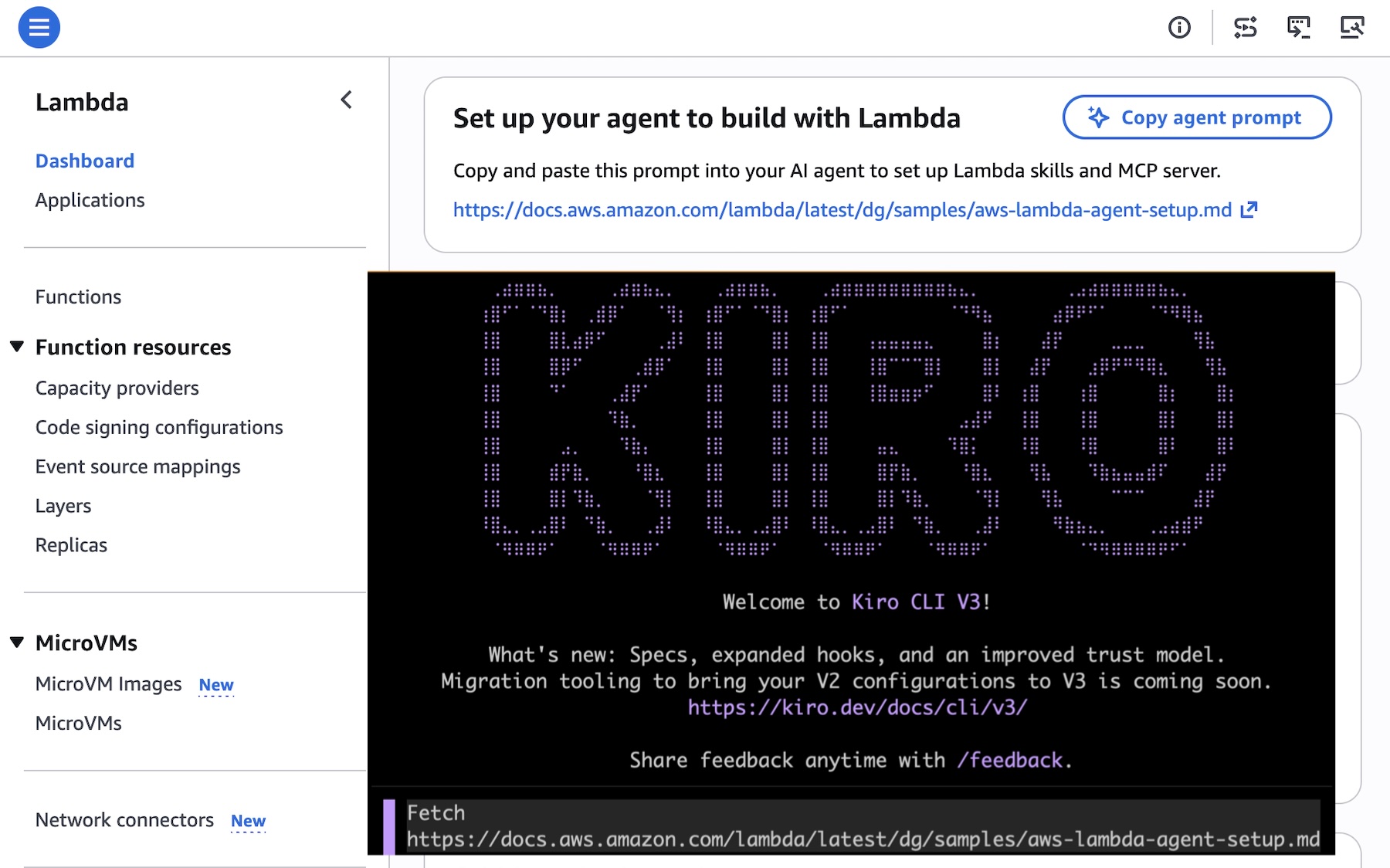
A one-click Lambda setup prompt for coding agents caught my eye most last week. This prompt configures your agent with AWS Serverless skills and the Serverless Model Context Protocol (MCP) server, embedding serverless best practices from the start. This prompt references the Lambda agent setup guide, which includes installation commands for Claude Code, Kiro, Cursor, GitHub Copilot, Codex, Devin Desktop, and OpenCode.

To get started, choose the Copy agent prompt button on the Lambda console screen or copy fetch https://docs.aws.amazon.com/lambda/latest/dg/samples/aws-lambda-agent-setup.md directly, and paste this URL in your preferred AI agent.

You can also use Agent Toolkit for AWS to give your coding agent current AWS knowledge and safe resource access. Use fetch https://raw.githubusercontent.com/aws/agent-toolkit-for-aws/refs/heads/main/setup-instructions/setup.md for installing AWS MCP Server.

Last week’s launches
Here are last week’s launches that caught my attention:

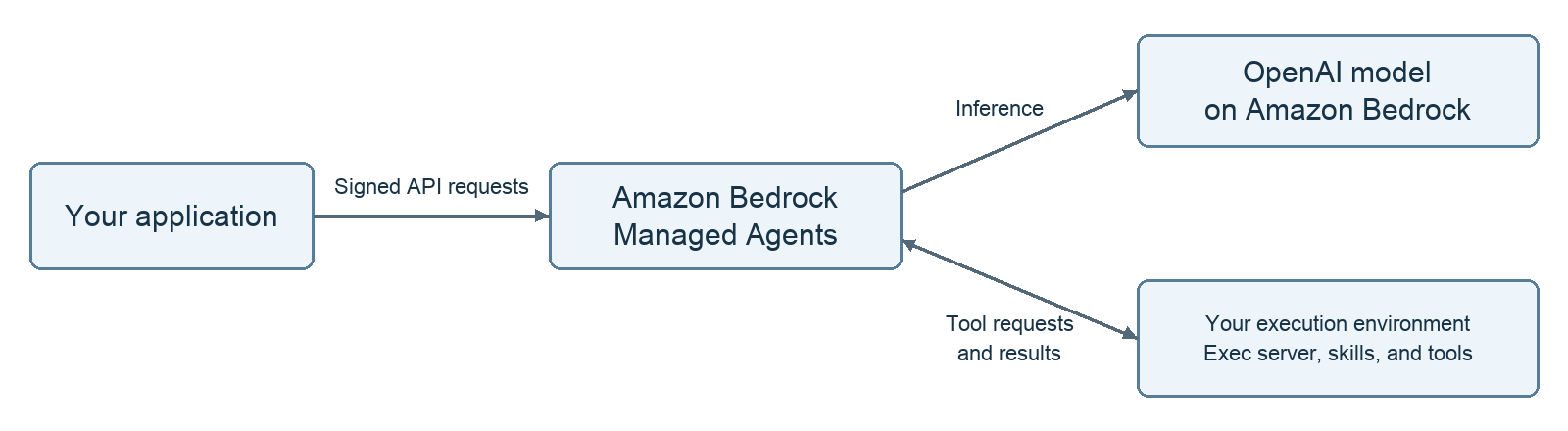
  • OpenAI GPT-5.6 Sol, Terra, and Luna on Amazon Bedrock: You can use the smartest family of models from OpenAI yet on Bedrock’s next-generation inference engine built for high performance, security, and reliability. The three models span capability tiers from flagship reasoning (Sol) to balanced performance (Terra) to fast, cost-efficient inference (Luna), all accessible through the Responses API on Amazon Bedrock.
  • Same-day transitions to Amazon S3 Standard-IA and S3 One Zone-IA: You can now transition objects to S3 Standard-Infrequent Access (S3 Standard-IA) and S3 One Zone-Infrequent Access (S3 One Zone-IA) as soon as the day they are created, without the previous 30-day minimum retention period in S3 Standard. These storage classes offer up to 40% lower storage costs than S3 Standard while still providing millisecond access when needed, making them ideal for backups, log analytics, and compliance workloads where data becomes cold within hours or days.
  • Self-managed code storage on AWS Lambda: With self-managed Amazon S3 buckets for code storage, you can reference source code directly from your own S3 buckets without Lambda creating intermediate copies. This eliminates code storage limits and reduces function activation time after function creates and updates by removing the copy step.
  • Importing users with password hashes on Amazon Cognito: You can now import users with password hashes in CSV user imports. Previously, imported users had to reset their passwords on first sign-in. Now, you can include password hashes in the CSV import, enabling users to sign in immediately with their existing credentials. When creating a CSV import, you specify the password hashing algorithm used by your source system.

For a full list of AWS announcements, be sure to keep an eye on the What’s New with AWS page.

Additional updates
Here are some additional news items that you might find interesting:

  • Amazon SQS turns 20: Two decades of reliable messaging at scale: When Amazon SQS launched publicly in July 2006, it made this pattern available to every AWS customer. Twenty years later, that core function, decoupling producers from consumers, remains the reason customers use SQS. Let’s look back important milestones after Jeff’s 15th anniversary post.
  • Open Protocols with the Strands Agents SDK: Learn how open AI protocols such as MCP, A2A, UTCP, AG-UI, and x402 work together using Strands Agents SDK for building AI agents as an example implementation, though the patterns apply to any agent framework.
  • Open source Bulk Executor for Amazon DynamoDB: Performing bulk operations against all items in a DynamoDB table has historically required custom coding. The Bulk Executor for DynamoDB simplifies bulk tasks like these. You can use this feature to invoke commands like count, find, delete, or update. No coding is required, even when running at large scale.
  • Transform AWS Support Case Workflows with Kiro CLI: Explore how Kiro CLI’s MCP integration accelerates support case workflows by combining investigation, documentation lookup, and case creation into a single conversational interface across three real-world scenarios: AWS Glue job failures, AWS Lambda cold start investigation, and AWS WAF false positive analysis.

For a full list of AWS blog posts, be sure to keep an eye on the AWS Blogs page.

Learn more about AWS, browse and join upcoming AWS-led in-person and virtual events, startup events, and developer-focused events including AWS Summits. Join the AWS Builder Center to connect with builders, share solutions, and access content that supports your development.

Finally, some customers experienced an issue with Cost Explorer displaying inaccurate estimated billing data in last weekend. They may have received erroneous budget and cost anomaly detection alerts, and observed inflated estimated cost and usage data. The issue has been resolved, and all AWS services are operating normally. We apologize for the concern this incident caused our customers and are conducting a thorough retrospective to prevent events like this from reoccurring, as well as improving our response when billing incidents occur. For more information, visit the AWS Health Dashboard.

That’s all for this week. Check back next Monday for another Weekly Roundup!

Channy

AWS Weekly Roundup: NY Summit recap, Local Zone in Hanoi, Grok 4.3 in Bedrock, price reductions, and more (June 22, 2026)

Post Syndicated from Channy Yun (윤석찬) original https://aws.amazon.com/blogs/aws/aws-weekly-roundup-ny-summit-recap-local-zone-in-hanoi-grok-4-3-in-bedrock-price-reductions-and-more-june-22-2026/

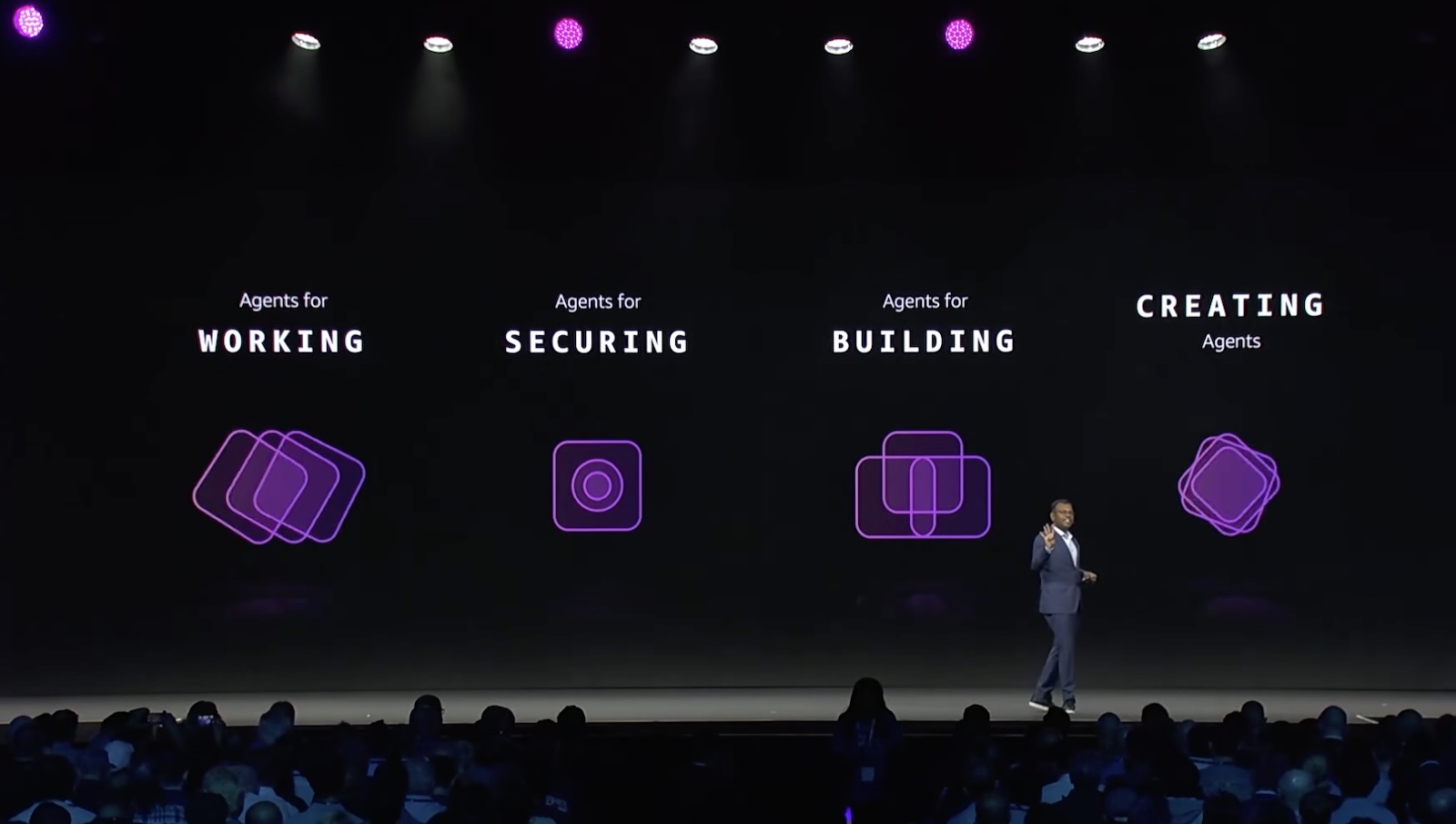
Last week AWS Summit New York City brought together thousands of customers, partners, and builders for a free, one-day event showcasing the latest in cloud and AI innovation. Dr. Swami Sivasubramanian, VP of Agentic AI at AWS unveiled a stack of AI launches in his keynote, all built around one thesis: agents that compound value over time.

  • Agents for working – You can launch autonomous agents and access a smarter activity feed with new Amazon Quick features, which now let you create and run multi-step agents directly in the desktop app and consolidates email, Slack, calendar, and tasks into a single prioritized view with personalized rules.
  • Agents for securing – You can shift from reactive to proactive security with AWS Continuum, a new AI-native security service that reasons, validates, and acts at machine speed across the full code vulnerability lifecycle. AWS Security Agent (now part of AWS Continuum) adds new features: threat modeling; pull request code scanning with remediation across major Git platforms; and IDE integrations via Kiro power, Claude Code plugin, and MCP.
  • Agents for building – You can write, ship, and modernize code in one continuous loop with Kiro, AWS DevOps Agent, and AWS Transform. Kiro introduces a native iOS app; AWS DevOps Agent adds release management capabilities to assess code changes before production; and AWS Transform continuous modernization reduces tech debt autonomously.
  • Agents customers create – You can go from agent idea to production in minutes with Amazon Bedrock AgentCore, which now includes a GA harness for infrastructure and orchestration, Web Search, Managed Knowledge Base, policy integrations with Guardrails, and the new AWS Context service for mapping organizational data relationships.

To learn more, visit the Summit recap from our top announcements blog post and Amazon News post.

Last week’s launches
Here are last week’s launches that caught my attention:

  • AWS Local Zone in Hanoi, Vietnam  —This new Local Zone is one of the first AWS Local Zones in the Asia Pacific with support for Amazon S3 and Amazon EBS Local Snapshots, enabling customers to meet data residency requirements by storing and backing up data locally. To get started, enable the Hanoi Local Zone (ap-southeast-1-han-1a) from the Regions and Zones tab in the AWS Global View or by using the ModifyAvailabilityZoneGroup API.
  • AWS Blocks, an open-source TypeScript framework for application developers (preview) — AWS Blocks runs a fully functional local environment with Postgres, authentication, and real-time messaging, no AWS account required. When you’re ready to deploy, the same application code runs on production AWS services with zero changes, and you can drop into AWS CDK at any point for direct resource configuration.
  • Grok 4.3 from xAI in Amazon Bedrock —You can use the Grok 4.3 model on Amazon Bedrock, giving you even more choice as you build generative AI applications across reasoning, agentic, and enterprise workflows. Grok 4.3 runs on a new inference engine in Bedrock designed for price performance, with support for tool calling, structured output, and response streaming.
  • Amazon S3 annotations: attach rich, queryable context directly to your objects — Amazon S3 now lets you attach up to 1 GB of rich, mutable, and queryable context directly to your objects using annotations, purpose-built for AI agents and autonomous workflows that need to discover, understand, and act on data at scale without maintaining separate metadata systems.
  • Amazon ECS announces faster service auto scaling — Amazon ECS service auto scaling now detects and responds to load changes faster with support for high resolution (20-second) metrics and metric publishing optimizations. In AWS benchmarking tests, time to trigger scale-out improved from 363 seconds to 86 seconds (76% faster), and total time to scale and provision new tasks improved from 386 seconds to 109 seconds (72% faster).
  • Amazon EC2 G7 instances accelerated by NVIDIA RTX PRO 4500 Blackwell Server Edition GPUs — AWS is the first major cloud provider to support NVIDIA RTX PRO 4500 Blackwell Server Edition GPUs. G7 instances are accelerated by these GPUs with custom sixth-generation Intel Xeon Scalable processors, delivering up to 4.6x AI inference performance and up to 2.1x graphics performance compared to G6 instances.
  • Strands Agents introduces new capabilities — Strands is an open source toolkit for building production agents. You can now use better context management in Harness SDK, a new isolated execution environment with Strands Shell, and chaos testing and red teaming in Strands Evals.
  • AWS Management Console Private Access – You can access the AWS Console from VPCs without internet connectivity, allowing enterprises to manage their AWS infrastructure through the console while maintaining strict network security controls in air-gapped environments.
  • AWS Marketplace Storefront is now generally available – AWS Partners can create and deploy their own branded catalog of solutions and services on their website or application in hours. Channel Partners and Independent Software Vendors can now simplify how they manage their cloud marketplace business and make it easier for customers to discover and purchase their solutions from AWS Marketplace.
  • Palo Alto Networks (PANW) Advanced DNS Security on Amazon Route 53 Resolver DNS Firewall (preview) – You can now enforce DNS threat protections from Palo Alto Networks directly on Route 53 DNS Firewall rules, without deploying separate firewalls or modifying VPC configurations — by subscribing to PANW from the DNS Firewall console through the embedded AWS Marketplace widget.

For a full list of AWS announcements, be sure to keep an eye on the What’s New with AWS page.

Price reductions 
AWS continues to look for ways to increase performance and lower prices for our customers. I noticed a few such efforts last week, so I’d like to share them:

Learn more about AWS, browse and join upcoming AWS-led in-person and virtual events, startup events, and developer-focused events as well as AWS Summits and AWS Community Days. Join the AWS Builder Center to connect with builders, share solutions, and access content that supports your development.

That’s all for this week. Check back next Monday for another Weekly Roundup!

Channy

Building Self-Extending CLI Tools with Strands Agent

Post Syndicated from Ragib Ahsan original https://aws.amazon.com/blogs/devops/building-self-extending-cli-tools-with-aws-strands/

I. Introduction

Engineering teams build internal command-line interface (CLI) tools because repetitive operational tasks such as generating reports, auditing infrastructure, and checking service health are faster and more reliable when automated behind a consistent interface. A well-built CLI replaces ad-hoc scripts with structured commands, standardized error handling, and composable workflows that any team member can run. However, building these tools follows a predictable development lifecycle. The developer sets up a package, writes commands, handles errors, and ships it, then spends the next six months as its sole maintainer. Meanwhile, requests for new commands, custom report formats, and one-off integrations pile up as other teams across the organization discover the tool is useful for their workflows too. Frameworks like Click and Typer reduce the friction, but every new command still needs to be written, tested, and deployed manually.

Tools that generate their own capabilities on demand offer a different approach. Instead of writing each command manually, users can describe what is needed in natural language, and the tool writes the code, loads it, and makes it available at runtime without requiring a restart or redeployment. This is called meta-tooling, a repeatable pattern for giving applications the ability to create their own tools dynamically. For teams that maintain growing collections of internal utilities, this eliminates the bottleneck of having a single developer write every new feature.

In this post, we will walk through one implementation of this pattern, a CLI generator called CLI Creator. CLI Creator combines three technologies into a mechanism that organizations can adapt for their own use cases:

  • Amazon Bedrock, a fully managed service for building generative AI applications with foundation models, with Anthropic’s Claude Opus 4.6 for AI-powered code generation.
  • Strands Agents SDK, an open-source Python framework for building AI agents with tool use, for dynamic tool creation, loading, and execution at runtime.
  • Model Context Protocol (MCP), an open standard for connecting AI applications to external data sources and tools, for automatically discovering API servers that give generated tools additional knowledge.

The result is a development workflow where new CLI capabilities go from request to working command in minutes instead of days, without manual coding. By the end of this post, a single natural language prompt will have produced a complete, installable CLI. That CLI can extend itself with new tools, refine them iteratively, and discover relevant MCP servers through an interactive selection workflow.

II. Solution Overview

The Challenge

As an example, consider a platform engineering team that produces weekly operations reports for leadership. Every Monday morning, stakeholders expect a summary of their AWS footprint, including which Amazon DynamoDB tables are running hot, which Amazon Simple Storage Service (Amazon S3) buckets are growing fastest, and who made significant infrastructure changes last week. The AWS CLI can list tables and buckets, but it cannot produce these reports.

Each report is a multi-step workflow that involves calling several APIs, joining the data, computing derived metrics like estimated monthly cost or growth rate, and formatting the output for a specific audience. The team ends up writing Python scripts for each report, and every new report request means another script by a developer.These are each their own small project, often requiring a hundred lines of Python to pull multiple APIs, compute derived metrics, and format output before you even think about error handling. Requirements shift weekly, so each change means modifying source code, testing, and redeploying. The tooling never converges; the team ends up with a folder of disconnected scripts, each with its own argument parsing, error handling, and output formatting. Any team that builds small, purpose-built utilities faces the same friction, and operations reporting is the example we use to illustrate the meta-tooling pattern.

The Solution

Prerequisites

To follow along with this post, you will need:

  • Python 3.12 or later
  • An AWS account with Amazon Bedrock access enabled for Anthropic Claude models in us-west-2
  • AWS credentials configured locally (via `aws configure` or environment variables)
  • Git installed (for tool version tracking)

The source code is available on GitHub. Installation instructions are in the repository README.

Walkthrough

Instead of writing report scripts manually, organizations describe what they need in natural language.Terminal screenshot of a CLI Creator tool generating an AWS operations reporting CLI called "aws-ops-reporter." The tool analyzes requirements, detects API keywords (DynamoDB, S3, CloudTrail), and displays 18 available MCP servers. The user selects servers 1, 9, and 18 (AWS DynamoDB, AWS S3, AWS CloudTrail). A planned CLI structure shows four commands: dynamo-capacity, unused-s3, audit-cloudtrail, and cost-summary. A confirmation prompt reads "Proceed with generation? [Y/n].

The system then does the following:

  1. Claude Opus 4.6 on Amazon Bedrock analyzes the description and extracts a structured list of commands, arguments, and options.
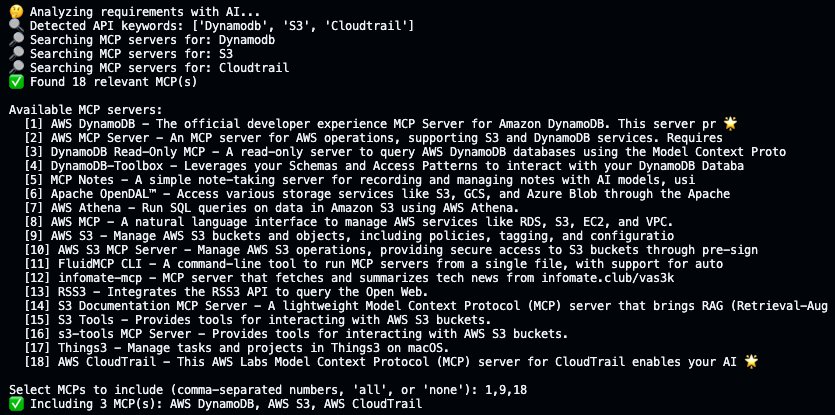
  2. MCP servers are discovered automatically, wherein the system detects keywords like “DynamoDB”, “S3”, and “CloudTrail” in the description, searches the MCP registry for relevant API servers, and presents an interactive selection prompt for choosing which servers to include.
  3. Once the user confirms, the system generates complete Python code for each command. These are not stubs or placeholders that users may typically see within generated code, but working implementations with validated AWS SDK for Python (Boto3) calls, error handling, and type hints.
  4. Finally, the output is packaged as an installable Python project with a pyproject.toml file and entry points configured.

Most importantly, the generated CLI includes a tool command group that enables self-extension at runtime. After installation, users can ask the CLI to create entirely new reporting tools and iteratively refine them without touching source code. This is the repeatable part of the pattern because any generated tool inherits the ability to extend itself. This mechanism is built into every generated CLI, so each one is immediately capable of growing beyond its original scope.

III. Technical Implementation

Strands Agents SDK Integration

The Strands Agents SDK is the backbone of the meta-tooling pattern. It provides three features that make self-extending tools possible, and these features are not specific to CLI generation. Any Python application can use them to dynamically create and manage capabilities at runtime.

The @tool Decorator

When a user asks a generated CLI to create a new tool, Claude Opus 4.6 on Amazon Bedrock produces Python code that uses the Strands @tool decorator. This decorator registers the function with Strands’ tool system, making it immediately discoverable and executable:

from strands import tool

@tool 
def list_s3_buckets_with_costs() -> List[Dict[str, Any]]:

The @tool decorator registers the function’s signature, type hints, and docstring as a tool specification that the Strands Agent can reason about and invoke.

Runtime Tool Loading

The Strands Agents SDK includes a tool loading system that can discover and import @tool-decorated functions from Python files at runtime. Tools do not need to be registered at application startup. They can be created, saved to a directory, and made available to the agent dynamically.In our implementation, generated tools are saved as standalone Python files in a directory called `tools/`. Each time a CLI command runs, the application scans this directory, loads any @tool-decorated functions it finds, and adds them to the agent’s tool collection without requiring a restart.The self-extending pattern works because of this scan-on-invocation approach. A user can create a tool, execute it, decide it needs changes, update it, and execute again without any rebuild or reinstall step since each CLI invocation discovers and loads whatever tools exist on disk.

Agent Orchestration with BedrockModel

The Strands Agent class ties everything together. It connects to Amazon Bedrock via BedrockModel and manages a collection of tools:

from strands import Agent
from strands.models import BedrockModel

agent = Agent(
    model=BedrockModel(
        model_id=""
    ),
    tools=[shell_tool, editor_tool] + loaded_tools,
    system_prompt="You are a tool creation assistant..."
)

When the agent receives a tool creation request, it calls Amazon Bedrock to generate the implementation and saves it as a Python file in the tools/ directory. The next CLI command automatically discovers and loads the new tool.

Amazon Bedrock Integration

CLI Creator connects to Anthropic’s Claude through Amazon Bedrock’s cross-region inference profile. Amazon Bedrock serves two distinct roles in the system.

Role 1: CLI Requirements Analysis with Structured Output

When you run cli-creator create, the first step is analyzing the natural language description and extracting a structured specification. Instead of parsing raw text from the model, we use the Strands Agents SDK’s structured output feature with Pydantic models to guarantee the response conforms to our schema:

from pydantic import BaseModel, Field
from strands import Agent
from strands.models import BedrockModel

class CommandSpec(BaseModel):
    name: str = Field(description="Command name in kebab-case")
    description: str = Field(description="What this command does")
    arguments: Optional[List[str]] = Field(default_factory=list)
    options: Optional[List[CommandOption]] = Field(default_factory=list)

class CLIRequirements(BaseModel):
    cli_name: str = Field(description="CLI name in kebab-case")
    description: str = Field(description="One-line description")
    commands: List[CommandSpec] = Field(description="Commands to generate")
    dependencies: List[str] = Field(default_factory=list)

# Create agent and invoke with structured output
agent = Agent(
    model=BedrockModel(model_id="us.anthropic.claude-opus-4-6-v1"),
    system_prompt="You are an expert CLI designer..."
)

result = agent(
    f"Analyze this CLI description: {description}",
    structured_output_model=CLIRequirements
)

# Access the validated Pydantic model — no JSON parsing needed
requirements: CLIRequirements = result.structured_output

By passing the structured_output_model, the Strands Agent constrains the model’s response to match the Pydantic schema. The result is a validated Python object where if the model’s first attempt does not conform to the schema, Strands automatically sends the validation errors back to the model and retries, producing a correct response without manual intervention. This approach eliminates malformed JSON, missing fields, wrong types, and hallucinated structure.

Role 2: Complete Command Generation with AI Functions

The second Amazon Bedrock role is generating complete command implementations. Direct integration of AI agents in code generation workflows is often avoided because of the model’s non-deterministic nature. There is no guarantee that generated code will compile, follow the expected structure, or avoid common pitfalls like empty error handlers. Strands AI Functions addresses this through runtime post-condition checking. AI Functions is a Python library for building reliable AI-powered applications through a new abstraction of functions that behave like standard Python functions but are evaluated by reasoning AI Agents. You decorate a function with @ai_function, write its prompt as a docstring with curly-brace placeholders, and attach post-conditions that the output must satisfy. If any post-condition fails, AI Functions automatically initiates a self-correcting loop, sending the specific error back to the model and retrying until all conditions pass or the maximum attempts are reached.

We use AI Functions to build a self-correcting code generation pipeline. Each generated command must pass three post-conditions before it is accepted:

from ai_functions import ai_function, PostConditionResult

def check_syntax(response: str) -> PostConditionResult:
    try:
        compile(response, '<generated>', 'exec')
        return PostConditionResult(passed=True)
    except SyntaxError as e:
        return PostConditionResult(
            passed=False,
            message=f"Python syntax error on line {e.lineno}: {e.msg}. Fix: {e.text}"
        )

def check_has_decorator(response: str) -> PostConditionResult:
    if '@cli.command' in response:
        return PostConditionResult(passed=True)
    return PostConditionResult(
        passed=False,
        message="Missing @cli.command() decorator."
    )

@ai_function(
    post_conditions=[check_syntax, check_has_decorator, check_no_empty_try],
    max_attempts=3
)
def generate_click_command(command_name: str, description: str, ...) -> str:
    """
    Generate a complete Click CLI command function in Python.

    Use @cli.command() decorator. Include needed imports using 'from X import Y' style.
    Always use 'import click' and reference as click.echo(), click.style().

    Command: {command_name}
    Description: {description}
    """

The @ai_function decorator turns the function’s docstring into a prompt template. Curly-brace placeholders like {command_name} are filled from the function arguments at call time. Each post-condition receives the model’s response and returns a PostConditionResult. When a condition fails, AI Functions sends the error message back to the model and retries automatically, up to max_attempts. The model sees the specific failure (“syntax error on line 42”, “missing @cli.command decorator”, “empty try/except block detected”) and corrects it on the next attempt.

The prompt embedded in the docstring still enforces coding conventions (use import click rather than from click import, use from X import Y for all other imports) to prevent import conflicts. Post-conditions catch what the prompt misses, making the pipeline significantly more reliable than prompt engineering alone.

MCP Server Discovery and Integration

The Model Context Protocol adds automatic discovery of external API knowledge to the pattern. When your tool description mentions AWS services, the system searches for MCP servers that can provide domain-specific tooling. Generated tools can tap into live, structured API knowledge beyond what Amazon Bedrock knows at generation time.

How Discovery Works

The system uses Amazon Bedrock to extract API keywords dynamically. The api_keywords field is part of the same CLIRequirements Pydantic model used for structured output, so keyword detection happens in the same call that extracts commands and dependencies at zero additional cost:

class CLIRequirements(BaseModel):
    cli_name: str = ...
    commands: List[CommandSpec] = ...
    dependencies: List[str] = ...
    api_keywords: List[str] = Field(
        default_factory=list,
        description="API/service keywords to search for MCP servers"
    )

When the model returns keywords like ["dynamodb", "s3", "cloudtrail"], the system uses a Strands Agent with the http_request tool from Strands Agents Tools to search the MCP registry for each keyword. Results are merged and deduplicated.

Interactive MCP Selection

After discovering relevant MCPs, the system presents them to the user for selection:

Terminal screenshot showing an AI-powered MCP server discovery process. The tool analyzes requirements, detects API keywords (DynamoDB, S3, CloudTrail), searches for relevant servers, and displays 18 available MCP servers in a numbered list. The user selects servers 1, 9, and 18 at a prompt, confirming the inclusion of AWS DynamoDB, AWS S3, and AWS CloudTrail.

Selected MCPs are configured in the generated CLI’s .mcp.json file, and a bridge module is copied to the output project. This bridge connects to MCP servers at runtime, extracts their tool metadata, and converts them into Strands @tool functions that the Agent can invoke.

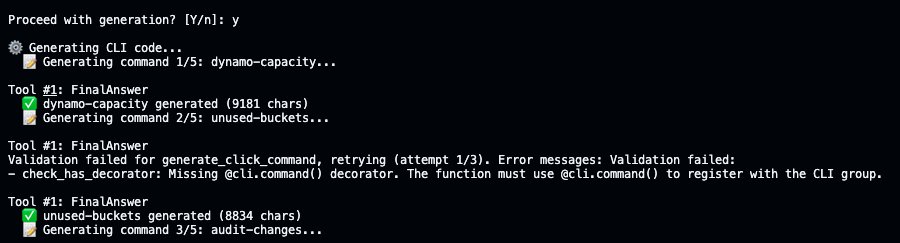
Terminal screenshot showing CLI code generation in progress. The user confirms generation with "y." Command 1/5 (dynamo-capacity) succeeds with 9,181 characters generated. Command 2/5 (unused-buckets) fails validation due to a missing @cli.command() decorator, retries (attempt 1/3), and ultimately succeeds with 8,834 characters. Command 3/5 (audit-changes) begins generating.

After MCP selection, CLI Creator generates each command sequentially using AI Functions. Here, the unused-buckets command initially fails the check_has_decorator post-condition for missing the @cli.command decorator, and AI Functions automatically retries generation with the error fed back to the model, producing valid code on the second attempt. All commands go through this process before having an installable CLI.

The Meta-Tooling Workflow: Create, Update, Revert

The most distinctive feature of the pattern is the iterative tool refinement workflow. This is where meta-tooling becomes practical, and it is the part most easily adapted to domains beyond CLI generation.

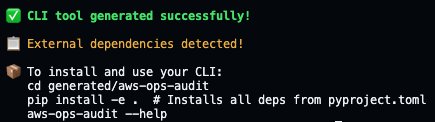
Step 1: Install and verify the generated CLI

Terminal screenshot showing successful CLI tool generation. A green checkmark with green text confirms "CLI tool generated successfully!" A yellow warning notes "External dependencies detected!" followed by installation instructions: navigate to the generated/aws-ops-audit directory, install dependencies with pip, and verify with the --help command.

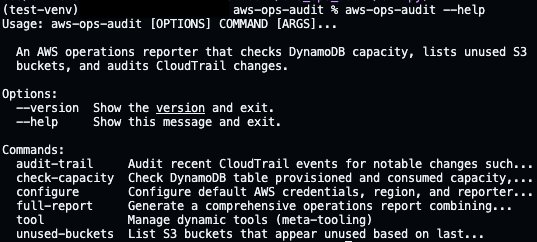
After generation completes, install the CLI and verify it works:

Terminal screenshot showing the help output for the "aws-ops-audit" CLI tool, run inside a Python virtual environment (test-venv). The tool is described as "An AWS operations reporter that checks DynamoDB capacity, lists unused S3 buckets, and audits CloudTrail changes." Two options (--version, --help) and six commands (audit-trail, check-capacity, configure, full-report, tool, unused-buckets) are listed.

Each command is fully implemented. Here is unused-buckets pulling live S3 data:

Terminal screenshot showing the output of the "aws-ops-audit unused-buckets" command run in a Python virtual environment. An "Unused S3 Buckets Report" lists four S3 buckets with metadata including name, region, object count, size, last modified date, creation date, and reason for being flagged — either "no activity since [date]" or "empty bucket."

After installation, the CLI is ready to use. Each subcommand supports --help for detailed parameter information.

Step 2: Create a new reporting tool at runtime

Consider a scenario where leadership requests a new report that was not part of the original CLI, such as a summary of all Amazon S3 buckets with their sizes, sorted by cost impact. Instead of modifying source code, use the built-in tool create command:

Terminal screenshot showing the output of the "aws-ops-audit unused-buckets" command run in a Python virtual environment. An "Unused S3 Buckets Report" lists four S3 buckets with metadata including name, region, object count, size, last modified date, creation date, and reason for being flagged — either "no activity since [date]" or "empty bucket."

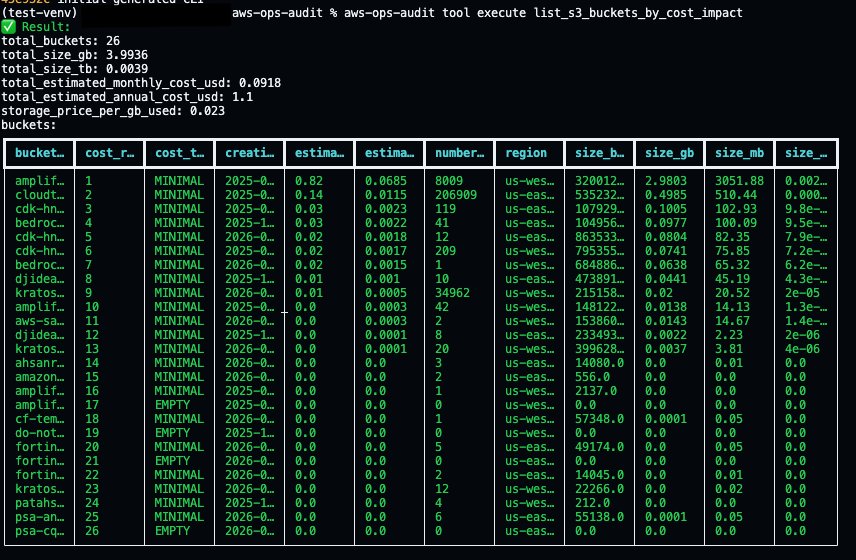
Amazon Bedrock generates a complete Strands tool, saves it to `tools/`, and commits it to git. The next CLI command automatically discovers and loads the new tool from disk, so you can execute it right away:

Terminal screenshot showing the output of "aws-ops-audit tool execute list_s3_buckets_by_cost_impact." A summary section displays aggregate statistics for 26 S3 buckets totaling 3.99 GB and $1.10/year in estimated costs. Below, a detailed data table ranks all 26 buckets by cost impact, showing columns for bucket name, cost rank, cost tier (MINIMAL or EMPTY), creation date, estimated monthly/annual costs, object count, region, and size metrics.

Output is automatically formatted based on data type, so lists of dictionaries render as tables, single dictionaries display as key-value pairs, and everything else falls back to JSON.

Step 3: Update and review changes

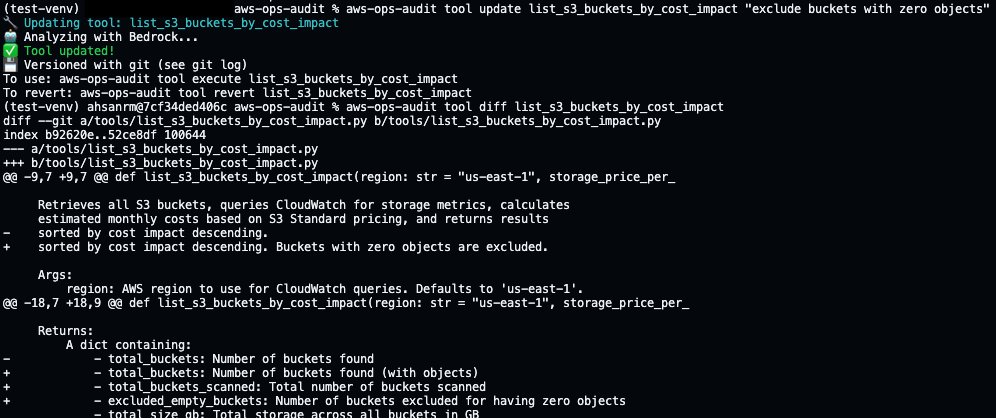
Suppose the initial output needs adjustment. Leadership wants the report to exclude buckets with an object count of zero. The user describes this change in natural language using the tool update command.

Terminal screenshot showing the update of the "list_s3_buckets_by_cost_impact" tool using the aws-ops-audit CLI with the instruction to "exclude buckets with zero objects." The tool is updated via Bedrock AI analysis, versioned with git, and a git diff displays changes to the function's docstring — adding exclusion behavior documentation and new return fields (total_buckets_scanned, excluded_empty_buckets).

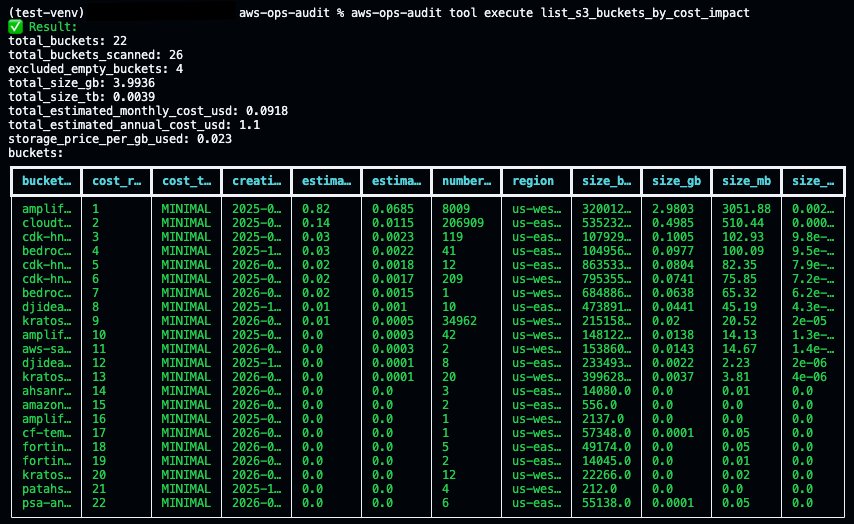
CLI Creator commits the current version to git before overwriting, then generates a new version. The tool diff command shows exactly what changed. Now execute the updated tool to see the improvements:

Terminal screenshot showing the updated output of "aws-ops-audit tool execute list_s3_buckets_by_cost_impact" after the zero-object exclusion update. Summary statistics now show 22 active buckets out of 26 scanned, with 4 empty buckets excluded. The data table lists only 22 rows, all classified as MINIMAL — confirming the empty bucket exclusion is working correctly.

The same update workflow applies regardless of what the tool does, whether it is an Amazon S3 cost report, an Amazon DynamoDB capacity analyzer, or a Salesforce data exporter.

Step 4: Revert if needed

If the update didn’t work as expected, tool revert restores the previous version from git:

Terminal screenshot showing the revert of the "list_s3_buckets_by_cost_impact" tool using the aws-ops-audit CLI. A confirmation prompt asks "Revert 'list_s3_buckets_by_cost_impact' to previous backup? [Y/n]:" and the user enters "y." A green checkmark confirms "Tool reverted!" followed by a note: "Restored from git history."

The git log shows the full history of create, update, and revert operations, all tracked automatically.

Terminal screenshot showing a two-line git log output. The most recent commit (ef4a65e, HEAD → main) reverts the list_s3_buckets_by_cost_impact tool. The previous commit (3640bde) updated the same tool to "exclude buckets with zero objects and add a total."

Under the hood, tool create, tool update, and tool revert are convenience wrappers around git. Each operation commits to the repository, so the version history is standard git and works with any existing workflow. The tool diff and tool revert commands exist so that someone iterating conversationally can see changes and undo them without switching context to git commands, but git log, git diff, and git revert work just as well. Git-based versioning and one-command reverts make it safe to experiment.

Step 5: Output formats

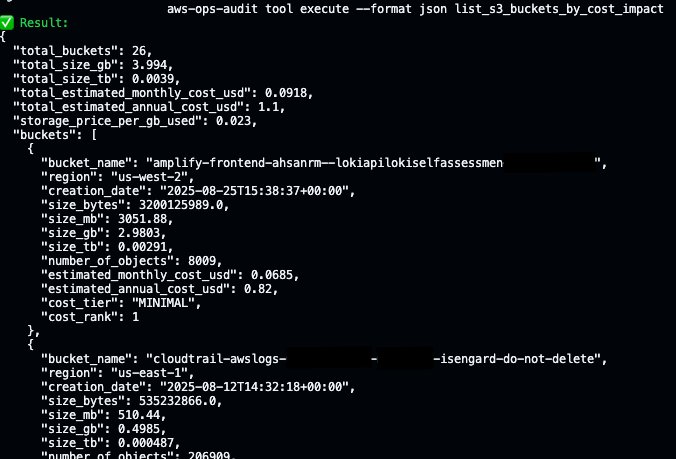
Reports often need to be consumed in different ways. The --format flag lets you control how output is rendered:

Terminal screenshot showing a two-line git log output. The most recent commit (ef4a65e, HEAD → main) reverts the list_s3_buckets_by_cost_impact tool. The previous commit (3640bde) updated the same tool to "exclude buckets with zero objects and add a total."

The formatter attempts to use the Rich library for colored tables when available and falls back to an ASCII table implementation when it is not installed. Here is a new AWS Lambda tool stored in `tools/`, rendering as a table by default:

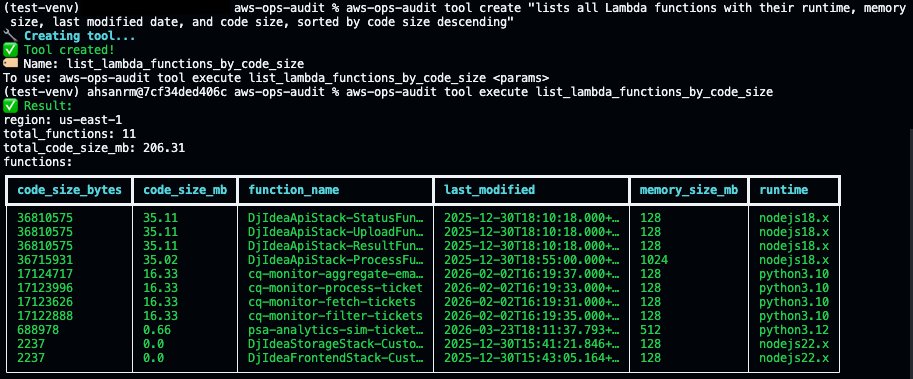
Terminal screenshot showing the creation and immediate execution of a new "list_lambda_functions_by_code_size" tool using the aws-ops-audit CLI. The tool is created from a natural language description, then executed to produce a Lambda functions report for us-east-1 showing 11 functions with a total code size of 206.31 MB, displayed in a table sorted by code size descending.

IV. Conclusion

The meta-tooling pattern demonstrated here combines Amazon Bedrock for code generation, the Strands Agents SDK for runtime tool management, and Model Context Protocol for external API discovery into a system where CLIs extend themselves through natural language. The implementation has clear limitations today. Generated code still requires human review before production use; post-conditions catch structural errors but cannot verify business logic correctness, and the MCP ecosystem is young enough that server coverage is uneven across domains.

V. Next Steps

CLI tools are a natural starting point because they have a well-defined structure and fast feedback loops, but the same mechanism applies to any software that could benefit from generating and refining small, composable units of functionality at runtime. Infrastructure-as-code modules, data pipeline transformations, API integration adapters, and compliance policy checks are all domains where the creation pattern is repetitive, and the validation criteria are expressible as post-conditions. To explore the pattern:

– Start with Amazon Bedrock for foundation model access.

– Use the Strands Agents SDK for tool orchestration.

– Browse the MCP ecosystem at mcpservers.org.

– Fork the CLI Creator source code on GitHub.


About the authors
Ragib Ahsan

Ahsan is an AI Acceleration Architect at Amazon Web Services (AWS), where he helps organizations build and implement AI/ML solutions. Specializing in computer vision and industrial manufacturing, he works with AWS partners and engineering teams to create practical applications using cloud technologies.

Agentic application modernization at scale with Strands and Amazon Transform custom

Post Syndicated from Kanishk Mahajan original https://aws.amazon.com/blogs/devops/use-generative-ai-agents-for-application-modernization-at-scale-with-strands-amazon-transform-custom-and-amazon-bedrock-agentcore/

Introduction

Modernizing applications by upgrading language runtimes, migrating SDKs, and refactoring frameworks is important for cloud adoption but can be labor-intensive at scale. Each repository requires analysis of dependencies and transformation needs; custom transformation logic must be built and validated, and changes are often executed sequentially across codebases. If you have hundreds of applications, this stretches timelines from months to years, while introducing inconsistency across your teams.

To address this, Amazon Web Services (AWS) provides a composable set of building blocks. AWS Transform custom enables reusable, CLI-driven code transformations for upgrading runtimes, SDKs, and frameworks consistently across large portfolios. Strands Agents provides a framework for building multi-agent systems that coordinate complex transformation workflows. Amazon Bedrock AgentCore delivers the managed runtime, memory, and observability to operate these agents reliably in production. Together, they replace manual, sequential modernization with an intelligent, automated approach that scales.

In this post, we show you how to combine these services to build a generative AI–powered, agentic modernization system that can automatically analyze application repositories, determine required changes, create missing transformations, and execute them in parallel at scale.

Solution overview

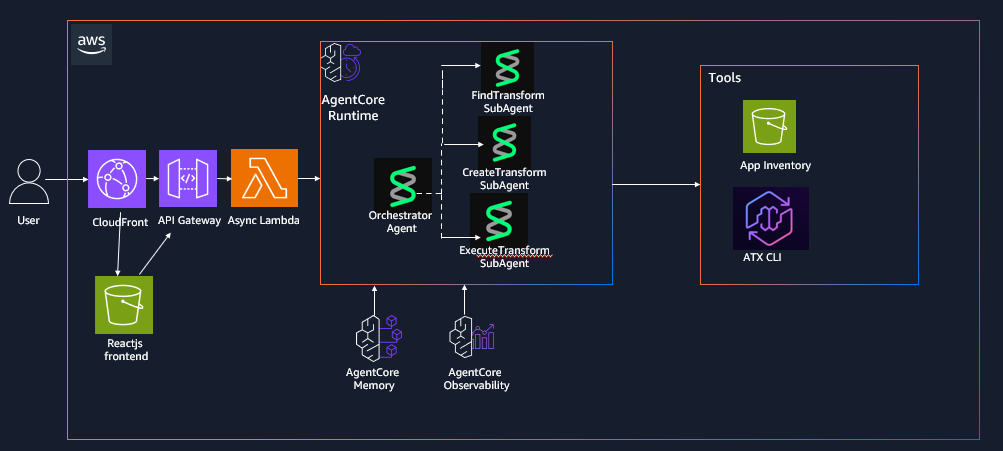
The solution uses an agentic architecture that separates intelligent decision-making from deterministic execution, enabling automation at scale while maintaining consistency and control. In this post, you will build an AI-driven application modernization system that demonstrates how multi-agent workflows can be applied to large-scale code transformation scenarios. You interact with the system through a React-based frontend or API interface, submitting individual repositories or batch workloads via CSV inputs. Requests are processed asynchronously through an API layer that invokes an orchestrator agent running on Amazon Bedrock AgentCore, which coordinates specialized agents to analyze codebases, identify transformation requirements, and manage execution workflows. Results are stored and surfaced through the interface, allowing users to track progress and review outputs in real time.The workflow begins with repository analysis, where the system inspects application codebases to identify languages, dependencies, and required upgrades such as runtime version changes or SDK migrations. Based on this analysis, the system maps each application to an existing transformation when available. If no suitable transformation exists, a creation agent dynamically generates one using natural language instructions and publishes it to a centralized registry for reuse, creating a continuously improving system where transformation coverage expands over time.

Once transformations are identified or created, an execution agent runs them at scale by invoking AWS Batch jobs that execute the AWS Transform custom CLI, enabling parallel processing across multiple repositories. The orchestrator coordinates all agents, maintains workflow state using Amazon Bedrock AgentCore Memory, and ensures reliable execution through structured task decomposition, tool invocation, and error handling. While the example focuses on application re-platforming, the same architectural pattern can be applied to other large-scale code analysis and automation workflows.

The following architecture diagram (Figure 1) illustrates the various components of our solution as outlined in this section:architecture diagram describing the multi agent strands and agentcore deployment

Figure 1: AWS Transform custom Agentic Orchestration Architecture using Strands agents and Amazon Bedrock AgentCore

Prerequisites

Complete the following prerequisites:

  1. Install the AWS Command Line Interface (AWS CLI).
  2. Install the AWS SAM CLI v1.100.0+
  3. Install Docker v20.x+.
  4. Install Node.js v18.x+
  5. Install Python v3.11+
  6. Install the AWS CDK CLI
  7. Enable access to a Bedrock model for the orchestrator in your deployment region. The default model can be configured through the Amazon Bedrock model access console. To use a different model, set `BEDROCK_MODEL_ID` in `deployment/config.env` before Step 3 and enable access to that model instead. Model access approval can take a few minutes in some accounts, so complete this step before deploying.

Dependencies

The Strands Agents implementation has the following dependencies that are packaged in the DockerFile:

  1. Strands multi-agent framework: strands-agents
  2. Strands agent tools and utilities: strands-agents-tools
  3. HTTP library for API calls: requests
  4. Amazon Bedrock AgentCore SDK: bedrock-agentcore
  5. AWS SDK for Python: boto3

Deploy the solution

The solution is available for download on the GitHub repo. This post walks through the CDK + SAM deployment path (Option A in the repository README). The repository also includes a CDK-only option (Option B); see the repository README for details.

Step 1: Clone the repository

git clone https://github.com/aws-samples/aws-transform-custom-samples.git

cd aws-transform-custom-samples/agentic-atx-platform

Step 2: Configure AWS Credentials

# Configure AWS CLI

aws configure

# Verify credentials

aws sts get-caller-identity

Step 3: Deploy ATX CLI Container image and frontend using AWS CDK

# Copy configuration template (defaults work for most setups; edit only to change region or Bedrock model)

cd deployment

cp config.env.template config.env

# Authenticate with Amazon ECR Public (required for the Docker base image pull)

aws ecr-public get-login-password --region us-east-1 | docker login --username AWS --password-stdin public.ecr.aws

# Build the UI placeholder so CDK’s UI stack has ui/dist/ to deploy

cd ../ui && npm install && npx vite build

# Install CDK dependencies and bootstrap (run once per account/region)

cd ../cdk

npm install cdk bootstrap

# Build TypeScript and deploy the three stacks

npx tsc

CDK_DEFAULT_ACCOUNT=$(aws sts get-caller-identity --query Account --output text)

cdk deploy AtxContainerStack AtxInfrastructureStack AtxUiStack --require-approval never

# Note for accounts without a default VPC , pass the VPC context flags to `cdk deploy`:

cdk deploy AtxContainerStack AtxInfrastructureStack AtxUiStack --require-approval never

cdk deploy AtxContainerStack AtxInfrastructureStack AtxUiStack --require-approval never -c existingVpcId=vpc-xxx -c existingSubnetIds=subnet-aaa,subnet-bbb -c existingSecurityGroupId=sg-ccc

# Subnets must be public (auto-assign public IP enabled) or private with a NAT gateway so Fargate tasks can reach Amazon ECR, Amazon S3, and Git repositories.

Step 4: Deploy Strands Agents to AgentCore runtime using AWS SAM

cd ../sam./deploy.sh

# Invoke the deploy Lambda to create the AgentCore Runtime via the bedrock-agentcore-control SDK (takes 2-5 minutes)

aws lambda invoke --function-name atx-deploy-agentcore \ --region us-east-1 \ --cli-binary-format raw-in-base64-out \ --payload '{"action":"deploy"}' \ --cli-read-timeout 900 /tmp/deploy-output.jsoncat /tmp/deploy-output.json

Step 5: Wire the AgentCore runtime ARN into the async invoke Lambda

ACCOUNT_ID=$(aws sts get-caller-identity --query Account --output text)

RUNTIME_ARN=$(python3 -c "import json; print(json.loads(json.load(open('/tmp/deploy-output.json'))['body'])['runtime_arn'])")aws lambda update-function-configuration \ --function-name atx-async-invoke-agent \ --region us-east-1 \ --environment "Variables={AGENT_RUNTIME_ARN=${RUNTIME_ARN},RESULT_BUCKET=atx-custom-output-${ACCOUNT_ID},JOBS_TABLE=atx-transform-jobs}"

Step 6: Rebuild and deploy the frontend with AgentCore API endpoint

# Update the React application with the deployed API endpoint and redeploy it.

API_URL=$(aws cloudformation describe-stacks \ --stack-name AtxAgentCoreSAM \ --region us-east-1 \ --query 'Stacks[0].Outputs[?OutputKey==`ApiEndpoint`].OutputValue' \ --output text)

cd ../ui

VITE_API_ENDPOINT=$API_URL npx vite build./deploy-aws.sh

# This rebuilds the React application with the correct API endpoint, uploads it to Amazon S3, and invalidates the Amazon CloudFront distribution.

Step 7: Access the application

# After deployment completes, retrieve the CloudFront distribution URL from the AWS CloudFormation outputs and open it in your browser to access the application UI.

aws cloudformation describe-stacks \ --stack-name AtxUiStack \ --region us-east-1 \ --query 'Stacks[0].Outputs[?OutputKey==`WebsiteUrl`].OutputValue' \ --output text

Using the application

The UI exposes five tabs covering the complete modernization workflow: browsing available transformations, executing a transformation on a single repository, creating a new custom transformation with natural language, batch-processing a CSV of repositories, and tracking job status. This section walks through two of the most common flows.

Create a custom transformation from natural language

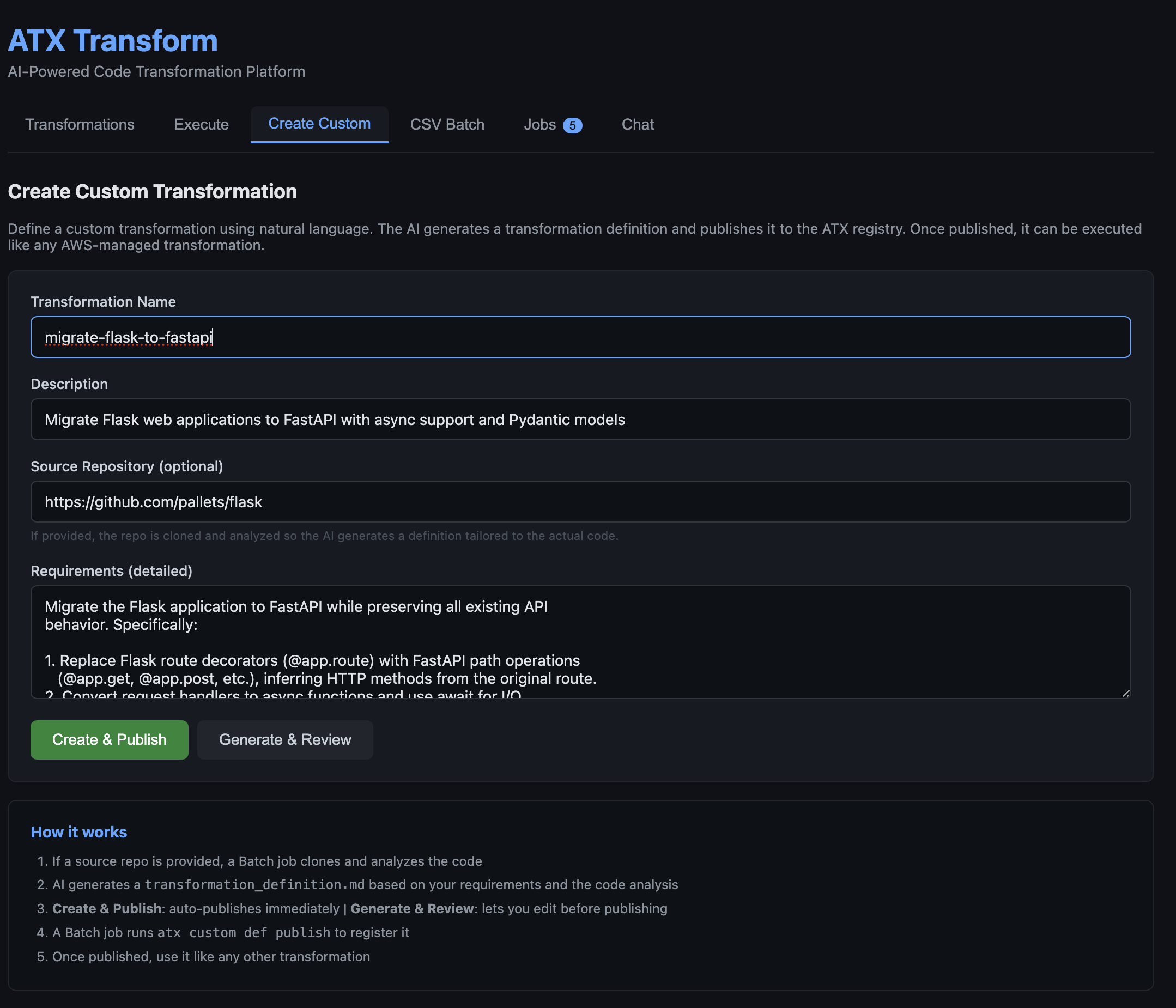
Open the Create Custom tab, describe the transformation in plain English (for example, “Upgrade Spring Boot 2 applications to Spring Boot 3”), and optionally provide a reference repository URL. The creation agent analyzes the source, generates a transformation definition, and publishes it to the ATX registry for reuse across the portfolio.

Describing a custom transformation in plain English. The form accepts a name, description, optional reference repository, and natural-language requirements.

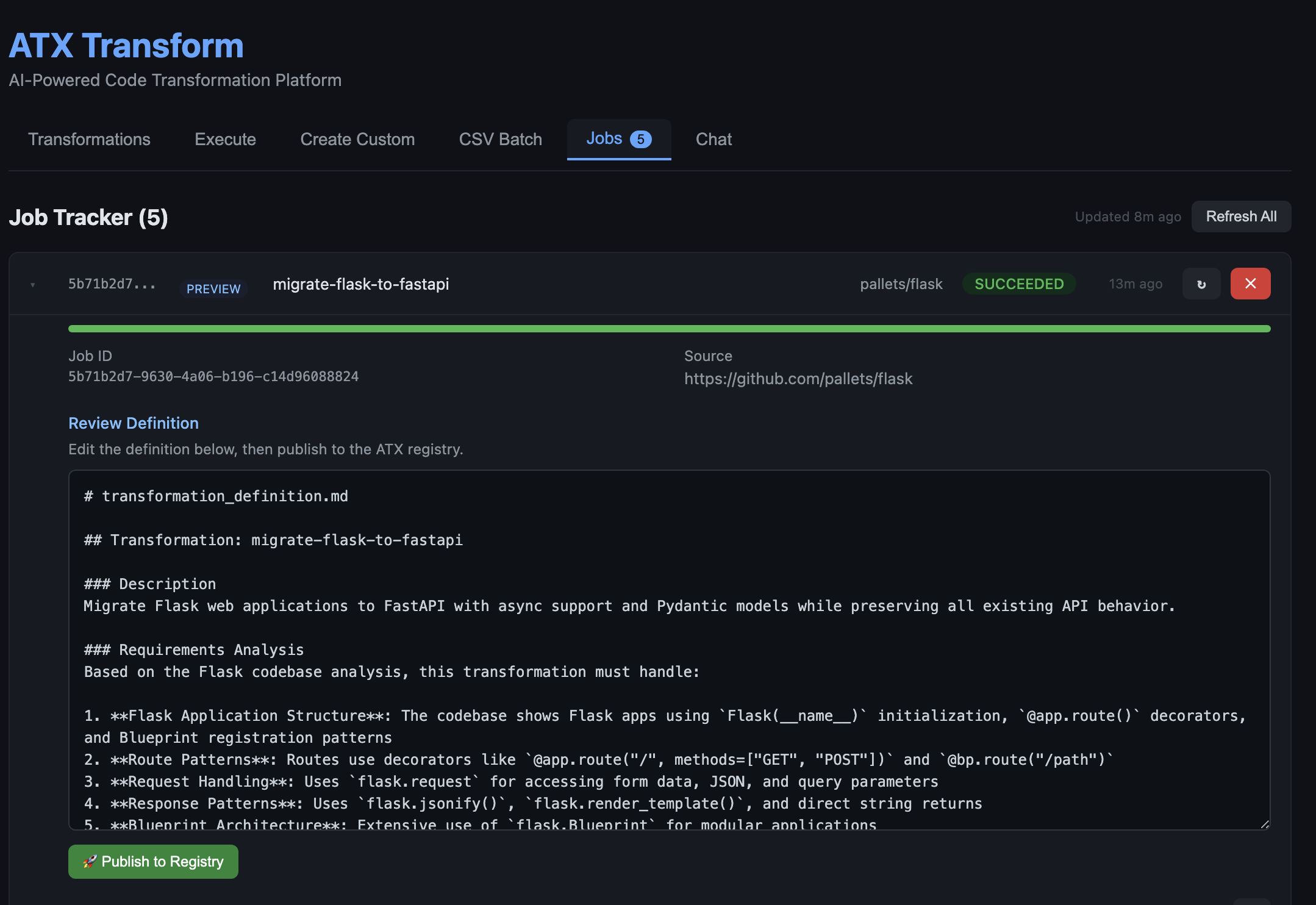
Figure 2: Describing a custom transformation in plain English. The form accepts a name, description, optional reference repository, and natural-language requirements.After submitting, the orchestrator clones the reference repository, analyzes the source, and generates a transformation definition tailored to the actual code patterns found in the codebase. This takes 1–5 minutes depending on repository size. The generated definition is then shown for review in the Jobs tab, where it can be edited before publishing to the ATX registry.

Figure 3: The AI-generated transformation definition shown for review in the Jobs tab. The agent analyzed the Flask codebase and produced a detailed definition covering routes, request handling, response patterns, and Blueprint architecture. The user can edit the definition in-place and click Publish to Registry when ready.Once published, the new transformation appears in the Transformations tab alongside AWS-managed transformations and can be executed the same way on any repository.

Run a batch of repositories from a CSV

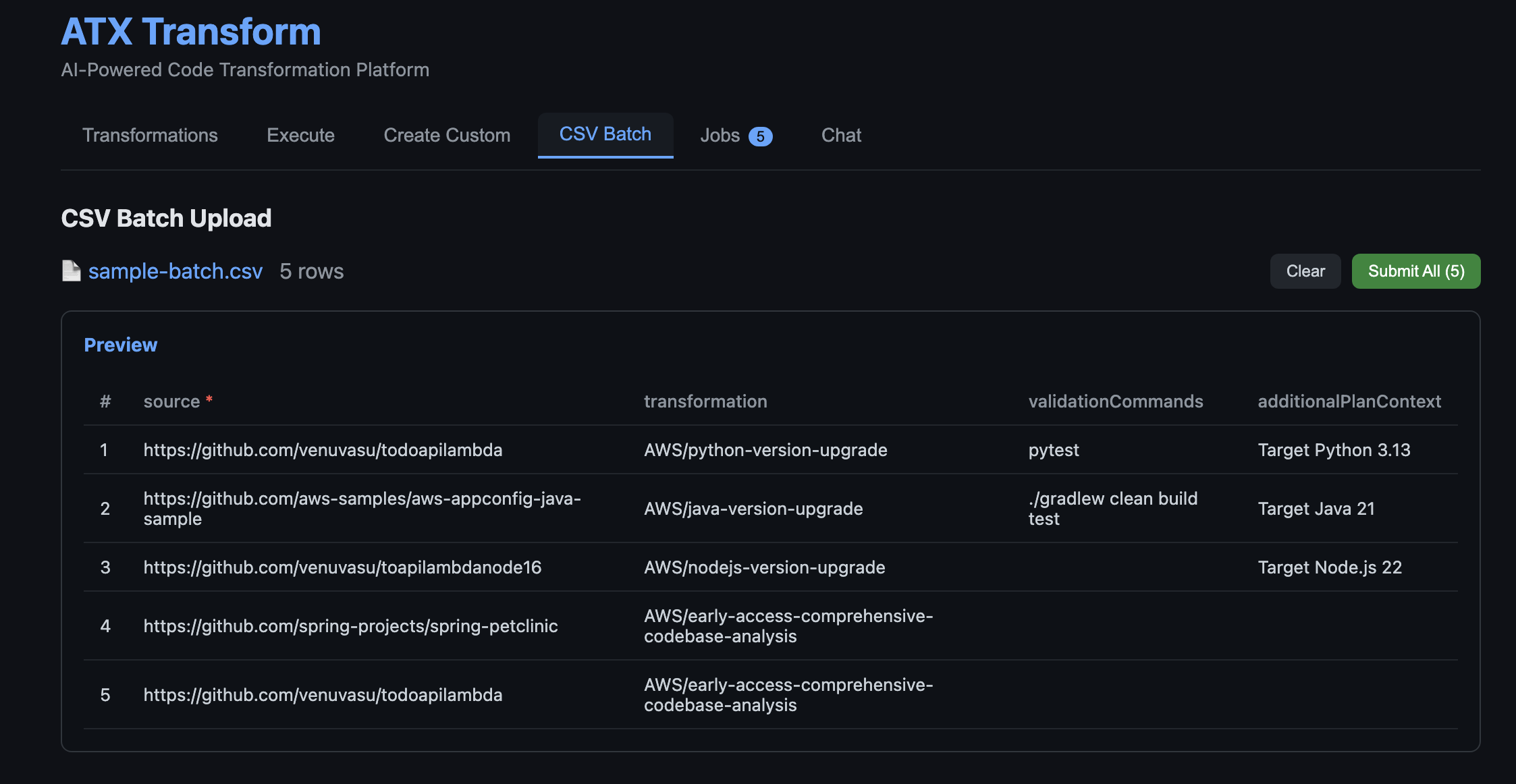
Open the CSV Batch tab and upload a CSV listing repository URLs and target transformations. A sample `sample-batch.csv` is included in the repository at `agentic-atx-platform/ui/sample-batch.csv`. The preview shows the parsed rows before submission. On Submit All, each row becomes a separate AWS Batch job running in parallel, and the Jobs tab shows live status as repositories complete.

Uploading a batch of repositories for parallel processing. The CSV lists a source repository URL, target transformation, optional validation commands, and additional plan context per row.

Figure 4: Uploading a batch of repositories for parallel processing. The CSV lists a source repository URL, target transformation, optional validation commands, and additional plan context per row. Each row becomes an independent AWS Batch job on submission.

Clean up

To avoid recurring charges, remove the resources after trying the solution.

Step 1: Delete the SAM Stack

sam delete --stack-name AtxAgentCoreSAM --region us-east-1 --no-prompts

Step 2: Delete the CDK Stacks

Remove the three CDK stacks in reverse order. The S3 buckets are configured with `autoDeleteObjects: true`, so CDK will empty them before deletion.

cd cdk

npx cdk destroy AtxUiStack AtxInfrastructureStack AtxContainerStack --force

Conclusion

In this post, you learned how to build a generative AI–powered, agentic system for application modernization that can analyze application repositories, determine required code changes, create missing transformations, and execute those transformations at scale. By combining AWS Transform Custom for transformation execution with Amazon Bedrock AgentCore for orchestration, and Strands Agents for multi-agent coordination and AWS Transform container solution for parallel processing, this approach demonstrates how intelligent automation can be applied to large-scale code transformation workflows.

This solution directly addresses the challenges of traditional modernization approaches. It reduces manual effort by automating repository analysis and transformation mapping, eliminates gaps in transformation coverage by dynamically generating reusable transformations, and significantly improves scalability through parallel execution using AWS Batch.

By introducing a centralized, agent-driven workflow with built-in observability and state management, organizations can achieve faster, more consistent, and governed modernization across large application portfolios. To get started, deploy the solution in your AWS environment, test it with a sample repository or batch workload, and extend it by creating custom transformations tailored to your applications. You can further integrate this approach into your CI/CD pipelines to enable continuous modernization and accelerate your cloud migration initiatives.


About the authors

Kanishk Mahajan is Principal – AI/ML with AWS Professional Services. In this role, he leads GenAI and agentic transformations for some of AWS largest customers in Telco and Media & Entertaintment.

Sandeep Batchu is a Senior Security Architect at Amazon Web Services, with extensive experience in software engineering, solutions architecture, and cybersecurity. Passionate about bridging business outcomes with technological innovation, Sandeep guides customers through their cloud and generative AI journey, helping them design and implement secure, scalable, and resilient architectures in the era of AI-driven transformation.

Venugopalan Vasudeven (Venu) is a Principal Specialist Solutions Architect at AWS, where he leads Agentic AI initiatives focused on AWS Transform. He helps customers adopt and scale AI-powered developer and modernization solutions to accelerate innovation and business outcomes.

Modernize your workflows: Amazon WorkSpaces now gives AI agents their own desktop (preview)

Post Syndicated from Micah Walter original https://aws.amazon.com/blogs/aws/modernize-your-workflows-amazon-workspaces-now-gives-ai-agents-their-own-desktop-preview/

Enterprises face a significant challenge when deploying AI agents: the desktop and legacy applications that power most business workflows are simply inaccessible to modern AI systems. According to a 2024 Gartner report, 75% of organizations run legacy applications that lack modern APIs, and 71% of Fortune 500 companies operate critical processes on mainframe systems without adequate programmatic access. For many organizations, this has meant choosing between delaying AI adoption or undertaking expensive and risky modernization projects.

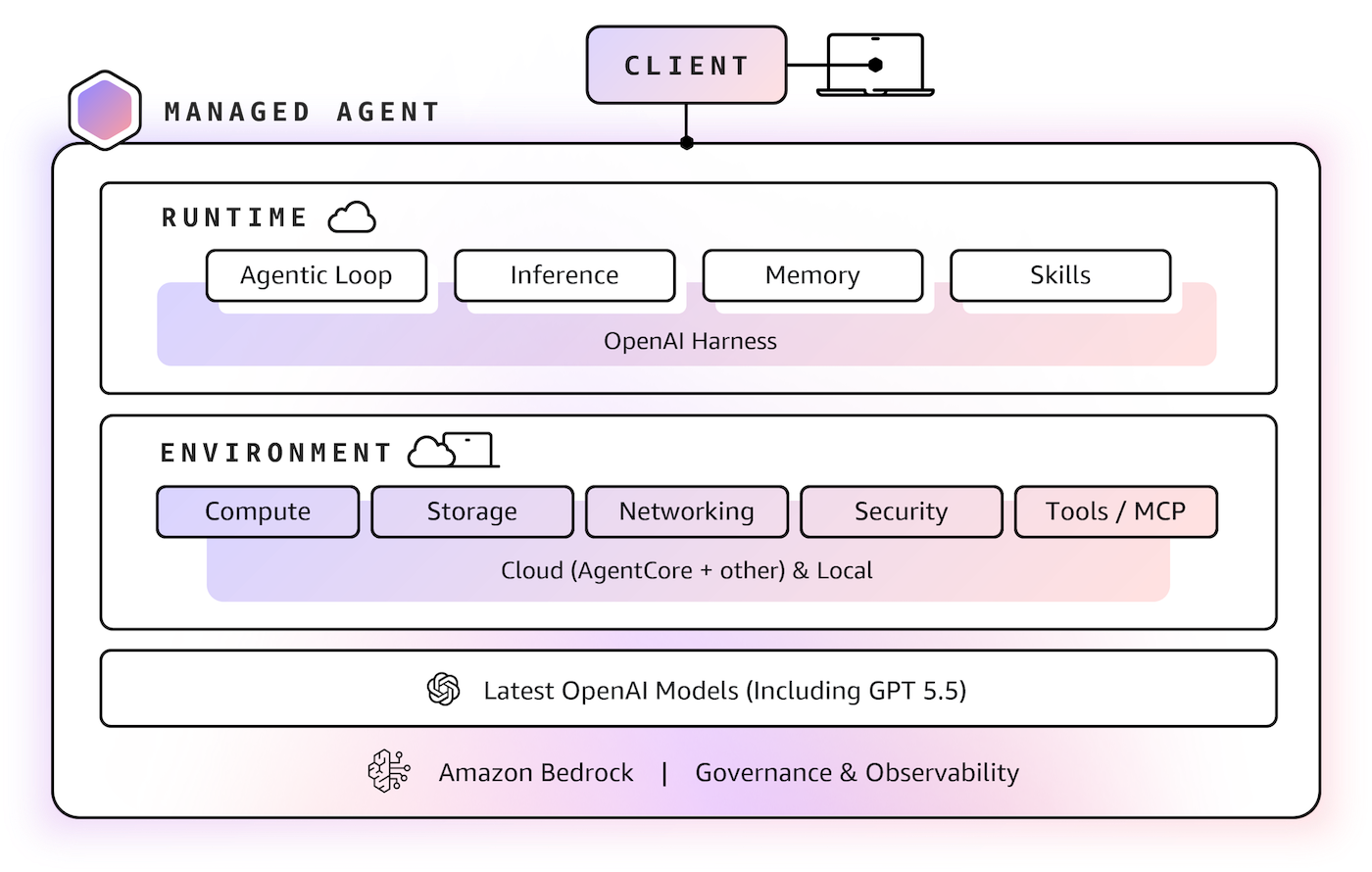
Today, we are announcing that Amazon WorkSpaces now enables AI agents to securely operate desktop applications without requiring application modernization. The same managed virtual desktops that millions of employees use and trust can now also serve AI agents, turning WorkSpaces into infrastructure for scaling enterprise productivity, not just delivering it. Because agents operate within your existing WorkSpaces environment, there are no APIs to build, no application migrations to plan, and no new infrastructure to manage.

Some of our customers had an early opportunity to give their agents a WorkSpace. Chris Noon, Director, Nuvens Consulting shared with us, “WorkSpaces lets our clients give AI agents the same secure, governed desktop environment their employees already use — no custom API integrations, full audit trails, and enterprise-grade isolation out of the box. For regulated industries, that’s not a nice-to-have — it’s the baseline.”

Secure cloud desktop access for AI agents
With WorkSpaces, AI agents can securely access and operate desktop applications running inside managed WorkSpaces environments to complete complex business workflows. Agents authenticate through AWS Identity and Access Management (IAM) and connect via Workspaces with complete audit trails available through AWS CloudTrail and Amazon CloudWatch. Because agents operate within secure WorkSpaces environments rather than on local machines, your existing security controls and compliance policies remain fully intact.

Amazon Workspaces supports the industry-standard Model Context Protocol (MCP), which means WorkSpaces works with any agent framework, such as LangChain, CrewAI and Strands Agents.

Let’s try it out
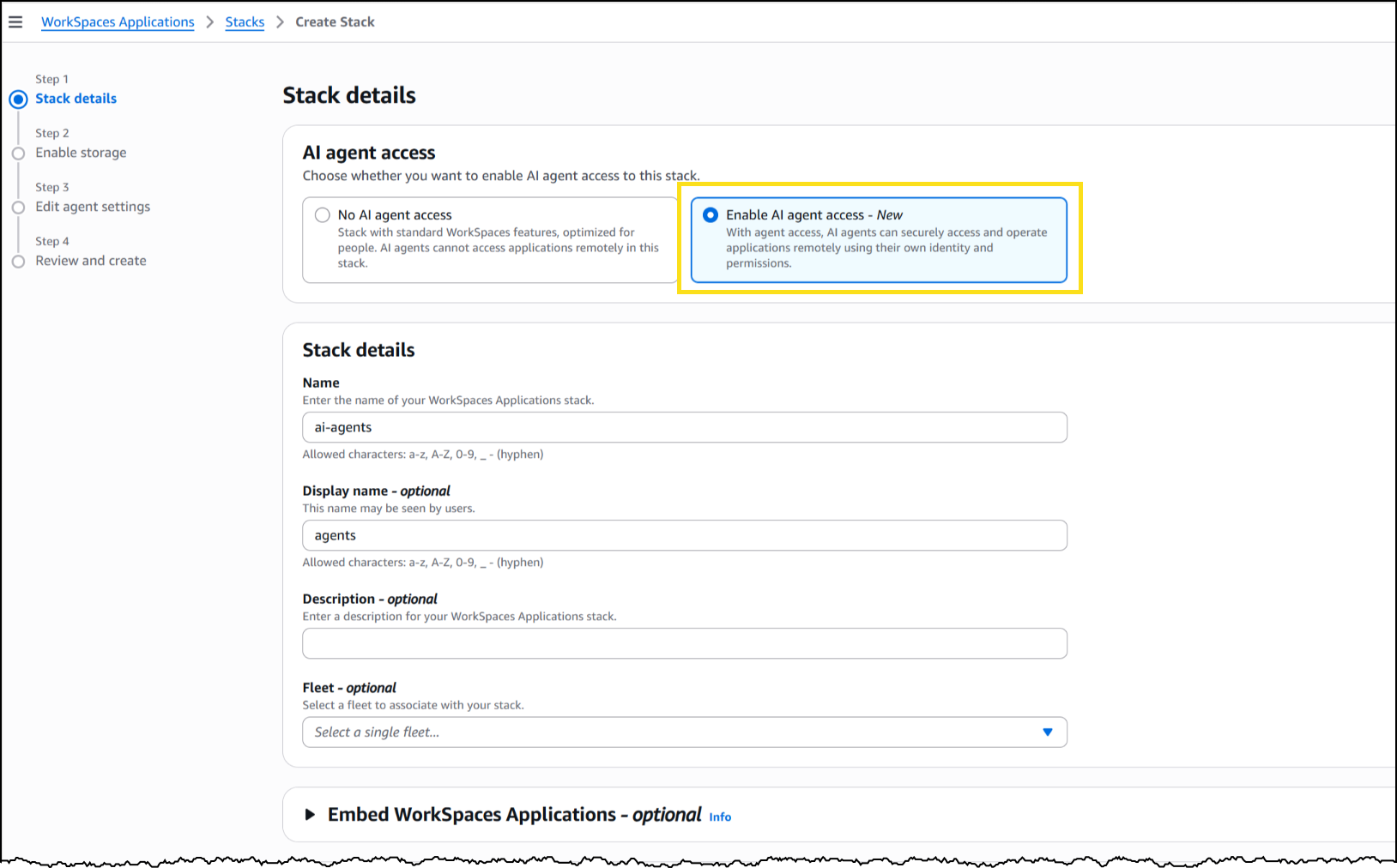
To set up a WorkSpaces environment for AI agents, I started in the AWS Management Console by creating a new WorkSpaces Applications stack—the environment definition that controls how agents connect and what they’re allowed to do.

From the Amazon WorkSpaces console, I chose Create stack and configured the basics: name, fleet association, and VPC endpoints. In Step 3 of the stack creation workflow, I noticed the new AI agents section with two options. The first, No AI agent access, is the default configuration for standard WorkSpaces designed for people. The second, Add AI Agents, allows AI agents to securely access and operate applications using their own identity and permissions. I selected Add AI Agents to enable agent connections on this stack.

Workspaces Screenshot

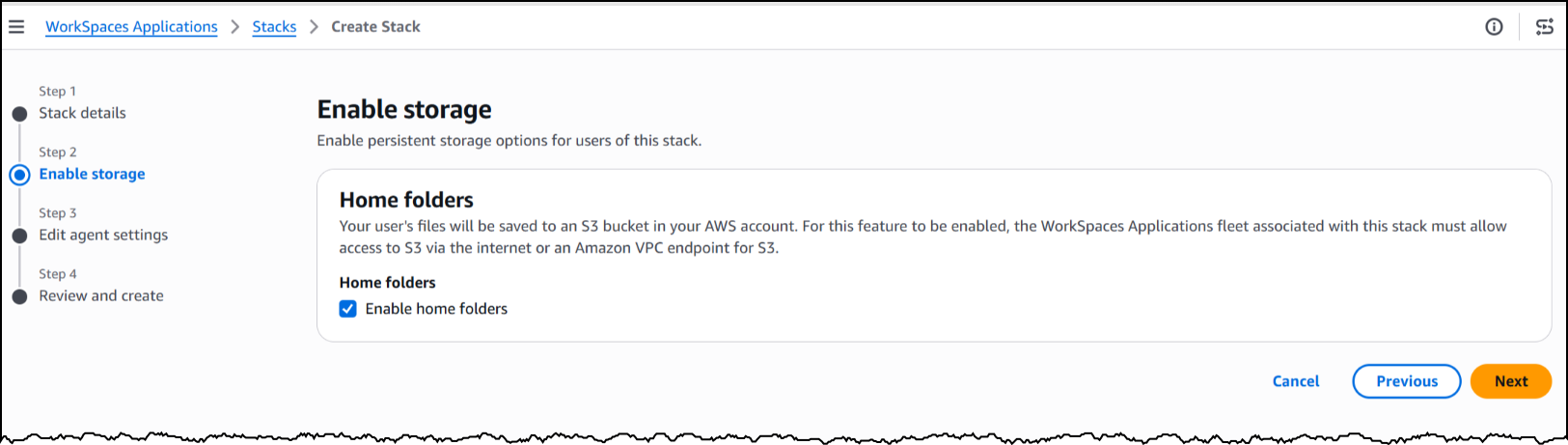
Next, I will enable storage before configuring the agent access settings to define how agents interact with the desktop.

Workspaces screenshot

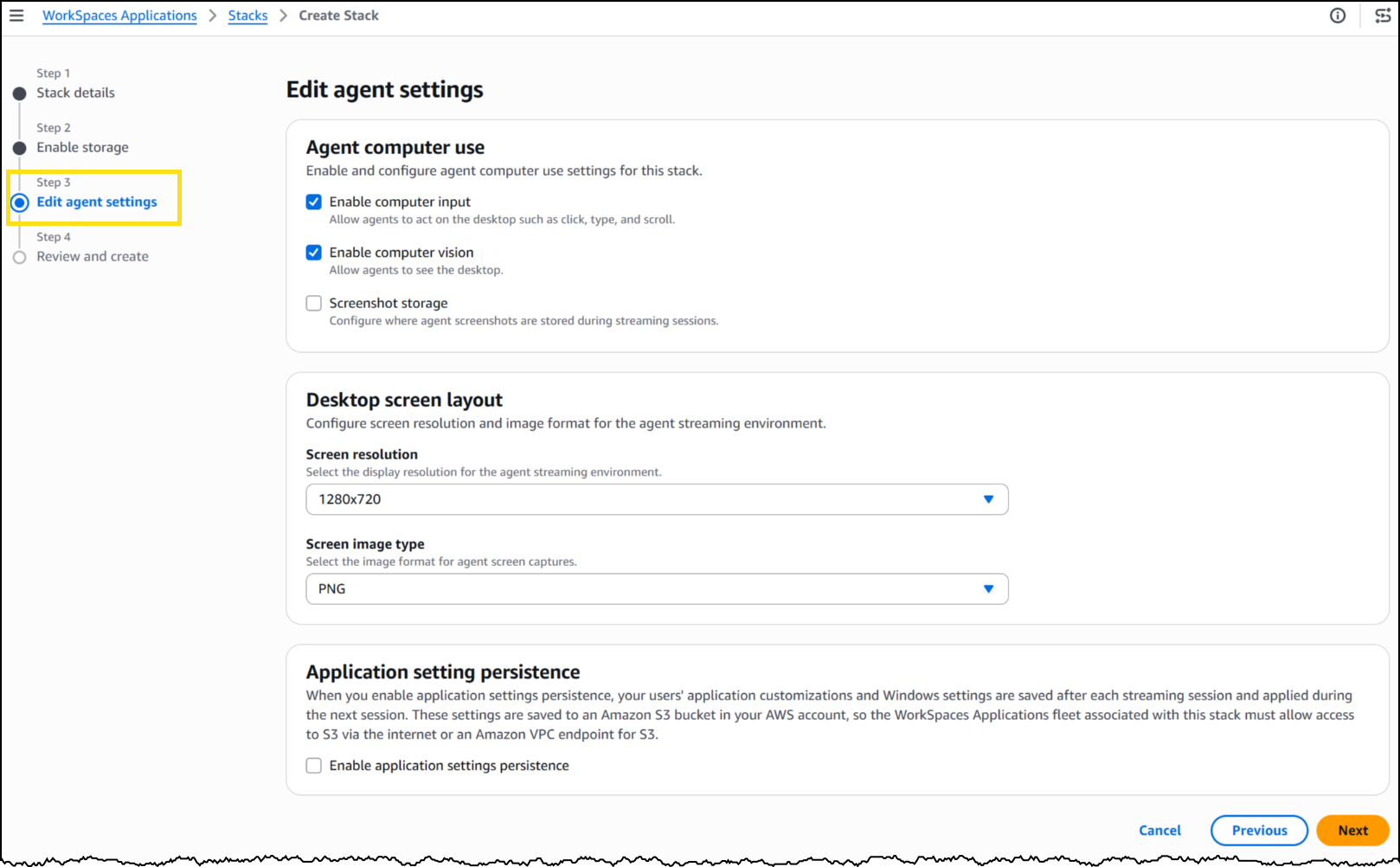
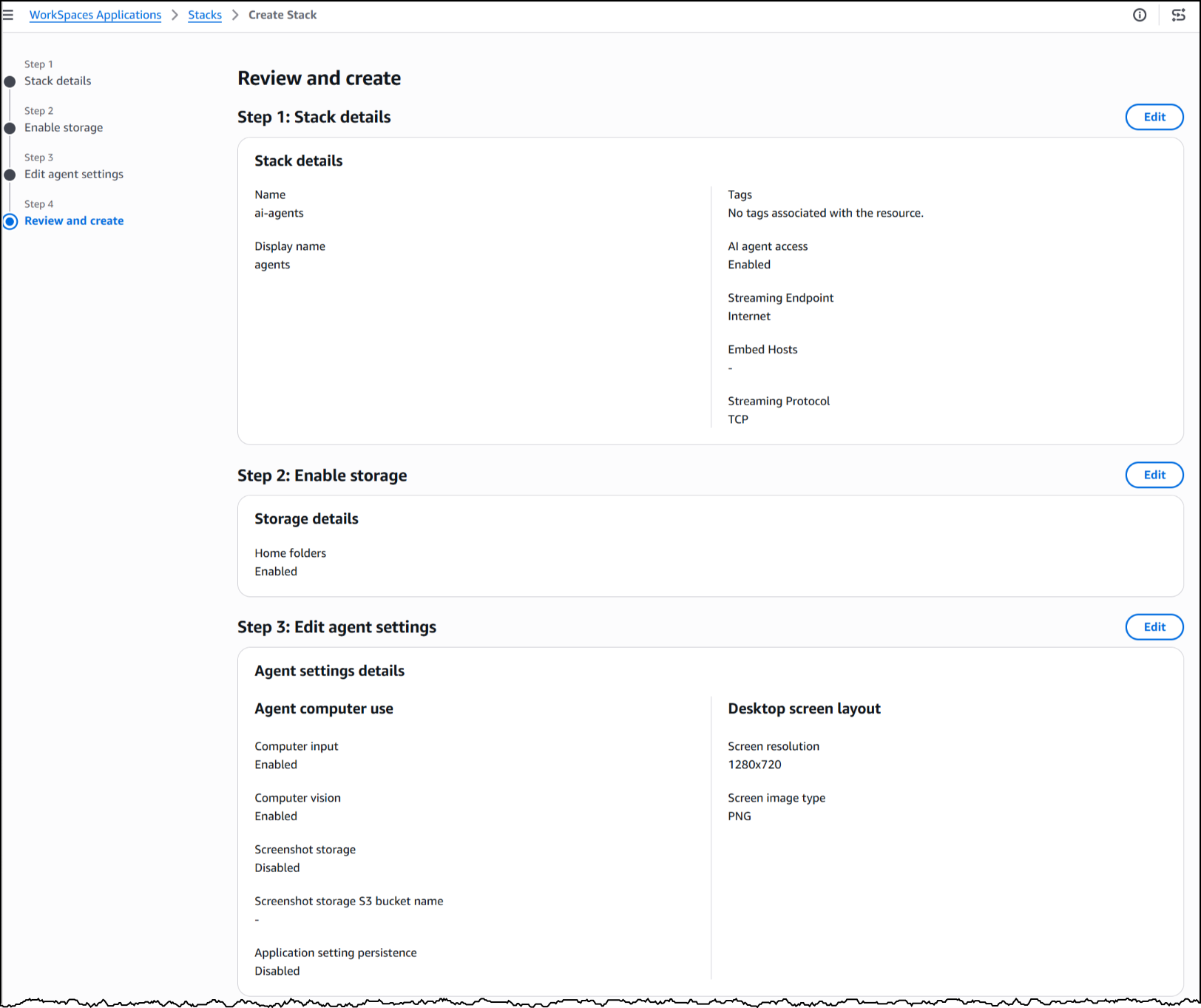
Under Agent features, I enabled three capabilities. Computer input allows the agent to click, type, and scroll within the desktop. Computer vision allows the agent to capture screenshots of the desktop, which is how it “sees” the application. Finally, screenshot storage configures where session screenshots are stored for audit and debugging.

Workspaces Screenshot

Under Desktop screen layout, I set the screen resolution to 1280×720 and image format to PNG. The resolution determines the fidelity of what the agent sees during a session—a complex application with dense UI elements might benefit from higher resolution, while a terminal-style interface works well at 720p.

Workspaces Screenshot

With my stack configured, WorkSpaces exposes a managed MCP endpoint. I pointed my agent framework to this endpoint, provided IAM credentials for authentication, and my agent began interacting with the desktop applications installed on the fleet’s image.

To see this in action, here’s an agent built with the Strands Agent SDK and Amazon Bedrock handling a prescription refill, looking up the patient record, searching for the medication, placing the order, and confirming a successful refill, all inside a sample pharmacy system with no API.

The application doesn’t know an agent is driving it. Nothing about the software was modified, rebuilt, or integrated. The agent worked with it exactly as it exists today.

Now available
This feature is available today in public preview at no additional cost in US East (N. Virginia, Ohio), US West (Oregon), Canada (Central), Europe (Frankfurt, Ireland, Paris), and Asia (Tokyo, Mumbai, Sydney, Seoul, Singapore) Regions.

Get started building today using our GitHub repo, or visit the WorkSpaces page for more details.

Serverless ICYMI Q1 2026

Post Syndicated from Julian Wood original https://aws.amazon.com/blogs/compute/serverless-icymi-q1-2026/

Stay current with the latest serverless innovations that can improve your applications. In this 32nd quarterly recap, discover the most impactful AWS serverless launches, features, and resources from Q1 2026 that you might have missed.

In case you missed our last ICYMI, check out what happened in Q4 2025.

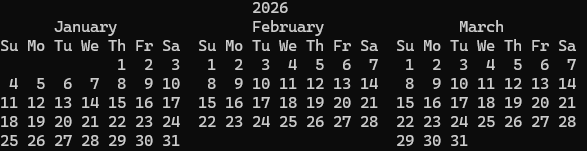
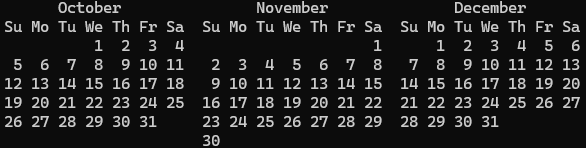
2026 Q1 calendar

2026 Q1 calendar

Serverless with Mama J


Serverless with Mama J

If you really want to know whether you understand something, try explaining it to your mom!

That’s exactly what Eric Johnson did. His mom, everyone calls her Mama J, wanted to know what serverless actually means and why it matters. So he walked her through it: what servers do, why they’re a headache to manage, and how AWS Lambda lets you skip all that by running code only when it’s needed, scaling automatically, and charging you nothing when nobody’s using it.

Watch the video on the AWS Developers YouTube channel.

Build serverless apps faster with AI

AWS is providing a growing set of AI-powered tools to bring serverless expertise directly into your coding assistants. From Model Context Protocol (MCP) servers and Anthropic Claude plugins to Kiro Powers. These tools provide contextual guidance for architecture decisions, implementation patterns, and deployment automation across the full serverless development lifecycle.

For more information on the tools available, see the resources page.

Serverless Patterns Collection

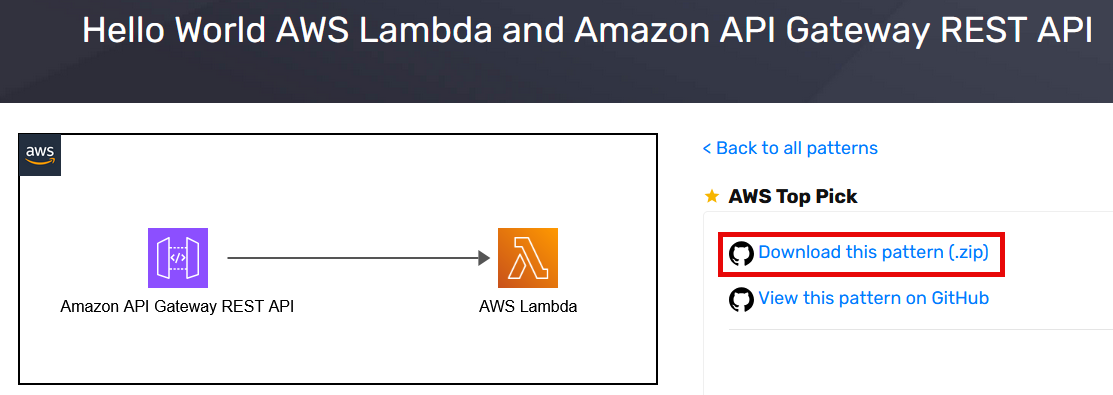
The open source Serverless Patterns Collection on Serverless Land now provides a direct link to download pattern .zip files. You can also clone the whole repo and explore more patterns.

Serverless Patterns .zip download

Serverless Patterns .zip download

AWS Lambda

Build fault-tolerant, long-running applications using familiar programming patterns using AWS Lambda durable functions. You can use Lambda durable functions to write multi-step workflows in your preferred programming language, using built-in methods that automatically handle progress checkpointing and error recovery. This can improve your architecture so that you can focus on your business logic and optimize costs by charging only for active compute time.

You can build durable functions in Python and TypeScript and there is a durable execution SDK for Java in preview with the code available on GitHub.

Eric Johnson has a new video deep dive showing how to upload videos and scan them with AI. Learn how to coordinate multiple AWS services like Amazon Rekognition and Amazon Transcribe, implement human-in-the-loop approval workflows, and crate a live dashboard for real-time updates.

To find out how durable functions work, see the blog post which also provides testing and best practices guidance. You can also watch the re:Invent Breakout Session video: Deep Dive on AWS Lambda durable functions (CNS380)

Lambda now supports the .NET 10 runtime, including support for file-based apps. Developers can take advantage of the latest .NET 10 performance improvements, new language features, and improved startup times for Lambda functions.

You can now see Availability Zone (AZ) metadata in function execution environments. This allows you to determine the AZ ID (e.g., use1-az1) of the AZ your function is running in. This helps build functions that can make AZ-aware routing decisions, such as preferring same-AZ endpoints for downstream services to reduce cross-AZ latency. Operators can also implement AZ-aware resilience patterns like AZ-specific fault injection testing.

Payload size increase

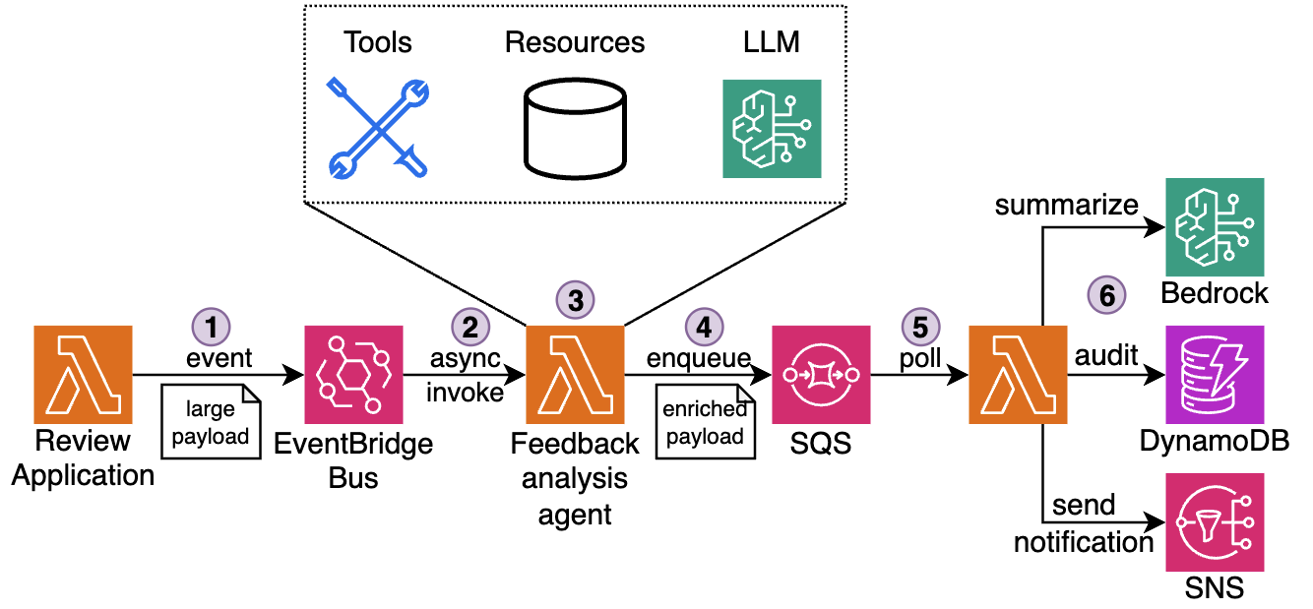
AWS has increased the maximum payload size from 256 KB to 1 MB for a number of services such as asynchronous Lambda invocations, Amazon SQS, and Amazon EventBridge. This gives you more room to build and maintain context-rich event-driven systems and reduce the need for complex workarounds such as data chunking or external large object storage.

This blog post explores a real-world example using rich event context in agentic event-driven architectures

Payload size increase workflow

Payload size increase workflow

Amazon Bedrock

Amazon Bedrock expanded its model availability with a new set of fully managed open-weight models spanning frontier reasoning and agentic coding. Other model releases include Anthropic Claude Opus 4.6 and Claude Sonnet 4.6, and NVIDIA Nemotron 3 Super. You can invoke them through the unified Amazon Bedrock API without managing any underlying infrastructure, making it straightforward to experiment and swap models as your workload evolves.

Amazon Bedrock AgentCore is the infrastructure layer for securely deploying and operating AI agents. It works with popular open source frameworks, including Strands Agents, LangGraph and CrewAI, giving you the flexibility to build with your preferred tools without vendor lock-in.

AgentCore Gateway now includes semantic tool search, so you can discover the right tool for a task using natural language queries instead of manually browsing a catalogue. It also adds custom KMS encryption, debugging messages, and resource tagging to give you stronger governance over tool integrations.

Policy in Bedrock AgentCore allows you to define precise boundaries on agent actions and run continuous quality monitoring. This helps you maintain predictable, auditable agent behavior in production without embedding guardrail logic inside each individual agent.

AgentCore Runtime now supports stateful MCP server features, allowing agents to maintain session context across tool calls for richer, more coherent multi-step interactions.

Strands Agents

Strands Agents SDK

Strands Agents SDK

Strands Agents is an open source SDK for building and running AI agents in just a few lines of code, working with models available in Amazon Bedrock. Strands Labs is a new dedicated GitHub organization for experimental agent projects, including robotics and code agents. This gives you early access to cutting-edge agentic techniques before they reach production frameworks. See the introduction blog post for more information.

AWS Step Functions

AWS Step Functions introduces an enhanced TestState API that enables API-based testing for validating workflows before deployment. The new API supports testing individual states in isolation or complete workflows end-to-end, making it easier to verify state machine logic without incurring runtime costs.

By integrating TestState API testing into CI/CD pipelines, you can validate workflow logic before deployment, reducing the risk of production issues. Find complete code examples and testing framework in the GitHub repository.

Amazon EventBridge

Amazon EventBridge Scheduler now provides resource count metrics to help you monitor quota usage. These new metrics make it easier to track the number of schedules and schedule groups in your account and proactively manage service quotas.

Amazon DynamoDB

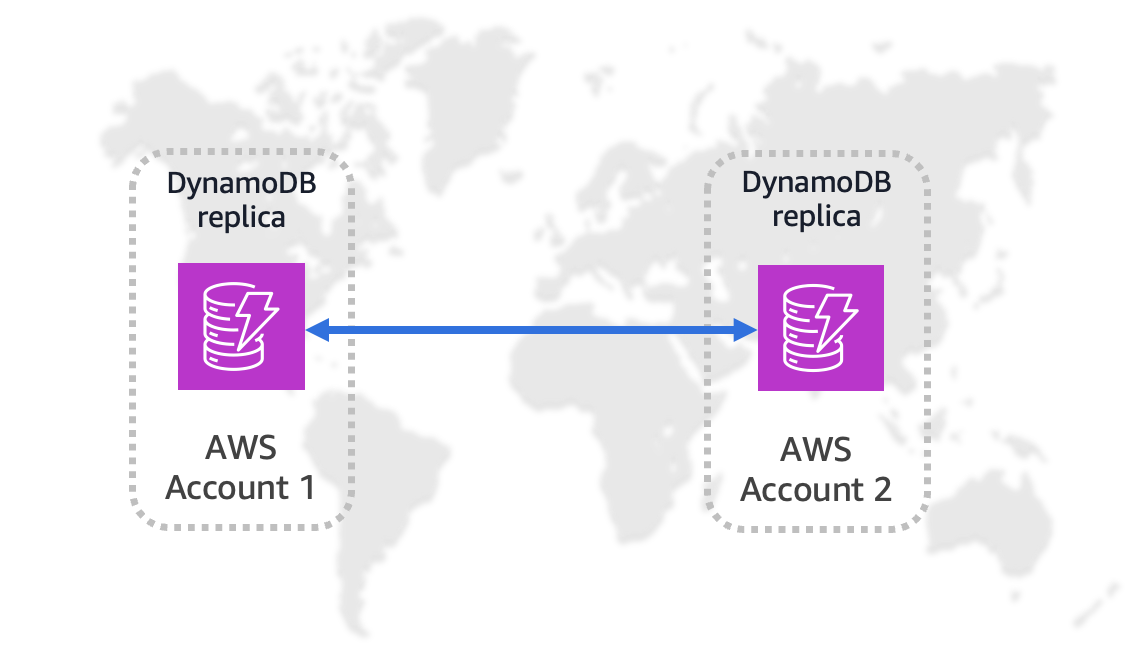
You can replicate Amazon DynamoDB table data across multiple AWS accounts and Regions. This enhances resiliency through account-level isolation, supports tailored security and data-perimeter controls. You can align workloads by business unit or environment and simplify governance requirements.

Amazon DynamoDB global replication

Amazon DynamoDB global replication

Amazon ECS

Amazon ECS Managed Instances can now integrate with Amazon EC2 Capacity Reservations. This allows you to make sure there is capacity availability for your container workloads while benefiting from the management automation of ECS Managed Instances.

ECS also now supports Network Load Balancer (NLB) for linear and canary deployment strategies. This helps you perform gradual traffic shifting using NLBs, providing more flexibility in deployment pipelines for latency-sensitive applications.

Serverless blog posts

January

February

March

Serverless Office Hours

Join our livestream every Tuesday at 11 AM PT for live discussions, Q&A sessions, and deep dives into serverless technologies. Watch episodes on-demand at serverlessland.com/office-hours.

January

February

March

Still looking for more?

The Serverless landing page has overall information about building serverless applications. The Lambda resources page contains case studies, webinars, whitepapers, customer stories, reference architectures, and even more Getting Started tutorials.

You can also follow the Developer Advocacy team to see the latest news, follow conversations, and interact with the team.

And finally, visit Serverless Land  for your serverless needs.

Serverless ICYMI Q4 2025

Post Syndicated from Julian Wood original https://aws.amazon.com/blogs/compute/serverless-icymi-q4-2025/

Stay current with the latest serverless innovations that can transform your applications. In this 31st quarterly recap, discover the most impactful AWS serverless launches, features, and resources from Q4 2025 that you might have missed.

In case you missed our last ICYMI, check out what happened in Q3 2025.

2025 Q4 calendar

2025 Q4 calendar

Serverless at re:Invent 2025

This post covers the biggest serverless announcements from re:Invent 2025, highlighting key feature updates that can improve your applications, and shares valuable resources to keep you informed.

AWS re:Invent 2025 had more than 60,000 in-person attendees and more than 2 million online viewers for the keynotes. The event featured 3,500 sessions from 3,000 speakers, which included information on 530 AWS service and feature announcements.

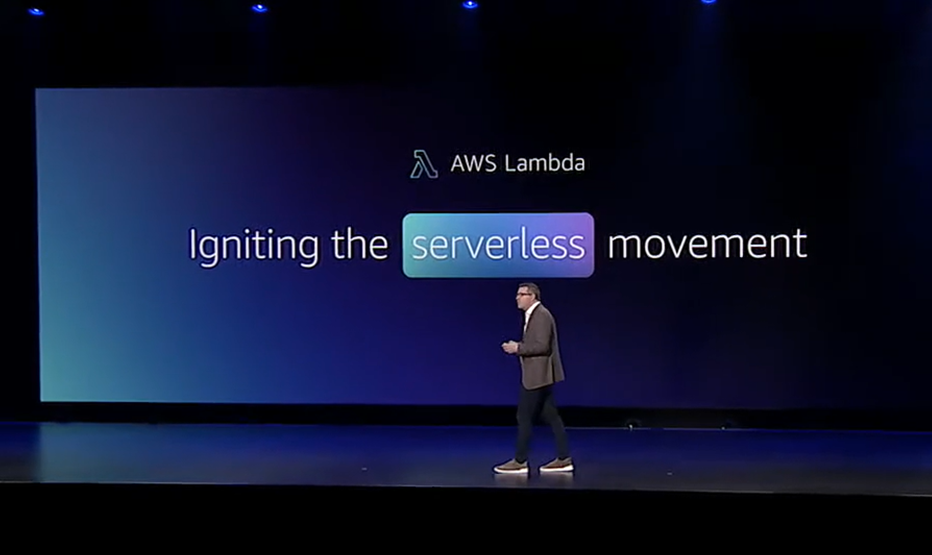
Keynote Igniting the serverless movement

Keynote Igniting the serverless movement

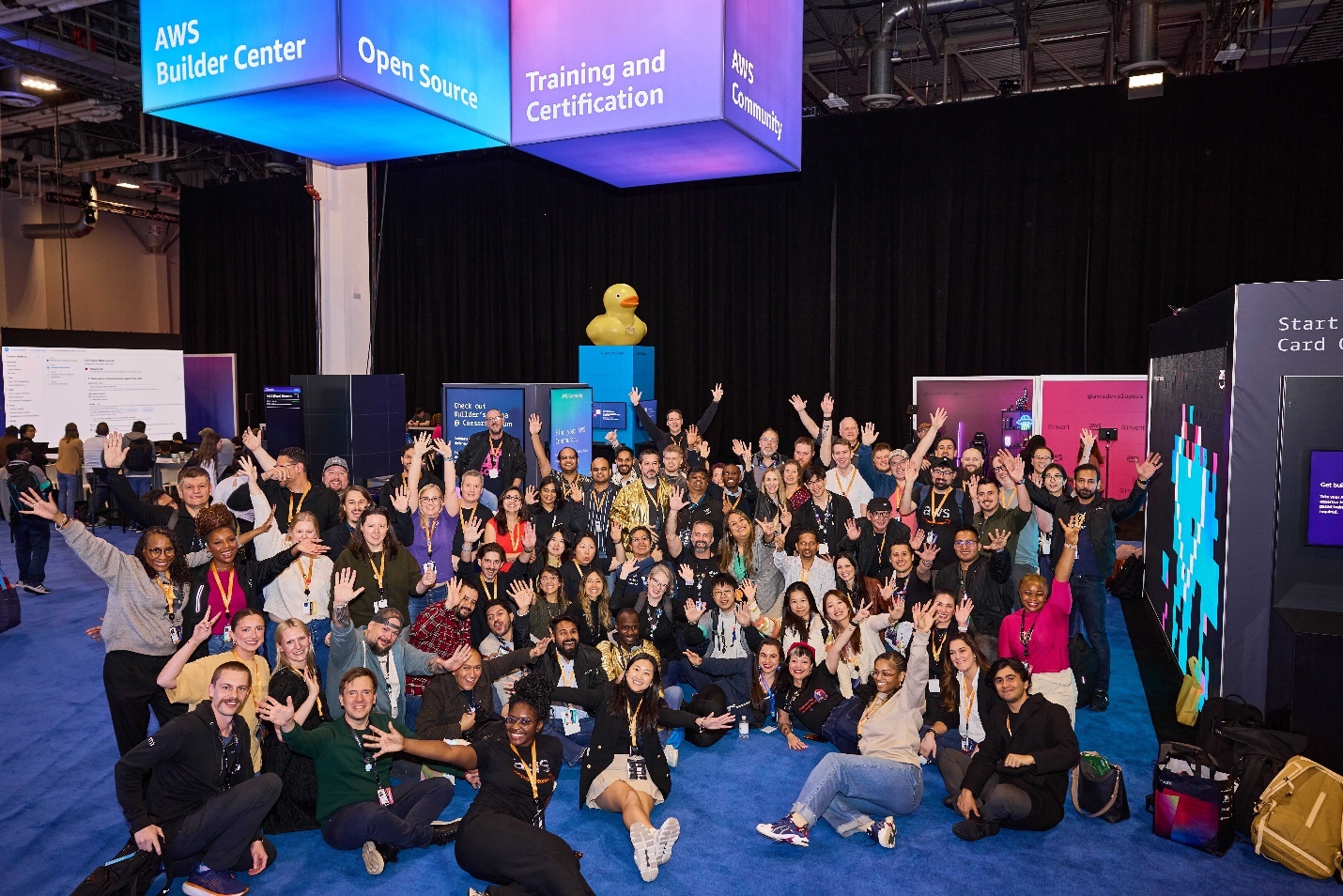
The serverless content consisted of two tracks: Containers and Serverless (CNS) and Application Integration (API). These tracks included 150 unique sessions watched in-person by more than 16,000 attendees. There were developer-focused experiences including a Road to re:Invent Hackathon, AWS Builder Loft, and Builders Arena. Serverlesspresso, the coffee shop powered by serverless technology, operated in two locations during the event: the Expo Hall and the certification lounge.

Serverless and developer community photo

Serverless and developer community photo

Find a curated list of serverless videos on Serverless Land YouTube.

AWS Lambda durable functions

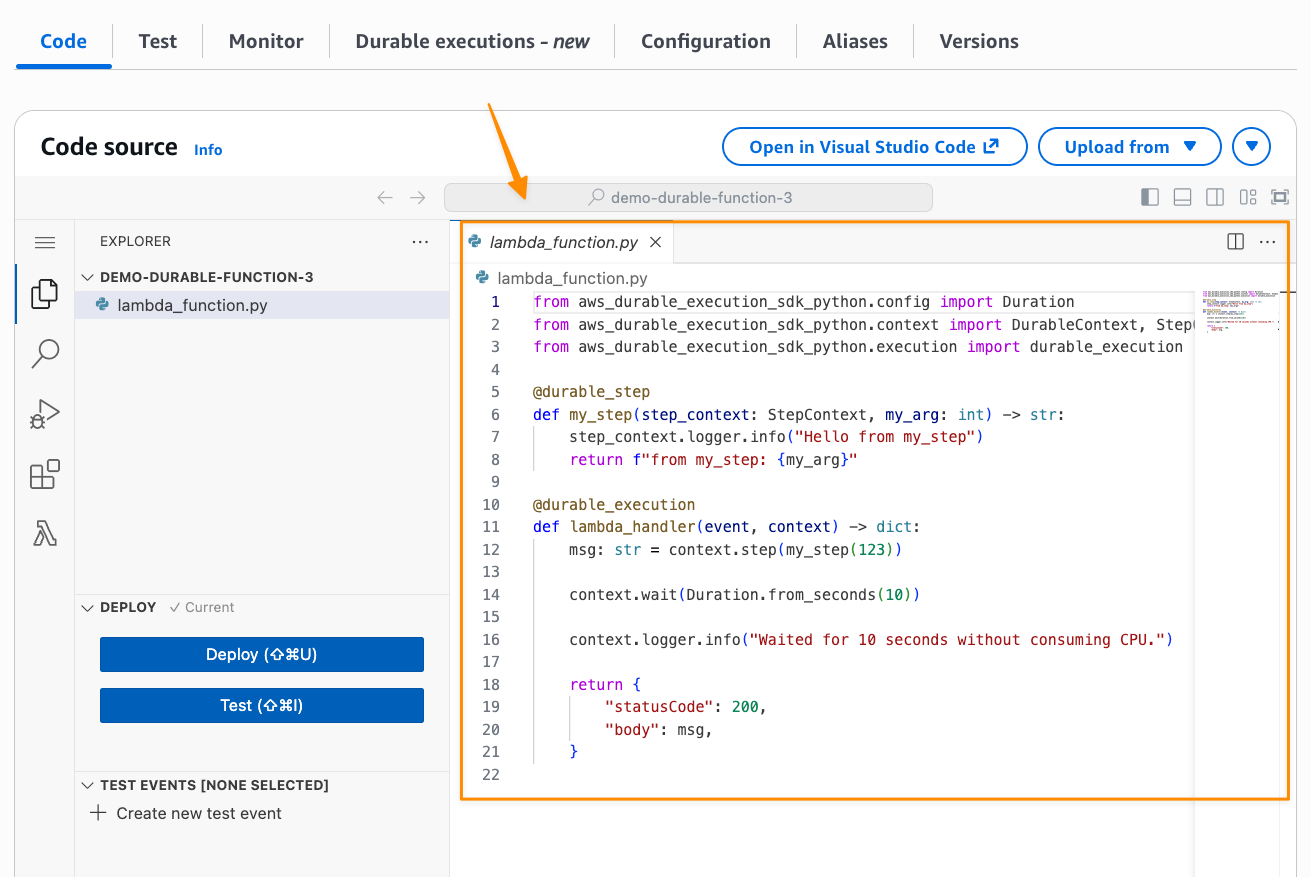
Managing state across multi-step serverless workflows has traditionally required complex external orchestration tools. AWS Lambda durable functions expand how developers can use Lambda. You can now build reliable multi-step applications and AI workflows directly within Lambda.

AWS Lambda durable functions code

AWS Lambda durable functions code

Durable functions automatically checkpoint progress by saving the current state and completed steps at key points during execution. This allows them to suspend execution for up to one year during long-running tasks and recover from failures by resuming from the last checkpoint rather than restarting from the beginning, all without requiring additional infrastructure management.

Developers can now build in Python or TypeScript, wrap calls in steps with automatic retries and checkpointing. You can use waits to suspend execution for minutes, hours, or even up to a year without paying for idle compute. Durable functions use a replay mechanism to maintain state and handle failures gracefully. The replay mechanism works by re-executing your function code from checkpoints when recovering from failures, ensuring state consistency without data loss. This also means you don’t need complex external orchestration tools for many use cases. This can be helpful for AI workflows and multi-step applications where you need reliable state management without managing external infrastructure.

For more information, read the launch blog post and watch the re:Invent Breakout Session video: Deep Dive on AWS Lambda durable functions (CNS380)

AWS Lambda Managed Instances

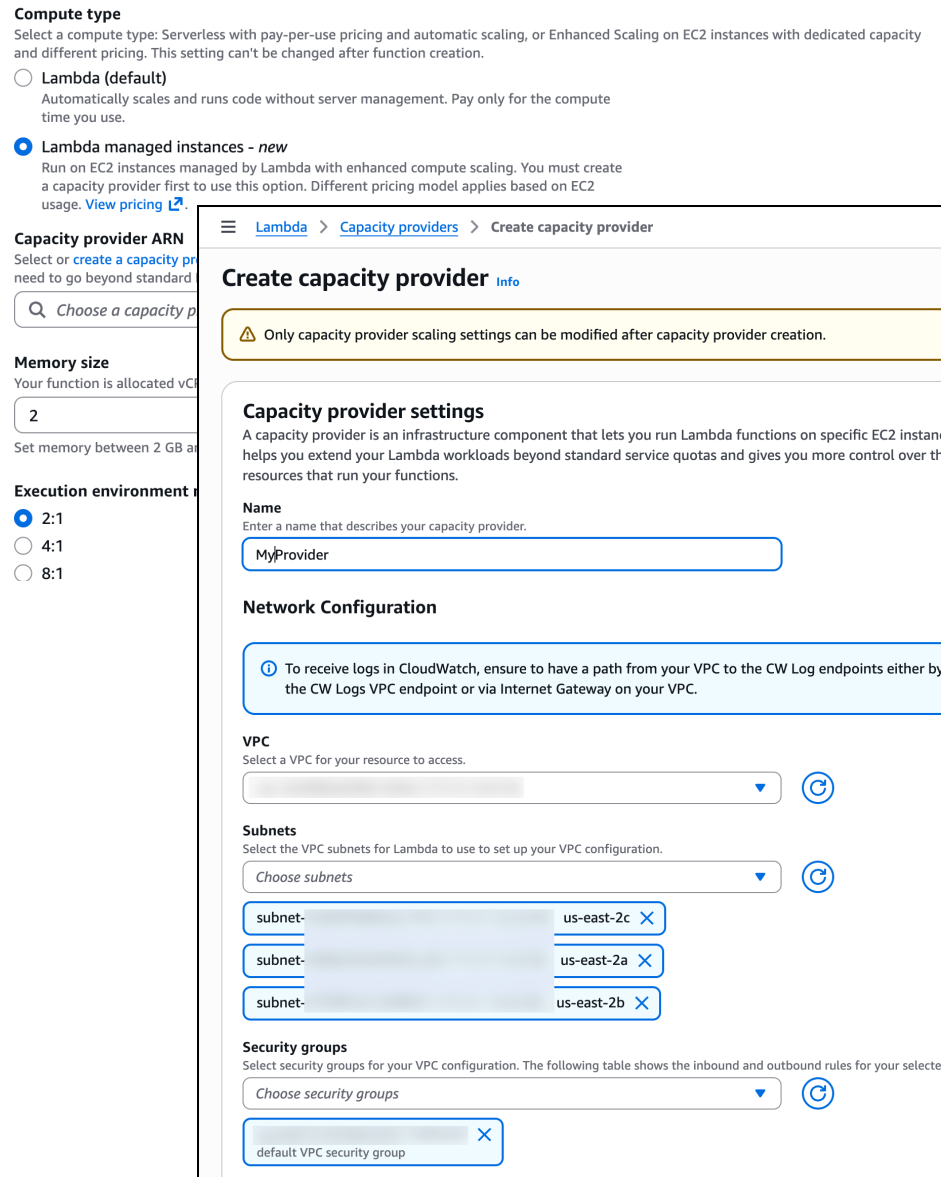
Lambda now offers Lambda Managed Instances, a new compute option that combines Amazon EC2 flexibility with fully managed infrastructure. AWS automatically handles instance provisioning, scaling, and maintenance while allowing access to the full range of EC2 capabilities, including Graviton4, network-optimized instances, and other specialized compute options.

AWS Lambda Managed Instances configuration

AWS Lambda Managed Instances configuration

Your functions run on dedicated EC2 capacity from your account, in your own Amazon Virtual Private Cloud (Amazon VPC). AWS still manages the operational overhead, including OS patching, load balancing, and auto-scaling. This gives you access to specialized hardware options while maintaining the serverless operational model. You can further improve costs by using EC2 pricing models, including Compute Savings Plans and Reserved Instances for Lambda workloads. Each instance can handle multiple concurrent requests, making this particularly valuable for high-volume, steady-state workloads where predictable pricing and specific hardware requirements matter.

For more information, read the launch blog post and watch the re:Invent Breakout Session video: Lambda Managed Instances: EC2 Power with Serverless Simplicity (CNS382).

Other Lambda announcements

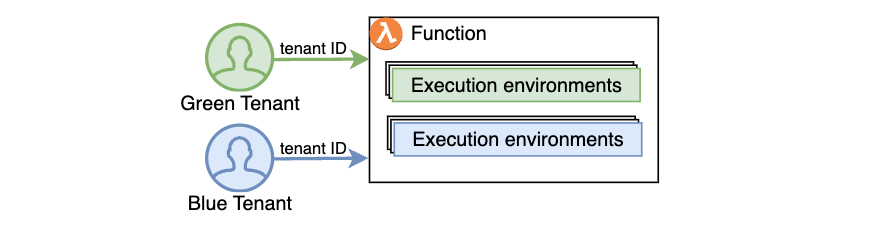
Multi-tenant SaaS applications face challenges like data leakage between tenants and noisy neighbor effects where one tenant’s workload impacts others. They also struggle with implementing custom isolation mechanisms. Tenant isolation mode addresses these by processing function invocations in separate execution environments for each tenant. This manages tenant-level compute environment isolation automatically.

AWS Lambda tenant isolation

AWS Lambda tenant isolation

Lambda adds Provisioned Mode for Amazon SQS event-source mappings, providing predictable performance and reduced cold starts for high-throughput SQS processing workloads.

You can now send up to 1 MB of data in asynchronous Lambda invocations, increased from 256 KB, helping you build more complex data processing scenarios.

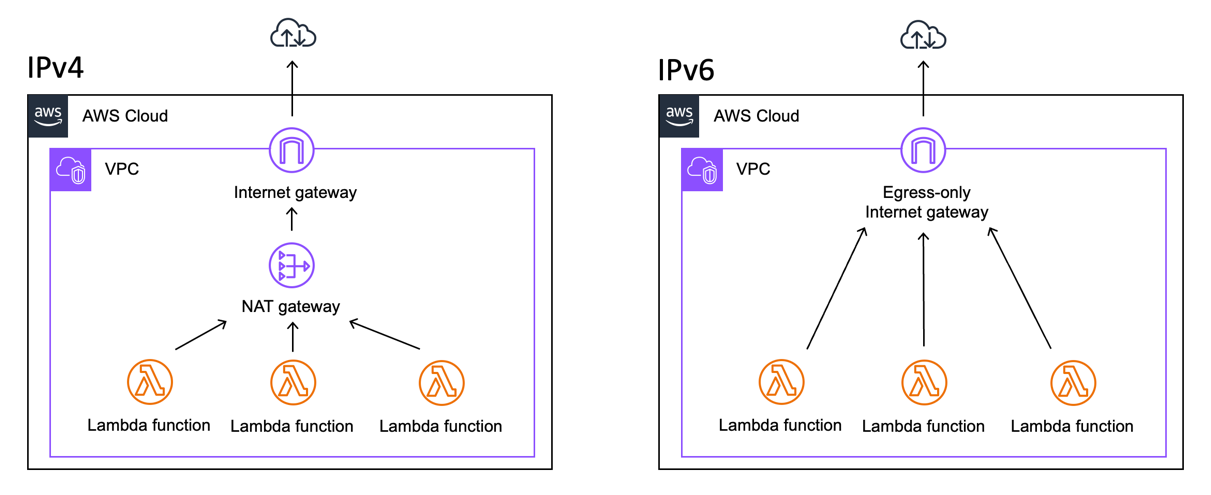
Lambda functions now support IPv6 networking, so you don’t need NAT Gateways when accessing the internet or other AWS services from VPC-connected functions.

Lambda internet connectivity through a NAT Gateway (IPv4) and Lambda internet connectivity through an egress-only internet gateway (IPv6).

Lambda internet connectivity through a NAT Gateway (IPv4) and Lambda internet connectivity through an egress-only internet gateway (IPv6).

Lambda Rust support is now generally available, moving from experimental status. This is backed by AWS Support and the Lambda availability SLA.

Lambda has expanded its runtime support by adding Python 3.14, Node.js 24, and Java 25 as both managed runtimes and container base images, providing access to the latest language features and ensuring long-term support.

Amazon ECS

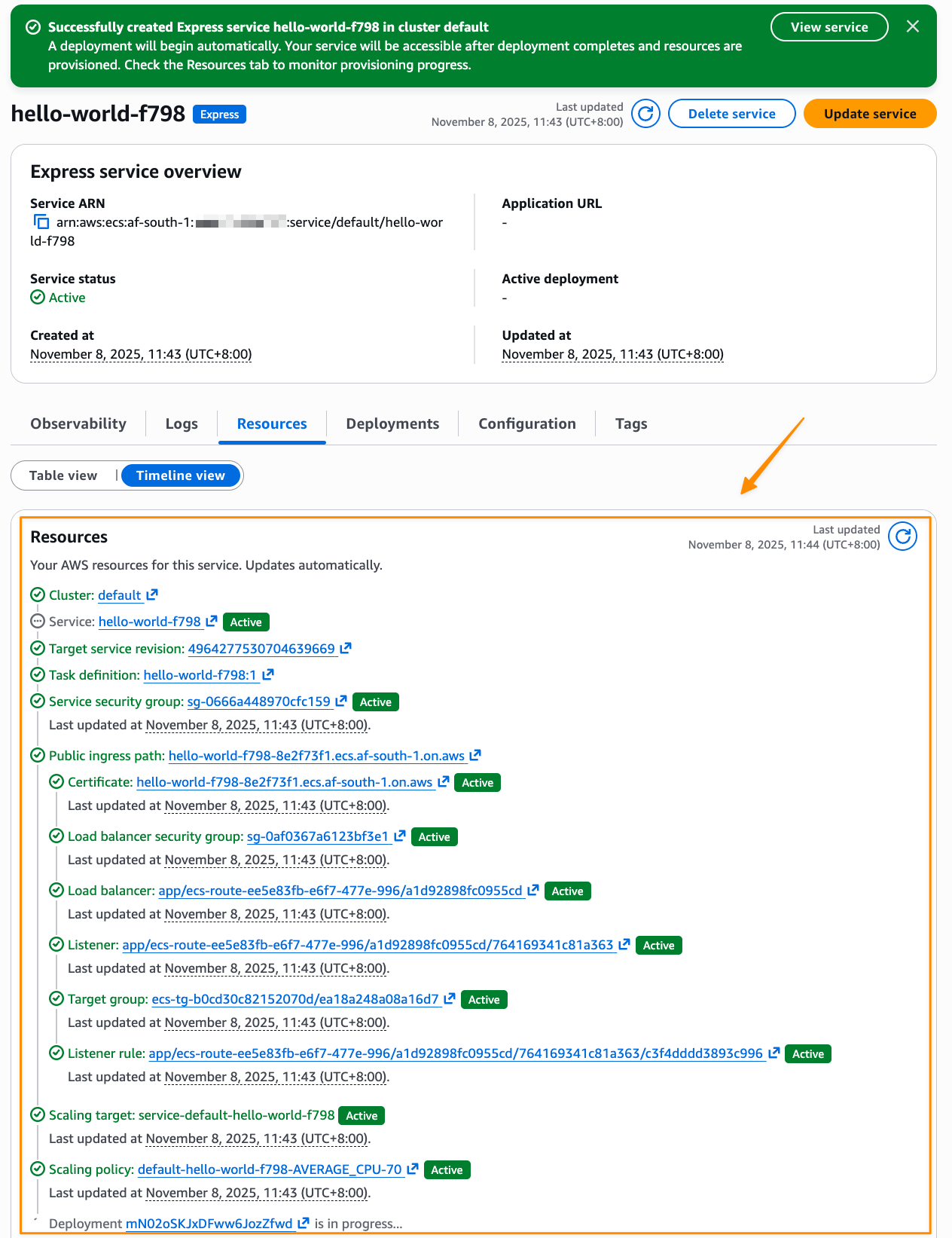
Amazon Elastic Container Service (Amazon ECS) Express Mode streamlines the deployment and management of containerized applications by automating the infrastructure setup that traditionally slows down developers.

Amazon ECS Express Mode deployment

Amazon ECS Express Mode deployment

This means you can focus on building applications while deploying with confidence using AWS best practices. Express Mode lets you deploy production-ready containerized web applications and APIs with a single command. This automatically handles domains, networking, load balancing, AWS Identity and Access Management (IAM) roles, and auto-scaling through simplified APIs. When your applications evolve and require advanced features, you can seamlessly configure and access the full capabilities of the resources, including Amazon ECS. Learn more from the launch blog post.

Amazon ECS announced a public preview of a fully managed MCP server, enabling AI-powered experiences for development and operations. The Model Context Protocol (MCP) server provides enterprise-grade capabilities like automatic updates and patching, centralized security through AWS IAM integration, comprehensive audit logging via AWS CloudTrail, and the proven scalability, reliability, and support of AWS.

Amazon Elastic Container Registry (ECR) managed container image signing enhances your security posture and eliminates the operational overhead of setting up signing. Container image signing allows you to verify that images are from trusted sources. ECR automatically signs images as they are pushed using the identity of the entity pushing the image. Signing operations are logged through CloudTrail for full auditability.

Amazon API Gateway

Amazon API Gateway allows you to improve the responsiveness of your REST APIs by progressively streaming response payloads back to the client. With this new capability, you can use streamed responses to enhance user experience when building LLM-driven applications (such as AI agents and chatbots), improve time-to-first-byte (TTFB) performance for web and mobile applications, stream large files, and perform long-running operations while reporting incremental progress using protocols such as server-sent events (SSE).

Amazon API Gateway streaming

API Gateway introduces private integration with Application Load Balancers (ALBs). You can use this to expose your VPC-based applications securely through REST APIs without exposing your ALBs to the public internet.

You can also now configure enhanced TLS security policies on API endpoints and custom domain names, providing you with greater control over the security posture of your APIs.

Amazon EventBridge

Amazon EventBridge introduced an enhanced visual rule builder that helps developers discover and subscribe to events from custom applications and over 200 AWS services. The console-based interface integrates the EventBridge schema registry with a comprehensive event catalog and intuitive drag-and-drop canvas that simplifies building event-driven applications. Developers can browse and search through events with readily available sample payloads and schemas without having to hunt through individual service documentation. The schema-aware visual builder guides developers through creating event filter patterns and rules, reducing syntax errors and accelerating development time.

EventBridge also allows targeting SQS fair queues.

AWS Step Functions

AWS Step Functions allows for enhanced local testing through the TestState API, providing programmatic access to comprehensive testing capabilities without deploying to AWS. This helps you build automated test suites that validate your workflow definitions locally on your development machines. Test error handling patterns, data transformations, and mock service integrations using your preferred testing frameworks.

There is also a new metrics dashboard, giving you visibility into your workflow operations at both the account and state machine levels.

Other announcements

Savings Plans flexible pricing model extends to AWS managed database services with the launch of Database Savings Plans. This helps reduce database costs by up to 35% when committing to a consistent amount of usage ($/hour) over a 1-year term. Savings automatically apply each hour to eligible usage across supported database services, and additional usage beyond the commitment is billed at on-demand rates.

Amazon DynamoDB now supports multi-attribute composite keys in global secondary indexes. You no longer need to concatenate values into synthetic keys manually, which sometimes results in the need to backfill data before adding new indexes. Instead, you can create primary keys using up to eight existing attributes, making it easier to model diverse access patterns and adapt to new query requirements.

Amazon Bedrock introduced AgentCore with quality evaluations and policy controls for deploying trusted AI agents at scale.

Bedrock also added 18 fully managed open weight models, expanding AI model options for developers.

The Strands Agents SDK is an open source framework that takes a model-driven approach to building and running AI agents in just a few lines of code. TypeScript support is now available in preview so you can choose between Python and TypeScript for building Strands Agents.

Amazon S3 Vectors became generally available. S3 Vectors delivers purpose-built, cost-optimized vector storage for AI agents, inference, Retrieval Augmented Generation (RAG), and semantic search at billion-vector scale.

Serverless blog posts

October

November

Serverless Office Hours

Join our livestream every Tuesday at 11 AM PT for live discussions, Q&A sessions, and deep dives into serverless technologies. Episodes are available on-demand at serverlessland.com/office-hours.

October

November

December

Still looking for more?

The Serverless landing page has overall information about building serverless applications. The Lambda resources page contains case studies, webinars, whitepapers, customer stories, reference architectures, and even more Getting Started tutorials.

You can also follow the Serverless Developer Advocacy team to see the latest news, follow conversations, and interact with the team.

And finally, visit Serverless Land for all your serverless needs.