All posts by Micah Walter

AWS Weekly Roundup: Amazon EC2 G7e instances with NVIDIA Blackwell GPUs (January 26, 2026)

Post Syndicated from Micah Walter original https://aws.amazon.com/blogs/aws/aws-weekly-roundup-amazon-ec2-g7e-instances-with-nvidia-blackwell-gpus-january-26-2026/

Hey! It’s my first post for 2026, and I’m writing to you while watching our driveway getting dug out. I hope wherever you are you are safe and warm and your data is still flowing!

Our driveway getting snow plowed

This week brings exciting news for customers running GPU-intensive workloads, with the launch of our newest graphics and AI inference instances powered by NVIDIA’s latest Blackwell architecture. Along with several service enhancements and regional expansions, this week’s updates continue to expand the capabilities available to AWS customers.

Last week’s launches

Amazon EC2 G7e instances are now generally available — The new G7e instances accelerated by NVIDIA RTX PRO 6000 Blackwell Server Edition GPUs deliver up to 2.3 times better inference performance compared to G6e instances. With two times the GPU memory and support for up to 8 GPUs providing 768 GB of total GPU memory, these instances enable running medium-sized models of up to 70B parameters with FP8 precision on a single GPU. G7e instances are ideal for generative AI inference, spatial computing, and scientific computing workloads. Available now in US East (N. Virginia) and US East (Ohio).

Additional updates

I thought these projects, blog posts, and news items were also interesting:

Amazon Corretto January 2026 Quarterly Updates — AWS released quarterly security and critical updates for Amazon Corretto Long-Term Supported (LTS) versions of OpenJDK. Corretto 25.0.2, 21.0.10, 17.0.18, 11.0.30, and 8u482 are now available, ensuring Java developers have access to the latest security patches and performance improvements.

Amazon ECR now supports cross-repository layer sharing — Amazon Elastic Container Registry now enables you to share common image layers across repositories through blob mounting. This feature helps you achieve faster image pushes by reusing existing layers and reduce storage costs by storing common layers once and referencing them across repositories.

Amazon CloudWatch Database Insights expands to four additional regions — CloudWatch Database Insights on-demand analysis is now available in Asia Pacific (New Zealand), Asia Pacific (Taipei), Asia Pacific (Thailand), and Mexico (Central). This feature uses machine learning to help identify performance bottlenecks and provides specific remediation advice.

Amazon Connect adds conditional logic and real-time updates to Step-by-Step Guides — Amazon Connect Step-by-Step Guides now enables managers to build dynamic guided experiences that adapt based on user interactions. Managers can configure conditional user interfaces with dropdown menus that show or hide fields, change default values, or adjust required fields based on prior inputs. The feature also supports automatic data refresh from Connect resources, ensuring agents always work with current information.

Upcoming AWS events

Keep a look out and be sure to sign up for these upcoming events:

Best of AWS re:Invent (January 28-29, Virtual) — Join us for this free virtual event bringing you the most impactful announcements and top sessions from AWS re:Invent. AWS VP and Chief Evangelist Jeff Barr will share highlights during the opening session. Sessions run January 28 at 9:00 AM PT for AMER, and January 29 at 9:00 AM SGT for APJ and 9:00 AM CET for EMEA. Register to access curated technical learning, strategic insights from AWS leaders, and live Q&A with AWS experts.

AWS Community Day Ahmedabad (February 28, 2026, Ahmedabad, India) — The 11th edition of this community-driven AWS conference brings together cloud professionals, developers, architects, and students for expert-led technical sessions, real-world use cases, tech expo booths with live demos, and networking opportunities. This free event includes breakfast, lunch, and exclusive swag.

Join the AWS Builder Center to learn, build, and connect with builders in the AWS community. Browse for upcoming in-person and virtual developer-focused events in your area.


That’s all for this week. Check back next Monday for another Weekly Roundup!

~ micah

AWS Clean Rooms launches privacy-enhancing synthetic dataset generation for ML model training

Post Syndicated from Micah Walter original https://aws.amazon.com/blogs/aws/aws-clean-rooms-launches-privacy-enhancing-synthetic-dataset-generation-for-ml-model-training/

Today, we’re announcing privacy-enhancing synthetic dataset generation for AWS Clean Rooms, a new capability that organizations and their partners can use to generate privacy-enhancing synthetic datasets from their collective data to train regression and classification machine learning (ML) models. You can use this feature to generate synthetic training datasets that preserve the statistical patterns of the original data, without the model having access to original records, opening new opportunities for model training that were previously not possible due to privacy concerns.

When building ML models, data scientists and analysts typically face a fundamental tension between data utility and privacy protection. Access to high-quality, granular data is essential for training accurate models that can recognize trends, personalize experiences, and drive business outcomes. However, using granular data such as user-level event data from multiple parties raises significant privacy concerns and compliance challenges. Organizations want to answer questions like, “What characteristics indicate a high-probability customer conversion?”, but training on the individual-level signals often conflicts with privacy policies and regulatory requirements.

Privacy-enhancing synthetic dataset generation for custom ML
To address this challenge, we’re introducing privacy-enhancing synthetic dataset generation in AWS Clean Rooms ML, which organizations can use to create synthetic versions of sensitive datasets that can be more securely used for ML model training. This capability uses advanced ML techniques to generate new datasets that maintain the statistical properties of the original data while de-identifying subjects from the original source data.

Traditional anonymization techniques such as masking still carry the risk of re-identifying individuals in a dataset—knowing attributes about a person such as zip code and date of birth can be sufficient to identify them with census data. Privacy-enhancing synthetic dataset generation addresses this risk through a fundamentally different approach. The system trains a model that learns the essential statistical patterns of the original dataset, then generates synthetic records by sampling values from the original dataset and using the model to predict the predicted value column. Rather than merely copying or perturbing the original data, the system uses a model capacity reduction technique to mitigate the risk that the model will memorize information about individuals in the training data. The resulting synthetic dataset has the same schema and statistical characteristics as the original data, making it suitable for training classification and regression models. This approach quantifiably reduces the risk of re-identification.

Organizations using this capability have control over the privacy parameters, including the amount of noise applied and the level of protection against membership inference attacks, where an adversary attempts to determine whether a specific individual’s data was included in the training set. After generating the synthetic dataset, AWS Clean Rooms provides detailed metrics to help customers and their compliance teams understand the quality of the synthetic dataset across two critical dimensions: fidelity to the original data and privacy preservation. The fidelity score uses KL-divergence to measure how similar the synthetic data is to the original dataset, and the privacy score quantifies how likely the dataset is protected from membership inference attacks.

Working with synthetic data in AWS Clean Rooms
Getting started with privacy-enhancing synthetic dataset generation follows the established AWS Clean Rooms ML custom models workflow, with new steps to specify privacy requirements and review quality metrics. Organizations begin by creating configured tables with analysis rules using their preferred data sources, then join or create a collaboration with their partners and associate their tables with that collaboration.

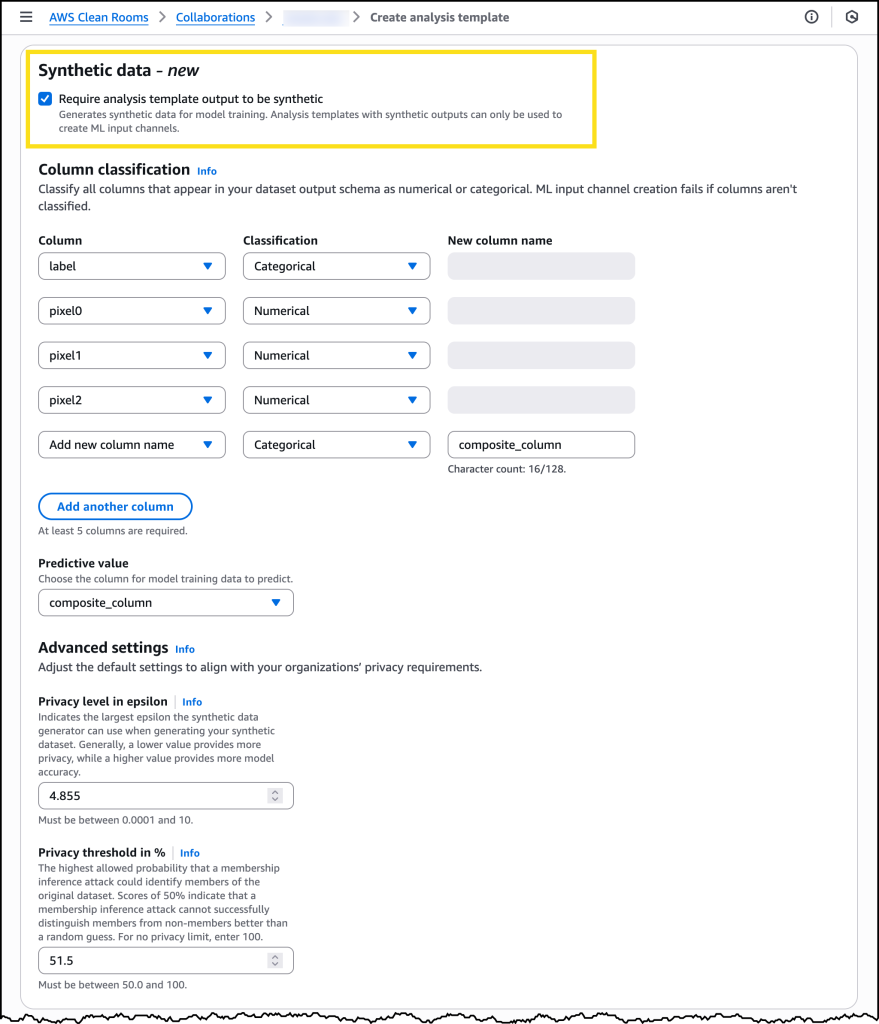
The new capability introduces an enhanced analysis template where data owners define not only the SQL query that creates the dataset but also specify that the resulting dataset must be synthetic. Within this template, organizations classify columns to indicate which column the ML model will predict and which columns contain categorical versus numerical values. Critically, the template also includes privacy thresholds that the generated synthetic data must meet to be made available for training. These include an epsilon value that specifies how much noise must be present in the synthetic data to protect against re-identification, and a minimum protection score against membership inference attacks. Setting these thresholds appropriately requires understanding your organization’s specific privacy and compliance requirements, and we recommend engaging with your legal and compliance teams during this process.

After all data owners review and approve the analysis template, a collaboration member creates a machine learning input channel that references the template. AWS Clean Rooms then begins the synthetic dataset generation process, which typically completes within a few hours depending on the size and complexity of the dataset. If the generated synthetic dataset meets the required privacy thresholds defined in the analysis template, a synthetic machine learning input channel becomes available along with detailed quality metrics. Data scientists can review the actual protection score achieved against a simulated membership inference attack.

Once satisfied with the quality metrics, organizations can proceed to train their ML models using the synthetic dataset within the AWS Clean Rooms collaboration. Depending on the use case, they can export the trained model weights or continue to run inference jobs within the collaboration itself.

Let’s try it out
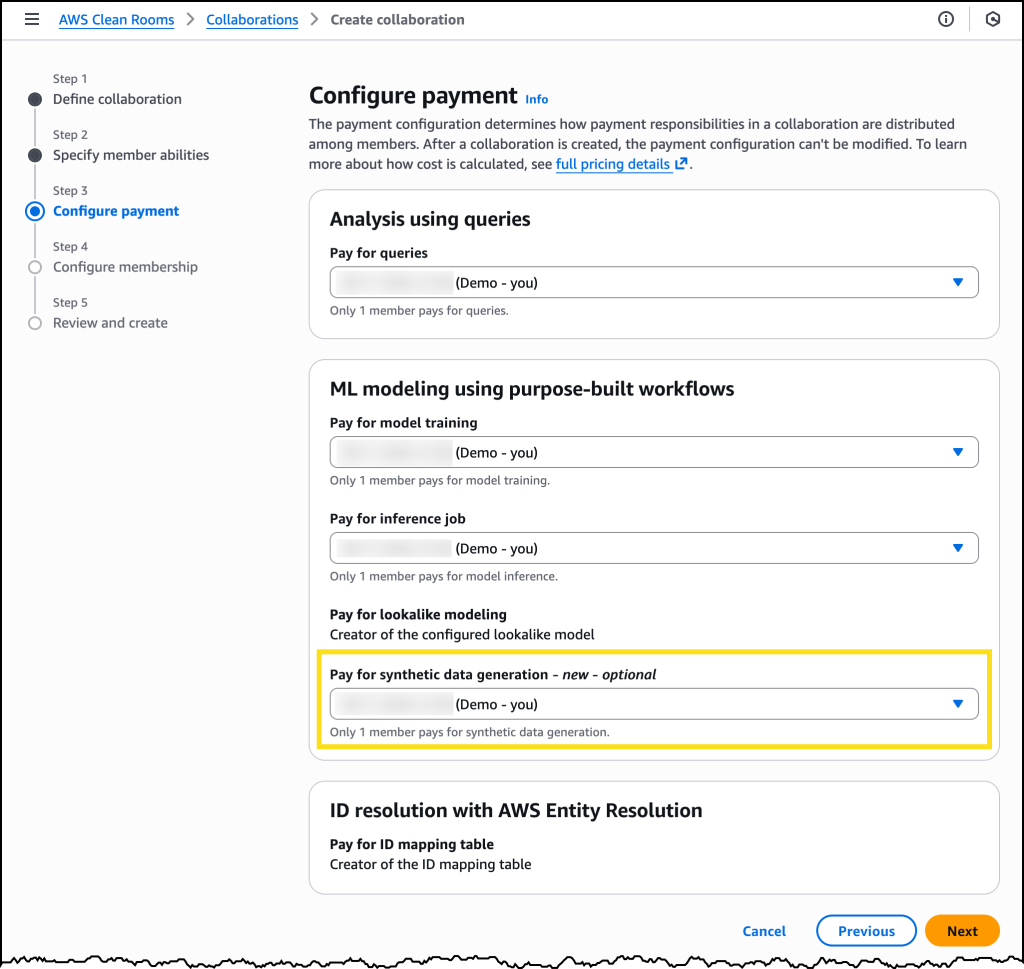
When creating a new AWS Clean Rooms collaboration, I can now set who pays for synthetic dataset generation.

After my Collaboration is configured, I can choose Require analysis template output to be synthetic when creating a new analysis template.

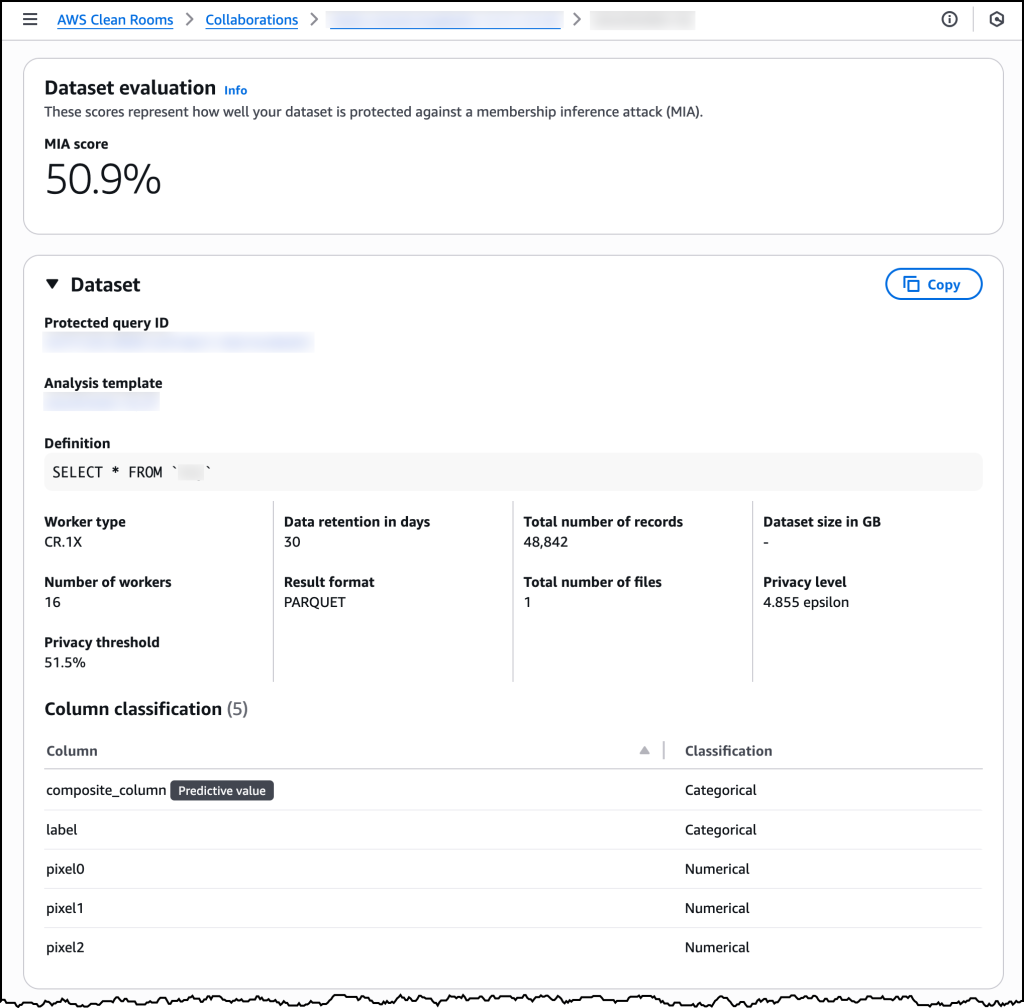
After my synthetic analysis template is ready, I can use it when running protected queries and view all the relevant ML input channel details.

Clean Rooms Synthetic Data Console

Now available
You can start using privacy-enhancing synthetic dataset generation through AWS Clean Rooms today. The feature is available in all commercial AWS Regions where AWS Clean Rooms is available. Learn more about it in the AWS Clean Rooms documentation.

Privacy-enhancing synthetic dataset generation is billed separately based on usage. You pay only for the compute used to generate your synthetic dataset, charged as Synthetic Data Generation Units (SDGUs). The number of SDGUs varies based on the size and complexity of your original dataset. This fee can be configured as a payer setting, meaning any collaboration member can agree to pay the costs. For more information on pricing, refer to the AWS Clean Rooms pricing page.

The initial release supports training classification and regression models on tabular data. The synthetic datasets work with standard ML frameworks and can be integrated into existing model development pipelines without requiring changes to your workflows.

This capability represents a significant advancement in privacy-enhanced machine learning. Organizations can unlock the value of sensitive user-level data for model training while mitigating the risk that sensitive information about individual users could be leaked. Whether you’re optimizing advertising campaigns, personalizing insurance quotes, or enhancing fraud detection systems, privacy-enhancing synthetic dataset generation makes it possible to train more accurate models through data collaboration while respecting individual privacy.

Introducing AWS Lambda Managed Instances: Serverless simplicity with EC2 flexibility

Post Syndicated from Micah Walter original https://aws.amazon.com/blogs/aws/introducing-aws-lambda-managed-instances-serverless-simplicity-with-ec2-flexibility/

Today, we’re announcing AWS Lambda Managed Instances, a new capability you can use to run AWS Lambda functions on your Amazon Elastic Compute Cloud (Amazon EC2) compute while maintaining serverless operational simplicity. This enhancement addresses a key customer need: accessing specialized compute options and optimizing costs for steady-state workloads without sacrificing the serverless development experience you know and love.

Although Lambda eliminates infrastructure management, some workloads require specialized hardware, such as specific CPU architectures, or cost optimizations from Amazon EC2 purchasing commitments. This tension forces many teams to manage infrastructure themselves, sacrificing the serverless benefits of Lambda only to access the compute options or pricing models they need. This often leads to a significant architectural shift and greater operational responsibility.

Lambda Managed Instances
You can use Lambda Managed Instances to define how your Lambda functions run on EC2 instances. Amazon Web Services (AWS) handles setting up and managing these instances in your account. You get access to the latest generation of Amazon EC2 instances, and AWS handles all the operational complexity—instance lifecycle management, OS patching, load balancing, and auto scaling. This means you can select compute profiles optimized for your specific workload requirements, like high-bandwidth networking for data-intensive applications, without taking on the operational burden of managing Amazon EC2 infrastructure.

Each execution environment can process multiple requests rather than handling just one request at a time. This can significantly reduce compute consumption, because your code can efficiently share resources across concurrent requests instead of spinning up separate execution environments for each invocation. Lambda Managed Instances provides access to Amazon EC2 commitment-based pricing models such as Compute Savings Plans and Reserved Instances, which can provide up to a 72% discount over Amazon EC2 On-Demand pricing. This offers significant cost savings for steady-state workloads while maintaining the familiar Lambda programming model.

Let’s try it out
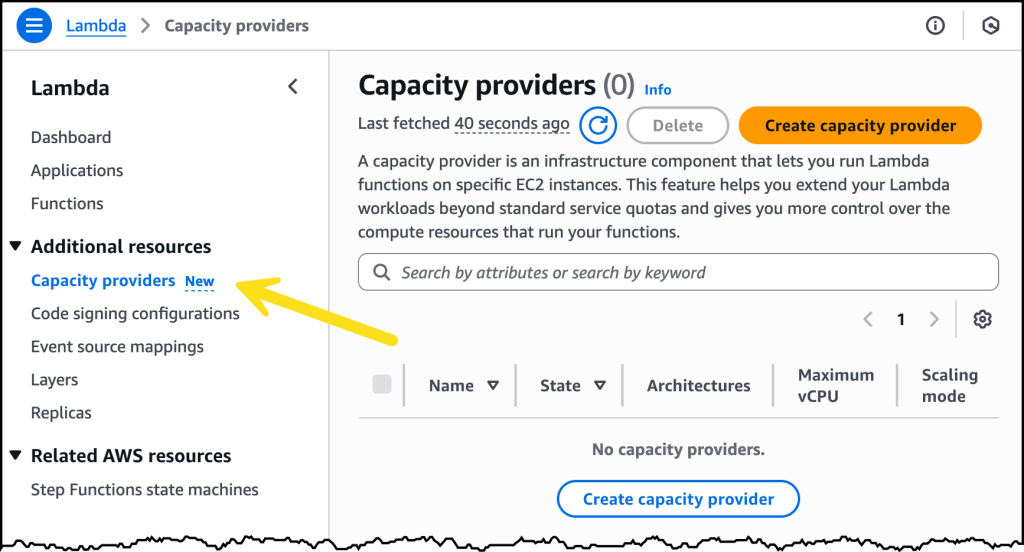
To take Lambda Managed Instances for a spin, I first need to create a Capacity provider. As shown in the following image, there is a new tab for creating these in the navigation pane under Additional resources.

Lambda Managed Instances Console

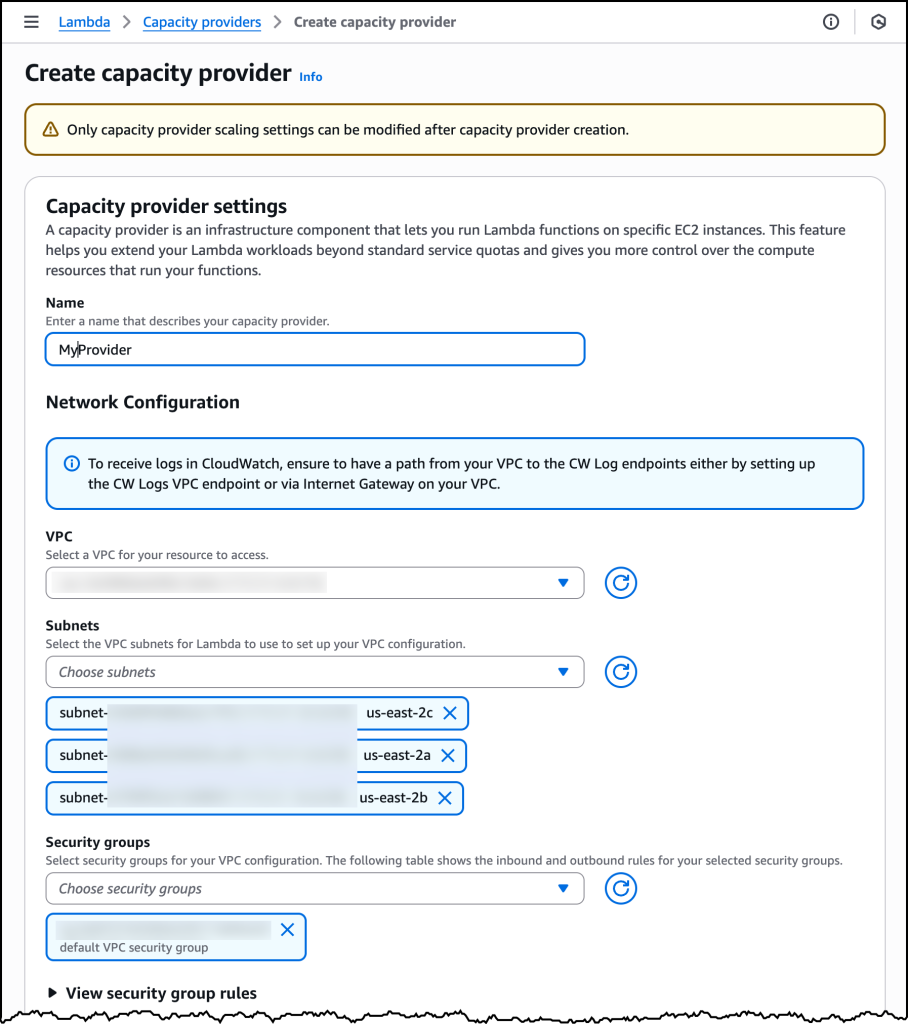
Creating a Capacity provider is where I specify the virtual private cloud (VPC), subnet configuration and security groups. With a capacity provider configuration, I can also tell Lambda where to provision and manage the instances.

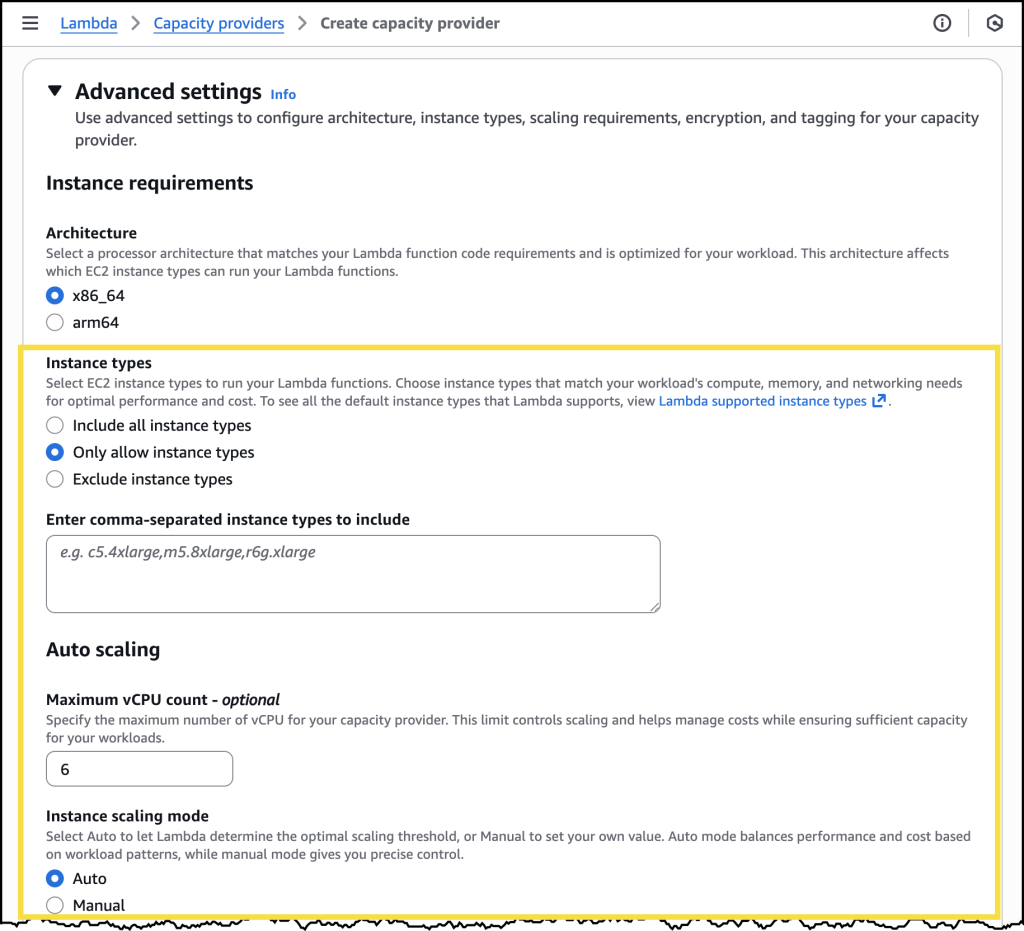
I can also specify the EC2 instance types I’d like to include or exclude, or I can choose to include all instance types for high diversity. Additionally, I can specify a few controls related to auto scaling, including the Maximum vCPU count, and if I want to use Auto scaling or use a CPU policy.

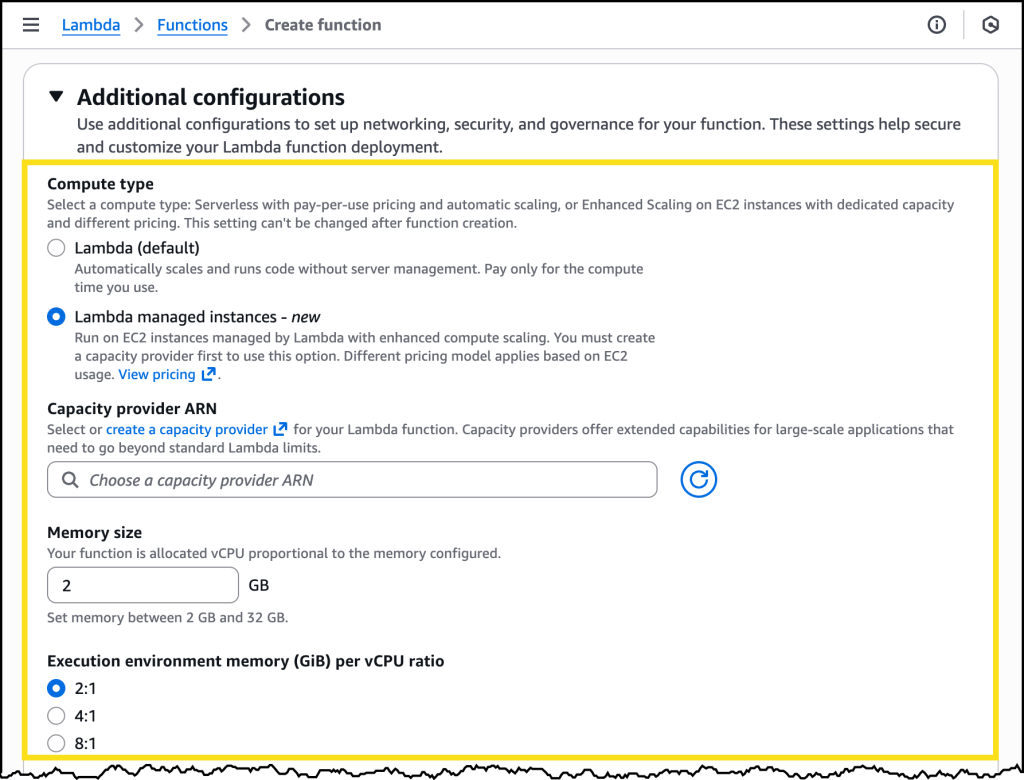
After I have my capacity provider configured, I can choose it through its Amazon Resource Name (ARN) when I go to create a new Lambda function. Here I can also select the memory allocation I want along with a memory-to-vCPU ratio.

Working with Lambda Managed Instances
Now that we’ve seen the basic setup, let’s explore how Lambda Managed Instances works in more detail. The feature organizes EC2 instances into capacity providers that you configure through the Lambda console, AWS Command Line Interface (AWS CLI), or infrastructure as code (IaC) tools such as AWS CloudFormation, AWS Serverless Application Model (AWS SAM), AWS Cloud Development Kit (AWS CDK) and Terraform. Each capacity provider defines the compute characteristics you need, including instance type, networking configuration, and scaling parameters.

When creating a capacity provider, you can choose from the latest generation of EC2 instances to match your workload requirements. For cost-optimized general-purpose compute, you could choose AWS Graviton4 based instances that deliver excellent price performance. If you’re not sure which instance type to select, AWS Lambda provides optimized defaults that balance performance and cost based on your function configuration.

After creating a capacity provider, you attach your Lambda functions to it through a straightforward configuration change. Before attaching a function, you should review your code for programming patterns that can cause issues in multiconcurrency environments, such as writing to or reading from file paths that aren’t unique per request or using shared memory spaces and variables across invocations.

Lambda automatically routes requests to preprovisioned execution environments on the instances, eliminating cold starts that can affect first-request latency. Each execution environment can handle multiple concurrent requests through the multiconcurrency feature, maximizing resource utilization across your functions. When additional capacity is needed during traffic increases, AWS automatically launches new instances within tens of seconds and adds them to your capacity provider. The capacity provider can absorb traffic spikes of up to 50% without needing to scale by default, but built-in circuit breakers protect your compute resources during extreme traffic surges by temporarily throttling requests with 429 status codes if the capacity provider reaches maximum provisioned capacity and additional capacity is still being spun up.

The operational and architectural model remains serverless throughout this process. AWS handles instance provisioning, OS patching, security updates, load balancing across instances, and automatic scaling based on demand. AWS automatically applies security patches and bug fixes to operating system and runtime components, often without disrupting running applications. Additionally, instances have a maximum 14-day lifetime to align with industry security and compliance standards. You don’t need to write automatic scaling policies, configure load balancers, or manage instance lifecycle yourself, and your function code, event source integrations, AWS Identity and Access Management (AWS IAM) permissions, and Amazon CloudWatch monitoring remain unchanged.

Now available
You can start using Lambda Managed Instances today through the Lambda console, AWS CLI, or AWS SDKs. The feature is available in US East (N. Virginia), US East (Ohio), US West (Oregon), Asia Pacific (Tokyo), and Europe (Ireland) Regions. For Regional availability and future roadmap, visit the AWS Capabilities by Region. Learn more about it in the AWS Lambda documentation.

Pricing for Lambda Managed Instances has three components. First, you pay standard Lambda request charges of $0.20 per million invocations. Second, you pay standard Amazon EC2 instance charges for the compute capacity provisioned. Your existing Amazon EC2 pricing agreements, including Compute Savings Plans and Reserved Instances, can be applied to these instance charges to reduce costs for steady-state workloads. Third, you pay a compute management fee of 15% calculated on the EC2 on-demand instance price to cover AWS’s operational management of your instances. Note that unlike traditional Lambda functions, you are not charged separately for execution duration per request. The multiconcurrency feature helps further optimize costs by reducing the total compute time required to process your requests.

The initial release supports the latest versions of Node.js, Java, .NET and Python runtimes, with support for other languages coming soon. The feature integrates with existing Lambda workflows including function versioning, aliases, AWS CloudWatch Lambda Insights, AWS AppConfig extensions, and deployment tools like AWS SAM and AWS CDK. You can migrate existing Lambda functions to Lambda Managed Instances without changing your function code (as long as it has been validated to be thread safe for multiconcurrency) making it easy to adopt this capability for workloads that would benefit from specialized compute or cost optimization.

Lambda Managed Instances represents a significant expansion of Lambda’s capabilities, which means you can run a broader range of workloads while preserving the serverless operational model. Whether you’re optimizing costs for high-traffic applications, or accessing the latest processor architectures like Graviton4, this new capability provides the flexibility you need without operational complexity. We’re excited to see what you build with Lambda Managed Instances.

Simplify IAM policy creation with IAM Policy Autopilot, a new open source MCP server for builders

Post Syndicated from Micah Walter original https://aws.amazon.com/blogs/aws/simplify-iam-policy-creation-with-iam-policy-autopilot-a-new-open-source-mcp-server-for-builders/

Today, we’re announcing IAM Policy Autopilot, a new open source Model Context Protocol (MCP) server that analyzes your application code and helps your AI coding assistants generate AWS Identity and Access Management (IAM) identity-based policies. IAM Policy Autopilot accelerates initial development by providing builders with a starting point that they can review and further refine. It integrates with AI coding assistants such as Kiro, Claude Code, Cursor, and Cline, and it provides them with AWS Identity and Access Management (IAM) knowledge and understanding of the latest AWS services and features. IAM Policy Autopilot is available at no additional cost, runs locally, and you can get started by visiting our GitHub repository.

Amazon Web Services (AWS) applications require IAM policies for their roles. Builders on AWS, from developers to business leaders, engage with IAM as part of their workflow. Developers typically start with broader permissions and refine them over time, balancing rapid development with security. They often use AI coding assistants in hopes of accelerating development and authoring IAM permissions. However, these AI tools don’t fully understand the nuances of IAM and can miss permissions or suggest invalid actions. Builders seek solutions that provide reliable IAM knowledge, integrate with AI assistants and get them started with policy creation, so that they can focus on building applications.

Create valid policies with AWS knowledge
IAM Policy Autopilot addresses these challenges by generating identity-based IAM policies directly from your application code. Using deterministic code analysis, it creates reliable and valid policies, so you spend less time authoring and debugging permissions. IAM Policy Autopilot incorporates AWS knowledge, including published AWS service reference implementation, to stay up to date. It uses this information to understand how code and SDK calls map to IAM actions and stays current with the latest AWS services and operations.

The generated policies provide a starting point for you to review and scope down to implement least privilege permissions. As you modify your application code—whether adding new AWS service integrations or updating existing ones—you only need to run IAM Policy Autopilot again to get updated permissions.

Getting started with IAM Policy Autopilot
Developers can get started with IAM Policy Autopilot in minutes by downloading and integrating it with their workflow.

As an MCP server, IAM Policy Autopilot operates in the background as builders converse with their AI coding assistants. When your application needs IAM policies, your coding assistants can call IAM Policy Autopilot to analyze AWS SDK calls within your application and generate required identity-based IAM policies, providing you with necessary permissions to start with. After permissions are created, if you still encounter Access Denied errors during testing, the AI coding assistant invokes IAM Policy Autopilot to analyze the denial and propose targeted IAM policy fixes. After you review and approve the suggested changes, IAM Policy Autopilot updates the permissions.

You can also use IAM Policy Autopilot as a standalone command line interface (CLI) tool to generate policies directly or fix missing permissions. Both the CLI tool and the MCP server provide the same policy creation and troubleshooting capabilities, so you can choose the integration that best fits your workflow.

When using IAM Policy Autopilot, you should also understand the best practices to maximize its benefits. IAM Policy Autopilot generates identity-based policies and doesn’t create resource-based policies, permission boundaries, service control policies (SCPs) or resource control policies (RCPs). IAM Policy Autopilot generates policies that prioritize functionality over minimal permissions. You should always review the generated policies and refine if necessary so they align with your security requirements before deploying them.

Let’s try it out
To set up IAM Policy Autopilot, I first need to install it on my system. To do so, I just need to run a one-liner script:

curl https://github.com/awslabs/iam-policy-autopilot/raw/refs/heads/main/install.sh | bash

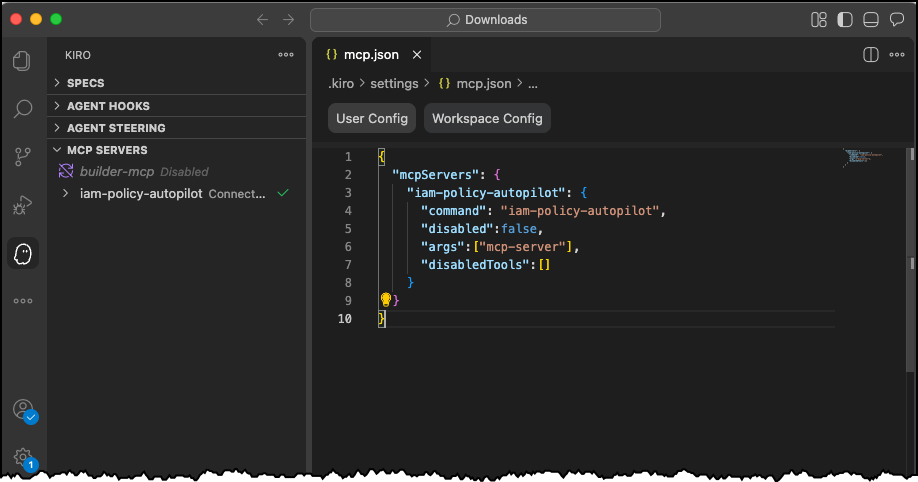
Then I can follow the instructions to install any MCP server for my IDE of choice. Today, I’m using Kiro!

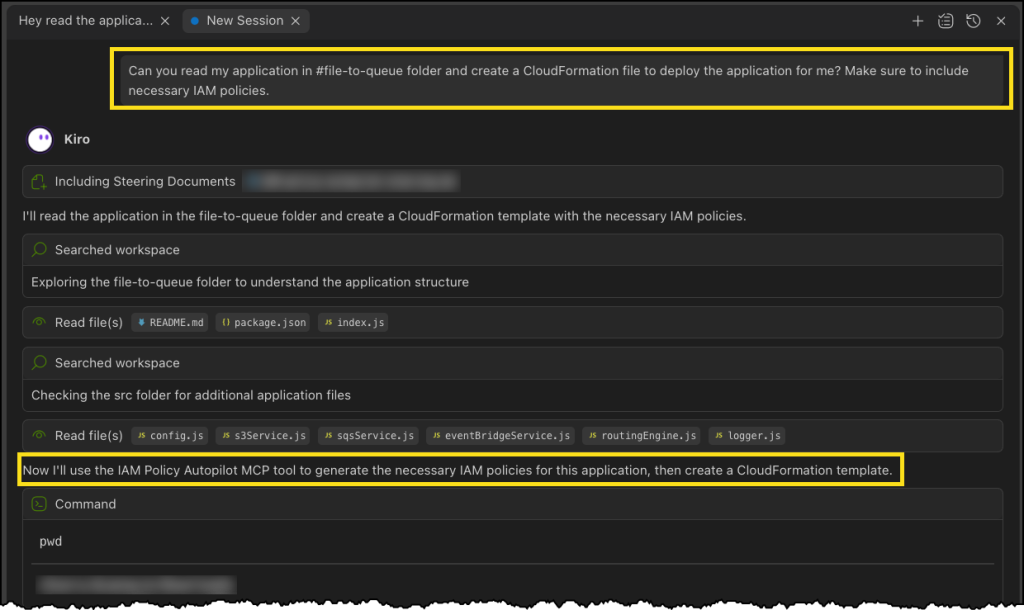
In a new chat session in Kiro, I start with a straightforward prompt, where I ask Kiro to read the files in my file-to-queue folder and create a new AWS CloudFormation file so I can deploy the application. This folder contains an automated Amazon Simple Storage Service (Amazon S3) file router that scans a bucket and sends notifications to Amazon Simple Queue Service (Amazon SQS) queues or Amazon EventBridge based on configurable prefix-matching rules, enabling event-driven workflows triggered by file locations.

The last part asks Kiro to make sure I’m including necessary IAM policies. This should be enough to get Kiro to use the IAM Policy Autopilot MCP server.

Next, Kiro uses the IAM Policy Autopilot MCP server to generate a new policy document, as depicted in the following image. After it’s done, Kiro will move on to building out our CloudFormation template and some additional documentation and relevant code files.

IAM Policy Autopilot

Finally, we can see our generated CloudFormation template with a new policy document, all generated using the IAM Policy Autopilot MCP server!

IAM Policy Autopilot

Enhanced development workflow
IAM Policy Autopilot integrates with AWS services across multiple areas. For core AWS services, IAM Policy Autopilot analyzes your application’s usage of services such as Amazon S3, AWS Lambda, Amazon DynamoDB, Amazon Elastic Compute Cloud (Amazon EC2), and Amazon CloudWatch Logs, then generates necessary permissions your code needs based on the SDK calls it discovers. After the policies are created, you can copy the policy directly into your CloudFormation template, AWS Cloud Development Kit (AWS CDK) stack, or Terraform configuration. You can also prompt your AI coding assistants to integrate it for you.

IAM Policy Autopilot also complements existing IAM tools such as AWS IAM Access Analyzer by providing functional policies as a starting point, which you can then validate using IAM Access Analyzer policy validation or refine over time with unused access analysis.

Now available
IAM Policy Autopilot is available as an open source tool on GitHub at no additional cost. The tool currently supports Python, TypeScript, and Go applications.

These capabilities represent a significant step forward in simplifying the AWS development experience so builders of different experience levels can develop and deploy applications more efficiently.

Amazon Route 53 launches Accelerated recovery for managing public DNS records

Post Syndicated from Micah Walter original https://aws.amazon.com/blogs/aws/amazon-route-53-launches-accelerated-recovery-for-managing-public-dns-records/

Today, we’re announcing Amazon Route 53 Accelerated recovery for managing public DNS records, a new Domain Name Service (DNS) business continuity feature that is designed to provide a 60-minute recovery time objective (RTO) during service disruptions in the US East (N. Virginia) AWS Region. This enhancement ensures that customers can continue making DNS changes and provisioning infrastructure even during regional outages, providing greater predictability and resilience for mission-critical applications.

Customers running applications that require business continuity have told us they need additional DNS resilience capabilities to meet their business continuity requirements and regulatory compliance obligations. While AWS maintains exceptional availability across our global infrastructure, organizations in regulated industries like banking, FinTech, and SaaS want the confidence that they will be able to make DNS changes even during unexpected regional disruptions, allowing them to quickly provision standby cloud resources or redirect traffic when needed.

Accelerated recovery for managing public DNS records addresses this need by targeting DNS changes that customers can make within 60 minutes of a service disruption in the US East (N. Virginia) Region. The feature works seamlessly with your existing Route 53 setup, providing access to key Route 53 API operations during failover scenarios, including ChangeResourceRecordSets, GetChange, ListHostedZones, and ListResourceRecordSets. Customers can continue using their existing Route 53 API endpoint without modifying applications or scripts.

Let’s try it out
Configuring a Route53 hosted zone to use accelerated recovery is simple. Here I am creating a new hosted zone for a new website I’m building.

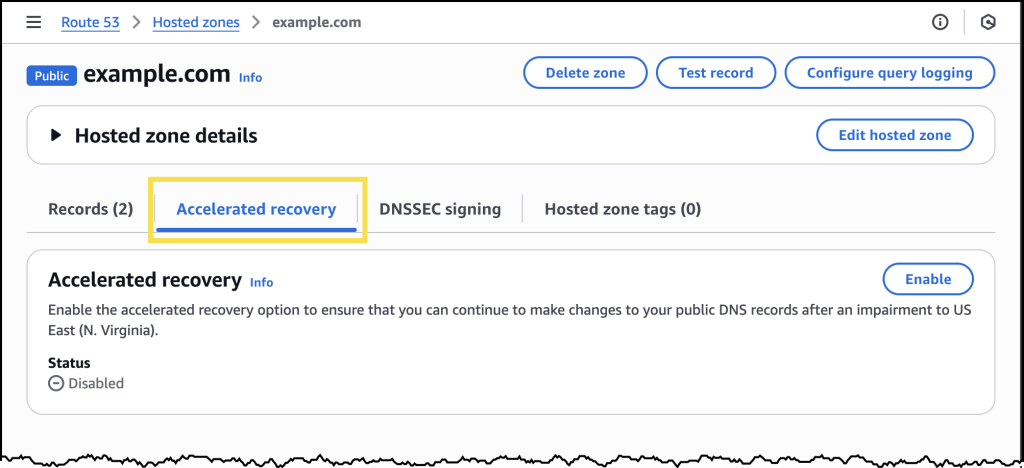
Once I have created my hosted zone, I see a new tab labeled Accelerated recovery. I can see here that accelerated recovery is disabled by default.

To enable it, I just need to click the Enable button and confirm my choice in the modal that appears as depicted in the dialog below.

Enabling accelerated recovery will take a couple minutes to complete. Once it’s enabled, I see a green Enabled status as depicted in the screenshot below.

I can disable accelerated recovery at any time from this same area of the AWS Management Console. I can also enable accelerated recovery for any existing hosted zones I have already created.

Enhanced DNS business continuity
With accelerated recovery enabled, customers gain several key capabilities during service disruptions. The feature maintains access to essential Route 53 API operations, ensuring that DNS management remains available when it’s needed most. Organizations can continue to make critical DNS changes, provision new infrastructure, and redirect traffic flows without waiting for full service restoration.

The implementation is designed for simplicity and reliability. Customers don’t need to learn new APIs or modify existing automation scripts. The same Route 53 endpoints and API calls continue to work, providing a seamless experience during both normal operations and failover scenarios.

Now available
Accelerated recovery for Amazon Route 53 public hosted zones is available now. You can enable this feature through the AWS Management Console, AWS Command Line Interface (AWS CLI), AWS Software Development Kit (AWS SDKs), or infrastructure as code tools like AWS CloudFormation and AWS Cloud Development Kit (AWS CDK). There is no additional cost for using accelerated recovery.

To learn more about accelerated recovery and get started, visit the documentation. This new capability represents our continued commitment to providing customers with the DNS resilience they need to build and operate mission-critical applications in the cloud.

AWS Lambda enhances event processing with provisioned mode for SQS event-source mapping

Post Syndicated from Micah Walter original https://aws.amazon.com/blogs/aws/aws-lambda-enhances-sqs-processing-with-new-provisioned-mode-3x-faster-scaling-16x-higher-capacity/

Today, we’re announcing the general availability of provisioned mode for AWS Lambda with Amazon Simple Queue Service (Amazon SQS) Event Source Mapping (ESM), a new feature that customers can use to optimize the throughput of their event-driven applications by configuring dedicated polling resources. Using this new capability, which provides 3x faster scaling, and 16x higher concurrency, you can process events with lower latency, handle sudden traffic spikes more effectively, and maintain precise control over your event processing resources.

Modern applications increasingly rely on event-driven architectures where services communicate through events and messages. Amazon SQS is commonly used as an event source for Lambda functions, so developers can build loosely coupled, scalable applications. Although the SQS ESM automatically handles queue polling and function invocation, customers with stringent performance requirements have asked for more control over the polling behavior to handle spiky traffic patterns and maintain low processing latency.

Provisioned mode for SQS ESM addresses these needs by introducing event pollers, which are dedicated resources that remain ready to handle expected traffic patterns. These event pollers can auto scale up to 1000 per concurrent executions per minute, more than three times faster than before to handle sudden spikes in event traffic and provide up to 20,000 concurrency–16 times higher capacity to process millions of events with Lambda functions. This enhanced scaling behavior helps customers maintain predictable low latency even during traffic surges.

Enterprises across various industries, from financial services to gaming companies, are using AWS Lambda with Amazon SQS to process real-time events for their mission-critical applications. These organizations, which include some of the largest online gaming platforms and financial institutions, require consistent subsecond processing times for their event-driven workloads, particularly during periods of peak usage. Provisioned mode for SQS ESM is a capability you can use to meet your stringent performance requirements while maintaining cost controls.

Enhanced control and performance

With provisioned mode, you can configure both minimum and maximum numbers of event pollers for your SQS ESM. Each event poller represents a unit of compute that handles queue polling, event batching, and filtering before invoking Lambda functions. Each event poller can handle up to 1 MB/sec of throughput, up to 10 concurrent invokes, or up to 10 SQS polling API calls per second. By setting a minimum number of event pollers, you enable your application to maintain a baseline processing capacity that can immediately handle sudden traffic increases. We recommend that you set the minimum event pollers required to handle your known peak workload requirements. The optional maximum setting helps prevent overloading downstream systems by limiting the total processing throughput.

The new mode delivers significant improvements in how your event-driven applications handle varying workloads. When traffic increases, your ESM detects the growing backlog within seconds and dynamically scales event pollers between your configured minimum and maximum values three times faster than before. This enhanced scaling capability is complemented by a substantial increase in processing capacity, with support for up to 2 GBps of aggregate traffic, and up to 20K concurrent requests—16x higher than previously possible. By maintaining a minimum number of ready-to-use event pollers, your application achieves predictable performance, handling sudden traffic spikes without the delay typically associated with scaling up resources. During low traffic periods, your ESM automatically scales down to your configured minimum number of event pollers, which means you can optimize costs while maintaining responsiveness.

Let’s try it out

Enabling provisioned mode is straightforward in the AWS Management Console. You need to already have an SQS queue configured and a Lambda function. To get started, in the Configuration tab for your Lambda function, choose Triggers, then Add trigger. This will bring up a user interface where you can configure your trigger. Choose SQS from the dropdown menu for source and then select the SQS queue you want to use.

Under Event poller configuration, you will now see a new option called Provisioned mode. Select Configure to reveal settings for Minimum event pollers and Maximum event pollers, each with defaults and minimum and maximum values displayed.

Configuration panel for SQS provisioned Mode

After you have configured Provisioned mode, you can save your trigger. If you need to make changes later, you can find the current configuration under the Triggers tab in the AWS Lambda configuration section, and you can modify your current settings there.

SQS Provisioned Poller confiig

Monitoring and observability

You can monitor your provisioned mode usage through Amazon CloudWatch metrics. The ProvisionedPollers metric shows the number of active event pollers processing events in one-minute windows.

Now available

Provisioned mode for Lambda SQS ESM is available today in all commercial AWS Regions. You can start using this feature through the AWS Management Console, AWS Command Line Interface (AWS CLI), or AWS SDKs. Pricing is based on the number of event pollers provisioned and the duration they’re provisioned for, measured in Event Poller Units (EPUs). Each EPU supports up to 1 MB per second throughput capacity per event poller, with minimum 2 event pollers per ESM. See the AWS pricing page for more information on EPU charges.

To learn more about provisioned mode for SQS ESM, visit the AWS Lambda documentation. Start building more responsive event-driven applications today with enhanced control over your event processing resources.

AWS Weekly Roundup: AWS RTB Fabric, AWS Customer Carbon Footprint Tool, AWS Secret-West Region, and more (October 27, 2025)

Post Syndicated from Micah Walter original https://aws.amazon.com/blogs/aws/aws-weekly-roundup-aws-rtb-fabric-aws-customer-carbon-footprint-tool-aws-secret-west-region-and-more-october-27-2025/

This week started with challenges for many using services in the the North Virginia (us-east-1) Region. On Monday, we experienced a service disruption affecting DynamoDB and several other services due to a DNS configuration problem. The issue has been fully resolved, and you can read the full details in our official summary. As someone who works closely with developers, I know how disruptive these incidents can be to your applications and your users. The teams are learning valuable lessons from this event that will help improve our services going forward.

Last week’s launches

On a brighter note, I’m excited to share some launches and updates from this past week that I think you’ll find interesting.

AWS RTB Fabric is now generally available — If you’re working in advertising technology, you’ll be interested in AWS RTB Fabric, a fully managed service for real-time bidding workloads. It connects AdTech partners like SSPs, DSPs, and publishers through a private, high-performance network that delivers single-digit millisecond latency—critical for those split-second ad auctions. The service reduces networking costs by up to 80% compared to standard cloud solutions with no upfront commitments, and includes three built-in modules to optimize traffic, improve bid efficiency, and increase bid response rates. AWS RTB Fabric is available in US East (N. Virginia), US West (Oregon), Asia Pacific (Singapore and Tokyo), and Europe (Frankfurt and Ireland).

Customer Carbon Footprint Tool now includes Scope 3 emissions data — Understanding the full environmental impact of your cloud usage just got more comprehensive. The AWS Customer Carbon Footprint Tool (CCFT) now covers all three industry-standard emission scopes as defined by the Greenhouse Gas Protocol. This update adds Scope 3 emissions—covering the lifecycle carbon impact from manufacturing servers, powering AWS facilities, and transporting equipment to data centers—plus Scope 1 natural gas and refrigerants. With historical data available back to January 2022, you can track your progress over time and make informed decisions about your cloud strategy to meet sustainability goals. Access the data through the CCFT dashboard or AWS Billing and Cost Management Data Exports.

Additional updates

I thought these projects, blog posts, and news items were also interesting:

AWS Secret-West Region is now available — AWS launched its second Secret Region in the western United States, capable of handling mission-critical workloads at the Secret U.S. security classification level. This new region provides enhanced performance for latency-sensitive workloads and offers multi-region resiliency with geographic separation for Intelligence Community and Department of Defense missions. The infrastructure features data centers and network architecture designed, built, accredited, and operated for security compliance with Intelligence Community Directive requirements.

Amazon CloudWatch now generates incident reports — CloudWatch investigations can now automatically generate comprehensive incident reports that include executive summaries, timeline of events, impact assessments, and actionable recommendations. The feature collects and correlates telemetry data along with investigation actions to help teams identify patterns and implement preventive measures through structured post-incident analysis.

Amazon Connect introduces threaded email views — Amazon Connect email now displays exchanges in a threaded format and automatically includes prior conversation context when agents compose responses. These enhancements make it easier for both agents and customers to maintain context and continuity across interactions, delivering a more natural and familiar email experience.

Amazon EC2 I8g instances expand to additional regions — Storage Optimized I8g instances are now available in Europe (London), Asia Pacific (Singapore), and Asia Pacific (Tokyo). Powered by AWS Graviton4 processors and third-generation AWS Nitro SSDs, these instances deliver up to 60% better compute performance and 65% better real-time storage performance per TB compared to previous generation I4g instances, with storage I/O latency reduced by up to 50%.

AWS Location Service adds enhanced map styling — Developers can now incorporate terrain visualization, contour lines, real-time traffic overlays, and transportation-specific routing details through the GetStyleDescriptor API. The new styling parameters enable tailored maps for specific applications—from outdoor navigation to logistics planning.

CloudWatch Synthetics introduces multi-check canaries — You can now bundle up to 10 different monitoring steps in a single canary using JSON configuration without custom scripts. The multi-check blueprints support HTTP endpoints with authentication, DNS validation, SSL certificate monitoring, and TCP port checks, making API monitoring more cost-effective.

Amazon S3 Tables now generates CloudTrail events — S3 Tables now logs AWS CloudTrail events for automatic maintenance operations, including compaction and snapshot expiration. This enables organizations to audit the maintenance activities that S3 Tables automatically performs to enhance query performance and reduce operational costs.

AWS Lambda increases asynchronous invocation payload size to 1 MB — Lambda has quadrupled the maximum payload size for asynchronous invocations from 256 KB to 1 MB across all AWS Commercial and GovCloud (US) Regions. This expansion streamlines architectures by allowing comprehensive data to be included in a single event, eliminating the need for complex data chunking or external storage solutions. Use cases now better supported include large language model prompts, detailed telemetry signals, complex ML output structures, and complete user profiles. The update applies to asynchronous invocations through the Lambda API or push-based events from services like S3, CloudWatch, SNS, EventBridge, and Step Functions. Pricing remains at 1 request charge for the first 256 KB, with 1 additional charge per 64 KB chunk thereafter.

Upcoming AWS events

Keep a look out and be sure to sign up for these upcoming events:

AWS re:Invent 2025 (December 1-5, 2025, Las Vegas) — AWS flagship annual conference offering collaborative innovation through peer-to-peer learning, expert-led discussions, and invaluable networking opportunities. Registration is now open.

Join the AWS Builder Center to learn, build, and connect with builders in the AWS community. Browse for upcoming in-person and virtual developer-focused events in your area.

That’s all for this week. Check back next Monday for another Weekly Roundup!

~ micah

Announcing Amazon ECS Managed Instances for containerized applications

Post Syndicated from Micah Walter original https://aws.amazon.com/blogs/aws/announcing-amazon-ecs-managed-instances-for-containerized-applications/

Today, we’re announcing Amazon ECS Managed Instances, a new compute option for Amazon Elastic Container Service (Amazon ECS) that enables developers to use the full range of Amazon Elastic Compute Cloud (Amazon EC2) capabilities while offloading infrastructure management responsibilities to Amazon Web Service (AWS). This new offering combines the operational simplicity of offloading infrastructure with the flexibility and control of Amazon EC2, which means customers can focus on building applications that drive innovation, while reducing total cost of ownership (TCO) and maintaining AWS best practices.

Customers running containerized workloads told us they want to combine the simplicity of serverless with the flexibility of self-managed EC2 instances. Although serverless options provide an excellent general-purpose solution, some applications require specific compute capabilities, such as GPU acceleration, particular CPU architectures, or enhanced networking performance. Additionally, customers with existing Amazon EC2 capacity investments through EC2 pricing options couldn’t fully use these commitments with serverless offerings.

Amazon ECS Managed Instances provides a fully managed container compute environment that supports a broad range of EC2 instance types and deep integration with AWS services. By default, it automatically selects the most cost-optimized EC2 instances for your workloads, but you can specify particular instance attributes or types when needed. AWS handles all aspects of infrastructure management, including provisioning, scaling, security patching, and cost optimization, enabling you to concentrate on building and running your applications.

Let’s try it out

Looking at the AWS Management Console experience for creating a new Amazon ECS cluster, I can see the new option for using ECS Managed Instances. Let’s take a quick tour of all the new options.

Creating a ECS cluster with Managed Instances

After I’ve selected Fargate and Managed Instances, I’m presented with two options. If I select Use ECS default, Amazon ECS will choose general purpose instance types based on grouping together pending Tasks, and picking the optimum instance type based on cost and resilience metrics. This is the most straightforward and recommended way to get started. Selecting Use custom – advanced opens up additional configuration parameters, where I can fine-tune the attributes of instances Amazon ECS will use.

Creating a ECS cluster with Managed Instances

By default, I see CPU and Memory as attributes, but I can select from 20 additional attributes to continue to filter the list of available instance types Amazon ECS can access.

Creating a ECS cluster with Managed Instances

After I’ve made my attribute selections, I see a list of all the instance types that match my choices.

Creating a ECS cluster with Managed Instances

From here, I can create my ECS cluster as usual and Amazon ECS will provision instances for me on my behalf based on the attributes and criteria I’ve defined in the previous steps.

Key features of Amazon ECS Managed Instances

With Amazon ECS Managed Instances, AWS takes full responsibility for infrastructure management, handling all aspects of instance provisioning, scaling, and maintenance. This includes implementing regular security patches initiated every 14 days (due to instance connection draining, the actual lifetime of the instance may be longer), with the ability to schedule maintenance windows using Amazon EC2 event windows to minimize disruption to your applications.

The service provides exceptional flexibility in instance type selection. Although it automatically selects cost-optimized instance types by default, you maintain the power to specify desired instance attributes when your workloads require specific capabilities. This includes options for GPU acceleration, CPU architecture, and network performance requirements, giving you precise control over your compute environment.

To help optimize costs, Amazon ECS Managed Instances intelligently manages resource utilization by automatically placing multiple tasks on larger instances when appropriate. The service continually monitors and optimizes task placement, consolidating workloads onto fewer instances to dry up, utilize and terminate idle (empty) instances, providing both high availability and cost efficiency for your containerized applications.

Integration with existing AWS services is seamless, particularly with Amazon EC2 features such as EC2 pricing options. This deep integration means that you can maximize existing capacity investments while maintaining the operational simplicity of a fully managed service.

Security remains a top priority with Amazon ECS Managed Instances. The service runs on Bottlerocket, a purpose-built container operating system, and maintains your security posture through automated security patches and updates. You can see all the updates and patches applied to the Bottlerocket OS image on the Bottlerocket website. This comprehensive approach to security keeps your containerized applications running in a secure, maintained environment.

Available now

Amazon ECS Managed Instances is available today in US East (North Virginia), US West (Oregon), Europe (Dublin), Africa (Cape Town), Asia Pacific (Singapore), and Asia Pacific (Tokyo) AWS Regions. You can start using Managed Instances through the AWS Management Console, AWS Command Line Interface (AWS CLI), or infrastructure as code (IaC) tools such as AWS Cloud Development Kit (AWS CDK) and AWS CloudFormation. You pay for the EC2 instances you use plus a management fee for the service.

To learn more about Amazon ECS Managed Instances, visit the documentation and get started simplifying your container infrastructure today.

Announcing AWS Outposts third-party storage integration with Dell and HPE

Post Syndicated from Micah Walter original https://aws.amazon.com/blogs/aws/announcing-aws-outposts-third-party-storage-integration-with-dell-and-hpe/

Since announcing second-generation AWS Outposts racks in April with breakthrough performance and scalability, we’ve continued to innovate on behalf of our customers at the edge of the cloud. Today, we’re expanding AWS Outposts third-party storage integration program to include Dell PowerStore and HPE Alletra Storage MP B10000 systems, joining our list of existing integrations with NetApp on-premises enterprise storage arrays and Pure Storage FlashArray. This program makes it easy for customers to use AWS Outposts with third-party storage arrays through AWS native tooling. The solution integration is particularly important for organizations migrating VMware workloads to AWS who need to maintain their existing storage infrastructure during the transition, and for those who must meet strict data residency requirements by keeping their data on-premises while using AWS services.

Outposts compute rack_Gen2_front_45This announcement builds upon two significant storage integration milestones we achieved in the past year. In December 2024, we introduced the ability to attach block data volumes from third-party storage arrays to Amazon EC2 instances on Outposts directly through the AWS Management Console. Then in July 2025, we enabled booting Amazon EC2 instances directly from these external storage arrays. Now, with the addition of Dell and HPE, customers have even more choice in how they integrate their on-premises storage investments with AWS Outposts.

Enhanced storage integration capabilities

Our third-party storage integration supports both data and boot volumes, offering two boot methods: iSCSI SANboot and Localboot. The iSCSI SANboot option enables both read-only and read-write boot volumes, while Localboot supports read-only boot volumes using either iSCSI or NVMe-over-TCP protocols. With this comprehensive approach, customers can centrally manage their storage resources while maintaining the consistent hybrid experience that Outposts provides.

Through the Amazon EC2 Launch Instance Wizard in the AWS Management Console, customers can configure their instances to use external storage from any of our supported partners. For boot volumes, we provide AWS-verified AMIs for Windows Server 2022 and Red Hat Enterprise Linux 9, with automation scripts available through AWS Samples to simplify the setup process.

Support for various Outposts configurations

All third-party storage integration features are supported on Outposts 2U servers and both generations of Outposts racks. Support for second-generation Outposts racks means customers can combine the enhanced performance of our latest EC2 instances on Outposts—including twice the vCPU, memory, and network bandwidth—with their preferred storage solutions. The integration works seamlessly with both our new simplified network scaling capabilities and specialized Amazon EC2 instances designed for ultra-low latency and high throughput workloads.

Things to know

Customers can begin using these capabilities today with their existing Outposts deployments or when ordering new Outposts through the AWS Management Console. If you are using third-party storage integration with Outposts servers, you can have either your onsite personnel or a third-party IT provider install the servers for you. After the Outposts servers are connected to your network, AWS will remotely provision compute and storage resources so you can start launching applications. For Outposts rack deployments, the process involves a setup where AWS technicians verify site conditions and network connectivity before the rack installation and activation. Storage partners assist with the implementation of the third-party storage components.

Third-party storage integration for Outposts with all compatible storage vendors is available at no additional charge in all AWS Regions where Outposts is supported. See the FAQs for Outposts servers and Outposts racks for the latest list of supported Regions.

This expansion of our Outposts third-party storage integration program demonstrates our continued commitment to providing flexible, enterprise-grade hybrid cloud solutions, meeting customers where they are in their cloud migration journey. To learn more about this capability and our supported storage vendors, visit the AWS Outposts partner page and our technical documentation for Outposts servers, second-generation Outposts racks, and first-generation Outposts racks. To learn more about partner solutions, check out Dell PowerStore integration with AWS Outposts and HPE Alletra Storage MP B10000 integration with AWS Outposts.

Accelerate serverless testing with LocalStack integration in VS Code IDE

Post Syndicated from Micah Walter original https://aws.amazon.com/blogs/aws/accelerate-serverless-testing-with-localstack-integration-in-vs-code-ide/

Today, we’re announcing LocalStack integration in the AWS Toolkit for Visual Studio Code that makes it easier than ever for developers to test and debug serverless applications locally. This enhancement builds upon our recent improvements to the AWS Lambda development experience, including the console to IDE integration and remote debugging capabilities we launched in July 2025, continuing our commitment to simplify serverless development on Amazon Web Services (AWS).

When building serverless applications, developers typically focus on three key areas to streamline their testing experience: unit testing, integration testing, and debugging resources running in the cloud. Although AWS Serverless Application Model Command Line Interface (AWS SAM CLI) provides excellent local unit testing capabilities for individual Lambda functions, developers working with event-driven architectures that involve multiple AWS services, such as Amazon Simple Queue Service (Amazon SQS), Amazon EventBridge, and Amazon DynamoDB, need a comprehensive solution for local integration testing. Although LocalStack provided local emulation of AWS services, developers had to previously manage it as a standalone tool, requiring complex configuration and frequent context switching between multiple interfaces, which slowed down the development cycle.

LocalStack integration in AWS Toolkit for VS Code
To address these challenges, we’re introducing LocalStack integration so developers can connect AWS Toolkit for VS Code directly to LocalStack endpoints. With this integration, developers can test and debug serverless applications without switching between tools or managing complex LocalStack setups. Developers can now emulate end-to-end event-driven workflows involving services such as Lambda, Amazon SQS, and EventBridge locally, without needing to manage multiple tools, perform complex endpoint configurations, or deal with service boundary issues that previously required connecting to cloud resources.

The key benefit of this integration is that AWS Toolkit for VS Code can now connect to custom endpoints such as LocalStack, something that wasn’t possible before. Previously, to point AWS Toolkit for VS Code to their LocalStack environment, developers had to perform manual configuration and context switching between tools.

Getting started with LocalStack in VS Code is straightforward. Developers can begin with the LocalStack Free version, which provides local emulation for core AWS services ideal for early-stage development and testing. Using the guided application walkthrough in VS Code, developers can install LocalStack directly from the toolkit interface, which automatically installs the LocalStack extension and guides them through the setup process. When it’s configured, developers can deploy serverless applications directly to the emulated environment and test their functions locally, all without leaving their IDE.

Let’s try it out
First, I’ll update my copy of the AWS Toolkit for VS Code to the latest version. Once, I’ve done this, I can see a new option when I go to Application Builder and click on Walkthrough of Application Builder. This allows me to install LocalStack with a single click.

Once I’ve completed the setup for LocalStack, I can start it up from the status bar and then I’ll be able to select LocalStack from the list of my configured AWS profiles. In this illustration, I am using Application Composer to build a simple serverless architecture using Amazon API Gateway, Lambda, and DynamoDB. Normally, I’d deploy this to AWS using AWS SAM. In this case, I’m going to use the same AWS SAM command to deploy my stack locally.

I just do `sam deploy –guided –profile localstack` from the command line and follow the usual prompts. Deploying to LocalStack using AWS SAM CLI provides the exact same experience I’m used to when deploying to AWS. In the screenshot below, I can see the standard output from AWS SAM, as well as my new LocalStack resources listed in the AWS Toolkit Explorer.

I can even go in to a Lambda function and edit the function code I’ve deployed locally!

Over on the LocalStack website, I can login and take a look at all the resources I have running locally. In the screenshot below, you can see the local DynamoDB table I just deployed.

Enhanced development workflow
These new capabilities complement our recently launched console-to-IDE integration and remote debugging features, creating a comprehensive development experience that addresses different testing needs throughout the development lifecycle. AWS SAM CLI provides excellent local testing for individual Lambda functions, handling unit testing scenarios effectively. For integration testing, the LocalStack integration enables testing of multiservice workflows locally without the complexity of AWS Identity and Access Management (IAM) permissions, Amazon Virtual Private Cloud (Amazon VPC) configurations, or service boundary issues that can slow down development velocity.

When developers need to test using AWS services in development environments, they can use our remote debugging capabilities, which provide full access to Amazon VPC resources and IAM roles. This tiered approach frees up developers to focus on business logic during early development phases using LocalStack, then seamlessly transition to cloud-based testing when they need to validate against AWS service behaviors and configurations. The integration eliminates the need to switch between multiple tools and environments, so developers can identify and fix issues faster while maintaining the flexibility to choose the right testing approach for their specific needs.

Now available
You can start using these new features through the AWS Toolkit for VS Code by updating to v3.74.0. The LocalStack integration is available in all commercial AWS Regions except AWS GovCloud (US) Regions. To learn more, visit the AWS Toolkit for VS Code and Lambda documentation.

For developers who need broader service coverage or advanced capabilities, LocalStack offers additional tiers with expanded features. There are no additional costs from AWS for using this integration.

These enhancements represent another significant step forward in our ongoing commitment to simplifying the serverless development experience. Over the past year, we’ve focused on making VS Code the tool of choice for serverless developers, and this LocalStack integration continues that journey by providing tools for developers to build and test serverless applications more efficiently than ever before.

Introducing Amazon Elastic VMware Service for running VMware Cloud Foundation on AWS

Post Syndicated from Micah Walter original https://aws.amazon.com/blogs/aws/introducing-amazon-elastic-vmware-service-for-running-vmware-cloud-foundation-on-aws/

Today, we’re announcing the general availability of Amazon Elastic VMware Service (Amazon EVS), a new AWS service that lets you run VMware Cloud Foundation (VCF) environments directly within your Amazon Virtual Private Cloud (Amazon VPC). With Amazon EVS, you can deploy fully functional VCF environments in just hours using a guided workflow, while running your VMware workloads on qualified Amazon Elastic Compute Cloud (Amazon EC2) bare metal instances and seamlessly integrating with AWS services such as Amazon FSx for NetApp ONTAP.

Many organizations running VMware workloads on premises want to move to the cloud to benefit from improved scalability, reliability, and access to cloud services, but migrating these workloads often requires substantial changes to applications and infrastructure configurations. Amazon EVS lets customers continue using their existing VMware expertise and tools without having to re-architect applications or change established practices, thereby simplifying the migration process while providing access to AWS’s scale, reliability, and broad set of services.

With Amazon EVS, you can run VMware workloads directly in your Amazon VPC. This gives you full control over your environments while being on AWS infrastructure. You can extend your on-premises networks and migrate workloads without changing IP addresses or operational runbooks, reducing complexity and risk.

Key capabilities and features

Amazon EVS delivers a comprehensive set of capabilities designed to streamline your VMware workload migration and management experience. The service enables seamless workload migration without the need for replatforming or changing hypervisors, which means you can maintain your existing infrastructure investments while moving to AWS. Through an intuitive, guided workflow on the AWS Management Console, you can efficiently provision and configure your EVS environments, significantly reducing the complexity to migrate your workloads to AWS.

With Amazon EVS, you can deploy a fully functional VCF environment running on AWS in a few hours. This process eliminates many of the manual steps and potential configuration errors that often occur during traditional deployments. Furthermore, with Amazon EVS you can optimize your virtualization stack on AWS. Given the VCF environment runs inside your VPC, you have full full administrative access to the environment and the associated management appliances. You also have the ability to integrate third-party solutions, from external storage such as Amazon FSx for NetApp ONTAP or Pure Cloud Block Store or backup solutions such as Veeam Backup and Replication.

The service also gives you the ability to self-manage or work with AWS Partners to build, manage, and operate your environments. This provides you with flexibility to match your approach with your overall goals.

Setting up a new VCF environment

Organizations can streamline their setup process by ensuring they have all the necessary pre-requisites in place ahead of creating a new VCF environment. These prerequisites include having an active AWS account, configuring the appropriate AWS Identity and Access Management (IAM) permissions, and setting up a Amazon VPC with sufficient CIDR space and two Route Server endpoints, with each endpoint having its own peer. Additionally, customers will need to have their VMware Cloud Foundation license keys ready, secure Amazon EC2 capacity reservations specifically for i4i.metal instances, and prepare their VLAN subnet information planning.

To help ensure a smooth deployment process, we’ve provided a Getting started hub, which you can access from the EVS homepage as well as a comprehensive guide in our documentation. By following these preparation steps, you can avoid potential setup delays and ensure a successful environment creation.

Screenshots of EVS onboarding

Let’s walk through the process of setting up a new VCF environment using Amazon EVS.

Screenshots of EVS onboarding

You will need to provide your Site ID, which is allocated by Broadcom when purchasing VCF licenses, along with your license keys. To ensure a successful initial deployment, you should verify you have sufficient licensing coverage for a minimum of 256 cores. This translates to at least four i4i.metal instances, with each instance providing 64 physical cores.

This licensing requirement helps you maintain optimal performance and ensures your environment meets the necessary infrastructure specifications. By confirming these requirements upfront, you can avoid potential deployment delays and ensure a smooth setup process.

Screenshots of EVS onboarding

Once you have provided all the required details, you will be prompted to specify your host details. These are the underlying Amazon EC2 instances that your VCF environment will get deployed in.

Screenshots of EVS onboarding

Once you have filled out details for each of your host instances, you will need to configure your networking and management appliance DNS details. For further information on how to create a new VCF environment on Amazon EVS, follow the documentation here.

Screenshots of EVS onboarding

After you have created your VCF environment, you will be able to look over all of the host and configuration details through the AWS Console.

Additional things to know

Amazon EVS currently supports VCF version 5.2.1 and runs on i4i.metal instances. Future releases will expand VCF versions, licensing options, and more instance type support to provide even more flexibility for your deployments.

Amazon EVS provides flexible storage options. Your Amazon EVS local Instance storage is powered by VMware’s vSAN solution, which pools local disks across multiple ESXi hosts into a single distributed datastore. To scale your storage, you can leverage external Network File System (NFS) or iSCSI-based storage solutions. For example, Amazon FSx for NetApp ONTAP is particularly well-suited for use as an NFS datastore or shared block storage over iSCSI.

Additionally, Amazon EVS makes connecting your on-premises environments to AWS simple. You can connect from on-premises vSphere environment into Amazon EVS using a Direct Connect connection or a VPN that terminates into a transit gateway. Amazon EVS also manages the underlying connectivity from your VLAN subnets into your VMs.

AWS provides comprehensive support for all AWS services deployed by Amazon EVS, handling direct customer support while engaging with Broadcom for advanced support needs. Customers must maintain AWS Business Support on accounts running the service.

Availability and pricing

Amazon EVS is now generally available in US East (N. Virginia), US East (Ohio), US West (Oregon), Europe (Frankfurt), Europe (Ireland), and Asia Pacific (Tokyo) AWS Regions, with additional Regions coming soon. Pricing is based on the Amazon EC2 instances and AWS resources you use, with no minimum fees or upfront commitments.

To learn more, visit the Amazon EVS product page.

AWS Weekly Roundup: SQS fair queues, CloudWatch generative AI observability, and more (July 28, 2025)

Post Syndicated from Micah Walter original https://aws.amazon.com/blogs/aws/aws-weekly-roundup-sqs-fair-queues-cloudwatch-generative-ai-observability-and-more-july-28-2025/

To be honest, I’m still recovering from the AWS Summit in New York, doing my best to level up on launches like Amazon Bedrock AgentCore (Preview) and Amazon Simple Storage Service (S3) Vectors. There’s a lot of new stuff to learn!

Meanwhile, it’s been an exciting week for AWS builders focused on reliability and observability. The standout announcement has to be Amazon SQS fair queues, which tackles one of the most persistent challenges in multi-tenant architectures: the “noisy neighbor” problem. If you’ve ever dealt with one tenant’s message processing overwhelming shared infrastructure and affecting other tenants, you’ll appreciate how this feature enables more balanced message distribution across your applications.

On the AI front, we’re also seeing AWS continue to enhance our observability capabilities with the preview launch of Amazon CloudWatch generative AI observability. This brings AI-powered insights directly into your monitoring workflows, helping you understand infrastructure and application performance patterns in new ways. And for those managing Amazon Connect environments, the addition of AWS CloudFormation for message template attachments makes it easier to programmatically deploy and manage email campaign assets across different environments.

Last week’s launches

  • Amazon SQS Fair Queues — AWS launched Amazon SQS fair queues to help mitigate the “noisy neighbor” problem in multi-tenant systems, enabling more balanced message processing and improved application resilience across shared infrastructure.
  • Amazon CloudWatch Generative AI Observability (Preview) — AWS launched a preview of Amazon CloudWatch generative AI observability, enabling users to gain AI-powered insights into their cloud infrastructure and application performance through advanced monitoring and analysis capabilities.
  • Amazon Connect CloudFormation Support for Message Template Attachments —AWS has expanded the capabilities of Amazon Connect by introducing support for AWS CloudFormation for Outbound Campaign message template attachments, enabling customers to programmatically manage and deploy email campaign attachments across different environments.
  • Amazon Connect Forecast Editing — Amazon Connect introduces a new forecast editing UI that allows contact center planners to quickly adjust forecasts by percentage or exact values across specific date ranges, queues, and channels for more responsive workforce planning.
  • Bloom Filters for Amazon ElastiCache — Amazon ElastiCache now supports Bloom filters in version 8.1 for Valkey, offering a space-efficient way to quickly check if an item is in a set with over 98% memory efficiency compared to traditional sets.
  • Amazon EC2 Skip OS Shutdown Option — AWS has introduced a new option for Amazon EC2 that allows customers to skip the graceful operating system shutdown when stopping or terminating instances, enabling faster application recovery and instance state transitions.
  • AWS HealthOmics Git Repository Integration — AWS HealthOmics now supports direct Git repository integration for workflow creation, allowing researchers to seamlessly pull workflow definitions from GitHub, GitLab, and Bitbucket repositories while enabling version control and reproducibility.
  • AWS Organizations Tag Policies Wildcard Support — AWS Organizations now supports a wildcard statement (ALL_SUPPORTED) in Tag Policies, allowing users to apply tagging rules to all supported resource types for a given AWS service in a single line, simplifying policy creation and reducing complexity.

Blogs of note

Beyond IAM Access Keys: Modern Authentication Approaches — AWS recommends moving beyond traditional IAM access keys to more secure authentication methods, reducing risks of credential exposure and unauthorized access by leveraging modern, more robust approaches to identity management.

Upcoming AWS events

AWS re:Invent 2025 (December 1-5, 2025, Las Vegas) — AWS’s flagship annual conference offering collaborative innovation through peer-to-peer learning, expert-led discussions, and invaluable networking opportunities.

AWS Summits — Join free online and in-person events that bring the cloud computing community together to connect, collaborate, and learn about AWS. Register in your nearest city: Mexico City (August 6) and Jakarta (August 7).

AWS Community Days — Join community-led conferences that feature technical discussions, workshops, and hands-on labs led by expert AWS users and industry leaders from around the world: Singapore (August 2), Australia (August 15), Adria (September 5), Baltic (September 10), and Aotearoa (September 18).

Simplify serverless development with console to IDE and remote debugging for AWS Lambda

Post Syndicated from Micah Walter original https://aws.amazon.com/blogs/aws/simplify-serverless-development-with-console-to-ide-and-remote-debugging-for-aws-lambda/

Today, we’re announcing two significant enhancements to AWS Lambda that make it easier than ever for developers to build and debug serverless applications in their local development environments: console to IDE integration and remote debugging. These new capabilities build upon our recent improvements to the Lambda development experience, including the enhanced in-console editing experience and the improved local integrated development environment (IDE) experience launched in late 2024.

When building serverless applications, developers typically focus on two areas to streamline their workflow: local development environment setup and cloud debugging capabilities. While developers can bring functions from the console to their IDE, they’re looking for ways to make this process more efficient. Additionally, as functions interact with various AWS services in the cloud, developers want enhanced debugging capabilities to identify and resolve issues earlier in the development cycle, reducing their reliance on local emulation and helping them optimize their development workflow.

Console to IDE integration

To address the first challenge, we’re introducing console to IDE integration, which streamlines the workflow from the AWS Management Console to Visual Studio Code (VS Code). This new capability adds an Open in Visual Studio Code button to the Lambda console, enabling developers to quickly move from viewing their function in the browser to editing it in their IDE, eliminating the time-consuming setup process for local development environments.

The console to IDE integration automatically handles the setup process, checking for VS Code installation and the AWS Toolkit for VS Code. For developers that have everything already configured, choosing the button immediately opens their function code in VS Code, so they can continue editing and deploy changes back to Lambda in seconds. If VS Code isn’t installed, it directs developers to the download page, and if the AWS Toolkit is missing, it prompts for installation.

To use console to IDE, look for the Open in VS Code button in either the Getting Started popup after creating a new function or the Code tab of existing Lambda functions. After selecting, VS Code opens automatically (installing AWS Toolkit if needed). Unlike the console environment, you now have access to a full development environment with integrated terminal – a significant improvement for developers who need to manage packages (npm install, pip install), run tests, or use development tools like linters and formatters. You can edit code, add new files/folders, and any changes you make will trigger an automatic deploy prompt. When you choose to deploy, the AWS Toolkit automatically deploys your function to your AWS account.

Screenshot showing Console to IDE

Remote debugging

Once developers have their functions in their IDE, they can use remote debugging to debug Lambda functions deployed in their AWS account directly from VS Code. The key benefit of remote debugging is that it allows developers to debug functions running in the cloud while integrated with other AWS services, enabling faster and more reliable development.

With remote debugging, developers can debug their functions with complete access to Amazon Virtual Private Cloud (VPC) resources and AWS Identity and Access Management (AWS IAM) roles, eliminating the gap between local development and cloud execution. For example, when debugging a Lambda function that interacts with an Amazon Relational Database Service (Amazon RDS) database in a VPC, developers can now debug the execution environment of the function running in the cloud within seconds, rather than spending time setting up a local environment that might not match production.

Getting started with remote debugging is straightforward. Developers can select a Lambda function in VS Code and enable debugging in seconds. AWS Toolkit for VS Code automatically downloads the function code, establishes a secure debugging connection, and enables breakpoint setting. When debugging is complete, AWS Toolkit for VS Code automatically cleans up the debugging configuration to prevent any impact on production traffic.

Let’s try it out

To take remote debugging for a spin, I chose to start with a basic “hello world” example function, written in Python. I had previously created the function using the AWS Management Console for AWS Lambda. Using the AWS Toolkit for VS Code, I can navigate to my function in the Explorer pane. Hovering over my function, I can right-click (ctrl-click in Windows) to download the code to my local machine to edit the code in my IDE. Saving the file will ask me to decide if I want to deploy the latest changes to Lambda.

Screenshot view of the Lambda Debugger in VS Code

From here, I can select the play icon to open the Remote invoke configuration page for my function. This dialog will now display a Remote debugging option, which I configure to point at my local copy of my function handler code. Before choosing Remote invoke, I can set breakpoints on the left anywhere I want my code to pause for inspection.

My code will be running in the cloud after it’s invoked, and I can monitor its status in real time in VS Code. In the following screenshot, you can see I’ve set a breakpoint at the print statement. My function will pause execution at this point in my code, and I can inspect things like local variable values before either continuing to the next breakpoint or stepping into the code line by line.

Here, you can see that I’ve chosen to step into the code, and as I go through it line by line, I can see the context and local and global variables displayed on the left side of the IDE. Additionally, I can follow the logs in the Output tab at the bottom of the IDE. As I step through, I’ll see any log messages or output messages from the execution of my function in real time.

Enhanced development workflow

These new capabilities work together to create a more streamlined development experience. Developers can start in the console, quickly transition to VS Code using the console to IDE integration, and then use remote debugging to debug their functions running in the cloud. This workflow eliminates the need to switch between multiple tools and environments, helping developers identify and fix issues faster.

Now available

You can start using these new features through the AWS Management Console and VS Code with the AWS Toolkit for VS Code (v3.69.0 or later) installed. Console to IDE integration is available in all commercial AWS Regions where Lambda is available, except AWS GovCloud (US) Regions. Learn more about it in Lambda and AWS Toolkit for VS Code documentation. To learn more about remote debugging capability, including AWS Regions it is available in, visit the AWS Toolkit for VS Code and Lambda documentation.

Console to IDE and remote debugging are available to you at no additional cost. With remote debugging, you pay only for the standard Lambda execution costs during debugging sessions. Remote debugging will support Python, Node.js, and Java runtimes at launch, with plans to expand support to additional runtimes in the future.

These enhancements represent a significant step forward in simplifying the serverless development experience, which means developers can build and debug Lambda functions more efficiently than ever before.

Amazon CloudFront simplifies web application delivery and security with new user-friendly interface

Post Syndicated from Micah Walter original https://aws.amazon.com/blogs/aws/amazon-cloudfront-simplifies-web-application-delivery-and-security-with-new-user-friendly-interface/

Today, we’re announcing a new simplified onboarding experience for Amazon CloudFront that developers can use to accelerate and secure their web applications in seconds. This new experience, along with improvements to the AWS WAF console experience, makes it easier than ever for developers to configure content delivery and security services without requiring deep technical expertise.

Setting up content delivery and security for web applications traditionally required navigating multiple Amazon Web Services (AWS) services and making numerous configuration decisions. With this new CloudFront onboarding experience, developers can now create a fully configured distribution with DNS and a TLS certificate in just a few clicks.

Amazon CloudFront offers compelling benefits for organizations of all sizes looking to deliver content and applications globally. As a content delivery network (CDN), CloudFront significantly improves application performance by serving content from edge locations closest to your users, reducing latency and improving user experience. Beyond performance, CloudFront provides built-in security features that protect your applications from distributed denial of service (DDoS) attacks and other threats at the edge, preventing malicious traffic from reaching your origin infrastructure. The service automatically scales with your traffic demands without requiring any manual intervention, handling both planned and unexpected traffic spikes with ease. Whether you’re running a small website or a large-scale application, the CloudFront integration with other AWS services and the new simplified console experience makes it easier than ever to implement these essential capabilities for your web applications.

Streamlined CloudFront configuration

The new CloudFront console experience guides developers through a simplified workflow that starts with the domain name they want to use for their distribution. When using Amazon Route 53, the experience automatically handles TLS certificate provisioning and DNS record configuration, while incorporating security best practices by default. This unified approach eliminates the need to switch between multiple services like AWS Certificate Manager, Route 53, and AWS WAF, and offers developers a faster time to production without the need to dive deep on the nuanced configuration options of each service.

For example, a developer can now create a secure CloudFront distribution for their applications fronted by a load balancer by entering their domain name and selecting their load balancer as the origin. The console automatically recommends optimal CDN and security configurations based on the application type and requirements, and developers can deploy with confidence knowing they’re following AWS best practices.

For developers who wish to host a static website on Amazon Simple Storage Service (Amazon S3), CloudFront provides several important benefits. First, it improves your website’s performance by caching content at edge locations closer to your users, reducing latency and improving page load times. Second, it helps protect your S3 bucket by acting as a security layer—CloudFront can be configured to be the only way to access your content, preventing direct access to your S3 bucket. The new experience automatically configures these security best practices for you.

Enhanced security integration with AWS WAF

Complementing the new CloudFront experience, we’re also introducing an improved AWS WAF console that features intelligent Rule Packs—curated sets of security rules based on application type and security requirements. These Rule Packs enable developers to implement comprehensive security controls without needing to be security experts.

When creating a CloudFront distribution, developers can now enable AWS WAF protection through an integrated experience that uses these new Rule Packs. The console provides clear recommendations for security configurations that developers can use to preview and validate their settings before deployment.

Web applications face numerous security threats today, including SQL injection attacks, cross-site scripting (XSS), and other OWASP Top 10 vulnerabilities. With the new AWS WAF integration, you automatically get protection against these common attack vectors. The recommended Rule Packs provide immediate protection against malicious bot traffic, common web exploits, and known bad actors while preventing direct-to-origin attacks that could overwhelm your infrastructure.

Let’s take a look

If you’ve ever created an Amazon CloudFront distribution, you’ll immediately notice that things have changed. The new experience is straightforward to follow and understand. For my example, I chose to create a distribution for a static website using Amazon S3 as my origin.

New onboarding experience for Amazon CloudFront

In Step 1, I give my distribution a name and select from Single website or app or the new Multi-tenant architecture option, which I can use to configure distributions that use multiple domains but share a common configuration. I choose Single website or app and enter an optional domain name. With the new experience, I can use the Check domain button to verify I have my domain as a Route 53 zone file.

Next, I select the origin for the distribution, which is where CloudFront will fetch the content to serve and cache. For my Origin type, I select Amazon S3. As the preceding screenshot shows, there are several additional options to choose from. Each of the options is designed to make configuration as straightforward as possible for the most popular use cases. Next, I select my S3 bucket, either by typing in the bucket name or using the Browse S3 button.

Next, I have several settings related to using Amazon S3 as my origin. The Grant CloudFront access to origin option is an important one. This option (selected by default) will update my S3 bucket policy to allow CloudFront to access my bucket and will configure my bucket for origin access control. This way, I can use a completely private bucket and know that assets in my bucket can only be accessed through CloudFront. This is a critical step to keeping my bucket and assets secure.

In the next step, I’m presented with the option to configure AWS WAF. With AWS WAF enabled, my web servers are better protected because it inspects each incoming request for potential threats before allowing them to make their way to my web servers. There is a cost to enabling AWS WAF, and as you can see in the following screenshot, there is a calculator to help estimate additional charges.

New onboarding experience for Amazon CloudFront

Now available

The new CloudFront onboarding experience and enhanced AWS WAF console are available today in all AWS Regions where these services are offered. You can start using these new features through the AWS Management Console. There are no additional charges for using these new experiences—you pay only for the CloudFront and AWS WAF resources you use, based on their respective pricing models.

To learn more about the new CloudFront onboarding experience and AWS WAF improvements, visit the Amazon CloudFront Documentation and AWS WAF Documentation. Start building faster, more secure web applications today with these simplified experiences.

Verify internal access to critical AWS resources with new IAM Access Analyzer capabilities

Post Syndicated from Micah Walter original https://aws.amazon.com/blogs/aws/verify-internal-access-to-critical-aws-resources-with-new-iam-access-analyzer-capabilities/

Today, we’re announcing a new capability in AWS IAM Access Analyzer that helps security teams verify which AWS Identity and Access Management (IAM) roles and users have access to their critical AWS resources. This new feature provides comprehensive visibility into access granted from within your Amazon Web Services (AWS) organization, complementing the existing external access analysis.

Security teams in regulated industries, such as financial services and healthcare, need to verify access to sensitive data stores like Amazon Simple Storage Service (Amazon S3) buckets containing credit card information or healthcare records. Previously, teams had to invest considerable time and resources conducting manual reviews of AWS Identity and Access Management (IAM) policies or rely on pattern-matching tools to understand internal access patterns.

The new IAM Access Analyzer internal access findings identify who within your AWS organization has access to your critical AWS resources. It uses automated reasoning to collectively evaluate multiple policies, including service control policies (SCPs), resource control policies (RCPs), and identity-based policies, and generates findings when a user or role has access to your S3 buckets, Amazon DynamoDB tables, or Amazon Relational Database Service (Amazon RDS) snapshots. The findings are aggregated in a unified dashboard, simplifying access review and management. You can use Amazon EventBridge to automatically notify development teams of new findings to remove unintended access. Internal access findings provide security teams with the visibility to strengthen access controls on their critical resources and help compliance teams demonstrate access control audit requirements.

Let’s try it out

To begin using this new capability, you can enable IAM Access Analyzer to monitor specific resources using the AWS Management Console. Navigate to IAM and select Analyzer settings under the Access reports section of the left-hand navigation menu. From here, select Create analyzer.

Screenshot of creating an Analyzer in the AWS Console

From the Create analyzer page, select the option of Resource analysis – Internal access. Under Analyzer details, you can customize your analyzer’s name to whatever you prefer or use the automatically generated name. Next, you need to select your Zone of trust. If your account is the management account for an AWS organization, you can choose to monitor resources across all accounts within your organization or the current account you’re logged in to. If your account is a member account of an AWS organization or a standalone account, then you can monitor resources within your account.

The zone of trust also determines which IAM roles and users are considered in scope for analysis. An organization zone of trust analyzer evaluates all IAM roles and users in the organization for potential access to a resource, whereas an account zone of trust only evaluates the IAM roles and users in that account.

For this first example, we assume our account is the management account and create an analyzer with the organization as the zone of trust.

Screenshot of creating an Analyzer in the AWS Console

Next, we need to select the resources we wish to analyze. Selecting Add resources gives us three options. Let’s first examine how we can select resources by identifying the account and resource type for analysis.

Screenshot of creating an Analyzer in the AWS Console

You can use Add resources by account dialog to choose resource types through a new interface. Here, we select All supported resource types and select the accounts we wish to monitor. This will create an analyzer that monitors all supported resource types. You can either select accounts through the organization structure (shown in the following screenshot) or paste in account IDs using the Enter AWS account ID option.

Screenshot of creating an Analyzer in the AWS Console

You can also choose to use the Define specific resource types dialog, which you can use to pick from a list of supported resource types (as shown in the following screenshot). By creating an analyzer with this configuration, IAM Access Analyzer will continually monitor both existing and new resources of the selected type within the account, checking for internal access.

Screenshot of creating an Analyzer in the AWS Console

After you’ve completed your selections, choose Add resources.

Screenshot of creating an Analyzer in the AWS Console

Alternatively, you can use the Add resources by resource ARN option.

Screenshot of creating an Analyzer in the AWS Console

Or you can use the Add resources by uploading a CSV file option to configure monitoring a list of specific resources at scale.

Screenshot of creating an Analyzer in the AWS Console

After you’ve completed the creation of your analyzer, IAM Access Analyzer will analyze policies daily and generate findings that show access granted to IAM roles and users within your organization. The updated IAM Access Analyzer dashboard now provides a resource-centric view. The Active findings section summarizes access into three distinct categories: public access, external access outside of the organization (requires creation of a separate external access analyzer), and access within the organization. The Key resources section highlights the top resources with active findings across the three categories. You can see a list of all analyzed resources by selecting View all active findings or Resource analysis on the left-hand navigation menu.

Screenshot of Access Analyzer findings

On the Resource analysis page, you can filter the list of all analyzed resources for further analysis.

Screenshot of creating an Analyzer in the AWS Console

When you select a specific resource, any available external access and internal access findings are listed on the Resource details page. Use this feature to evaluate all possible access to your selected resource. For each finding, IAM Access Analyzer provides you with detailed information about allowed IAM actions and their conditions, including the impact of any applicable SCPs and RCPs. This means you can verify that access is appropriately restricted and meets least-privilege requirements.

Screenshot of creating an Analyzer in the AWS Console

Pricing and availability

This new IAM Access Analyzer capability is available today in all commercial Regions. Pricing is based on the number of critical AWS resources monitored per month. External access analysis remains available at no additional charge. Pricing for EventBridge applies separately.

To learn more about IAM Access Analyzer and get started with analyzing internal access to your critical resources, visit the IAM Access Analyzer documentation.

Centralize visibility of Kubernetes clusters across AWS Regions and accounts with EKS Dashboard

Post Syndicated from Micah Walter original https://aws.amazon.com/blogs/aws/centralize-visibility-of-kubernetes-clusters-across-aws-regions-and-accounts-with-eks-dashboard/

Today, we are announcing EKS Dashboard, a centralized display that enables cloud architects and cluster administrators to maintain organization-wide visibility across their Kubernetes clusters. With EKS Dashboard, customers can now monitor clusters deployed across different AWS Regions and accounts through a unified view, making it easier to track cluster inventory, assess compliance, and plan operational activities like version upgrades.

As organizations scale their Kubernetes deployments, they often run multiple clusters across different environments to enhance availability, ensure business continuity, or maintain data sovereignty. However, this distributed approach can make it challenging to maintain visibility and control, especially in decentralized setups spanning multiple Regions and accounts. Today, many customers resort to third-party tools for centralized cluster visibility, which adds complexity through identity and access setup, licensing costs, and maintenance overhead.

EKS Dashboard simplifies this experience by providing native dashboard capabilities within the AWS Console. The Dashboard provides insights into 3 different resources including clusters, managed node groups, and EKS add-ons, offering aggregated insights into cluster distribution by Region, account, version, support status, forecasted extended support EKS control plane costs, and cluster health metrics. Customers can drill down into specific data points with automatic filtering, enabling them to quickly identify and focus on clusters requiring attention.

Setting up EKS Dashboard

Customers can access the Dashboard in EKS console through AWS Organizations’ management and delegated administrator accounts. The setup process is straightforward and includes simply enabling trusted access as a one-time setup in the Amazon EKS console’s organizations settings page. Trusted access is available from the Dashboard settings page. Enabling trusted access will allow the management account to view the Dashboard. For more information on setup and configuration, see the official AWS Documentation.

Screenshot of EKS Dashboard settings

A quick tour of EKS Dashboard

The dashboard provides both graphical, tabular, and map views of your Kubernetes clusters, with advanced filtering, and search capabilities. You can also export data for further analysis or custom reporting.

Screenshot of EKS Dashboard interface

EKS Dashboard overview with key info about your clusters.

Screenshot of EKS Dashboard interface

There is a wide variety of available widgets to help visualize your clusters.

Screenshot of EKS Dashboard interface

You can visualize your managed node groups by instance type distribution, launch templates, AMI versions, and more

Screenshot of EKS Dashboard interface

There is even a map view where you can see all of your clusters across the globe.

Beyond EKS clusters

EKS Dashboard isn’t limited to just Amazon EKS clusters; it can also provide visibility into connected Kubernetes clusters running on-premises or on other cloud providers. While connected clusters may have limited data fidelity compared to native Amazon EKS clusters, this capability enables truly unified visibility for organizations running hybrid or multi-cloud environments.

Available now

EKS Dashboard is available today in the US East (N. Virginia) Region and is able to aggregate data from all commercial AWS Regions. There is no additional charge for using the EKS Dashboard. To learn more, visit the Amazon EKS documentation.

This new capability demonstrates our continued commitment to simplifying Kubernetes operations for our customers, enabling them to focus on building and scaling their applications rather than managing infrastructure. We’re excited to see how customers use EKS Dashboard to enhance their Kubernetes operations.

— Micah;

AWS Weekly Roundup: South America expansion, Q Developer in OpenSearch, and more (May 12, 2025)

Post Syndicated from Micah Walter original https://aws.amazon.com/blogs/aws/aws-weekly-roundup-south-america-expansion-q-developer-in-opensearch-and-more-may-12-2025/

I’ve always been fascinated by how quickly we’re able to stand up new Regions and Availability Zones at AWS. Today there are 36 launched Regions and 114 launched Availability Zones. That’s amazing!

This past week at AWS was marked by significant expansion to our global infrastructure. The announcement of a new Region in the works for South America means customers will have more options for meeting their low latency and data residency requirements. Alongside the expansion, AWS announced the availability of numerous instance types in additional Regions.

In addition to the infrastructure expansion, AWS is also expanding the reach of Amazon Q Developer into Amazon OpenSearch Service.

Last week’s launches

Instance announcements

AWS expanded instance availability for an array of instance types across additional Regions.

Additional updates

Upcoming events

We are in the middle of AWS Summit season! AWS Summits run throughout the summer in cities all around the world. Be sure to check the calendar to find out when a AWS Summit is happening near you. Here are the remaining Summits for May, 2025.


How is the News Blog doing? Take this 1 minute survey!

(This survey is hosted by an external company. AWS handles your information as described in the AWS Privacy Notice. AWS will own the data gathered via this survey and will not share the information collected with survey respondents.)

Announcing second-generation AWS Outposts racks with breakthrough performance and scalability on-premises

Post Syndicated from Micah Walter original https://aws.amazon.com/blogs/aws/announcing-second-generation-aws-outposts-racks-with-breakthrough-performance-and-scalability-on-premises/

Today we’re announcing the general availability of second-generation AWS Outposts racks, which marks the latest innovation from AWS for edge computing. This new generation includes support for the latest x86-powered Amazon Elastic Compute Cloud (Amazon EC2) instances, new simplified network scaling and configuration, and accelerated networking instances designed specifically for ultra-low latency and high-throughput workloads. These enhancements deliver greater performance for a broad range of on-premises workloads, such as core trading systems of financial services and telecom 5G Core workloads.

Customers like athenahealth, FanDuel, First Abu Dhabi Bank, Mercado Libre, Liberty Latin America, Riot Games, Vector Limited, and Wiwynn are already using Outposts racks for workloads that need to stay on-premises. The second-generation Outposts rack can provide low latency, local data processing, or data residency needs, such as game servers for multi-player online games, customer transaction data, medical records, industrial and manufacturing control systems, telecom Business Support Systems (BSS), and edge inference of a variety of machine learning (ML) models. Customers can now take advantage of the latest generation of processors and more advanced configurations of Outposts racks to support faster processing, higher memory capacity, and increased network bandwidth.

Latest generation EC2 instances

We’re excited to announce local support for the latest generation (7th generation) of x86-powered Amazon EC2 instances on AWS Outposts racks, starting with C7i compute-optimized instances, M7i general-purpose instances, and R7i memory-optimized instances. These new instances deliver twice the vCPU, memory, and network bandwidth while providing up to 40% better performance compared to C5, M5, and R5 instances on previous generation Outposts racks. They are powered by 4th Gen Intel Xeon Scalable processors and are ideal for a broad range of on-premises workloads requiring enhanced performance such as larger databases, more memory-intensive applications, advanced real-time big data analytics, high-performance video encoding and streaming, and CPU-based edge inference with more sophisticated ML models. Support for more latest generation EC2 instances, including GPU-enabled instances, is coming soon.

Simplified network scaling and configuration

We’ve completely reimagined networking in our latest Outposts generation, making it simpler and more scalable than ever. At the heart of this upgrade is our new Outposts network rack, which acts as a central hub for all your compute and storage traffic.
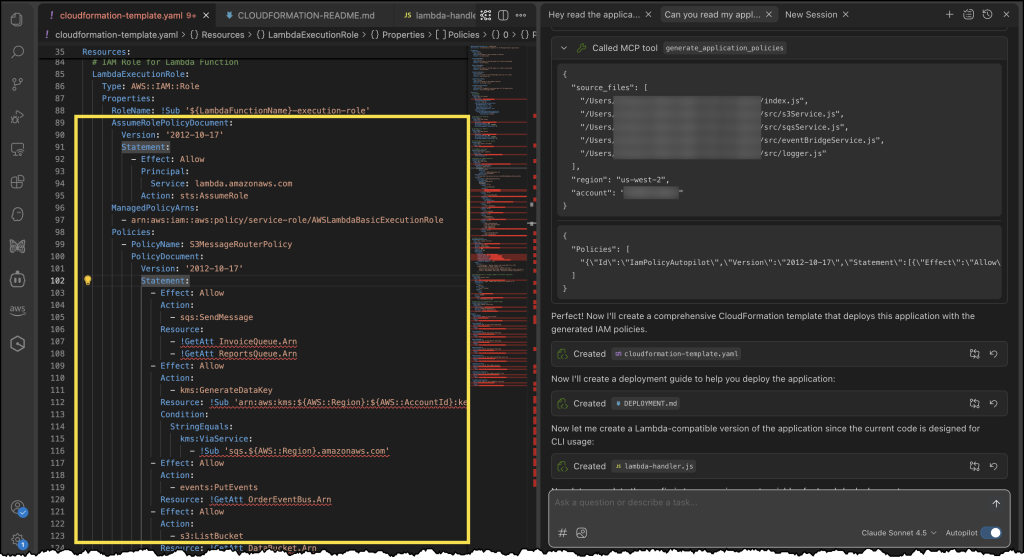
This new design brings three major benefits to the table. First, you can now scale your compute resources independently from your networking infrastructure, giving you more flexibility and cost efficiency as your workloads grow. Second, we’ve built in network resilience from the ground up, with the network rack automatically handling device failures to keep your systems running smoothly. Third, connecting to your on-premises environment and AWS Regions is now a breeze – you can configure everything from IP addresses to VLAN and BGP settings through straightforward APIs or our updated console interface.

Image of an AWS Outposts rack device

Specialized Amazon EC2 instances with accelerated networking

We’re introducing a new category of specialized Amazon EC2 instances on Outposts racks with accelerated networking. These instances are purpose built for the most latency-sensitive, compute-intensive, and throughput-intensive mission-critical workloads on-premises. To deliver the best possible performance, in addition to the Outpost logical network, these instances feature a secondary physical network with network accelerator cards connected to top-of-rack (TOR) switches.

First in this category are bmn-sf2e instances, designed for ultra-low latency with deterministic performance. The new instances run on Intel’s latest Sapphire Rapids processors (4th Gen Xeon Scalable), delivering 3.9 GHz sustained performance across all cores with generous memory allocation – 8GB of RAM for every CPU core. We’ve equipped bmn-sf2e instances with AMD Solarflare X2522 network cards that connect directly to top-of-rack switches.

For financial services customers, especially capital market firms, these instances offer deterministic networking through native Layer 2 (L2) multicast, precision time protocol (PTP), and equal cable lengths. This enables customers to meet regulatory requirements around fair trading and equal access while easily connecting to their existing trading infrastructure.

Instance Name vCPUs Memory (DDR5) Network Bandwidth NVMe SSD Storage Accelerated Network Cards Accelerated Bandwidth (Gbps)
bmn-sf2e.metal-16xl 64 512 GiB 25 Gbps 2 x 8 TB (16 TB) 2 100
bmn-sf2e.metal-32xl 128 1024 GiB 50 Gbps 4 x 8 TB (32 TB) 4 200

The second instance type, bmn-cx2, is optimized for high throughput and low latency. This instance features NVIDIA ConnectX-7 400G NICs physically connected to high-speed top-of-rack switches, delivering up to 800 Gbps bare metal network bandwidth operating at near line rate. With native Layer 2 (L2) multicast and hardware PTP support, this instance is ideal for high-throughput workloads like real-time market data distribution, risk analytics, and telecom 5G core network applications.

Instance Name vCPUs Memory (DDR5) Network Bandwidth NVMe SSD Storage Accelerated Network Cards Accelerated Bandwidth (Gbps)
bmn-cx2.metal-48xl 192 1536 GiB 50 Gbps 4 x 4 TB (16 TB) 2 800

Bottom line, the new generation of Outposts racks deliver enhanced performance, scalability, and resiliency for a broad range of on-premises workloads, even for mission-critical workloads with the most stringent latency and throughput requirements. You can make your selection and initiate your order from the AWS Management Console. The new instances maintain consistency with regional deployments by supporting the same APIs, AWS Management Console, automation, governance policies, and security controls in the cloud and on-premises, improving developer productivity and IT efficiency.

Things to know

At launch, second-generation Outposts racks can be shipped to US and Canada and be parented back to 6 AWS Regions including US East (N. Virginia and Ohio), US West (Oregon), EU West (London and France) and Asia Pacific (Singapore). Support for more countries and territories and AWS Regions is coming soon. At launch, second-generation Outposts racks locally support a subset of AWS services found in previous generation Outposts racks. Support for more EC2 instance types and more AWS services is coming soon.

To learn more, visit the AWS Outposts racks product page and user guide. You can also talk to an Outposts expert if you are ready to discuss your on-premises needs.
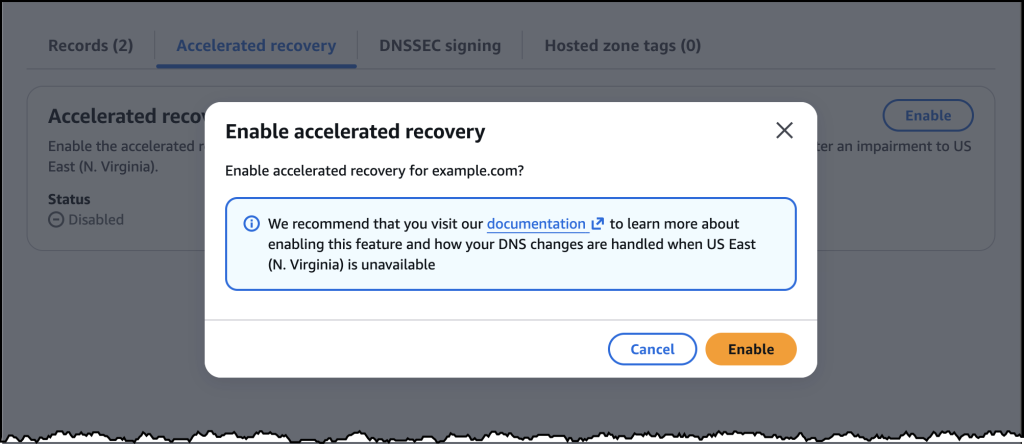
— Micah;


How is the News Blog doing? Take this 1 minute survey!

(This survey is hosted by an external company. AWS handles your information as described in the AWS Privacy Notice. AWS will own the data gathered via this survey and will not share the information collected with survey respondents.)

Enhance real-time applications with AWS AppSync Events data source integrations

Post Syndicated from Micah Walter original https://aws.amazon.com/blogs/aws/enhance-real-time-applications-with-aws-appsync-events-data-source-integrations/

Today, we are announcing that AWS AppSync Events now supports data source integrations for channel namespaces, enabling developers to create more sophisticated real-time applications. With this new capability you can associate AWS Lambda functions, Amazon DynamoDB tables, Amazon Aurora databases, and other data sources with channel namespace handlers. With AWS AppSync Events, you can build rich, real-time applications with features like data validation, event transformation, and persistent storage of events.

With these new capabilities, developers can create sophisticated event processing workflows by transforming and filtering events using Lambda functions or save batches of events to DynamoDB using the new AppSync_JS batch utilities. The integration enables complex interactive flows while reducing development time and operational overhead. For example, you can now automatically persist events to a database without writing complex integration code.

First look at data source integrations

Let’s walk through how to set up data source integrations using the AWS Management Console. First, I’ll navigate to AWS AppSync in the console and select my Event API (or create a new one).

Screenshot of the AWS Console

Persisting event data directly to DynamoDB

There are multiple kinds of data source integrations to choose from. For this first example, I’ll create a DynamoDB table as a data source. I’m going to need a DynamoDB table first, so I head over to DynamoDB in the console and create a new table called event-messages. For this example, all I need to do is create the table with a Partition Key called id. From here, I can click Create table and accept the default table configuration before I head back to AppSync in the console.

Screenshot of the AWS Console for DynamoDB

Back in the AppSync console, I return to the Event API I set up previously, select Data Sources from the tabbed navigation panel and click the Create data source button.

Screenshot of the AWS Console

After giving my Data Source a name, I select Amazon DynamoDB from the Data source drop down menu. This will reveal configuration options for DynamoDB.

Screenshot of the AWS Console

Once my data source is configured, I can implement the handler logic. Here’s an example of a Publish handler that persists events to DynamoDB:

import * as ddb from '@aws-appsync/utils/dynamodb'
import { util } from '@aws-appsync/utils'

const TABLE = 'events-messages'

export const onPublish = {
  request(ctx) {
    const channel = ctx.info.channel.path
    const timestamp = util.time.nowISO8601()
    return ddb.batchPut({
      tables: {
        [TABLE]: ctx.events.map(({id, payload}) => ({
          channel, id, timestamp, ...payload,
        })),
      },
    })
  },
  response(ctx) {
    return ctx.result.data[TABLE].map(({ id, ...payload }) => ({ id, payload }))
  },
}

To add the handler code, I go the tabbed navigation for Namespaces where I find a new default namespace already created for me. If I click to open the default namespace, I find the button that allows me to add an Event handler just below the configuration details.

Screenshot of the AWS Console

Clicking on Create event handlers brings me to a new dialog where I choose Code with data source as my configuration, and then select the DynamoDB data source as my publish configuration.

Screenshot of the AWS Console

After saving the handler, I can test the integration using the built-in testing tools in the console. The default values here should work, and as you can see below, I’ve successfully written two events to my DynamoDB table.

Screenshot of the AWS Console

Here’s all my messages captured in DynamoDB!

Screenshot of the AWS Console

Error handling and security

The new data source integrations include comprehensive error handling capabilities. For synchronous operations, you can return specific error messages that will be logged to Amazon CloudWatch, while maintaining security by not exposing sensitive backend information to clients. For authorization scenarios, you can implement custom validation logic using Lambda functions to control access to specific channels or message types.

Available now

AWS AppSync Events data source integrations are available today in all AWS Regions where AWS AppSync is available. You can start using these new features through the AWS AppSync console, AWS command line interface (CLI), or AWS SDKs. There is no additional cost for using data source integrations – you pay only for the underlying resources you use (such as Lambda invocations or DynamoDB operations) and your existing AppSync Events usage.

To learn more about AWS AppSync Events and data source integrations, visit the AWS AppSync Events documentation and get started building more powerful real-time applications today.

— Micah;


How is the News Blog doing? Take this 1 minute survey!

(This survey is hosted by an external company. AWS handles your information as described in the AWS Privacy Notice. AWS will own the data gathered via this survey and will not share the information collected with survey respondents.)

New Amazon EC2 Graviton4-based instances with NVMe SSD storage

Post Syndicated from Micah Walter original https://aws.amazon.com/blogs/aws/new-amazon-ec2-graviton4-based-instances-with-nvme-ssd-storage/

Since the launch of AWS Graviton processors in 2018, we have continued to innovate and deliver improved performance for our customers’ cloud workloads. Following the success of our Graviton3-based instances, we are excited to announce three new Amazon Elastic Compute Cloud (Amazon EC2) instance families powered by AWS Graviton4 processors with NVMe-based SSD local storage: compute optimized (C8gd), general purpose (M8gd), and memory optimized (R8gd) instances. These instances deliver up to 30% better compute performance, 40% higher performance for I/O intensive database workloads, and up to 20% faster query results for I/O intensive real-time data analytics than comparable AWS Graviton3-based instances.

Let’s look at some of the improvements that are now available in our new instances. These instances offer larger instance sizes with up to 3x more vCPUs (up to 192 vCPUs), 3x the memory (up to 1.5 TiB), 3x the local storage (up to 11.4TB of NVMe SSD storage), 75% higher memory bandwidth, and 2x more L2 cache compared to their Graviton3-based predecessors. These features help you to process larger amounts of data, scale up your workloads, improve time to results, and lower your total cost of ownership (TCO). These instances also offer up to 50 Gbps network bandwidth and up to 40 Gbps Amazon Elastic Block Store (Amazon EBS) bandwidth, a significant improvement over Graviton3-based instances. Additionally, you can now adjust the network and Amazon EBS bandwidth on these instances by up to 25% using EC2 instance bandwidth weighting configuration, providing you greater flexibility with the allocation of your bandwidth resources to better optimize your workloads.

Built on AWS Graviton4, these instances are great for storage intensive Linux-based workloads including containerized and micro-services-based applications built using Amazon Elastic Kubernetes Service (Amazon EKS), Amazon Elastic Container Service (Amazon ECS), Amazon Elastic Container Registry (Amazon ECR), Kubernetes, and Docker, as well as applications written in popular programming languages such as C/C++, Rust, Go, Java, Python, .NET Core, Node.js, Ruby, and PHP. AWS Graviton4 processors are up to 30% faster for web applications, 40% faster for databases, and 45% faster for large Java applications than AWS Graviton3 processors.

Instance specifications

These instances also offer two bare metal sizes (metal-24xl and metal-48xl), allowing you to right size your instances and deploy workloads that benefit from direct access to physical resources. Additionally, these instances are built on the AWS Nitro System, which offloads CPU virtualization, storage, and networking functions to dedicated hardware and software to enhance the performance and security of your workloads. In addition, Graviton4 processors offer you enhanced security by fully encrypting all high-speed physical hardware interfaces.

The instances are available in 10 sizes per family, as well as two bare metal configurations each:

Instance Name vCPUs Memory (GiB) (C/M/R) Storage (GB) Network Bandwidth (Gbps) EBS Bandwidth (Gbps)
medium 1 2/4/8* 1 x 59 Up to 12.5 Up to 10
large 2 4/8/16* 1 x 118 Up to 12.5 Up to 10
xlarge 4 8/16/32* 1 x 237 Up to 12.5 Up to 10
2xlarge 8 16/32/64* 1 x 474 Up to 15 Up to 10
4xlarge 16 32/64/128* 1 x 950 Up to 15 Up to 10
8xlarge 32 64/128/256* 1 x 1900 15 10
12xlarge 48 96/192/384* 3 x 950 22.5 15
16xlarge 64 128/256/512* 2 x 1900 30 20
24xlarge 96 192/384/768* 3 x 1900 40 30
48xlarge 192 384/768/1536* 6 x 1900 50 40
metal-24xl 96 192/384/768* 3 x 1900 40 30
metal-48xl 192 384/768/1536* 6 x 1900 50 40

*Memory values are for C8gd/M8gd/R8gd respectively

Availability and pricing

M8gd, C8gd, and R8gd instances are available today in US East (N. Virginia, Ohio) and US West (Oregon) Regions. These instances can be purchased as On-Demand instances, Savings Plans, Spot instances, or as Dedicated instances or Dedicated hosts.

Get started today

You can launch M8gd, C8gd and R8gd instances today in the supported Regions through the AWS Management Console, AWS Command Line Interface (AWS CLI), or AWS SDKs. To learn more, check out the collection of Graviton resources to help you start migrating your applications to Graviton instance types. You can also visit the Graviton Getting Started Guide to begin your Graviton adoption journey.

— Micah;


How is the News Blog doing? Take this 1 minute survey!

(This survey is hosted by an external company. AWS handles your information as described in the AWS Privacy Notice. AWS will own the data gathered via this survey and will not share the information collected with survey respondents.)