Tag Archives: feature flags

Introducing Flagship: feature flags built for the age of AI

Post Syndicated from Rohan Mukherjee original https://blog.cloudflare.com/flagship/

AI is writing more code than ever. AI-assisted contributions now account for a rapidly growing share of new code across the platform. Agentic coding tools like OpenCode and Claude Code are shipping entire features in minutes.

AI-generated code entering production is only going to accelerate. But the bigger shift isn’t just speed — it’s autonomy.

Today, an AI agent writes code and a human reviews, merges, and deploys it. Tomorrow, the agent does all of that itself. The question becomes: how do you let an agent ship to production without removing every safety net?

Feature flags are the answer. An agent writes a new code path behind a flag and deploys it — the flag is off, so nothing changes for users. The agent then enables the flag for itself or a small test cohort, exercises the feature in production, and observes the results. If metrics look good, it ramps the rollout. If something breaks, it disables the flag. The human doesn’t need to be in the loop for every step — they set the boundaries, and the flag controls the blast radius.

This is the workflow feature flags were always building toward: not just decoupling deployment from release, but decoupling human attention from every stage of the shipping process. The agent moves fast because the flag makes it safe to move fast.

Today, we’re announcing Flagship — Cloudflare’s native feature flag service, built on OpenFeature, the CNCF open standard for feature flag evaluation. It works everywhere — Workers, Node.js, Bun, Deno, and the browser — but it’s fastest on Workers, where flags are evaluated within the Cloudflare network. With the Flagship binding and OpenFeature, integration looks like this:

await OpenFeature.setProviderAndWait(
    new FlagshipServerProvider({ binding: env.FLAGS })
);

Flagship is now available in closed beta.

The problem with feature flags on Workers

Many Cloudflare developers have resorted to the pragmatic workaround: hardcoding flag logic directly into their Workers. And honestly, it works well enough in the beginning. Workers deploy in seconds, so flipping a boolean in code and pushing it to production is fast enough for most situations.

But it doesn’t stay simple. One hardcoded flag becomes ten. Ten becomes fifty, owned by different teams, with no central view of what’s on or off. There’s no audit trail — when something breaks, you’re searching git blame to figure out who toggled what.

Network call to external services

Another common pattern used on workers is to make an HTTP request to an external service in the following manner:

const response = await fetch("https://flags.example-service.com/v1/evaluate", {
      ...
      body: JSON.stringify({
        flagKey: "new-checkout-flow",
        context: {
          ...
        },
      }),
    });
const { value } = await response.json();
if (value === true) {
    return handleNewCheckout(request);
}
return handleLegacyCheckout(request);

That outbound request sits on the critical path of every single user request. It could add considerable latency depending on how far the user is from the flag service’s region.

This is a strange situation. Your application runs at the edge, milliseconds from the user. But the feature flag check forces it to reach back across the Internet to another API before it can decide what to render.

Why local evaluation doesn’t solve the problem

Some feature flag services offer a “local evaluation” SDK. Instead of calling a remote API on every request, the SDK downloads the full set of flag rules into memory and evaluates them locally. No outbound request per evaluation and the flag decision happens in-process.

On Workers, none of these assumptions hold. There is no long-lived process: a Worker isolate can be created, serve a request, and be evicted between one request and the next. A new invocation could mean re-initializing the SDK from scratch.

On a serverless platform, you need a distribution primitive that’s already at the edge, one where the caching is managed for you, reads are local, and you don’t need a persistent connection to keep things up to date.

Cloudflare KV is a great primitive for this!

How Flagship works

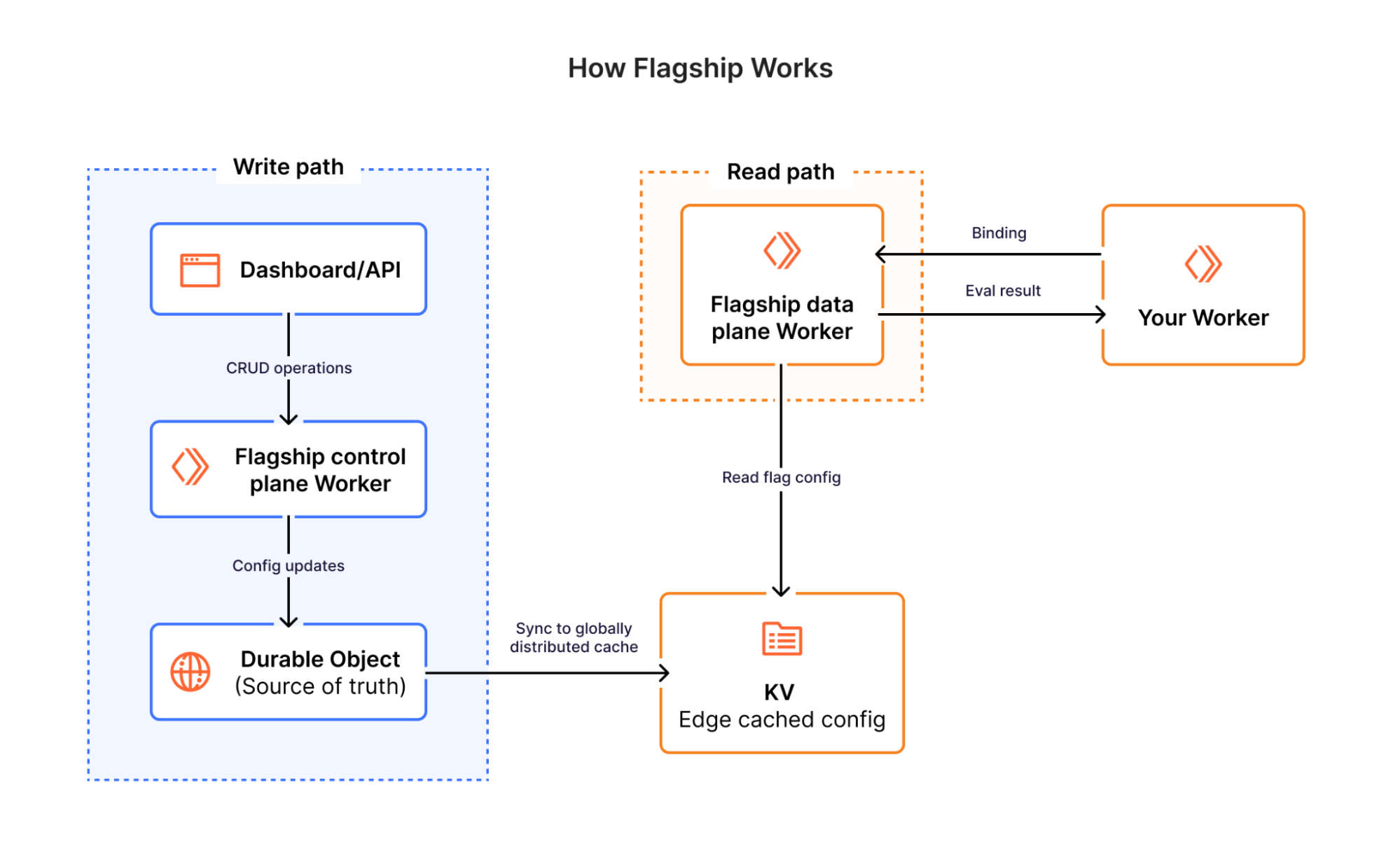
Flagship is built entirely on Cloudflare’s infrastructure — Workers, Durable Objects, and KV. There are no external databases, no third-party services, and no centralized origin servers in the evaluation path.

When you create or update a flag, the control plane writes the change atomically to a Durable Object — a SQLite-backed, globally unique instance that serves as the source of truth for that app’s flag configuration and changelog. Within seconds, the updated flag config is synced to Workers KV, Cloudflare’s globally distributed key-value store, where it’s replicated across Cloudflare’s network.

When a request evaluates a flag, Flagship reads the flag config directly from KV at the edge — the same Cloudflare location already handling the request. The evaluation engine then runs right there in an isolate: it matches the request context against the flag’s targeting rules, resolves the rollout percentage, and returns a variation. Both the data and the logic live at the edge — nothing is sent elsewhere to be evaluated.

Using Flagship: the Worker binding

For teams running Cloudflare Workers, Flagship offers a direct binding that evaluates flags inside the Workers runtime — no HTTP round-trip, no SDK overhead. Add the binding to your wrangler.jsonc and your Worker is connected:

{
  "flagship": [
    {
      "binding": "FLAGS",
      "app_id": "<APP_ID>"
    }
  ]
}

That’s it. Your account ID is inferred from your Cloudflare account, and the app_id ties the binding to a specific Flagship app. In your Worker, you just ask for a flag value:

export default {
  async fetch(request: Request, env: Env) {
    // Simple boolean check
    const showNewUI = await env.FLAGS.getBooleanValue('new-ui', false, {
      userId: 'user-42',
      plan: 'enterprise',
    });
    // Full evaluation details when you need them
    const details = await env.FLAGS.getStringDetails('checkout-flow', 'v1', {
      userId: 'user-42',
    });
    // details.value = "v2", details.variant = "new", details.reason = "TARGETING_MATCH"
  },
};

The binding supports typed accessors for every variation type – getBooleanValue(), getStringValue(), getNumberValue(), getObjectValue() – plus *Details() variants that return the resolved value alongside the matched variant and the reason it was selected. On evaluation errors, the default value is returned gracefully. On type mismatches, the binding throws an exception — that’s a bug in your code, not a transient failure.

The SDK: OpenFeature-native

Most feature flag SDKs come with their own interfaces and evaluation patterns. Over time, those become deeply embedded in your codebase — and switching providers means rewriting every call site.

We didn’t want to build another one of those. Flagship is built on OpenFeature, the CNCF open standard for feature flag evaluation. OpenFeature defines a common interface for flag evaluation across languages and providers — it’s the same relationship that OpenTelemetry has to observability. You write your evaluation code once against the standard, and swap providers by changing a single line of configuration.

import { OpenFeature } from '@openfeature/server-sdk';
import { FlagshipServerProvider } from '@cloudflare/flagship/server';
await OpenFeature.setProviderAndWait(
  new FlagshipServerProvider({
    appId: 'your-app-id',
    accountId: 'your-account-id',
    authToken: 'your-cloudflare-api-token',
  })
);
const client = OpenFeature.getClient();
const showNewCheckout = await client.getBooleanValue(
  'new-checkout-flow',
  false,
  {
    targetingKey: 'user-42',
    plan: 'enterprise',
    country: 'US',
  }
);

If you’re running on Workers with the Flagship binding, you can pass it directly to the OpenFeature provider. The binding already carries your account context, so there’s nothing to configure — authentication is implicit.

import { OpenFeature } from '@openfeature/server-sdk';
import { FlagshipProvider } from '@cloudflare/flagship/server';
let initialized = false;
export default {
  async fetch(request: Request, env: Env) {
    if (!initialized) {
      await OpenFeature.setProviderAndWait(
        new FlagshipServerProvider({ binding: env.FLAGS })
      );
      initialized = true;
    }
    const client = OpenFeature.getClient();
    const showNewCheckout = await client.getBooleanValue('new-checkout-flow', false, {
      targetingKey: 'user-42',
      plan: 'enterprise',
    });
  },
};

Your evaluation code doesn’t change — the OpenFeature interface is identical. But under the hood, Flagship evaluates flags through the binding instead of over HTTP. You get the portability of the standard with the performance of the binding.

A client-side provider is also available for browsers. It pre-fetches the flags you specify, caches them with a configurable TTL, and serves evaluations synchronously from that cache.

What you can do with Flagship

Flagship supports the patterns you’d expect from a feature flag service and the ones that become critical when AI-generated code is landing in production daily.

Flag values can be boolean, strings, numbers, or full JSON objects — useful for configuration blocks, UI theme definitions, or routing users to different API versions without maintaining separate code paths.

Targeting Rules

Each flag can have multiple rules, evaluated in priority order. The first rule that matches wins.

A rule consists of:

  • Conditions that determine whether the rule applies to a given context

  • A flag variation to serve when the rule matches

  • An optional rollout for percentage-based delivery

  • A priority that determines evaluation order when multiple rules are present (lower number = higher priority)

Nested Logical Conditions

Conditions can be composed using AND/OR logic, nested up to five levels deep. A single rule can express things like:

(plan == “enterprise” AND region == “us” ) OR (user.email.endsWith(“@cloudflare.com”))
= serve (“premium”)

At the top level of a rule, multiple conditions are combined with implicit AND where all conditions must pass for the rule to match. Within each condition, you can nest AND/OR groups for more complex logic.

Flag Rollouts by Percentage

Unlike gradual deployments, which split traffic between different uploaded versions of your Worker, feature flags let you roll out behavior by percentage within a single version that is serving 100% of traffic.

Any rule can include a percentage rollout. Instead of serving a variation to everyone who matches the conditions, you serve it to a percentage of them.

Rollouts use consistent hashing on the specified context attribute. The same attribute value (userId, for example) always hashes to the same bucket, so they won’t flip between variations across requests. You can ramp from 5% to 10% to 50% to 100% of users, so those who were already in the rollout stay in it.

Built for what comes next

AI-generated code entering production is only going to accelerate. Agentic workflows will push it further — agents that autonomously deploy, test, and iterate on code in production. The teams that thrive in this world won’t be the ones shipping the fastest. They’ll be the ones who can ship fast and still maintain control over what their users see, roll back in seconds when something breaks, and gradually expose new code paths with confidence.

That’s what Flagship is built for:

  • Evaluation across region Earth, cached globally using K/V.

  • A full audit trail. Every flag change is recorded with field-level diffs, so you know who changed what and when.

  • Dashboard integration. Anyone on the team can toggle a flag or adjust a rollout without touching code.

  • OpenFeature compatibility. Adopt Flagship without rewriting your evaluation code. Leave without rewriting it either.

Get started with Flagship

Starting today, Flagship is in private beta. You can request for access here. We’ll share more details on pricing as we approach general availability.

  • Visit the Cloudflare dashboard to create your first Flagship app

  • Install the SDK: npm i @cloudflare/flagship; or use the Worker binding directly in your Worker

  • Read the documentation for integration guides and API reference

  • Check out the source code for examples and to contribute

If you’re currently hardcoding flags in your Workers, or evaluating flags through an external service that adds latency to every request, give Flagship a try. We’d love to hear what you build.
How we ship code faster and safer with feature flags

Post Syndicated from Alberto Gimeno original https://github.blog/2021-04-27-ship-code-faster-safer-feature-flags/

At GitHub, we’re continually working to improve existing features and shipping new ones all the time. From our launch of GitHub Discussions to the release of manual approvals for GitHub Actions—in order to ship new features and improvements faster while lowering the risk in our deployments, we have a simple but powerful tool: feature flags.

Reducing deployment risk

We deploy changes around the clock, and we need to keep the service running with no disruptions. For these reasons, deploying needs to be an almost risk-free process. Any problem that comes up during a deployment requires a rollback of the code. During this rollback period, users could be impacted and other deployments delayed; the more time that elapses the bigger the impact.

We use feature flags to reduce the risk of deploying to production. Any potentially risky change is put behind a feature flag in the code and then, when the deployment is done, we enable the feature flag to everyone or to a percentage of actors. This way we minimize the impact of the new changes, and if something goes wrong we can disable the feature flag completely in a matter of seconds without interrupting other deployments. This is fundamental to us for the following reasons:

  • It isolates and reduces the deployment risk.
  • We have the ability to disable changes in seconds without rolling back a deployment, which could take minutes.

What kind of things can go wrong during a deployment, where a feature flag can help? These are some examples:

  • Changes in database queries can potentially make existing functionality slower.
  • Changes in the logic on existing features can produce unexpected behavior, edge cases not considered, and more.
  • Changes in how we store or process information, such as saving new columns in the database can accidentally start inserting invalid values or generate too many writes to the database.

Working on new features

Feature flags are not only useful to reduce deployment risk when fixing or improving existing features, we also use them when developing new features!

Using feature flags allows us to work on features incrementally. Only staff members working on the project have the corresponding feature flag enabled, so they can see the new feature that is under development while other users cannot. We don’t use long-lived feature branches. Instead, feature flags allow us to work on small batches, which brings us many benefits:

  • Small batches are easier to review by other engineers in pull requests.
  • The smaller the change, the lesser the chance to get something wrong during the production deployment.
  • Not using long-lived feature branches avoids lots of potential merge conflicts and clashes with other features under development.

In order to adopt this way of building new features, you need to do a little bit of additional planning upfront to divide the work. For example, a new feature typically needs new data models or changes in existing ones. If you create a pull request only for the data model changes, then you may get blocked until those changes are merged. There are a couple of things we usually do to prevent this:

  • Create a main pull request. A spike, where you put the data model changes, and continue working on other areas that require changes: UI, API, background jobs, etc. Then, start extracting those changes to smaller pull requests that your peers can review.
  • Alternatively, you can create an initial pull request, and then create new branches off of that first branch, even if it’s not merged to the main branch yet. If you need to make changes to the first branch, you’ll need to rebase the other branches.

This way of working could introduce some friction due to having to ask for reviews more frequently. Sometimes it can take days until a team reviews your pull request. To prevent this from being a blocker, we follow one or more of these strategies:

Keep working even if the changes are not merged into the main branch. Either on that “spike” pull request or branching off the branch that is waiting for reviews.

Have a first responder person in each team that is focused on reviewing pull requests quickly to unblock the progress of their own team or other teams.
Sometimes if a critical pull request is ready to be deployed sooner rather than later, but has outstanding non-critical feedback waiting to be addressed, we do that in follow up pull requests.

Testing features

We have to make sure that the new functionality works as expected while also maintaining the existing functionality. In order to do that, we have many mechanisms to enable or disable feature flags at all levels as follows:

  • In our development environments, we can toggle feature flags from the command line.
  • In automated tests, we can enable or disable feature flags in the code.
  • In our CI, we have two different builds: one that runs with all feature flags disabled by default, and another one that runs with all feature flags enabled by default. This drastically reduces the chances of not covering most code paths in automated tests properly.
  • In production, we can enable or disable feature flags in the query string of a request.

Different shipping strategies

We already mentioned that we can flag particular actors, or we can enable a feature flag for a percentage of actors. Those are the most common options, but others include:

  • Individual actors: We use this mechanism to flag employees working on a feature or to enable the flag to customers that are experimenting with a feature, or if they have a problem we are trying to fix.
  • Staff shipping: When a feature is almost ready to be released, we first enable it for all GitHub staff, publish an internal post for awareness, and create an internal issue for gathering feedback or possible bugs.
  • Early access maintainers or other beta groups: When we are about to release an important feature that will impact the workflows of open source software (OSS) maintainers or other types of users, we test the feature with a small group first. After some time, we may interview them and gather their feedback to confirm our hypothesis, and validate the implementation.
  • Percentage of actors: As mentioned earlier, we can specify a percentage of actors for which to enable the feature flag. In this case when an actor is flagged, it remains flagged, unless the feature flag is rolled back. When the percentage of actors is changed, a message is sent to our deployments channel on Slack so other engineers are aware of the change.
  • Dark shipping: This allows us to enable the feature flag for a percentage of calls. This is different from the previous mechanism because an actor can get the feature enabled in one call (one request, for example) but not in the next one. This mechanism is not meant for features that are visible to the users, but for internal changes, such as a performance improvement in a query.

All these strategies and the full administration of feature flags is done through a web UI. Not all staff members have access to this UI, but most engineers do. The interface allows us to manage the shipping status of a feature flag, creation of new ones, and deletion. Additionally, we can see a history of changes made to the feature flag: who made the change, when and what changes were made, and other metadata, such as which team owns it.

What to flag

When we say that we can flag an actor, we mean that we can flag not only users, but other entities. In particular, we can flag users, organizations, teams, enterprises, repositories, or GitHub Apps. When writing the code that checks if the flag is enabled or not, we need to specify which actor has the flag enabled or not. These are some examples:

  • If the flag is purely visual, we flag the user, and we check the current logged user. Examples of this could be: dark mode, layout or navigation changes, and new components in the UI that don’t depend on data changes.
  • If the flag changes the way we store data, it is usually better to flag the repository for consistency for all users using the repository. For example, if we start storing timestamps for specific actions, we don’t want some users to produce the new timestamp while others do not.
  • For API changes, we also flag GitHub Apps.
  • Sometimes, especially for some risky changes, we create custom, context-specific actor types, where the existing actor types just wouldn’t have worked.

Sometimes we do more sophisticated checks, such as checking multiple actors or checking if a repository is public or not. For example, when we staff ship a feature it may make a new feature available for all repositories of an employee. If the feature must not be visible to other users, we want to enable the feature only for private repositories to prevent public repositories of an employee leaking the new feature.

The cost of a feature flag

As we have seen, using feature flags extensively changes the way we work, and requires a bit of additional planning and coordination. But there’s also additional costs associated with feature flags that we need to keep in mind. First, we have a runtime cost. When we check if a feature flag is enabled to an actor, we need to first load the metadata information of the flag, which is stored in MySQL but cached in memcached. We are now considering having the feature metadata and the list of actors always in memory to reduce this overhead. There’s an exception for this: we consider some feature flags “large.” An example of this was GitHub Actions, a feature that we rolled out to tens of thousands of users every week. For these large feature flags, when they are still not fully enabled, we need to do a per-actor query to MySQL to check if the actor is in the list of enabled actors.

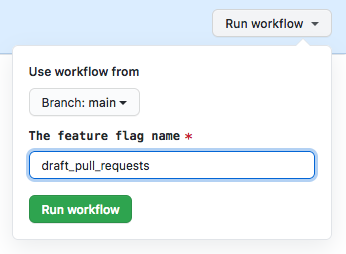
For runtime, there’s also a cost in the form of technical debt. Once a feature flag is fully enabled, it leaves a lot of dead code and old tests in the repository that need to be deleted. Usually we do this manually after a feature has been rolled out for a few days or weeks depending on the case. But we are now automating the process: we have created a script that can be either invoked locally or by triggering a workflow manually.

The script uses regular expressions to find usages of the feature flag using git grep. Then for the matched Ruby files, it modifies the code using rubocop-ast. It is capable of deleting code blocks, such as if/else statements, and modifying boolean expressions, in addition to reindenting the code afterwards. When the file is a test, it deletes the code that enables the feature flag. For tests that check the behavior of the application when the feature flag is disabled, it just leaves a comment and makes the test fail, since in many cases we don’t want to just delete the test, but simply update it. As a result, even when the script requires some intervention from an engineer, it drastically reduces the manual work required in the process.

When the script is run using a workflow dispatch, it also creates a new branch and a pull request. Since we do extensive use of CODEOWNERS, the pull request will have the proper teams and people as reviewers. In the near future, we want to automate this process even more by running the script automatically when we can consider a feature flag stale.

Conclusion

Feature flags allow us to ship code faster with higher confidence. Using them we reduce deployment risk and make code reviews and development on new features easier, because we can work on small batches. There are also associated costs, but the benefits highly exceed them.