Post Syndicated from Molly Clancy original https://backblaze.com/blog/multi-cloud-strategy-architecture-guide/
Cloud technology has revolutionized IT operations over the past decade and a half. According to the Flexera 2024 State of the Cloud Report, 89% of respondents reported having a multi-cloud strategy in 2024, up slightly from 87% in 2023. Businesses are steadily relying on multi-cloud environments to enhance flexibility, optimize costs, and keep up with hardware improvements.
A multi-cloud approach leverages the strengths of multiple cloud providers to meet diverse business needs. Rather than relying on a single cloud provider or on-premises infrastructure, organizations distribute workloads across various platforms.
For those not yet utilizing a multi-cloud strategy or seeking to maximize their current approach, this guide explains the essentials of multi-cloud architecture. It covers the benefits of a multi-cloud environment, how to implement it effectively, and critical considerations to keep in mind for a successful deployment.
First, some multi-cloud history
The shift to multi-cloud infrastructure over the past decade and a half can be traced to two trends in the cloud computing landscape. First, AWS, Google, and Microsoft—otherwise known as the “Big Three” and sometimes called hyperscalers—are no longer the only options for IT departments looking to move to the cloud. Since AWS launched in 2006, specialized infrastructure as a service (IaaS) providers, such as CoreWeave, DigitalOcean, and, well, us, have emerged to challenge the Big Three, giving companies more options for cloud deployments. Many challengers focus on specialized cloud functions—CoreWeave, for example, is a primarily GPU provider, though it also has its own storage cloud—who enhance their core functionality with partnerships. (What we like to call the open cloud.)
Second, many companies spent the decade after AWS’s launch making the transition from on-premises to the cloud, and dealing with complicated and expensive hyperscaler pricing structures that were the only option at the time. Now, new companies are built to be cloud native and existing companies are poised to optimize their cloud deployments. They’ve crossed the hurdle of moving or connecting on-premises infrastructure to the cloud and can focus on how to architect their cloud environments to maximize the advantages of multi-cloud.
What is multi-cloud?
Nearly every software as a service (SaaS) platform is hosted in the cloud. So, if your company uses a tool like Microsoft 365 for Business or Google Workspace along with any other cloud service or platform, you’re technically operating in a multi-cloud environment. But, using more than one SaaS platform does not constitute a true multi-cloud strategy.
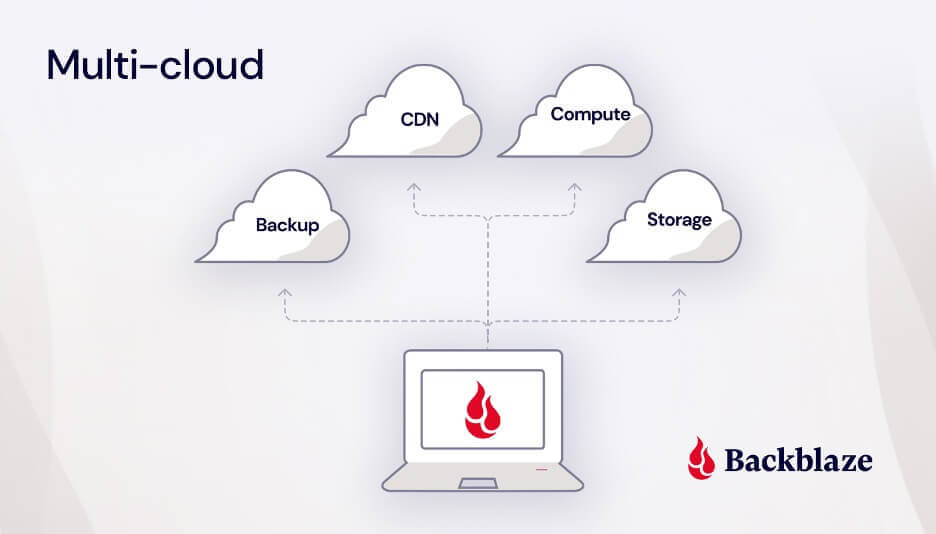
In the cloud services industry, when we talk about “multi-cloud,” we’re referring to the use of multiple public cloud platforms to build your company’s infrastructure. This includes all aspects of your tech stack such as storage, networking, computing power, and more.
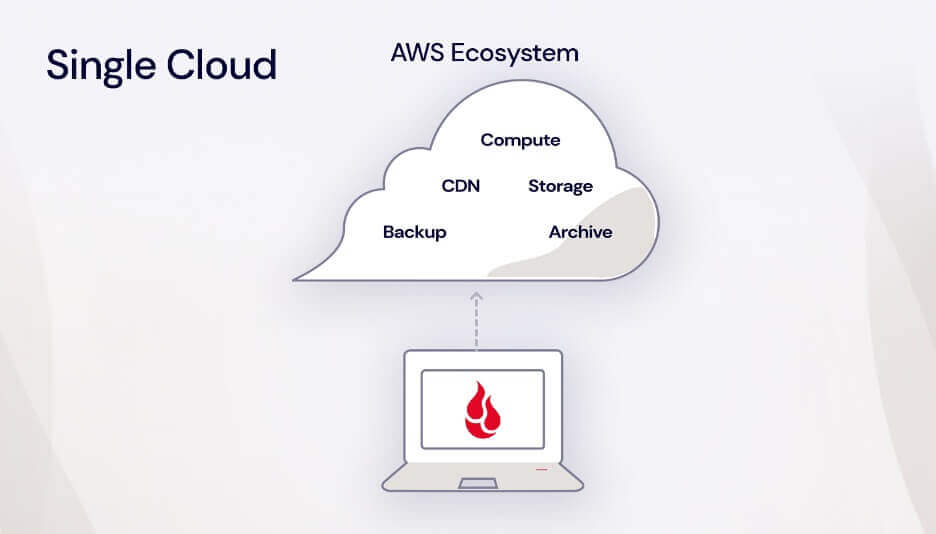
Essentially, it means not putting all your eggs in one basket (or in one cloud provider like AWS, Google, or even on-premises infrastructure), but instead leveraging the strengths of different cloud providers to meet your specific needs.
Multi-cloud vs. hybrid cloud: what’s the diff?
To be more precise, multi-cloud refers to the use of more than one public cloud platform. This strategy allows businesses to leverage the unique strengths and services of different providers, optimizing for performance and cost.
On the other hand, a hybrid cloud combines a private cloud with a public cloud. A private cloud is typically hosted on-premises, but it can also be hosted in a colocation data center. The key difference between private and public clouds is that a private cloud’s infrastructure, hardware, and software are maintained and used exclusively by your business.
Things can get even more interesting when a company uses a private cloud along with multiple public clouds. This approach, known as a hybrid multi-cloud strategy, maximizes flexibility and resilience, though it can be complex to manage.
Did you know?
The International Data Corporation (IDC) is forecasting cloud infrastructure spending to jump to $129.9 billion in 2024. That’s up almost 20% compared to 2023.
How to implement multi-cloud: use cases
As multi-cloud deployments have become integral to operations, IT teams have incorporated them into an overall enterprise cloud strategy. And, as multi-cloud infrastructure has become more common, leading tools like Veeam, Commvault, Kubernetes, iconik, and rclone have been built to integrate with specific storage targets and complex storage infrastructure.
So, how do you actually use a multi-cloud strategy, and what is a multi-cloud strategy good for? Multi-cloud has a number of compelling use cases and rationales, including:
- Disaster recovery
- Failover
- Cost optimization
- Avoiding vendor lock-in
- Data sovereignty
- Access to specialized services
Disaster recovery
One of the key advantages of a multi-cloud environment is enhanced disaster recovery through redundancy. By leveraging multiple cloud providers, IT departments can easily implement the modern 3-2-1 backup strategy: three copies of data, stored on two different types of media, with one copy stored off-site or in the cloud. As cloud services have advanced, the primacy of on-premises backups has diminished, with data recovery from the cloud now almost as fast as from on-premises infrastructure and protected by regional separation in case of natural disaster.
Failover
Similarly, some cloud-native companies utilize multiple cloud providers to host mirrored copies of their active production data. If one of their public clouds suffers an outage, they have mechanisms in place to direct their applications to failover to a second public cloud.
E-commerce company, Big Cartel, pursued this strategy after AWS suffered a number of outages in past years that gave Big Cartel cause for concern. They host more than one million websites on behalf of their clients, and an outage would take them all down. “Having a single storage provider was a single point of failure that we grew less and less comfortable with over time,” Big Cartel Technical Director, Lee Jensen, acknowledged. Now, their data is stored in two public clouds—Amazon S3 and Backblaze B2 Cloud Storage. Their content delivery network (CDN), Fastly, preferentially pulls data from Backblaze B2 with Amazon S3 as failover.

Cost optimization
Challenger companies can offer incentives that compete with the Big Three and pricing structures that suit specialized data use cases. For example, some cloud providers offer free egress but put limits on how much data can be downloaded, while others charge nominal egress fees, but don’t cap downloads. Or, you might see things like minimum storage duration fees, which means that you get charged for your data being stored even after deletion. Savvy companies employ multiple clouds for different types of data depending on how much data they have and how often it needs to be accessed.
simmer.io, a community site that makes sharing Unity WebGL games easy for indie game developers, would get hit with egress spikes from Amazon S3 whenever one of their hosted games went viral. The fees turned their success into a growth inhibitor. simmer.io mirrored their data to Backblaze B2 Cloud Storage and reduced egress to $0 as a result of the partnership between Backblaze and Cloudflare. They can grow their site without having to worry about increasing egress costs over time or usage spikes when games go viral, and they doubled redundancy in the process.

Avoiding vendor lock-in
Many companies initially adopted one of the Big Three because they were the only game in town, but later felt restricted by their closed systems. Companies like Amazon and Google don’t play nice with each other and both seek to lock customers in with proprietary services. Adopting a multi-cloud infrastructure with interoperable providers gives these companies more negotiating power and control over their cloud deployments.
For example, Gideo, a connected TV app platform, initially used an all-in-one cloud provider for compute, storage, and content delivery, but felt they had no leverage to reduce their bills or improve the service they were receiving. They adopted a multi-cloud approach, building a tech stack with a mix of unconflicted partners where they no longer feel beholden to one provider.
Data sovereignty
Many countries, including those in the European Union (EU), have enacted stringent laws regulating where and how data can be stored, often referred to as data sovereignty or data residency requirements. These regulations ensure that sensitive data remains within specific geographical boundaries to protect privacy and maintain national security.
For companies subject to these data residency standards, employing a multi-cloud approach is a strategic way to meet regulatory requirements. By using multiple public cloud providers with diverse geographic footprints, organizations can store data in the required regions. This approach not only ensures compliance with local laws but also enhances data security and accessibility.
Access to specialized services
Organizations may use different cloud providers to access specialized or complimentary services. For example, a company may use a public cloud like DigitalOcean or Vultr for access to compute resources or bare metal servers, but store their data with a different, interoperable public cloud that specializes in storage (aka Backblaze!). Or, a company may use a cloud storage provider in combination with a cloud CDN to distribute content faster to end users.
The advantages of multi-cloud infrastructure
No matter the use case or rationale, companies achieve a number of advantages from deploying a multi-cloud infrastructure, including:
- Better reliability and lower latency: In a failover scenario, if one cloud goes down, companies with a multi-cloud strategy have others to fall back on. If a company uses multiple clouds for data sovereignty or in combination with a CDN, they see reduced latency as their clouds are located closer to end users.
- Redundancy: With data in multiple, isolated clouds, companies are better protected from threats. If cybercriminals are able to access one set of data, companies are more likely to recover if they can restore from a second cloud environment that operates on a separate network.
- More freedom and flexibility: With a multi-cloud system, if something’s not working or if costs start to become unmanageable, companies have more leverage to influence changes and the ability to leave if another vendor offers better features or more affordable pricing. Businesses can also take advantage of industry partnerships to build flexible, cloud-agnostic tech stacks using best-of-breed providers.
- Affordability: It may seem counterintuitive that using more clouds would cost less, but it’s true. Diversified cloud providers like AWS make their services hard to quit for a reason—when you can’t leave, they can charge you whatever they want. A multi-cloud system allows you to take advantage of competitive pricing among platforms.
- Best-of-breed services: Adopting a multi-cloud strategy means you can work with providers who specialize in doing one thing really well, rather than trying to be everything to everyone. Cloud platforms specialize to offer customers top-of-the-line service, features, and support rather than providing a one-size-fits all solution.
The challenges of multi-cloud infrastructure
The advantages of a multi-cloud system have attracted an increasing number of companies, but it’s not without challenges. According to a 2024 IDC Tracker, managing costs is complex due to different pricing models and billing structures across cloud providers, necessitating real-time cost monitoring and predictive analytics from any cloud integration. Additionally, Gartner highlights the shortage of skilled professionals to manage multi-cloud environments, requiring continuous upskilling and training investments. Basically, a good IT team is worth its weight in… cloud storage savings.
Despite these challenges plus performance management, security concerns, compliance requirements, and others, multi-cloud strategies offer improved flexibility and resilience, making them a valuable approach for medium to large enterprises.

Multi-cloud best practices
As you plan your multi-cloud strategy, keep the following considerations in mind:
- Deployment strategies
- Cost management
- Data security
- Governance
Multi-cloud deployment strategies
There are likely as many ways to deploy a multi-cloud strategy as there are companies using a multi-cloud strategy. But, they generally fall into two broader categories—redundant or distributed.
In a redundant deployment, data is mirrored in more than one cloud environment, for example, for failover or disaster recovery. Companies that use a multi-cloud approach rather than a hybrid approach to store backup data are using a redundant multi-cloud deployment strategy. Most IT teams looking to use a multi-cloud approach to back up company data or environments will fall into this category.
A distributed deployment model more often applies to software development teams. In a distributed deployment, different workloads, or different components of the same application are spread across multiple cloud computing environments based on the best fit. For example, a DevOps team might host their compute infrastructure in one public cloud and storage in another.
Your business requirements will dictate which type of deployment you should use. Knowing your deployment approach from the outset can help you pick providers with the right mix of services and billing structures for your multi-cloud strategy.
Multi-cloud cost management
Managing costs in a multi-cloud environment is a challenge that every company faces. Effective cost management requires robust monitoring tools to track cloud utilization and spending, providing visibility into usage and identifying areas for optimization. Choosing cloud providers with straightforward, transparent pricing is essential to avoid unexpected costs and simplify budgeting.
Multi-cloud data security
Security risks increase as your cloud environment becomes more complex. There are more attack targets, and you’ll want to plan security measures accordingly. To take advantage of multi-cloud benefits while reducing risk, follow multi-cloud security best practices:
- Ensure you have controls in place for authentication across platforms. Your different cloud providers likely have different authentication protocols, and you need a framework and security protocols that work across providers. Hint: Use a password management tool or a single-sign on (SSO) login methods.
- Train your team appropriately to identify cybersecurity risks.
- Stay up-to-date on security patches. Each cloud provider will publish their own upgrades and patches. Make sure to automate upgrades as much as possible.
- Consider using a tool like Object Lock to protect backups with immutability. Object Lock allows you to store objects using a write once, read many (WORM) model, meaning after it’s written, data cannot be modified or deleted for a defined period of time. Any attempts to manipulate, copy, encrypt, change, or delete the file will fail during that time. The files may be accessed, but no one can change them, including the file owner or whoever set the Object Lock.
Multi-cloud governance
As cloud adoption grows across your company, you’ll need to have clear protocols for how your infrastructure is managed. Consider creating standard operating procedures for cloud platform management and provisioning to avoid shadow IT proliferation, where teams may adopt tools (in the cloud or not) that IT has not approved and isn’t managing. And, set up policies for centralized security monitoring.
Ready for multi-cloud? Here are some migration strategies
If you’re ready to go multi-cloud, you’re probably wondering how to get your data from your on-premises infrastructure to the cloud or from one cloud to another. After choosing a provider that fits your needs, you can start planning your data migration. There are a range of tools for moving your data, but when it comes to moving between cloud services, a tool like our Universal Data Migration can help make things a lot easier and faster.
How Backblaze fits into a multi-cloud strategy
Backblaze B2 enhances versatile and secure backup solutions with features like Object Lock for immutable data storage and 3x free egress for when you need to recover data. In partnership with backup solutions like Veeam and disaster recovery services like Cloud Instant Backup Recovery, businesses can utilize Backblaze in a multi-cloud architecture to ensure continuous operation during ransomware attacks, hardware failures, or even force majeure. Backblaze also integrates into your multi-cloud tech stack so you can build applications and safeguard datasets on S3 compatible cloud object infrastructure with connected compute and integrated CDNs.
Have any more questions about multi-cloud or cloud migration? Let us know in the comments.
FAQs about multi-cloud architecture guide
Multi-cloud storage is a term for the use of multiple cloud providers within one organization. For example, if your organization uses one cloud storage provider for sensitive medical documents to comply with HIPAA and another cloud storage provider for non-sensitive day-to-day documents, you’re using multi-cloud storage.
Multi-cloud refers to the process of using multiple clouds within the same cloud storage system. Hybrid cloud, on the other hand, refers to using two different kinds of cloud storage systems—private clouds and public clouds. They are both options that can be incredibly beneficial for many people and organizations, but they’re different methods of approaching cloud storage.
Multi-cloud is a common cloud storage strategy, and most organizations should consider its value for their operations. Multi-cloud has a number of compelling use cases and rationales, including disaster recovery, failover, cost optimization, avoiding vendor lock-in, data sovereignty, and access to specialized services.
Multi-cloud storage strategies offer many benefits depending on how you employ them. They provide more flexibility to meet or exceed regulatory and compliance requirements depending on your industry. They provide greater resilience and protection for your backup and recovery systems. And they provide you with greater flexibility to find the storage solutions that work best for your operations and your budget. Adding cloud providers can increase complexity in billing and administration, but properly managed, it provides your business the ability to better protect and use your data.
The post Multi-Cloud Architecture Guide appeared first on Backblaze Blog | Cloud Storage & Cloud Backup