Tag Archives: GitHub Enterprise Server

How we rebuilt the search architecture for high availability in GitHub Enterprise Server

Post Syndicated from David Tippett original https://github.blog/engineering/architecture-optimization/how-we-rebuilt-the-search-architecture-for-high-availability-in-github-enterprise-server/


So much of what you interact with on GitHub depends on search—obviously the search bars and filtering experiences like the GitHub Issues page, but it is also the core of the releases page, projects page, the counts for issues and pull requests, and more. Given that search is such a core part of the GitHub platform, we’ve spent the last year making it even more durable. That means, less time spent managing GitHub Enterprise Server, and more time working on what your customers care most about. 

In recent years, GitHub Enterprise Server administrators had to be especially careful with search indexes, the special database tables optimized for searching. If they didn’t follow maintenance or upgrade steps in exactly the right order, search indexes could become damaged and need repair, or they might get locked and cause problems during upgrades. Quick context if you’re not running High Availability (HA) setups, they’re designed to keep GitHub Enterprise Server running smoothly even if part of the system fails. You have a primary node that handles all the writes and traffic, and replica nodes that stay in sync and can take over if needed.
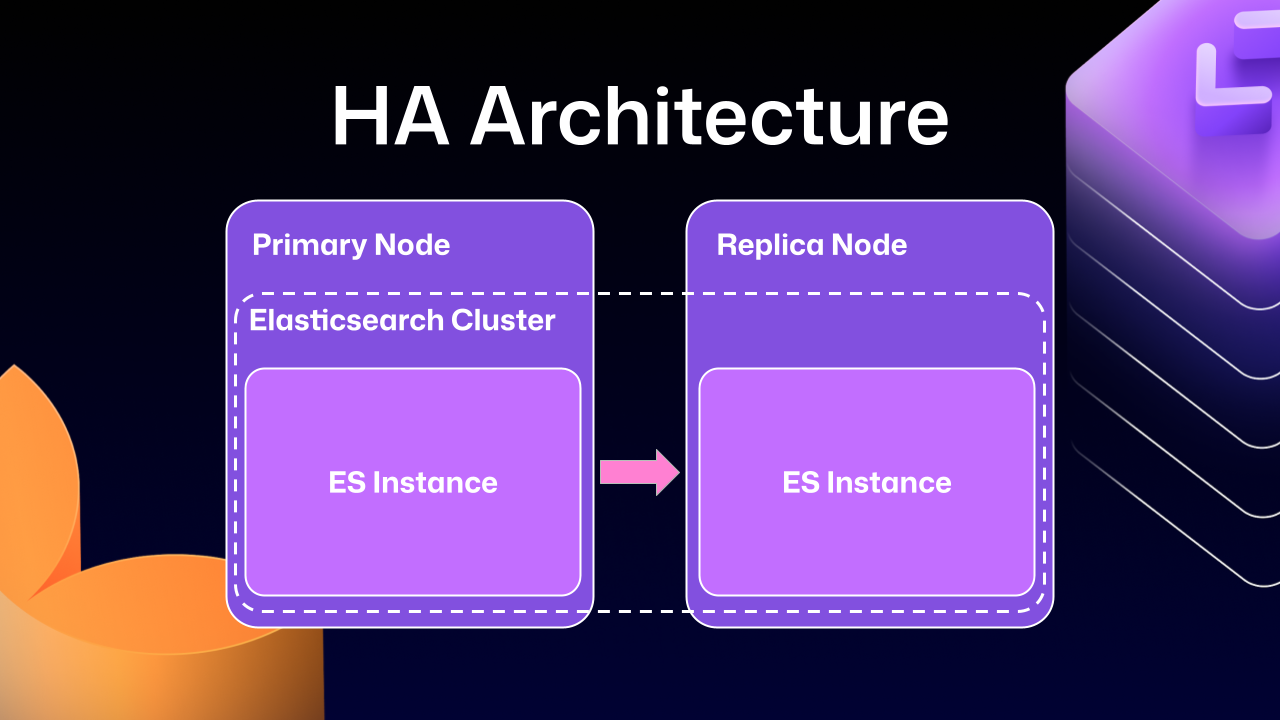
Diagram labeled 'HA Architecture' with two boxes: 'Primary Node' and 'Replica Node.' Across both of them there exists an 'Elasticsearch Cluster' with a nested box on each node labeled 'ES Instance.' A pink arrow points from the Primary Node’s ES Instance to the Replica Node’s ES Instance, indicating replication or failover in a high-availability setup.

Much of this difficulty comes from how previous versions of Elasticsearch, our search database of choice, were integrated. HA GitHub Enterprise Server installations use a leader/follower pattern. The leader (primary server) receives all the writes, updates, and traffic. Followers (replicas) are designed to be read-only. This pattern is deeply ingrained into all of the operations of GitHub Enterprise Server.

This is where Elasticsearch started running into issues. Since it couldn’t support having a primary node and a replica node, GitHub engineering had to create an Elasticsearch cluster across the primary and replica nodes. This made replicating data straightforward and additionally gave some performance benefits, since each node could locally handle search requests. 
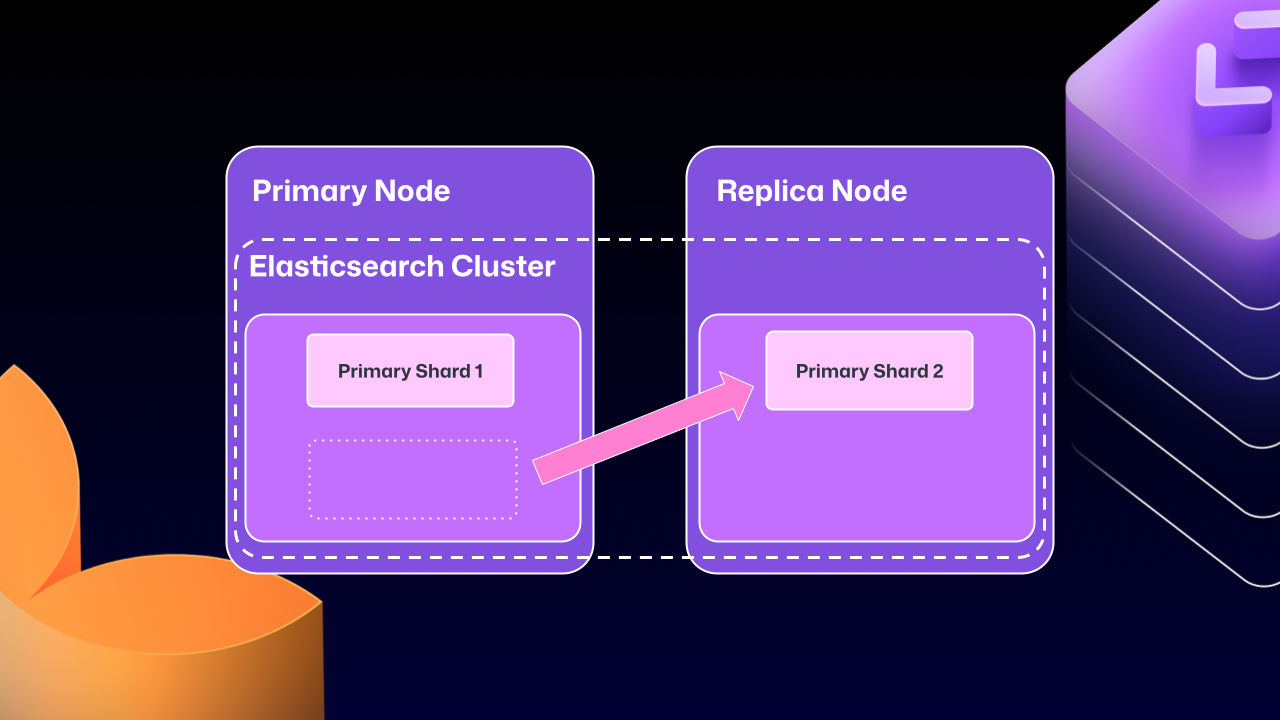
Diagram showing 'Primary Node' and 'Replica Node' as part of an 'Elasticsearch Cluster.' The Primary Node contains 'Primary Shard 1,' and the Replica Node contains 'Primary Shard 2.' A pink arrow points from an empty shard slot on the 'Primary Node' to Shard 2, representing the unwanted move of a primary shard to the 'Replica Node.'

Unfortunately, the problems of clustering across servers eventually began to outweigh the benefits. For example, at any point Elasticsearch could move a primary shard (responsible for receiving/validating writes) to a replica. If that replica was then taken down for maintenance, GitHub Enterprise Server could end up in a locked state. The replica would wait for Elasticsearch to be healthy before starting up, but Elasticsearch couldn’t become healthy until the replica rejoined.

For a number of GitHub Enterprise Server releases, engineers at GitHub tried to make this mode more stable. We implemented checks to ensure Elasticsearch was in a healthy state, as well as other processes to try and correct drifting states. We went as far as attempting to build a “search mirroring” system that would allow us to move away from the clustered mode. But database replication is incredibly challenging and these efforts needed consistency.

What changed?

After years of work, we’re now able to use Elasticsearch’s Cross Cluster Replication (CCR) feature to support HA GitHub Enterprise. 

“But David,” you say, “That’s replication between clusters. How does that help here?” 

I’m so glad you asked. With this mode, we’re moving to use several, “single-node” Elasticsearch clusters. Now each Enterprise server instance will operate as independent single node Elasticsearch clusters.
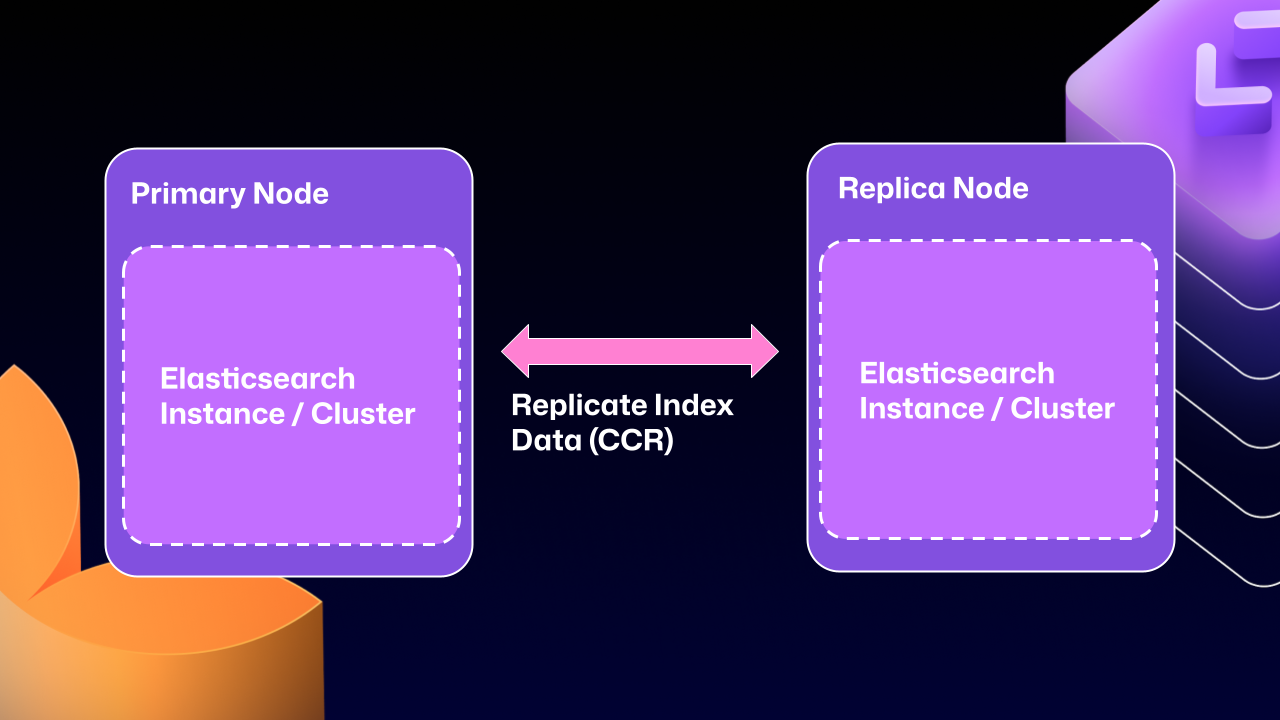
Diagram showing two boxes labeled 'Primary Node' and 'Replica Node.' Each box contains a dashed rectangle labeled 'Elasticsearch Instance / Cluster.' A double-headed pink arrow labeled 'Replicate Index Data (CCR)' connects the two boxes, illustrating bidirectional data replication between the primary and replica Elasticsearch clusters.

CCR lets us share the index data between nodes in a way that is carefully controlled and natively supported by Elasticsearch. It copies data once it’s been persisted to the Lucene segments (Elasticsearch’s underlying data store). This ensures we’re replicating data that has been durably persisted within the Elasticsearch cluster.

In other words, now that Elasticsearch supports a leader/follower pattern, GitHub Enterprise Server administrators will no longer be left in a state where critical data winds up on read-only nodes.

Under the hood

Elasticsearch has an auto-follow API, but it only applies to indexes created after the policy exists. GitHub Enterprise Server HA installations already have a long-lived set of indexes, so we need a bootstrap step that attaches followers to existing indexes, then enables auto-follow for anything created in the future.

Here’s a sample of what that workflow looks like:

function bootstrap_ccr(primary, replica):
  # Fetch the current indexes on each 
  primary_indexes = list_indexes(primary)
  replica_indexes = list_indexes(replica)

  # Filter out the system indexes
  managed = filter(primary_indexes, is_managed_ghe_index)
  
  # For indexes without follower patterns we need to
  #   initialize that contract
  for index in managed:
    if index not in replica_indexes:
      ensure_follower_index(replica, leader=primary, index=index)
    else:
      ensure_following(replica, leader=primary, index=index)

  # Finally we will setup auto-follower patterns 
  #   so new indexes are automatically followed
  ensure_auto_follow_policy(
    replica,
    leader=primary,
    patterns=[managed_index_patterns],
    exclude=[system_index_patterns]
  )

This is just one of the new workflows we’ve created to enable CCR in GitHub Enterprise Server. We’ve needed to engineer custom workflows for failover, index deletion, and upgrades. Elasticsearch only handles the document replication, and we’re responsible for the rest of the index’s lifecycle. 

How to get started with CCR mode 

To get started using the new CCR mode, reach out to [email protected] and let them know you’d like to use the new HA mode for GitHub Enterprise Server. They’ll set up your organization so that you can download the required license.

Once you’ve downloaded your new license, you’ll need to set `ghe-config app.elasticsearch.ccr true`. With that finished, administrators can run a `config-apply` or an upgrade on your cluster to move to 3.19.1, which is the first release to support this new architecture.  

When your GitHub Enterprise Server restarts, Elasticsearch will migrate your installation to use the new replication method. This will consolidate all the data onto the primary nodes, break clustering across nodes, and restart replication using CCR. This update may take some time depending on the size of your GitHub Enterprise Server instance.

While the new HA method is optional for now, we’ll be making it our default over the next two years. We want to ensure there’s ample time for GitHub Enterprise administrators to get their feedback in, so now is the time to try it out. 

We’re excited for you to start using the new HA mode for a more seamless experience managing GitHub Enterprise Server. 

Want to get the most out of search on your High Availability GitHub Enterprise Server deployment? Reach out to support to get set up with our new search architecture!

The post How we rebuilt the search architecture for high availability in GitHub Enterprise Server appeared first on The GitHub Blog.
How we tripled max concurrent jobs to boost performance of GitHub Actions

Post Syndicated from Aiqiao Yan original https://github.blog/2022-09-16-how-we-tripled-max-concurrent-jobs-to-boost-performance-of-github-actions/

GitHub Actions became generally available on GitHub Enterprise Server (GHES) with the 3.0 release about two years ago. Since then, we’ve made many performance improvements to the product that reduced GitHub Actions CPU consumption on the server and allowed us to run more GitHub Actions jobs concurrently. By the numbers, on 96-core machines, the max concurrent jobs went from 2,200 on GHES 3.2 to 7,000 on GHES 3.6 (the current release) a 3x performance improvement.

Here are some of the more interesting improvements we made to reach that mark and the lessons we learned along the way.

Fix 1: Just making sure caches are working

One fine day, we realized our hottest code path that we use to access workflow secrets and callback URLs wasn’t using a cache, though we assumed it was. This was a surprise to our team since we have extensive monitors for every new cache we add to the product, but this specific cache is something we thought we enabled years ago. Issues like this are hard to catch. We only caught this by analyzing the profile traces collected during load testing and in production. After one simple change to enable the cache, CPU usage went down fast, which translated to faster workflow execution and an increase in throughput. As it turns out, sometimes you don’t have to dig too deep in order to discover a big performance win.

Fix 2: Improving the orchestration framework

How it used to work

“Orchestration” is what GitHub Actions uses to run workflows. On a high level, it’s a durable state machine that makes workflow runs resilient to machine shutdowns and intermittent failures. To achieve durability, every time the orchestrator wakes up, it replays execution from the beginning to rebuild local state until either the code is finished or it encounters new work.

We store orchestration state in a database table. The issue we had is that we were saving the state in a single column in the database as one big blob of events.

CREATE TABLE tbl_OrchestrationSession (
   SessionId           BIGINT              NOT NULL,
   CreatedOn           DATETIME            NOT NULL DEFAULT GETUTCDATE(),
   LastUpdatedOn       DATETIME            NOT NULL DEFAULT GETUTCDATE(),
   ...
   State               VARBINARY(MAX)      NULL, -- this is where we store execution state
)

When updating the state for a running orchestration, we would read the whole blob into memory, append the new events to the end, and write it back to the database. We had unnecessary overhead in that we would delete a growing blob and then have to commit a slightly bigger (but almost exactly the same) value over and over when saving state. We had to read and deserialize a big blob every time when replaying the state.

What we did instead

We adopted a new version of orchestration that supports both incremental reads and incremental writes to the database. The state history is now in its own table instead of an inline binary blob. Now when we update the orchestration state, only the new events will be written. It also allows us to do interesting things, like caching where we can skip getting all historic events, and just fetch pending events from the database. With this, the overhead of replay is avoided, which means long‐ running orchestrations from workflows with more steps are less of a concern.

-- new table to store execution state
CREATE TABLE tbl_OrchestrationSessionEvent (
   ...
   SessionId       BIGINT          NOT NULL,
   EventId         BINARY(20)      NOT NULL,
   EventData       VARBINARY(MAX)  NOT NULL
)

Impact

On GitHub.com, we saw CPU consumption for running orchestrations reduced by 50% on average, with longer-running orchestrations seeing a larger benefit. We hadn’t made much investment in the orchestration platform we depend on before making this change. The result from the change showed the importance of constantly reevaluating our approaches and underlying platforms as we grow and evolve.

Fix 3: Reducing postback load

What is a postback

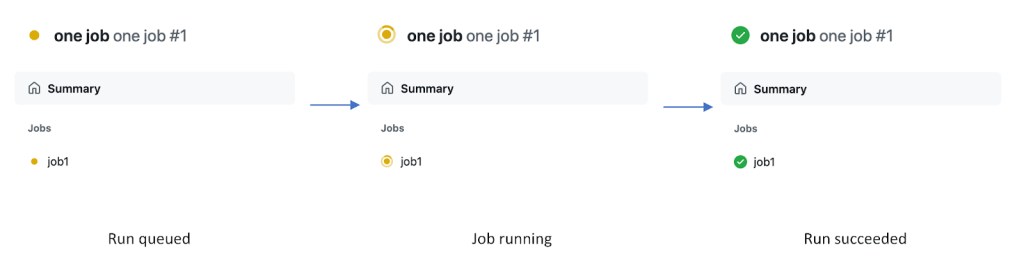
As a workflow run progresses, you can see the updates as checks in the UI and API. The state of a run is kept by the GitHub Actions backend service (in orchestration), but the checks for a run are kept in the Rails monolith. Simply put, a “postback” is the service-to-service call that pushes the latest run state to checks. Postbacks are generated as the orchestrator executes a workflow run. The backend maintains an internal queue of postbacks to send to the frontend using a separate orchestration per workflow run so they are reliable and won’t get interrupted by service downtime.

Visualization of a postback

During load testing, we found that delivering a postback is consistently one of the slower activities, averaging around 250-300ms to execute. We also discovered that the backend sends one postback for every check step update and three postbacks with almost exactly the same payload whenever a check run completes. A large amount of slow postbacks consumes a lot of system resources and can stall execution of other activities, causing overall slowness. This was especially concerning for large matrix scenarios.

What we did instead

We evaluated the usefulness of every postback the backend sends. We found that check step statuses are only displayed on one specific UI. We decided to stop sending them during the workflow run and post step data only upon completion of the run. Not having step data available for in-progress runs meant that the initial navigation speed for an in-progress run could be slower than that of a completed run due to client side rendering overhead, but those are tradeoffs we were willing to make. Of course, we also removed the duplicated job completed events. Both of these changes shipped with GHES 3.3 that allowed GitHub Actions to run close to 2x more jobs concurrently than GHES 3.2.

As for slowness of each individual postback call, they are slow because postbacks were being sent via HTTP calls across four different services with each service manually handling retries, timeouts, etc. We are actively working on switching postback delivery to a faster and simpler system using a message queue. The goal is to roll out the change in the next few months, hopefully increasing performance further.

In conclusion

Of course, there are other improvements we made that didn’t make it to this post (it’s long enough already). In the end, GitHub Actions can now run three times more jobs concurrently while using less system resources. And while work like this is satisfying to us as engineers—3x is a big improvement!—we also know that this has real-world impact on our customers who rely on GitHub Actions to get their work done and deliver code into production. We learned that it’s always worthwhile to revisit fundamentals on longstanding projects, especially as they scale. Going forward, we’re looking to continue improving our load testing automation to catch issues like the ones mentioned above before they become problems and to continue optimizing performance across the GitHub platform.

Action needed by GitHub Connect customers using GHES 3.1 and older to adopt new authentication token format updates

Post Syndicated from Jim Boyle original https://github.blog/2022-05-20-action-needed-by-github-connect-customers-using-ghes-3-1-and-older-to-adopt-new-authentication-token-format-updates/

As previously announced, the format of GitHub authentication tokens has changed. The following token types have been affected:

Due to the updated format of GitHub authentication tokens, GitHub Connect will no longer support instances running GitHub Enterprise Server (GHES) 3.1 or older after June 3, 2022. To continue using GitHub Connect, an upgrade to GHES 3.2 or newer will be required by June 3. GitHub Connect is necessary in order to use the latest features, such as Dependabot updates, license sync, GitHub.com Actions synchronization, and unified contributions.

GHES customers seeking a GHES upgrade can follow the instructions outlined in the instructions for Upgrading GitHub Enterprise Server.