Every day on GitHub, millions of developers build the products their customers rely on, contribute to open source, and pursue personal projects. GitHub’s architecture has changed steadily over the years to support that work and the growing demands of the developers and organizations who depend on it.
Agentic software development is driving the next architectural shift. With developers and agents working concurrently in repositories that receive millions of commits a day, these workloads demand a different Git architecture. We’re rebuilding GitHub’s Git infrastructure to support them. This post explores the demands shaping that work and the design principles behind it.
Today’s highest-volume workloads show the scale we’re building for. The gap between a typical repository and the busiest ones is wider than most people expect. Here’s a rough picture of the monthly repository activity distribution on GitHub from August 2026:
Repository activity climbs sharply at the far end of the distribution. The busiest repository on GitHub saw roughly a billion requests in August.
Beyond these highest-volume workloads, total Git activity on GitHub is also growing rapidly: between September 2025 and August 2026, it increased to more than 2x its previous level, from 218.2 billion events per month to 473.3 billion.
In September alone, developers and agents made 7.38 billion commits on GitHub, more than five times as many as a year earlier.
The repositories at the top of this curve show what agentic development looks like at its leading edge: large engineering teams running busy CI pipelines alongside growing fleets of agents. Supporting these teams means building Git infrastructure for sustained, concurrent reads and writes at a scale few repositories reach today. We’re investing deeply in Git infrastructure to meet the demands of agentic software development and give teams a foundation built for their most ambitious workloads.
Building for this scale means addressing several architectural challenges:
Commit turnaround becomes a bottleneck per agent. An agent in a tight loop commits or checkpoints after nearly every action. Its speed is bounded by how fast a single push completes, so latency that a human would never notice becomes the limiting factor.
Write throughput demand is increasing by orders of magnitude. Pushes grew 4.9x year over year, from 0.69 billion to 3.35 billion per month. Thousands of agents working on their own branches in one repository produce a sustained write rate that converges on a single point in our architecture.
Merges contend on one reference. Trunk-based development, release trains, and merge queues funnel all that work onto a single ref that has to absorb every merge. Pull request merges on GitHub grew to nearly 4x their volume a year ago.
Each push multiplies into thousands of reads. For example, CI and code scanning clone or fetch the same branch tip thousands of times per minute, and that fan-out has to be cheap. GitHub Actions alone ran 3.26 billion times in September, more than 4x as many as a year ago.
Operations on a repository must continue to be fast. To keep them fast, we continually compact repository data and clean up objects that are no longer needed. Every new write adds to that work, and the cost compounds as volume climbs.
This is why fast clones only solve part of the problem. Reads are relatively easy to scale: add caches, add replicas, and serve the same bytes to more clients. Scaling reads is essential, but these workloads require more than that. Writes are way harder. Every push has to be stored durably and made visible consistently before the next agent or CI job can build on it.
Where today’s architecture meets new demands
The current architecture has served developers well for years. Every repository is stored by Spokes, which keeps a full copy on the local disks of several fileservers, five by default. Those fast local disks let Git operations read native repository data with low latency, and the extra copies provide redundancy while spreading reads across fileservers. When a push updates a reference, a three-phase commit protocol uses a quorum to ensure that CI, the web UI, and API clients see a consistent repository state. That pairing serves a billion repositories today.
However, the mechanism we use for durability is the same one we use for scale. The copies on disk are the source of truth, so adding read capacity means adding another durable replica. Every replica participates in every write, so a push is only as fast as the slowest replica in its set. The net effect: adding replicas to absorb read load makes writes slower.
For most repositories, this tradeoff works well. At the highest activity levels, it becomes a ceiling: adding read replicas adds overhead to writes, losing a replica reduces read capacity, and losing quorum stops writes entirely. To meet agent-first demands, we need to separate durability from scale without losing what teams rely on today.
Built for the busiest, better for everyone
We’re rebuilding the infrastructure while GitHub keeps running. There’s no maintenance window where the world’s code stops moving, and no version of this work where we ask people to change how they build software while we do it.
We’re building for the most demanding workloads on GitHub: an enterprise shipping under strict regulatory requirements, a team landing a change across a repo that builds an operating system, and an organization running thousands of agents against a single codebase. Engineering for that scale raises the floor for everyone. The maintainer reviewing contributions from volunteers across time zones and the student opening their first pull request get the same faster, more resilient foundation.
The new architecture also must preserve the controls teams already operate on. A maintainer needs branch protections and required reviews so an unreviewed change never reaches the default branch. A security team needs audit logs and repository visibility to investigate a suspicious access event. An on-call engineer needs dependable automation and enough observability to understand why a deployment failed.
For the platform to keep serving everyone here while it scales for the busiest workloads, these are our guiding principles:
Build on the workflows developers already trust. Teams rely on workflows like branching, review, merge, and history to build, ship, and govern software at scale. Our new infrastructure is designed to support those same workflows at much higher volumes of activity.
Put reliability first. We measure every decision against the reliability that developers and organizations require. Confidence in the platform is what lets an engineering organization build automation, ship on a schedule, meet compliance obligations, and understand the software it produces. This work will meaningfully improve throughput and scale, and those gains extend a foundation of trust that’s already there.
Keep people in control of their code. If the system isn’t helping the people and organizations who use it, and isn’t under their control, it isn’t worth building. As agents take on more of the work, the people who own the code can still review, understand, and approve it.
The approach
We are building a new GitHub architecture that can scale much more effectively. Our approach centers around core distributed systems design tenets, applied to the concurrency and scale of agentic software development. Our goal is to continue the forward momentum for open-source communities and enterprises around the world who have built their projects with Git and GitHub, while preserving and adapting the features and controls around it to meet the new needs of the agentic era.
Minimize coordination
A repository that receives many pushes must accept and publish updates quickly. Coordination is valuable when it protects correctness, but too much of it limits write throughput and can turn a busy repository into a bottleneck. Our current architecture is tightly coupled in places it doesn’t need to be, which limits our ability to scale across reads and writes without tough trade-offs. We’re redesigning the system to preserve the coordination that Git semantics require and let everything else proceed independently.
Coordinate only what needs agreement. The part of a push that truly needs agreement is the reference update itself. Storing the underlying objects, validating object connectivity, and secret scanning are much more work, but most of it can happen in parallel to other writes. That shrinks the critical path of a push to the small step that needs coordination, so the rest of the work no longer delays the acknowledgment.
Move maintenance off the serving path. Compaction and garbage collection are among the heaviest work a repository does, and today they run on the same hosts that answer live Git requests. In the new architecture, separate workers handle maintenance directly against durable storage. A busy repository can be optimized continuously in the background without slowing pushes and fetches.
Decouple storage from compute
Today, complete repository copies on local disks serve both as durable storage and as the layer that answers Git requests. Separating the two lets us scale each one independently.
Scale reads without adding durable copies. In the new architecture, read capacity comes from lightweight workers that cache data to serve requests. The authoritative copy of the repository lives in a durable storage layer underneath. That way, the platform can absorb large read spikes from CI fan-out, agent fleets, and large clones without adding work to every push.
Let each layer do one job. Authoritative repository data lives in Azure Blob Storage, which already provides durability and replication at Azure scale. The compute layer is optimized for throughput at the lowest latency.
Recover faster from failures. When storage and compute are coupled, losing a host reduces both capacity and durability, and recovery means rebuilding a full repository copy. When they’re separate, losing a compute worker is closer to a cache miss: a replacement worker can start serving requests right away and fill its cache from durable storage as traffic arrives.
Match capacity to demand. Compute workers can be added or removed as traffic changes instead of provisioning for peak load in advance. A repository going through a burst of activity, like a release or a new agent fleet coming online, can get extra capacity for the burst. Once it passes, that capacity goes away.
Together, these tenets allow us to support higher throughput and more concurrent work without abandoning the reliability and controls that our users need.
What comes next
We’re building an architecture designed to provide the highest throughput and reliability available. Reads and writes scale independently, and the system recovers gracefully from failures. In internal benchmarks, it has delivered up to 35 times higher write throughput, with read capacity that scales on its own to meet demand.
As automated development increases the frequency and concurrency of software change, GitHub will evolve its foundations without trading away the governance and control that teams rely on. We’re already putting that foundation in place. In the next post in this series, we’ll dive deeper into our future architecture and the journey that led us there.
The Primer Design System powers many of the experiences you see on GitHub today. From buttons to banners to breadcrumbs, these foundational components are required to be accessible, flexible, and performant across a wide variety of scenarios.
Back in 2023, the number of components on certain pages began to explode. This led to several performance-related challenges with our existing CSS-in-JS solution:
Initial page loads took longer due to styles being initialized on the client
Server-side rendering performance declined as style collection shifted from the client
Updates to styles grew out of control as component count grew on a page
It became clear that the Primer team needed to address the issue at the source. We needed to find an alternative that would completely avoid the client and server costs that we were seeing with our current solution. Most importantly, any alternative we pick would need to work in a way that would avoid any breakage to GitHub during the migration.
Introducing CSS (Modules)
The Primer team found a solution that met all of our criteria: CSS Modules. This format would allow us to do one of our favorite things: write and use native CSS features, while still allowing some amount of the colocation and encapsulation that we had come to expect from CSS-in-JS.
With CSS Modules, styles would be authored in a CSS file alongside the JavaScript source for the component. It would also allow us to treat all class names as local by default, preventing some of the collisions and challenges that can come from global selectors. This format also removes the need for any client or server runtime behavior. Instead, styles would roll up into CSS stylesheets that were sent as part of the HTML for a page.
However, this solution was radically different from the CSS-in-JS solution we had at the time. This change would require an update to every Primer component and every component at GitHub authored using this technique. Thankfully, design systems are a perfect vehicle to deliver this kind of change at scale.
A gradual march towards CSS Modules
The situation for moving towards CSS Modules was clear. The Primer team would need to deliver updates to each of its components, moving them from CSS-in-JS to CSS Modules. At the same time, updates we made to these components could not break any usage in GitHub. Finally, the underlying technique we used for CSS-in-JS also had to continue working for any components in GitHub that were currently using it.
With all these constraints in place, we decided on an incremental migration strategy that would allow us to safely ship component updates without breaking the world. For each component, our plan was to:
Add a new file that translated existing styles to CSS Modules
Add the component to a feature flag that would toggle between the new and old styles
Use existing visual regression tests to verify snapshots were identical between our CSS-in-JS solution and CSS Modules
Gradually roll out the feature flag to our team, then to GitHub staff, and finally to all GitHub users to catch any issues along the way
This process created a strong feedback loop where issues were flagged early in the process as Primer continuously delivered these changes to GitHub. The use of feature flags allowed us to do this migration safely while giving us clear signals on the performance benefits of CSS Modules.
By December 2024, all components in Primer were migrated over to CSS Modules using this process. We saw performance wins across the board, in particular:
55% less time to server-side render a page
25% less time for components on a page to initialize
With clear performance wins from doing this work in Primer, we began to wonder if we could see similar performance wins by doing these conversions in other parts of GitHub. Similarly, how long until we could ultimately drop support for CSS-in-JS across the company?
Moving away from CSS-in-JS at GitHub
One of the trickiest parts about removing our CSS-in-JS solution from Primer was due to the usage of the sx prop. This prop was the way to style and customize components from Primer. Teams could provide an inline object to customize everything about the component. It represented the best and worst parts of CSS-in-JS:
Excellent TypeScript support with integration with our Design Tokens
Co-located with the component so that everything was in one place
High runtime cost due to the dynamic nature of inline objects used for sx
Difficulties scaling as the number of components using sx on a page grew
As a result, the first part of our journey to move away from CSS-in-JS was to reduce sx usage across GitHub. This would allow us to immediately improve performance similar to the wins we saw when migrating Primer components. It also set us up perfectly for removing CSS-in-JS entirely from the product.
The Duality of Primer
It’s important to note that, while the design system itself was officially off styled-components, a large part of the GitHub codebase itself wasn’t. With sx props having been the de facto styling standard at GitHub for years, we were looking at thousands of sx props that needed migration before we could even think of getting GitHub onto the sleek new @primer/react version which didn’t rely on styled-components.
So… how did we do this immense amount of work while increasing confidence and reducing risk? The answer: not all at once.
The original CSS migration was a little bit more nuanced than we led on: in addition to migrating the components to CSS modules, feature flagging to test in production and slowly rolling them out, we also created “wrapper” components in a transitive library we called @primer/styled-react. The whole purpose of this package was to allow sx usage into the newly migrated components. This way, the instances of the GitHub UI codebase that were using this prop could continue to consume them by importing the same component through @primer/styled-react, while we realized the performance gains of importing straight from @primer/react for the cases that didn’t.
Styled Box Zero
The next phase of the migration process was as follows:
On a package-by-package basis:
Translate all sxusage into equivalent CSS modules files. This included cross referencing (See migrating to CSS variables)
Replace @primer/styled-react imports with @primer/react imports
Test in pre-production
Deploy
Curiously enough, while we were getting ready to undertake this massive effort, styled-componentsmaintenance mode was announced, offering further confirmation that we were taking steps in the right direction.
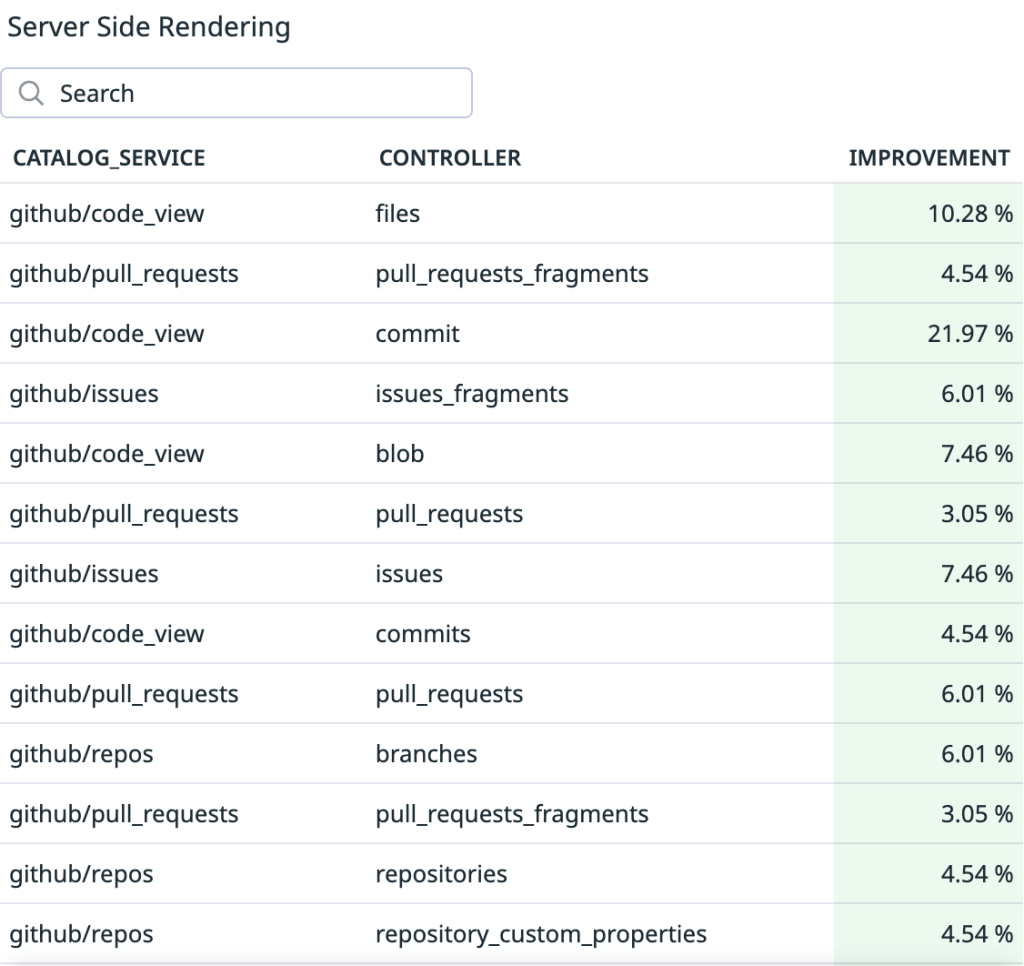
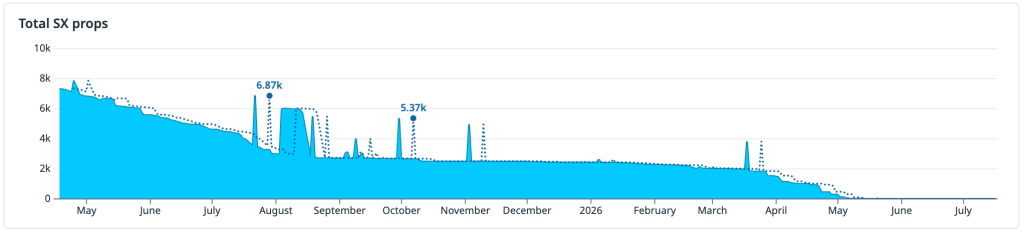
The work kicked off April 2025 with a peak of ~7,760 sxprops to be migrated; we wouldn’t see it realized until May 2026. Initially, one of our great in-house developers, Ian Sanders, created a VS Code plugin that would assist with per-prop migration. A similar codemod was developed internally and utilized to migrate entire files in the GitHub codebase. The work, while requiring a bit of manual oversight and careful validation, was mostly automated. A rotation of 8 engineers migrated 6,419 props over the course of 6 months, observing Server-Side Rendering time performance gains ranging from 1% up to 22% in some pages.
In a different side of GitHub, Copilot’s capabilities were increasing exponentially. AI was getting smarter, more capable; we released Copilot coding agent and Copilot code review while this work was still underway.
By the time we picked this work back up, now April of 2026, the panorama was different; we were able to get down from 895 to 0 sxprops in the span of three weeks with a team of two engineers, relentless determination, and a whole lot of Copilot coding agents.
Battle of the themes
It was a big day: we had finally completed the sx migrations that were standing between us and full styled-components removal, years in the making… we can finally clean up these dependencies and move on to different, more exciting work, right? Wrong!
GitHub supports seven different themes, all of which offer a high contrast mode variation. All of it enabled through, you guessed it, styled-components. Before we can even think of removing these dependencies, we need to decouple our theming.
Now, this isn’t as huge a deal as it sounds. Our theming variables have always been defined in CSS through our @primer/css package, and we already planned forward for non-styled Theming when we migrated @primer/react in late 2025. It’s the JavaScript usage and utilities that are enabled by styled-components that we needed to remove. Once again, we got to work.
You know the drill by now: perform the migrations, roll it out slowly, feature flag everything. Two months and a few hiccups along the way later, we were all-systems go for dependency removal; we even feature flagged that. Better safe than sorry.
All’s well that ends well
GitHub has been running on 100% CSS modules as of June 2026. The safeguards we put in place enabled us to roll out significant architectural changes safely, stress test in production, catch errors, pivot and repair efficiently, ultimately allowing us to succeed in our goals and realize great performance gains along the way.
What looked at first like a CSS migration turned out to be a gradual re-platforming of how GitHub styles, themes, and ships UI at scale. By the end, we had not only removed sx, styled-components, and styled-system from dotcom, but completed it without breaking GitHub along the way. Enhancing the performance, user experience and delight of our products continues to be top of mind for all of us here at GitHub.
Output quality is important when working with AI coding agents, but true efficiency comes from getting work done quickly, efficiently, and with the right context.
That’s why token count of individual interactions alone isn’t a meaningful measure of efficiency. The goal shouldn’t be to use fewer tokens, but to tap into the right amount of context to move a task forward. A concise tool response can sometimes require additional calls or work if it leaves out information the agent needs, ultimately making the task slower and more expensive.
That’s why we want to optimize for the outcome rather than the tool call. This post examines four changes in GitHub Copilot that put that principle into practice:
Preserve useful context while reducing repetitive output.
Remove formatting that adds no value to the task.
Shorten instructions without changing useful behavior.
Deliver completed background work without an extra retrieval step.
Possible changes were evaluated offline using agentic coding benchmarks. The most promising changes were then validated through controlled online experiments before shipping. The examples in this post come from GitHub Copilot CLI. Multiple other Copilot products, such as the GitHub Copilot app and Copilot code review, use the same underlying harness and also become more efficient through these improvements.
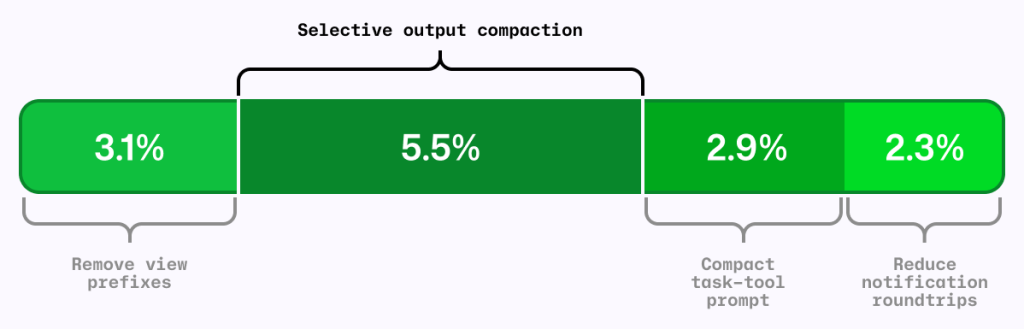
Figure 1: Four independent A/B experiments using the same AI-credit metric. The segments are shown together for comparison; their effects are not necessarily strictly additive.
The local metric trap
It’s common to shorten the output from each tool call as a way to reduce agent costs. RTK (Rust Token Killer) is a utility that shortens shell output before an agent reads it. We evaluated its effect on GitHub Copilot using our agentic coding benchmarks.
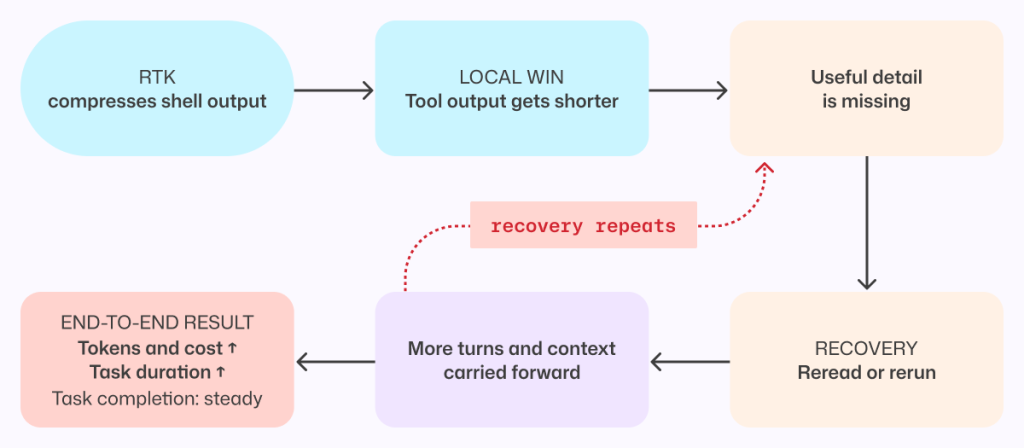
In our harness and benchmark configuration, RTK shortened some responses, but when the omitted text mattered, the model sometimes reopened the original output or reran the command to recover what it needed.
Those recovery steps added turns and carried more context forward. The individual tool response was shorter, but on average, the task used more tokens and took longer. We saved tokens locally and spent more globally.
Figure 2: A shorter tool response can make the completed task more expensive when missing details force the agent to reread output, rerun commands, and carry more context forward.
This result applies to the integration and workloads we tested, not to every RTK configuration or to output compression in general. This meant that tokens per tool call is the wrong objective. An efficiency change has to be evaluated across the complete task, from the user’s request through the final result.
More useful was to look at what can we remove without making the model repeat work.
Compress noise, preserve useful information
The goal was to shorten repetitive output while preserving the context an agent needs to complete its task without retracing steps.
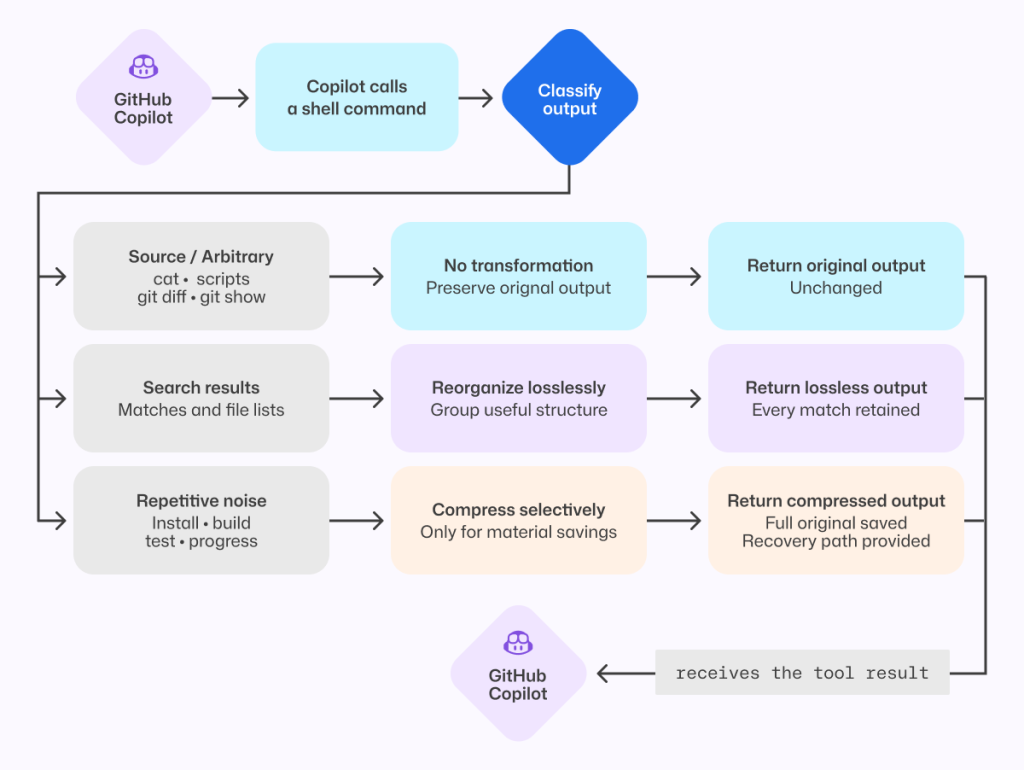
Analysis of benchmark runs showed that install, build, test, and lint output often contains repetitive noise, while source-like output and arbitrary command results are more likely to contain the information an agent needs. That analysis informed a selective output compressor, informed in part by RTK and similar approaches.
The prototype was evaluated on agentic coding benchmarks and a range of open source repositories, exercising their build, test, and lint systems.
Early versions were too aggressive. They made the model repeat work or read the full saved output, increasing end-to-end cost and reducing task success. For example, we initially compressed git diff but removed that filter after benchmark tasks showed agents reopening the original output to recover missing information.
Those early failures led to a three-part policy:
Preserve source-like and arbitrary output. Commands such as cat, git diff, git show, and arbitrary scripts are returned unchanged.
Reorganize search results without dropping content. Matches and file lists from tools such as grep can be grouped more efficiently while retaining every result.
Compress repetitive noise selectively. Install, build, test, and progress output is compressed only when the savings are substantial.
The shipped version emerged through repeated evaluation and refinement. It is conservative not because the goal was to build a conservative compressor, but because that is what the evaluations supported.
When output is compressed, the agent can still retrieve the complete original through a direct recovery path.
Figure 3: The shipped compressor preserves source-like output, reorganizes search results without loss, and compresses only predictable repetitive noise while retaining the full original.
That recovery path is both a safety mechanism and an evaluation signal. We tracked whether the agent opened the saved original, reran commands, repeated exploration, narrowed its searches, or took additional turns. Frequent recovery would indicate that the compressor had removed something valuable.
On offline tasks where output compression triggered, no statistically significant task-success regression was detected, and agents extremely rarely opened the saved originals. In the online experiment, average cost decreased slightly with no material regression detected in the tracked quality metrics.
Remove formatting before removing information
One clean token optimization came from the view tool, which agents use to read file contents into context.
Previously, view prefixed every line with a number before showing the contents to the model. Earlier file-editing tools used those numbers to target changes, but current tools instead match surrounding code and do not use line numbers. The line-number prefixes remained even though the normal workflow no longer used them.
Each prefix was small. Repeated across every line and every file read, however, that unused formatting accumulated throughout a session. So, we removed it.
Figure 4: Removing line-number prefixes preserves the source exactly while eliminating formatting that was repeated across every file read.
Line numbers remain useful in diffs and short snippets. They were wasteful here because they were attached to every file read without serving the current editing workflow.
Removing them caused model-inference cost to fall by roughly 5% in offline agentic coding benchmarks. Success rates stayed within the expected run-to-run variance, and edit failures did not increase.
We then tested the change with Copilot CLI users. The online experiment reduced average daily model-inference cost per user by about 3%, with no material regression detected in the quality or satisfaction metrics we tracked.
For developers, that means more of the context window is available for the work itself rather than formatting the agent does not use.
This was the ideal change: no new instructions for the model, no source of information to recover, and no additional decision to make. The file contents reached the model unchanged.
Compress prompts without compressing intent
Prompts carry instructions that shape how an agent works, and they are sent to the model on every turn. Shortening them only improves efficiency if the agent keeps the behaviors developers depend on.
In GitHub Copilot, the task tool launches specialized agents for parallel work. Its guidance had accumulated across tool descriptions, schemas, agent definitions, system instructions, and companion tools.
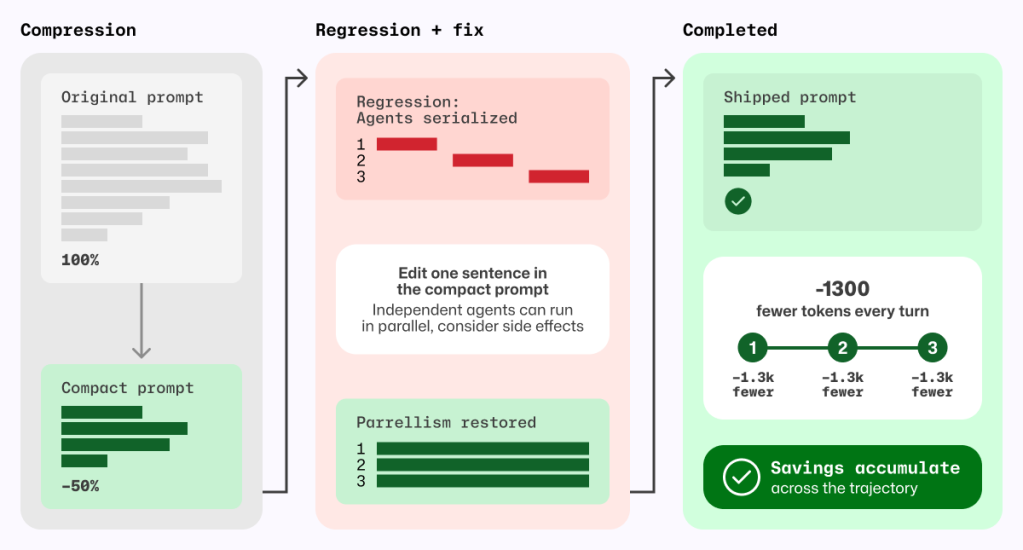
A meta-prompting loop, in which Copilot iteratively wrote its own prompt, reduced that prompt by roughly half. Copilot produced and refined smaller candidates, and targeted behavioral tests checked the requirements we wanted to preserve.
The first online experiment found a regression that the initial offline evaluations had missed. The meta-prompting loop had rewritten cautious parallelism guidance into a hard scheduling policy, causing independent custom agents to run sequentially.
We stopped the experiment. Before changing the prompt again, we wrote a regression evaluation for the behavior users had exposed. The eventual fix replaced an explicit allowlist and denylist with one sentence:
Independent agents can run in parallel; consider side effects.
That sentence was shorter and less restrictive; it deferred the choice of whether to run sub-agents in parallel to the model instead of the previous explicit guidance. With it, our new behavior test passed without causing any existing behavioral tests to fail.
Prompt behavior needs tests. If a behavior is not tested, a shorter prompt can remove it without anyone noticing.
Figure 5 Prompt compression became safe only after a regression test exposed serialized agents and a one-sentence fix restored parallelism; the resulting token savings recur on every model turn.
The shipped prompt removes about 1,300 task-tool prompt tokens per turn, corresponding to approximately 1.8% fewer total prompt tokens per session and 2.9% lower normalized cost per active hour, with no quality regression detected in the measured evaluations.
Deliver completed background work without an extra retrieval turn
Agents often run independent work in the background, such as a long-running shell command alongside a sub-agent investigation. Notifications let the agent continue until that work is ready without spending a tool call waiting.
If the agent does not explicitly wait for either task, the harness wakes the model and notifies it when the shell command or sub-agent finishes.
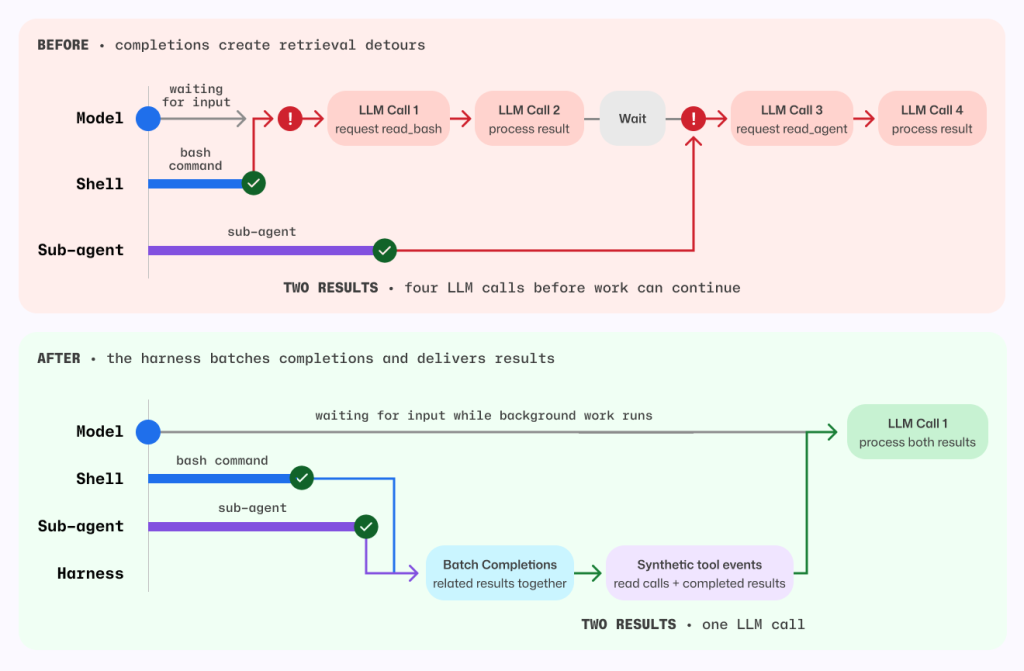
Previously, that notification did not include the completed result, so the agent had to spend another turn retrieving output Copilot had already received. When several tasks finished close together, that detour could repeat. Copilot now batches eligible completion notifications and delivers completed results directly in the existing tool-result format. The agent can continue with the information it needs, without spending an extra turn asking for it again. Explicit reads for work that is still running behave as before.
Figure 6 Before, each background completion could wake a retrieval-only model turn. After, the harness batches eligible completions and delivers completed results in the existing tool-result format.
Before this change, each completed task required one model call to request its result and another to process it. For the shell command and sub-agent shown above, that meant four model calls before work could continue.
Now, the harness batches both completions and supplies their results together, so a single model call can process both. Removing those retrieval detours also avoids carrying the full session context through unnecessary calls.
By delivering completed results directly, without compressing, summarizing, or withholding anything, the harness reduced average token-related usage, as measured in AI Credits, by about 2.3%.
Measure changes in context
A change that saves tokens in one Copilot workflow can increase costs in another.
For example, a tighter set of file-tool instructions was inspired by positive results in Copilot code review. In a Copilot CLI online experiment, it increased cost, so we did not ship it.
By contrast, removing line-number prefixes and selectively compressing output each reduced average prompt tokens per review by roughly 5% in independent evaluations across a large set of Copilot code review tasks using the production model. We detected no material change in the tracked review-quality metrics.
Suppose a user searches for café and your corpus contains CAFÉ, or they type straße and you’ve stored STRASSE. To make these count as matches, you need a canonical form that erases case distinctions, so that two strings which differ only in case compare equal. That form is case folding, and it shows up wherever text is matched rather than displayed: search engines, regex (?i) flags, case-insensitive usernames and hostnames.
It’s a basic operation, but at GitHub we run it a lot. Blackbird, GitHub’s code search engine, indexes over 180 million repositories—more than 480TB of source code. Every byte is case-folded before we extract ngrams and build the index, and for every potential query result, another (implicit or explicit) case folding operation is needed to locate matches. At that scale, the speed of even a basic operation starts to matter.
This post is about how we made it fast, and it starts somewhere counterintuitive: the biggest win in the ASCII fast path came from removing an optimization, not adding one. It turns out to be faster to sweep the whole buffer with no branches than to stop early at the first non-ASCII byte. We open-sourced the result as a Rust crate called casefold.
Folding is not lowercasing
It is tempting to reach for str::to_lowercase, but lowercasing and folding are different operations with different goals:
Lowercasing is for display, and it’s locale- and context-sensitive: Greek final sigma lowercases to ς at the end of a word and σ elsewhere, and Turkish I lowercases differently than English I. Case folding is for comparison, and it’s deliberately context-free and locale-independent. The point is a relation that stays stable and symmetric, so that if A folds to match B, B folds to match A in any locale. The Unicode Character Database ships an explicit CaseFolding.txt for exactly that.
The two operations diverge on real characters—ß, İ, final sigma—which is why lowercasing as a stand-in silently produces wrong matches. This crate implements only the simple (1-to-1) folds—statuses C and S in CaseFolding.txt—and not the multi-character “full” folds (ß → ss) or Turkic locale folds (the dotted İ). This isn’t an unusual choice: common tools and regex engines like ripgrep make the same restriction, and being consistent across tools is important.
The counterintuitive core: Don’t stop early
We deal mostly with source code, so the text we fold is overwhelmingly ASCII and making it run at memory speed is the single most important thing we can do. Everything else just has to keep the rare non-ASCII path from spoiling it.
The fold of an ASCII letter is trivial—A..=Z map to a..=z, everything else is unchanged—so the ASCII pass is really just “sweep the buffer, lowercase in place.” Ask any LLM for it and you might get something like this:
let bytes = s.as_bytes_mut();
for (i, b) in bytes.iter_mut().enumerate() {
    if *b >= 0x80 {
        break; // non-ASCII at index i: hand the rest to the Unicode path
    }
    if b.is_ascii_uppercase() {
        *b += 32; // 'A'..='Z' → 'a'..='z'
    }
}
It looks ideal: do the cheap byte work, and the instant you hit a non-ASCII byte, break and let the “real” Unicode path take over: “only do the cheap work until you have to.” On an Apple M4 this runs at about 3 GiB/s. That sounds fine in isolation, but it is more than 15× short of “optimal” because of the if branches.
Let’s delete every branch, line by line:
if b >= 0x80 { break } → don’t stop at all. ORevery byte into an accumulator and test it once, after the loop: high_bit_acc |= *b. Same information (was there any non-ASCII byte?), zero branches in the body.
TheA..=Zrange test → make it arithmetic. b.wrapping_sub(b'A') < 26 is true exactly for A..=Z (any other byte wraps to ≥ 26), yielding a 0/1 mask with no branch.
The conditional write → fold the mask into the store.| (is_upper << 5)sets bit 5—turning an upper-case letter lower-case and being a no-op on everything else—the byte is always written, never branched on.
What’s left has no branch in its body and no early exit:
let mut high_bit_acc: u8 = 0;
for b in &mut bytes {
    high_bit_acc |= *b; // detect any non-ASCII byte
    let is_upper = b.wrapping_sub(b'A') < 26; // branchless A..=Z test
    *b |= u8::from(is_upper) << 5; // set bit 5 → lowercase, else no-op
}
if high_bit_acc & 0x80 == 0 {
    return bytes; // pure ASCII: already folded in place, no second buffer
}
A loop with no data-dependent control flow is trivially vectorizable: LLVM emits 16-byte-at-a-time NEON and the whole thing runs at > 45 GiB/s—essentially memory bandwidth. And we come out of the pass already knowing, from high_bit_acc, whether there’s any non-ASCII work left to do.
How much did each step matter? Measuring the cumulative ladder on pure ASCII (Apple M4, 5.7 KB buffer):
Version
Throughput
Vectorized?
naive (break + branch test)
3.1 GiB/s
no (0 vector instrs)
→ branchless test/write, keep break
2.6 GiB/s
no (0 vector instrs)
→ drop the early-exit break
7.6 GiB/s
partially (25 vector instrs)
→ branchless test + write (the loop)
>45 GiB/s
fully (41 vector instrs)
The early-exit is what gates vectorization: keep the break but make the body perfectly branch-free and you still get zero vector instructions (~2.6 GiB/s); a data-dependent loop exit is enough on its own to keep the loop scalar. Only once the break is gone can the compiler vectorize. The final step—making the upper-case fold branchless—then turns a partially vectorized loop (which still compiles the conditional store to a compare-blend-masked-store, ~7.6 GiB/s) into the straight-line arithmetic that hits memory bandwidth.
Note: Branchless is apessimizationin scalar code. Look again at the table: making the body branchless while keeping the break (2.6 GiB/s) is actually slower than the naive branchy loop (3.1 GiB/s). The asm explains why. The branchy version only stores a byte when it actually changes one; its conditional strbis skipped for every lowercase letter, digit and space (the vast majority of real text), and the well-predicted branch that guards it is nearly free. The branchless version replaces that rarely taken store with an unconditionalstrbevery iteration, writing back all ~5,700 bytes instead of just the handful of upper-case ones. Extra write traffic for no benefit. Branchless-write only wins once the loop vectorizes, because then the store becomes a single 16-byte vector write regardless of content, and the per-byte cost disappears. The lesson: a branchless body is worth it only as the enabler for vectorization. On its own, in scalar code, it can cost you.
There’s also a middle ground, and it’s what standard libraries use. Instead of testing one byte at a time, [u8]::is_ascii scans a machine word at a time—on a 64-bit target it tests 16 bytes per iteration by OR-ing two u64 lanes and checking all their high bits with a single & 0x8080_8080_8080_8080 mask. You can build the ASCII fast path on top of that: chunk-scan to find the ASCII prefix, then run the branchless (vectorizable) convert over it. That keeps the early-exit ability—it still bails on the first non-ASCII block—while letting both halves go fast. The catch is that it reads the data twice (once to scan, once to convert), landing at about 23 GiB/s—roughly half of the single-pass branchless sweep, and ~7× the naive break loop. A solid, general-purpose default; just not the absolute ceiling when you control the whole loop and can fold detection and conversion into one branch-free pass.
Wouldn’tfusingthe two passes be faster? It’s the obvious next thought: keep the chunked early-exit but convert each 16-byte block right after you’ve confirmed it’s ASCII, reading the data only once. Measured, it’s ~2.6× slower—8.7 GiB/s versus the two-pass 23. The inner block convert still vectorizes to a single 16-byte op, but now there’s a data-dependent early-exit branch every 16 bytes, and that branch pins the loop to one block at a time: the compiler doesn’t unroll or software-pipeline across blocks, and each iteration pays the full load→test→branch→convert→store latency with nothing to hide it behind. Split into two passes, each one is clean: the scan is a branch-light, store-free word scan that races through memory, and the convert is the fully-vectorized branch-free sweep at >45 GiB/s. Two fast, branch-free passes beat one branchy fused pass—even though the fused version touches the data half as many times. It’s the same lesson one more time: in the hot loop, the branch is the enemy.
Avoiding the heap
Forty-Five GiB/s also means doing zero unnecessary allocation. simple_fold takes the input String by value, owning the heap buffer it can mutate and return it. If the OR-accumulator’s high bit was clear, the input was pure ASCII already folded in place. We hand the same allocation straight back, no second buffer and no copy. Otherwise, we memchrto the first non-ASCII byte and scan the tail from there, leaving the output buffer unallocated (a null write cursor) until we hit a character that folds to different bytes. Text whose multibyte content never folds—CJK, Hangul, Kana, Arabic, Hebrew, symbols—also returns the original allocation untouched, never copying a byte.
Why a second buffer rather than rewriting in place like the ASCII pass? Because folding can make the string longer: almost every fold preserves the UTF-8 length or shrinks it, but two outliers grow—U+023A (Ⱥ) and U+023E (Ɀ) are 2 bytes each yet fold to 3-byte characters (ⱥ, ɀ). Once one appears, the output no longer fits in the input’s bytes, and we need somewhere new to write.
We allocate that buffer once, sized for the worst case, rather than growing it as more folds appear. Incremental reserve calls would mean re-checking capacity, occasionally reallocating, copying everything written so far, and juggling extra length/capacity bookkeeping; a single up-front allocation lets a raw write cursor run straight to the end with none of that. And since the cursor is nulluntil that first growing/changing fold, it doubles as the “have we allocated the extra buffer yet?” flag.
Sizing it needs a bound on growth, and those same two outliers give it: every 2 input bytes yield at most 3 output bytes, capping the output at 1.5× the input—exactly the capacity we reserve:
out = Vec::with_capacity(bytes.len() + bytes.len() / 2 + 4);
After that the loop writes through a raw pointer with no capacity checks and calls set_len once at the end. Two more details keep it branch-light. The run of unchanged bytes between two folds is moved with a single copy_nonoverlapping rather than byte by byte. And each fold unconditionally writes all 4 bytes of a little-endian word before bumping the cursor by only the folded length (1–4)—dropping a branch on the output length from the hot path, with the + 4 in the reservation as the headroom that makes the final character’s over-store safe.
Making Unicode cheap too
When a character does fold, we still don’t want to fall off a cliff—decode UTF-8, hash lookup, re-encode. Unicode 16.0 has 1484 simple-fold mappings, but they’re a very sparse and very structured relation. Four observations shrink them to 1776 bytes and let the fold run without ever decoding a full character.
Even on the non-ASCII path, the overwhelming majority of characters do not fold. The hot operation isn’t really “fold this character,” it’s “does this character fold?” Almost always no. The table has to make that negative test as cheap as possible; the actual folding is the rare case on an already-rare path. That priority is what shapes the layout below—the page bitmap exists precisely so a non-folding character is rejected in a single bit test, straight from its leading UTF-8 bytes, without decoding or scanning anything.
This is exactly why a HashMap<u32, u32> is the wrong shape for the job, not just a bigger one. A hash map is optimized for the hit: it finds a present key in roughly one probe, and only spends extra work (more probes, full key comparison) when load factor or collisions bite. But our workload is dominated by misses—characters that aren’t in the table at all—and a miss is a hash map’s least favorite query: it still has to hash the key, jump to a bucket, and walk the probe sequence far enough to prove absence.
Foldable code points cluster into 64-code-point “pages”
Foldable code points bunch together. Slice the code space into 64-code-point “pages” and the ~1484 folds touch just 59 of ~1960 possible pages. A one-bit-per-page presencebitmap answers the negative test on its own: a clear bit is a definitive “no fold”—copy through, done—which is what makes fold-free scripts cheap. Only on a set bit do we consult a second structure, a cumulative-popcount side table that ranks the page (how many populated pages precede it) to find its slice of entries, storing nothing for the ~1900 empty pages.
let (word_idx, bit_idx, c_len) = if lead < 0xE0 {
    (0usize, lead & 0x1F, 2usize) // 2-byte: word 0
} else if lead < 0xF0 {
    ((lead & 0x0F) as usize, bytes[read + 1] & 0x3F, 3) // 3-byte: word = nibble

} else {
    (
        (((lead & 0x07) as usize) << 6) | (bytes[read + 1] & 0x3F) as usize,
        bytes[read + 2] & 0x3F,
        4usize,
    ) // 4-byte: merge 2 bytes
};
// reject without decoding: clear bit ⇒ no fold
if word_idx >= PAGE_BITMAP.len() || (PAGE_BITMAP[word_idx] >> bit_idx) & 1 == 0 {
    read += c_len;
    continue;
}
Because word_idxdepends only on the lead byte (and, for four-byte sequences, the first continuation byte), the bitmap load can be issued early.
Within a page, folds come in runs
A set page bit tells us something on this page folds, but not which code points or to what. The obvious encoding is one entry per foldable code point—but that is both bulky and slow to search: a page can hold dozens of folds, and we’d have to scan them all to find the one matching the current code point. The structure of the data rescues us again. Adjacent code points overwhelmingly share the same delta to their fold: A–Z all map +32, and Latin Extended is full of alternating runs like 0x0100, 0x0102, 0x0104, … where every second code point folds. Instead of per-code-point entries we store runs—start, end, stride, delta—and a 1-bit stride flag covers both the contiguous and the every-other case. This interval compression collapses the ~1484 individual folds into just 238 runs across the 59 pages (≈four per page), leaving the within-page search only a handful of entries to look at instead of dozens. This range-with-delta encoding (including the stride trick) is borrowed from Go’s unicode package, whose CaseRange records store a Lo/Hi range plus per-case deltas, with an UpperLower sentinel marking the alternating blocks. Runs are split at the page boundaries so a run never straddles two pages.
A run record is two clean bytes
With both endpoints inside one page they fit in 6 bits, split across two arrays: RUN_END_LOW[``i``] = end & 0x3F (the scan key) and RUN_START_STRIDE[``i``] = (start & 0x3F) | ((stride − 1) << 6) (read only on a hit). Because each key is one clean byte, the within-page search can go wide: rather than comparing cp & 0x3F against the runs one at a time, we load 8 end_low bytes into a single u64 and test all of them at once with one branchless SWAR step—(chunk | 0x80…80) − broadcast(low) & 0x80…80 sets the top bit of every lane whose key is ≥ cp & 0x3F. A single bit-scan of that mask (the keys are sorted, so the first set lane is the run we want) finds the slot. A page holds ~4 runs on average; that one 8-wide compare almost always resolves the entire search in a single step. One unlucky page does hold 30 runs, which puts the compare inside a short loop that strides eight keys at a time—but that loop trips at most a handful of times on exactly one page in all of Unicode, and never on the common ones. Either way: no per-run branch, and no code-point reconstruction anywhere.
/// Offset of the first run with `end_low >= low_v` in a page of `n` runs,
/// or `n` if none. Scans 8 `end_low` bytes at a time via SWAR.
#[inline]
fn scan_end_low(lo: usize, n: usize, low_v: u8) -> usize {
    const HIGH: u64 = 0x8080_8080_8080_8080;
    const ONES: u64 = 0x0101_0101_0101_0101;
    let bcast = (low_v as u64).wrapping_mul(ONES);
    let mut base = 0;
    while base < n {
        // RUN_END_LOW is padded by 8 bytes so this read is always in bounds.
        let chunk = u64::from_le_bytes(
            RUN_END_LOW[lo + base..lo + base + 8]
                .try_into()
                .expect("8-byte slice"),
        );
        // `(b | 0x80) - low_v` keeps its high bit iff `b >= low_v` (no
        // cross-lane borrow). The first set lane is the first run `>= low_v`.
        let ge = (chunk | HIGH).wrapping_sub(bcast) & HIGH;
        if ge != 0 {
            let j = base + (ge.trailing_zeros() / 8) as usize;
            return if j < n { j } else { n };
        }
        base += 8;
    }
    n
}
Folding is a little-endian byte addition
On a little-endian machine the folded character’s UTF-8 bytes, read as a u32, equal the source bytes (as a u32) plus a per-run constant. A parallel BYTE_DELTA[i] table then turns the whole fold into a masked load, one wrapping_add, and a 4-byte store:
let word = u32::from_le_bytes(next_four_bytes) & length_mask; // keep this char's bytes
let folded = word.wrapping_add(BYTE_DELTA[i]); // the fold, as one byte add
write_u32_le(dst, folded); // store all 4 bytes...
dst += utf8_len(folded); // ...advance by the folded length
Both lengths in that snippet—the length_mask for the source character and the advance by the folded length for the destination—come from one more tiny trick. A UTF-8 sequence’s length is fixed by the top four bits of its lead byte, letting the 16 possible lengths pack one nibble each into a single 64-bit constant (0x4322_1111_1111_1111); the length is then a shift and a mask, (LEN_BITS >> (4 * (lead >> 4))) & 0xF—no if chain, no table memory, nothing for the predictor to get wrong. (A count leading ones—(!lead).leading_zeros()—would also work, since a lead byte carries one leading 1-bit per byte of the sequence.)
/// Number of bytes in the UTF-8 sequence whose lead byte is `lead`.
#[inline]
pub fn utf8_len(lead: u8) -> usize {
    const UTF8_LEN_BY_LEAD: u64 = 0x4322_1111_1111_1111;
    ((UTF8_LEN_BY_LEAD >> (4 * (lead >> 4))) & 0xF) as usize
}
Because we advance by the folded length, this even handles length-changing folds—U+212A KELVIN SIGN (3 bytes) → k (1 byte), or U+023A Ⱥ (2 bytes) → U+2C65 ⱥ (3 bytes)—by writing fewer or more bytes than were read. That’s the part we believe is genuinely new: every other folder we looked at—ICU, Go’s unicode, Rust’s regex, CPython, glibc—decodes UTF-8 to a code point, applies the fold there, and re-encodes (even SIMD folders decode first). Doing the arithmetic in byte space skips both the decode and the encode, which is exactly why this path can outrun a hash map that already has the answer tabulated—the hash map still has to decode its key and encode its result. The byte-space arithmetic assumes the input is well-formed, shortest-form UTF-8—every code point encoded with the minimal number of bytes. Reading the source bytes as a u32and adding a per-run delta only lands on the correct folded encoding when the source is in canonical form; an overlong encoding (a code point padded into more bytes than necessary, e.g. / as 0xC0 0xAF) has a different byte pattern and would break thelength_mask and the delta arithmetic. This is not a real restriction in Rust—&str/String are guaranteed to hold valid UTF-8, which by definition rejects overlong sequences—but a caller feeding raw bytes from elsewhere must validate (or otherwise normalize) them first.
The ASCII shortcut in the tail loop
One more shortcut rounds out the tail loop. Remember the first pass already lowercased every ASCII byte, so when the scan meets an ASCII byte in the tail it advances a single byte and moves on—no page probe, no table touch at all. And it doesn’t copy that byte either: unmodified bytes (ASCII and non-folding multibyte alike) aren’t moved one at a time. The scan just keeps walking until it reaches a character that actually folds, then flushes the whole unchanged run between the last fold and this one with a single copy_nonoverlapping. Mixed text—CJK with ASCII spaces and punctuation, or code with the occasional accented identifier—therefore races through the ASCII filler and only consults the bitmap for genuine multibyte characters, copying in bulk rather than byte by byte.
Putting it together: the whole table
Component
Bytes
PAGE_BITMAP (1 bit per 64-cp page)
248
POPCNT_SAMPLES (cumulative popcount)
32
PAGE_OFFSET (per populated page)
60
RUN_END_LOW (scan key, end & 0x3F, +8 pad)
246
RUN_START_STRIDE (start & 0x3F | stride)
238
BYTE_DELTA (little-endian fold delta per run)
952
Total
1776
That’s 9.6 bits per fold entry, over half of it the BYTE_DELTA side table we trade for the decode-free path; the index + run records alone are ~4.4 bits/entry.
Next to the obvious alternatives, that 1776 bytes is an order of magnitude or more smaller—and unlike most of them, it never decodes a character:
Representation
Size
Naïve [(u32, u32); 1484]
~11.6 KB
regex-syntax’s case_folding_simple table
~70 KB
Go’s unicode.SimpleFold (orbit + ASCII + ranges)
~7.3 KB
A runtime HashMap<u32, u32>
~17 KB
This crate (paged bitmap + packed runs)
1776 B
Where it lands against the alternatives
On the common case, ASCII, folding runs at memory bandwidth (>45 GiB/s), more than an order of magnitude ahead of other real folders and more than 50% faster than the (non-equivalent) str::to_lowercase function. To get a rough “upper bound” for the non-ASCII case, we measured the optimized Utf8 decoding + encoding round trip without performing any actual case folding using the simdutf crate. This experiment achieves consistently about 2GB/sec and is only about twice as fast than our solution for the worst case all-folding input. A naive hash map trails everything on all workloads.
The three columns are real case folders that produce identical output: simple_fold (this crate), simd_normalizer (the simd-normalizer crate), and HashMap (naive CaseFolding.txt lookup). The workload rows are chosen to simulate different scenarios from typical to worst case:
Workload (input size)
simple_fold
simd_normalizer
HashMap (byte path)
Pure ASCII (5.7 KB)
>45 GiB/s
1.21 GiB/s
213 MiB/s
Chinese/Japanese/Korean, no folds (8.1 KB)
2.95 GiB/s
1.97 GiB/s
558 MiB/s
Symbols / Myanmar, no folds (9.0 KB)
2.96 GiB/s
1.56 GiB/s
410 MiB/s
Worst case: Latin/Greek/Cyrillic (Unicode U+0000–U+FFFF), all folding (8.8 KB)
869 MiB/s
922 MiB/s
334 MiB/s
Length-changing folds (1.7 KB)
1.26 GiB/s
716 MiB/s
233 MiB/s
Treat the absolute figures as illustrative, not portable: the whole design leans on auto-vectorization, SWAR, and little-endian byte arithmetic, so the numbers—and even the ratios between rows—can shift substantially on a different microarchitecture (a wider or narrower vector unit, different memory bandwidth, a big-endian target, x86 vs ARM).
Case folding is about as basic as text operations get, which is exactly why it was worth the effort: we run it across every byte we index. The wins came from two ideas that both cut against instinct—sweep the whole buffer branch-free instead of stopping early, and do the fold as byte-space arithmetic instead of decoding to a code point. Together they let the common case run at memory bandwidth and the rare fold run without a decode, in a table small enough (1776 bytes) to stay resident. The decode-free byte-space fold is the piece we believe is genuinely new; it’s why this path can beat a hash map that already has the answer.
There’s surely more to find here, and we’d like to see it. The crate is casefold; the generated table and full design notes live alongside the source.
Give an agent better tools and it should do better work. That’s the instinct, anyway.
When you open a pull request, Copilot code review reads the diff and explores the surrounding code to find the problems that matter before they ship. To do that, it used its own code exploration tools. So when we swapped in the better-maintained, shared tools that power the Copilot CLI, grep, glob, and view, we expected a clean upgrade.
Instead, in our benchmarks, we found that the cost of reviews was higher and fewer issues were being caught.
But the tools weren’t the problem. The instructions were. Once we rewrote them for the way a reviewer actually reads a pull request, the regression flipped into a win: roughly 20% lower average review cost, while maintaining the same review quality.
This is the story of how adjusting the workflows around the tools led us to a fix.
Same tools, wrong instincts
If you’ve built on top of an agent framework, you’ve probably inherited its tools too. They work, so you keep them, until the day your use case drifts far enough from what they were designed for that they quietly start working against you. That’s the situation we were in. Before trying to use the shared CLI tools, Copilot code review used its own code exploration tools. That tool layer was inspired by earlier agentic systems, including ideas from SWE-agent-style repository navigation and GitHub Copilot Autofix: list directories, search files, search directories, and read code. Those tools worked, but they were specific to Copilot code review, and they were designed for how models behaved at the time. Earlier agentic coding models made fewer tool calls and were worse at automatically pulling in necessary context. This meant it was more important to include all relevant information in the few tool calls that the model made.
Meanwhile, the Copilot CLI harness has a shared set of Unix-inspired code exploration tools: grep, glob, and view. That harness is also used by a growing number of Copilot agent products, including GitHub Copilot cloud agent, so harness improvements can benefit more than one product. We wanted to clean up and share infrastructure where possible, so we experimented with using the tools from the Copilot CLI harness in Copilot code review. The goal was to reduce duplicated tool implementations, create one shared place to improve code exploration tools, and make it easier to carry those improvements across Copilot products.
On paper, the migration looked simple:
Old Copilot code review
GitHub Copilot CLI
Purpose
list_dir
glob
Discover candidate files and directories before opening code.
search_file and search_dir
grep
Search code for matching text, symbols, or call sites.
read_code
view
Read the relevant file contents once a path or range is known.
The existing review tools were not thin wrappers. When searching for a directory or reading a code range, they could return the matched or requested lines plus extra surrounding code context. That added token cost, but it also matched how earlier models often benefited from having nearby context included automatically.
Initially, we hoped this would be a simple migration: swap one set of tools for another. But when we tested the shared tools in offline benchmarks, the review agent became less efficient and less effective. Average cost increased, and the number of useful comments dropped.
The trace revealed a browsing loop
Our internal Copilot code review benchmarks were useful because they show more than a final score. They show the path the agent took, including which tools it called, how much output came back, where errors happened, and whether it was narrowing toward evidence or widening the search.
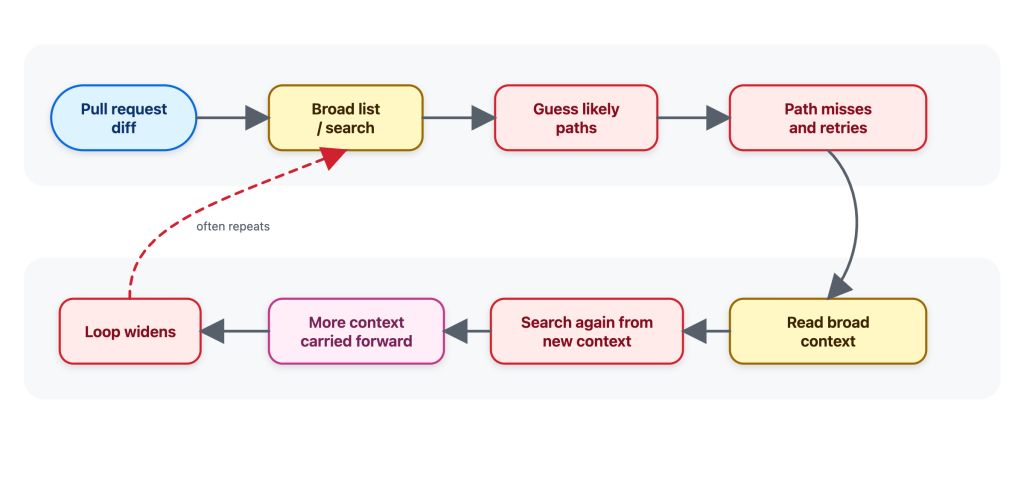
When we first tried the shared Copilot CLI tools in offline benchmarks, the agent often behaved as if it was browsing a repository instead of investigating a pull request. It would search broadly, guess likely paths, read broadly, find more things to search, and carry that extra context forward.
Figure 1: Before — a simplified illustration of the general-purpose behavior we observed: widening the search, guessing paths, and accumulating context.
That pattern is understandable. Broad exploration can be useful when the task is “understand this repo.” But it’s not how a reviewer would usually review a pull request.
When I review a pull request, I start from the diff and ask targeted questions:
Where is this function called?
Is this config key used anywhere else?
Is there a test or helper with the same pattern?
What is the smallest nearby code range that explains this behavior?
I do not want to open a large part of the repository before I know what I am looking for. I want the minimal context needed to answer the question, without overloading the review with unrelated code.
That matters because every tool result becomes part of the agent’s working context. Extra file contents can be carried forward into later reasoning, increasing cost and sometimes making the review less focused. A tool result is not a disposable printout; for an agent, it’s extra tokens that stay in the context window.
The traces made that difference visible. The shared tools were not the problem. The instructions were giving the agent the wrong instincts to do an efficient and effective review.
The tools themselves worked, but their instructions were tuned for their use within the Copilot CLI and implied the wrong workflow: the agent used grep, glob, and view like a broad coding assistant instead of a reviewer. A coding assistant may map a whole area before making a change to ensure it doesn’t break some other corner of the code. On the other hand, a reviewer usually starts from the diff, asks whether the change introduced a problem, and then looks for the narrowest nearby evidence required to confirm or dismiss it.
General coding-assistant tool instructions, like the ones used by Copilot CLI or Copilot cloud agent, make sense for an interactive assistant. A developer may ask it to understand a repository, plan a change, edit files, and continue over multiple turns.
Copilot code review has a narrower job: start from a pull request diff, gather enough surrounding evidence to decide whether a change introduces a real issue, and avoid loading context that is not needed for that review question.
It was therefore clear that we couldn’t simply replace the previous Copilot code review tools with the tools from the Copilot CLI without additional prompting work. The problem became: how do we design tool instructions that use these shared tools effectively in a code review setting?
Rewriting the tool instructions for a reviewer’s workflow
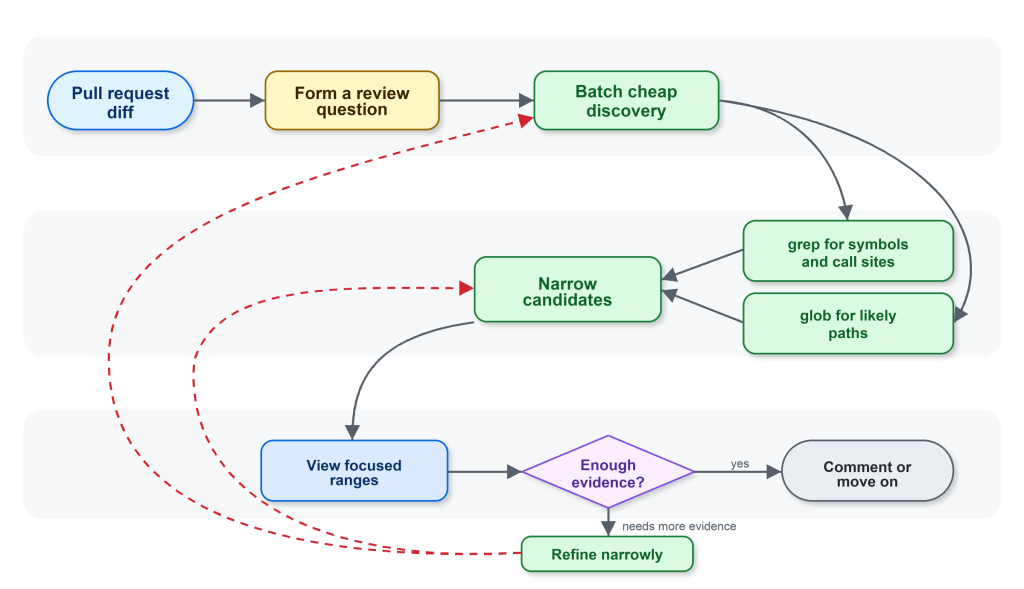
The next iterations made the guidance specific to code review. The workflow we wanted Copilot code review to follow was:
Start from the diff and form specific review questions.
Use glob when the path is uncertain and grep to find candidate files, symbols, and call sites.
Batch cheap discovery before reading files.
Use view only when the agent knows which file or line range it needs.
Batch focused reads instead of alternating between one search and one read.
In oversimplified form, this was the behavior we encoded:
Generic posture: Use the available tools to inspect repository context that may be relevant.
Review-shaped guidance: Start from the diff. Narrow first with grep and glob; read exact evidence with view. If grep fails to find relevant context, retry with a simpler escaped search. If a path is wrong, pivot to glob instead of guessing nearby paths.
For example, imagine the diff changes an authorization helper that decides whether an operation is allowed. A relevant review question is not “show me the full contents of every file that calls this helper.” It could instead be the narrower: “are any request-handling callers relying on the old behavior?”
The intended path is short:
start from the helper changed in the diff
grep for callers of that helper
glob for likely route, handler, or controller files
view the most relevant caller ranges
decide whether any caller changes the risk
The guidance also changed how the agent recovered from failed searches. If an input made grep fail, the better next step was one simpler, corrected search. If a path was wrong, the better next step was glob, not guessing neighboring paths and reading whatever happened to exist. That nudged the agent away from letting a small tool failure turn into a larger exploration loop.
Figure 2: After — a simplified illustration of the review-shaped behavior the prompt guided toward: stay anchored to the diff, narrow with grep and glob, then read focused ranges with view.
The change was small in wording and large in effect. It changed the rhythm of the agent from “browse, read, search again” to “ask, narrow, read, decide.”
Benchmarks let us debug behavior, not just scores
The shared harness gave us the tools. The internal Copilot code review benchmarks gave us the feedback loop.
We could run the same review examples, compare tool traces, update the instructions, and run again. That let us ask concrete questions:
Did the agent narrow first, or read broadly first?
Did it batch independent searches?
Did it call view only when it had a reason?
Did a tool-instruction change reduce tool errors, or just move them somewhere else?
Did the trace stay focused on evidence from the diff?
Did the review still preserve the quality metrics we cared about?
The most useful signal was not “the instructions are better.” It was more concrete. The agent was making a similar number of tool calls, but spending more of them on relevant evidence instead of repeatedly expanding the search.
That connected product-level outcomes to understandable engineering behavior. Instead of guessing why a score moved, we could inspect the workflow that produced it.
The result: roughly 20% lower average review cost
In production, the tuned behavior showed roughly 20% lower average review cost compared with the control. Importantly, it did not show a quality signal that could block shipping.
The reduction did not come from the tools by themselves, it came from the workflow around them. Shared code exploration tools, Copilot code review custom tool instructions, and internal benchmarks made the agent’s behavior visible enough to tune.
That framing matters when building with agents. It can be tempting to treat tools as implementation details by swapping one tool for another, then comparing the final answer. But for an agent, the tool surface is part of the product experience. It changes what the agent notices, how it searches, how much context it carries forward, and when it decides it has enough evidence.
Tool descriptions and system instructions are closer to API documentation. Unclear API docs can leave a developer confused and lead to inefficient or wrong decisions. Unclear tool prompting can do the same for an LLM; a small wording change can affect cost, quality, and the shape of the investigation because it changes how the agent spends its attention.
Same tools, different job
We also tried to apply the same kind of focused tool instructions in the CLI, where it did not produce the same kind of win. That is a useful counterexample, and an important guardrail for the lesson.
Copilot code review is anchored to a diff and a review question. Copilot CLI handles broader, interactive coding tasks where exploration can be part of the job. There may be no single diff anchor, the user may change direction over multiple turns, and the right context may not be obvious at the start. The same grep, glob, and view tools can support both products, but the workflow around those tools has to match the product.
The takeaway is that shared tools scale when the instructions and benchmarks match the job.
“Where are the docs?” It’s a question nobody on a product team enjoys answering. The honest reply is usually some variant of “behind.” A writer is staring at a closed pull request, trying to reverse-engineer what changed. The pull request’s author has already moved on. By the time the doc actually publishes, the feature has shipped, sometimes more than once.
That used to be us on the Aspire team (we’re a small team of 10 building dev tools for distributed apps). A few months back, we were trying to figure out how to safely bring AI into automations we already trusted. That’s when we discovered GitHub Agentic Workflows. I started bolting prototypes into microsoft/aspire.
Here’s what that bought us, in numbers pulled straight out of GitHub: for Aspire 13.3 and 13.4, 82 feature-docs pull requests merged at a median of 44.8 hours after the product pull request, every one of them reviewed by the engineer who shipped the feature. No new headcount. No process retraining. Just a different way of asking “who writes this?”
🔒 The constraint: cross-repo automation is the hard part
Our product lives in microsoft/aspire and our docs site lives in microsoft/aspire.dev—different repo, deploy target, and review chain. Most teams figure out same-repo automation pretty quickly; cross-repo automation is where things get sharp. Broad repo-scoped tokens belong in a museum, and any responsible security posture (ours included) restricts them accordingly. That’s a good thing. It’s also a real bottleneck if the place where you write the docs isn’t the place where you write the code.
The default workflow for years was:
Engineer ships a feature in microsoft/aspire.
Docs writer notices weeks later.
Docs writer opens the pull request, reads the diff, and pings the engineer to clarify what changed.
Engineer is on the next feature, vaguely remembers, replies with half the picture.
Docs draft ships, sometimes against a release that’s already out.
This is the reverse-engineering tax. We needed automation that crossed repos without handing an agent a write-everywhere token. GitHub Agentic Workflows turned out to be the answer.
🤖 Why GitHub Agentic Workflows
GitHub Agentic Workflows is a project from the GitHub Next team that I keep describing to people as “GitHub Actions, but with a model as the work-item processor and guard rails that satisfy security review.” That’s reductive, but it’s close.
The shape of it:
You author a workflow as a single markdown file (.github/workflows/my-thing.md). YAML-style frontmatter on top, an English-language prompt underneath.
You run GitHub Agentic Workflows compile, and it generates a sibling .lock.yml (a normal GitHub Actions workflow) that you commit alongside.
At runtime, the workflow runs an agent against your prompt with a constrained toolset.
Critically, the agent doesn’t write to GitHub directly. It emits intent (a JSON blob describing the pull requests, issues, and comments it wants to create), and a separate, narrowly scoped job (the safe-outputs handler) materializes that intent against a per-workflow GitHub app.
That last bullet is the unlock. The agent gets read access and a prompt. Writes go through a tiny verifiable pipeline with explicit allow-lists. Security review nods. We ship.
💚 A small aside: kindred stacks
I love when the tools you’re using to build are built with the same tools you’re using to build with. The GitHub Agentic Workflows docs are built with Astro and Starlight. So is aspire.dev—Astro with Starlight, dressed up with the wider Starlight plugin ecosystem (astro-mermaid, starlight-llms-txt, starlight-sidebar-topics, starlight-image-zoom, the gorgeous @catppuccin/starlight theme, and more. Shout-out to Chris Swithinbank and the Starlight maintainers, the entire ecosystem feels designed by people who genuinely care).
There’s a real kinship there. The tool we use to automate docs and the docs site we automate into share the same foundation. Convenient, because the Mermaid sequence diagram in the next section renders the exact same way in both worlds.
The end-to-end pipeline
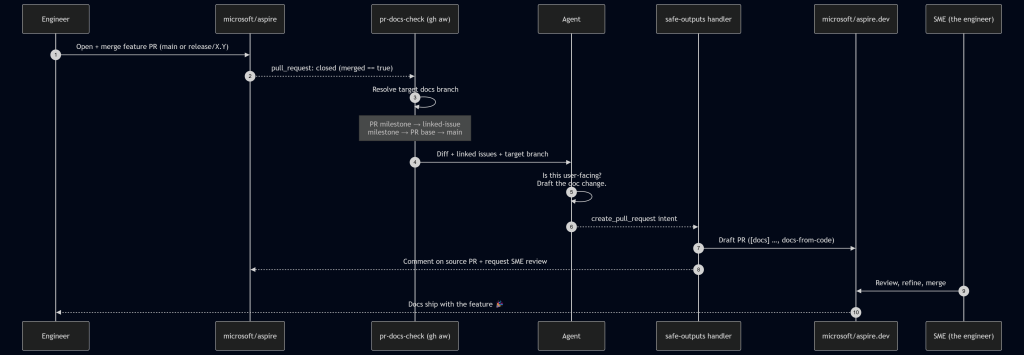
Here’s the flow we landed on. The protagonist is a workflow called pr-docs-check.md living in microsoft/aspire.
A run starts on pull_request: closed against main or release/*, gated by merged == true. From there, the workflow first runs a deterministic target branch resolver in plain bash before the agent ever wakes up:
Pull request milestone title (e.g. 13.4 → release/13.4 on aspire.dev).
Linked-issue milestone title (parse Fixes/Closes/Resolves #N from the body, fetch each issue, take the first non-empty milestone).
Pull request base ref, if it matches release/X.Y[.Z].
Fall back to main.
This is the linchpin. Milestones in the product repo map cleanly to release branches in the docs repo. When the agent finally runs, it knows exactly where the docs should land without any creative writing about target branches or guessing.
The agent reads the diff, scans linked issues, and decides: does this need docs? If yes, it drafts the actual content in a checked-out microsoft/aspire.dev workspace, following our existing doc-writer skill (voice, MDX conventions, Starlight components). It then emits a create_pull_request safe-output and hands off.
The safe-outputs handler takes over:
Title prefix: [docs]
Label: docs-from-code
draft: true (we never auto-merge)
Base branch: agent-supplied, restricted to main or release/*
Target repo: microsoft/aspire.dev
Reviewer: the SME identified from the source pull request’s reviews—i.e., whoever the product team trusted to approve the feature, now gets asked to approve the doc for that feature.
A companion job posts a marker comment back on the source pull request with the docs pull request link and minimizes any older pr-docs-check comments on re-run. The engineer who just hit Merge gets a notification within a few minutes: “Here’s the docs draft. Look it over?”
🔐 The safe-outputs contract
The whole security story comes down to a small, boring stretch of frontmatter:
That’s the deal in plain text. The agent gets a GitHub App token whose installation is scoped to exactly two repositories—the product repo and the docs repo—and nothing else in the org is reachable. It can only land pull requests against main or release/*. AGENTS.md and dependency manifests are off-limits by policy. If the pull request creation fails (network blip, conflict, anything), the framework falls back to filing an issue, so nothing is silently dropped.
This is the part security review actually liked. The agent’s reasoning is fuzzy. The action surface is not.
📊 By the numbers
Here are the stats from a rolling 30-day window (May 3 – June 2, 2026) spanning the back end of the Aspire 13.3 release and the run-up to 13.4:
Metric
Value
Product pull requests merged in microsoft/aspire
396 (338 main / 50 release/13.3 / 8 release/13.2)
pr-docs-check workflow runs
396
Draft docs pull requests created on microsoft/aspire.dev
82
– Merged
82 (100%)
– Closed without merge
0
– Still open
0
Docs pull requests target branches
52 → release/13.3, 27 → release/13.4, 3 → main
Median time-to-merge (docs)
44.8 hours
Merged within 24 h / 7 days
38% / 96%
Note: Numbers captured at the time of writing; the workflows keep running, so the totals only go up.
A few of those numbers deserve a second look:
396 runs → 82 pull requests is not a defect. The workflow runs on every merged pull request; most of them are internal refactors, test fixes, or dependency bumps with no user-facing surface. The agent saying “no docs needed” 300+ times is a feature.
100% merge rate says the agent’s docs picks are right. The tighter prompt we shipped after the v1 false-positive phase is paying off.
✅ What worked, ❌ what didn’t
What worked
✅ Milestone → release-branch mapping. This was the single highest-leverage choice we made. Engineers already set milestones on pull requests and issues; we got accurate target-branch routing for free.
✅ Draft-only, SME-as-reviewer. The agent never merges. The engineer who shipped the feature is the one who confirms the docs are right. We’ve stopped reverse-engineering features at the doc layer. The engineer just tells the docs draft what to say, in the place where they already are.
✅ Scoped GitHub app per workflow. Each workflow gets its own app token with explicit repo and permission scopes. Security review approved. We approved too; the first time we needed to rotate keys.
✅ protected-files: blocked. The agent cannot touch AGENTS.md, package manifests, or repo security config. Period.
What didn’t (at first)
❌ The agent’s “is this docs-worthy?” gate was too generous in the first version. It drafted pull requests for changes that were genuinely internal, such as a CI tweak or a logging refactor. The result: 9 closures of 69 pull requests (≈13%), so we tightened the prompt’s user-facing-change definition and added explicit negative examples (CI, internal helpers, tests-only). Now, the rate is trending down.
❌ Cross-repo pull request creation needed a mirrored checkout pattern that wasn’t obvious from the docs. The agent works in one repo; safe-outputs needs to find the target repo to push a branch. We solved it by checking out microsoft/aspire.dev twice—once as the current workspace, once under _repos/aspire.dev—so the safe-outputs handler can rediscover it deterministically.
❌ Big diffs blow prompt budgets. We pre-extract pull request metadata (linked issues, milestone, base ref) in pre-agent-steps bash, so the agent gets a small, structured summary instead of a giant payload. This is GitHub Agentic Workflow’s designed-in pattern, and it works.
Wrapping up
The changes we made shifted our thinking. A feature wasn’t considered done until the docs were. Docs no longer trail along behind it like a tin can on a string. The engineer’s review is the gate; the bot does the typing.
Critically, this doesn’t replace docs writers; it un-burdens them. Our writers used to spend most of their time reverse-engineering features. Now they spend their time on the things only a human can do well: narrative pages, sample programs, conceptual walkthroughs, the parts of the docs that don’t fall out of a diff. The bot handles the mechanical “this new option was added; here’s the reference page update” work that was never enjoyable for anyone.
Huge thanks to the GitHub Next team for GitHub Agentic Workflows (and for making the safe-outputs primitive a first-class part of the design), and to Chris Swithinbank and the Starlight maintainers for the docs platform we automate into. A genuine thank-you, too, to the security folks whose guardrails forced us to design this the right way the first time. The boring secret of good automation is that strong security constraints make the system more trustworthy and more correct.
If you build a product in one repo and ship docs in another—and especially if you have to do it inside any nontrivial security boundary—GitHub Agentic Workflows is worth a serious look. Start with one workflow, such as pr-docs-check, and watch what happens to your median time-to-docs.
🔗 The other workflows
pr-docs-check is the one I wrote this post about, but it’s not running alone. If you’re curious about the rest, the source is public:
milestone-changelog.md: runs every two hours, picks up newly merged pull requests in the active milestone, and maintains a 13.x-Change-log wiki page (new features, improvements, notable bug fixes) with a companion editorial-feedback issue. 346 runs.
release-update-support-mdx.md: on a stable Aspire release, drafts a [support] pull request on aspire.dev that updates the support policy page (promotes the new version, demotes the previous one, refreshes the “Last updated” badge).
update-integration-data.md: lives in the docs repo; runs pnpm update:all daily, refreshes NuGet metadata + GitHub stats + sample data, and opens a chore: Update integration data PR with supersede-and-close logic for stale runs. 27 runs, eight merged pull requests.
repo-pulse.md: a rolling three-day repo dashboard pinned to a single issue and updated in place: recent merges, pull requests awaiting review, new issues, discussion activity. One issue, always fresh.
When you’re working through a backlog—opening an issue, jumping to a linked thread, then back to the list—latency isn’t just a metric. It’s a context switch. Even small delays add up, and they hit hardest at the exact moments developers are trying to stay in flow. It’s not that GitHub Issues was “slow” in isolation; it’s that too many navigations still paid the cost of redundant data fetching, breaking flow again and again.
Earlier this year, we set out to fix that—not by chasing marginal backend wins, but by changing how issue pages load end-to-end. Our approach was to shift work to the client and optimize perceived latency: render instantly from locally available data, then revalidate in the background. To make that work, we built a client-side caching layer backed by IndexedDB, added a preheating strategy to improve cache hit rates without spamming requests, and introduced a service worker so cached data remains usable even on hard navigations.
In this post, we’ll walk through how the system works and what changed in practice. We’ll cover the metric we optimized for; the caching and preheating architecture; how the service worker speeds up navigation paths that used to be slow; and the results across real-world usage. We’ll also dig into the tradeoffs—because this approach isn’t free—and what still needs to happen to make “fast” the default across every path into Issues. If you’re building a data-heavy web app, these patterns are directly transferable: you can apply the same model to reduce perceived latency in your own system without waiting for a full rewrite.
The speed of thought: Web performance in 2026
In 2026, “fast enough” is not a competitive bar. For developer tools, latency is product quality. When someone is triaging multiple issues, reviewing a feature request or reporting a bug, every avoidable wait breaks flow.
Modern local-first tools and aggressively optimized clients have moved the standard from “loads in a second” to “feels instant.” In this world, users do not benchmark us against old web apps. They benchmark us against the fastest experience they have ever had every day.
GitHub Issues is not a small surface area. Every week millions of people around the world rely on Issues to keep their codebase running smoothly. As Issues also becomes the planning layer for AI-assisted work, perceived performance becomes even more critical: if the loop between intent and feedback is slow, the entire system feels slow.
We heard the same problems from both internal teams and the community: Issues felt too heavy compared to tools built with speed as a first principle. The bottleneck was not feature depth or correctness. It was architecture and request lifecycle. Too many common paths still paid the full cost of server rendering, network fetches, and client boot, even when data had effectively been seen before.
Our Issues Performance team’s job was to close that gap. The objective was straightforward and technical: redesign data flow and navigation behavior so the product feels instant by default.
Before changing architecture, we needed to align on what “fast” means in user terms and how to measure it. Generic page metrics are useful, but they are not sufficient for a complex product surface like Issues.
We use HPC (Highest Priority Content), an internal metric closely aligned with Web Vitals LCP, to measure when the primary content (the content users care about) on the page is first rendered. Like LCP, this is anchored to a single HTML element selected by the browser, which on issue pages is most often the issue title or the issue body. If that element is rendered quickly, the experience feels responsive even if non-critical page regions are still loading.
Operationally, we bucket navigations using HPC thresholds:
Instant: HPC < 200 ms
Fast: HPC < 1000 ms
Slow: HPC >= 1000 ms
These thresholds give us a practical model for user-perceived speed, not just raw backend latency. The <200 ms bucket maps to interactions that feel immediate in real workflows, while the <1000 ms bucket captures experiences that are still acceptable but no longer invisible to users.
This is also the point at which our measurement philosophy evolved. Historically, we dedicated significant effort to tracking the p90 and p99 of the HPC and minimizing the worst tail of the distribution. While this work remains important, it does not inherently ensure that the product feels fast for the majority of users. It is possible to enhance the p99 of the HPC while still leaving the median experience feeling sluggish.
For this initiative, we shifted focus toward distribution quality: how many navigations land in our fast and instant buckets across the whole population? The goal is not just fewer terrible outliers. It’s to make speed the default path for the majority of sessions.
The baseline: Navigation mix before we changed anything
Before implementing optimizations, we needed a clear model of how users were actually reaching issues#show (the route for viewing an issue). Treating all navigations as one class of traffic would hide the real bottlenecks.
We identified three primary navigation types:
Hard navigation: a full browser load (cold start or refresh) where we pay the full cost of network, server rendering, asset loading, JavaScript boot and React hydration.
Turbo navigation: a Rails Turbo transition that updates targeted page regions without a full reload. It avoids some hard-navigation overhead but still depends heavily on server-rendered responses.
Soft navigation (React): a client-side transition inside the existing React runtime, where we can often avoid full page bootstrap costs.
Our measured distribution at the start of the workstream was:
That distribution made one thing obvious: the dominant path was also the slowest. Any strategy focused only on React soft navigations could improve part of the experience, but it could not move overall perceived performance enough on its own.
This baseline shaped our next architecture decisions: improve the fast paths and reduce the hard-navigation penalty, because that’s where most users were seeing the most latency.
One thing to note: GitHub is still in the middle of moving from Rails-rendered pages to a React frontend. During that transition, many user journeys cross the Rails/React boundary. When that happens—for example, navigating from a Rails page into Issues—the browser often has to do a full hard navigation and cold boot. That boundary crossing is a big reason hard navigations made up the largest share of our baseline.
We expect that share of hard navigations to decrease over time as more surfaces become React-native. But we could not wait for platform migration alone to solve our problem. We started by optimizing React soft navigations first, where we had immediate architectural leverage and could ship improvements quickly.
Once we aligned on the target, our strategy became clear: build a local-first application model with stale-while-revalidate. That means rendering immediately from locally available data to minimize user-visible latency, then asynchronously revalidating against the server and reconciling the UI if newer data exists.
Step 1: Client-side caching with IndexedDB
We started where we had the most leverage and where we want to move most traffic in the future: React soft navigations. In this path, the runtime is already alive, so the dominant cost is usually data fetch latency, not application boot. If we could remove network from repeated visits, we could move a large slice of traffic into the instant bucket.
Our pre-workstream analysis showed a strong repeated-access pattern: users reopen the same issues frequently during triage and collaboration loops. Based on that behavior, we estimated a potential cache-hit ratio of roughly 30% for issues#show and used that as the initial viability threshold.
The implementation was to extend our current in-memory store with a persistent client cache in IndexedDB.
Why we chose IndexedDB for this layer:
Durable browser storage that survives tab closes and browser restarts, unlike memory-only stores.
Indexed object-store model, which gives efficient key-based lookups for issue query payloads.
Larger practical quota than localStorage, making it appropriate for real working sets.
On top of that storage layer, we implemented stale-while-revalidate semantics:
Read path: on soft navigation, attempt to hydrate from local cache first and render immediately.
Revalidation path: issue a background network request for freshness and reconcile the in-memory store if data changed.
Failure behavior: when network is degraded, users still get a usable page from cache, with freshness reconciled once connectivity recovers, introducing a new graceful-degradation model.
The architectural point is that this is not “cache or correctness.” It is latency-first rendering with asynchronous consistency checks on the same navigation.
Initial production results validated the model. After broad rollout to all users, approximately 22% of React navigations became instant—up from 4% pre-launch—representing about 15% of total request volume. Observed cache-hit ratio landed around one-third (~33%), which was consistent with the earlier revisit analysis.
The main tradeoff is controlled staleness. We measured server/cache divergence at about 4.7% and treated that as an explicit operating envelope: acceptable for the perceived speed gains on soft navigations, with safeguards to limit user-visible inconsistency.
Moving the needle on cache-hit ratios
Caching is only as good as its cache-hit ratio. The IndexedDB-backed SWR (Stale-While-Revalidate) layer gave us a strong first step, but a one-third hit rate also exposed the next limitation: most navigations still arrived before the data did.
The naive answer was obvious: prefetch every likely next issue as early as possible. We explored that direction and quickly ran into the real constraint, which was not implementation complexity but capacity. On high-fanout surfaces such as issue lists, dashboards, and projects, eager prefetching amplifies request volume, creates N+1-style access patterns and pushes unnecessary compute onto the system for pages a user may never open.
So we changed the objective. Instead of trying to make prefetched data always fresh, we optimized for a cheaper and more scalable condition: make sure some usable data is already local by the time the user clicks.
That is preheating. Preheating proactively walks high-intent issue references and prepares cache entries ahead of navigation, but it only hits the network when the issue is not already present in the client cache. If usable data already exists, preheating stops. This makes it fundamentally different from traditional preloading. It is cache-population logic, not freshness-enforcement logic.
This is an explicit tradeoff between freshness and capacity usage. We are willing to serve data that may be slightly stale if that allows the navigation itself to complete near instantaneous, because once the user opens the issue, we can still revalidate in the background and converge to the latest server state.
To support that model efficiently, we introduced an in-memory cache version in front of IndexedDB. IndexedDB gives persistence across tabs and sessions, but it is still asynchronous and therefore not free on the critical path. The in-memory layer sits between the active in-memory store and persistent storage, allowing hot issue payloads to be served synchronously without paying even the IndexedDB read cost. In practice, this removes another async boundary from soft navigation and materially increases the probability of rendering directly from memory.
Operationally, preheating is triggered from high-intent surfaces such as issue lists, dashboards, projects, and dependency views. Requests run on low-priority workers, are strictly rate-limited and are guarded by circuit breakers, so the mechanism backs off under pressure. User-initiated work always takes precedence over speculative fetches, allowing us to avoid the noisy-neighbor problem and keep the system stable while still improving cache-hit ratios for real user navigations.
The result was a large shift in distribution. After rolling out preheating broadly, instant navigations for issues#show increased to roughly 30% overall. For React navigations specifically, up to ~70% became instant. Cache-hit ratio rose to roughly 96%.
That tradeoff was acceptable. We spent a small amount of controlled background capacity to move a large percentage of real user navigations out of the network-bound path.
Expanding the fast path: Optimizing turbo and hard navigations
We were happy with the React navigation gains, but soft navigations aren’t the whole story. Even as more of GitHub moves from Rails to React, hard navigations will always exist—refreshes, new tabs, direct URLs, and inbound links. Those cold starts still matter, so we wanted cached data to help there too.
The mechanism we chose was a service worker.
A service worker is a browser-managed script that runs outside the page itself and can intercept network requests before they reach the server. Conceptually, it sits between the browser and the origin as a programmable middleman. That makes it one of the few web platform primitives that can influence hard navigations without requiring the page’s JavaScript runtime to already be active.
For issues#show, our service worker extends the same local-first model we built for React navigations. When the browser starts a navigation request for an issue page, the service worker intercepts it and checks whether the issue data is already available in local cache. If it is, the worker annotates the outgoing request with a specific header that tells the server it can skip a substantial amount of work.
When the service worker detects a cache hit, it signals to the server via a request header. From there, the navigation splits into two paths:
Cache hit path: return a thin HTML shell (layout + minimal markup + JS), and let React render from the locally cached issue payload.
Cache miss path: return the normal response (server loads data and SSRs the page).
This is a strict optimization: if the cache is cold, stale, or the service worker isn’t available, behavior falls back to the standard server-rendered path.
This had an especially strong effect on Turbo navigations, because Turbo paths are still heavily constrained by server response time. Once the service worker can signal that issue data is already present, the server spends much less time computing the application fragment, and Turbo benefits almost immediately from that reduction in backend work.
Hard-navigation gains are real, but they are less immediately visible than Turbo gains: on cache-hit hard navigations, so we trade SSR time for client-side rendering. The critical path now becomes JavaScript download and execution.
To reduce that cost, we split code by route using React.lazy and dynamic route preloading, so only the code required for the current route is fetched up front. We apply the same principle at the component level, loading only what’s necessary for the initial view and deferring non-critical modules. For example, we only fetch the issue editor bundle when a user enters edit mode, and use intent-based prefetching (like hover) to hide that latency without bloating the initial bundle.
The results
After deploying these changes, we wanted to step back and look at the cumulative impact. We analyzed the HPC metric across the entire rollout period—from the initial IndexedDB cache through preheating, in-memory layering, and the service worker—and the trend is clear and sustained: the distribution is shifting toward fast.
Rather than cherry-pick a single good week, we looked at the full window to share some concrete wins from recent months. Below are the HPC percentiles across all issues#show traffic:
P10: ~600 ms → 70 ms — the fastest navigations moved firmly into the instant bucket, well below 200 ms.
P25: ~800 ms → 120 ms — a quarter of all navigations now complete in under 120 ms, down from nearly a full second.
P50: ~1,200 ms → 700 ms — the median experience crossed below the one-second threshold, moving from the slow bucket into fast.
P75: 1,800 ms → 1,400 ms — the upper quartile dropped by over 400 ms, shrinking the long tail of perceptible latency.
P90: 2,400 ms → 2,100 ms — even the slowest navigations improved, though this tail remains the clearest signal of where further work is needed.
The pattern that stands out is the outsized improvement in the lower percentiles. P10 and P25 compressed dramatically because cached and preheated navigations now dominate that part of the distribution. The median improved meaningfully but is still shaped by cold-start traffic. And the upper tail, while better, reflects the hard-navigation paths where JavaScript boot and client rendering are now the bottleneck—exactly the area we are targeting next.
Numbers tell the optimization story, but what ultimately matters is the user impact. The video below shows what these changes feel like in practice—navigating between issues at full speed in a real session:
The work ahead
GitHub Issues is faster today than it has ever been. Across soft navigations, preheated paths, and service-worker-accelerated flows, we have materially changed the distribution of user-perceived latency and moved a much larger share of traffic into the instant bucket.
At the same time, we are not done. Cold starts that rely on SSR are still a real hurdle, especially when client boot and JavaScript execution become the dominant cost after server work is reduced.
The next phase is about moving bigger rocks. We are planning targeted rewrites of parts of our backend stack optimized explicitly for low-latency delivery and are investing in a modern UI delivery layer closer to the edge to reduce round trips and improve response time further.
Performance remains a continuous systems investment, not a one-time project. The architecture is improving, the bottlenecks are changing, and we will keep iterating until fast is the default experience across all navigation paths.
Pull requests are the beating heart of GitHub. As engineers, this is where we spend a good portion of our time. And at GitHub’s scale—where pull requests can range from tiny one-line fixes to changes spanning thousands of files and millions of lines—the pull request review experience has to stay fast and responsive.
We recently shipped the new React-based experience for the Files changed tab (now the default experience for all users). One of our main goals was to ensure a more performant experience across the board, especially for large pull requests. That meant investing in, and consistently prioritizing, the hard problems like optimized rendering, interaction latency, and memory consumption.
For most users before optimization, the experience was fast and responsive. But when viewing large pull requests, performance would noticeably decline. For example, we observed that in extreme cases, the JavaScript heap could exceed 1 GB, DOM node counts surpassed 400,000, and page interactions became extremely sluggish or even unusable. Interaction to Next Paint (INP) scores (a key metric in determining responsiveness) were above acceptable levels, resulting in an experience where users could quantifiably feel the input lag.
Our recent improvements to the Files changed tab have meaningfully improved some of these core performance metrics. While we covered several of these changes briefly in a recent changelog, we’re going to cover them in more detail here. Read on for why they mattered, what we measured, and how those updates improved responsiveness and memory pressure across the board and especially in large pull requests.
Performance improvements by pull request size and complexity
As we started to investigate and plan our next steps for improving these performance issues, it became clear early on that there wouldn’t be one silver bullet. Techniques that preserve every feature and browser-native behavior can still hit a ceiling at the extreme end. Meanwhile, mitigations designed to keep the worst-case from tipping over can be the wrong tradeoff for everyday reviews.
Instead of looking for a single solution, we began developing a set of strategies. We selected multiple targeted approaches, each designed to address a specific pull request size and complexity.
Those strategies focused on the following themes:
Focused optimizations for diff-line components. Make the primary diff experience efficient for most pull requests. Medium and large reviews stay fast without sacrificing expected behavior, like native find-in-page.
Gracefully degrade with virtualization. Keep the experience usable for the largest pull requests. Prioritize responsiveness and stability by limiting what is rendered at any moment.
Invest in foundational components and rendering improvements. These compound across every pull request size, regardless of which mode a user ends up in.
With these strategies in mind, let’s explore the specific steps we took to address these challenges and how our initial iterations set the stage for the improvements that followed.
First steps: Optimizing diff lines
With our team’s goal of improving pull request performance, we had three main objectives:
Reduce memory and JavaScript heap size.
Reduce the DOM node count.
Reduce our average INP and significantly improve our p95 and p99 measurements
To hit these goals, we focused on simplification: less state, fewer elements, less JavaScript, and fewer React components. Before we look at the results and new architecture, let’s take a step back and look at where we started.
What worked and what didn’t with v1
In v1, each diff line was expensive to render. In unified view, a single line required roughly 10 DOM elements; in split view, closer to 15. That’s before syntax highlighting, which adds many more <span> tags and drives the DOM count even higher.
The following is a simplified visual of the React Component structure mixed with the DOM tree elements for v1 diffs.
At the React layer, unified diffs typically contain at least eight components per line, while the split view contain a minimum of 13. And these numbers represent baseline counts; extra UI states like comments, hover, and focus could add more components on top.
This approach made sense to us in v1, when we first ported the diff lines to React from our classic Rails view. Our original plan centered around lots of small reusable React components and maintaining DOM tree structure.
But we also ended up attaching a lot of React event handlers in our small components, often five to six per component. On a small scale, that was fine, but on a large scale that compounded quickly. A single diff line could carry 20+ event handlers multiplied across thousands of lines.
Beyond performance impact, it also increased complexity for developers. This is a familiar scenario where you implement an initial design, only to discover later its limitations when faced with the demands of unbounded data.
To summarize, for every v1 diff line there would be:
Minimum of 10-15 DOM tree elements
Minimum of 8-13 React Components
Minimum of 20 React Event Handlers
Lots of small re-usable React Components
This v1 strategy proved unsustainable for our largest pull requests, as we consistently observed that larger pull request sizes directly led to slower INP and increased JavaScript heap usage. We needed to determine the best path for improving this setup.
Small changes make a large impact: v2
No change is too small when it comes to performance, especially at scale. For example, we removed unnecessary <code> tags from our line number cells. While dropping two DOM nodes per diff line might appear minor, across 10,000 lines, that’s 20,000 fewer nodes in the DOM. These kinds of targeted, incremental optimizations, no matter how small, compound to create a much faster and more efficient experience. By not overlooking these details, we ensured that every opportunity for improvement was captured, amplifying the overall impact on our largest pull requests.
Refer to the images below to see how v1 looks compared to v2.
This becomes clearer if we look at the component structure behind this HTML:
We went from eight components per diff line to two. Most of the v1 components were thin wrappers that let us share code between Split and Unified views. But that abstraction had a cost: each wrapper carried logic for both views, even though only one rendered at a time. In v2, we gave each view its own dedicated component. Some code is duplicated, but the result is simpler and faster.
Simplifying the component tree
For v2, we removed deeply nested component trees, opting for dedicated components for each split and unified diff line. While this led to some code duplication, it simplified data access and reduced complexity.
Event handling is now managed by a single top-level handler using data-attribute values. So, for instance, when you click and drag to select multiple diff lines, the handler checks each event’s data-attribute to determine which lines to highlight, instead of each line having its own mouse enter function. This approach streamlines both code and improves performance.
Moving complex state to conditionally rendered child components
The most impactful change from v1 to v2 was moving app state for commenting and context menus into their respective components. Given GitHub’s scale, where some pull requests exceed thousands of lines of code, it isn’t practical for every line to carry complex commenting state when only a small subset of lines will ever have comments or menus open. By moving the commenting state into the nested components for each diff line, we ensured that the diff-line component’s main responsibility is just rendering code—aligning more closely with the Single Responsibility Principle.
O(1) data access and less “useEffect” hooks
In v1, we gradually accumulated a lot of O(n) lookups across shared data stores and component state. We also introduced extra re-rendering through useEffect hooks scattered throughout the diff-line component tree.
To address this in v2, we adopted a two-part strategy. First, we restricted useEffect usage strictly to the top level of diff files. We also established linting rules to prevent the introduction of useEffect hooks in line-wrapping React components. This approach enables accurate memoization of diff line components and ensures reliable, predictable behavior.
Next, we redesigned our global and diff state machines to utilize O(1) constant time lookups by employing JavaScript Map. This let us build fast, consistent selectors for common operations throughout our codebase, such as line selection and comment management. These changes have enhanced code quality, improved performance, and reduced complexity by maintaining flattened, mapped data structures.
Now, any given diff line simply checks a map by passing the file path and the line number to determine whether or not there are comments on that line. An access might look like: commentsMap[‘path/to/file.tsx’][‘L8’]
Did it work?
Definitely. The page runs faster than it ever did, and JavaScript heap and INP numbers are massively reduced. For a numeric look, check out the results below. These metrics were evaluated on a pull request using a split diff setting with 10,000 line changes in the diff comparison.
Metric
v1
v2
Improvement
Total lines of code
2,800
2,000
27% less
Total unique component types
19
10
47% fewer
Total components rendered
~183,504
~50,004
74% fewer
Total DOM nodes
~200,000
~180,000
10% fewer
Total memory usage
~150-250 MB
~80-120 MB
~50% less
INP on a large pull request using m1 MacBook pro with 4x slowdown:
~450 ms
~100 ms
~78% faster
As you can see, this effort had a massive impact, but the improvements didn’t end there.
Virtualization for our largest pull requests
When you’re working with massive pull requests—p95+ (those with over 10,000 diff lines and surrounding context lines)—the usual performance tricks just don’t cut it. Even the most efficient components will struggle if we try to render tens of thousands of them at once. That’s where window virtualization steps in.
In front-end development, window virtualization is a technique that keeps only the visible portion of a large list or dataset in the DOM at any given time. Instead of loading everything (which would crush memory and slow things to a crawl), it dynamically renders just what you see on screen, and swaps in new elements as you scroll. This approach is like having a moving “window” over your data, so your browser isn’t bogged down by off-screen content.
To make this happen, we integrated TanStack Virtual into our diff view, ensuring that only the visible portion of the diff list is present in the DOM at any time. The impact was huge: we saw a 10X reduction in JavaScript heap usage and DOM nodes for p95+ pull requests. INP fell from 275–700+ milliseconds (ms) to just 40–80 ms for those big pull requests. By only showing what’s needed, the experience is much faster.
Further performance optimizations
To push performance even further, we tackled several major areas across our stack, each delivering meaningful wins for speed and responsiveness. By focusing on trimming unnecessary React re-renders and honing our state management, we cut down wasted computation, making UI updates noticeably faster and interactions smoother.
On the styling front, we swapped out heavy CSS selectors (e.g. :has(...)) and re-engineered drag and resize handling with GPU transforms, eliminating forced layouts and sluggishness and giving users a crisp, efficient interface for complex actions.
We also stepped up our monitoring game with interaction-level INP tracking, diff-size segmentation, and memory tagging, all surfaced in a Datadog dashboard. This continues to give our developers real-time, actionable metrics to spot and squash bottlenecks before they become issues.
On the server side, we optimized rendering to hydrate only visible diff lines. This slashed our time-to-interactive and keeps memory usage in check, ensuring that even huge pull requests feel fast and responsive on load.
Finally, with progressive diff loading and smart background fetches, users are now able to see and interact with content sooner. No more waiting for a massive number of diffs to finish loading.
All together, these targeted optimizations made our UI feel lighter, faster, and ready for anything our users throw at it.
Diff-initely better: The power of streamlined performance
This exciting journey to streamline the diff line architecture yielded substantial improvements in performance, efficiency and maintainability. By reducing unnecessary DOM nodes, simplifying our React component tree, and relocating complex state to conditionally rendered child components, we achieved faster rendering times and lower memory consumption. The adoption of more O(1) data access patterns and stricter rules for state management further optimized performance. This made our UI more responsive (faster INP!) and easier to reason with.
These measurable gains demonstrate that targeted refactoring, even within our large and mature codebase, can deliver meaningful benefits to all users—and that sometimes focusing on small, simple improvements can have the largest impact. To see the performance gains in action, go check out your open pull requests.
I may have just automated myself into a completely different job…
This is a familiar pattern among software engineers, who often, through inspiration, frustration, or sometimes even laziness, build systems to remove toil and focus on more creative work. We then end up owning and maintaining those systems, unlocking that automated goodness for the rest of those around us.
As an AI researcher, I recently took this beyond what was previously possible and have automated away my intellectual toil. And now I find myself maintaining this tool to enable all my peers on the Copilot Applied Science team to do the same.
During this process, I learned a lot about how to effectively create and collaborate using GitHub Copilot. Applying these learnings has unlocked an incredibly fast development loop for myself as well as enabled my team mates to build solutions to fit their needs.
Before I get into explaining how I made this possible, let me set the stage for what spawned this project so you better understand the scope of what you can do with GitHub Copilot.
The impetus
A large part of my job involves analyzing coding agent performance as measured against standardized evaluation benchmarks, like TerminalBench2 or SWEBench-Pro. This often involves poring through tons of what are called trajectories, which are essentially lists of the thought processes and actions agents take while performing tasks.
Each task in an evaluation dataset produces its own trajectory, showing how the agent attempted to solve that task. These trajectories are often .json files with hundreds of lines of code. Multiply that over dozens of tasks in a benchmark set and again over the many benchmark runs needing analysis on any given day, and we’re talking hundreds of thousands of lines of code to analyze.
It’s an impossible task to do alone, so I would typically turn to AI to help. When analyzing new benchmark runs, I found that I kept repeating the same loop: I used GitHub Copilot to surface patterns in the trajectories then investigated them myself—reducing the number of lines of code I had to read from hundreds of thousands to a few hundred.
However, the engineer in me saw this repetitive task and said, “I want to automate that.” Agents provide us with the means to automate this kind of intellectual work, and thus eval-agents was born.
The plan
Engineering and science teams work better together. That was my guiding principle as I set about solving this new challenge.
Thus, I approached the design and implementation strategy of this project with a couple of goals in mind:
Make these agents easy to share and use
Make it easy to author new agents
Make coding agents the primary vehicle for contributions
Bullets one and two are in GitHub’s lifeblood and are values and skills I’ve gained throughout my career, especially during my stint as an OSS maintainer on the GitHub CLI.
However, goal three shaped the project the most. I noticed that when I set GitHub Copilot up to help me build the tool effectively, it also made the project easier to use and collaborate on. That experience taught me a few key lessons, which ultimately helped push the first and second goals forward in ways I didn’t expect.
Making coding agents your primary contributor
I’ll start by describing my agentic coding setup:
Coding agent: Copilot CLI
Model used: Claude Opus 4.6
IDE: VSCode
It’s also noteworthy that I leveraged the Copilot SDK to accelerate agent creation, which is powered under the hood by the Copilot CLI. This gave me access to existing tools and MCP servers, a way to register new tools and skills, and a whole bunch of other agentic goodness out of the box that I didn’t have to reinvent myself.
With that out of the way, I could streamline the whole development process very quickly by following a few core principles:
Prompting strategies: agents work best when you’re conversational, verbose, and when you leverage planning modes before agent modes.
Architectural strategies: refactor often, update docs often, clean up often.
Iteration strategies: “trust but verify” is now “blame process, not agents.”
Uncovering and following these strategies led to an incredible phenomenon: adding new agents and features was fast and easy. We had five folks jump into the project for the first time, and we created a total of 11 new agents, four new skills, and the concept of eval-agent workflows (think scientist streams of reasoning) in less than three days. That amounted to a change of +28,858/-2,884 lines of code across 345 files.
Holy crap!
Below, I’ll go into detail about these three principles and how they enabled this amazing feat of collaboration and innovation.
Prompting strategies
We know that AI coding agents are really good at solving well-scoped problems but need handholding for the more complex problems you’d only entrust to your more senior engineers.
So, if you want your agent to act like an engineer, treat it like one. Guide its thinking, over-explain your assumptions, and leverage its research speed to plan before jumping into changes. I found it far more effective to put some stream-of-consciousness musings about a problem I was chewing on into a prompt and working with Copilot in planning mode than to give it a terse problem statement or solution.
Here’s an example of a prompt I wrote to add more robust regression tests to the tool:
> /plan I've recently observed Copilot happily updating tests to fit its new paradigms even though those tests shouldn't be updated. How can I create a reserved test space that Copilot can't touch or must reserve to protect against regressions?
This resulted in a back and forth that ultimately led to a series of guardrails akin to contract testing that can only be updated by humans. I had an idea of what I wanted, and through conversation, Copilot helped me get to the right solution.
It turns out that the things that make human engineers the most effective at doing their jobs are the same things that make these agents effective at doing theirs.
Architectural strategies
Engineers, rejoice! Remember all those refactors you wanted to do to make the codebase more readable, the tests you never had time to write, and the docs you wish had existed when you onboarded? They’re now the most important thing you can be working on when building an agent-first repository.
Gone are the days where deprioritizing this work over new feature work was necessary, because delivering features with Copilot becomes trivial when you have a well-maintained, agent-first project.
I’ve spent most of my time on this project refactoring names and file structures, documenting new features or patterns, and adding test cases for problems that I’ve uncovered as I go. I’ve even spent a few cycles cleaning up the dead code that the agents (like your junior engineers) may have missed while implementing all these new features and changes.
This work makes it easy for Copilot to navigate the codebase and understand the patterns, just like it would for any other engineer.
I can even ask, “Knowing what I know now, how would I design this differently?” And I can then justify actually going back and rearchitecting the whole project (with the help of Copilot, of course).
It’s a dream come true!
And this leads me to my last bit of guidance.
Iteration strategies
As agents and models have improved, I have moved from a “trust but verify” mindset to one that is more trusting than doubtful. This mirrors how the industry treats human teams: “blame process, not people.” It’s how the most effective teams operate, because people make mistakes, so we build systems around that reality.
This idea of blameless culture provides psychological safety for teams to iterate and innovate, knowing that they won’t be blamed if they make a mistake. The core principle is that we implement processes and guardrails to protect against mistakes, and if a mistake does happen, we learn from it and introduce new processes and guardrails so that our teams won’t make the same mistake again.
Applying this same philosophy to agent-driven development has been fundamental to unlocking this incredibly rapid iteration pipeline. That means we add processes and guardrails to help prevent the agent from making mistakes, but when it does make a mistake, we add additional guardrails and processes—like more robust tests and better prompts—so the agent can’t make the same mistake again. Taking this one step further means that practicing good CI/CD principles is a must.
Practices like strict typing ensure the agent conforms to interfaces. Robust linters impose implementation rules on the agent that keep it following good patterns and practices. And integration, end-to-end, and contract tests—which can be expensive to build manually—become much cheaper to implement with agent assistance, while giving you confidence that new changes don’t break existing features.
When Copilot has these tools available in its development loop, it can check its own work. You’re setting it up for success, much in the same way you’d set up a junior engineer for success in your project.
Putting it all together
Here’s what all this means for your development loop when you’ve got your codebase set up for agent-driven development:
Plan a new feature with Copilot using /plan.
Iterate on the plan.
Ensure that testing is included in the plan.
Ensure that docs updates are included in the plan and done before code is implemented. These can serve as additional guidelines that live beside your plan.
Let Copilot implement the feature on /autopilot.
Prompt Copilot to initiate a review loop with the Copilot Code Review agent. For me, it’s often something like: request Copilot Code Review, wait for the review to finish, address any relevant comments, and then re-request review. Continue this loop until there are no more relevant comments.
Human review. This is where I enforce the patterns I discussed in the previous sections.
Additionally, outside of your feature loop, be sure you’re prompting Copilot early and often with the following:
/plan Review the code for any missing tests, any tests that may be broken, and dead code
/plan Review the code for any duplication or opportunities for abstraction
/plan Review the documentation and code to identify any documentation gaps. Be sure to update the copilot-instructions.md to reflect any relevant changes
I have these run automatically once a week, but I often find myself running them throughout the week as new features and fixes go in to maintain my agent-driven development environment.
Take this with you
What started as a frustration with an impossibly repetitive analysis task turned into something far more interesting: a new way of thinking about how we build software, how we collaborate, and how we grow as engineers.
Building agents with a coding agent-first mindset has fundamentally changed how I work. It’s not just about the automation wins—though watching four scientists ship 11 agents, four skills, and a brand-new concept in under three days is nothing short of remarkable. It’s about what this style of development forces you to prioritize: clean architecture, thorough documentation, meaningful tests, and thoughtful design—the things we always knew mattered but never had time for.
The analogy to a junior engineer keeps proving itself out. You onboard them well, give them clear context, build guardrails so their mistakes don’t become disasters, and then trust them to grow. If something goes wrong, you blame the process. Not the agent. If there’s one thing I want you to take away from this, it’s that the skills that make you a great engineer and a great teammate are the same skills that make you great at building with Copilot. The technology is new. The principles aren’t.
So go clean up that codebase, write that documentation you’ve been putting off, and start treating your Copilot like the newest member of your team. You might just automate yourself into the most interesting work of your career.
For years, accessibility feedback at GitHub didn’t have a clear place to go.
Unlike typical product feedback, accessibility issues don’t belong to any single team—they cut across the entire ecosystem. For example, a screen reader user might report a broken workflow that touches navigation, authentication, and settings. A keyboard-only user might hit a trap in a shared component used across dozens of pages. A low vision user might flag a color contrast issue that affects every surface using a shared design element. No single team owns any of these problems—but every one of them blocks a real person.
These reports require coordination that our existing processes weren’t originally built for. Feedback was often scattered across backlogs, bugs lingered without owners, and users followed up to silence. Improvements were often promised for a mythical “phase two” that rarely materialized.
We knew we needed to change this. But before we could build something better, we had to lay the groundwork—centralizing scattered reports, creating templates, and triaging years of backlog. Only once we had that foundation in place could we ask: How can AI make this easier?
The answer was an internal workflow, powered by GitHub Actions, GitHub Copilot, and GitHub Models, that ensures every piece of user and customer feedback becomes a tracked, prioritized issue. When someone reports an accessibility barrier, their feedback is captured, reviewed, and followed through until it’s addressed. We didn’t want AI to replace human judgment—we wanted it to handle repetitive work so humans could focus on fixing the software.
This is how we went from chaos to a system where every piece of accessibility feedback is tracked, prioritized, and acted on—not eventually, but continuously.
Accessibility as a living system
Continuous AI for accessibility weaves inclusion into the fabric of software development. It’s not a single product or a one-time audit—it’s a living methodology that combines automation, artificial intelligence, and human expertise.
This philosophy connects directly to our support for the 2025 Global Accessibility Awareness Day (GAAD) pledge: strengthening accessibility across the open source ecosystem by ensuring user and customer feedback is routed to the right teams and translated into meaningful platform improvements.
The most important breakthroughs rarely come from code scanners—they come from listening to real people. But listening at scale is hard, which is why we needed technology to help amplify those voices. We built a feedback workflow that functions less like a static ticketing system and more like a dynamic engine—leveraging GitHub products to clarify, structure, and track user and customer feedback, turning it into implementation-ready solutions.
Designing for people first
Before jumping into solutions, we stepped back to understand who this system needed to serve:
Issue submitters: Community managers, support agents, and sales reps submit issues on behalf of users and customers. They aren’t always accessibility experts, so they need a system that guides them and teaches accessibility concepts in the flow of work.
Accessibility and service teams: Engineers and designers responsible for fixes need structured, actionable data—reproducible steps, WCAG mapping, severity scores, and clear ownership.
Program and product managers: Leadership needs visibility into pain points by category, trends, and progress over time to allocate resources strategically.
With these personas in mind, we knew we wanted to 1) treat feedback as data flowing through a pipeline and 2) build a system able to evolve with us.
How feedback flows
With that foundation set, we built an architecture around an event-driven pattern, where each step triggers a GitHub Action that orchestrates what comes next—ensuring consistent handling no matter where the feedback originates. We built this system largely by hand starting in mid-2024. Today, tools like Agentic Workflows let you create GitHub Actions using natural language—meaning this kind of system could be built in a fraction of the time.
The workflow reacts to key events: Issue creation launches GitHub Copilot analysis via the GitHub Models API, status changes initiate hand-offs between teams, and resolution triggers submitter follow-up with the user. Every Action can also be triggered manually or re-run as needed—automation covers the common path, while humans can step in at any point.
Feedback isn’t just captured—it continuously flows through the right channels, providing visibility, structure, and actionability at every stage.
*Click images to enlarge.
1. Actioning intake
Feedback can come from anywhere—support tickets, social media posts, email, direct outreach—but most users choose the GitHub accessibility discussion board. It’s where they can work together and build community around shared experiences. Today, 90% of the accessibility feedback flows through that single channel. Because posts are public, other users can confirm the problem, add context, or suggest workarounds—so issues often arrive with richer detail than a support ticket ever could. Regardless of the source, every piece of feedback gets acknowledged within five business days, and even feedback we can’t act on gets a response pointing to helpful resources.
When feedback requires action from internal teams, a team member manually creates a tracking issue using our custom accessibility feedback issue template. Issue templates are pre-defined forms that standardize how information is collected when opening a new issue. The template captures the initial context—what the user reported, where it came from, and which components are involved—so nothing is lost between intake and triage.
This is where automation kicks in. Creating the issue triggers a GitHub Action that engages GitHub Copilot, and a second Action adds the issue to a project board, providing a centralized view of current status, surfacing trends, and helping identify emerging needs.
2. GitHub Copilot analysis
With the tracking issue created, a GitHub Action workflow programmatically calls the GitHub Models API to analyze the report. We chose stored prompts over model fine-tuning so that anyone on the team can update the AI’s behavior through a pull request—no retraining pipeline, no specialized ML knowledge required.
We configured GitHub Copilot using custom instructions developed by our accessibility subject matter experts. Our prompt serves two roles: triage analysis, which classifies issues by WCAG violation, severity, and affected user group, and accessibility coaching, where GitHub Copilot acts as a subject-matter expert to help teams write and review accessible code.
These instruction files point to our accessibility policies, component library, and internal documentation that details how we interpret and apply WCAG success criteria. When our standards evolve, the team updates the markdown and instruction files via pull request—the AI’s behavior changes with the next run, not the next training cycle. For a detailed walkthrough of this approach, see our guide on optimizing GitHub Copilot custom instructions for accessibility.
The automation works in two steps. First, an Action fires on issue creation and triggers GitHub Copilot to analyze the report. GitHub Copilot populates approximately 80% of the issue’s metadata automatically—over 40 data points including issue type, user segment, original source, affected components, and enough context to understand the user’s experience. The remaining 20% requires manual input from the team member. GitHub Copilot then posts a comment on the issue containing:
A summary of the problem and user impact
Suggested WCAG success criteria for potential violations
Severity level (sev1 through sev4, where sev1 is critical)
Impacted user groups (screen reader users, keyboard users, low vision users, etc.)
Recommended team assignment (design, engineering, or both)
A checklist of low-barrier accessibility tests so the submitter can verify the issue
Then a second Action fires on that comment, parses the response, applies labels based on the severity GitHub Copilot assigned, updates the issue’s status on the project board, and assigns it to the submitter for review.
If GitHub Copilot’s analysis seems off, anyone can flag it by opening an issue describing what it got wrong and what it should have said—feeding directly into our continuous improvement process.
3. Submitter review
Before we act on GitHub Copilot’s recommendations, two layers of review happen—starting with the issue submitter.
The submitter attempts to replicate the problem the user reported. The checklist GitHub Copilot provides in its comment guides our community managers, support agents, and sales reps through expert-level testing procedures—no accessibility expertise required. Each item includes plain-language explanations, step-by-step instructions, and links to tools and documentation.
Example questions include:
Can you navigate the page using only a keyboard? Press “Tab” to move through interactive elements. Can you reach all buttons, links, and form fields? Can you see where your focus is at all times?
Do images have descriptive alt text? Right-click an image and select “Inspect” to view the markup. Does the alt attribute describe the image’s purpose, or is it a generic file name?
Are interactive elements clearly labeled? Using a screen reader, navigate to a button or link. Is its purpose announced clearly? Alternatively, review the accessibility tree in your browser’s developer tools to inspect how elements are exposed to assistive technologies.
If the submitter can replicate the problem, they mark the issue as reviewed, which triggers the next GitHub Action. If they can’t reproduce it, they reach out to the user for more details. Once new information arrives, the submitter can re-run the GitHub Copilot analysis—either by manually triggering the Action from the Actions tab or by removing and re-adding the relevant label to kick it off automatically. AI provides the draft, but humans provide the verification.
4. Accessibility team review
Once the submitter marks the issue as reviewed, a GitHub Action updates its status on the workflow project board and adds it to a separate accessibility first responder board. This alerts the accessibility team—engineers, designers, champions, testing vendors, and managers—that GitHub Copilot’s analysis is ready for their review.
The team validates GitHub Copilot’s analysis—checking the severity level, WCAG mapping, and category labels—and corrects anything the AI got wrong. When there’s a discrepancy, we assume the human is correct. We log these corrections and use them to refine the prompt files, improving future accuracy.
Once validated, the team determines the resolution approach:
Documentation or settings update: Provide the solution directly to the user.
Code fix by the accessibility team: Create a pull request directly.
Service team needed: Assign the issue to the appropriate service team and track it through resolution.
With a path forward set, the team marks the issue as triaged. An Action then reassigns it to the submitter, who communicates the plan to the user—letting them know what’s being done and what to expect.
5. Linking to audits
As part of the review process, the team connects user and customer feedback to our formal accessibility audit system.
Roughly 75–80% of the time, reported issues correspond to something we already know about from internal audits. Instead of creating duplicates, we find the existing internal audit issue and add a customer-reported label. This lets us prioritize based on real-world impact—a sev2 issue might technically be less critical than a sev1, but if multiple users are reporting it, we bump up its priority.
If the feedback reveals something new, we create a new audit issue and link it to the tracking issue.
6. Closing the loop
This is the most critical step for trust. Users who take the time to report accessibility barriers deserve to know their feedback led to action.
Once a resolution path is set, the submitter reaches out to the original user to let them know the plan—what’s being fixed, and what to expect. When the fix ships, the submitter follows up again and asks the user to test it. Because most issues originate from the community discussion board, we post confirmations there for everyone to see.
If the user confirms the fix works, we close the tracking issue. If the fix doesn’t fully address the problem, the submitter gathers more details and the process loops back to the accessibility team review. We don’t close issues until the user confirms the fix works for them.
7. Continuous improvement
The workflow doesn’t end when an issue closes—it feeds back into itself.
When submitters or accessibility team members spot inaccuracies in GitHub Copilot’s output, they open a new issue requesting a review of the results. Every GitHub Copilot analysis comment includes a link to create this issue at the bottom, so the feedback loop is built into the workflow itself. The team reviews the inaccuracy, and the correction becomes a pull request to the custom instruction and prompt files described earlier.
We also automate the integration of new accessibility guidance. A separate GitHub Action scans our internal accessibility guide repository weekly and incorporates changes into GitHub Copilot’s custom instructions automatically.
The goal isn’t perfection—it’s continuous improvement. Each quarter, we review accuracy metrics and refine our instructions. These reviews feed into quarterly and fiscal year reports that track resolution times, WCAG failure patterns, and feedback volume trends—giving leadership visibility into both progress and persistent gaps. The system gets smarter over time, and now we have the data to show it.
Impact in numbers
A year ago, nearly half of accessibility feedback sat unresolved for over 300 days. Today, that backlog isn’t just smaller—it’s gone. And the improvements don’t stop there.
89% of issues now close within 90 days (up from 21%)
62% reduction in average resolution time (118 days → 45 days)
70% reduction in manual administrative time
1,150% increase in issues resolved within 30 days (4 → 50 year-over-year)
50% reduction in critical sev1 issues
100% of issues closed within 60 days in our most recent quarter
We track this through automated weekly and quarterly reports generated by GitHub Actions—surfacing which WCAG criteria fail most often and how resolution times trend over time.
Beyond the numbers
A user named James emailed us to report that the GitHub Copilot CLI was inaccessible. Decorative formatting created noise for screen readers, and interactive elements were impossible to navigate.
A team member created a tracking issue. Within moments, GitHub Copilot analyzed the report—mapping James’s description to specific technical concepts, linking to internal documentation, and providing reproduction steps so the submitter could experience the product exactly as James did.
With that context, the team member realized our engineering team had already shipped accessible CLI updates earlier in the year—James simply wasn’t aware.
They replied immediately. His response? “Thanks for pointing out the –screen-reader mode, which I think will help massively.”
Because the AI workflow identified the problem correctly, we turned a frustration into a resolution in hours.
But the most rewarding result isn’t the speed—it’s the feedback from users. Not just that we responded, but that the fixes actually worked for them:
“Huge thanks to the team for updating the contributions graph in the high contrast theme. The addition of borders around the grid edges is a small but meaningful improvement. Keep it up!”
“Let’s say you want to create several labels for your GitHub-powered workflow: bug, enhancement, dependency updates… But what if you are blind? Before you had only hex codes randomly thrown at you… now it’s fixed, and those colors have meaningful English names. Well done, GitHub!”
“This may not be very professional but I literally just screamed! This fix has actually made my day… Before this I was getting my wife to manage the GitHub issues but now I can actually navigate them by myself! It means a lot that I can now be a bit more independent so thank you again.”
That independence is the point. Every workflow, every automation, every review—it all exists so moments like these are the expectation, not the exception.
The bigger picture
Stories like these remind us why the foundation matters. Design annotations, code scanners, accessibility champions, and testing with people with disabilities—these aren’t replaced by AI. They are what make AI-assisted workflows effective. Without that human foundation, AI is just a faster way to miss the point.
We’re still learning, and the system is still evolving. But every piece of feedback teaches us something, and that knowledge now flows continuously back to our team, our users, and the tools we build.
If you maintain a repository—whether it’s a massive enterprise project or a weekend open-source library—you can build this kind of system today. Start small. Create an issue template for accessibility. Add a .github/copilot-instructions.md file with your team’s accessibility standards. Let AI handle the triage and formatting so your team can focus on what really matters: writing more inclusive code.
And if you hit an accessibility barrier while using GitHub, please share your feedback. It won’t disappear into a backlog. We’re listening—and now we have the system to follow through.
So much of what you interact with on GitHub depends on search—obviously the search bars and filtering experiences like the GitHub Issues page, but it is also the core of the releases page, projects page, the counts for issues and pull requests, and more. Given that search is such a core part of the GitHub platform, we’ve spent the last year making it even more durable. That means, less time spent managing GitHub Enterprise Server, and more time working on what your customers care most about.
In recent years, GitHub Enterprise Server administrators had to be especially careful with search indexes, the special database tables optimized for searching. If they didn’t follow maintenance or upgrade steps in exactly the right order, search indexes could become damaged and need repair, or they might get locked and cause problems during upgrades. Quick context if you’re not running High Availability (HA) setups, they’re designed to keep GitHub Enterprise Server running smoothly even if part of the system fails. You have a primary node that handles all the writes and traffic, and replica nodes that stay in sync and can take over if needed.
Much of this difficulty comes from how previous versions of Elasticsearch, our search database of choice, were integrated. HA GitHub Enterprise Server installations use a leader/follower pattern. The leader (primary server) receives all the writes, updates, and traffic. Followers (replicas) are designed to be read-only. This pattern is deeply ingrained into all of the operations of GitHub Enterprise Server.
This is where Elasticsearch started running into issues. Since it couldn’t support having a primary node and a replica node, GitHub engineering had to create an Elasticsearch cluster across the primary and replica nodes. This made replicating data straightforward and additionally gave some performance benefits, since each node could locally handle search requests.
Unfortunately, the problems of clustering across servers eventually began to outweigh the benefits. For example, at any point Elasticsearch could move a primary shard (responsible for receiving/validating writes) to a replica. If that replica was then taken down for maintenance, GitHub Enterprise Server could end up in a locked state. The replica would wait for Elasticsearch to be healthy before starting up, but Elasticsearch couldn’t become healthy until the replica rejoined.
For a number of GitHub Enterprise Server releases, engineers at GitHub tried to make this mode more stable. We implemented checks to ensure Elasticsearch was in a healthy state, as well as other processes to try and correct drifting states. We went as far as attempting to build a “search mirroring” system that would allow us to move away from the clustered mode. But database replication is incredibly challenging and these efforts needed consistency.
What changed?
After years of work, we’re now able to use Elasticsearch’s Cross Cluster Replication (CCR) feature to support HA GitHub Enterprise.
“But David,” you say, “That’s replication between clusters. How does that help here?”
I’m so glad you asked. With this mode, we’re moving to use several, “single-node” Elasticsearch clusters. Now each Enterprise server instance will operate as independent single node Elasticsearch clusters.
CCR lets us share the index data between nodes in a way that is carefully controlled and natively supported by Elasticsearch. It copies data once it’s been persisted to the Lucene segments (Elasticsearch’s underlying data store). This ensures we’re replicating data that has been durably persisted within the Elasticsearch cluster.
In other words, now that Elasticsearch supports a leader/follower pattern, GitHub Enterprise Server administrators will no longer be left in a state where critical data winds up on read-only nodes.
Under the hood
Elasticsearch has an auto-follow API, but it only applies to indexes created after the policy exists. GitHub Enterprise Server HA installations already have a long-lived set of indexes, so we need a bootstrap step that attaches followers to existing indexes, then enables auto-follow for anything created in the future.
Here’s a sample of what that workflow looks like:
function bootstrap_ccr(primary, replica):
  # Fetch the current indexes on each
  primary_indexes = list_indexes(primary)
  replica_indexes = list_indexes(replica)

  # Filter out the system indexes
  managed = filter(primary_indexes, is_managed_ghe_index)

  # For indexes without follower patterns we need to
  #   initialize that contract
  for index in managed:
    if index not in replica_indexes:
      ensure_follower_index(replica, leader=primary, index=index)
    else:
      ensure_following(replica, leader=primary, index=index)

  # Finally we will setup auto-follower patterns
  #   so new indexes are automatically followed
  ensure_auto_follow_policy(
    replica,
    leader=primary,
    patterns=[managed_index_patterns],
    exclude=[system_index_patterns]
  )
This is just one of the new workflows we’ve created to enable CCR in GitHub Enterprise Server. We’ve needed to engineer custom workflows for failover, index deletion, and upgrades. Elasticsearch only handles the document replication, and we’re responsible for the rest of the index’s lifecycle.
How to get started with CCR mode
To get started using the new CCR mode, reach out to [email protected] and let them know you’d like to use the new HA mode for GitHub Enterprise Server. They’ll set up your organization so that you can download the required license.
Once you’ve downloaded your new license, you’ll need to set `ghe-config app.elasticsearch.ccr true`. With that finished, administrators can run a `config-apply` or an upgrade on your cluster to move to 3.19.1, which is the first release to support this new architecture.
When your GitHub Enterprise Server restarts, Elasticsearch will migrate your installation to use the new replication method. This will consolidate all the data onto the primary nodes, break clustering across nodes, and restart replication using CCR. This update may take some time depending on the size of your GitHub Enterprise Server instance.
While the new HA method is optional for now, we’ll be making it our default over the next two years. We want to ensure there’s ample time for GitHub Enterprise administrators to get their feedback in, so now is the time to try it out.
We’re excited for you to start using the new HA mode for a more seamless experience managing GitHub Enterprise Server.
Want to get the most out of search on your High Availability GitHub Enterprise Server deployment? Reach out to support to get set up with our new search architecture!
Originally, Issues search was limited by a simple, flat structure of queries. But with advanced search syntax, you can now construct searches using logical AND/OR operators and nested parentheses, pinpointing the exact set of issues you care about.
Building this feature presented significant challenges: ensuring backward compatibility with existing searches, maintaining performance under high query volume, and crafting a user-friendly experience for nested searches. We’re excited to take you behind the scenes to share how we took this long-requested feature from idea to production.
Here’s what you can do with the new syntax and how it works behind the scenes
Issues search now supports building queries with logical AND/OR operators across all fields, with the ability to nest query terms. For example is:issue state:open author:rileybroughten (type:Bug OR type:Epic) finds all issues that are open AND were authored by rileybroughten AND are either of type bug or epic.
How did we get here?
Previously, as mentioned, Issues search only supported a flat list of query fields and terms, which were implicitly joined by a logical AND. For example, the query assignee:@me label:support new-project translated to “give me all issues that are assigned to me AND have the label support ANDcontain the text new-project.”
But the developer community has been asking for more flexibility in issue search, repeatedly, for nearly a decade now. They wanted to be able to find all issues that had either the label support or the label question, using the query label:support OR label:question. So, we shipped an enhancement towards this request in 2021, when we enabled an OR style search using a comma-separated list of values.
From an architectural perspective, we swapped out the existing search module for Issues (IssuesQuery), with a new search module (ConditionalIssuesQuery), that was capable of handling nested queries while continuing to support existing query formats.
This involved rewriting IssueQuery, the search module that parsed query strings and mapped them into Elasticsearch queries.
To build a new search module, we first needed to understand the existing search module, and how a single search query flowed through the system. At a high level, when a user performs a search, there are three stages in its execution:
Parse: Breaking the user input string into a structure that is easier to process (like a list or a tree)
Query: Transforming the parsed structure into an Elasticsearch query document, and making a query against Elasticsearch.
Normalize: Mapping the results obtained from Elasticsearch (JSON) into Ruby objects for easy access and pruning the results to remove records that had since been removed from the database.
Each stage presented its own challenges, which we’ll explore in more detail below. The Normalize step remained unchanged during the re-write, so we won’t dive into that one.
Parse stage
The user input string (the search phrase) is first parsed into an intermediate structure. The search phrase could include:
Query terms: The relevant words the user is trying to find more information about (ex: “models”)
Search filters: These restrict the set of returned search documents based on some criteria (ex: “assignee:Deborah-Digges”)
Example search phrase:
Find all issues assigned to me that contain the word “codespaces”:
is:issue assignee:@me codespaces
Find all issues with the label documentation that are assigned to me:
assignee:@me label:documentation
The old parsing method: flat list
When only flat, simple queries were supported, it was sufficient to parse the user’s search string into a list of search terms and filters, which would then be passed along to the next stage of the search process.
The new parsing method: abstract syntax tree
As nested queries may be recursive, parsing the search string into a list was no longer sufficient. We changed this component to parse the user’s search string into an Abstract Syntax Tree (AST) using the parsing library parslet.
We defined a grammar (a PEG or Parsing Expression Grammar) to represent the structure of a search string. The grammar supports both the existing query syntax and the new nested query syntax, to allow for backward compatibility.
A simplified grammar for a boolean expression described by a PEG grammar for the parslet parser is shown below:
class Parser < Parslet::Parser
  rule(:space)  { match[" "].repeat(1) }
  rule(:space?) { space.maybe }

  rule(:lparen) { str("(") >> space? }
  rule(:rparen) { str(")") >> space? }

  rule(:and_operator) { str("and") >> space? }
  rule(:or_operator)  { str("or")  >> space? }

  rule(:var) { str("var") >> match["0-9"].repeat(1).as(:var) >> space? }

  # The primary rule deals with parentheses.
  rule(:primary) { lparen >> or_operation >> rparen | var }

  # Note that following rules are both right-recursive.
  rule(:and_operation) {
    (primary.as(:left) >> and_operator >>
      and_operation.as(:right)).as(:and) |
    primary }

  rule(:or_operation)  {
    (and_operation.as(:left) >> or_operator >>
      or_operation.as(:right)).as(:or) |
    and_operation }

  # We start at the lowest precedence rule.
  root(:or_operation)
end
For example, this user search string: is:issue AND (author:deborah-digges OR author:monalisa ) would be parsed into the following AST:
Once the query is parsed into an intermediate structure, the next steps are to:
Transform this intermediate structure into a query document that Elasticsearch understands
Execute the query against Elasticsearch to obtain results
Executing the query in step 2 remained the same between the old and new systems, so let’s only go over the differences in building the query document below.
The old query generation: linear mapping of filter terms using filter classes
Each filter term (Ex: label:documentation) has a class that knows how to convert it into a snippet of an Elasticsearch query document. During query document generation, the correct class for each filter term is invoked to construct the overall query document.
The new query generation: recursive AST traversal to generate Elasticsearch bool query
We recursively traversed the AST generated during parsing to build an equivalent Elasticsearch query document. The nested structure and boolean operators map nicely to Elasticsearch’s boolean query with the AND, OR, and NOT operators mapping to the must, should, and should_not clauses.
We re-used the building blocks for the smaller pieces of query generation to recursively construct a nested query document during the tree traversal.
Continuing from the example in the parsing stage, the AST would be transformed into a query document that looked like this:
With this new query document, we execute a search against Elasticsearch. This search now supports logical AND/OR operators and parentheses to search for issues in a more fine-grained manner.
Considerations
Issues is one of the oldest and most heavily -used features on GitHub. Changing core functionality like Issues search, a feature with an average of nearly 2000 queries per second (QPS)—that’s almost 160M queries a day!—presented a number of challenges to overcome.
Ensuring backward compatibility
Issue searches are often bookmarked, shared among users, and linked in documents, making them important artifacts for developers and teams. Therefore, we wanted to introduce this new capability for nested search queries without breaking existing queries for users.
We validated the new search system before it even reached users by:
Testing extensively: We ran our new search module against all unit and integration tests for the existing search module. To ensure that the GraphQL and REST API contracts remained unchanged, we ran the tests for the search endpoint both with the feature flag for the new search system enabled and disabled.
Validating correctness in production with dark-shipping: For 1% of issue searches, we ran the user’s search against both the existing and new search systems in a background job, and logged differences in responses. By analyzing these differences we were able to fix bugs and missed edge cases before they reached our users.
We weren’t sure at the outset how to define “differences,” but we settled on “number of results” for the first iteration. In general, it seemed that we could determine whether a user would be surprised by the results of their search against the new search capability if a search returned a different number of results when they were run within a second or less of each other.
Preventing performance degradation
We expected more complex nested queries to use more resources on the backend than simpler queries, so we needed to establish a realistic baseline for nested queries, while ensuring no regression in the performance of existing, simpler ones.
For 1% of Issue searches, we ran equivalent queries against both the existing and the new search systems. We used scientist, GitHub’s open source Ruby library, for carefully refactoring critical paths, to compare the performance of equivalent queries to ensure that there was no regression.
Preserving user experience
We didn’t want users to have a worse experience than before just because more complex searches were possible.
We collaborated closely with product and design teams to ensure usability didn’t decrease as we added this feature by:
Limiting the number of nested levels in a query to five. From customer interviews, we found this to be a sweet spot for both utility and usability.
Providing helpful UI/UX cues: We highlight the AND/OR keywords in search queries, and provide users with the same auto-complete feature for filter terms in the UI that they were accustomed to for simple flat queries.
Minimizing risk to existing users
For a feature that is used by millions of users a day, we needed to be intentional about rolling it out in a way that minimized risk to users.
We built confidence in our system by:
Limiting blast radius: To gradually build confidence, we only integrated the new system in the GraphQL API and the Issues tab for a repository in the UI to start. This gave us time to collect, respond to, and incorporate feedback without risking a degraded experience for all consumers. Once we were happy with its performance, we rolled it out to the Issues dashboard and the REST API.
Testing internally and with trusted partners: As with every feature we build at GitHub, we tested this feature internally for the entire period of its development by shipping it to our own team during the early days, and then gradually rolling it out to all GitHub employees. We then shipped it to trusted partners to gather initial user feedback.
And there you have it, that’s how we built, validated, and shipped the new and improved Issues search!
Feedback
Want to try out this exciting new functionality? Head to our docs to learn about how to use boolean operators and parentheses to search for the issues you care about!
If you have any feedback for this feature, please drop us a note on our community discussions.
Acknowledgements
Special thanks to AJ Schuster, Riley Broughten, Stephanie Goldstein, Eric Jorgensen Mike Melanson and Laura Lindeman for the feedback on several iterations of this blog post!
Recently we launched sub-issues, a feature designed to tackle complex issue management scenarios. This blog post delves into the journey of building sub-issues, what we learned along the way, how we implemented sub-issues, and the benefits of being able to use sub-issues to build itself.
What are sub-issues?
Sub-issues are a way to break a larger issue into smaller, more manageable tasks. With this feature, you can now create hierarchical lists within a single issue, making it easier to track progress and dependencies. By providing a clear structure, sub-issues help teams stay organized and focused on their goals.
For example, I often realize that a batch of work requires multiple steps, like implementing code in different repositories. Breaking this task into discrete sub-issues makes it easier to track progress and more clearly define the work I need to do. In practice we’ve noticed this helps keep linked PRs more concise and easier to review.
A brief history
Issues have long been at the heart of project management on GitHub. From tracking bugs to planning feature development, issues provide a flexible and collaborative way for teams to organize their work. Over time, we’ve enriched this foundation with tools like labels, milestones, and task lists, all to make project management even more intuitive and powerful.
One of the key challenges we set out to solve was how to better represent and manage hierarchical tasks within issues. As projects grow in complexity, breaking down work into smaller, actionable steps becomes essential. We want to empower users to seamlessly manage these nested relationships while maintaining the simplicity and clarity GitHub is known for.
Our journey toward sub-issues began with a fundamental goal: to create a system that integrates deeply into the GitHub Issues experience, enabling users to visually and functionally organize their work without adding unnecessary complexity. Achieving this required careful design and technical innovation.
Building sub-issues
To build sub-issues, we began by designing a new hierarchical structure for tasks rather than modifying the existing task list functionality. We introduced the ability to nest tasks within tasks, creating a hierarchical structure. This required updates to our data models and rendering logic to support nested sub-issues.
From a data modeling perspective, the sub-issues table stores the relationships between parent and child issues. For example, if Issue X is a parent of Issue Y, the sub-issues table would store this link, ensuring the hierarchical relationship is maintained.
In addition, we roll up sub-issue completion information into a sub-issue list table. This allows us to performantly get progress without having to traverse through a list of sub-issues. For instance, when Issue Y is completed, the system automatically updates the progress of Issue X, eliminating the need to manually check the status of all sub-issues.
We wanted a straightforward representation of sub-issues as relationships in MySQL. This approach provided several benefits, including easier support for sub-issues in environments like GitHub Enterprise Server and GitHub Enterprise Cloud with data residency.
We exposed sub-issues through GraphQL endpoints, which let us build upon the new Issues experience and leverage newly crafted list-view components. This approach provided some benefits, including more efficient data fetching and enhanced flexibility in how issue data is queried and displayed. Overall, we could move faster because we reused existing components and leveraged new components that would be used in multiple features. This was all made possible by building sub-issues in the React ecosystem.
We also focused on providing intuitive controls for creating, editing, and managing sub-issues. To this end, we worked closely with accessibility designers and GitHub’s shared components team that built the list view that powers sub-issues.
Our goal was to make it as easy as possible for users to break down their tasks without disrupting their workflow.
Using sub-issues in practice
Dogfooding is a best practice at GitHub and it’s how we build GitHub! We used sub-issues extensively within our own teams throughout the company to manage complex projects and track progress. Having a discrete area to manage our issue hierarchy resulted in a simpler, more performant experience. Through this hands-on experience, we identified areas for improvement and ensured that the feature met our high standards.
Our teams found that sub-Issues significantly improved their ability to manage large projects. By breaking down tasks into smaller, actionable items, they maintained better visibility and control over their work. The hierarchical structure also made it easier to identify dependencies and ensure nothing fell through the cracks.
Gathering early feedback
Building sub-issues was a team effort. Feedback from our beta testers was instrumental in shaping the final product and ensuring it met the needs of our community. For example, understanding how much metadata to display in the sub-issue list was crucial. We initially started with only issue titles, but eventually added the issue number and repository name, if the issue was from another repository.
Building features at GitHub makes it really easy to improve our own features as we go. It was really cool to start breaking down the sub-issues work using sub-issues. This allowed us to experience the feature firsthand and identify any pain points or areas for improvement. For example, the has:sub-issues-progress and has:parent-issue filters evolved from early discussions around filtering syntax. This hands-on approach ensured that we delivered a polished and user-friendly product.
These lessons have been invaluable in not only improving sub-issues, but also in shaping our approach to future feature development. By involving users early and actively using our own features, we can continue to build products that truly meet the needs of our community. These practices will be important to our development process going forward, ensuring that we deliver high-quality, user-centric solutions.
Call to action
Sub-issues are designed to help you break down complex tasks into manageable pieces, providing clarity and structure to your workflows. Whether you’re tracking dependencies, managing progress, or organizing cross-repository work, sub-issues offer a powerful way to stay on top of your projects.
We’d love for you to try sub-issues and see how they can improve your workflow. Your feedback is invaluable in helping us refine and enhance this feature. Join the conversation in our community discussion to share your thoughts, experiences, and suggestions.
Thank you for being an integral part of the GitHub community. Together, we’re shaping the future of collaborative development!
The GitHub Performance Engineering team regularly conducts experiments to observe how our systems perform under varying load conditions. A consistent pattern in these experiments is the significant impact of CPU utilization on system performance. We’ve observed that as CPU utilization rises, it can lead to increased latency, which provides an opportunity to optimize system efficiency. Addressing this challenge allows us to maintain performance levels while reducing the need for additional machines, ultimately preventing inefficiencies.
Although we recognized the correlation between higher CPU utilization and increased latency, we saw an opportunity to explore the specific thresholds and impacts at various stages in greater detail. With a diverse set of instance types powered by different CPU families, we focused on understanding the unique performance characteristics of each CPU model. This deeper insight empowered us to make smarter, data-driven decisions, enabling us to provision our infrastructure with greater efficiency and confidence.
With these goals in mind, we embarked on a new journey of exploration and experimentation to uncover these insights.
Experiment setup 🧰
Collecting accurate data for this type of experiment was no easy feat. We needed to gather data from workloads that were as close to our production as possible, while also capturing how the system behaves under different phases of load. Since CPU usage patterns vary across workloads, we focused primarily on our flagship workloads. However, increasing the load could introduce small performance discrepancies, so our goal was to minimize disruption for our users.
Fortunately, a year ago, the Performance Engineering team developed an environment designed to meet these requirements, codenamed Large Unicorn Collider (LUC). This environment operates within a small portion of our Kubernetes clusters, mirroring the same architecture and configuration as our flagship workloads. It also has the flexibility to be hosted on dedicated machines, preventing interference from or with other workloads. Typically, the LUC environment remains idle, but when needed, we can direct a small, adjustable amount of traffic towards it. Activating or deactivating this traffic takes only seconds, allowing us to react quickly if performance concerns arise.
To accurately assess the impact of CPU utilization, we first established a baseline by sending moderate production traffic to a LUC Kubernetes pod hosted on one of its dedicated machines. This provided us with a benchmark for comparison. Importantly, the number of requests handled by the LUC pods remained constant throughout the experiment, ensuring consistent CPU load over time.
Once the baseline was set, we gradually increased CPU utilization using a tool called “stress,” which artificially occupies a specified number of CPU cores by running random processing tasks. Each instance type has a different number of CPU cores, so we adjusted the steps accordingly. However, the common factor across all instances was the total CPU utilization.
Note: It’s important to recognize that this is not a direct 1:1 comparison to the load generated by actual production workloads. The stress tool continuously runs mathematical operations, while our production workloads involve I/O operations and interrupts, which place different demands on system resources. Nevertheless, this approach still offers valuable insights into how our CPUs perform under load.
With the environment set up and our plan in place, we proceeded to collect as much data as possible to analyze the impact.
Results 📃
With our experiment setup finalized, let’s examine the data we gathered. As previously mentioned, we repeated the process across different instance types. Each instance type showed unique behavior and varying thresholds where performance started to decline.
As anticipated, CPU time increased for all instance types as CPU utilization rose. The graph below illustrates the CPU time per request as CPU utilization increases.
CPU time per request vs CPU utilization
The latency differences between instance types are expected due to the variations in CPU models. Focusing on the percentage increase in latency may provide more meaningful insights.
Latency percentage increase vs CPU utilization
In both graphs, one line stands out by deviating more than the others. We’ll examine this case in detail shortly.
Turbo Boost effect
An interesting observation is how CPU frequency changes as utilization increases, which can be attributed to Intel’s Turbo Boost Technology. Since all the instances we used are equipped with Intel CPUs, the impact of Turbo Boost is noticeable across all of them. In the graph below, you can see how the CPU frequency decreases as the CPU utilization increases. The red arrows are showing the CPU utilization level.
CPU Cores Frequency
When CPU utilization remains at lower levels (around 30% or below), we benefit from increased core frequencies, leading to faster CPU times and, consequently, lower overall latency. However, as the demand for more CPU cores rises and utilization increases, we are likely to reach the CPU’s thermal and power limits, causing frequencies to decrease. In essence, lower CPU utilization results in better performance, while higher utilization leads to a decline in performance. For instance, a workload running on a specific node with approximately 30% CPU utilization will report faster response times compared to the same workload on the same VM when CPU utilization exceeds 50%.
Hyper-Threading
Variations in CPU frequency are not the only factors influencing performance changes. All our nodes have Hyper-Threading enabled, an Intel technology that allows a single physical CPU core to operate as two virtual cores. Although there is only one physical core, the Linux kernel recognizes it as two virtual CPU cores. The kernel attempts to distribute the CPU load across these cores, aiming to keep only one hardware thread (virtual core) busy per physical core. This approach is effective until we reach a certain level of CPU utilization. Beyond this threshold, we cannot fully utilize both virtual CPU cores, resulting in reduced performance compared to normal operation.
Finding the “Golden Ratio” of CPU utilization
Underutilized nodes lead to wasted resources, power, and space in our data centers, while nodes that are excessively utilized also create inefficiencies. As noted, higher CPU utilization results in decreased performance, which can give a misleading impression that additional resources are necessary, resulting in a cycle of over-provisioning. This issue is particularly pronounced with blocking workloads that do not follow an asynchronous model. As CPU performance deteriorates, each process can manage fewer tasks per second, making existing capacity inadequate. To achieve the optimal balance—the “Golden Ratio” of CPU utilization—we must identify a threshold where CPU utilization is sufficiently high to ensure efficiency without significantly impairing performance. Striving to keep our nodes near this threshold will enable us to utilize our current hardware more effectively alongside our existing software.
Since we already have experimental data demonstrating how CPU time increases with rising utilization, we can develop a mathematical model to identify this threshold. First, we need to determine what percentage of CPU time degradation is acceptable for our specific use case. This may depend on user expectations or performance Service Level Agreements (SLAs). Once we establish this threshold, it will help us select a level of CPU utilization that remains within acceptable limits.
We can plot the CPU utilization vs. CPU time (latency) and find the point where:
CPU utilization is high enough to avoid resource underutilization.
CPU time degradation does not exceed your acceptable limit.
A specific example derived from the data above can be illustrated in the following graph.
Percentage Increase in P50 Latency vs CPU Utilization
In this example, we aim to achieve less than 40% CPU time degradation, which would correspond to a CPU utilization of 61% on the specific instance.
Outlier case
As previously mentioned, there was a specific instance that displayed some outlying data points. Our experiment confirmed an already recognized issue where certain instances were not achieving their advertised maximum Turbo Boost CPU frequency. Instead, we observed steady CPU frequencies that fell below the maximum advertised value under low CPU utilization. In the example below, you can see an instance from a CPU family that advertises Turbo Boost frequencies above 3 GHz, but it is only reporting a maximum CPU frequency of 2.8 GHz.
CPU cores frequency
This issue turned out to be caused by a disabled CPU C-state, which prevented the CPU cores from halting even when they were not in use. As a result, these cores were perceived as “busy” by the turbo driver, limiting our ability to take advantage of Turbo Boost benefits with higher CPU frequencies. By enabling the C-state and allowing for optimization and power reduction during idle mode, we observed the expected Turbo Boost behavior. This change had an immediate impact on the CPU time spent by our test workloads. The images below illustrate the prompt changes in CPU frequencies and latency reported following the C-state adjustment.
CPU cores frequencyP50 CPU time on a request
Upon re-evaluating the percentage change in CPU time, we now observe similar behavior across all instances.
Percentage Increase in P50 Latency vs CPU Utilization
Wrap-up
As we anticipated many of these insights, our objective was to validate our theories using data from our complex system. While we confirmed that performance lowers as CPU utilization increases across different CPU families, by identifying optimal CPU utilization thresholds, we can achieve a better balance between performance and efficiency, ensuring that our infrastructure remains both cost-effective and high performing. Going forward, these insights will inform us of our resource provisioning strategies and help us maximize the effectiveness of our hardware investments.
Thank you for sticking with us until the end!! A special shout-out to @adrmike, @schlubbi, @terrorobe, the @github/compute-platform and finally the @github/performance-engineering team for their invaluable assistance throughout these experiments, data analysis, and for reviewing the content for accuracy and consistency. ❤️
What happens when you push to GitHub? The answer, “My repository gets my changes” or maybe, “The refs on my remote get updated” is pretty much right—and that is a really important thing that happens, but there’s a whole lot more that goes on after that. To name a few examples:
Pull requests are synchronized, meaning the diff and commits in your pull request reflect your newly pushed changes.
Push webhooks are dispatched.
Workflows are triggered.
If you push an app configuration file (like for Dependabot or GitHub Actions), the app is automatically installed on your repository.
GitHub Pages are published.
Codespaces configuration is updated.
And much, much more.
Those are some pretty important things, and this is just a sample of what goes on for every push. In fact, in the GitHub monolith, there are over 60 different pieces of logic owned by 20 different services that run in direct response to a push. That’s actually really cool—we should be doing a bunch of interesting things when code gets pushed to GitHub. In some sense, that’s a big part of what GitHub is, the place you push code1 and then cool stuff happens.
The problem
What’s not so cool is that, up until recently, all of these things were the responsibility of a single, enormous background job. Whenever GitHub’s Ruby on Rails monolith was notified of a push, it enqueued a massive job called the RepositoryPushJob. This job was the home for all push processing logic, and its size and complexity led to many problems. The job triggered one thing after another in a long, sequential series of steps, kind of like this:
There are a few things wrong with this picture. Let’s highlight some of them:
This job was huge, and hard to retry. The size of the RepositoryPushJob made it very difficult for different push processing tasks to be retried correctly. On a retry, all the logic of the job is repeated from the beginning, which is not always appropriate for individual tasks. For example:
Writing Push records to the database can be retried liberally on errors and reattempted any amount of time after the push, and will gracefully handle duplicate data.
Sending push webhooks, on the other hand, is much more time-sensitive and should not be reattempted too long after the push has occurred. It is also not desirable to dispatch multiples of the same webhook.
Most of these steps were never retried at all. The above difficulties with conflicting retry concerns ultimately led to retries of RepositoryPushJob being avoided in most cases. To prevent one step from killing the entire job, however, much of the push handling logic was wrapped in code catching any and all errors. This lack of retries led to issues where crucial pieces of push processing never occurred.
Tight coupling of many concerns created a huge blast radius for problems. While most of the dozens of tasks in this job rescued all errors, for historical reasons, a few pieces of work in the beginning of the job did not. This meant that all of the later steps had an implicit dependency on the initial parts of the job. As more concerns are combined within the same job, the likelihood of errors impacting the entire job increases.
For example, writing data to our Pushes MySQL cluster occurred in the beginning of the RepositoryPushJob. This meant that everything occurring after that had an implicit dependency on this cluster. This structure led to incidents where errors from this database cluster meant that user pull requests were not synchronized, even though pull requests have no explicit need to connect to this cluster.
A super long sequential process is bad for latency. It’s fine for the first few steps, but what about the things that happen last? They have to wait for every other piece of logic to run before they get a chance. In some cases, this structure led to a second or more of unnecessary latency for user-facing push tasks, including pull request synchronization.
What did we do about this?
At a high level, we took this very long sequential process and decoupled it into many isolated, parallel processes. We used the following approach:
We added a new Kafka topic that we publish an event to for each push.
We examined each of the many push processing tasks and grouped them by owning service and/or logical relationships (for example, order dependency, retry-ability).
For each coherent group of tasks, we placed them into a new background job with a clear owner and appropriate retry configuration.
Finally, we configured these jobs to be enqueued for each publish of the new Kafka event.
To do this, we used an internal system at GitHub that facilitates enqueueing background jobs in response to Kafka events via independent consumers.
We had to make investments in several areas to support this architecture, including:
Creating a reliable publisher for our Kafka event–one that would retry until broker acknowledgement.
Setting up a dedicated pool of job workers to handle the new job queues we’d need for this level of fan out.
Improving observability to ensure we could carefully monitor the flow of push events throughout this pipeline and detect any bottlenecks or problems.
Devising a system for consistent per-event feature flagging, to ensure that we could gradually roll out (and roll back if needed) the new system without risk of data loss or double processing of events between the old and new pipelines.
Now, things look like this:
A push triggers a Kafka event, which is fanned out via independent consumers to many isolated jobs that can process the event without worrying about any other consumers.
Results
A smaller blast radius for problems.
This can be clearly seen from the diagram. Previously, an issue with a single step in the very long push handling process could impact everything downstream. Now, issues with one piece of push handling logic don’t have the ability to take down much else.
Structurally, this decreases the risk of dependencies. For example, there are around 300 million push processing operations executed per day in the new pipeline that previously implicitly depended on the Pushes MySQL cluster and now have no such dependency, simply as a product of being moved into isolated processes.
Decoupling also means better ownership. In splitting up these jobs, we distributed ownership of the push processing code from one owning team to 15+ more appropriate service owners. New push functionality in our monolith can be added and iterated on by the owning team without unintentional impact to other teams.
Pushes are processed with lower latency.
By running these jobs in parallel, no push processing task has to wait for others to complete. This means better latency for just about everything that happens on push.
For example, we can see a notable decrease in pull request sync time:
Improved observability.
By breaking things up into smaller jobs, we get a much clearer picture of what’s going on with each job. This lets us set up observability and monitoring that is much more finely scoped than anything we had before, and helps us to quickly pinpoint any problems with pushes.
Pushes are more reliably processed.
By reducing the size and complexity of the jobs that process pushes, we are able to retry more things than in the previous system. Each job can have retry configuration that’s appropriate for its own small set of concerns, without having to worry about re-executing other, unrelated logic on retry.
If we define a “fully processed” push as a push event for which all the desired operations are completed with no failures, the old RepositoryPushJob system fully processed about 99.897% of pushes.
In the worst-case estimate, the new pipeline fully processes 99.999% of pushes.
Conclusion
Pushing code to GitHub is one of the most fundamental interactions that developers have with GitHub every day. It’s important that our system handles everyone’s pushes reliably and efficiently, and over the past several months we have significantly improved the ability of our monolith to correctly and fully process pushes from our users. Through platform level investments like this one, we strive to make GitHub the home for all developers (and their many pushes!) far into the future.
Notes
People push to GitHub a whole lot, as you can imagine. In the last 30 days, we’ve received around 500 million pushes from 8.5 million users. ↩
To provide the best experiences, we use technologies like cookies to store and/or access device information. Consenting to these technologies will allow us to process data such as browsing behavior or unique IDs on this site. Not consenting or withdrawing consent, may adversely affect certain features and functions.
Functional
Always active
The technical storage or access is strictly necessary for the legitimate purpose of enabling the use of a specific service explicitly requested by the subscriber or user, or for the sole purpose of carrying out the transmission of a communication over an electronic communications network.
Preferences
The technical storage or access is necessary for the legitimate purpose of storing preferences that are not requested by the subscriber or user.
Statistics
The technical storage or access that is used exclusively for statistical purposes.The technical storage or access that is used exclusively for anonymous statistical purposes. Without a subpoena, voluntary compliance on the part of your Internet Service Provider, or additional records from a third party, information stored or retrieved for this purpose alone cannot usually be used to identify you.
Marketing
The technical storage or access is required to create user profiles to send advertising, or to track the user on a website or across several websites for similar marketing purposes.