Tag Archives: hard drive stats

Backblaze Drive Stats for Q3 2022

Post Syndicated from original https://www.backblaze.com/blog/backblaze-drive-stats-for-q3-2022/

As of the end of Q3 2022, Backblaze was monitoring 230,897 hard drives and SSDs in our data centers around the world. Of that number, 4,200 are boot drives, with 2,778 SSDs and 1,422 HDDs. The SSDs were previously covered in our recently published Midyear SSD Report. Today, we’ll focus on the 226,697 data drives under management as we review their quarterly and lifetime failure rates as of the end of Q3 2022.

We’ll also take a look at the relationship between hard drive failure rates and hard drive cost. Along the way, we’ll share our observations and insights on the data presented, and, as always, we look forward to you doing the same in the comments section at the end of the post.

Q3 2022 Hard Drive Failure Rates

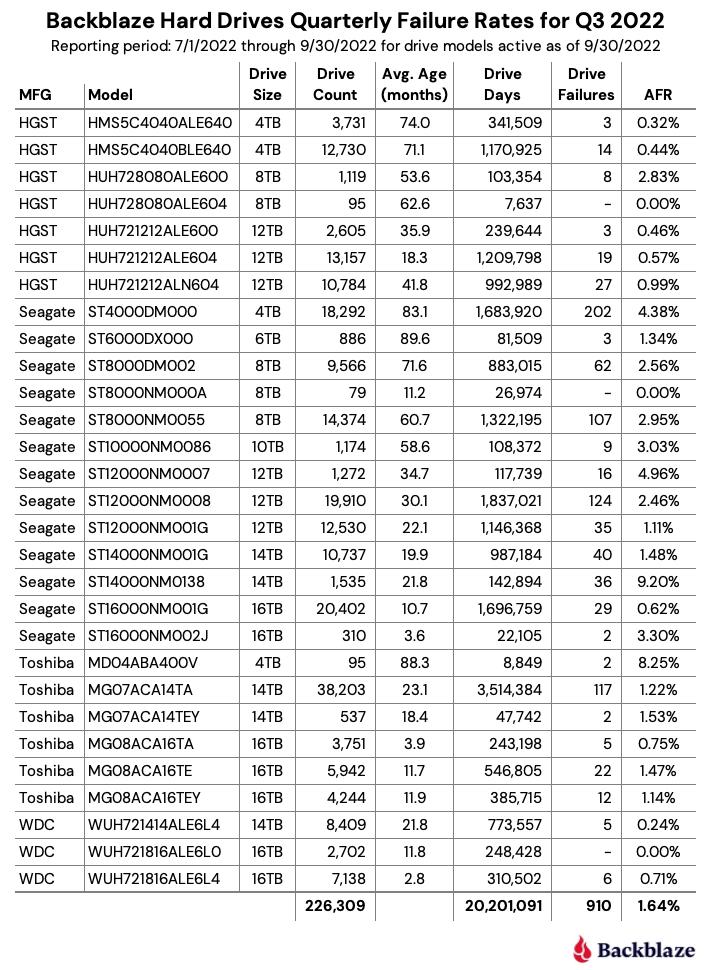
Let’s start with reviewing our data for the Q3 2022 period. In that quarter, we tracked 226,697 hard drives used to store data. For our evaluation, we removed 388 drives from consideration as they were used for testing purposes or drive models which did not have at least 60 drives. This leaves us with 226,309 hard drives grouped into 29 different models to analyze.

Notes and Observations on the Q2 2022 Stats

Zero failures for Q3: Three drives had zero failures this quarter: the 8TB HGST (model: HUH728080ALE604), the 8TB Seagate (model: ST8000NM000A), and the 16TB WDC (model: WUH721816ALE6L0). For the 8TB HGST, that was the second quarter in a row with zero failures. Of the three, only the WDC model has enough lifetime data (drive days) to be comfortable with the calculated annualized failure rate (AFR). As we will see later in this review, this 14TB WDC model has a lifetime AFR of 0.11% with the confidence interval range of just 0.30 at a 95% confidence level.

The new disks in town: There are two new models in this quarter’s data: the 8TB Seagate (model: ST8000NM000A) and the 16TB Seagate (model: ST16000NM002J). Neither has enough data to be interesting yet, but as noted above, the 8TB Seagate had zero failures in its first quarter in operation. These additions give us 29 different models we are tracking, up from 27 in the previous quarter.

The 29 models break down by manufacturer as:

  • HGST: 7 models
  • Seagate: 13 models
  • Toshiba: 6 models
  • WDC: 3 models

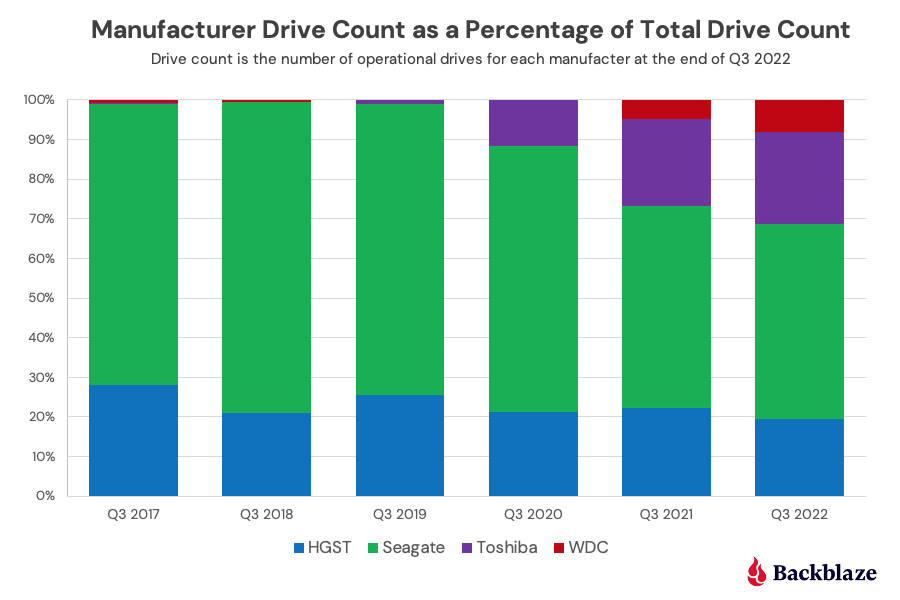
The chart below shows, by manufacturer, how our drive fleet has changed over the past six years.

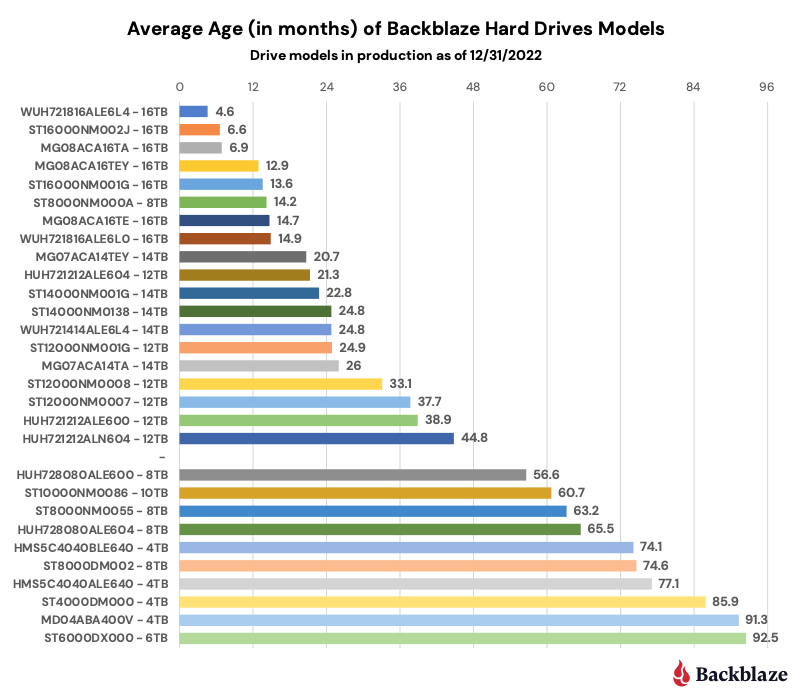
The old guard is feeling old: All three of the oldest drives we currently use are showing signs of their age as each experienced an increase in AFR from Q2 to Q3 2022 as shown below.

MFG Model Size Q3 2022 Avg Age Q2 AFR Q3 AFR
Seagate ST4000DM000 4TB 83.1 3.42% 4.38%
Seagate ST6000DX000 6TB 89.6 0.91% 1.34%
TOSHIBA MD04ABA400V 4TB 88.3 0.00% 8.25%

Note that the 4TB Toshiba only had two failures in Q3 2022. The high AFR (8.25%) is due to the limited number of drive days in the quarter (8,849) from only 95 drives. For all three, it seems their spindles, actuators, and media are starting to wear out after seven years or so of constant spinning.

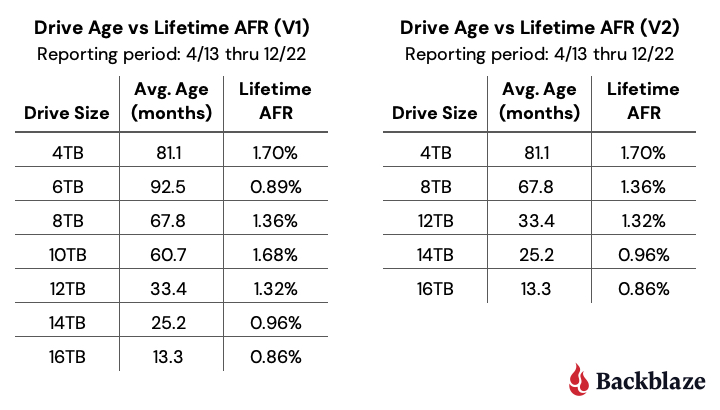
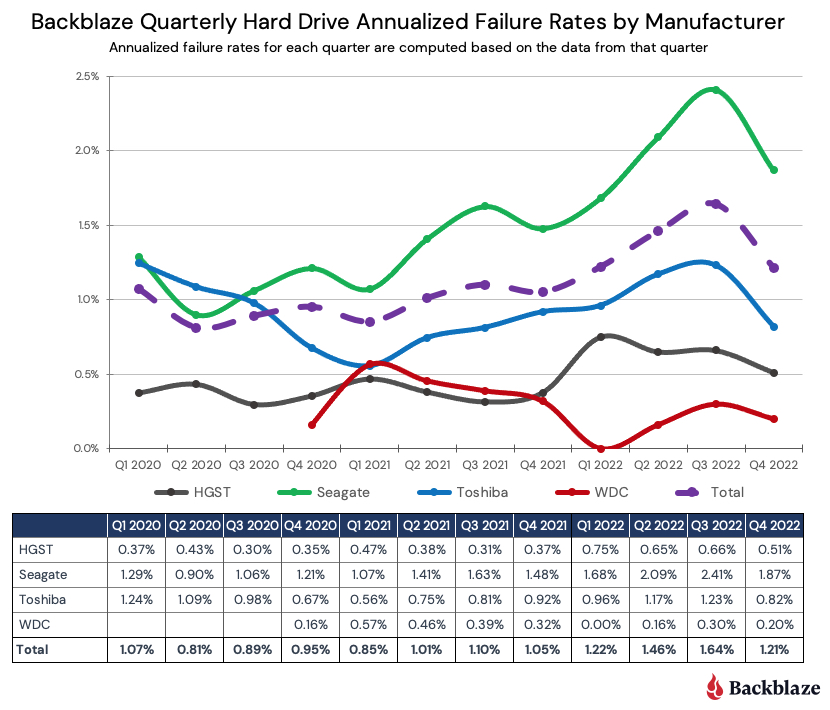
The Quarterly AFR continues to rise: The AFR for Q3 2022 was 1.64%, increasing from 1.46% in Q2 2022 and from 1.10% a year ago. As noted previously, this is related to the aging of the entire drive fleet and we would expect this number to go down as older drives are retired and replaced over the next year. A possible harbinger of what is to come can be seen in the 16TB models which as a group had an 0.80% AFR in Q3 2022. As these drives are used to replace the aging 4TB drives, the quarterly AFR should decrease.

Hard Drive Failure Versus Hard Drive Cost

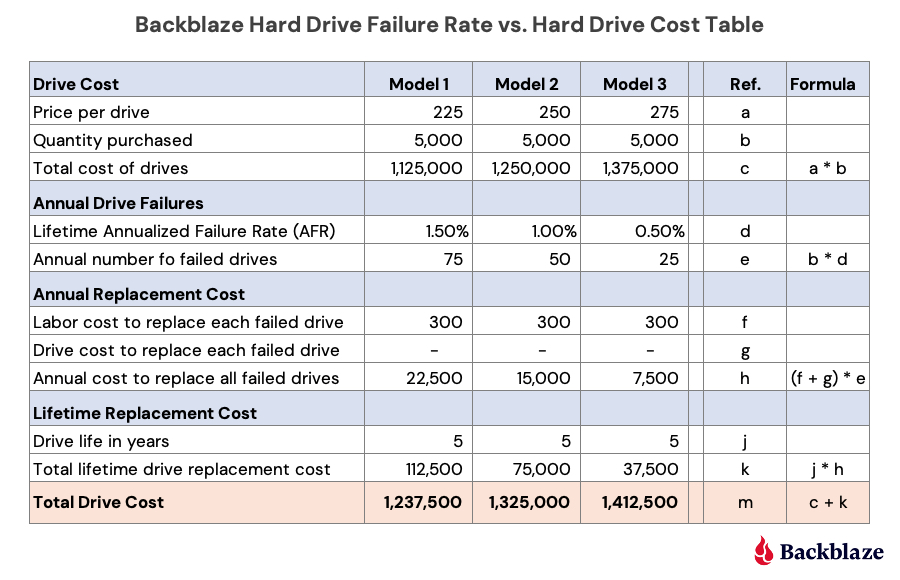
One question that comes up is why we would continue to buy a drive model that has a higher annualized failure rate versus a comparably sized, but more expensive, model. Two primary reasons: First, we are able to do so as our cloud storage Backblaze Vault architecture is designed for drive failure. Second, by studying data like drive stats and such, we work hard to understand our environment from the inside out. Understanding the relationship between cost and drive failure is one of those learnings. Here’s a simple example below using three fictitious models of 14TB drives, Model 1, Model 2, and Model 3.

Let’s take a look at the different sections (i.e. blue rows) of this table.

Drive Cost: Each model has a different price: low ($225), medium ($250), and high ($275). We would buy the same number of drives (5,000) of each model and we get the cost of each model.

Annual Drive Failures: This is the AFR of each drive model. For this example, we assigned the lowest price model to the highest failure rate, the highest price model to the lowest failure rate, and so on. In practice, we would use our own AFR numbers for a given model that we are considering purchasing. Regardless, we get the annual number of failed drives for each model.

Annual Replacement Cost: Labor cost covers the human cost involved from identifying the failure to returning and replacing the drive. Drive cost is zero here as the assumption is that all drives are returned for credit or replacement to the manufacturer or their agent. A zero value here may not always be the case; hence the line item. In either case, the annual cost to replace the failed drives for each model is computed.

Lifetime Replacement Cost: Take the number of years you expect the drive model to be in service times the annual cost to replace the failed drives. All of this gets us the total cost of each drive model—the peach section. In our example, the most expensive model (Model 3) is the most expensive drive over the five-year life expectancy and the lowest cost drive model (Model 1) is the least expensive over the same period, even with a higher annualized failure rate.

But we’re not done. The next question is: What would the annualized failure rate for the least expensive choice, Model 1, need to be such that the total cost after five years would be the same as Model 2 and then Model 3? In other words, how much failure can we tolerate before our original purchase decision is wrong? When we crunch the numbers we come out with the following:

  • Model 1 and Model 2 have the same total drive cost ($1,325,000) when the annualized failure rate for Model 1 is 2.67%.
  • Model 1 and Model 3 have the same total drive cost ($1,412,500) when the annualized failure rate for Model 1 is 3.83%.

The model presented is a simplified version of how we think about drive purchase decisions using annualized drive failure rates as part of the equation. You can make this model more accurate, and complicated, by adding in the drive failure rate changes over time (the bathtub curve) and prorating the cost of returning failed drives over the years. Whether that is needed is up to you.

The need for such a model is important in our business if you are interested in optimizing the efficiency of your cloud storage platform. Otherwise, just robotically buying the most expensive, or least expensive, drives is turning a blind eye to the expense side of the ledger.

On an individual or small office/home office level, your drive purchasing decision requires a lot less math, and often comes down to what drive can you afford. Even so, you should still try to do some research. Our drive stats can help, but in all cases you should have a solid backup plan in place as no drive you can buy is failure proof.

Lifetime Hard Drive Failure Rates

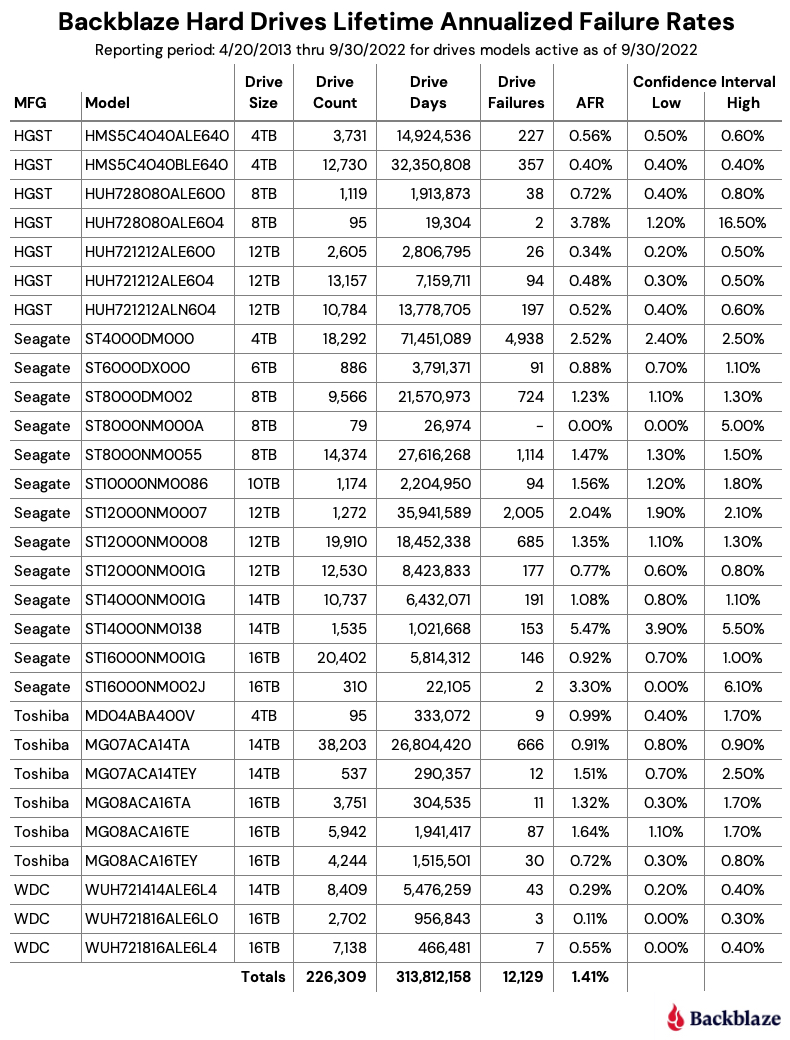
As of September 30, 2022, Backblaze was monitoring 226,697 hard drives used to store data. For our evaluation, we removed 388 drives from consideration as they were used for testing purposes or drive models which did not have at least 60 drives. This leaves us with 226,309 hard drives grouped into 29 different models to analyze for the lifetime report.

Notes and Observations About the Lifetime Stats

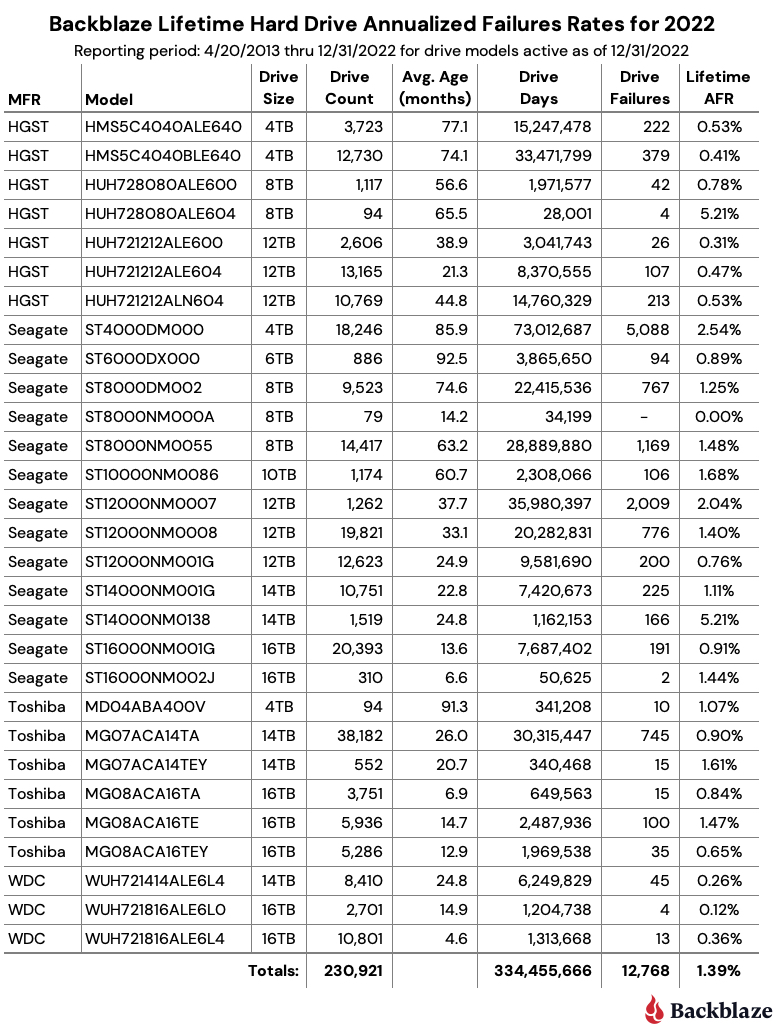
The lifetime annualized failure rate for all the drives listed above is 1.41%. That is a slight increase from the previous quarter of 1.39%, but lower than one year ago (Q3 2021) which was 1.45%.

The usual caution should be applied to those drive models that have wide confidence intervals, one percent or greater. Such a gap indicates there is not enough data or that the data we do have is not readily predictable.

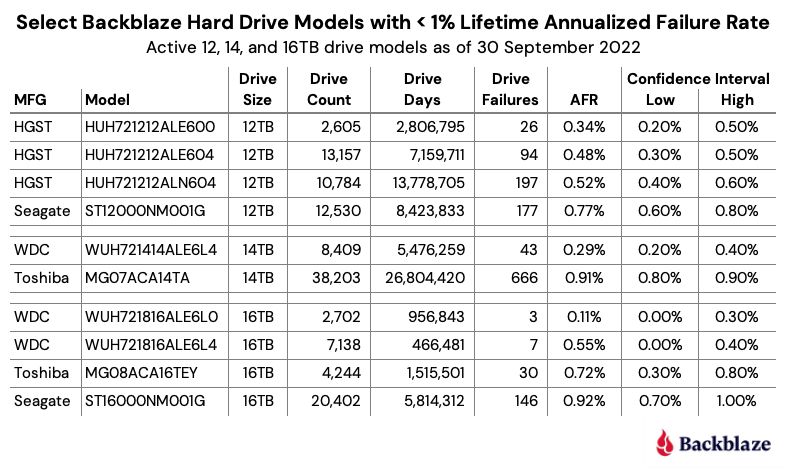
That said, we do have plenty of drive models for which we have solid data. Below we’ve extracted the 12TB, 14TB, and 16TB models from the lifetime table above that have a Lifetime AFR of less than 1% and have a confidence interval of 0.5% or less. These are hard drives which, up to this point, have shown solid reliability in our environment.

The Hard Drive Stats Data

The complete data set used to create the information in this review is available on our Hard Drive Test Data page. You can download and use this data for free for your own purpose. All we ask are three things: 1) you cite Backblaze as the source if you use the data, 2) you accept that you are solely responsible for how you use the data, and 3) you do not sell this data to anyone; it is free.

If you want the tables and charts used in this report, you can download the .zip file from Backblaze B2 Cloud Storage which contains the .jpg and/or .xlsx files as applicable.

Good luck, and let us know if you find anything interesting.

The post Backblaze Drive Stats for Q3 2022 appeared first on Backblaze Blog | Cloud Storage & Cloud Backup.
The SSD Edition: 2022 Drive Stats Mid-year Review

Post Syndicated from original https://www.backblaze.com/blog/ssd-drive-stats-mid-2022-review/

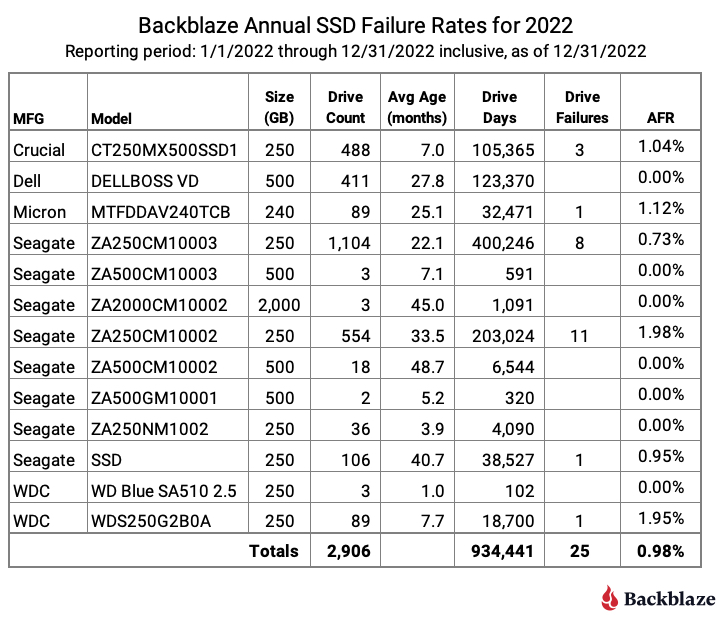
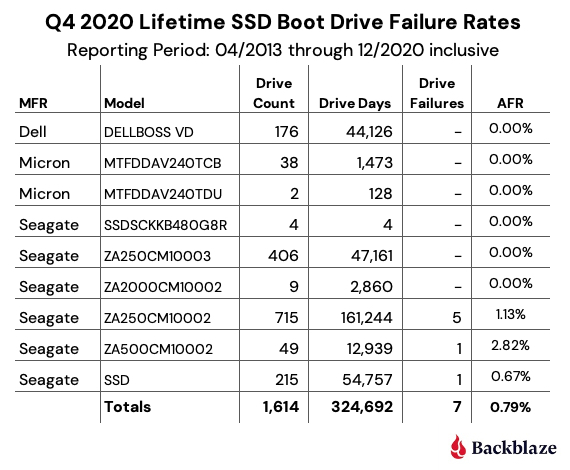
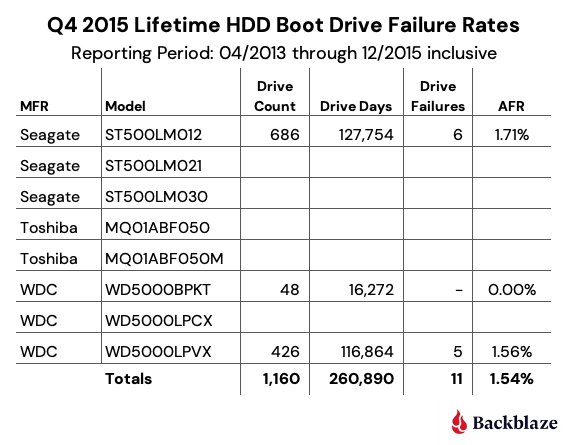
Welcome to the midyear SSD edition of the Backblaze Drive Stats report. This report builds on the 2021 SSD report published previously and is based on data from the SSDs we use as storage server boot drives in our Backblaze Cloud Storage platform. We will review the quarterly and lifetime failure rates for these drives and, later in this report, we will also compare the performance of these SSDs to hard drives we also use as boot drives. Along the way, we’ll offer observations and insights to the data presented and, as always, we look forward to your questions and comments.

Overview

Boot drives in our environment do much more than boot the storage servers: they also store log files and temporary files produced by the storage server. Each day a boot drive will read, write, and delete files depending on the activity of the storage server itself. In our early storage servers, we used HDDs exclusively for boot drives. We began using SSDs in this capacity in Q4 2018. Since that time, all new storage servers, and any with failed HDD boot drives, have had SSDs installed.

Midyear SSD Results by Quarter

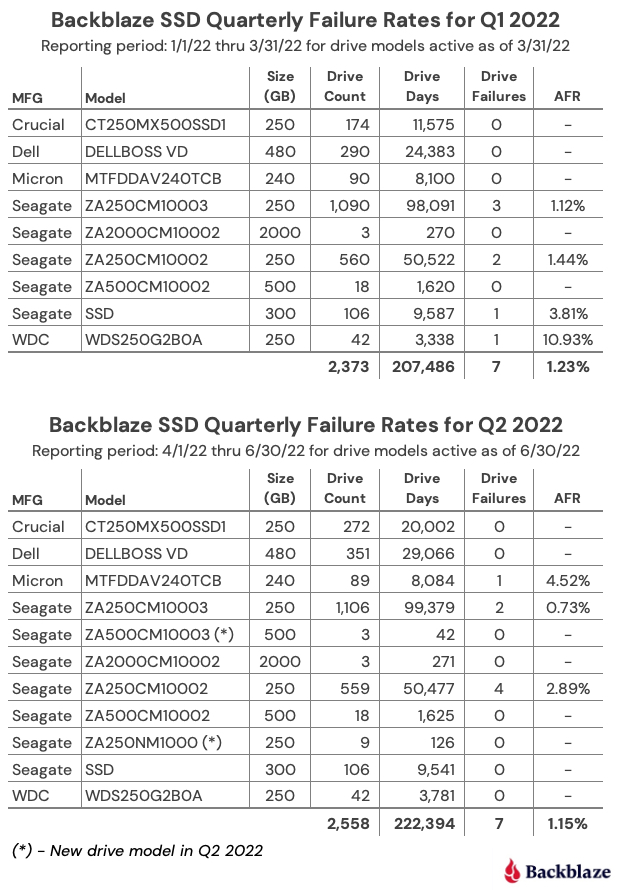
As of June 30, 2022, there were 2,558 SSDs in our storage servers. This compares to 2,200 SSDs we reported in our 2021 SSD report. We’ll start by presenting and discussing the quarterly data from each of the last two quarters (Q1 2022 and Q2 2022).

Notes and Observations

Form factors: All of the drives listed above are the standard 2.5” form factor, except the Dell (DELLVOSS VD) and Micron (MTFDDAV240TCB) models each of which are the M.2 form factor.

Most drives added: Since our last SSD report, ending in Q4 2021, the Crucial (model: CT250MX500SSD1) lead the way with 192 new drives added, followed by 101 new DELL drives (model: DELLBOSS VD) and 42 WDC drives (model: WDS250G2B0A).

New drive models: In Q2 2022 we added two new SSD models, both from Seagate, the 500GB model: ZA500CM10003 (3 drives), and the 250 GB model: ZA250NM1000 (18 drives). Neither has enough drives or drive days to reach any conclusions, although they each had zero failures, so nice start.

Crucial is not critical: In our previous SSD report, a few readers took exception to the high failure rate we reported for the Crucial SSD (model: CT250MX500SSD1) although we observed that it was with a very limited amount of data. Now that our Crucial drives have settled in, we’ve had no failures in either Q1 or Q2. Please call off the dogs.

One strike and you’re out: Three drives had only one failure in a given quarter, but the AFR they posted was noticeable: WDC model WDS250G2B0A – 10.93%, Micron – Model MTFDDAV240TCB – 4.52%, and the Seagate model: SSD – 3.81%. Of course if any of these models had 1 less failure their AFR would be zero, zip, bupkus, nada – you get it.

It’s all good man: For any given drive model in this cohort of SSDs, we like to see at least 100 drives and 10,000 drives-days in a given quarter as a minimum before we begin to consider the calculated AFR to be “reasonable”. That said, quarterly data can be volatile, so let’s next take a look at the data for each of these drives over their lifetime.

SSD Lifetime Annualized Failure Rates

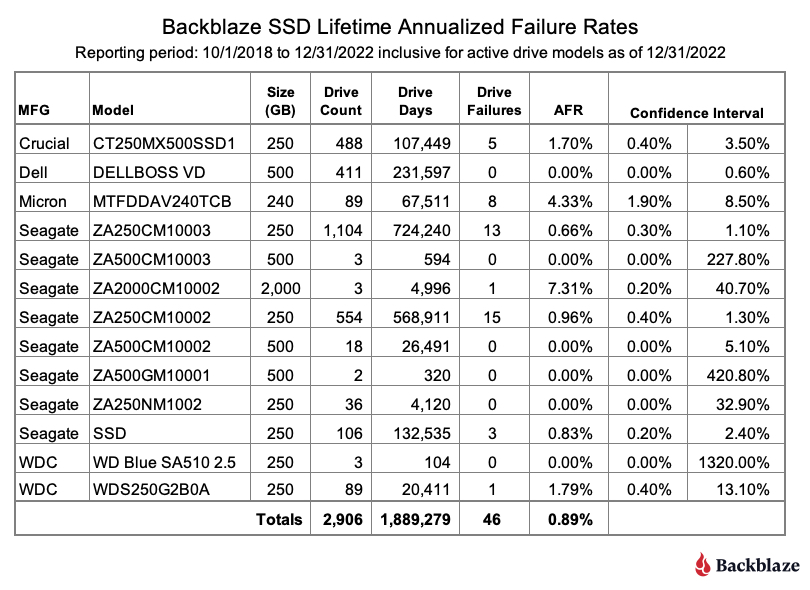
As of the end of Q2 2022 there were 2,558 SSDs in our storage servers. The table below is based on the lifetime data for the drive models which were active as of the end of Q2 2022.

Notes and Observations

Lifetime annualized failure rate (AFR): The lifetime data is cumulative over the period noted, in this case from Q4 2018 through Q2 2022. As SSDs age, lifetime failure rates can be used to see trends over time. We’ll see how this works in the next section when we compare SSD and HDD lifetime annualized failure rates over time.

Falling failure rate?: The lifetime AFR for all of the SSDs for Q2 2022 was 0.92%. That was down from 1.04% at the end of 2021, but exactly the same as the Q2 2021 AFR of 0.92%.

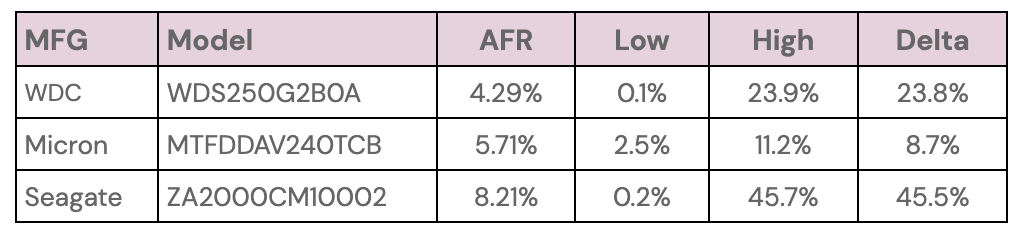
Confidence Intervals: In general, the more data you have, and the more consistent that data is, the more confident you are in your predictions based on that data. For SSDs we like to see a confidence interval of 1.0% or less between the low and the high values before we are comfortable with the calculated AFR. This doesn’t mean that drive models with a confidence interval greater than 1.0% are wrong, it just means we’d like to get more data to be sure.

Speaking of Confidence Intervals: You’ll notice from the table above that the three drives with the highest lifetime annualized failure rates also have sizable confidence intervals.


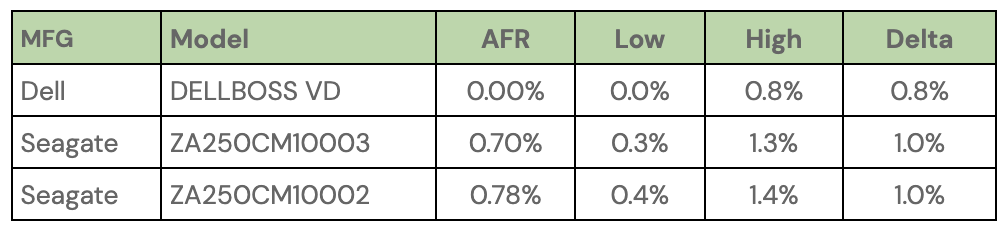
Conversely, there are three drives with a confidence interval of 1% or less, as shown below:


Of these three, the Dell drive seems the best. It is a server-class drive in an M.2 form factor, but it might be out of the price range for many of us as it currently sells from Dell for $468.65. The two remaining drives are decidedly consumer focused and have the traditional SSD form factor. The Seagate model ZA250CM10003 is no longer available new, only refurbished, and the Seagate model ZA250CM10002 is currently available on Amazon for $45.00.

SSD Versus HDD Annualized Failure Rates

Last year we compared SSD and HDD failure rates when we asked: Are SSDs really more reliable than Hard Drives? At that time the answer was maybe. We now have a year’s worth of data available to help answer that question, but first, a little background to catch everyone up.

The SSDs and HDDs we are reporting on are all boot drives. They perform the same functions: booting the storage servers, recording log files, acting as temporary storage for SMART stats, and so on. In other words they perform the same tasks. As noted earlier, we used HDDs until late 2018, then switched to SSDs. This creates a situation where the two cohorts are at different places in their respective life expectancy curves.

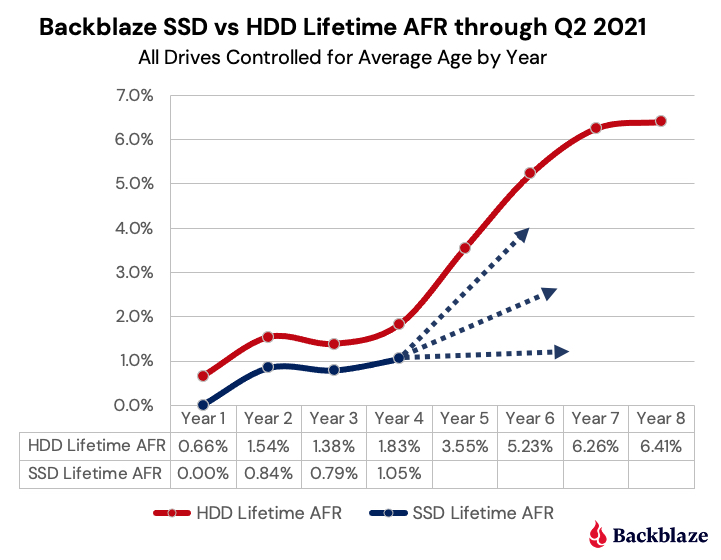
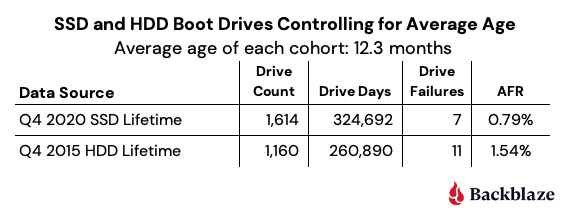
To fairly compare the SSDs and HDDs, we controlled for average age of the two cohorts, so that SSDs that were on average one year old, were compared to HDDs that were on average one year old, and so on. The chart below shows the results through Q2 2021 as we controlled for the average age of the two cohorts.


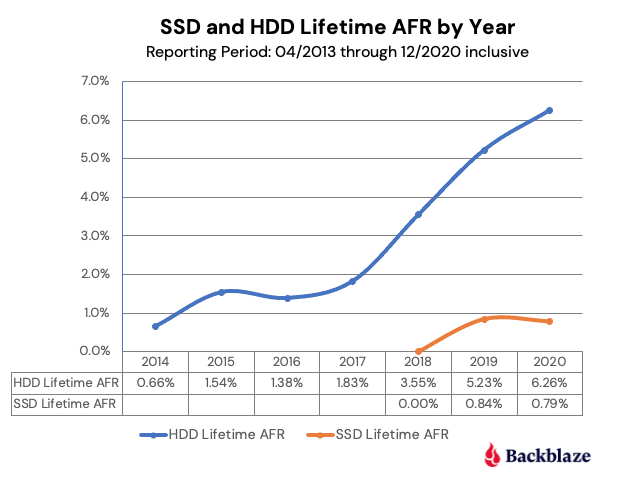
Through Q2 2021 (Year 4 in the chart for SSDs) the SSDs followed the failure rate of the HDDs over time, albeit with a slightly lower AFR. But, it was not clear whether the failure rate of the SSD cohort would continue to follow that of the HDDs, flatten out, or fall somewhere in between.

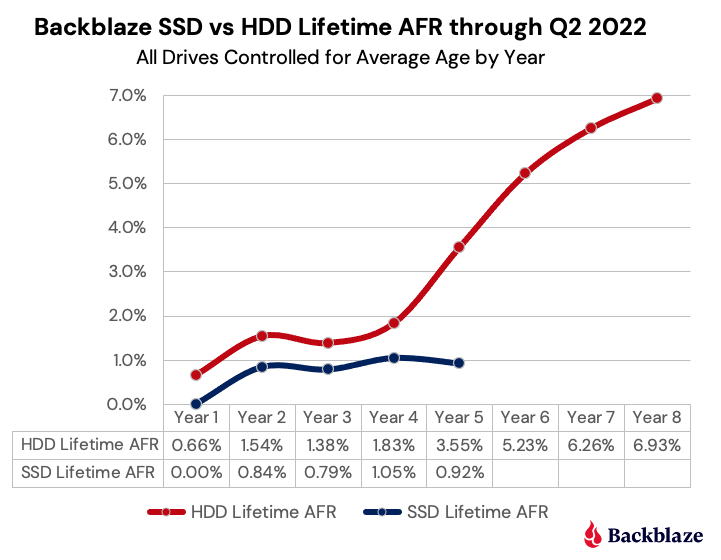
Now that we have another year of data, the answer appears to be obvious as seen in the chart below, which is based on data through Q2 2022 data and gives us the SSD data for Year 5.

And the Winner Is…

At this point we can reasonably claim that SSDs are more reliable than HDDs, at least when used as boot drives in our environment. This supports the anecdotal stories and educated guesses made by our readers over the past year or so. Well done.

We’ll continue to collect and present the SSD data on a regular basis to confirm these findings and see what’s next. It is highly certain that the failure rate of SSDs will eventually start to rise. It is also possible that at some point the SSDs could hit the wall, perhaps when they start to reach their media wearout limits. To that point, over the coming months we’ll take a look at the SMART stats for our SSDs and see how they relate to drive failure. We also have some anecdotal information of our own that we’ll try to confirm on how far past the media wearout limits you can push an SSD. Stay tuned.

The SSD Stats Data

The data collected and analyzed for this review is available on our Hard Drive Test Data page. You’ll find SSD and HDD data in the same files and you’ll have to use the model number to locate the drives you want, as there is no field to designate a drive as SSD or HDD. You can download and use this data for free for your own purpose. All we ask are three things: 1) you cite Backblaze as the source if you use the data, 2) you accept that you are solely responsible for how you use the data, and 3) you do not sell this data to anyone—it is free.

You can also download the Backblaze Drive Stats data via SNIA IOTTA Trace Repository if desired. Same data; you’ll just need to comply with the license terms listed. Thanks to Geoff Kuenning and Manjari Senthilkumar for volunteering their time and brainpower to make this happen. Awesome work.

Good luck and let us know if you find anything interesting.

The post The SSD Edition: 2022 Drive Stats Mid-year Review appeared first on Backblaze Blog | Cloud Storage & Cloud Backup.
Backblaze Drive Stats for Q2 2022

Post Syndicated from original https://www.backblaze.com/blog/backblaze-drive-stats-for-q2-2022/

As of the end of Q2 2022, Backblaze was monitoring 219,444 hard drives and SSDs in our data centers around the world. Of that number, 4,020 are boot drives, with 2,558 being SSDs, and 1,462 being HDDs. Later this quarter, we’ll review our SSD collection. Today, we’ll focus on the 215,424 data drives under management as we review their quarterly and lifetime failure rates as of the end of Q2 2022. Along the way, we’ll share our observations and insights on the data presented and, as always, we look forward to you doing the same in the comments section at the end of the post.

Lifetime Hard Drive Failure Rates

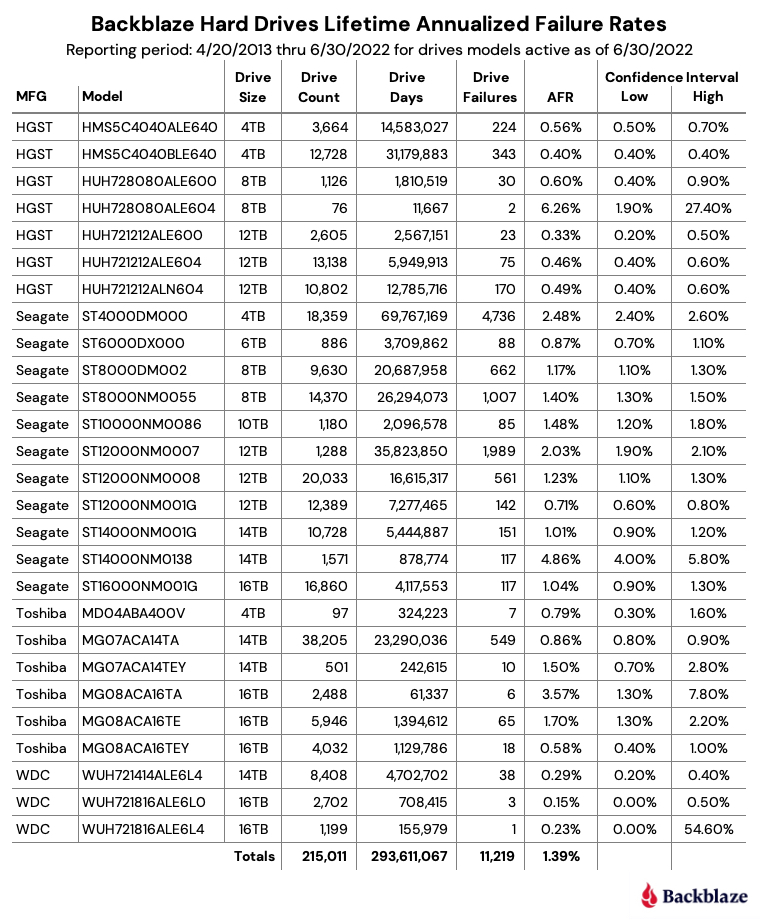
This report, we’ll change things up a bit and start with the lifetime failure rates. We’ll cover the Q2 data later on in this post. As of June 30, 2022, Backblaze was monitoring 215,424 hard drives used to store data. For our evaluation, we removed 413 drives from consideration as they were used for testing purposes or drive models which did not have at least 60 drives. This leaves us with 215,011 hard drives grouped into 27 different models to analyze for the lifetime report.

Notes and Observations About the Lifetime Stats

The lifetime annualized failure rate for all the drives listed above is 1.39%. That is the same as last quarter and down from 1.45% one year ago (6/30/2021).

A quick glance down the annualized failure rate (AFR) column identifies the three drives with the highest failure rates:

  • The 8TB HGST (model: HUH728080ALE604) at 6.26%.
  • The Seagate 14TB (model: ST14000NM0138) at 4.86%.
  • The Toshiba 16TB (model: MG08ACA16TA at 3.57%.

What’s common between these three models? The sample size, in our case drive days, is too small, and in these three cases leads to a wide range between the low and high confidence interval values. The wider the gap, the less confident we are about the AFR in the first place.

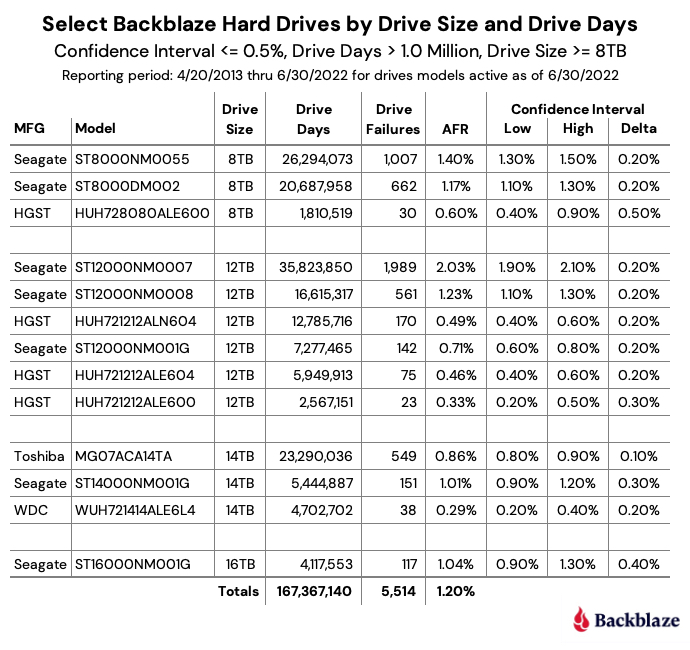
In the table above, we list all of the models for completeness, but it does make the chart more complex. We like to make things easy, so let’s remove those drive models that have wide confidence intervals and only include drive models that are generally available. We’ll set our parameters as follows: a 95% confidence interval gap of 0.5% or less, a minimum drive days value of one million to ensure we have a large enough sample size, and drive models that are 8TB or more in size. The simplified chart is below.

To summarize, in our environment, we are 95% confident that the AFR listed for each drive model is between the low and high confidence interval values.

Computing the Annualized Failure Rate

We use the term annualized failure rate, or AFR, throughout our Drive Stats reports. Let’s spend a minute to explain how we calculate the AFR value and why we do it the way we do. The formula for a given cohort of drives is:

AFR = ( drive_failures / ( drive_days / 365 )) * 100

Let’s define the terms used:

  • Cohort of drives: The selected set of drives (typically by model) for a given period of time (quarter, annual, lifetime).
  • AFR: Annualized failure rate, which is applied to the selected cohort of drives.
  • drive_failures: The number of failed drives for the selected cohort of drives.
  • drive_days: The number of days all of the drives in the selected cohort are operational during the defined period of time of the cohort (i.e., quarter, annual, lifetime).

For example, for the 16TB Seagate drive in the table above, we have calculated there were 117 drive failures and 4,117,553 drive days over the lifetime of this particular cohort of drives. The AFR is calculated as follows:

AFR = ( 117 / ( 4,117,553 / 365 )) * 100 = 1.04%

Why Don’t We Use Drive Count?

Our environment is very dynamic when it comes to drives entering and leaving the system; a 12TB HGST drive fails and is replaced by a 12TB Seagate, a new Backblaze Vault is added and 1,200 new 14TB Toshiba drives are added, a Backblaze Vault of 4TB drives is retired, and so on. Using drive count is problematic because it assumes a stable number of drives in the cohort over the observation period. Yes, we will concede that with enough math you can make this work, but rather than going back to college, we keep it simple and use drive days as it accounts for the potential change in the number of drives during the observation period and apportions each drive’s contribution accordingly.

For completeness, let’s calculate the AFR for the 16TB Seagate drive using a drive count-based formula given there were 16,860 drives and 117 failures.

Drive Count AFR = ( 117 / 16,860 ) * 100 = 0.69%

While the drive count AFR is much lower, the assumption that all 16,860 drives were present the entire observation period (lifetime) is wrong. Over the last quarter, we added 3,601 new drives, and over the last year, we added 12,003 new drives. Yet, all of these were counted as if they were installed on day one. In other words, using drive count AFR in our case would misrepresent drive failure rates in our environment.

How We Determine Drive Failure

Today, we classify drive failure into two categories: reactive and proactive. Reactive failures are where the drive has failed and won’t or can’t communicate with our system. Proactive failures are where failure is imminent based on errors the drive is reporting which are confirmed by examining the SMART stats of the drive. In this case, the drive is removed before it completely fails.

Over the last few years, data scientists have used the SMART stats data we’ve collected to see if they can predict drive failure using various statistical methodologies, and more recently, artificial intelligence and machine learning techniques. The ability to accurately predict drive failure, with minimal false positives, will optimize our operational capabilities as we scale our storage platform.

SMART Stats

SMART stands for Self-monitoring, Analysis, and Reporting Technology and is a monitoring system included in hard drives that reports on various attributes of the state of a given drive. Each day, Backblaze records and stores the SMART stats that are reported by the hard drives we have in our data centers. Check out this post to learn more about SMART stats and how we use them.

Q2 2022 Hard Drive Failure Rates

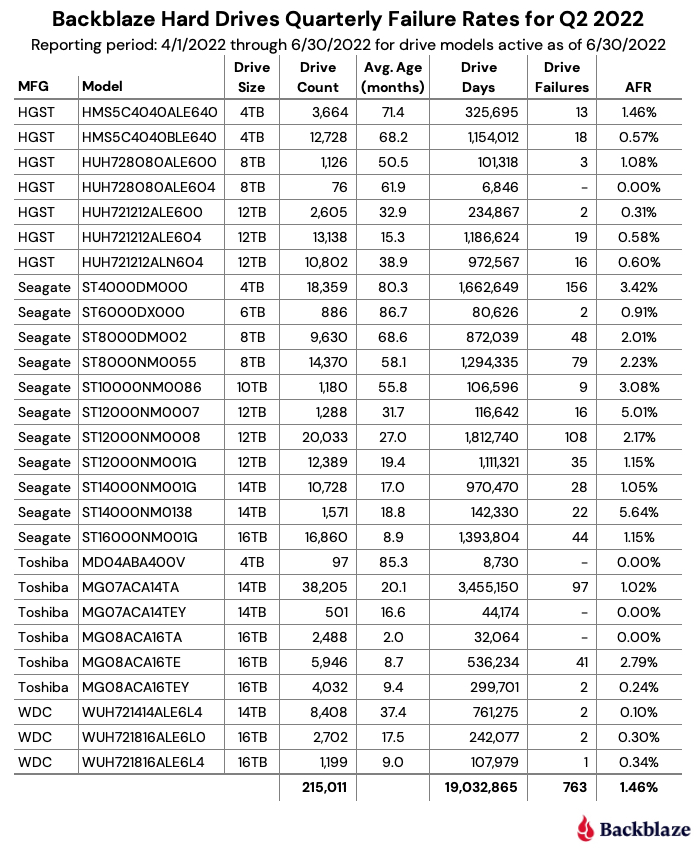
For the Q2 2022 quarterly report, we tracked 215,011 hard drives broken down by drive model into 27 different cohorts using only data from Q2. The table below lists the data for each of these drive models.

Notes and Observations on the Q2 2022 Stats

Breaking news, the OG stumbles: The 6TB Seagate drives (model: ST6000DX000) finally had a failure this quarter—actually, two failures. Given this is the oldest drive model in our fleet with an average age of 86.7 months of service, a failure or two is expected. Still, this was the first failure by this drive model since Q3 of last year. At some point in the future we can expect these drives will be cycled out, but with their lifetime AFR at just 0.87%, they are not first in line.

Another zero for the next OG: The next oldest drive cohort in our collection, the 4TB Toshiba drives (model: MD04ABA400V) at 85.3 months, had zero failures for Q2. The last failure was recorded a year ago in Q2 2021. Their lifetime AFR is just 0.79%, although their lifetime confidence interval gap is 1.3%, which as we’ve seen means we are lacking enough data to be truly confident of the AFR number. Still, at one failure per year, they could last another 97 years—probably not.

More zeroes for Q2: Three other drives had zero failures this quarter: the 8TB HGST (model: HUH728080ALE604), the 14TB Toshiba (model: MG07ACA14TEY), and the 16TB Toshiba (model: MG08ACA16TA). As with the 4TB Toshiba noted above, these drives have very wide confidence interval gaps driven by a limited number of data points. For example, the 16TB Toshiba had the most drive days—32,064—of any of these drive models. We would need to have at least 500,000 drive days in a quarter to get to a 95% confidence interval. Still, it is entirely possible that any or all of these drives will continue to post great numbers over the coming quarters, we’re just not 95% confident yet.

Running on fumes: The 4TB Seagate drives (model: ST4000DM000) are starting to show their age, 80.3 months on average. Their quarterly failure rate has increased each of the last four quarters to 3.42% this quarter. We have deployed our drive cloning program for these drives as part of our data durability program, and over the next several months, these drives will be cycled out. They have served us well, but it appears they are tired after nearly seven years of constant spinning.

The AFR increases, again: In Q2, the AFR increased to 1.46% for all drives models combined. This is up from 1.22% in Q1 2022 and up from 1.01% a year ago in Q2 2021. The aging 4TB Seagate drives are part of the increase, but the failure rates of both the Toshiba and HGST drives have increased as well over the last year. This appears to be related to the aging of the entire drive fleet and we would expect this number to go down as older drives are retired over the next year.

Four Thousand Storage Servers

In the opening paragraph, we noted there were 4,020 boot drives. What may not be obvious is that this equates to 4,020 storage servers. These are 4U servers with 45 or 60 drives in each with drives ranging in size from 4TB to 16TB. The smallest is 180TB of raw storage space (45 * 4TB drives) and the largest is 960TB of raw storage (60 * 16TB drives). These servers are a mix of Backblaze Storage Pods and third-party storage servers. It’s been a while since our last Storage Pod update, so look for something in late Q3 or early Q4.

Drive Stats at DEFCON

If you will be at DEFCON 30 in Las Vegas, I will be speaking live at the Data Duplication Village (DDV) at 1 p.m. on Friday, August 12th. The all-volunteer DDV is located in the lower level of the executive conference center of the Flamingo hotel. We’ll be talking about Drive Stats, SSDs, drive life expectancy, SMART stats, and more. I hope to see you there.

Never Miss the Drive Stats Report

Sign up for the Drive Stats Insiders newsletter and be the first to get Drive Stats data every quarter as well as the new Drive Stats SSD edition.

➔ Sign Up

The Hard Drive Stats Data

The complete data set used to create the information used in this review is available on our Hard Drive Test Data page. You can download and use this data for free for your own purpose. All we ask are three things: 1) you cite Backblaze as the source if you use the data, 2) you accept that you are solely responsible for how you use the data, and 3) you do not sell this data to anyone; it is free.

If you want the tables and charts used in this report, you can download the .zip file from Backblaze B2 Cloud Storage which contains the .jpg and/or .xlsx files as applicable.
Good luck and let us know if you find anything interesting.

Want More Drive Stats Insights?

Check out our 2021 Year-end Drive Stats Report.

Interested in the SSD Data?

Read our first SSD-based Drive Stats Report.

The post Backblaze Drive Stats for Q2 2022 appeared first on Backblaze Blog | Cloud Storage & Cloud Backup.
Backblaze Drive Stats for Q1 2022

Post Syndicated from original https://www.backblaze.com/blog/backblaze-drive-stats-for-q1-2022/

A long time ago, in a galaxy far, far away, Backblaze began collecting and storing statistics about the hard drives it uses to store customer data. As of the end of Q1 2022, Backblaze was monitoring 211,732 hard drives and SSDs in our data centers around the universe. Of that number, there were 3,860 boot drives, leaving us with 207,872 data drives under management. This report will focus on those data drives. We will review the hard drive failure rates for those drive models that were active as of the end of Q1 2022, and we’ll also look at their lifetime failure statistics. In between, we will dive into the failure rates of the active drive models over time. Along the way, we will share our observations and insights on the data presented and, as always, we look forward to you doing the same in the comments section at the end of the report.

“The greatest teacher, failure is.”1

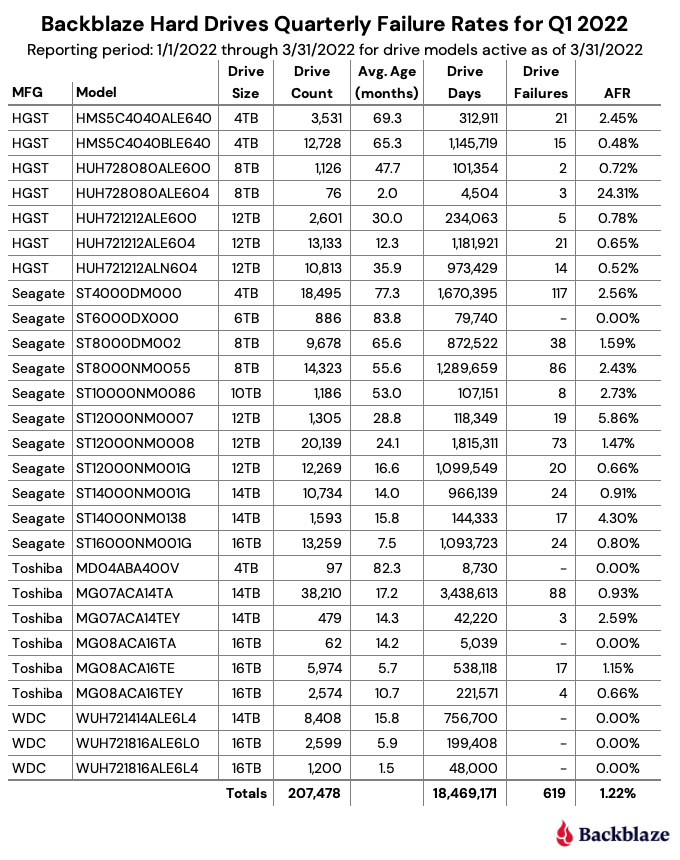
As of the end of Q1 2022, Backblaze was monitoring 207,872 hard drives used to store data. For our evaluation, we removed 394 drives from consideration as they were either used for testing purposes or were drive models which did not have at least 60 active drives. This leaves us with 207,478 hard drives to analyze for this report. The chart below contains the results of our analysis for Q1 2022.

“Always pass on what you have learned.”2

In reviewing the Q1 2022 table above and the data that lies underneath, we offer a few observations and caveats:

  • “The Force is strong with this one.”3 The 6TB Seagate (model: ST6000DX000) continues to defy time with zero failures during Q1 2022 despite an average age of nearly seven years (83.7 months). 98% of the drives (859) were installed within the same two-week period back in Q1 2015. The youngest 6TB drive in the entire cohort is a little over four years old. The 4TB Toshiba (model: MD04ABA400V) also had zero failures during Q1 2022 and the average age (82.3 months) is nearly as old as the Seagate drives, but the Toshiba cohort has only 97 drives. Still, they’ve averaged just one drive failure per year over their Backblaze lifetime.
  • “Great, kid, don’t get cocky.”4 There were a number of padawan drives (in average age) that also had zero drive failures in Q1 2022. The two 16TB WDC drives (models: WUH721816ALEL0 and WUH721816ALEL4) lead the youth movement with an average age of 5.9 and 1.5 months respectively. Between the two models, there are 3,899 operational drives and only one failure since they were installed six months ago. A good start, but surely not Jedi territory yet.
  • “I find your lack of faith disturbing.”5 You might have noticed the AFR for Q1 2022 of 24.31% for the 8TB HGST drives (model: HUH728080ALE604). The drives are young with an average age of two months, and there are only 76 drives with a total of 4,504 drive days. If you find the AFR bothersome, I do in fact find your lack of faith disturbing, given the history of stellar performance in the other HGST drives we employ. Let’s see where we are in a couple of quarters.
  • “Try not. Do or do not. There is no try.”6 The saga continues for the 14TB Seagate drives (model: ST14000NM0138). When we last saw this drive, the Seagate/Dell/Backblaze alliance continued to work diligently to understand why the failure rate was stubbornly high. Unusual it is for this model, and the team has employed multiple firmware tweaks over the past several months with varying degrees of success. Patience.

“I like firsts. Good or bad, they’re always memorable.”7

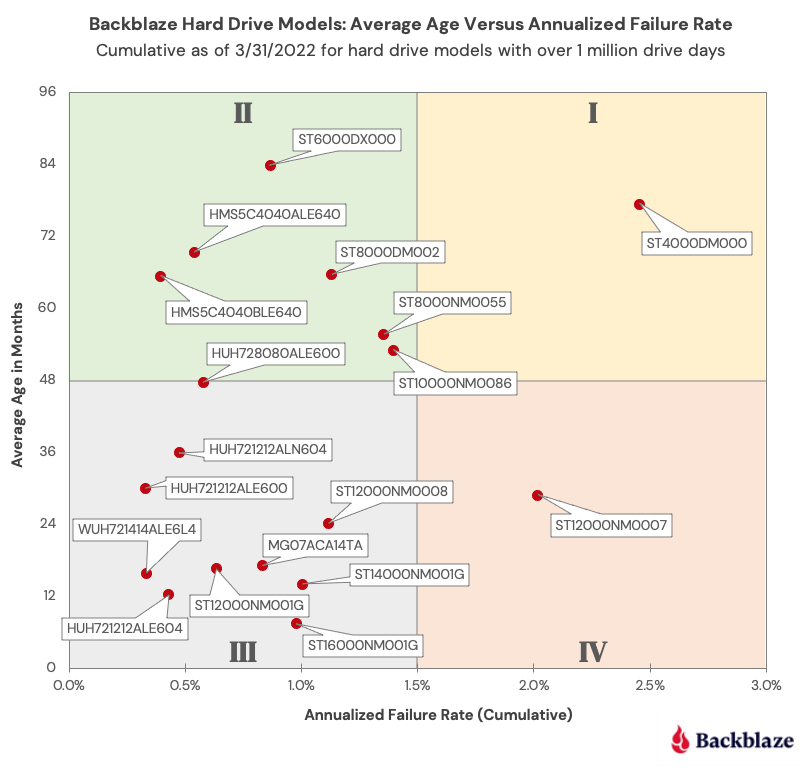
We have been delivering quarterly and annual Drive Stats reports since Q1 2015. Along the way, we have presented multiple different views of the data to help provide insights into our operational environment and the hard drives in that environment. Today we’d like to offer a different way to visualize comparing the average age of many of the different models we currently use versus the annualized failure rate of each of those drive models: the Drive Stats Failure Square:

“…many of the truths that we cling to depend on our viewpoint.”8

Each point on the Drive Stats Failure Square represents a hard drive model in operation in our environment as of 3/31/2022 and lies at the intersection of the average age of that model and the annualized failure rate of that model. We only included drive models with a lifetime total of one million drive days or with a confidence interval of all drive models included being 0.6 or less.

The resulting chart is divided into four equal quadrants, which we will categorize as follows:

  • Quadrant I: Retirees. Drives in this quadrant have performed well, but given their current high AFR level they are first in line to be replaced.
  • Quadrant II: Winners. Drives in this quadrant have proven themselves to be reliable over time. Given their age, we need to begin planning for their replacement, but there is no need to panic.
  • Quadrant III: Challengers. Drives in this quadrant have started off on the right foot and don’t present any current concerns for replacement. We will continue to monitor these drive models to ensure they stay on the path to the winners quadrant instead of sliding off to quadrant IV.
  • Quadrant IV: Muddlers. Drives in this quadrant should be replaced if possible, but they can continue to operate if their failure rates remain at their current rate. The redundancy and durability built into the Backblaze platform protects data from the higher failure rates of the drives in this quadrant. Still, these drives are a drain on data center and operational resources.

“Difficult to see; always in motion is the future.”9

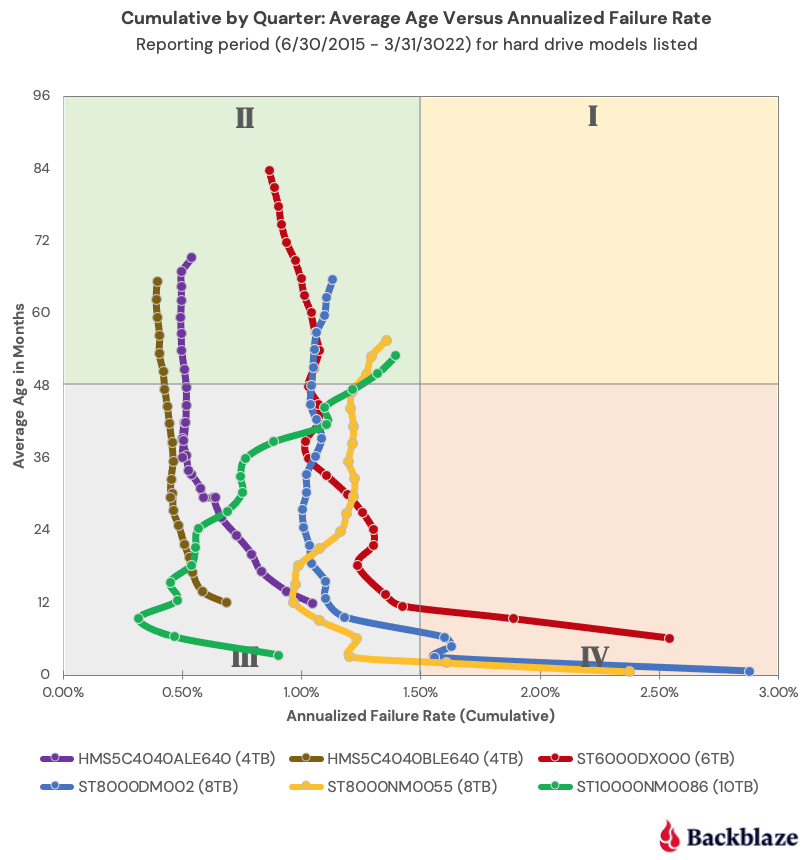
Obviously, the Winners quadrant is the desired outcome for all of the drive models we employ. But every drive basically starts out in either quadrant III or IV and moves from there over time. The chart below shows how the drive models in quadrant II (Winners) got there.

“Your focus determines your reality.”10

Each drive model is represented by a snake-like line (Snakes on a plane!?) which shows the AFR of the drive model as the average age of the fleet increased over time. Interestingly, each of the six models currently in quadrant II has a different backstory. For example, who could have predicted that the 6TB Seagate drive (model: ST6000DX000) would have ended up in the Winners quadrant given its less than auspicious start in 2015. And that drive was not alone; the 8TB Seagate drives (models: ST8000NM0055 and ST8000DM002) experienced the same behavior.

This chart can also give us a visual clue as to the direction of the annualized failure rate over time for a given drive model. For example, the 10TB Seagate drive seems more interested in moving into the Retiree quadrant over the next quarter or so and as such its replacement priority could be increased.

“In my experience, there’s no such thing as luck.”11

In the quarterly Drive Stats table at the start of this report, there is some element of randomness which can affect the results. For example, whether a drive is reported as a failure on the 31st of March at 11:59 p.m. or at 12:01 a.m. on April 1st can have a small effect on the results. Still, the quarterly results are useful in surfacing unexpected failure rate patterns, but the most accurate information regarding a given drive model is captured in the lifetime annualized failures rates.

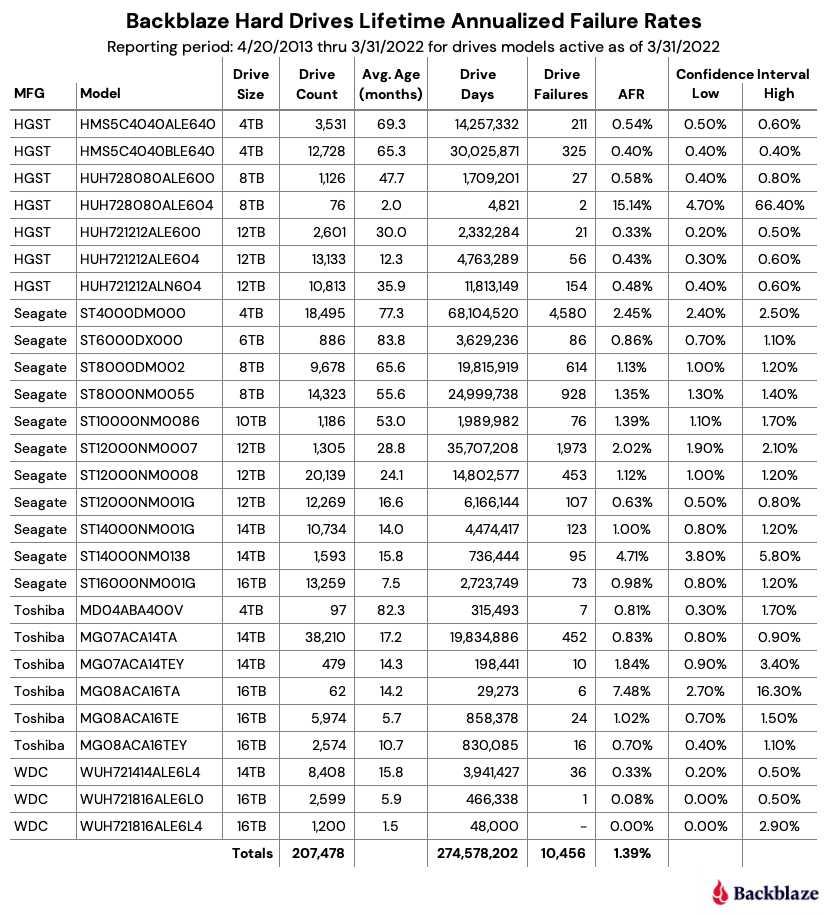
The chart below shows the lifetime annualized failure rates of all the drive models in production as of March 31, 2022.

“You have failed me for the last time…”12

The lifetime annualized failure rate for all the drives listed above is 1.39%. That was down from 1.40% at the end of 2021. One year ago (3/31/2021), the lifetime AFR was 1.49%.

When looking at the lifetime failure table above, any drive models with less than 500,000 drive days or a confidence interval greater than 1.0% do not have enough data to be considered an accurate portrayal of their performance in our environment. The 8TB HGST drives (model: HUH728080ALE604) and the 16TB Toshiba drives (model: MG08ACA16TA) are good examples of such drives. We list these drives for completeness as they are also listed in the quarterly table at the beginning of this review.

Given the criteria above regarding drive days and confidence intervals, the best performing drive in our environment for each manufacturer is:

  • HGST: 12TB, model: HUH721212ALE600. AFR: 0.33%
  • Seagate: 12TB model: ST12000NM001G. AFR 0.63%
  • WDC: 14TB model: WUH721414ALE6L4. AFR: 0.33%
  • Toshiba: 16TB model: MG08ACA16TEY. AFR 0.70%

“I never ask that question until after I’ve done it!”13

For those of you interested in how we produce this report, the data we used is available on our Hard Drive Test Data webpage. You can download and use this data for free for your own purpose. All we ask are three things: 1) you cite Backblaze as the source if you use the data, 2) you accept that you are solely responsible for how you use the data, and 3) you do not sell the data itself to anyone; it is free.

Good luck and let us know if you find anything interesting. And no, it’s not a trap.

Quotes Referenced

  1. “The greatest teacher, failure is.”—Yoda, “The Last Jedi”
  2. “Always pass on what you have learned.”—Yoda, “Return of the Jedi”
  3. “The Force is strong with this one.”—Darth Vader, “A New Hope”
  4. “Great, kid, don’t get cocky.”—Han Solo, “A New Hope”
  5. “I find your lack of faith disturbing.”—Darth Vader, “A New Hope”
  6. “Try not. Do or do not. There is no try.”—Yoda, “The Empire Strikes Back”
  7. “I like firsts. Good or bad, they’re always memorable.”—Ahsoka Tano, “The Mandalorian”
  8. “…many of the truths that we cling to depend on our viewpoint.”—Obi-Wan Kenobi, “Return of the Jedi”
  9. “Difficult to see; always in motion is the future.”—Yoda, “The Empire Strikes Back”
  10. “Your focus determines your reality.”—Qui-Gon Jinn, “The Phantom Menace”
  11. “In my experience, there’s no such thing as luck.”—Obi-Wan Kenobi, “A New Hope”
  12. “You have failed me for the last time…”—Darth Vader, “The Empire Strikes Back”
  13. “I never ask that question until after I’ve done it!”—Han Solo, “The Force Awakens”

The post Backblaze Drive Stats for Q1 2022 appeared first on Backblaze Blog | Cloud Storage & Cloud Backup.
The SSD Edition: 2021 Drive Stats Review

Post Syndicated from original https://www.backblaze.com/blog/ssd-edition-2021-drive-stats-review/

Welcome to the first SSD edition of the Backblaze Drive Stats report. This edition will focus exclusively on our SSDs as opposed to our quarterly and annual Drive Stats reports which, until last year, focused exclusively on HDDs. Initially we expect to publish the SSD edition twice a year, although that could change depending on its value to our readers. We will continue to publish the HDD Drive Stats reports quarterly.

Background

The SSDs in this report are all boot drives in our storage servers. In our early storage servers, we used HDDs exclusively for boot drives. We began using SSDs in this capacity in Q4 of 2018. Since that time, all new storage servers and any with failed HDD boot drives have had SSDs installed. Boot drives in our environment do much more than boot the storage servers, they also store log files and temporary files produced by the storage server. Each day a boot drive will read, write, and delete files depending on the activity of the storage server itself.

Overview

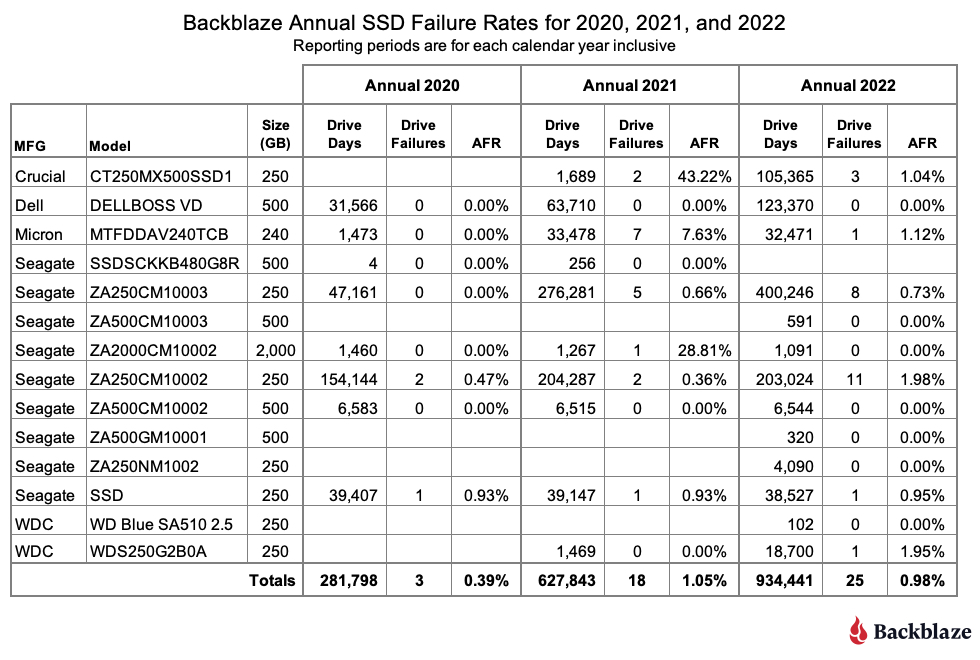
As of December 31, 2021, we were using 2,200 SSDs. As we share various tables and charts below, some of the numbers, particularly the annualized failure rate (AFR) will be very surprising to informed readers. For example, an AFR of 43.22% might catch your attention. We will explain these outliers as we go along. Most are due to the newness of a drive, but we’ll let you know.

As with the HDD reports, we have published the data we used to develop our SSD report. In fact, we have always published this data as it resides in the same files as the HDD data. Now for the bad news: The data does not currently include a drive type, SDD or HDD, so you’ll have to do your research by model number. Sorry. You’ll find the links to download the data files on our Drive Stats Test Data webpage. If you are just looking for SSD data, start with Q4 2018 and go forward.

If you are new to our Drive Stats reports, you might wonder why we collect and share this information. It starts with the fact that we have lots of data storage available, over two exabytes to date, for customers using the Backblaze B2 Cloud Storage and Backblaze Computer Backup services. In doing that, we need to have a deep understanding of our environment, one aspect of which is how often drives, both HDDs and SSDs, fail. Starting about seven years ago we decided to share what we learned and shed some light on the previously opaque world of hard drive failure rates. It is only natural that we would be as transparent with SSDs. Read on.

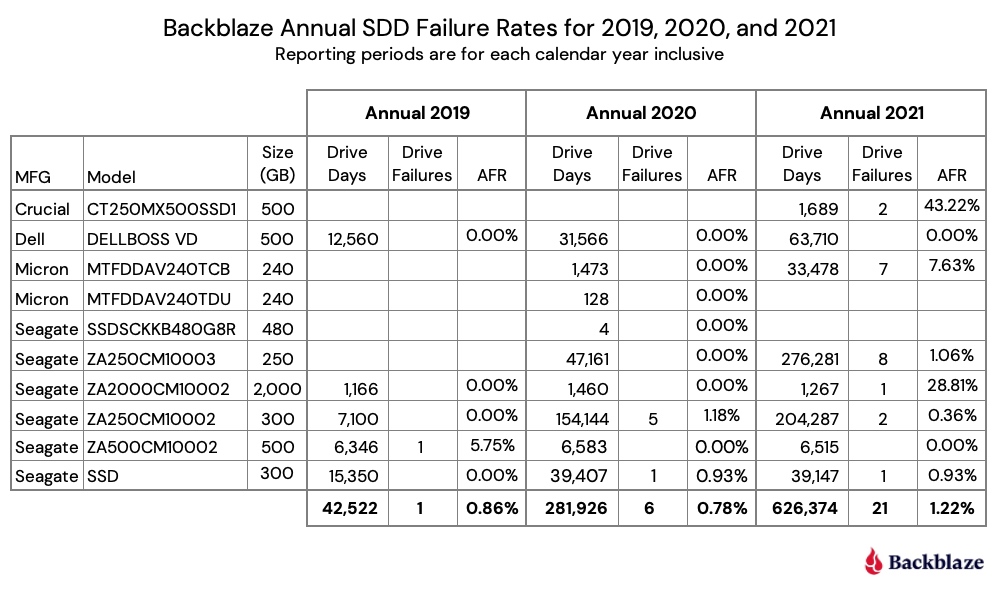
Annual SSD Failure Rates for 2019, 2020, and 2021

At the end of 2021, there were 2,200 SSDs in our storage servers, having grown from zero in Q3 2018. We’ll start with looking at the AFR for the last three years, then dig into 2021 failure rates, and finally, take a look at the monthly AFR rates since 2019. We’ll explain each as we go.

The chart below shows the failure rates for 2019, 2020, and 2021.

Observations and Comments

  • The data for each year (2019, 2020, and 2021) is inclusive of the activity which occurred in that year.
  • There is an upward direction in the failure rate for 2021. We saw this when we compared our HDD and SSD boot drives in a previous post. When we get to the quarter-by-quarter chart later in this blog post, this trend, as such, will be much clearer.
  • Two drives have eye-popping failure rates—the Crucial model: CT250MX500SSD1 and the Seagate model: ZA2000CM10002. In both cases, the drive days and drive count (not shown) are very low. For the Crucial, there are only 20 drives which were installed in December 2021. For the Seagate, there were only four drives and one failed in early 2021. In both cases, the AFR is based on very little data, which leads to a very wide confidence interval, which we’ll see in the next section. We include these drives for completeness.
  • A drive day denotes one drive in operation for one day. Therefore, one drive in operation for 2021 would have 365 drive days. If a drive fails after 200 days, it will have 200 drive days and be marked as failed. For a given cohort of drives over a specified period of time, we compute the AFR as follows:
     
    AFR = (drive failures / (drive days / 365)) * 100
     
    This provides the annualized failure rate (AFR) over any period of time.

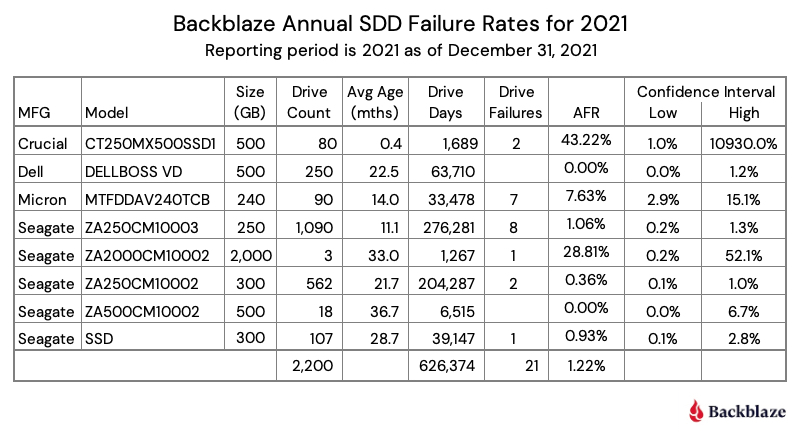
2021 Annual SSD Failure Rates

Let’s dig into 2021 and add a few more details. The table below is an expanded version of the annual 2021 section from the previous chart.

From the table, it should be clear that the Crucial and Seagate drives with the double-digit AFRs require a lot more data before passing any judgment on their reliability in our environment. This is evidenced by the extremely wide confidence interval for each drive. A respectable confidence interval is less than 1.0%, with 0.6% or less being optimal for us. Only the Seagate model: ZA250CM10002 meets the 1.0% percent criteria, although the Seagate model: ZA250CM10003 is very close.

Obviously, it takes time to build up enough data to be confident that the drive in question is performing at the expected level. In our case, we expect a 1% to 2% AFR. Anything less is great and anything more bears watching. One of the ways we “watch” is by tracking quarterly results, which we’ll explore next.

Quarterly SSD Failure Rates Over Time

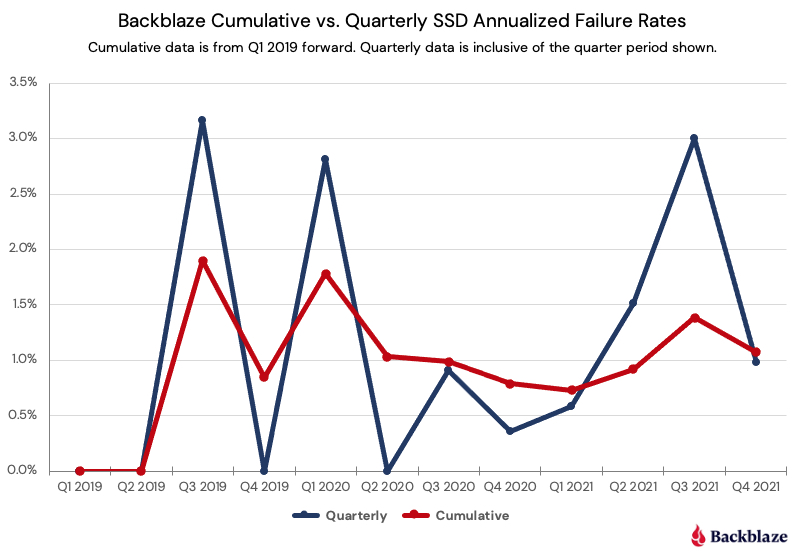
There are two different ways we can look at the quarterly data: over discrete periods of time, e.g., a quarter or year; or cumulative over a period of time, e.g., all data since 2018. Data scoped to quarter by quarter can be volatile or spikey, but reacts quickly to change. Cumulative data shows longer term trends, but is less reactive to quick changes.

Below are graphs of both the quarter-by-quarter and cumulative-by-quarter data for our SSDs beginning in Q1 2019. First we’ll compare all SSDs, then we’ll dig into a few individual drives of interest.

The cumulative curve flows comfortably below our 2% AFR threshold of concern. If we had just followed the quarterly number, we might have considered the use of SSDs as boot drives to be problematic, as in multiple quarters the AFR was at or near 3%. That said, the more data the better, and as the SSDs age we’ll want to be even more on alert to see how long they last. We have plenty of data on that topic for HDDs, but we are still learning about SDDs.

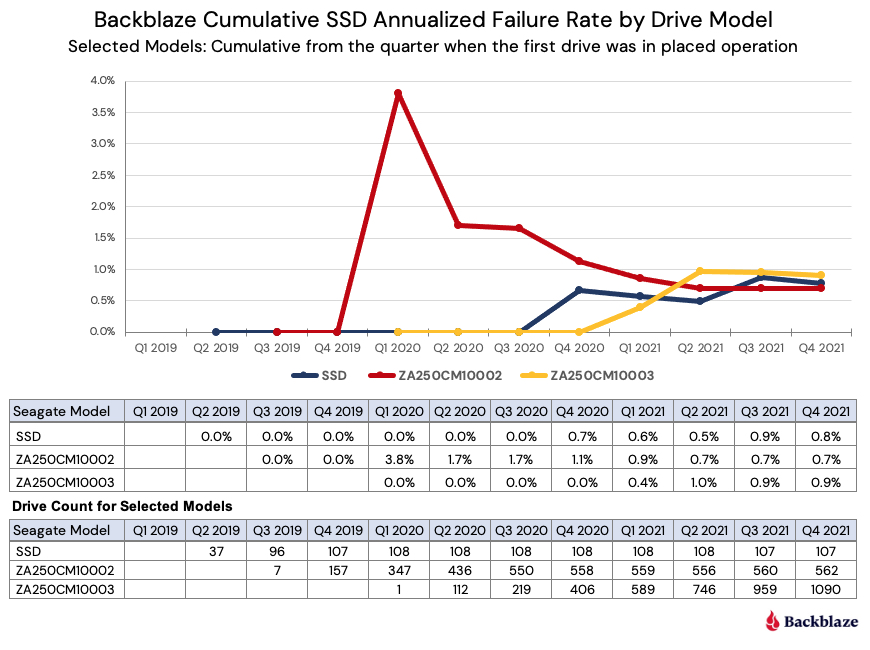
With that in mind, let’s take a look at three of the older SSDs to see if there is anything interesting at this point.

Observations and Comments

  • For all of 2021, all three drives have had cumulative AFR rates below 1%.
  • This compares to the cumulative AFR for all SSD drives as of Q4 2021 which was 1.07% (from the previous chart).
  • Extending the comparison, the cumulative (lifetime) AFR for our hard drives was 1.40% as noted in our 2021 Drive Stats report. But, as we have noted in our comparison of HDDs and SSDs, the two groups (SSDs and HDDs) are not at the same point in their life cycles. As promised, we’ll continue to examine that dichotomy over the coming months.
  • The model (ZA250CM10002) represented by the red line seems to be following the classic bathtub failure curve, experiencing early failures before settling down to an AFR below 1%. On the other hand, the other two drives showed no signs of early drive failure and have only recently started failing. This type of failure pattern is similar to that demonstrated by our HDDs which no longer fit the bathtub curve model.

Experiments and Test Drives

If you decide to download the data and poke around, you’ll see a few anomalies related to the SSD models. We’d like to shed some light on these outliers before you start poking around. We’ve already covered the Crucial and Seagate drives that had higher than expected AFR numbers, but there are two other SSD models that don’t show up in this report, but do show up in the data. These are the Samsung 850 EVO 1TB and the HP SSD S700 250GB.

Why don’t they show up in this report? As with our drive stats review for our HDDs, we remove those drives we are using for testing purposes. Here are the details:

  • The Samsung SSDs were the first SSDs to be installed as boot drives. There were 10 drives that were installed to test out how SSDs would work as boot drives. Thumbs up! We had prior plans for these 10 drives in other servers and after about two weeks, the Samsung drives were swapped out with other SSDs and deployed for their original purpose. Their pioneering work was captured in the Drive Stats data for posterity.
  • The HP SSDs that were part of the testing of our internal data migration platform, i.e., moving data from smaller drives to larger drives. These drives showed up in the data in Q3 and Q4 of 2021. Any data related to these drives in Q3 or Q4 is not based on using these drives in our production environment.

What’s Next

We acknowledge that 2,200 SSDs is a relatively small number of drives on which to perform our analysis, and while this number does lead to wider than desired confidence intervals, we had to start somewhere. Of course, we will continue to add SSD boot drives to the study group, which will improve the fidelity of the data presented. In addition, we expect our readers will apply their usual skeptical lens to the data presented and help guide us towards making this report increasingly educational and useful.

We do have SSDs in other types of servers in our environment. For example, restore servers, utility servers, API servers, and so on. We are considering instrumenting the drives in some of those servers so that they can report their stats in a similar fashion as our boot drives. There are multiple considerations before we do that:

  1. We don’t impact the performance of the other servers.
  2. We recognize the workload of the drives in each of the other servers is most likely different. This means we could end up with multiple cohorts of SSD drives, each with different workloads, that may or may not be appropriate to group together for our analysis.
  3. We don’t want to impact the performance of our data center techs to do their job by adding additional or conflicting steps to the processes they use when maintaining those other servers.

The SSD Stats Data

The complete data set used to create the information used in this review is available on our Hard Drive Test Data page. As noted earlier, you’ll find SSD and HDD data in the same files and you’ll have to use the model number to distinguish one record from another. You can download and use this data for free for your own purpose. All we ask are three things: 1) you cite Backblaze as the source if you use the data, 2) you accept that you are solely responsible for how you use the data, and 3) you do not sell this data to anyone; it is free.
Good luck and let us know if you find anything interesting.

The post The SSD Edition: 2021 Drive Stats Review appeared first on Backblaze Blog | Cloud Storage & Cloud Backup.

Backblaze Drive Stats for 2021

Post Syndicated from original https://www.backblaze.com/blog/backblaze-drive-stats-for-2021/

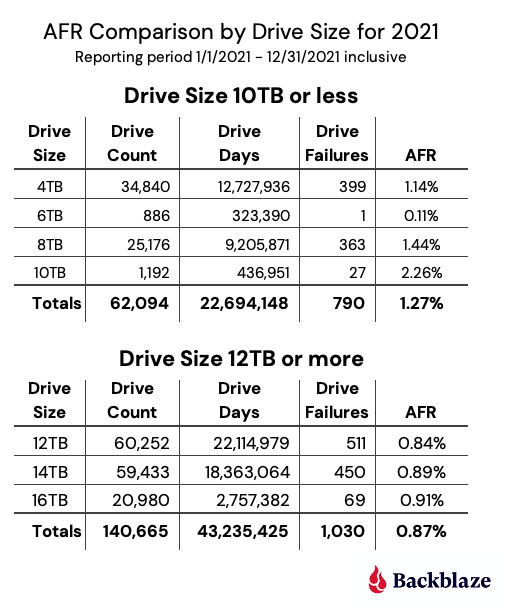
In 2021, Backblaze added 40,460 hard drives and as of December 31, 2021, we had 206,928 drives under management. Of that number, there were 3,760 boot drives and 203,168 data drives. This report will focus on our data drives. We will review the hard drive failure rates for 2021, compare those rates to previous years, and present the lifetime failure statistics for all the hard drive models active in our data center as of the end of 2021. Along the way, we share our observations and insights on the data presented and, as always, we look forward to you doing the same in the comments section at the end of the post.

2021 Hard Drive Failure Rates

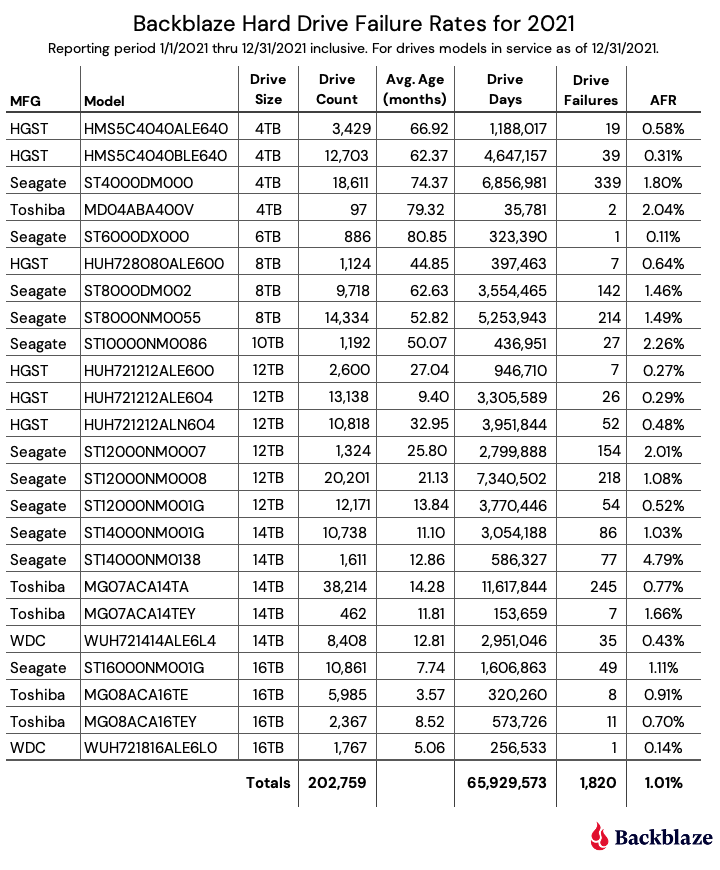
At the end of 2021, Backblaze was monitoring 203,168 hard drives used to store data. For our evaluation, we removed 409 drives from consideration which were used for either testing purposes or drive models for which we did not have at least 60 drives. This leaves us with 202,759 hard drives to analyze for this report.

Observations and Notes

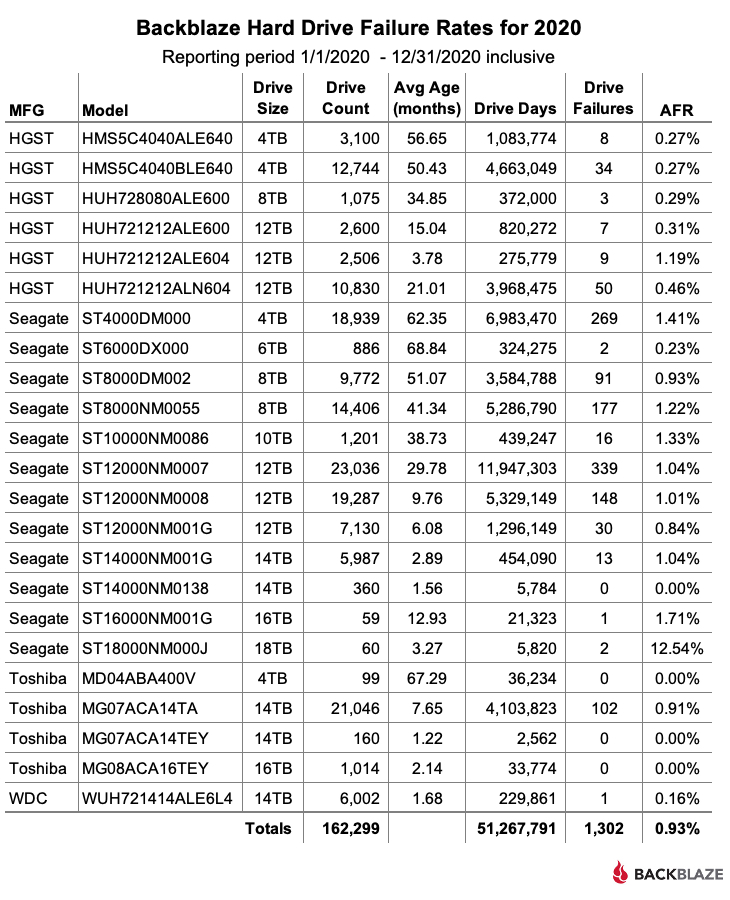
The Old Guy Rules: For 2021, the 6TB Seagate (model: ST6000DX000) had the lowest failure rate of any drive model, clocking in with an annualized failure rate (AFR) of 0.11%. This is even more impressive when you consider that this 6TB drive model is the oldest in the fleet with an average age of 80.4 months. The number of drives, 886, and 2021 drive days, 323,390, are on the lower side, but after nearly seven years in operation, these drives are thumbing their nose at the tail end of the bathtub curve.

The Kids Are Alright: Two drive models are new for 2021 and both are performing well. The 16TB WDC drive cohort (model: WUH721816ALE6L0) has an average age of 5.06 months and an AFR of 0.14%. While the 16TB Toshiba drive cohort (model: MG08ACA16TE) has an average age of 3.57 months and an AFR of 0.91%. In both cases, the number of drive days is on the lower side, but these two drive models are off to a good start.

AFR, What Does That Mean?

AFR stands for annualized failure rate. This is different from an annual failure rate in which the number of drives is the same for each model (cohort) throughout the annual period. In our environment, drives are added and leave throughout the year. For example, a new drive installed in Q4 might contribute just 43 days, while a drive that failed in July might contribute 186 days, while drives in continuous operation for the year could contribute 365 days each. We count the number of drive days each drive contributes throughout the period and annualize the total using this formula:

AFR = (drive failures / (drive days / 365)) * 100

The Patient Is Stable: Last quarter, we reported on the state of our 14TB Seagate drives (model: ST14000NM0138) provisioned in Dell storage servers. They were failing at a higher than expected rate and everyone—Backblaze, Seagate, and Dell—wanted to know why. The failed drives were examined by fault analysis specialists and in late Q3 it was decided as a first step to upgrade the firmware for that cohort of drives still in service. The results were that the quarterly failure rate dropped from 6.29% in Q3 to 4.66% in Q4, stabilizing the rapid rise in failures we’d seen in Q2 and Q3. The 19 drives that failed in Q4 were shipped off for further analysis. We’ll continue to follow this process over the coming quarters.

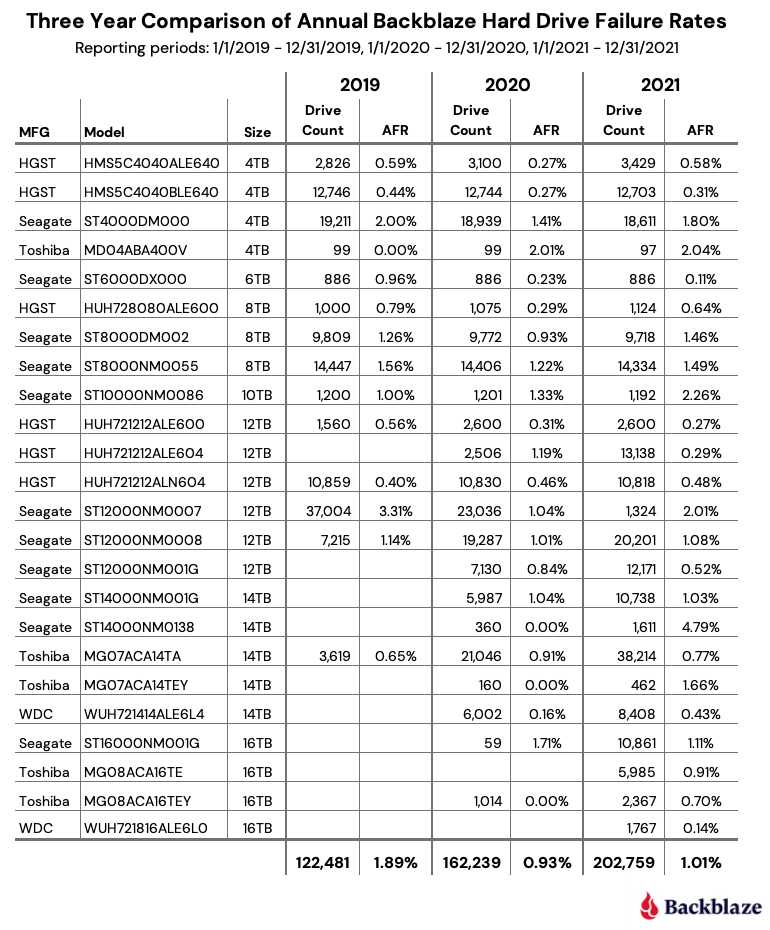
The AFR for 2021 for all drive models was 1.01%, which was slightly higher than the 0.93% we reported for 2020. The next section will compare the data from the last three years.

Comparing Drive Stats for 2019, 2020, and 2021

The chart below compares the AFR for each of the last three years. The data for each year is inclusive of that year only and for the active drive models present at the end of each year.

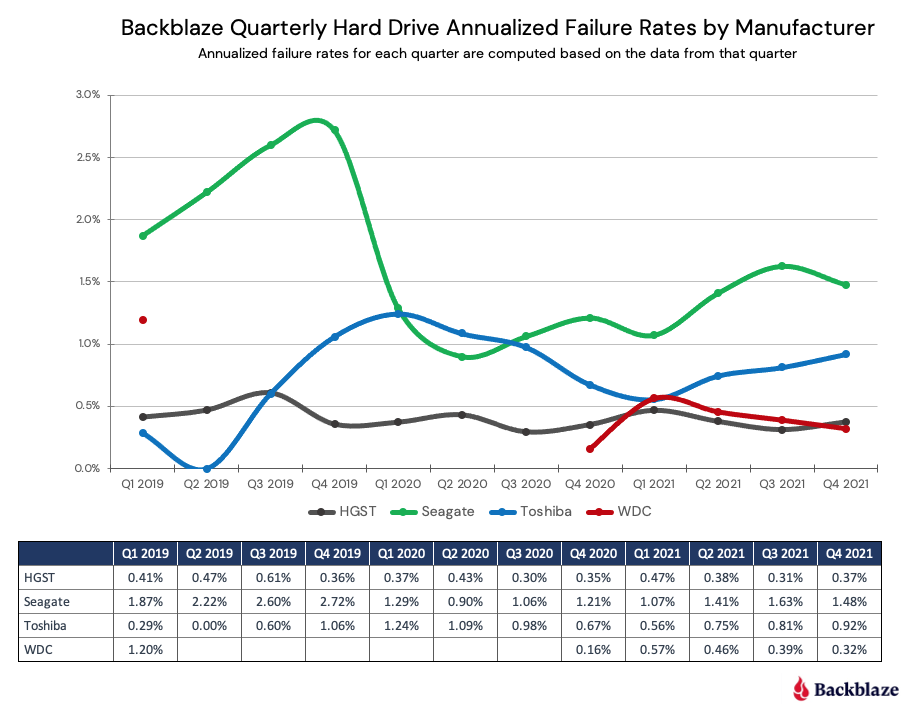
Digging a little deeper, we can aggregate the different drive models by manufacturer to see how failure rates per manufacturer have fared over the last three years.

Note that for the WDC data, a blank value means we did not have any countable WDC drives in our data center in that quarter.

Trends for 2021

The AFR Stayed Low in 2021: In 2021, the AFR for all drives was 1.01%. This was slightly higher than 2020 at 0.93%, but a good sign that the drop in 2020 from 1.83% in 2019 was not an anomaly. What’s behind the 1.01% for 2021? Large drives, as seen below:

The AFR for larger drives, defined here as 12TB, 14TB, and 16TB drives, are all below the 2021 AFR of 1.01% for all drives. The larger drives make up 69% of the total drive population, but more importantly, they total 66% of the drive days total, while only producing 57% of the drive failures.

The larger drives are also the newer drives, which tend to fail less versus older drives. In fact, the oldest large drive has an average age 33 months, while the youngest “small” (4TB, 6TB, 8TB, and 10TB) drive has an average age of 44.9 months.

In summary, the lower AFR for the larger drives is a major influence in keeping the overall AFR for 2021 low.

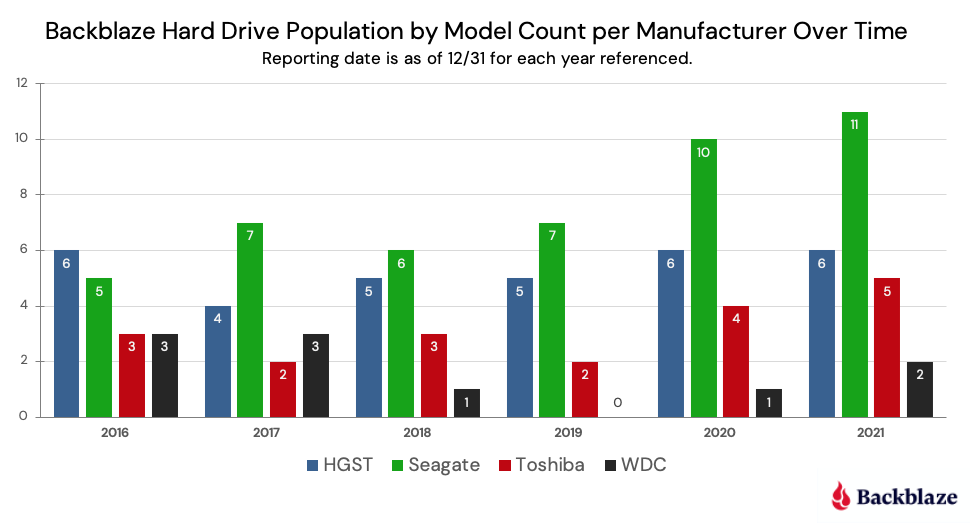
Drive Model Diversity Continues: In 2021, we added two new drive models to our farm with no models retired. We now have a total of 24 different drive models in operation. That’s up from a low point of 14 in 2019 and 22 in 2020. The chart below for “Backblaze Quarterly Hard Drive Population Percentage by Manufacturer” examines the changing complexion of our drive farm as we look at the number of models from each manufacturer we used over the past six years.

When we first started, we often mixed and matched drive models, mostly out of financial necessity—we bought what we could afford. As we grew, we bought and deployed drives in larger lots and drive homogeneity settled in. Over the past few years, we have gotten more comfortable with mixing and matching again, enabled by our Backblaze Vault architecture. A Vault is composed of sixty tomes, with each tome being 20 drives. We make each tome the same drive model, but each of the tomes within a vault can have different drive models, and even different drive sizes. This allows us to be less reliant on any particular drive model, so the more drive models the better.

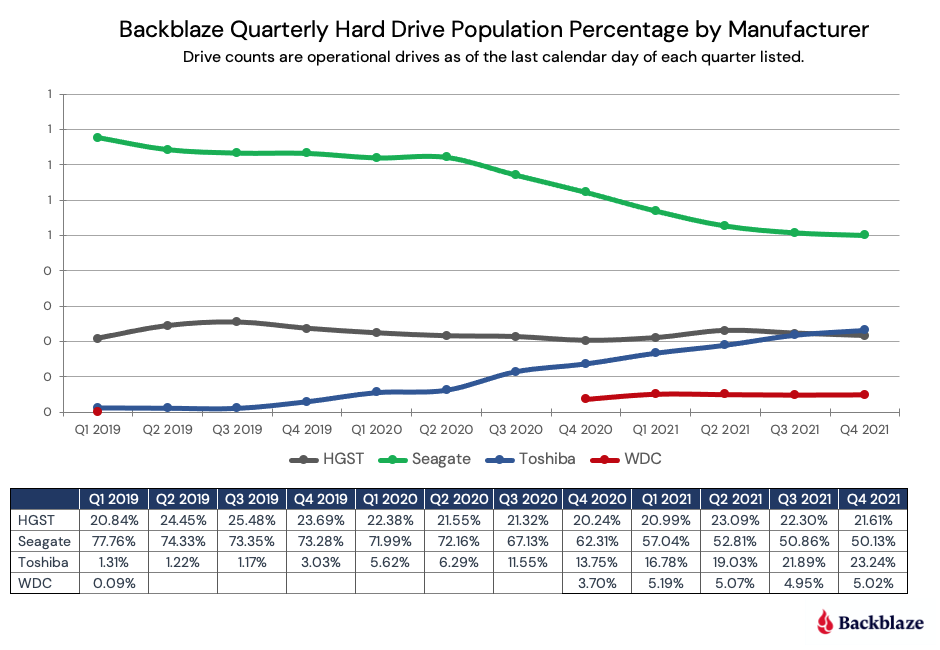
Drive Vendor Diversity Continues, Too: When looking at the chart above for “Backblaze Hard Drive Population by Model Count per Manufacturer Over Time,” you might guess that we have increased the percentage of Seagate drives over the last couple of years. Let’s see if that’s true.

It appears the opposite is true, we have lowered the percentage of Seagate drives in our data centers, even though we have added additional Seagate models.

Why is it important to diversify across multiple manufacturers? Flexibility, just like increasing the number of models. Having relationships with all the primary hard drive vendors gives us the opportunity to get the resources we need in a timely fashion. The fact that we can utilize any one of several different models from these vendors adds to that flexibility.

Lifetime Hard Drive Stats

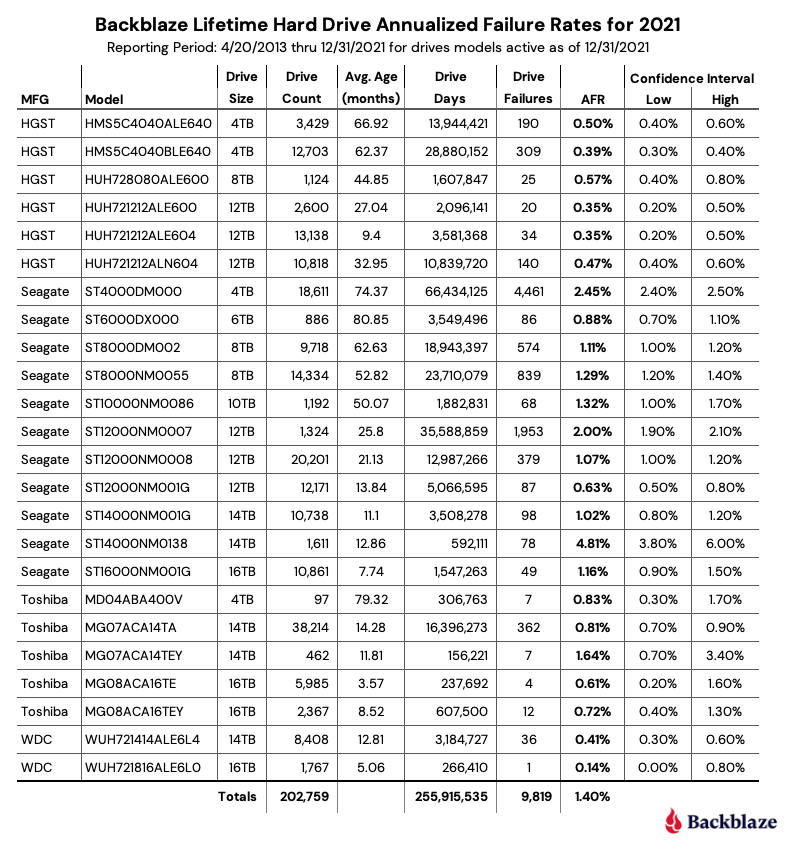
The chart below shows the lifetime annualized failure rates of all the drive models in production as of December 31, 2021.

Observations and Caveats

The lifetime AFR for all the drives listed above is 1.4% and continues to go down year over year. At the end of 2020, the AFR was 1.54% and at the end of 2019, the AFR stood at 1.62%.

When looking at the chart above, several of the drives have a fairly wide confidence interval (>0.5). In these cases, we do not really have enough information about the drive’s performance to be reasonably confident (>95%) in the AFR listed. This is typically the case with lower drive counts or newer drives.

Looking for SSD Numbers?

We’ll be covering our annual failure rates for our SSD drives in a separate post in the next few weeks. We realized that combining the analysis of our data drives and our boot drives in one post was confusing. Stay tuned.

The Hard Drive Stats Data

The complete data set used to create the information used in this review is available on our Hard Drive Test Data page. You can download and use this data for free for your own purpose. All we ask are three things: 1) you cite Backblaze as the source if you use the data, 2) you accept that you are solely responsible for how you use the data, and 3) you do not sell this data to anyone; it is free.

If you just want the summarized data used to create the tables and charts in this blog post, you can download the ZIP file containing the CSV files for each chart.

Good luck and let us know if you find anything interesting.

The post Backblaze Drive Stats for 2021 appeared first on Backblaze Blog | Cloud Storage & Cloud Backup.
How Long Do Disk Drives Last?

Post Syndicated from original https://www.backblaze.com/blog/how-long-do-disk-drives-last/

Editor’s Note: This post has been updated since it was originally published in 2013 to provide the latest information and statistics.

How long do disk drives last? We asked that question several years ago, and at the time the answer was: We didn’t know yet. Nevertheless, we did present the data we had up to that point and we made a few of predictions. Since that time, we’ve gone to school on hard disk drive (HDD) and solid-state drive (SSD) failure rates. Let’s see what we’ve learned.

The initial drive life study was done with 25,000 disk drives and about four years of data. Today’s study includes data from over 200,000 disk drives, many of which have survived six years and longer. This gives us more data to review and lets us extend our projections. For example, in our original report we reported that 78% of the drives we purchased were living longer than four years. Today, about 90% of the drives we own have lasted four years and 65% are living longer than six years. So how long do drives last? Keep reading.

How Drives Are Used at Backblaze

Backblaze currently uses over 200,000 hard drives to store our customers’ data. Drives range in size from 4TB to 18TB in size. When added together, we have over two exabytes of hard drive space under management. Most of these drives are mounted in a storage server which accommodates 60 drives, plus a boot drive. There are also a handful of storage servers which use only 45 hard drives. The storage servers consist of Storage Pods (our own homegrown storage servers) and storage servers from external manufacturers. Twenty storage servers are grouped into a Backblaze Vault, which utilizes our own Reed-Solomon erasure coding algorithm to replicate and store customer data across the 20 servers in a Backblaze Vault.

Types of Hard Drives in the Analysis

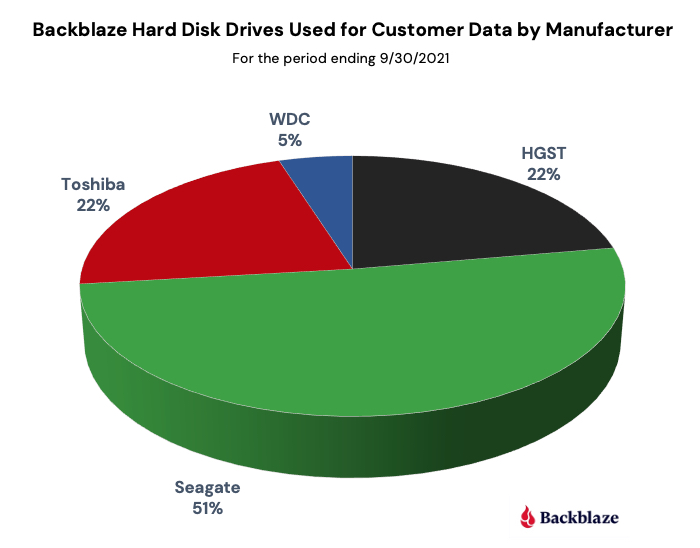
The hard drives we use to store customer data are standard 3.5 inch drives you can buy online or in stores. The redundancy provided by the Backblave Vault software ensures the data is safe, while allowing us to use off-the-shelf drives from the three primary disk drive manufacturers: Seagate, Western Digital, and Toshiba. The following chart breaks down our current drive count by manufacturer. Note that HGST is now part of Western Digital, but the drives themselves report as HGST drives so they are listed separately in the chart.

Each of the storage servers also uses a boot drive. Besides the obvious function of booting the server, we also use these drives to store log files recording system access and activities which are used for analytics and compliance purposes. A boot drive can be either an HDD or an SSD. If you’re interested, we’ve compared the reliability of HDDs versus SSDs as it relates to these boot drives.

Number of Hard Drives

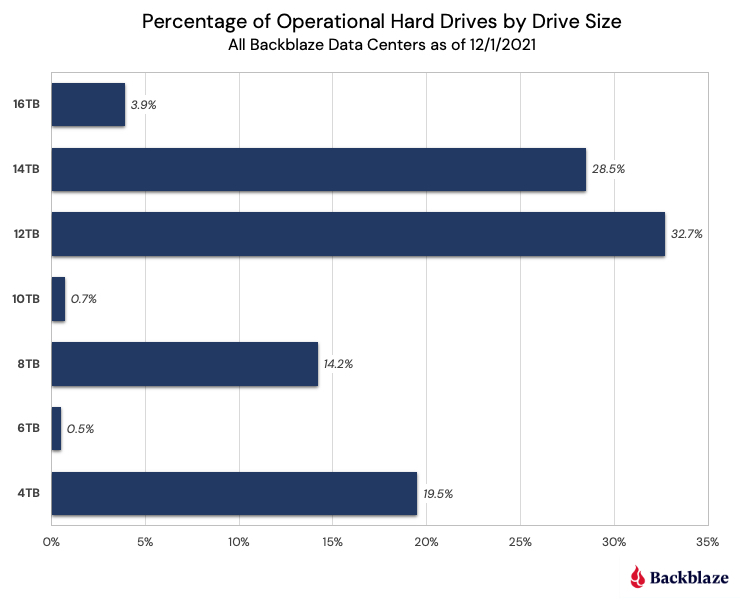
As stated earlier, we currently have over 200,000 disk drives we manage and use for customer data storage. We use several different disk drive sizes as the table below shows, with over 60% of those drives being 12TB or 14TB in size.

Drive Failure Rates

Before diving into the data on failure rates, it’s worth spending a little time clarifying what exactly a failure rate means. The term failure rate alone is not very useful as it is missing the notion of time. For example, if you bought a hard drive, what is the failure rate of a hard drive that failed one week after you purchased it? What about one year after you purchased it? Five years? They can’t all be the same failure rate. What’s missing is time. When we produce our quarterly and annual Drive Stats reports, we calculate and publish the annualized failure rate (AFR). By using the AFR, all failure rates are translated to be annual so that regardless of the timeframe (e.g., one month, one year, three years) we can compare different cohorts of drives. Along with the reports, we include links to the drive data we use to calculate the stated failures rates.

The Bathtub Curve

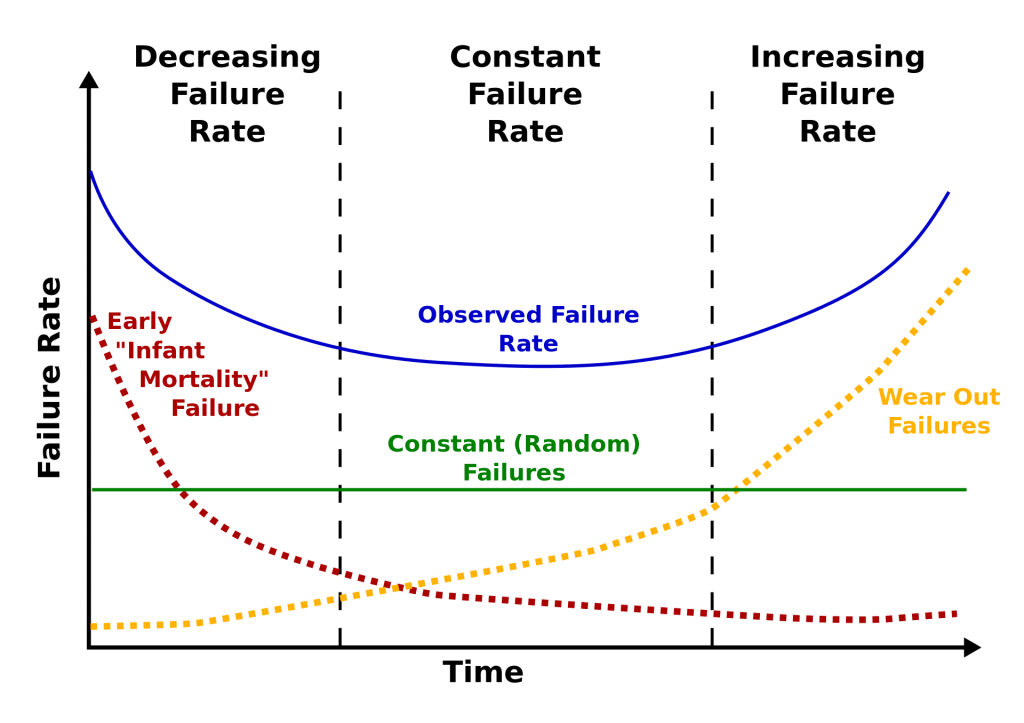
Reliability engineers use something called the bathtub curve to describe expected failure rates. The idea is that defects come from three factors: (1) factory defects, resulting in “infant mortality,” (2) random failures, and (3) parts that wear out, resulting in failures after much use. The chart below (from Wikimedia Commons) shows how these three factors can be expected to produce a bathtub-shaped failure rate curve.

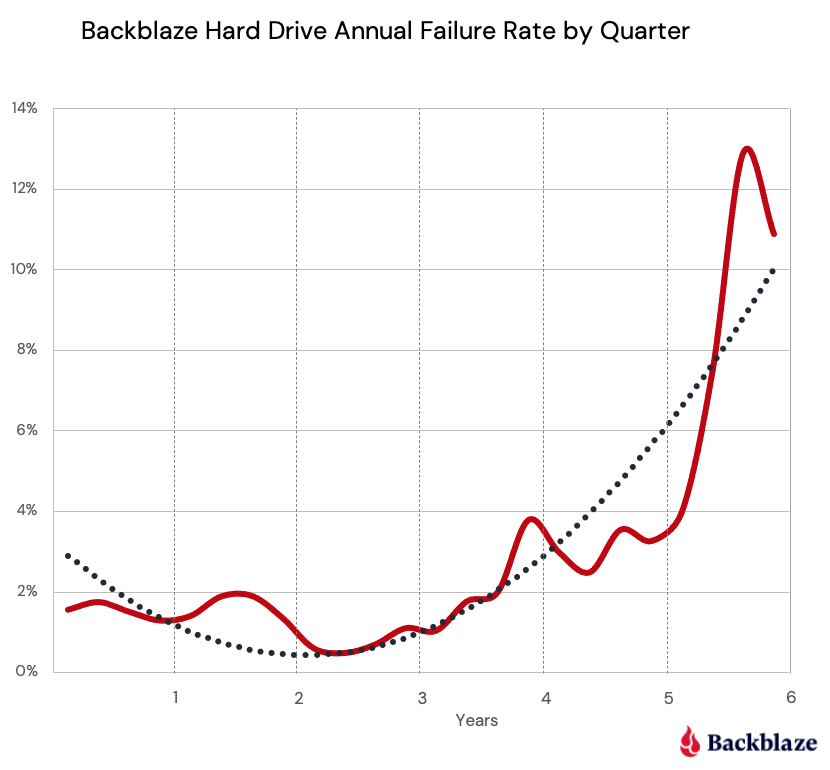
When our initial drive life study was done, the Backblaze experience matched the bathtub curve theory. When we recently revisited the bathtub curve, we found the bathtub to be leaking, as the left side of the Backblaze bathtub curve (decreasing failure rate) was much lower and more consistent with the constant failure rate. This can be seen in the chart below which covers the most recent six years worth of disk drive failure data.

The failure rate (the red line) is below 2% for the first three and a half years and then increases rapidly through year six. When we plot a trendline of the data (the blue dotted line, a second order polynomial) a parabolic curve emerges, but it is significantly lower on the left hand side, looking less like a bathtub and more like a shallow ladle or perhaps a hockey stick.

Calculating Life Expectancy

What’s the life expectancy of a hard disk drive? To answer that question, we first need to decide what we mean by “life expectancy.”

When measuring the life expectancy of people, the usual measure is the average number of years remaining at a given age. For example, the World Health Organization estimates that the life expectancy of all newborns in the world is currently 73 years. This means if we wait until all of those new people have lived out their lives in 120 or 130 years, the average of their lifespans will be 73.0.

For disk drives, it may be that all of them will wear out before they are 10 years old. Or it may be that some of them last 20 or 30 years. If some of them live a long, long time, it makes it hard to compute the average. Also, a few outliers can throw off the average and make it less useful.

The number that should be able to compute is the median lifespan of a new drive. That is the age at which half of the drives fail. Let’s see how close we can get to predicting the median lifespan of a new drive given all the data we’ve collected over the years.

Disk Drive Survival Rates

To this day it is surprisingly hard to get an answer to the question “How long will a hard drive last?” As noted, we regularly publish our Drive Stats reports, which lists the AFRs for the drive models we use. While these reports answer the question at what rate disk drives will fail, they don’t tell us how long they will last. Interestly, the same data we collect and use to predict drive failure can be used to figure out the life expectancy of the hard drive models we use. It is all a matter of how you look at the data.

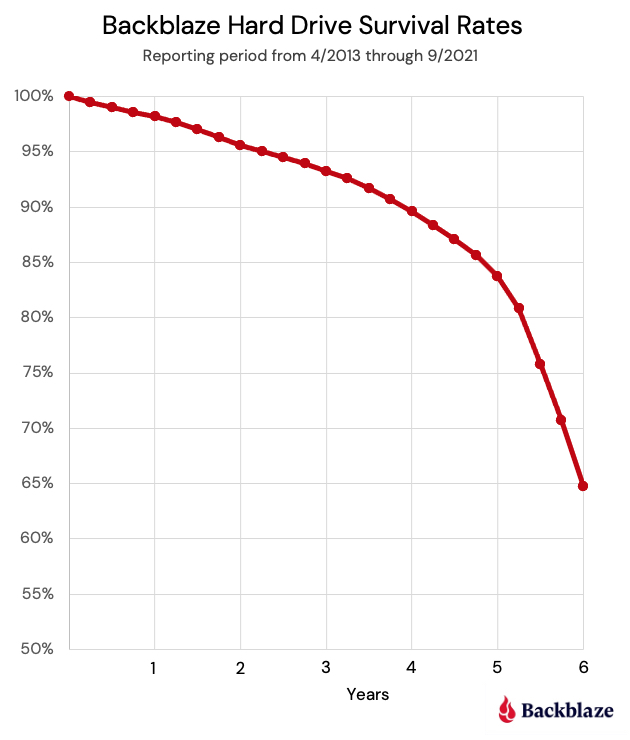
When we apply life expectancy forecasting techniques to the drive data we have collected, we get the following chart:

The life expectancy decreases at a fairly stable rate of 2% to 2.5% a year for the first four years, then the decrease begins to accelerate. Looking back at the AFR by quarter chart above, this makes sense as the failure rate increases beginning in year four. After six years we end up with a life expectancy of 65%. Stated another way, if we bought a hard drive six years ago, there is a 65% chance it is still alive today.

How Long WILL the Hard Drives Last?

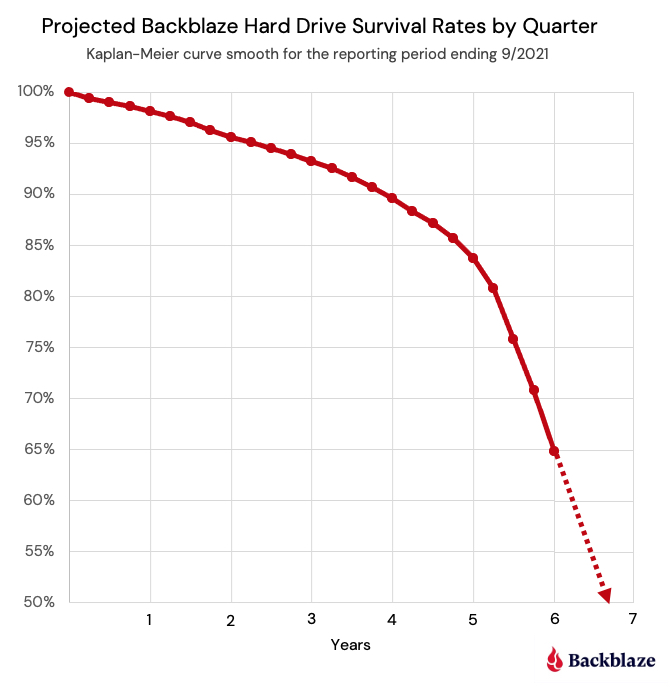
What happens to drives when they’re older than six years? We do have drives that are older than six years, so why did we stop there? We didn’t have enough data to be confident beyond six years as the number of drives drops off at that point and becomes composed almost entirely of one or two drive models versus a diverse selection. Instead, we used the data we had through six years and extrapolated from the life expectancy line to estimate the point at which half the drives will have died.

How long do drives last? It would appear a reasonable estimate of the median life expectancy is six years and nine months. That aligns with the minimal amount of data we have collected to date, but as noted, we don’t have quite enough data to be certain. Still, we know it is longer than six years for all the different drive models we use. We will continue to build up data over the coming months and years and see if anything changes.

In the meantime, how long should you assume a hard drive you are going to buy will last? The correct answer is to always have at least one backup and preferably two, keep them separate, and check them often一the 3-2-1 backup strategy. Every hard drive you buy will fail at some point—it could be in one day or 10 years—be prepared.

The post How Long Do Disk Drives Last? appeared first on Backblaze Blog | Cloud Storage & Cloud Backup.
Backblaze Drive Stats for Q3 2021

Post Syndicated from original https://www.backblaze.com/blog/backblaze-drive-stats-for-q3-2021/

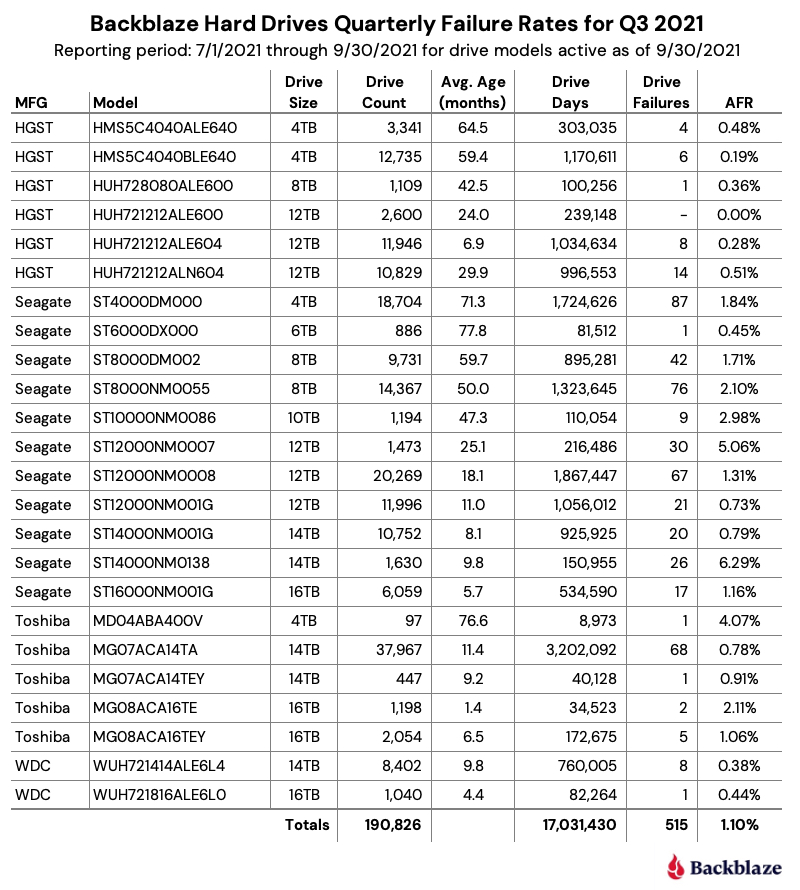
As of September 30, 2021, Backblaze had 194,749 drives spread across four data centers on two continents. Of that number, there were 3,537 boot drives and 191,212 data drives. The boot drives consisted of 1,557 hard drives and 1,980 SSDs. This report will review the quarterly and lifetime failure rates for our data drives, as well as compare failure rates for our SSD and HDD boot drives. Along the way, we’ll share our observations and insights of the data presented and, as always, we look forward to your comments below.

Q3 2021 Hard Drive Failure Rates

At the end of September 2021, Backblaze was monitoring 191,212 hard drives used to store data. For our evaluation, we removed from consideration 386 drives which were used for either testing purposes or were drive models for which we did not have at least 60 drives. This leaves us with 190,826 hard drives for the Q3 2021 quarterly report, as shown below.

Notes and Observations on the Q3 2021 Stats

The data for all of the drives in our data centers, including the 386 drives not included in the list above, is available for download on the Hard Drive Test Data webpage.

Zero Failures

The only drive model that recorded zero failures during Q2 was the HGST 12TB drive (model: HUH721212ALE600) which is used in our Dell storage servers in our Amsterdam data center.

Honorable Mentions

Five drive models recorded one drive failure during the quarter:

  • HGST 12TB drive (model: HUH728080ALE600).
  • Seagate 6TB drive (model: ST6000DX000).
  • Toshiba 4TB drive (model: MD04ABA400V).
  • Toshiba 14TB drive (model: MG07ACA14TEY).
  • WDC 16TB drive (model: WUH721816ALE6L0).

While one failure is good, the number of drive days for each of these drives is 100,256 or less for the quarter. This leads to a wide confidence interval for the annualized failure rate (AFR) for these drives. Still, kudos to the Seagate 6TB drives (average age 77.8 months) and Toshiba 4TB drives (average age 75.6 months) as they have been good for a long time.

What’s New

We added a new Toshiba 16TB drive this quarter (model: MG08ACA16TE). There were a couple of early drive failures, but they’ve only been installed a little over a month. This drive is similar to model MG08ACA16TEY, with the difference purportedly being the latter having the Sanitize Instant Erase (SIE) feature, which shouldn’t be in play in our environment. It will be interesting to see how they compare over time.

Outliers

There are two drives in the quarterly results which require additional information beyond the raw numbers presented. Let’s start with the Seagate 12TB drive (model: ST12000NM0007). Back in January of 2020, we noted that these drives were not working optimally in our environment and higher failure rates were predicted. Together with Seagate, we decided to remove these drives from service over the coming months. Covid-19 delayed the project some and the results are the predicted higher failure rates. We expect all of the remaining drives to be removed during Q4.

The second outlier is the Seagate 14TB drive (model: ST14000NM0138). As noted in the Q2 Drive Stats report, these drives, while manufactured by Seagate, were provisioned in Dell storage servers. As noted, both Seagate and Dell were looking into the possible causes for the unexpected failure rate. The limited number of failures, 26 this quarter, have made failure analysis challenging. As we learn more, we will let you know.

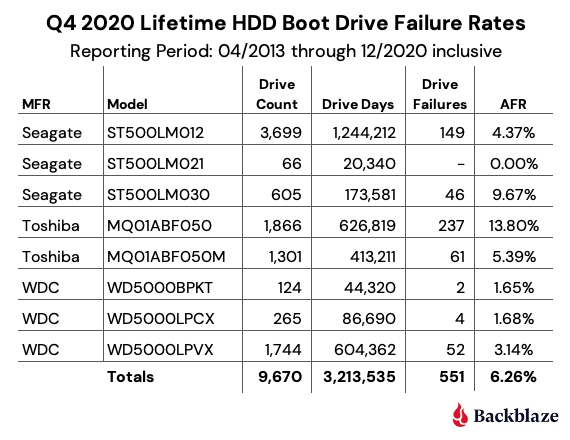
HDDs versus SSDs

As a reminder, we use both SSDs and HDDs as boot drives in our storage servers. The workload for a boot drive includes regular reading, writing, and deleting of files (log files typically) along with booting the server when needed. In short, the workload for each type of drive is similar.

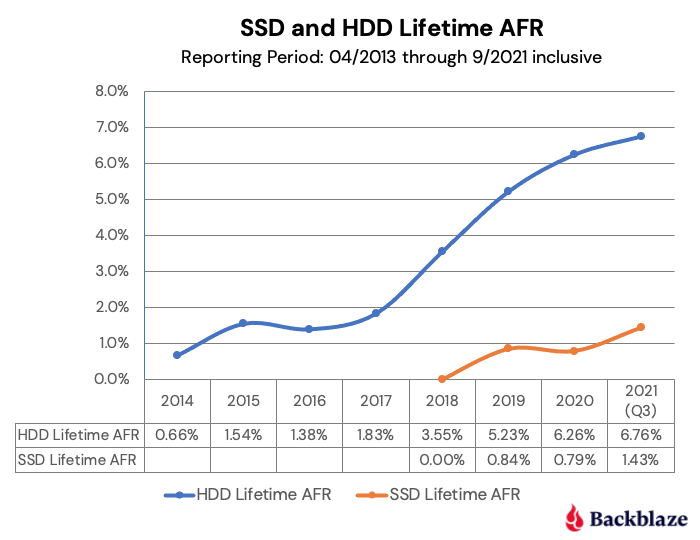
In our recent post, “Are SSDs Really More Reliable Than Hard Drives?” we compared the failure rates of our HDD and SSD boot drives using data through Q2 2021. In that post, we found that if we controlled for the average age and drive days for each cohort, we were able to compare failure rates over time.

We’ll continue that comparison, and we have updated the chart below through Q3 2021 to reflect the latest data.

The first four points of each drive type create lines that are very similar, albeit the SSD failures rates are slightly lower. The HDD failure rates began to spike in year five (2018) as the HDD drive fleet started to age. Given what we know about drive failure over time, it is reasonable to assume that the failure rates of the SSDs will rise as they get older. The question to answer is: Will it be higher, lower, or the same? Stay tuned.

Data Storage Changes

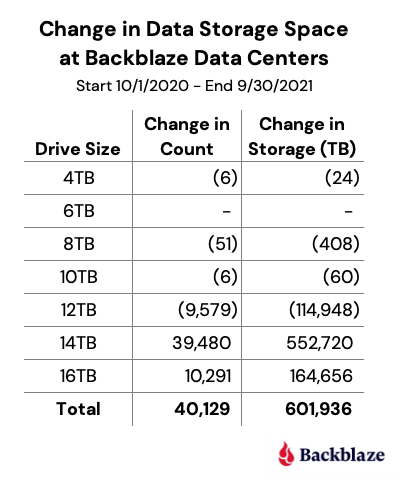
Over the last year, we’ve added 40,129 new hard drives. Actually, we installed 67,990 new drives and removed 27,861 old drives. The removed drives included failed drives (1,674) and migrations (26,187). That works out to installing about 187 drives a day, which over the course of the last year, totaled just over 600PB of new data storage.

The following chart breaks down the efforts of our intrepid data center teams.

Lifetime Hard Drive Stats

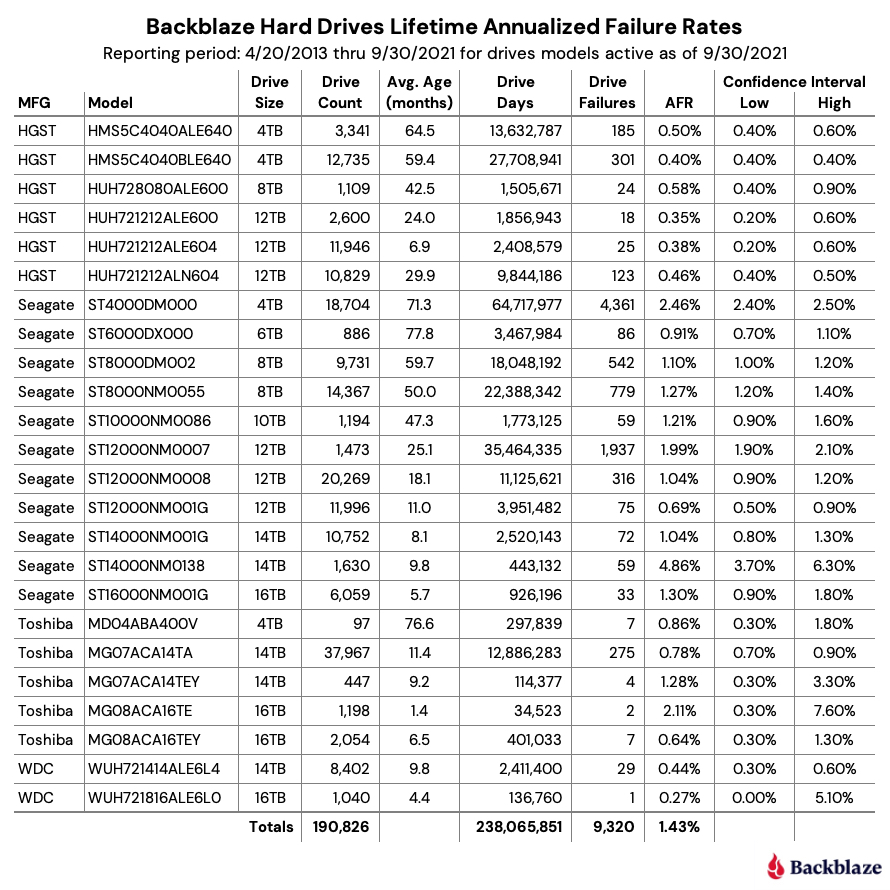
The chart below shows the lifetime AFRs of all the hard drive models in production as of September 30, 2021.

Notes and Observations on the Lifetime Stats

The lifetime AFR for all of the drives in our farm continues to decrease. The 1.43% AFR is the lowest recorded value since we started back in 2013. The drive population spans drive models from 4TB to 16TB and varies in average age from one month (Toshiba 16TB) to over six years (Seagate 6TB).

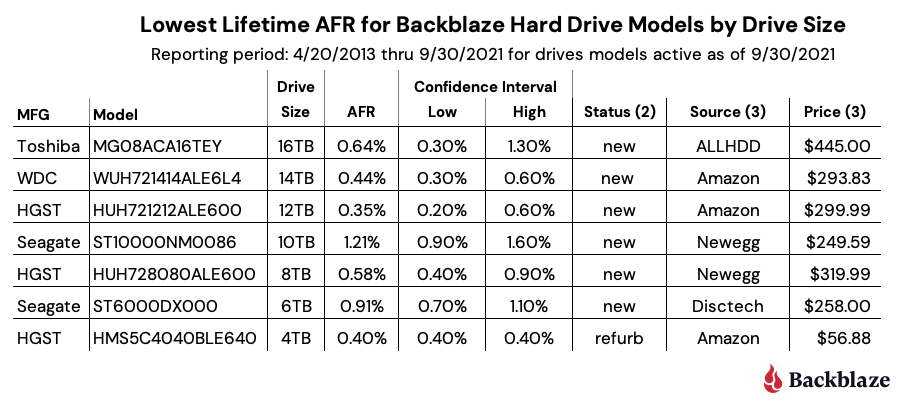
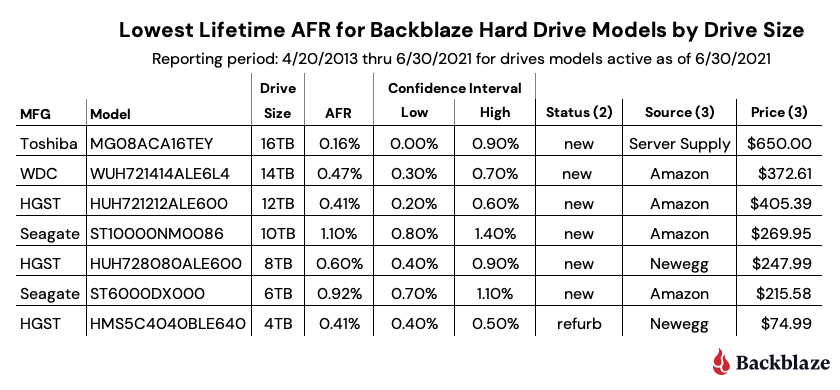
Our best performing drive models in our environment by drive size are listed in the table below.

Notes:

  1. The WDC 16TB drive (model: WUH721816ALE6L0) does not appear to be available in the U.S. through retail channels. It is available in Europe for 549,00 EUR.
  2. Status is based on what is stated on the website. Further investigation may be required to ensure you are purchasing a new drive versus a refurbished drive marked as new.
  3. The source and price columns were as of 10/23/2021.
Interested in learning more? Join our webinar on November 4th at 10 a.m. PT with Drive Stats author, Andy Klein, to gain unique and valuable insights into why drives fail, how often they fail, and which models work best in our environment of 190,000+ drives. Register today.

The Hard Drive Stats Data

The complete data set used to create the information used in this review is available on our Hard Drive Test Data page. You can download and use this data for free for your own purpose. All we ask are three things: 1) you cite Backblaze as the source if you use the data, 2) you accept that you are solely responsible for how you use the data, and 3) you do not sell this data to anyone; it is free.

If you just want the summarized data used to create the tables and charts in this blog post, you can download the ZIP file containing the Excel XLXS files for each chart.

Good luck and let us know if you find anything interesting.

The post Backblaze Drive Stats for Q3 2021 appeared first on Backblaze Blog | Cloud Storage & Cloud Backup.
Backblaze Drive Stats for Q2 2021

Post Syndicated from original https://www.backblaze.com/blog/backblaze-drive-stats-for-q2-2021/

As of June 30, 2021, Backblaze had 181,464 drives spread across four data centers on two continents. Of that number, there were 3,298 boot drives and 178,166 data drives. The boot drives consisted of 1,607 hard drives and 1,691 SSDs. This report will review the quarterly and lifetime failure rates for our data drives, and we’ll compare the failure rates of our HDD and SSD boot drives. Along the way, we’ll share our observations of and insights into the data presented and, as always, we look forward to your comments below.

Q2 2021 Hard Drive Failure Rates

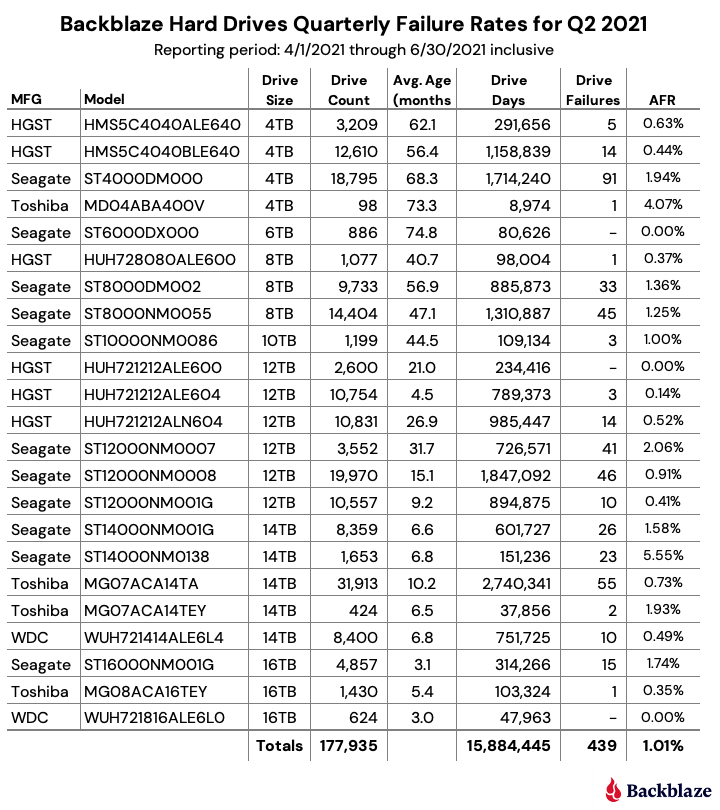
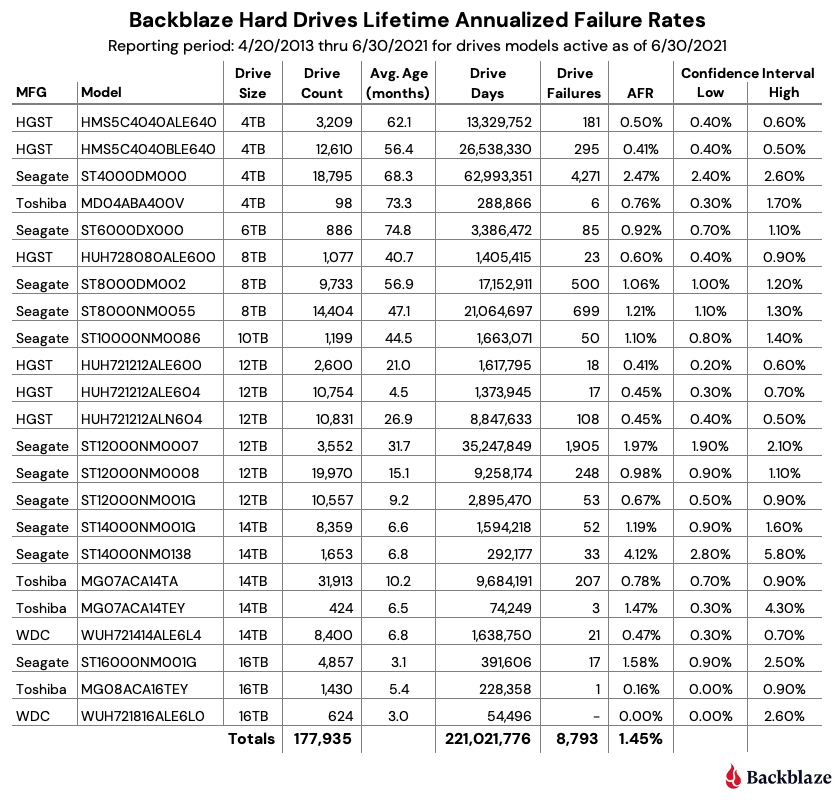
At the end of June 2021, Backblaze was monitoring 178,166 hard drives used to store data. For our evaluation, we removed from consideration 231 drives which were used for either testing purposes or as drive models for which we did not have at least 60 drives. This leaves us with 177,935 hard drives for the Q2 2021 quarterly report, as shown below.

Notes and Observations on the Q2 2021 Stats

The data for all of the drives in our data centers, including the 231 drives not included in the list above, is available for download on the Hard Drive Test Data webpage.

Zero Failures

Three drive models recorded zero failures during Q2, let’s take a look at each.

  • 6TB Seagate (ST6000DX000): The average age of these drives is over six years (74 months) and with one failure over the last year, this drive is aging quite well. The low number of drives (886) and drive days (80,626) means there is some variability in the failure rate, but the lifetime failure rate of 0.92% is solid.
  • 12TB HGST (HUH721212ALE600): These drives reside in our Dell storage servers in our Amsterdam data center. After recording a quarterly high of five failures last quarter, they are back on track with zero failures this quarter and a lifetime failure rate of 0.41%.
  • 16TB Western Digital (WUH721816ALE6L0): These drives have only been installed for three months, but no failures in 624 drives is a great start.

Honorable Mention

Three drive models recorded one drive failure during the quarter. They vary widely in age.

  • On the young side, with an average age of five months, the 16TB Toshiba (MG08ACA16TEY) had its first drive failure out of 1,430 drives installed.
  • At the other end of the age spectrum, one of our 4TB Toshiba (MD04ABA400V) drives finally failed, the first failure since Q4 of 2018.
  • In the middle of the age spectrum with an average of 40.7 months, the 8TB HGST drives (HUH728080ALE600) also had just one failure this past quarter.

Outliers

Two drive models had an annualized failure rate (AFR) above 4%, let’s take a closer look.

  • The 4TB Toshiba (MD04ABA400V) had an AFR of 4.07% for Q2 2021, but as noted above, that was with one drive failure. Drive models with low drive days in a given period are subject to wide swings in the AFR. In this case, one less failure during the quarter would result in an AFR of 0% and one more failure would result in an AFR of over 8.1%.
  • The 14TB Seagate (ST14000NM0138) drives have an AFR of 5.55% for Q2 2021. These Seagate drives along with 14TB Toshiba drives (MG07ACA14TEY) were installed in Dell storage servers deployed in our U.S. West region about six months ago. We are actively working with Dell to determine the root cause of this elevated failure rate and expect to follow up on this topic in the next quarterly drive stats report.

Overall AFR

The quarterly AFR for all the drives jumped up to 1.01% from 0.85% in Q1 2021 and 0.81% one year ago in Q2 2020. This jump ended a downward trend over the past year. The increase is within our confidence interval, but bears watching going forward.

HDDs vs. SSDs, a Follow-up

In our Q1 2021 report, we took an initial look at comparing our HDD and SSD boot drives, both for Q1 and lifetime timeframes. As we stated at the time, a numbers-to-numbers comparison was suspect as each type of drive was at a different point in its life cycle. The average age of the HDD drives was 49.63 months while the SSDs average age was 12.66 months. As a reminder, the HDD and SSD boot drives perform the same functions which include booting the storage servers and performing reads, writes, and deletes of daily log files and other temporary files.

To create a more accurate comparison, we took the HDD boot drives that were in use at the end of Q4 2020 and went back in time to see where their average age and cumulative drive days would be similar to those same attributes for the SDDs at the end of Q4 2020. We found that at the end of Q4 2015 the attributes were the closest.

Let’s start with the HDD boot drives that were active at the end of Q4 2020.

Next, we’ll look at the SSD boot drives that were active at the end of Q4 2020.

Finally, let’s look at the lifetime attributes of the HDD drives active in Q4 2020 as they were back in Q4 2015.

To summarize, when we control using the same drive models, the same average drive age, and a similar number of drive days, HDD and SSD drives failure rates compare as follows:

While the failure rate for our HDD boot drives is nearly two times higher than the SSD boot drives, it is not the nearly 10 times failure rate we saw in the Q1 2021 report when we compared the two types of drives at different points in their lifecycle.

Predicting the Future?

What happened to the HDD boot drives from 2016 to 2020 as their lifetime AFR rose from 1.54% in Q4 2015 to 6.26% in Q4 2020? The chart below shows the lifetime AFR for the HDD boot drives from 2014 through 2020.

As the graph shows, beginning in 2018 the HDD boot drive failures accelerated. This continued in 2019 and 2020 even as the number of HDD boot drives started to decrease when failed HDD boot drives were replaced with SSD boot drives. As the average age of the HDD boot drive fleet increased, so did the failure rate. This makes sense and is borne out by the data. This raises a couple of questions:

  • Will the SSD drives begin failing at higher rates as they get older?
  • How will the SSD failure rates going forward compare to what we have observed with the HDD boot drives?

We’ll continue to track and report on SSDs versus HDDs based on our data.

Lifetime Hard Drive Stats

The chart below shows the lifetime AFR of all the hard drive models in production as of June 30, 2021.

Notes and Observations on the Lifetime Stats

The lifetime AFR for all of the drives in our farm continues to decrease. The 1.45% AFR is the lowest recorded value since we started back in 2013. The drive population spans drive models from 4TB to 16TB and varies in average age from three months (WDC 16TB) to over six years (Seagate 6TB).

Our best performing drive models in our environment by drive size are listed in the table below.

Notes:

  1. The WDC 16TB drive, model: WUH721816ALE6L0, does not appear to be available in the U.S. through retail channels at this time.
  2. Status is based on what is stated on the website. Further investigation may be required to ensure you are purchasing a new drive versus a refurbished drive marked as new.
  3. The source and price were as of 7/30/2021.
  4. In searching for the Toshiba 16TB drive, model: MG08ACA16TEY, you may find model: MG08ACA16TE for much less ($399.00 or less). These are not the same drive and we have no information on the latter model. The MG08ACA16TEY includes the Sanitize Instant Erase feature.

The Drive Stats Data

The complete data set used to create the information used in this review is available on our Hard Drive Test Data page. You can download and use this data for free for your own purpose. All we ask are three things: 1) you cite Backblaze as the source if you use the data, 2) you accept that you are solely responsible for how you use the data, and 3) you do not sell this data to anyone; it is free.

If you just want the summarized data used to create the tables and charts in this blog post, you can download the ZIP file containing the CSV files for each chart.

Good luck and let us know if you find anything interesting.

The post Backblaze Drive Stats for Q2 2021 appeared first on Backblaze Blog | Cloud Storage & Cloud Backup.
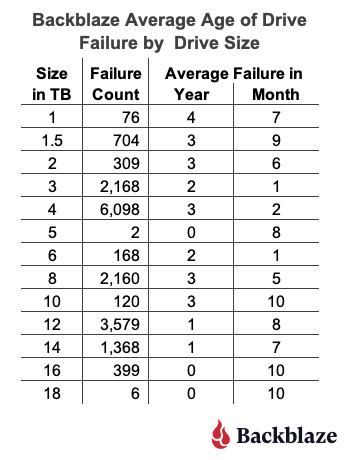
Backblaze Hard Drive Stats for 2020

Post Syndicated from original https://www.backblaze.com/blog/backblaze-hard-drive-stats-for-2020/

In 2020, Backblaze added 39,792 hard drives and as of December 31, 2020 we had 165,530 drives under management. Of that number, there were 3,000 boot drives and 162,530 data drives. We will discuss the boot drives later in this report, but first we’ll focus on the hard drive failure rates for the data drive models in operation in our data centers as of the end of December. In addition, we’ll welcome back Western Digital to the farm and get a look at our nascent 16TB and 18TB drives. Along the way, we’ll share observations and insights on the data presented and as always, we look forward to you doing the same in the comments.

2020 Hard Drive Failure Rates

At the end of 2020, Backblaze was monitoring 162,530 hard drives used to store data. For our evaluation, we remove from consideration 231 drives which were used for testing purposes and those drive models for which we did not have at least 60 drives. This leaves us with 162,299 hard drives in 2020, as listed below.

Observations

The 231 drives not included in the list above were either used for testing or did not have at least 60 drives of the same model at any time during the year. The data for all drives, data drives, boot drives, etc., is available for download on the Hard Drive Test Data webpage.

For drives which have less than 250,000 drive days, any conclusions about drive failure rates are not justified. There is not enough data over the year-long period to reach any conclusions. We present the models with less than 250,000 drive days for completeness only.

For drive models with over 250,000 drive days over the course of 2020, the Seagate 6TB drive (model: ST6000DX000) leads the way with a 0.23% annualized failure rate (AFR). This model was also the oldest, in average age, of all the drives listed. The 6TB Seagate model was followed closely by the perennial contenders from HGST: the 4TB drive (model: HMS5C4040ALE640) at 0.27%, the 4TB drive (model: HMS5C4040BLE640), at 0.27%, the 8TB drive (model: HUH728080ALE600) at 0.29%, and the 12TB drive (model: HUH721212ALE600) at 0.31%.

The AFR for 2020 for all drive models was 0.93%, which was less than half the AFR for 2019. We’ll discuss that later in this report.

What’s New for 2020

We had a goal at the beginning of 2020 to diversify the number of drive models we qualified for use in our data centers. To that end, we qualified nine new drives models during the year, as shown below.

Actually, there were two additional hard drive models which were new to our farm in 2020: the 16TB Seagate drive (model: ST16000NM005G) with 26 drives, and the 16TB Toshiba drive (model: MG08ACA16TA) with 40 drives. Each fell below our 60-drive threshold and were not listed.

Drive Diversity

The goal of qualifying additional drive models proved to be prophetic in 2020, as the effects of Covid-19 began to creep into the world economy in March 2020. By that time we were well on our way towards our goal and while being less of a creative solution than drive farming, drive model diversification was one of the tactics we used to manage our supply chain through the manufacturing and shipping delays prevalent in the first several months of the pandemic.

Western Digital Returns

The last time a Western Digital (WDC) drive model was listed in our report was Q2 2019. There are still three 6TB WDC drives in service and 261 WDC boot drives, but neither are listed in our reports, so no WDC drives—until now. In Q4 a total of 6,002 of these 14TB drives (model: WUH721414ALE6L4) were installed and were operational as of December 31st.

These drives obviously share their lineage with the HGST drives, but they report their manufacturer as WDC versus HGST. The model numbers are similar with the first three characters changing from HUH to WUH and the last three characters changing from 604, for example, to 6L4. We don’t know the significance of that change, perhaps it is the factory location, a firmware version, or some other designation. If you know, let everyone know in the comments. As with all of the major drive manufacturers, the model number carries patterned information relating to each drive model and is not randomly generated, so the 6L4 string would appear to mean something useful.

WDC is back with a splash, as the AFR for this drive model is just 0.16%—that’s with 6,002 drives installed, but only for 1.7 months on average. Still, with only one failure during that time, they are off to a great start. We are looking forward to seeing how they perform over the coming months.

New Models From Seagate

There are six Seagate drive models that were new to our farm in 2020. Five of these models are listed in the table above and one model had only 26 drives, so it was not listed. These drives ranged in size from 12TB to 18TB and were used for both migration replacements as well as new storage. As a group, they totaled 13,596 drives and amassed 1,783,166 drive days with just 46 failures for an AFR of 0.94%.

Toshiba Delivers More Zeros

The new Toshiba 14TB drive (model: MG07ACA14TA) and the new Toshiba 16TB (model: MG08ACA16TEY) were introduced to our data centers in 2020 and they are putting up zeros, as in zero failures. While each drive model has only been installed for about two months, they are off to a great start.

Comparing Hard Drive Stats for 2018, 2019, and 2020

The chart below compares the AFR for each of the last three years. The data for each year is inclusive of that year only and for the drive models present at the end of each year.

The Annualized Failure Rate for 2020 Is Way Down

The AFR for 2020 dropped below 1% down to 0.93%. In 2019, it stood at 1.89%. That’s over a 50% drop year over year. So why was the 2020 AFR so low? The answer: It was a group effort. To start, the older drives: 4TB, 6TB, 8TB, and 10TB drives as a group were significantly better in 2020, decreasing from a 1.35% AFR in 2019 to a 0.96% AFR in 2020. At the other end of the size spectrum, we added over 30,000 larger drives: 14TB, 16TB, and 18TB, which as a group recorded an AFR of 0.89% for 2020. Finally, the 12TB drives as a group had a 2020 AFR of 0.98%. In other words, whether a drive was old or new, or big or small, they performed well in our environment in 2020.

Lifetime Hard Drive Stats

The chart below shows the lifetime annualized failure rates of all of the drives models in production as of December 31, 2020.

AFR and Confidence Intervals

Confidence intervals give you a sense of the usefulness of the corresponding AFR value. A narrow confidence interval range is better than a wider range, with a very wide range meaning the corresponding AFR value is not statistically useful. For example, the confidence interval for the 18TB Seagate drives (model: ST18000NM000J) ranges from 1.5% to 45.8%. This is very wide and one should conclude that the corresponding 12.54% AFR is not a true measure of the failure rate of this drive model. More data is needed. On the other hand, when we look at the 14TB Toshiba drive (model: MG07ACA14TA), the range is from 0.7% to 1.1% which is fairly narrow, and our confidence in the 0.9% AFR is much more reasonable.

3,000 Boot Drives

We always exclude boot drives from our reports as their function is very different from a data drive. While it may not seem obvious, having 3,000 boot drives is a bit of a milestone. It means we have 3,000 Backblaze Storage Pods in operation as of December 31st. All of these Storage Pods are organized into Backblaze Vaults of 20 Storage Pods each or 150 Backblaze Vaults.

Over the last year or so, we moved from using hard drives to SSDs as boot drives. We have a little over 1,200 SSDs acting as boot drives today. We are validating the SMART and failure data we are collecting on these SSD boot drives. We’ll keep you posted if we have anything worth publishing.

Are you interested in learning more about the trends in the 2020 drive stats? Join our upcoming webinar: “Backblaze Hard Drive Report: 2020 Year in Review Q&A” with drive stats author, Andy Klein, on February 3.

The Hard Drive Stats Data

The complete data set used to create the information used in this review is available on our Hard Drive Test Data page. You can download and use this data for free for your own purpose. All we ask are three things: 1) you cite Backblaze as the source if you use the data, 2) you accept that you are solely responsible for how you use the data, and 3) you do not sell this data to anyone; it is free.

If you just want the summarized data used to create the tables and charts in this blog post you can download the ZIP file containing the CSV files for each chart.

Good luck and let us know if you find anything interesting.

The post Backblaze Hard Drive Stats for 2020 appeared first on Backblaze Blog | Cloud Storage & Cloud Backup.
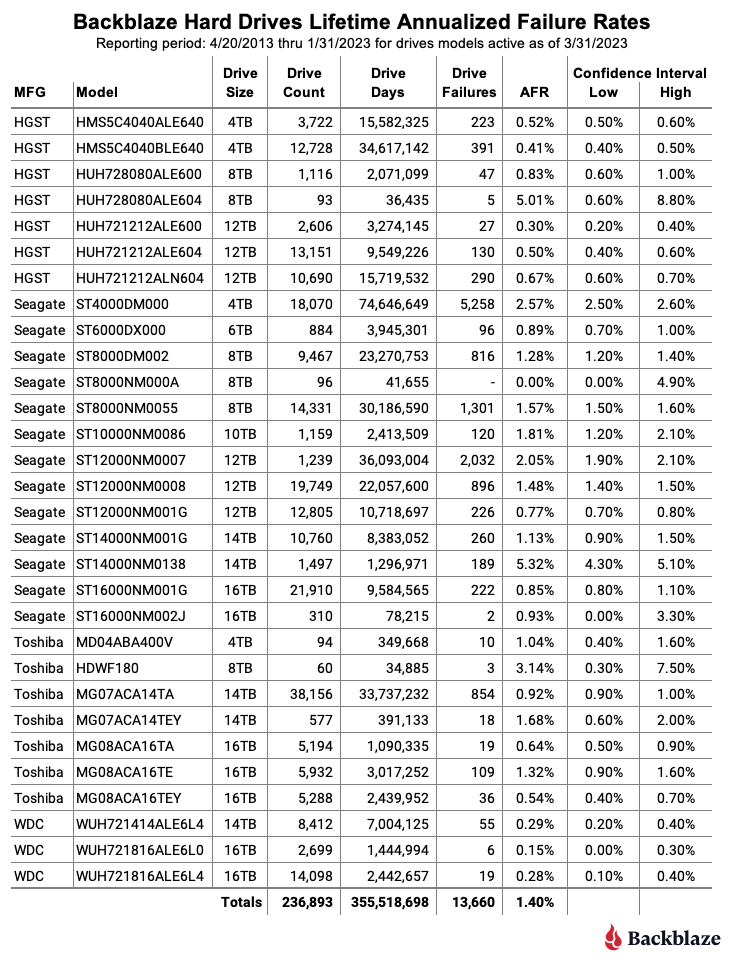
Backblaze Hard Drive Stats Q3 2020

Post Syndicated from original https://www.backblaze.com/blog/backblaze-hard-drive-stats-q3-2020/

As of September 30, 2020, Backblaze had 153,727 spinning hard drives in our cloud storage ecosystem spread across four data centers. Of that number, there were 2,780 boot drives and 150,947 data drives. This review looks at the Q3 2020 and lifetime hard drive failure rates of the data drive models currently in operation in our data centers and provides a handful of insights and observations along the way. As always, we look forward to your comments.
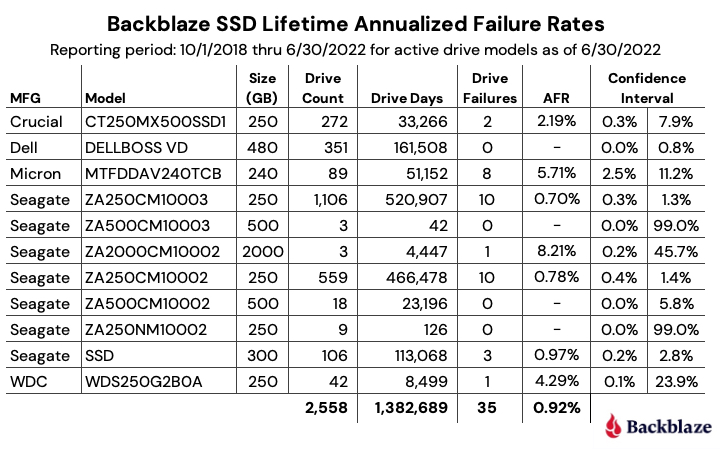
Quarterly Hard Drive Failure Stats for Q3 2020

At the end of Q3 2020, Backblaze was using 150,974 hard drives to store customer data. For our evaluation we remove from consideration those drive models for which we did not have at least 60 drives (more on that later). This leaves us with 150,757 hard drives in our review. The table below covers what happened in Q3 2020.

Observations on the Q3 Stats

There are several models with zero drive failures in the quarter. That’s great, but when we dig in a little we get different stories for each of the drives.

  • The 18TB Seagate model (ST18000NM000J) has 300 drive days and they’ve been in service for about 12 days. There were no out of the box failures which is a good start, but that’s all you can say.
  • The 16TB Seagate model (ST16000NM001G) has 5,428 drive days which is low, but they’ve been around for nearly 10 months on average. Still, I wouldn’t try to draw any conclusions yet, but a quarter or two more like this and we might have something to say.
  • The 4TB Toshiba model (MD04ABA400V) has only 9,108 drive days, but they have been putting up zeros for seven quarters straight. That has to count for something.
  • The 14TB Seagate model (ST14000NM001G) has 21,120 drive days with 2,400 drives, but they have only been operational for less than one month. Next quarter will give us a better picture.
  • The 4TB HGST (model: HMS5C4040ALE640) has 274,923 drive days with no failures this quarter. Everything else is awesome, but hold on before you run out and buy one. Why? You’re probably not going to get a new one and if you do, it will really be at least three years old, as HGST/WDC hasn’t made these drives in at least that long. If someone from HGST/WDC can confirm or deny that for us in the comments that would be great. There are stories dating back to 2016 where folks tried to order this drive and got a refurbished drive instead. If you want to give a refurbished drive a try, that’s fine, but that’s not what our numbers are based on.

The Q3 2020 annualized failure rate (AFR) of 0.89% is slightly higher than last quarter at 0.81%, but significantly lower than the 2.07% from a year ago. Even with the lower drive failure rates, our data center techs are not bored. In this quarter they added nearly 11,000 new drives totaling over 150PB of storage, all while operating under strict Covid-19 protocols. We’ll cover how they did that in a future post, but let’s just say they were busy.

The Island of Misfit Drives

There were 190 drives (150,947 minus 150,757) that were not included in the Q3 2020 Quarterly Chart above because we did not have at least 60 drives of a given model. Here’s a breakdown:

Nearly all of these drives were used as replacement drives. This happens when a given drive model is no longer available for purchase, but we have many in operation and we need a replacement. For example, we still have three WDC 6TB drives in use; they are installed in three different Storage Pods, along with 6TB drives from Seagate and HGST. Most of these drives were new when they were installed, but sometimes we reuse a drive that was removed from service, typically via a migration. Such drives are, of course, reformatted, wiped, and then must pass our qualification process to be reinstalled.

There are two “new” drives on our list. These are drives that are qualified for use in our data centers, but we haven’t deployed in quantity yet. In the case of the 10TB HGST drive, the availability and qualification of multiple 12TB models has reduced the likelihood that we would use more of this drive model. The 16TB Toshiba drive model is more likely to be deployed going forward as we get ready to deploy the next wave of big drives.

The Big Drives Are Here

When we first started collecting hard drive data back in 2013, a big drive was 4TB, with 5TB and 6TB drives just coming to market. Today, we’ll define big drives as 14TB, 16TB, and 18TB drives. The table below summarizes our current utilization of these drives.

The total of 19,878 represents 13.2% of our operational data drives. While most of these are the 14TB Toshiba drives, all of the above have been qualified for use in our data centers.

For all of the drive models besides the Toshiba 14TB drive, the number of drive days is still too small to conclude anything, although the Seagate 14TB model, the Toshiba 16TB model, and the Seagate 18TB model have experienced no failures to date.

We will continue to add these large drives over the coming quarters and track them along the way. As of Q3 2020, the lifetime AFR for this group of drives is 1.04%, which as we’ll see, is below the lifetime AFR for all of the drive models in operation.

Lifetime Hard Drive Failure Rates

The table below shows the lifetime AFR for the hard drive models we had in service as of September 30, 2020. All of the drive models listed were in operation during this timeframe.
The lifetime AFR as of Q3 2020 was 1.58%, the lowest since we started keeping track in 2013. That is down from 1.73% one year ago, and down from 1.64% last quarter.

We added back the average age column as “Avg Age.” This is in months and is the average age of the drives used to compute the data in the table and is based on the amount of time they have been in operation. One thing to remember is that our environment is very dynamic with drives being added, being migrated, and leaving on a regular basis and this could impact the average age. For example, we could retire a Storage Pod with mostly older drives and that could lower the average age of the remaining drives of that model while those remaining drives got older.

Looking at the average age, the 6TB Seagate drives are the oldest cohort, averaging nearly five and a half years of service each. These drives have actually gotten better over the last couple years and are aging well with a current lifetime AFR of 1.0%.

If you’d like to learn more, join us for a webinar Q&A with the author of Hard Drive Stats, Andy Klein, on October 22, 10:00 a.m. PT.

The Hard Drive Stats Data

The complete data set used to create the information used in this review is available on our Hard Drive Test Data webpage. You can download and use this data for free for your own purpose. All we ask are three things: 1) You cite Backblaze as the source if you use the data, 2) You accept that you are solely responsible for how you use the data, and 3) You do not sell this data to anyone—it is free.

If you just want the summarized data used to create the tables and charts in this blog post, you can download the ZIP file containing the MS Excel spreadsheet.

Good luck and let us know if you find anything interesting.

The post Backblaze Hard Drive Stats Q3 2020 appeared first on Backblaze Blog | Cloud Storage & Cloud Backup.