Tag Archives: MCP

Piecing together the Agent puzzle: MCP, authentication & authorization, and Durable Objects free tier

Post Syndicated from Rita Kozlov original https://blog.cloudflare.com/building-ai-agents-with-mcp-authn-authz-and-durable-objects/

It’s not a secret that at Cloudflare we are bullish on the future of agents. We’re excited about a future where AI can not only co-pilot alongside us, but where we can actually start to delegate entire tasks to AI. 

While it hasn’t been too long since we first announced our Agents SDK to make it easier for developers to build agents, building towards an agentic future requires continuous delivery towards this goal. Today, we’re making several announcements to help accelerate agentic development, including:

  • New Agents SDK capabilities: Build remote MCP clients, with transport and authentication built-in, to allow AI agents to connect to external services. 

  • BYO Auth provider for MCP: Integrations with Stytch, Auth0, and WorkOS to add authentication and authorization to your remote MCP server. 

  • Hibernation for McpAgent: Automatically sleep stateful, remote MCP servers when inactive and wake them when needed. This allows you to maintain connections for long-running sessions while ensuring you’re not paying for idle time. 

  • Durable Objects free tier: We view Durable Objects as a key component for building agents, and if you’re using our Agents SDK, you need access to it. Until today, Durable Objects was only accessible as part of our paid plans, and today we’re excited to include it in our free tier.

  • Workflows GA: Enables you to ship production-ready, long-running, multi-step actions in agents.

  • AutoRAG: Helps you integrate context-aware AI into your applications, in just a few clicks

  • agents.cloudflare.com: our new landing page for all things agents.

New MCP capabilities in Agents SDK

AI agents can now connect to and interact with external services through MCP (Model Context Protocol). We’ve updated the Agents SDK to allow you to build a remote MCP client into your AI agent, with all the components — authentication flows, tool discovery, and connection management — built-in for you.

This allows you to build agents that can:

  1. Prompt the end user to grant access to a 3rd party service (MCP server).

  2. Use tools from these external services, acting on behalf of the end user.

  3. Call MCP servers from Workflows, scheduled tasks, or any part of your agent.

  4. Connect to multiple MCP servers and automatically discover new tools or capabilities presented by the 3rd party service.
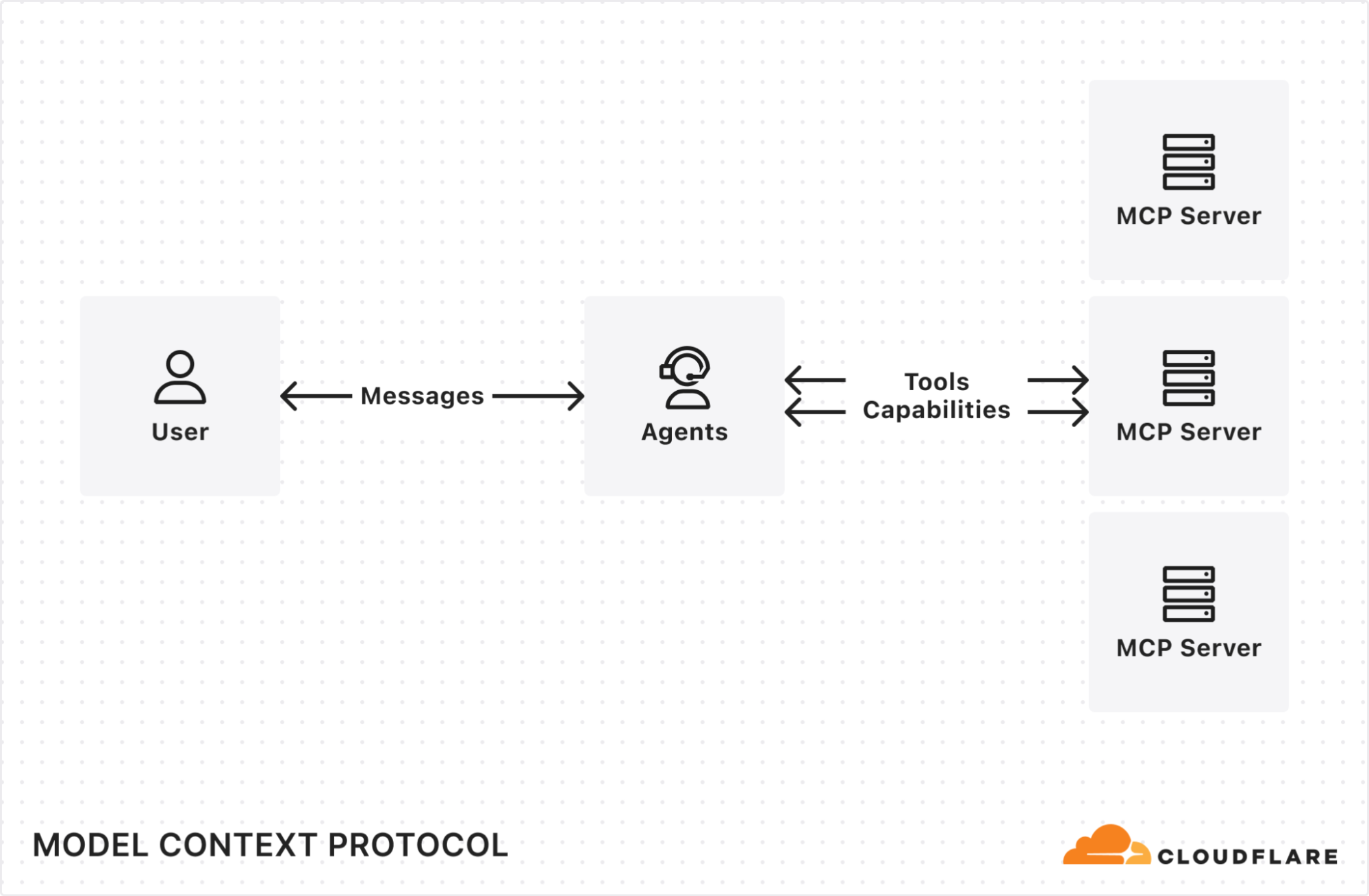

MCP (Model Context Protocol) — first introduced by Anthropic — is quickly becoming the standard way for AI agents to interact with external services, with providers like OpenAI, Cursor, and Copilot adopting the protocol.

We recently announced support for building remote MCP servers on Cloudflare, and added an McpAgent class to our Agents SDK that automatically handles the remote aspects of MCP: transport and authentication/authorization. Now, we’re excited to extend the same capabilities to agents acting as MCP clients.
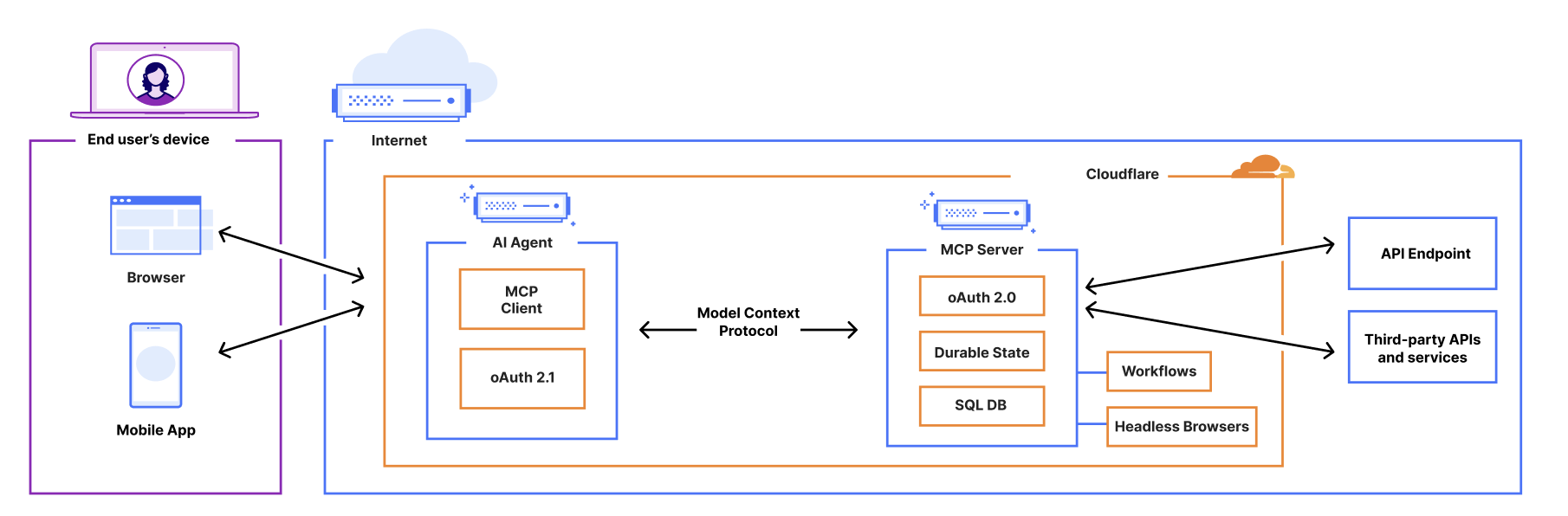

Want to see it in action? Use the button below to deploy a fully remote MCP client that can be used to connect to remote MCP servers.

AI Agents can now act as remote MCP clients, with transport and auth included

AI agents need to connect to external services to access tools, data, and capabilities beyond their built-in knowledge. That means AI agents need to be able to act as remote MCP clients, so they can connect to remote MCP servers that are hosting these tools and capabilities. 

We’ve added a new class, MCPClientManager, into the Agents SDK to give you all the tooling you need to allow your AI agent to make calls to external services via MCP. The MCPClientManager class automatically handles: 

  • Transport: Connect to remote MCP servers over SSE and HTTP, with support for Streamable HTTP coming soon. 

  • Connection management: The client tracks the state of all connections and automatically reconnects if a connection is lost.

  • Capability discovery: Automatically discovers all capabilities, tools, resources, and prompts presented by the MCP server.

  • Real-time updates: When a server’s tools, resources, or prompts change, the client automatically receives notifications and updates its internal state.

  • Namespacing: When connecting to multiple MCP servers, all tools and resources are automatically namespaced to avoid conflicts.

Granting agents access to tools with built-in auth check for MCP Clients

We’ve integrated the complete OAuth authentication flow directly into the Agents SDK, so your AI agents can securely connect and authenticate to any remote MCP server without you having to build authentication flow from scratch.

This allows you to give users a secure way to log in and explicitly grant access to allow the agent to act on their behalf by automatically: 

  • Supporting the OAuth 2.1 protocol.

  • Redirecting users to the service’s login page.

  • Generating the code challenge and exchanging an authorization code for an access token.

  • Using the access token to make authenticated requests to the MCP server.

Here is an example of an agent that can securely connect to MCP servers by initializing the client manager, adding the server, and handling the authentication callbacks:

async onStart(): Promise<void> {
  // initialize MCPClientManager which manages multiple MCP clients with optional auth
  this.mcp = new MCPClientManager("my-agent", "1.0.0", {
    baseCallbackUri: `${serverHost}/agents/${agentNamespace}/${this.name}/callback`,
    storage: this.ctx.storage,
  });
}

async addMcpServer(url: string): Promise<string> {
  // Add one MCP client to our MCPClientManager
  const { id, authUrl } = await this.mcp.connect(url);
  // Return authUrl to redirect the user to if the user is unauthorized
  return authUrl
}

async onRequest(req: Request): Promise<void> {
  // handle the auth callback after being finishing the MCP server auth flow
  if (this.mcp.isCallbackRequest(req)) {
    await this.mcp.handleCallbackRequest(req);
    return new Response("Authorized")
  }
  
  // ...
}

Connecting to multiple MCP servers and discovering what capabilities they offer

You can use the Agents SDK to connect an MCP client to multiple MCP servers simultaneously. This is particularly useful when you want your agent to access and interact with tools and resources served by different service providers. 

The MCPClientManager class maintains connections to multiple MCP servers through the mcpConnections object, a dictionary that maps unique server names to their respective MCPClientConnection instances. 

When you register a new server connection using connect(), the manager: 

  1. Creates a new connection instance with server-specific authentication.

  2. Initializes the connections and registers for server capability notifications.

async onStart(): Promise<void> {
  // Connect to an image generation MCP server
  await this.mcp.connect("https://image-gen.example.com/mcp/sse");
  
  // Connect to a code analysis MCP server
  await this.mcp.connect("https://code-analysis.example.org/sse");
  
  // Now we can access tools with proper namespacing
  const allTools = this.mcp.listTools();
  console.log(`Total tools available: ${allTools.length}`);
}

Each connection manages its own authentication context, allowing one AI agent to authenticate to multiple servers simultaneously. In addition, MCPClientManager automatically handles namespacing to prevent collisions between tools with identical names from different servers. 

For example, if both an “Image MCP Server” and “Code MCP Server” have a tool named “analyze”, they will both be independently callable without any naming conflicts.

Use Stytch, Auth0, and WorkOS to bring authentication & authorization to your MCP server 

With MCP, users will have a new way of interacting with your application, no longer relying on the dashboard or API as the entrypoint. Instead, the service will now be accessed by AI agents that are acting on a user’s behalf. To ensure users and agents can connect to your service securely, you’ll need to extend your existing authentication and authorization system to support these agentic interactions, implementing login flows, permissions scopes, consent forms, and access enforcement for your MCP server. 

We’re adding integrations with Stytch, Auth0, and WorkOS to make it easier for anyone building an MCP server to configure authentication & authorization for their MCP server. 

You can leverage our MCP server integration with Stytch, Auth0, and WorkOS to: 

  • Allow users to authenticate to your MCP server through email, social logins, SSO (single sign-on), and MFA (multi-factor authentication).

  • Define scopes and permissions that directly map to your MCP tools.

  • Present users with a consent page corresponding with the requested permissions.

Enforce the permissions so that agents can only invoke permitted tools. 
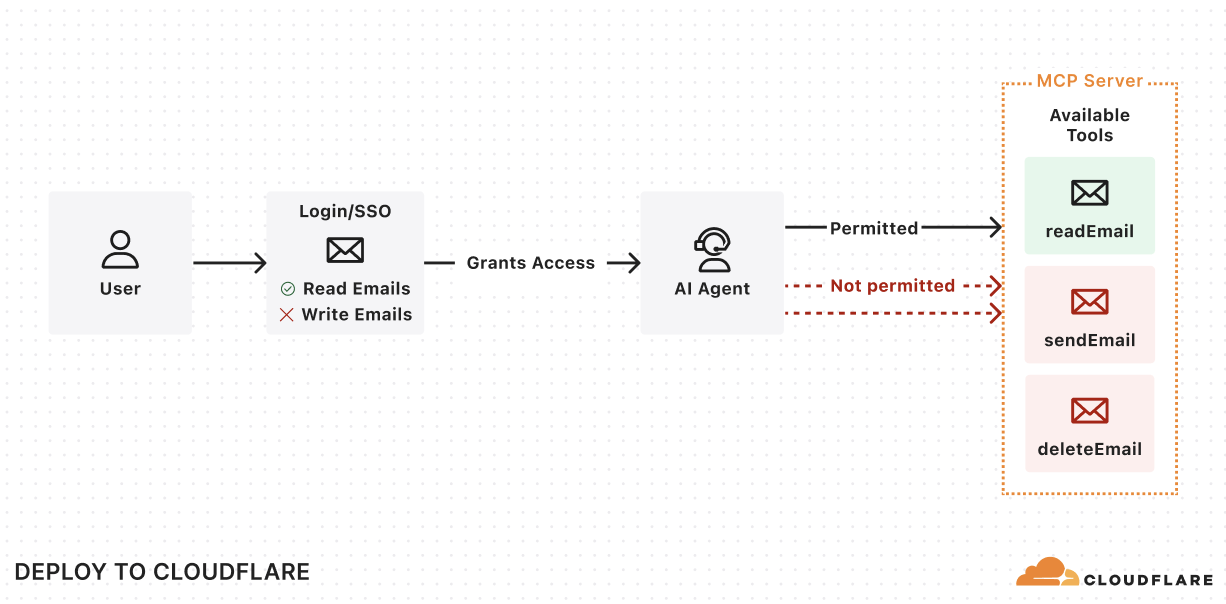

Get started with the examples below by using the “Deploy to Cloudflare” button to deploy the demo MCP servers in your Cloudflare account. These demos include pre-configured authentication endpoints, consent flows, and permission models that you can tailor to fit your needs. Once you deploy the demo MCP servers, you can use the Workers AI playground, a browser-based remote MCP client, to test out the end-to-end user flow. 

Stytch

Get started with a remote MCP server that uses Stytch to allow users to sign in with email, Google login or enterprise SSO and authorize their AI agent to view and manage their company’s OKRs on their behalf. Stytch will handle restricting the scopes granted to the AI agent based on the user’s role and permissions within their organization. When authorizing the MCP Client, each user will see a consent page that outlines the permissions that the agent is requesting that they are able to grant based on their role.

For more consumer use cases, deploy a remote MCP server for a To Do app that uses Stytch for authentication and MCP client authorization. Users can sign in with email and immediately access the To Do lists associated with their account, and grant access to any AI assistant to help them manage their tasks.

Regardless of use case, Stytch allows you to easily turn your application into an OAuth 2.0 identity provider and make your remote MCP server into a Relying Party so that it can easily inherit identity and permissions from your app. To learn more about how Stytch is enabling secure authentication to remote MCP servers, read their blog post.

“One of the challenges of realizing the promise of AI agents is enabling those agents to securely and reliably access data from other platforms. Stytch Connected Apps is purpose-built for these agentic use cases, making it simple to turn your app into an OAuth 2.0 identity provider to enable secure access to remote MCP servers. By combining Cloudflare Workers with Stytch Connected Apps, we’re removing the barriers for developers, enabling them to rapidly transition from AI proofs-of-concept to secure, deployed implementations.” — Julianna Lamb, Co-Founder & CTO, Stytch.

Auth0

Get started with a remote MCP server that uses Auth0 to authenticate users through email, social logins, or enterprise SSO to interact with their todos and personal data through AI agents. The MCP server securely connects to API endpoints on behalf of users, showing exactly which resources the agent will be able to access once it gets consent from the user. In this implementation, access tokens are automatically refreshed during long running interactions.

To set it up, first deploy the protected API endpoint:

Then, deploy the MCP server that handles authentication through Auth0 and securely connects AI agents to your API endpoint. 

“Cloudflare continues to empower developers building AI products with tools like AI Gateway, Vectorize, and Workers AI. The recent addition of Remote MCP servers further demonstrates that Cloudflare Workers and Durable Objects are a leading platform for deploying serverless AI. We’re very proud that Auth0 can help solve the authentication and authorization needs for these cutting-edge workloads.” — Sandrino Di Mattia, Auth0 Sr. Director, Product Architecture.

WorkOS

Get started with a remote MCP server that uses WorkOS’s AuthKit to authenticate users and manage the permissions granted to AI agents. In this example, the MCP server dynamically exposes tools based on the user’s role and access rights. All authenticated users get access to the add tool, but only users who have been assigned the image_generation permission in WorkOS can grant the AI agent access to the image generation tool. This showcases how MCP servers can conditionally expose capabilities to AI agents based on the authenticated user’s role and permission.

“MCP is becoming the standard for AI agent integration, but authentication and authorization are still major gaps for enterprise adoption. WorkOS Connect enables any application to become an OAuth 2.0 authorization server, allowing agents and MCP clients to securely obtain tokens for fine-grained permission authorization and resource access. With Cloudflare Workers, developers can rapidly deploy remote MCP servers with built-in OAuth and enterprise-grade access control. Together, WorkOS and Cloudflare make it easy to ship secure, enterprise-ready agent infrastructure.” — Michael Grinich, CEO of WorkOS.

Hibernate-able WebSockets: put AI agents to sleep when they’re not in use

Starting today, a new improvement is landing in the McpAgent class: support for the WebSockets Hibernation API that allows your MCP server to go to sleep when it’s not receiving requests and instantly wake up when it’s needed. That means that you now only pay for compute when your agent is actually working.

We recently introduced the McpAgent class, which allows developers to build remote MCP servers on Cloudflare by using Durable Objects to maintain stateful connections for every client session. We decided to build McpAgent to be stateful from the start, allowing developers to build servers that can remember context, user preferences, and conversation history. But maintaining client connections means that the session can remain active for a long time, even when it’s not being used. 

MCP Agents are hibernate-able by default

You don’t need to change your code to take advantage of hibernation. With our latest SDK update, all McpAgent instances automatically include hibernation support, allowing your stateful MCP servers to sleep during inactive periods and wake up with their state preserved when needed. 

How it works

When a request comes in on the Server-Sent Events endpoint, /sse, the Worker initializes a WebSocket connection to the appropriate Durable Object for the session and returns an SSE stream back to the client. All responses flow over this stream.

The implementation leverages the WebSocket Hibernation API within Durable Objects. When periods of inactivity occur, the Durable Object can be evicted from memory while keeping the WebSocket connection open. If the WebSocket later receives a message, the runtime recreates the Durable Object and delivers the message to the appropriate handler.

Durable Objects on free tier

To help you build AI agents on Cloudflare, we’re making Durable Objects available on the free tier, so you can start with zero commitment. With Agents SDK, your AI agents deploy to Cloudflare running on Durable Objects.

Durable Objects offer compute alongside durable storage, that when combined with Workers, unlock stateful, serverless applications. Each Durable Object is a stateful coordinator for handling client real-time interactions, making requests to external services like LLMs, and creating agentic “memory” through state persistence in zero-latency SQLite storage — all tasks required in an AI agent. Durable Objects scale out to millions of agents effortlessly, with each agent created near the user interacting with their agent for fast performance, all managed by Cloudflare. 

Zero-latency SQLite storage in Durable Objects was introduced in public beta September 2024 for Birthday Week. Since then, we’ve focused on missing features and robustness compared to pre-existing key-value storage in Durable Objects. We are excited to make SQLite storage generally available, with a 10 GB SQLite database per Durable Object, and recommend SQLite storage for all new Durable Object classes. Durable Objects free tier can only access SQLite storage.

Cloudflare’s free tier allows you to build real-world applications. On the free plan, every Worker request can call a Durable Object. For usage-based pricing, Durable Objects incur compute and storage usage with the following free tier limits.


Workers Free

Workers Paid

Compute: Requests

100,000 / day

1 million / month included

+ $0.15 / million

Compute: Duration

13,000 GB-s / day

400,000 GB-s / month  included 

+ $12.50 / million GB-s

Storage: Rows read

5 million / day

25 billion / month included

+ $0.001 / million 

Storage: Rows written

100,000 / day

50 million / month included

+ $1.00 / million

Storage: SQL stored data

5 GB (total)

5 GB-month included

+ $0.20 / GB-month

Find us at agents.cloudflare.com

We realize this is a lot of information to take in, but don’t worry. Whether you’re new to agents as a whole, or looking to learn more about how Cloudflare can help you build agents, today we launched a new site to help get you started — agents.cloudflare.com

Let us know what you build!

Build and deploy Remote Model Context Protocol (MCP) servers to Cloudflare

Post Syndicated from Brendan Irvine-Broque original https://blog.cloudflare.com/remote-model-context-protocol-servers-mcp/

It feels like almost everyone building AI applications and agents is talking about the Model Context Protocol (MCP), as well as building MCP servers that you install and run locally on your own computer.

You can now build and deploy remote MCP servers to Cloudflare. We’ve added four things to Cloudflare that handle the hard parts of building remote MCP servers for you:

  1. workers-oauth-provider — an OAuth Provider that makes authorization easy

  2. McpAgent — a class built into the Cloudflare Agents SDK that handles remote transport

  3. mcp-remote — an adapter that lets MCP clients that otherwise only support local connections work with remote MCP servers

  4. AI playground as a remote MCP client — a chat interface that allows you to connect to remote MCP servers, with the authentication check included

The button below, or the developer docs, will get you up and running in production with this example MCP server in less than two minutes:

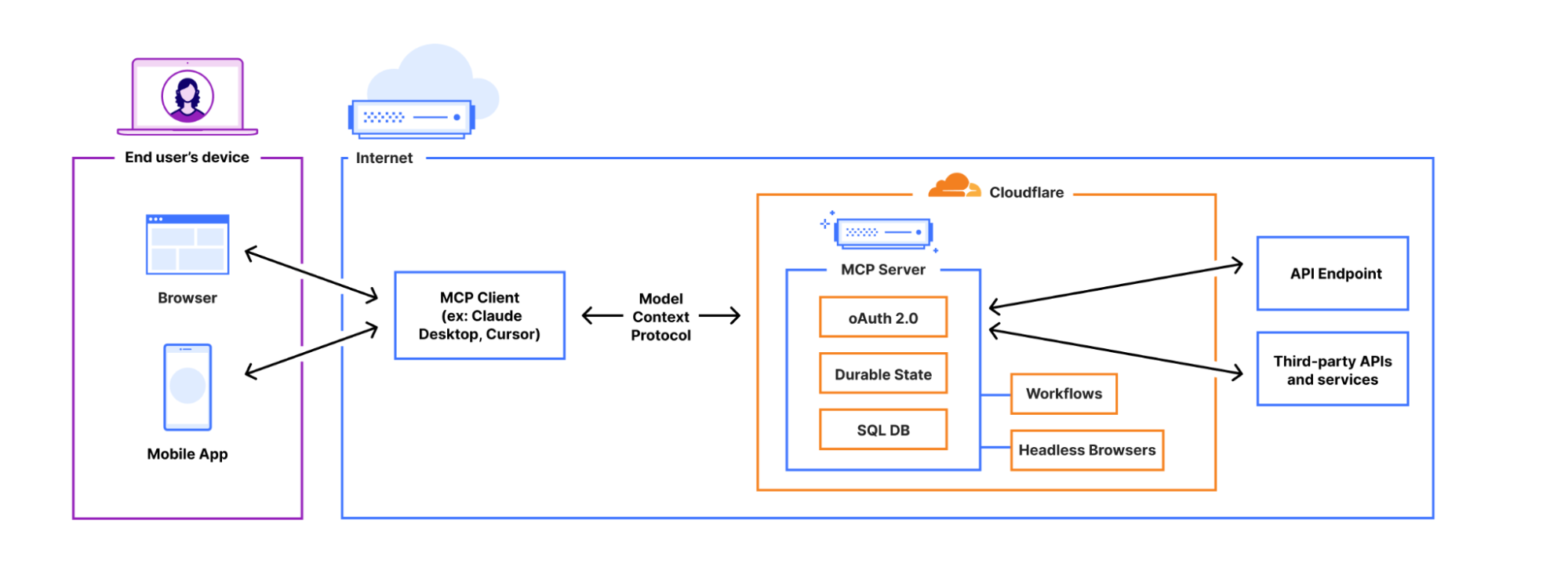
Unlike the local MCP servers you may have previously used, remote MCP servers are accessible on the Internet. People simply sign in and grant permissions to MCP clients using familiar authorization flows. We think this is going to be a massive deal — connecting coding agents to MCP servers has blown developers’ minds over the past few months, and remote MCP servers have the same potential to open up similar new ways of working with LLMs and agents to a much wider audience, including more everyday consumer use cases.

From local to remote — bringing MCP to the masses

MCP is quickly becoming the common protocol that enables LLMs to go beyond inference and RAG, and take actions that require access beyond the AI application itself (like sending an email, deploying a code change, publishing blog posts, you name it). It enables AI agents (MCP clients) to access tools and resources from external services (MCP servers).

To date, MCP has been limited to running locally on your own machine — if you want to access a tool on the web using MCP, it’s up to you to set up the server locally. You haven’t been able to use MCP from web-based interfaces or mobile apps, and there hasn’t been a way to let people authenticate and grant the MCP client permission. Effectively, MCP servers haven’t yet been brought online.


Support for remote MCP connections changes this. It creates the opportunity to reach a wider audience of Internet users who aren’t going to install and run MCP servers locally for use with desktop apps. Remote MCP support is like the transition from desktop software to web-based software. People expect to continue tasks across devices and to login and have things just work. Local MCP is great for developers, but remote MCP connections are the missing piece to reach everyone on the Internet.


Making authentication and authorization just work with MCP

Beyond just changing the transport layer — from stdio to streamable HTTP — when you build a remote MCP server that uses information from the end user’s account, you need authentication and authorization. You need a way to allow users to login and prove who they are (authentication) and a way for users to control what the AI agent will be able to access when using a service (authorization).

MCP does this with OAuth, which has been the standard protocol that allows users to grant applications to access their information or services, without sharing passwords. Here, the MCP Server itself acts as the OAuth Provider. However, OAuth with MCP is hard to implement yourself, so when you build MCP servers on Cloudflare we provide it for you.

workers-oauth-provider — an OAuth 2.1 Provider library for Cloudflare Workers

When you deploy an MCP Server to Cloudflare, your Worker acts as an OAuth Provider, using workers-oauth-provider, a new TypeScript library that wraps your Worker’s code, adding authorization to API endpoints, including (but not limited to) MCP server API endpoints.

Your MCP server will receive the already-authenticated user details as a parameter. You don’t need to perform any checks of your own, or directly manage tokens. You can still fully control how you authenticate users: from what UI they see when they log in, to which provider they use to log in. You can choose to bring your own third-party authentication and authorization providers like Google or GitHub, or integrate with your own.

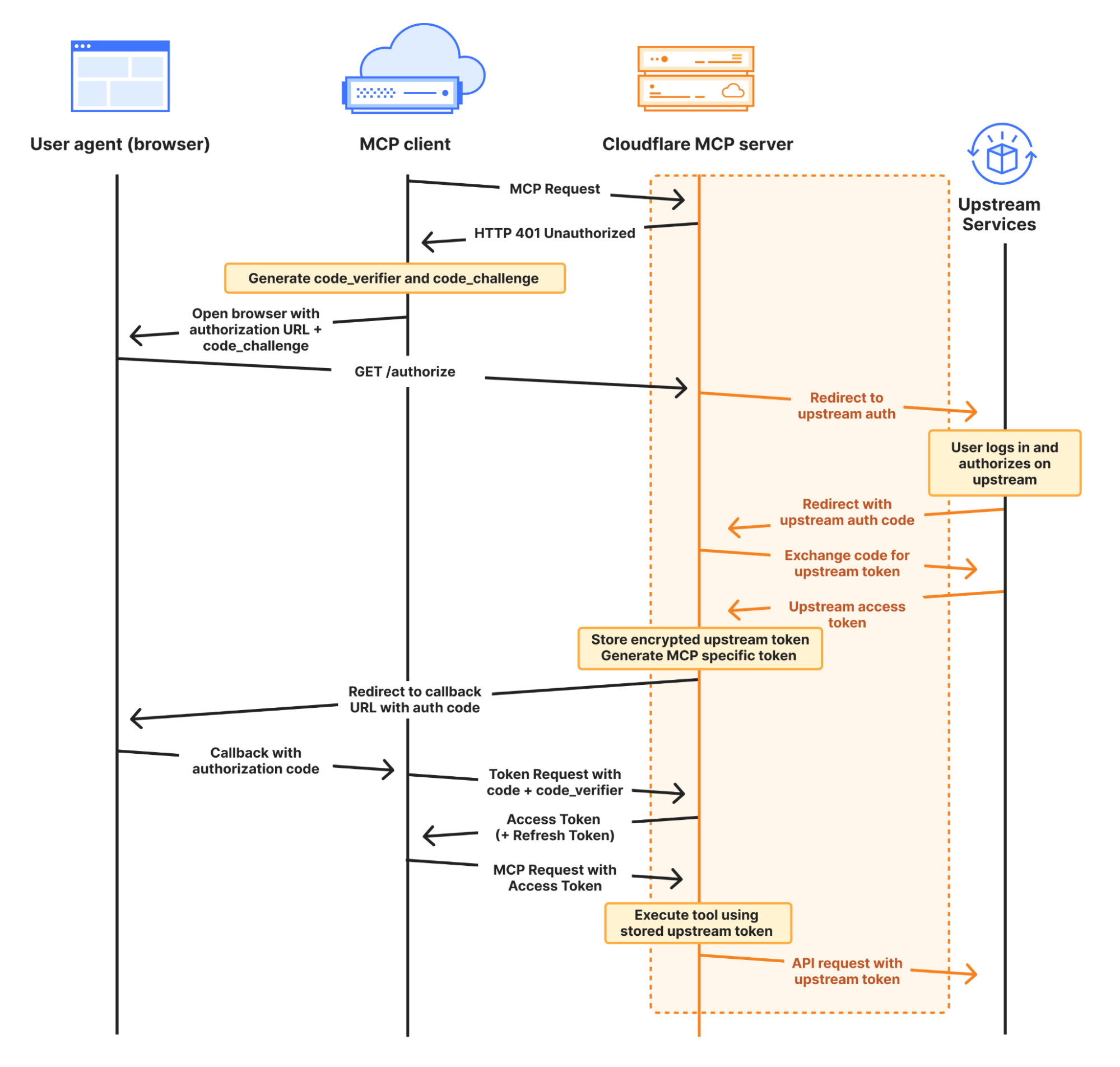
The complete MCP OAuth flow looks like this:


Here, your MCP server acts as both an OAuth client to your upstream service, and as an OAuth server (also referred to as an OAuth “provider”) to MCP clients. You can use any upstream authentication flow you want, but workers-oauth-provider guarantees that your MCP server is spec-compliant and able to work with the full range of client apps & websites. This includes support for Dynamic Client Registration (RFC 7591) and Authorization Server Metadata (RFC 8414).

A simple, pluggable interface for OAuth

When you build an MCP server with Cloudflare Workers, you provide an instance of the OAuth Provider paths to your authorization, token, and client registration endpoints, along with handlers for your MCP Server, and for auth:

import OAuthProvider from "@cloudflare/workers-oauth-provider";
import MyMCPServer from "./my-mcp-server";
import MyAuthHandler from "./auth-handler";

export default new OAuthProvider({
  apiRoute: "/sse", // MCP clients connect to your server at this route
  apiHandler: MyMCPServer.mount('/sse'), // Your MCP Server implmentation
  defaultHandler: MyAuthHandler, // Your authentication implementation
  authorizeEndpoint: "/authorize",
  tokenEndpoint: "/token",
  clientRegistrationEndpoint: "/register",
});

This abstraction lets you easily plug in your own authentication. Take a look at this example that uses GitHub as the identity provider for an MCP server, in less than 100 lines of code, by implementing /callback and /authorize routes.

Why do MCP servers issue their own tokens?

You may have noticed in the authorization diagram above, and in the authorization section of the MCP spec, that the MCP server issues its own token to the MCP client.

Instead of passing the token it receives from the upstream provider directly to the MCP client, your Worker stores an encrypted access token in Workers KV. It then issues its own token to the client. As shown in the GitHub example above, this is handled on your behalf by the workers-oauth-provider — your code never directly handles writing this token, preventing mistakes. You can see this in the following code snippet from the GitHub example above:

  // When you call completeAuthorization, the accessToken you pass to it
  // is encrypted and stored, and never exposed to the MCP client
  // A new, separate token is generated and provided to the client at the /token endpoint
  const { redirectTo } = await c.env.OAUTH_PROVIDER.completeAuthorization({
    request: oauthReqInfo,
    userId: login,
    metadata: { label: name },
    scope: oauthReqInfo.scope,
    props: {
      accessToken,  // Stored encrypted, never sent to MCP client
    },
  })

  return Response.redirect(redirectTo)

On the surface, this indirection might sound more complicated. Why does it work this way?

By issuing its own token, MCP Servers can restrict access and enforce more granular controls than the upstream provider. If a token you issue to an MCP client is compromised, the attacker only gets the limited permissions you’ve explicitly granted through your MCP tools, not the full access of the original token.

Let’s say your MCP server requests that the user authorize permission to read emails from their Gmail account, using the gmail.readonly scope. The tool that the MCP server exposes is more narrow, and allows reading travel booking notifications from a limited set of senders, to handle a question like “What’s the check-out time for my hotel room tomorrow?” You can enforce this constraint in your MCP server, and if the token you issue to the MCP client is compromised, because the token is to your MCP server — and not the raw token to the upstream provider (Google) — an attacker cannot use it to read arbitrary emails. They can only call the tools your MCP server provides. OWASP calls out “Excessive Agency” as one of the top risk factors for building AI applications, and by issuing its own token to the client and enforcing constraints, your MCP server can limit tools access to only what the client needs.

Or building off the earlier GitHub example, you can enforce that only a specific user is allowed to access a particular tool. In the example below, only users that are part of an allowlist can see or call the generateImage tool, that uses Workers AI to generate an image based on a prompt:

import { McpAgent } from "agents/mcp";
import { McpServer } from "@modelcontextprotocol/sdk/server/mcp.js";
import { z } from "zod";

const USER_ALLOWLIST = ["geelen"];

export class MyMCP extends McpAgent<Props, Env> {
  server = new McpServer({
    name: "Github OAuth Proxy Demo",
    version: "1.0.0",
  });

  async init() {
    // Dynamically add tools based on the user's identity
    if (USER_ALLOWLIST.has(this.props.login)) {
      this.server.tool(
        'generateImage',
        'Generate an image using the flux-1-schnell model.',
        {
          prompt: z.string().describe('A text description of the image you want to generate.')
        },
        async ({ prompt }) => {
          const response = await this.env.AI.run('@cf/black-forest-labs/flux-1-schnell', { 
            prompt, 
            steps: 8 
          })
          return {
            content: [{ type: 'image', data: response.image!, mimeType: 'image/jpeg' }],
          }
        }
      )
    }
  }
}

Introducing McpAgent: remote transport support that works today, and will work with the revision to the MCP spec

The next step to opening up MCP beyond your local machine is to open up a remote transport layer for communication. MCP servers you run on your local machine just communicate over stdio, but for an MCP server to be callable over the Internet, it must implement remote transport.

The McpAgent class we introduced today as part of our Agents SDK handles this for you, using Durable Objects behind the scenes to hold a persistent connection open, so that the MCP client can send server-sent events (SSE) to your MCP server. You don’t have to write code to deal with transport or serialization yourself. A minimal MCP server in 15 lines of code can look like this:

import { McpAgent } from "agents/mcp";
import { McpServer } from "@modelcontextprotocol/sdk/server/mcp.js";
import { z } from "zod";

export class MyMCP extends McpAgent {
  server = new McpServer({
    name: "Demo",
    version: "1.0.0",
  });
  async init() {
    this.server.tool("add", { a: z.number(), b: z.number() }, async ({ a, b }) => ({
      content: [{ type: "text", text: String(a + b) }],
    }));
  }
}

After much discussion, remote transport in the MCP spec is changing, with Streamable HTTP replacing HTTP+SSE This allows for stateless, pure HTTP connections to MCP servers, with an option to upgrade to SSE, and removes the need for the MCP client to send messages to a separate endpoint than the one it first connects to. The McpAgent class will change with it and just work with streamable HTTP, so that you don’t have to start over to support the revision to how transport works.

This applies to future iterations of transport as well. Today, the vast majority of MCP servers only expose tools, which are simple remote procedure call (RPC) methods that can be provided by a stateless transport. But more complex human-in-the-loop and agent-to-agent interactions will need prompts and sampling. We expect these types of chatty, two-way interactions will need to be real-time, which will be challenging to do well without a bidirectional transport layer. When that time comes, Cloudflare, the Agents SDK, and Durable Objects all natively support WebSockets, which enable full-duplex, bidirectional real-time communication. 

Stateful, agentic MCP servers

When you build MCP servers on Cloudflare, each MCP client session is backed by a Durable Object, via the Agents SDK. This means each session can manage and persist its own state, backed by its own SQL database.

This opens the door to building stateful MCP servers. Rather than just acting as a stateless layer between a client app and an external API, MCP servers on Cloudflare can themselves be stateful applications — games, a shopping cart plus checkout flow, a persistent knowledge graph, or anything else you can dream up. When you build on Cloudflare, MCP servers can be much more than a layer in front of your REST API.

To understand the basics of how this works, let’s look at a minimal example that increments a counter:

import { McpAgent } from "agents/mcp";
import { McpServer } from "@modelcontextprotocol/sdk/server/mcp.js";
import { z } from "zod";

type State = { counter: number }

export class MyMCP extends McpAgent<Env, State, {}> {
  server = new McpServer({
    name: "Demo",
    version: "1.0.0",
  });

  initialState: State = {
    counter: 1,
  }

  async init() {
    this.server.resource(`counter`, `mcp://resource/counter`, (uri) => {
      return {
        contents: [{ uri: uri.href, text: String(this.state.counter) }],
      }
    })

    this.server.tool('add', 'Add to the counter, stored in the MCP', { a: z.number() }, async ({ a }) => {
      this.setState({ ...this.state, counter: this.state.counter + a })

      return {
        content: [{ type: 'text', text: String(`Added ${a}, total is now ${this.state.counter}`) }],
      }
    })
  }

  onStateUpdate(state: State) {
    console.log({ stateUpdate: state })
  }

}

For a given session, the MCP server above will remember the state of the counter across tool calls.

From within an MCP server, you can use Cloudflare’s whole developer platform, and have your MCP server spin up its own web browser, trigger a Workflow, call AI models, and more. We’re excited to see the MCP ecosystem evolve into more advanced use cases.

Connect to remote MCP servers from MCP clients that today only support local MCP

Cloudflare is supporting remote MCP early — before the most prominent MCP client applications support remote, authenticated MCP, and before other platforms support remote MCP. We’re doing this to give you a head start building for where MCP is headed.

But if you build a remote MCP server today, this presents a challenge — how can people start using your MCP server if there aren’t MCP clients that support remote MCP?

We have two new tools that allow you to test your remote MCP server and simulate how users will interact with it in the future:

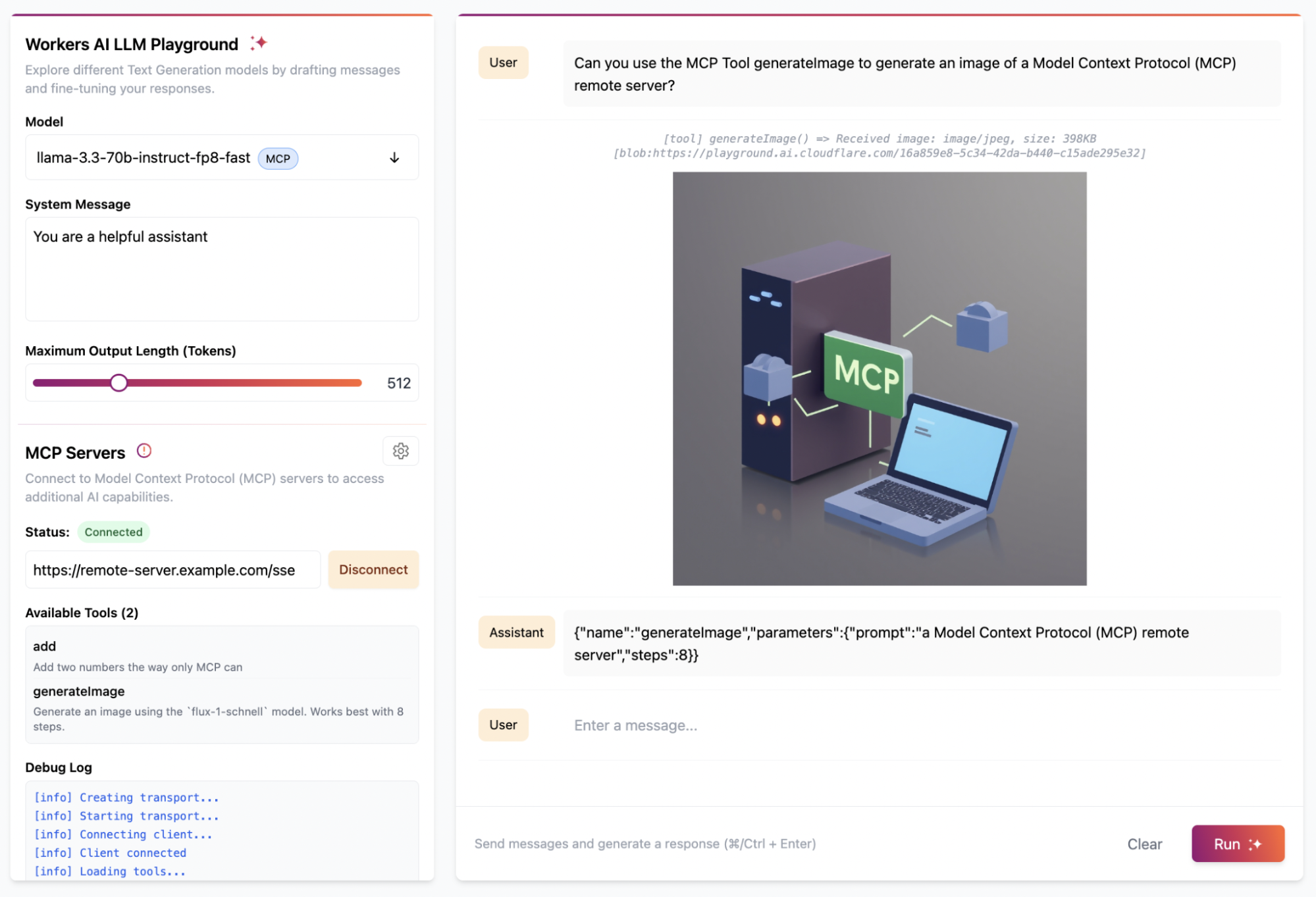
We updated the Workers AI Playground to be a fully remote MCP client that allows you to connect to any remote MCP server with built-in authentication support. This online chat interface lets you immediately test your remote MCP servers without having to install anything on your device. Instead, just enter the remote MCP server’s URL (e.g. https://remote-server.example.com/sse) and click Connect.


Once you click Connect, you’ll go through the authentication flow (if you set one up) and after, you will be able to interact with the MCP server tools directly from the chat interface.

If you prefer to use a client like Claude Desktop or Cursor that already supports MCP but doesn’t yet handle remote connections with authentication, you can use mcp-remote. mcp-remote is an adapter that  lets MCP clients that otherwise only support local connections to work with remote MCP servers. This gives you and your users the ability to preview what interactions with your remote MCP server will be like from the tools you’re already using today, without having to wait for the client to support remote MCP natively. 

We’ve published a guide on how to use mcp-remote with popular MCP clients including Claude Desktop, Cursor, and Windsurf. In Claude Desktop, you add the following to your configuration file:

{
  "mcpServers": {
    "remote-example": {
      "command": "npx",
      "args": [
        "mcp-remote",
        "https://remote-server.example.com/sse"
      ]
    }
  }
}

[email protected] — start building remote MCP servers today

Remote Model Context Protocol (MCP) is coming! When client apps support remote MCP servers, the audience of people who can use them opens up from just us, developers, to the rest of the population — who may never even know what MCP is or stands for. 

Building a remote MCP server is the way to bring your service into the AI assistants and tools that millions of people use. We’re excited to see many of the biggest companies on the Internet are busy building MCP servers right now, and we are curious about the businesses that pop-up in an agent-first, MCP-native way.

On Cloudflare, you can start building today. We’re ready for you, and ready to help build with you. Email us at [email protected], and we’ll help get you going. There’s lots more to come with MCP, and we’re excited to see what you build.

Hi Claude, build an MCP server on Cloudflare Workers

Post Syndicated from Dina Kozlov original https://blog.cloudflare.com/model-context-protocol/

In late November 2024, Anthropic announced a new way to interact with AI, called Model Context Protocol (MCP). Today, we’re excited to show you how to use MCP in combination with Cloudflare to extend the capabilities of Claude to build applications, generate images and more. You’ll learn how to build an MCP server on Cloudflare to make any service accessible through an AI assistant like Claude with just a few lines of code using Cloudflare Workers. 

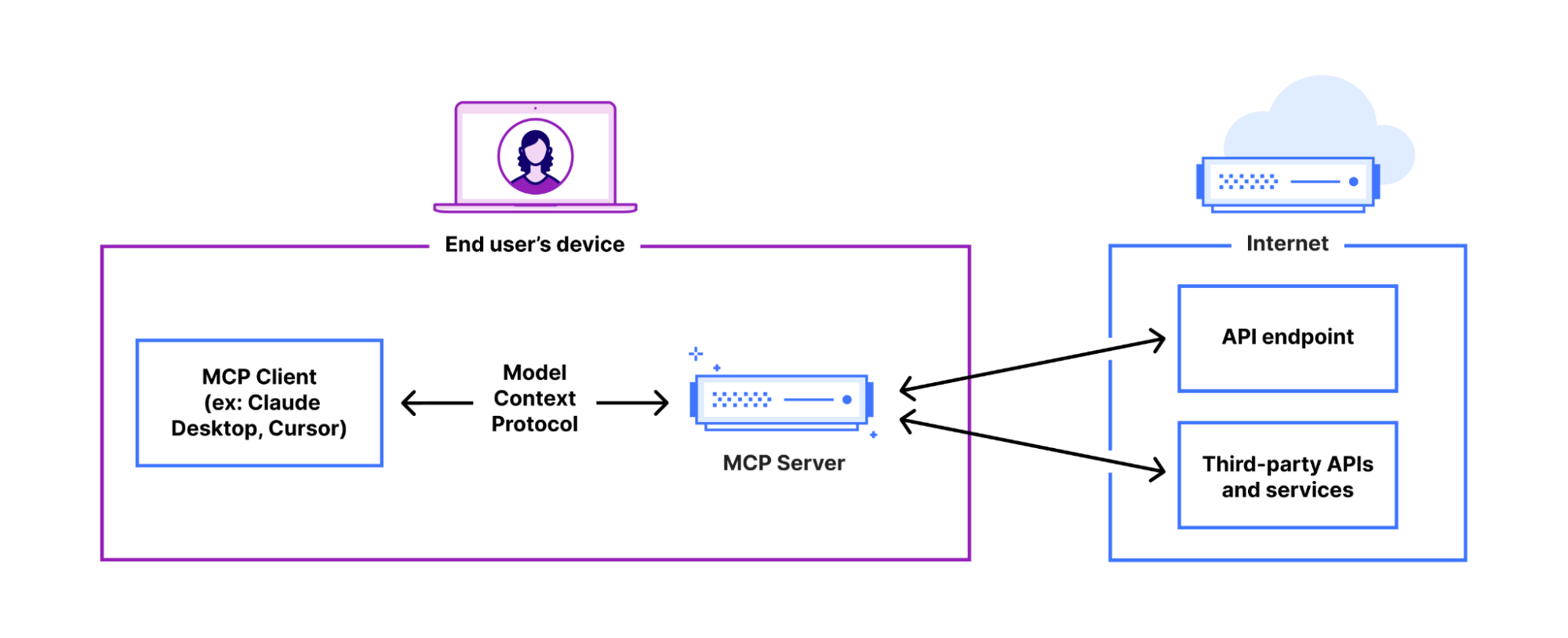
A quick primer on the Model Context Protocol (MCP)

MCP is an open standard that provides a universal way for LLMs to interact with services and applications. As the introduction on the MCP website puts it,

“Think of MCP like a USB-C port for AI applications. Just as USB-C provides a standardized way to connect your devices to various peripherals and accessories, MCP provides a standardized way to connect AI models to different data sources and tools.” 

From an architectural perspective, MCP is comprised of several components:

  • MCP hosts: Programs or tools (like Claude) where AI models operate and interact with different services

  • MCP clients: Client within an AI assistant that initiates requests and communicates with MCP servers to perform tasks or access resources

  • MCP servers: Lightweight programs that each expose the capabilities of a service

  • Local data sources: Files, databases, and services on your computer that MCP servers can securely access

  • Remote services: External Internet-connected systems that MCP servers can connect to through APIs

Imagine you ask Claude to send a message in a Slack channel. Before Claude can do this, Slack must communicate which tools are available. It does this by defining tools — such as “list channels”, “post messages”, and “reply to thread” — in the MCP server. Once the MCP client knows what tools it should invoke, it can complete the task. All you have to do is tell it what you need, and it will get it done. 

Allowing AI to not just generate, but deploy applications for you

What makes MCP so powerful? As a quick example, by combining it with a platform like Cloudflare Workers, it allows Claude users to deploy a Cloudflare Worker in just one sentence, resulting in a site like this


But that’s just one example. Today, we’re excited to show you how you can build and deploy your own MCP server to allow your users to interact with your application directly from an LLM like Claude, and how you can do that just by writing a Cloudflare Worker.

Simplifying your MCP Server deployment with workers-mcp

The new workers-mcp tooling handles the translation between your code and the MCP standard, so that you don’t have to do the maintenance work to get it set up.

Once you create your Worker and install the MCP tooling, you’ll get a worker-mcp template set up for you. This boilerplate removes the overhead of configuring the MCP server yourself:

import { WorkerEntrypoint } from 'cloudflare:workers'
import { ProxyToSelf } from 'workers-mcp'
export default class MyWorker extends WorkerEntrypoint<Env> {
  /**
   * A warm, friendly greeting from your new Workers MCP server.
   * @param name {string} the name of the person we are greeting.
   * @return {string} the contents of our greeting.
   */
  sayHello(name: string) {
    return `Hello from an MCP Worker, ${name}!`
  }
  /**
   * @ignore
   **/
  async fetch(request: Request): Promise<Response> {
    return new ProxyToSelf(this).fetch(request)
  }
}

Let’s unpack what’s happening here. This provides a direct link to MCP. The ProxyToSelf logic ensures that your Worker is wired up to respond as an MCP server, without any complex routing or schema definitions. 

It also provides tool definition with JSDoc. You’ll notice that the `sayHello` method is annotated with JSDoc comments describing what it does, what arguments it takes, and what it returns. These comments aren’t just for human readers, but they’re also used to generate documentation that your AI assistant (Claude) can understand. 

Adding image generation to Claude

When you build an MCP server using Workers, adding custom functionality to an LLM is easy. Instead of setting up the server infrastructure, defining request schemas, all you have to do is write the code. Above, all we did was generate a “hello world”, but now let’s power up Claude to generate an image, using Workers AI:

import { WorkerEntrypoint } from 'cloudflare:workers'
import { ProxyToSelf } from 'workers-mcp'

export default class ClaudeImagegen extends WorkerEntrypoint<Env> {
 /**
   * Generate an image using the flux-1-schnell model.
   * @param prompt {string} A text description of the image you want to generate.
   * @param steps {number} The number of diffusion steps; higher values can improve quality but take longer.
   */
  async generateImage(prompt: string, steps: number): Promise<string> {
    const response = await this.env.AI.run('@cf/black-forest-labs/flux-1-schnell', {
      prompt,
      steps,
    });
        // Convert from base64 string
        const binaryString = atob(response.image);
        // Create byte representation
        const img = Uint8Array.from(binaryString, (m) => m.codePointAt(0)!);
        
        return new Response(img, {
          headers: {
            'Content-Type': 'image/jpeg',
          },
        });
      }
  /**
   * @ignore
   */
  async fetch(request: Request): Promise<Response> {
    return new ProxyToSelf(this).fetch(request)
  }
}

Once you update the code and redeploy the Worker, Claude will now be able to use the new image generation tool. All you have to say is: “Hey! Can you create an image of a lava lamp wall that lives in San Francisco?”


If you’re looking for some inspiration, here are a few examples of what you can build with MCP and Workers: 

  • Let Claude send follow-up emails on your behalf using Email Routing

  • Ask Claude to capture and share website previews via Browser Automation

  • Store and manage sessions, user data, or other persistent information with Durable Objects

  • Query and update data from your D1 database 

  • …or call any of your existing Workers directly!

Why use Workers for building your MCP server?

To build out an MCP server without access to Cloudflare’s tooling, you would have to: initialize an instance of the server, define your APIs by creating explicit schemas for every interaction, handle request routing, ensure that the responses are formatted correctly, write handlers for every action, configure how the server will communicate, and more… As shown above, we do all of this for you.

For reference, an implementation may look something like this:

import { Server } from "@modelcontextprotocol/sdk/server/index.js";
import { StdioServerTransport } from "@modelcontextprotocol/sdk/server/stdio.js";

const server = new Server({ name: "example-server", version: "1.0.0" }, {
  capabilities: { resources: {} }
});

server.setRequestHandler(ListResourcesRequestSchema, async () => {
  return {
    resources: [{ uri: "file:///example.txt", name: "Example Resource" }]
  };
});

server.setRequestHandler(ReadResourceRequestSchema, async (request) => {
  if (request.params.uri === "file:///example.txt") {
    return {
      contents: [{
        uri: "file:///example.txt",
        mimeType: "text/plain",
        text: "This is the content of the example resource."
      }]
    };
  }
  throw new Error("Resource not found");
});

const transport = new StdioServerTransport();
await server.connect(transport);

While this works, it requires quite a bit of code just to get started. Not only do you need to be familiar with the MCP protocol, but you need to complete a fair amount of set up work (e.g. defining schemas) for every action. Doing it through Workers removes all these barriers, allowing you to spin up an MCP server without the complexity.

We’re always looking for ways to simplify developer workflows, and we’re excited about this new standard to open up more possibilities for interacting with LLMs, and building agents.

If you’re interested in setting this up, check out this tutorial which walks you through these examples. We’re excited to see what you build. Be sure to share your MCP server creations with us on Discord, X, or Bluesky!