Tag Archives: Media Workflow

The Power of Specialized Cloud Providers: A Game Changer for SaaS Companies

Post Syndicated from Amrit Singh original https://www.backblaze.com/blog/the-power-of-specialized-cloud-providers-a-game-changer-for-saas-companies/
A decorative image showing a cloud with the Backblaze logo, then logos hanging off it it for Vultr, Fastly, Equinix metal, Terraform, and rclone.

“Nobody ever got fired for buying AWS.” It’s true: AWS’s one-size-fits-all solution worked great for most businesses, and those businesses made the shift away from the traditional model of on-prem and self-hosted servers—what we think of as Cloud 1.0—to an era where AWS was the cloud, the one and only, which is what we call Cloud 2.0. However, as the cloud landscape evolves, it’s time to question the old ways. Maybe nobody ever got fired for buying AWS, but these days, you can certainly get a lot of value (and kudos) for exploring other options. 

Developers and IT teams might hesitate when it comes to moving away from AWS, but AWS comes with risks, too. If you don’t have the resources to manage and maintain your infrastructure, costs can get out of control, for one. As we enter Cloud 3.0 where the landscape is defined by the open, multi-cloud internet, there is an emerging trend that is worth considering: the rise of specialized cloud providers.

Today, I’m sharing how software as a service (SaaS) startups and modern businesses can take advantage of these highly-focused, tailored services, each specializing and excelling in specific areas like cloud storage, content delivery, cloud compute, and more. Building on a specialized stack offers more control, return on investment, and flexibility, while being able to achieve the same performance you expect from hyperscaler infrastructure.

From a cost of goods sold perspective, AWS pricing wasn’t a great fit. From an engineering perspective, we didn’t want a net-new platform. So the fact that we got both with Backblaze—a drop-in API replacement with a much better cost structure—it was just a no-brainer.

—Rory Petty, Co-Founder & CTO, Tribute

The Rise of Specialized Cloud Providers

Specialized providers—including content delivery networks (CDNs) like Fastly, bunny.net, and Cloudflare, as well as cloud compute providers like Vultr—offer services that focus on a particular area of the infrastructure stack. Rather than trying to be everything to everyone, like the hyperscalers of Cloud 2.0, they do one thing and do it really well. Customers get best-of-breed services that allow them to build a tech stack tailored to their needs. 

Use Cases for Specialized Cloud Providers

There are a number of businesses that might benefit from switching from hyperscalers to specialized cloud providers, including:

In order for businesses to take advantage of the benefits (since most applications rely on more than just one service), these services must work together seamlessly. 

Let’s Take a Closer Look at How Specialized Stacks Can Work For You

If you’re wondering how exactly specialized clouds can “play well with each other,” we ran a whole series of application storage webinars that talk through specific examples and uses cases. I’ll share what’s in it for you below.

1. Low Latency Multi-Region Content Delivery with Fastly and Backblaze

Did you know a 100-millisecond delay in website load time can hurt conversion rates by 7%? In this session, Pat Patterson from Backblaze and Jim Bartos from Fastly discuss the importance of speed and latency in user experience. They highlight how Backblaze’s B2 Cloud Storage and Fastly’s content delivery network work together to deliver content quickly and efficiently across multiple regions. Businesses can ensure that their content is delivered with low latency, reducing delays and optimizing user experience regardless of the user’s location.

2. Scaling Media Delivery Workflows with bunny.net and Backblaze

Delivering content to your end users at scale can be challenging and costly. Users expect exceptional web and mobile experiences with snappy load times and zero buffering. Anything less than an instantaneous response may cause them to bounce. 

In this webinar, Pat Patterson demonstrates how to efficiently scale your content delivery workflows from content ingestion, transcoding, storage, to last-mile acceleration via bunny.net CDN. Pat demonstrates how to build a video hosting platform called “Cat Tube” and shows how to upload a video and play it using HTML5 video element with controls. Watch below and download the demo code to try it yourself.

3. Balancing Cloud Cost and Performance with Fastly and Backblaze

With a global economic slowdown, IT and development teams are looking for ways to slash cloud budgets without compromising performance. E-commerce, SaaS platforms, and streaming applications all rely on high-performant infrastructure, but balancing bandwidth and storage costs can be challenging. In this 45-minute session, we explored how to recession-proof your growing business with key cloud optimization strategies, including ways to leverage Fastly’s CDN to balance bandwidth costs while avoiding performance tradeoffs.

4. Reducing Cloud OpEx Without Sacrificing Performance and Speed

Greg Hamer from Backblaze and DJ Johnson from Vultr explore the benefits of building on best-of-breed, specialized cloud stacks tailored to your business model, rather than being locked into traditional hyperscaler infrastructure. They cover real-world use cases, including:

  • How Can Stock Photo broke free from AWS and reduced their cloud bill by 55% while achieving 4x faster generation.
  • How Monument Labs launched a new cloud-based photo management service to 25,000+ users.
  • How Black.ai processes 1000s of files simultaneously, with a significant reduction of infrastructure costs.

5. Leveling Up a Global Gaming Platform while Slashing Cloud Spend by 85%

James Ross of Nodecraft, an online gaming platform that aims to make gaming online easy, shares how he moved his global game server platform from Amazon S3 to Backblaze B2 for greater flexibility and 85% savings on storage and egress. He discusses the challenges of managing large files over the public internet, which can result in expensive bandwidth costs. By storing game titles on Backblaze B2 and delivering them through Cloudflare’s CDN, they achieve reduced latency since games are cached at the edge, and pay zero egress fees thanks to the Bandwidth Alliance. Nodecraft also benefited from Universal Data Migration, which allows customers to move large amounts of data from any cloud services or on-premises storage to Backblaze’s B2 Cloud Storage, managed by Backblaze and free of charge.

Migrating From a Hyperscaler

Though it may seem daunting to transition from a hyperscaler to a specialized cloud provider, it doesn’t have to be. Many specialized providers offer tools and services to make the transition as smooth as possible. 

  • S3-compatible APIs, SDKs, CLI: Interface with storage as you would with Amazon S3—switching can be as easy as dropping in a new storage target.
  • Universal Data Migration: Free and fully managed migrations to make switching as seamless as possible.
  • Free egress: Move data freely with the Bandwidth Alliance and other partnerships between specialized cloud storage providers.

As the decision maker at your growing SaaS company, it’s worth considering whether a specialized cloud stack could be a better fit for your business. By doing so you could potentially unlock cost savings, improve performance, and gain flexibility to adapt your services to your unique needs. The one-size-fits-all is no longer the only option out there. 

Want to Test It Out Yourself?

Take a proactive approach to cloud cost management: Get 10GB free to test and validate your proof of concept (POC) with Backblaze B2. All it takes is an email to get started.

Download the Ransomware Guide ➔ 

The post The Power of Specialized Cloud Providers: A Game Changer for SaaS Companies appeared first on Backblaze Blog | Cloud Storage & Cloud Backup.
Unlocking Media Collaboration: How to Use Hybrid Cloud to Boost Productivity

Post Syndicated from Vinodh Subramanian original https://www.backblaze.com/blog/unlocking-media-collaboration-how-to-use-hybrid-cloud-to-boost-productivity/

A decorative image showing a Synology NAS with various icons representing file types going up into a cloud with a Backblaze logo.

In today’s fast-paced media landscape, efficient collaboration is essential for success. With teams managing large files between geographically dispersed team members on tight deadlines, the need for a robust, flexible storage solution has never been greater. Hybrid cloud storage addresses this need by combining the power of on-premises solutions, like network attached storage (NAS) devices, with cloud storage, creating an ideal setup for enhanced productivity and seamless collaboration. 

In this post, I’ll walk you through some approaches for optimizing media workflows using hybrid cloud storage. You’ll learn how to unlock fast local storage, easy file sharing and collaboration, and enhanced data protection, which are all essential components for success in the media and entertainment industry. 

Plus, we’ll share specific media workflows for different types of collaboration scenarios and practical steps you can take to get started with your hybrid cloud approach today using Synology NAS and Backblaze B2 Cloud Storage as an example.

Common Challenges for Media Teams

Before we explore a hybrid cloud approach that combines NAS devices with cloud storage, let’s first take a look at some of the common challenges media teams face, including:

  • Data storage and accessibility.
  • File sharing and collaboration.
  • Security and data protection.

Data Storage and Accessibility Challenges

It’s no secret that recent data growth has been exponential. This is no different for media files. Cameras are creating larger and higher-quality files. There are more projects to shoot and edit. And editors and team members require immediate access to those files due to the high demand for fresh content.

File Sharing and Collaboration Challenges

Back in 2020, everyone was forced to go remote and the workforce changed. Now you can hire freelancers and vendors from around the world. This means you have to share assets with external contributors, and, in the past, this used to exclusively mean shipping hard drives to said vendors (and sometimes, it can still be necessary). Different contractors, freelancers, and consultants may use different tools and different processes.

Security and Data Protection Challenges

Data security poses unique challenges for media teams due to the industry’s specific requirements including managing large files, storing data on physical devices, and working with remote teams and external stakeholders. The need to protect sensitive information and intellectual property from data breaches, accidental deletions, and device failures adds complexity to data protection initiatives. 

How Does Hybrid Cloud Help Media Teams Solve These Challenges?

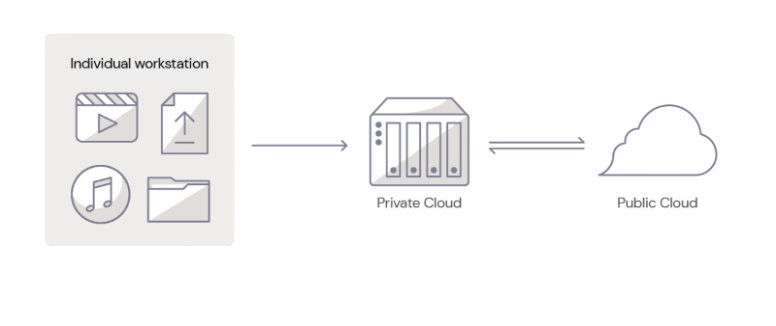
As a quick reminder, the hybrid cloud refers to a computing environment that combines the use of both private cloud and public cloud resources to achieve the benefits of each platform.

A private cloud is a dedicated and secure cloud infrastructure designed exclusively for a single tenant or organization. It offers a wide range of benefits to users. With NAS devices, organizations can enjoy centralized storage, ensuring all files are accessible in one location. Additionally, it offers fast local access to files that helps streamline workflows and productivity. 

The public cloud, on the other hand, is a shared cloud infrastructure provided by cloud storage companies like Backblaze. With public cloud, organizations can scale their infrastructure up or down as needed without the up-front capital costs associated with traditional on-premises infrastructure. 

By combining cloud storage with NAS, media teams can create a hybrid cloud solution that offers the best of both worlds. Private local storage on NAS offers fast access to large files while the public cloud securely stores those files in remote servers and keeps them accessible at a reasonable price.

How To Get Started With A Hybrid Cloud Approach

If you’d like to get started with a hybrid cloud approach, using NAS on-premises is an easy entry point. Here are a few tips to help you choose the right NAS device for your data storage and collaboration needs. 

  • Storage Requirements: Begin by assessing your data volume and growth rate to determine how much storage capacity you’ll need. This will help you decide the number of drives required to support your data growth. 
  • Compute Power: Evaluate the NAS device’s processor, controller, and memory to ensure it can handle the workloads and deliver the performance you need for running applications and accessing and sharing files.
  • Network Infrastructure: Consider the network bandwidth, speed, and port support offered by the NAS device. A device with faster network connectivity will improve data transfer rates, while multiple ports can facilitate the connection of additional devices.
  • Data Collaboration: Determine your requirements for remote access, sync direction, and security needs. Look for a NAS device that provides secure remote access options, and supports the desired sync direction (one-way or two-way) while offering data protection features such as encryption, user authentication, and access controls. 

By carefully reviewing these factors, you can choose a NAS device that meets your storage, performance, network, and security needs. If you’d like additional help choosing the right NAS device, download our complete NAS Buyer’s Guide. 

Download the Guide ➔

Real-World Examples: Using Synology NAS + Backblaze B2

Let’s explore a hybrid cloud use case. To discuss specific media workflows for different types of collaboration scenarios, we’re going to use Synology NAS as the private cloud and Backblaze B2 Cloud Storage as the public cloud as examples in the rest of this article. 

Scenario 1: Working With Distributed Teams Across Locations

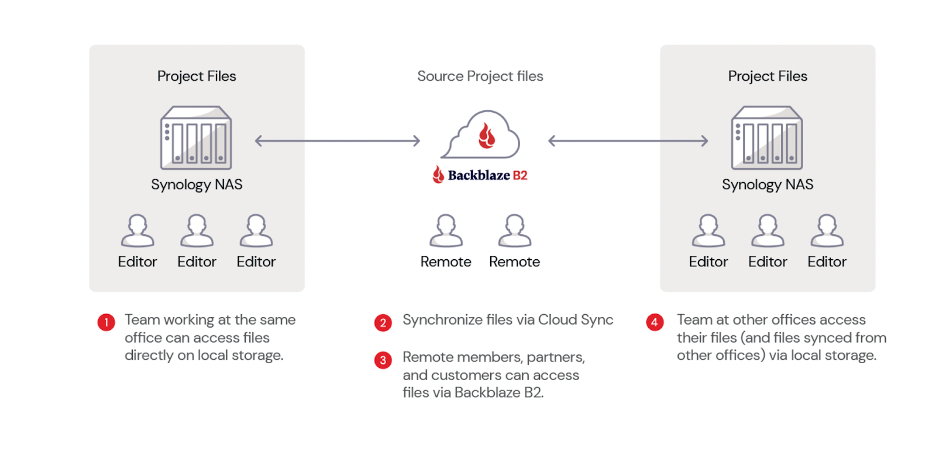
In the first scenario, let’s assume your organization has two different locations with your teams working from both locations. Your video editors work in one office, while a separate editorial team responsible for final reviews operates from the second location. 

To facilitate seamless collaboration, you can install a Synology NAS device at both locations and connect them to Backblaze B2 using Cloud Sync. 

Here’s a video guide that demonstrates how to synchronize Synology NAS to Backblaze B2 using cloud sync.

This hybrid cloud setup allows for fast local access, easy file sharing, and real-time synchronization between the two locations, ensuring that any changes made at one site are automatically updated in the cloud and mirrored at the other site.

Scenario 2: Working With Distributed Teams

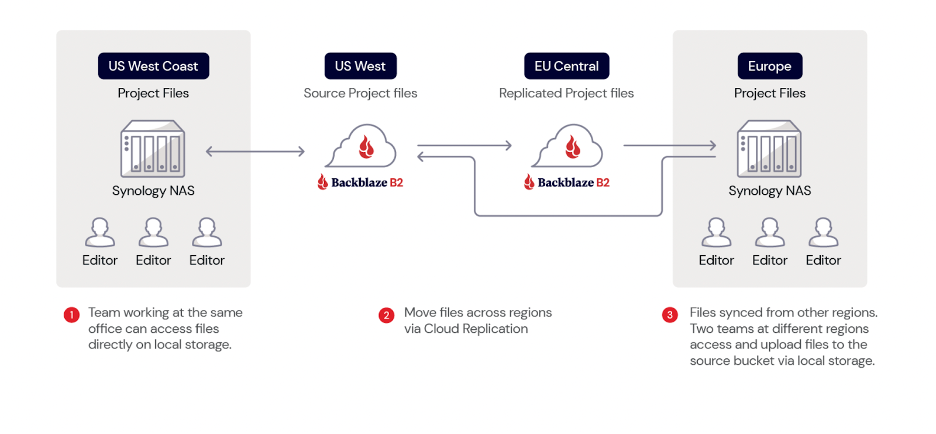
In this second scenario, you have teams working on your projects from different regions, let’s say the U.S. and Europe. Downloading files from different parts of the world can be time-consuming, causing delays and impacting productivity. To solve this, you can use Backblaze B2 Cloud Replication. This allows you to replicate your data automatically from your source bucket (U.S. West) to a destination bucket (EU Central). 

Source files can be uploaded into B2 Bucket on the U.S. West region. These files are then replicated to the EU Central region so you can move data closer to your team in Europe for faster access. Vendors and teams in Europe can configure their Synology NAS devices with Cloud Sync to automatically sync with the replicated files in the EU Central data center.

Scenario 3: Working With Freelancers

In both scenarios discussed so far, file exchanges can occur between different companies or within the same company across various regions of the world. However, not everyone has access to these resources. Freelancers make up a huge part of the media and entertainment workforce, and not every one of them has a Synology NAS device. 

But that’s not a problem! 

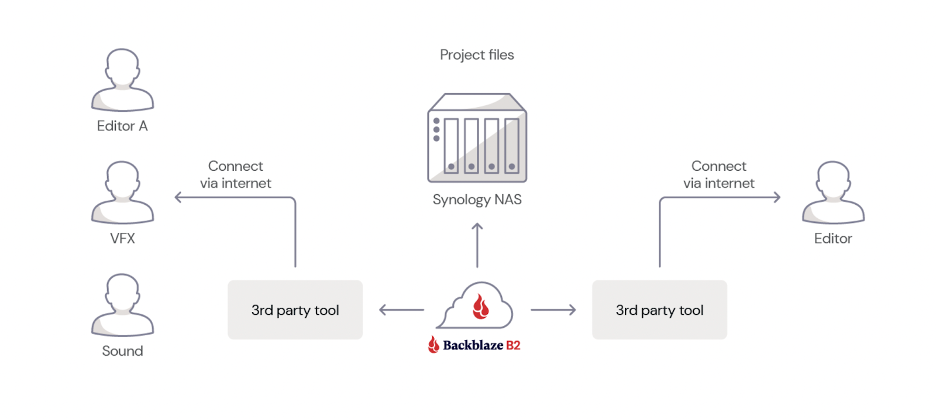
In this case, you can still use a Synology NAS to upload your project files and sync them with your Backblaze B2 Bucket. Instead of syncing to another NAS or replicating to a different region, freelancers can access the files in your Backblaze B2 Bucket using third-party tools like Cyberduck

This approach allows anyone with an internet connection and the appropriate access keys to access the required files instantly without needing to have a NAS device.

Scenario 4: Working With Vendors

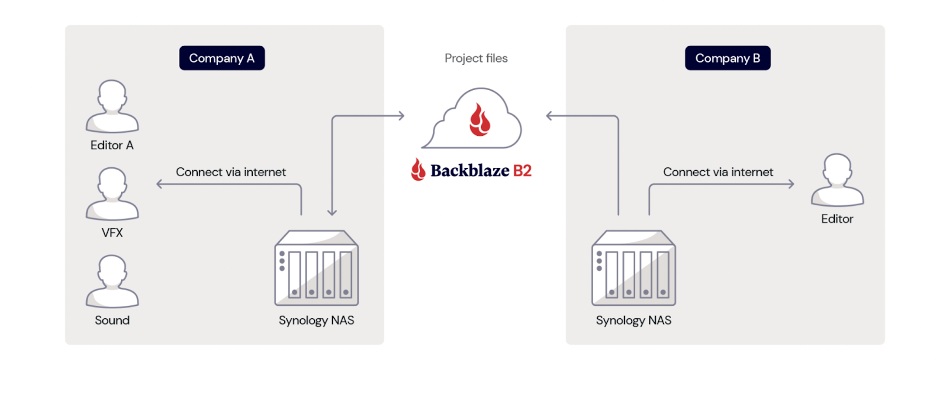
In this final scenario, which is similar to the first one, you collaborate with another company or vendor located elsewhere instead of working with your internal team. Both parties can install their own Synology NAS device at their respective locations, ensuring centralized access, fast local access, and easy file sharing and collaboration. 

The two NAS devices are then connected to a Backblaze B2 Bucket using Cloud Sync, allowing for seamless synchronization of files and data between the two companies.

Whenever changes are made to files by one company, the updated files are automatically synced to Backblaze B2 and subsequently to the other company’s Synology NAS device. This real-time synchronization ensures that both companies have access to the latest versions of the files, allowing for increased efficiency and collaboration. 

Making Hybrid Cloud Work for Your Production Team

As you can see, there are several different ways you can move your media files around and get them in the hands of the right people—be it another one of your offices, vendors, or freelancers. The four scenarios discussed here are just a few common media workflows. You may or may not have the same scenario. Regardless, a hybrid cloud approach provides you with all the tools you need to customize your workflow to best suit your media collaboration needs.

Ready to Get Started?

With Backblaze B2’s pre-built integration with Synology NAS’s Cloud Sync, getting started with your hybrid cloud approach using Synology NAS and Backblaze B2 is simple and straightforward. Check out our guide, or watch the video below as Pat Patterson, Backblaze Chief Technical Evangelist, walks through how to get your Synology NAS data into B2 Cloud Storage in under 10 minutes using Cloud Sync.

Your first step is creating an account.

In addition to Synology NAS, Backblaze B2 Cloud Storage integrates seamlessly with other NAS devices such as Asustor, Ctera, Dell Isilon, iOsafe, Morro Data, OWC JellyFish, Panzura, QNAP, TrueNAS, and more. Regardless of which NAS device you use, getting started with a hybrid cloud approach is simple and straightforward with Backblaze B2.

Hybrid Cloud Unlocks Collaboration and Productivity for Media Teams

Easing collaboration and boosting productivity in today’s fast-paced digital landscape is vital for media teams. By leveraging a hybrid cloud storage solution that combines the power of NAS devices with the flexibility of cloud storage, organizations can create an efficient, scalable, and secure solution for managing their media assets. 

This approach not only addresses storage capacity and accessibility challenges, but also simplifies file sharing and collaboration, while ensuring data protection and security. Whether you’re working within your team from different locations, collaborating with external partners, or freelancers, a hybrid cloud solution offers a seamless, cost-effective, and high-performance solution to optimize your media workflows and enhance productivity in the ever-evolving world of media and entertainment. 

We’d love to hear about other different media workflow scenarios. Share with us how you collaborate with your media teams and vendors in the comments below. 

The post Unlocking Media Collaboration: How to Use Hybrid Cloud to Boost Productivity appeared first on Backblaze Blog | Cloud Storage & Cloud Backup.

Object Storage for Film, Video, and Content Creation

Post Syndicated from James Flores original https://www.backblaze.com/blog/object-storage-for-film-video-and-content-creation/

A decorative image showing icons representing drives and storage options superimposed on a cloud. A title reads: Object Storage for Media Workflows

Twenty years ago, who would have thought going to work would mean spending most of your time on a computer and running most of your applications through a web browser or a mobile app? Today, we can do everything remotely via the power of the internet—from email to gaming, from viewing our home security cameras to watching the latest and greatest movie trailers—and we all have opinions about the best browsers, too…

Along with that easy, remote access, a slew of new cloud technologies are fueling the tech we use day in and day out. To get to where we are today, the tech industry had to rethink some common understandings, especially around data storage and delivery. Gone are the days that you save a file on your laptop, then transport a copy of that file via USB drive or CD-ROM (or, dare we say, a floppy disk) so that you can keep working on it at the library or your office. And, those same common understandings are now being reckoned with in the world of film, video, and content creation.

In this post, I’ll dive into storage, specifically cloud object storage, and what it means for the future of content creation, not only for independent filmmakers and content creators, but also in post-production workflows.

The Evolution of File Management

If you are reading this blog you are probably familiar with a storage file system—think Windows Explorer, the Finder on Mac, or directory structures in Linux. You know how to create a folder, create files, move files, and delete folders. This same file structure has made its way into cloud services such as Google Drive, Box, and Dropbox. And many of these technologies have been adopted to store some of the largest content, namely media files like .mp4, .wav, or .r3d files.

But, as camera file outputs grow larger and larger and the amount of content generated by creative teams soars, folders structures get more and more complex. Why is this important?

Well, ask yourself: How much time have you spent searching for clips you know exist, but just can’t seem to find? Sure, you can use search tools to search your folder structure but as you have more and more content, that means searching for the proverbial needle in a haystack—naming conventions can only do so much, especially when you have dozens or hundreds of people adding raw footage, creating new versions, and so on.

Finding files in a complex file structure can take so much time that many of the aforementioned companies create system limits preventing long searches. In addition, they may limit uploads and downloads making it difficult to manage the terabytes of data a modern production creates. So, this all begs the question: Is a traditional file system really the best for scaling up, especially in data-heavy industries like filmmaking and video content creation? Enter: Cloud object storage.

Refresher: What is Object Storage?

You can think of object storage as simply a big pool of storage space filled with object data. In the past we’ve defined object data as “some assemblage of data with one unique identifier and an infinite amount of metadata.” The three components that comprise objects in object storage are key here. They include:

  1. Unique Identifier: Referred to as a universally unique identifier (UUID) or global unique identifier (GUID), this is simply a complex number identifier.
  2. Infinite Metadata: Data about the data with endless possibilities.
  3. Data: The actual data we are storing.

So what does that actually mean?

It means each object (this can be any type of file—a .jpg, .mp4, .wav, .r3d, etc.) has an automatically generated unique identifier which is just a number (e.g. 4_z6b84cf3535395) versus a folder structure path you must manually create and maintain (e.g. D:\Projects\JOB4548\Assets\RAW\A001\A001_3424OP.RDM\A001_34240KU.RDC\
A001_A001_1005ku_001.R3D).

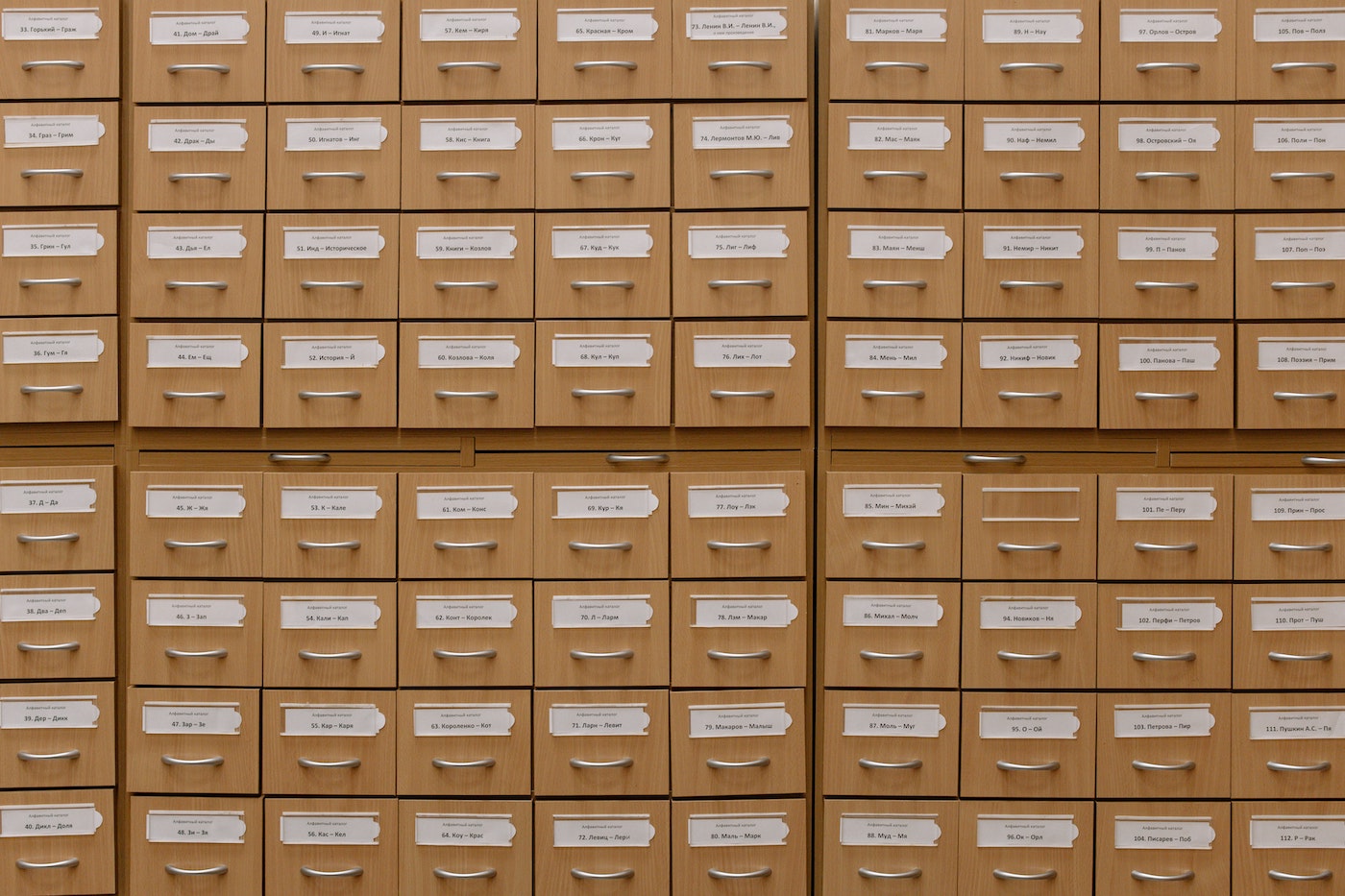
An image of a card catalog.
Interestingly enough, this is where metadata comes from.

It also means each object can have an infinite amount of metadata attached to it. Metadata, put simply, is a “tag” that identifies how the file is used or stored. There are several examples of metadata, but here are just a few:

  • Descriptive metadata, like the title or author.
  • Structural metadata, like how to order pages in a chapter.
  • Administrative metadata, like when the file was created, who has permissions to it, and so on.
  • Legal metadata, like who holds the copyright or if the file is in the public domain.

So, when you’re saying an image file is 400×400 pixels and in .jpg format, you’ve just identified two pieces of metadata about the file. In filmmaking, metadata can include things like reel numbers or descriptions. And, as artificial intelligence (AI) and machine learning tools continue to evolve, the amount of metadata about a given piece of footage or image only continues to grow. AI tools can add data around scene details, facial recognition, and other identifiers, and since those are coded as metadata, you will be able to store and search files using terms like “scenes with Bugs Bunny” or “scenes that are in a field of wildflowers”—and that means that you’ll spend less time trying to find the footage you need when you’re editing.

When you put it all together, you have one gigantic content pool that can grow infinitely. It uses no manually created complex folder structure and naming conventions. And it can hold an infinite amount of data about your data (metadata), making your files more discoverable.

Let’s Talk About Object Storage for Content Creation

You might be wondering: What does this have to do with the content I’m creating?

Consider this: When you’re editing a project, how much of your time is spent searching for files? A recent study by GISTICS found that the average creative person searches for media 83 times a week. Maybe you’re searching your local hard drive first, then your NAS, then those USB drives in your closet. Or, maybe you are restoring content off an LTO tape to search for that one clip you need. Or, maybe you moved some of your content to the cloud—is it in your Google Drive or in your Dropbox account? If so, which folder is it in? Or was it the corporate Box account? Do you have permissions to that folder? All of that complexity means that the average creative person fails to find the media they are looking for 35% of the time. But you probably don’t need a study to tell you we all spent huge amounts of time searching for content.

An image showing a command line interface window with a failed search.
Good old “request timed out.”

Here is where object storage can help. With object storage, you simply have buckets (object storage containers) where all your data can live, and you can access it from wherever you’re working. That means all of the data stored on those shuttle drives sitting around your office, your closet of LTO tapes, and even a replica of your online NAS are in a central, easily accessible location. You’re also working from the most recent file.

Once it’s in the cloud, it’s safe from the types of disasters that affect on-premises storage systems, and it’s easy to secure your files, create backups, and so on. It’s also readily available when you need it, and much easier to share with other team members. It’s no wonder many of the apps you use today take advantage of object storage as their primary storage mechanism.

The Benefits of Object Storage for Media Workflows

Object storage offers a number of benefits for creative teams when it comes to streamlining workflows, including:

  • Instant access
  • Integrations
  • Workflow interoperability
  • Easy distribution
  • Off-site back up and archive

Instant Access

With cloud object storage, content is ready when you need it. You know inspiration can strike at any time. You could be knee deep in editing a project, in the middle of binge watching the latest limited series, or out for a walk. Whenever the inspiration decides to strike, having instant access to your library of content is a game changer. And that’s the great thing about object storage in the cloud: you gain access to massive amounts of data with a few clicks.

Integrations

Object storage is a key component of many of the content production tools in use today. For example, iconik is a cloud-native media asset management (MAM) tool that can gather and organize media from any storage location. You can point iconik to your Backblaze B2 Bucket and use its advanced search functions as well as its metadata tagging.

Workflow Interoperability

What if you don’t want to use iconik, specifically? What’s great about using cloud storage as a centralized repository is that no matter what application you use, your data is in a single place. Think of it like your external hard drive or NAS—you just connect that drive with a new tool, and you don’t have to worry about downloading everything to move to the latest and greatest. In essence, you are bringing your own storage (BYOS!).

Here’s an example: CuttingRoom is a cloud native video editing and collaboration tool. It runs entirely in your web browser and lets you create unique stories that can instantly be published to your destination of choice. What’s great about CuttingRoom is its ability to read an object storage bucket as a source. By simply pointing CuttingRoom to a Backblaze B2 Bucket, it has immediate access to the media source files and you can get to editing. On the other hand, if you prefer using a MAM, that same bucket can be indexed by a tool like iconik.

Easy Distribution

Now that your edit is done, it’s time to distribute your content to the world. Or, perhaps you are working with other teams to perfect your color and sound, and it’s time to share your picture lock version. Cloud storage is ready for you to distribute your files to the next team or an end user.

Here’s a recent, real-world example: If you have been following the behind-the-scenes articles about creating Avatar: The Way of Water, you know that not only was its creation the spark of new technology like the Sony Venice camera with removable sensors, but the distribution featured a cloud centric flow. Footage (the film) was placed in an object store (read: a cloud storage database), processed into different formats, languages were added with 3D captions, and then footage was distributed directly from a central location.

And, while not all of us have Jon Landau as our producer, a huge budget, and a decade to create our product, this same flexibility exists today with object storage—with the added bonus that it’s usually budget-friendly as well.

Off-Site Back Up and Archive

And last but certainly not least, let’s talk back up and archive. Once a project is done, you need space for the next project, but no one wants to risk losing the old project. Who out there is completely comfortable hitting the delete key as well as saying yes to the scary prompt, “Are you sure you want to delete?”

Well, that’s what you would have to do in the past. These days, object storage is a great place to store your terabytes and terabytes of archived footage without cluttering your home, office, or set with additional hardware. Compared with on-premises storage, cloud storage lets you add more capacity as you need it—just make sure you understand cloud storage pricing models so that you’re getting the best bang for your buck.

If you’re using a NAS device in your media workflow, you’ll find you need to free up your on-prem storage. Many NAS devices, like Synology and QNAP, have cloud storage integrations that allow you to automatically sync and archive data from your device to the cloud. In fact, you could start taking advantage of this today.

No delete key here—just a friendly archive button.

Getting Started With Object Storage for Media Workflows

Migrating to the cloud may seem daunting, but it doesn’t have to be. Especially with the acceleration of hybrid workflows in the film industry recently, cloud-based workflows are becoming more common and better integrated with the tools we use every day. You can test this out with Backblaze using your free 10GB that you get just for signing up for Backblaze B2. Sure, that may not seem like much when a single .r3d file is 4GB. But with that 10GB, you can test upload speeds and download speeds, try out integrations with your preferred workflow tools, and experiment with AI metadata. If your team is remote, you could try an integration with LucidLink. Or if you’re looking to power a video on-demand site, you could integrate with one of our content delivery network (CDN) partners to test out content distribution, like Backblaze customer Kanopy, a streaming service that delivers 25,000 videos to libraries worldwide.

Change is hard, but cloud storage can be easy. Check out all of our media workflow solutions and get started with your 10GB free today.

The post Object Storage for Film, Video, and Content Creation appeared first on Backblaze Blog | Cloud Storage & Cloud Backup.
Virtual vs. Remote vs. Hybrid Production

Post Syndicated from James Flores original https://www.backblaze.com/blog/virtual-vs-remote-vs-hybrid-production/

A decorative image showing icons of a NAS device, a video with a superimposed play button, and a cloud with the Backblaze logo.

For many of us, 2020 transformed our work habits. Changes to the way we work that always seemed years away got rolled out within a few months. Fast forward to today, and the world seems to be returning back to some sense of normalcy. But one thing that’s not going back is how we work, especially for media production teams. Virtual production, remote video production, and hybrid cloud have all accelerated, reducing operating costs and moving us closer to a cloud-based reality.

So what’s the difference between virtual production, remote production, and hybrid cloud workflows, and how can you use any or all of those strategies to improve how you work? At first glance, they all seem to be different variations of the same thing. But there are important differences, and that’s what we’re digging into today. Read on to get an understanding of these new ways of working and what they mean for your creative team.

Going to NAB in April?

Want to talk about your production setup at NAB? Backblaze will be there with exciting new updates and hands-on demos for better media workflows. Oh, and we’re bringing some really hot swag. Reserve time to meet with our team (and snap up some sweet goodies) below.

➔ Meet Backblaze at NAB

What Is Virtual Production?

Let’s start with virtual production. It sounds like doing production virtually, which could just mean “in the cloud.” I can assure you, it’s way cooler than that. When the pandemic hit, social distancing became the norm. Gathering a film crew together in a studio or in any location of the world went out the door. Never fear: virtual production came to the rescue.

Virtual production is a method of production where, instead of building a set or going to a specific location, you build a set virtually, usually with a gaming engine such as Unreal Engine. Once the environment is designed and lit within Unreal Engine, it can then be fed to an LED volume. An LED volume is exactly what it sounds like: a huge volume of LED screens connected to a single input (the Unreal Engine environment).

With virtual production, your set becomes the LED volume, and Unreal Engine can change the background to anything you can imagine at the click of a button. Now this isn’t just a LED screen as a background—what makes virtual production so powerful is its motion tracking integration with real cameras.

Using a motion sensor system attached to a camera, Unreal Engine is able to understand where your camera is pointed. (It’s way more tech-y than that, but you get the picture.) You can even match the virtual lens in Unreal Engine with the lens of your physical camera. With the two systems combined, a camera following an actor on a virtual set can react by moving the background along with the camera in real time.

Virtual Production in Action

If you were one of the millions who have been watching The Mandalorian on Disney+, check out this behind the scenes look at how they utilized a virtual production.


This also means location scouting can be done entirely inside the virtual set and the assets created for pre-vizualiation can actually carry on into post, saving a ton of time (as the post work actually starts during pre-production.

So, virtual production is easily confused with remote production, but it’s not the same. We’ll get into remote production next.

What Is Remote Production?

We’re all familiar with the stages of production: development, pre-production, production, post-production, and distribution. Remote production has more to do with post-production. Remote production is simply the ability to handle post-production tasks from anywhere.

Here’s how the pandemic accelerated remote production: In post, assets are edited on non-linear editing software (NLEs) connected to huge storage systems located deep within studios and post-production houses. When everyone was forced to work from home, it made editing quite difficult. There were, of course, solutions that allowed you to remotely control your edit bay, but remotely controlling a system from miles away and trying to scrub videos over your at-home internet bandwidth quickly became a nuisance.

To solve this problem, everyone just took their edit bay home along with a hard drive containing what they needed for their particular project. But shuttling drives all over the place and trying to correlate files across all the remote drives meant that the NAS became the next headache. To resolve this confusion over storage, production houses turned to hybrid solutions—our next topic.

What Are Hybrid Cloud Workflows?

Hybrid cloud workflows didn’t originate during the pandemic, but they did make remote production much easier. A hybrid cloud workflow is a combination of a public cloud, private cloud, and an on-premises solution like a network attached storage device (NAS) or storage area network (SAN). When we think about storage, we think about first the relationship of our NLE to our local hard drive, then our relationship between the local computer and the NAS or SAN. The next iteration of this is the relationship of all of these (NLE, local computer, and NAS/SAN) to the cloud.

For each of these on-prem solutions the primary problems faced are capacity and availability. How much can our drive hold, and how do I access the NAS—local area network (LAN) or virtual private network (VPN)? Storage in the cloud inherently solves both of these problems. It’s always available and accessible from any location with an internet connection. So, to solve the problems that remote teams of editors, visual effects (VFX), color, and sound folks faced, the cloud was integrated into many workflows.

Using the cloud, companies are able to store content in a single location where it can then be distributed to different teams (VFX, color, sound, etc.). This central repository makes it possible to move large amounts of data across different regions, making it easier for your team to access it while also keeping it secure. Many NAS devices have native cloud integrations, so the automated file synchronization between the cloud and a local environment is baked in—teams can just get to work.

The hybrid solution worked so well that many studios and post houses have adopted them as a permanent part of their workflow and have incorporated remote production into their day-to-day. A good example is the video team at Hagerty, a production crew that creates 300+ videos a year. This means that workflows that were once locked down to specific locations are now moving to the cloud. Now more than ever, API accessible resources, like cloud storage with S3 compatible APIs that integrates with your preferred tools, are needed to make these workflows actually work.

Just one example of Hagerty’s content.

Hybrid Workflows and Cloud Storage

While the world seems to be returning to a new normal, our way of work is not. For the media and entertainment world, the pandemic gave the space a jolt of electricity, igniting the next wave of innovation. Virtual production, remote production, and hybrid workflows are here to stay. What digital video started 20 years ago, the pandemic has accelerated, and that acceleration is pointing directly to the cloud.

So, what are your next steps as you future-proof your workflow? First, inspect your current set of tools. Many modern tools are already cloud-ready. For example, a Synology NAS already has Cloud Sync capabilities. EditShare also has a tool capable of crafting custom workflows, wherever your data lives. (These are just a few examples.)

Second, start building and testing. Most cloud providers offer free tiers or free trials—at Backblaze, your first 10GB are free, for example. Testing a proof of concept is the best way to understand how new workflows fit into your system without overhauling the whole thing or potentially disrupting business as usual.

And finally, one thing you definitely need to make hybrid workflows work is cloud storage. If you’re looking to make the change a lot easier, you came to the right place. Backblaze B2 Cloud Storage pairs with hundreds of integrations so you can implement it directly into your established workflows. Check out our partners and our media solutions for more.

The post Virtual vs. Remote vs. Hybrid Production appeared first on Backblaze Blog | Cloud Storage & Cloud Backup.
Work Smarter With Backblaze and Quantum H4000 Essential

Post Syndicated from Jennifer Newman original https://www.backblaze.com/blog/work-smarter-with-backblaze-and-quantum-h4000-essential/

A decorative image displaying the Backblaze and Quantum logos.

How much do you think it costs your creative team to manage data? How much time and money is spent organizing files, searching for files, and maybe never finding those files? Have you ever quantified it? One market research firm has. According to GISTICS, a creative team of eight people wastes more than $85,000 per year searching for and managing files—and larger teams waste even more than that.

Creative teams need better tools to work smarter. Backblaze has partnered with Quantum to simplify media workflows, provide easy remote collaboration, and free up on-premises storage space with seamless content archiving to the cloud. The partnership provides teams the tools needed to compete. Read on to learn more.

What Is Quantum?

Quantum is a data storage company that provides technology, software, and services to help companies make video and other unstructured data smarter—so data works for them and not the other way around. Quantum’s H4000 Essential (H4000E) asset management and shared storage solution offers customers an all-in-one appliance that integrates automatic content indexing, search, discovery, and collaboration. It couples the CatDV asset management platform with Quantum’s StorNext 7 shared storage.

How Does This Partnership Benefit Joint Customers?

By pairing Quantum H4000 Essential with Backblaze B2 Cloud Storage, you get award-winning asset management and shared storage with the ability to archive to the cloud. The partnership provides a number of benefits:

  • Better organization: Creative teams work visually, and the Quantum platform supports visual workflows. All content is available in one place, with automatic content indexing, metadata tagging, and proxy generation.
  • Searchable assets: All content and projects are searchable in an easy to use visual catalog.
  • Seamless collaboration: Teams can use production tools like Adobe Premiere Pro, Final Cut Pro X, and others to work on shared projects as well as tagging, markup, versioning, chat, and approval tools to streamline collaboration.
  • Robust archive management: Archived content can be restored easily from Backblaze B2 to CatDV to keep work in progress lean and focused.
  • On-premises efficiency: Once projects are complete, they can be quickly archived to the cloud to free up storage space on the H4000E for high-resolution production files and ongoing projects.
  • Simplified billing: Data is stored on always-hot storage, eliminating the management frustration that comes with multiple tiers and variable costs for egress and API calls.

Purchase Cloud Capacity the Same Way You Purchase On-Premises

With Backblaze B2 Reserve, you can purchase capacity-based storage starting at 20TB to pair with your Quantum H4000E if you prefer a predictable cloud spend versus consumption-based billing. Key features of B2 Reserve include:

  • Free egress up to the amount of storage purchased per month.
  • Free transaction calls.
  • Enhanced migration services.
  • No delete penalties.
  • Upgraded Tera support.

Who Would Benefit From Backblaze B2 + Quantum H4000E?

The partnership benefits any team that handles large amounts of data, specifically media files. The solution can help teams with:

  • Simplifying media workflows.
  • Easing remote project management and collaboration.
  • Cloud tiering.
  • Extending on-premises storage.
  • Implementing a cloud-first strategy.
  • Backup and disaster recovery planning.
  • Ransomware protection.
  • Managing consistent data growth.

Getting Started With Backblaze B2 and Quantum H4000E

The Quantum H4000E is a highly-integrated solution for collaborative shared storage and asset management. Configured with Backblaze B2 for content archiving and retrieval, it provides new menu options to perform cloud archiving and move, copy, and restore content, freeing up H4000 local storage for high-resolution files. You can easily add on cloud storage to improve remote media workflows, content collaboration, media asset protection, and archive.

With the H4000E, everything you need to get started is in the box, ready to connect to your 10GbE and higher network. And, a simple Backblaze B2 archive plugin connects the solution directly to your Backblaze B2 account.

Simply create a Backblaze account and configure the Backblaze CatDV panel with your credentials.

Join Backblaze at NAB Las Vegas

Join us at NAB to learn more about the Quantum + Backblaze solution. Our booths are neighbors! Schedule a meeting with us for a demo.

The post Work Smarter With Backblaze and Quantum H4000 Essential appeared first on Backblaze Blog | Cloud Storage & Cloud Backup.