Post Syndicated from Ruchikka Chaudhary original https://aws.amazon.com/blogs/messaging-and-targeting/build-an-ai-powered-real-estate-assistant-on-whatsapp-using-strands-agents-sdk-and-aws-end-user-messaging/
Most real estate websites collect form submissions and route them to sales teams who respond hours or days later. Customers who expect immediate answers often move on. This post shows how to close that gap with a WhatsApp assistant that responds instantly. We show you how to build a real estate assistant powered by AI that delivers property discovery, home loan pre-approval, and site visit booking entirely within WhatsApp. The solution uses the Strands Agents SDK to orchestrate specialized AI agents on Amazon Bedrock, with AWS End User Messaging Social for WhatsApp integration. The serverless backend runs on AWS Lambda and Amazon DynamoDB.
Prerequisites
You need an AWS account with permissions for AWS CloudFormation, Lambda, Amazon Simple Notification Service (Amazon SNS), Amazon Bedrock, and DynamoDB. You also need a WhatsApp Business account integrated with AWS End User Messaging. For instructions to locate your WhatsApp phone number ID, see View a phone number’s ID in AWS End User Messaging Social.
For more information about how to set up WhatsApp using AWS End User Messaging Social, refer to Automate workflows with WhatsApp using AWS End User Messaging Social.
AWS Serverless Application Model (AWS SAM) CLI is required to deploy the demo solution. For installation instructions, see the AWS SAM CLI installation guide.
Overview of solution
The architecture uses four AI agents built with the Strands Agents SDK. Each agent handles a specific task: identity verification, credit scoring, fraud detection, or property valuation. The agents use Strands SDK decorators to access external data sources. The agents run on Amazon Bedrock with the Nova Lite model and are deployed to AWS Lambda using the official Strands Agents Lambda Layer. AWS End User Messaging Social handles WhatsApp Business API integration, publishing incoming messages to Amazon SNS for routing. The webhook handler Lambda function processes these events and invokes the supervisor agent. The supervisor agent orchestrates the conversation flow, maintains session state in Amazon DynamoDB, and sends rich interactive messages back to customers on WhatsApp.
For this post, we use a demo landing page to simulate the “Enquire Now” button on a real estate website. In a production scenario, you can add this integration point to any existing website. The only requirement is a WhatsApp click-to-chat link that pre-fills the initial message with the property details.
The following diagram illustrates the solution architecture:
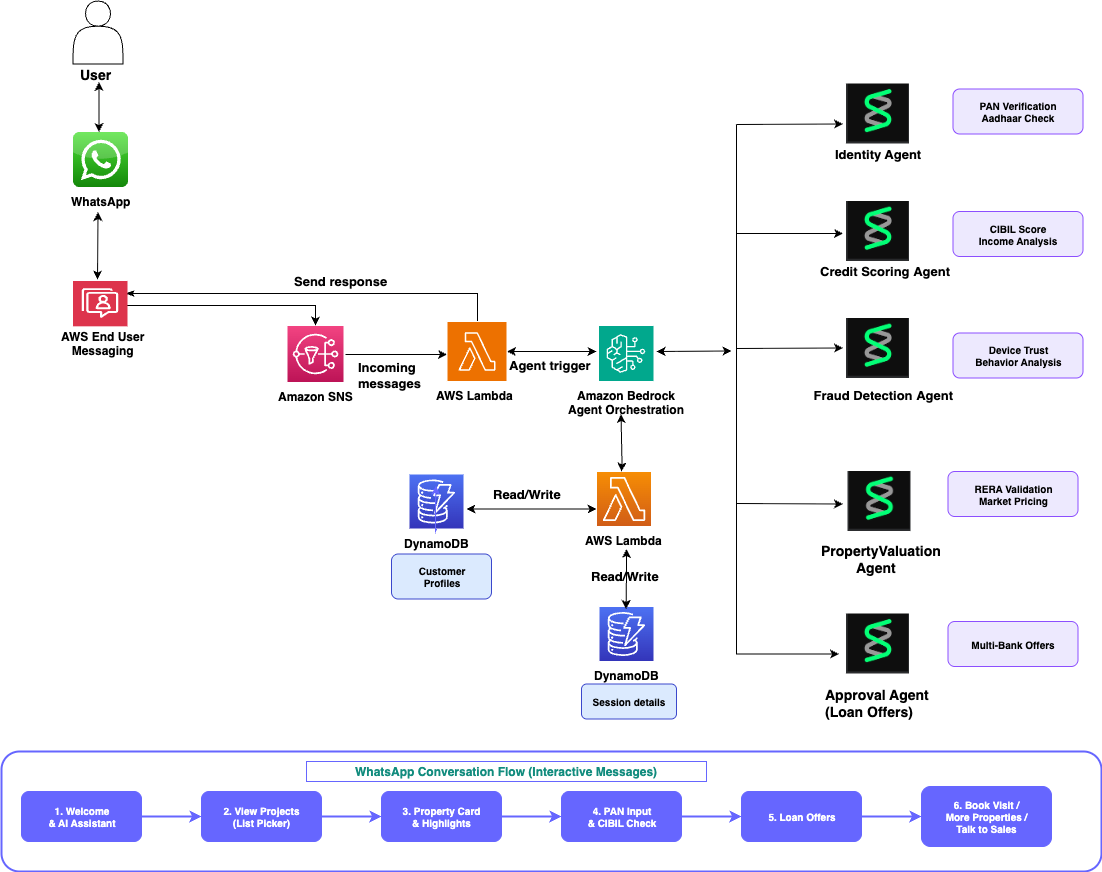
Strands Agents SDK — multi-agent pipeline
The Strands Agents SDK is an open source framework from AWS for building AI agents. Each agent gets a system prompt and tools. The agent then decides when to use those tools based on what the user asks.
This solution uses four specialized agents, each with its own tools:
- Identity Agent – uses the
verify_identitytool to validate the customer’s tax identification number. - Credit Scoring Agent – uses
check_credit_scoreandget_loan_offerstools to assess creditworthiness and generate lending offers. - Fraud Detection Agent – uses
check_fraud_riskto evaluate application risk. - Property Valuation Agent – uses
validate_propertyto check regulatory registration and market value.
The following example shows how to define agents using the Strands @tool decorator pattern. Each tool is region-agnostic by design. You adapt the implementation for your local tax authority, credit bureau, and property registry.
You then orchestrate the agents in a pipeline:
AWS End User Messaging Social
AWS End User Messaging Social handles WhatsApp Business API integration. Incoming messages arrive as events. Outgoing messages, including text, buttons, lists, and location cards, go through the SendWhatsAppMessage API.
Message routing with Amazon SNS
An SNS topic receives events from AWS End User Messaging Social whenever customers send WhatsApp messages.
Webhook handler – AWS Lambda
The webhook handler Lambda function parses the EUM Social event envelope, extracts the WhatsApp message payload, and routes it based on message type.
Supervisor agent – AWS Lambda with Strands Agents
The supervisor agent orchestrates the full conversation flow. It maintains session state in Amazon DynamoDB and sends rich WhatsApp messages back to the customer. When the customer submits their identification, the supervisor invokes the Strands agent pipeline, which runs four agents sequentially on Amazon Bedrock.
The supervisor sends interactive WhatsApp messages using the EUM Social API:
Lambda Layer for Strands Agents
The Strands Agents SDK provides an official Lambda Layer that includes all required dependencies pre-built for the Lambda runtime.
Session state – Amazon DynamoDB
Two DynamoDB tables store conversation state. The sessions table tracks the full conversation state machine (INITIATED, AWAITING_PROJECT_SELECT, AWAITING_ACTION, AWAITING_ID, LOAN_APPROVED, VISIT_CONFIRMED), with a 30-minute TTL.
Conversation flow
The customer journey unfolds across four steps in WhatsApp.
Step 1: Property discovery
When the customer sends the initial message, the supervisor agent sends a welcome message followed by an interactive list picker showing properties grouped by developer. The list picker uses WhatsApp’s native interactive message format.
Step 2: Property detail with action buttons
When the customer selects a property, the supervisor sends a rich detail card with key highlights, regulatory registration, and three action buttons:
Step 3: Loan pre-approval with Strands Agents
When the customer chooses Check Loan and submits their tax identification number, the supervisor invokes the Strands agent pipeline. Four agents run sequentially on Amazon Bedrock, each using its specialized tools. The following log output shows the pipeline in action:
The customer receives a loan approval card with offers from multiple lending institutions, each with personalized interest rates based on the credit score returned by the credit agent. The full pipeline typically runs in under 10 seconds.
Step 4: Site visit booking
The customer selects a time slot from an interactive list picker and receives a confirmation with relationship manager details and a location card.
Demo implementation: India real estate market
This demo uses India-specific implementations: PAN validation for identity, CIBIL scores for credit (300-900 range), example bank offers with EMI in Rupees, RERA registration validation, and free cab pickup for site visits.
To adapt this solution for another region, you replace the tool implementations with calls to your local tax authority, credit bureau, lending institutions, and property registry. The agent architecture, WhatsApp integration, and conversation flow remain unchanged.
Deployment
To deploy the demo solution, run the following commands:
After deployment, in the AWS End User Messaging Social console, route incoming messages for your phone number ID to the SNS topic demo-whatshome-incoming-messages created by the stack.
Test the solution
Select Enquire Now on any property card. WhatsApp opens at the configured business number with a prefilled message. Send the message and finish the loan pre-approval flow on WhatsApp.
Sample conversation
The following images show how a customer interacts with the real estate AI assistant.
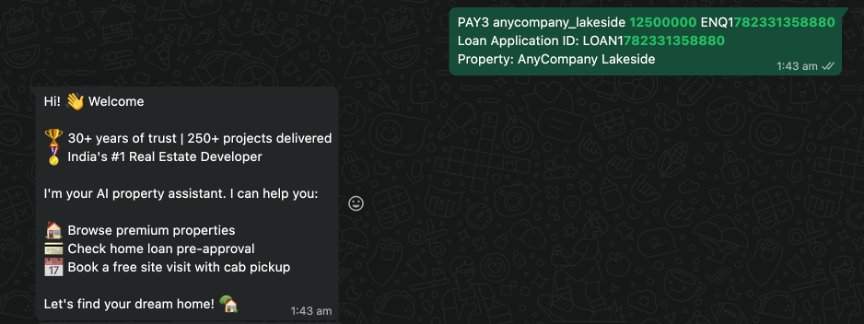
The customer lands on WhatsApp with a predefined message from the website, and the AI assistant greets them with a welcome message.
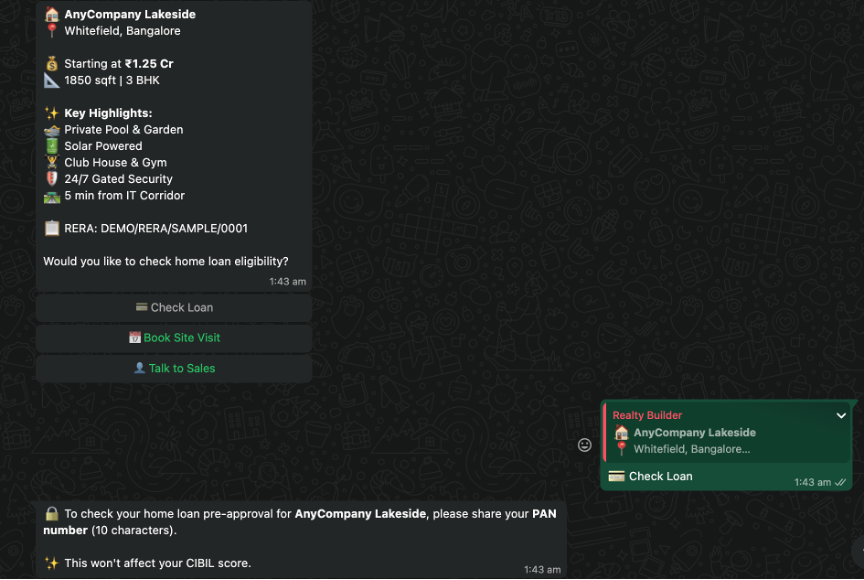
The customer selects the Check Loan option for one of the properties listed.
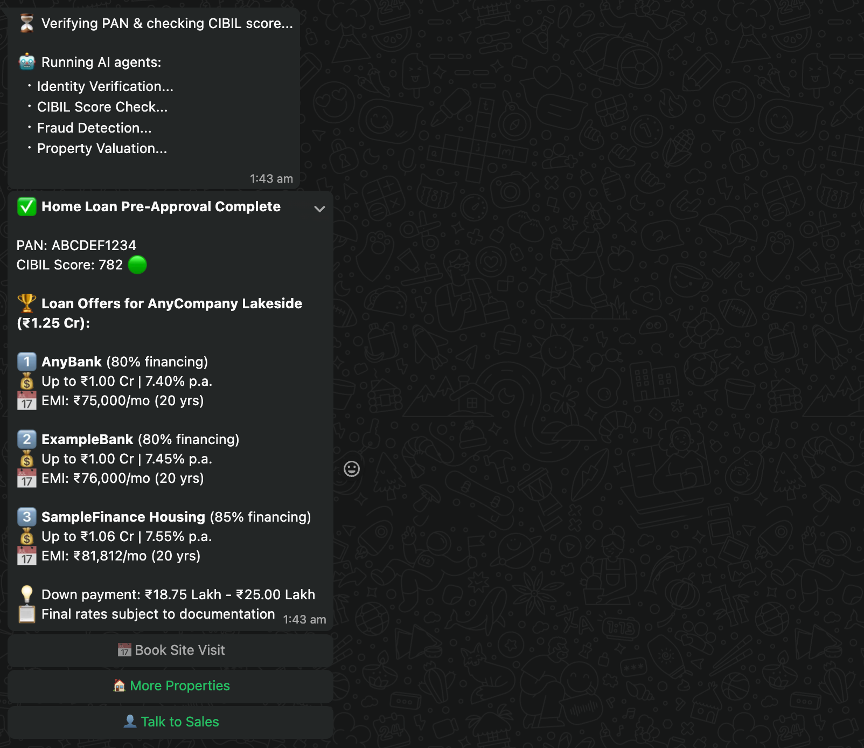
The agents are invoked to verify the customer details and provide loan quotations.
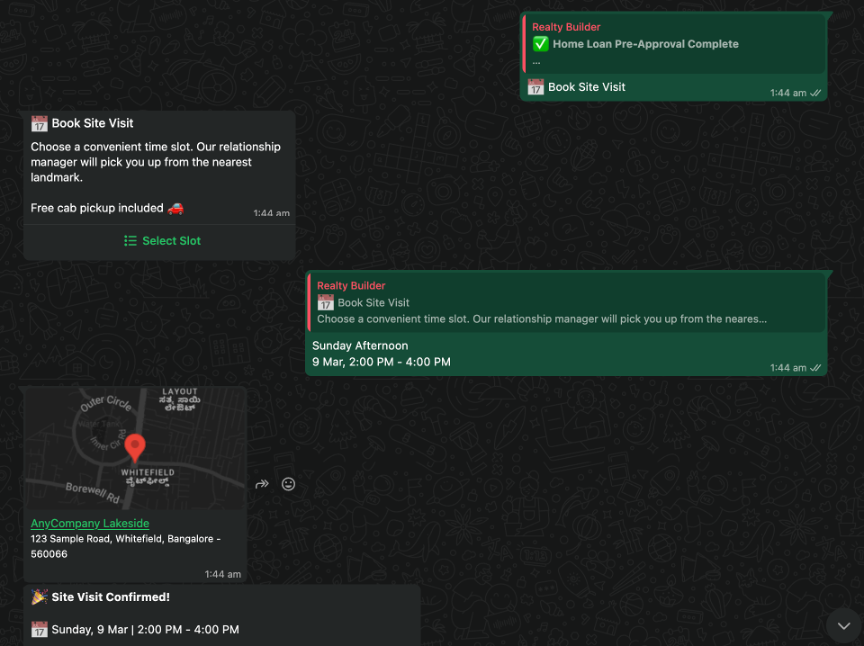
The customer books a site visit after selecting a suitable time slot.
Clean up
To avoid ongoing charges, delete the resources you created during this walkthrough:
Deleting the CloudFormation stack removes the Lambda functions, DynamoDB tables, Amazon SNS topics, Amazon Simple Queue Service (Amazon SQS) queue, AWS Key Management Service (AWS KMS) key, and AWS Identity and Access Management (IAM) roles. If you deployed the demo landing page to Amazon Simple Storage Service (Amazon S3) and Amazon CloudFront, delete those resources separately.
Conclusion
You can combine the Strands Agents SDK, Amazon Bedrock, AWS End User Messaging Social, and Lambda to build an end-to-end WhatsApp assistant. The multi-agent architecture has specialized agents for identity verification, credit scoring, fraud detection, and property valuation. This decomposition shows how you can break complex business workflows into focused AI agents that collaborate to deliver instant results.
The same pattern works for banking loan applications, insurance claims, healthcare appointments, and ecommerce order tracking.
To get started, see the AWS End User Messaging Social documentation and the Strands Agents SDK on GitHub.