All posts by Ruchikka Chaudhary

Build an AI-powered course recommender using Amazon Bedrock and AWS End User Messaging

Post Syndicated from Ruchikka Chaudhary original https://aws.amazon.com/blogs/messaging-and-targeting/build-an-ai-powered-course-recommender-using-amazon-bedrock-and-aws-end-user-messaging/

Educational technology (EdTech) providers face the challenge of maintaining seamless, personalized communication and presenting the right recommendations to their diverse stakeholders. This post explores how combining Amazon Web Services (AWS) End User Messaging and WhatsApp Business API with the advanced AI capabilities of Amazon Bedrock can transform educational engagement.

In this post, we explore use cases that are reshaping the EdTech industry. We discover how application automation can streamline admissions and enrollment processes, making them more efficient and user-friendly. We demonstrate how instant student engagement can be achieved through AI-powered, personalized interactions that keep learners motivated and connected. We showcase how real-time course feedback mechanisms can help educators adapt and improve their teaching methods. We also examine how student support can be automated using intelligent assistants that provide continuous, all-day assistance while maintaining a personal touch.

We show you how to build an AI-powered course recommendation system. We explain how to set up WhatsApp Business API integration with Amazon Bedrock, implement smart search capabilities for course matching, and create a scalable serverless architecture. You’ll learn how to build meaningful analytics dashboards to track engagement and learn best practices for handling errors and maintaining system reliability. Whether you’re an EdTech professional or a cloud architect, this guide gives you practical insights into combining conversational AI with educational services.

Use cases

  • An AI-powered personalized learning pathway generator that automatically recommends customized content based on individual student performance metrics and learning requirements
  • Course improvement suggestions and real-time course feedback
  • A smart communication orchestrator that delivers role-specific, automated notifications and updates across multiple channels to enhance student and parent engagement
  • An early warning system using predictive analytics to identify at-risk students through real-time monitoring of engagement metrics and performance indicators
  • Student support automation with always available AI assistant support, FAQ handling, escalation management, and multilingual support

Prerequisites

  • An AWS account
  • AWS End User Messaging set up with WhatsApp channel enabled
  • A pre-existing WhatsApp Business account
  • Amazon Bedrock setup must be completed with preferred model
  • Amazon Quick Sight for the AWS Region must be enabled

Solution overview

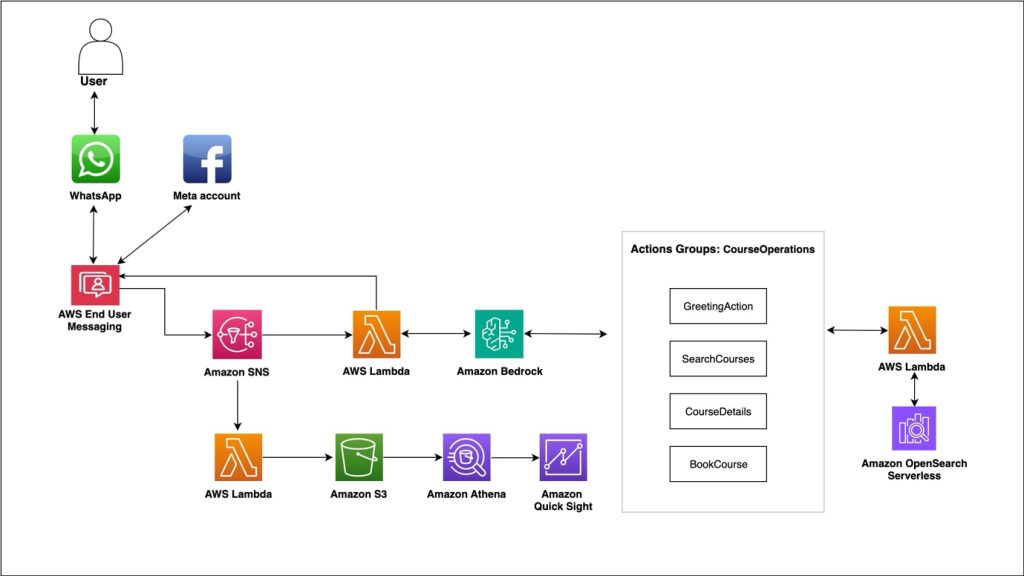
With this solution, users can discover and order educational courses through WhatsApp conversations. Instead of navigating complex websites, the user can send a WhatsApp message saying, “I want to learn Python programming.” They’ll receive personalized course recommendations instantly. The architecture processes WhatsApp messages through AWS End User Messaging, uses Amazon Bedrock for AI-powered conversations, performs semantic search with Amazon OpenSearch Serverless, and captures analytics for business insights. (For step-by-step implementation and rollback guidelines, see the sample course recommendation system.) The following architectural diagram illustrates a modern AI-powered course recommendation system that uses multiple AWS services.

Figure 1: AI-powered course recommendation system

Message processing

When users send WhatsApp messages, AWS End User Messaging captures them and publishes events to an Amazon Simple Notification Service (Amazon SNS) topic. This creates a decoupled architecture where multiple services can process the same message events independently. AWS Lambda functions subscribe to these events, facilitating reliable message processing during high-traffic periods. The decoupled design provides several advantages:

  • If one component fails, others continue operating
  • You can add new message processors without affecting existing ones
  • The system automatically scales based on message volume without manual intervention

AI conversation engine

Amazon Bedrock with Claude 3 Haiku powers natural language understanding. It is configured specifically for WhatsApp with instructions for short paragraphs, relevant emoji, and mobile-optimized responses.

AI agents

The agent maintains conversation context and handles structured actions such as course search, detail retrieval, and booking through defined functions. The following workflow is the agent action flow and sample code:

Agent flow

  1. Greets user → Understands intent → Searches courses → Provides details → Facilitates booking
  2. Maintains context throughout the conversation
  3. Can switch between actions based on user responses
  4. Handles complex queries by combining multiple actions

Sample code

The following is sample code to create a Bedrock agent using AWS CDK:

    agent = bedrock.CfnAgent(foundation_model="anthropic.claude-3-haiku-20240307-v1:0",
     instruction="""
     Format for WhatsApp: short paragraphs,
        focus on technical courses only
       """,
      action_groups=[# Functions for search, details, booking]
)

Semantic search

Traditional keyword search can miss the user’s intent. The application uses Amazon Titan Embeddings in Amazon Bedrock to convert courses and queries into vectors, enabling semantic understanding. When users ask for “cloud computing courses,” the system can understand related terms such as “AWS” and “serverless” without exact matches. Amazon OpenSearch Serverless handles vector similarity matching combined with traditional filters for course price, level, and duration.

Analytics pipeline

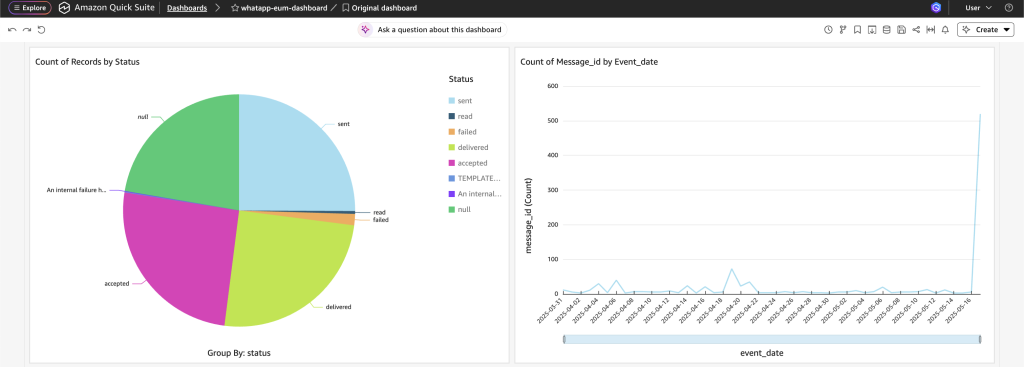
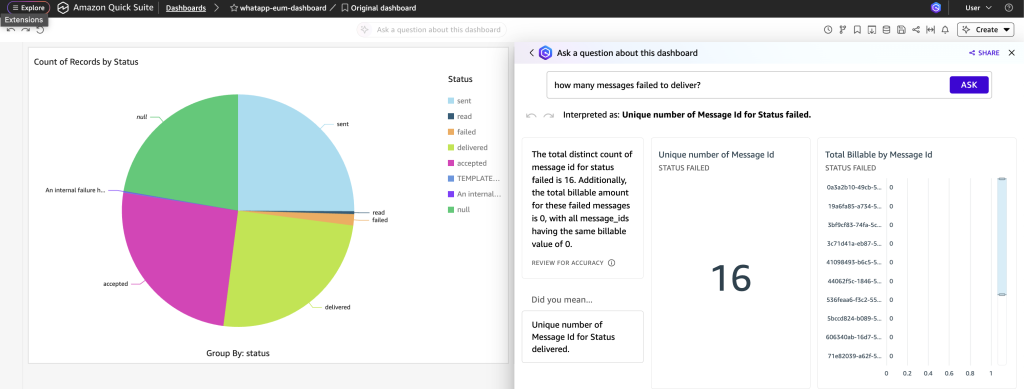
Every WhatsApp message interaction generates business intelligence. Messages are stored in Amazon Simple Storage Service (Amazon S3) with date partitioning, catalogued through AWS Glue, and made queryable using Amazon Athena. Teams can analyze user behavior, popular topics, and conversion rates through Quick Sight dashboards. The following dashboard shows example widgets displaying pie-chart breakdown of message delivery status and count of messages per day.

Figure 2: Amazon Quick Sight dashboard

As shown in the following dashboard, Amazon Q in QuickSight enables you to explore and analyze your data using conversational AI capabilities.

Figure 3: Amazon Quick Sight dashboard showing chat window

Error handling and resilience

Such highly scalable and distributed solutions require robust error handling. The application has exponential backoff and retries for API calls, meaning the system can gracefully handle rate limits and temporary service unavailability.

The following is sample code for error handling and resilience:

python
def retry_with_backoff(func, max_retries=5):
retries = 0
backoff = 1
while retries < max_retries:
try:
return func()
except ThrottlingException:
sleep_time = backoff + random.uniform(0, 1)
time.sleep(sleep_time)
backoff = min(backoff * 2, 32)
retries += 1
raise Exception("Max retries exceeded")

Business impact

With the global EdTech market expected to reach $165 billion by 2026, educators and institutions are seeking solutions to prevent student dropouts, improve learning outcomes, and maintain their competitive advantage. Poor personalization can lead to decreased student engagement, lower course completion rates, and ultimately revenue loss.

Implementing AI-driven personalization and communication systems means institutions can significantly improve student retention rates, boost learning outcomes, and create a more engaging educational experience, which directly impacts their bottom line and reputation in an increasingly competitive educational landscape. This solution could transform educational delivery through intelligent personalization and operational excellence. A serverless architecture can help educational institutions focus on content quality rather than infrastructure management while potentially maintaining rapid response times for course searches. The system’s analytics capabilities could offer insights into student behavior and course preferences, helping shape future curriculum development.

With mobile optimization, institutions can better serve the growing population of digital-first learners. The combination of automated scaling and pay-per-use pricing could create opportunities for cost optimization, and real-time dashboards can be used to facilitate data-informed decision-making. Such improvements in user experience and operational efficiency could lead to enhanced student engagement and institutional growth in the evolving education environment.

Sample conversation

The following video shows how a user can interact with the generative AI-powered course recommendation system and receive course recommendations.

Future enhancements

We’re expanding to more messaging platforms, adding voice integration through Amazon Connect, and implementing predictive analytics for personalized recommendations. The serverless architecture makes these additions straightforward without infrastructure changes. Future scenarios could involve:

  • Educator and student support – This solution can be enhanced for student and educator experiences. For educators, it can automate administrative tasks. For students, it can create personalized engagement campaigns, a communication approach that could be significantly more effective than traditional methods.
  • Digital admission process flow – The solution integrates AWS Bedrock AI with WhatsApp Business API to streamline digital admissions. It can enable instant document verification, guide secure payments, and provide automated updates, all within the AWS End User Messaging WhatsApp channel. This AI-powered system could transform the complex admission process into an efficient, chat-based experience, benefiting both institutions and applicants.
  • Parental support and study material management – The system could intelligently distribute learning resources based on student needs, send automated schedule updates, and provide personalized progress reports to parents through WhatsApp. Parents could receive AI-curated study materials and real-time updates about their child’s academic performance, homework assignments, and upcoming assessments through familiar chat interactions. This integration could transform traditional parent-teacher communication into an efficient, automated system while providing timely access to relevant educational resources.

Conclusion

The WhatsApp course recommender agent demonstrates how modern AWS services can create sophisticated, AI-powered conversational experiences that scale automatically and provide rich business insights. The serverless architecture provides cost-effectiveness while maintaining enterprise-grade reliability. Key architectural principles that make this solution successful include event-driven design for scalability, AI integration for natural interactions, semantic search for superior user experience, customizable analytics for business intelligence, and infrastructure as code (IaC) for reliable deployments.

For organizations considering similar implementations, we recommend focusing on user experience optimization, robust error handling, comprehensive monitoring, and gradual feature rollout. The conversational AI environment is rapidly evolving, and solutions that prioritize user experience while maintaining technical excellence can drive the most business value. This implementation can serve as a reference architecture for building production-ready conversational AI systems on AWS, demonstrating patterns that can apply across industries and use cases.


About the authors

Establishing finops management: Integrating AWS Budgets with WhatsApp using AWS End User Messaging

Post Syndicated from Ruchikka Chaudhary original https://aws.amazon.com/blogs/messaging-and-targeting/establishing-finops-management-integrating-aws-budgets-with-whatsapp-using-aws-end-user-messaging/

Managing cloud costs effectively is a critical concern for organizations of all sizes. While AWS Budgets provides powerful tools to set spending thresholds and receive notifications, these alerts traditionally arrive through email or through AWS Management Console notifications. These traditional notification methods face several challenges when managing cloud costs:

  • Email notifications might not be seen immediately
  • Important budget alerts can get lost in crowded inboxes
  • Team members might not have immediate access to their email or the console
  • Global teams need accessible alerting mechanisms that work across time zones

Today, we’re sharing a solution that brings AWS Budgets alerts directly to your WhatsApp using AWS End User Messaging—enabling real-time cost awareness and faster response to budget thresholds wherever you are.

Overview of solution

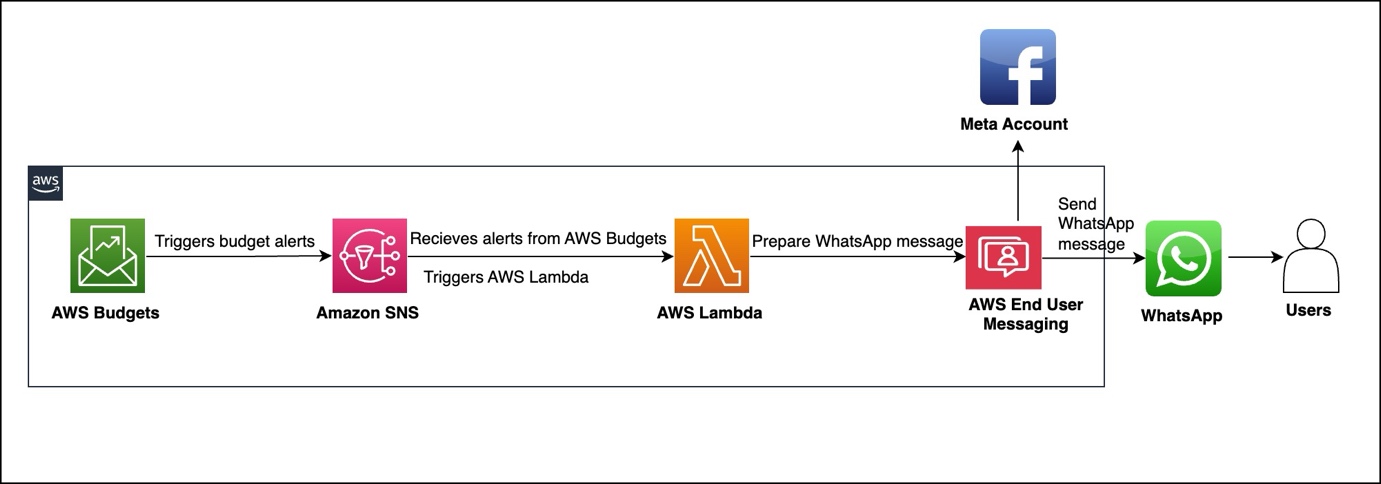
Our solution integrates AWS Budgets with WhatsApp messaging using AWS End User Messaging, AWS Lambda, and Amazon Simple Notification Service (Amazon SNS). When a budget threshold is crossed, the alert is processed and delivered as a formatted WhatsApp message to designated recipients.

The architecture, shown in the following figure, consists of four main AWS services to deliver budget alerts. AWS Budgets tracks expenses against your defined thresholds. When expenses exceed these thresholds, Amazon SNS receives an alert. An AWS Lambda function processes this alert and sends it through AWS End User Messaging to WhatsApp. Users then receive actionable budget notifications directly on their WhatsApp.

Billing and Cost Management data, which AWS Budgets uses to monitor resources, is updated at least once per day. Keep in mind that budget information and associated alerts are updated and sent according to this data refresh cadence. In a budget period,

notifications are triggered every time the notification state goes from OK to Exceeded (when the threshold is exceeded). If the budget stays in Exceeded state in the same budget period, AWS Budgets doesn’t send an additional alert.

Prerequisites

Implementation requires an AWS account with appropriate permissions for AWS CloudFormation, Lambda, Amazon SNS, and AWS Budgets. You must also have a WhatsApp Business Account integrated with AWS End User Messaging Social and the WhatsApp phone number ID from the AWS End User Messaging console. For instructions to locate this information, see View a phone number’s ID in AWS End User Messaging Social.

For more information about how to set up WhatsApp using AWS End User Messaging Social, see Automate workflows with WhatsApp using AWS End User Messaging Social.

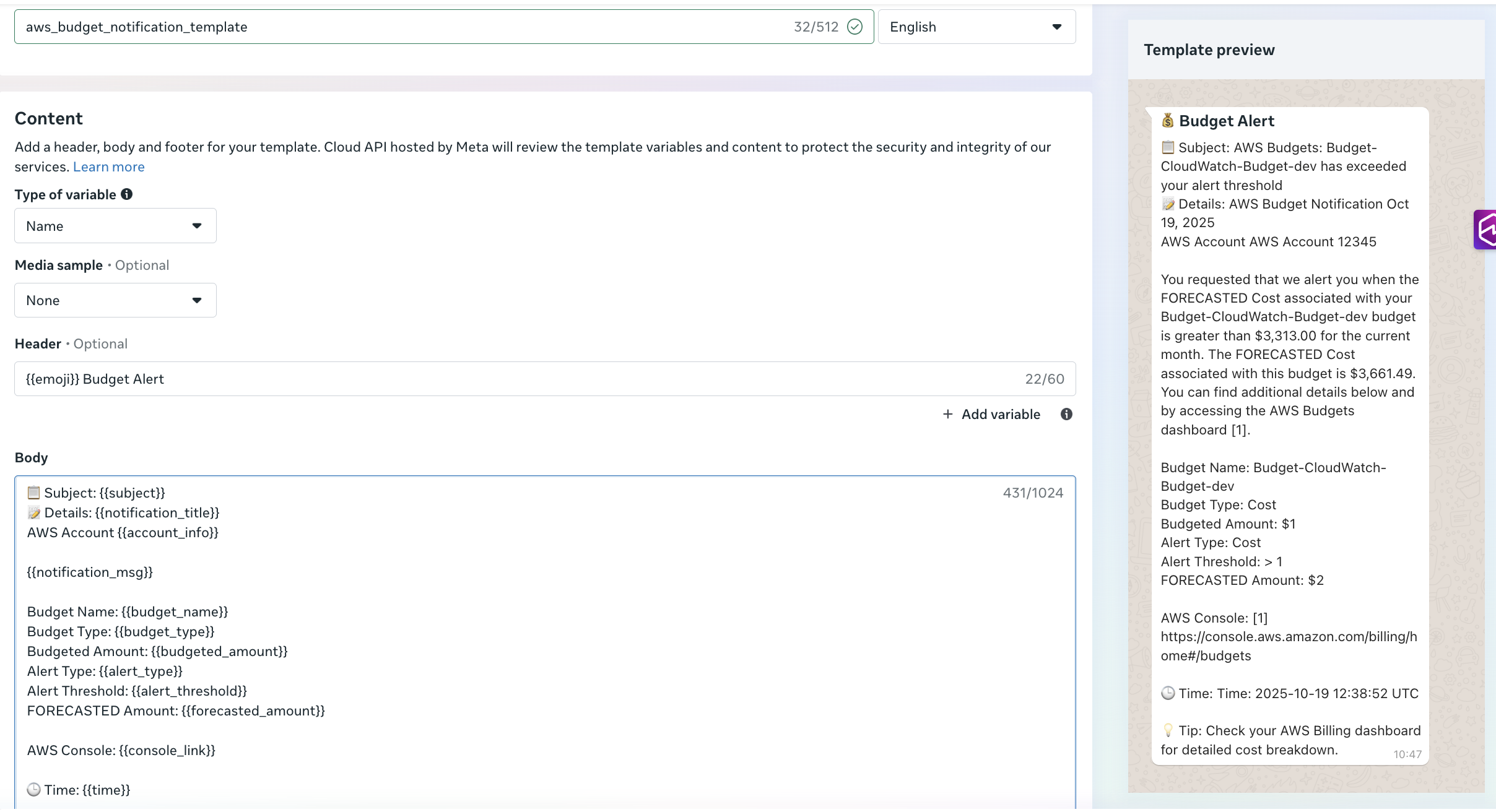
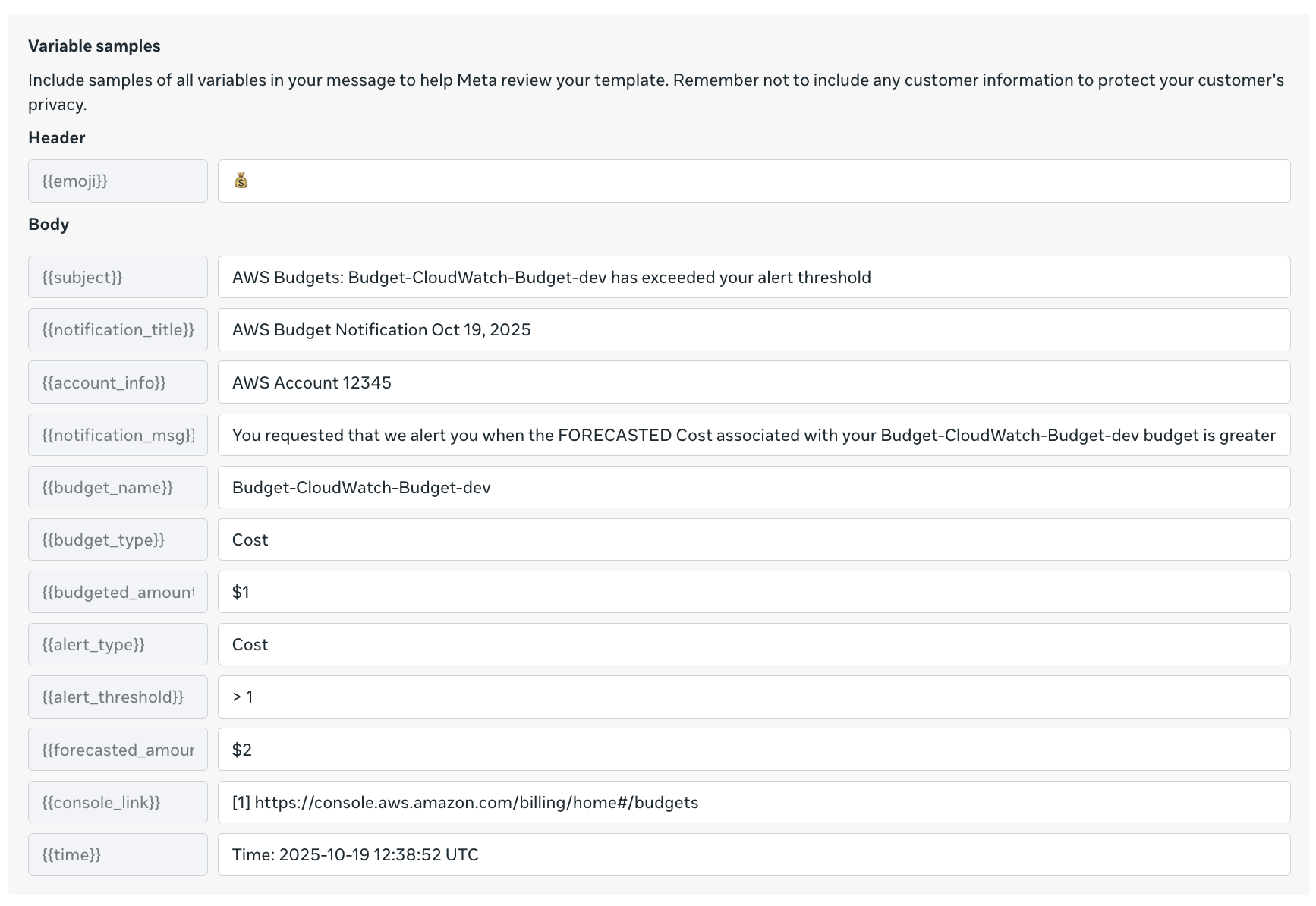
Before you deploy this solution, create an approved utility template in your Meta account named aws_budgets_notification_template(as shown in the following screenshot). Alternatively, use your preferred template name and modify the Lambda function code accordingly.

The preceding figure shows variable samples that can be used while creating a message template. You can also use the following AWS Command Line Interface (AWS CLI) command to create the messaging template-

aws socialmessaging create-whatsapp-message-template \
  --region <region> \
  --id <waba-id> \
  --template-definition "$(echo '{
    "name": "aws_budgets_notification_template",
    "language": "en",
    "category": "UTILITY",
    "parameter_format": "named",
    "components": [
      {
        "type": "HEADER",
        "format": "TEXT",
        "text": "{{emoji}} Budget Alert",
        "example": {
          "header_text_named_params": [
            {"param_name": "emoji", "example": "💰"}
          ]
        }
      },
      {
        "type": "BODY",
        "text": "Subject: {{subject}}\\nDetails: {{notification_title}}\\nAWS Account {{account_info}}\\n\\n{{notification_msg}}\\n\\nBudget Name: {{budget_name}}\\nBudget Type: {{budget_type}}\\nBudgeted Amount: {{budgeted_amount}}\\nAlert Type: {{alert_type}}\\nAlert Threshold: {{alert_threshold}}\\nFORECASTED Amount: {{forecasted_amount}}\\n\\nAWS Console: {{console_link}}\\n\\nTime: {{time}}\\n\\nTip: Check your AWS Billing Dashboard for detailed cost breakdown",
        "example": {
          "body_text_named_params": [
            {"param_name": "subject", "example": "AWS Budgets: Budget-Cloudwatch-budget-dev has exceeded your alert threshold"},
            {"param_name": "notification_title", "example": "AWS Budget Notification Oct 19, 2025"},
            {"param_name": "account_info", "example": "AWS Account 12345"},
            {"param_name": "notification_msg", "example": "You requested that we alert you when the FORECASTED Cost associated with your Budget-Cloudwatch-dev Budget is greater"},
            {"param_name": "budget_name", "example": "Budget-Cloudwatch-budget-dev"},
            {"param_name": "budget_type", "example": "Cost"},
            {"param_name": "budgeted_amount", "example": "$1"},
            {"param_name": "alert_type", "example": "Cost"},
            {"param_name": "alert_threshold", "example": "> 1"},
            {"param_name": "forecasted_amount", "example": "$2"},
            {"param_name": "console_link", "example": "https://console.aws.amazon.com/billing/home#/budgets"},
            {"param_name": "time", "example": "2025-10-19 12:38:52 UTC"}
          ]
        }
      }
    ]
  }' | base64)"

You can confirm the template approval status and type in the Meta portal.

Solution walkthrough

The core component consists of a Python-based Lambda function that processes Budget alerts and formats them for WhatsApp delivery. The function receives SNS events containing budget alerts data, extracts relevant information, formats contextual messages, and delivers notifications through AWS End User Messaging Social.The following function shows an example to parse the SNS message content:

 def process_notification(record):
"""Process SNS notification and send WhatsApp message"""
sns_message = record['Sns']
subject = sns_message.get('Subject', 'AWS Notification')
message_body = sns_message.get('Message', '')

logger.info(f"Processing notification - Subject: {subject}")
process_budget_notification(subject, message_body)

The following example demonstrates how to format alert information—including subject, details, and timestamp—and deliver the message to WhatsApp.

#Create template message with parsed values
template_name = "aws_budgets_notification_template"
template_message = {
    "name": template_name,
    "language": {
        "code": "en"
    },
    "components": [
        {
            "type": "header",
            "parameters": [{
                "type": "text",
                "parameter_name": "emoji",
                "text": "💰"
            }]
        },
        {
            "type": "body",
            "parameters": [
                {
                    "type": "text",
                    "parameter_name": "subject",
                    "text": subject
                },
                {
                    "type": "text",
                    "parameter_name": "notification_title",
                    "text": notification_title
                },
                {
                    "type": "text",
                    "parameter_name": "account_info",
                    "text": f"AWS Account {account_number}"
                },
                {
                    "type": "text",
                    "parameter_name": "notification_msg",
                    "text": notification_msg + "."
                },
                {
                    "type": "text",
                    "parameter_name": "budget_name",
                    "text": budget_details.get('Budget Name', '')
                },
                {
                    "type": "text",
                    "parameter_name": "budget_type",
                    "text": budget_details.get('Budget Type', '')
                },
                {
                    "type": "text",
                    "parameter_name": "budgeted_amount",
                    "text": budget_details.get('Budgeted Amount', '')
                },
                {
                    "type": "text",
                    "parameter_name": "alert_type",
                    "text": budget_details.get('Alert Type', '')
                },
                {
                    "type": "text",
                    "parameter_name": "alert_threshold",
                    "text": budget_details.get('Alert Threshold', '')
                },
                {
                    "type": "text",
                    "parameter_name": "forecasted_amount",
                    "text": budget_details.get('FORECASTED Amount', '')
                },
                {
                    "type": "text",
                    "parameter_name": "console_link",
                    "text": "https://console.aws.amazon.com/billing/home#/budgets"
                },
                {
                    "type": "text",
                    "parameter_name": "time",
                    "text": datetime.now().strftime('%Y-%m-%d %H:%M:%S UTC')
                }
            ]
        }
    ]
}
send_whatsapp_message(template_message)

The send_whatsapp_message function uses AWS End User Messaging Social to deliver formatted messages through the socialmessaging client, as shown in the following example:

def send_whatsapp_message(message):
  client = boto3.client('socialmessaging')
  # Get environment variables
  phone_number_id = os.environ.get('WHATSAPP_PHONE_NUMBER_ID')
  recipient = os.environ.get('ALERT_RECIPIENT')
                    
# Prepare message object
  message_object = {
"messaging_product": "whatsapp",
"recipient_type": "individual",
"to": recipient,
"type": "template",
"template": message
}
  # Send message
response = client.send_whatsapp_message(
originationPhoneNumberId=phone_number_id,
metaApiVersion="v20.0",
message=bytes(json.dumps(message_object), "utf-8")  
)

Deploying the solution

The solution uses AWS CloudFormation for infrastructure as code (IaC) deployment. The main template creates an SNS topic for alert notifications, a Lambda function for message processing, and required AWS Identity and Access Management (IAM) roles with least-privilege permissions.

The CloudFormation template requires a recipient number with an active WhatsApp account to receive alert notifications as messages. The template also requires the WhatsApp phone number ID retrieved from the AWS End User Messaging Social console, as noted in the prerequisites. The template must be deployed in the same AWS Region as AWS End User Messaging Social. See the following code:

aws cloudformation deploy \
  --template-file <> \
  --stack-name budget-eum-whatsapp-alerts \
  --parameter-overrides \
    ActualSpendThreshold= \
    AlertRecipient=<+1234567890> \
    BudgetAmount=<Budget Amount e.g. 3000> \
    Environment= \
    ForecastedSpendThreshold= \
    WhatsAppPhoneNumberId= \
  --capabilities CAPABILITY_NAMED_IAM \
  --region <EUM-region>

Testing the solution

The solution can be tested and validated using the SNS topic created by the CloudFormation stack. Use the following AWS CLI command to publish a test message to the SNS topic:

aws sns publish \
  --topic-arn arn:aws:sns:<region>:<account>:<topic-name> \
  --subject "[Test] AWS Budget Alert: Budget-Alert-EUM has exceeded 80% of your budgeted amount" \
  --message "AWS Budget Notification - Your budget has exceeded the alert threshold
AWS Account 123456789012
Budget Name: Budget-Alert-EUM
Budget Type: Cost
Budgeted Amount: $100.00
Alert Type: ACTUAL
Alert Threshold: 80%
FORECASTED Amount: $85.00
You have exceeded 80% of your budget for this period" \
  --region <region>

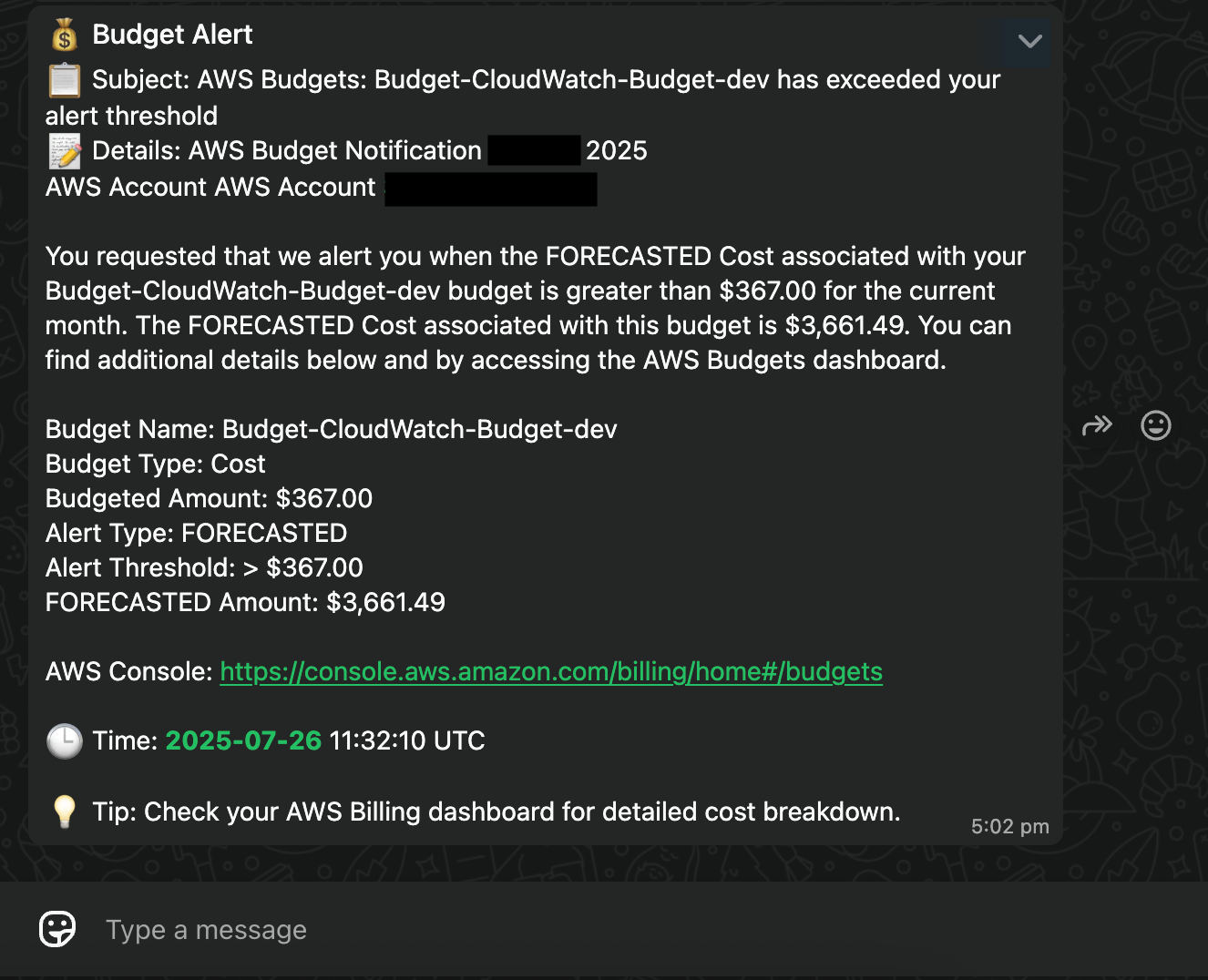
The SNS message triggers the Lambda function, which sends the alert to your configured WhatsApp recipient, as shown in the following screenshot.

Clean up

Use the following steps to clean up your resources when you no longer need this solution:

  1. Delete the CloudFormation stack deployed in this solution: budget-eum-whatsapp-alerts
  2. Delete the template in your Meta account.

Conclusion

Integrating AWS Budgets alerts with WhatsApp notifications represents a significant step forward in modern cost monitoring. By using AWS End User Messaging Social, you can send teams critical alerts through their preferred communication channel while maintaining the reliability and scalability of AWS services. The solution’s modular architecture, basic yet effective security model, and cost-effective design make it suitable for organizations of various sizes.


About the authors

Integrate Amazon CloudWatch alarms with WhatsApp using AWS End User Messaging

Post Syndicated from Ruchikka Chaudhary original https://aws.amazon.com/blogs/messaging-and-targeting/integrate-amazon-cloudwatch-alarms-with-whatsapp-using-aws-end-user-messaging/

Timely and accessible alert notifications are crucial for maintaining operational excellence, but traditional alerting mechanisms often fall short. Email notifications can get buried in crowded inboxes, SMS messages might incur high costs for international teams, and pager systems lack the rich context modern teams need for rapid incident response. WhatsApp, with over 2 billion users worldwide, offers several advantages:

  • Universal accessibility – Available on virtually every smartphone
  • Rich media support – Sends formatted messages, images, and links
  • Global reach – No international SMS fees
  • High engagement – Messages are typically delivered within seconds
  • Familiar interface – Many teams already use WhatsApp for daily communication

This post walks through a solution to build a serverless alerting system that delivers Amazon CloudWatch alarms to WhatsApp using AWS End User Messaging.

Overview of solution

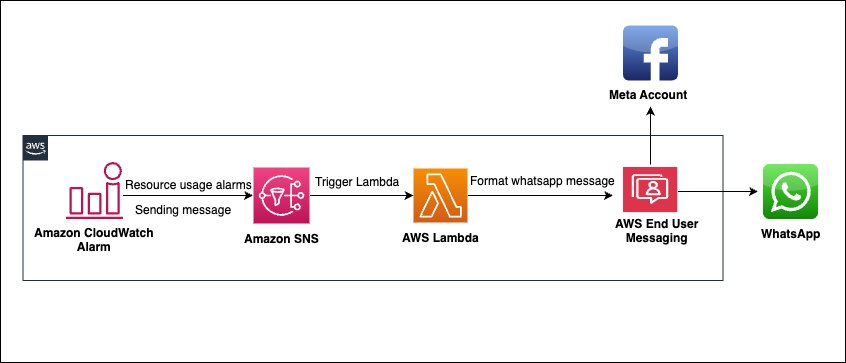
The solution uses AWS End User Messaging Social to create a seamless bridge between CloudWatch alarms and WhatsApp notifications. This serverless architecture provides real-time infrastructure alerts through WhatsApp messaging platform teams already know and use.

The architecture consists of four main AWS services working together. The data flow begins when CloudWatch alarms detect breaches of predefined thresholds and publish notifications to an Amazon Simple Notification Service (Amazon SNS) topic. The SNS topic triggers an AWS Lambda function that processes the alarm data, formats contextual WhatsApp messages, and uses AWS End User Messaging Social to deliver notifications to specified recipients.

The following diagram illustrates the solution architecture.

Prerequisites

Implementation requires an AWS account with appropriate permissions for AWS CloudFormation, Lambda, Amazon SNS, and CloudWatch. You must also have a WhatsApp Business Account integrated with AWS End User Messaging and the WhatsApp phone number ID from the AWS End User Messaging console. (For instructions to locate this information, see View a phone number’s ID in AWS End User Messaging Social).

For more information about how to set up WhatsApp using AWS End User Messaging Social, refer to Automate workflows with WhatsApp using AWS End User Messaging Social.

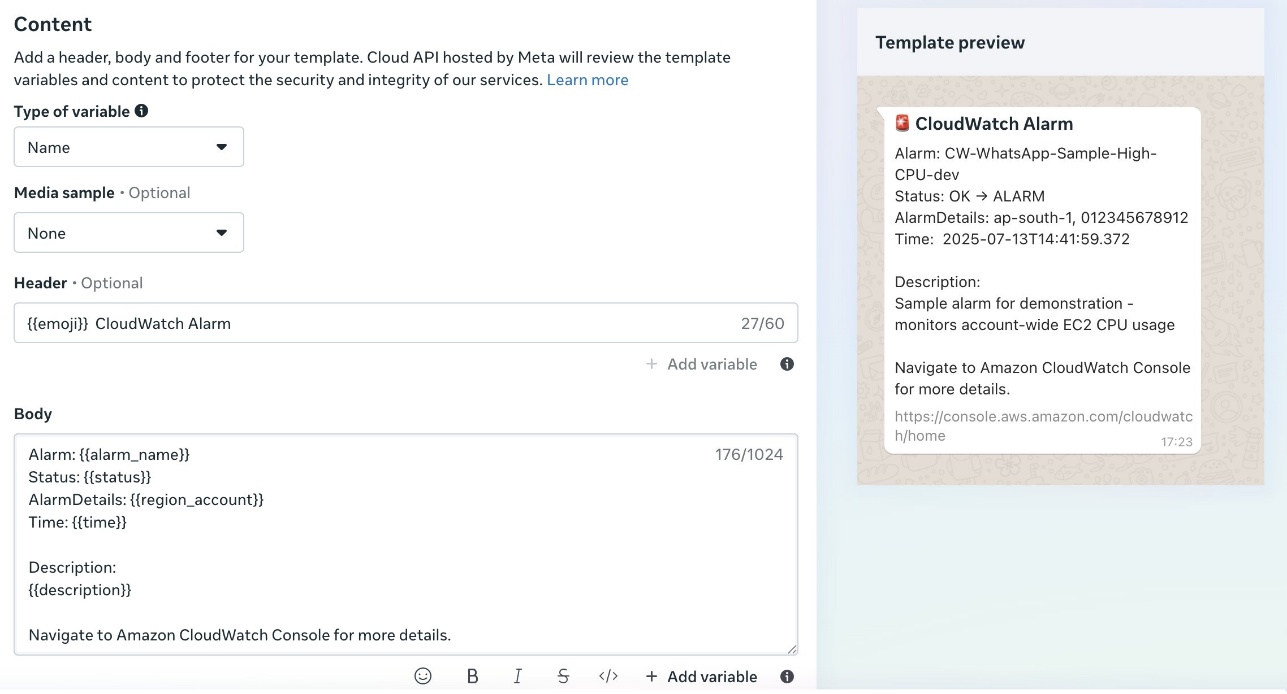
Before you deploy this solution, create an approved template in your Meta account named cw_alarm_notification. Alternatively, use your preferred template name and modify the Lambda function code accordingly (as shown in the following screenshot).

Lambda function code

The solution uses a Python-based Lambda function that processes CloudWatch alarm notifications and formats them for WhatsApp delivery. The function receives SNS events containing CloudWatch alarm data, extracts relevant information, formats contextual messages, and delivers notifications through AWS End User Messaging Social.

The following function code shows an example to parse the SNS message content and extract key alarm information, including alarm name, state value, and reason for state change:

def process_alarm_notification(record):
    # Parse SNS message
    sns_message = json.loads(record['Sns']['Message'])
    
    # Extract alarm details
    alarm_name = sns_message.get('AlarmName', 'Unknown Alarm')
    alarm_description = sns_message.get('AlarmDescription', '')
    new_state = sns_message.get('NewStateValue', 'UNKNOWN')
    old_state = sns_message.get('OldStateValue', 'UNKNOWN')
    reason = sns_message.get('NewStateReason', '')
    timestamp = sns_message.get('StateChangeTime', '')
    region = sns_message.get('Region', '')
    
    # Format WhatsApp message
    message = format_alarm_message(
        alarm_name, alarm_description, new_state, 
        old_state, reason, timestamp, region
    )
    
    # Send WhatsApp message
    send_whatsapp_message(message)
    

The following code shows an example to create a template message for WhatsApp (you can change the template name if required):

              # Build message
              template_name = 'cw_alarm_notification'
              template_message = {
                      "name": template_name,
                      "language": {
                          "code": "en"
                      },
                      "components": [
                          {
                              "type": "header",
                              "parameters": [{
                                  "type": "text",
                                  "parameter_name": "emoji",
                                  "text": state_emoji
                                  }
                              ]
                          },
                          {
                              "type": "body",
                              "parameters": [
                                  {
                                      "type": "text",
                                      "parameter_name": "alarm_name",
                                      "text": alarm_name
                                  },
                                  {
                                      "type": "text",
                                      "parameter_name": "status",
                                      "text": old_state + " → " + new_state
                                  },
                                  {
                                      "type": "text",
                                      "parameter_name": "region_account",
                                      "text": region + " - " + account_id
                                  },
                                  {
                                      "type": "text",
                                      "parameter_name": "time",
                                      "text": formatted_time
                                  },
                                  {
                                      "type": "text",
                                      "parameter_name": "description",
                                      "text": alarm_description + reason
                                  }
                              ]
                          }

                      ]
                  }
              
              return template_message

The send_whatsapp_message function uses AWS End User Messaging Social to deliver formatted messages through the socialmessaging client:

def send_whatsapp_message(message):
    """Send message via AWS End User Messaging"""
    client = boto3.client('socialmessaging')
    
    response = client.send_whats_app_message(
        originationPhoneNumberId=os.environ['WHATSAPP_PHONE_NUMBER_ID'],
        destinationPhoneNumber=os.environ['ALERT_RECIPIENT'],
        messageBody={'text': message}
    )

Deploy the solution

The solution uses AWS CloudFormation for infrastructure as code (IaC) deployment. The main template creates an SNS topic for alarm notifications, a Lambda function for message processing, and required AWS Identity and Access Management (IAM) roles with least-privilege permissions.

The CloudFormation template requires a recipient number with an active WhatsApp account to receive alarm notifications as messages. The template also requires the WhatsApp phone number ID retrieved from the AWS End User Messaging Social console, as noted in the prerequisites. The template must be deployed in the same AWS Region as AWS End User Messaging Social. See the following code:

aws cloudformation deploy \
  --template-file <cloudwatch-eum-whatsapp-alerts.yaml> \
  --stack-name cloudwatch-eum-whatsapp-alerts \
  --parameter-overrides \
    WhatsAppPhoneNumberId=<your-phone-number-id-from-eum> \
    AlertRecipient=<+1234567890> \
    Environment=dev \
  --capabilities CAPABILITY_IAM \
  --region <EUM-region>

The preceding template deploys an alarm called SampleHighCPUAlarm that triggers an SNS topic. The SNS topic triggers the WhatsApp alarm notifier Lambda function, which processes and sends the message using AWS End User Messaging Social.

Test the solution

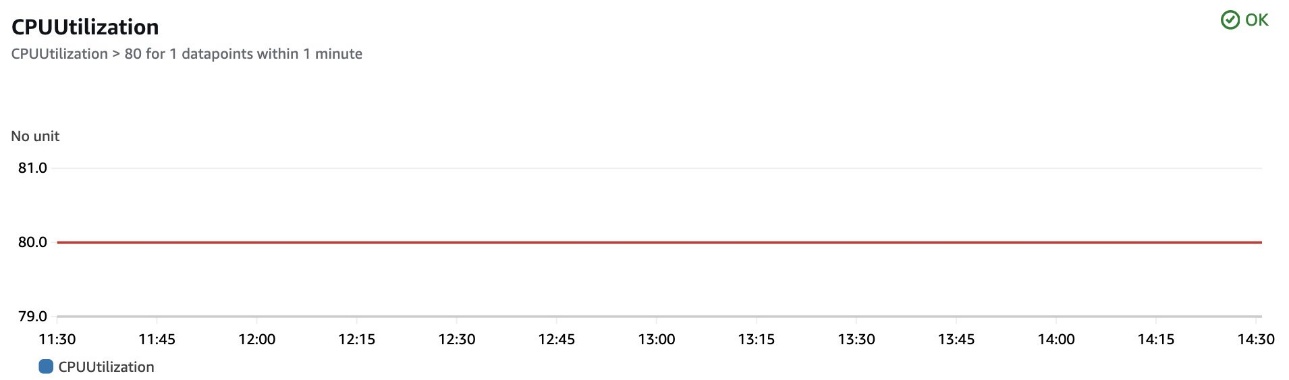
You can test the solution using the sample alarm created by the CloudFormation stack. The following screenshot shows an example alarm configuration and its CloudWatch metrics, currently in the OK state.

You can use the following code to trigger the alarm by updating this metric:

 aws cloudwatch put-metric-data --namespace "Custom/EC2" --metric-data MetricName=CPUUtilization,Value=85,Unit=Percent

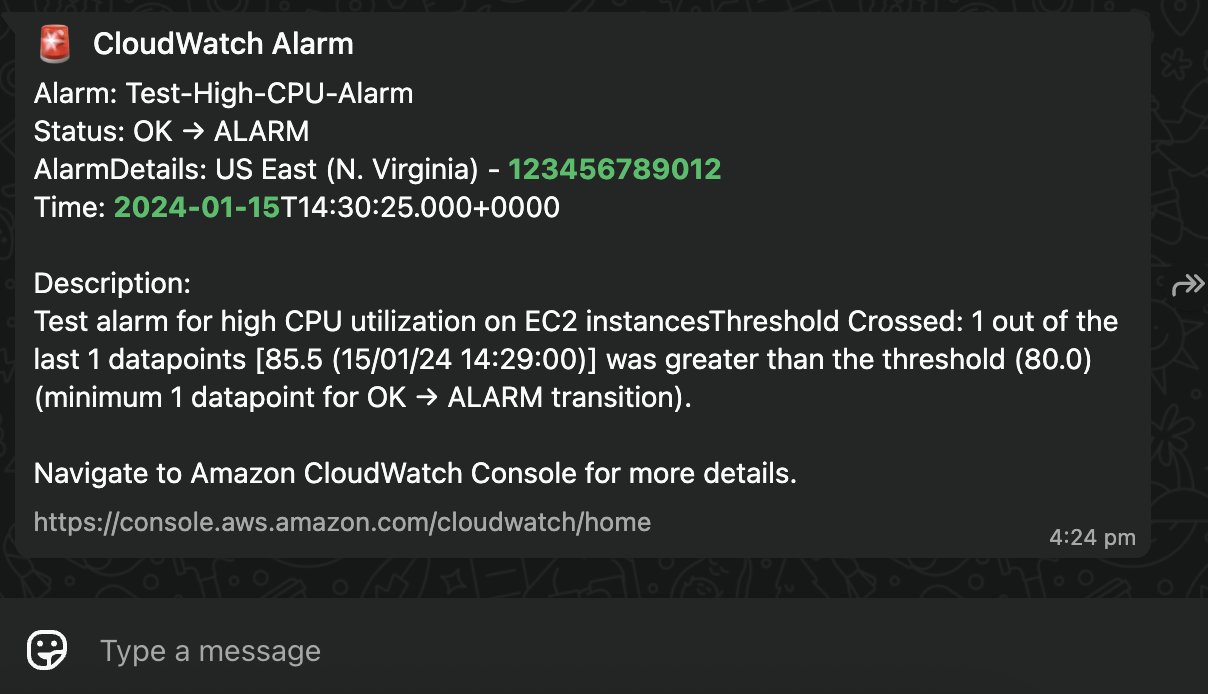
As the alarm switches from OK to ALARM state, a WhatsApp Message is delivered.

Conclusion

Integrating CloudWatch with WhatsApp notifications represents a significant step forward in modern infrastructure monitoring. By using AWS End User Messaging, teams can receive critical alerts through their preferred communication channel while maintaining the reliability and scalability of AWS services.

The solution’s modular architecture, simple yet effective security model, and cost-effective design make it suitable for organizations of various sizes.


About the author