Tag Archives: AWS End User Messaging

How to register for a US toll-free number with AWS End User Messaging

Post Syndicated from Tyler Holmes original https://aws.amazon.com/blogs/messaging-and-targeting/how-to-register-for-a-us-toll-free-number-with-aws-end-user-messaging/

As businesses increasingly use SMS messaging to engage with customers at scale, having the right origination identity is crucial. Toll-free numbers (TFNs) are the quickest way to begin sending to the United States and offer a trusted, high-visibility option that can drive greater response and brand recognition. This post is for every company that wants to send to the US or internationally.

Obtaining and properly registering a US toll-free number requires a registration process and adhering to requirements set forth by mobile carriers. This comprehensive guide walks you through the step-by-step procedure for registering a US toll-free number through AWS End User Messaging, which provides robust SMS capabilities to AWS customers.

The benefits of using a US toll-free number

TFNs offer several key advantages over other SMS origination types in the US market:

Toll-free facts

  • The opt-out flow for US TFNs is managed at a network level and enforced by US Carriers. If a user sends the word stopor any of the other supported keywords—to the TFN, the carrier sends the following outbound message to the user: NETWORK MSG: You replied with the word "stop" which blocks all texts sent from this number.
    Text back unstop or start to receive messages again. This behavior cannot be changed.
  • Toll-free numbers have a throughput of three Message Parts per Second (MPS).
  • International toll-free numbers are two-way capable in the US and Canada but are one-way only in all other supported countries. Depending on the country being sent to, if not the US or Canada, your end-user can receive your message from an originator other than your TFN. This feature can be turned on before or after registration.

The TFN registration process

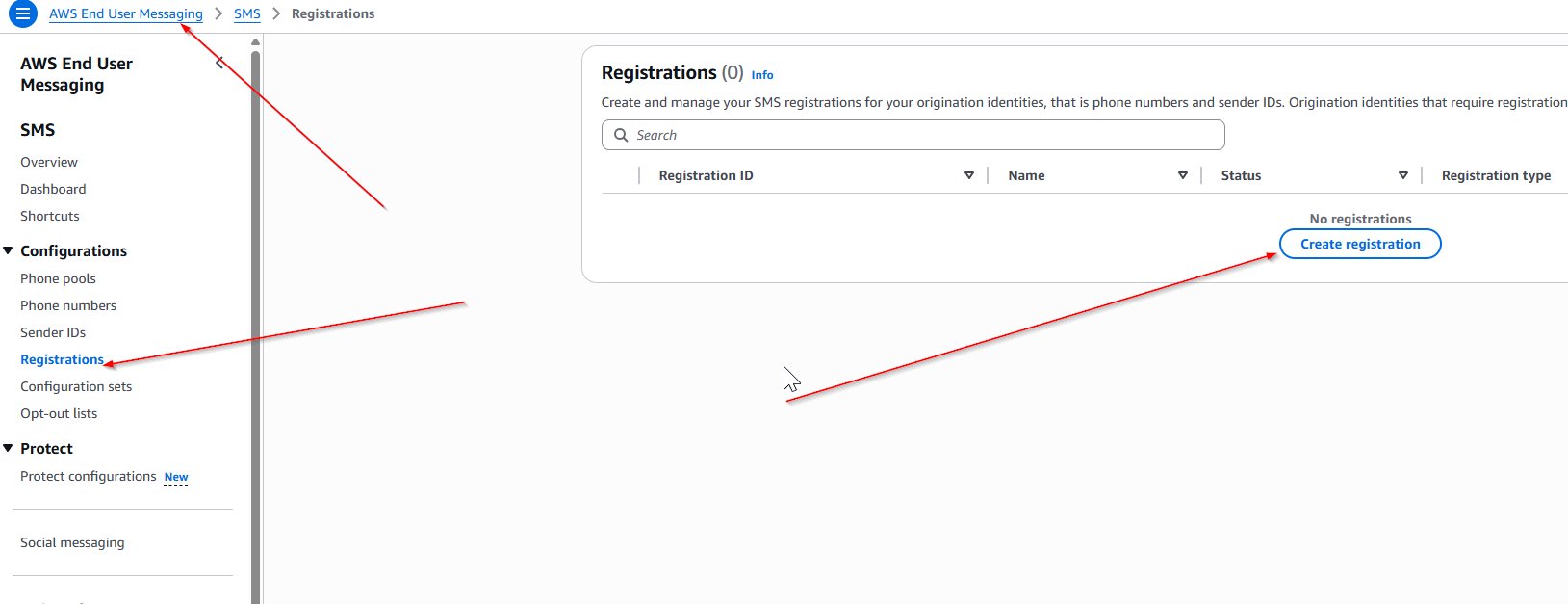
To get started, you need to create a US toll-free number registration in the AWS Management Console for AWS End User Messaging or use the API.

  1. Company information: Provide details about your business, including the company name, website, and headquarters address.
  2. Contact information: Enter the name, email, and phone number of the individual who will serve as the main point of contact for your TFN program. This email address should match the domain of the company being registered and cannot be a distribution list, contact group, or mailing list. This information will be used for verification or in the event of something needing to be communicated to you about your TFN. It will not be public knowledge.
  3. Messaging use case: Describe how you intend to use the TFN, including your estimated monthly SMS volume, and select the Use Case Category (such as two-factor authentication, notifications, or marketing).
  4. Use case details: It’s critical that the Use Case Details field and all message templates are consistent with the Use Case Category you selected in the previous step.

For example, if you select two-factor authentication or one-time passwords, your Use Case Details should explain how you plan to use your TFN for that use case, who you will interact with, and why. Answers must be written in English, and it is very important to be clear and concise in this section. Humans are reviewing these, so make sure that everything you write can be understood without prior knowledge of your company or your use case.

  1. Opt-in Workflow Description: This has several boiler-plate components that must be present at the point of opt-in and are discussed in depth in this blog post. If you have a verbal opt-in, you can include the script in this field. If you have a publicly available form, you can supply the URL in the description. Regardless of the format, you must include the following elements at the point of opt in:
    1. Program (brand) name.
    2. Explicitly state the purpose of the SMS program that your end-users are opting into.
    3. Have no prefilled checkboxes, radio buttons, or other fields.
    4. Message frequency disclosure. For example: Message frequency varies or One message per login.
    5. Customer care contact information. For example, Text HELP or call 1-800-111-2222 for support.
    6. Opt-out information. For example: Text STOP to opt-out of future messages.
    7. Include Message and data rates may apply disclosure.
    8. Link to a publicly accessible terms and conditions page.
        • Note: See this post on opt-in processes for terms that must be included.
        • If you are unable to include a public link to your terms, you can include them in the Opt-in workflow image field or alternatively attach them to the registration form or another method like an Amazon S3 presigned URL. Make sure to keep it separate from the actual opt-in screenshots.
    9. Link to a publicly accessible privacy policy page.
        • Note: Carriers are primarily concerned with data sharing of opt-in information to third parties. It’s recommended to have a specific SMS section that addresses that no data gathered during opt-in is shared. See this post on opt-in processes for more details on creating a compliant privacy policy.
        • If you’re unable to include a public link, you can include the full terms in the Opt-in workflow image field or alternatively attach them to the registration form or another method like an Amazon S3 presigned URL. Make sure to keep it separate from the actual opt-in screenshots.
  2. Opt-in workflow image: Upload an image showing how users consent to receiving messages.
    • The maximum file size is 500 KB, and valid file extensions are PDF, JPEG, and PNG.
    • This could be a screenshot of a non-public form, a written consent form, or other evidence of a compliant explicit opt-in that includes all the elements detailed previously.
    • Make sure that the screenshot is clear and readable; degraded image quality will likely be rejected regardless of compliance.
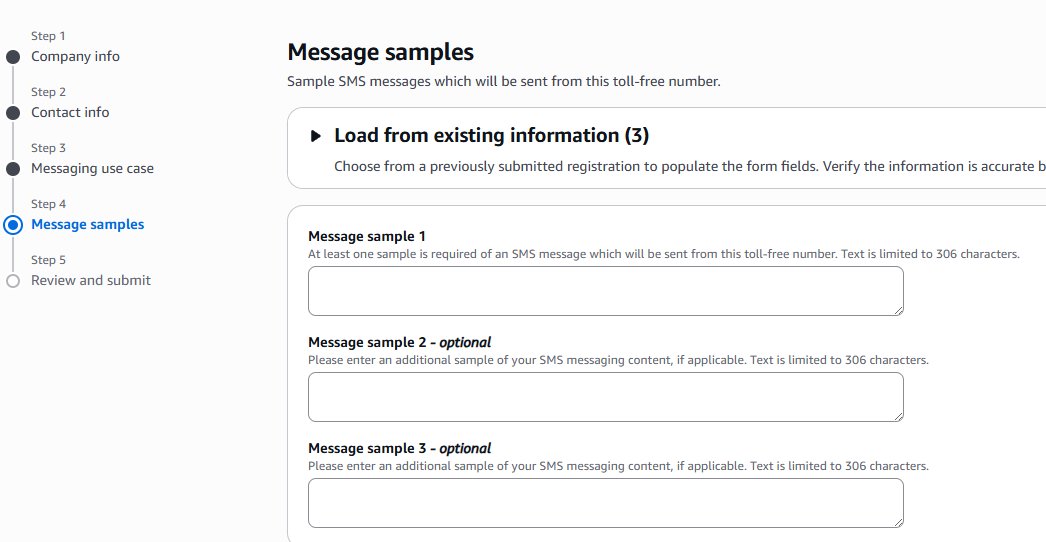
  3. Message samples: Each sample message should reflect actual messages to be sent, should match the Use Case Category you indicated previously, and should follow these best practices:

    • Indicate any variable fields with brackets and make sure to be clear what information can be replaced.
    • Example: Hi, [FirstName] this is AnyCompany letting you know that your delivery is ready.
    • Each sample message must be at least 20 characters. If you plan to use multiple message templates, include them too.
    • Ensure that all messages include your brand name and that it’s consistent with the previously entered information.
    • Make sure your messaging doesn’t involve prohibited content such as cannabis, hate speech, and so on; and that your use case is compliant with AWS Messaging Policy.
  4. Review and submit: Verify that all information is accurate before submitting your registration for approval. There are no exceptions to an explicit opt-in—this includes one-time password use cases, so make sure that your registration includes all the required elements.

The TFN provisioning process

After your TFN registration is submitted it will be reviewed by the same third-party as all other SMS vendors across the globe, not by AWS. You can find current registration time estimates in the number registration process. While waiting, you can monitor your registration status for rejection or acceptance. This AWS blog post has an example of using AWS Lambda to monitor status changes.

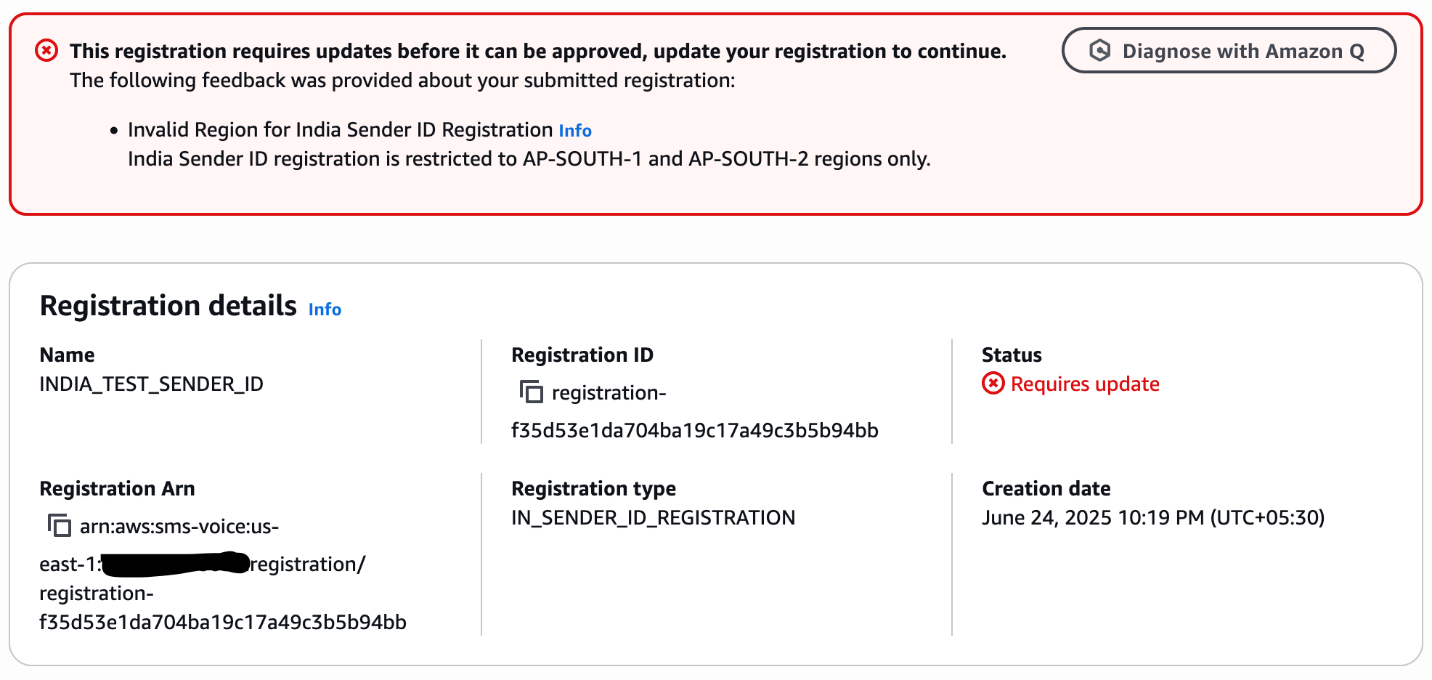
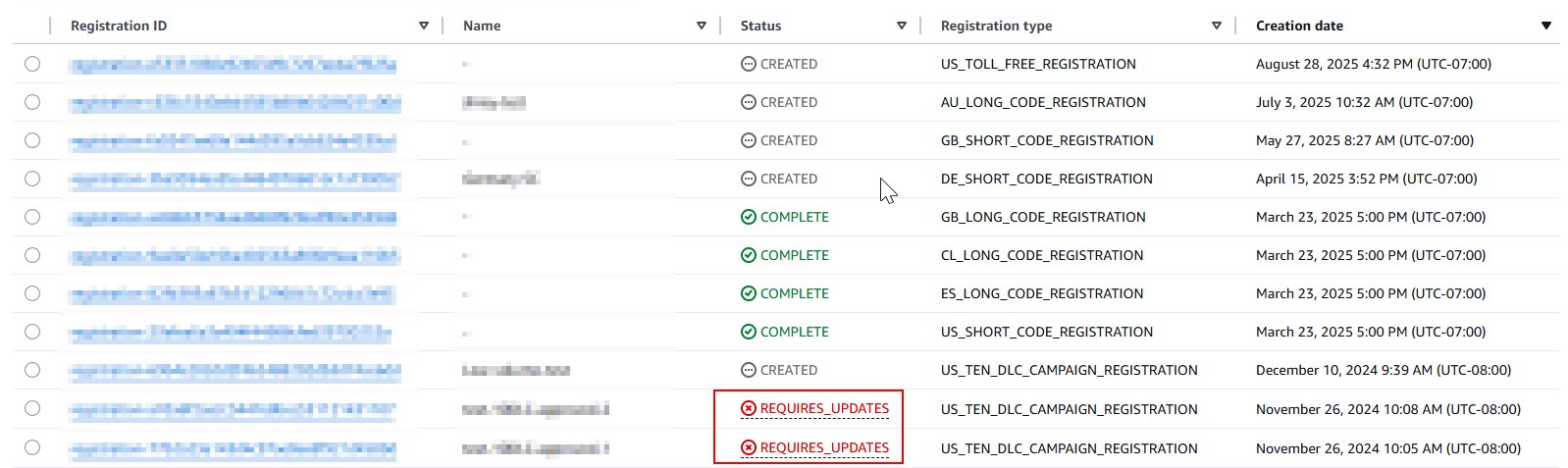
If your registration is rejected, the status will change to REQUIRES_UPDATES and should have at least one rejection reason that needs to be reviewed and updated before resubmitting. Follow these instructions to update a rejected registration.

Sending SMS messages and monitoring delivery receipts

After your TFN is activated, you can begin sending SMS messages through AWS End User Messaging. It’s important to monitor your program closely and maintain compliance, because carriers might filter or block your messages if there are issues with your program. This blog post reviews best practices for how to monitor deliverability of SMS messages.

Conclusion

Make sure to follow each step carefully and answer each question completely. There are humans reviewing these so it’s important that your answers are succinct and clear.

As an AWS customer, you have access to powerful messaging capabilities through AWS End User Messaging. By following the steps outlined in this guide, you can quickly register for a US toll-free number to start your SMS outreach. Maintaining compliance is key, and with a TFN in place, you’ll be well on your way to delivering highly effective, compliant SMS messaging that drives real business impact. If you have other questions about AWS End User Messaging, see the comprehensive API specs, the User Guide, or reach out to AWS Support.


About the authors
A Guide to Sending International SMS with US Toll-Free Numbers and AWS End User Messaging

Post Syndicated from Brett Ezell original https://aws.amazon.com/blogs/messaging-and-targeting/a-guide-to-sending-international-sms-with-us-toll-free-numbers-and-aws-end-user-messaging/

AWS End User Messaging now supports international SMS capabilities for US Toll-Free Numbers (TFNs). This new feature allows businesses to use a single US TFN to send SMS messages to over 150 countries, simplifying global outreach. It primarily benefits customers who need to send one-way transactional alerts—like one-time passwords (OTPs) or shipping notifications—and businesses that want to rapidly prototype and test their messaging strategy in new international markets without the overhead of procuring country-specific numbers.

This guide will walk you through the pros and cons of this feature and show you how to enable it and when to use it versus traditional, country-specific sending methods.

What Are International US Toll-Free Numbers?

An International US Toll-Free Number is a standard US TFN that has been enabled with the capability to send SMS messages to destinations outside of the United States. This feature is backward compatible, meaning you can enable it on any new or existing US TFNs in your account.

How to Enable International Sending

There are three primary ways to enable this feature for your US Toll-Free Numbers:

  • Enable international sending when registering a new number in the console.
  • Enable international sending for an existing number in the console.
  • Enable international sending for an existing number via the AWS CLI.

1. Enable When Registering a New US Toll-Free Number (Console)

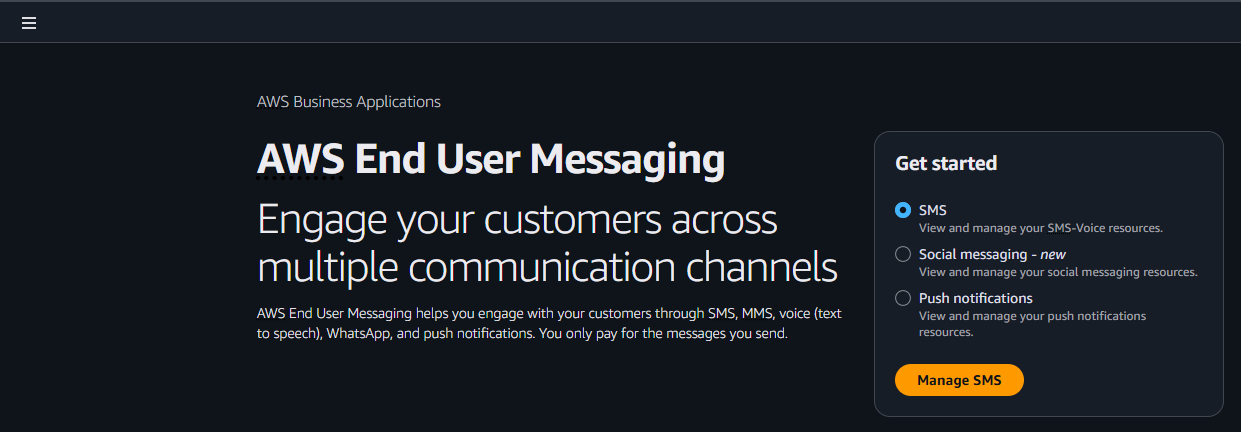
  • From the AWS End User Messaging console, navigate to Manage SMS
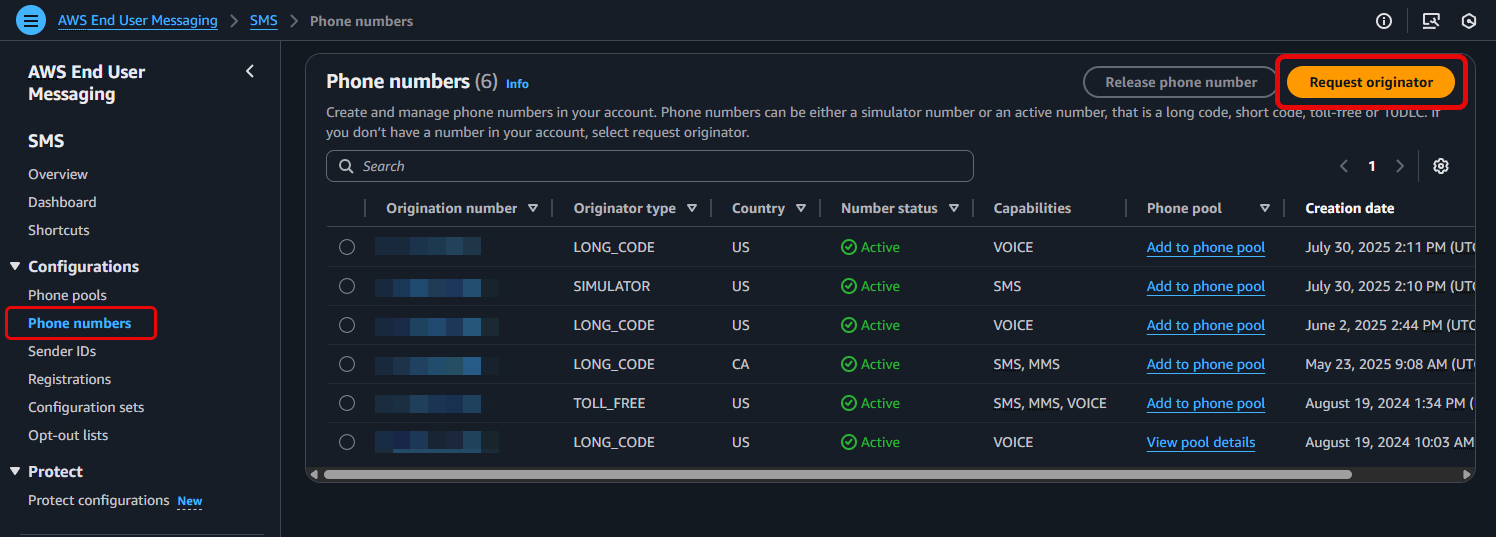
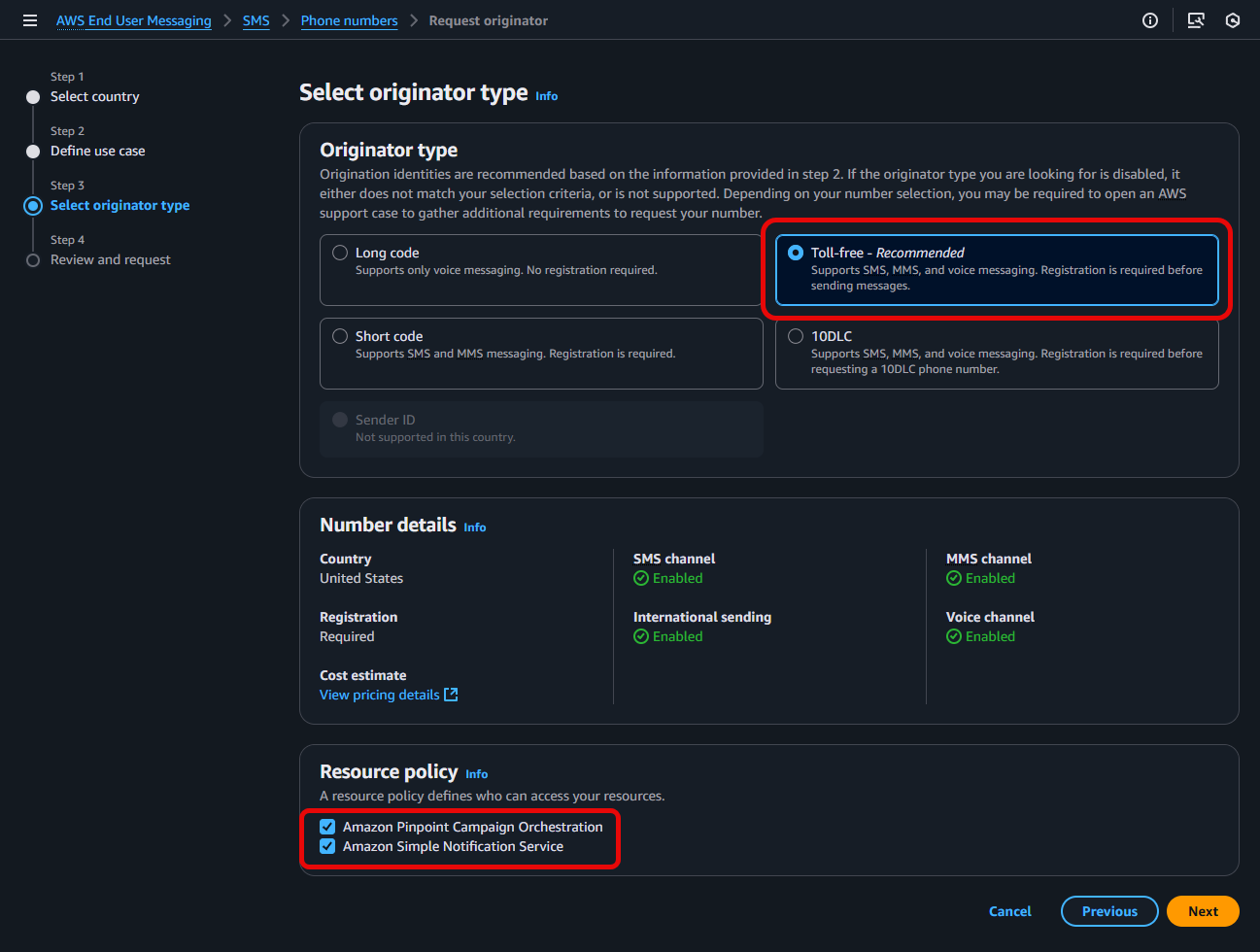
  • From the AWS End User Messaging console, navigate to Configurations > Phone numbers > and select Request originator
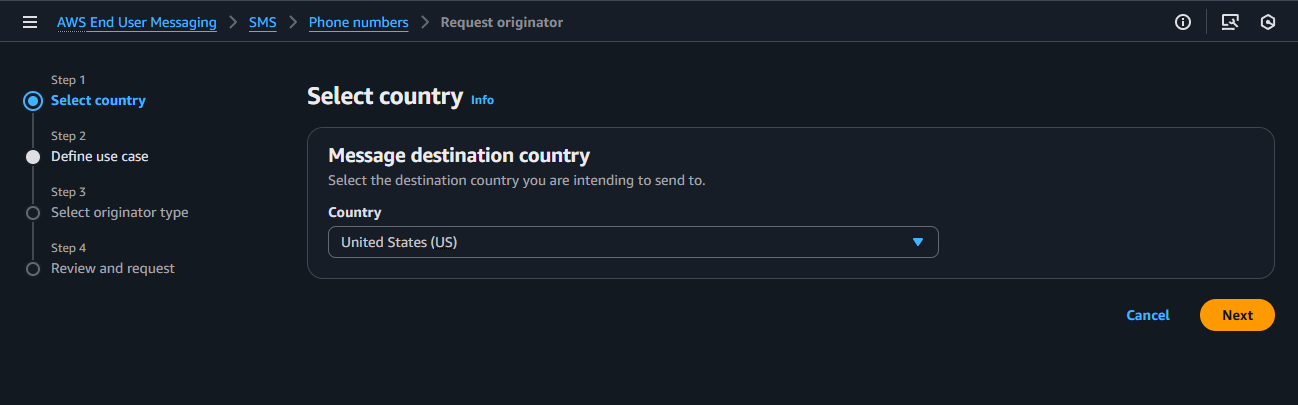
  • Step 1: Select country, select the United States (US) as your destination country
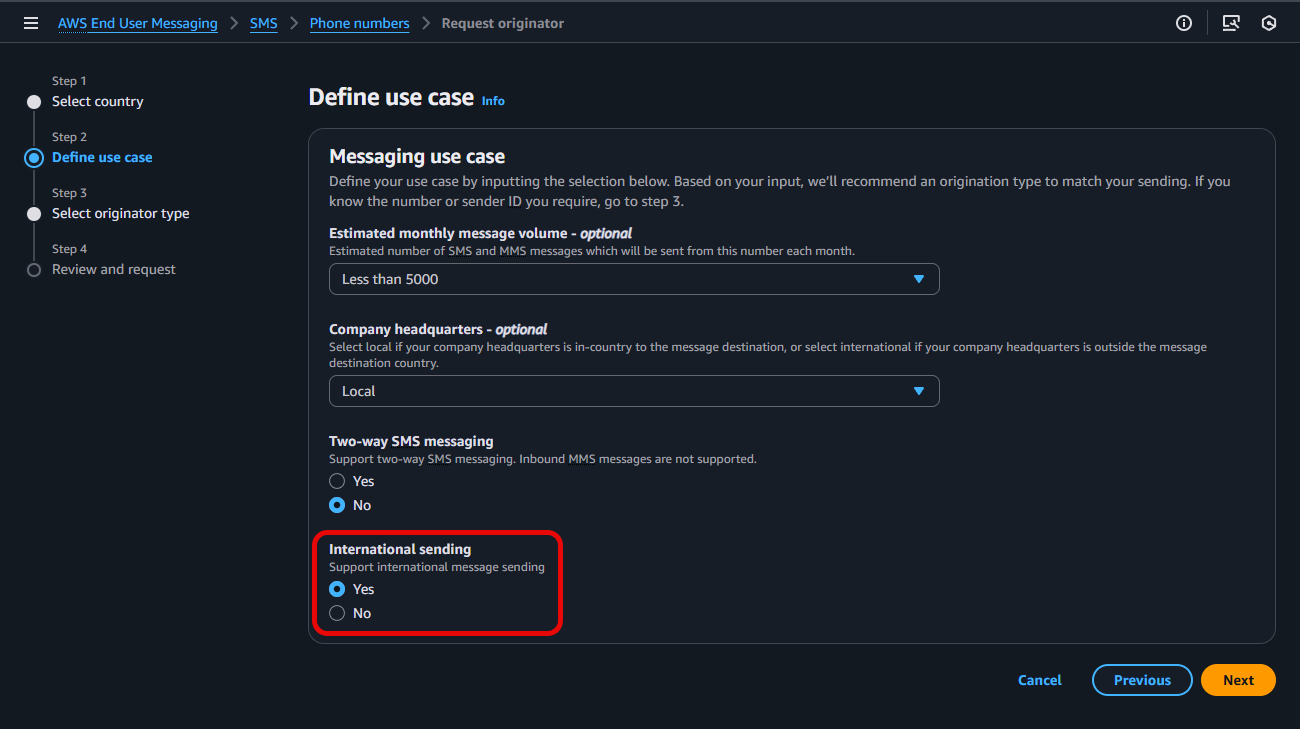
  • Under Step 2: Define use case, configure the various options listed for your intended Messaging use case, and select Yes to enable International sending, prior to clicking Next
  • For Step 3: Select originator type, select Toll-free, validate your Resource policy choices, select Next
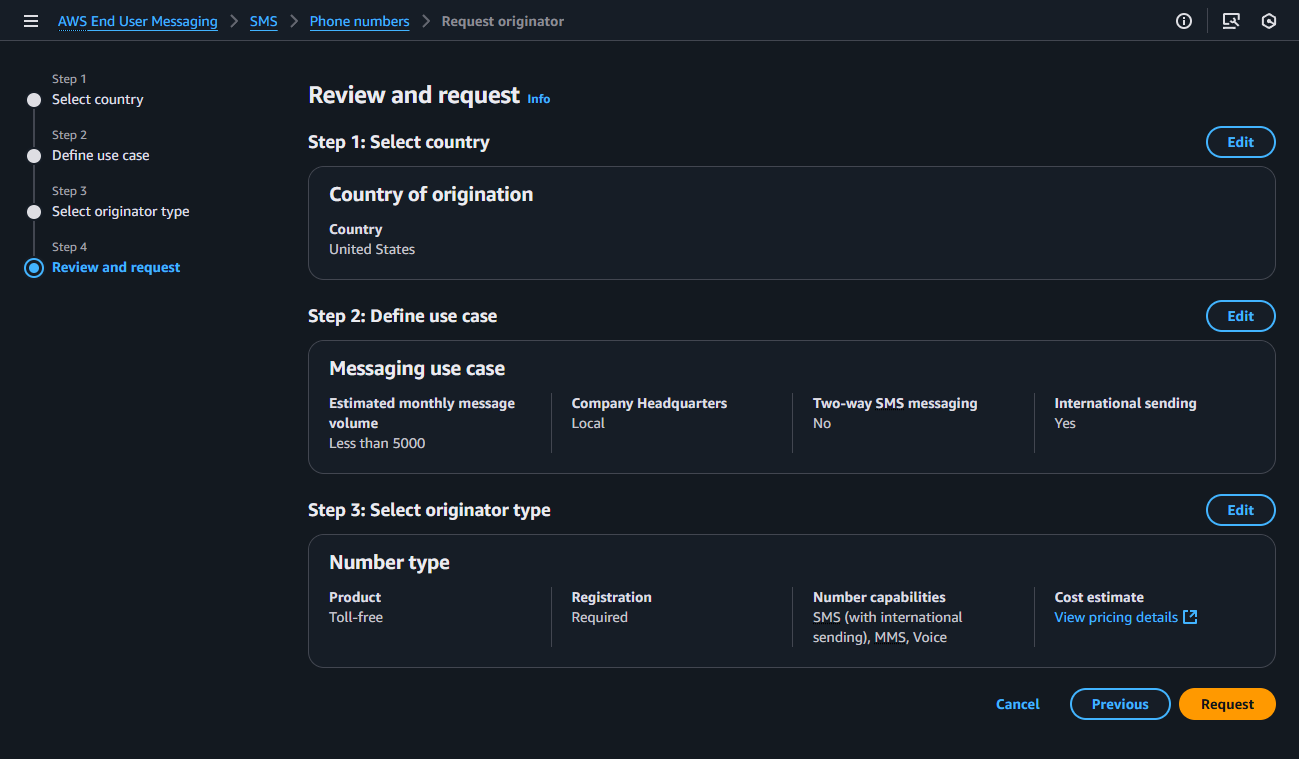
  • In Step 4: Review and request: Verify the information you entered is correct and select Request. Please note: US Toll-Free Number registration requests can take approximately 15 business days to be approved.

For more information, see Request a phone number in AWS End User Messaging SMS

2. Enable for an Existing US Toll-Free Number (Console or CLI)

If you have already acquired a TFN, you can enable the international sending feature at any time.

Using the AWS Management Console:

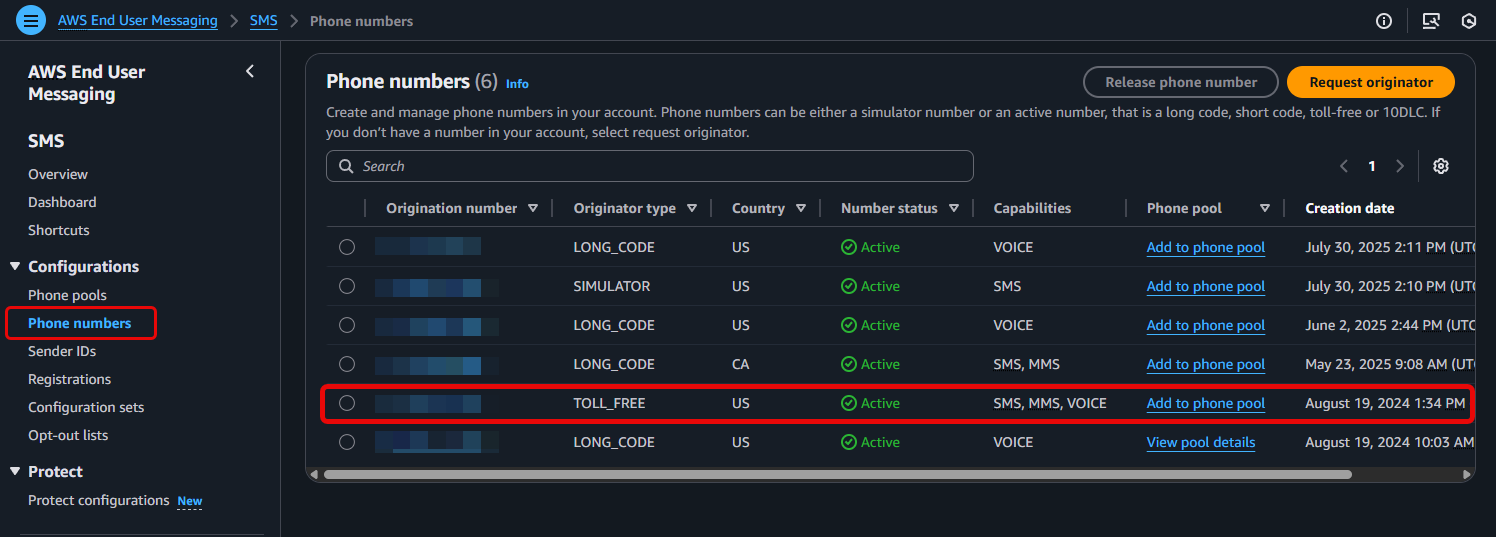
  • Navigate to Configurations > Phone numbers > and select an existing Toll-free number
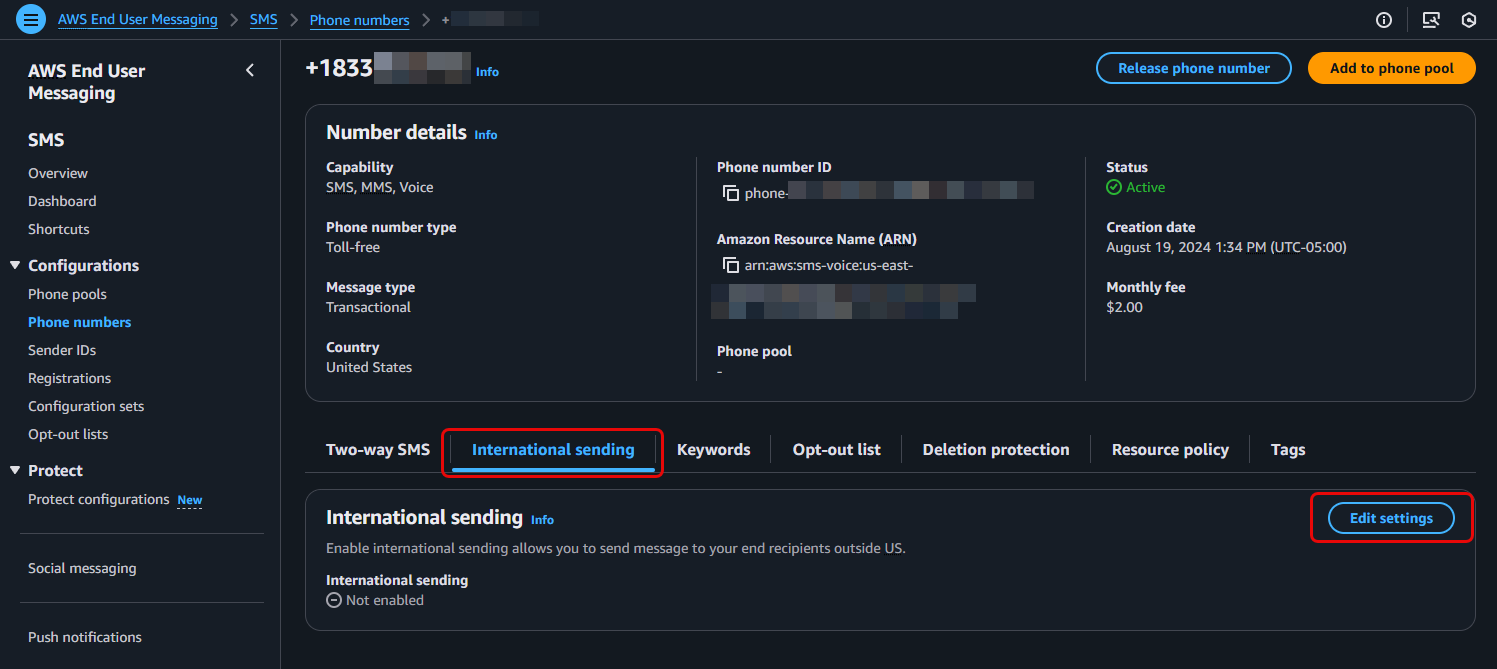
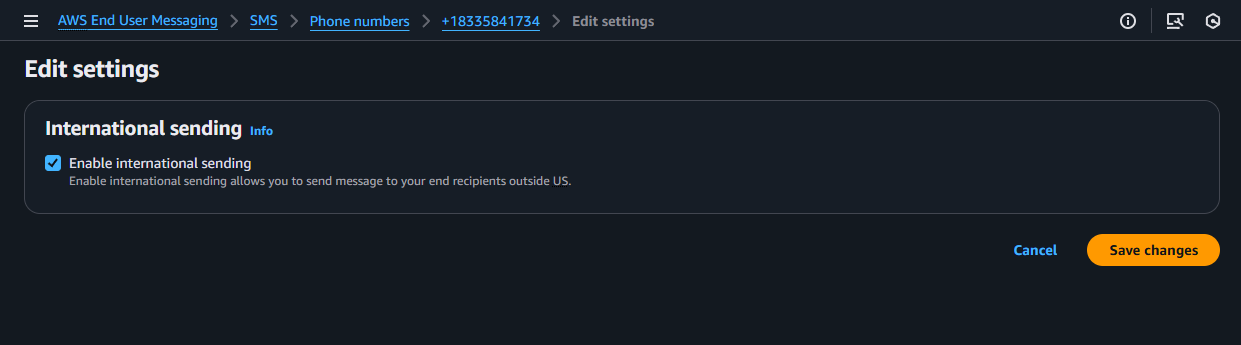
  • Locate the International sending tab and choose Edit settings
  • Check the Enable international sending capability box in your phone number details
    • Save Changes

Using the AWS CLI

The update-phone-number command allows you to modify a phone number’s capabilities, while the describe-phone-numbers command allows you to verify its status.

1. To Enable International Sending:

Use the --international-sending-enabled flag

aws pinpoint-sms-voice-v2 update-phone-number \
    --phone-number-id "phone-a1b2c3d4e5f67890" \
    --international-sending-enabled \
    --region us-east-1

Note: Replace "phone-a1b2c3d4e5f67890" with your actual phone number’s ID

2. To Disable International Sending:

Use the --no-international-sending-enabled flag

aws pinpoint-sms-voice-v2 update-phone-number \
    --phone-number-id "phone-a1b2c3d4e5f67890" \
    --no-international-sending-enabled \
    --region us-east-1

Expected Response (for update-phone-number):

A successful command returns the full JSON object for the phone number. Confirm the change by checking that the InternationalSendingEnabled value is true

{
    "PhoneNumberArn": "arn:aws:sms-voice:us-east-1:111122223333:phone-number/phone-a1b2c3d4e5f67890",
    "PhoneNumberId": "phone-a1b2c3d4e5f67890",
    "PhoneNumber": "+18005550199",
    "Status": "ACTIVE",
    "IsoCountryCode": "US",
    "MessageType": "TRANSACTIONAL",
    "NumberCapabilities": [
        "SMS"
    ],
    "NumberType": "TOLL_FREE",
    "MonthlyLeasingPrice": "2.00",
    "TwoWayEnabled": true,
    "InternationalSendingEnabled": true,
    "CreatedTimestamp": "2025-08-15T10:30:00.123Z"
}

3. To Verify the Current Status:

Use the describe-phone-numbers command with your Phone Number ID to check its current configuration at any time.

aws pinpoint-sms-voice-v2 describe-phone-numbers \
    --phone-number-ids "phone-a1b2c3d4e5f67890" \
    --region us-east-1

Benefits and Limitations

This feature offers a powerful new way to reach a global audience, but it’s important to understand where it shines and what its limitations are.

Benefits (Advantages)

  • Global Reach with a Single Number: Send SMS to over 150 countries using a single, existing US TFN.
  • Simplified Management: Avoid the operational overhead and cost of purchasing and managing a fleet of country-specific phone numbers.
  • Rapid Prototyping and Testing: Quickly test messaging campaigns in new international markets before committing to the best practice approach of acquiring dedicated in-country numbers.
  • Cost Optimization for One-Way Alerts: Provides a cost-effective method for sending high-volume, one-way transactional messages like OTPs, appointment reminders, and shipping notifications globally.

Limitations & Technical Considerations

  • Two-Way SMS is Limited to the US and Canada: Reliable, two-way SMS conversations are only supported for recipients in the United States and Canada.
  • One-Way Only for All Other Countries: For all other destinations, this is a one-way only.
  • Best-Effort Deliverability: Sending outside of the US and Canada is on a “best-effort” basis. The phone number that appears on the recipient’s device may be replaced with a local number or Sender ID, which is why two-way messaging will not work for these destinations. For more details on maximizing delivery, please read A Guide to Optimizing SMS Delivery and Best Practices.
  • Managed Opt-Out is Not Guaranteed Internationally: The automatic STOP reply functionality does not work for destinations outside of the US and Canada. For international recipients, you must provide an alternative opt-out method.
  • Standard Throughput (3 MPS): International TFNs have a default throughput of 3 Message Parts Per Second (MPS). For high-volume, high-throughput campaigns, dedicated country-specific numbers (like short codes) are the recommended best practice.

Understanding the Cost

The pricing for this feature is straightforward:

  • No Additional Monthly Fees: There is no extra charge to enable the international sending capability on your US TFN. You only pay the standard monthly lease for the number itself.
  • Pay-Per-Use Messaging: You are billed for each outbound SMS message at the standard, per-message rate for the destination country.

For a complete and up-to-date list of prices by country, please visit the AWS End User Messaging Pricing page.

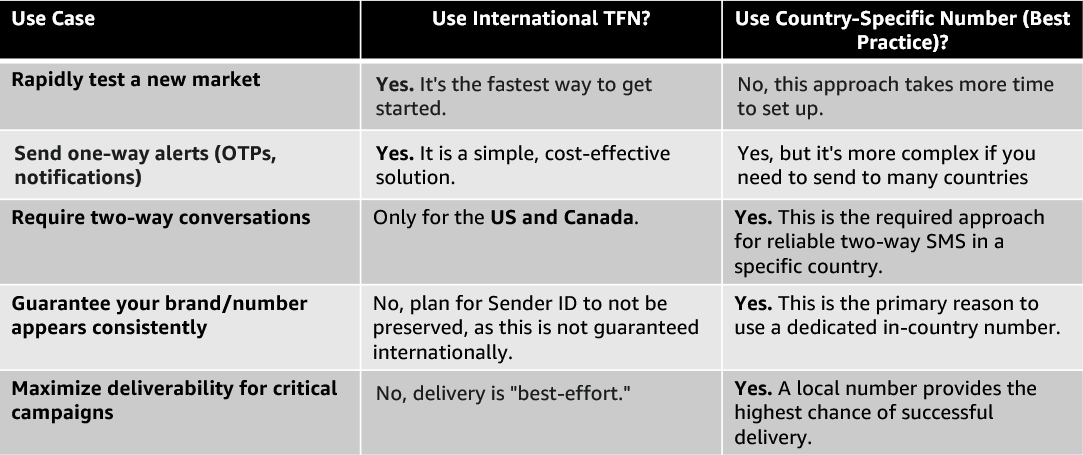
When to Use This vs. Country-Specific Numbers

Choosing the right tool depends on your use case. Here’s a simple comparison:

Considerations and Next Steps

Once you have enabled your international sending over US Toll-Free Numbers, you can enhance your messaging strategy by considering resilience, monitoring, and scalability. The following resources provide best practices for enhancing your sending.

Conclusion

International SMS for US Toll-Free Numbers is a powerful strategic tool for businesses looking to simplify their global messaging. It excels at enabling rapid testing in new markets and efficiently delivering one-way transactional alerts across the globe from a single number.

However, it is not a replacement for the best practice of using dedicated, in-country phone numbers when reliable two-way conversations and guaranteed branding are critical to your campaign’s success. By understanding its benefits and limitations, you can strategically use this feature to get going quickly while planning a long-term move towards country-specific codes for your most important markets.

Best practices for building high-performance WhatsApp AI assistant using AWS

Post Syndicated from Pavlos Ioannou Katidis original https://aws.amazon.com/blogs/messaging-and-targeting/best-practices-for-building-high-performance-whatsapp-ai-assistant-using-aws/

WhatsApp is one of the most widely used messaging platforms globally, making it an ideal

channel for customer engagement. Whether you’re building a virtual assistant, a customer AI assistant, or an internal communication tool, developing a WhatsApp AI assistant presents unique design and operational challenges.

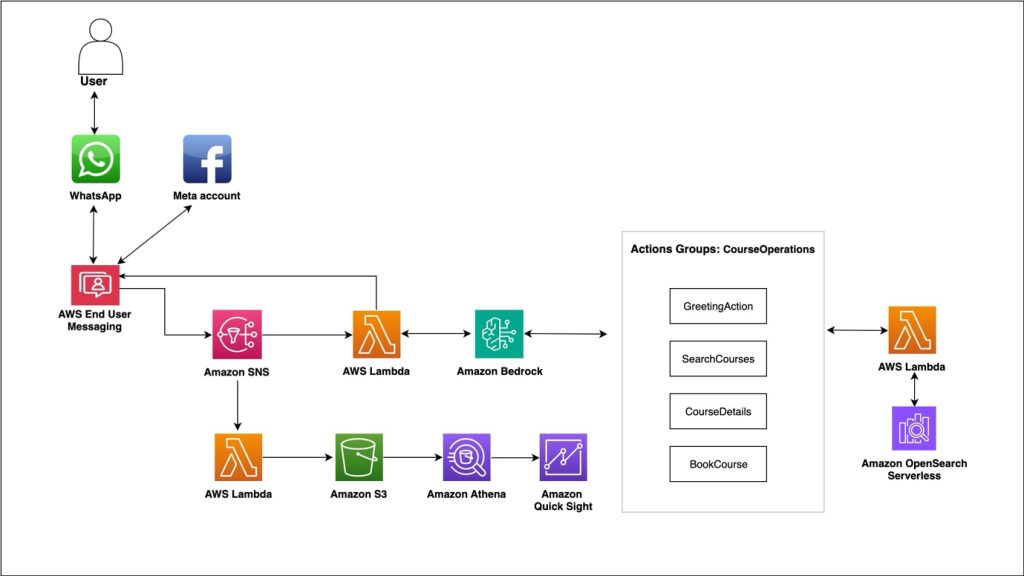
In this post, we explore best practices for building a WhatsApp AI assistant using AWS services—with a focus on how the AWS Summit Assistant used AWS End User Messaging and Amazon Bedrock to power a responsive, secure, and scalable generative AI assistant.

Why build a WhatsApp AI assistant with AWS End User Messaging

AWS offers a comprehensive set of services that can seamlessly handle the full lifecycle of a WhatsApp interaction—from ingesting and validating inbound messages, storing session context, generating AI responses, to monitoring key performance indicators in real time.

AWS End User Messaging provides native integration with WhatsApp, so you can send and receive messages directly using a REST API or SDK. It also supports AWS Identity and Access Management (IAM), enabling fine-grained control over access, authentication, and user roles.

The following sections outline best practices for designing, building, and operating WhatsApp AI assistants on AWS. Although not every recommendation will apply to every use case, they are based on real-world lessons learned from production deployments like the AWS Summit Assistant.

Use a modular, event-driven architecture

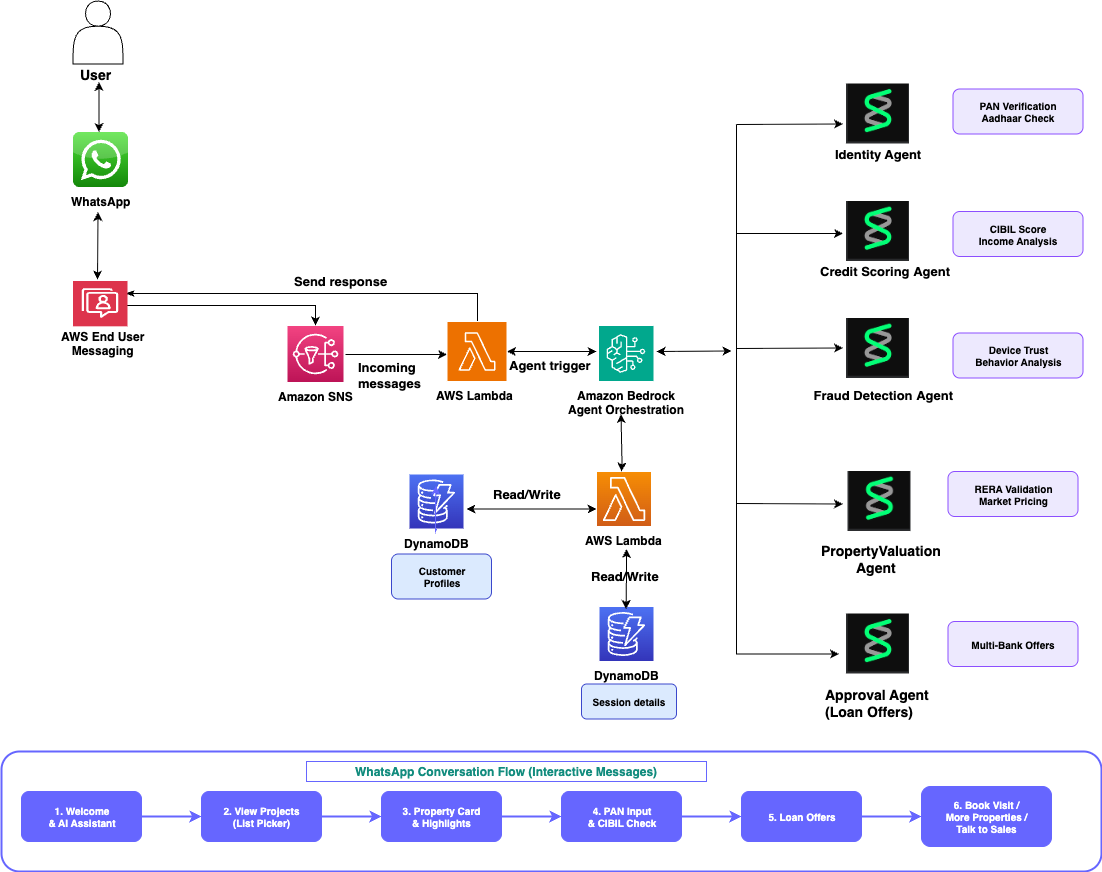
Rather than relying on tightly coupled services or monolithic workflows, design your WhatsApp AI assistant as a set of loosely coupled, modular components. AWS services such as Amazon Simple Notification Service (Amazon SNS), Amazon Simple Queue Service (Amazon SQS), and AWS Lambda are ideal for building scalable, event-driven systems.

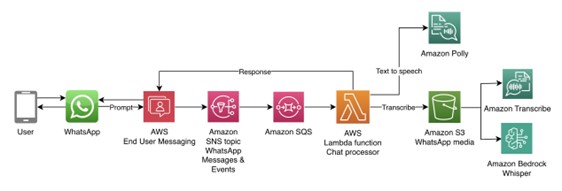
By default, AWS End User Messaging publishes inbound WhatsApp messages and engagement events to an SNS topic. To manage throughput and avoid overwhelming downstream components, subscribe an SQS queue to this topic. With this setup, you can process messages at a controlled pace and buffer traffic during bursts.

Depending on your use case, you might choose to skip dead-letter queues (DLQs) in favor of logging failures to Amazon CloudWatch Logs, especially given the real-time nature of chatbots where retrying a failed message hours later might no longer be relevant. Instead, the AI assistant should respond to the user immediately, explaining the issue and suggesting corrective actions such as rephrasing their question or trying again later.

A typical modular structure might have the following components:

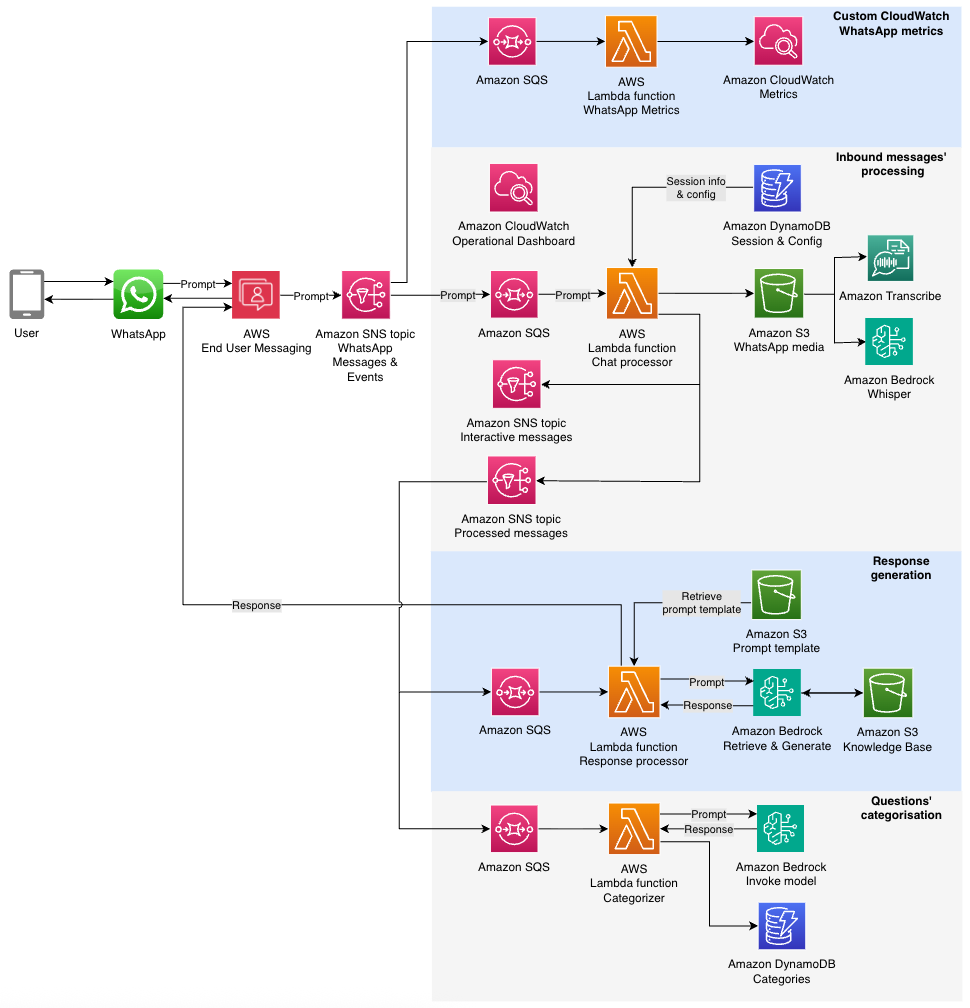
  • SQS queue – An SQS queue subscribed to the WhatsApp Messages & Events SNS topic to control throughput and isolate retries.
  • A messages processor function for inbound processing and audio processing (optional) – This AWS Lambda function handles initial validation and message-type filtering and transcribes the voice message. The output is published to the Processed messages SNS topic.
  • Fan-out to downstream consumers – Other Lambda functions through Amazon SQS subscribe to the Processed messages SNS topic to handle specialized tasks like response generation using Amazon Bedrock or categorization and analytics’ purposes.

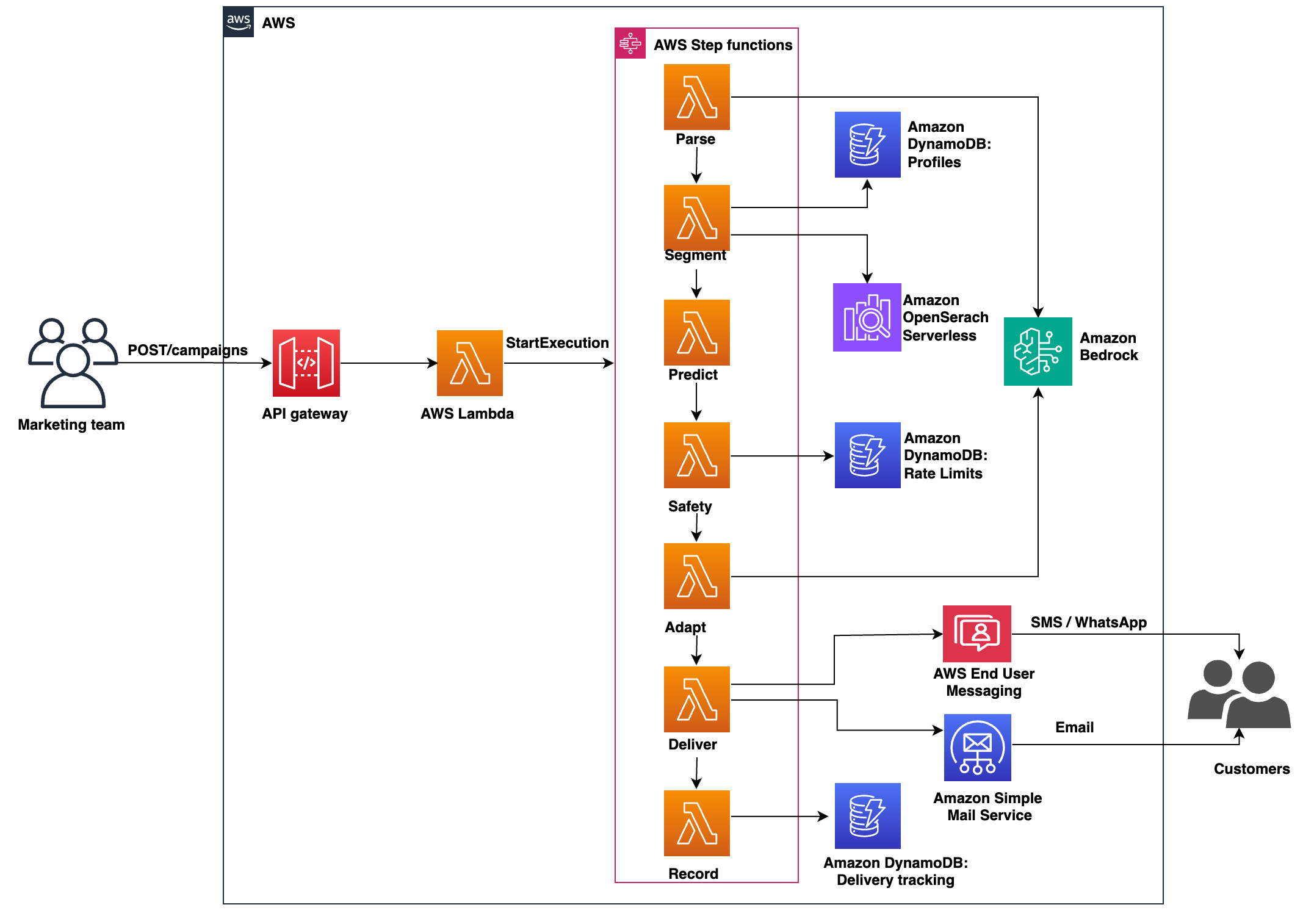
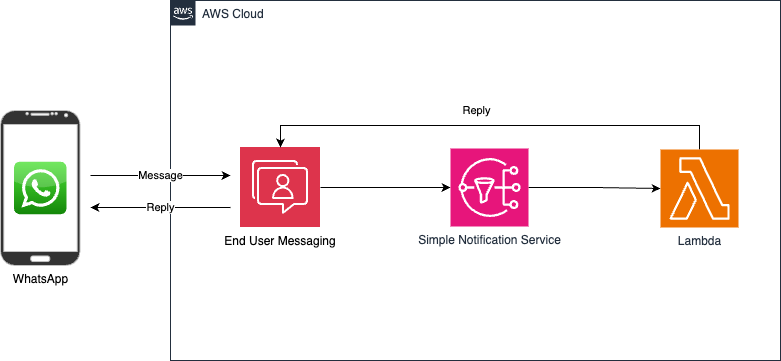
The following diagram illustrates the solution architecture.

architecture diagram whatsapp chatbot

This fan-out architecture promotes clean separation of concerns, avoids redundant processing, and makes it straightforward to introduce new capabilities such as sentiment analysis or content moderation by simply adding new subscribers. By decoupling components and using Amazon SNS and Amazon SQS patterns, each part of the system can scale independently and recover gracefully from localized failures.

Design for controlled processing throughput

When integrating with other AWS services such as Amazon Bedrock, with soft service quotas, it’s critical to manage throughput carefully. Use Amazon SQS to decouple the SNS topic from Lambda invocations. This makes sure spikes in message volume don’t result in throttling or failed invocations. It also lets you scale consumer Lambda functions based on queue depth, allowing for burst handling without dropping messages. In cases where message failure is unrecoverable (such as invalid content or unsupported message types), log the error and notify the user with a helpful message rather than retrying. This keeps the user informed and prevents queues from growing unnecessarily due to retry cycles. This design pattern of Amazon SNS to Amazon SQS to Lambda is foundational for building resilient, scalable AI assistants that meet user expectations for speed and reliability.

Handle voice messages with Amazon Transcribe or Whisper

WhatsApp voice messages are received in OGG format. To process these messages, you can use the AWS End User Messaging GetWhatsAppMessageMedia API to retrieve media files, including audio, images, and video. The audio needs to be converted to a compatible format for transcription: PCM for Amazon Transcribe or WAV for Hugging Face Whisper (available through Amazon Bedrock Marketplace). This conversion can be achieved using a library like FFmpeg, implemented as a Lambda layer.

The processing flow involves fetching audio from WhatsApp, which is then automatically stored in Amazon Simple Storage Service (Amazon S3) in a bucket you create and own (this is the default behavior of the GetWhatsAppMessageMedia API). Next, the audio is converted to the required format and stored locally in Lambda for faster processing before being transcribed.

As a best practice, consider deleting audio files after processing to simplify data management and reduce storage requirements for personally identifiable information (PII). This approach facilitates efficient handling and transcription of WhatsApp voice messages while maintaining data privacy standards.

Enforce strict message validation

To promote quality and security, implement layered validation within your message processing Lambda function. This might differ depending your use case and requirements:

  • Message status indicators – Mark inbound messages as read and indicate you are responding to maintain the recipients’ interest while generating a response. WhatsApp’s API allows marking messages as read by message ID and setting the typing indicator to true. The typing indicator automatically dismisses after 25 seconds without a reply.
  • Message type validation – Filter by message type using the inbound WhatsApp message payload’s type field. Implement checks based on your AI assistant’s supported message types and provide static responses for unsupported formats. For example, a text only AI assistant shouldn’t process message types such as Media, Reaction, Template, Location, Contacts or Interactive.
  • Size limit protection – Add message size validation based on character count. This prevents resource drainage from potential bad actors who might attempt to send extremely large text chunks that could generate excessive large language model (LLM) input tokens.
  • Conversation management – Track message counts and total character length per conversation, resetting the context when necessary to manage costs and prevent resource drainage. Implement this using Amazon DynamoDB with the recipient’s hashed phone number as the primary key.
  • Processing lock mechanism – Prevent duplicate processing by implementing a flag system in DynamoDB. When processing a message, set the recipient’s flag to true. While active, new messages receive a static response indicating that a previous message is being processed, avoiding out-of-sync responses and resource waste.
  • Access control – Consider implementing an allow list for beta functionality or controlled access. This provides selective AI assistant activation for testing while restricting general audience access when needed.
  • Error handling – Manage response generation failures with clear, static replies to the customer. Include troubleshooting steps or alternative contact channels based on the issue’s severity to maintain a positive user experience.

Security

Consider the following security best practices for message processing systems:

  • Encryption standards – Encrypt SNS topics, SQS queues, and DynamoDB tables using AWS Key Management Service (AWS KMS) service managed keys or customer managed keys (CMKs) to facilitate data protection at rest and in transit.
  • PII data protection – For analytics and troubleshooting purposes, avoid logging raw phone numbers when the full number isn’t required. Instead, implement hashing of phone numbers before logging to maintain user privacy while preserving tracking capabilities.
  • Data retention management – Enable Time-To-Live (TTL) attributes on DynamoDB tables to automatically purge old session data, maintaining data hygiene and avoiding storing PII data when not needed.
  • Content safety controls – Implement Amazon Bedrock Guardrails to prevent processing or generating unwanted content and messages. When required, use the data loss protection features of Amazon Bedrock Guardrails to safeguard sensitive information.
  • LLM security framework – Follow OWASP’s top 10 risk & mitigations for LLMs and Gen AI Apps guidelines to filter unsafe or inappropriate content in generative responses, maintaining a secure and appropriate interaction environment.

Use Amazon Bedrock for generative responses and categorization

The AWS Summit Assistant used two key Amazon Bedrock capabilities:

  • Amazon Bedrock Knowledge Bases – Powered by Amazon Bedrock Knowledge Bases using OpenSearch vector embeddings and Anthropic on Amazon Bedrock, the AI assistant could answer user questions using publicly available event data.
  • Categorization – Using the InvokeModel API, inbound messages were tagged with categories for analytics. A DynamoDB table stored category counts, enabling trend detection across users.

Sessions persisted using the Amazon Bedrock native session ID feature for consistent conversation flow.

Monitoring

Consider the following monitoring and data analysis options:

  • Message status tracking – WhatsApp provides six distinct events per message. Though valuable, these should be complemented with AWS service operational metrics for comprehensive monitoring. These events are published on the WhatsApp SNS topic in your AWS account.
  • Real-time monitoring with CloudWatch – Set up CloudWatch alarms to track SNS message publication rates, providing real-time visibility into WhatsApp activity for both inbound and outbound messages. Extend monitoring to include Lambda function and Amazon Bedrock metrics. For tracking WhatsApp’s six message states, implement a dedicated Lambda function that subscribes to the WhatsApp SNS topic and records each event as a custom CloudWatch metric.
  • Detailed analysis with CloudWatch Logs Insights – Use CloudWatch Logs Insights for granular monitoring with minimal development overhead. This approach enables advanced queries for metrics not available through standard CloudWatch metrics, such as unique conversation counts and user engagement statistics. The logs’ content depends on your requirements.
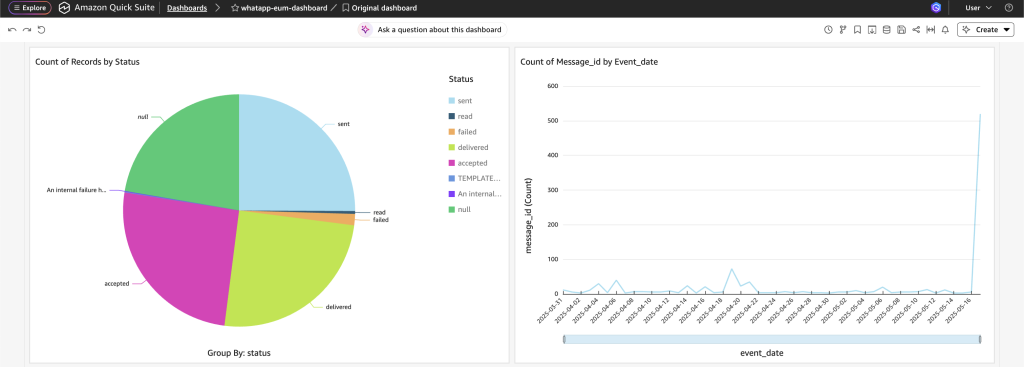
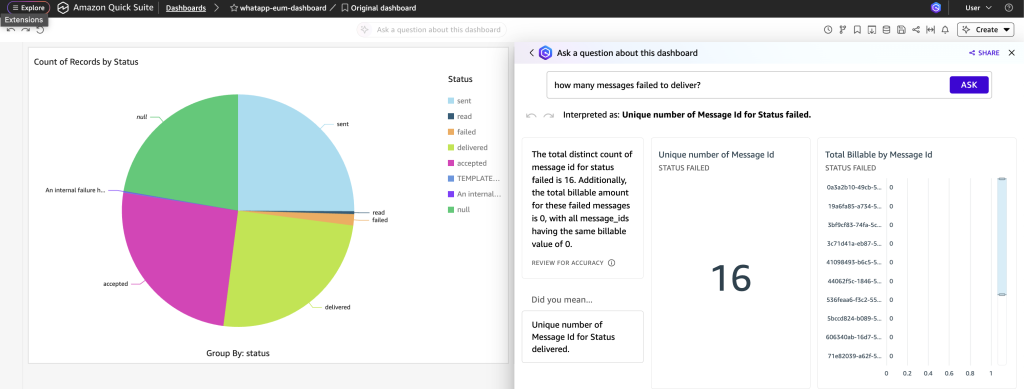
  • Advanced analytics integration – For sophisticated use cases, implement a data pipeline using Amazon Data Firehose to store events in Amazon S3, then visualize using business intelligence tools like Amazon Quick Sight for custom dashboards. For a reference implementation, refer to the following GitHub repo.

Example use case: AWS Summit Assistant

Deployed at AWS Summit Dubai 2025, AWS Summit Johannesburg 2025, AWS Cloud Day Türkiye, AWS Cloud Day Riyadh and re:Inforce re:Cap London 2025, this WhatsApp AI assistant performed the following functions:

  • Used Amazon Bedrock Knowledge Bases to answer attendee questions
  • Transcribed voice messages using Whisper
  • Categorized questions for trend reporting
  • Operated with near real-time responsiveness using Amazon SNS, Amazon SQS, and Lambda

The AI assistant processed over 2,000 questions with no service interruptions, showing the viability of serverless architecture for WhatsApp-based assistants.

Conclusion

Building a scalable and secure WhatsApp AI assistant with AWS offers numerous advantages for businesses looking to enhance customer engagement. By using AWS services like AWS End User Messaging, Amazon Bedrock, Lambda, and DynamoDB, builders can create robust, AI-powered assistants that handle high message volumes while maintaining security and performance. Key takeaways include:

  • Adopting a modular, event-driven architecture for flexibility and scalability
  • Implementing thorough message validation and security measures
  • Using Amazon Bedrock for advanced Gen AI capabilities
  • Establishing comprehensive monitoring and analytics

Although these practices provide a strong foundation, they represent just a subset of possible best practices. As WhatsApp and AWS services grow and industry standards change, best practices continue to evolve. Stay current by regularly reviewing AWS documentation and keeping up with new feature releases.

To get started with your WhatsApp AI assistant implementation, refer to the Github repository Chat Orchestrator for Generative AI Conversations.


About the authors
Track OTP success with AWS End User Messaging SMS feedback

Post Syndicated from Rommel Sunga original https://aws.amazon.com/blogs/messaging-and-targeting/track-otp-success-with-aws-end-user-messaging-sms-feedback/

In this post, we show how to implement message feedback for SMS one-time passwords (OTPs) using AWS End User Messaging. OTP verification through SMS is a fundamental component of modern authentication systems. Although sending OTPs follows an established pattern, tracking their delivery and usage presents several challenges. This post shows how to implement the AWS End User Messaging Message Feedback API to monitor OTP delivery and conversion rates effectively. This post highlights the Message Feedback API in an OTP use case; for practical examples and detailed guidance on building a secure OTP architecture, see Build a Secure One-Time Password Architecture with AWS.

Challenges with OTP tracking

Organizations commonly face these key challenges with OTP tracking:

  • Relying solely on Delivery Receipt (DLR) data for confirming message delivery, which is third-party carrier data that can be subject to interpretation by carriers or message providers, whereas conversion tracking through message feedback provides first-party data that can more accurately reflect actual message delivery and usage
  • Measuring accurate user authentication success rates
  • Identifying OTP verification issues across different geographic regions, carriers and delivery paths

To address these challenges, you can use the AWS End User Messaging Message Feedback API to track delivery and conversion rates, providing first-party data for more accurate insights into message delivery and usage patterns. Although OTP use cases are the most common and serve as our example implementation of message feedback, the same tracking logic can also be applied to other types of SMS conversions, such as promotional link clicks, shopping cart additions, account activations, appointment confirmations, and delivery notifications.

Solution overview

The OTP message flow consists of two main phases. Let’s first examine how the system handles the initial OTP request.

Phase 1: OTP request flow

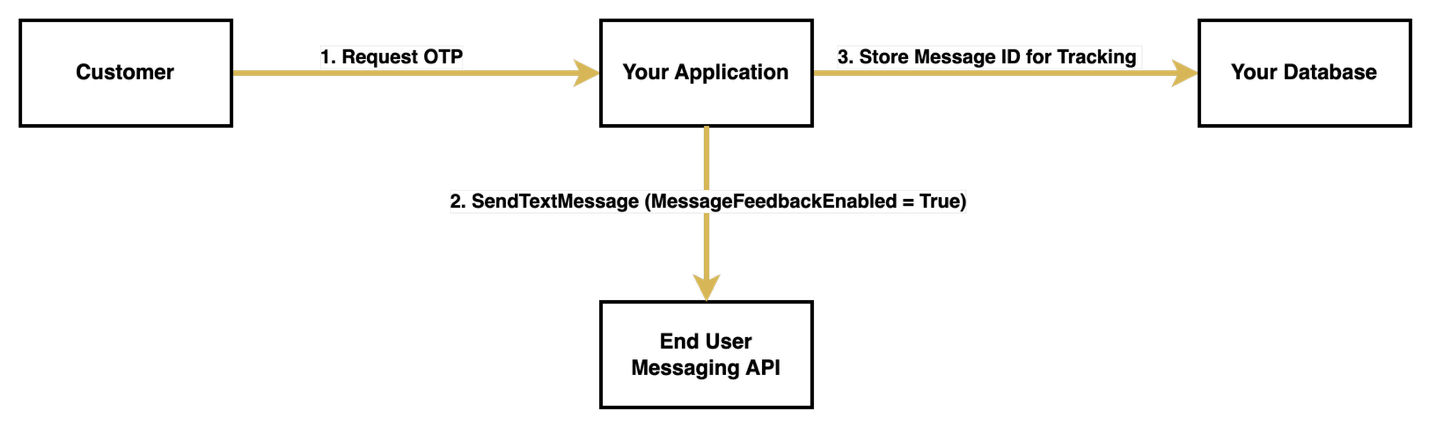
When a customer initiates an OTP request, your system begins a carefully orchestrated process. First, your application receives this request and generates a unique OTP. With the OTP generated, your system prepares to send it through the AWS End User Messaging API, specifically enabling message feedback tracking by setting the MessageFeedbackEnabled parameter to true when calling SendTextMessage.

Upon successful sending, it returns a unique message ID, which your system must store alongside the generated OTP. This message ID serves as a crucial tracking identifier for the entire verification process. The message is then dispatched to the customer’s device, and your system enters a waiting state, ready to process the verification attempt.

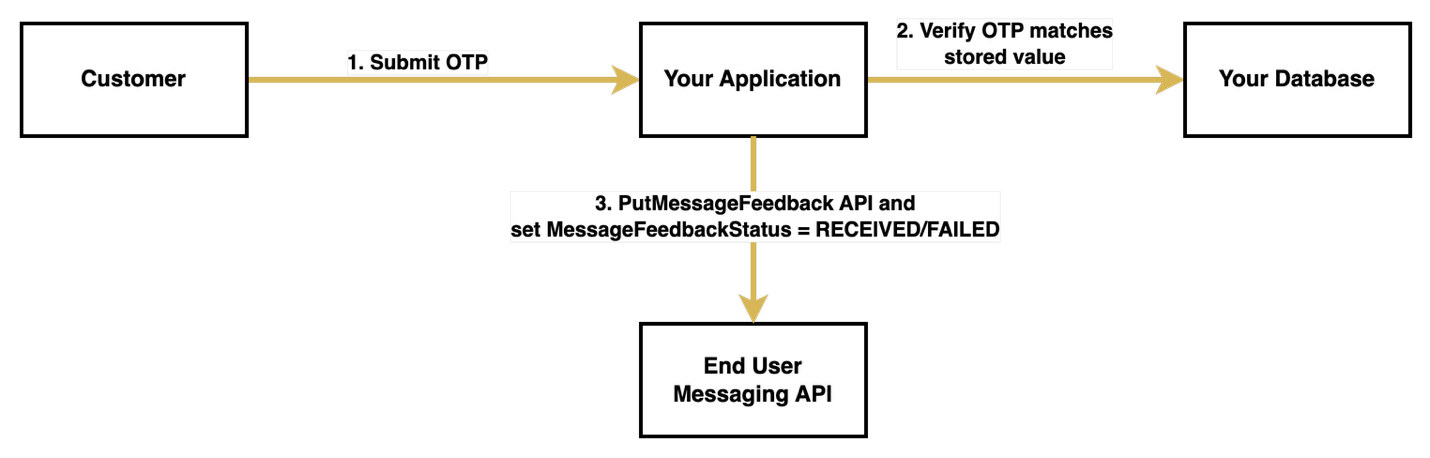
The following diagram illustrates the OTP request flow.

OTP Request Flow Diagram

Phase 2: OTP verification flow

The verification process begins when the customer receives the OTP through SMS and submits it back to your system. Upon receiving the submission, your system first validates the OTP against the stored value. This verification step is critical, because its outcome determines how you will update the message feedback status.

If the customer successfully verifies the OTP, your system calls the PutMessageFeedback API with the stored message ID and sets the status to "RECEIVED", indicating successful delivery and usage of the OTP. However, if the verification fails or the customer doesn’t respond within the timeout period, your system sets the status to "FAILED".

If your system doesn’t explicitly update the feedback status within 1 hour, AWS automatically sets it to "FAILED".

The following diagram illustrates the OTP verification flow.

Prerequisites

Before you begin implementing OTP message feedback, make sure you have the following components and permissions in place:

Send SMS with message feedback enabled

You can enable message feedback in two ways. The first method is to use the MessageFeedbackEnabled parameter when sending an SMS, the second is to send a message with a configuration set with message feedback already enabled. Using a configuration set is often more convenient for bulk implementations because you don’t need to specify message feedback settings in each API call.

To send an SMS with message feedback enabled directly, you can use the following function:

import boto3

# Initialize the End User Messaging client
client = boto3.client('pinpoint-sms-voice-v2')

def send_otp_with_feedback():
    # Generate a unique OTP
    otp = generate_otp()  
    
    # Send SMS with feedback enabled
    response = client.send_text_message(
        DestinationPhoneNumber='+15555550123',  # Replace with your destination phone number
        OriginationIdentity='+14255550120',  # Replace with your origination identity
        MessageBody=f'Your verification code is: {otp}',
        MessageFeedbackEnabled=True
    )
    
    # Store OTP details for verification
    store_otp_details(response['MessageId'], otp)
    return response['MessageId']

The function uses the following details:

  • store_otp_details() is a placeholder function where you store the OTP details in a database for later retrieval
  • generate_otp() is a placeholder function where you generate your OTPs to send using SMS

If you prefer to use a configuration set with message feedback enabled, you can use the following alternative function:

def send_otp_with_feedback_using_configuration_set():
    # Initialize the End User Messaging client
    client = boto3.client('pinpoint-sms-voice-v2')
    
    # Generate OTP
    otp = generate_otp()
    
    # Send SMS using configuration set
    response = client.send_text_message(
        DestinationPhoneNumber='+15555550123',  # Replace with your destination phone number
        OriginationIdentity='pool-201d59fffd554bdfbaf9ee8aEXAMPLE',  # Replace with your origination identity
        MessageBody=f'Your verification code is: {otp}',
        ConfigurationSetName='example-us-east-configuration-set'  # Replace with your configuration set name
    )
    
    # Store OTP details for later verification
    store_otp_details(response['MessageId'], otp)
    
    return response['MessageId']

Your configuration set must have message feedback enabled to use this option. You can enable it using the AWS Command Line Interface (AWS CLI) with the following command:

aws pinpoint-sms-voice-v2 set-default-message-feedback-enabled \
--configuration-set-name "YourConfigSetName" \
--message-feedback-enabled

Another option is to use the AWS End User Messaging console, where you can enable message feedback under Set Settings for the desired configuration set.

Update feedback

After you send a message, you can update the message status to indicate whether a user has successfully completed an action, such as entering the OTP on your application or webpage:

def update_message_feedback(message_id: str, status: str) -> dict:
    try:
        # Initialize the End User Messaging client
        client = boto3.client('pinpoint-sms-voice-v2')
        
        # Update the message feedback status
        response = client.put_message_feedback(
            MessageId=message_id,
            MessageFeedbackStatus=status
        )
        
        return response
        
    except Exception as e:
        print(f"Error updating message feedback: {str(e)}")
        raise

# Example usage
message_id = "a1b2c3d4-5678-90ab-cdef-EXAMPLE11111"  # Replace with your message ID
status = "RECEIVED"  # Use "FAILED" for unsuccessful verifications

result = update_message_feedback(message_id, status)
print(f"Feedback status updated: {result}")

Verify feedback metrics

The AWS End User Messaging dashboard provides comprehensive metrics to help you monitor your OTP performance. The following metrics are available for customizable time periods:

  • Number of messages with feedback completion
  • Percentage of messages with feedback completion
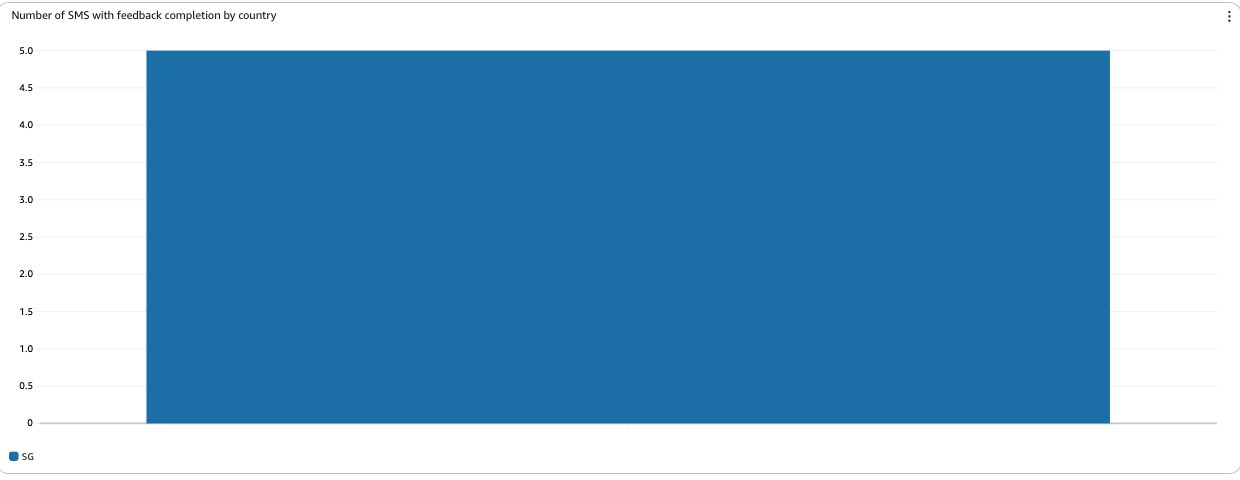
  • Number of SMS with feedback completion by country

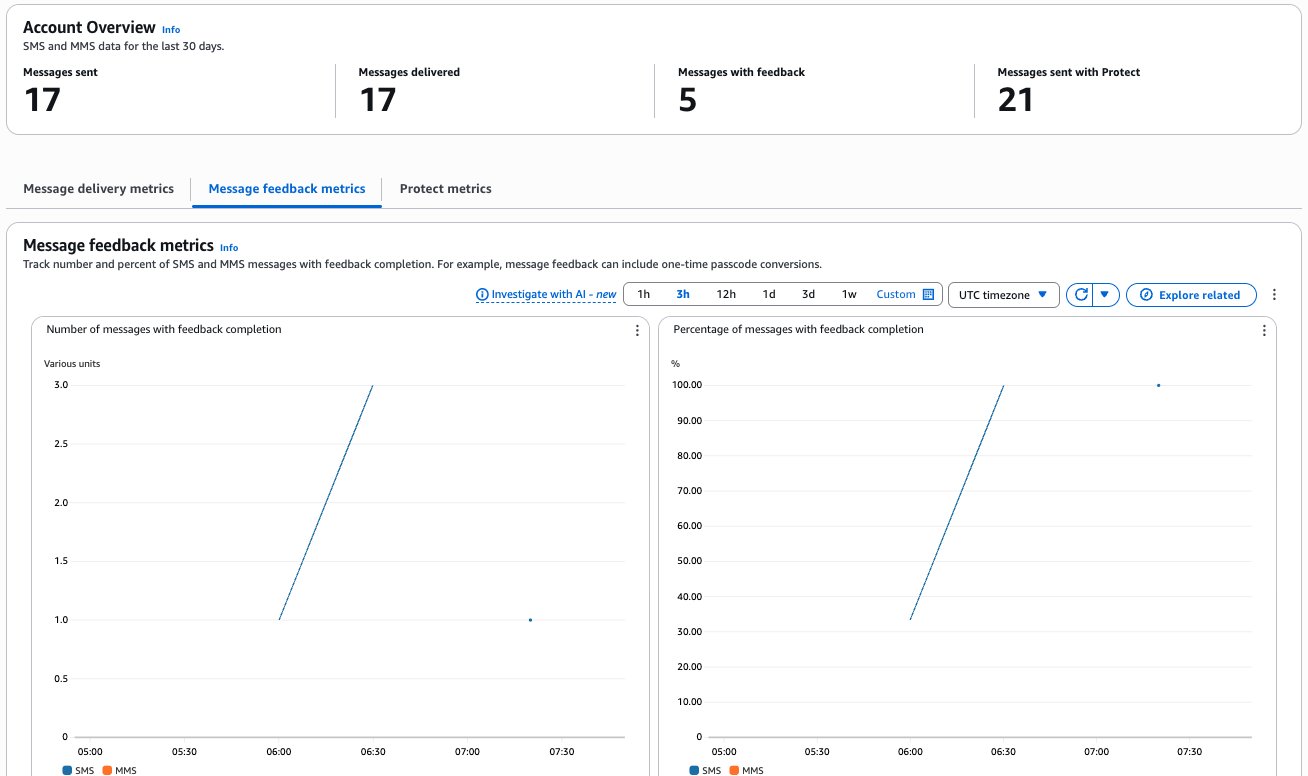
To review your application’s overall message feedback metrics, choose Dashboard in the AWS End User Messaging console navigation pane, then choose Message Feedback Metrics.

The dashboard presents three key metrics:

  • Number of messages with feedback completion – The count of SMS and MMS messages where the message feedback record is set to RECEIVED
  • Percentage of messages with feedback completion – The percentage of SMS and MMS messages where the message feedback record is set to RECEIVED
  • Number of SMS with feedback completion by country – The count of message feedback received by country

The progression to 100% completion indicates optimal system performance, where all sent OTPs were successfully received and verified by users, and the message feedback record is set to RECEIVED within the expected timeframe. This high completion rate suggests effective message delivery and a smooth user verification experience. Variations in completion rates across countries can help identify potential regional delivery challenges or user behavior patterns.

The 30% conversion starting point shown in this example is used for illustration purposes only, demonstrating messages that were intentionally left unconverted during testing.

Best practices for OTP implementation

For a secure and reliable OTP implementation, follow these best practices to balance security with user experience:

  • Include rate limiting to prevent abuse
  • Implement proper timeout mechanisms for OTPs
  • Make sure error handling provides clear feedback to users
  • Maintain comprehensive logging for security audits

Conclusion

By implementing the Message Feedback API for OTP tracking, you can gain valuable insights into your authentication system’s effectiveness in real time. This approach helps you monitor successful OTP usage and identify potential delivery issues that might affect user authentication, with granular metrics broken down by geographic regions. The data collected through message feedback offers a more accurate picture of actual user interactions compared to carrier-provided delivery receipts, helping you make data-driven decisions about your authentication system.

To build upon this foundation, consider implementing Amazon CloudWatch alerts for your conversion metrics, and optimizing your message templates based on performance data. The combination of real-time feedback, detailed analytics, and proactive monitoring can help make sure your OTP system remains both secure and efficient.

For additional implementation guidance and best practices, refer to the following resources:


About the authors
Integrate Amazon CloudWatch alarms with WhatsApp using AWS End User Messaging

Post Syndicated from Ruchikka Chaudhary original https://aws.amazon.com/blogs/messaging-and-targeting/integrate-amazon-cloudwatch-alarms-with-whatsapp-using-aws-end-user-messaging/

Timely and accessible alert notifications are crucial for maintaining operational excellence, but traditional alerting mechanisms often fall short. Email notifications can get buried in crowded inboxes, SMS messages might incur high costs for international teams, and pager systems lack the rich context modern teams need for rapid incident response. WhatsApp, with over 2 billion users worldwide, offers several advantages:

  • Universal accessibility – Available on virtually every smartphone
  • Rich media support – Sends formatted messages, images, and links
  • Global reach – No international SMS fees
  • High engagement – Messages are typically delivered within seconds
  • Familiar interface – Many teams already use WhatsApp for daily communication

This post walks through a solution to build a serverless alerting system that delivers Amazon CloudWatch alarms to WhatsApp using AWS End User Messaging.

Overview of solution

The solution uses AWS End User Messaging Social to create a seamless bridge between CloudWatch alarms and WhatsApp notifications. This serverless architecture provides real-time infrastructure alerts through WhatsApp messaging platform teams already know and use.

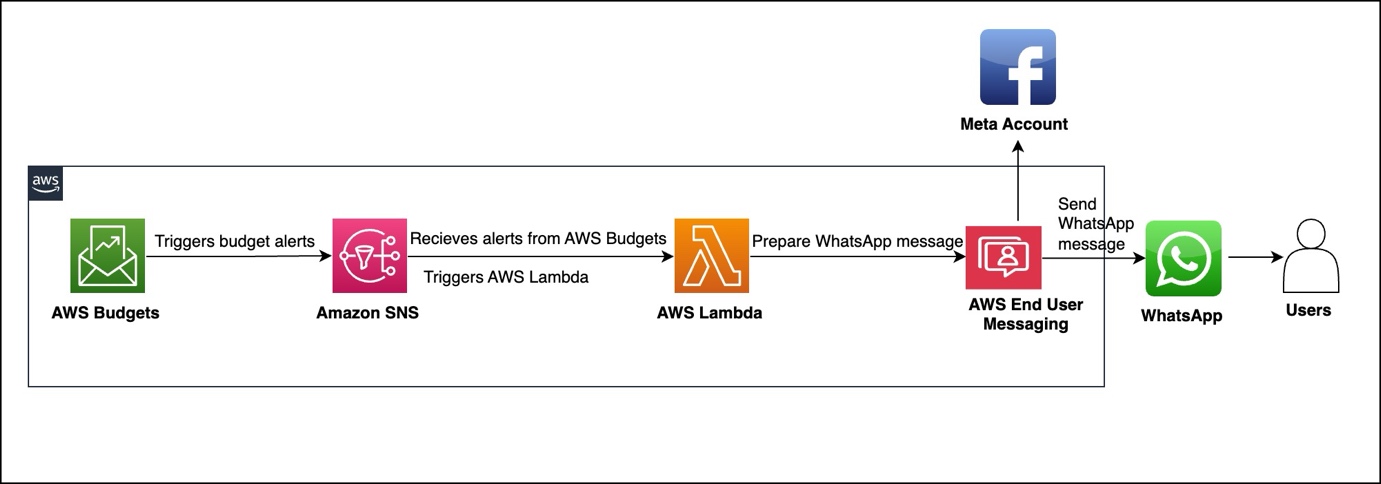
The architecture consists of four main AWS services working together. The data flow begins when CloudWatch alarms detect breaches of predefined thresholds and publish notifications to an Amazon Simple Notification Service (Amazon SNS) topic. The SNS topic triggers an AWS Lambda function that processes the alarm data, formats contextual WhatsApp messages, and uses AWS End User Messaging Social to deliver notifications to specified recipients.

The following diagram illustrates the solution architecture.

Prerequisites

Implementation requires an AWS account with appropriate permissions for AWS CloudFormation, Lambda, Amazon SNS, and CloudWatch. You must also have a WhatsApp Business Account integrated with AWS End User Messaging and the WhatsApp phone number ID from the AWS End User Messaging console. (For instructions to locate this information, see View a phone number’s ID in AWS End User Messaging Social).

For more information about how to set up WhatsApp using AWS End User Messaging Social, refer to Automate workflows with WhatsApp using AWS End User Messaging Social.

Before you deploy this solution, create an approved template in your Meta account named cw_alarm_notification. Alternatively, use your preferred template name and modify the Lambda function code accordingly (as shown in the following screenshot).

Lambda function code

The solution uses a Python-based Lambda function that processes CloudWatch alarm notifications and formats them for WhatsApp delivery. The function receives SNS events containing CloudWatch alarm data, extracts relevant information, formats contextual messages, and delivers notifications through AWS End User Messaging Social.

The following function code shows an example to parse the SNS message content and extract key alarm information, including alarm name, state value, and reason for state change:

def process_alarm_notification(record):
    # Parse SNS message
    sns_message = json.loads(record['Sns']['Message'])
    
    # Extract alarm details
    alarm_name = sns_message.get('AlarmName', 'Unknown Alarm')
    alarm_description = sns_message.get('AlarmDescription', '')
    new_state = sns_message.get('NewStateValue', 'UNKNOWN')
    old_state = sns_message.get('OldStateValue', 'UNKNOWN')
    reason = sns_message.get('NewStateReason', '')
    timestamp = sns_message.get('StateChangeTime', '')
    region = sns_message.get('Region', '')
    
    # Format WhatsApp message
    message = format_alarm_message(
        alarm_name, alarm_description, new_state, 
        old_state, reason, timestamp, region
    )
    
    # Send WhatsApp message
    send_whatsapp_message(message)
    

The following code shows an example to create a template message for WhatsApp (you can change the template name if required):

              # Build message
              template_name = 'cw_alarm_notification'
              template_message = {
                      "name": template_name,
                      "language": {
                          "code": "en"
                      },
                      "components": [
                          {
                              "type": "header",
                              "parameters": [{
                                  "type": "text",
                                  "parameter_name": "emoji",
                                  "text": state_emoji
                                  }
                              ]
                          },
                          {
                              "type": "body",
                              "parameters": [
                                  {
                                      "type": "text",
                                      "parameter_name": "alarm_name",
                                      "text": alarm_name
                                  },
                                  {
                                      "type": "text",
                                      "parameter_name": "status",
                                      "text": old_state + " → " + new_state
                                  },
                                  {
                                      "type": "text",
                                      "parameter_name": "region_account",
                                      "text": region + " - " + account_id
                                  },
                                  {
                                      "type": "text",
                                      "parameter_name": "time",
                                      "text": formatted_time
                                  },
                                  {
                                      "type": "text",
                                      "parameter_name": "description",
                                      "text": alarm_description + reason
                                  }
                              ]
                          }

                      ]
                  }
              
              return template_message

The send_whatsapp_message function uses AWS End User Messaging Social to deliver formatted messages through the socialmessaging client:

def send_whatsapp_message(message):
    """Send message via AWS End User Messaging"""
    client = boto3.client('socialmessaging')
    
    response = client.send_whats_app_message(
        originationPhoneNumberId=os.environ['WHATSAPP_PHONE_NUMBER_ID'],
        destinationPhoneNumber=os.environ['ALERT_RECIPIENT'],
        messageBody={'text': message}
    )

Deploy the solution

The solution uses AWS CloudFormation for infrastructure as code (IaC) deployment. The main template creates an SNS topic for alarm notifications, a Lambda function for message processing, and required AWS Identity and Access Management (IAM) roles with least-privilege permissions.

The CloudFormation template requires a recipient number with an active WhatsApp account to receive alarm notifications as messages. The template also requires the WhatsApp phone number ID retrieved from the AWS End User Messaging Social console, as noted in the prerequisites. The template must be deployed in the same AWS Region as AWS End User Messaging Social. See the following code:

aws cloudformation deploy \
  --template-file <cloudwatch-eum-whatsapp-alerts.yaml> \
  --stack-name cloudwatch-eum-whatsapp-alerts \
  --parameter-overrides \
    WhatsAppPhoneNumberId=<your-phone-number-id-from-eum> \
    AlertRecipient=<+1234567890> \
    Environment=dev \
  --capabilities CAPABILITY_IAM \
  --region <EUM-region>

The preceding template deploys an alarm called SampleHighCPUAlarm that triggers an SNS topic. The SNS topic triggers the WhatsApp alarm notifier Lambda function, which processes and sends the message using AWS End User Messaging Social.

Test the solution

You can test the solution using the sample alarm created by the CloudFormation stack. The following screenshot shows an example alarm configuration and its CloudWatch metrics, currently in the OK state.

You can use the following code to trigger the alarm by updating this metric:

 aws cloudwatch put-metric-data --namespace "Custom/EC2" --metric-data MetricName=CPUUtilization,Value=85,Unit=Percent

As the alarm switches from OK to ALARM state, a WhatsApp Message is delivered.

Conclusion

Integrating CloudWatch with WhatsApp notifications represents a significant step forward in modern infrastructure monitoring. By using AWS End User Messaging, teams can receive critical alerts through their preferred communication channel while maintaining the reliability and scalability of AWS services.

The solution’s modular architecture, simple yet effective security model, and cost-effective design make it suitable for organizations of various sizes.


About the author

Enhance event experiences with a generative AI-powered WhatsApp assistant using AWS End User Messaging

Post Syndicated from Richard Perez original https://aws.amazon.com/blogs/messaging-and-targeting/enhance-event-experiences-with-a-generative-ai-powered-whatsapp-assistant-using-aws-end-user-messaging/

Technology conferences and events serve as vital opportunities for innovation, knowledge sharing, and networking in the rapidly evolving technology industry. These gatherings range from large international conventions attracting tens of thousands of attendees, or more specialized conferences focused on specific sectors such as AI, cybersecurity, or a particular industry.

In this post, we share how the AWS Communication Developer Services (CDS) team integrated an AWS End User Messaging Social WhatsApp channel with Amazon Bedrock to launch the AWS Summit Assistant Bot at the AWS Dubai Summit 2025, enhancing the experience of attendees in real-world applications.

AWS Global Summits

AWS Global Summits have become an important event in the technology community, offering invaluable opportunities for professionals to explore the latest cloud computing innovations and best practices. These summits, held in major cities worldwide, bring together developers, engineers, and business leaders to share knowledge, network, and gain hands-on experience with AWS technologies. The events typically feature keynote speeches from AWS executives and industry leaders, providing insights into future trends and strategic directions in cloud computing. Attendees can participate in technical sessions, workshops, and demos that cover a wide range of topics, from artificial intelligence and machine learning (AI/ML) to serverless computing. The impact of these summits extends beyond the events themselves, fostering a global community of cloud practitioners and driving innovation across various industries that rely on cloud technologies.

Attendee experience

Despite the valuable experience these events create, attendees often find navigating their way around these events challenging. Participants frequently find themselves uncertain about which sessions align best with their interests and expertise levels. Locating specific sessions within the venue can be time-consuming, and finding essential venue-specific areas such as quiet rooms or lost property offices has been a persistent pain point.

Users are increasingly reluctant to download single-use mobile apps due to friction like account creation, logins, storage, and app fatigue. Storyly notes that users spend 80% of their app time in their top three apps, with most others abandoned quickly. For event apps specifically, this reluctance stems from the same factors: app fatigue, privacy concerns about sharing personal information, and the time and effort required to set up and navigate yet another platform. Unless the value is immediate and clear, many attendees simply opt out, mirroring the broader trend where users avoid the hassle of downloading apps unless they offer sustained, high-value utility.

These challenges can detract from the overall event experience and can lead to missed opportunities for learning and networking.

How we enhanced the attendee experience

The AWS Summit Assistant Bot, launched at the AWS Dubai Summit (May 2025), offered a seamless solution to these attendee challenges. Attendees simply scanned QR codes that were strategically placed throughout the venue to initiate a WhatsApp chat with the AI-powered assistant. This innovative assistant uses advanced natural language processing to understand attendees’ interests and provide tailored session recommendations. Moreover, it offered real-time guidance on session locations and can direct users to various venue-specific areas, providing a smooth and efficient summit experience.

Solution overview

Let’s examine how the AWS Summit Assistant Bot architecture enables seamless interaction between attendees and summit information systems. The AWS Summit Assistant Bot design allows for real-time processing of attendee messages and response generation using Amazon Bedrock Knowledge Bases for helpful and relevant answers. The following diagram illustrates how various AWS services work together to process attendee messages.

The architecture follows a modular pattern with four key components that enable efficient message processing and analytics capabilities:

  • Custom metrics – Custom Amazon CloudWatch WhatsApp metrics enable real-time monitoring of engagement events through Amazon Simple Notification Service (Amazon SNS) topic integration. These metrics track message delivery status and read receipts, providing crucial operational and performance insights.
  • Inbound message processing – This pipeline forms the core functionality, implementing message validation filters for length and message type constraints, managing session state, and handling audio transcription workflows. Validated messages are published to a dedicated SNS topic for downstream consumption.
  • Response generation – This component uses Amazon Bedrock Knowledge Bases for intelligent message handling, with architecture designed for flexible integration of alternative processing engines. Future iterations of the AWS Summit Assistant Bot will use the Strands Agents SDK and tools.
  • Questions categorization – This framework provides contextual analytics beyond standard CloudWatch and AWS Lambda insights. This component implements an Amazon DynamoDB based categorization system that works in conjunction with Amazon Bedrock to dynamically classify and track inquiry patterns while maintaining user privacy through personally identifiable information (PII)-free analytics.

Technical implementation

Our serverless, event-driven architecture efficiently handles WhatsApp message processing through a seamless multi-stage workflow. When a WhatsApp message arrives, AWS End User Messaging receives it and immediately publishes it to an SNS topic. From there, the messages are written to Amazon Simple Queue Service (Amazon SQS) queues, which enables controlled and systematic processing. Lambda functions then handle the core business logic, processing these messages and managing interactions with DynamoDB. To generate responses, the system uses Amazon Bedrock Knowledge Bases to create personalized content for each user. Finally, these tailored responses are routed back to users through AWS End User Messaging, completing the WhatsApp communication cycle.

The system implements two parallel processes alongside the main message processing pipeline. The first is a categorization service that processes messages through Amazon SNS and Amazon SQS before using Lambda functions to analyze content against existing DynamoDB category records. This function either increments existing category counters or creates new categories as needed. The second parallel process handles custom CloudWatch metrics, following a similar initial flow through Amazon SNS and Amazon SQS, but employs specialized Lambda functions to extract and record engagement metrics for operational monitoring.

Generative AI integration

The Amazon Bedrock implementation encompasses two core AI capabilities:

  • A knowledge base retrieval system using OpenSearch vector embeddings and Anthropic’s Claude 3.7 Sonnet model for accurate information retrieval
  • A real-time message categorization engine that dynamically classifies incoming messages into existing categories or creates new ones based on content analysis

Voice message processing

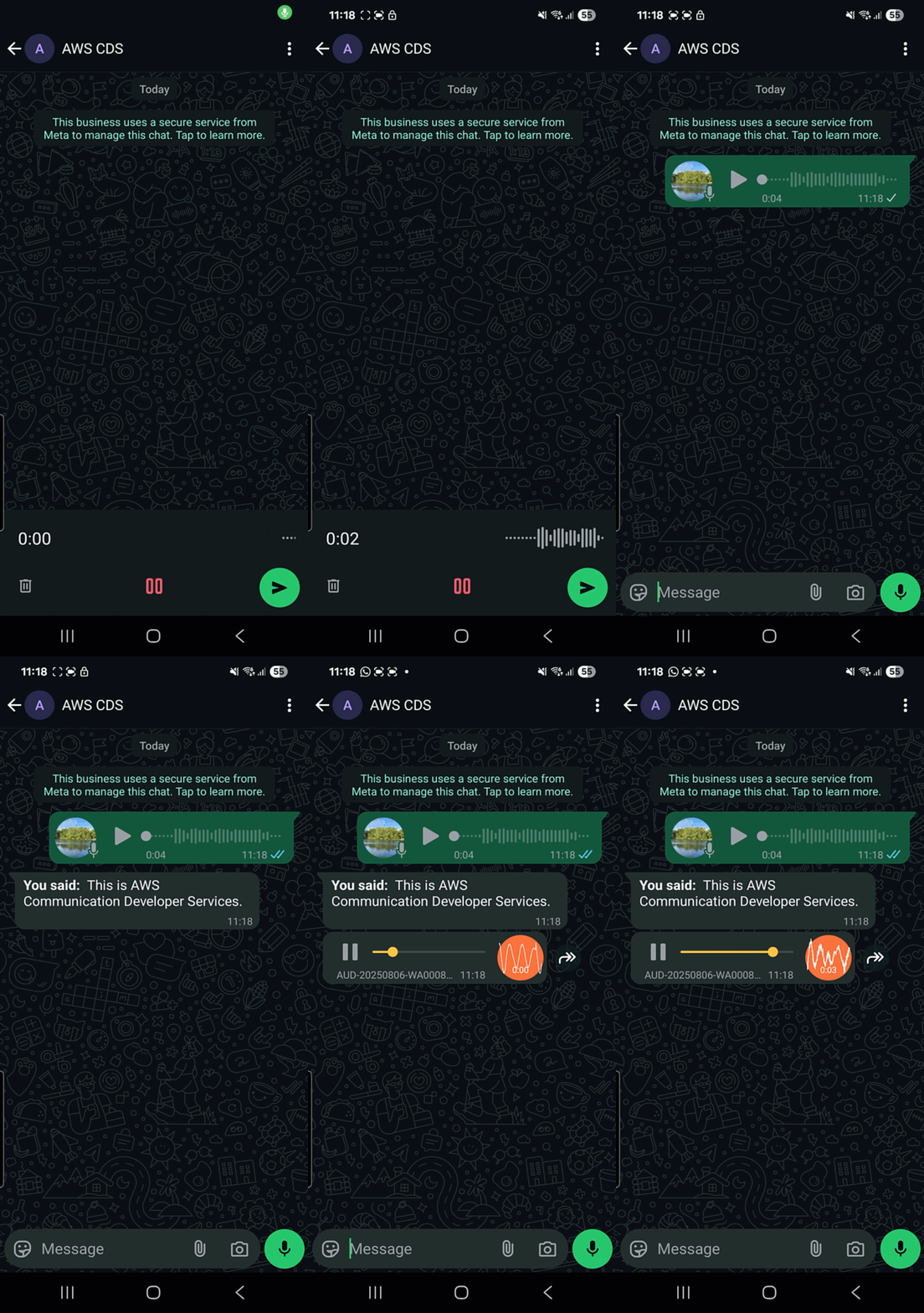
The voice message handling system implements a sophisticated processing chain. WhatsApp voice messages in OGG format are processed through a Lambda based conversion pipeline using the ffmpeg library. The converted audio is then transcribed using Whisper through Amazon Bedrock Marketplace, chosen for its fast processing and robust multi-language support capabilities.

Security and privacy considerations

Our security-first approach implements multiple layers of protection:

  • Customer managed key encryption for data at rest and in transit across Amazon SNS, Amazon SQS, and DynamoDB
  • Minimized PII CloudWatch logging and automatic data cleanup through DynamoDB TTL settings
  • Amazon Bedrock Guardrails to prevent inappropriate content generation and protect against data loss
  • Custom logic to prevent resource draining by preventing the ingestion of unreasonably large messages and keeping a short conversation context window

Monitoring and analytics

Monitoring is important for operational purposes but also for understanding what questions users are asking. The solution uses the following components:

  • A Real-time CloudWatch dashboard for tracking operational metrics such as messages published on SNS topics; WhatsApp messages sent, delivered, and read, Lambda invocations; failures; and Amazon Bedrock metrics
  • CloudWatch logs for granular analytics using CloudWatch insights such as unique users and number of conversations
  • Generative AI-powered categorization of users’ questions

Conclusion

The AWS Summit Assistant Bot demonstrates how AWS services can be combined to create practical, generative AI-powered solutions that enhance real-world experiences. This framework can be adapted for various event types and scales, such as tech conferences, trade shows, festivals, campus orientations, and shopping centers.

To learn more about building similar solutions:

By using these AWS services and resources, you can create innovative, AI-powered communication solutions for a wide range of applications.


About the authors
How to build resilient SMS delivery with AWS End User Messaging

Post Syndicated from Tyler Holmes original https://aws.amazon.com/blogs/messaging-and-targeting/how-to-build-resilient-sms-delivery-with-aws-end-user-messaging/

Reliable SMS delivery is a critical requirement for many businesses. However, SMS communications can be impacted by factors outside your direct control, such as carrier availability and delivery challenges.

In this post, we explore strategies for building resilient SMS architectures using AWS End User Messaging. We discuss how to architect your SMS communications at the originator, account, and Regional levels to support high availability and seamless failover, even in the face of disruptions. This includes implementing best practices like using phone pools, dedicated originators, and multi-Region redundancy.

By understanding these strategies, you can create a resilient messaging system that keeps your mission-critical SMS flowing reliably to your customers and stakeholders, regardless of external service interruptions or carrier-specific issues.

How SMS delivery works

The process of delivering an SMS message involves a complex chain of interconnected systems. The message needs to be routed to the appropriate mobile network operator (carrier) based on the recipient’s phone number, and there are many paths the message could take. When a user sends an SMS through AWS End User Messaging, the message is routed appropriately based on the country, carrier, and originator type being used.

The inherent complexity of SMS delivery means there are numerous potential service degradation points, such as issues with an aggregator, carrier configurations, and filtering. The general availability of a mobile device can also be a factor, because it’s dependent on the current health of the network the device uses. Things as simple as weather changes or location (such as parking garages) can impact the delivery of messages and illustrates why alternate channels should be provided.

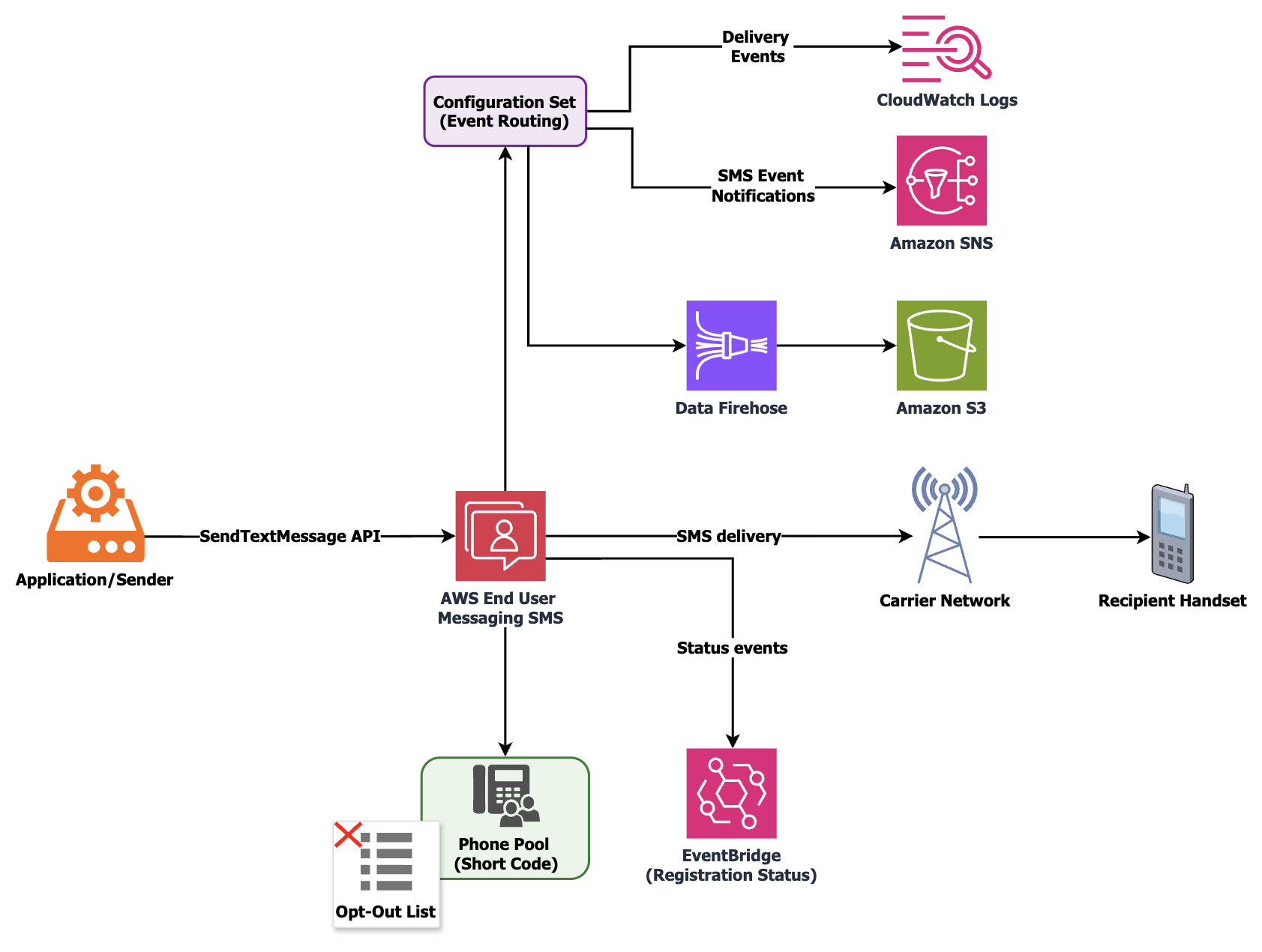
Understanding this underlying architecture is crucial for building resilient SMS systems that can withstand disruptions at different stages of the process. The following diagram shows a simplified version of how an SMS is delivered to a handset.

The need for SMS resiliency

Given the complex dependencies and potential points of degradation in the SMS delivery chain, it’s critical to architect your SMS communications for resilience. This helps make sure your messages can be delivered reliably, even when facing Regional service disruptions, carrier challenges, or other potential communication barriers.

Levels of resiliency for SMS

The following are the three levels of resiliency to consider for SMS and some potential reasons for disruption:

  • Originator-level resiliency – Carriers and other downstream entities can sometimes block or filter specific origination numbers, causing delivery issues. Originators must be configured with these downstream entities, so downstream misconfigurations might occur.
  • Account resiliency – Your primary AWS account might experience a disruption, preventing you from sending messages through that account. Account-level issues, such as reaching an account SMS spending limit or throughput, might limit your ability to send from a specific account.
  • AWS Region resiliency – Regions can experience degradation of service, and originators are tied to an account and Region when they are configured and can’t be moved.

General best practices for SMS resiliency

A phone pool, also known as a pool, is a collection of originators that share the same settings. When you send messages through a phone pool, it selects an appropriate origination identity to use for sending the message based on the country code. In general, pools will select the highest throughput originator in the pool for the country being sent to. This means that the order from first to last will be short codes, long codes, sender ID, toll-free, and finally shared routes. If one of the origination identities in the phone pool is unable to send the message, the phone pool will automatically fail over to another origination identity, which is part of the same phone pool, for that same country if there is one available.

Having a dedicated originator for each country you send to improves deliverability and allows for two-way communication if the originator supports it. Pools have a setting for shared routes in some countries, which is a pool of shared origination identities that AWS maintains. When you activate shared routes on a pool and don’t have a dedicated originator, AWS End User Messaging SMS attempts to deliver your message using one of the shared identities. The origination identity could be a sender ID, long code, or short code, and could vary within each country. These shared routes are not capable of two-way communication so they are not eligible for any use cases that require it. Deliverability on these shared routes also varies; it’s always a best practice to use a shared route as a last resort option. Using at least one dedicated originator for each destination and use case you support will improve your deliverability and the experience of your end-users. Refer to How to Manage Global Sending of SMS with AWS End User Messaging for more details on getting ready to send SMS. The post includes a template for organizing use cases and selecting originators.

AWS End User Messaging provides several options for sending Delivery Receipts (DLRs), as shown in the following diagram, including Amazon Simple Notification Service (Amazon SNS), Amazon CloudWatch Logs, and Amazon Data Firehose. If you are using a multi-Region or multi-account architecture, it’s important to centralize this data. The following GitHub repo provides a solution as a deployable starter project that builds on top of an Amazon S3 storage location and combines channel engagement and conversational data into a centralized data store. You can also optionally deploy an Amazon QuickSight dashboard to visualize the engagement data.

Using the message feedback feature of AWS End User Messaging also allows for more visible and finite message statuses. You can use signals from customers to determine if they have received the message and set the message feedback status record as delivered. Using message feedback means you don’t have to wait for the DLR to be returned and you can set your message as received and update your message metrics. Message feedback can be used for typical user actions, such as completing a workflow, clicking a link, verifying a one-time password.

When choosing a repository for your DLRs, make sure to consider your data requirements related to data consistency, tolerance for latency, performance requirements, and your unique access patterns.

Strategies for resiliency at each level

Each level at which SMS operates provides layered resiliency. You don’t need to implement all the layers; this will depend on your comfort level for complexity and increased cost. In this section, we review the resiliency strategies at each level.

Originator-level resiliency

AWS recommends provisioning a minimum of two origination number types per country in each Region you are using to provide redundancy. Different originator types often use different paths to send, so if one sending is degraded on one path, you can switch to the other. The implementation itself will depend on the countries you are sending to and the level of complexity and cost you are willing to incur, because some originators have costs associated with owning them.If you decide to have multiple originators, we recommend communicating with your end-users about the methods by which you might communicate with them. This reduces the chance of spam complaints if you need to deliver SMS with an unfamiliar originator.

Let’s explore an example of designing originator-level resiliency for the US (the general pattern is the same across different countries).The US options for originators, in order of highest to lowest throughput, are short codes, 10DLC, and toll-free numbers (TFNs). Each requires registration to be completed. Depending on your throughput needs, there are a few things we recommend when implementing resiliency in the US.

If you’re using 10DLC, we recommend getting at least one other 10DLC number that you don’t use. If you encounter a filtering or blocking event by US carriers, you can use this number to swap into your pool to continue to be able to send while you solve the problem on the blocked or filtered number. This might give you more time to fix an issue while still maintaining your ability to send. The other option, and another layer of redundancy, is to register a TFN that you could swap into your pool. Although TFNs have lower throughput, this can help you continue some level of sending while solving for the blocking issue.

If you’re using a short code, you have an added layer of redundancy because carriers don’t generally block those codes without warning. You will receive an audit and be given a chance to fix whatever issue the carriers have found with your sending. Having a second short code or using a lower throughput backup such as a 10DLC or TFN is also an option.

Account-level resiliency

There is always the chance that your primary account could be degraded in some way. Issues such as an inaccessible account or hitting a spending limit can take time to mitigate. For example, Artificially Inflated Traffic (AIT), also known as SMS pumping fraud, can cause your spending limit to be hit, shutting off your ability to send from that account. To learn more, refer to Defending Against SMS Pumping: New AWS Features to Help Combat Artificially Inflated Traffic.

You can mitigate these issues by having a secondary account in the same Region that you share your originators, pools, and opt-out lists with by using AWS Resource Access Manager (AWS RAM) to enable resource sharing. You can use AWS RAM to share some AWS End User Messaging SMS resources with other AWS accounts or through AWS Organizations. The accounts being shared to must be in the same Region as the account that owns the resources. Configuring this sharing makes it possible to send from a secondary account using the same resources in the primary account. Billing on the volume is attributed to the sending account, whereas charges for the originators are billed to the account that owns them.

Region-level resiliency

There is always the possibility of a Regional degradation of services or a downstream misconfiguration for a particular originator or Region. The only way to protect your sending against this is to configure origination numbers in at least one other Region. This way, you can fail over to a secondary Region if the primary Region experiences a degradation of service. When implementing this approach, keep the following considerations in mind:

  • If a country requires registration for SMS sending, you must complete that registration separately in each Region where you plan to use an originator for that country. You can submit the same registration for each Region, or for some originators you can specify multiple Regions at the time of registration, rather than applying twice.
  • Many countries support sender IDs, and as long as they don’t require a registration, the same sender ID can be configured in multiple Regions. This simplifies the multi-Region setup. If you need to configure many sender IDs, refer to Automating Sender ID Configuration for SMS with AWS End User Messaging APIs to learn how to automate the process of configuring sender IDs across Regions.
  • Carrier availability can also be a point of failure, so it’s important to have multiple origination numbers provisioned in each Region to avoid a single point of failure.

Although this post focuses specifically on SMS resiliency, as a general best practice for your messaging system, you should also enable alternative channels as failover or primary channels. Channels such as WhatsApp, push, voice, or email offer increased resiliency in the event of a degradation of SMS service.

Automating failover

AWS End User Messaging provides DLR data for your sent messages, which is a key piece of information you can use to automate retries and handle failures. As a protocol, SMS doesn’t guarantee delivery. Depending on the country being sent to, DLRs might take up to 72 hours to be returned or in some cases might not be returned at all. For this reason, relying on DLRs alone is not enough. You might also want to monitor the health of your Region or the AWS End User Messaging service, which can be done through the AWS Health Dashboard.

For a deep dive on managing SMS deliverability, refer to A Guide to Optimizing SMS Delivery and Best Practices, which goes into more detail on the complexities of SMS delivery and how to effectively monitor your message performance.

When it comes to automating your failover process, the DLR data provided by AWS End User Messaging can be a powerful tool. By analyzing the delivery statuses and error codes, you can build logic to automatically retry messages that fail on the first attempt. The key is to build in this automation proactively, rather than relying on manual intervention. Building your failover logic ahead of time can provide for a seamless recovery when delivery issues occur, minimizing disruption to your users.

It’s also important to remember that DLRs are fallible and might take up to 72 hours to arrive. The message feedback feature will give you more insight into message status, and you don’t have to wait for the DLR to be returned. You can set your message as received and update your message metrics based on expected user actions.

The goal is to create a resilient messaging architecture that can withstand the inevitable complexities of SMS delivery. Automating your failover process is a crucial component of that strategy.

Pros and cons of multi-Region SMS redundancy

Although implementing multi-Region redundancy can increase the reliability and resilience of your SMS communications, there are both advantages and trade-offs to consider. Evaluating the specific needs of your use cases against the added complexity and costs is important in determining the optimal approach.

The following are key benefits of having a resilient SMS architecture:

  • Increased reliability and availability of SMS communications – Having redundant originators and routing across multiple Regions strengthens your ability to withstand Regional disruptions or carrier-specific issues, so you can continue sending SMS reliably.
  • Seamless failover during outages – The ability to automatically fail over to a secondary Region when issues occur in the primary Region minimizes disruptions and keeps your SMS flowing.
  • Reduced impact of carrier-specific problems – By diversifying your origination numbers across AWS accounts and Regions, you can avoid being heavily impacted by a problem with a single carrier or originator.

However, consider the following important trade-offs:

  • Increased complexity in configuration and management – Maintaining redundant resources (originators, phone pools, opt-out lists, and so on) across multiple Regions adds complexity to your SMS architecture. A multi-Region setup requires additional configuration and ongoing maintenance.
  • Additional costs – Provisioning origination numbers, short codes, and so on in multiple Regions can incur additional costs compared to a single-Region setup. There might also be costs for cross-Region data transfers if centralizing delivery logs and event data. Centralizing DLR data from multiple Regions likely requires additional storage and processing costs.
  • Potential reputation and deliverability challenges – When failing over to a different Region, your SMS messages might come from new originators. If customers aren’t prepared for this change, they might mistake legitimate messages for spam. These spam reports can harm your overall SMS deliverability rates.

Overall, the pros of increased reliability and resilience must be weighed against the cons of higher complexity and costs. The optimal approach will depend on the criticality of the SMS use cases and your organization’s risk tolerance.

Conclusion

By implementing the layered resiliency strategies outlined in this post, you can significantly improve the reliability of your critical SMS communications. Whether you start with originator-level redundancy using phone pools or build a fully Regional-resilient architecture, proactively investing in your setup helps your messages reach your customers, even in the face of unexpected challenges.

To get started, consider the following next steps:

  • Evaluate your current SMS workloads and determine what level of resiliency is right for your business needs and risk tolerance.
  • As a first step, implement phone pools in your primary Region to protect against single-originator filtering or blocking.
  • For critical applications, set up a secondary account and use AWS RAM to share your primary originators, providing a robust layer of account-level redundancy.

To learn more, explore the AWS End User Messaging documentation and the AWS RAM User Guide. For personalized guidance, work with your AWS account team to design the optimal SMS architecture for your business.


About the author

A Complete Guide to Resource Sharing for AWS End User Messaging

Post Syndicated from Brett Ezell original https://aws.amazon.com/blogs/messaging-and-targeting/a-complete-guide-to-resource-sharing-for-aws-end-user-messaging/

Introduction

Do you need to send SMS across multiple AWS accounts? Or have you ever wanted to use the same specific 10DLC phone number or branded Sender ID across those accounts? Perhaps your development team needs to test an application in a sandbox account using a production-ready number, or you’re migrating a workload to a new account and need to ensure your customer communications aren’t disrupted. Centralizing your messaging resources across accounts improves efficiency and branding, while lowering the risk in compliance gaps..

In this step-by-step guide, we will show how to solve this challenge by sharing your AWS End User Messaging resources across multiple AWS accounts using AWS Resource Access Manager (AWS RAM). By creating a single sharing account for your messaging resources—like phone numbers, Sender IDs, and opt-out lists—and securely sharing them with your other “consuming” accounts, you can build a more efficient, secure, and scalable communication platform.

Common Use Cases for Resource Sharing

Important: resource sharing with AWS RAM is a regional feature. You can only share resources with accounts within the same AWS Region where those resources are located.

Centralizing and sharing resources is a powerful pattern that addresses several common customer needs:

  • Testing in a Sandbox Environment: Allows development teams to test applications using production-ready phone numbers or Sender IDs in an isolated sandbox account, without giving them access to production configurations.
  • Simplified Registration and Onboarding: Share an existing pre-registered 10DLC number or Sender ID with a new account that has not yet completed its own registration process, enabling it to start sending messages more quickly.
  • Seamless Account Transitions: When migrating an application or workload to a new AWS account, you can share the existing origination identities. This makes certain that your phone numbers and Sender IDs remain consistent during the transition, preventing any disruption to your customer-facing communications.

This guide will walk you through the step-by-step process of sharing your AWS End User Messaging resources.

Shareable AWS End User Messaging Resources

You can share the following AWS End User Messaging resources using AWS RAM:

  • Phone Numbers: Share your dedicated short codes, 10DLCs, long codes, and toll-free numbers. This allows different accounts to send messages using a centralized pool of numbers.
  • Sender IDs: Share alphanumeric sender IDs to maintain consistent branding in one-way SMS messages across your accounts.
  • Opt-out Lists: Centralize your opt-out management to ensure regulatory compliance. When a user opts out of messaging from one account, they are opted out across all accounts using that shared list. This is especially powerful when used with pools, as you can associate a pool with a specific opt-out list, ensuring all numbers in that pool adhere to the same primary list. As a best practice, you should create and share a dedicated opt-out list rather than relying on the default list for each account.
  • Pools: Share your pools of phone numbers and sender IDs to manage origination identities at scale. Pools provide benefits like automatic failover and apply settings like opt-out lists or two-way SMS configurations to the entire pool.
    • Important: for a shared Opt-out list or pool to be functional, all of its member resources (the phone numbers and/or Sender IDs within it) must also be included in the same AWS RAM resource share.

Understanding AWS RAM Fundamentals

Before sharing your End User Messaging resources, it’s essential to understand the core concepts of AWS RAM.

  • Resource Share: This is the central component in AWS RAM. A resource share consists of three elements:
    • The resources to be shared (such as phone numbers, or opt-out lists).
    • The principals (AWS accounts, OUs, or an entire organization) with whom you are sharing.
    • The managed permissions that define what actions the principals can perform on the shared resources.

Important: The supported resources of AWS End User Messaging are shareable with AWS accounts, Organizations, and OUs, but not with individual AWS Identity and Access Management (IAM) roles or users. This restriction ensures that resource sharing remains at the account level, maintaining clear boundaries and simplifying access management for your End User Messaging infrastructure.

  • Sharing Account vs. Consuming Account:
    • The sharing account (or owner account) is the AWS account that owns the resources and creates the resource share.
    • When a principal (such as an AWS account) is granted access to a resource share, it becomes a consuming account. It can use the shared resources according to the permissions granted and pays for its own usage of those resources, not for the resources themselves. For example: The consuming account pays for the volume of SMS sent by a shared number but the sharing account pays for any fees associated with owning that actual number.
  • AWS Organizations Integration: While you can share resources with individual AWS accounts, the most powerful way to use AWS RAM is in conjunction with AWS Organizations. This service allows you to centrally manage and govern multiple AWS accounts under a single umbrella. When you enable sharing within your organization, you can share resources with all accounts in the organization, or with specific Organizational Units (OUs), seamlessly and without needing to send and accept individual invitations. This sharing is only possible between accounts that reside in the same AWS Region.
  • Managed Permissions: AWS RAM uses managed permissions to control access.
    • AWS managed permissions are predefined permission sets created and maintained by AWS for common use cases. For AWS End User Messaging, the key permission is AWSRAMDefaultPermissionSmsVoice, which allows consumers to use the resources for sending messages but not for deleting or modifying them.
    • Customer managed permissions can be created for more granular control over shared resources.
  • Resource-Based Policies: Behind the scenes, AWS RAM works by creating and managing resource-based policies for you. These policies are what actually grant the consuming accounts access to the shared resources.

To better illustrate these sharing models, the following diagrams show how a Sharing Account can share its AWS End User Messaging resources using different strategies:

Diagram 1: Direct Account-to-Account Sharing:

Diagram 2: Sharing with an Entire AWS Organization:

Diagram 3: Sharing with a Specific Organizational Unit (OU):

Prerequisites and Setup

For the following walkthrough, we will demonstrate how to configure the setup for Diagram 1: Direct Account-to-Account Sharing. However, the steps for managing and using the resource share are similar for all three scenarios. Before you begin, ensure your environment is set up correctly.

Note for AWS Organizations Users: When your account is managed by AWS Organizations, you can take advantage of that to share resources more easily. With or without Organizations, a user can share with individual accounts. However, if your account is in an organization, then you can share with individual accounts, or with all accounts in the organization or in an OU without having to enumerate each account.

If you plan to share resources using AWS Organizations (as shown in Diagram 2 or Diagram 3), you must complete the following prerequisite steps from your organization’s management account before creating a resource share:

1. Enable all features in your organization:

aws organizations enable-all-features

2. Enable resource sharing with AWS RAM: This creates the necessary service-linked role.

aws ram enable-sharing-with-aws-organization

1. Required IAM Permissions

The IAM user or role performing these actions needs permissions for both AWS RAM and AWS End User Messaging. The following policy grants the necessary permissions to manage resource shares.

{
    "Version": "2012-10-17",
    "Statement": [
        {
            "Sid": "RAMResourceShareManagement",
            "Effect": "Allow",
            "Action": [
                "ram:UpdateResourceShare",
                "ram:DeleteResourceShare",
                "ram:AssociateResourceShare",
                "ram:DisassociateResourceShare"
            ],
            "Resource": "arn:aws:ram:*:*:resource-share/*"
        },
        {
            "Sid": "DiscoveryAndCreationPermissions",
            "Effect": "Allow",
            "Action": [
                "ram:CreateResourceShare",
                "ram:GetResourceShares",
                "ram:ListResources",
                "organizations:ListAccounts",
                "organizations:DescribeOrganization",
                "pinpoint-sms-voice-v2:DescribePhoneNumbers",
                "pinpoint-sms-voice-v2:DescribeSenderIds",
                "pinpoint-sms-voice-v2:DescribeOptOutLists",
                "pinpoint-sms-voice-v2:DescribePools"
            ],
            "Resource": "*"
        }
    ]
}

Note on Least Privilege: This policy follows the security best practice of granting least privilege. The first statement scopes modification permissions to only AWS RAM resource shares. The second statement grants permissions for discovery actions (like Describe* and List*) and the ram:CreateResourceShare action, which require "Resource": "*" as they do not operate on a specific, pre-existing resource.

2. Regionality Requirement

Important Reminder: resource sharing with AWS RAM is a regional feature. You can only share resources with accounts within the same AWS Region where those resources are located.

For example, a resource in us-east-1 can only be shared with other accounts in us-east-1, regardless of where those accounts operate other resources. Ensure that the resources you intend to share and the accounts that you anticipate sharing with are each considering the same Region for this process.

Creating and Managing Resource Shares (Sharing Account Actions)

This section provides a step-by-step guide to sharing your resources using the AWS CLI. We will walk through creating a resource share, associating and disassociating resources, and checking the status of your shares.

Step 1: Create an Empty Resource Share

First, create the resource share. Think of this as an empty container. You will associate principals (the consuming accounts) and resources (the phone numbers, etc.) with this share.

In the command below, we will create a share named EUM-Shared-Resources for an external account.

# Create a resource share and grant default End User Messaging permissions # Replace 123456789012 with the consuming account's ID
aws ram create-resource-share \
    --name "EUM-Shared-Resources" \
    --principals "123456789012" \
    --permission-arns "arn:aws:ram::aws:permission/AWSRAMDefaultPermissionSmsVoice" \
    --allow-external-principals \
    --region us-east-1
  • --principals: Specify one or more AWS account IDs.
  • --allow-external-principals: This flag is required when sharing with accounts that are not part of your AWS Organization.

Expected Response: A successful command returns a JSON object describing the new resource share. Note that allowExternalPrincipals is now true.

{
    "resourceShare": {
        "resourceShareArn": "arn:aws:ram:us-east-1:111122223333:resource-share/a1b2c3d4-5678-90ab-cdef-example11111",
        "name": "EUM-Shared-Resources",
        "owningAccountId": "111122223333",
        "allowExternalPrincipals": false,
        "status": "ACTIVE",
        "tags": [],
        "featureSet": "STANDARD"
    }
}

For the following sections and when specifying resource ARNs, ensure you’re using the correct format for AWS End User Messaging resources:

  • Phone numbers: arn:aws:sms-voice:region:account-id:phone-number/phonenumber-id
  • Sender IDs: arn:aws:sms-voice:region:account-id:sender-id/senderid
  • Opt-out lists: arn:aws:sms-voice:region:account-id:opt-out-list/optoutlist-id
  • Pools: arn:aws:sms-voice:region:account-id:pool/pool-id

Replace ‘region‘, ‘account-id‘, and the specific resource IDs with your actual values.

Step 2: Associate Resources with the Share

Now that you have your “container,” you can add resources to it. The associate-resource-share command links one or more of your End User Messaging resources to the share you just created, making them available to the principals.

# Define the ARN of the resource share from the previous step
RESOURCE_SHARE_ARN="arn:aws:ram:us-east-1:111122223333:resource-share/a1b2c3d4-5678-90ab-cdef-111111111111"

# Associate a phone number and a pool with the share # Replace the resource-arns with your actual resource ARNs
aws ram associate-resource-share \
    --resource-share-arn "$RESOURCE_SHARE_ARN" \
    --resource-arns \
        "arn:aws:sms-voice:us-east-1:111122223333:phone-number/phonenumber-a1b2c3d4" \
        "arn:aws:sms-voice:us-east-1:111122223333:pool/pool-b2c3d4e5" \
    --region us-east-1

Expected Response: A successful association returns a JSON object confirming the association and showing its status. The status will initially be ASSOCIATING and will transition to ASSOCIATED once complete.

Note: The association process is asynchronous. We’ll show you how to verify the completion status in the next step using the get-resource-shares and list-resources commands. It’s important to confirm the status has changed to ASSOCIATED before attempting to use the shared resources.

Step 3: Verify the Status and contents of the Share

Before making changes, it’s good practice to verify what’s in the share. Use get-resource-shares to check the status and list-resources to see the contents. This process helps ensure that all intended resources are properly associated and accessible to the principals you’ve designated.

# Verify the association status is ASSOCIATED
aws ram get-resource-shares \
    --resource-owner SELF \
    --name "EUM-Shared-Resources" \
    --association-status ASSOCIATED \
    --region us-east-1

Expected Response: If the command returns no results, wait a few moments and try again. The association process is typically quick but can sometimes take up to a few minutes.

{
    "resourceShares": [
        {
            "resourceShareArn": "arn:aws:ram:us-east-1:111122223333:resource-share/12345678-abcd-1234-efgh-111122223333",
            "name": "EUM-Shared-Resources",
            "owningAccountId": "111122223333",
            "allowExternalPrincipals": true,
            "status": "ACTIVE",
            "creationTime": "2023-07-01T12:00:00.000Z",
            "lastUpdatedTime": "2023-07-01T12:00:00.000Z",
            "featureSet": "STANDARD"
        }
    ]
}

Review the output carefully to ensure all intended resources are listed. If any resources are missing, you may need to reassociate them using the associate-resource-share command.

Expected Response (list-resources): This command will return a list of JSON objects, each representing a resource in the share.

# List the ARNs of all resources currently in the share
aws ram list-resources \
    --resource-owner SELF \
    --resource-share-arns "$RESOURCE_SHARE_ARN" \
    --region us-east-1

Review the output carefully to ensure all intended resources are listed. If any resources are missing, you may need to reassociate them using the associate-resource-share command.

# List the ARNs of all resources currently in the share
aws ram list-resources \
    --resource-owner SELF \
    --resource-share-arns "$RESOURCE_SHARE_ARN" \
    --region us-east-1

Expected Response (list-resources): This command will return a list of JSON objects, each representing a resource in the share.

{
    "resources": [
        {
            "arn": "arn:aws:sms-voice:us-east-1:111122223333:phone-number/phonenumber-a1b2c3d4",
            "type": "sms-voice:PhoneNumber",
            "resourceShareArn": "arn:aws:ram:us-east-1:111122223333:resource-share/a1b2c3d4-5678-90ab-cdef-example11111",
            "status": "AVAILABLE"
        },
        {
            "arn": "arn:aws:sms-voice:us-east-1:111122223333:pool/pool-b2c3d4e5",
            "type": "sms-voice:Pool",
            "resourceShareArn": "arn:aws:ram:us-east-1:111122223333:resource-share/a1b2c3d4-5678-90ab-cdef-example11111",
            "status": "AVAILABLE"
        }
    ]
}

Step 4: Disassociate Specific Resources from the Share

To stop sharing a specific resource, you use the disassociate-resource-share command. You must provide the ARN of the resource you wish to remove. This gives you granular control, allowing you to remove one resource while continuing to share others.

# Disassociate only the phone number from the share
aws ram disassociate-resource-share \
    --resource-share-arn "$RESOURCE_SHARE_ARN" \
    --resource-arns "arn:aws:sms-voice:us-east-1:111122223333:phone-number/phonenumber-a1b2c3d4" \
    --region us-east-1

Expected Response: The response will be nearly identical to the associate response, confirming the disassociation request. The status will be DISASSOCIATING.

{
    "resourceShareAssociations": [
        {
            "resourceShareArn": "arn:aws:ram:us-east-1:111122223333:resource-share/a1b2c3d4-5678-90ab-cdef-example11111",
            "associatedEntity": "arn:aws:sms-voice:us-east-1:111122223333:phone-number/phonenumber-a1b2c3d4",
            "associationType": "RESOURCE",
            "status": "DISASSOCIATING",
            "external": false
        }
    ]
}

How to Use Shared Resources

Once resources are shared, users in the consuming accounts can discover and use them for sending messages.

Step 1: Discovering Shared Resources

From a consuming account, you can list resources that have been shared with you by using the --filters parameter in the describe-* commands.

Note: Shared resources are discoverable via the AWS CLI and SDKs but will not appear in the AWS Management Console of the consuming account. This is expected behavior, as the resources are owned by the sharing account.

# List phone numbers shared with your account
aws pinpoint-sms-voice-v2 describe-phone-numbers \
    --filters Name=shared-with-me,Values=true \
    --region us-east-1
# List sender IDs shared with your account
aws pinpoint-sms-voice-v2 describe-sender-ids \
--filters Name=shared-with-me,Values=true \
--region us-east-1

# List pools shared with your account
aws pinpoint-sms-voice-v2 describe-pools \
--filters Name=shared-with-me,Values=true \
--region us-east-1

# List shared opt-out lists with region specification
aws pinpoint-sms-voice-v2 describe-opt-out-lists \
--filters Name=shared-with-me,Values=true \
--region us-east-1

Expected Response: The command returns a JSON object listing the shared resources, including their ARNs, which you will need for sending messages.

{
    "PhoneNumbers": [
        {
            "PhoneNumberArn": "arn:aws:sms-voice:us-east-1:111122223333:phone-number/phonenumber-a1b2c3d4",
            "PhoneNumberId": "phonenumber-a1b2c3d4",
            "PhoneNumber": "+12065550100",
            "Status": "ACTIVE",
            "MessageType": "TRANSACTIONAL",
            "TwoWayEnabled": true,
            "CreatedTimestamp": "2023-10-26T14:34:56.123Z"
        }
    ]
}

Step 2: Sending Messages with Shared Resources

Important: When using shared resources, consuming accounts must specify the full ARN of the shared resource in API calls. This differs from resource owners, who can use either the resource ID, ARN, or the number directly. You can specify the ARN of an individual phone number or a pool as the origination-identity.

# Send an SMS using a shared Phone Number ARN (consuming account MUST use ARN)
aws pinpoint-sms-voice-v2 send-text-message \
    --destination-phone-number "+12065550199" \
    --origination-identity "arn:aws:sms-voice:us-east-1:111122223333:phone-number/phonenumber-a1b2c3d4" \
    --message-body "Hello from a shared number!" \
    --region us-east-1

# Send an SMS using a shared Pool ARN (consuming account MUST use ARN)
aws pinpoint-sms-voice-v2 send-text-message \
    --destination-phone-number "+12065550199" \
    --origination-identity "arn:aws:sms-voice:us-east-1:111122223333:pool/pool-b2c3d4e5" \
    --message-body "Hello from a shared pool!" \
    --region us-east-1

Expected Response: A successful send-text-message call will return a MessageId, which confirms that the service has accepted the message for delivery.

{
    "MessageId": "a1b2c3d4-5678-90ab-cdef-example22222"
}

Message Delivery Reporting:

Once a message is sent, understanding its delivery status is crucial for ensuring your communications are effective. AWS End User Messaging provides several mechanisms for tracking message delivery, giving you a multi-layered approach to reporting.

Delivery Receipts (DLRs):

For traditional, carrier-provided Delivery Receipts (DLRs), which can sometimes take up to 72 hours to be returned, you must configure an event destination. This is the most common method for confirming that a message has reached the recipient’s handset, and is achieved through a Configuration Set.

For shared resources:

  • The configuration set must be created and managed in the sharing account.
  • The consuming account must then reference the ARN of the configuration set when sending messages.
# Example for consuming account
aws pinpoint-sms-voice-v2 send-text-message 
    --destination-phone-number "+12065550199" 
    --origination-identity "arn:aws:sms-voice:us-east-1:111122223333:phone-number/phonenumber-a1b2c3d4" 
    --message-body "Hello from a shared number!" 
    --configuration-set-name "arn:aws:sms-voice:us-east-1:111122223333:configuration-set/MyConfigSet" 
    --region us-east-1

For a detailed walkthrough, see our companion blog post, How to Send SMS Using Configuration Sets with AWS End User Messaging.

Message Feedback:

For more immediate, application-driven insights, you can use the Message Feedback feature. This allows you to programmatically mark messages as “delivered” based on a user’s action, such as using a one-time password (OTP) or clicking a link in the message. This provides a real-time confirmation loop that is independent of carrier DLRs.

Amazon CloudWatch:

To monitor these events at scale, you can stream them to Amazon CloudWatch Logs to track key performance indicators like the number of messages sent and delivered, and to set up alerts based on your specific business needs.

To set up comprehensive reporting:

  1. Configure an event destination for DLRs and detailed status events.
  2. Set up CloudWatch dashboards and alerts for ongoing monitoring.

This multi-layered approach provides both immediate feedback and long-term delivery insights, allowing you to optimize your messaging strategy and quickly identify potential delivery issues.

Troubleshooting Common Issues

  • Permission Denied Errors: If a consuming account cannot access a shared resource, verify that the consuming account’s IAM policies include the necessary permissions. Here’s an example policy:
{
    "Version": "2012-10-17",
    "Statement": [
        {
            "Effect": "Allow",
            "Action": [
                "pinpoint-sms-voice-v2:SendTextMessage",
                "pinpoint-sms-voice-v2:SendVoiceMessage",
                "pinpoint-sms-voice-v2:DescribePhoneNumbers",
                "pinpoint-sms-voice-v2:DescribeSenderIds",
                "pinpoint-sms-voice-v2:DescribeOptOutLists",
                "pinpoint-sms-voice-v2:DescribePools"
            ],
            "Resource": "*"
        }
    ]
}
  • Resource Not Visible: Remember that shared resources do not appear in the consuming account’s AWS Management Console. If the describe-* commands with the shared-with-me filter return no results, ensure the resource share status is ACTIVE in the sharing account.
    • If sharing via AWS Organizations, confirm the consuming account is correctly placed in the specified OU. You can find more information on managing OUs in the AWS Organizations User Guide.
  • CLI Command Fails: If a command fails with a “not found” or “invalid parameter” error, it is often due to an incorrect ARN. Double-check that the ARNs for resources, principals, and the resource share itself are correct. A Permission Denied error, on the other hand, points to an IAM policy issue..

Best Practices and Considerations

  • Security: Always follow the principle of least privilege. Use AWS managed permissions like AWSRAMDefaultPermissionSmsVoice where possible and create customer-managed permissions only for specific, granular requirements.
  • Cost: The sharing account is billed for provisioning the resources (e.g., the monthly cost of a phone number). Consuming accounts are billed for their usage of those shared resources (e.g., the cost per message sent). There are no additional costs for using AWS RAM.
  • Throughput and Quotas: Resource throughput quotas (e.g., messages per second) are shared along with the resource. High volume sending from multiple consuming accounts using the same shared number or pool, could collectively hit the service quota, which may result in throttling. Plan your usage accordingly or request quota increases if necessary.

Conclusion

This guide has equipped you to centralize your AWS End User Messaging resources using AWS Resource Access Manager. By implementing this strategy, you can directly address the common challenges of a multi-account environment: maintaining consistent branding with shared Sender IDs, ensuring comprehensive compliance with centralized opt-out lists, and reducing operational overhead by managing resources in one place.

We have walked through the entire lifecycle, from the initial prerequisites in AWS Organizations and IAM, to the step-by-step CLI commands for creating shares, associating resources, and enabling consuming accounts to use them. By applying these techniques and keeping the best practices for security and throughput in mind, you are now able to build a more efficient, secure, and scalable communication platform across your entire AWS ecosystem.

Creando experiencias de cliente con IA mediante un hub de comunicaciones moderno

Post Syndicated from Bruno Giorgini original https://aws.amazon.com/blogs/messaging-and-targeting/creando-experiencias-de-cliente-con-ia-mediante-un-hub-de-comunicaciones-moderno/

Los clientes de hoy esperan que las organizaciones satisfagan proactivamente sus necesidades con contenido personalizado, entregado en el momento, lugar y forma de su elección. Buscan interacciones dinámicas y conscientes del contexto con conversaciones sofisticadas a través de todos los canales de comunicación. Esta creciente demanda ejerce presión sobre las organizaciones para transformar sus flujos de trabajo de experiencia del cliente para mejorar la lealtad y aumentar la eficiencia operativa. Si bien los avances recientes en Generative AI (GenAI), incluida la hiperpersonalización y Agentic AI, ofrecen posibilidades interesantes, también presentan nuevos desafíos. Las organizaciones necesitan una arquitectura flexible y reutilizable que les permita incorporar GenAI en sus sistemas existentes de participación del cliente sin requerir una revisión completa de sus soluciones dispares actuales.

Esta publicación de blog explora cómo construir un centro de comunicaciones moderno impulsado por IA utilizando ejemplos de GitHub de código abierto que integran servicios de SMS/MMS y WhatsApp con capacidades de GenAI. Las organizaciones pueden crear experiencias innovadoras de cliente impulsadas por IA con una rápida prueba de concepto sin interrumpir los sistemas existentes.

En combinación con Vector Databases y Retrieval Augmented Generation (RAG), GenAI hace posible reorganizar el conocimiento en un solo sistema y consultar desde una única interfaz de usuario a través de conversación en lenguaje natural con un chatbot o asistente virtual. Canalizar las comunicaciones de los clientes a través de un centro de comunicaciones multicanal vinculado con capacidades de GenAI ayuda a unificar los mecanismos de participación del cliente y agiliza la creación de experiencias ricas para el cliente. Los clientes interactúan con agentes de IA y bots de preguntas y respuestas en el canal de comunicación que les resulta conveniente para autogestionar sus necesidades. Las organizaciones pueden construir experiencias de cliente agnósticas al canal de comunicación mientras recopilan eventos de participación del canal y datos conversacionales en un almacén de datos centralizado para obtener información en tiempo real, consultas ad-hoc, análisis y entrenamiento de ML.

Descripción general de la solución

En el núcleo de la solución se encuentra el Centro de Comunicaciones Moderno que conecta los canales de comunicación digital con servicios clave de GenAI, como Amazon Bedrock y Amazon Q, junto con servicios de AWS ML, bases de datos, almacenamiento y computación sin servidor.

Este diagrama muestra la arquitectura de la solución en Nivel 300

AWS End User Messaging y Amazon SES proporcionan acceso a nivel de API a canales de comunicación digital, ofreciendo servicios seguros, escalables, de alto rendimiento y rentables para que las aplicaciones empresariales intercambien SMS/MMS, WhatsApp, notificaciones push y de voz, y correo electrónico con los clientes.

Una colección de código de muestra de código abierto, publicada en el repositorio AWS-samples de GitHub, ilustra cómo facilitar conversaciones generativas en canales SMS/MMS y WhatsApp. Esto se extenderá para incluir servicios de correo electrónico. Dos componentes clave forman la base de las Muestras de Integración de GenAI: el Orquestrador de chat Multicanal con Agentes de IA, y la Base de Datos de Participación y Análisis para End User Messaging y SES. Nos referiremos a estos simplemente como el Procesador de Conversaciones y la Base de Datos de Participación en el diagrama de la solución.

El Procesador de Conversaciones recibe mensajes de clientes a través de AWS End User Messaging y Amazon Simple Email Service (SES), almacena los detalles de la conversación e invoca al Agente de Amazon Bedrock relevante. Los Agentes de Amazon Bedrock utilizan Modelos de Lenguaje Grandes (LLMs) y bases de conocimiento para analizar tareas, dividirlas en pasos accionables, ejecutar esos pasos o buscar en la base de conocimiento, observar resultados y refinar iterativamente su enfoque hasta completar la tarea junto con una respuesta. Alternativamente, el Procesador de Conversaciones puede funcionar como un bot de preguntas y respuestas, en cuyo caso utiliza Amazon Bedrock Knowledge Bases junto con su función RAG para generar una respuesta LLM y enviarla por el mismo canal que el mensaje del cliente.

La Base de Datos de Participación recopila y combina datos de participación del cliente y registros conversacionales de todos los canales de comunicación, almacenando la información en un data lake centralizado en Amazon S3. Al convertir los datos a un formato común y canónico, la solución simplifica la consulta y el análisis de estos eventos entrantes. Una función Lambda Transformer aprovecha las Plantillas Apache Velocity para transformar los datos JSON entrantes, permitiendo obtener información en tiempo real.

Los datos de eventos sin procesar almacenados en el data lake de Amazon S3 pueden luego alimentar otros servicios de AWS para su procesamiento posterior. Por ejemplo, los datos pueden fluir hacia Amazon Connect Customer Data Profiles o Amazon SageMaker para apoyar el entrenamiento de modelos de machine learning. Los analistas de datos pueden usar Amazon Athena para realizar consultas directas para informes detallados ad-hoc, o enviar los datos a Amazon QuickSight para visualizaciones avanzadas y capacidades de consulta en lenguaje natural a través de Amazon Q en QuickSight.

NOTA: Existe la posibilidad de que los usuarios finales envíen Información Personal Identificable (PII) en los mensajes. Para proteger la privacidad del cliente, considere usar Amazon Comprehend para ayudar a redactar PII antes de almacenar mensajes en S3. La siguiente publicación de blog proporciona una buena descripción general de cómo usar Comprehend para redactar PII: Redact sensitive data from streaming data in near-real time using Amazon Comprehend and Amazon Kinesis Data Firehose.

Amazon Bedrock proporciona capacidades centrales de GenAI como LLMs, Knowledge Bases, Retrieval Augmented Generation (RAG), agentes de IA y Guardrails, para comprender las solicitudes de los clientes, determinar qué acción tomar y qué comunicar de vuelta. Amazon Bedrock Knowledge Bases proporciona conocimiento y razonamiento específico de la organización, mientras que los Agentes de Amazon Bedrock automatizan tareas de múltiples pasos conectándose perfectamente con los sistemas, APIs y fuentes de datos de la empresa.

Requisitos previos

Los siguientes requisitos previos son necesarios para construir su centro de comunicaciones moderno:

  • Una cuenta de AWS. Regístrese para obtener una cuenta de AWS en el sitio web de AWS si no tiene una.
  • Roles y permisos apropiados de AWS Identity and Access Management (IAM) para Amazon Bedrock, AWS End User Messaging y Amazon S3. Para más información, consulte Create a service role for model import.
  • Configuración de AWS End User Messaging: Necesitará configurar la identidad de origen necesaria en el servicio AWS End User Messaging para entregar mensajes a través de SMS o WhatsApp. Si configura SMS, se debe aprovisionar un Número de Teléfono de Origen SMS registrado y activo en AWS End User Messaging SMS. (Dentro de Estados Unidos, use 10DLC o Números Gratuitos (TFNs)). Si configura WhatsApp, se debe aprovisionar un número activo que haya sido registrado con Meta/WhatsApp en AWS End User Messaging Social.
  • Modelos de Amazon Bedrock: Bedrock Anthropic Claude 3.0 Sonnet y Titan Text Embeddings V2 habilitados en su región. Tenga en cuenta que estos son los modelos predeterminados utilizados por la solución; sin embargo, puede experimentar con diferentes modelos.
  • Docker instalado y en ejecución – Se utiliza localmente para empaquetar recursos para el despliegue.
  • Node (> v18) y NPM (> v8.19) instalados y configurados en su computadora
  • AWS Command Line Interface (AWS CLI) instalado y configurado
  • AWS CDK (v2) instalado y configurado en su computadora.

Implementación del Procesador de Conversaciones y Base de Datos de Participación

Implemente las siguientes dos soluciones. Si bien no es obligatorio, es mejor implementarlas en este orden, ya que las salidas de la Base de Datos de Participación pueden utilizarse en el ejemplo de Chat Multicanal:

    1. Engagement Database and Analytics for End User Messaging and SES
    2. Orquestrador de chat Multicanal con Agentes de IA

Cada solución contiene instrucciones detalladas para implementar los servicios requeridos usando AWS Cloud Development Kit (CDK). La primera solución de Base de Datos de Participación creará un flujo de Amazon Data Firehose que puede utilizarse como entrada para la segunda aplicación de Chat Multicanal, de modo que los datos puedan almacenarse y consultarse en la Base de Datos de Participación.

Orquestrador de chat Multicanal con Agentes de IA

Esta solución demuestra cómo los usuarios pueden interactuar con tres diferentes fuentes de conocimiento. Puede que no necesite las tres, sin embargo, esto debería servir como un buen ejemplo para construir la fuente de conocimiento adecuada para su caso de uso particular:

Construya sus Bases de Conocimiento en Amazon Bedrock usando Amazon S3. Por defecto, la solución creará Bases de Conocimiento usando un Bucket de Amazon S3 como fuente de datos. Esta solución le permite cargar documentos a un bucket de Amazon S3 para poblar la base de conocimiento.

NOTA: El proyecto inicial crea un bucket S3 para almacenar los documentos utilizados para la Base de Conocimiento de Bedrock. Por favor, considere usar Amazon Macie para ayudar en el descubrimiento de datos potencialmente sensibles en buckets S3. Amazon Macie puede habilitarse en una prueba gratuita durante 30 días, hasta 150GB por cuenta.

Construya su Base de Conocimiento en Amazon Bedrock usando un Web Crawler. Opcionalmente configure su base de conocimiento para escanear o rastrear sitio(s) web para poblar su base de conocimiento.

Agentes de Amazon Bedrock: Opcionalmente permita que sus usuarios chateen con Agentes de Amazon Bedrock. Los agentes tienen el beneficio adicional de soportar bases de conocimiento para responder preguntas y guiar a los usuarios a través de la recopilación de información necesaria para automatizar una tarea como hacer una reserva. Hay agentes de ejemplo disponibles en el repositorio Amazon Bedrock Agent Samples. Tenga en cuenta que necesitará tener un Agente de Amazon Bedrock creado en su región antes de implementar la solución.

Conclusión

Un Centro de Comunicaciones Moderno, acoplado de manera flexible con servicios centrales de Generative AI, establecerá una base componible para construir experiencias de cliente agnósticas al canal de comunicación. Construya uno aprovechando las Muestras de Integración de GenAI, el Procesador de Conversaciones y la Base de Datos de Participación, combinándolos con los servicios de comunicación digital seguros, escalables, de alto rendimiento y rentables de AWS End User Messaging y Amazon SES. Esto proporcionará un único punto de acceso conversacional a bases de conocimiento y capacidades de IA agéntica en Amazon Bedrock. Comience a experimentar con innovaciones de experiencia del cliente impulsadas por IA con una rápida prueba de concepto que no interferirá con su configuración actual de participación del cliente.

Acerca de los Autores

Monitoring AWS End User Messaging SMS Registrations with Lambda

Post Syndicated from Patrick Viker original https://aws.amazon.com/blogs/messaging-and-targeting/monitoring-aws-end-user-messaging-sms-registrations-with-lambda/

Managing AWS End User Messaging SMS registrations can be challenging, especially when dealing with multiple registrations in various states and countries. This post introduces an automated monitoring solution that helps you stay on top of your registration statuses. By leveraging AWS Lambda, EventBridge, and Simple Email Service (SES), you’ll create a system that provides regular updates about registrations that need attention, are under review, in draft pending submission, or have recently been completed.

Whether you’re managing Sender IDs, United States 10DLC campaigns, toll-free numbers, or short codes, this solution will help you maintain visibility across all your registrations and respond promptly to status changes. The setup takes approximately 15-20 minutes and requires no ongoing maintenance beyond occasional adjustments to meet your evolving needs.

Estimated Setup Time: 15-20 minutes

Prerequisites

  • An AWS account with access to Lambda, IAM, EventBridge, End User Messaging SMS, and SES
  • A verified email address in Amazon SES for sending reports.
Figure 1: AWS End User Messaging SMS registrations in the console. This view shows registrations in various states that our Lambda function will monitor.

Figure 1: AWS End User Messaging SMS registrations in the console. This view shows registrations in various states that our Lambda function will monitor.

Step 1: Set up Amazon SES

  1. Open the Amazon SES console
  2. Navigate to “Verified identities”
  3. If you have an identity verified you can skip this section
  4. If you do not already have an identity verified Click “Create identity”
  5. Review this post to learn how to verify an identity
    NOTE: Best practice is to verify a domain identity. This will authenticate your domain and improve deliverability. An email address identity, while more simple, will not be authenticated through DKIM which may decrease deliverability.

Reference: Creating and verifying identities in Amazon SES

Step 2: Create an IAM Role

  1. Open the IAM console
  2. Navigate to “Roles” and click “Create role”
  3. Select “AWS service” and “Lambda” as the use case
  4. Add only the following AWS managed policy: AWSLambdaBasicExecutionRole
  5. Name the role (e.g., “EndUserMessagingRegistrationsMonitorRole”) and click “Create role”
  6. After role creation, click on the newly created role
  7. Select “Add permissions” → “Create inline policy”
  8. Click on the “JSON” tab and paste the following policy:
    {
        "Version": "2012-10-17",
        "Statement": [
            {
                "Effect": "Allow",
                "Action": [
                    "sms-voice:DescribeRegistrations",
                    "sms-voice:DescribeRegistrationVersions"
                ],
                "Resource": "arn:aws:sms-voice:${region}:${account-id}:registration/*"
            },
            {
                "Effect": "Allow",
                "Action": "ses:SendRawEmail",
                "Resource": [
                    "arn:aws:ses:${region}:${account-id}:identity/${domain}",
                    "arn:aws:ses:${region}:${account-id}:configuration-set/*"
                ],
                "Condition": {
                    "StringLike": {
                        "ses:FromAddress": [
                            "*@${domain}"
                        ]
                    }
                }
            }
        ]
    }
  9. Replace the placeholders in the policy:
    1. ${region}: Your AWS region (e.g., ‘us-west-2’)
    2. ${account-id}: Your AWS account ID
    3. ${domain}: Your verified SES domain
  10. Click “Next”
  11. Name the policy (e.g., “EndUserMessagingRegistrationsAccess”) and click “Create policy”

Reference: Creating a role for an AWS service (console)

Step 3: Create the Lambda Function

  1. Open the Lambda console
  2. Click “Create function”
  3. Choose “Author from scratch”
  4. Configure basic settings:
  5. Name: EndUserMessagingRegistrationsMonitor
  6. Runtime: Python 3.12
  7. Architecture: x86_64
  8. Permissions: Use the IAM role created in Step 2
  9. Click “Create function”
  10. Configure environment variables:
    1. Under “Configuration” tab → “Environment variables”
    2. Set the following key/value pairs:
      1. Key: SENDER_EMAIL, Value: [Your verified SES email]
      2. Key: RECIPIENT_EMAIL, Value: [Email to receive reports]
  11. Configure function timeout:
    1. Under “Configuration” → “General configuration”
    2. Set timeout to 1 minute
  12. In the function code area, paste the following code:
    import boto3
    import json
    from datetime import datetime, timedelta
    from collections import defaultdict
    from email.mime.text import MIMEText
    from email.mime.multipart import MIMEMultipart
    import os
    
    # Constants
    REGION = os.environ['AWS_REGION']
    SENDER_EMAIL = os.environ['SENDER_EMAIL']
    RECIPIENT_EMAIL = os.environ['RECIPIENT_EMAIL']
    COMPLETED_LOOKBACK_DAYS = 7
    
    # Initialize AWS clients
    sms_client = boto3.client('pinpoint-sms-voice-v2', region_name=REGION)
    ses_client = boto3.client('ses', region_name=REGION)
    
    # Global registration dictionary
    registrations = {
        'REQUIRES_UPDATES': defaultdict(list),
        'CREATED': defaultdict(list),
        'COMPLETED': defaultdict(list),
        'REVIEWING': defaultdict(list)
    }
    
    def get_console_url(registration_id):
        return f"https://{REGION}.console.aws.amazon.com/sms-voice/home?region={REGION}#/registrations?registration-id={registration_id}"
    
    def get_version_details(registration_id, latest_denied_version=None):
        try:
            if latest_denied_version:
                response = sms_client.describe_registration_versions(
                    RegistrationId=registration_id,
                    VersionNumbers=[latest_denied_version]
                )
            else:
                response = sms_client.describe_registration_versions(
                    RegistrationId=registration_id,
                    MaxResults=1
                )
            
            if response['RegistrationVersions']:
                return response['RegistrationVersions'][0]
        except Exception as e:
            print(f"Error getting version details for {registration_id}: {str(e)}")
        return None
    
    def is_recently_completed(version_info):
        if 'RegistrationVersionStatusHistory' in version_info:
            history = version_info['RegistrationVersionStatusHistory']
            if 'ApprovedTimestamp' in history:
                approved_time = history['ApprovedTimestamp']
                if isinstance(approved_time, datetime):
                    approved_time = approved_time.timestamp()
                lookback_time = (datetime.now() - timedelta(days=COMPLETED_LOOKBACK_DAYS)).timestamp()
                return approved_time > lookback_time
        return False
    
    def categorize_registration_type(registration_type):
        if 'TEN_DLC' in registration_type:
            return 'TEN_DLC'
        elif 'LONG_CODE' in registration_type:
            return 'LONG_CODE'
        elif 'SHORT_CODE' in registration_type:
            return 'SHORT_CODE'
        elif 'SENDER_ID' in registration_type:
            return 'SENDER_ID'
        elif 'TOLL_FREE' in registration_type:
            return 'TOLL_FREE'
        else:
            return 'OTHER'
    
    def categorize_registrations():
        global registrations
        registrations = {
            'REQUIRES_UPDATES': defaultdict(list),
            'CREATED': defaultdict(list),
            'COMPLETED': defaultdict(list),
            'REVIEWING': defaultdict(list)
        }
    
        try:
            response = sms_client.describe_registrations()
            
            for registration in response.get('Registrations', []):
                status = registration['RegistrationStatus']
                registration_id = registration['RegistrationId']
                registration_type = registration['RegistrationType']
                category = categorize_registration_type(registration_type)
                
                reg_info = {
                    'id': registration_id,
                    'type': registration_type,
                    'status': status,
                    'version': registration['CurrentVersionNumber'],
                    'console_url': get_console_url(registration_id)
                }
    
                if 'AdditionalAttributes' in registration:
                    reg_info['additional_attributes'] = registration['AdditionalAttributes']
    
                if status == 'REQUIRES_UPDATES':
                    latest_denied_version = registration.get('LatestDeniedVersionNumber')
                    version_info = get_version_details(registration_id, latest_denied_version)
                    if version_info and 'DeniedReasons' in version_info:
                        reg_info['denial_reasons'] = version_info['DeniedReasons']
                    registrations['REQUIRES_UPDATES'][category].append(reg_info)
                
                elif status == 'CREATED':
                    registrations['CREATED'][category].append(reg_info)
                
                elif status == 'REVIEWING':
                    registrations['REVIEWING'][category].append(reg_info)
                
                elif status == 'COMPLETE':
                    version_info = get_version_details(registration_id)
                    if version_info and is_recently_completed(version_info):
                        approved_timestamp = version_info['RegistrationVersionStatusHistory']['ApprovedTimestamp']
                        if isinstance(approved_timestamp, datetime):
                            approved_timestamp = approved_timestamp.timestamp()
                        reg_info['approved_timestamp'] = approved_timestamp
                        registrations['COMPLETED'][category].append(reg_info)
                    
        except Exception as e:
            print(f"Error listing registrations: {str(e)}")
            raise e
    
    def generate_html_output():
        html = """
        <html>
        <head>
            <style>
                body { 
                    font-family: Arial, sans-serif;
                    margin: 20px;
                    line-height: 1.6;
                }
                .registration-group { margin: 20px 0; }
                .registration-category { 
                    background-color: #f0f0f0;
                    padding: 10px;
                    margin: 10px 0;
                    border-radius: 5px;
                }
                .registration-item {
                    border-left: 4px solid #ccc;
                    margin: 10px 0;
                    padding: 10px;
                    background-color: #ffffff;
                }
                .requires-updates { border-left-color: #ff9900; }
                .created { border-left-color: #007bff; }
                .completed { border-left-color: #28a745; }
                .reviewing { border-left-color: #6c757d; }
                .denial-reasons {
                    background-color: #fff3f3;
                    padding: 10px;
                    margin: 5px 0;
                    border-radius: 3px;
                }
                .console-link {
                    color: #007bff;
                    text-decoration: none;
                    padding: 2px 5px;
                    border: 1px solid #007bff;
                    border-radius: 3px;
                }
                .console-link:hover {
                    background-color: #007bff;
                    color: #ffffff;
                }
                .summary {
                    margin: 20px 0;
                    padding: 15px;
                    background-color: #e9ecef;
                    border-radius: 5px;
                    box-shadow: 0 2px 4px rgba(0,0,0,0.1);
                }
                .divider {
                    border-top: 2px solid #dee2e6;
                    margin: 20px 0;
                }
                .lookback-info {
                    background-color: #e2e3e5;
                    padding: 10px;
                    border-radius: 5px;
                    margin: 10px 0;
                    font-style: italic;
                }
                h2, h3, h4 {
                    color: #333;
                    margin-top: 20px;
                }
                ul {
                    margin: 5px 0;
                    padding-left: 20px;
                }
                li {
                    margin: 5px 0;
                }
            </style>
        </head>
        <body>
        """
    
        html += f"<h2>Registration Status Report - {datetime.now().strftime('%Y-%m-%d %H:%M:%S')}</h2>"
    
        html += f"""
        <div class="lookback-info">
            Note: Completed registrations shown are those completed within the last {COMPLETED_LOOKBACK_DAYS} days.
        </div>
        """
    
        html += '<div class="summary"><h3>Summary</h3>'
        for status, categories in registrations.items():
            total = sum(len(regs) for regs in categories.values())
            html += f"<p><strong>{status}:</strong> {total}"
            if status == 'COMPLETED':
                html += f" (last {COMPLETED_LOOKBACK_DAYS} days)"
            html += "<br>"
            for category, regs in categories.items():
                if regs:
                    html += f"&nbsp;&nbsp;{category}: {len(regs)}<br>"
            html += "</p>"
        grand_total = sum(sum(len(regs) for regs in categories.values()) for categories in registrations.values())
        html += f"<p><strong>Total Registrations:</strong> {grand_total}</p>"
        html += "</div>"
    
        html += '<div class="divider"></div>'
    
        html += "<h3>Detailed Registration Status</h3>"
    
        for status, categories in registrations.items():
            total = sum(len(regs) for regs in categories.values())
            html += f"""
            <div class="registration-group">
                <h3>{status} Registrations (Total: {total})</h3>
            """
    
            for category, regs in categories.items():
                if regs:
                    html += f"""
                    <div class="registration-category">
                        <h4>{category} Registrations ({len(regs)})</h4>
                    """
    
                    for reg in regs:
                        css_class = status.lower().replace('_', '-')
                        html += f"""
                        <div class="registration-item {css_class}">
                            <strong>Registration ID:</strong> {reg['id']}<br>
                            <strong>Type:</strong> {reg['type']}<br>
                            <strong>Status:</strong> {reg['status']}<br>
                            <strong>Version:</strong> {reg['version']}<br>
                            <strong>Console:</strong> <a href="{reg['console_url']}" class="console-link" target="_blank">Open in Console</a><br>
                        """
    
                        if (reg['type'] == 'US_TEN_DLC_BRAND_VETTING' and 
                            status == 'COMPLETED' and 
                            'additional_attributes' in reg and 
                            'VETTING_SCORE' in reg['additional_attributes']):
                            html += f"<strong>Vetting Score:</strong> {reg['additional_attributes']['VETTING_SCORE']}<br>"
    
                        if status == 'REQUIRES_UPDATES' and reg.get('denial_reasons'):
                            html += '<div class="denial-reasons"><strong>Denial Reasons:</strong><ul>'
                            for reason in reg['denial_reasons']:
                                html += f"""
                                <li>
                                    <strong>{reason.get('Reason', 'N/A')}</strong><br>
                                    {reason.get('ShortDescription', 'N/A')}<br>
                                """
                                if reason.get('LongDescription'):
                                    html += f"{reason['LongDescription']}<br>"
                                if reason.get('DocumentationLink'):
                                    html += f'<a href="{reason["DocumentationLink"]}" target="_blank">Documentation</a>'
                                html += "</li>"
                            html += "</ul></div>"
    
                        if status == 'COMPLETED':
                            approved_time = datetime.fromtimestamp(reg['approved_timestamp']).strftime('%Y-%m-%d %H:%M:%S')
                            html += f"<strong>Approved:</strong> {approved_time}<br>"
    
                        html += "</div>"
                    html += "</div>"
            html += "</div>"
    
        html += "</body></html>"
        return html
    
    def send_email(html_content, subject, recipient):
        msg = MIMEMultipart('mixed')
        msg['Subject'] = subject
        msg['From'] = SENDER_EMAIL
        msg['To'] = recipient
    
        html_part = MIMEText(html_content, 'html')
        msg.attach(html_part)
    
        try:
            response = ses_client.send_raw_email(
                Source=msg['From'],
                Destinations=[recipient],
                RawMessage={'Data': msg.as_string()}
            )
            print(f"Email sent! Message ID: {response['MessageId']}")
        except Exception as e:
            print(f"Error sending email: {str(e)}")
            raise e
    
    def lambda_handler(event, context):
        try:
            print("Starting registration categorization...")
            categorize_registrations()
            
            print("Generating HTML report...")
            html_content = generate_html_output()
            
            print("Sending email...")
            subject = f"End User Messaging SMS Registration Status Report - {datetime.now().strftime('%Y-%m-%d %H:%M')}"
            send_email(html_content, subject, RECIPIENT_EMAIL)
            
            return {'statusCode': 200, 'body': json.dumps('Registration status report generated and sent successfully')}
        except Exception as e:
            print(f"Error in lambda execution: {str(e)}")
            return {'statusCode': 500, 'body': json.dumps(f'Error generating report: {str(e)}')}

Reference: Building Lambda functions with Python

Step 4: Set Up EventBridge Rule

  1. Open the Amazon EventBridge console
  2. Click “Create rule”
  3. Name your rule (e.g., “EndUserMessagingRegistrationsMonitorSchedule”)
  4. For the event pattern, choose “Schedule” then select “Continue in EventBridge Scheduler”
  5. Configure your schedule pattern to your requirements (for example, Cron-based schedule to run at specific days and times or rate-based schedule such as every 1 day). Click “Next”.
  6. Select “Lambda” for “Target detail” and select the Lambda function created in Step 3 as the target from the dropdown. Click “Next”.
  7. For permissions:
    1. Select “Create new role for this schedule”
    2. EventBridge will automatically create a role with the necessary permissions to invoke your Lambda function
  8. Click “Next” to review your configuration
  9. Click “Create schedule”

Reference: Amazon EventBridge Scheduler

Step 5: Test the Setup

  1. Open the Lambda console and navigate to your function
  2. Click “Test” and create a test event (you can use an empty JSON object {})
  3. Run the test and check the execution results
  4. Verify that you receive an email report

Reference: Testing Lambda functions in the console

The generated email report provides a clear summary of all registrations, categorized by their status.

Figure 2: The generated email report provides a clear summary of all registrations, categorized by their status.

Understanding the Lambda Function

Let’s break down the key components of our Lambda function:

  1. Initialization: The script sets up necessary AWS clients and defines constants.
  2. categorize_registrations(): This function fetches all registrations and categorizes them based on their status and type.
  3. generate_html_output(): Creates a formatted HTML report of the registration statuses.
  4. send_email(): Uses Amazon SES to send the HTML report via email.
  5. lambda_handler(): The main entry point for the Lambda function, orchestrating the entire process.

The function categorizes registrations into four main statuses:

  • REQUIRES_UPDATES: Registrations that need attention or modifications
  • CREATED: Newly created registrations
  • REVIEWING: Registrations currently under review
  • COMPLETED: Registrations that have been approved recently (within the last 7 days by default)
Detailed view of a registration requiring updates and created registrations pending submission, including specific denial reasons if applicable and direct console links.

Figure 3: Detailed view of a registration requiring updates and created registrations pending submission, including specific denial reasons if applicable and direct console links.

Customization Options

  1. Lookback Period: Modify the COMPLETED_LOOKBACK_DAYS constant to change how far back the function checks for completed registrations.
  2. Email Formatting: Adjust the HTML and CSS in generate_html_output() to customize the email report’s appearance.
  3. Additional Data: Modify the reg_info dictionary in categorize_registrations() to include more data fields in your report.

Monitoring and Maintenance

  1. CloudWatch Logs: Regularly check the Lambda function’s CloudWatch Logs for any errors or unexpected behavior.
  2. Adjusting Schedule: If you find the current schedule doesn’t meet your needs, adjust the EventBridge rule accordingly.

Conclusion

You now have an automated system that monitors your End User Messaging SMS registrations and sends you regular, detailed status reports. This setup provides:

  • Automated visibility into registrations requiring updates or attention
  • Clear tracking of draft registrations awaiting your submission
  • Monitoring of registrations under review
  • Notifications of recently completed registrations
  • A consolidated view of all registration states through formatted email reports

This automated solution eliminates the need for manual status checking and helps ensure timely responses to registration changes. As your messaging needs grow, you can easily customize the monitoring frequency, lookback period, and report format to match your requirements.

Next Steps:

  • Consider adjusting the EventBridge schedule based on your registration volume
  • Customize the email format to highlight information most relevant to your team
  • Set up CloudWatch alarms to monitor the Lambda function’s health
  • Review and update the completed registrations lookback period as needed

For more complex scenarios, consider extending this solution with additional features like Slack notifications, registration metrics tracking, or integration with your ticketing system.


AWS End User Messaging SMS & Voice v2 API: A Migration Guide from v1

Post Syndicated from Brett Ezell original https://aws.amazon.com/blogs/messaging-and-targeting/aws-end-user-messaging-sms-and-voice-v2-api-a-migration-guide-from-v1/

This blog covers the steps on how to upgrade to the latest APIs offered by AWS for SMS messaging.

IMPORTANT: Understanding this Migration in Context of Amazon Pinpoint’s End of Support

Amazon Pinpoint announced its end of support (EOS) on October 2026. However, if you are an existing customer using Amazon Pinpoint for SMS, your current SMS operations are not impacted by the EOS, and you are not required to migrate to the v2 API at this time.

This blog post details an optional upgrade path from the Amazon Pinpoint v1 SendMessages API to the AWS End User Messaging SMS and Voice v2 SendTextMessage API. Transitioning allows you to leverage enhanced capabilities and new features available exclusively in the v2 API.

Regarding your existing resources: Your SMS phone numbers and sender ID resources are already stored in AWS End User Messaging. There is no need to register new numbers (originators) or configure new Sender IDs if you choose to migrate your API usage as described here.

AWS End User Messaging provides developers with a scalable and cost-effective messaging infrastructure without compromising the safety, security, or results of their communications. Developers can integrate messaging over channels such as SMS, MMS, voice text-to-speech, WhatsApp and mobile push to support use cases such as one-time passwords (OTP) at sign-ups, account updates, appointment reminders, delivery notifications, promotions and more. AWS End User Messaging was renamed in 2024 as the new name for Amazon Pinpoint’s communication capabilities. For the SMS protocol, the service includes two sets of APIs, including SMS and Voice, version 2 API (v2 API), which provides enhanced capabilities and flexibility for customer communications and the original Amazon Pinpoint v1 API.

The End User Messaging SMS service provides core building blocks and is the core service in charge of SMS delivery for other AWS services, including Amazon Simple Notification Service (SNS), Amazon Cognito, and Amazon Connect. Transitioning to the v2 API allows customers using the older Amazon Pinpoint v1 API to access enhanced capabilities available now—like improved control via Configuration Sets, Phone Pools, Protect Configurations, and Registrations—as well as ensuring access to future features developed exclusively in the V2 APIs.

In this post, we will focus on why transitioning is beneficial and how developers can transition from Amazon Pinpoint’s v1 SendMessages API to the AWS End User Messaging SMS and Voice, version 2 (SendTextMessage) API. This move offers more functionality for creating custom messaging solutions and integrating seamlessly with third-party applications. Consolidating management and messaging into AWS End User Messaging provides customers with greater control and access to the features and capabilities described below.

What Are the Changes and Benefits of Migrating?

Migrating from the Pinpoint v1 SendMessages API to the AWS End User Messaging v2 SendTextMessage API offers several key advantages in plain language:

  • Simpler Code: The new SendTextMessage API has a flatter, more straightforward structure compared to the nested configuration required by the old SendMessages API. This makes your code easier to write, read, and maintain.
  • More Control Over Delivery: AWS End User Messaging introduces new tools that give you fine-grained control:
    • Configuration Sets: Apply specific rules for logging via Event Destinations, routing (using specific number pools), and opt-out management per message.
    • Phone Pools: Group your sending phone numbers or sender IDs to manage sender reputation, improve reliability with failover, and handle different use cases more effectively.
    • Protect Configurations: Set account-level safety rules, like blocking messages to certain countries, or filtering messages suspected to be Artificially Inflated Traffic (AIT), enhancing security and compliance.
    • Message Feedback: Enable detailed feedback mechanisms and track message conversion data like one time passcode conversions.
  • Better Monitoring & Troubleshooting: With Configuration Sets and Event Destinations, you retain detailed delivery logs, Delivery Receipts (DLRs), and event tracking, similar to Pinpoint’s event streaming. This allows comprehensive monitoring via Amazon EventBridge, Amazon CloudWatch, Amazon Data Firehose, or Amazon SNS.
  • Expanded Capabilities: The AWS End User Messaging v2 API exclusively supports Media Messaging Service (MMS) and includes integrated tools for managing control plane activities, such as sender registrations required in many countries.
  • Future-Proofing: AWS is actively developing new features exclusively for the AWS End User Messaging v2 API. Migrating ensures you can leverage the latest advancements in messaging technology.

Understanding Key AWS End User Messaging Components

Migration involves understanding and utilizing several core AWS End User Messaging components:

Phone Pools

  • What they are: A Phone Pool is a collection of your origination identities (phone numbers, Sender IDs) that share common settings. When you send a message using a pool, AWS End User Messaging can automatically select an appropriate identity from that pool.
  • Benefits:
    • Improved Reliability: Pools provide automatic failover; if one number in the pool fails, another can be used.
    • Reputation Management: You can create separate pools for different use-cases, or types of messages (e.g., transactional vs. promotional) to isolate sender reputations.
    • Simplified Configuration: Apply settings like opt-out lists or two-way SMS configurations to the entire pool.
  • When to Use: Pools are highly recommended for managing multiple origination identities, ensuring high availability, or separating traffic. However, they are optional. If you only use a single phone number or Sender ID for a specific use case, you can continue to specify that single identity directly in your SendTextMessage API calls.

Protect Configurations

  • What they are: Protect Configurations allow you to define account-wide or configuration-set-level rules that safeguard against unwanted traffic, including Artificially Inflated Traffic (AIT) and messages to specific destinations. They operate using rules applied per country, which can be set to different modes: Block (prevent sending to specified countries), Monitor (analyze traffic for AIT risk without blocking, providing visibility), or Filter (automatically block messages suspected of being AIT based on risk analysis, in addition to blocking specified countries).
  • Benefits:
    • Enhanced Security: Prevent accidental or malicious sending to unintended destinations by explicitly blocking specific countries.
    • Proactive AIT Defense (Filter): Automatically block suspected fraudulent SMS pumping traffic based on risk analysis before messages are sent, reducing exposure to financial costs and potential reputation damage associated with AIT.
    • Risk Visibility (Monitor): Gain insights into potential AIT patterns targeting your account and understand the likely impact of Filter rules without disrupting legitimate message delivery. Recommendations are provided via event destinations.
    • Compliance: Helps enforce geographic sending restrictions required by regulations or internal policies.
    • Cost Control: Avoid unexpected charges from sending to blocked/filtered destinations.
    • Granular Application: Apply different rules (Block/Monitor/Filter) per country and use multiple Protect Configurations tailored to different workflows (e.g., stricter filtering for public-facing forms vs. internal notifications).
  • Note: Protect Configurations, including the Monitor and Filter modes for AIT, are features unique to the AWS End User Messaging v2 API and are not available in the Pinpoint v1 API. Check out Defending Against SMS Pumping: New AWS Features to Help Combat Artificially Inflated Traffic to learn more.

Configuration Sets

  • What they are: Configuration Sets are collections of rules applied to messages when you send them. You specify which Configuration Set to use in your SendTextMessage API call.
  • Benefits:
    • Essential for Monitoring: Configuration Sets are required to receive message event data (including Delivery Receipts – DLRs). They replace the automatic event streaming provided by Pinpoint v1. You must associate an Event Destination (EventBridge, CloudWatch Logs, Amazon Data Firehose, or SNS) with your Configuration Set to capture delivery status, failures, and other events.
    • Granular Control: Apply specific settings per message, such as routing messages through specific Phone Pools, using different default Sender IDs, or associating different opt-out lists.
    • Message Feedback: Enable detailed feedback mechanisms.
  • Key Takeaway: Migrating users must create and use Configuration Sets with associated Event Destinations if they need to monitor message delivery status, replicating the functionality previously provided by Pinpoint event streams.

Registrations

  • What they are: In many countries and regions, regulations require businesses to register their Sender IDs or phone numbers (like US 10DLC numbers) before sending A2P (Application-to-Person) messages. Some regions (like India or China) may also require pre-registering message templates.
  • Benefits:
    • Compliance: Ensures adherence to local telecommunication laws and carrier requirements.
    • Improved Deliverability: Registered traffic is often treated with higher priority and is less likely to be filtered as spam by carriers.
  • When Needed: Registration requirements — or lack thereof — vary significantly by country (e.g., US 10DLC, UK Sender IDs, India Sender IDs) and the type of number/Sender ID used. While some origination identities in certain regions may not require pre-registration, the landscape is complex and evolving. Always check the AWS documentation for the specific, current requirements of the countries you send messages to. AWS End User Messaging provides tools within the console and API to help manage any necessary registrations.

Additional Key Differences & Benefits

  • MMS Support: The AWS End User Messaging v2 API provides clear, first-class support for sending Multimedia Messaging Service (MMS) messages via the SendMediaMessage API call, offering richer media possibilities than typically available via the older Pinpoint API.
  • API Simplicity: The SendTextMessage API call is significantly less nested and complex than the SendMessages API structure, making integration and maintenance easier.
    • Example Comparison:
    • # Pinpoint v1 SendMessages (Nested Structure)
      response = pinpoint_client.send_messages(
          ApplicationId='YOUR_PINPOINT_PROJECT_ID',
          MessageRequest={
              'Addresses': {
                  '+12065550100': { # Destination Address
                      'ChannelType': 'SMS'
                  }
              },
              'MessageConfiguration': {
                  'SMSMessage': {
                      'Body': 'Your message content',
                      'MessageType': 'TRANSACTIONAL',
                      'OriginationNumber': '+12065550199' # Origination Number
                  }
              }
          }
      )
      
      # AWS End User Messaging v2 SendTextMessage (Flatter Structure)
      response = end_user_messaging_client.send_text_message(
          DestinationPhoneNumber='+12065550100',
          OriginationIdentity='+12065550199', # Can be Number, SenderID, Pool ARN/ID
          MessageBody='Your message content',
          MessageType='TRANSACTIONAL'
          # Optional: ConfigurationSetName='MyConfigSet'
      )

      This side-by-side comparison clearly shows the reduced nesting and more direct parameter usage in the AWS End User Messaging SendTextMessage API call.

  • Broader Regional Availability: The AWS End User Messaging v2 API offers significantly broader regional availability compared to the older Pinpoint v1 API (currently supported in over 30 regions versus 13). AWS also plans to expand this support to an additional 4 regions soon (reaching 34 total), further improving global reach and potentially reducing latency.

How to Use AWS End User Messaging Features Functionally (API Examples)

Here’s how you use the SendTextMessage API (using AWS SDK for Python Boto3 as an example) to leverage these features:

import boto3
import logging

logger = logging.getLogger()
logger.setLevel(logging.INFO)

# Initialize the AWS End User Messaging v2 client
# Note the client name change from 'pinpoint'
end_user_messaging_client = boto3.client('pinpoint-sms-voice-v2')

# --- Basic SMS Send ---
try:
    response = end_user_messaging_client.send_text_message(
        DestinationPhoneNumber='+12065550100',
        OriginationIdentity='+12065550199', # Your AWS End User Messaging registered Phone Number, Sender ID, or Pool ARN/ID
        MessageBody='Hello from AWS End User Messaging!',
        MessageType='TRANSACTIONAL' # Or 'PROMOTIONAL'
    )
    logger.info(f"Basic Send - Message ID: {response.get('MessageId')}")
except Exception as e:
    logger.error(f"Basic Send Failed: {e}")

# --- Send with a Configuration Set (for DLRs/Events) ---
try:
    response = end_user_messaging_client.send_text_message(
        DestinationPhoneNumber='+12065550101',
        OriginationIdentity='+12065550199',
        MessageBody='This message uses a configuration set.',
        MessageType='TRANSACTIONAL',
        ConfigurationSetName='MyConfigSet' # Specify your Configuration Set
    )
    logger.info(f"Config Set Send - Message ID: {response.get('MessageId')}")
except Exception as e:
    logger.error(f"Config Set Send Failed: {e}")

# --- Send using a Phone Pool ---
try:
    response = end_user_messaging_client.send_text_message(
        DestinationPhoneNumber='+12065550102',
        OriginationIdentity='arn:aws:sms-voice:us-east-1:111122223333:pool/MyPhonePool', # Use Pool ARN or ID
        MessageBody='This message is sent via a phone pool.',
        MessageType='TRANSACTIONAL',
        ConfigurationSetName='MyConfigSet' # Still need a Config Set for events
    )
    logger.info(f"Pool Send - Message ID: {response.get('MessageId')}")
except Exception as e:
    logger.error(f"Pool Send Failed: {e}")

# --- Send with a Protect Configuration (via Config Set or directly) ---
# Option 1: Protect Config applied via Configuration Set
# (Configure association in the AWS End User Messaging console or via AssociateProtectConfiguration API)
# No change needed in SendTextMessage call beyond specifying the ConfigurationSetName

# Option 2: Protect Config applied directly per message
try:
    response = end_user_messaging_client.send_text_message(
        DestinationPhoneNumber='+12065550103',
        OriginationIdentity='+12065550199',
        MessageBody='This message has direct protect config applied.',
        MessageType='TRANSACTIONAL',
        ProtectConfigurationId='MyProtectConfig' # Specify Protect Configuration ID or ARN
        # ConfigurationSetName='MyConfigSet' # Can also be used if needed for other rules like events
    )
    logger.info(f"Protect Config Send - Message ID: {response.get('MessageId')}")
except Exception as e:
    logger.error(f"Protect Config Send Failed: {e}")

# --- Standard Exception Handling ---
try:
    response = end_user_messaging_client.send_text_message(
        DestinationPhoneNumber='+12065550104',
        OriginationIdentity='+12065550199',
        MessageBody='Testing exception handling.',
        MessageType='TRANSACTIONAL',
        ConfigurationSetName='MyConfigSet'
    )
    logger.info(f"Exception Test Send - Message ID: {response.get('MessageId')}")
except end_user_messaging_client.exceptions.ThrottlingException:
    logger.error("Rate limit exceeded. Implementing backoff.")
except end_user_messaging_client.exceptions.ValidationException as e:
    logger.error(f"Validation error: {str(e)}")
except Exception as e:
     logger.error(f"Generic error sending message: {e}")

How to Migrate SDKs

Migrating your application code involves updating your AWS SDK initialization:

  1. Identify SDK Usage: Locate where your code uses the AWS SDK to interact with the Pinpoint v1 API, specifically for sending SMS (likely using client.send_messages(...)).
  2. Update Client Initialization: Change the service client you initialize.
    • Python (Boto3): Change boto3.client('pinpoint') to boto3.client('pinpoint-sms-voice-v2').
    • Other SDKs: Consult the specific AWS SDK documentation for the equivalent change. The service identifier will typically change from pinpoint or similar to pinpoint-sms-voice-v2 or equivalent.
  3. Update API Calls: Replace calls to the Pinpoint v1 SendMessages operation with calls to the AWS End User Messaging v2 SendTextMessage operation, adjusting the parameter structure as shown in the examples above.
  4. Dependencies: Ensure your application deployment includes the necessary updated SDK libraries.

Data Migration Considerations

Endpoint Contextual Data: Pinpoint allows associating rich attributes and user data with endpoints, often used in campaigns. If your application logic for sending direct SMS via the Pinpoint SendMessages API previously relied on accessing these Pinpoint endpoint attributes at the time of sending (e.g., for personalization), note that the AWS End User Messaging SendTextMessage API operates independently of the Pinpoint endpoint data model. Your application will now need to fetch any required contextual data (user attributes, preferences, etc.) itself before calling SendTextMessage if that information is needed for message construction or logic.

Opt-Out Lists (Optional):

IMPORTANT: End User Messaging has automatically been adding opt-outs to a “default optout list” for all SMS you have sent out unless you have been self managing opt-outs. Check to see if you have numbers in the “default” list in the console or by using DescribeOptedOutNumbers and using “default” as the OptOutListName.

If you are managing opt-outs at the endpoint level, managing them within your application, or only have opt-outs in the “default” list, it’s recommended that you export those numbers into a new End User Messaging Opt-Out List.

  1. Extract from Pinpoint: Identify and extract the phone numbers opted out of SMS within your Pinpoint project. This typically involves exporting endpoint data (using the Pinpoint API, like GetEndPoints, or GetSegmentExportJobs) and filtering for endpoints associated with the SMS channel that have an OptOut status set (e.g., ALL). You may need custom processing to isolate the correct phone numbers.
  2. Create AWS End User Messaging List: Create a new opt-out list in AWS End User Messaging using the CreateOptOutList API operation (e.g., name it MigratedPinpointOptOuts).
  3. Import Numbers: Add the phone numbers extracted from Pinpoint into the newly created AWS End User Messaging opt-out list using the PutOptedOutNumber API operation for each number.
  4. Associate List: Associate your new AWS End User Messaging Opt-Out List with the relevant Phone Pool(s) or individual origination phone number(s)/Sender ID(s) using the appropriate AWS End User Messaging API calls (e.g., SetDefaultPoolOptOutList, SetPhoneNumberOptedOut). This ensures AWS End User Messaging automatically blocks sends to these numbers when using those specific origination identities. Note: Opt-out lists are associated with origination identities, not directly with Configuration Sets.

Here’s an accurate AWS SDK for Python (Boto3) example that demonstrates this process:

import boto3

# Initialize clients
pinpoint = boto3.client('pinpoint')
eum = boto3.client('pinpoint-sms-voice-v2')

# Step 1: Extract opted-out numbers from Pinpoint
def get_opted_out_numbers(project_id):
    opted_out_numbers = set()
    paginator = pinpoint.get_paginator('get_endpoints')
    
    for page in paginator.paginate(ApplicationId=project_id):
        for item in page['ItemResponse'].values():
            if item['ChannelType'] == 'SMS' and item.get('OptOut') == 'ALL':
                opted_out_numbers.add(item['Address'])
    
    return opted_out_numbers

# Example usage
project_id = 'YOUR_PINPOINT_PROJECT_ID'
opted_out_numbers = get_opted_out_numbers(project_id)

# Step 2: Create AWS End User Messaging Opt-Out List
opt_out_list_name = 'MigratedPinpointOptOuts'
eum.create_opt_out_list(OptOutListName=opt_out_list_name)

# Step 3: Import Numbers to the new Opt-Out List
for number in opted_out_numbers:
    eum.put_opted_out_number(
        OptOutListName=opt_out_list_name,
        OptedOutNumber=number
    )

# Step 4: Associate the Opt-Out List with a Phone Pool
phone_pool_id = 'YOUR_PHONE_POOL_ID'
eum.set_default_pool_opt_out_list(
    PhonePoolId=phone_pool_id,
    OptOutListName=opt_out_list_name
)

# If you're using individual numbers not in a pool:
# phone_number = 'YOUR_PHONE_NUMBER'
# eum.set_phone_number_opted_out(
#     PhoneNumber=phone_number,
#     OptOutListName=opt_out_list_name
# )

print(f"Migration complete. {len(opted_out_numbers)} numbers added to the opt-out list.")

Conclusion

Migrating from the legacy Amazon Pinpoint v1 SendMessages API to the modern AWS End User Messaging v2 SendTextMessage API aligns strategically with End User Messaging, the focus of AWS’s ongoing messaging development and advancements. As we’ve explored, this transition is driven by tangible benefits and enhanced capabilities designed for contemporary communication needs.

This guide detailed the key advantages, including a significantly simplified API structure that streamlines development and maintenance. We also covered the core components that provide enhanced control and functionality: Configuration Sets, which are crucial for enabling detailed monitoring and delivery reporting (DLRs); Phone Pools for flexible and reliable sender identity management; Protect Configurations for improved security and compliance; and Registrations for adhering to regional requirements and maximizing deliverability.

This post also outlined the practical steps involved in this migration, from updating your SDK client initialization and adapting your code to use the SendTextMessage API with its new features, to the critical process of migrating existing opt-out lists to ensure continuity and compliance.

By understanding these components, leveraging the new features, and executing the necessary technical and data migration steps, you can successfully transition your SMS operations. This move not only modernizes your infrastructure but also positions you to take full advantage of future advancements on the AWS End User Messaging platform, enabling you to build more robust, scalable, and sophisticated messaging solutions.

SMS Onboarding for SaaS, ISV, and Multi-Tenant Applications with AWS End User Messaging

Post Syndicated from Tyler Holmes original https://aws.amazon.com/blogs/messaging-and-targeting/sms-onboarding-for-saas-isv-and-multi-tenant-applications-with-aws-end-user-messaging/

Introduction

SMS messaging continues to be one of the most reliable and effective communication channels. However, for Software as a Service (SaaS) companies, Independent Software Vendors (ISVs), and multi-tenant solution providers looking to incorporate SMS capabilities into their offerings, the journey can be complex and filled with challenges.

This guide is specifically designed for technology providers—whether you’re a SaaS company, an ISV, or any platform that enables your customers to send SMS messages to their end users. Throughout this article, the following terminology will be used:

  • Provider: An organization offering SMS capabilities as part of your product or service
  • Customer: The entities using Provider technology to send SMS messages
  • End User: The recipients who opt in to receive SMS messages from Customers

The landscape of SMS implementation can be complicated, with varying country-specific regulations, lengthy registration processes that can take weeks or even months, different originator types (Long Code, Short Code, Sender ID, etc.) with unique capabilities, and the diverse needs of Customers and End Users. These challenges are amplified when you’re a Provider offering SMS services to your own Customers, who in turn serve their End Users.

By the end of this guide, you’ll understand:

  • How opt-in influences architecture
  • Options for how to structure your SMS offering to Customers
  • Strategies for reducing friction in the SMS implementation process

Let’s dive in.

The Registration Dilemma: Who Owns the Relationship?

One of the most critical decisions for your SMS Originator registration is determining whose information is used to apply. The biggest mistake AWS sees Providers make is not knowing how their relationship with their Customers and their Customers’ End Users affects their architecture and how they complete any registrations that are necessary.

Mobile carriers want to know who will be sending SMS to their customers, how that entity will opt them in, and what content they will be sending. When registering for originators, especially in the United States, you will need to succinctly explain how End Users will opt in and how that data will not be shared with any third parties. Your architecture must ensure:

AWS consistently sees Providers register themselves when obtaining an Originator when they do not have a relationship with their Customers’ End Users. The decision of whose information belongs in the registration hinges primarily on a fundamental question: Who does the End User believe they’re entering into a relationship with when they provide their phone number?

The most common scenarios are below:

Scenario 1: End Users interact with the Customer’s brand only

In most cases, End Users are completely unaware of your existence as the Provider. They believe they’re opting in to receive messages from your Customer directly. In this scenario:

  • Registration should be completed using the Customer’s information. There are many ways you can facilitate this process and some ways to reduce this common friction point will be discussed later in this post.
  • Messages should appear to come from the Customer, not the Provider, your service name should not appear in messaging

Scenario 2: End Users explicitly opt in through the Provider application

In some cases, End Users clearly understand they’re opting in to receive messages via your technology platform, on behalf of your Customer. The opt-in data will not be shared with your Customers and your brand, as the Provider, will be the named entity in all SMS sent.

There are a number of ways that this can happen:

  • End Users could opt in using a widget you build that your Customers install on their site or in their app
  • A paper form or verbal script that you supply that clearly identifies you, the Provider

AWS commonly sees this occurring with Providers that supply:

  • Third-party payment processing
  • Shipping and logistics support
  • Customer service platforms
  • One-Time Password (OTP) capabilities

In this scenario your company name would typically appear in the messaging and registration would use your company information.

NOTE: There are edge cases to these two scenarios but the implementation can be complicated, so if you are a Provider and you don’t think that you fit into these two scenarios above make sure to reach out to your Account Manager, open a case, or speak to a specialist before starting to implement anything.

Architectural Models for SMS Implementation

Let’s explore various architectural models for structuring your SMS offering based on your business needs and Customer relationships. Each model has distinct characteristics in the following areas:

1. “Bring Your Own AWS Account” Model

Who does the registration and configuration?

  • The Customer connects their own AWS account, so the registration and any configuration happens in the Customer account.
  • Usually in this scenario the information that is input into the registration is the Customer’s since it’s their account

Customer responsibilities:

  • Customer handles all registration and configuration requirements themselves
  • Customer integrates their account with the Provider service
  • Customer manages sending, opt-out lists, etc.
  • Pays the AWS bill

Provider responsibilities:

  • The Provider offers a user-friendly interface that calls the AWS End User Messaging Service APIs using the Customer’s credentials.
  • The depth of services offered by the Provider can vary

Best for: Technical Customers who want full control and already use AWS; Providers who want to avoid registration and configuration complexities.

2. Provider Account – Manual Registration and Configuration

Who does the registration and configuration?

  • The Provider owns the account and is not providing the Customer with a way to submit their own information so the Provider must enter the information
  • The Customer’s information is captured manually
  • The Provider handles the complexity of registration and configuration through the console

Customer responsibilities:

  • Provide necessary information to the Provider for registration purposes

Provider responsibilities:

  • Captures the registration information manually from Customers.
  • Manages the complexity on behalf of your Customers.

This can be implemented either with separate AWS accounts for each Customer or a multi-tenant architecture in a single account.

Best for: Providers with a small number of high-value Customers who need hand-holding through the SMS implementation process.

3. Semi-Automated Solution – Customer Sending

Who does the registration and configuration?

  • The Provider builds a way for the Customer to submit their registration information, which the Provider then programmatically submits to carriers/regulators.

Customer responsibilities:

  • Your platform manages the technical configuration and provides sending capabilities, but the Customer is responsible for maintaining compliance.

Provider responsibilities:

  • You provide a streamlined way for Customers to submit registration information (webhooks, forms, APIs).
  • You programmatically submit the registration data to carriers/regulators.
  • You manage the technical configuration and provide sending capabilities.

Best for: Providers with moderate technical sophistication who want to reduce friction while maintaining separation of regulatory responsibilities.

4. Fully Automated Solution – Provider Sending

Who does the registration and configuration?

  • The Customer’s information is used in the registration, which you handle programmatically.

Customer responsibilities:

  • You handle all technical aspects of registration, but the Customer is still responsible for maintaining messaging compliance.

Provider responsibilities:

  • You provide hosted, customizable Terms & Conditions and Privacy Policies for each Customer that are compliant out of the box.
  • You offer compliant opt-in pathways (web forms, verbal scripts, etc.).
  • You handle all technical aspects of registration.

Best for: Large-scale Providers serving many Customers with varying levels of technical sophistication.

5. Template-Restricted Fully Automated Messaging

Who does the registration and configuration?

  • The Customer’s information is used in the registration, which you handle programmatically.

Customer responsibilities:

  • You manage all regulatory compliance centrally, and the Customer can only personalize specific fields in pre-approved message templates.

Provider responsibilities:

  • You provide a suite of pre-approved message templates.
  • You manage all regulatory compliance centrally.
  • You simplify the registration process since the content is tightly controlled.

Best for: Use cases with predictable messaging needs like appointment reminders, shipping notifications, or one-time passwords.

6. Fully Managed Programs

Who does the registration and configuration?

  • The Customer authorizes you to send messages on their behalf, so you own the relationship with the end-user and the registration.

Customer responsibilities:

  • Only required to give you any pertinent information necessary for you to send messages to the End-Users. This could be things like tracking numbers or other information that the particular use case requires and is part of the personalization that is allowed.

Provider responsibilities:

  • You manage all aspects of the end-user relationship.
  • You control the entire messaging experience, including opt-in collection and the end-user relationship.

Example: A shipping notification service might send messages like: “ShipTrack: Your order from ACME Corp will arrive tomorrow. Track at [link]”

Best for: Specialized use cases where your platform adds significant value as an identified intermediary.

Shaping Your SMS Offering: Strategic Considerations

Pricing Strategies

When incorporating SMS into your product, one of the first considerations is how to structure your pricing. Unlike many digital services with predictable costs, SMS pricing varies significantly based on destination country, originator type, and volume.

AWS End User Messaging Service bills based on volume sent per country, with each country having its own price point. This pricing is determined by the recipient’s handset country code, not their physical location. This means that even if you primarily serve U.S. based Customers, you may need to account for international rates when recipients have non-U.S. phone numbers.

There are also one-time and ongoing fees to be accounted for. Registrations often have one-time processing fees and Originators can have leasing costs that range from free to more than $1,000 a month for short codes in some countries. Make sure that you think through how those costs will or will not be passed to your Customers.

As you design your pricing model, consider these common volume based approaches:

  • SMS Credits: Create a standardized credit system where Customers purchase credits regardless of destination country. You would internally manage the conversion between credits and actual costs.
  • Dollar-Based Allocation: Provide Customers with a budget that gets depleted based on actual costs per message sent.
  • Tiered Country Pricing: Group countries into tiers (e.g., Tier 1 for North America, Tier 2 for Western Europe) with different pricing for each tier.
  • Bundled Messaging: Include a certain number of messages in your base subscription with overage fees for additional messages.

Each approach has trade-offs in terms of simplicity, transparency, and risk management. Your decision should align with your overall business model and Customer expectations.

Geographic Considerations

Different countries have distinct regulatory requirements for SMS messaging, including:

  • Originator Support: Not all countries support all originator types, view the details here
  • Originator Selection: In cases where multiple types of originators are supported, how do you support your Customer in selecting the right originator for the right use case?
  • Read through this tutorial to help decide what originator(s) are right for your use case(s)
  • Registration: An increasing numbers of countries require you to register before being allowed to send
  • Quiet hours: Many countries restrict when promotional messages can be sent
  • Content restrictions: Certain types of content (gambling, alcohol, adult content, etc.) may be prohibited or heavily restricted. A more comprehensive list can be found here
  • Template requirements: Some jurisdictions require pre-approval of message templates
  • Sender ID regulations: Rules regarding who can use alphanumeric sender IDs vary widely

As a Provider, you need to decide which countries you’ll support and how you’ll ensure compliance across markets. This decision affects not just your pricing but your entire product architecture, especially if you serve global Customers.

Strategies to Reduce Implementation Friction

Implementing SMS can be complex for your Customers. Here are some strategies that can simplify and/or streamline the process. Some of these can be mixed and matched and could also be used as a value-add or even as a paid offering to your Customers:

Provider-Hosted Privacy Policy and/or Terms & Conditions

Create customizable, compliant templates for Privacy Policies and Terms & Conditions that your Customers can use. This ensures proper disclosure of SMS practices without requiring Customers to update their own legal documents.

Registration Webforms and Workflows

Develop user-friendly webforms that collect all required registration information in a guided process. These can significantly simplify complex registrations like 10DLC brand and campaign registration.

Below, Figures 1-3, you will find several examples of compliant forms that could be customized for your use:

Fig. 1

Fig. 2

Fig. 3

Pre-Approved Opt-In Widgets

Create embeddable widgets, such as Figures 1-3 above, that your Customers can add to their websites or apps that implement compliant opt-in processes. These can include all required disclosures and confirmations while being easy to integrate.

Template Libraries

Provide a library of pre-approved message templates for common use cases. This reduces compliance risks and simplifies the sending process for your Customers.

Testing Environments

Create sandbox environments where Customers can test their SMS implementation before going live. This helps catch issues with formatting, opt-in processes, or content compliance.

Documentation and Training

Develop clear documentation and training resources specific to each originator type and use case. This empowers your Customers while reducing support burden.

Conclusion

Incorporating SMS capabilities into your platform can enhance Customer engagement, but the journey can be complex. This guide has explored key considerations to help you navigate it successfully.

This post examined various architectural models, each with tradeoffs in Customer responsibilities and Provider responsibilities. This post reviewed strategic factors like pricing, geographic regulations, and originator types that must be carefully considered.
Finally, practical strategies to reduce implementation friction for Customers such as hosted compliance documents, streamlined registration workflows, and pre-approved templates, you can use to simplify the integration process were discussed .

The critical first step though, is understanding the relationship between you as the Provider, your Customers, and their End Users. This shapes whose information is used for originator registration, which in turn defines the SMS experience.

Ultimately, a successful SMS solution requires balancing technical, regulatory, and Customer-centric factors. Leveraging this guidance will equip you to design and deploy an offering that delights your Customers and their End Users.

Additional resources:

Defending Against SMS Pumping: New AWS Features to Help Combat Artificially Inflated Traffic

Post Syndicated from Tyler Holmes original https://aws.amazon.com/blogs/messaging-and-targeting/defending-against-sms-pumping-new-aws-features-to-help-combat-artificially-inflated-traffic/

As businesses increasingly rely on SMS messaging to engage customers, AWS End User Messaging is enhancing its SMS Protect feature to now include automated message filtering based on the risk of Artificially Inflated Traffic (AIT) from each message request. This new capability helps protect against AIT, also known as SMS pumping. AIT occurs when malicious actors use bots and other measures to generate fake SMS traffic, targeting businesses’ customer communication workflows like one-time password triggers, app downloads, and promotional signups. In a recent report co-authored by Enea it was shown that AIT accounted for 19.8 billion to 35.7 billion fraudulent SMS messages in 2023, costing over $1 billion. All workflows with user generated messages are susceptible to AIT but insecure public webforms are the most commonly used as a vector to exploit and generate SMS messages. The goal is to artificially inflate the number of SMS messages a business sends, resulting in increased costs and a negative impact on the sender’s reputation.

We launched AWS End User Messaging Protect to help our customers combat this growing threat. Initially launched with Country Level Blocking, we’ve now launched two new features, called Monitor and Filter, within AWS End User Messaging’s Protect capabilities. Updating your current security posture for SMS with Monitor and Filter, along with adhering to some other best practice security measures we will cover later, will make it harder for bad actors to target and inflate your SMS costs with bots or other measures.

What is SMS Protect Filter and Monitor?

Filter and Monitor are the next layers of defense in our Protect Feature Set. These features are designed to provide enhanced protection against AIT for countries in which you need to send messages by analyzing and proactively blocking messages that are suspected to be fraudulent. The Filter setting blocks suspected AIT messages. The Monitor mode allows you to evaluate how Filter would affect your sending, without blocking. Monitor could also be used for the events it emits, which could be leveraged in your own custom AIT solutions, but again, does not automatically block messages.

Filter Mode: Automated Blocking of Suspected Artificial Traffic

The Filter mode in Protect takes your AIT mitigation efforts to the next level by automatically blocking messages that exhibit patterns of artificial inflation. When you set your configuration to “Filter” the model will automatically filter any messages being sent that match patterns indicative of AIT.

Filter mode provides automated defense against AIT by analyzing and proactively blocking AIT messages before they leave AWS, reducing your exposure to the financial and reputational impacts of SMS pumping. Turning on Filter at the Account level is the quickest way to protecting yourself. The tutorial below will walk you through configuration.

Importantly, when a message is blocked in Filter mode, you do not incur the normal per-message fees, instead you only pay for the lesser costs associated with the Protect Filter capabilities, providing a more cost effective approach to message security.

Monitor Mode: Gain Visibility and Insights into Potentially Suspicious Traffic

The Monitor mode in Protect works identical to filter, it uses the same AIT prediction models behind the scenes, but rather than blocking suspected AIT it simply emits recommendations for blocking based on the patterns of data. The recommendations are delivered in a new field attached to the Delivery Receipts (DLRs) that are already streamed via Event Destinations. The recommendations are also logged in summary to CloudWatch and the End User Messaging Console Dashboards. This provides you with valuable data and insights to help inform your AIT mitigation strategy.

Messages sent while in monitor mode will not be blocked and will be charged the country per message cost as well as the Protect Monitor per message cost.

If you want to see what our AIT prediction models recommend without AWS actually blocking messages, you can start in Monitor Mode and change to Filter when you are more comfortable. This allows you to understand how your traffic is analyzed by our AIT prediction models without immediately blocking messages, offering a cautious and informed approach to how Filter will affect your Account.

The Monitor mode reports include detailed analytics on blocked message volumes, geographic distribution, carrier patterns, and more. By analyzing this data, you can identify specific countries, number ranges, or sending behaviors that may be indicative of artificially inflated traffic. This helps you make informed decisions about where to apply more stringent controls.

Importantly, during the monitoring phase, Protect also provides recommendations on whether a particular message would have been blocked and whether certain numbers should be blocked in the future. This gives you the ability to fine-tune your configurations and better understand your traffic before taking enforcement actions.

How do you get started with Protect Monitor and Filter?

Every customer’s needs are unique, but for most customers, we suggest the following steps:

  1. Block all countries to which you do not send messages
    1. Your first line of defense should be to block all traffic to countries where you don’t conduct business or need to send messages. Preventing unwanted messages from being sent is the simplest way to help prevent SMS pumping in the first place. You can use Protect Country Blocking rules to do this and they can can be applied to SMS, MMS, and voice messages sent from your AWS account. For a tutorial on how to do this you can read this earlier blog on Protect.
  2. Create an account level “Filter” configuration
    1. When considering the risk of AIT in a specific country we recommend aligning risk level with the SMS per message cost. The higher the cost the higher the risk.
  3. Make sure that your forms and other vulnerable public facing messaging workflows are protected with best practice security measures that we will review further on in this post.

How to create a protect configuration

You can use a Protect configuration at different levels of granularity:

  1. As the default for your entire AWS account(Good for customers with a single use case)
  2. Associated with a specific Configuration Set
  3. Directly specified when calling the SendMediaMessage, SendTextMessage, or SendVoiceMessage APIs
    NOTE: You can only change your MMS country rules list through the AWS End User Messaging SMS and voice v2 API or AWS CLI. The Voice rules can be changed in the console but only after creating an SMS Protect Configuration. Once you have created your first Configuration you can edit it and select the “Voice Rules” tab.

The main benefit of Protect configurations is the ability to control where you send messages and avoid unexpected costs or compliance issues. By creating multiple configurations you can apply specific rules that control how messages are processed and delivered based on your unique business needs. Let’s walk through how to set them up.

Creating a Protect Configuration

  1. To create a Protect Configuration, log into the AWS Management Console and navigate to End User Messaging.
  2. From there, go to the “SMS” section and select “Protect configurations”.
  3. Click the “Create protect configuration” button and give your new configuration a name.
    1. Define the specific allow and block rules for SMS, MMS, and voice messages.
      1. Checking a box next to a country blocks that country and checking the box for a region will block all countries associated with that region.

Once you’ve configured the country rules, you can choose how to associate this Protect configuration:

  1. Set it as the default for your entire AWS account
    1. For many customers this should be the default. Having an account level configuration as a fallback helps protect you incase you forget to specify a protect configuration in your request.
    2. Note: To use a protect configuration with other AWS services to send messages, like Amazon SNS, Amazon Connect, or Amazon Pinpoint, you need to set your protect configuration as the account default
  2. Associate it with one or more Configuration Sets
    1. This setting will be applied anytime you send SMS with the config set associated with this Protect Configuration
  3. Leave it unassociated to use it explicitly in API calls
    1. This setting allows you to apply it whenever you want. This will override any previous associations when you reference the “ProtectConfigurationId” in your SendMediaMessage, SendTextMessage, or SendVoiceMessage calls

You can also add optional tags to help organize your resources.

  1. Click “Create protect configuration”
    1. NOTE: You can only change your MMS country rules list through the AWS End User Messaging SMS and voice v2 API or AWS CLI. The Voice rules can be changed in the console but only after creating an SMS Protect Configuration. Once you have created your first Configuration you can edit it and select the “Voice Rules” tab.
  2. How to add Filter or Monitor to the Protect Configuration you just created
    1. Click into the Protect Configuration you just created
      1. Note the “SMS Rules” tab and the “Voice Rules” tab can have different rule settings. Make sure you are editing the right channel
  3. You will once again select the country or region you wish to set to Filter(recommended) or Monitor

    1. Confirm the changes and you will see your changes in the next screen

Getting more granular with Protect Configurations

In most cases you should be using “Filter” account wide for the countries you are concerned about AIT in, but If you have different public and/or private messaging workflows you may benefit from a more precise, or granular, approach to your messaging and security practices. If you want more control, the first step is to identify your traffic that is a high risk for SMS pumping. Any public-facing forms or workflows that trigger SMS being sent are prime targets for attackers to try and pump SMS are at high risk, such as:

  • One-time passwords or 2FA flows
  • Password/User resets
  • New user registrations
  • Other

Creating a separate Protect Configuration for each of these different workflows will help the models in Protect more effectively identify anomalies and tailor its detection models to your specific messaging patterns. Service-initiated messages, such as appointment reminders or marketing campaigns that are not user-generated are at much less risk of SMS pumping attacks so you may decide not to include them in the same Protect config as a public facing workflow to reduce overall costs.

You can follow the directions above for creating a Protect Configuration for each of the workflows you identify. You might configure something like the below, where “OTP New Sign Up” and “Password Reset” have Filter enabled for the countries of concern and the “Marketing Newsletter” Configuration would not have either configured since that use case does not involve a publicly available form that triggers an SMS being sent. Creating a Protect Configuration for different use cases gives you more granular control over your messaging, your messaging budget, and ensuring the integrity of your communications

Updating an Existing Protect Configuration

After creating a Protect configuration, you may need to modify the country rules, change the association or as we saw above, add Filter or Monitor to certain countries. To do this, simply navigate back to the “Protect configurations” section and select the one you want to update.

From here you can edit the allow/block country lists, change the association, or even delete the configuration if needed. Just be careful with the account default – you’ll want to be sure you have another default in place before removing the existing one.

Using Protect Configurations

Once you have your Protect configurations set up, you can start putting them to use. If you’ve associated one with a Configuration Set, any messages sent using that Configuration Set will automatically have the Protect rules applied.

Alternatively, you can specify the ProtectConfigurationId parameter when calling the SendMediaMessage, SendTextMessage, or SendVoiceMessage APIs. This allows you to override the account default or Configuration Set association on a per-message basis.

Reporting on Protect Configurations

There are two places within the console that you can see metrics for your Protect Configurations. The Monitoring tab on a protect configuration provides an overview of message delivery metrics for the protect configuration. To view all metrics for your account in the AWS End User Messaging SMS console choose Dashboard in the left hand navigation. You can also use CloudWatch to view and create alarms. For more information on CloudWatch metrics, see Dashboard metrics, and Create CloudWatch Alarms.

Monitoring tab on a specific Protect Configuration

End User Messaging provides multiple charts that helps you understand how your country rule configurations (Allow, Block, Monitor, or Filter), along with phone number rule overrides are controlling SMS sending overall, and to specific countries.

The included charts are:

  • Number and Percentage of Blocked Messages: Shows the count and percentage of SMS and MMS messages that were blocked during the selected time period. This includes messages blocked by country rules set to ‘block’ or ‘filter’ mode, as well as messages blocked by phone number override rules.
  • Number of Blocked Messages by Country: Shows the count of SMS and MMS messages that were blocked during the selected time period, broken down by destination country.
  • Number and Percentage of Messages Recommended to Block: Shows the count and percentage of SMS and MMS messages that were identified as risky by the AIT risk prediction model. This includes messages in both ‘monitor’ and ‘filter’ modes. In monitor mode, these messages are delivered but flagged; in filter mode, these messages are blocked.
  • Number of Messages Recommended to Block by Country: Shows the count of SMS and MMS messages identified as risky by the AIT prediction model, broken down by destination country.

Implementing a Layered Approach to SMS Security

While Filter and Monitor are new tools in the fight against AIT, they should be implemented as part of a broader, layered security strategy for your SMS messaging infrastructure. Here are some best practices to consider:

Identify and compartmentalize Your Traffic

You are able to create multiple Protect Configurations based on different use cases, such as one-time passwords, marketing campaigns, and appointment reminders. This granular approach allows Protect’s prediction models to better understand your expected traffic patterns and identify anomalies more accurately. Once you have identified your traffic types you can assign different configurations to them. You may set a marketing configuration to not be filtered or monitored because it’s not user generated but an OTP type with a publicly available form you may want to set to Filter. In this way you save money by protecting only the messages that are more likely to be susceptible to AIT. Each of these may block the same countries but operate differently with regards to identifying and blocking potentially fraudulent traffic.

Leverage Geographic Controls:

Always start by blocking countries where you have no business presence, then allow-list the regions where you actively engage customers and have not seen AIT issues. For countries where you suspect potential abuse, utilize the Monitor mode to gather data before deciding on a blocking strategy.

Allow-list Legitimate phone numbers in countries you are blocking

To avoid impacting your critical messaging workflows, implement phone number rule overrides for specific countries where you are blocking traffic. As an example, if you have engineers in Columbia that you want to be able to send SMS to but you don’t have any legitimate reason other than that to send to Columbian handsets you can block Columbia but allow-list those engineer’s phone numbers. You can also provide your front end support teams the functionality to add numbers to allow-lists in case a number is mistakenly blocked by Filter recommendations

  1. To create a phone number override rule using the console, follow these steps:
  2. Open the AWS End User Messaging SMS console at https://console.aws.amazon.com/sms-voice/.
  3. In the navigation pane, under Protect, choose the Protect configuration you want to add allow-list numbers in
  4. Choose the Rule overrides tab and in the Rules override section choose Add override.
    1. In the Rule override details section, enter the following:
      1. For Destination phone number enter the phone number to create the rule for. The phone number must start with a ‘+’ and can’t contain any spaces, hyphens, or parentheses. For example, +1 (206) 555-0142 is not in the correct format, but +12065550142 is.
      2. For Override type choose either Always allow or Always block.
      3. For Expiration date – optional choose a date for the rule expire or leave it blank for the rule to never expire.
  5. Choose Add rule override.

Integrate with Complementary Security Services

Enhance your SMS security posture by integrating Protect with other AWS services, such as AWS Web Application Firewall (WAF) for web-based attack protection and Amazon Cognito for robust user authentication. See this post on Cognito Security for more detailed information on how to add self-service sign-up, sign-in, and control access features to your web and mobile applications while benefitting from SMS authentication and fraud protection with End User Messaging Protect Block, Monitor, and Filter.

WAF has out of the box support for complementary security protections such as CAPTCHA, IP blocking, and JA3 fingerprint matching which are all best practice features to help protect your public forms that may be at risk for SMS pumping.

Review and Iterate

Regularly review your Protect configurations, analyze false positive rates, and update your allow-lists and rules as your messaging patterns evolve. If you are satisfied with your blocking, leave it alone. If you want to get more precise and remove false positives, look for which protect configurations have identified suspected AIT, and try to make them more granular. For example, if you have a sign-up form that is currently being triggered from two separate web pages, you could have a config set for each of those pages and trigger a different config set with Filter mode activated for each. Maintaining an agile, data-driven approach is key to ensuring optimal balance between security and service availability for your legitimate customers.

Conclusion

Take a proactive, multilayered approach to combating the growing threat of SMS fraud by leveraging the new Filter and Monitor capabilities within AWS End User Messaging Protect. These features empower you to gain visibility into potentially malicious traffic, automate the blocking of suspected AIT, and protect your messaging infrastructure while preserving the seamless experience your customers expect.

To get started with Protect and explore these new features, visit the AWS End User Messaging documentation or reach out to your AWS account team. We’re here to help you strengthen the security and integrity of your SMS communications.

Automating Sender ID Configuration for SMS with AWS End User Messaging APIs

Post Syndicated from Tyler Holmes original https://aws.amazon.com/blogs/messaging-and-targeting/automating-sender-id-configuration-for-sms-with-aws-end-user-messaging-apis/

Global SMS messaging with consistent Sender ID branding requires configuring the same Sender ID across multiple countries, which is a time-consuming process for businesses operating internationally. In this post, we’ll show you how to automate the configuration of Sender IDs for countries that do not have registration requirements using the AWS End User Messaging v2 API.

The Challenge of Multi-Country Sender ID Configuration

When sending SMS messages internationally, if you are using Sender ID, you want your brand to be consistently recognized. This means configuring the same Sender ID in each country you send to. However there are several challenges related to this:

  • Each country must be done manually, one at a time, if using the AWS Console
  • If you have multiple environments for testing the process must be repeated for each Account/Region
  • If you are moving account/regions you have to reconfigure each country in the new Account/Region
  • Manual configuration can be error prone
  • Errors can be detrimental to a brand

The Solution: AWS Lambda Automation

This solution can be applied to any country that supports Sender ID configurations and does not require registration. You can view a comprehensive list of these eligible countries here.

Below is an AWS Lambda function that streamlines this process by handling bulk configuration requests. The function solves the challenges in handling multiple country configurations in a single automated workflow. Here’s the complete code:

import boto3
import uuid
import json
import time
from typing import Dict, Any, List

def validate_input(sender_id: str, countries: List[str]) -> bool:
    if not 1 <= len(sender_id) <= 11:
        raise ValueError("Sender ID must be between 1 and 11 characters")
    
    if not sender_id.replace('_', '').replace('-', '').isalnum():
        raise ValueError("Sender ID can only contain alphanumeric characters, underscore, and hyphen")
    
    if not countries:
        raise ValueError("At least one country code must be provided")
    
    return True

def request_sender_id(client, sender_id: str, countries: List[str], message_types: List[str] = None, tags: List[Dict] = None) -> List[Dict]:
    if message_types is None:
        message_types = ["TRANSACTIONAL", "PROMOTIONAL"]
    
    results = []
    
    for i, country in enumerate(countries):
        if i > 0:
            time.sleep(1)  # Rate limiting: 1 request per second
            
        try:
            print(f"Processing country: {country} ({i+1}/{len(countries)})")
            request_params = {
                'ClientToken': str(uuid.uuid4()),
                'SenderId': sender_id,
                'IsoCountryCode': country.upper(),
                'MessageTypes': message_types,
                'DeletionProtectionEnabled':True
            }
            
            if tags:
                request_params['Tags'] = tags
                
            response = client.request_sender_id(**request_params)
            
            results.append({
                'Country': country,
                'Status': 'Success',
                'SenderIdArn': response.get('SenderIdArn'),
                'MonthlyLeasingPrice': response.get('MonthlyLeasingPrice')
            })
            
        except Exception as e:
            results.append({
                'Country': country,
                'Status': 'Failed',
                'Error': str(e)
            })
            
        print(f"Completed {country}: {'Success' if results[-1]['Status'] == 'Success' else 'Failed'}")
    
    return results

def lambda_handler(event: Dict[str, Any], context: Any) -> Dict[str, Any]:
    try:
        # Extract parameters from event
        sender_id = event['sender_id']
        countries = [c.strip().upper() for c in event['countries'] if c.strip()]
        tags = event.get('tags')  # Optional
        message_types = event.get('message_types', ["TRANSACTIONAL", "PROMOTIONAL"])  # Optional
        
        # Validate input
        validate_input(sender_id, countries)
        
        # Initialize the AWS SMS Voice v2 client
        client = boto3.client('pinpoint-sms-voice-v2')
        
        # Process the request
        results = request_sender_id(
            client=client,
            sender_id=sender_id,
            countries=countries,
            message_types=message_types,
            tags=tags
        )
        
        # Calculate summary
        successful = sum(1 for r in results if r['Status'] == 'Success')
        
        return {
            'statusCode': 200,
            'body': {
                'results': results,
                'summary': {
                    'total': len(countries),
                    'successful': successful,
                    'failed': len(countries) - successful
                }
            }
        }
        
    except Exception as e:
        return {
            'statusCode': 500,
            'body': {
                'error': str(e)
            }
        }

How the Lambda Function Works to Configure Sender IDs

The Lambda function automates the Sender ID configuration process through these key steps:

  • Input Validation: Ensures the Sender ID meets format requirements (1-11 alphanumeric characters, with optional underscores or hyphens).
  • Bulk Registration: Processes each country sequentially with built-in rate limiting (1 request per second) to prevent API throttling.
  • Logging: Returns the full ARN of each successfully configured Sender ID
  • Flexible Configuration Settings:
    • Supports multiple message types (transactional, promotional, or both)
    • Enables resource tagging for organizational and cost tracking
    • Provides deletion protection to prevent accidental removal
  • Cost Transparency: Displays monthly leasing price for each successful country configuration
  • Error Handling: Individual country failures don’t halt the entire process, allowing partial success if a single country were to fail for some reason.

Using the Lambda Function

To use this function, create a Lambda with the code above and configure an event. The tags are optional and we have provided an example below:
NOTE: Depending on the number of countries you are attempting to register at a time, you may need to increase the 3 second default Lambda timeout. For reference, in our testing, we were able to do all Sender IDs(160) in less than 3 minutes.

Test Event Example

{
    "sender_id": "YourBrand",
    "countries": ["GB", "DE", "FR"],
    "tags": [
        {
            "Key": "Environment",
            "Value": "Production"
        },
        {
            "Key": "Department",
            "Value": "Marketing"
        }
    ]
}

IAM Permissions

Your Lambda will need these minimum AWS Identity and Access Management (IAM) permissions, scale back the resource if necessary:

{
    "Version": "2012-10-17",
    "Statement": [
        {
            "Effect": "Allow",
            "Action": [
                "sms-voice:RequestSenderId",
                "sms-voice:TagResource"
            ],
            "Resource": "arn:aws:sms-voice:*:**ACCOUNT#**:sender-id/*"
        }
    ]
}

The Trust Policy required for Lambda to assume the role:

{
    "Version": "2012-10-17",
    "Statement": [
        {
            "Effect": "Allow",
            "Principal": {
                "Service": "lambda.amazonaws.com"
            },
            "Action": "sts:AssumeRole"
        }
    ]
}

Results Example

The Lambda will return results for each country, including configuration status and monthly costs, if any. Below you will see an example of 3 countries being configured:


{
  "statusCode": 200,
  "body": {
    "results": [
      {
        "Country": "GB",
        "Status": "Success",
        "SenderIdArn": "arn:aws:sms-voice:us-west-2:**ACCOUNT#**:sender-id/LAMBDATEST2/GB",
        "MonthlyLeasingPrice": "0.00"
      },
      {
        "Country": "DE",
        "Status": "Success",
        "SenderIdArn": "arn:aws:sms-voice:us-west-2:**ACCOUNT#**:sender-id/LAMBDATEST2/DE",
        "MonthlyLeasingPrice": "0.00"
      },
      {
        "Country": "FR",
        "Status": "Success",
        "SenderIdArn": "arn:aws:sms-voice:us-west-2:**ACCOUNT#**:sender-id/LAMBDATEST2/FR",
        "MonthlyLeasingPrice": "0.00"
      }
    ],
    "summary": {
      "total": 3,
      "successful": 3,
      "failed": 0
    }
  }
}
Function Logs:
START RequestId: 81d2d144-9023-413d-b976-c87c79a82eae Version: $LATEST
Processing country: GB (1/3)
Completed GB: Success
Processing country: DE (2/3)
Completed DE: Success
Processing country: FR (3/3)
Completed FR: Success

After processing your Sender ID configurations, it’s crucial to verify them. You can do this via the AWS console or by using the DescribeSenderIds API. This API offers flexible retrieval options:

  • Specify individual Sender IDs for targeted information
    • Providing an invalid Sender ID will result in an error
  • Apply filters to narrow your results
  • Retrieve all Sender IDs associated with your AWS account by omitting both

Conclusion

Automating Sender ID configuration with the AWS End User Messaging v2 API and a Lambda function will dramatically reduce the time spent on manual configuration, ensure consistent branding across all supported and configured countries, and simplify a complex process. You’ll gain a scalable, reliable solution that allows you to deploy and manage your Sender IDs with confidence.

Additional resources:

AWS End User Messaging SMS documentation

SMS V2 API

How to Register a Sender ID Using APIs with AWS End User Messaging

Post Syndicated from Tyler Holmes original https://aws.amazon.com/blogs/messaging-and-targeting/how-to-register-a-sender-id-using-apis-with-aws-end-user-messaging/

Introduction

Welcome to our comprehensive guide on using the AWS End User Messaging V2 APIs to obtain a Sender ID in countries that require registration. Sender ID registration is a crucial step for businesses looking to establish a trusted communication channel with their customers via SMS. In countries such as Jordan, the Philippines, Qatar, and others registering a Sender ID is mandatory to ensure compliance with local regulations and to enhance message deliverability. You can view a list of countries that support Sender ID and require registration here.

NOTE: This post is specific to Sender IDs, to learn more about choosing the right originator for your use case read this post on How to Send SMS Globally Using AWS End User Messaging.

This guide will walk you through the high-level process of creating and submitting a Sender ID registration using AWS End User Messaging V2 APIs. While we will use Jordan as a case study in this post, the principles and steps outlined here apply to other countries with similar registration requirements for Sender ID.

High-Level Understanding of the Registration APIs

To successfully register a Sender ID, you’ll need to interact with several AWS End User Messaging APIs. Here’s a brief overview of the key APIs involved and their roles in the registration process:

1. DescribeRegistrationTypeDefinitions

  • Purpose: Retrieves the specified registration type definitions.
  • Use Case: View the requirements for creating, filling out, and submitting each registration type.
  • Key Point: Each country has a specific “RegistrationType” that needs to be used in the next step to create a registration.
  • Documentation: DescribeRegistrationTypeDefinitions

2. CreateRegistration

  • Purpose: Creates a new registration “container”. This is an empty registration that we are going to fill with our data in later steps.
  • Key Field: RegistrationType
    • Controls the type of registration (e.g., Toll-Free, 10DLC, JO_SENDER_ID_REGISTRATION, etc.).
  • Documentation: CreateRegistration

3. DescribeRegistrationFieldDefinitions

  • Purpose: Retrieves the specified RegistrationType field definitions.
  • Use Case: View the requirements for creating, filling out, and submitting each registration type. There are different field types (SELECT, TEXT, ATTACHMENT) dependent on the type of data required to register as well as the actual questions that need to be answered.
  • Documentation: DescribeRegistrationFieldDefinitions

4. CreateRegistrationAttachment

  • Purpose: Uploads additional documentation that some countries require. Not all countries require documentation that needs to be uploaded so this may be an optional step depending on the country you are registering for. We will be registering for Jordan in this example which does require us to upload a document to complete the registration.
  • Key Field: RegistrationAttachmentId
    • Used in the next action to include an attachment in the registration when you are required to provide one. Not all registration types require an attachment.
  • File Specifications:
    • Maximum file size: 500kb
    • Valid file extensions: PDF, JPEG, or PNG
  • Documentation: CreateRegistrationAttachment

5. PutRegistrationFieldValue

  • Purpose: Sets the value for a specific registration field.
    • This action needs to be repeated for all required fields.
  • Documentation: PutRegistrationFieldValue

6. SubmitRegistrationVersion

  • Purpose: Submits the specified registration version for review and approval. You are able to create new versions of the registration using CreateRegistrationVersion so make sure if you created another Registration Version that you use the correct ID.
  • Important Notes:
    • Ensure that you are using the correct Version if you created multiple
    • Ensure all data is correct before submission.
    • Initial status will be “CREATED” and should change to “REVIEWING” within 24 hours.
    • You cannot edit or delete the registration until it is approved or rejected.
  • Documentation: SubmitRegistrationVersion

Detailed Steps for Sender ID Registration in Jordan

In the following sections, we’ll dive deeper into each of these steps, providing more detail on the API calls and responses as well as best practices to ensure a smooth registration process. Whether you’re registering in Jordan or another country with similar requirements, this guide will equip you with the knowledge you need to successfully register a Sender ID.

Step 1: DescribeRegistrationTypeDefinitions

The first step is to run DescribeRegistrationTypeDefinitions to retrieve all specified registration type definitions. This API provides a detailed response that includes various attributes related to the registration process. Let’s break down these attributes for Jordan:

  • Country: JO
    • Description: Specifies the country code for which the registration type definitions are being described. JO stands for Jordan.
    • Implication: Understanding the country code is crucial because registration requirements and processes can vary significantly from one country to another.
  • ResourceType: SENDER_ID
    • Description: Indicates the type of resource for which the registration is being defined.
    • Implication: Knowing that the resource type is SENDER_ID helps you understand that the registration process is focused on obtaining approval specifically for a Sender ID as there are some countries that have multiple registration types.
  • Registration Type: JO_SENDER_ID_REGISTRATION
    • Description: Specifies the exact type of registration required for the given country and resource type.
    • Implication: This registration type is critical because it dictates the specific steps, documentation, and criteria you need to meet to successfully register a Sender ID in Jordan.
    • You will use this value to create the initial registration
  • Association Behavior: ASSOCIATE_ON_APPROVAL
    • Description: Describes how the registered Sender ID will be associated with your AWS account once the registration is approved.
    • Implication: ASSOCIATE_ON_APPROVAL means that the Sender ID will be automatically associated with your account as soon as the registration is approved, simplifying the process post-approval. There will be nothing more for you to do once you have successfully submitted your registration and it has been approved. Some registration types require steps to be taken after the registration is approved, this is not one of them.
  • Disassociation Behavior: DISASSOCIATE_ALL_CLOSES_REGISTRATION
    • Description: Explains what happens when you disassociate the Sender ID from your account.
    • Implication: This behavior is important to note because it means that the origination identity must be disassociated from the registration before the registration can be closed.

Step 2: CreateRegistration

Next, use CreateRegistration with the RegistrationType for Jordan, “JO_SENDER_ID_REGISTRATION,” to generate a blank registration “container” for a Jordan Sender ID. Make sure to log the “RegistrationId” for later use as it will be used throughout the rest of the process.

Below is a screenshot of the registration that was created in the console

Step 3: DescribeRegistrationFieldDefinitions

Use DescribeRegistrationFieldDefinitions with “JO_SENDER_ID_REGISTRATION” as the RegistrationType to pull down all the fields that need to be filled out to submit the registration.

Important Field Attributes

  • FieldPath
    • Value: A string that specifies the path to the field within the registration form (e.g., companyInfo.companyName).
    • Description: The FieldPath attribute provides a hierarchical path to the specific field within the registration form. It identifies one of the fields we will use later to input the data into our registration
    • Implication: Ensures that you place the required information in the correct field, essential for accurate processing.
  • FieldRequirement
    • Value: Indicates whether the field is required, optional, or conditional (REQUIRED, OPTIONAL, CONDITIONAL).
    • Description: The FieldRequirement attribute specifies the necessity of the field in the registration process. A REQUIRED field must be filled out for the registration to be submitted, while an OPTIONAL field can be left blank if not applicable. A CONDITIONAL field depends on other fields and may become required based on certain conditions.
    • Implication: Helps prioritize which fields to complete and ensures critical information is not missed.
  • FieldType
    • Value: Describes the type of data expected in the field (SELECT, TEXT, ATTACHMENT).
    • Description: Indicates the format and type of data that should be entered into the field.
    • Implication: Ensures the registration form is valid and reduces the risk of errors or rejections due to incorrect data formats.

See the categories of the Jordan registration in the screenshot below

Let’s break down the required fields that are common across all Sender Id registrations and their descriptions in a more readable format:

Sender ID Information:

  1. Sender ID (Required)
    1. Must be 3-11 alphanumeric characters
    2. Must contain at least one letter
    3. Example: “EXAMPLE”
  2. Sender ID Description (Optional)
    1. Explain the connection between company name and sender ID
    2. Max 500 characters
  3. Proof of Sender ID Connection (Optional)
    1. Required only if the connection between company name and sender ID isn’t obvious
    2. Must provide evidence of intellectual property rights

Below is a screenshot of the Console version

Company Information:

  1. Company Name (Required)
    1. Legal company name
    2. Max 100 characters
    3. Example: “Example Corp”
  2. Company ID (Required)
    1. Legal identification number (EIN/VAT)
    2. Alphanumeric only
    3. Max 30 characters
  3. DBA Name (Optional)
    1. “Doing Business As” name if different from legal name
    2. Max 100 characters
  4. Website (Required)
    1. Company’s full URL
    2. Example: “https://www.example.com”
  5. Area of Business (Required)
    1. Choose one: Agriculture, Communication, Construction, Education, Energy, Entertainment, Financial, Government, Healthcare, Hospitality, Insurance, Manufacturing, Real estate, Retail, Technology, Other

Below is a screenshot of the Console version

Company Address:

  1. Address Line 1 (Required)
  2. Address Line 2 (Optional)
  3. City (Required)
  4. State/Province (Optional)
  5. Postal Code (Optional)
  6. Country Code (Required)
    1. Two-letter ISO code
    2. Example: “US”

Below is a screenshot of the Console version

Contact Information:

  1. Email Address (Required)
    1. Valid email format
    2. Example: “[email protected]
  2. Phone Number (Required)
    1. Must contain at least 3 digits
    2. Example: “+12065550100“

Below is a screenshot of the Console version

Messaging Use Case:

  1. Use Case Category (Required)
    1. Choose one: One-time passcodes, Account/security alerts, Purchase/delivery notifications, Public service announcements, Polling/surveys, Info on demand, Other
  2. Use Case Description (Required)
    1. Max 500 characters
  3. Monthly Message Volume (Required)
    1. Choose one: 10, 100, 1,000, 10,000, 100,000, 1,000,000, 10,000,000+
  4. Opt-in Description (Required)
    1. How users will opt-in to receiving messages
    2. Max 500 characters

Below is a screenshot of the Console version

Message Samples:

  1. Message Sample 1 (Required)
    1. Max 306 characters
  2. Message Sample 2 (Optional)
    1. Max 306 characters
  3. Message Sample 3 (Optional)
    1. Max 306 characters

Below is a screenshot of the Console version

Jordan-Specific Requirements

Some countries, not all, also have country-specific requirements. Jordan requires the following for this registration:

  1. Company Registration Documentation (Required)
    1. Must provide company registration docs (both local and international companies)
    2. This is an Attachment type so we will need to use “CreateRegistrationAttachment” first in order to put this value into the registration. We will cover this further down in the process
  2. Transactional Acknowledgement (Required)
    1. Must acknowledge that only transactional messages will be sent
    2. Promotional content is not allowed
    3. This is a “Select” field type with the only option being “Yes” meaning you will be unable to register unless you agree to this acknowledgement

Below is a screenshot of the Console version

Step 4: CreateRegistrationAttachment

Now that you know all the fields required for the Jordan Sender ID registration, you need to gather all the necessary data, including the required attachment. The Jordan Sender ID registration requires only one attachment. Let’s review how to add this attachment to your registration.

To add an attachment to your registration, use the CreateRegistrationAttachment API. You have two options for providing this document:

  1. Specify a file in S3:
    1. Ensure you use Standard buckets, S3 Express is not supported.
  2. Upload it as a Base64-encoded binary data object:
    1. This method allows you to directly upload the document without needing to store it in S3 first.

Important: After successfully running the CreateRegistrationAttachment command, you will receive a “RegistrationAttachmentId.” Make sure to log this ID, as you will need it to attach the upload to your registration.

Step 5: PutRegistrationFieldValue

Use PutRegistrationFieldValue to input data into each field. Loop through each input as each call only inputs a single value. Specify the “RegistrationId” logged earlier when making each call. Your options for field values are:

  • RegistrationAttachmentId: The unique identifier for the registration attachment
  • SelectChoices: An array of values for the form field that were specified in the payload earlier
  • TextValue: The text data for a free form field

Step 6: Review your registration

Once you have successfully inputted all the values for your registration, you can review your inputs in one of two ways:

  1. View in the Console:
    1. Your registration details are accessible directly in the AWS Management Console.
  2. Use DescribeRegistrationFieldValues:
    1. You can pull down your registration and review each of its values using the DescribeRegistrationFieldValues API. Make sure to use the right version ID of your registration.

Step 7: Submitting Your Registration

Once all values in your registration are complete and correct, submit your registration for review using the SubmitRegistrationVersion API. Provide your “RegistrationId” when making this call.

Initial Status:

  • The initial status of your registration will be “CREATED.”
  • It should change to “REVIEWING” within 24 hours.
  • If the status does not change from “CREATED” to “REVIEWING” within 24 hours and you’ve confirmed you SUBMITTED your registration version, create a support case for assistance.

Sender ID Registration Review Process

Each country has its own review process and timeline. Each registration is examined on a first-in/first-out basis by the registrar for each country. AWS does not review your registrations so make sure that you are completing this registration with this in mind. There are humans reviewing these registrations that do not know your company or your use case so make sure to be clear and concise in your responses.

If the registrar is confused by your submission, they may reject it, and you will need to start the process over, amending the registration where necessary and resubmitting. This puts you in the back of the line again, which will increase your timeline.

Conclusion

Completing a Sender ID registration using the End User Messaging V2 APIs involves several steps, each critical to ensuring compliance and successful registration. By following this guide, you can navigate the process efficiently, from understanding the required fields to submitting your registration for review. Whether you’re registering in Jordan or another country with different requirements, this guide provides the knowledge and steps needed to successfully obtain a Sender ID and establish a trusted communication channel with your customers via SMS.

A Guide to SMS Short Codes with AWS End User Messaging

Post Syndicated from Tyler Holmes original https://aws.amazon.com/blogs/messaging-and-targeting/guide-to-sms-short-codes-with-aws-end-user-messaging/

In today’s digital age, SMS messaging remains a crucial communication channel for businesses. One of the most effective ways to leverage SMS is through the use of short codes – those brief, memorable numbers that make it easy for customers to interact with your brand. This comprehensive guide will walk you through everything you need to know about obtaining and using SMS short codes.

What Are Short Codes and Why Use Them?

While short codes aren’t required for sending SMS in most countries(not all) they are synonymous with high throughput and reliability.

They offer several advantages:

  • High throughput – They start out at 100 messages per second
  • Ability to scale to thousands of messages per second – If you need the kind of scale to send out mass alerts in a short amount of time, the best option is likely a short code
  • Higher deliverability rates – Because of the increased upfront scrutiny in the registration process they have less issues with filtering and blocking. Critical use cases such as One-Time Password(OTP)/Two-Factor Authentication(2FA) are use cases that, even if you don’t need the high throughput, you may want to consider using a short code to deliver them
    • Short codes investigate issues before blocking through proactive audits, while other registered originator types such as toll-free or 10DLC block/filter first and investigate later when issues arise
  • Easy for customers to remember and identify – Short codes are 5-6 digit numbers, which is easier for recipients to remember than 10+ and lends credibility and trust to your message

Short Codes Shortcomings

While short codes offer many advantages for SMS messaging, they also come with some things to be aware of

  • Short codes are limited to SMS/MMS functionality only, unlike other number types such as long codes, 10DLC, or toll-free numbers that can also support voice messages. This limitation may restrict your communication options with customers.
  • Carriers consider short codes a premium product, which can lead to higher costs for businesses.
  • The process of obtaining a short code can be more time-consuming and complex than other originators, requiring strict adherence to carrier requirements and a thorough application process that can take several weeks to months to complete. This is not specific to AWS, these processes are controlled by the carriers and countries in which you are applying. For example, some countries require specific supporting documents such as a Letter of Authorization (LOA) or even a copy of a passport of an executive at the company. Be ready to provide these as there are usually no exceptions to these requirements.
  • While it’s an edge case, there are some prepaid mobile plans, like those offered by T-Mobile in the US, that don’t allow their users to receive messages from short codes, potentially limiting your reach.

Do You Need a Short Code?

If you answer yes to any of the below, you might want to consider a short code

  • You need over 20 MPS
  • You need daily volumes over 400K
  • You need higher success rates
  • You want an easily recognizable number for your brand
  • The country you need to send to ONLY allows short codes
  • Ensuring maximum reliability is critical
  • You operate in a highly regulated industry (like finance)

However, keep in mind that short codes:

  • Do not support voice like long codes can
  • Require a more rigorous application process and take longer to obtain
  • Have an increased cost compared to other originator types (Long codes, Toll-Free, 10DLC, Sender ID, etc.)
  • While a small edge case, they may not be supported by some prepaid mobile plans

If you’ve decided that your use case requires a short code, you have to do some planning before you request one. The next few sections guide you through some of the requirements that must be in place in order to obtain and use a short code.

Planning Your Short Code Application

Before applying for a short code, you need to have several elements in place:

1. Understand Consent Requirements

Carriers impose their own, more strict, requirements beyond the minimum requirements of law in many countries. A non-exhaustive list of consent requirements include:

  • Explicit consent is required before sending any messages
    • It does not matter if you are messaging to your employees, sending to 6 people on an IT team, or sending millions of messages promoting your brand, there are no exceptions to this rule
  • Consent must be specific to each message type (no blanket consent)
    • You must obtain explicit consent for each distinct use case such as OTP/2FA, Marketing, and the various flavors of transactional messaging. You can find examples of the distinct use cases that US 10DLC numbers adhere to here which is a good place to start when trying to classify your use cases
  • Consent can’t be transferred between companies
    • The concept of consent lies with who owns the relationship to the recipient. Just because you have received consent for a brand within your portfolio does not mean that you can message someone for a different brand or use case.
    • If you are a SaaS or multi-tenant type customer where you are offering SMS capabilities to your customers, then proof of consent must be supplied by your customer and their information submitted for review.
    • Never sell/rent your list of opted-in customers, and never use purchased or rented lists.
  • Receiving SMS can’t be a requirement for using your service or opting out
    • If your use case requires that you verify your customer’s phone number, provide them an alternative to receiving text messages. For example, provide the option to receive a voice call or an email and opt-out via different channels as well

2. Design Compliant Opt-in Workflows

An in-depth explanation of how to design a compliant opt-in process can be found here. Your opt-in process does not have to be online. You can use verbal scripts, paper forms, or online signups but the location at which someone is opting in must include:

  • A description of message types you’ll send
  • The phrase “Message and data rates may apply”
  • Message frequency information
    • This is a statement such as:
      • “You will receive (1-10) messages per (day/week/month/other)” or “message frequency varies”
  • Links to Terms & Conditions and Privacy Policy or a printed copy if not publicly accessible
  • Opt-out information (example: “Text STOP to opt-out of future messages.”)
  • Communication options
    • If your use case is 2FA/OTP you must supply a secondary channel for receiving the codes, such as email. SMS must be optional and another option must be provided. This is mandated by Verizon in the US.
    • In all other use cases SMS must be optional. It cannot be a requirement for a subscriber to opt in to SMS in order to sign up for a service. As an example: you sign up for a rewards program at a coffee shop and it is mandatory to sign up for SMS in order to join the program. This is prohibited
  • An explicit opt-in
    • Checking a box, signing your name and date, capturing it verbally and logging it. These are all valid forms of explicit opt-in. If you pre-check boxes on your forms that is NOT considered an explicit opt-in and your registration will be denied, increasing the time it will take to get approved.

The image below is an example of an online form. This is a more complex flow but you could also have a single screen flow, as long as it contains all of the above required components. Keep in mind that you can also use verbal scripts and paper forms that include all of the required components above.

Image 1 – Complex

3. Create/Update SMS-specific Privacy Policy and Terms & Conditions

Data privacy is an important component of any SMS program and when applying for a short code the US mobile carriers set the most stringent requirements regarding specific language in your Privacy Policy and Terms & Conditions. If you comply with the below for your Privacy Policy and Terms & Conditions this should put you in compliance for other countries that you may want to apply for.

For a more in depth discussion of the topic of opt-in and compliance please visit

NOTE: You are allowed to create an SMS only section within these two documents to call out different data sharing or other terms that apply to SMS but not to other parts of your business, but these items are non-negotiable and must be present or your registration will be denied by the carriers in the US

Terms & Conditions

Below is the boilerplate language that covers minimum requirements from the US carriers who are the most stringent:

  1. {Program name}
  2. {Insert program description here; this is simply a brief description of the kinds of messages users can expect to receive when they opt-in.}
  3. You can cancel the SMS service at any time. Just text “STOP” to the short code. After you send the SMS message “STOP” to us, we will send you an SMS message to confirm that you have been unsubscribed. After this, you will no longer receive SMS messages from us. If you want to join again, just sign up as you did the first time and we will start sending SMS messages to you again.
  4. If you are experiencing issues with the messaging program you can reply with the keyword HELP for more assistance, or you can get help directly at {support email address or toll-free number}.
  5. Carriers are not liable for delayed or undelivered messages
  6. As always, message and data rates may apply for any messages sent to you from us and to us from you. You will receive {message frequency}. If you have any questions about your text plan or data plan, it is best to contact your wireless provider.
  7. If you have any questions regarding privacy, please read our privacy policy: {link to privacy policy}

Privacy Policy

One of the key items carriers look for in a Privacy Policy is the sharing of end-user information with third-parties. If your privacy policy mentions data sharing or selling to non-affiliated third parties, there is a concern that customer data will be shared with third parties for marketing purposes.

Express consent is required for SMS; therefore, sharing data is prohibited. Privacy policies must specify that this data sharing excludes SMS opt-in data and consent. Privacy policies can be updated (or draft versions provided) where the practice of sharing personal data to third parties is expressly omitted from the number registration.

Example: “The above excludes text messaging originator opt-in data and consent; this information will not be shared with any third parties.”

It can also be an option to put the privacy statement in the Call-to-action mockup if you do not want to have to put it in your privacy policy page.

4. Prepare Message Templates

When submitting your registration, you must provide examples of the messages you will be sending. This includes automated responses triggered by specific keywords from end-users such as “Help“ as well as the outbound messages you will be sending to your recipients based on your use case. While we’ll provide English examples below, note that keywords and responses should be localized based on your recipient countries. You may (and should) configure multiple keywords depending on your audience demographics. All messages must be under 160 characters and meet the specific requirements detailed below:

  • Standard Outbound Messages
    • These will be specific to your program and what your use case is. You do not need to provide all of your messages that you plan on sending but you should provide an example of each type of message that you plan on sending. If you are sending in multiple languages you should provide a version for each language.
  • Opt-in Confirmation Message
    • This is the message that must be sent whenever you opt someone into your program
  • Help
    • This message must be sent when any of the required keywords for help in the country you are registering for are sent back to you. In the US this is “help” and in Mexico this is “ayuda” for example.
  • Stop
    • The “Stop message” is the response that is required to be sent to end-users when they text the keyword “STOP” (or similar keywords). End-users are required to be opted out of further messages when they text the STOP (or equivalent) keyword to your number and you are required to confirm with them that they will no longer receive messages for the program.

Let’s review the specific requirements for each in detail

Standard Outbound Message Types:

Your short code application must include examples of all of the message TYPES that you plan to use but it does not need to include ALL of the possible examples. This is especially true with promotional messages that can have a lot more variability. You need to give the reviewers enough examples that you are illustrating how you will be using the short code.

The two main types of messages are Promotional and Transactional, let’s break each down.

Promotional: This includes any type of messaging that has content related to sales or other offers. This does not only have to be related to content that requires a purchase. This could also be marketing new features, announcing the launch of a new program, or other messaging that could be construed as marketing. Remember, there are humans reviewing these registrations so make sure that any messages that you are using will not be misconstrued as a type of message that you are not registering for.

Transactional: There are a lot of different types of messages that can be considered transactional. The simple way of thinking about it is that anything that is NOT promotional, is transactional. Some examples of transactional messages include:

  • Account Notifications
  • Status notifications about an account that the recipient is a part of or owns
  • Customer Care
  • Communications related to support or account management
  • Delivery Notifications
  • Notifications about the status of a delivery of a product or service
  • Fraud Alert Messaging
  • Notifications related to potential fraudulent activity
  • Security Alerts
  • Notifications related to a compromised software or hardware system that requires recipients to take an action
  • Two Factor Authentication(2FA) or One-Time Password(OTP)
  • Authentication, account verifications, or one-time passcode

While these two types can be mixed on a single short code we strongly recommend against this:

  • Mixing message types on a single code is not as resilient should something happen to your code or if your code is ever audited.
  • It could prevent your recipients from accessing their account if they opt out of a code delivering OTP and marketing messages and you are not self managing your opt out process.
  • It can also impacts the throughput — if, during a marketing campaign using the same short code, that campaign is exhausting the throughput of the short code, the transactional use case will be impacted by that capacity limitation.

Best practices:

  • Include your Program (brand) name in each message
  • If you have multiple templates, include an example of all of the types you are registering for.
  • Read them all and make sure that they are clearly a part of the message type/use case that you are registering for
  • If your messages will include variables, it’s fine to use either placeholder values or variables.
    • For example, both of the following are acceptable: “Hello John. Your one-time password is 654321” and “Hello [first_name]. Your one-time password is [otp code] .”
  • Make sure they are all less than 160 characters
  • Do not use unbranded link shorteners
    • If you have to use a shortener make sure that it is branded and that there are not multiple redirects. Also make sure to provide examples of the branded shortened domain so that it is on file with the carriers

Confirmation:

Provide the exact message that will be sent back to your end-users letting them know that they have successfully registered.

Example:
“Welcome to AnyCo! Reply “YES” to confirm your subscription and get special offers once a month. Msg & data rates may apply. Text ‘STOP’ to opt out.”

You must include:

  • The message has to be a minimum of 20 characters and a maximum of 160 characters
  • Brand Name
  • Opt-in confirmation messages are required for all use cases, even one-time passwords. However, for OTP-type use cases, the act of end users requesting an OTP is essentially an opt-in and associated confirmation message which means you don’t need another unique confirmation message on top of the OTP as long as the OTP message is compliant.
    • A double opt-in confirmation message flow, where the recipient will text back “YES” to confirm that they did want to register, is only required for shopping cart reminder use cases. However we do recommend it as a best practice for all use cases since it ensures you are maintaining a clean database of numbers.
  • Include “Msg & data rates may apply” as seen in the example
  • Include opt-out language as seen in the example

Help:

Provide the exact message that will be sent back to your end-users when they request “help” via keyword response.

Example:
“ExampleCorp Account Alerts: For help call 1-888-555-0142 or go to example.com. Msg&data rates may apply. Text STOP to cancel.”

You must include:

  • The message has to be a minimum of 20 characters and a maximum of 160 characters
  • The message must include:
    • Program (brand) name OR product description.
    • Additional customer care contact information.
      • It is mandatory to include a phone number and/or email for end-user support
  • Include “Msg & data rates may apply” as seen in the example

Stop:

Provide the exact message that will be sent back to your end-users when they request to be opted out of your program. You are allowed to include instructions on how to resubscribe but be sure to keep the total message length under 160 characters while still including all of the required components.

Example:
“You are unsubscribed from ExampleCorp Account Alerts. Text JOIN to resubscribe. No more messages will be sent. Reply HELP for help or call 1-888-555-0142.“

You must include:

  • The message has to be a minimum of 20 characters and a maximum of 160 characters
  • The message must include:
    • Program (brand) name OR product description
    • Confirmation that no further messages will be delivered

How to Apply for a Short Code

Step 1: Create a Case in AWS Support Center

Currently short codes are only available by opening a case. The first step to register a short code is to open a short code request case in the AWS Support Center, providing detailed information about your use case and opt-in policies. A request must be opened for each country in which you want a short code. Each country has their own registration process and requirements so having a case for each allows for much easier tracking and updating as there are communications going back and forth between you, the customer, support, and any downstream clarifications that may come back.

Step 2: Complete the Short Code Application

Each country may have different requirements for the information you need to fill out as well as supporting documents you may need to provide. Make sure that everything you submit is 100% correct to your knowledge, as any missing information or information that needs to be corrected extends the time it takes to receive your short code. The minimum information you will need to provide is:

  • Company information such as legal name and tax ID
  • Use case details
  • Opt-in workflow documentation
  • Privacy Policy and Terms of Service
  • Message templates (including CONFIRMATION, HELP, and STOP responses)

The short code application form contains all of the information that we send to the carriers to let them know about your use case. For this reason, the form must be filled in completely, and the responses must all be compliant with the requirements of the carriers. The high-level process looks like the below:

  1. Submit your request for a short code through the AWS case console
  2. AWS will respond back with the appropriate form and required supporting documentation for the country you are applying for.
  3. Fill out the document with all of the information and include any supporting documents required. Don’t leave anything blank, there are no exceptions to these forms.
  4. AWS will validate that the form is complete and supporting documentation is included. We do not review your documents, so make sure that to your knowledge they are correct.
  5. AWS will submit your form to be carefully reviewed.
  6. The registrar reviews documentation to ensure that it is compliant with all carrier and country requirements.
    1. This step may have several rounds of revisions. If you requested through an AWS support case, make sure you are CC’d to updates so you can quickly address any feedback from external reviewers as delays in responses increase the timeline.
  7. Once your documentation is considered compliant your company will be submitted for vetting. This is similar to a credit check process where your data will be validated and you will need to prove you are a member of your company through a domain validation email.
  8. Once the vetting process is completed your short code moves to “carrier review” state — this is when the timer starts. Continue to monitor your case for any needed updates.
  9. The short code numbers are confirmed and the number is provisioned to your account and billing starts. This does not mean that the number can be used however as there are configurations with carriers that need to be completed.
  10. Carriers approve and provision the SC to their network to make it active
    1. This is the final external provider phase. This process requires each individual carrier to review your registration, approve it, and then to provision the code to their networks so that it is active when handed over to you. In rare cases, an individual carrier may reject your registration and request changes or additional information before they approve.
  11. Our SC partner informs us the SC is now approved and active on carrier networks
  12. AWS updates your case informing you that the SC is ready to use

Conclusion

Obtaining and using SMS short codes requires careful planning and adherence to the strict requirements set forth by the carriers. By following the guidance provided in this comprehensive guide, businesses can navigate the application process successfully and leverage the unique advantages of short codes for their SMS messaging needs.

Key to the successful procurement and usage of a short code is the establishment of compliant opt-in workflows, SMS-specific privacy policies and terms of service, as well as the preparation of required message templates. By meticulously addressing these prerequisites, businesses can streamline the application process and avoid costly delays or rejections.

The high bar for obtaining a short code exists to protect consumers from spam and abuse, ensuring that only approved and legitimate use cases are granted access to this powerful communication channel. While the application process may be time-consuming and complex, the benefits of using a short code – including high throughput, reliability, and an easily recognizable brand identifier – make it a valuable investment for businesses that need to communicate with their customers via SMS at scale.

Ultimately, the diligence required to obtain and properly utilize a short code pays dividends in the form of a highly effective and trustworthy SMS messaging channel. Following the guidance outlined in this document will position businesses for success in leveraging the power of short codes to connect with their customers in today’s digital landscape.

Building AI-powered customer experiences using a modern communications hub

Post Syndicated from Osman Duman original https://aws.amazon.com/blogs/messaging-and-targeting/building-ai-powered-customer-experiences-using-a-modern-communications-hub/

Customers demand organizations to anticipate and seamlessly fulfill their needs, engaging them with personalized content when, where, and how they prefer. They yearn for context-sensitive, dynamic interactions with nuanced conversations across all communication channels. Organizations are under growing pressure to modernize customer experience workflows to drive loyalty and improve operational efficiency. Leveraging the latest advancements in Generative AI (GenAI), such as hyper-personalization and Agentic AI, presents new challenges. Organizations require a scalable, reusable architecture to integrate GenAI into their customer engagement systems without a complete system overhaul, amid disparate solutions they currently operate.

This blog post explores how to build an AI-powered modern communications hub using open-source GitHub samples that integrate SMS/MMS and WhatsApp services with GenAI capabilities. Organizations can create innovative AI-powered customer experiences with a quick proof-of-concept without disrupting existing systems.

In combination with Vector Databases and Retrieval Augmented Generation (RAG), GenAI makes it possible to reorganize knowledge into a single system and query from a single user interface through natural language conversation with a chatbot or virtual assistant. Funneling customer communications through a multi-channel communications hub linked with GenAI capabilities helps unify customer engagement mechanisms and streamlines the creation of rich customer experiences. Customers meet AI agents and Q&A bots on the communication channel that is convenient to self-serve their needs. Organizations can build communications-channel-agnostic customer experiences while collecting channel engagement event and conversational data into a centralized data store for real-time insights, ad-hoc queries, analytics, and ML training.

Solution overview

In the core of the solution is the Modern Communications Hub that connects digital communication channels with key GenAI services, like Amazon Bedrock and Amazon Q, along with AWS ML, database, storage, and serverless computing services.AWS End User Messaging and Amazon SES provide API level access to digital communication channels, offering secure, scalable, high-performance, and cost-effective services for enterprise applications to exchange SMS/MMS, WhatsApp, push and voice notifications, and email with customers.

A collection of open-source sample code, published in the AWS-samples GitHub repository, illustrates how to facilitate generative conversations on SMS/MMS and WhatsApp channels. This will be extended to include email services. Two key components form the foundation of the GenAI Integration Samples: the Multi-channel Chat with AI Agents and Q&A Bots and the Engagement Database and Analytics for End User Messaging and SES. We will simply refer to these as the Conversation Processor and Engagement Database in the solution diagram.

This diagrams shows the solution architecture in Level 300

The Conversation Processor receives customer messages via AWS End User Messaging and Amazon Simple Email Service (SES), stores the conversation details, and invokes the relevant Amazon Bedrock Agent. Amazon Bedrock Agents use Large Language Models (LLMs) and knowledge bases to analyze tasks, break them into actionable steps, execute those steps or search the knowledge base, observe outcomes, and iteratively refine their approach until completing the task along with a response. Alternatively, the Conversation Processor can function as a Q&A bot in which case it uses Amazon Bedrock Knowledge Bases along with its RAG feature to generate an LLM answer and send back on the same channel as the customer’s message.

The Engagement Database collects and combines customer engagement data and conversational logs from across communication channels, storing the information in a centralized data lake on Amazon S3. By converting the data into a common, canonical format, the solution simplifies querying and analysis of these inbound events. A Lambda Transformer function leverages Apache Velocity Templates to transform the incoming JSON data, enabling real-time insights.

The raw event data stored in the Amazon S3 data lake can then be fed into other AWS services for further processing. For example, the data can flow into Amazon Connect Customer Data Profiles or Amazon SageMaker to support machine learning model training. Data analysts can use Amazon Athena to issue direct queries for detailed ad-hoc reporting, or to send the data to Amazon QuickSight for advanced visualizations and natural language querying capabilities through Amazon Q in QuickSight.

NOTE: There is the potential for end users to send Personal Identifiable Information (PII) in messages. To protect customer privacy, please consider using Amazon Comprehend to assist in redacting PII before storing messages in S3. The following blog post provides a good overview of how to use Comprehend to redact PII: Redact sensitive data from streaming data in near-real time using Amazon Comprehend and Amazon Kinesis Data Firehose.

Amazon Bedrock provides core GenAI capabilities such as LLMs, Knowledge Bases, Retrieval Augmented Generation (RAG), AI agents, and Guardrails, to understand customer asks, determine what action to take, and what to communicate back. Amazon Bedrock Knowledge Bases provide organization specific business knowledge and reasoning, while Amazon Bedrock Agents automate multistep tasks by seamlessly connecting with company systems, APIs, and data sources.

Prerequisites

The following prerequisites are necessary to build your modern communications hub:

  • An AWS account. Sign up for an AWS account at AWS website if you don’t have one.
  • Appropriate AWS Identity and Access Management(IAM) roles and permissions for Amazon Bedrock, AWS End User Messaging, and Amazon S3. For more information, see Create a service role for model import.
  • AWS End User Messaging Configuration: You’ll need to configure the necessary origination identity in the AWS End User Messagingservice to deliver messages via SMS or WhatsApp. If configuring SMS, a registered and active SMS Origination Phone Number must be provisioned in AWS End User Messaging SMS. (Within the United States, use 10DLC or Toll-Free Numbers (TFNs). If configuring WhatsApp, an active number that has been registered with Meta/WhatsApp should be provisioned in AWS End User Messaging Social.
  • Amazon Bedrock models: Bedrock Anthropic Claude 3.0 Sonnet and Titan Text Embeddings V2 enabled in your region. Note that these are the default models used by the solution, however, you are free to experiment with different models.
  • Docker Installed and Running – This is used locally to package resources for deployment.
  • Node (> v18) and NPM (> v8.19) installed and configured on your computer
  • The AWS Command Line Interface(AWS CLI) installed and configured
  • AWS CDK (v2) installed and configured on your computer.

Deploy the Conversation Processor and Engagement Database

Deploy the following two solutions. While not required, it is best to deploy them in this order, as outputs from the Engagement Database can be used in the Multi-Channel Chat example:

  1. Engagement Database and Analytics for End User Messaging and SES
  2. Multi-channel Chat with AI Agents and Q&A Bots

Each solution contains detailed instructions to deploy the required services using the AWS Cloud Development Kit (CDK). The first Engagement Database solution will create an Amazon Data Firehose stream that can be used as an input to the second Multi-Channel Chat application so that data can be stored and queried in the Engagement Database.

Multi-Channel Chat with AI Agents and Q&A Bot Data Sources
This solution demonstrates how users can interact with three different knowledge sources. You may not need all of three, however this should serve as a good example to build the right knowledge source for your particular use-case:

NOTE: The starter project creates an S3 bucket to store the documents used for the Bedrock Knowledge Base. Please consider using Amazon Macie to assist in the discovery of potentially sensitive data in S3 buckets. Amazon Macie can be enabled on a free trial for 30 days, up to 150GB per account.

  • Build your Knowledge Base on Amazon Bedrock using a Web Crawler. Optionally configure your knowledge base to scan or crawl website(s) to populate your knowledge base.
  • Amazon Bedrock Agents: Optionally enable your users to chat with an Amazon Bedrock Agents. Agents have the added benefit of supporting knowledge bases for answering questions and walking users through collecting the information needed to automate a task such as making a reservation. Sample agents are available in the Amazon Bedrock Agent Samples repository. Note that you will need to have an Amazon Bedrock Agent created in your region prior to deploying the solution.

Conclusion

A Modern Communications Hub, loosely coupled with core Generative AI services, will establish a composable foundation to build communication-channel-agnostic customer experiences on. Build one by leveraging the GenAI Integration Samples, Conversation Processor and Engagement Database, combining with the secure, scalable, high-performance, and cost-effective digital communication services by AWS End User Messaging and Amazon SES. This will provide a single point of conversational access to knowledge bases and agentic AI capabilities on Amazon Bedrock. Start experimenting with AI-powered customer experience innovations with a quick proof-of-concept that won’t interfere with your present customer engagement setup.

About the Authors

Automatización de flujos de trabajo con WhatsApp usando AWS End User Messaging Social

Post Syndicated from Bruno Giorgini original https://aws.amazon.com/blogs/messaging-and-targeting/automatizacion-de-flujos-de-trabajo-con-whatsapp-usando-aws-end-user-messaging-social/

En el mundo actual, WhatsApp se ha convertido en una aplicación de comunicación ampliamente utilizada, con más de 2.700 millones de usuarios globalmente. Como propietario de un negocio, probablemente tenga clientes que usan WhatsApp regularmente. Esto presenta una oportunidad para usar WhatsApp como un canal adicional para aumentar su alcance e interactuar con sus clientes de manera más efectiva. La mensajería de WhatsApp no necesita limitarse a interacciones uno a uno con sus clientes. También puede usarla para automatizar algunos de sus flujos de trabajo empresariales. Estos flujos de trabajo pueden ser parte de sus procesos corriendo en AWS, o puede construir nuevas automatizaciones usando servicios de AWS.

AWS End User Messaging Social vincula de forma nativa su WhatsApp Business Account (WABA) y su cuenta de AWS. Esto ayuda a simplificar la construcción de integraciones entre la aplicación de mensajería WhatsApp de su cliente y sus cargas de trabajo ejecutándose en AWS. Además, también proporciona una experiencia de facturación unificada dentro de AWS.

Esta publicación explica una solución para establecer esta integración y automatizar sus flujos de trabajo empresariales usando WhatsApp y AWS End User Messaging Social.

Visión general de la solución

La solución utiliza AWS End User Messaging Social para integrar su carga de trabajo implementada en AWS con su portafolio de negocios de Meta. Esto le permite recibir mensajes de WhatsApp que sus clientes finales envían, directamente en su entorno AWS. Un mensaje entrante de WhatsApp que AWS End User Messaging Social recibe activa una notificación de Amazon Simple Notification Service (SNS), que luego activa una función AWS Lambda. Esta función Lambda procesa la solicitud y luego envía un mensaje de WhatsApp como respuesta al usuario. Podrá construir flujos de trabajo empresariales complejos y marketing automatizado de WhatsApp expandiendo esta solución.

La arquitectura de la solución de la publicación muestra cómo el cliente envía un mensaje de WhatsApp a una carga de trabajo alojada en AWS. AWS End User Messaging Social recibe el mensaje de WhatsApp y, a continuación, lo reenvía a un tema de redes sociales. Esto activa una función Lambda. A continuación, la función Lambda envía una respuesta de WhatsApp al teléfono móvil del cliente a través de AWS End User Messaging Social.

Figura 1: Arquitectura de la Solución


IMPORTANTE: Tenga en cuenta que cualquier usuario de WhatsApp puede enviar un mensaje a su número WABA y activar el flujo de trabajo. Para evitar incurrir en cargos continuos, complete los pasos en la sección “Limpieza“.

Requisitos previos

Antes de comenzar esta guía, asegúrese de tener:

  1. Una cuenta de AWS
  2. Un portafolio de negocios de Meta. Cree uno siguiendo estas instrucciones
  3. Un número de teléfono para crear una WABA
  4. Un teléfono móvil con la aplicación WhatsApp Messenger instalada para probar la solución. Tenga en cuenta que la aplicación móvil usa un número de teléfono diferente al que está asociado con su WABA.
  5. AWS CLI instalado y configurado para acceder a su cuenta AWS
  6. Serverless Application Model CLI para implementar la aplicación de ejemplo
  7. node.js >= 22.x

Implementación de la solución

Paso 1: Crear un tema SNS

  1. Navegue a la página de SNS.
  2. Use la región de AWS donde planea usar AWS End User Messaging Social.
  3. Seleccione “Standard” como “Type” del tema
  4. Ingrese “WhatsAppIncomingMessages” como “Name” del tema
  5. Haga clic en el botón “Create topic“.
  6. En los detalles del tema que aparecen, tome nota del “ARN” del tema

Paso 2: Agregar WABA a AWS End User Messaging Social

  1. Navegue a la página WABA.
  2. Haga clic en el botón “Add WhatsApp phone number
  3. Haga clic en “Launch Facebook portal” para conectar su cuenta AWS y su portafolio de negocios de Meta.
  4. Siga las instrucciones en la ventana emergente de Facebook para completar el registro. A continuación se muestran capturas de pantalla de los pasos clave en el proceso:
Captura de pantalla de los pasos que debes seguir para conectar tu cuenta de AWS y tu cartera de negocios Meta.

Figura 2: Conectar AWS y el Portafolio de Negocios de Meta

  1. Después de que se cierre la ventana emergente de registro de Facebook, verá este mensaje “Link established” en su consola AWS. Ingrese el ARN del tema SNS creado en el Paso 1 en la sección “Message and event destination”.
Captura de pantalla de la consola de AWS que muestra la conexión establecida entre AWS y la cuenta WABA y el tema de SNS

Figura 3: Conexión exitosa entre la cuenta WABA y AWS

  1. Haga clic en “Add phone number” para completar la vinculación de su cuenta comercial de WhatsApp con su cuenta AWS.
  2. Navegue a la página WABA y verifique que la cuenta agregada esté en estado “Active”.
  3. Haga clic en el ID de cuenta comercial que agregó para navegar a la página de detalles.
  4. En la sección “Phone Numbers“, tome nota del “Phone number ID” del número que agregó.

Paso 3: Implementar la función Lambda para manejar los mensajes de WhatsApp de los clientes

  1. Clone el repositorio de ejemplo e implemente la función Lambda siguiendo los pasos a continuación:
$ git clone https://github.com/aws-samples/aws-end-user-messaging-social-automation.git

$ cd aws-end-user-messaging-social-automation/
  1. Construya el proyecto ejecutando este comando:
$ sam build
  1. Implemente la aplicación ejecutando el comando a continuación y siga las indicaciones:
$ sam deploy --guided
...
# Enter the details for questions asked
Stack Name [sam-app]: EndUserMessagingWhatsApp
AWS Region [us-east-1]: <AWS region where you have created the WABA account>
Parameter SNSTopicArn []: <ARN of the SNS topic created in Step 1>
Parameter PhoneNumberID []: <Phone number ID from Step 2>

Acepte los valores predeterminados del resto de las preguntas para completar la implementación. Esto creará una función Lambda que se activa cuando se envía un mensaje de WhatsApp a su número WABA.

Paso 4: Prueba de la solución

  1. Desde un teléfono que tenga WhatsApp instalado, envíe este mensaje a su número WABA:
Hello
  1. Valide que ve lo siguiente en respuesta al mensaje anterior:
    • Marca azul, indicando que el mensaje ha sido recibido y leído
    • Una reacción 👋 a su mensaje
    • Un mensaje de respuesta diciendo “Hello {nombre del perfil}, how can we help you?”
    • Una lista de opciones para elegir
  2. Seleccione una de las opciones
  3. Recibirá un mensaje estático que lo dirigirá a encontrar más información sobre AWS End User Messaging Social en la página de documentación. La interacción se verá como en la imagen siguiente:
Captura de pantalla de la interacción del usuario final en WhatsApp. El usuario envía un mensaje de inicio "Hello!", al que la empresa responde con 2 opciones para elegir. El cliente selecciona la opción de consultar el estado del pedido, a lo que la empresa responde con un enlace a la documentación sobre el servicio de mensajería para el usuario final.

Figura 4: Interacción del usuario final con WhatsApp con el negocio

Solución de problemas

Acceda a los registros de su función lambda navegando a la página de registros de CloudWatch y buscando “WhatsAppMessageHandler” en el cuadro de búsqueda. Seleccione el grupo de registros de su función Lambda y haga clic en el flujo de registro correspondiente al momento en que ejecutó la prueba. La función Lambda registra información cuando se recibe y procesa un mensaje. Sin embargo, los eventos SNS recibidos por Lambda y los mensajes de usuario extraídos se excluyen deliberadamente de los registros de CloudWatch. El evento contiene información como el número de teléfono del remitente y el nombre del perfil de WhatsApp que su empresa puede clasificar como sensible. Verifique las políticas de manejo de datos de su organización antes de registrar esta información. Encuentre más información sobre la estructura de mensajes de los diferentes tipos de mensajes en la documentación para desarrolladores de Meta.

También puede usar AWS CLI para enviar mensajes a los clientes. Puede enviar mensajes de tipo “text” si su cliente ya ha iniciado una conversación con usted. Ejecute el siguiente comando para enviar una respuesta a un mensaje de WhatsApp:

aws socialmessaging send-whatsapp-message \
--cli-binary-format raw-in-base64-out \
--message '{"messaging_product": "whatsapp", "to": "+15554567890", "text": { "preview_url": false, "body": "Hello! How can we help you?"}}' \
--origination-phone-number-id phone-number-id-beac123456789abcdefgh \
--meta-api-version v20.0

Tenga en cuenta que solo puede enviar mensajes de tipo “text” al cliente si han iniciado una conversación con usted y han pasado menos de 24 horas desde la última vez que le enviaron un mensaje. Use mensajes con plantillas para iniciar conversaciones con sus clientes, por ejemplo, para enviar una OTP (contraseña de un solo uso) o mensajes de marketing. Meta necesita aprobar las plantillas de mensajes antes de que pueda enviarlas a los clientes.

Monitoreo

AWS End User Messaging Social puede publicar datos relacionados con el costo de usar el servicio en las métricas de CloudWatch. Para habilitarlo, ingrese el comando a continuación para crear un rol vinculado al servicio IAM llamado “AWSServiceRoleForSocialMessaging“:

aws iam create-service-linked-role --aws-service-name social-messaging.amazonaws.com

Puede monitorear AWS End User Messaging Social usando CloudWatch para ver métricas:

  • WhatsAppMessageFeeCount
  • WhatsAppConversationFeeCount

También puede recibir notificaciones cuando se alcance un umbral específico configurando una alarma de CloudWatch en estas métricas. Esto puede ayudarlo a realizar un seguimiento de los costos asociados con AWS End User Messaging Social.

Limpieza

Tenga en cuenta que cualquier usuario de WhatsApp puede enviar un mensaje a su número WABA y activar el flujo de trabajo. Para evitar incurrir en cargos continuos, complete los siguientes pasos de limpieza:

  1. Para eliminar la función Lambda y los recursos asociados, ejecute el siguiente comando:
sam delete
  1. Para eliminar los recursos de AWS End User Messaging Social, navegue a la página WABA. Seleccione el ID de cuenta comercial de su WABA y haga clic en el botón “Unlink”.

Conclusión

Esta publicación muestra cómo puede simplificar la integración entre WhatsApp y sus cargas de trabajo ejecutándose en AWS, permitiéndole automatizar las interacciones con sus clientes finales. Muestra cómo puede activar una función Lambda desde un mensaje de WhatsApp iniciado por su cliente final. Puede extender esta solución para construir flujos de trabajo más complejos, por ejemplo, activar AWS Step Functions, invocar sus cargas de trabajo basadas en contenedores ejecutándose en AWS, entre otros.

Para más información, consulte los siguientes recursos:

Automate workflows with WhatsApp using AWS End User Messaging Social

Post Syndicated from Bruno Giorgini original https://aws.amazon.com/blogs/messaging-and-targeting/whatsapp-aws-end-user-messaging-social/

In today’s world, WhatsApp has become a widely used communication app, with over 2.7 billion users globally. As a business owner, you likely have customers who use WhatsApp regularly. This presents an opportunity to use WhatsApp as an additional channel to increase your reach and engage with your customers more effectively. WhatsApp messaging need not be limited to one-on-one interactions with your customers. You can also use it to automate some of your business workflows. These workflows can be part of your existing workloads running on AWS, or you can build new automations using AWS services.

AWS End User Messaging Social natively links your WhatsApp Business Account (WABA) and your AWS account. This helps simplify building integrations between your customer’s WhatsApp messenger app and your workloads running on AWS. Additionally, it also provides unified billing experience within AWS.

This post walks through a solution to establish this integration and automate your business workflows using WhatsApp and End User Messaging Social.

Overview of solution

The solution uses End User Messaging Social to integrate your workload deployed on AWS with your Meta business portfolio. This allows you to receive WhatsApp messages that your end customers send, directly in your AWS environment. An incoming WhatsApp message that End User Messaging Social receives triggers an Amazon Simple Notification Service (SNS) notification, which then activates an AWS Lambda function. This Lambda function processes the request and then sends a WhatsApp message as a response to the user. You can build complex business workflows and automated WhatsApp marketing expanding this solution.

Solution architecture of the post shows customer sending a WhatsApp message to a workload that is hosted on AWS. AWS End User Messaging Social receives the WhatsApp message. It then forwards the message to an SNS topic. This triggers a Lambda function. The Lambda function then sends a WhatsApp reply back to the customer’s mobile phone through End User Messaging Social

Figure 1: Solution Architecture


IMPORTANT: Note that any WhatsApp user can send a message to your WABA number and trigger the workflow. To avoid incurring ongoing charges, complete the steps in the “Cleaning up” section.

Prerequisites

Before starting this walkthrough, ensure you have:

  1. An AWS account
  2. A Meta business portfolio. Create one by following these instructions
  3. A phone number to create a WABA
  4. A phone with WhatsApp Messenger app installed to test the solution. Note that the mobile app uses a different phone number than the one that is associated with your WABA.
  5. AWS CLI installed and configured to access to your AWS account
  6. Serverless Application Model CLI to deploy the sample application
  7. node.js >= 22.x

Implementing the solution

Step 1: Create an SNS topic

  1. Navigate to the SNS page.
  2. Use the AWS region where you plan to use End User Messaging Social.
  3. Select “Standard” as the topic “Type”
  4. Enter “WhatsAppIncomingMessages” as the “Name” of the topic
  5. Click on the “Create topic” button.
  6. In the topics details that appear, note the “ARN” of the topic

Step 2: Add WABA to AWS End User Messaging

  1. Navigate to the WABA page.
  2. Click on the “Add WhatsApp phone number” button
  3. Click on “Launch Facebook portal” to connect your AWS account and your Meta business portfolio.
  4. Follow the instructions in the Facebook pop-up to complete the registration. Below are screenshots of the key steps in the process:
Screenshot of the steps you need to follow to connect your AWS account and your Meta business portfolio.

Figure 2: Connect AWS and Meta Business Portfolio

  1. After the Facebook signup popup closes, you will see this “Link established” message on your AWS console. Enter the ARN of the SNS topic created in Step 1 in the “Message and event destination” section.
Screenshot of the AWS console that shows established connection between AWS and WABA account and the SNS topic

Figure 3: Successfully linked WABA and AWS account

[Alt text: Screenshot of the AWS console that shows an established connection between AWS and WABA account and the SNS topic]

  1. Click “Add phone number” to complete linking your WhatsApp business account with your AWS account.
  1. Navigate to the WABA page and verify that the added account is in “Active” status.
  2. Click on the Business account ID you added to navigate to the details page.
  3. From the “Phone Numbers” section, note the “Phone number ID” of the number that you added.

Step 3: Deploy the Lambda function to handle customer WhatsApp messages

  1. Clone the example repository and deploy the Lambda function by following the steps below:
$ git clone https://github.com/aws-samples/aws-end-user-messaging-social-automation.git

$ cd aws-end-user-messaging-social-automation/
  1. Build the project by running this command:
$ sam build
  1. Deploy the application by running the command below and follow the prompts:
$ sam deploy --guided
...
# Enter the details for questions asked
Stack Name [sam-app]: EndUserMessagingWhatsApp
AWS Region [us-east-1]: <AWS region where you have created the WABA account>
Parameter SNSTopicArn []: <ARN of the SNS topic created in Step 1>
Parameter PhoneNumberID []: <Phone number ID from Step 2>

Accept the defaults of the rest of the questions to complete the deployment. This will create a Lambda function that is triggered when a WhatsApp message is sent to your WABA number

Step 4: Testing the solution

  1. From a phone that has WhatsApp installed, send this message to your WABA phone number
Hello
  1. Validate that you see the following in response to the previous message:
    1. Blue check mark, indicating the message has been received and read
    2. A 👋 reaction to your message
    3. A reply message saying “Hello {profile name}, how can we help you?”
    4. A list of options to choose from
  2. Select one of the options
  3. You will receive a static message pointing you to find more information about the End User Social in the documentation page. The interaction will look like the picture below:
Screenshot of the end user’s WhatsApp interaction. User sends a Hello! Message, to which the business responds with 2 options to choose from. Customer selects check order status option, to which the business responds with a link to documentation about End user messaging service.

Figure 4: End user’s WhatsApp interaction with the business

Troubleshooting

Access the logs of your lambda function by navigating to the CloudWatch logs page and searching for “WhatsAppMessageHandler” in the search box. Select the log group of your Lambda function and click on the log stream corresponding to the time you ran the test. The Lambda function logs information when a message is received and processed. However, Lambda’s received SNS events and extracted user messages are deliberately excluded from CloudWatch logs. The event contains information such as sender’s phone number and WhatsApp profile name that can be classified as sensitive by your business. Check your organization’s data handling policies before logging this information. Find more information on the message structure of the different message types in Meta developer documentation.

You can also use AWS CLI to send messages to customers. You can send messages of “text” type if your customer has already initiated a conversation with you. Run the command below to send a reply to a WhatsApp message:

aws socialmessaging send-whatsapp-message \
--cli-binary-format raw-in-base64-out \
--message '{"messaging_product": "whatsapp", "to": "+15554567890", "text": { "preview_url": false, "body": "Hello! How can we help you?"}}' \
--origination-phone-number-id phone-number-id-beac123456789abcdefgh \
--meta-api-version v20.0

Note that you can only send messages of type “text” to customer if they have started a conversation with you and it has been less than 24 hours since the last time they messaged you. Use templated messages to start conversations with your customers, for example, to send an OTP (one-time password) or marketing messages. Meta needs to approve message templates before you can send them to customers.

Monitoring

End User Messaging Social can publish data related to cost of using the service to CloudWatch metrics. To enable this, enter the command below to create a IAM service linked role called “AWSServiceRoleForSocialMessaging”:

aws iam create-service-linked-role --aws-service-name social-messaging.amazonaws.com

You can monitor AWS End User Messaging Social using CloudWatch to view metrics:

  • WhatsAppMessageFeeCount
  • WhatsAppConversationFeeCount

You can get also get notified when a specific threshold is reached by setting up a CloudWatch alarm on these metrics. This can help you keep track of costs associated with End User Messaging Social.

Cleaning up

Note that any WhatsApp user can send a message to your WABA number and trigger the workflow. To avoid incurring ongoing charges, complete the following cleanup steps:

  1. To delete the Lambda function and the associated resources, run the following command:
sam delete
  1. To delete the End User Messaging Social resources, navigate to the WABA page. Select the Business account ID of your WABA and click on the “Unlink” button.

Conclusion

This post shows how you can simplify the integration between WhatsApp and your workloads running on AWS, allowing you to automate interactions with your end customers. It shows how you can trigger a Lambda function from a WhatsApp message initiated by your end customer. You can extend this solution to build more complex workflows, for example triggering an AWS Step Functions , invoking your container based workloads running on AWS among others.

For more information, see the following resources: