Post Syndicated from Grab Tech original https://engineering.grab.com/app-stability-at-scale-with-a-layered-defense
Introduction
Artificial intelligence (AI) coding assistants have changed how fast we can ship. They have not changed how mobile users experience a crash. That gap is the pressure every mobile stability program now operates under.
The Grab superapp, which millions of users across Southeast Asia use to book rides, order food, and more, operates at a large scale. On Android alone, it spans millions of lines of code, with many engineers shipping code into every release on a weekly release cycle. Maintaining app stability is not just a technical goal; it is a product commitment to those users. With the rise of AI coding assistance, the volume of change in every release has grown, and so has the number of ways a single change can break something in an already large codebase.
At this scale, crashes leaking into production are an ongoing risk. A high volume of merge requests lands every week across many product teams, many shipping features behind flags that are switched on independently of releases. Any one of those changes can introduce a crash. Most of the time, the stack trace points straight to the responsible change and team. The hard cases are the exceptions: crashes without a usable stack trace, such as native crashes without debug symbols, where finding the cause means cross-referencing release timelines, flag rollouts, and session metadata.
The cost of a crash is also steeper on mobile than on the web. A web fix can go live in minutes; a mobile crash that ships stays on users’ devices. With more than 100 million downloads on Google Play as of October 2026, not every user has auto-update enabled, and until a force update reaches them, some will run a broken version for months. Meanwhile, the crash degrades their experience, drags down the crash-free session rate, and can hurt the app’s ranking on Google Play. If it is severe enough to need a hotfix, the team also has to prepare an out-of-cycle build, pulling time away from planned work.
We keep the Grab superapp stable with a set of layered practices. Data points and tooling examples come from Android. The Grab iOS app follows the same strategy with platform-equivalent tooling (SwiftLint in place of Android Lint), and both apps share one release pipeline for Grab Early Access (GEA), our early access build, as well as staged rollout, production monitoring, and crash triage.
A layered defense for app stability
Our strategy is rooted in a shift-left mindset: the earlier we catch a crash, the cheaper and less disruptive it is to fix. A crash caught by a lint rule costs nothing. A crash caught in GEA takes an engineer fewer hours to fix. A crash that reaches production costs user trust. That is why we invest most heavily in prevention: the goal is to stop crashes before they reach production, not to fix them there.
The system is a series of filters, each anchored to a specific phase of the feature development lifecycle, so the right check runs at the right time, and a crash that slips past one layer has another waiting downstream.
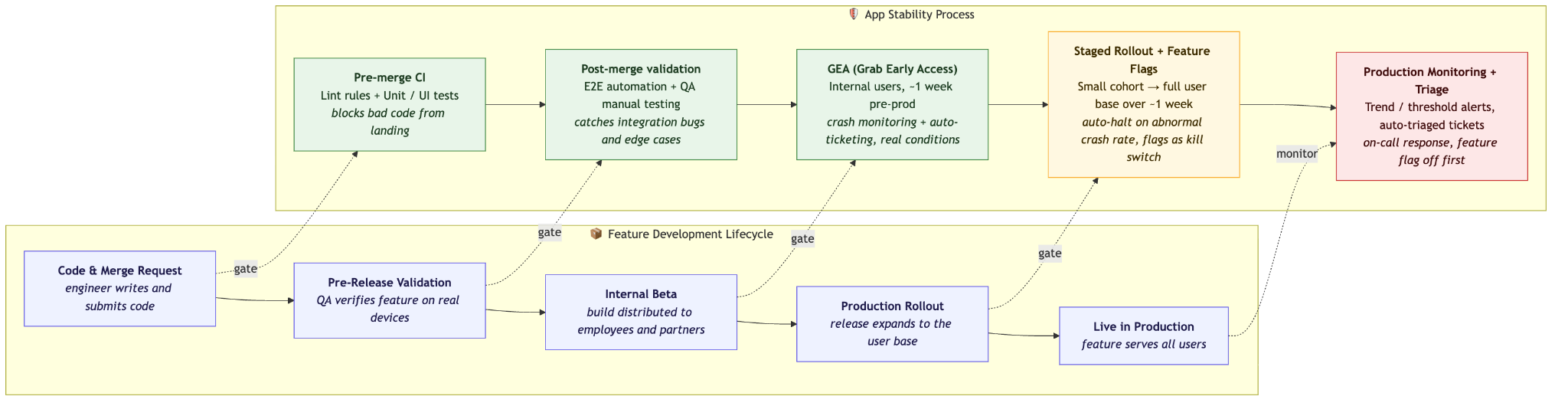
The colors mark the three phases on the stability side: prevention (pre-merge through pre-prod), the release gate (staged rollout and feature flags), and response (post-release).
Prevention: Our primary line of defense
Lint checks: Stopping crashes at the code level
Lint is the cheapest layer we have: static analysis that flags unsafe patterns, application programming interface (API) misuse, and likely crashes before the code ever runs. We use Android Lint on Android and SwiftLint on iOS. Both run in continuous integration (CI) on every merge request, and high-severity findings are merge blockers. Pre-existing issues never block a merge request: on Android, a lint baseline records them, and on iOS, SwiftLint reports only on the lines a merge request changes. Either way, a merge request fails only on the findings it introduces.
Our rules come from three sources:
- Platform rules. Built-in checks cover well-known dangerous patterns, such as incorrect API usage and threading mistakes, and form the foundation for every build.
- Community rules. Open-source rule sets cover third-party libraries and patterns the built-in checks miss. We adopt the ones relevant to our stack.
- Custom rules. Both Android Lint and SwiftLint support custom rules, and we have built our own on both platforms. When a post-mortem or crash investigation traces a production crash to a specific code pattern, we write a rule that blocks that pattern from coming back.
Custom rules matter more as AI-assisted coding grows. An assistant can write code that looks right in general without knowing which patterns have crashed our app before. Custom rules turn those lessons into checks that apply equally to hand-written and AI-generated code.
Lint routinely blocks merge requests carrying Fatal issues: the kind that typically crash the app immediately or stop it from running.
Testing strategy: Multiple layers of confidence
Lint catches unsafe patterns statically, but it cannot run the code. Tests are where we catch crashes and regressions that only appear at runtime. No single test type covers everything, so we apply multiple complementary layers:
| Layer | Focus |
|---|---|
| Unit tests | Business logic correctness at the function and class level |
| User interface (UI) component tests | Rendering and interaction behavior of individual UI components |
| End-to-end (E2E) automation tests | Integrity of critical user journeys |
| Quality assurance (QA) manual testing | Real-device exploratory testing for new features and significant code changes |
Each layer targets a different class of crash risk. Unit tests block logic errors before they merge. UI component tests catch crashes tied to rendering or state mismatches; like unit tests, they run pre-merge on every merge request, so a rendering regression is blocked before it lands. E2E automation covers the flows with the highest business impact and runs on a per-team schedule and on every release train. QA manual testing focuses on new features and significant code changes, plus a full regression pass on every release, catching the edge cases that automation misses on real devices.
Grab Early Access (GEA): A one-week pre-production gate
Even with strong lint rules and test coverage, some crashes only surface under real-world conditions. GEA is an early build app by Grab. GEA builds are actively monitored for crashes, and any new crash surfaced during the GEA window automatically creates a ticket assigned to the responsible team. Issues reported by internal users, including functional defects and feature breakage, are ticketed the same way. Teams are required to resolve all blocking GEA issues before the release proceeds to production. GEA’s user base is large enough to expose real-world edge cases that automated tests miss, but small enough that issues are contained before reaching production users. GEA is a mandatory quality gate on every release cycle.
A crash that only a handful of internal users see in GEA would, at production scale, translate into a substantial spike in the crash rate, extra support load, and potentially a hotfix. Catching these crashes before they ever reach production users makes GEA one of our most important stability gates.
The impact adds up. Across both platforms, GEA catches new crashes every month, and each is fixed before the release reaches production. Each of them could otherwise have reached production users, including the long tail of users who do not auto-update and would have kept hitting them for months.
The release gate: Staged rollout and feature flags
Prevention keeps crashes out of the build. But the moment a release enters production, it meets something neither lint rules nor GEA can fully replicate: the full diversity of the real world, with thousands of device models, operating system (OS) versions, carrier configurations, and usage patterns that no internal test environment can mirror. So we treat the release boundary as its own critical checkpoint, a release gate between a validated build and full user exposure. Two mechanisms operate at this gate: staged rollout monitoring to limit the blast radius of the release itself, and feature flags to decouple feature activation from deployment.
Staged rollout monitoring
We do not ship to all users at once. Every release follows a staged rollout over the course of a week, starting with a small percentage of users and expanding in steps to the full user base. Each increment gives the monitoring system time to accumulate meaningful signal before the next expansion. During this window, we run a dedicated monitor that tracks the crash rate of the new version in isolation, separately from the baseline of all active versions. The separation matters: a regression in the new release can be masked in aggregate metrics if the older, stable versions dominate the user base.
If the new release shows an abnormal crash rate at any point during rollout, an automated system pauses the release before it expands further. The rollout does not resume until the responsible team has reviewed the issue and explicitly approved continuation. The pause gives us a hard stopping point: a regression introduced by the new release is contained to the fraction of users who received it, instead of compounding across the full install base.
In recent months, several Android rollouts were paused for on-call review. Most resumed after investigation: either the signal turned out to be noise, or the crash sat behind a feature flag that could be turned off without a new build. A small number stayed halted at the first stage until a hotfix shipped. We tune the monitor to be sensitive on purpose: a paused rollout takes an engineer a few hours to fix, while a missed regression can cost weeks. In one of the halted cases, only a small number of users hit the new crash before the halt, and the rest of the user base never saw it. Without the automated halt, the rollout would have kept expanding on schedule, taking the crash to the full user base.
Feature flags: Controlled activation with an instant kill switch
Even when a release ships cleanly, the features inside it are gated independently. All significant new features ship behind feature flags, decoupling deployment from activation. Flags let us roll out a feature gradually, monitor crash rates at each increment, and, critically, disable a feature instantly if its crash rate exceeds a defined threshold, without waiting for the next release cycle. For a team shipping weekly, the kill switch is what makes fast iteration safe, and it is also our first lever when something does reach production.
Response: When prevention falls short
No prevention layer is perfect. Crashes can still reach production: a misconfigured remote flag opens an unexpected code path, an OS update from a device manufacturer changes system behavior in ways no test environment can predict, or a bug slips past GEA and the rollout monitor because it only triggers under a specific combination of device state and user action. When that happens, the goal shifts from prevention to containment. For these scenarios, speed of detection, stopping the bleeding, and accuracy of diagnosis become the priority.
Real-time monitoring and on-call response
We maintain real-time crash rate monitoring across all active versions, with two complementary signals that can trigger an on-call alert:
- Hard threshold breach. The crash rate of an active version crosses an absolute limit we define as unacceptable.
- Abnormal trend. The crash rate spikes sharply relative to its own recent baseline, even if it has not yet crossed the absolute threshold.
We watch both because they catch different failure modes. A hard threshold catches slow drift: if the crash rate creeps up a little with each release, every step looks normal against its recent baseline and the trend alert never fires, yet over a year the rate can quietly increase. An abnormal trend catches the opposite case: a sudden regression, early, before it grows large enough to breach the threshold.
When either signal fires, an on-call engineer is immediately notified. The engineer begins by reviewing Firebase Crashlytics reports to identify which crash issues are driving the anomaly, then loops in the team responsible for the affected area. From there, the response follows a three-step decision framework, ordered from cheapest to most expensive:
- Disable the responsible feature flag. If the crash is tied to a feature behind a flag, turning the flag off stops new users from hitting the issue immediately, with no new build required. Turning off a flag is by far the fastest mitigation we have.
- Apply a server-side fix. If no flag covers the affected code path, the team looks for any server-side lever that can contain the impact: updating an API response, changing a config value, throttling a backend dependency. Any change that takes effect without shipping a new app build is preferred over one that does.
- Ship a hotfix. If neither of the above is available, the team evaluates whether the crash warrants an out-of-cycle hotfix release, using defined criteria: business criticality of the affected flow, crash severity, user impact, and time to the next scheduled release. After the hotfix is delivered, a post-mortem is required. The goal is not just to document what went wrong, but to identify concrete action items that close the gap in our prevention layer, such as adding a lint rule to block the same pattern, wrapping a similar feature behind a flag, or improving test coverage for the affected code path. Every hotfix should make the next one less likely.
Automated crash triage
Automated ticket creation in GEA and production is not a collection of separate tools; it is one triage pipeline that follows a release from GEA into production. In production, running in parallel with real-time monitoring, it creates a production issue ticket for crashes that cross a minimum threshold. We assess crashes by type, user impact, and whether they’re actionable. Tickets are created for issues that meaningfully affect users; low-volume, device-specific crashes that we can’t address are monitored but don’t receive tickets. This keeps the team focused on the problems users are most likely to feel.
For crashes that do qualify, the ticket is routed to the owning team with a service-level agreement (SLA) tied to severity: Urgent, High, Medium, or Low. The initial priority is set automatically based on crash rate and user impact, but teams can re-evaluate and adjust the priority based on the business criticality of the affected feature.
Feature flag rollout history: Diagnosing crash spikes
Some of the hardest on-call moments start the same way: the app suddenly begins crashing, alerts fire, and there is no obvious reason why. Nothing shipped that day, and in the worst cases the crash arrives without a usable stack trace to point anywhere. With many product teams working on the same app simultaneously, the culprit is often not new code in the latest release; it is a feature flag quietly rolled out to a wider user segment in the background. Finding that flag by asking around does not scale: without a central view, an on-call engineer can spend hours before the responsible rollout turns up.
So we maintain a feature flag rollout history: a dashboard that correlates flag activation events with crash rate changes over time. Instead of polling every team, the on-call engineer gets an immediate view of whether any flag rollout aligns with the onset of the spike, turning a slow manual search into a quick read of a timeline.
Deep observability: Enriched diagnostics for hard-to-debug crashes
Firebase Crashlytics is our primary crash monitoring tool, but some crashes resist easy diagnosis: crashes with unusable stack traces, native crashes from third-party libraries without debug symbols, or issues that only manifest on specific device configurations. Without a clear stack trace, there is no obvious starting point for investigation.
We handle these cases in two ways.
First, we use Crashlytics’ built-in export to BigQuery, so we own a copy of the crash data. The data is pseudonymized and handled under Grab’s data protection policies. That copy gives us two things Crashlytics alone cannot:
- Query the data when needed: full Structured Query Language (SQL) analysis across device attributes, app versions, and session metadata, surfacing patterns invisible in individual crash reports.
- Build internal dashboards that serve app stability investigations, broken down by crash category, device tier, or release version.
Second, we enrich every crash session with custom metadata attached directly to Crashlytics. Among the most useful attributes we track:
- Last visited screen: the last screen the user was on before the crash occurred (for example, the last Activity and Fragment on Android), helping reconstruct the navigation path that led to the failure.
- Install source: whether the app was installed from Google Play or a third-party store (Android only). Some third-party stores distribute unofficial copies of the app, and more than once we have traced a crash back to a corrupted copy served by one of them. Knowing the install source lets us recognize these failures as environmental, instead of chasing them as code defects.
- Session history: from the session data, we can reconstruct the sequence of screens and actions leading up to the crash, which is often the key to a crash investigation.
We attach many other custom attributes, but these three have proven the most useful in hard investigations. Together with structured logs and breadcrumbs, they give us a trail of events leading up to the crash, often the only meaningful signal when the stack trace alone is not enough.
Crashes we control, not eliminate
Different crashes call for different responses. Some are fixed in our code, while others, such as rare native crashes in operating system (OS) code, out-of-memory errors on devices near their limits, or failures from unofficial and sideloaded installs, are better handled through monitoring and containment.
We keep these categories at an acceptable baseline and monitor them on dedicated dashboards, separate from actionable issues. If any of them starts trending up instead of sitting flat, that spike triggers the same triage process as any other anomaly.
Conclusion
Sustaining stability across a codebase of millions of lines on Android alone, with many engineers shipping a release every week and AI assistance accelerating the rate of code change, is not the work of any single tool or team. It is the cumulative effect of a layered defense: lint rules and tests blocking bad code at the merge gate, QA and GEA catching what slips through, staged rollout limiting the blast radius of what reaches production, and on-call response combined with automated triage closing the loop on what production reveals.
The principle behind every layer is the same: shift left. A crash caught earlier is cheaper, smaller in impact, and less disruptive to fix. As the volume of code shipped per release continues to grow, the layered defense matters more, not less: the cost of a crash that reaches production is unchanged, but the number of opportunities to introduce one is rising. AI is speeding up how fast code is written; the layered defense is what makes that speed safe. Stability is not about having zero open problems; it is about knowing which problems you own and which ones you are watching.
Join us
Grab is a leading superapp in Southeast Asia, operating across the deliveries, mobility, and digital financial services sectors. Serving over 900 cities in eight Southeast Asian countries: Cambodia, Indonesia, Malaysia, Myanmar, the Philippines, Singapore, Thailand, and Vietnam. Grab enables millions of people every day to order food or groceries, send packages, hail a ride or taxi, pay for online purchases or access services such as lending and insurance, all through a single app. We operate supermarkets in Malaysia under Jaya Grocer and Everrise, which enables us to bring the convenience of on-demand grocery delivery to more consumers in the country. As part of our financial services offerings, we also provide digital banking services through GXS Bank in Singapore and GXBank in Malaysia. Grab was founded in 2012 with the mission to drive Southeast Asia forward by creating economic empowerment for everyone. Grab strives to serve a triple bottom line. We aim to simultaneously deliver financial performance for our shareholders and have a positive social impact, which includes economic empowerment for millions of people in the region, while mitigating our environmental footprint.
Powered by technology and driven by heart, our mission is to drive Southeast Asia forward by creating economic empowerment for everyone. If this mission speaks to you, join our team today!