All posts by Drive Stats Team

Backblaze Drive Stats for Q3 2025

Post Syndicated from Drive Stats Team original https://www.backblaze.com/blog/backblaze-drive-stats-for-q3-2025/

An illustration of chart bars with the words Backblaze S3 2025 Drive Stats overlaid

Every quarter, Drive Stats gives us the numbers. This quarter, it gave us a crisis of meaning. What does it really mean for a hard drive to fail? Is it the moment the lights go out, or the moment we decide they have? Philosophers might call that an ontological gray area. We just call it Q3.

As of June 30, 2025, we had 332,915 drives under management. Of that total, there were 3,970 boot drives and 328,348 data drives. Let’s dig into our stats, then talk about the meaning of failure.

This quarter, we have more to talk about (Stats-wise)

Drive Stats was the beginning. Want to see more of the full picture? Check out the Stats Lab webinar, bringing together content from all of our Stats articles. We’re going to chat about all things Backblaze (and beyond)—by the numbers.

Save My Seat

Drive Stats: The digest version

Q3 2025 hard drive failure rates

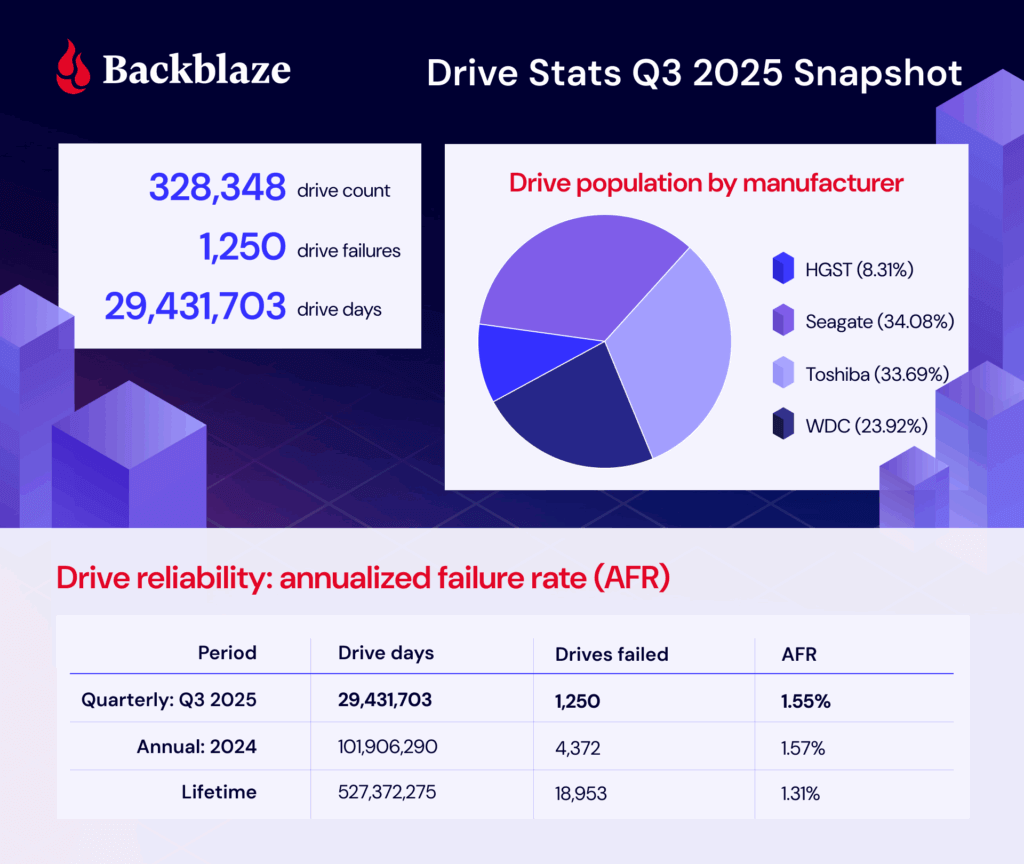
During Q3 2025, we were tracking 328,348 storage drives. Here are the numbers: 

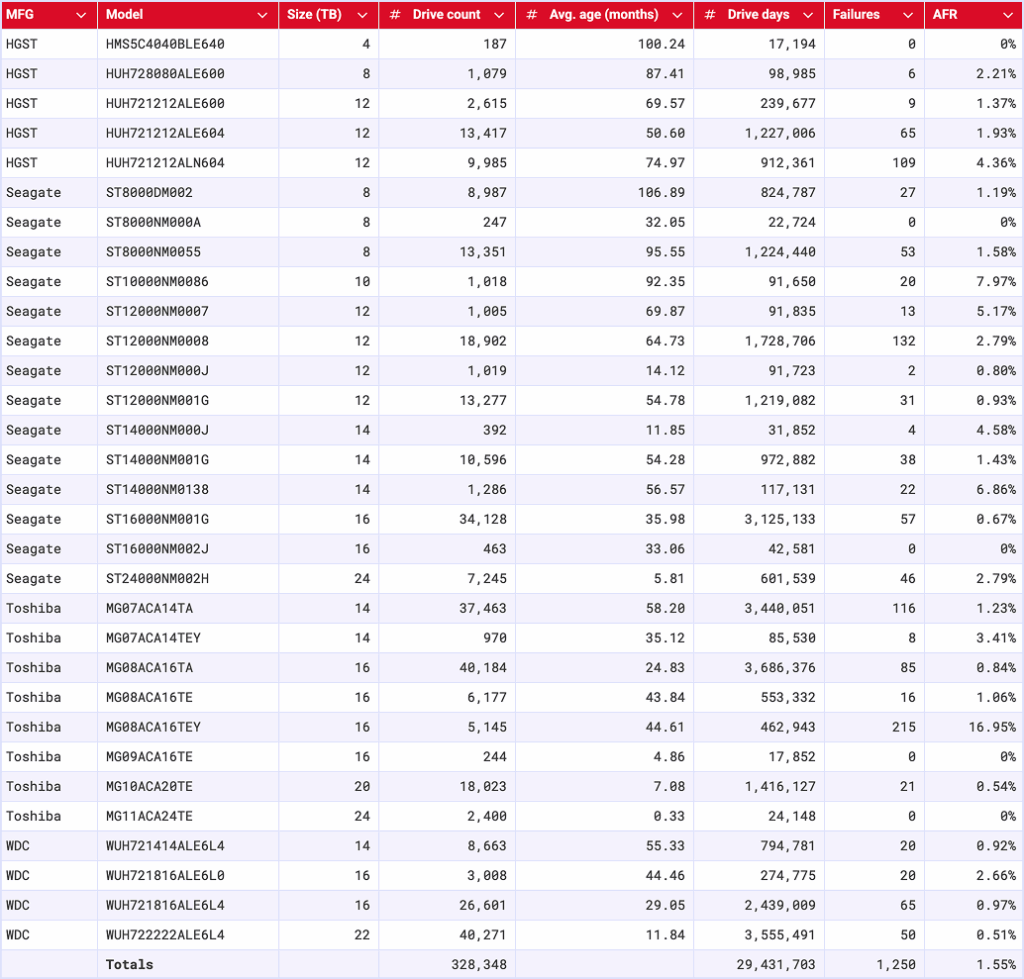
Backblaze Hard Drive Failure Rates for Q3 2025

Reporting period July 1, 2025–September 30, 2025 inclusive
Drive models with drive count > 100 as of July 1, 2025 and drive days > 10,000 in Q3 2025

Notes and observations

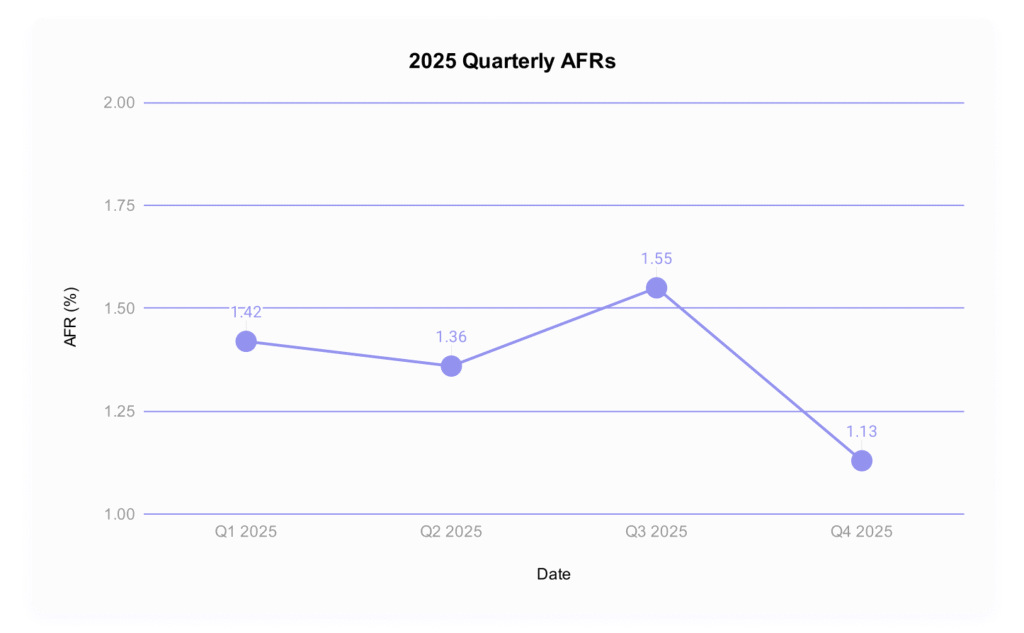
  • The failure rate has increased: The failure rate has changed, and by quite a bit. As a reminder, last quarter’s AFR was 1.36% compared with this quarter’s 1.55%. (Interestingly, the 2024 yearly AFR was 1.57%.) 
  • That new drive energy: Say hello to the 24TB Toshiba MG11ACA24TE, joining the drive pool with 2,400 drives and 24,148 drive days. That means that we’ve hit the thresholds for the quarterly stats, but not the lifetime. 
  • The zero failure club: It was a big month for the zero failure club, with four drives making the cut:
    • Seagate HMS5C4040BLE640 (4TB)
    • Seagate ST8000NM000A (8TB)
    • Toshiba MG09ACA16TE (16TB)
    • Toshiba MG11ACA24TE (24TB)—and yes, that’s the new drive.

For those of you tracking the stats closely, you’ll notice that the Seagate ST8000NM000A (8TB) is a frequent flier on this list. The last time it had a failure was in Q3 2024—and it was just a single failure for the whole quarter!

  • The highest AFRs were really high: The high end was so high that this month, it inspired us to run an outlier analysis using the standard quartile analysis (Tukey method). Based on that information, any drive with a quarterly AFR higher than 5.88% is an outlier, and there are three:
    • Seagate ST10000NM0086 (10TB): 7.97%
    • Seagate ST14000NM0138 (14TB): 6.86%
    • Toshiba MG08ACA16TEY (16TB): 16.95%

What’s going on there? Great question, and we’ll get into that after the lifetime failure rates. 

Lifetime hard drive failure rates

To be considered for the lifetime review, a drive model was required to have 500 or more drives as of the end of Q2 2025 and have over 100,000 accumulated drive days during their lifetime. When we removed those drive models which did not meet the lifetime criteria, we had drives grouped into 27 models remaining for analysis as shown in the table below.

Backblaze Hard Drive Failure Rates for Q2 2025

Reporting period ending September 30, 2025
Drive models > 500 drives and > 100,000 lifetime drive days

Notes and observations

  • That lifetime AFR is pretty consistent, isn’t it? The lifetime AFR is 1.31%. Last quarter we reported that it was 1.30%, and the quarter before that, it was 1.31%. 
  • The 4TB average age hasn’t shifted: As we’ve reported on previously, the 4TB drives are being decommissioned over time. Now, we’re down to just a handful left—just 11 of the ALE models and 187 of the BLE models. But, because their lifetime populations are so comparatively large, the additional drive days aren’t enough to move the needle on the average age in months. So, no ghosts in the machine here, and decommissioning is proceeding as planned. 
  • Steady uptick in higher capacity drives: Of the 20TB+ drives that meet our lifetime data parameters, we’ve added 7,936 since last quarter. And, don’t forget that our newest entrée to the cohort, the Toshiba MG11ACA24TE (24TB), hasn’t made its way to this table yet—that adds an additional 2,400 drive models. All together, the 20TB+ club represents 67,939 drives, or about 21% of the drive pool.

Defining a failure—from a technical perspective

A question that’s come up a few times when we’re hosting a webinar or chatting in the comments section is how we define a failure. While it may seem intuitive, it’s actually something of a meaty conundrum, and something we haven’t addressed since the early days of this series. Tracking down the answer to this question touches internal drive fleet monitoring tools (via SMART stats), the actual Drive Stats collection program, and our data engineering layer. I’ll dig into each of these in detail, then we’ll take a look at the outliers for this quarter.

SMART stats reporting 

We use Smartmontools to collect the SMART attributes of drives, and another monitoring tool called drive sentinel to flag read/write errors that exceed a certain threshold as well as some other anomalies.  

The main indicator we use for determining if a drive should be replaced is when it responds to reads with uncorrectable medium errors. When a drive reads the data from the disk, but the data fails its integrity check, the drive will try to reconstruct the data using internal error correction codes. If it is unable to reconstruct the data, it notifies the host by reporting it as an uncorrectable error and marks that part of the disk as pending reallocation, which shows up in SMART under an attribute like Current_Pending_Sector.

On Storage Pods that control drives through SATA links, the drive sentinel will count the number of these uncorrectable errors a drive reports and if it exceeds a threshold, access to the drive will be removed. This is important in the classic Backblaze Storage Pods where five drives share a single SATA link and errors by one drive will affect all drives on the link.

On Dell and SMCI pods that use a SAS topology to connect drives, drive sentinel doesn’t remove access to drives because the errors are reported differently; but, that’s also not as critical since SAS minimizes the impact that a problem disk can have on others.

The Drive Stats program 

We’ve talked about the custom program we use to collect Drive Stats in the past, and here’s a quick recap: 

The podstats generator runs on every Storage Pod, what we call any host that holds customer data, every few minutes. It’s a C++ program that collects SMART stats and a few other attributes, then converts them into an .xml file (“podstats”). Those are then pushed to a central host in each datacenter and bundled. Once the data leaves these central hosts, it has entered the domain of what we will call Drive Stats. 

For this program, the logic is relatively simple: A failure in Drive Stats occurs when a drive vanishes out of the reporting population. It is considered “failed” until it shows up again. Drives are tracked by serial number and we report daily logs on a per-drive basis, so truly, we can get pretty granular here. 

The data engineering layer

To recap, we’ve collected our SMART stats and compiled them with the podstats program. Now we’ve got all the information, and data intelligence needs to add the context. A drive may go offline for a day or so (not return a response to those tools that collect daily logs of SMART stats), but it could be something as simple as a loose cable. So, time-wise, if a drive reappears after one day or 30, at what point in that period of time do we classify it as an official failure?

Previously, we manually cross-referenced data center work tickets, but these days, we’ve automated that process. On the backend, it’s a SQL query, but in human speak, this is what it comes down to:

  1. If a drive logs data on the last day of the selection period (which in this case is a quarter) then it has not failed.
  2. There are three human-curated tables that the query cross references. If a drive serial number appears on one of them, it tells us whether there’s a failure or not (depending on the table’s function). 
  3. If the drive serial number is the primary serial number in a drive replacement Jira ticket then it has failed. (Jira is where we track our data center work tickets.)
  4. If the drive serial number is the target serial number in a clone Jira ticket or a (temp) replacement ticket, then it has not failed.

Basically, when we go to write the Drive Stats reports at the end of the quarter, if a drive has either appeared in one of our various work trackers or hasn’t re-entered the population, then it’s considered failed. 

In rare instances, that can mean that we have so-called “cosmetic” failures when we have some work we’re doing on a drive model that lasts more than that quarterly collection period. And, spoiler, we have one of those instances that showed up in the data this month—our outlier Toshiba drive with the 16.9% failure rate. We’ll dig in in just a minute; but first, some context. 

Connecting drive failure to overall picture of the drive pool 

As we mentioned above, certain drives in the pool had such high swings in AFR that we ended up running an outlier analysis using the quartile method. (It’s also worth mentioning that a cluster analysis could potentially be a better fit, but we can save that for another day.) Based on that analysis, anything that has above a 5.88% failure rate is an outlier. 

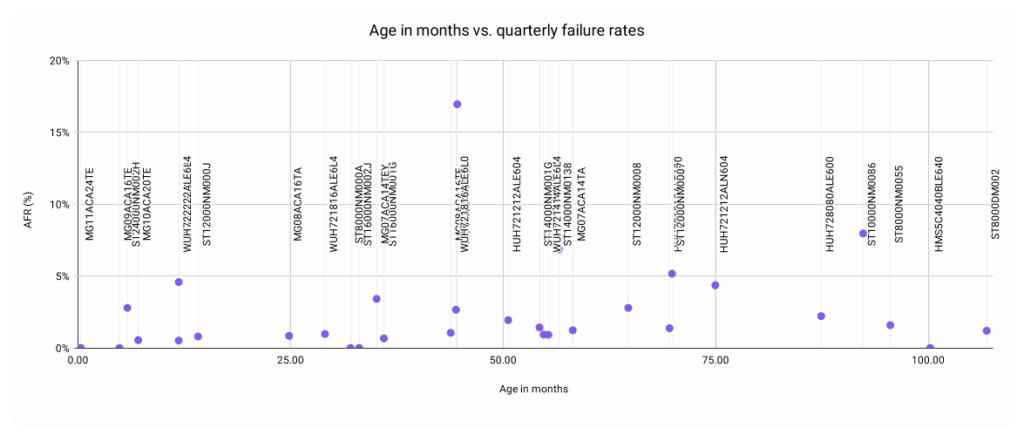
The primary motivation was inspired by an attempt to visualize the relationship between the age in months of a drive versus this quarter’s AFRs. 

And yes, we’re fully aware that that’s a… super unreadable scatter plot. Removing the labels, this is a bit better: 

We’re interested, really, in the shape of the relationship. If we posit that the older drives get, the higher their failure rates, you’d expect a larger concentration in the top right quadrant. But, our data follows a much more interesting pattern than that, with most of our data points concentrated in the lowest regions of the graph regardless of age—something you’d expect from a set of data that reflects a bunch of smart folks actively working towards the goal of a healthy drive population. And yet, we have some data points that break the mold.

As is pretty intuitive to my business intelligence folks in the audience, the process of identifying outliers is actionable data as well. Just like all press is good press; in our world, more data is more better. So, let’s take a closer look at those outliers. As a reminder, that’s these three drive models: 

  • Seagate ST10000NM0086 (10TB): 7.97%
  • Seagate ST14000NM0138 (14TB): 6.86%
  • Toshiba MG08ACA16TEY (16TB): 16.95%

Seagate ST10000NM0086 (10TB)

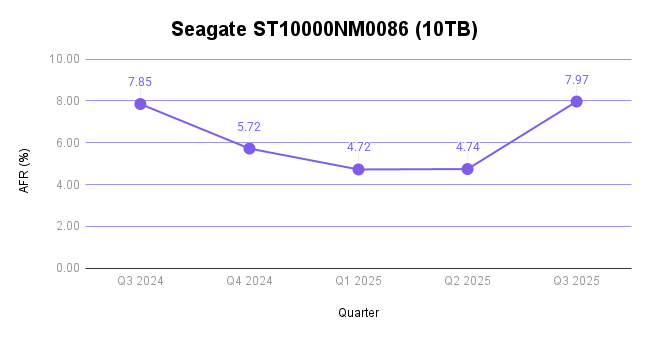
This drive has some pretty explainable factors for the high failure rate. It’s well over seven years old (92.35 months). And, since it only has 1,018 drive models in operation, single failures hold a lot of weight compared with the average drive count per model—which comes in at 10,952 if you use the mean of this quarterly data and 6,177 if you use the median. 

And, you can see that borne out in the trend in the last year of data: 

Seagate ST14000NM0138 (14TB)

This drive is nearing five years in age (56.57 months) and, again, has a lower drive count at 1,286. More importantly, this particular drive model has had historically high failure rates. In parallel with above, here’s the last year of quarterly failure rates:  

Toshiba MG08ACA16TEY (16TB)

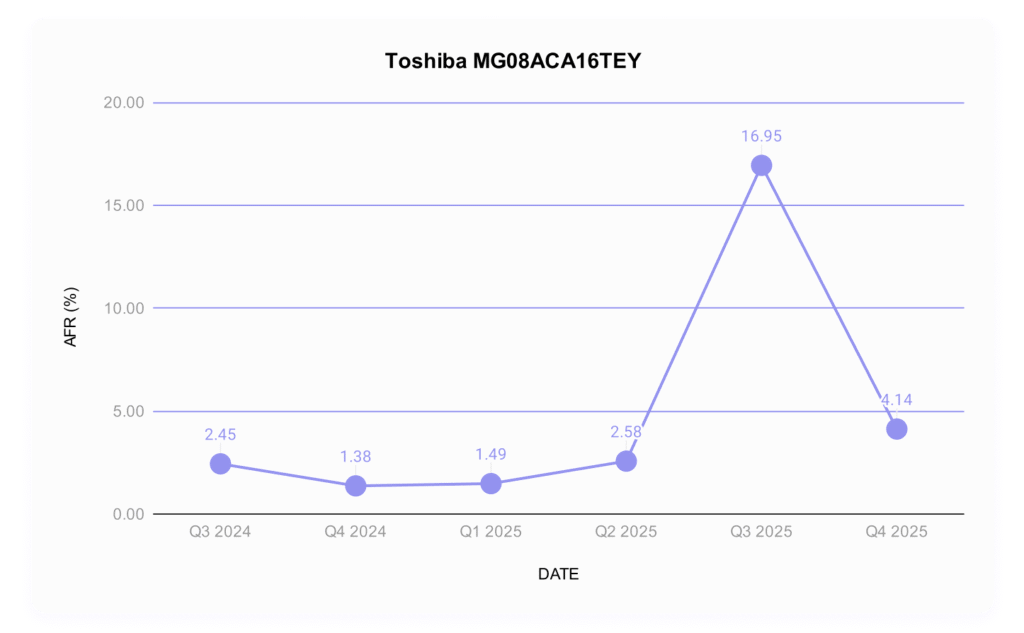
Finally, our Toshiba model is the most interesting of all. It’s less than four years old (44.61 months), and has 5,145 drives in the pool. And, this quarter is clearly a change from its normal, decent, AFRs. 

When we see deviations like this one, it’s usually an indication that there’s something afoot. 

Never fear, Drive Stats fans; this was a known quantity before we went on this journey. This past quarter, working with Toshiba, we deployed some firmware updates they provided to optimize performance on these drives. Because we needed to pull drives to achieve this in some cases, we had an abnormal number of “failed” drives in this population. 

What that means for this drive is that it’s actually not a bad drive model; and, given the ways we and Toshiba have worked together on a fix, we should see failure rates normalizing in the near future. And, this also goes back to our conversation of defining a failure—in this case, while the drives “failed,” the failure wasn’t mechanical and was based on something that we’ll be able to fix without replacing the drives. In short, don’t sweat the spike and pay attention to the long arc of performance on this population. We expect to see those drives happy and spinning for years to come (and with better performance, too). 

The Hard Drive dataset (and beyond) 

Thank you, as always, for making it through ~2,500 or so words to examine the fun side of data. Here’s our standard fine print: 

The complete dataset used to create the tables and charts in this report is available on our Hard Drive Test Data page. You can download and use this data for free for your own purpose. All we ask are three things: 

  1. You cite Backblaze as the source if you use the data; 
  2. You accept that you are solely responsible for how you use the data, and; 
  3. You do not sell this data itself to anyone; it is free.

If you’re a new Drive Stats fan, consider signing up for the newsletter. If you’re not ready for that kind of commitment, sound off in the comments section below or reach out directly to us to let us know what you’re working on. Happy investigating!

The post Backblaze Drive Stats for Q3 2025 appeared first on Backblaze Blog | Cloud Storage & Cloud Backup

Are Hard Drives Getting Better? Let’s Revisit the Bathtub Curve

Post Syndicated from Drive Stats Team original https://www.backblaze.com/blog/are-hard-drives-getting-better-lets-revisit-the-bathtub-curve/

A decorative image showing stylized hard drives.

If you’ve hung around Backblaze for a while (and especially if you’re a Drive Stats fan), you may have heard us talking about the bathtub curve. In Drive Failure Over Time: The Bathtub Curve Is Leaking, we challenged one of reliability engineering’s oldest ideas—the notion that drive failures trace a predictable U-shaped curve over time. 

But, the data didn’t agree. Our fleet showed dips, spikes, and plateaus that refused to behave. Now, after 13 years of continuous data, the picture is clearer—and stranger. 

The bathtub curve isn’t just leaking, and the shape of reliability might look more like an ankle-high wall at the entrance to a walk-in shower. The neat story of early failures, calm middle age, and gentle decline no longer fits the world our drives inhabit. Drives are getting better—or, more precisely, the Drive Stats dataset says that our drives are performing better in data center environments. 

So, let’s talk about what our current “bathtub curve” looks like, and how it compares to earlier generations of the analysis. 

The TL;DR: Hard drives are getting better, and lasting longer.

The intro: Let’s talk bathtub curve

If you’ve spent any time around hardware reliability, you’ve seen it: a smooth U-shaped line called the bathtub curve. It promises order in the chaos of failure—a story where devices begin life with a burst of defects, settle into steady performance, and finally wear out in predictable decline. And, this is what it looks like:

For decades, it’s been engineering shorthand for how things die. But as our dataset has grown—more than a decade of drive telemetry and millions of drive-days—the data is clear: Our real drive population is more complicated. 

What the bathtub curve looked like then

The first time we ran this analysis was in 2013, and when we updated the article in 2021, we shared this chart:

It shows the annualized failure rate (AFR) of the full drive pool over time (in years) at two different look-back points—2013 and 2021. At that time, you could already see that the bathtub curve was starting to, as the venerable Andy Klein put it, “leak.” The 2013 data looks the closest to a true bathtub curve, while the 2021 data shows fewer early failures and a lower failure rate for more years. We also see the average longevity of drives goes up by about two years before spiking into the failure zone.

Numbers can both define and obscure reality

Now, there are some very interesting factors that come into play when comparing hard drive reliability over time. For example, our usual caveats about how we use drives vs. how consumers use drives, how our workloads have changed over time, etc. More importantly, though, because we’re comparing averages, it’s easy to lose track of the context around our dataset—how many hard drives are we talking about in 2013 vs. 2021? 

When we did this analysis in 2013, Backblaze had been open for six years, but we’d only been publishing the Drive Stats dataset since 2013. So, arriving at presenting a look-back at the data (i.e., this is how many drives failed when they were between zero and one years old) was a bit of a math problem compared to our usual data reporting. We were talking about drives that entered the drive pool in 2007, and those were ones we hadn’t shared complete daily logs about, even if the drive was still in service in 2013 (which, as you can tell from the data, was unlikely). We achieved that by looking at failures vs. logged on hours, and when we re-created the analysis recently, we used this SQL query: 

CREATE VIEW introduction_dates AS
-- Calculate the introduction date of drives that were already in service on 2013-04-10
SELECT serial_number, date(date_add('hour', -1 * smart_9_raw, TIMESTAMP '2013-04-10 00:00:00')) AS introduced
FROM drivestats
WHERE date = DATE '2013-04-10'
UNION
-- Use the minimum date for drives that entered service after after 2013-04-10
SELECT serial_number, MIN(date) as introduced
FROM drivestats
WHERE serial_number NOT IN (
SELECT serial_number
FROM drivestats
WHERE date = DATE '2013-04-10'
)
GROUP BY serial_number;

SELECT
date_diff('day', d2.introduced, d1.date) / 91 AS age_in_quarters,
100 * 365 * (cast(SUM(d1.failure) AS DOUBLE) / COUNT(*)) AS afr
FROM drivestats AS d1
INNER JOIN introduction_dates AS d2
ON d1.serial_number = d2.serial_number
GROUP BY 1
ORDER BY 1;

Our drive pool looked a lot different in 2013 as well. Not only was it smaller (~35,000 drives and over 100PB of data were live as of September 2014), but it also was made up of “consumer” drives. While we didn’t see much of a difference between the two when we actually tested them in the environment, we did a lot of drive farming in those days, a process that included actually “shelling” the drives and removing them from their housings—which means that our drive pool had a lot more potential to get some bumps along the way. Hard drives are pretty resilient and we were careful, but it’s worth noting. 

By the time we were doing this analysis in 2021, we had a lot more data and a lot more storage drives—206,928 or so. Between 2013 and 2021, we had added capacity to our Sacramento data center; expanded our data center regions with locations in Phoenix and Amsterdam, with more on the way in 2022; we launched Backblaze B2 Cloud Storage; and, we went public

All those things are cool from a historical perspective, but the more impactful thing to pay attention to is that any time you have less data (read: a smaller number of total drives), each individual data point has more impact on the whole. In the bathtub curve, you naturally reduce the number of drives as they get older—every drive has a day one, but not every drive has a day 1,461 (or, in lay people’s terms: four years, one day). With fewer drives, more spikes. So, if you start off with more drives, your numbers are likely to be more steady—unless there’s a real problem, or you’re entering your true drive pool failure zone. 

And, since we’ve transitioned to buying more drives, and decommissioning drives in a different way—well, that all affects what the end result is. More on our drive hygiene habits later; for now, let’s get into our current data.

What the bathtub curve looks like now

Without further ado, let’s look at the failure rates in our current Backblaze drive pool:

That’s a pretty solid deviation in both age of drive failure and the high point of AFR from the last two times we’ve run the analyses. When we ran our 2025 numbers (at the close of Q2 2025), we reported on 317,230 drives. Take that as an approximate raw number given the normal drive exclusions in each Drive Stats report, but it gets you in the ballpark. 

For consistency’s sake, here’s 2013:

And here’s 2021:

What’s missing, and a bit difficult to visualize, is the scale on both the x axis (time in years) and the y axis (annualized failure rate expressed in percentage). Let’s put all three on the same chart:

Note that both the 2013 data and the 2021 data have high failure percentage peaks at some point near the end of their drive lifetimes. In 2013, it was 13.73% at about 3 years, 3 months (and 13.30% at 3 years, 9 months). In 2021, it’s 14.24%, with that peak hitting at 7 years, 9 months. 

Now, compare that with the 2025 data: Our peak is 4.25% at 10 years, 3 months (woah). Not only is that a significant improvement in drive longevity, it’s also the first time we’ve seen the peak drive failure rate at the hairy end of the drive curve. And, it’s about a third of each of the other failure peaks. 

Meanwhile, we see that the drive failure rates on the front end of the curve are also incredibly low—when a drive is between zero and one years old, we barely crack 1.30% AFR. For reference, the most recent quarterly AFR is 1.36%. 

Still, if we take a look at the trendlines, we can see that the 2021 and the 2025 data isn’t too far off, shape-wise. That is, we see a pretty even failure rate through the significant majority of the drives’ lives, then a fairly steep spike once we get into drive failure territory. 

What does that mean? Well, drives are getting better, and lasting longer. And, given that our trendlines are about the same shape from 2021 to 2025, we should likely check back in when 2029 rolls around to see if our failure peak has pushed out even further.

Hey, what about that data contextualization you did above?

Good point—there are significant things that have changed about our dataset that may be affecting our numbers. We’ve already tackled the consumer vs. enterprise drive debate, and while we don’t have updated testing on that front, there are other things about buying drives at scale that may have an effect on the data. 

For instance, because we buy drives in bulk, that means that a big chunk of drives enter our data pool at the same time. Given that we, over the years, have really only seen model-by-model variation, this means that if you get a lemon of a drive and you’ve added a lot of them, you may have a chunk of drives failing all at once. 

Also, we have a different process for decommissioning drives these days. There are lots of things that go into that strategy, but you can simplify it all to risk management and our ability to grow our storage footprint over time. From a practical perspective, that means sometimes there are drives that are still performing well that we decide to take out of service anyway—and that means they get taken out of the fleet without ever having failed. Since our analyses above are based on annualized failure rate vs. age of drive, you can see a big drop in drive population without the expected failure rate spike. 

Finally, we have different standards for new drives. Some of them just have to do with the industry at large—drives are getting bigger, and storage patterns are changing. But, compared with 2013, when a natural disaster forced us to innovate in unexpected ways, we’ve got more flexibility to consider our purchases, and to do so in a way that’s specific to our environment. 

Was the bathtub curve just wrong?

The issue isn’t that the bathtub curve is wrong—it’s that it’s incomplete. It treats time as the only dimension of reliability, ignoring workload, manufacturing variation, firmware updates, and operational churn. And, it rests on a set of assumptions:

  • Devices are identical and operate under the same conditions.
  • Failures happen independently, driven mostly by time.
  • The environment stays constant across a product’s life.

The good news: When it comes to data centers, most of these are as true as they can be in a real-world environment. Data centers environments attempt to be as consistent as possible to be able to reduce power consumption, and to be able to properly anticipate and plan data workloads. Basically, consistency = a happy data center. 

That said, conditions can’t ever be perfect. Our numbers have always and will always reflect both good planning and the unforeseen aspects of reality. Understanding whether drives are “good” or “bad” is always a conversation between what you theorize (in this case, the bathtub curve) and what happens (the Drive Stats dataset). 

What’s next?

Why does all this talk of numbers matter? Well, as we’ve expanded our drive pool over time, in some ways, we’ve increased confidence in the results we’re seeing, both on day one and day 1,461. Even if we had the exact same drives models and drive pool make up (by percentage) from 2013 that we did in 2021, having more of them would give us better results. But, now we have a greater diversity of drives and more of them. 

That doesn’t mean we’re the be-all, end-all of drive reliability, but it does give us some more footing to slice and dice the data and bring it back to you. As always, you can find the full Drive Stats dataset on our website, which means you can repeat this experiment, or use the data in any way you can imagine. Stay tuned for our quarterly reports and more articles from the Drive Stats extended universe—and feel free to sign up for the Drive Stats newsletter if you want to stay up-to-date.

The post Are Hard Drives Getting Better? Let’s Revisit the Bathtub Curve appeared first on Backblaze Blog | Cloud Storage & Cloud Backup

Backblaze Drive Stats for Q2 2025

Post Syndicated from Drive Stats Team original https://www.backblaze.com/blog/backblaze-drive-stats-for-q2-2025/

A decorative image showing vertical bars and that includes the Backblaze logo, as well as the title Backblaze Q2 2025 Drive Stats.

With hundreds of thousands of hard drives spinning 24/7, our data centers are less like peaceful white-noise oases and more like a a series of obstacle courses—if said obstacle courses were about managing over four exabytes of customer data from archival backups to streaming media to AI training datasets. Sure, they’re obstacle courses we all (and I’m including you, users of the internet) collectively create, but it’s no less of a balancing act to find the contestants (erm, hard drives) that can go the distance. 

And we, dear readers, get to watch it all. Welcome to Drive Stats: where failure is inevitable, survival is fascinating, and every quarter brings a new leaderboard.

As of June 30, 2025, we had 321,201 drives under management. Of that total, there were 3,971 boot drives and 317,230 data drives. Stay tuned as we take our standard peek into quarterly and lifetime failure rates, and do a deep dive into the 20TB+ club. 

As always, we’ll see you in the comments section. This month, you’ll also get three (count ‘em, three!) opportunities to talk to us in person as well—virtually at our Drive Stats LinkedIn Live on August 5 (today), or twice in Las Vegas at DefCon on August 7 and 8. 

Sign up for the Drive Stats LinkedIn Live

Ready to dive deeper into the data? Tune in today at 10:00 a.m. PT, to query the Drive Stats team, Stephanie Doyle and Pat Patterson. We’ll see you there!

Join the Conversation

Drive Stats by the numbers: The digest version

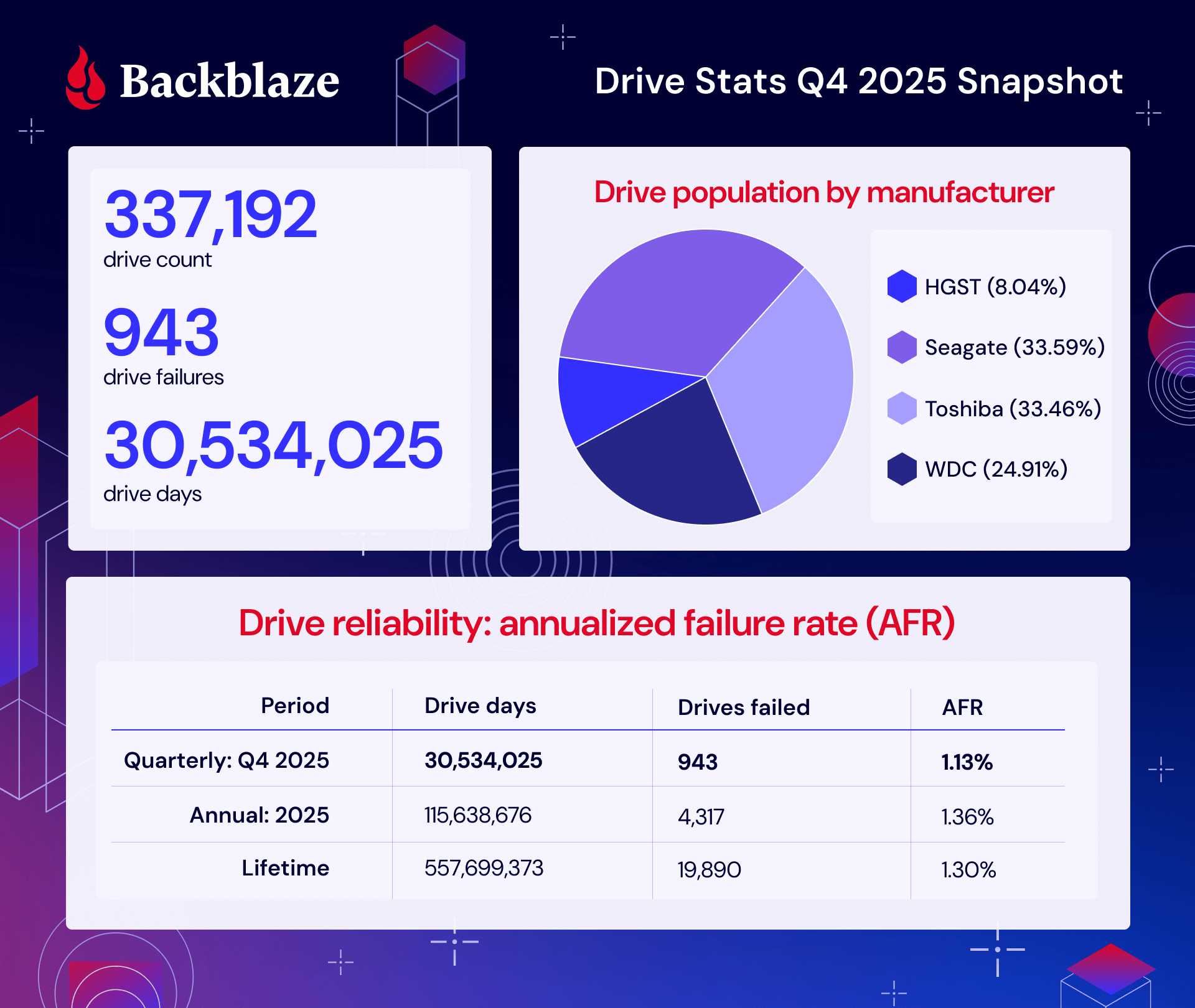
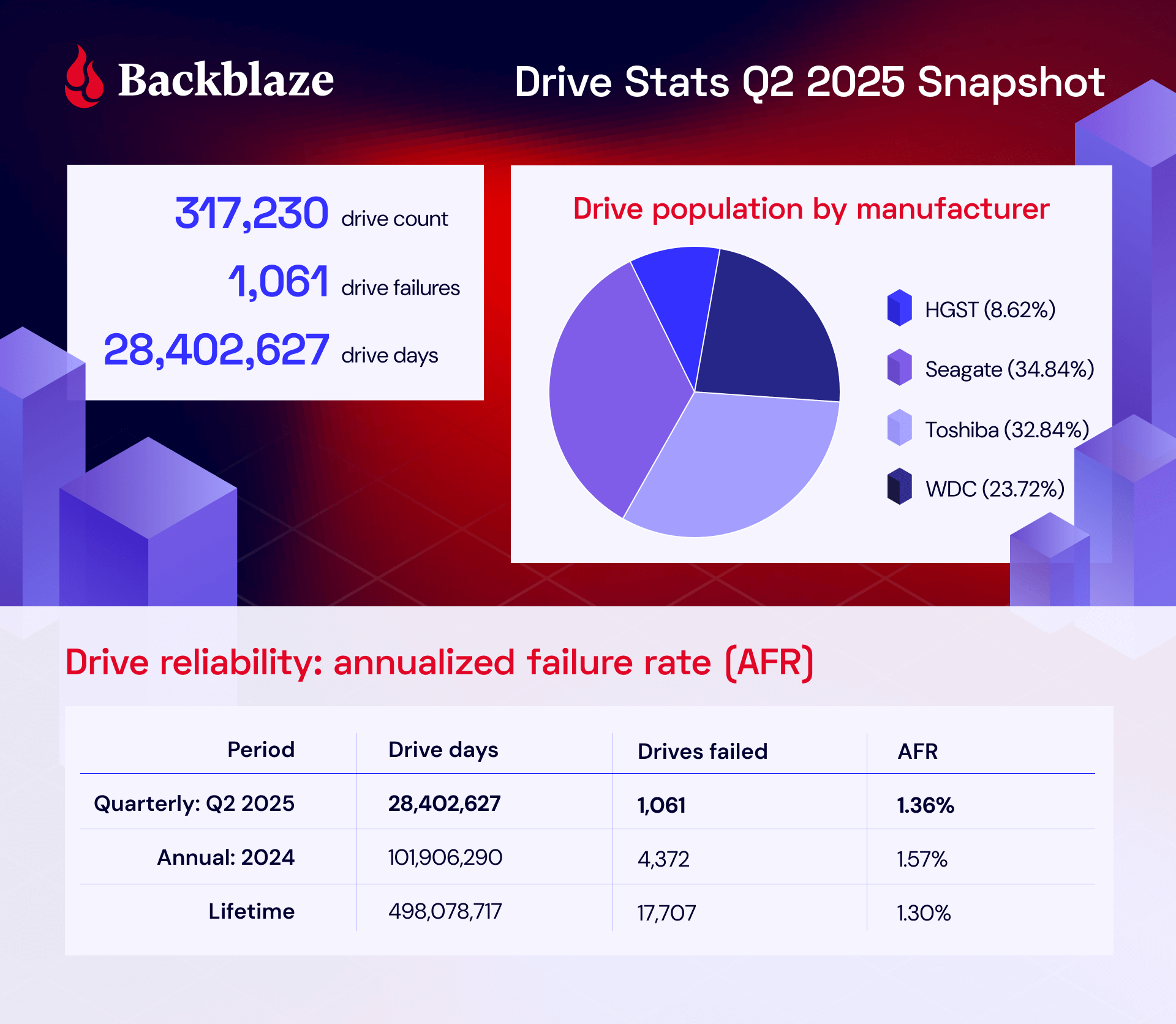
An infographic summarizing key data points in this report, including drive count, drive failures, drive days, drive population by manufacturer, and a summary of the quarterly, annual, and lifetime AFRs.

Q2 2025 hard drive failure rates

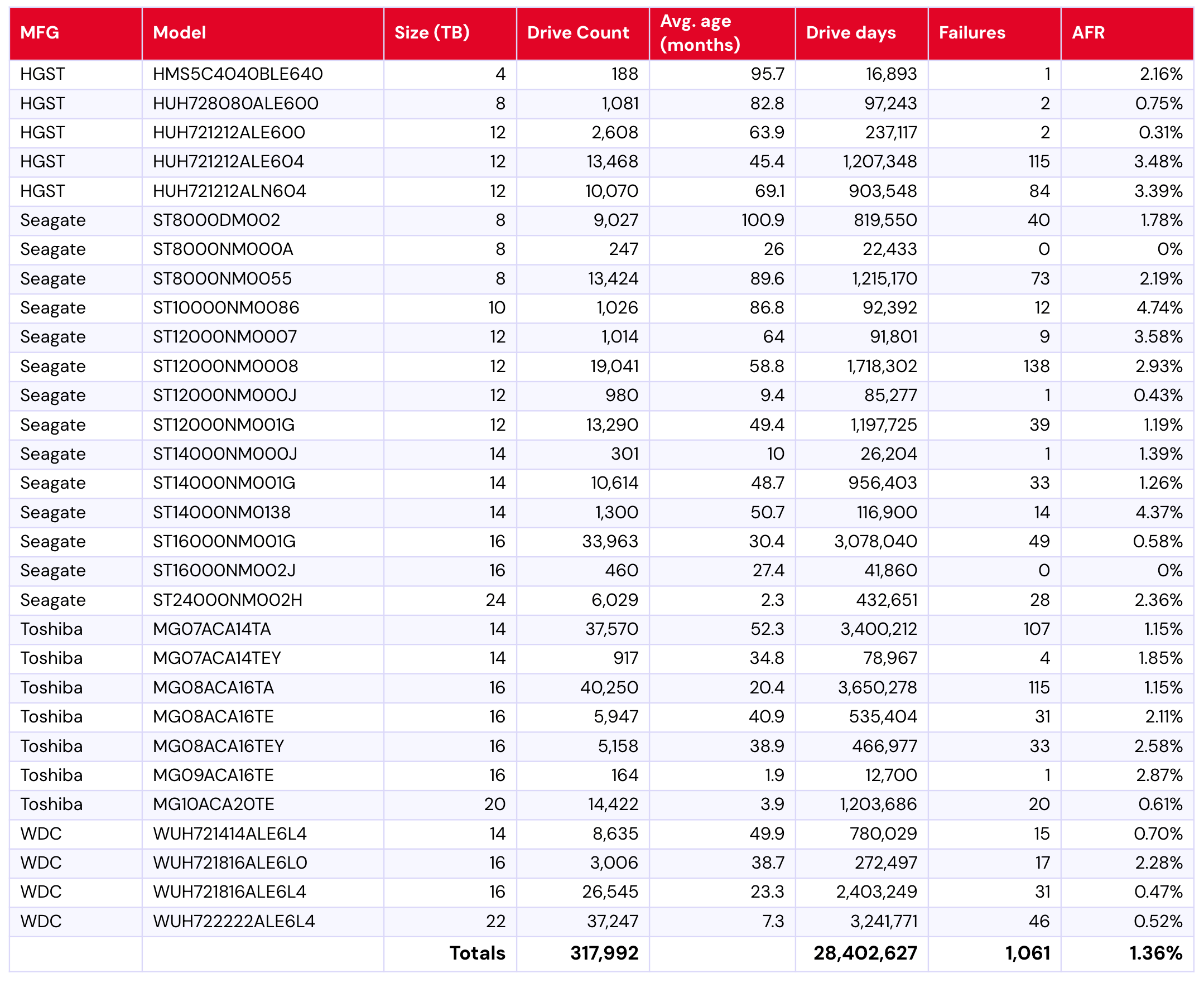
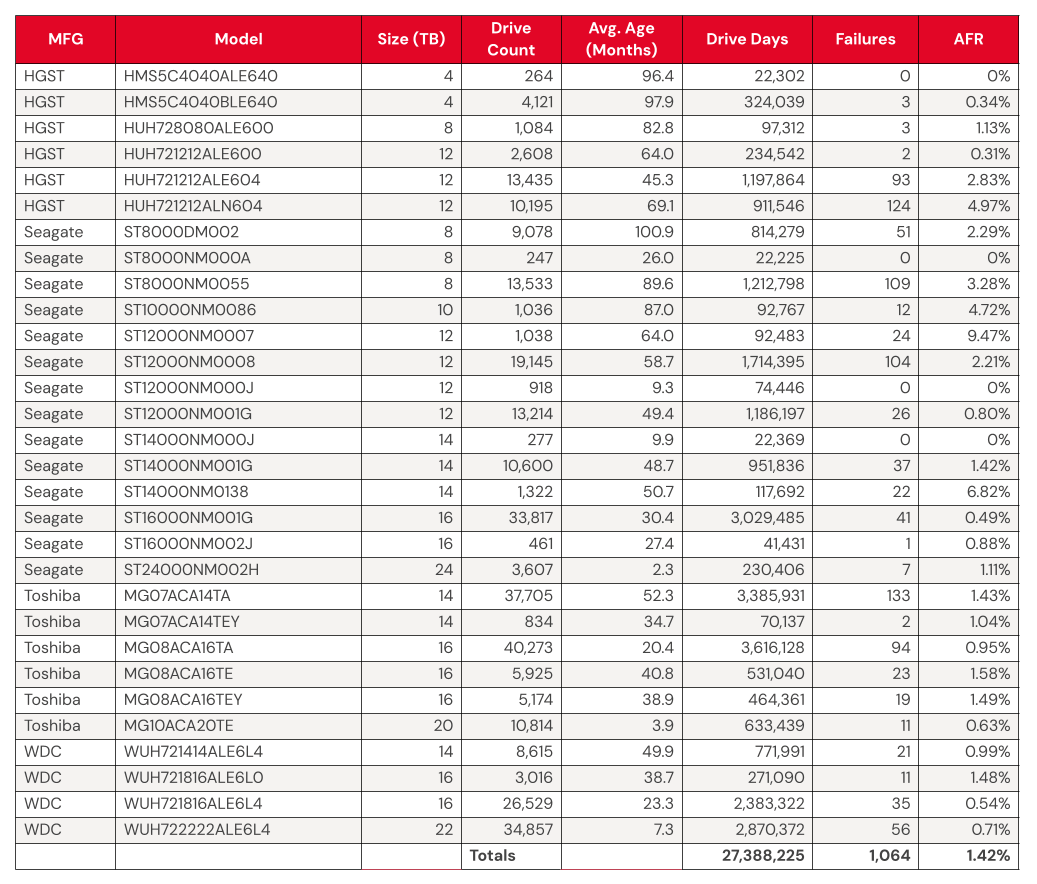
For those that are new to the Drive Stats report, it’s worth mentioning that we have certain criteria that we use to select drives for consideration each quarter. We’ll discuss those in the next section, but for now, let’s talk about the data. The table below shows the failure rates for Q2 2025.

Backblaze Hard Drive Failure Rates for Q2 2025

Reporting period April 1, 2025–June 30, 2025 inclusive
Drive models with drive count > 100 as of June 30, 2025 and drive days > 10,000 in Q2 2025

The quarterly Drive Stats table.

Notes and observations

  • The annual failure rate is lower this quarter. We had some major fluctuations last quarter. Quoting ourselves from May 2025:

The quarterly failure rate is slightly higher. The quarterly failure rate went up from 1.35% to 1.42%. As with the zero-failure club, our higher-end outlier AFRs show some of the usual suspects:

We’re now back down to 1.36%. What’s changed? 

  • Big swings in our higher-end failure rates: Well, some of the drives with higher failure rates have come down quite a bit. Notably, that includes the 12TB Seagate model ST12000NM0007, which was at a whopping 9.47% failure rate last quarter—down this quarter to only 3.58%. With its drive count holding more or less steady (1,038 in Q1 and 1,014 in Q2), that means a real change in failure rates. Note that this drive was at 8.72% in Q4 2024, so it’s worth keeping an eye on whether this is a fluke or a new pattern. Other significant drops include the 12TB HGST model HUH721212ALN604 (Q1: 4.97%; Q2: 3.39%) and the 14TB Seagate model ST14000NM0138 (Q1: 6.82%, Q2: 4.37%). 
  • One new drive model on the way in: Welcome to the party, Toshiba MG09ACA16TE (16TB).
  • Zero failures for the quarter: Rising to the top, we’ve got only two this time around:
    • Seagate ST8000NM000A (8TB)
    • Seagate ST16000NM002J (16TB) 

That 8TB Seagate is really shining, given this is its third quarter running with zero failures.

  • Bonus: One failure drives: Since we only have two 0 failures (and that just seems a little lackluster, doesn’t it?), it’s also worth mentioning the drives with only one failure this quarter: 
    • HGST HMS5C4040BLE640 (4TB)
    • Seagate ST12000NM000J (12TB) 
    • Seagate ST14000NM000J (14TB) 
    • Toshiba MG09ACA16TE (16TB)

Drive model criteria

We noted earlier we removed 495 drives from consideration when we produced the table above covering Q2 2025. There are two primary reasons we did not consider these drive models.

  • Testing. These are drives of a given model that we monitor and collect Drive Stats data on, but are not considered production drives at this time. For example, drives undergoing certification testing to determine if they are performant enough for our environment are not included in our Drive Stats calculations.
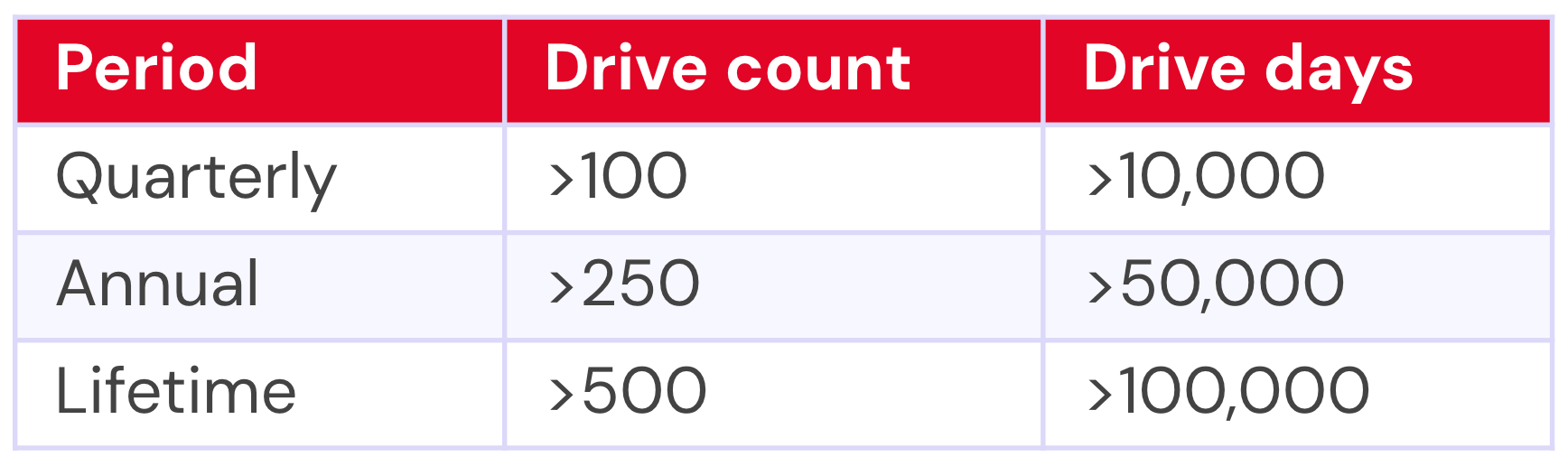
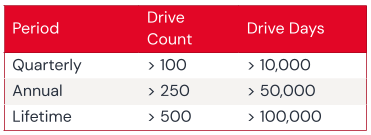
  • Insufficient data points. When we calculate the annualized failure rate for a drive model for a given period of time (quarterly, annual, or lifetime), we want to ensure we have enough data to reliably do so. Therefore we have defined criteria for a drive model to be included in the tables and charts for the specified period of time. Models that do not meet these criteria are not included in the tables and charts for the period in question.
A table that outlines the drive inclusion parameters for each type of Backblaze Drive Stats report.

Regardless of whether or not a given drive model is included in the charts and tables, all of the data for all of the drives we use is included in our Drive Stats dataset which you can download by visiting our Drive Stats page.

As with the Q2 quarterly results, we will apply these criteria to the lifetime charts that follow in this report.

Lifetime hard drive failure rates

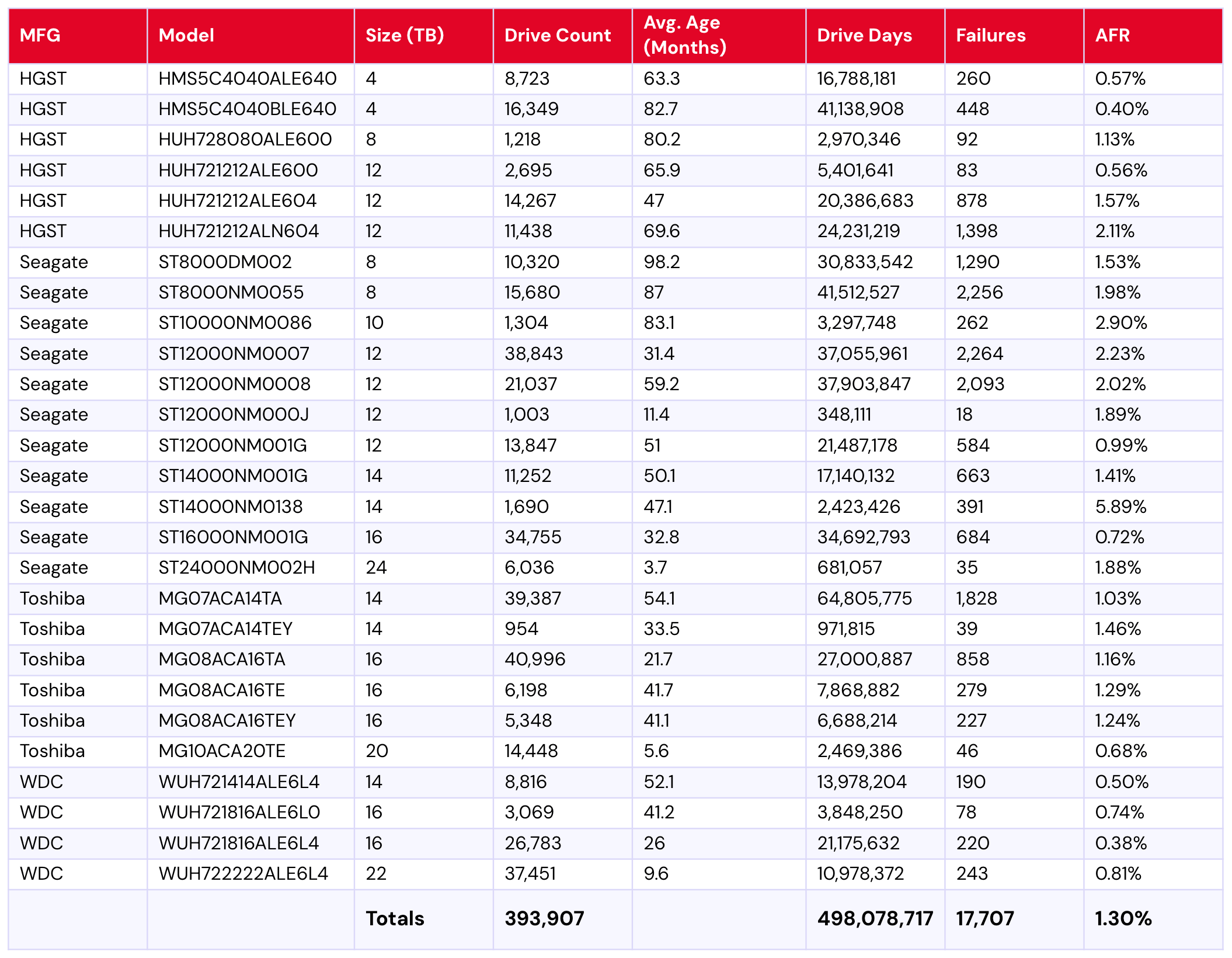
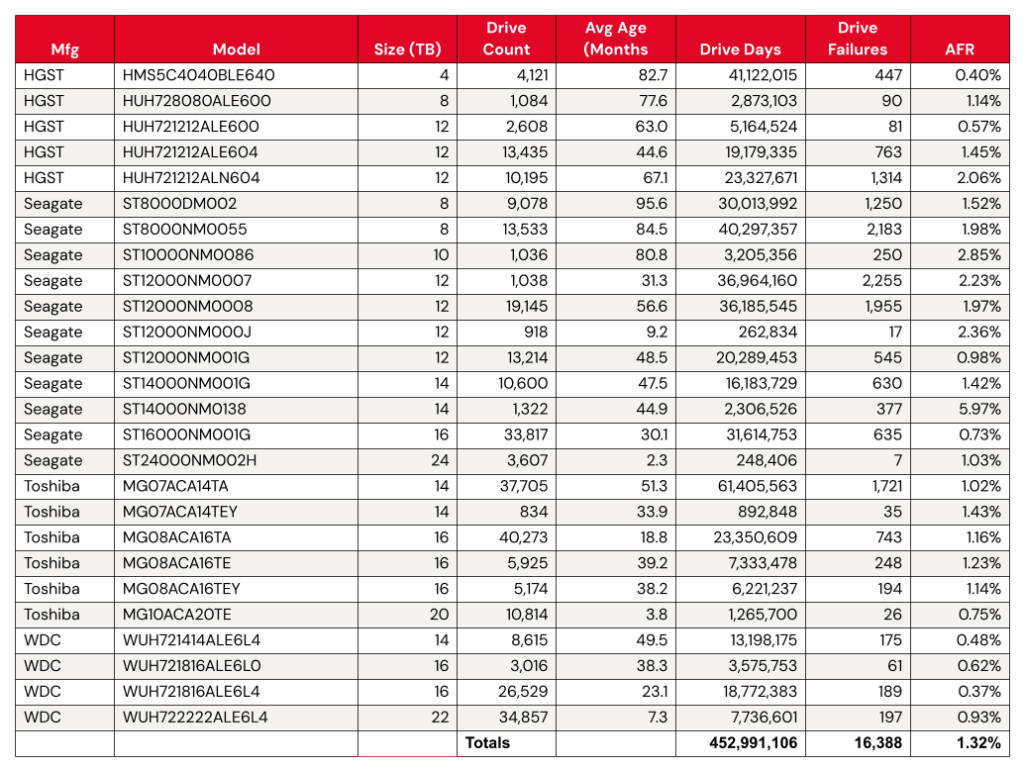
To be considered for the lifetime review, a drive model was required to have 500 or more drives as of the end of Q2 2025 and have over 100,000 accumulated drive days during their lifetime. When we removed those drive models which did not meet the lifetime criteria, we had 393,907 drives grouped into 27 models remaining for analysis as shown in the table below.

Backblaze Hard Drive Failure Rates for Q2 2025

Reporting period ending June 30, 2025
Drive models > 500 drives and > 100,000 lifetime drive days
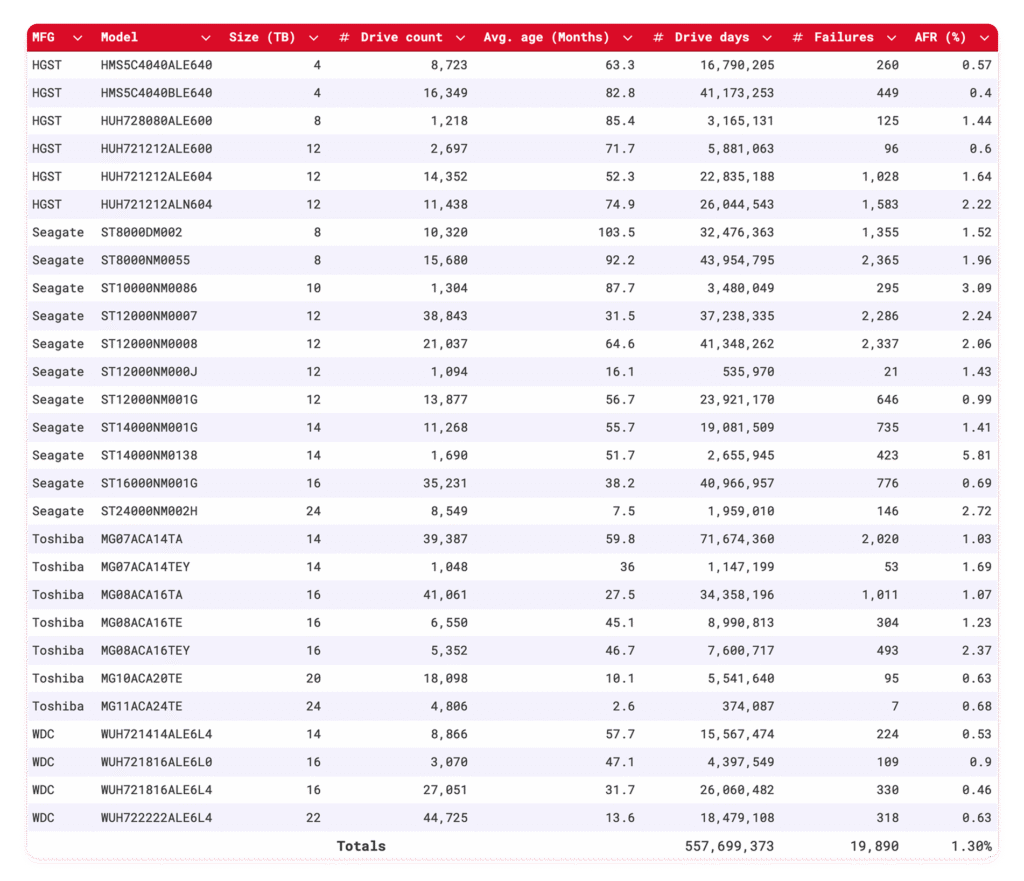
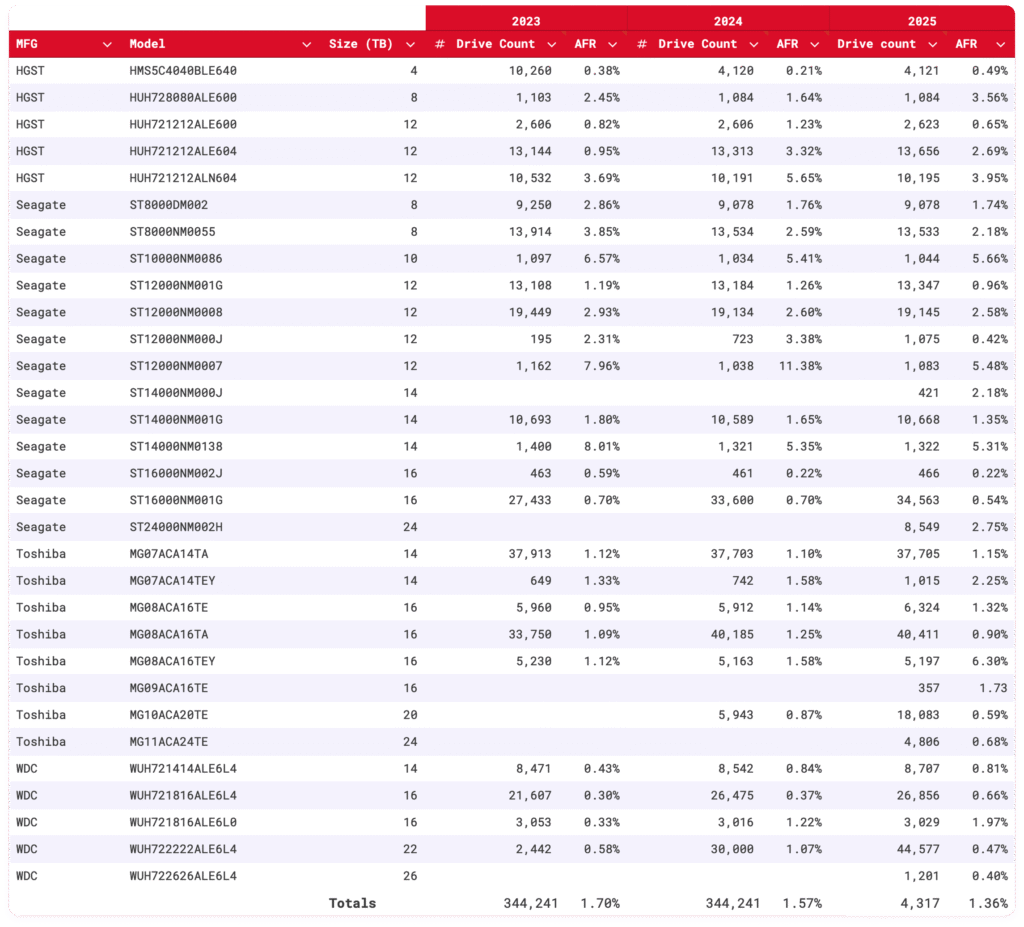
A table showing the lifetime Backblaze Drive Stats.

Notes and observations

Again, the lifetime AFR holds steady, dropping from Q1 2025’s 1.31% to 1.30%. 

  • Now you see me: This quarter’s table also gives us an interesting snapshot that has to do with our drive exclusions as the 4TB HGST model HMS5C4040ALE640 is on the way out. It meets our lifetime drive criteria, so it is included in this second table, but it didn’t make the cut for the quarterly table because it had too few drives running by the end of the quarter. Usually you see the opposite, where drive models show up in the quarterly requirements but not the lifetime. This quarter, four models meet that standard (Seagate model numbers ST8000NM000A, ST14000NM000J, ST16000NM002J, and Toshiba MG09ACA16TE). 
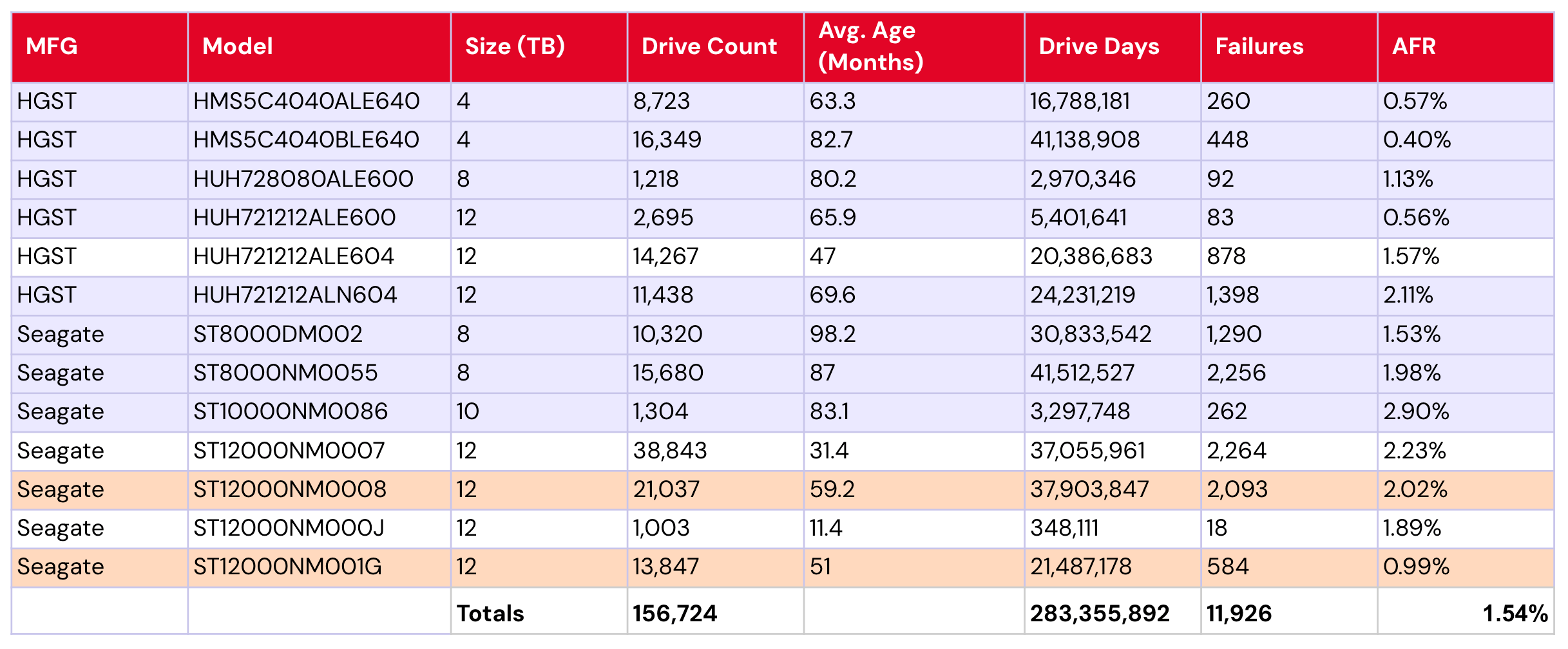
  • Smaller drives getting older: Perhaps an unsurprising trend—Backblaze’s smaller capacity drives are getting older. We have a total of 13 drive models with 12TB or less, with a collective 1.54% failure rate. See the table below:

Backblaze drives with ≤12TB capacity

A image showing drives that are less than or equal to 12TB, including color coding to indicate drive age.

Of those models, eight are five years old or older (shown in purple). An additional two models are four years or older (that’s your orange). Taking just these 10 models—drives reaching their supposed golden years—we have a collective AFR of 1.42%.

Notably, that AFR is due to some well-performing low-failure outliers, including both of the 4TB Seagate models (0.57% and 0.40%), the 12TB HGST model HUH721212ALE600 (0.56%), and the 12TB Seagate model ST12000NM001G (0.99%).

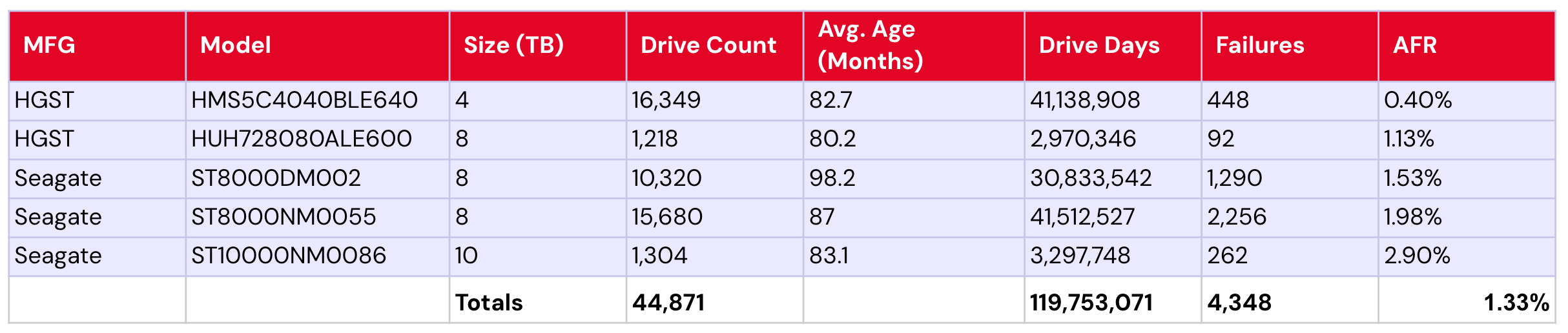
That said, it’s also perhaps more impressive that when we say “eight are five years and older,” of those eight drive models, five are six or more years old. Their collective AFR is 1.33%.

Drive models that are less than or equal to 12TB and that are 6 or more years old.

This begs the age-old question: Is age just a number? Or, are we just seeing several exceptional drive models? In any event—an interesting drive population to keep an eye on, as it represents 156,724 of our 393,907 (~40%) of the lifetime drive pool.

Zoom in: The 20TB+ club

We’ve been taking quick peeks at the 20TB+ drives in the last few reports, but it’s high time we dig in a bit deeper. Right now, our cohort of 20TB+ drives that meet the lifetime criteria consists of three drives, the 20TB Toshiba model MG10ACA20TE, 22TB WDC model WUH722222ALE6L4, and 24TB Seagate model ST24000NM002H. Quite neatly, that also gives us one per manufacturer, lending itself to something of a head-to-head comparison—though, of course, with the variability we see on a per-drive basis within the same manufacturer, we won’t over-index on lending it too much significance. 

Let’s take a look at each.

20TB Toshiba MG10ACA20TE

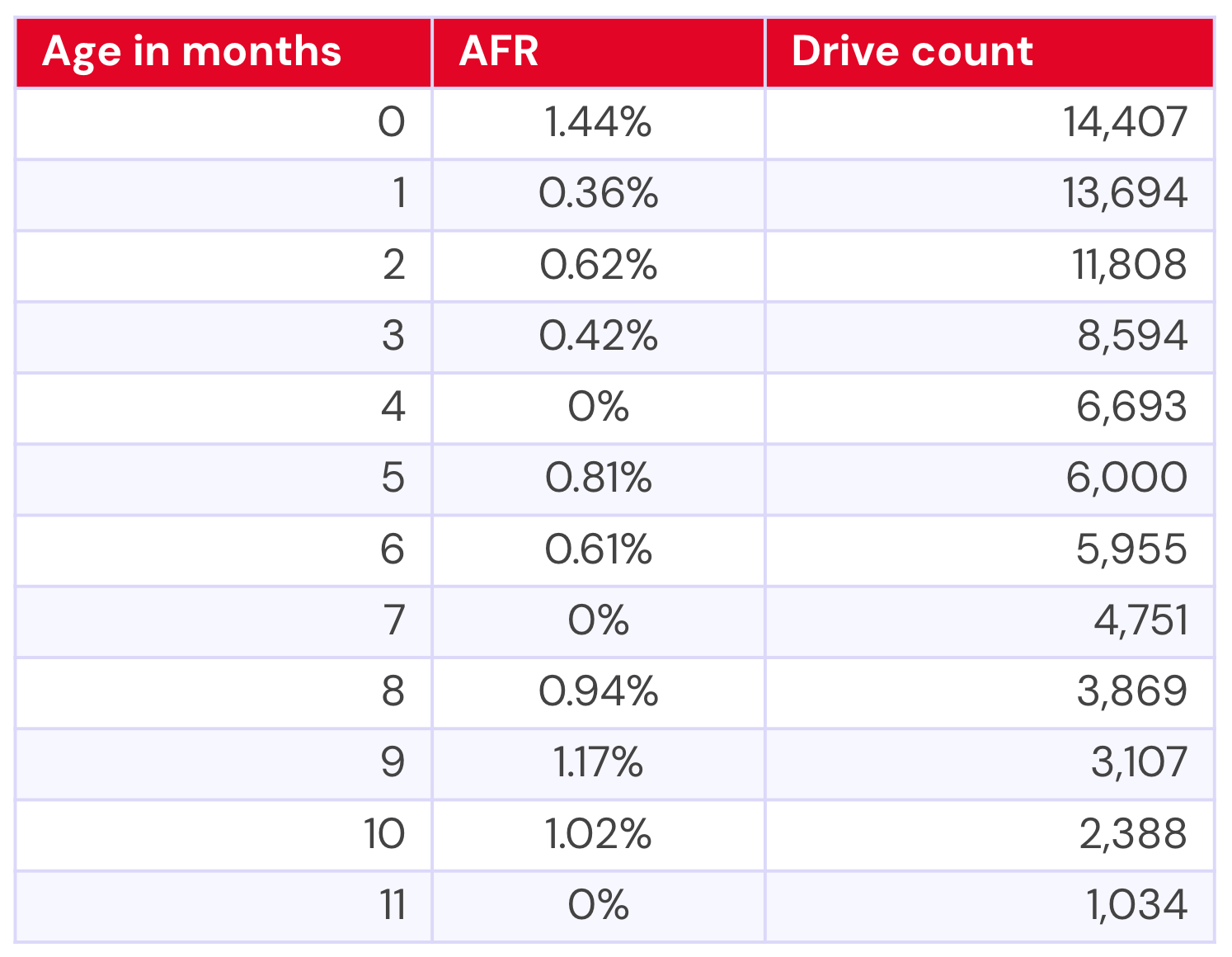
The Toshiba has actually been in our drive pool for 22 months, but until just under a year ago, there were only two drives. For the purposes of significance, then, we’ll exclude significantly low numbers of drives—thankfully, each model has something of a natural fall-off point where they go from single-digit drive numbers to hundreds. 

For the Toshiba, that gives us the following data:

A table showing the AFRs for the 20TB Toshiba based on their age.

Converted to a graph, we end up with the following:

A graph showing the failure rates based on age for the 20TB Toshiba drives.

On this graph, the blue line represents the AFR and the red line represents the drive count. Drive count can be a bit tricky since our x-axis is age, and we start with age=0, which means that the drive count (from our perspective) goes from larger to smaller. That is, as drives get older, there are fewer of them by count—you have your initial purchase cohort, then you add drives over time. You can read this as the first data point representing drives that are between 0–1 month old, the next data point as 1–2 months old, etc. 

We set it up this way because we wanted to be able to directly compare the failure rates of the drives based on their ages. Those familiar with our bathtub curve analysis may recognize our methodology here—we’re just zooming in on specific drives and drive capacities. 

22TB WDC WUH722222ALE6L4

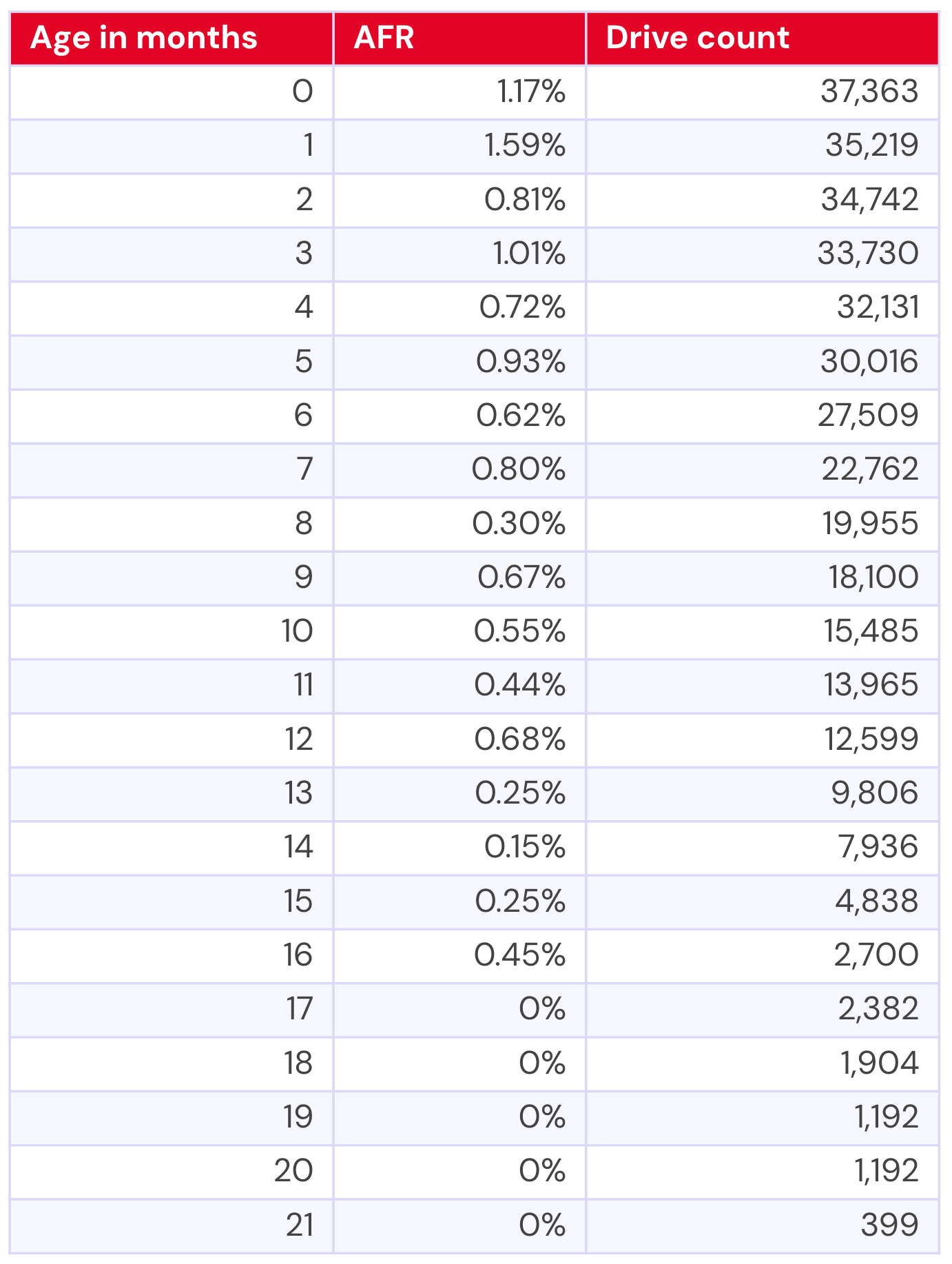
Now let’s take a look at the WDC model. We have usable data for about 21 months of its drive life:

A table showing the AFRs for the 22TB WDC drives based on their age.

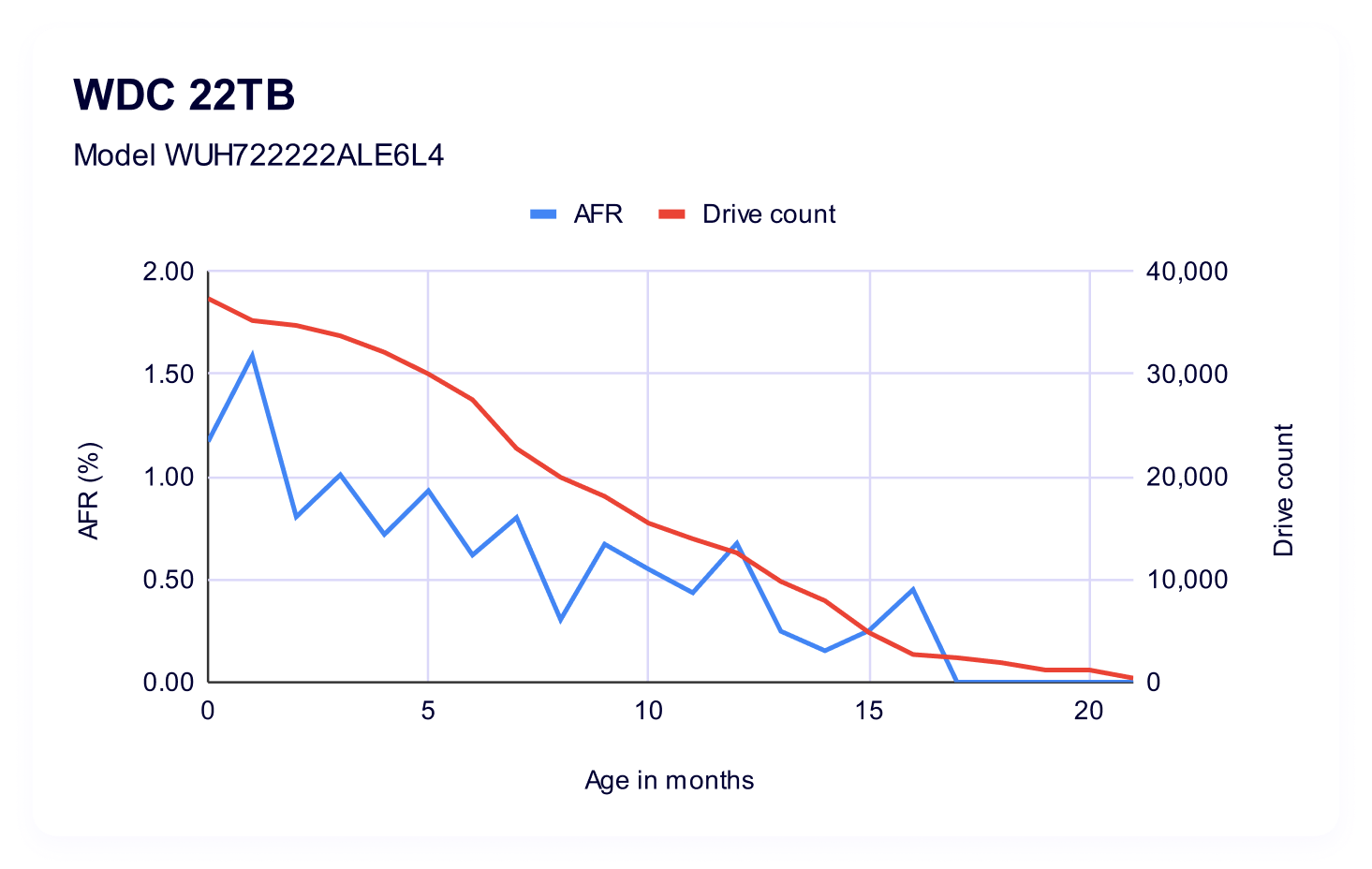
Which gives us the following visualization:

A graph showing the AFRs for the 22TB WDC drives based on their age.

Interestingly, we see a lot less variability in the span of time where we have a direct comparison. That said, the WDC model also had a minimum of double the drive count if we’re looking at a similar time period—so, at their youngest (0 months old) the Toshiba had 14,407 drives vs. WDC’s 37,363; and, at 11 months Toshiba had 1,034 drives vs. WDC’s 13,965. 

While AFRs do get us mostly on an even playing field as far as being able to make a 1:1 comparison, it’s important to remember that in smaller drive pools, a single failure can be amplified by quite a bit.

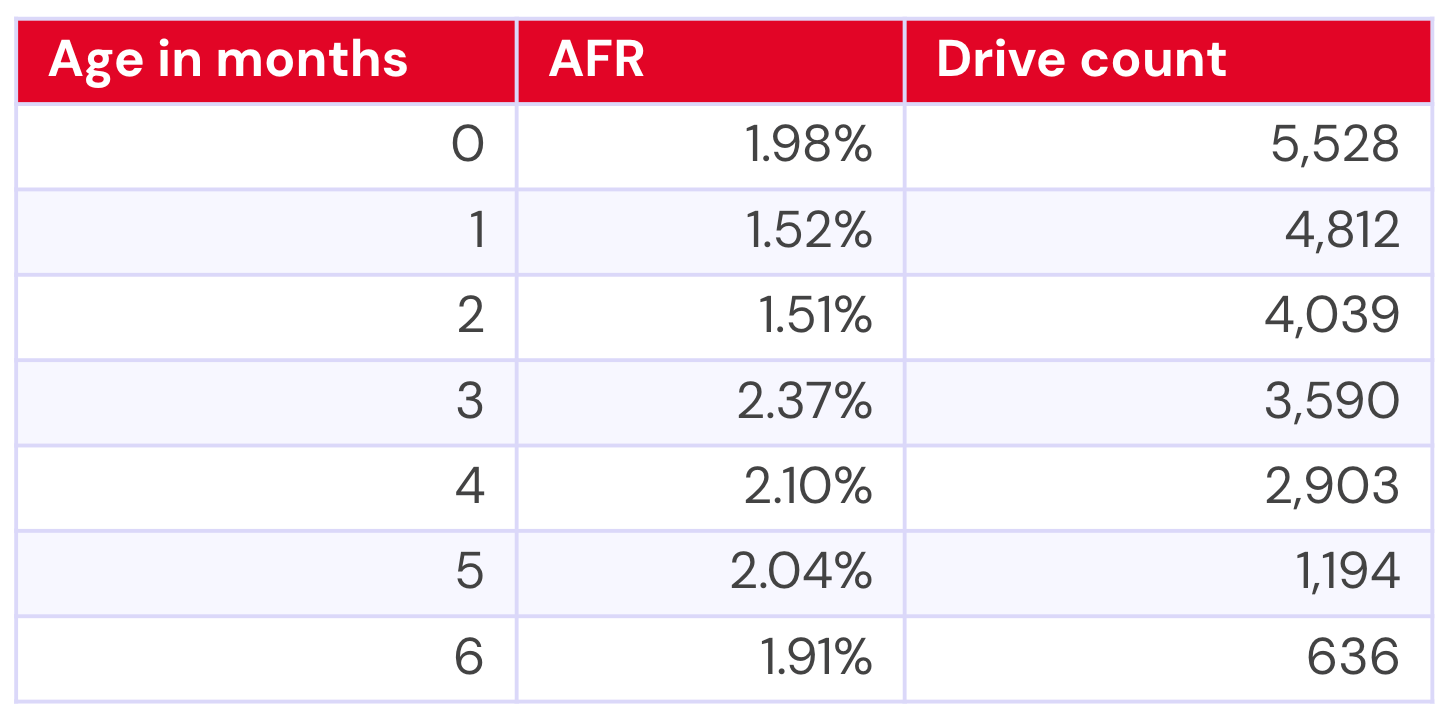
24TB Seagate ST24000NM002H

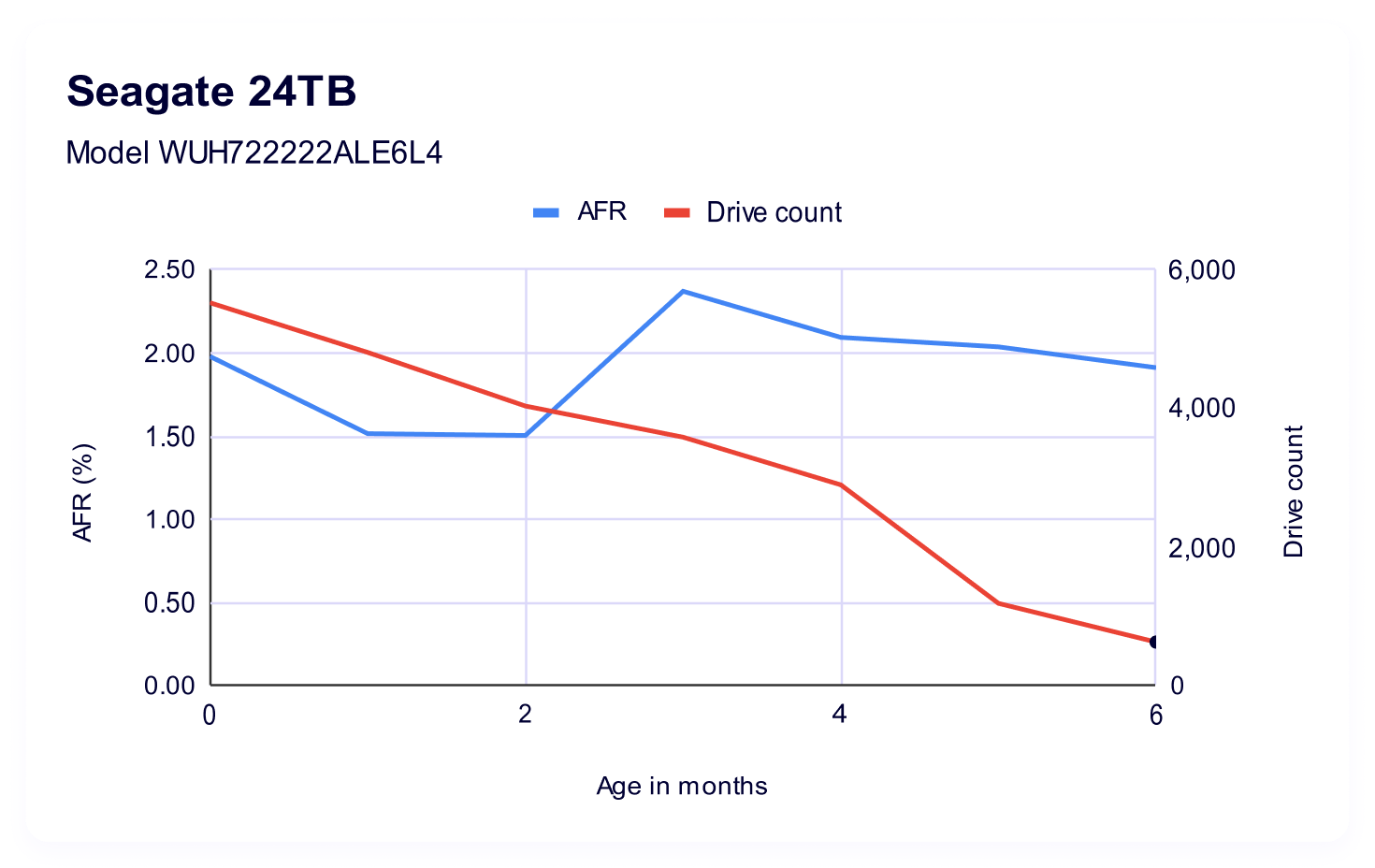
Our youngest drive model, the 24TB Seagate ST24000NM002H, has just half a year of data.

A table showing the AFRs for the 24TB Seagate drives based on their age.

That gives us the following visualization:

A graph showing the AFRs for the 24TB Seagate drives based on their age.

Compared with our other two drive models, the 24TB Seagate definitely has the highest failure rates. This could be explained, in part, by it being a young drive—is it in the leading edge of a traditional bathtub curve? So, certainly something to track over time to see if it will settle out as it gets older.

All together now: Comparing each 20TB+ drives

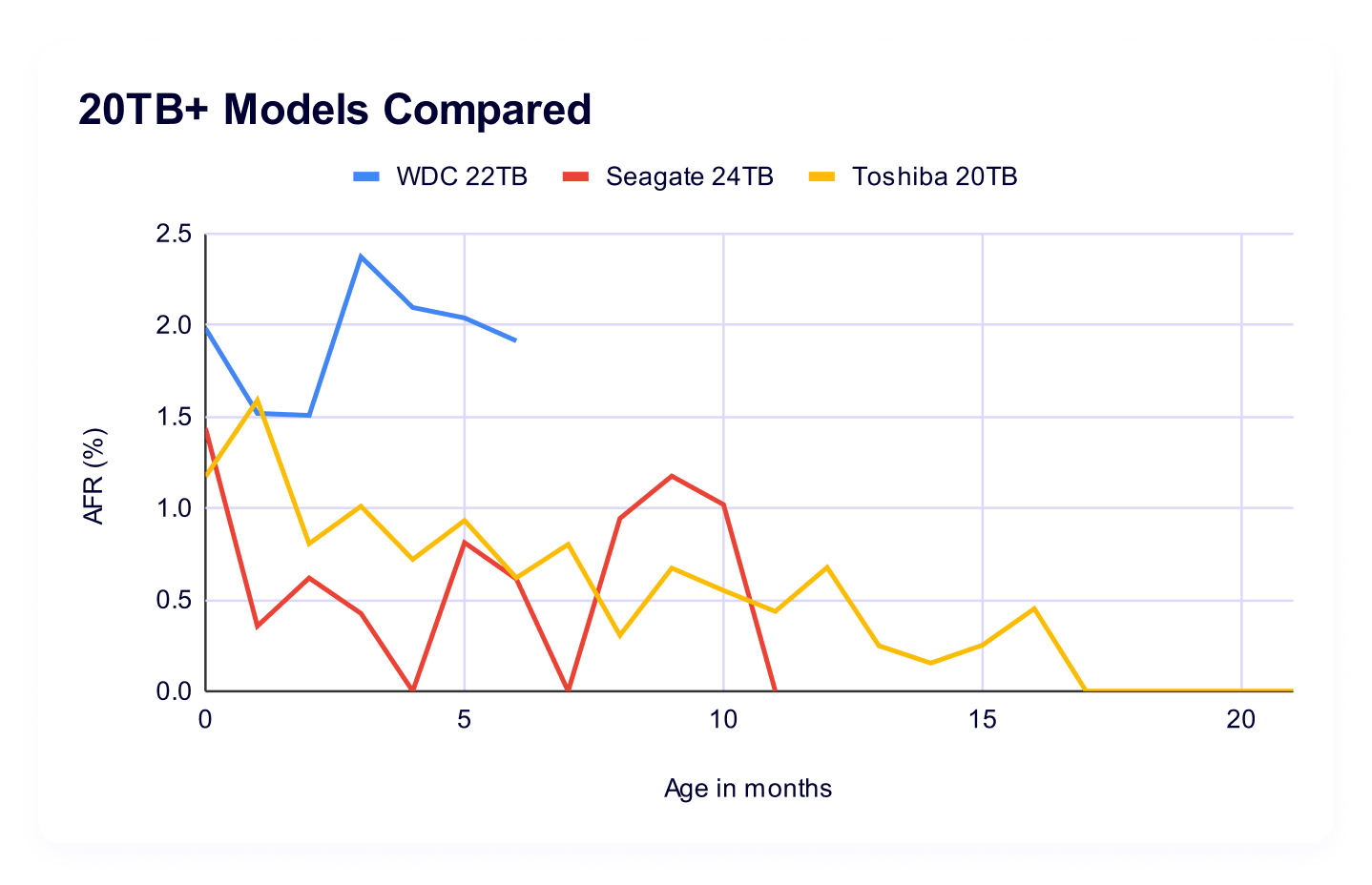
We designed this view to be directly comparable at points in time, so, here’s your graph that puts each drive on the same time scale:

A graph comparing the AFRs for the 20TB+ drives based on their age.

What’s our takeaway here? Well, in both drive count and length of time in the pool, it’s a little early to create definitive trends for the Seagate and the Toshiba. Certainly we can see that the Seagate is, early on, showing higher failure rates. Meanwhile, the 20TB Toshiba has had a bit of a variable year one. But again, with significantly variable drive pools between all models, we’re not quite comparing apples to apples. (We chose not to plot drive count on this chart—it gets messy quickly.)  Add to that: the Seagate in particular is potentially at the beginning of the “bathtub” curve, we may see it change over time.

On the other hand, the 22TB WDC model has shown up quite a bit below our current average AFR for the drive pool of all drive sizes and ages, and it’s the model with the most data. But, how does that compare to other models as they come online? 

Comparison: 20TB+ as a pool vs. 14-16TB as a pool

When we were considering whether this information would be a useful slice of the data, our biggest question was how to contextualize it versus drives. It’s perhaps a tad imperfect, but we landed on combining the 14–16TB drives as a pool, largely because they have a significant amount of data points and were our last set of drives onboarded, which means that they’re more or less the last generation of hardware. 

The other thing to note is that once we combined the 20TB drives into a pool, some of the data we filtered out on a per-drive basis got added back in. So, at the 21 month mark, where the Toshiba model only had one drive, we added that single drive to the 399 that our WDC model brought to the table and calculated AFR across the pool (giving us 400 drives to work with). 

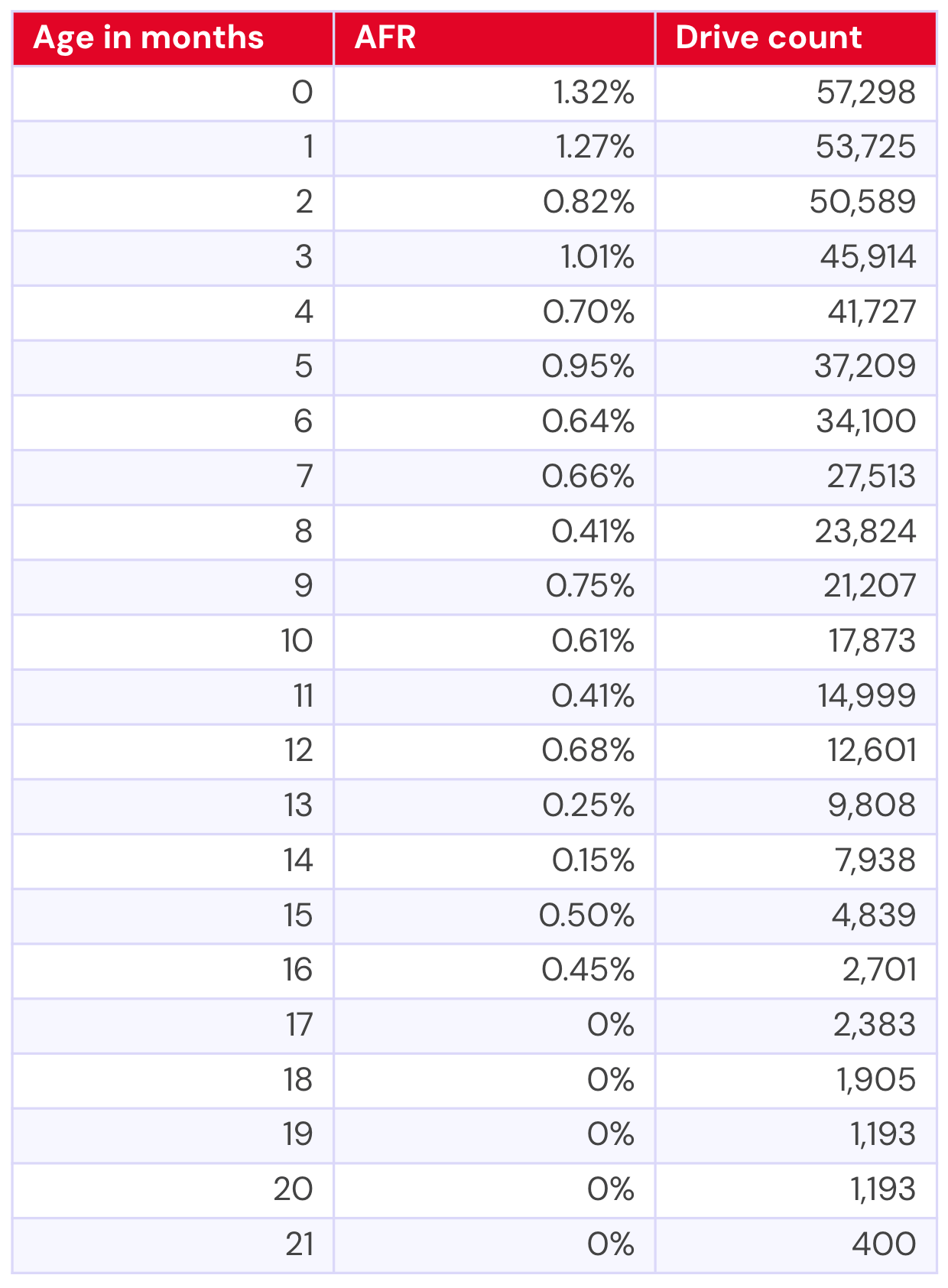
Here’s the numbers for the 20TB+ drive pool: 

A table combining the AFRs for the 20TB+ drives based on their age.

That gives us a pretty neat graph, actually:

A graph combining the AFRs for the 20TB+ drives based on their age.

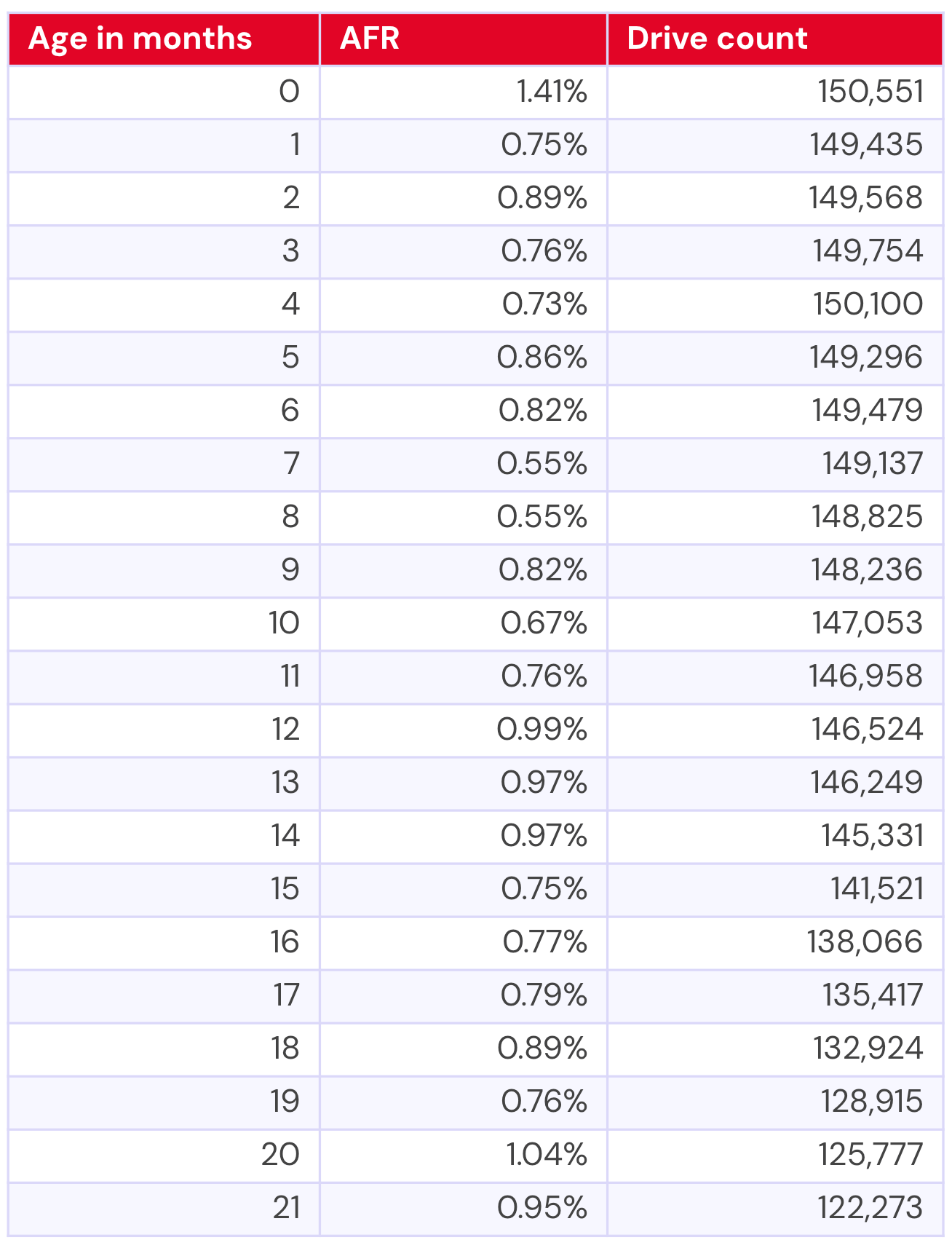
Now, let’s compare to the 14–16TB drives of the same age. We have significant data for this population for nearly seven years, but in the interest of saving you three pages of scrolling, I’ll give you the table for the data that directly correlates to the 21 months of data we have for the 20TB+ drives.

A table combining the AFRs for the 14-16TB drives based on their age.

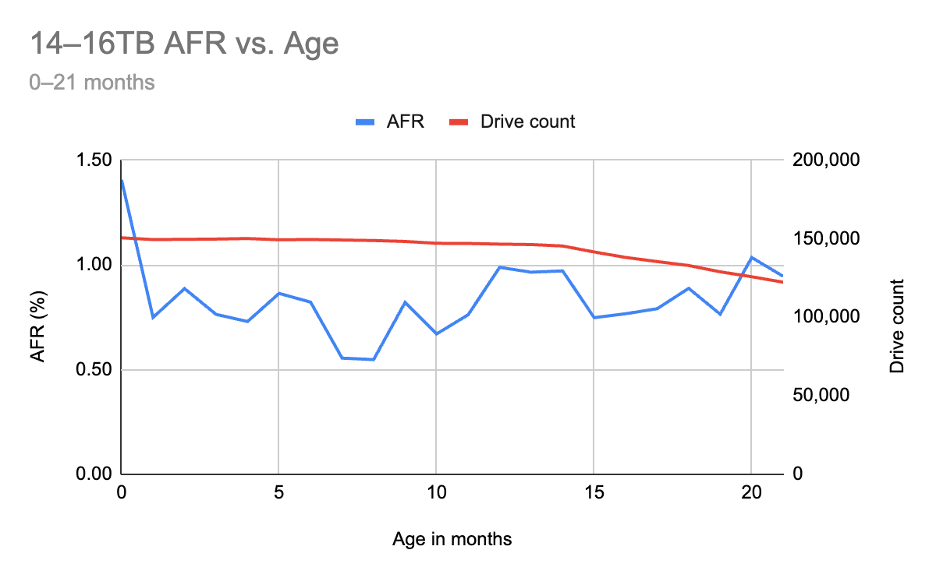
This is the line chart for that range of time:

A graph combining the AFRs for the 14-16TB drives based on their age, showing only the time period from 0-21 months.

Comparing age of drive to age of drive, it would seem that our 20TB are right on target, and perhaps doing a bit better than expected. But, that definitely isn’t a perfect comparison given that the 14–16TB drives have a steadier and larger drive count. So, let’s look at the chart with the full, nearly seven year time period:

A graph combining the AFRs for the 14-16TB drives based on their age, showing only the full age of the drive pool, 81 months.

This view starts to show us some spiky patterns as the 14–16TB drives get older, of course exacerbated by drive counts reducing over time.

So what’s it all mean?

It’s clear from the data that we need to give the 20TB+ drives time to mature, and that as we (depending on our buying behavior, of course) add more drives, we might see some interesting changes in the data. 

As for the 14–16TB pool, they’re following relatively expected patterns of wearing out in the five-plus year range—but what does that mean when you compare to what we observed in our current lifetime stats, where we see our 12TB and smaller drive pool performing so well? 

Without taking a closer look at the 14–16TB drives, it’s hard to say that they don’t have similar outlier tendencies to what the 12TB and smaller pool does, just pulling the failure rates upward. Even a casual glance at our current lifetime table’s 14–16TB drives bears that out (four years and older highlighted in orange, as our corollary above): 

A image showing drives that are 14-16TB drives, including color coding to indicate drive age.

That data isn’t inclusive of all of the 14–16TB drives we’ve ever had, though—just those currently in operation. So, as always, there’s more investigation to be done.

The Hard Drive Stats data

The complete dataset used to create the tables and charts in this report is available on our Hard Drive Test Data page. You can download and use this data for free for your own purpose. All we ask are three things: 1) you cite Backblaze as the source if you use the data, 2) you accept that you are solely responsible for how you use the data, and 3) you do not sell this data itself to anyone; it is free.

Good luck, and let us know if you find anything interesting.

The post Backblaze Drive Stats for Q2 2025 appeared first on Backblaze Blog | Cloud Storage & Cloud Backup

Backblaze Drive Stats for Q1 2025

Post Syndicated from Drive Stats Team original https://www.backblaze.com/blog/backblaze-drive-stats-for-q1-2025/

A decorative image showing the title Backblaze Q1 2025 Drive Stats.

Welcome to the first Drive Stats of 2025. In case you missed it, the 2024 Drive Stats report was the last for long-time Drive Stats guru, Andy Klein, who is happily retired—off putting the “green” in greener pastures by working on his golf game. We–being Backblaze staff writer Stephanie Doyle and Chief Technical Evangelist Pat Patterson–are picking up where Andy left off, bringing you the metrics and analysis you know and love. Now, on to the numbers! 

As of March 31, 2025, we had 312,831 drives under management. Of that total, there were 3,970 boot drives and 308,861 data drives. We’ll review their annualized failure rates (AFRs) as of Q1 2025, and we’ll dig into the average age of drive failure by model, drive size, and more. Along the way, we’ll share our observations and insights on the data presented and, this time around, we’ve got some exciting updates to share about how we produce Drive Stats. (Stay tuned, fellow Snowflake fans.) 

As always, we look forward to your thoughts—we’ll see you in the comments section. 

Sign up for the Drive Stats LinkedIn Live

Ready to dive deeper into the data? Tune in Thursday, May 15, 2025 at 10:00 a.m. PT, to query the new Drive Stats team, Stephanie Doyle and Pat Patterson. Feel free to drop us a line with any questions you want us to answer.

Sign Up for the LinkedIn Live ➔

Q1 2025 hard drive failure rates

As mentioned above, at the end of Q1 2025, we were running 312,831 drives. During the quarter as a whole, however, we were monitoring a total of 318,426 drives; this count includes those that were taken out of service during the quarter, either because they failed or were only used temporarily. 

We’ll discuss the criteria we used in the next section of this report. Removing these drives leaves us with 317,833 hard drives to analyze. The table below shows the annualized failure rates (AFR) for Q1 2025 for this collection of drives.

Backblaze Hard Drive Failure Rates for Q1 2025

Reporting period January 1, 2025–March 31, 2025 inclusive
Drive models with drive count > 100 as of March 31, 2025 and drive days > 10,000 in Q1 2025. 

Notes and observations

  • The 4TB drives are hanging on and finishing strong. Good news: We have another quarter’s worth of data on our beloved 4TB drives (though the planned migration is well underway). True to their history, the 4TB drives showed wonderfully low failure rates, with yet another quarter of zero failures from model HMS5C4040ALE640 and 0.34% AFR from model HMS5C4040BLE640. 
  • Keeping an eye on the 20TB+ pool. The 24TB Seagate (model ST24000NM002H) no longer has a perfect record, with eight failures for the quarter. Still, the drives put up a respectable 1.00% AFR. Meanwhile, the 20TB+ drives as a pool are averaging a 0.72% AFR, coming in lower than the overall failure rates—always a promising sign. 
  • Zero failures for the quarter. Four drives get a gold star for zero failures this quarter:
    • The 4TB HGST (model HMS5C4040ALE640) 
    • The Seagate 8TB (model ST8000NM000A) 
    • Seagate 12TB (model ST12000NM000J)
    • Seagate 14TB (model ST14000NM000J) 

Three out of the four also had zero failures last quarter, all but the Seagate 12TB. 

  • The quarterly failure rate is slightly higher. The quarterly failure rate went up from 1.35% to 1.42%. As with the zero-failure club, our higher-end outlier AFRs show some of the usual suspects:
    • Seagate 10TB (model ST10000NM0086). Q4 2024: 5.72%. Q1 2025: 4.72%.
    • HGST 12TB (model HUH721212ALN604). Q4 2024: 5.15%. Q1 2025: 4.97%.
    • Seagate 12TB (model ST12000NM0007). Q4 2024: 8.72%. Q1 2025: 9.47%.
    • Seagate 14TB (model ST14000NM0138). Q4 2024: 5.95%. Q1 2025: 6.82%.

Drive model criteria

We noted earlier we removed 593 drives from consideration when we produced the table above covering Q4 2024. There are two primary reasons we did not consider these drive models.

  • Testing. These are drives of a given model that we monitor and collect Drive Stats data on, but are not considered production drives at this time. For example, drives undergoing certification testing to determine if they are performant enough for our environment are not included in our Drive Stats calculations.
  • Insufficient data points. When we calculate the annualized failure rate for a drive model for a given period of time (quarterly, annual, or lifetime), we want to ensure we have enough data to reliably do so. Therefore we have defined criteria for a drive model to be included in the tables and charts for the specified period of time. Models that do not meet these criteria are not included in the tables and charts for the period in question.

Regardless of whether or not a given drive model is included in the charts and tables, all of the data for all of the drives we use is included in our Drive Stats dataset which you can download by visiting our Drive Stats page.

As with the Q4 quarterly results, we will apply these criteria to the annual and lifetime charts that follow in this report.

Lifetime hard drive failure rates

As of the end of Q1 2025, we were tracking 312,831 data hard drives. To be considered for the lifetime review, a drive model was required to have 500 or more drives as of the end of Q1 2025 and have over 100,000 accumulated drive days during their lifetime. When we removed those drive models which did not meet the lifetime criteria, we had 312,493 drives grouped into 26 models remaining for analysis as shown in the table below.

Backblaze Lifetime Hard Drive Failure Rates 

Reporting period ending March 31, 2025 inclusive
Drive models with > 500 drives and > 100,000 lifetime drive days

Notes and observations

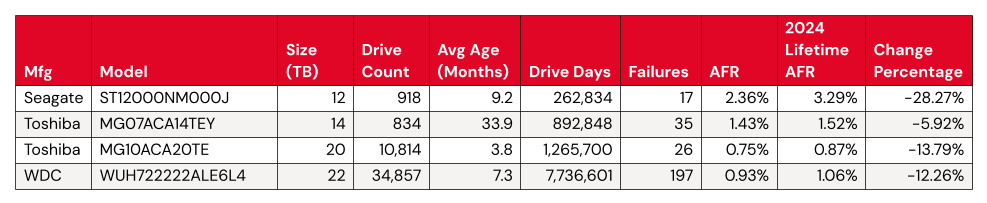
The lifetime AFR remains steady, despite some drives having significant change. We see virtually no change in our overall lifetime AFR, which we last tracked at 1.31% in the 2024 Year-End Drive Stats Report. But, with some drive models showing significant change in year-over-year AFR, it’s worth digging in a little deeper. 

Statistically significant improved AFRs: 

  • Both the 12TB and the 14TB had the same number of failures (or nearly so). Meanwhile, the Toshiba 20TB and WDC 22TB had more failures, but added a significant number of drives to the fleet. Both of these activities increase the number of drive days we tracked for the model’s drive pool, so these results are unsurprising. 

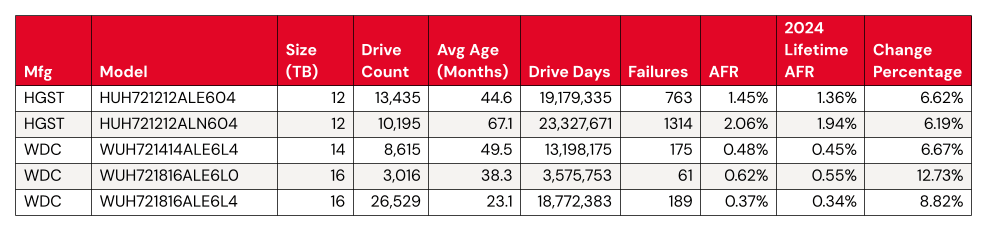
Statistically significant worsened AFRs:

  • Meanwhile, we have a few things happening for the significantly worsened AFRs. The WDC drive models are all top performers from a failure perspective, even a change from .45 to .48 shows up in the numbers. 
  • That leaves us with two HGST 12TB drives. Both come in above the average failure rate, at 1.45% (model: HUH721212ALE604) and 2.06% (model: HUH721212ALN604). We can give HUH721212ALE604 a pass—with the drive pool showing an average age of 67.1 months, or about five and a half years, it’s firmly on track with the expected pattern defined by the bathtub curve
  • Where does that leave us with model HUH721212ALE604? We’ll keep an eye on it. Given that its AFR rate isn’t too far off from the total AFR of the Backblaze drive fleet, it’s not hugely concerning unless we see the rate of change continue. 

What’s new with Drive Stats?

In taking on this report, our main focus was to ensure continuity with our decades-old dataset. That said, we also saw some opportunities to streamline the process of data collection, a continuation of the work that David Winings talked about in Overload to Overhaul: How We Upgraded the Drive Stats Data and Drive Stats Data Deep Dive: The Architecture. All of these things set us up for not just an easier time generating this report, but some bigger plans in the future. (We won’t tip our hand yet—but stay tuned.) 

Drive Stats gets a Snowflake upgrade

When we first started tracking Drive Stats way back in 2013, data collection was very ad hoc. For the first few years, when Brian Beach was at the helm, we published stats once a year. When Andy took over in 2015, he moved to publishing quarterly data (starting in 2016). As the dataset grew, and Andy’s collection of lightweight desktop apps started to run out of steam, it became apparent that we needed to upgrade to more capable analytical tooling. For a variety of operational reasons, Andy was gamely running SQL queries against CSV data imported into a MySQL instance running on his laptop—and having to do a ton of manual data cleanup to boot. (Pun obviously intended.) 

This year, with the help of our colleagues on the database engineering team (shoutout to Tom Roden—thanks so much!), we were able to get the Drive Stats data included in the Backblaze Snowflake instance. Gone are the days of us bugging folks for exports that take hours to process! We can run lightweight queries against a cached, structured table.

We started from Andy’s SQL queries and tweaked them a bit to match the logic and nomenclature of Snowflake fields. Once we had that worked out, the first thing we did was validate our methodology by running the Q4 Drive Stats numbers and comparing them to Andy’s—success. 

It helps that Pat has experimented with our Drive Stats dataset in Trino and other analytical tools like Apache Iceberg, so it’s certainly not the first time he’s considered methodology and tooling for this problem. Going forward, we may further refine the process, but for now, the migration to Snowflake saved us a ton of time and manual data cleanup.

The Hard Drive Stats data

The complete dataset used to create the tables and charts in this report is available on our Hard Drive Test Data page. You can download and use this data for free for your own purpose. All we ask are three things: 1) you cite Backblaze as the source if you use the data, 2) you accept that you are solely responsible for how you use the data, and 3) you do not sell this data itself to anyone; it is free.

Good luck, and let us know if you find anything interesting.

The post Backblaze Drive Stats for Q1 2025 appeared first on Backblaze Blog | Cloud Storage & Cloud Backup