All posts by Madhu Balaji

Measuring Developer Productivity with Amazon Q Developer and Jellyfish

Post Syndicated from Madhu Balaji original https://aws.amazon.com/blogs/devops/measuring-developer-productivity-with-amazon-q-developer-and-jellyfish/

Modern software development teams face increasing pressure to deliver high-quality code faster, while managing growing system complexity. Developers often spend significant time on necessary, but undifferentiated work, or “toil”. Toil is often manual, repetitive, and of limited enduring value, making it a strong candidate for automation or delegation to generative AI tools. The re:Invent 2024 session Unleashing generative AI: Amazon’s journey with Amazon Q Developer (DOP214) discussed how toil and productivity have an inverse relationship. Amazon Q Developer can help decrease toil and free up your developers to work on more productive tasks. Until now, that impact has been hard to show.

This post shows you how to integrate Amazon Q Developer with Jellyfish to measure AI’s impact on developer productivity. You’ll learn how to set up the integration, understand key metrics, and make data-driven decisions about your AI investments.

The Evolution of Developer Productivity Measurement

The initial Amazon Q Developer Dashboard, released in October 2023, provided basic visibility into subscription usage, code generation statistics, and security scans. While these metrics gave customers visibility into basic usage patterns, they wanted deeper insights into how the metrics connected to developer productivity and business outcomes. Since then, updates to the Amazon Q Developer Dashboard provided additional user-level insights, with the most recent changes discussed in the May 2025 blog post: Unlocking the power of Amazon Q: Metrics-driven strategies for better AI coding.
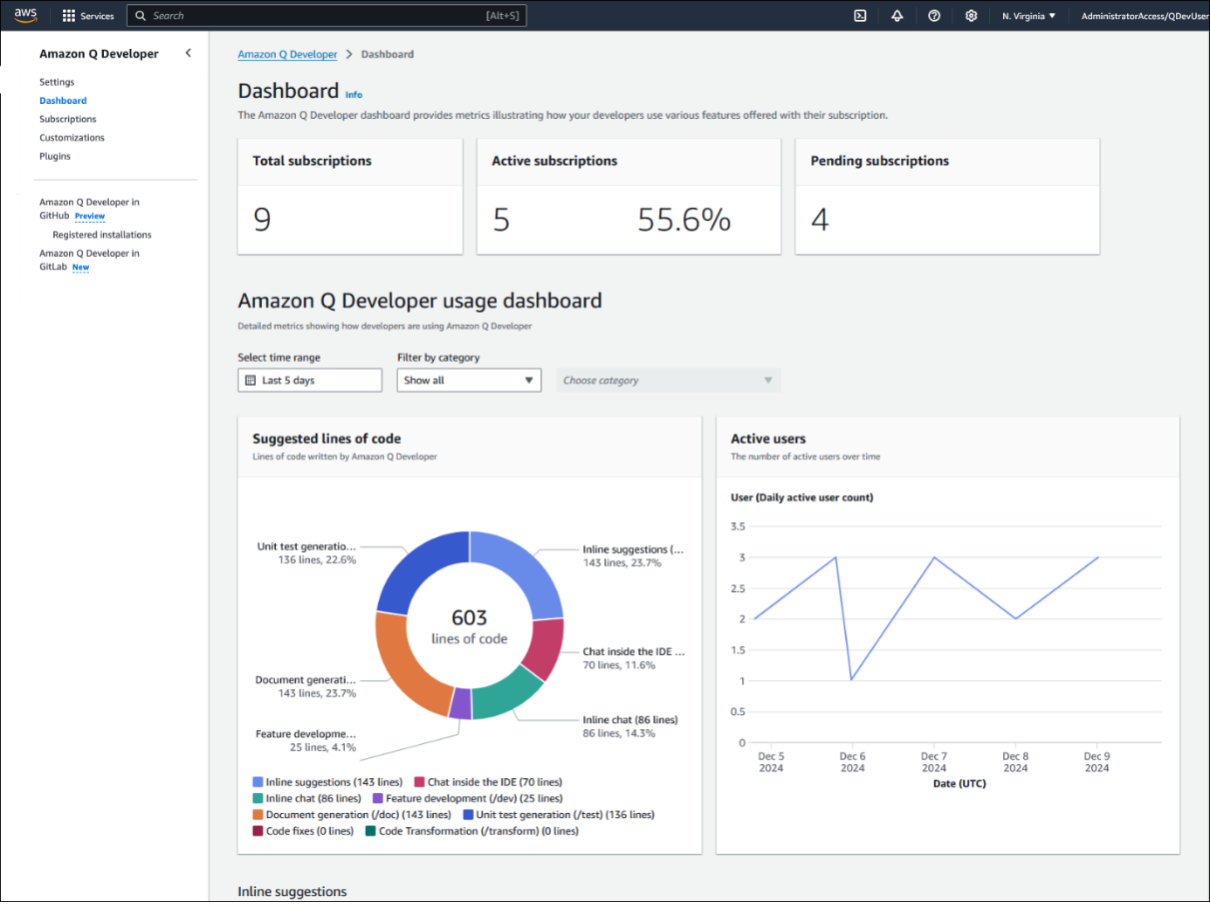
Amazon Q Developer dashboard in AWS Console showing subscription metrics, usage statistics with a donut chart of code suggestions by category, and an active users trend line graph

Amazon Q Dashboard in AWS Console

Many organizations face challenges when measuring generative AI impact due to complex organizational structures, fragmented tool chains, and rapidly evolving AI capabilities.

Leaders can make more informed decisions about metrics by working backwards from their desired business outcomes. When customers begin using generative AI tools, they focus on basic usage metrics such as subscription counts and active users. As generative AI adoption grows within an organization, teams want to understand AI impact on productivity and business value. By collecting the right data, leaders can measure how generative AI affects development workflows and business outcomes in their organizations.

Why Integrated Metrics Matter

The April 2025 blog “How generative AI is transforming developer workflows at Amazon” shared that developer productivity metrics are more complex than what any single tool measures. This aligns with established frameworks like DORA and SPACE. Understanding AI’s impact requires visibility across the entire development lifecycle. Organizations are looking for ways to combine data from multiple data sources to get a complete view. Some have created home-grown tools and dashboards while others like Genesys, a global cloud leader in AI-Powered Experience Orchestration, have taken advantage of partners like Jellyfish.

“At Jellyfish, our customers have been asking us for an Amazon Q Developer integration so they can understand the complete picture of how generative AI has transformed, improved and accelerated their software development workflows” – Billy Robbins, Jellyfish Head of Partnerships

The Jellyfish Solution

Jellyfish is an engineering management solution that combines metrics from various development tools. When integrated with Amazon Q Developer, Jellyfish helps you understand how Amazon Q Developer affects your development productivity by analyzing AI usage data alongside engineering metrics. Jellyfish understands the taxonomy of customer organizations allowing you to gain insights at the organizational levels that matter to you. This integration helps engineering leaders measure AI impact on development velocity, track adoption and usage patterns, and calculate the return on investment from AI spend.

“At Genesys, we’ve long been committed to data-driven engineering and deep telemetry across our software development lifecycle. However, quantifying AI’s impact on our development teams was challenging, as the insights from isolated tools were too fragmented to give us a clear overall picture. By partnering with AWS and Jellyfish, we’ve integrated the AI developer tooling our engineers trust with the platforms our leadership team relies on for visibility and alignment. This unified view empowers us to go beyond measuring AI adoption and on to operational metrics like productivity improvements and return on investment, enabling more informed decision-making at every level.” – Craig Dahlinger, Genesys Senior Director, Platform Engineering

Solution Overview

The Amazon Q Developer and Jellyfish integration connects your AI-assisted development metrics with broader engineering analytics. Through secure, automated data flow, the solution provides insights into how AI is transforming your development processes.
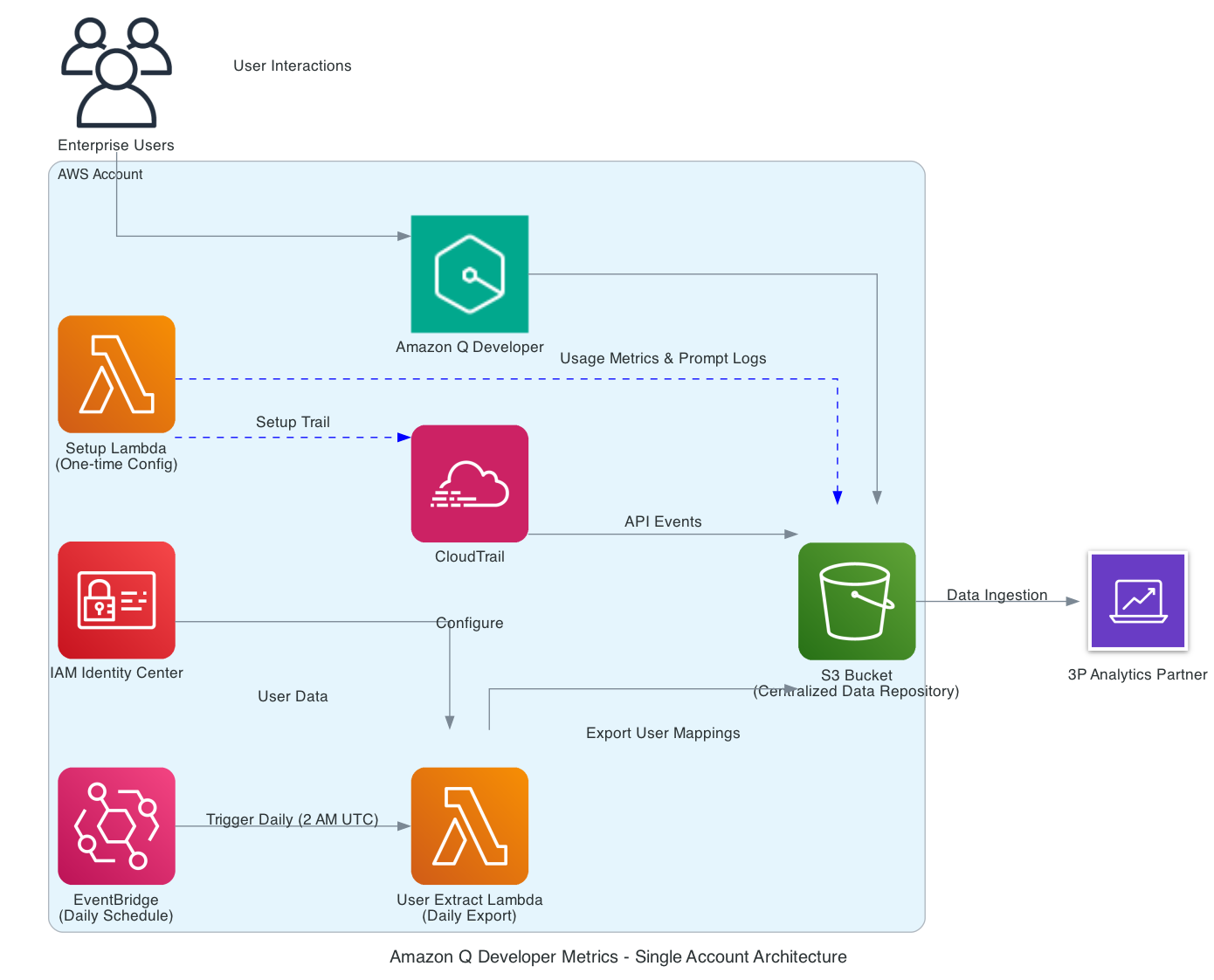
Architecture diagram showing Amazon Q Developer Metrics for a single account, illustrating data flow between various AWS services including Lambda, CloudTrail, IAM Identity Center, EventBridge, S3, and integration with a third-party analytics partner

Amazon Q Developer log data ingestion setup

How It Works

Amazon Q Developer automatically captures detailed usage data and prompt logs in your AWS environment. This data flows to a designated Amazon Simple Storage Service (Amazon S3) bucket, which Jellyfish securely accesses through pre-defined IAM roles. Jellyfish processes the information alongside data from your other development tools, providing comprehensive insights through their analytics system.

Key Metrics & Insights

Jellyfish’s AI Impact Dashboard surfaces several important metrics across your development lifecycle:

Engineering Adoption

Visualize how many engineers have adopted Amazon Q Developer across your organization. Users are categorized by cohort: Power, Casual, Idle, and New, giving you a clear picture of adoption. The following screenshot shows a breakdown by user cohorts: out of 77 total engineers, you see 22 Power Users, 20 Casual Users, 6 Idle Users, and 12 New Users. This view helps you understand where you’re succeeding in driving adoption and where there might be room for improvement.
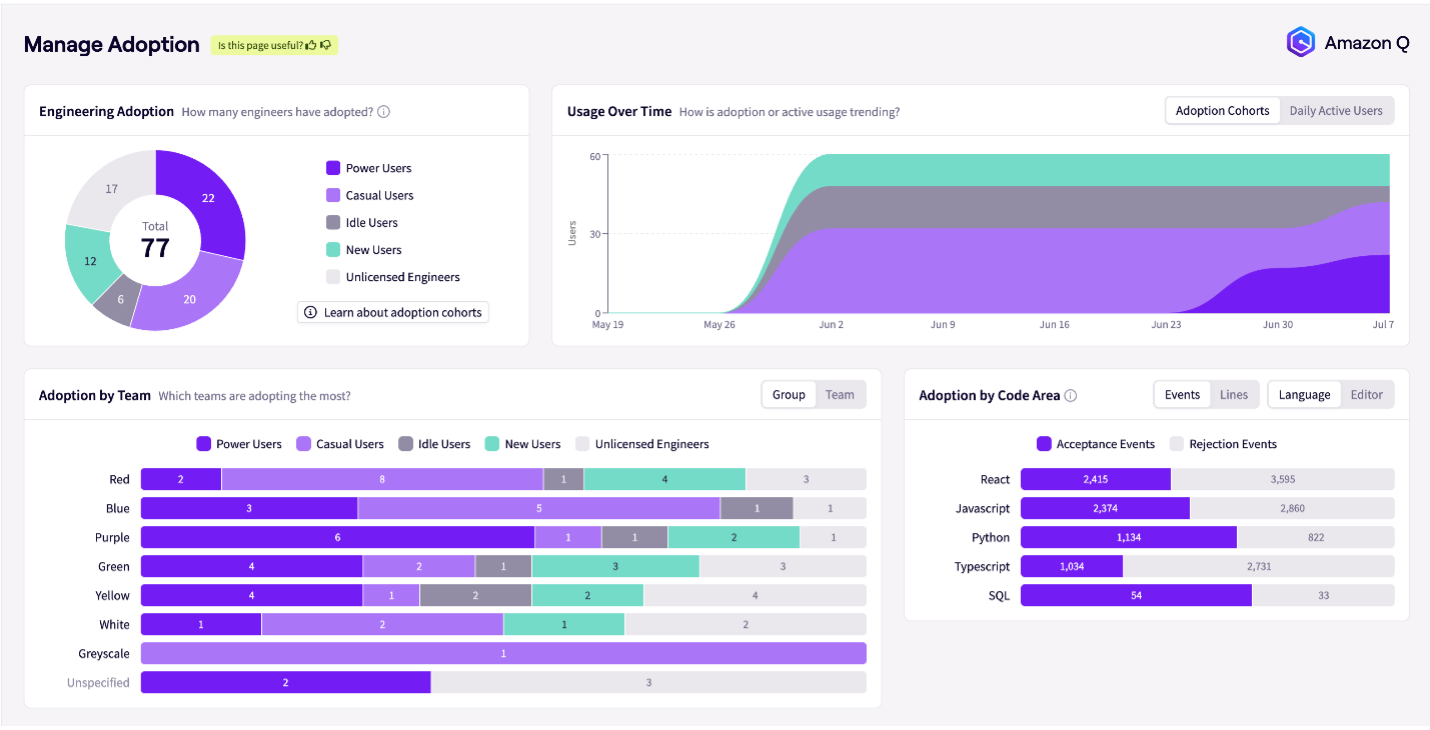
Jellyfish dashboard's Manage Adoption view showing user adoption metrics through a donut chart, usage trends over time, team-based adoption data, and programming language statistics for Amazon Q

JellyFish Dashboard Manage Adoption

Usage Patterns and Trends
Through intuitive graphs, you can see daily active usage data, adoption trends, and usage patterns over time. This temporal view is crucial to understand how usage evolves and helps you identify successful adoption strategies and potential barriers to consistent use.

You can also see which programming languages benefit most from AI assistance. For example, the Manage Adoption dashboard screenshot above shows higher acceptance rates for AI suggestions in React compared to SQL (2,415 vs. 54), guiding your efforts to expand AI usage across different development areas.

Impact Measurement

Perhaps most crucially, this integration provides concrete impact metrics. You can now measure the reduction in time from first commit to pull request open. For example, the following screenshot shows a 24% reduction, with work time decreasing from 2 days and 23 hours to 2 days and 6 hours. You can also track changes in review time, which might show slight increases as AI-assisted code often requires more thorough review. Throughput improvements are also measurable, with some teams seeing a 142% increase in average monthly pull requests per user, jumping from 2.6 to 6.3 PRs per month.
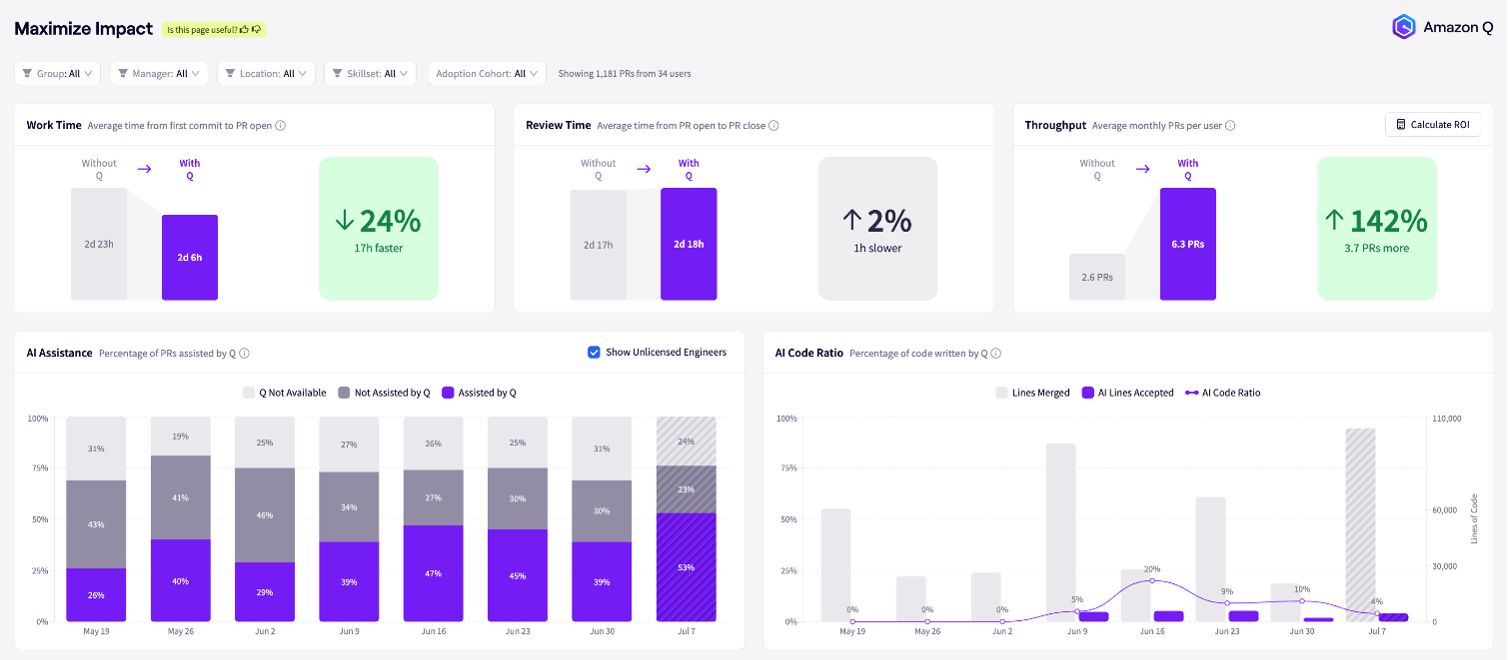
Jellyfish dashboard showing development metrics and AI assistance trends comparing performance with and without Amazon Q integration

JellyFish Dashboard Maximum Impact

You can use the dashboard to view the percentage of pull requests assisted by Amazon Q Developer over time and track AI adoption. You can also understand the ratio of AI-written to human-written code, providing insight into the level of AI integration in your development process.

Investment Analysis

To round out the picture, you can visualize the impact of tool utilization on investment across different areas such as Growth, KTLO (Keep The Lights On), and Support. This helps you understand how your AI investment is affecting various aspects of your development lifecycle.

Implementation Guide

Prerequisites

Before implementing this integration, make sure you have:

    • Configure S3 buckets
    • Manage IAM roles
    • Set up CloudTrail logs (optional)

Setup Process

The implementation involves three steps:

Step 1: Enable Amazon Q Developer data collection: Follow the setup process found in this repository, containing automation scripts and detailed instructions. In this step, you configure the necessary AWS resources to collect Amazon Q Developer metrics.

This repository includes:

  • Python scripts for local execution
  • AWS Lambda functions for serverless deployment
  • Comprehensive documentation and testing procedures

Step 2: S3 Access: To grant the JellyFish account/role access to the S3 bucket for logs, update the bucket policy

Sample: Provide Jellyfish the name of your amazon-q-log-bucket

S3 Bucket ARN: <your-amazon-q-log-bucket-arn>

Update S3 Bucket Policy

  1. Go to AWS S3 Console → Select your Amazon Q log bucketPermissions tab.
  2. Click Edit Bucket Policy and add:
{
    "Version": "2012-10-17",
    "Statement": [
        {
            "Effect": "Allow",
            "Principal": {
                "AWS": "arn:aws:iam::0XXXXXXXX5:role/<AccessRoleName>"
            },
            "Action": ["s3:GetObject", "s3:ListBucket"],
            "Resource": [
                "arn:aws:s3:::<your-amazon-q-log-bucket>",
                "arn:aws:s3:::<your-amazon-q-log-bucket>/*"
            ]
        }
    ]
}

Step 3: Verify Setup: Confirm that the data is appearing in your S3 bucket and check with Jellyfish team to validate they have access to the S3 bucket and are receiving the logs.

Clean up

Follow automated or the manual cleanup steps provided in the README.md

Conclusion

The Amazon Q Developer integration with Jellyfish represents a significant step forward in your ability to measure and optimize the impact of AI in software development. By providing engineering leaders with powerful, actionable insights into AI adoption and impact, organizations are enabled to make informed decisions about their AI investments, optimize developer workflows, and drive greater efficiency across their engineering teams.

To learn more about this integration, visit the Amazon Q Developer documentation, contact your Jellyfish representative, or visit the Jellyfish website if you’re new to their resources.

Madhu Balaji

Madhu is a Senior Specialist Solutions Architect at AWS who helps customers design and implement innovative cloud solutions. With 20+ years of experience in development and application architecture, he focuses on enabling customers to accelerate their time-to-market and solve complex business challenges using AWS services.

Austin Butler

Austin is a Senior Go-To-Market Specialist at Amazon Web Services (AWS) focusing on generative AI across the software development lifecycle. He works with strategic customers and partners to understand their software development practices and how AWS services like Amazon Q Developer can deliver value in their SDLC. Prior to joining AWS, Austin spent 10 years working in Finance & Accounting.

Streamline your Eclipse workflows with Amazon Q Developer, now generally available

Post Syndicated from Madhu Balaji original https://aws.amazon.com/blogs/devops/streamline-your-eclipse-workflows-with-amazon-q-developer-now-generally-available/

Today, we’re excited to announce the general availability of Amazon Q Developer plugin for the Eclipse integrated development environments (IDE). This release builds upon the developer experience introduced in our November 2024 public preview, bringing powerful AI-assisted development capabilities directly into Eclipse 2025-03(4.35.0) and later versions. The integration significantly improves how developers write, test, and maintain code by providing intelligent code suggestions, automated code generation, and real-time AI assistance within their familiar IDE environment.

Understanding the agentic coding experience

At its core, Amazon Q Developer functions as an intelligent coding companion in your Eclipse IDE, offering real-time collaboration through natural language interaction. What sets it apart is its agentic nature – Amazon Q Developer understands your project structure, can read and modify files, execute commands, and maintain conversation history throughout your development session. This deep integration helps developers stay focused within their IDE while leveraging AI assistance for various development tasks.

As a developer working on complex projects, I’m particularly excited to see Amazon Q Developer’s agentic coding experience now available in Eclipse IDE. It’s not just a passive tool – it’s an active participant that provides transparent reasoning for its suggestions and gives developers choice between automated modifications or step-by-step confirmation of changes. Amazon Q Developer maintains awareness of your entire conversation history and project workspace, making each interaction more meaningful and productive. This deep contextual understanding allows developers to receive accurate and targeted assistance, bringing the same powerful development experience that has already transformed how developers work in other IDEs.

Key Capabilities and Features

Amazon Q Developer brings a comprehensive set of capabilities designed to enhance your development workflow in Eclipse IDE:

Interactive development support: Through natural language interactions, Amazon Q Developer assists with code generation, bug fixing, tests and optimization. You can describe your requirements conversationally, and the Amazon Q Developer will suggest implementations while explaining its reasoning. This includes generating entire functions, classes, or application components while maintaining consistency with your existing codebase.

Context actions: Using special prompts like @workspace, @files, and @folders, Amazon Q Developer can access and understand specific parts of your project. For example, @workspace provides full visibility of your project structure, while @files lets you focus on specific files for targeted assistance. This granular control ensures that Amazon Q Developer’s responses are precisely tailored to the relevant parts of your codebase.

Rules and standards configuration: Teams can establish custom development standards by configuring rules in the .amazonq/rules/ directory. These rules govern coding standards, testing requirements, security protocols, and documentation practices. For example, you can define specific patterns for error handling, logging standards, or architectural preferences that Amazon Q Developer will follow in its suggestions and code generation.

Multi-language Support: Amazon Q Developer supports interactions in multiple languages, including English, Mandarin, French, German, Italian, Japanese, Spanish, Korean, Hindi, and Portuguese. This allows developers to communicate with Amazon Q Developer in their preferred language while maintaining the same level of development support.

Let’s see it in Action

To begin using Amazon Q Developer for the first time, follow the steps in the Getting Started with Amazon Q Developer guide to access Amazon Q Developer. When using Amazon Q Developer, you can choose between Amazon Q Developer Pro, a paid subscription service, or Amazon Q Developer Free tier with AWS Builder ID user authentication.

For existing users, update to the new version. Refer to Using Amazon Q Developer in the IDE for activation instructions.

To start, you select the Amazon Q Developer icon in the IDE to open the chat interface. By default, agentic chat is turned on. You can turn off the agentic chat by toggling the button in the chat.

Eclipse IDE interface showing Amazon Q Developer chat window with welcome message and file navigation panel on the left side

Amazon Q Developer’s welcome interface within Eclipse IDE

Start by describing your requirement in plain language

I started by asking Amazon Q Developer to help me create a REST API endpoint for user registration.

Help me create a REST API endpoint for user registration in the @workspace

After analyzing my workspace, Amazon Q Developer outlined a comprehensive plan that included creating a User model, registration controller, and setting up project dependencies. Noticing my project needed a proper build configuration, Amazon Q Developer proposed creating a Maven-based Spring Boot application structure and provided the necessary directory setup commands – demonstrating how Amazon Q Developer guides developers through the development process step by step.

Amazon Q Developer conversation interface showing step-by-step guidance for creating a REST API endpoint, including project structure analysis and Maven configuration setup

Step-by-step project setup guidance from Amazon Q Developer

Amazon Q Developer provides a structured solution with explanation

Following Amazon Q Developer’s guidance, I quickly had a fully functional REST API endpoint for user registration. Amazon Q Developer provided a comprehensive implementation, including a proper Maven project structure, essential model classes with validation, a REST controller, and the main application class. Amazon Q Developer even outlined the API usage, showing the expected JSON request format and response structure. It’s impressive how Amazon Q Developer not only generated the code but also included practical notes on validation and suggestions for production-ready improvements, demonstrating its understanding of best practices in software development.

Detailed summary screen showing the complete implementation of a REST API endpoint, including project structure, model classes, controller configuration, and JSON request/response examples

Complete REST API implementation summary with code examples

Build and run the application

With Amazon Q Developer’s guidance, I progressed from project setup to a running application. Amazon Q Developer helped me build the project successfully, and I was able to run the Spring Boot application, watching as it initialized and started up. The console output confirmed that Tomcat was running and my UserApiApplication had launched successfully, demonstrating how Amazon Q Developer streamlines the development process from code generation to a functioning API endpoint.

Terminal output showing successful Spring Boot application build and succesful startup with Maven build logs

Amazon Q Develeper agentic coding builds the application

Console output showing successful Spring Boot application startup logs with Tomcat server initialization, displaying timestamps and INFO messages indicating the application started on port 8080 with a total startup time of 1.57 seconds.

Successful build and launch of the Spring Boot REST API application

Multi-language support in Eclipse IDE

Side-by-side comparison of Amazon Q Developer conversations in English, Spanish, French and Hindi, all discussing the creation of a REST API endpoint for user registration in SpringBoot.

Q Developer supports multiple languages

Sample rules and standard setup for a project

A sample rule file for Spring Boot applications, stored in the .amazonq/rules directory at the project root, guides Amazon Q Developer’s actions.

# Spring Boot Project Setup for Eclipse IDE

Rules for setting up a standard Java Spring Boot 3-tier web application backend in Eclipse IDE

## Project Structure

Standard Spring Boot 3-tier application structure:
- `src/main/java/${packagePath}/controller`: REST controllers
- `src/main/java/${packagePath}/service`: Business logic services
- `src/main/java/${packagePath}/repository`: Data access repositories
- `src/main/java/${packagePath}/model`: Domain models/entities
- `src/main/java/${packagePath}/dto`: Data Transfer Objects
- `src/main/java/${packagePath}/exception`: Custom exceptions
- `src/main/java/${packagePath}/config`: Configuration classes
- `src/main/resources`: Configuration files, static resources, templates
- `src/test/java`: Test source code
- `src/test/resources`: Test configuration and resources

## Eclipse Configuration

Eclipse-specific settings:
- Java Compiler: Java 17
- Project Facets: Java
- Maven Integration
- Spring Tools 4 support

## Maven Configuration

Standard Maven configuration for Spring Boot:
- groupId: `${groupId:com.example}`
- artifactId: `${artifactId:demo}`
- version: `${version:0.0.1-SNAPSHOT}`
- name: `${name:demo}`
- description: `${description:Spring Boot Demo Project}`

### Dependencies
- org.springframework.boot:spring-boot-starter-web
- org.springframework.boot:spring-boot-starter-data-jpa
- org.springframework.boot:spring-boot-starter-validation
- org.springframework.boot:spring-boot-starter-test
- org.springframework.boot:spring-boot-devtools
- com.h2database:h2

## Application Properties

Standard application properties configuration:
```properties
# Server configuration
server.port=${serverPort:8080}
spring.application.name=${applicationName:demo}

# Database configuration
spring.datasource.url=jdbc:h2:mem:testdb
spring.datasource.driverClassName=org.h2.Driver
spring.datasource.username=sa
spring.datasource.password=password
spring.jpa.database-platform=org.hibernate.dialect.H2Dialect
spring.h2.console.enabled=true

# Logging
logging.level.root=INFO
logging.level.org.springframework.web=INFO
logging.level.org.hibernate=ERROR
```

Amazon Q Developer analyzes the workspace and creates a complete Spring Boot REST API project structure, including the Maven POM file, application properties, and appropriate directory hierarchy. It follows defined standard rules to ensure the project setup aligns with best practices, saving developers time and reducing setup complexity.

Getting Started

To begin using Amazon Q Developer in Eclipse IDE:

  1. Install Eclipse IDE 2025-03 or later
  2. Configure AWS credentials in your environment
  3. Install Amazon Q Developer plugin from Eclipse Marketplace or go to Help > Eclipse Marketplace , search for Amazon Q > Install

Conclusion

With the addition of Amazon Q Developer in Eclipse IDE, developers now have access to AI-assisted development capabilities directly within their familiar development environment. The agentic coding experience brings an intelligent, interactive coding companion to Eclipse IDE users, enabling them to write, test, and maintain code more efficiently. Features like multi-language support , customizable rules for team standards, and powerful workspace commands make Amazon Q Developer a valuable addition to the Eclipse IDE ecosystem.

As we continue to enhance Amazon Q Developer’s agentic coding capabilities in Eclipse IDE, we remain committed to supporting developers in their daily development tasks. Amazon Q Developer actively participates in your development process, offering real-time suggestions, generating code, and adapting to your project’s specific needs. We invite you to explore Amazon Q Developer in Eclipse IDE and experience how this agentic AI can transform your development workflow.

To learn more about Amazon Q Developer’s features and pricing details, visit the Amazon Q Developer product page.


Madhu Balaji

Madhu is a Senior Specialist Solutions Architect at AWS who helps customers design and implement innovative cloud solutions. With 20+ years of experience in development and application architecture, he focuses on enabling customers to accelerate their time-to-market and solve complex business challenges using AWS services.

Accelerate development workflows to reduce release cycles using the Amazon Q Developer integration for GitHub (Preview)

Post Syndicated from Madhu Balaji original https://aws.amazon.com/blogs/devops/accelerate-development-workflows-to-reduce-release-cycles-using-the-amazon-q-developer-integration-for-github-preview/

Automatically execute coding tasks to reduce development cycles using Amazon Q Developer in GitHub (in-preview), available for free, no AWS account required. Amazon Q Developer accelerates feature development within GitHub.com and GitHub Enterprise Cloud. Leverage the premium models that power Q Developer at no additional cost, to automatically implement new features, generate bug fixes, increase test coverage, generate documentation, run code reviews on all new pull requests and modernize legacy Java applications – all while using GitHub native issues and pull requests.

Background

Development teams face mounting challenges as they navigate multiple tools and contexts while collaborating to plan, write, and ship code. Critical time is consumed by routine tasks – fixing bugs, reviewing code, writing unit tests, and managing upgrades. As applications scale, these activities increasingly impact developer velocity and the ability to maintain security best practices.

Like many developers, you’re probably using GitHub for your DevOps workflows. That’s why we’re thrilled to announce Amazon Q Developer’s integration in GitHub. By bringing AI-powered assistance directly into your familiar GitHub environment, you can move faster, eliminate context switching, and focus on innovation while maintaining security and operational excellence. The future of development is here!

Getting started

Getting started with Amazon Q Developer in GitHub is straightforward. Organization administrators can quickly deploy the Amazon Q Developer application through the GitHub Marketplace, managing repository access and AI agent settings. Individual developers can start using the service immediately after organization setup – no AWS account set-up required.

Once configured, developers can engage Amazon Q Developer’s assistance by simply adding an “Amazon Q development agent” or “Amazon Q transform agent” label to GitHub issues. After the pull request is generated, developers can work with Amazon Q Developer to refine the generated code through natural language comments on Amazon Q Developer’s pull requests.

Amazon Q Developer for GitHub: How It Works

  1. Feature Development agent

Amazon Q Developer simplifies feature development and bug fixes by generating production-ready code from natural language descriptions. To start, simply add the “Amazon Q development agent” label to any GitHub issue. Once labeled, Amazon Q Developer analyzes your requirements and existing codebase to understand the context. It then creates a new branch and generates code that follows your project’s established patterns and best practices.

Issue created with Amazon Q development agent labelFig 1 – Issue created with Amazon Q development agent label

PR created by Amazon Q Developer with change descriptionFig 2- PR created by Amazon Q Developer with change description

As shown in Fig 1, when you create a GitHub issue with a title “Add an option to delete a task on the screen” and apply the “Amazon Q development agent” label, the agent begins processing. It analyzes the request and creates a pull request containing the proposed code changes, complete with detailed change descriptions and a security review, as shown in the Fig 2.

  1. Transformation agent

Amazon Q Developer helps development teams modernize their applications and reduce technical debt through automated code upgrades. The agent currently supports upgrading Java applications from version 8 or 11 to Java 17, handling API changes and deprecations automatically. It intelligently updates your code to leverage new language features while maintaining your application’s existing functionality, reducing both the time and risk typically associated with major version upgrades.

Before starting code transformation, review the prerequisites and setup instructions in the documentation.

Issue created with Amazon Q transform agent label
Fig 3 – Issue created with Amazon Q transform agent label

PR created with code transformation summary
Fig 4 – PR created with code transformation summary

Fig 5 – Files updated for the pull request

As shown in Fig 3, when you create an issue titled “Migrate project from Java 8 to Java 17” and apply the “Amazon Q transform agent” label, Amazon Q Developer begins the upgrade process. The agent creates a detailed pull request documenting all changes and implementation steps, as demonstrated in Fig 4 and Fig 5.

  1. Code Review agent

Amazon Q Developer streamlines the pull request review process by providing automated code analysis. This helps teams reduce review cycles and catch potential issues early in development. When a pull request is created, the agent automatically analyzes the code for:

  • Quality issues and potential bugs
  • Security vulnerabilities
  • Exposed secrets or sensitive information

Automated Code review for the pull request
Fig 6 – Automated Code review for the pull request

As shown in Fig 6, the agent performs a comprehensive security review and provides detailed, actionable feedback. In this example, it identified a hardcoded SECRET_KEY and offered a thorough remediation plan. The agent’s recommendations included:

  • Renaming the key for clarity
  • Moving sensitive data to environment variables
  • Adding documentation for future improvements
  • Suggesting best practices for secure key management

The agent explained how these changes would improve security by removing sensitive information from the source code, enabling easier key rotation, and improving code maintainability. It also recommended additional steps to enhance production security, such as using secure configuration files and implementing proper error handling.

By providing this level of detailed guidance, the code review agent is designed to help teams address immediate security concerns and assist developers in implementing AWS security best practices. This automated, in-depth review process can help reduce the time spent on manual code reviews while enhancing overall code quality and security.

Uninstall

To uninstall Amazon Q Developer from your GitHub organization, navigate to the app installation page and select “Configure”. Choose “Uninstall Amazon Q Developer” to permanently remove the integration from all previously selected repositories.

What’s Next

This preview release of Amazon Q Developer in GitHub aims to enhance enterprise software development. Amazon Q Developer brings AI-powered agent capabilities to GitHub, helping teams ship better code faster while maintaining high quality standards and reducing technical debt.

The integration uses standard GitHub workflows like issues, pull requests, and comments. Teams can benefit from Amazon Q Developer without disrupting their established development practices.

Ready to enhance your development workflow? Visit GitHub Marketplace to get started with Amazon Q Developer in GitHub today.


Madhu Balaji

Madhu is a Senior Specialist Solutions Architect at AWS who helps customers design and implement innovative cloud solutions. With 20+ years of experience in development and application architecture, he focuses on enabling customers to accelerate their time-to-market and solve complex business challenges using AWS services.