All posts by Mazrim Mehrtens

Powering agentic AI with real-time streaming data on AWS

Post Syndicated from Mazrim Mehrtens original https://aws.amazon.com/blogs/big-data/powering-agentic-ai-with-real-time-streaming-data-on-aws/

Two years ago, the conversation about streaming data and generative AI centered on a straightforward question: how do you feed real-time context into a large language model (LLM) so it can answer questions using fresh data? We explored that question in our 2024 blog post, “Exploring real-time streaming for generative AI applications,” which introduced patterns for connecting streaming pipelines to foundation models.

The landscape has shifted. Today’s generative AI systems don’t only answer questions. They observe, reason, and act. Agentic AI applications have moved from research prototype to production reality. Agentic AI-powered data pipelines now monitor streaming telemetry, detect anomalies, decide on remediation strategies, and execute actions without human intervention. They maintain memory across sessions, query live data sources on demand, and coordinate with other agents to solve complex problems.

This shift demands a fundamentally different relationship between streaming infrastructure and AI. It’s no longer enough to inject context into a prompt. You need architectures where streaming data continuously powers autonomous agent action and keeps a real-time lakehouse fresh for training and retrieval. That data also flows into multiple consumption patterns, such as generative business intelligence (BI) for humans, standardized protocols for agent queries, and proactive memory hydration for low-latency agent context.

This post introduces three architectural patterns that together form a unified streaming backbone for the agentic AI era:

  1. Streaming feature engineering → real-time inference → action: Continuous data flows build features, invoke AI models, and act in a single pipeline.
  2. Event-driven agent invocation: Streaming pipelines detect patterns across millions of events and trigger agentic workflows with full context already assembled.
  3. Real-time context synchronization: Change data capture (CDC) and streaming pipelines keep agents’ memory current, so agents can respond instantly rather than making expensive external calls.

The following sections explore each pattern in depth.

Pattern 1: Streaming feature engineering → real-time inference → action

You’re watching a live football match. As a striker receives the ball in the box, AI-generated commentary appears on screen: “This is Smith’s third touch in the penalty area in the last 3 minutes. His conversion rate from this zone is 34% this season.” That insight was computed from streaming event data, passed through a feature pipeline, and fed to a generative AI model. All of this happened within the time it takes the striker to turn and shoot.

This pattern combines two capabilities that are often treated separately: using real-time data to continuously improve AI models, and using real-time data to invoke those models for immediate action. The streaming pipeline does both: it builds the features that train the model and the features that drive inference.

Streaming events (user interactions, sensor readings, game events, and transaction records) flow into Amazon Managed Streaming for Apache Kafka (Amazon MSK) or Amazon Kinesis Data Streams. Amazon Managed Service for Apache Flink processes these events through windowed aggregations (tumbling windows, sliding windows, or session windows) to produce features: rolling averages, counts, ratios, behavioral sequences, or other derived signals relevant to your use case.

These features serve two paths simultaneously:

The inference path: At the end of each window (or on each event, depending on your latency requirements), features are passed to a generative AI or machine learning (ML) inference endpoint: Amazon Bedrock for generative output, or Amazon SageMaker for custom models. The model produces a result (commentary, a recommendation, a personalization decision, or a risk score) and the pipeline acts: posting content to a user, updating a recommendation feed, sending a notification, or writing to a downstream system.

The training path: The same streaming features are continuously written to a real-time data warehouse or lakehouse such as Apache Iceberg tables on Amazon S3 Tables, a capability of Amazon Simple Storage Service (Amazon S3), that keeps training datasets fresh. Amazon SageMaker lakehouse architecture provides unified access for training jobs and fine-tuning pipelines. As new data streams in, your models can be retrained or fine-tuned on data that’s minutes old rather than days old. This matters for domains where patterns shift quickly, such as fraud detection, personalization, and industry dynamics.

Amazon S3 Tables handles the Iceberg table management automatically, including compaction, snapshot management, and metadata optimization. Your team focuses on feature logic rather than storage operations. The AWS Glue Data Catalog makes these tables discoverable across training jobs, inference pipelines, and analytics consumers. Glue Data Catalog supports business context and semantic search. This context helps models discover and select the right data asset for any given task.

Scenarios

Real-time sports commentary: Streaming game events (passes, shots, player positions) flow through Apache Flink on Managed Service for Apache Flink, which computes rolling features (possession percentage, shot frequency by zone, player heat maps). These features feed a generative AI model through Amazon Bedrock that produces natural-language commentary and statistical insights in real time. Simultaneously, the features are written to S3 Tables to improve the model’s understanding of game patterns over time.

Streaming personalization: User clickstream data flows through Managed Service for Apache Flink, which computes behavioral features (session duration, category affinity scores, recency-weighted purchase history). These features invoke a personalization model that updates the user’s experience in real time by reranking product recommendations, adjusting content feeds, or triggering targeted offers. The same features feed the lakehouse to retrain the personalization model nightly.
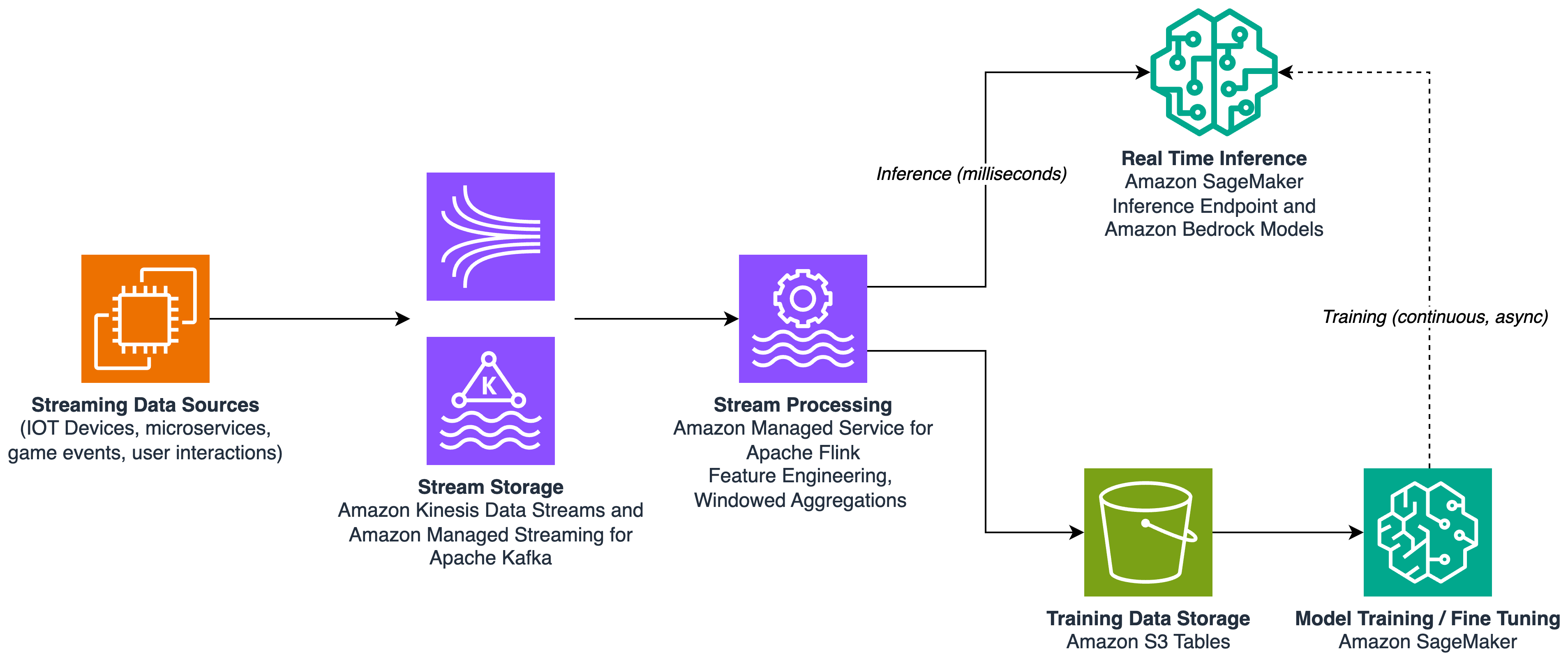
Streaming data flows through Managed Service for Apache Flink, then forks into a real-time inference path and a training path

Figure 1: Streaming feature engineering feeding a real-time inference path and a continuous training path

Pattern 2: Event-driven agent invocation

At 2:47 AM, a pressure sensor on a manufacturing line begins drifting. Within seconds, a streaming pipeline detects the anomaly, assembles full context (device history, maintenance schedule, correlated sensor readings), and invokes an agent that opens a maintenance work order, adjusts the device’s sampling rate, and notifies the on-call engineer. All of this happens before a human sees an alert.

Pattern 1 invokes inference on every window or event. It runs continuously. Pattern 2 adds to this approach: the streaming pipeline continuously analyzes data and invokes an agentic workflow when specific conditions are met or a pattern is detected. The pipeline is the sensor. The agent is the responder. Dynamic rules are the bridge between them.

The key distinction is that the events and triggers are dynamic. They’re defined by rules programmed into the streaming pipeline or traditional ML models for prediction or detection. The pipeline determines when and how the agent is triggered, making the system fluid and adaptive. You can update detection logic without redeploying the agent. You can add new anomaly patterns without changing the response logic.

Streaming telemetry flows into Amazon MSK or Amazon Kinesis Data Streams. Managed Service for Apache Flink runs continuous anomaly-detection logic, such as statistical models, windowed aggregations, threshold-based rules, or ML-based scoring. Critically, when Flink detects an anomaly, it doesn’t only publish a raw alert. It assembles a context package: the anomaly details, relevant historical data, correlated signals from other streams, and metadata the agent needs to act immediately.

This context package is published to a downstream topic and consumed by an Amazon Bedrock AgentCore agent. Because the pipeline has already assembled full context, the agent doesn’t waste time gathering information. It can reason and act immediately. AgentCore Runtime hosts the agent, AgentCore Observability provides tracing and logging, and AgentCore Memory maintains state across invocations (so the agent knows, for example, that this is the third anomaly from this device this week).

The benefit of this pattern over a polling-based or scheduled approach is twofold:

  1. Latency: The agent is invoked within seconds of the anomaly, not at the next polling interval.
  2. Context richness: The pipeline has already done the work of correlating signals and assembling context. A polling-based agent would need to make multiple queries to reconstruct what the pipeline already knows.

The rules that trigger invocation are a powerful abstraction. They can be simple thresholds (“temperature exceeds 95°C”), statistical (“value deviates more than 3σ from the rolling mean”), or ML-based (“anomaly score from an embedded model exceeds 0.85”). You can update these rules dynamically by adding new detection patterns, adjusting sensitivity, or routing different anomaly types to different agents.
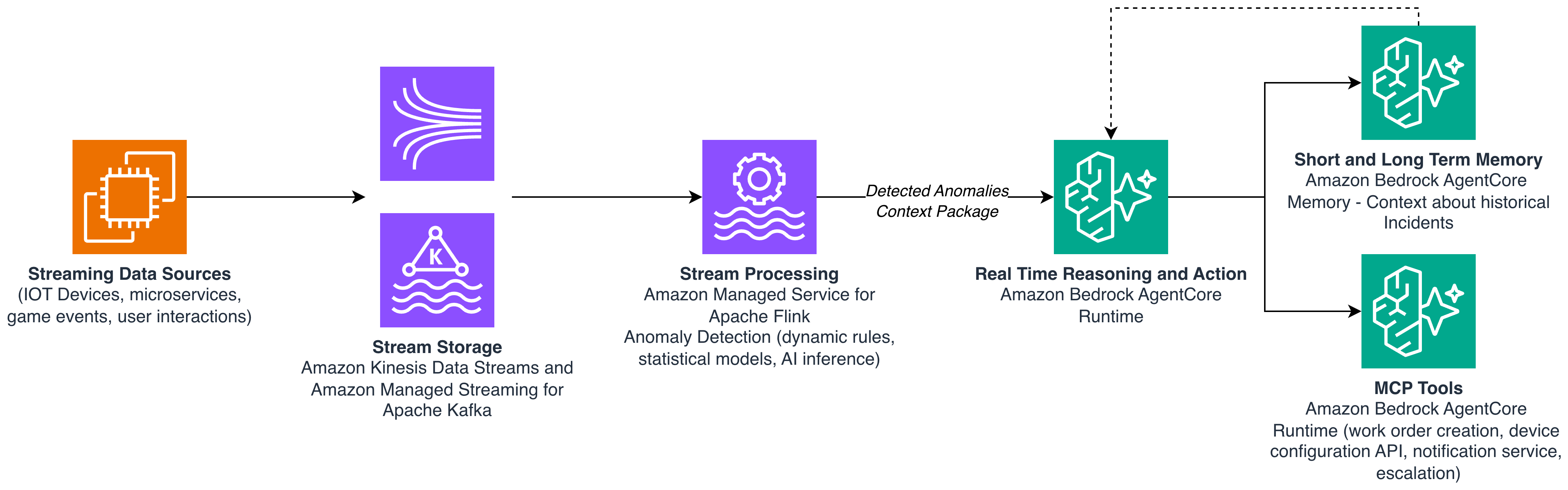
Managed Service for Apache Flink detects anomalies and sends a context package to an Amazon Bedrock AgentCore agent that acts on them

Figure 2: Event-driven agent invocation triggered by anomaly detection in the streaming pipeline

Pattern 3: Real-time agent context

A customer messages their bank: “Was that $847 charge at the airport legitimate?” The agent responds in under two seconds with full context (the customer’s recent travel pattern, the merchant’s fraud-risk score, and the transaction details) because all of this was already loaded into the agent’s context layer through streaming CDC. A reactive agent without this synchronization would need to make five separate API calls across three systems, taking 8–12 seconds and risking timeout failures.

This pattern addresses a fundamental question: how proactive should your agent be about gathering context?

A proactive agent has the full context, continuously synchronized with the state of the world. When a user asks a question, the agent already has the relevant knowledge from context. It responds from memory rather than making expensive external calls. A reactive agent starts cold. It knows nothing until it queries for information, making multiple calls across security boundaries, handling authentication, and stitching together data from disparate sources. For latency-sensitive use cases, where a user sends a prompt and expects a fast response, this difference is critical.

Real-time context synchronization uses CDC and streaming pipelines to keep agent memory current. The agent’s knowledge graph becomes a synchronized replica of the distributed systems it needs to reason about.

No agent is purely proactive or purely reactive. The design decision is: what data should be pre-loaded, and what should be fetched on demand? This is a spectrum, and where you land depends on three factors:

  1. Latency sensitivity: If users expect fast, contextually relevant responses, pre-load the data the agent needs most frequently.
  2. Data volume: Synchronizing everything is impractical. An efficient, fast search that still produces accurate results matters more than exhaustive pre-loading. Be selective about what you push.
  3. Data freshness requirements: Some data changes every second (stock prices, session state). Other data changes rarely (customer preferences, account configuration). Load what changes frequently and matters immediately.

Streaming pipelines (Managed Flink reading from Amazon MSK, Kinesis Data Streams, or CDC streams from operational databases) continuously process events and write aggregated results to the agent’s knowledge graph, or the context layer. These stores can take multiple forms depending on your access patterns:

  • AWS Context automatically maps relationships across your existing data into a knowledge graph and supports agentic search so AI agents can access governed data relationships, business rules, and domain knowledge at runtime. Data stewards manage the graph through an intuitive console, reviewing inferred relationships, promoting them to production, and attaching domain-specific knowledge like business definitions and usage rules.
  • Amazon Bedrock AgentCore Memory for structured agent context that persists across sessions.
  • Amazon DynamoDB for low-latency key-value lookups (customer profiles, account state).
  • Amazon OpenSearch Serverless for semantic search over unstructured context (past conversations, documents).
  • Amazon Neptune for relationship-rich data (knowledge graph).
  • Amazon S3 Tables fully managed Apache Iceberg tables in Amazon S3, for interoperability between multiple query engines.

For data that isn’t pre-loaded, the agent falls back to on-demand retrieval. This applies when the data is too large, changes too rarely to justify streaming, or is needed only in edge cases. The Model Context Protocol (MCP) provides a standardized interface for this. MCP servers expose heterogeneous data sources through a uniform protocol. The agent queries MCP when it needs context that isn’t in its synchronized memory.

This same real-time context synchronization pattern serves different consumers:

AI agents access fresh context through a real-time knowledge graph or a context layer, and MCP servers (pull tier), as in the preceding sections.

Human analysts and executives access the same context layer, which can directly query Apache Iceberg tables on S3 Tables through its direct query mode. Amazon Quick chat provides natural-language access to real-time lakehouse data. No intermediate warehouse is required. This is the generative BI expression of the same underlying pattern: streaming data keeps the lakehouse current, and Amazon Quick gives humans conversational access to it.

Training and fine-tuning pipelines access the synchronized lakehouse through Amazon SageMaker Lakehouse, keeping models fresh (as described in Pattern 1).

The underlying principle is the same across consumers: streaming pipelines synchronize distributed data into accessible stores, and each consumer accesses those stores through the interface that fits their needs.
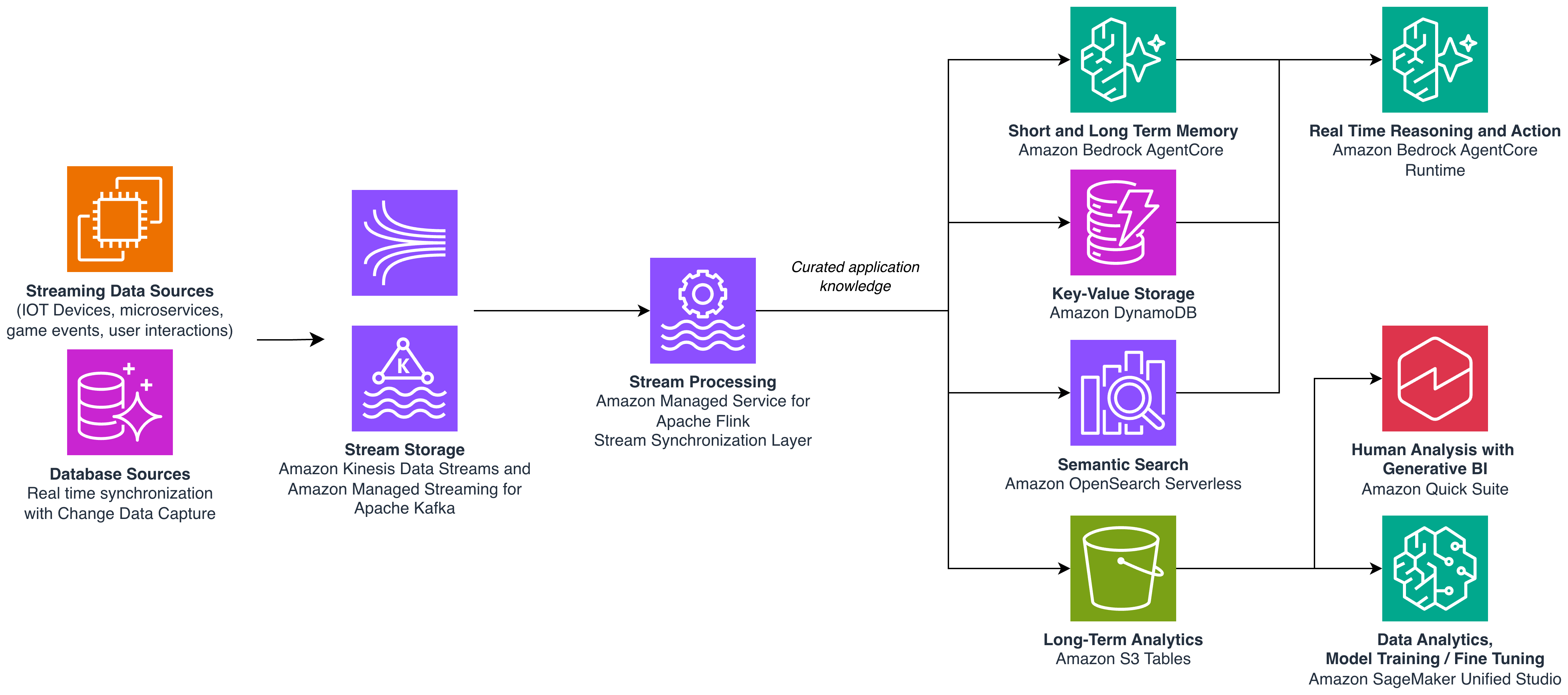
A streaming synchronization layer feeds multiple stores that serve AI agents, human analysts, and training pipelines

Figure 3: Real-time context synchronization serving agents, analysts, and training pipelines from shared stores

Bringing it together

The three patterns in this post form a unified architecture built on a single streaming backbone:

Pattern 1 uses streaming pipelines to build features that simultaneously drive real-time inference and keep training data fresh. Your models improve continuously while serving predictions in real time.

Pattern 2 uses streaming pipelines as intelligent sensors that detect anomalies and invoke agents with full context already assembled. This separates detection logic from response logic for maximum flexibility.

Pattern 3 uses streaming pipelines to synchronize distributed system state into the agent’s context layer, making agents more proactive and serving multiple consumers (agents, humans, and training jobs) from the same pre-loaded data.

The streaming infrastructure you build (Amazon MSK, Amazon Kinesis Data Streams, Amazon Managed Service for Apache Flink, and Amazon S3 Tables) serves all three patterns simultaneously. A Flink application can compute features for inference (Pattern 1), detect anomalies that trigger agents (Pattern 2), and synchronize state into agent memory (Pattern 3).

To get hands on with the patterns described in this post, refer to Agentic AI-Powered anomaly detection: Spotting anomalies in real-time.

You don’t need to implement all three patterns at once. Start with the one that addresses your most pressing need. But design your streaming infrastructure knowing it will serve multiple patterns. In the agentic AI era, every stream is a potential input to an agent, a model, and a human decision-maker.
About the authors

Mazrim Mehrtens

Mazrim Mehrtens

Mazrim is a Sr. Specialist Solutions Architect for messaging and streaming workloads. Mazrim works with customers to build and support systems that process and analyze terabytes of streaming data in real time, run enterprise Machine Learning pipelines, and create systems to share data across teams seamlessly with varying data toolsets and software stacks.

Ali Alemi

Ali Alemi

Ali is a Principal Streaming Solutions Architect at AWS. Ali advises AWS customers with architectural best practices and helps them design real-time analytics data systems which are reliable, secure, efficient, and cost-effective. Prior to joining AWS, Ali supported several public sector customers and AWS consulting partners in their application modernization journey and migration to the Cloud.

Build streaming applications on Amazon Managed Service for Apache Flink with AI-assisted guidance

Post Syndicated from Mazrim Mehrtens original https://aws.amazon.com/blogs/big-data/build-streaming-applications-on-amazon-managed-service-for-apache-flink-with-ai-assisted-guidance/

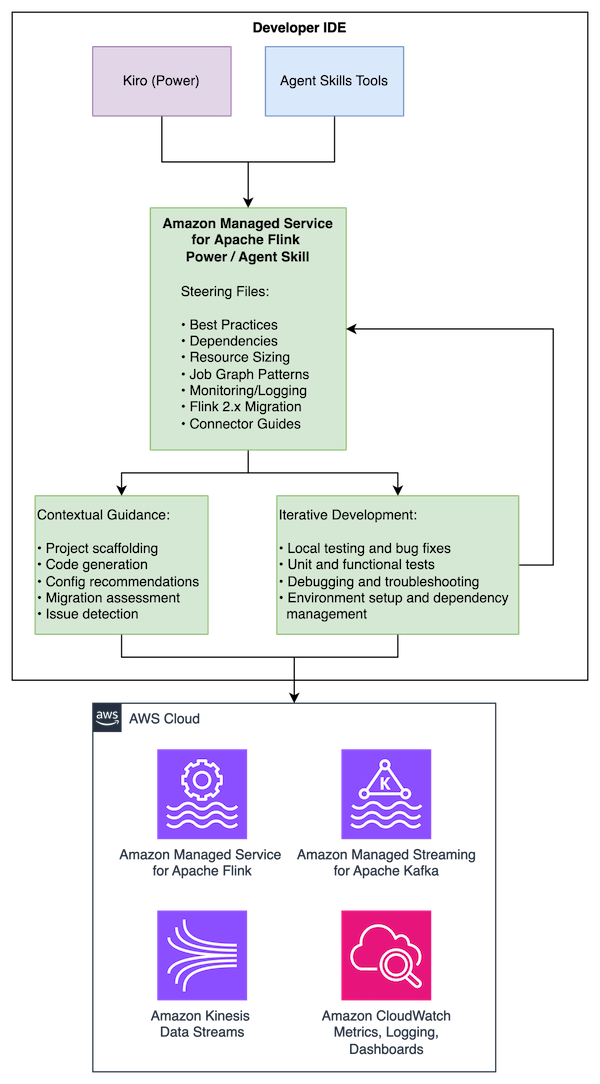
Building production-ready Apache Flink applications requires learning a complex ecosystem. The learning curve is steep for newcomers, and even experienced Flink developers encounter complexity when scaling applications or troubleshooting production issues. With the new Kiro Power and Agent Skill for Amazon Managed Service for Apache Flink, you can get AI-assisted guidance for building, improving, and migrating streaming applications directly in your development environment, with recommendations that are grounded in best practices.

The Managed Service for Apache Flink Kiro Power and Agent Skill helps you navigate challenges across the Flink application lifecycle. For new development, the tool provides contextual guidance on application architecture, state management patterns, and connector selection. For existing application improvements, it analyzes your existing code to identify performance bottlenecks, reliability risks, and opportunities for improvement. If you’re upgrading from Apache Flink 1.x to 2.x, it detects compatibility issues and provides targeted refactoring steps to modernize your applications.

In this post, we walk through installing the Power and Skill, using Amazon Kinesis Data Streams to build a Kinesis Data Stream-to-Kinesis Data Stream streaming pipeline, and migrating an existing application to Flink 2.2. You can follow along with this use case to see how the Managed Service for Apache Flink Kiro Power can help you build a resilient, performant application grounded in best practices.

Solution overview

The Managed Service for Apache Flink Power/Skill works across multiple AI development tools, providing the same comprehensive guidance in each:

  • Kiro: Installs as a Power that automatically activates for Flink-related development activities
  • Cursor and Claude Code: Installs as an Agent Skill following the open Agent Skills standard
  • Other compatible agents: Compatible with tools supporting the Agent Skills specification

The Power/Skill provides guidance across the development lifecycle:

  • Best practices for Managed Service for Apache Flink application development
  • Maven dependency management and project structure
  • Resource improvements including KPU sizing, parallelism tuning, and checkpointing
  • Job graph architecture patterns and anti-patterns
  • Amazon CloudWatch monitoring and logging configuration
  • Flink 1.x to 2.2 migration guidance with state compatibility assessment
  • Connector-specific guidelines

The content is maintained in a single repository with use case specific entry points that are dynamically loaded depending on your needs.

Prerequisites

To use the tool, you need:

  • A development machine running macOS, Linux, or Windows with Java 11 or later (Java 17 for Flink 2.2) and Apache Maven installed
  • One of the following AI development tools:
    • Kiro IDE
    • Cursor
    • Claude Code
    • Other Agent Skills-compatible tools
  • Basic knowledge of Java and stream processing concepts (helpful but not required)
  • An AWS Identity and Access Management (IAM) role configured with access to create and run Managed Service for Apache Flink applications, create Amazon Simple Storage Service (Amazon S3) buckets for Flink application dependencies, create Kinesis Data Streams for streaming, and create IAM roles (required if deploying an application)

Installation

Installing as a Kiro Power

  1. Open Kiro IDE.
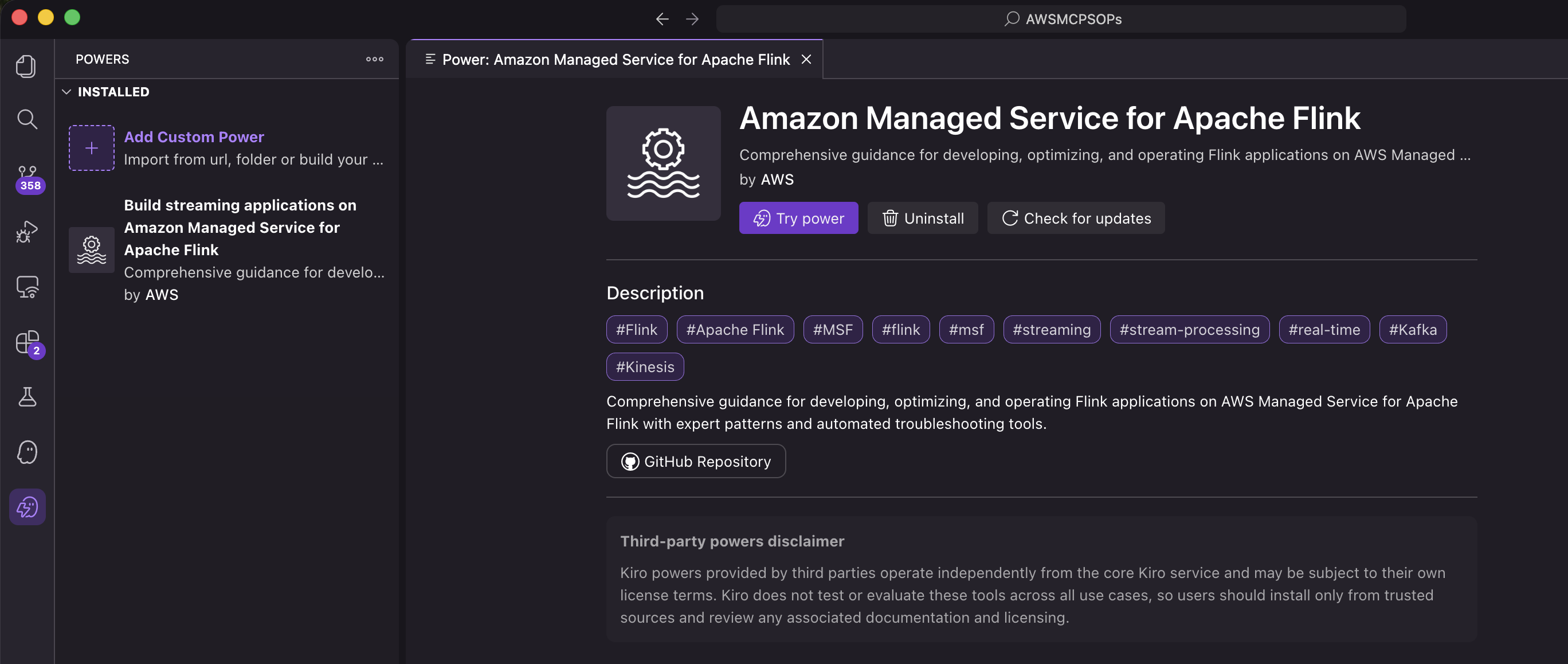
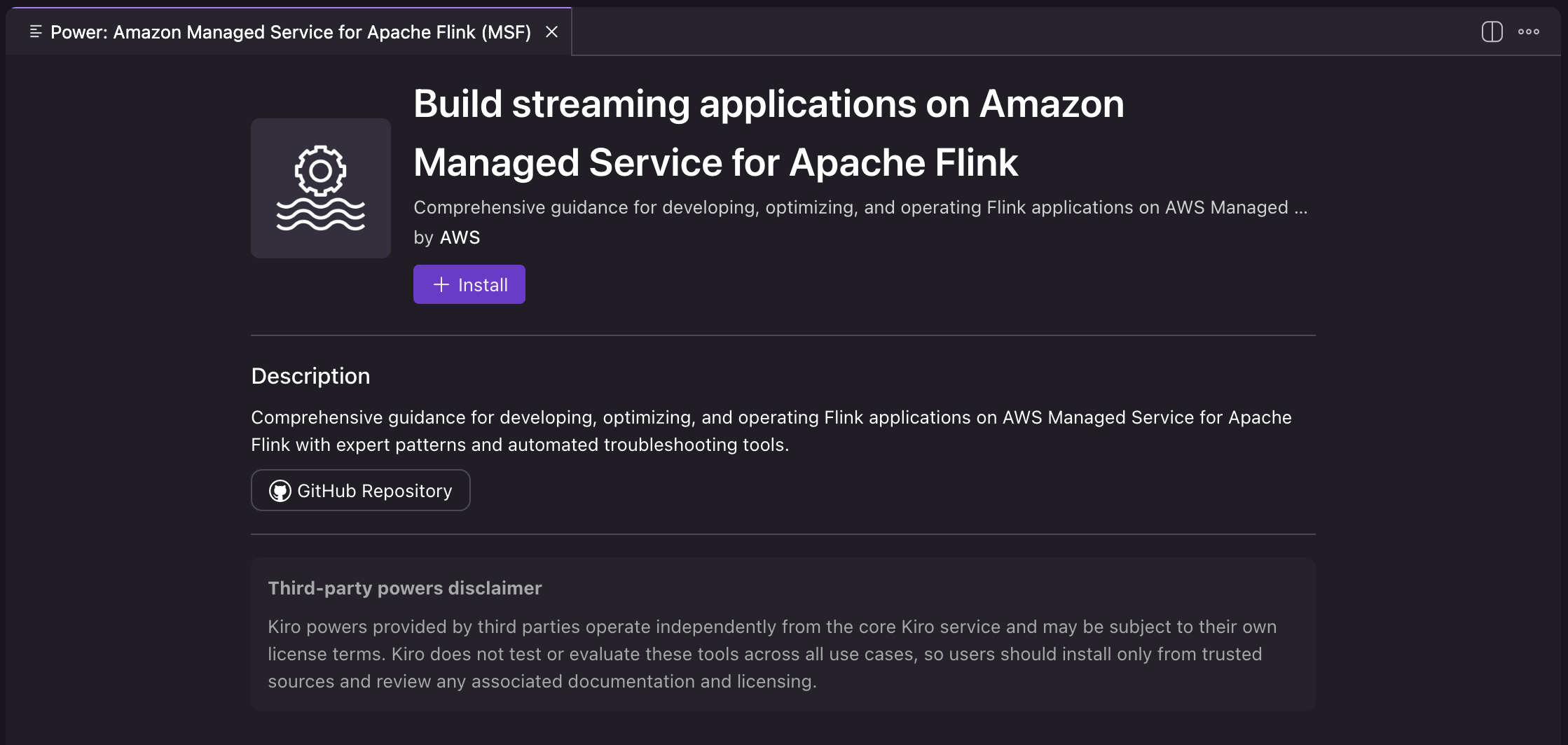
  2. Open Amazon Managed Service for Apache Flink and select Open in Kiro.

  1. Choose Install to install the power.

  1. Verify that the power is listed in the installed powers in the Kiro IDE.

The Power is now installed and automatically activates when you work on Flink-related development activities.

Installing as an Agent Skill

Agent Skills are discovered automatically by compatible tools through the SKILL.md file. Installation varies by tool:

Per-project installation (available in one project):

# For Cursor
git clone https://github.com/awslabs/managed-service-for-apache-flink-agent-steering-files.git .cursor/skills/flink

# For Claude Code
git clone https://github.com/awslabs/managed-service-for-apache-flink-agent-steering-files.git .claude/skills/flink

# For other Agent Skills-compatible tools
git clone https://github.com/awslabs/managed-service-for-apache-flink-agent-steering-files.git .agents/skills/flink

Personal installation (available across projects):

# For Cursor
git clone https://github.com/awslabs/managed-service-for-apache-flink-agent-steering-files.git ~/.cursor/skills/flink

# For Claude Code
git clone https://github.com/awslabs/managed-service-for-apache-flink-agent-steering-files.git ~/.claude/skills/flink

To verify the installation, interact with the skill in your preferred tool. In Claude Code, you can invoke it with /flink. In Cursor, type / in Agent chat and search for flink. For more information about Agent Skills, see the Agent Skills documentation.

Example: Building a Kinesis-to-Kinesis streaming pipeline

Rather than listing best practices, the Power/Skill actively guides you through making the right architectural decisions at each stage of development.

The following walkthrough demonstrates building a Flink application that reads from Amazon Kinesis Data Streams, analyzes events, and writes to another Kinesis stream. To follow along, run the same prompts in your Kiro IDE or other development tool. In the following prompts, we focus on local development and don’t create AWS resources. However, if you prompt the agent to create and deploy AWS resources, they will incur additional costs.

Starting the conversation

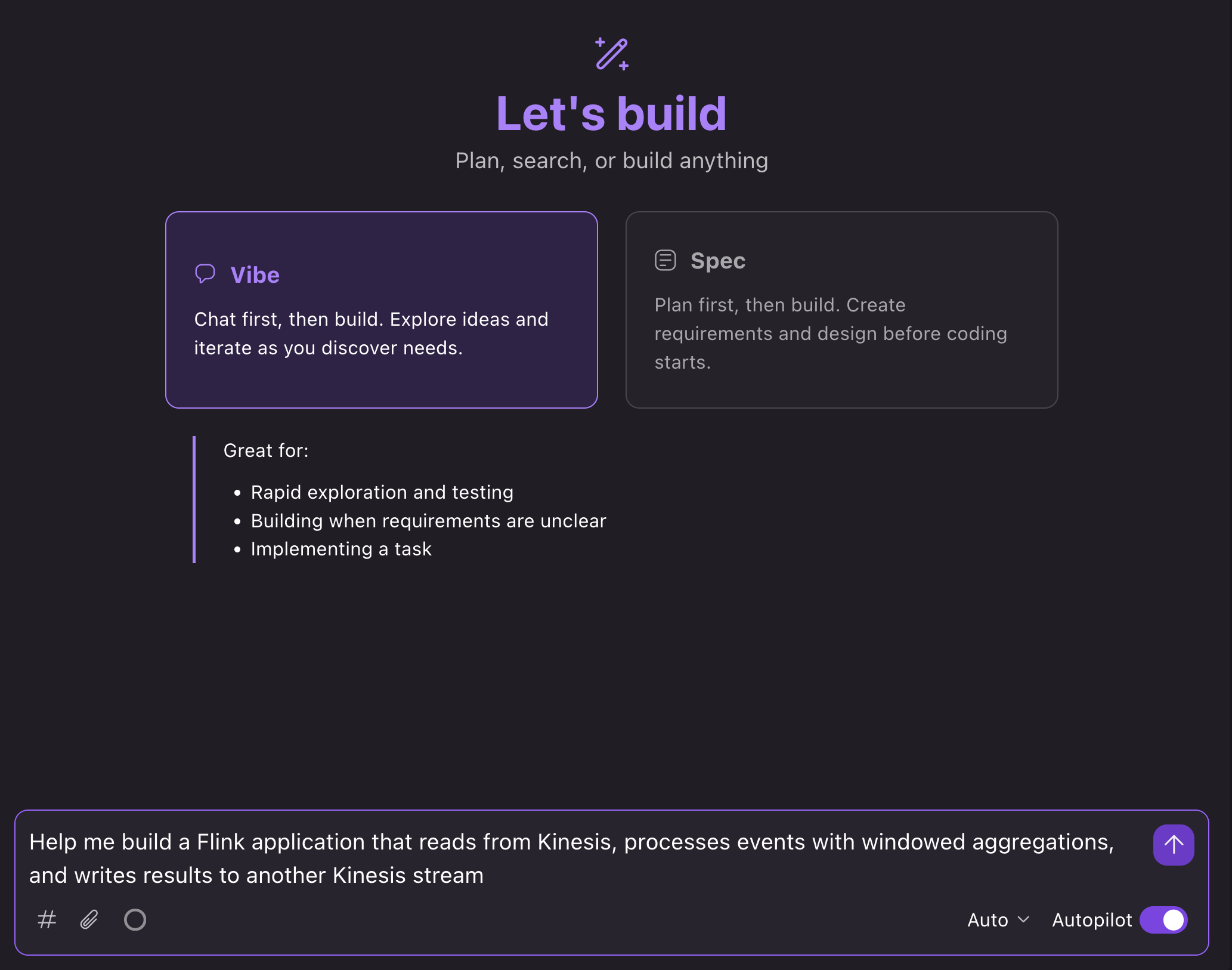
In the Kiro IDE, we can open a new chat in Vibe mode and prompt: “Help me build a Flink application that reads from Kinesis, processes events with windowed aggregations, and writes results to another Kinesis stream”:

Kiro chat showing a prompt to build a Kinesis streaming application

What happens next

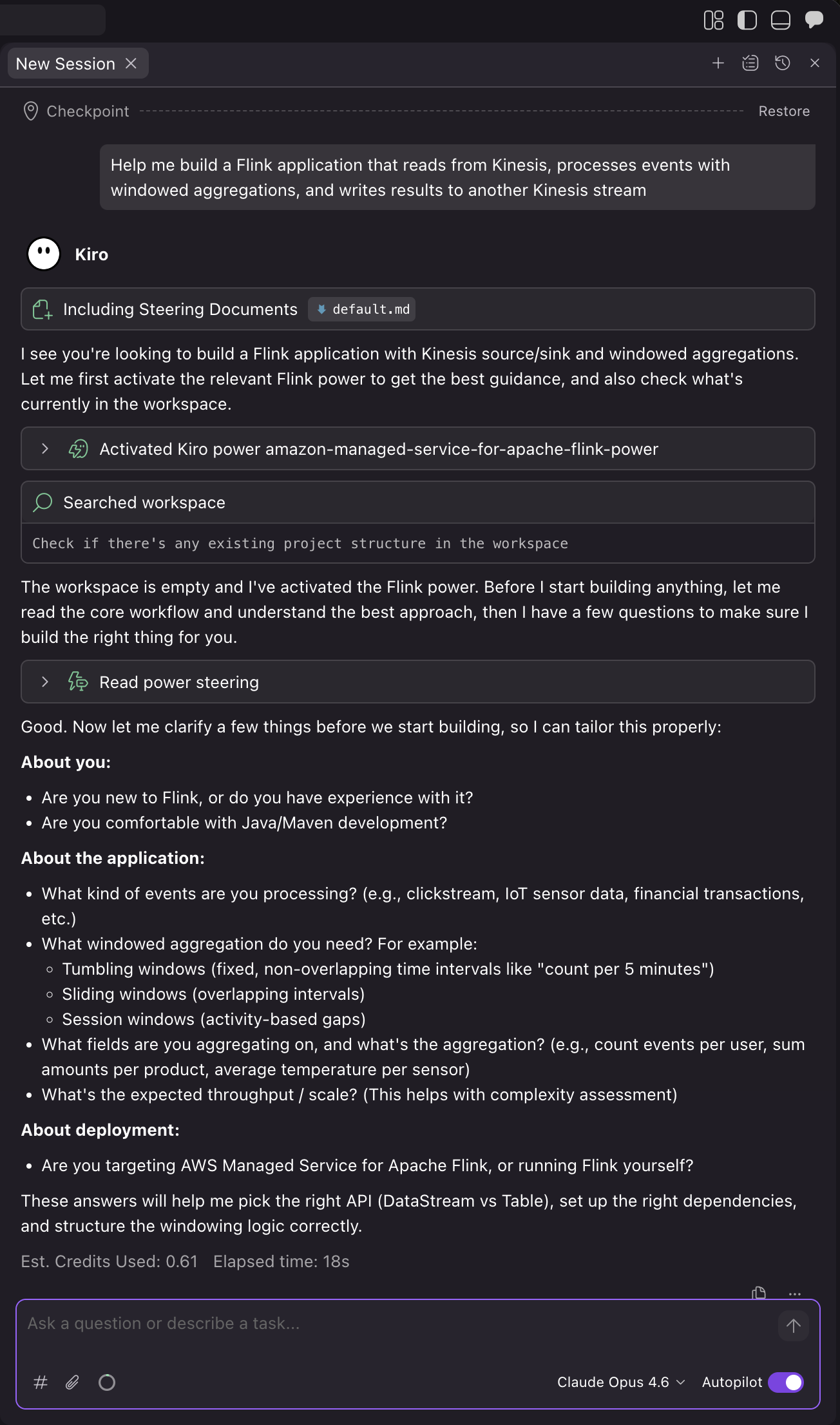
The AI assistant loads relevant guidance and walks you through the development process:

1. Confirm project requirements and details

Kiro automatically loads the Power based on the context of your prompt. The assistant then asks you questions about your use case to make sure that it builds the right application for your needs:

For the demo, we can prompt for a financial services use case: “I’m in financial services, so let’s use that as the use case. Try calculating volatility in real-time. And let’s use Flink 1.20 for now.”.

Kiro then confirms its assumptions and asks to proceed:

2. Project setup

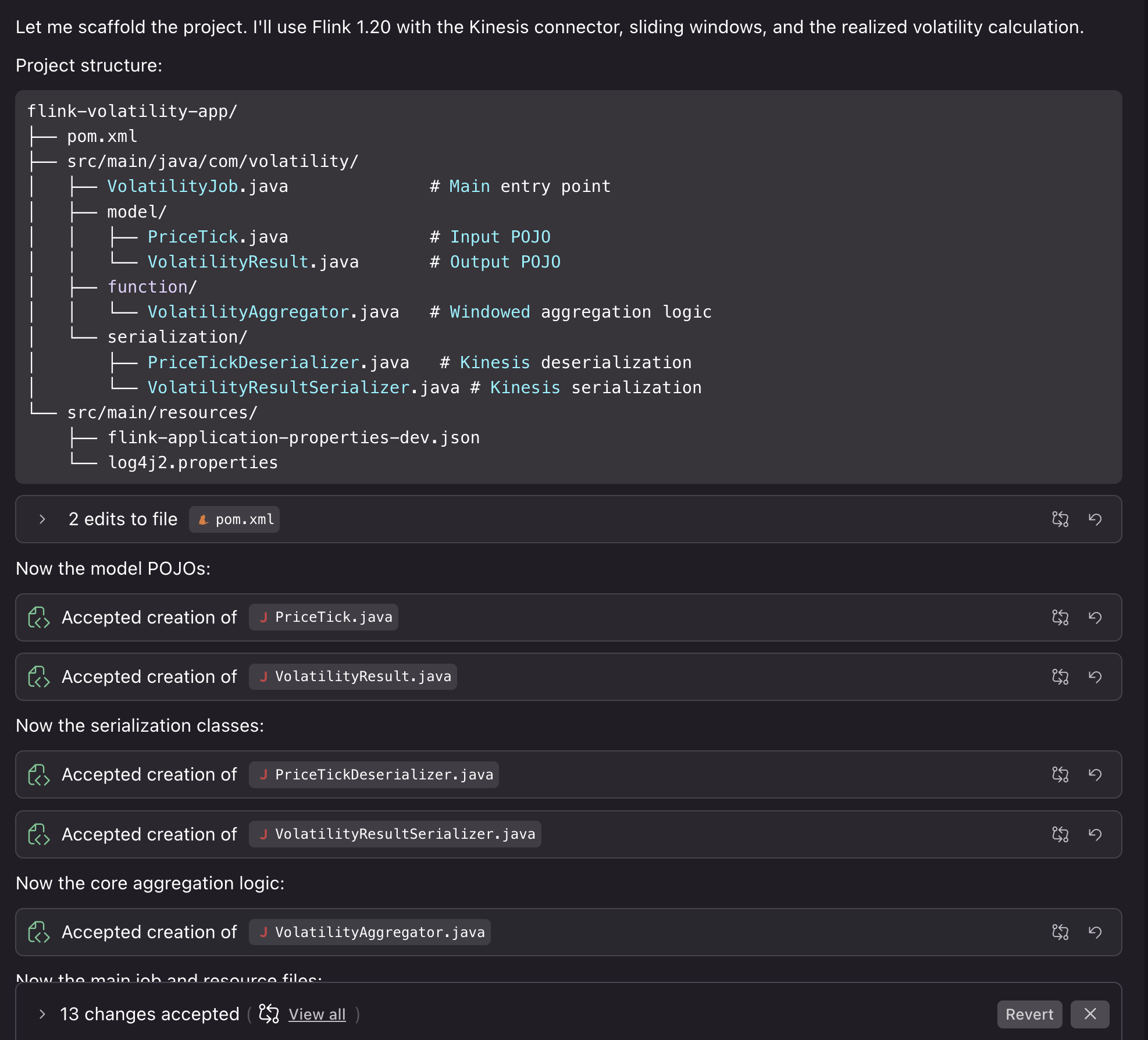
After we confirm, Kiro generates a project with Flink 1.20 dependencies, Kinesis connectors, and proper scope configuration for Managed Service for Apache Flink deployment. The assistant creates the application structure with proper configuration separation between local development and Managed Service for Apache Flink service-level settings. Then, it creates a Kinesis source with proper deserialization and the sink with partitioning strategy, and windowed aggregation logic with proper state management, TTL configuration, and error handling.

Generated project structure with Flink dependencies and Kinesis connectors

Kiro also compiles the code to verify that it builds correctly. We can then proceed by asking Kiro to help us with running the application locally for testing.

3. Testing the project locally

You can run the application locally to test the results. We can prompt: “Can we run this locally using something like LocalStack to test deploying the job and also see some example results?”

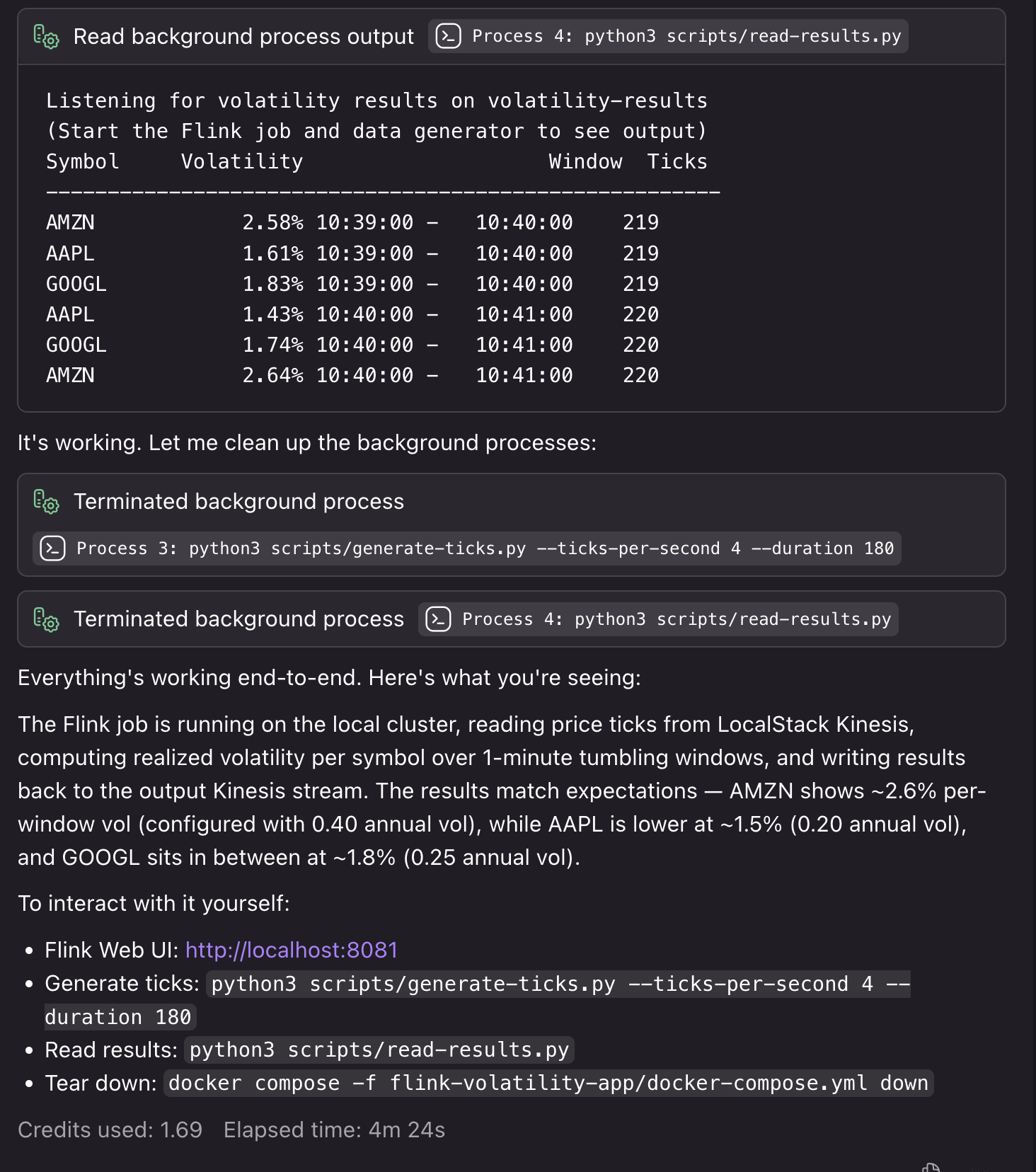
Kiro creates the necessary Docker resources, testing scripts, and deployment steps to run the application locally with synthetic resources. If it encounters bugs or detects issues during the local testing process, it fixes them so that your deployment runs smoothly:

Kiro creating Docker resources and local testing infrastructure

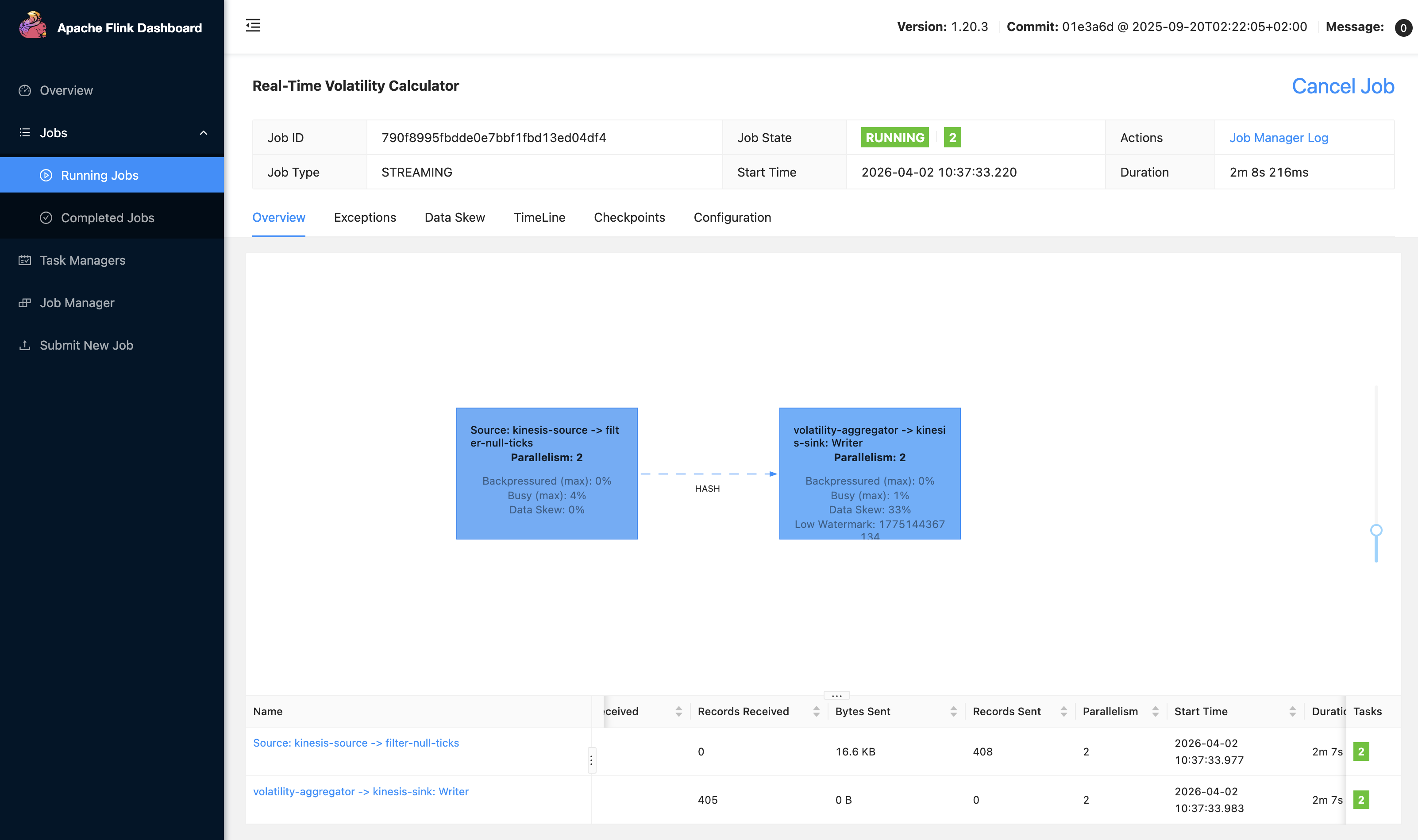
We can also access our local Flink UI to view our application:

Local Flink UI showing the running streaming application

4. Deploying the application to Managed Service for Apache Flink

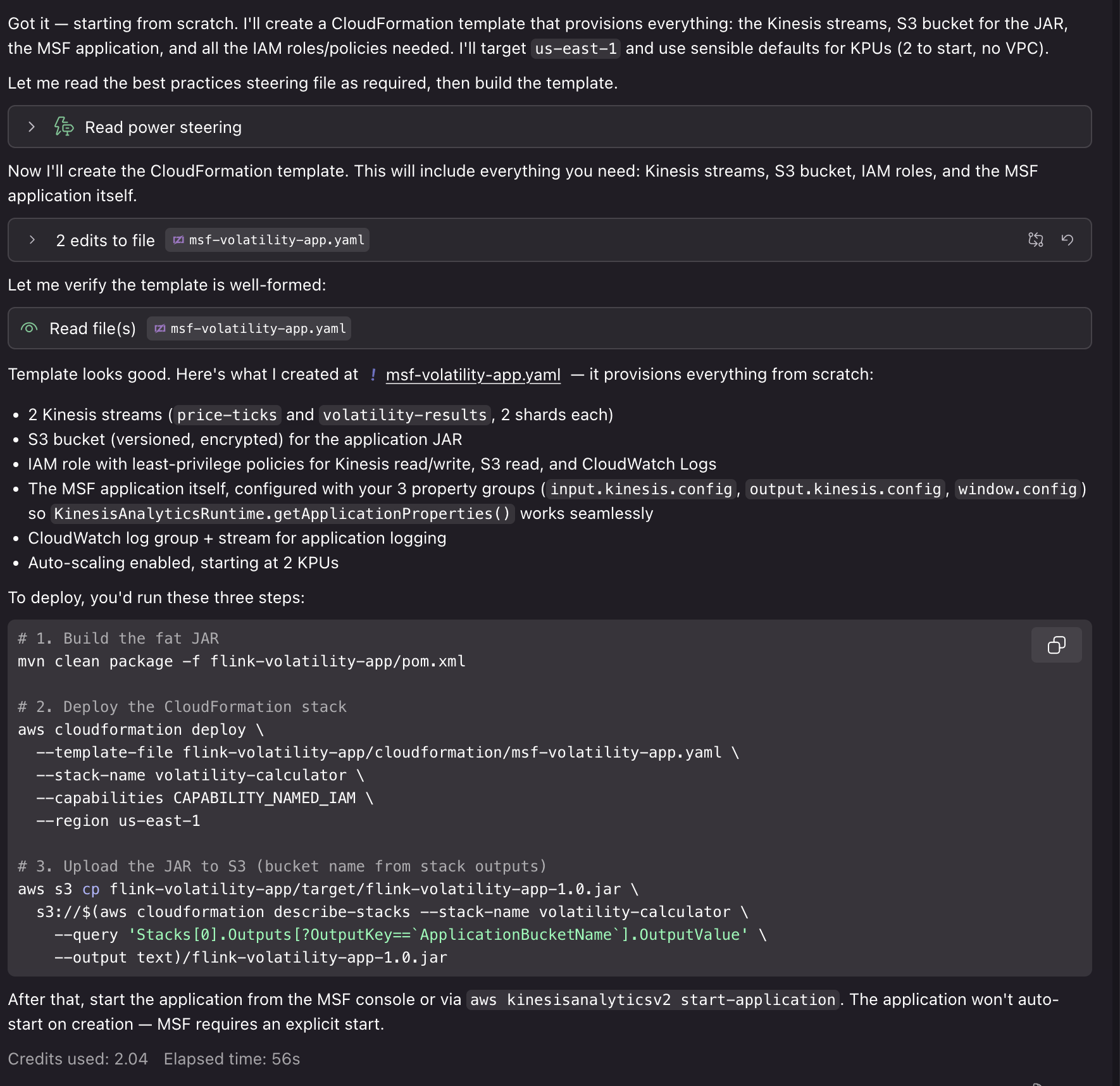
Now that our application is running and generating results end-to-end, we can use the Power for other tasks. For example, you can get guidance on KPU allocation and parallelism settings based on your expected throughput, configure monitoring with CloudWatch metrics, logging, and dashboards for operational visibility, or set up infrastructure as code (IaC) for deploying in Managed Service for Apache Flink. We can prompt: “This is great! Can you help me deploy this application to Managed Service for Apache Flink? I’d like to use CloudFormation for deployment.”

Kiro conversation summarizing creation of CloudFormation deployment resources

Using the generated AWS CloudFormation templates and deployment scripts, we can deploy our application to AWS with associated resources for Kinesis Data Streams, Amazon S3 buckets for application JAR files, CloudWatch log groups, and IAM roles. Deploying these resources requires IAM credentials with associated permissions and will incur cost for the associated resource usage.

In a traditional workflow, you build your application, deploy to Managed Service for Apache Flink, then discover performance issues or configuration problems in production. You spend time debugging checkpoint failures, serialization errors, or resource bottlenecks.With the Power/Skill, the AI assistant catches these issues during development. When you need complex aggregation and processing logic, it helps you to do so in a way that uses resources efficiently with Flink’s scaling model. When you create an application bug that would cause a crash in production, it helps you identify it early with local end-to-end testing. The Power is configured with guidance and best practices to help with the development process from start to finish.

Example: Migrating to Flink 2.2

The Managed Service for Apache Flink Kiro Power and Agent Skill provide contextual advice specific to your situation. For new developers, it walks through the complete workflow from project setup to deployment, explaining Managed Service for Apache Flink-specific concepts along the way. For migration projects, it analyzes your existing code for Flink 2.2 compatibility issues and provides targeted refactoring guidance. The following example shows how the tool helps with the complex task of migrating from Flink 1.x to 2.2.

1. Assessing migration compatibility

We can ask Kiro to help us upgrade our project from the previous example to Flink 2.2: “I need to migrate my Flink 1.x application to 2.2. Can you help me identify compatibility issues?”

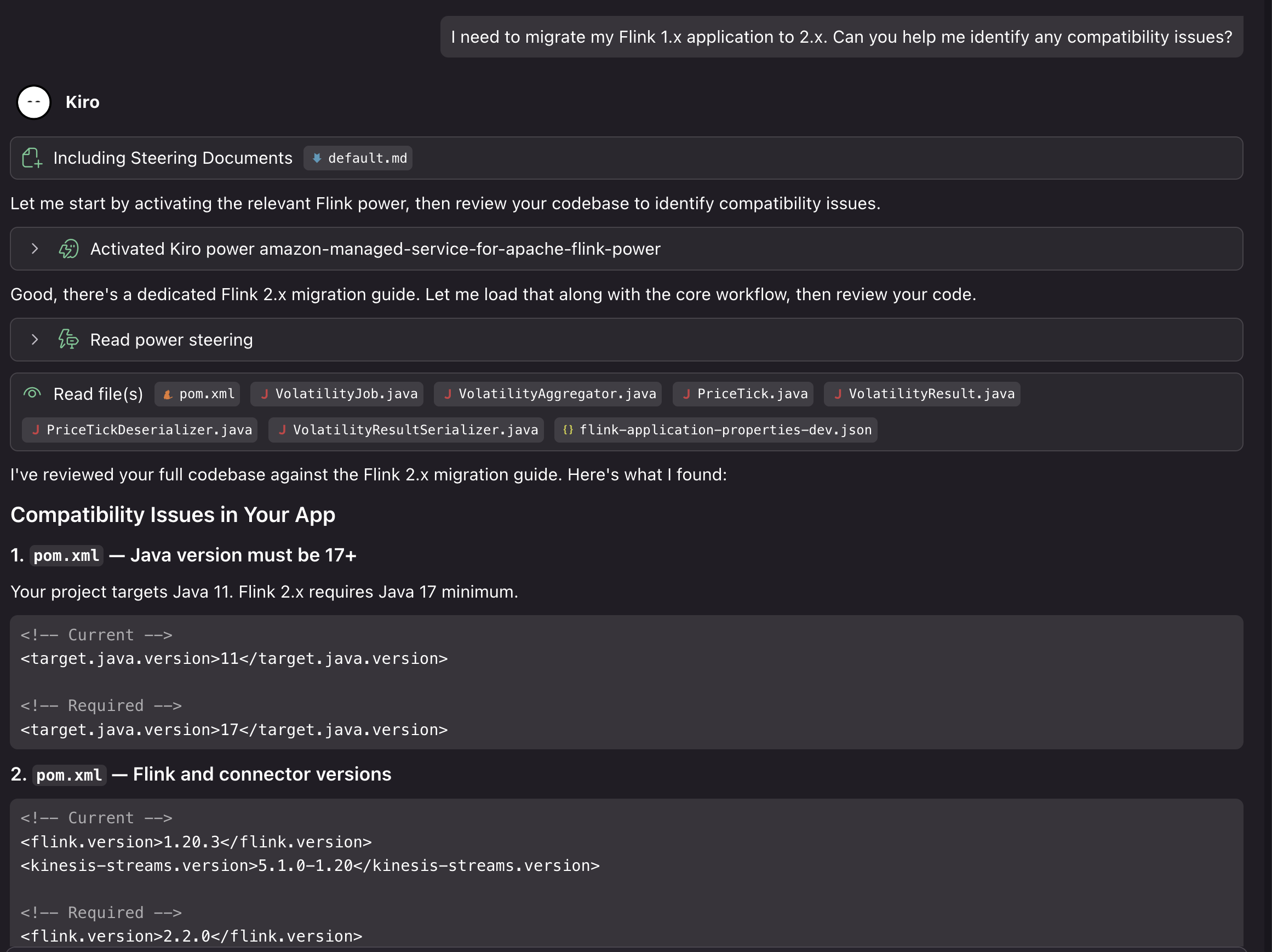
The assistant loads the Managed Service for Apache Flink Kiro Power and analyzes our code to identify potential issues:

Kiro analyzing Flink 1.x code for 2.2 compatibility issues

In this case, using our generated project on Flink 1.20, Kiro identified the following compatibility issues for the upgrade:

  • Java 11 must move to Java 17 (minimum for Flink 2.2)
  • Flink version 1.20.3 must update to 2.2.0
  • The Kinesis connector must update from 5.1.0-1.20 to 6.0.0-2.0
  • Time references must change to java.time.Duration in window and lateness calls
  • The LocalStreamEnvironment instance of check must be removed (class removed in 2.2)
  • The isEndOfStream() override must be dropped from PriceTickDeserializer (method removed)
  • implements Serializable must be added to PriceTick and VolatilityResult

It also verified that some parts of the project are already Flink 2.2 compatible. The project uses the new Source Sink V2 APIs, the logging is 2.2 ready, the POJOs with no collection fields are state migration safe, and there are no Kryo registrations or TimeCharacteristic usage.

2. Implementing the migration

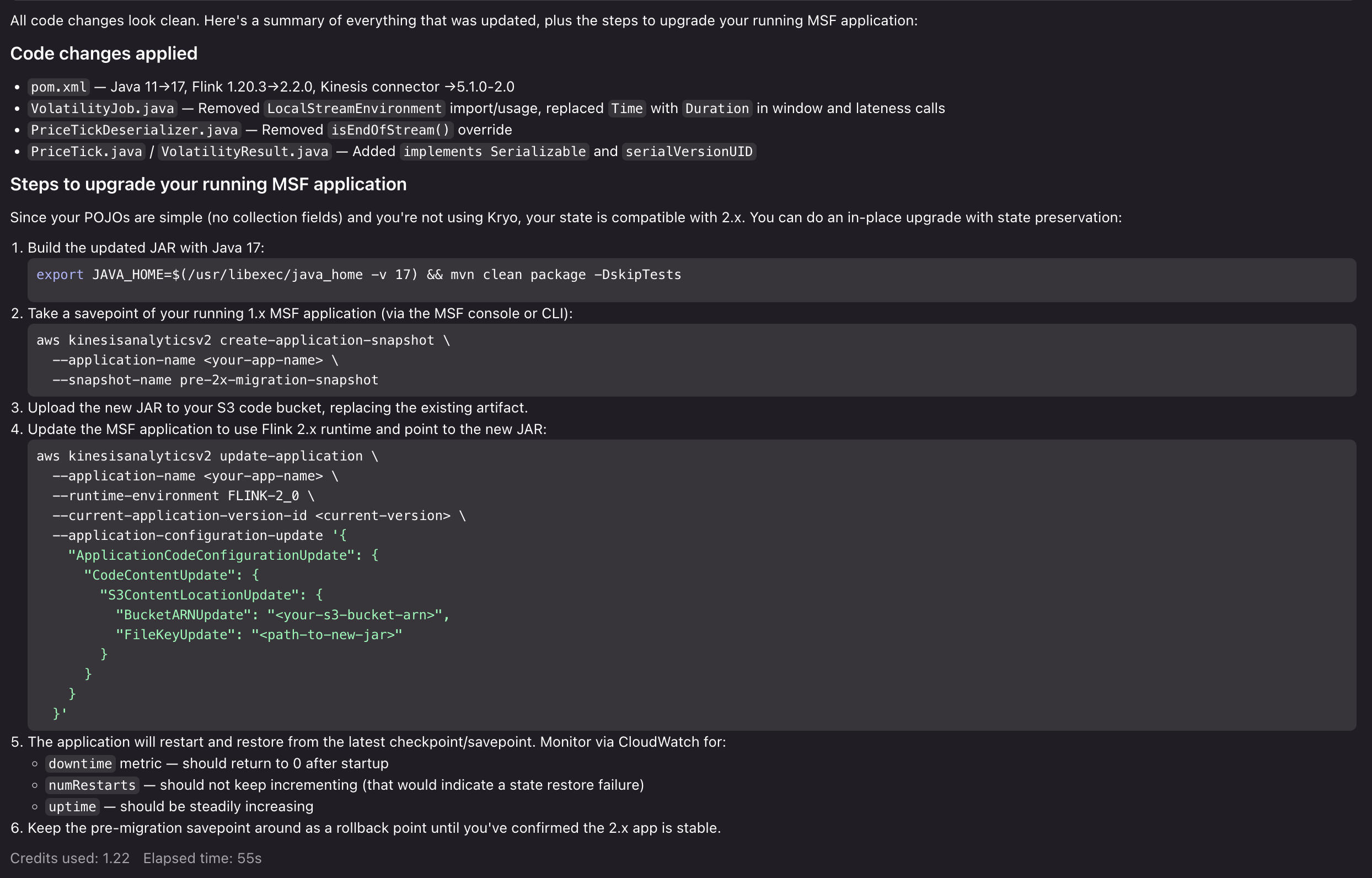
We can then ask Kiro to provide a step-by-step migration plan, both for updating the code and deploying to Managed Service for Apache Flink: “Can you help me update the application for Flink 2.2, and help me figure out the steps to upgrade my running Managed Service for Apache Flink application?”

Kiro evaluates the entire application code base. It evaluates it against the Power’s migration guidance and best practices, and provides a comprehensive analysis of the breaking changes, risks, and potential issues that would arise in the upgrade. After we approve the changes, Kiro then proceeds to make the necessary updates to make our application compatible with Flink 2.2 and provide us with a step-by-step upgrade process for the running application:

Kiro providing a step-by-step migration plan for Flink 2.2

Now that Kiro has prepared the application for Flink 2.2, highlighted migration risks, and provided us with a clear path to execute the upgrade, you can test the upgrade process with confidence. From here, we can proceed to run our Flink 2.2 application locally, test the upgrade process in a development environment in Managed Service for Apache Flink, and then execute the upgrade in our production environment. If we run into issues, we can return to the Kiro Power to get advice, resolve issues, and unblock our upgrade.

Cleanup

To remove the Power/Skill installation:

For Kiro:

  1. Open Kiro IDE.
  2. Navigate to the Powers tab.
  3. Uninstall the Amazon Managed Service for Apache Flink Power.

For Agent Skills:

# Remove per-project installation
rm -rf .cursor/skills/flink  # or .claude/skills/flink

# Remove personal installation
rm -rf ~/.cursor/skills/flink  # or ~/.claude/skills/flink
If you created Managed Service for Apache Flink applications or associated resources during development, clean the resources up:
  1. Delete the Managed Service for Apache Flink application from the AWS Console.
  2. Remove associated resources for sources and sinks, if created for development.
  3. Delete CloudWatch log groups if no longer needed.

Conclusion

In this post, we showed you how the Kiro Power and Agent Skill for Amazon Managed Service for Apache Flink brings AI-assisted development to stream processing. You can use the tool to overcome Flink’s learning curve, build applications following Managed Service for Apache Flink best practices, and migrate to Flink 2.2 with confidence. To get started, choose the path that fits your workflow:

  • If you use Kiro, install the Power from the Powers tab and start a new chat with a Flink-related prompt.
  • If you use Cursor, Claude Code, or another Agent Skills-compatible tool, clone the GitHub repository into your skills directory and reference the steering/ files for guidance.
  • If you are new to Amazon Managed Service for Apache Flink, review the Amazon Managed Service for Apache Flink Developer Guide and the Apache Flink documentation to build foundational knowledge alongside the Power/Skill.

We welcome your feedback. Report issues or request features through GitHub Issues, or contribute improvements via pull requests.


About the authors

Mazrim Mehrtens

Mazrim is a Sr. Specialist Solutions Architect for messaging and streaming workloads. Mazrim works with customers to build and support systems that process and analyze terabytes of streaming data in real time, run enterprise Machine Learning pipelines, and create systems to share data across teams seamlessly with varying data toolsets and software stacks.

Configure a custom domain name for your Amazon MSK cluster enabled with IAM authentication

Post Syndicated from Mazrim Mehrtens original https://aws.amazon.com/blogs/big-data/configure-a-custom-domain-name-for-your-amazon-msk-cluster-enabled-with-iam-authentication/

Most Amazon Managed Streaming for Apache Kafka (Amazon MSK) customers are simplifying and standardizing access control to Kafka resources using AWS Identity and Access Management (IAM) authentication. This adoption is also accelerated as Amazon MSK now supports IAM authentication in popular languages including Java, Python, Go, JavaScript, and .NET.

In the first part of Configure a custom domain name for your Amazon MSK cluster, we discussed about why custom domain names are important and provided details on how to configure a custom domain name in Amazon MSK when using SASL_SCRAM authentication. In this post, we discuss how to configure a custom domain name in Amazon MSK when using IAM authentication. We recommend you read the first part of this blog as it captures solution details implementation steps.

Solution overview

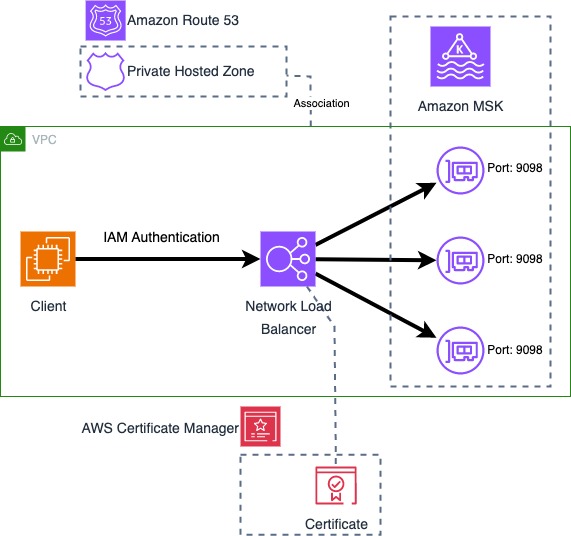
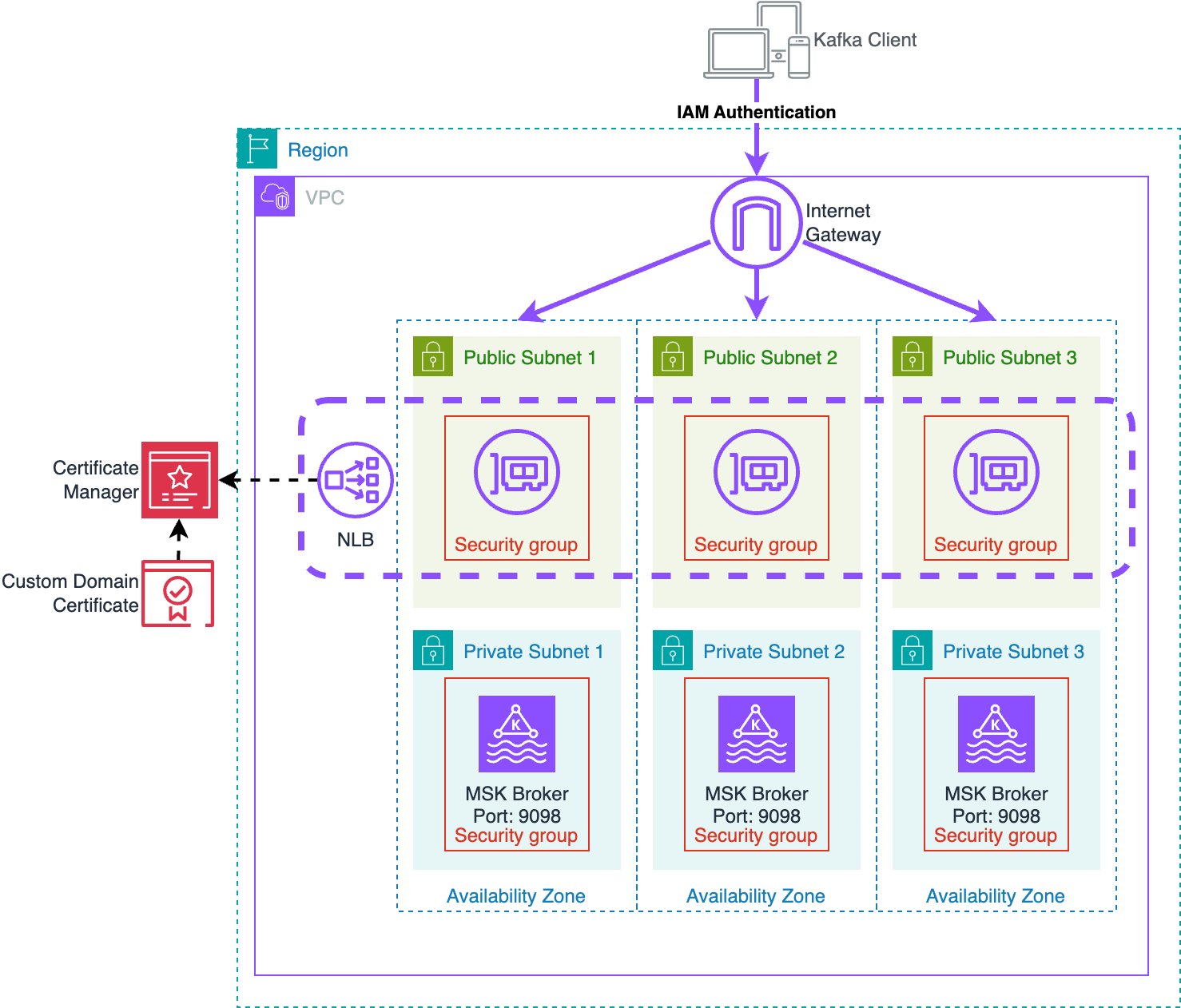
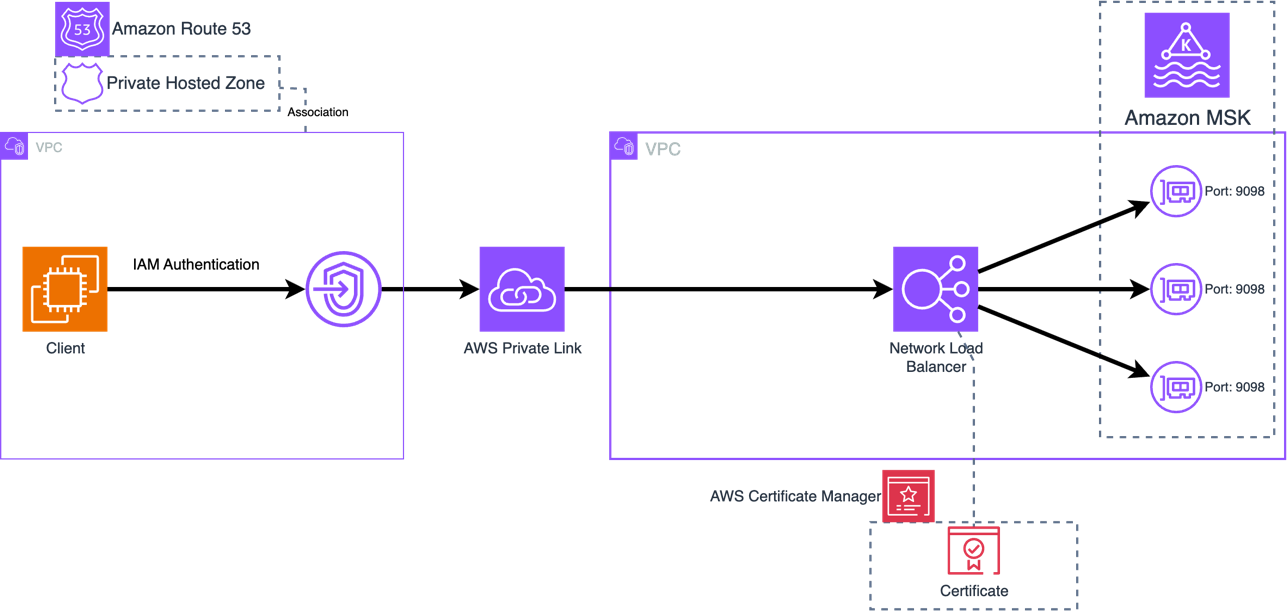
IAM authentication for Amazon MSK uses TLS to encrypt the Kafka protocol traffic between the client and Kafka broker. To use a custom domain name, the Kafka broker needs to present a server certificate that matches the custom domain name. To achieve this, this solution uses an Network Load Balancers (NLBs) with Amazon Certificate Manager to provide a custom certificate on behalf of the MSK brokers, and a Route 53 Private Hosted Zone to provide DNS for the custom domain name.

The following diagram shows all components used by the solution.

Architecture showing configuration of custom domain name with Amazon MSK

Certificate management

For clients to perform TLS communication with the MSK cluster the cluster needs to provide a certificate with hostnames matching the custom domain name. This solution uses a certificate in AWS Certificate Manager (ACM) signed with a Private Certificate Authority (PCA) for TLS with the custom domain name. This solution uses a certificate with bootstrap.example.com as the Common Name (CN) so that the certificate is valid for the bootstrap address, and Subject Alternative Names (SANs) are set for all broker DNS names (such as b-1.example.com). Since this solution uses a private certificate authority, the CA chain must be imported into the client trust stores.

This solution works with any server certificate, whether certificates are signed by a public or private Certificate Authority (CA). You can import existing certificates into ACM to be used with this solution. Certificates must provide a common name and/or subject alternative names that match the bootstrap DNS address as well as the individual broker DNS addresses. If the certificate is issued by a private CA, clients need to import the root and intermediate CA certificates to the client trust store. If the certificate is issued by a public CA, the root and intermediate CA certificates will be in the default trust store.

Network Load Balancer

The NLB provides the ability to use a TLS listener. The ACM certificate is associated with the listeners and enables TLS negotiation between the client and the NLB. The NLB performs a separate TLS negotiation between itself and the MSK brokers. In addition to the above architecture, this solution also allows using AWS Private Link to connect the cluster to external VPCs. This allows secure access to MSK between VPCs while using a custom domain name.

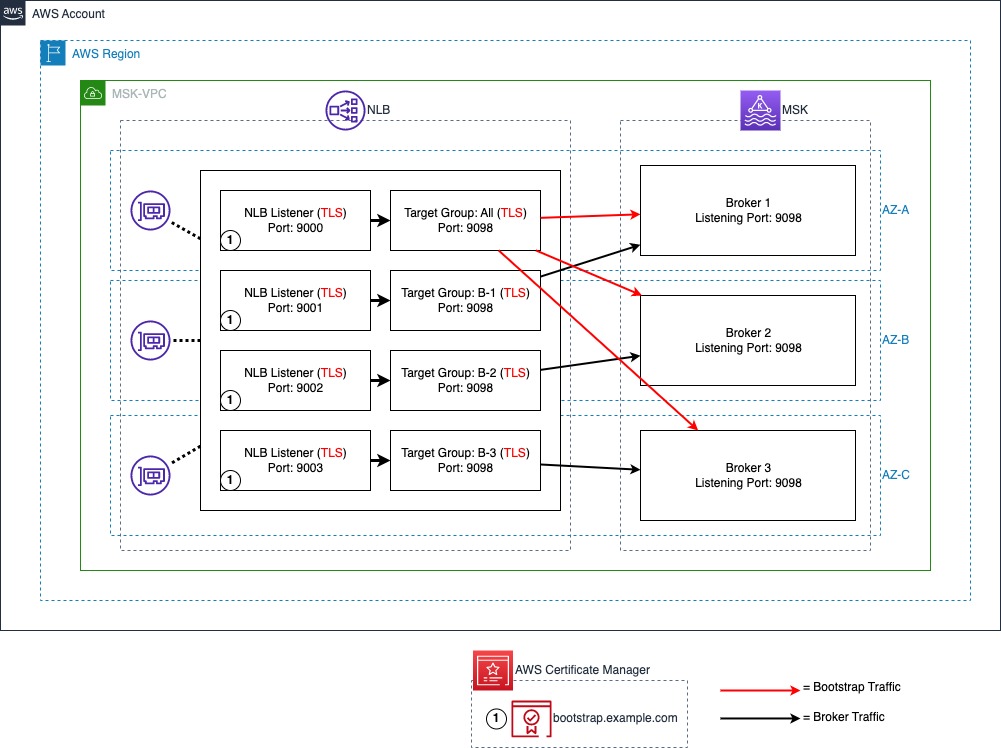
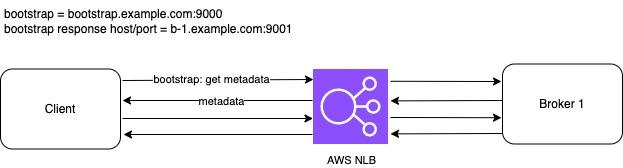
The following diagram illustrates the NLB port and target configuration. A TLS listener with port 9000 is used for bootstrap connections with all MSK brokers set as targets. IAM authentication is configured to run on port 9098 of the MSK brokers using a TLS target type. A TLS listener port is used to represent each broker in the MSK cluster. In this post, there are three brokers in the MSK cluster starting with port 9001, representing broker 1 and up to port 9003, representing broker 3.

Target Group mapping in NLB

Domain Name System (DNS)

For the client to resolve DNS queries for the custom domain, we use an Amazon Route 53 private hosted zone to host the DNS records, and associate it with the client’s VPC to enable DNS resolution from the Route 53 VPC resolver. This solution uses a private MSK cluster and private DNS. For publicly accessible MSK clusters a public NLB and DNS provider such as a Route53 public hosted zone can be used.

Amazon MSK

Finally, each broker needs to have its advertised listeners configuration (advertised.listeners) updated to match the custom domain name and NLB ports. Advertised listeners is a configuration option used by Kafka clients to connect to the brokers. By default, an advertised listener is not set. Once set, Kafka clients use the advertised listener instead of listeners to obtain the connection information for brokers. MSK brokers use the listener configuration to tell clients the DNS names and ports to use to connect to the individual brokers for each authentication type enabled. Advertised listeners are unique to each broker; and the cluster won’t start if multiple brokers have the same advertised listener address. For this reason, this solution uses a unique custom DNS name for each broker (such as, b-1.example.com).

Solution Deployment

To deploy the solution, use the CloudFormation template from the GitHub repository.

This template deploys a VPC, NLB, PCA, ACM certificate, MSK cluster, and an Amazon EC2 instance for cluster connectivity. The EC2 instance includes a script to handle updating the broker advertised.listeners settings to match the custom domain name. For more information on deploying a CloudFormation template, refer to Create a stack from the CloudFormation console.

After deploying the CloudFormation template, run the script to update advertised listeners as follows:

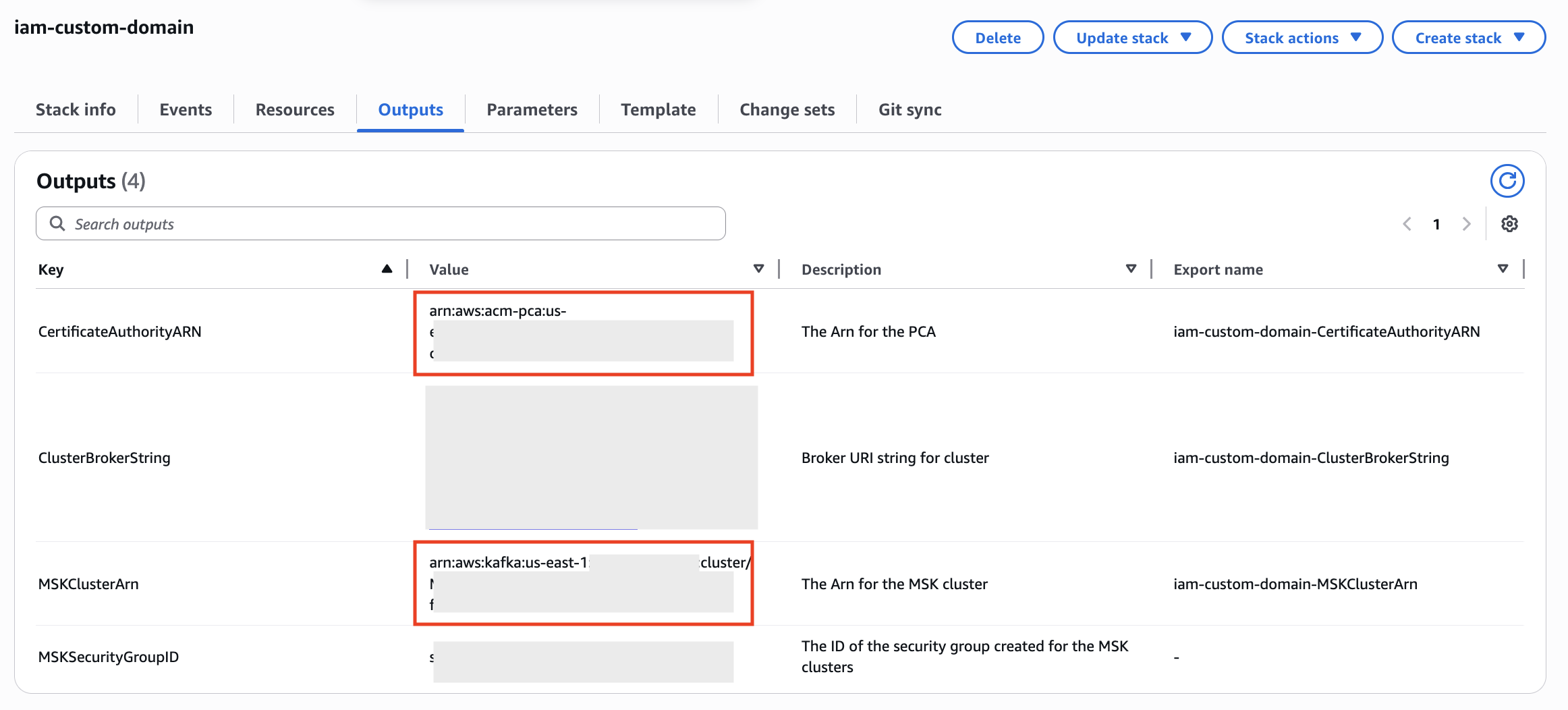
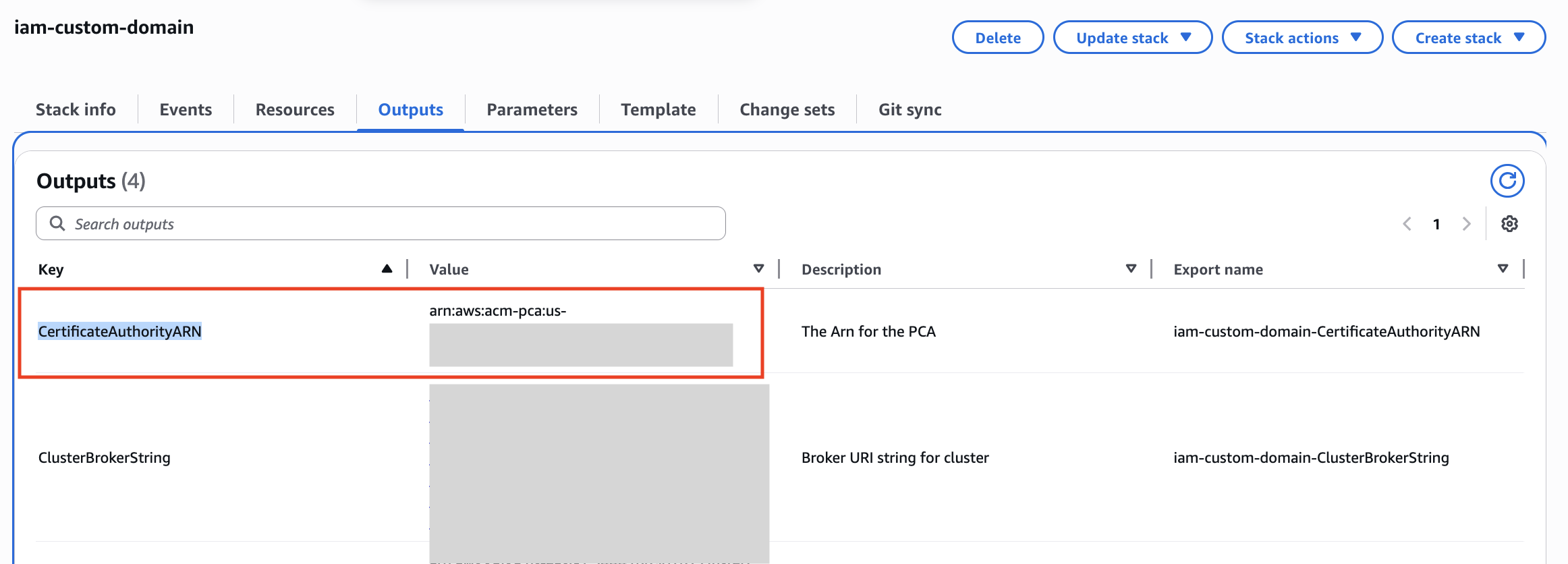
  1. Retrieve the MSKClusterARN and CertificateAuthorityARN from the CloudFormation outputs for your stack as they will be used in subsequent steps.
  2. Navigate to the EC2 console and identify the KafkaClientInstance. Choose Connect to connect to the instance using AWS Systems Manager Session Manager.
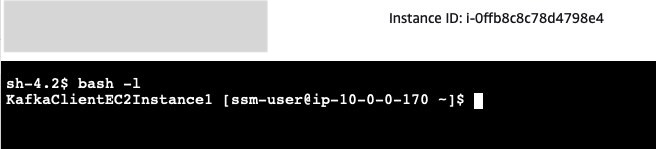
  3. Session Manager starts a session in shell. Start a bash session with the command:
    bash -l

  4. The Kafka client SDKs have already been installed in the EC2 instance. You can update the advertised.listeners configuration as follows, replacing CLUSTER_ARN with the ARN of your MSK cluster retrieved from CloudFormation in step 1:
    ./update_advertised_listeners.sh --region us-east-1 --cluster-arn CLUSTER_ARN

    Note that once this script completes, the brokers will have new advertised listeners configurations. Connections using the standard IAM address for the MSK service will not work until we complete the next steps, as the brokers will redirect connections over this address back to the custom domain name and TLS will fail.

  5. Next, we need to create a truststore with the certificate for our AWS Private Certificate Authority (PCA) to allow TLS with the NLB. In the following command, replace PCA_ARN with the ARN of the PCA retrieved from CloudFormation in step 1:
    We’re using the default Java truststore which uses the password changeit.When asked “Trust this certificate?” enter “yes”.

    export PCA_ARN=<<PCA_ARN>>
    export REGION=<<REGION>>
    
    cp /etc/pki/java/cacerts . && chmod 600 cacerts
    aws acm-pca get-certificate-authority-certificate --certificate-authority-arn $PCA_ARN --region $REGION | jq -r '.Certificate' > pca.pem
    keytool -import -file pca.pem -alias AWSPCA -keystore cacerts

  6. Create a new properties file to allow IAM authentication with our custom truststore:
    cat <<EOF >> /home/ssm-user/client-iam.properties
    ssl.truststore.location=/home/ssm-user/cacerts
    ssl.truststore.password=changeit
    EOF

  7. Verify you can connect to the cluster using IAM authentication using our new custom domain name, replacing bootstrap.example.com with your own custom domain name if you used a different one in CloudFormation:
    bin/kafka-topics.sh --list --command-config client-iam.properties --bootstrap-server bootstrap.example.com:9000

Cleanup

To stop incurring costs navigate to CloudFormation and delete the CloudFormation stack to remove all resources provisioned by CloudFormation.

Frequently Asked Question about Custom Domain Name

Customers have asked a few questions about implementing custom domain names with MSK. You can find answers to some of the most popular questions here.

Are there any limitations for this solution on MSK?

The advertised.listeners setting was removed as a dynamic broker in KRaft-based Kafka clusters. Therefore, this solution is only supported in Zookeeper-based MSK clusters. Additionally, this solution is only applicable to SASL/SCRAM and IAM-authentication based MSK clusters.

How the custom domain name solution scales when we add new brokers?

When using the NLB for broker connectivity (option 2 in the configure a custom domain name for your Amazon MSK cluster blog post), you will need to add an additional listener for each additional broker created.

For TLS, if using Subject Alternative Name (SAN) to list individual broker DNS hostnames, you will need to create a new certificate that includes the names of the additional brokers. One option is to create a certificate with SANs for more brokers than needed to allow for growth.If a wildcard certificate is used, you do not need to modify certificates when adding brokers.

What changes are required when we remove brokers?

Amazon MSK supports scale-in by removing brokers from the cluster. Brokers are removed from each availability zones (AZ). So a 6 broker Amazon MSK cluster deployed in 3 AZ can be reduced to 3 broker cluster deployed in 3 AZ. When brokers are removed, you can remove the NLB listeners for the removed broker along with the Route53 DNS endpoints. However, you can also leave them as is, or just remove the target IP from the broker numbers target group. The NLB will mark the targets as unhealthy and stop directing traffic to them. If you ever plan to scale-out the number of brokers, you can re-use the existing NLB listeners and Route 53 DNS entries and would only need to update the target IPs used in the broker numbers target group.

Is there any change in configuration required if there is any broker failure?

No. When a broker fails, Amazon MSK replaces the failed broker with a new broker instance keeping the configuration of the broker exactly the same. So, there would be no change in the advertised listener of the broker. Once the broker is healthy, the broker can accept new connections and read/write traffic.

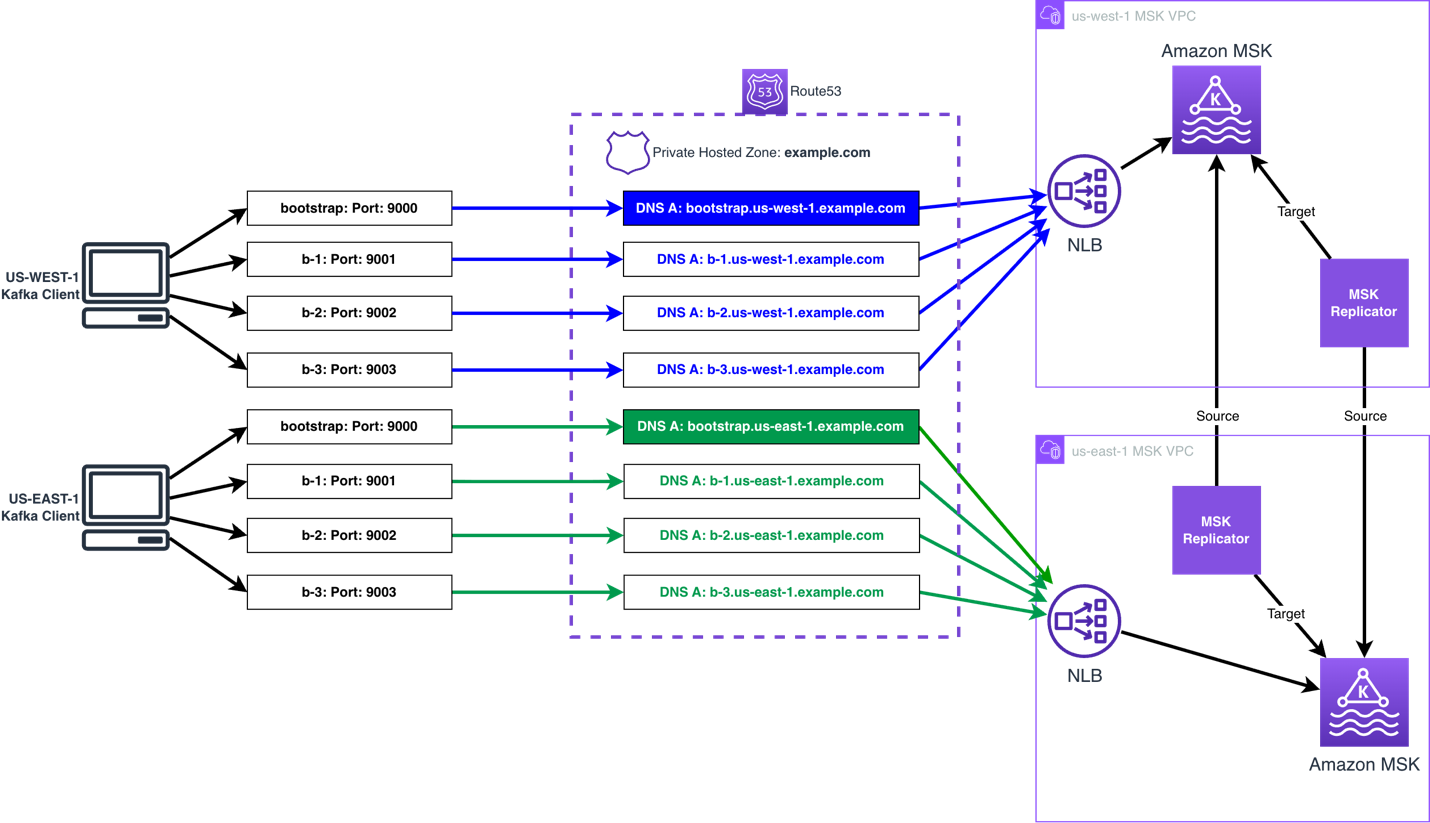
Can you use Amazon MSK Replicator between MSK clusters in multiple AWS Regions when using the custom domain name solution?

The Amazon MSK Replicator can be used when using the custom domain name solution, either in an active-passive or active-active setup. The same process can be followed to set the custom domain name.

You then follow build multi-Region resilient Apache Kafka applications with identical topic names using Amazon MSK and Amazon MSK Replicator post to configure MSK Replicator.

The following diagram shows an active-active AWS multi-Region MSK setup using the custom domain name solution:

Can I use a global bootstrap DNS name to connect to Amazon MSK clusters deployed across multiple AWS regions when IAM authentication is enabled?

No, it is not possible to use a global bootstrap reference to represent MSK clusters deployed in multiple AWS Regions, unless the client is aware of the cluster’s region when connecting. To use IAM authentication, the correct AWS Region must be included in the IAM authentication request for a given cluster. This is because the AWS Region is a part of the Sigv4 authentication protocol used by IAM. This scope prevents the IAM authorization being used to talk to a resource in another AWS Region. You can provide the AWS Region in one of two ways– with region-specific bootstrap URLs or by explicitly configuring the region.

For example, if the bootstrap string is bootstrap.us-east-1.example.com, then msk-iam-auth library will to extract the AWS Region from the broker connection string and use us-east-1 in its IAM requests. If the bootstrap string is simply bootstrap.example.com, then the client must explicitly configure AWS_REGION=us-east-1 to connect to the cluster if it is in us-east-1, or us-west-2 if it is in us-west-2.

Note that this is a limitation for IAM authentication, but not for SASL/SCRAM authentication. With SASL/SCRAM authentication, if the client’s credentials are applied to both clusters the global endpoint can point to either cluster and the client will be able to connect. The AWS Region is not used in SASL/SCRAM authentication, so it does not restrict the authentication scope.

How to allow public access to a private MSK cluster using the custom domain name solution?

To provide public access to a MSK cluster using the custom domain solution, you will need to do the following:

  • Create an Internet-facing NLB, and associate public subnets (subnets that have a route to the Internet Gateway attached to the VPC).
  • Create ingress rules in both the NLB and MSK security groups permitting the required public addresses. Note: the port will be 9098 for the MSK security group, and the ports you are using on the NLB listeners.
  • Provide public DNS resolution for the Kafka clients, by using a Route 53 public zone, or an alternative public DNS resolver.
  • The client needs have IAM credentials, with permission, to talk to the MSK brokers, using an IAM roleIAM access keys, IAM Roles Anywhere, or another mechanism that uses the AWS Security Token Service (AWS STS) to create and provide trusted users with temporary security credentials.

In the first part of the blog, two patterns have been highlighted. How to decide which pattern to use and why?

Option 1: Only bootstrap connection through NLB

If the Kafka clients have direct access to the broker, then you can use custom domain name for the bootstrap connection while the clients can still connect to the MSK Brokers with broker DNS. This is the simplest option, as it does not require custom TLS certificates or TLS listeners.Note that this option is not necessary when using MSK Express brokers, as MSK Express brokers already manages bootstrapping via a broker-agnostic connection string. For MSK Express, this option does not add value other than configuring a custom domain name for appearances / simplicity of client configuration. For MSK Standard brokers, this can improve client connectivity by making connection strings broker agnostic.

Option 2: All connections through NLB

When Kafka clients don’t have direct access to Amazon MSK Brokers, routing all connections through the NLB can be preferred. This can occur when a client is deployed in a different VPC than Amazon MSK VPC or the client is external, and when Amazon MSK Multi VPC Connectivity is not an option. In general, Amazon MSK Multi VPC Connectivity is preferred as this is a simpler pattern for most organizations to manage MSK Connectivity across accounts and VPCs.When Multi VPC Connectivity is not an option, NLB can be used to provide connectivity with Transit Gateway or PrivateLink, and the solution mentioned in the blog should be used.

Here is an example architecture how Kafka client and Amazon MSK cluster deployed in two separate VPCs but connected via AWS Private Link.

Is Amazon Route 53 required to use a custom domain name with Amazon MSK?

You can use an alternative DNS resolver service, and do not require Amazon Route 53 to use a custom domain name with Amazon MSK. The only requirement is that your clients can resolve against your DNS resolver service. The only change required, is to use a CNAME for the DNS records, referencing the NLBs DNS record, in place of the Alias records, as this is record type is only available in Amazon Route 53.

We don’t use Amazon Certificate Manager (ACM), can NLB integrate with other 3rd party certificate managers?

NLB only supports ACM to bind a certificate to a TLS listener. You can import a certificate created using your 3rd party certificate manager into ACM, and do not need to create a certificate using ACM.

Getting connection to node terminated during authentication after setting advertised.listeners , what could be the issue?

As the issue started to occur after changing the advertised.listeners configuration, the issue is unlikely to be related to permissions. The following can cause this issue:

  • The NLB and/or client’s Security Group does not permit access to the listener ports on the NLB from the client.
  • A firewall appliance between the NLB and client does not permit the client to talk to the NLB using the listener ports.
  • The advertised.listeners configuration has an error causing the client to receive invalid details, such as a typo in the name. If this is the case, use a client in the same VPC as the MSK broker that has IAM permissions to talk to the MSK broker, and Security Group rules permitting connectivity, you then use the following command to delete the advertised.listeners configuration.
/home/ec2-user/kafka/bin/kafka-configs.sh --alter \
         --bootstrap-server  \
         --entity-type brokers \
         --entity-name  \
         --command-config ~/kafka/config/client_iam.properties \
         --delete-config advertised.listeners

BROKERS_AMAZON_DNS_NAME such as b-1.clustername.xxxxxx.yy.kafka.region.amazonaws.com:9098.

Getting “unexpected broker id, expected 2 or empty string, but received 1”, what is causing this error?

This error is typically presented when the advertised.listeners configuration for one of the brokers has the port used by another broker set. For example broker 2 has port 9001 set for IAM, but this port is used to connect to broker 1, so broker 1 is responding with an error to say you presented broker id 2, but I am broker 1.

To correct this, you will need to update the broker with the incorrect advertised.listeners configuration to use the correct port. To gain access to the broker to make the change, you will need to use the following command to delete the incorrect configuration:

/home/ec2-user/kafka/bin/kafka-configs.sh --alter \
         --bootstrap-server \
         --entity-type brokers \
         --entity-name  \
         --command-config ~/kafka/config/client_iam.properties \
         --delete-config advertised.listeners

BROKERS_AMAZON_DNS_NAME such as b-2.clustername.xxxxxx.yy.kafka.region.amazonaws.com:9098.

You then need to use the following command to set the advertised.listeners configuration for that broker:

Note: The advertised.listeners configuration in the below assumes only IAM is used for authentication. If you are using additional authentication options, you will need to include them.

MSKDOMAIN=
broker_id=
Domain=

/home/ec2-user/kafka/bin/kafka-configs.sh --alter \
         --bootstrap-server  \
         --entity-type brokers \
         --entity-name "$broker_id" \
         --command-config ~/kafka/config/client_iam.properties \
         --add-config "advertised.listeners=[CLIENT_IAM://b-$broker_id.$Domain:900$broker_id,REPLICATION://b-$broker_id-internal.$MSKDOMAIN:9093,REPLICATION_SECURE://b-$broker_id-internal.$MSKDOMAIN:9095]"

Summary

In this post, we explained how you can use an NLB, Route 53, and the advertised listener configuration option in Amazon MSK to support custom domain names with MSK clusters when using IAM authentication. You can use this solution to keep your existing Kafka bootstrap DNS name and reduce or remove the need to change client applications because of a migration, recovery process, or to use a DNS name in line with your organization’s naming convention (for example, msk.prod.example.com).

Try the solution out for yourself, and leave your questions and feedback in the comments section.


About the authors

Subham Rakshit

Subham Rakshit

Subham is a Senior Streaming Solutions Architect for Analytics at AWS based in the UK. He works with customers to design and build streaming architectures so they can get value from analyzing their streaming data. His two little daughters keep him occupied most of the time outside work, and he loves solving jigsaw puzzles with them.

Mark Taylor

Mark Taylor

Mark is a Senior Technical Account Manager at AWS, working with enterprise customers to implement best practices, optimize AWS usage, and address business challenges. Mark lives in Folkestone, England, with his wife and two dogs. Outside of work, he enjoys watching and playing football, watching movies, playing board games, and traveling.

Mazrim Mehrtens

Mazrim is a Sr. Specialist Solutions Architect for messaging and streaming workloads. Mazrim works with customers to build and support systems that process and analyze terabytes of streaming data in real time, run enterprise Machine Learning pipelines, and create systems to share data across teams seamlessly with varying data toolsets and software stacks.

Simplifying Kafka operations with Amazon MSK Express brokers

Post Syndicated from Mazrim Mehrtens original https://aws.amazon.com/blogs/big-data/simplifying-kafka-operations-with-amazon-msk-express-brokers/

In this post, we show you how Amazon Managed Streaming for Apache Kafka (Amazon MSK) Express brokers brokers streamline the end-to-end activities for Kafka administration. Apache Kafka has become the de facto standard for real-time data streaming, powering mission-critical applications across industries worldwide. Its popularity stems from its ability to handle high-throughput, fault-tolerant data pipelines at scale. Given its central role in modern data architectures, managing Apache Kafka with high resilience and reliability is essential for business success.

To maintain this level of resilience, administrators need to handle several important operational tasks. Apache Kafka is a distributed stateful system, whose state management requires constant communication and data movement in dynamic cloud environments. Administrators need to carefully size clusters by calculating complex compute, storage, and network requirements. They must provision storage volumes upfront and monitor utilization constantly to avoid disruptions. When workloads grow, scaling the cluster requires hours or days of effort using multiple tools to provision capacity and rebalance load.

With these operational requirements in mind, many administrators ask: is there an easier way to manage Apache Kafka at scale while maintaining the high resilience their applications demand?

Amazon MSK Express addresses these challenges directly. In this post, we show you how MSK Express brokers streamline the end-to-end activities for Kafka administration, including:

  • Sizing Kafka clusters for optimal performance and cost
  • Scaling cluster storage up and down with workload changes
  • Scaling cluster compute in and out over time
  • Monitoring cluster health
  • Managing cluster security
  • Ensuring high availability with fast and automatic broker recovery

What are Amazon MSK Express brokers?

Amazon MSK Express brokers are a transformative breakthrough for customers needing high-throughput Kafka clusters that scale faster and cost less. Express brokers reimagine Kafka’s compute and storage, decoupling to unlock performance and elasticity benefits. Express brokers deliver performance improvements that directly impact your operations:

  • Up to 3x more throughput per broker, allowing you to handle more data with fewer resources and lower costs
  • Rebalance partitions across brokers 180x faster, reducing scaling from hours to minutes
  • Scale up to 20x faster, enabling you to respond to demand spikes without lengthy planning cycles
  • Recover 90% quicker compared to standard Apache Kafka brokers, minimizing workload disruption and maintaining business continuity

To learn more about the technical details, see Express brokers for Amazon MSK: Turbo-charged Kafka scaling with up to 20 times faster performance. For a comprehensive overview of Express broker capabilities, see the MSK Express brokers documentation.

Let’s explore how MSK Express brokers simplify Apache Kafka management.

Sizing an Express cluster

Sizing a traditional Apache Kafka cluster is complex. Working backwards from your ingress and egress load, you need to consider every dimension of your cluster compute, storage, and network limitations. Each node must be carefully sized to handle:

  • Ingress and egress traffic from your clients
  • Internal Kafka operations like replication and rebalancing (the process of redistributing partitions across brokers to maintain balance)
  • High availability with node and Availability Zone failures
  • Client operations like backfill procedures when reading historical data

These activities impact your cluster storage I/O limits, network ingress/egress limits, and CPU and memory constraints. Beyond this, you need to consider the number of partitions required and determine whether your cluster can scale to handle partition management for your use case.

MSK Express brokers simplify this calculus. Rather than considering these complex variables, you can focus on what matters:

  • Your ingress throughput
  • Your egress throughput
  • Your partition needs

MSK documents the Express broker throughput throttle and partition limits by broker size. MSK pre-calculates these to consider all cluster limits. They include multi-Availability Zone high availability to handle rare events like node failures or AZ impairment.

Notice we did not discuss storage in sizing an Express cluster. That is because storage in Express scales nearly infinitely. You pay for storage as you go rather than sizing storage up front.

Scaling Express cluster storage

With sizing simplified by focusing on throughput and partitions, storage management becomes the next operational consideration.

Normally, Apache Kafka clusters need storage volumes pre-provisioned to handle all retained data. You must allocate all storage up-front and pay for that storage no matter what your actual data retention is.

Example: If you store 7 days of data at 1 MB/sec ingress, that’s 600+ GB of storage. This does not include data replication across nodes and buffers for growth and workload variability. This workload requires over 3 TB of storage, allocated up-front, to handle replicas and storage buffers.

As your workload evolves, careful monitoring of storage utilization becomes essential. Adding storage capacity prevents workload disruptions. Often, you cannot reclaim this storage. Once you increase the volume size, you continue paying for additional storage even if your workload scales down and no longer requires additional capacity.

With Express brokers, there is no need for sizing and provisioning storage volumes. You pay for what you use with no provisioning: the data ingested to the cluster and data stored in the cluster per-GB-per-hour. All data stored in the cluster is replicated across 3 Availability Zones for high availability. This pay-as-you-go model eliminates wasted capacity costs and reduces your total infrastructure spend.

  • As workloads scale up, the cluster uses more storage with no changes needed from you
  • When workloads scale down, the cluster uses less storage, reducing storage charges automatically
  • Storage management for Apache Kafka becomes simpler with Express. You focus on ensuring that your per-topic retention is right-sized for each use case. That is the only consideration. Once you set up topic retention, MSK Express automatically manages and cost-optimizes storage on your behalf.

Storage management in MSK Express brokers is far simpler than in a traditional Apache Kafka cluster. So is scaling the compute capacity for an Express-based cluster.

Scaling Express cluster compute

Just as storage scales automatically with your workload, compute capacity can also adapt to changing demands.

As your workload grows and changes, you may find that you exceed your initial sizing estimates. For a traditional Apache Kafka cluster, scaling the cluster capacity is a significant event. Scaling takes effort to provision capacity and rebalance load, it requires using multiple tools to manage the scaling process (compute, storage, DNS, rebalancing, client configs, and more). The scaling process can take hours or days to complete, which can exacerbate application impact. This means you need to plan well ahead to ensure your Kafka cluster is prepared for any load changes.

With MSK Express clusters, this process becomes much simpler and requires little to no upfront planning. It has near zero disruption to your existing workload, allowing your team to focus on building features rather than managing infrastructure.

To scale up an MSK Express cluster, you simply add brokers to the cluster. Once new brokers come online, Express Intelligent Rebalancing automatically rebalances topic partitions to the new nodes. Thanks to the Express storage architecture, the new nodes automatically have almost all the data they need. There is no significant inter-broker communication for rebalancing. This causes no disruption to existing brokers.

The cluster then elects new broker leaders for each partition, enabling producers to direct traffic to the new nodes. The same applies to consumer groups.

Express broker DNS design keeps this in mind. Express broker connection strings abstract away from the nodes themselves. Clients connect to the active broker nodes with one connection string. No changes to DNS, load balancing, or client configurations are needed.

Deciding when to scale in an Express cluster is also simpler than in a traditional Apache Kafka cluster. The simplified Express architecture means less to monitor and manage for long-term cluster operations.

Monitoring Express clusters

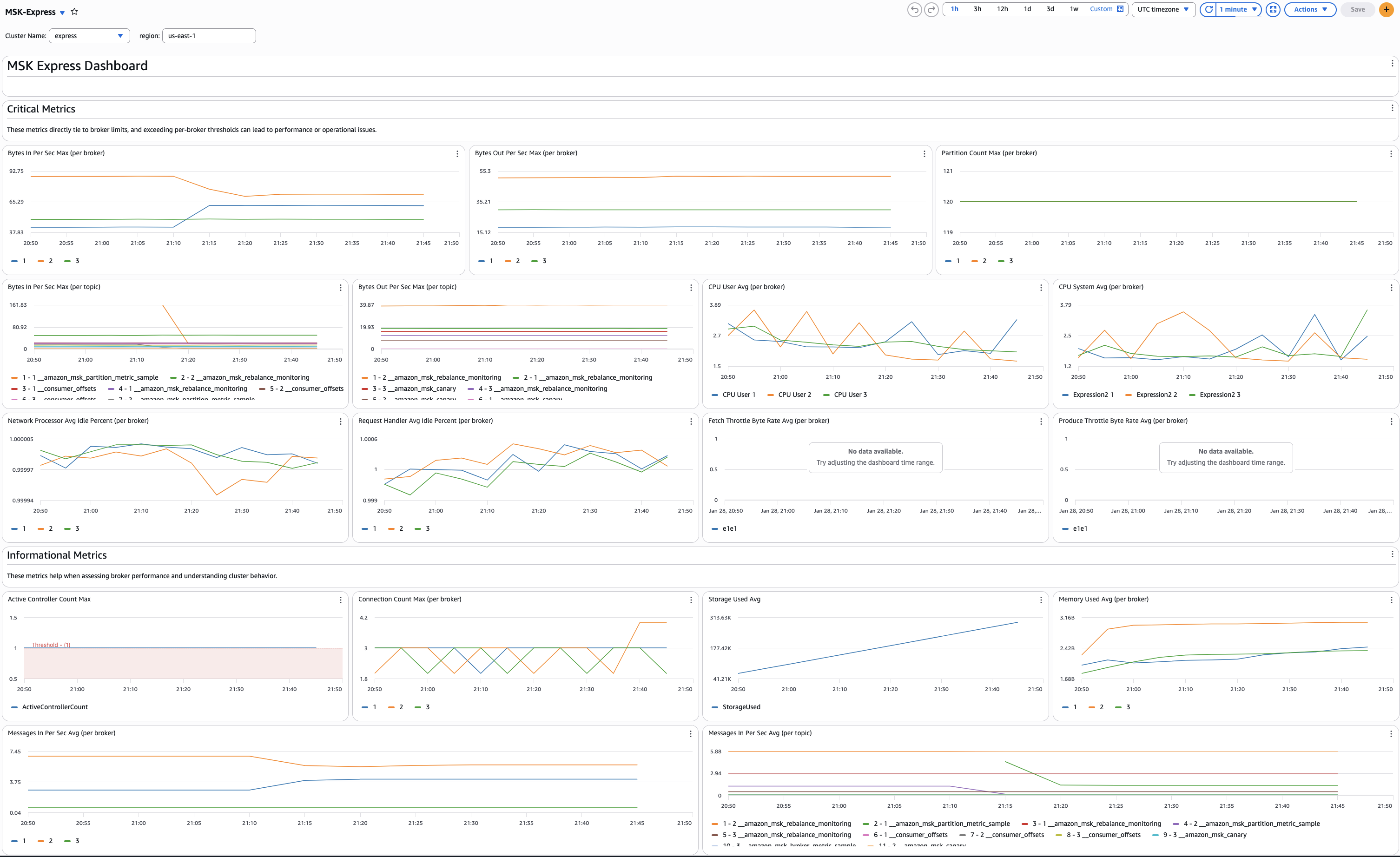
With simplified scaling decisions comes simplified monitoring. Express brokers reduce the number of metrics you need to track for cluster health. The below image demonstrates a dashboard which highlights the key metrics for monitoring MSK Express broker health.

Dashboard with key Amazon MSK Express brokers metrics

In a traditional Apache Kafka cluster, you need to consider dozens of metrics to understand overall cluster health. Express brokers simplify this operational process. They highlight ingress and egress throughput as two critical metrics for workload sizing and scaling. This streamlined monitoring approach reduces the expertise required to operate Kafka clusters and allows smaller teams to manage larger deployments effectively.

Other factors, like poorly designed clients, can incur additional overhead on a cluster. This can cause symptoms such as high CPU utilization without high ingress throughput. It is still important to monitor a variety of metrics with MSK Express brokers.

For Express brokers, the following table shows the critical metrics you must monitor and alert on for cluster health:

Metric Name Description Recommended Alarm
BytesInPerSec Ingress throughput to the cluster When > broker limit for > 5 minutes
BytesOutPerSec Egress throughput to the cluster When > broker limit for > 5 minutes
CpuUser + CpuSystem CPU utilization percentage When greater than 60% for 15 minutes
NetworkProcessorAvgIdlePercent Network processor thread idle time When less than 0.5 for > 5 minutes
RequestHandlerAvgIdlePercent Request processor thread idle time When less than 0.4 for > 15 minutes
FetchThrottleByteRate Consumer fetch throttling rate When < 0 for > 15 minutes
ProduceThrottleByteRate Producer ingress throttling rate When < 0 for > 15 minutes

For more information on monitoring Amazon MSK, see Monitoring Amazon MSK with Amazon CloudWatch.

Managing Express cluster access

Beyond monitoring, cluster management is another area where MSK Express brokers reduce operational complexity.

Express brokers simplify the internal management of Kafka clusters. In a traditional Kafka environment, you use schemes like SASL/SCRAM (username and password-based authentication) or mutual TLS (certificate-based authentication) for client authentication. Once authenticated, you configure complex Kafka ACLs (Access Control Lists—permissions that define who can access which topics) inside the Kafka cluster to authorize client access to topics and data.

These paradigms require you to manage all topics, authentication, and authorization inside Apache Kafka. This includes credential management, rotation, and other operational activities surrounding cluster access.

MSK simplifies this process by integrating with AWS Identity and Access Management (IAM) for access control. Clients can use IAM Roles that clearly specify cluster access boundaries. They also provide topic-level authorization to read and write data to a cluster with Kafka APIs.

Finally, clients can use MSK APIs to directly manage Kafka cluster configurations and Kafka topics, including creating new topics, updating topic configurations and partition counts, and deleting topics. Configurations and topics can be managed with the AWS Console, AWS CLI, and AWS SDK. For more information, refer to Amazon MSK simplifies Kafka topic management with new APIs and console integration.

You can focus only on your existing enterprise standards for IAM access controls, and your existing AWS CloudFormation and AWS CDK automation to manage your cluster with Infrastructure as Code (IaC). This integration reduces the operational overhead of cluster management and accelerates your time to production by leveraging existing security infrastructure.

MSK also supports using SASL/SCRAM and mutual TLS authentication modes alongside IAM access control. This gives you the flexibility to authorize applications outside of AWS. You can also provide access to legacy applications without the need for code changes.

For more information, see IAM access control for Amazon MSK and Security in Amazon MSK.

Building highly available Express brokers

With security simplified through IAM integration, high availability is the final piece of the operational puzzle.

Many of the same considerations we discussed in scaling Express cluster compute align with high availability considerations for MSK Express brokers.

Based on internal testing, MSK Express broker storage improvements enable faster recovery when broker nodes fail—90% faster than standard brokers. The new node can simply start up with almost no disruption to the rest of the cluster without needing to perform significant rebalancing. This contrasts with standard Kafka clusters, where the cluster needs to rebalance partitions to new nodes after recovery.

In addition to these improvements, MSK Express brokers are highly available by default. The service manages critical cluster and topic configurations for high availability and performance on your behalf. This eliminates the need for managing most cluster configurations.

Express fully manages configurations like min.insync.replicas, num.io.threads, and others described in Express brokers’ read-only configurations. This gives you a highly available and performant cluster out of the box.

You no longer need to worry about most cluster-level configurations of an Apache Kafka cluster. You can simply:

  • Start an MSK Express cluster
  • Configure topics and retention
  • Proceed without the fine tuning normally needed to ensure a highly available cluster

Conclusion

In this post, we showed how MSK Express brokers simplify cluster operations for Apache Kafka clusters. They lower the Total Cost of Ownership (TCO) of running an Apache Kafka cluster by simplifying sizing, storage management, compute management, high availability, and access control, while providing high performance, reliability, and cost-efficiency. These simplifications reduce the specialized expertise needed for cluster administration and accelerate your deployment timeline.

With this in mind, we recommend MSK Express brokers for almost all MSK workloads. If you are starting out with a new Kafka cluster or optimizing an existing one, MSK Express brokers provide a strong combination of simplicity, performance, and cost-efficiency.

Ready to simplify your Kafka operations? Get started using Amazon MSK to create your first Express cluster today. You can provision a fully managed, highly available Kafka cluster in minutes and start experiencing the operational benefits immediately. For pricing details, see Amazon MSK pricing.

For comprehensive information about Amazon MSK capabilities and features, visit the Amazon MSK product page and the Amazon MSK Developer Guide.


About the authors

Mazrim Mehrtens

Mazrim Mehrtens

Mazrim is a Sr. Specialist Solutions Architect for messaging and streaming workloads. Mazrim works with customers to build and support systems that process and analyze terabytes of streaming data in real time, run enterprise Machine Learning pipelines, and create systems to share data across teams seamlessly with varying data toolsets and software stacks.

Sai Maddali

Sai Maddali

Sai is a Senior Manager Product Management at AWS who leads the product team for Amazon MSK. He is passionate about understanding customer needs, and using technology to deliver services that empowers customers to build innovative applications. Besides work, he enjoys traveling, cooking, and running.