All posts by Rommel Sunga

Implement Tenants in your Amazon SES environment, Part 3: Implementation guide

Post Syndicated from Rommel Sunga original https://aws.amazon.com/blogs/messaging-and-targeting/implement-tenants-in-your-amazon-ses-environment-part-3-implementation-guide/

This is part 3 in a series covering the new tenants feature in Amazon Simple Email Service (SES). The first post in this series discussed how users can improve email deliverability with tenant management in Amazon SES. Part 2 covered key aspects involved in planning the migration of existing Amazon SES infrastructure to use tenant-based reputation isolation.

With Amazon SES tenants, users can:

  • Manage individual tenant onboardings and their reputations in isolation
  • Provision isolated tenants within a single SES account
  • Apply automated reputation policies to manage email sending
  • Detect and isolate deliverability issues within isolated email streams
  • Preserve sender reputation and improve inbox placement with mailbox providers

This post provides a step-by-step migration guide to Tenants for key AWS components like AWS Identity and Access Management (IAM) permissions, Amazon CloudWatch logging and Amazon EventBridge monitoring. Additionally, we provide several code examples that show how to programmatically provision tenants in real time as customers are onboarded. The goal is to demonstrate how to use the Tenants feature to achieve reputation isolation between customers or business units (BUs), get more control over sending policies, and enable the automatic pause mechanism to limit the damage from problematic senders.

Step-by-step migration guide

Having completed the inventory and configuration planning prescribed in part 2 of this series, we are ready to start the 4-step migration (or implementation) of the tenants feature in the AWS SES account.

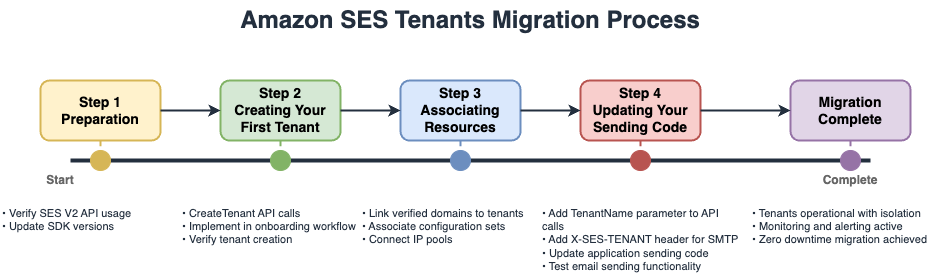
The Amazon SES Tenants Migration process is as follows:

  1. Preparation
    1. Verify SES V2 API usage
    2. Update SDK versions
  2. Create Your First Tenant
    1. Create Tenant API calls
    2. Implement in onboarding workflow
    3. Verify tenant creation
  3. Associating Resources
    1. Link verified domains to tenants
    2. Associate configuration sets
    3. Connect IP pools
  4. Updating Your Sending Code
    1. Add Tenant/Name parameter to API calls
    2. Add X-SES-TENANT header for SMTP
    3. Update application sending code
    4. Test email sending functionality

Preparation

When sending email through a tenant, be sure to specify the tenant in the API calls or SMTP headers and ensure that all resources used are associated with that tenant. Before getting started, keep in mind that there’s an additional charge per tenant per month based on the number of emails. For more detailed information, see the SES Pricing page.

For applications that use SMTP, see the SMTP Implementation section later in this document.

For applications that use the SES API, confirm that the latest Amazon SES V2 API is being used, as tenant management capabilities are only available in this version (see SES V2 API migration guide). We also recommend verifying that the AWS SDK version being used supports these operations, otherwise you may need to update to a version that supports them.

The SES V2 API includes the seven essential operations for managing the tenant architecture that the application will need to leverage throughout the migration (or implementation) and tenant lifecycle:

  1. CreateTenant for establishing new tenant containers
  2. CreateTenantResourceAssociation for linking resources like domains and configuration sets to tenants
  3. DeleteTenant for removing tenants when workloads offboard
  4. DeleteTenantResourceAssociation to unlink resources from tenants
  5. GetTenant retrieves specific tenant details
  6. ListTenants provides an overview of all tenants in an account
  7. ListTenantResources shows which resources are associated with each tenant

Implementation Steps

Creating the tenant(s)

The following Python code example uses the AWS SDK for Python (Boto3) and CreateTenant to demonstrate tenant creation. We’ve added optional tags to better organize the tenant resource for billing or logging purposes.

import boto3
from botocore.exceptions import ClientError

def setup_ses_tenant():
    ses_client = boto3.client('sesv2')
    
    # Create a new tenant with descriptive tags
    tenant_response = ses_client.create_tenant(
        TenantName='MyTenant',
        Tags=[
            {
                'Key': 'Environment',
                'Value': 'Production'
            },
            {
                'Key': 'CustomerID',
                'Value': '[customer_id]'
            }
        ]
    )
    
    # Verify tenant creation
    tenants = ses_client.list_tenants()
    print(f"Total tenants in account: {len(tenants['Tenants'])}")
    
    return tenant_response['TenantName']


if __name__ == "__main__":
    try:
        tenant_name = setup_ses_tenant()
        print(f"Successfully created tenant: {tenant_name}")
    except ClientError as e:
        print(f"AWS error: {e}")
    except Exception as e:
        print(f"Unexpected error: {e}")

This example code can be used when a customer first onboards onto the platform to send email. By creating a tenant for this customer, resources under that tenant will be associated together whenever the tenant is used as explained in the next steps.

Associating resources with the tenant

Each tenant needs appropriate resources—configuration sets, sending identities, and potentially dedicated IP pools—to begin sending email. The association process should align with the resource sharing strategy as established during the migration planning phase.

The following Python code example uses the AWS SDK for Python (Boto3) and CreateTenantResourceAssociation to associate resources to the tenant that was created in the previous step.

import boto3
from botocore.exceptions import ClientError

def associate_resources_with_tenant():
    ses_client = boto3.client('sesv2')
    
    try:
        # Associate verified domain identity
        ses_client.create_tenant_resource_association(
            TenantName='MyTenant',
            ResourceArn='arn:aws:ses:[aws_region]:[account_id]:identity/[domain_name]'
        )
        print("Successfully associated email identity with tenant")

        # Associate configuration set for tracking
        ses_client.create_tenant_resource_association(
            TenantName='MyTenant',
            ResourceArn='arn:aws:ses:[aws_region]:[account_id]:configuration-set/MyTenantConfigurationSet'
        )
        print("Successfully associated configuration set with tenant")

    except ClientError as e:
        print(f"Error: {e.response['Error']['Message']}")
        raise

if __name__ == "__main__":
    associate_resources_with_tenant()

Consider implementing batch association for email streams with multiple domains or configuration sets. This approach reduces API calls and improves provisioning efficiency. Remember that resources can be shared across multiple tenants if the architecture requires it, allowing flexible resource allocation strategies.

Update the applications

The transition to tenant-based sending requires minimal code changes in the apps, namely adding the TenantName and ConfigurationSetName to the sending process.

API Implementations

For applications that use the SES V2 API, add the tenant and configuration set parameters to the send calls as demonstrated below using the AWS SDK for Python (Boto3) :

import boto3

def send_email_from_tenant():
    ses_client = boto3.client('sesv2')
    
    response = ses_client.send_email(
        FromEmailAddress='sender@[domain_name]',
        Destination={
            'ToAddresses': ['[recipient_email]']
        },
        Content={
            'Simple': {
                'Subject': {
                    'Data': 'Test email from SES tenant'
                },
                'Body': {
                    'Text': {
                        'Data': 'This is a test email sent from an SES tenant'
                    }
                }
            }
        },
        ConfigurationSetName='MyTenantConfigurationSet',
        TenantName='MyTenant'  # Critical addition for tenant routing
    )
    
    print(f"Message sent! Message ID: {response['MessageId']}")
    return response

if __name__ == "__main__":
    send_email_from_tenant()

SMTP Implementations

For sending applications that use SMTP, add the X-SES-TENANT and the ConfigurationSetName header parameters to every message. In the code block that follows, we demonstrate the proper header configuration for SMTP sending using Python:

from email.mime.text import MIMEText
from email.mime.multipart import MIMEMultipart
import smtplib

def send_smtp_email_with_tenant():
    sender = 'smtp-sender@[domain_name]'
    sender_name = 'Sender Name'
    recipient = '[recipient_email]'
    username_smtp = '[smtp_username]'
    configuration_set = 'MyTenantConfigurationSet'
    host = 'email-smtp.[aws_region].amazonaws.com'
    port = 587
    
    subject = 'Amazon SES test (SMTP interface accessed using Python)'
    body_text = """Email Test
    This email was sent through the Amazon SES SMTP interface using Python."""
    body_html = """<h1>Email Test</h1>
        <p>This email was sent through the 
        <a href="https://aws.amazon.com/ses">Amazon SES</a> SMTP
        interface using Python."</p>"""
    
    msg = MIMEMultipart('alternative')
    msg['Subject'] = subject
    msg['From'] = f"{sender_name} <{sender}>"
    msg['To'] = recipient
    msg['X-SES-CONFIGURATION-SET'] = configuration_set
    
    # Critical: Specify tenant for SMTP sending
    msg['X-SES-TENANT'] = 'MyTenant'
    
    part1 = MIMEText(body_text, 'plain')
    part2 = MIMEText(body_html, 'html')
    msg.attach(part1)
    msg.attach(part2)
    
    try:
        server = smtplib.SMTP(host, port)
        server.ehlo()
        server.starttls()
        server.ehlo()
        server.login(username_smtp, fetch_smtp_password_from_secure_storage())
        server.sendmail(sender, recipient, msg.as_string())
        print("Email sent successfully!")
        
    except Exception as e:
        print(f"Error: {str(e)}")
    
    finally:
        server.quit()

def fetch_smtp_password_from_secure_storage():
    # Implement secure password retrieval from AWS Secrets Manager
    # or your preferred secret storage solution
    return '[smtp_password]'


if __name__ == "__main__":
    send_smtp_email_with_tenant()

Configuring IAM policies and permissions for tenants

This section explains how to configure IAM permissions for SES tenants, including how to set up different permission levels for tenant management, email sending, and monitoring while following security best practices to control access based on organizational roles. Remember that IAM policies for tenants follow the principle of least privilege. Start with minimal permissions and expand as needed, regularly reviewing and removing unused permissions to maintain security.

Tenant management permissions

SES Tenants can be controlled through specific IAM permissions that determine who can create, modify, and use specific tenant(s) in the organization. The tenant management system’s core API actions discussed previously can be granted with granular access through IAM policies for administrative operations. The Service Authorization Reference for Amazon Simple Email Service v2 page contains the latest documentation for the service-specific actions used below for Amazon Simple Email Service.

We recommend limiting each IAM role’s permission based on the minimum capabilities required by that role. This helps mitigate the potential for negative effects if an SMTP credential is misused. What follows is a basic IAM policy that demonstrates full tenant management capabilities; this is NOT demonstrating the principle of least privilege (yet):

{
    "Version": "2012-10-17",
    "Statement": [
        {
            "Effect": "Allow",
            "Action": [
                "ses:CreateTenant",
                "ses:DeleteTenant",
                "ses:GetTenant",
                "ses:ListTenants",
                "ses:CreateTenantResourceAssociation",
                "ses:DeleteTenantResourceAssociation",
                "ses:ListTenantResources",
                "ses:ListResourceTenants"
            ],
            "Resource": "*"
        }
    ]
}

Configuring sending permissions with tenants

Applications that send emails through tenants need different permissions than those managing tenants. The key distinction is using the ses:TenantName condition to restrict which tenants an application can use for sending.

The IAM policy below allows sending emails only through the specified CustomerA-Tenant tenant, ensuring applications can’t accidentally or maliciously send through other customers’ tenants.

{
    "Version": "2012-10-17",
    "Statement": [
        {
            "Effect": "Allow",
            "Action": [
                "ses:SendEmail",
                "ses:SendBulkEmail"
            ],
            "Resource": [
                "arn:aws:ses:[aws_region]:[account_id]:identity/*",
                "arn:aws:ses:[aws_region]:[account_id]:configuration-set/*"
            ],
            "Condition": {
                "StringEquals": {
                    "ses:TenantName": "CustomerA-Tenant"
                }
            }
        }
    ]
}

Separating administrative and operational access

Production environments implement role separation between tenant management and email sending operations. Administrative roles handle tenant creation and resource association during customer onboarding, while application roles can only send emails through assigned tenants. The IAM policy below is an example of an administrative role; it allows creating and configuring tenants for use during customer onboarding but does not allow the tenant deletion action to prevent accidental deletions.

{
    "Version": "2012-10-17",
    "Statement": [
        {
            "Effect": "Allow",
            "Action": [
                "ses:CreateTenant",
                "ses:ListTenants"
            ],
            "Resource": "*"
        },
        {
            "Effect": "Allow",
            "Action": [
                "ses:CreateTenantResourceAssociation",
                "ses:GetTenant"
            ],
            "Resource": "arn:aws:ses:[aws_region]:[account_id]:tenant/*/tn-*"
        },
        {
            "Effect": "Deny",
            "Action": "ses:DeleteTenant",
            "Resource": "*"
        }
    ]
}

Resource-level permissions

Tenants support resource-level permissions using Amazon Resource Names (ARNs), enabling fine-grained access control. Grant access to specific tenants by specifying the tenant name and tenant id (ex. CustomerA-Tenant/tn-1a2b3c4d5e6f7890abcdef1234567890) rather than granting blanket permissions using the “*/tn-*” wildcard as above. To obtain the tenant id you can use the list-tenants command of the AWS SESv2 CLI.

The IAM policy below grants access only to tenants CustomerA-Tenant and CustomerB-Tenant where the following tenant id is a placeholder that should be replaced by the correct tenant id that you obtained from list-tenants.

{
    "Version": "2012-10-17",
    "Statement": [
        {
            "Effect": "Allow",
            "Action": "ses:GetTenant",
            "Resource": [
                "arn:aws:ses:[aws_region]:[account_id]:tenant/CustomerA-Tenant/tn-1a2b3c4d5e6f7890abcdef1234567890",
                "arn:aws:ses:[aws_region]:[account_id]:tenant/CustomerB-Tenant/tn-9876543210fedcba0987654321abcdef"
            ]
        }
    ]
}

Monitoring and compliance access

Security and compliance teams often need read-only access to monitor tenant usage. The following IAM policy grants read-only access to all tenants, but does not permit modifications or deletions of any tenants:

{
    "Version": "2012-10-17",
    "Statement": [
        {
            "Effect": "Allow",
            "Action": [
                "ses:GetTenant",
                "ses:ListTenants",
                "ses:ListTenantResources"
            ],
            "Resource": "*"
        }
    ]
}

Monitoring Tenants with EventBridge and CloudWatch

Amazon SES integrates with Amazon EventBridge to deliver comprehensive monitoring capabilities for tenant management, providing real-time visibility into reputation changes and enabling automated response workflows. EventBridge is a serverless service that uses JSON-formatted events to connect application components, making it straightforward to build scalable event-driven applications. Amazon SES’s tenant feature’s integration with EventBridge enables organizations to track tenant-specific metrics and other metrics, such as reputation findings and reputation status changes, and tenant status changes.

Understanding EventBridge Integration with SES

EventBridge operates as a router that receives events from SES and delivers them to one or many destinations (aka targets). When SES features experience state changes or status updates, they automatically send events to the EventBridge default event bus. Rules associated with the event bus evaluate events as they arrive, checking whether each event matches the rule’s pattern before routing to specified targets. For SES tenant management, organizations can receive real-time alerts through Amazon EventBridge when tenant reputation findings are detected or when tenant status changes occur. These events are delivered on a best-effort basis; they might be delivered out of order, requiring users to deploy processing logic to handle such scenarios gracefully.

The code block that follows can guide users through the basic EventBridge integration with the SES tenant feature. For more extensive documentation on integrating with EventBridge please consult AWS documentation.

Setting up EventBridge integration

Create an EventBridge rule using the AWS SDK for Python (Boto3) to capture tenant status changes and reputation findings:

# Create rule for monitoring tenant status changes
aws events put-rule \
    --name "SESTenantStatusMonitor" \
    --description "Monitor SES tenant status changes" \
    --event-pattern '{
        "source": ["aws.ses"],
        "detail-type": [
            "Sending Status Enabled",
            "Sending Status Disabled",
            "Advisor Recommendation Status Open",
            "Advisor Recommendation Status Closed"
        ]
    }'

Routing events from EventBridge to CloudWatch Logs

CloudWatch provides the capability to collect raw data and process it into readable, near real-time metrics. Follow these steps to set up a CloudWatch log group for SES tenant events and configure the appropriate IAM permissions:

  1. Create a CloudWatch log group for tenant events:

aws logs create-log-group --log-group-name "/aws/ses/tenants"

  1. Add resource-based policy to CloudWatch Logs:
aws logs put-resource-policy \
    --policy-name EventBridgeToCloudWatchLogsPolicy \
    --policy-document '{
        "Version": "2012-10-17",
        "Statement": [{
            "Sid": "TrustEventsToStoreLogEvent",
            "Effect": "Allow",
            "Principal": {
                "Service": ["events.amazonaws.com", "delivery.logs.amazonaws.com"]
            },
            "Action": ["logs:CreateLogStream", "logs:PutLogEvents"],
            "Resource": "arn:aws:logs:[aws_region]: [account_id]:log-group:/aws/ses/tenants:*"
        }]
    }'
  1. Add the EventBridge target:

aws events put-targets \
    --rule "SESTenantStatusMonitor" \
    --targets '[{
        "Id": "SendToCloudWatchLogs",
        "Arn": "arn:aws:logs:[aws_region]:[account_id]:log-group:/aws/ses/tenants"
    }]'

An example event of a paused (“disabled”) tenant is shown below for reference:

{
    "version": "0",
    "id": "3cc76530-9842-03a9-fdef-e4e4f667cf4e",
    "detail-type": "Sending Status Disabled",
    "source": "aws.ses",
    "account": "[account_id]",
    "time": "2025-10-01T03:37:17Z",
    "region": "[aws_region]",
    "resources": [
        "arn:aws:ses:[aws_region]::tenant/CustomerA-Tenant/tn-2a8c678ec0000fdaf76cc1f127b40"
    ],
    "detail": {
        "version": "1.0.0",
        "data": {
            "origin": "CUSTOMER_MANAGED",
            "record": {
                "status": "DISABLED",
                "cause": "Status manually updated.",
                "lastUpdatedTimestamp": [
                    2025,
                    10,
                    1,
                    3,
                    37,
                    17,
                    671000000
                ]
            }
        }
    }
}

Managing tenant reputation with key Tenants features

Reputation management for individual tenants is one of the core benefits of using Amazon SES’s tenant feature, providing automated protection against deliverability issues that could damage overall account reputation. This section demonstrates how to configure reputation policies that can automatically pause tenants when they experience high bounce rates or reputation issues, as well as how to manually control tenant sending status for custom workflows.

Setting reputation policies

Amazon SES provides three reputation policy enforcement levels that determine how the system responds to reputation findings.

  • The Standard policy (recommended) pauses sending only for high-impact findings, providing a balance between protection and operational flexibility.
  • The Strict policy pauses sending for any reputation finding, offering maximum protection for sensitive environments.
  • The None option disables automated pausing while continuing to track findings, useful for manual monitoring scenarios.

Reputation findings are generated in two severity levels—low and high—based on metrics like bounce rates and complaint rates. When these metrics indicate a potential deliverability issue, SES creates findings that can trigger automatic pausing based on a chosen policy.

In the following code block, we demonstrate how to set a reputation policy on the CustomerA-Tenant

import boto3
from botocore.exceptions import ClientError

def update_tenant_reputation_policy(tenant_arn, policy_arn):
    ses_client = boto3.client('sesv2')
    
    ses_client.update_reputation_entity_policy(
        ReputationEntityType='RESOURCE',
        ReputationEntityReference=tenant_arn,
        ReputationEntityPolicy=policy_arn
    )
    print(f"Tenant policy_arn updated to: {policy_arn}")

# Example usage
if __name__ == "__main__":
    tenant_arn = "arn:aws:ses:[aws_region]:[account_id]:tenant/CustomerA-Tenant/tn-2a8c678ec0000fdaf76cc1f127b40"
    
    # Enable normal sending
    update_tenant_reputation_policy(tenant_arn, 'arn:aws:ses:[aws_region]:aws:reputation-policy/standard')
    
    # Disable/pause sending
    update_tenant_reputation_policy(tenant_arn, 'arn:aws:ses:[aws_region]:aws:reputation-policy/strict')
    
    # Reinstate with monitoring
    update_tenant_reputation_policy(tenant_arn, 'arn:aws:ses:[aws_region]:aws:reputation-policy/none')

Our recommendation is to choose the Standard policy for most production tenants, as this policy provides automatic protection against severe reputation issues while avoiding unnecessary disruptions. Reserve the Strict policy for new or untrusted tenants where maximum caution is warranted. Use the None option during initial monitoring periods or when implementing custom reputation management logic.

Handling paused tenants

When a tenant is paused, either automatically through reputation policies or manually, the sending status prevents any emails from being sent through that tenant. The system derives this aggregate status from both customer-managed and AWS-managed statuses; if either is set to DISABLED, the tenant cannot send emails.

Amazon SES publishes notifications to EventBridge when tenant status changes occur or new reputation findings are detected, enabling real-time response to reputation events. After investigating and resolving the underlying issues, the tenant’s sending capabilities can be reinstated. During reinstatement (REINSTATED status), the tenant can continue sending while metrics are monitored to verify improvement.

def update_tenant_status(tenant_arn, status):
    ses_client = boto3.client('sesv2')
    
    ses_client.update_reputation_entity_customer_managed_status(
        ReputationEntityType='RESOURCE',
        ReputationEntityReference=tenant_arn,
        SendingStatus=status
    )
    print(f"Tenant status updated to: {status}")

# Example usage
if __name__ == "__main__":
    tenant_arn = "arn:aws:ses:[aws_region]:[account_id]:tenant/CustomerA-Tenant/tn-2a8c678ec0000fdaf76cc1f127b40"
    
    # Enable normal sending
    update_tenant_status(tenant_arn, 'ENABLED')
    
    # Disable/pause sending
    update_tenant_status(tenant_arn, 'DISABLED')
    
    # Reinstate with monitoring
    update_tenant_status(tenant_arn, 'REINSTATED')

The REINSTATED status allows the tenant to continue sending even with active reputation findings. Once metrics return to healthy levels, the tenant automatically transitions back to ENABLED status. This approach ensures minimal disruption while protecting the overall account reputation from problematic email streams.

Managing tenant lifecycle

When customers modify a service tier or leave the platform, proper cleanup ensures resource efficiency and maintains account organization.

Removing resource associations

Before deleting a tenant, remove all resource associations to prevent orphaned configurations:

import boto3
from botocore.exceptions import ClientError

def remove_resource_from_tenant():
    ses_client = boto3.client('sesv2')
    
    try:
        # Remove identity association
        ses_client.delete_tenant_resource_association(
            TenantName='MyTenant',
            ResourceArn='arn:aws:ses:[aws_region]:[account_id]:identity/[domain_name]'
        )
        print("Successfully removed identity association")
        
        # Remove configuration set association
        ses_client.delete_tenant_resource_association(
            TenantName='MyTenant',
            ResourceArn='arn:aws:ses:[aws_region]:[account_id]:configuration-set/MyTenantConfigurationSet'
        )
        print("Successfully removed configuration set association")
    
    except ClientError as e:
        print(f"Error: {e.response['Error']['Message']}")
        raise


if __name__ == "__main__":
    remove_resource_from_tenant()

Deleting tenants

Once all resources are disassociated, remove the tenant entirely:

import boto3
from botocore.exceptions import ClientError

def delete_tenant(tenant_name):
    ses_client = boto3.client('sesv2')
    
    try:
        # Delete the tenant
        ses_client.delete_tenant(TenantName=tenant_name)
        print(f"Successfully deleted tenant: {tenant_name}")
        return True
        
    except ClientError as e:
        print(f"Error deleting tenant: {e.response['Error']['Message']}")
        raise

# Example usage with error handling
if __name__ == "__main__":
    try:
        delete_tenant("MyTenant")
    except ClientError as e:
        print(f"Cleanup failed: {e}")

Tenant lifecycle management ensures clean transitions when customers change service tiers or leave the platform. Implement these operations in customer offboarding workflows to maintain optimal account organization and resource utilization.

Resource Management

Resource Sharing Capabilities

Resources can be assigned to multiple tenants simultaneously. This enables sharing common resources between tenants while maintaining separate reputation tracking. For example, the reputation for marketing and transactional email could be tracked separately across independent tenants while using the same sending domain. SES validates tenant-resource associations at send time, rejecting requests if the specified tenant lacks access to the requested resources.

Resource Migration Between Tenants

Resource migration involves two API calls. First, remove the association from the current tenant using DeleteTenantResourceAssociation, then create a new association with the target tenant using CreateTenantResourceAssociation. This process can be automated for bulk migrations during reorganizations.

Reputation Management

Tenant Isolation Protection

Each tenant maintains independent reputation metrics and sending status. When one tenant experiences deliverability issues, it can be automatically paused without affecting other tenants’ ability to send, protecting both shared resources and account-level reputation.

Tenant Pausing Triggers

Tenants can either be paused manually using the UpdateReputationEntityCustomerManagedStatus API or paused automatically based on the reputation policy assigned to the tenant. Reputation policies pause tenants based on reputation findings generated from bounce rates, complaint rates, and third-party feedback reports. The Standard policy (recommended) pauses only for high-severity findings (bounce rate > 15%, complaint rate > 1%), while Strict pauses even for low severity findings (bounce rate > 10%, complaint rate > 0.5%).

Tenant Reactivation Process

For tenants paused by automated reputation policies, use the UpdateReputationEntityCustomerManagedStatus API to reinstate sending after addressing root causes. Tenants paused by AWS Trust & Safety require case resolution through AWS Support.

Migrating Existing Customers

Creating tenants for existing email streams can be completed with no disruption to email sending. Start by creating tenants for each customer or business unit, then associate existing resources like email identities, configuration sets, and templates using the tenant association APIs. Once those steps are complete, update the application, or inform the customer or BU they now need to specify the tenant name and configuration set in their SES SendEmail API calls or SMTP headers which enables SES to route emails through the appropriate tenant.

Reputation Metrics Transition

New reputation metrics will be tracked separately for each tenant from the point of creation and use. Historical metrics from before tenant implementation are not available. Tenant metrics contribute to the overall account-level reputation. For example, if tenant-a, tenant-b, and tenant-c each send 1,000 emails and:

  • Tenant-a receives 150 bounce notifications over 1,000 emails (for a bounce rate of 15%), tenant reputation protection will pause this tenant before the issue escalates.
  • Tenant-b receives 0 bounces over 1,000 emails, for a bounce rate of 0%
  • Tenant-c receives 0 bounces over 1,000 emails, for a bounce rate of 0%

The SES Account Level Bounce Rate (all tenants) is 150 out of 3,000, or 5%

Account Activation Requirements

No account-level activation is required to configure and use the Tenant feature, it is immediately available through the SES V2 API or the AWS SES Console. Users can also start using the tenant management APIs (CreateTenant, CreateTenantResourceAssociation, DeleteTenant, etc.) without any account modifications or support requests.

Conclusion

This post covered detailed migration steps, monitoring setup, practical implementation examples and troubleshooting steps. From running a SaaS platform, to managing multiple brands, to operating separate business units, tenant-based reputation isolation ensures Amazon SES email infrastructure scales reliably as an organization grows.

Additional resources


About the authors

Implement Tenants in your Amazon SES environment, Part 2: Assessment and planning

Post Syndicated from Rommel Sunga original https://aws.amazon.com/blogs/messaging-and-targeting/implement-tenants-in-your-amazon-ses-environment-part-2-assessment-and-planning/

Running multiple users or business units (BUs) on a shared email infrastructure often creates deliverability and compliance risks. The tenant-based reputation isolation feature in Amazon Simple Email Service (Amazon SES) solves these challenges by separating email reputation by customer, BU, or workload. This is part 2 in a series covering the new tenants feature in Amazon Simple Email Service (SES). The first post in this series discussed how users can improve email deliverability with tenant management in Amazon SES (for more details, see the blog post).

In this post, we provide an overview of the tenants feature and guidance for planning the implementation to or migration of your existing Amazon SES infrastructure to use tenant-based reputation isolation.

Part 3 covers practical implementation steps for the tenants feature, including configuration steps for key components like Identity and Access Management (IAM) permissions, Amazon CloudWatch logging, and Amazon EventBridge monitoring. We also provide code examples using the Amazon SES v2 APIs that show how to provision tenants in real time as you onboard downstream customers or business divisions onto your Amazon SES account. Key outcomes include complete reputation isolation between customers, control over sending policies, and automated pause mechanisms for problematic senders.

Solution overview

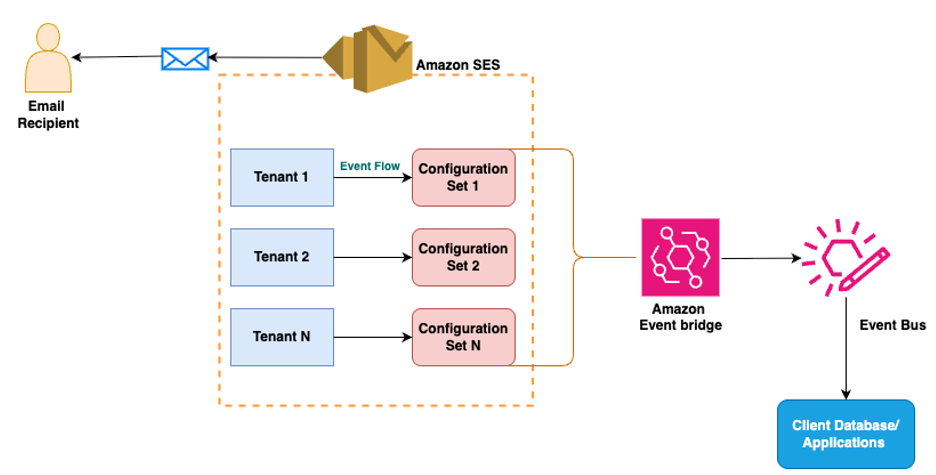
Amazon SES now offers tenant management capabilities that enable isolated email sending environments within a single AWS account. This provides granular reputation management across different email streams. You can assign dedicated configuration sets, sending identities, and templates to each tenant. Each tenant functions as a logical container that maintains its own sending reputation independently. This tenant-based reputation isolation makes sure deliverability issues with one tenant won’t affect your other tenants. You also get real-time visibility into tenant-level metrics, including messages sent, bounce rates, and complaint rates.

The following diagram illustrates the solution architecture.

Tenants are a best practice for those who want visibility, isolation, and control over their email reputation, from large-scale platforms to smaller teams:

  • Independent software vendors (ISVs) with multiple customers, and marketing and software as a service (SaaS) solutions using a central AWS SES account – You can provision a tenant for each customer to segregate email sending and prevent one client’s sending from negatively affecting deliverability for other clients.
  • Enterprises and other large organizations with multiple BUs – You can maintain separate reputation profiles for different BUs, departments, or brands within the same AWS account.
  • Organizations with distinct mail streams – You can separate transactional and marketing mail, or keep product notifications distinct from internal communications, to make sure issues with one tenant’s email stream don’t affect the other tenants.
  • Single-stream senders – Even if you currently only operate one email stream, you can future-proof your SES account by assigning a tenant from day one. This provides visibility into reputation findings and helps you apply proactive policies to stay ahead of deliverability issues before they impact sending.

In the following sections, we outline how to plan and execute your migration to Amazon SES tenants. We show how to assess your current setup, choose the right tenant structure for your organization, and implement a gradual rollout that minimizes disruption to your existing email operations.

Pre-migration assessment

If you are already using Amazon SES, the transition to tenant-based architecture begins with understanding your current email infrastructure. Start by creating an inventory of your existing sending identities (domains) and identify what, if any, Amazon SES configuration set is assigned. This will help you understand how each customer or BU is currently distributed across your Amazon SES infrastructure. Review each configuration set to identify and track the various configuration options, such as the sending IP pool and archive option. The information you uncover in this phase will serve as the blueprint for your tenant associations and help you make sure each tenant has access to the appropriate resources, while maintaining proper isolation boundaries.

Recommended tenant structure: Individual tenants per customer

For most implementations, we recommend creating one or more tenants per customer or BU so you can achieve complete tenant-level isolation of email workloads. With this approach, you can supply dedicated SMTP or API credentials per tenant to provide secure access to allocated resources. You can apply different reputation policies per tenant as needed and automatically pause any tenant that conflicts with the reputation policy. Additionally, the shared tenant monitoring tools in Amazon SES help you automatically monitor and enforce reputation-based policies at the tenant level, so that problematic email sending behavior from one tenant doesn’t impact the deliverability of others.

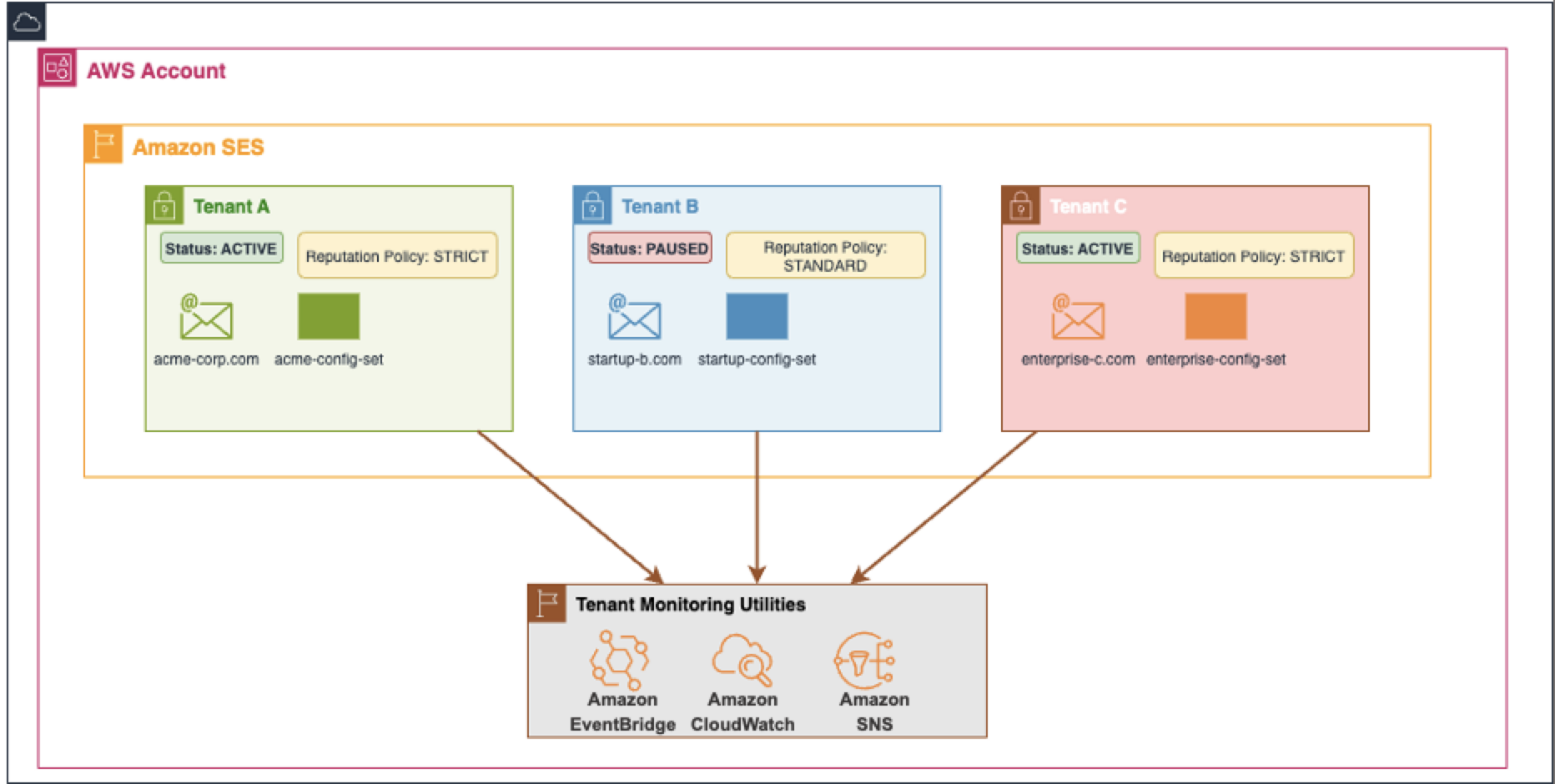
The following diagram shows an example of an ISV that operates a SaaS platform on AWS that sends emails on behalf of its many customers from a single Amazon SES account. They have followed the recommended approach by implementing a 1:1 mapping between tenants and customers. This strategy provides complete reputation isolation for each customer and makes sure the ISV operating the Amazon SES account can automatically prevent deliverability issues from one customer from impacting others. This architecture minimizes the reputation damage a single tenant can cause to the ISV’s Amazon SES account’s shared resources like IP pools and domains, making it the optimal choice for maintaining high deliverability standards.

Resource sharing strategies

Your resource allocation strategy depends on your business model and customer segmentation. Consider the following recommended approaches:

  • Complete resource isolation – Each customer, brand, BU, or workload is assigned to individual, dedicated resources using the tenant configuration. This approach offers the simplest migration path: associate each customer’s dedicated resources (identities, IP addresses) with their corresponding tenant and continue operations with enhanced isolation. This model works well for enterprise customers and ISVs who deploy dedicated IPs for customers and require complete separation.
  • Tiered resource sharing – Organizations and ISVs with service tiers (such as free, pro, and VIP) can align tenants and resource sharing with these tiers. Free-tier customers might use the free-tier tenant and share basic resources, pro customers access the pro-tier tenant that maps to enhanced shared resources, and VIP customers receive dedicated resources, often using VIP customer-specific tenants. This balances cost-efficiency with appropriate isolation levels for each customer segment.
  • Extensive resource sharing – Even when email streams share most resources in the Amazon SES account, such as sending identities and IP pools, tenant isolation tenant isolation allows you to protect the sender reputation for independent email streams you send through the shared resources. Consider grouping similar types of customers or email streams into a single tenant or assigning a certain number of customers to each tenant. Although the grouping might be varied, the Amazon SES tenant feature can still minimize the effect of problematic email streams in any one tenant from affecting other tenants by pausing the offending tenant. This helps avoid Amazon SES account-level reputation damage to shared resources, protecting customers and stakeholders using those resources.

Tenant limits and quotas

Amazon SES provides tenant limits to accommodate various organizational scales. The default limit supports 10,000 tenants per account, which is sufficient for most organizations. Qualifying accounts can request increases for more tenants as needed through the Service Quotas console.

Importantly, implementing tenants doesn’t impact your account-level sending quotas or transactions per second (TPS) limits; these remain unchanged and continue to apply across the tenants within your account.

Low-friction adoption

Amazon SES tenants are designed for low-friction adoption, providing isolated containers for your existing Amazon SES email infrastructure. With tenants, you can continue sending emails using your current domains, configuration sets, and IP pools while progressively associating them with appropriate tenants. If you use them, your senders can continue targeting their assigned configuration set. After you’ve configured your Amazon SES account with tenants, instruct your customers or event buses to add a new Amazon SES API call or SMTP header specifying their unique tenant ID. If you aren’t yet using configuration sets, we’ve found that the introduction of the Amazon SES tenants feature often serves as a compelling reason for ISVs and large organizations to adopt configuration sets. If your organization has been looking for ways to offer enhanced email services to existing customers, you might want to use this opportunity to review customer accounts and offer dedicated IPs or email archiving to important email workloads. The ability to gradually roll out the Amazon SES tenants feature facilitates selective adoption, starting with a subset of customers, brands, event buses, or workloads before expanding to your entire customer base. This phased approach enables testing and refinement of your tenant strategy without disrupting existing email operations. Organizations can validate their tenant configuration with low-risk customers before rolling out to critical segments, providing a smooth transition to enhanced reputation management.

Conclusion

In this post, we discussed key aspects of the migration process to Amazon SES tenants, from initial assessment to tenant structure planning. Part 3 of this series will cover details of IAM configuration, monitoring setup, and practical implementation examples. Whether you’re running a SaaS platform, managing multiple brands, operating separate BUs, or just starting to use Amazon SES for your organization, the tenant feature provides simple reputation isolation, boosts efficiency, and helps create better experiences for users.

To learn more, refer to the following resources:


About the authors

Track OTP success with AWS End User Messaging SMS feedback

Post Syndicated from Rommel Sunga original https://aws.amazon.com/blogs/messaging-and-targeting/track-otp-success-with-aws-end-user-messaging-sms-feedback/

In this post, we show how to implement message feedback for SMS one-time passwords (OTPs) using AWS End User Messaging. OTP verification through SMS is a fundamental component of modern authentication systems. Although sending OTPs follows an established pattern, tracking their delivery and usage presents several challenges. This post shows how to implement the AWS End User Messaging Message Feedback API to monitor OTP delivery and conversion rates effectively. This post highlights the Message Feedback API in an OTP use case; for practical examples and detailed guidance on building a secure OTP architecture, see Build a Secure One-Time Password Architecture with AWS.

Challenges with OTP tracking

Organizations commonly face these key challenges with OTP tracking:

  • Relying solely on Delivery Receipt (DLR) data for confirming message delivery, which is third-party carrier data that can be subject to interpretation by carriers or message providers, whereas conversion tracking through message feedback provides first-party data that can more accurately reflect actual message delivery and usage
  • Measuring accurate user authentication success rates
  • Identifying OTP verification issues across different geographic regions, carriers and delivery paths

To address these challenges, you can use the AWS End User Messaging Message Feedback API to track delivery and conversion rates, providing first-party data for more accurate insights into message delivery and usage patterns. Although OTP use cases are the most common and serve as our example implementation of message feedback, the same tracking logic can also be applied to other types of SMS conversions, such as promotional link clicks, shopping cart additions, account activations, appointment confirmations, and delivery notifications.

Solution overview

The OTP message flow consists of two main phases. Let’s first examine how the system handles the initial OTP request.

Phase 1: OTP request flow

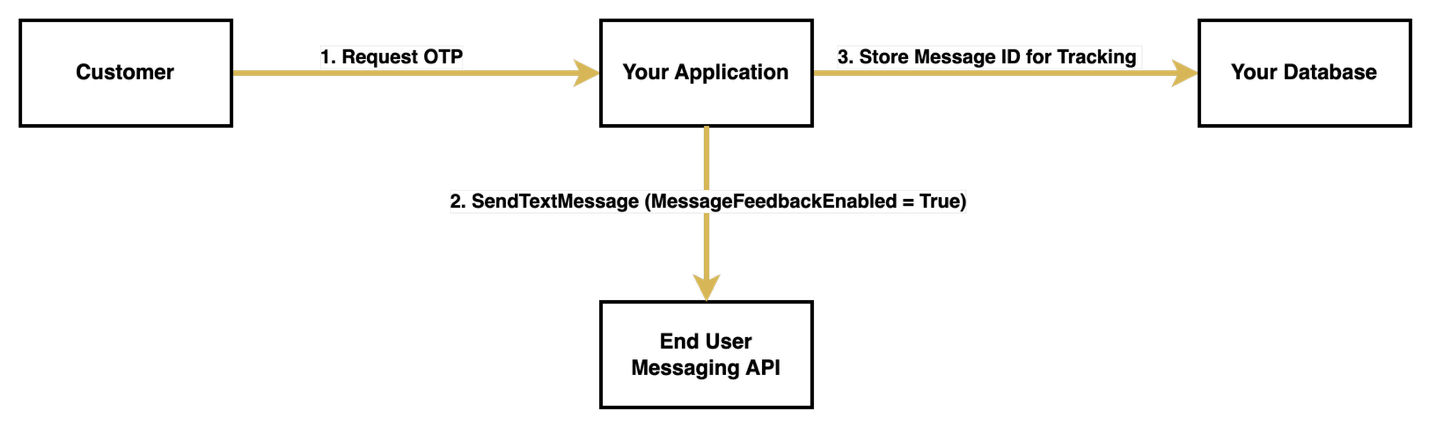
When a customer initiates an OTP request, your system begins a carefully orchestrated process. First, your application receives this request and generates a unique OTP. With the OTP generated, your system prepares to send it through the AWS End User Messaging API, specifically enabling message feedback tracking by setting the MessageFeedbackEnabled parameter to true when calling SendTextMessage.

Upon successful sending, it returns a unique message ID, which your system must store alongside the generated OTP. This message ID serves as a crucial tracking identifier for the entire verification process. The message is then dispatched to the customer’s device, and your system enters a waiting state, ready to process the verification attempt.

The following diagram illustrates the OTP request flow.

OTP Request Flow Diagram

Phase 2: OTP verification flow

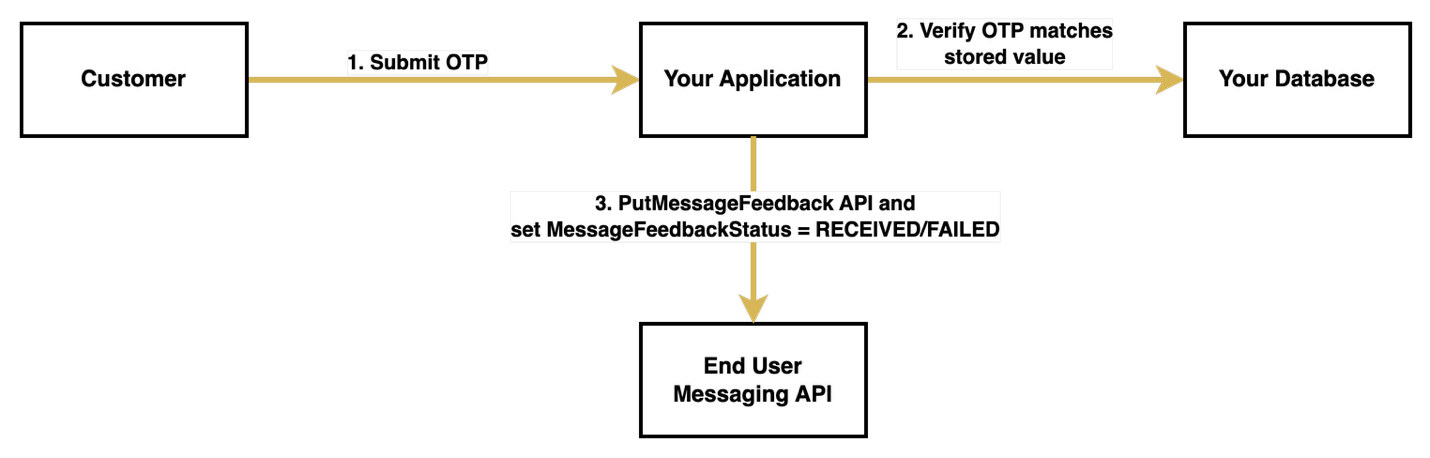
The verification process begins when the customer receives the OTP through SMS and submits it back to your system. Upon receiving the submission, your system first validates the OTP against the stored value. This verification step is critical, because its outcome determines how you will update the message feedback status.

If the customer successfully verifies the OTP, your system calls the PutMessageFeedback API with the stored message ID and sets the status to "RECEIVED", indicating successful delivery and usage of the OTP. However, if the verification fails or the customer doesn’t respond within the timeout period, your system sets the status to "FAILED".

If your system doesn’t explicitly update the feedback status within 1 hour, AWS automatically sets it to "FAILED".

The following diagram illustrates the OTP verification flow.

Prerequisites

Before you begin implementing OTP message feedback, make sure you have the following components and permissions in place:

Send SMS with message feedback enabled

You can enable message feedback in two ways. The first method is to use the MessageFeedbackEnabled parameter when sending an SMS, the second is to send a message with a configuration set with message feedback already enabled. Using a configuration set is often more convenient for bulk implementations because you don’t need to specify message feedback settings in each API call.

To send an SMS with message feedback enabled directly, you can use the following function:

import boto3

# Initialize the End User Messaging client
client = boto3.client('pinpoint-sms-voice-v2')

def send_otp_with_feedback():
    # Generate a unique OTP
    otp = generate_otp()  
    
    # Send SMS with feedback enabled
    response = client.send_text_message(
        DestinationPhoneNumber='+15555550123',  # Replace with your destination phone number
        OriginationIdentity='+14255550120',  # Replace with your origination identity
        MessageBody=f'Your verification code is: {otp}',
        MessageFeedbackEnabled=True
    )
    
    # Store OTP details for verification
    store_otp_details(response['MessageId'], otp)
    return response['MessageId']

The function uses the following details:

  • store_otp_details() is a placeholder function where you store the OTP details in a database for later retrieval
  • generate_otp() is a placeholder function where you generate your OTPs to send using SMS

If you prefer to use a configuration set with message feedback enabled, you can use the following alternative function:

def send_otp_with_feedback_using_configuration_set():
    # Initialize the End User Messaging client
    client = boto3.client('pinpoint-sms-voice-v2')
    
    # Generate OTP
    otp = generate_otp()
    
    # Send SMS using configuration set
    response = client.send_text_message(
        DestinationPhoneNumber='+15555550123',  # Replace with your destination phone number
        OriginationIdentity='pool-201d59fffd554bdfbaf9ee8aEXAMPLE',  # Replace with your origination identity
        MessageBody=f'Your verification code is: {otp}',
        ConfigurationSetName='example-us-east-configuration-set'  # Replace with your configuration set name
    )
    
    # Store OTP details for later verification
    store_otp_details(response['MessageId'], otp)
    
    return response['MessageId']

Your configuration set must have message feedback enabled to use this option. You can enable it using the AWS Command Line Interface (AWS CLI) with the following command:

aws pinpoint-sms-voice-v2 set-default-message-feedback-enabled \
--configuration-set-name "YourConfigSetName" \
--message-feedback-enabled

Another option is to use the AWS End User Messaging console, where you can enable message feedback under Set Settings for the desired configuration set.

Update feedback

After you send a message, you can update the message status to indicate whether a user has successfully completed an action, such as entering the OTP on your application or webpage:

def update_message_feedback(message_id: str, status: str) -> dict:
    try:
        # Initialize the End User Messaging client
        client = boto3.client('pinpoint-sms-voice-v2')
        
        # Update the message feedback status
        response = client.put_message_feedback(
            MessageId=message_id,
            MessageFeedbackStatus=status
        )
        
        return response
        
    except Exception as e:
        print(f"Error updating message feedback: {str(e)}")
        raise

# Example usage
message_id = "a1b2c3d4-5678-90ab-cdef-EXAMPLE11111"  # Replace with your message ID
status = "RECEIVED"  # Use "FAILED" for unsuccessful verifications

result = update_message_feedback(message_id, status)
print(f"Feedback status updated: {result}")

Verify feedback metrics

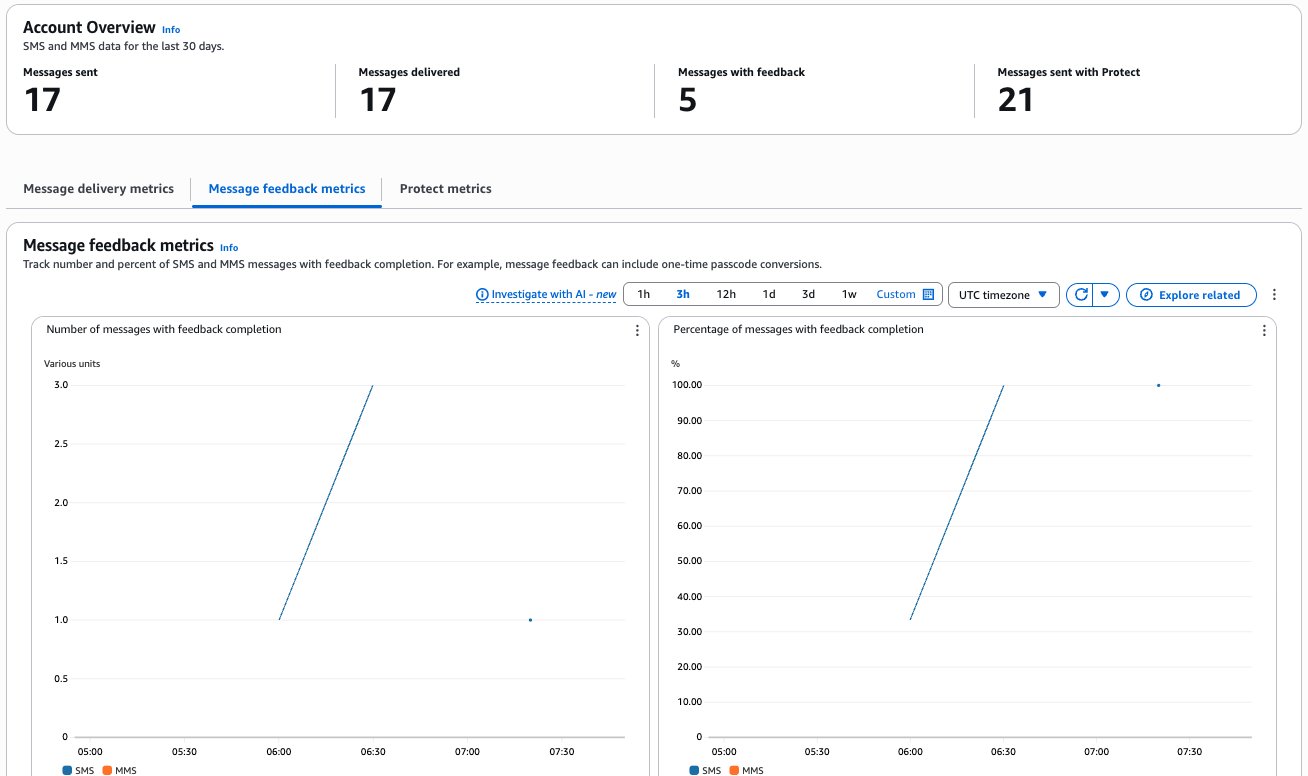
The AWS End User Messaging dashboard provides comprehensive metrics to help you monitor your OTP performance. The following metrics are available for customizable time periods:

  • Number of messages with feedback completion
  • Percentage of messages with feedback completion
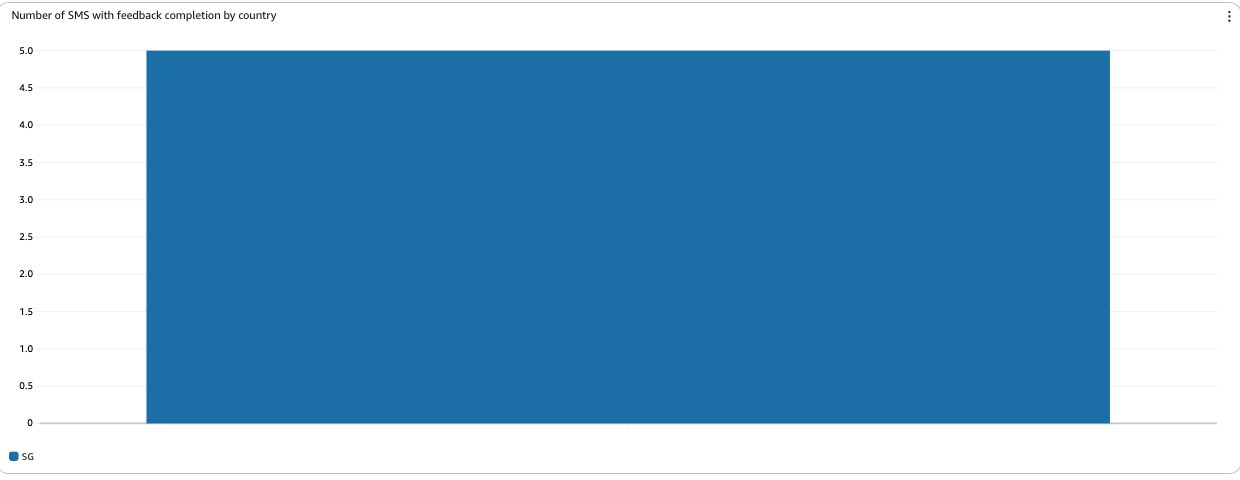
  • Number of SMS with feedback completion by country

To review your application’s overall message feedback metrics, choose Dashboard in the AWS End User Messaging console navigation pane, then choose Message Feedback Metrics.

The dashboard presents three key metrics:

  • Number of messages with feedback completion – The count of SMS and MMS messages where the message feedback record is set to RECEIVED
  • Percentage of messages with feedback completion – The percentage of SMS and MMS messages where the message feedback record is set to RECEIVED
  • Number of SMS with feedback completion by country – The count of message feedback received by country

The progression to 100% completion indicates optimal system performance, where all sent OTPs were successfully received and verified by users, and the message feedback record is set to RECEIVED within the expected timeframe. This high completion rate suggests effective message delivery and a smooth user verification experience. Variations in completion rates across countries can help identify potential regional delivery challenges or user behavior patterns.
The 30% conversion starting point shown in this example is used for illustration purposes only, demonstrating messages that were intentionally left unconverted during testing.

Best practices for OTP implementation

For a secure and reliable OTP implementation, follow these best practices to balance security with user experience:

  • Include rate limiting to prevent abuse
  • Implement proper timeout mechanisms for OTPs
  • Make sure error handling provides clear feedback to users
  • Maintain comprehensive logging for security audits

Conclusion

By implementing the Message Feedback API for OTP tracking, you can gain valuable insights into your authentication system’s effectiveness in real time. This approach helps you monitor successful OTP usage and identify potential delivery issues that might affect user authentication, with granular metrics broken down by geographic regions. The data collected through message feedback offers a more accurate picture of actual user interactions compared to carrier-provided delivery receipts, helping you make data-driven decisions about your authentication system.
To build upon this foundation, consider implementing Amazon CloudWatch alerts for your conversion metrics, and optimizing your message templates based on performance data. The combination of real-time feedback, detailed analytics, and proactive monitoring can help make sure your OTP system remains both secure and efficient.

For additional implementation guidance and best practices, refer to the following resources:


About the authors