All posts by Vamsi Vikash Ankam

Building resilient multi-Region Serverless applications on AWS

Post Syndicated from Vamsi Vikash Ankam original https://aws.amazon.com/blogs/compute/building-resilient-multi-region-serverless-applications-on-aws/

Mission-critical applications demand high availability and resilience against potential disruptions. In online gaming, millions of players connect simultaneously, making availability challenges evident. When gaming platforms experience outages, players lose progress, tournaments get disrupted, and brand reputation suffers. Traditional environments often overprovision compute to address these challenges, resulting in complex setups and high infrastructure and operation costs. Modern Amazon Web Services (AWS) serverless infrastructure offers a more efficient approach. This post presents architectural best practices for building resilient serverless applications, demonstrated through a multi-Region serverless authorizer implementation.

Overview

It’s too late if you are recognizing the importance of availability only after experiencing a disaster event. Applications fail for a variety of reasons, such as infrastructure issues, code defects, configuration errors, unexpected traffic spikes, or service disruptions at a regional level. Critical business services such as authentication systems, payment processors, and real-time gaming features necessitate high availability. To minimize impact on user experience and business revenue, establish bounded recovery times for critical services during outages.

AWS serverless architectures inherently provide high availability through multi-Availability Zone (AZ) deployments and built-in scalability. These services minimize infrastructure management while operating on a pay-for-value pricing model at a Regional level. The AWS serverless pay-for-value model enables cost-effective multi-Region deployments, making it ideal for building resilient architectures.
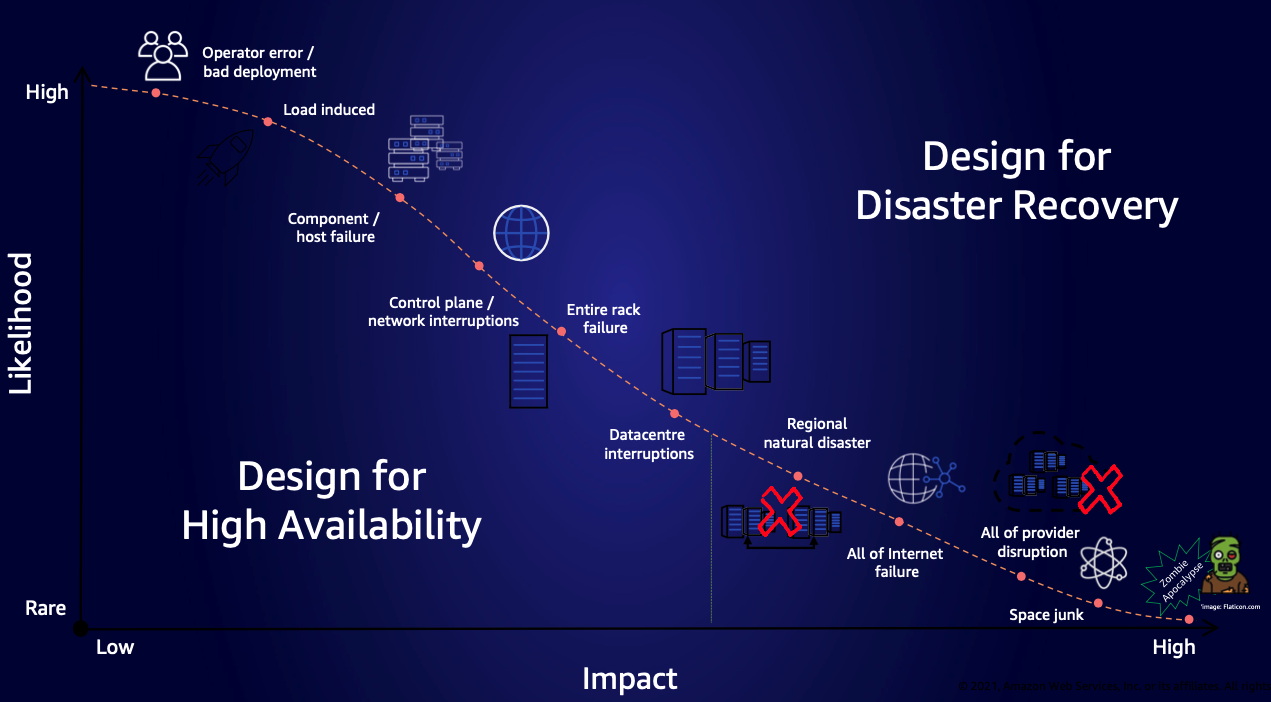
Figure 1. Chart showing various causes of failure, their impact, and how often they happen

Figure 1. Chart showing various causes of failure, their impact, and how often they happen

The preceding chart maps failures—from common operational errors to rare catastrophic events. It guides organizations in prioritizing multi-Region recovery strategies based on the likelihood and the potential impact to the business.

Regional decisions

To determine the appropriate multi-Region approach, carefully evaluate the following factors:

  1. Evaluate if your Recovery Time Objective (RTO) and Recovery Point Objective (RPO) requirements can be met within a single Region, or if a multi-Region architecture is necessary to achieve your recovery objectives.
  2. Do the business benefits of multi-Region redundancy outweigh the operational costs of data replication, synchronization, and increased implementation cost and complexity?
  3. Evaluate if data sovereignty laws, compliance requirements, or geographic restrictions prevent data replication across specific AWS Regions.
  4. Make sure that the chosen Regions in a multi-Region solution have service compatibility, quota limits, and pricing to match your needs.

After evaluating these requirements, if organizations determine the need for multi-Region workloads, then they must choose between two architectural patterns: Active-Passive or Active-Active deployments. Each pattern offers distinct advantages and trade-offs for resilience, costs, and operational complexity.

Multi-Region deployment patterns

The following sections outline the different multi-Region deployment patterns: Active-Passive, and Active-Active.

Active-Passive

In this pattern, one AWS Region serves as the “Active” Region, handling all production traffic, while other Region(s) remain “Passive”, as shown in the following figure. Passive Region(s) replicate data and configurations from the Active Region without serving requests and are prepared to handle requests during service disruptions in the “Active” Region. Depending on application criticality, passive Regions implement varying levels of infrastructure readiness: fully deployed infrastructure (Hot Standby), partially deployed infrastructure (Warm Standby), or minimal core infrastructure (Pilot Light).

Traditional Active-Passive architectures need significant investment in idle infrastructure: load balancers, auto-scaling groups, running compute resources, and monitoring systems. Organizations can use AWS serverless applications, with their pay-for-value pricing, to pay primarily for data replication, not idle compute resources. AWS manages the underlying infrastructure, eliminating most operational overhead.

Service quotas, API limits, and concurrency settings must match between AWS Regions to provide seamless failover. AWS Lambda offers provisioned concurrency to keep functions warm and responsive, which is particularly useful for secondary Regions during failover. It helps reduce cold starts by maintaining warm execution environments, thus the system can handle sudden traffic spikes with fewer cold starts. Note that provisioned concurrency incurs compute costs regardless of usage. Consider implementing auto-scaling for provisioned concurrency based on traffic patterns to optimize costs during idle periods.

This pattern suits organizations seeking a cost-effective disaster recovery (DR) solution, because AWS serverless charges apply only when resources are actively used in the secondary Region. Managed services such as Amazon DynamoDB Global Tables and Amazon Aurora Global Database handle data replication, further streamlining the implementation. The serverless authorizer discussed later in this article demonstrates this pattern in practice.
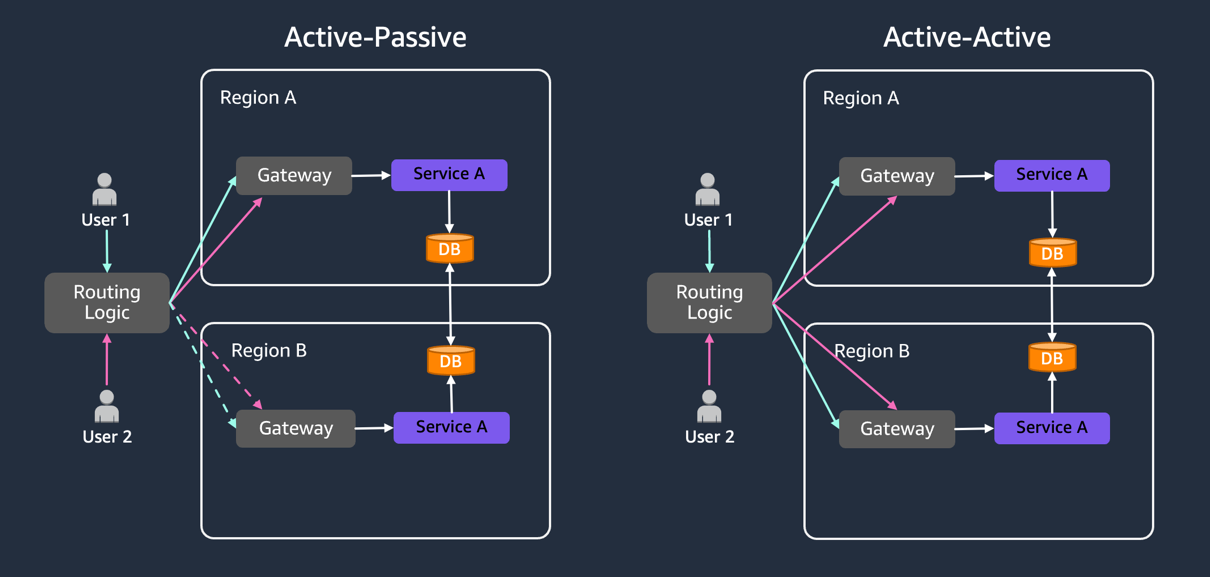
Figure 2: Active-Passive pattern with dotted lines shows standby Regions, while Active-Active patterns serve concurrent traffic

Figure 2: Active-Passive pattern with dotted lines shows standby Regions, while Active-Active patterns serve concurrent traffic

Active-Active

In this pattern, multiple Regions actively serve traffic concurrently, distributing the load and providing rapid failover capabilities. Active-Active architectures are expensive and designed for highest availability. However, they do not inherently provide DR for all potential failure modes. This approach suits applications needing geolocation-based routing, or highest availability requirements.

Active-Active deployments need rigorous engineering to handle data synchronization and conflict resolution. Each Region must be sized to handle full application load if another Region experiences service impairments. Active users are distributed across AWS Regions, thus a disruption in the service in one Region redirects all of the traffic to the remaining Regions, which necessitates them handling the combined load. To improve application resiliency, implement retry mechanisms, circuit breakers, and fallback strategies. Plan for static stability by pre-provisioning capacity and implementing client-side caching. Services such as Amazon Route 53 with latency-based routing and Amazon DynamoDB Global Tables with strong consistency provide the foundation but need thorough testing under various failure scenarios. This blog will not cover Active-Active deployments.

Multi-Region serverless authorizer

To demonstrate the Active-Passive scenario, we build a sample application that demonstrates how to build a multi-Region serverless authorizer using Amazon API Gateway, Lambda functions, and Amazon Route53. Modern gaming and entertainment platforms host critical services such as player matchmaking, live streaming, and real-time sports analytics. These services depend on robust authorization systems—when authorization fails, players cannot join matches, viewers lose access to streams, and live events becomes inaccessible. This post demonstrates how to build a fault-tolerant, multi-Region serverless authorizer while maintaining lower costs as compared to traditional environments.

Serverless multi-Region architectures typically comprise Routing, Compute, and Data layers. When implementing multi-Region deployments, data replication across AWS Regions is essential, regardless of the compute services used. The compute layer should prioritize idempotency to make sure of safe event processing across AWS Regions. Use Powertools for Lambda for efficient idempotency handling, or implement custom solutions using unique event IDs with DynamoDB as an idempotency store. Although this post focuses on the authorizer service implementation, this pattern can be applied to build multi-Region microservices handling various critical functions, such as game session management, content delivery orchestration, user preference management, and profile services.

Demo overview

To demonstrate the multi-Region serverless authorizer operation, we can examine the workflow:

  1. The frontend application authenticates with the Identity Provider to obtain an authentication token.
  2. The authentication token is sent to a resilient multi-Region DNS endpoint, which is hosted on Route 53 in this demo.
  3. Route 53 routes the request with the token to API Gateway in the primary Region.
  4. Route 53 monitors application health using a mock Lambda function in this demo. In production environments, implement deep health checks to monitor the complete service stack.
  5. Upon successful authorization, the application receives a response. If Route 53 detects primary Region impairment, then it triggers Amazon CloudWatch alarms, which application owners can use to evaluate and approve traffic redirection to the secondary Region.
  6. New traffic routes to the API Gateway in the secondary Region after manual failover approval.
  7. Route 53 health checks continue monitoring the primary Region’s health and restores request traffic when the Region recovers.
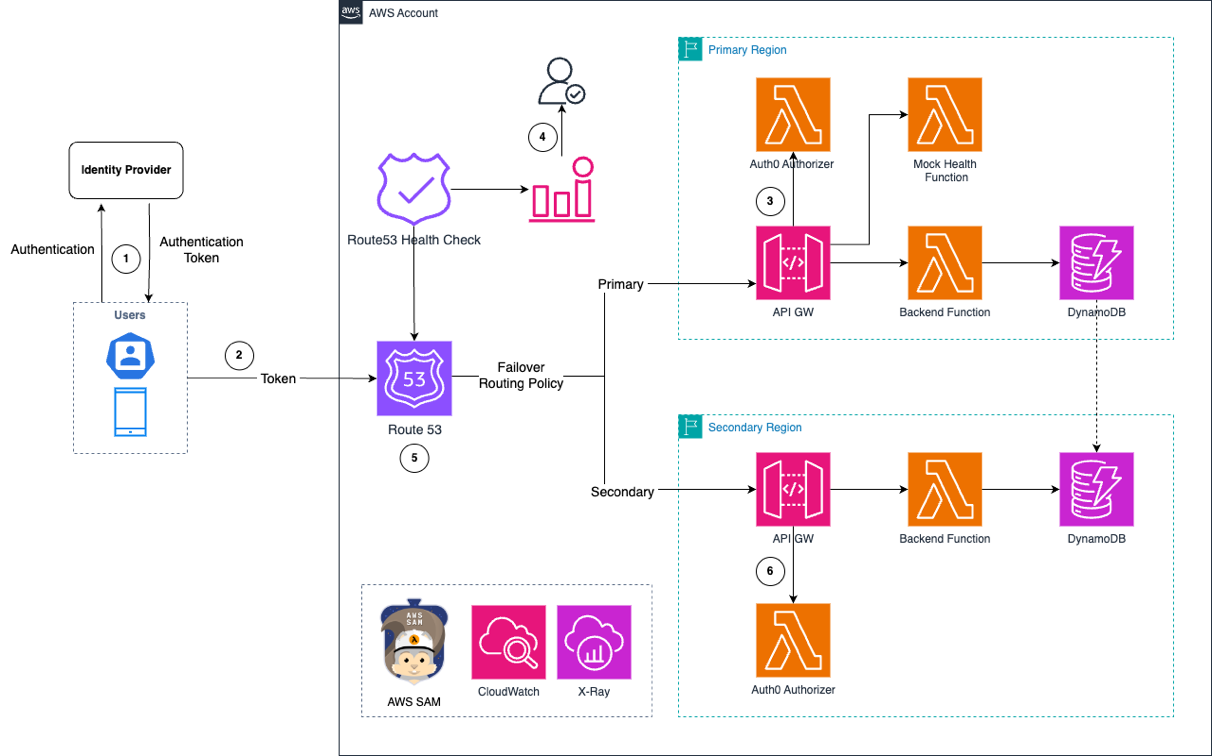
Figure 3: Multi-Region serverless authorizer workflow with Route 53 failover between primary and secondary Regions

Figure 3: Multi-Region serverless authorizer workflow with Route 53 failover between primary and secondary Regions

The preceding figure shows the architecture, which demonstrates both failover and fallback capabilities through CloudWatch alarms and a manual approval process. This approach aligns with best practices for critical applications, where automated failover is not recommended despite being technically possible. Teams can use this approach to assess technical readiness, evaluate business impact, and make informed business decisions about timing and potential revenue implications. The demo implements a multi-Region serverless authorizer that serves as a reference architecture. Real-world implementations should carefully evaluate the failover strategies based on business criticality and operational requirements.

Testing multi-Region scenarios

The demo application hosts its frontend on Amazon Elastic Container Service (Amazon ECS). The Route 53 health check configuration in this GitHub defines key failover parameters:

  1. FailureThreshold: Specifies the number of consecutive health check failures before Route 53 marks an endpoint as unhealthy
  2. RequestInterval:
    1. Standard: 30-second interval ($0.50 per health check/month)
    2. Fast: 10-second intervals ($1.00 per health check/month)
```
Route53HealthCheck:
    Type: AWS::Route53::HealthCheck
    Properties:
      HealthCheckConfig:
        FailureThreshold: 2
        FullyQualifiedDomainName: !Ref DomainName
        Port: 443
        RequestInterval: 10
        ResourcePath: /failure
        Type: HTTPS
      HealthCheckTags:
        - Key: Environment
          Value: Production
        - Key: Name
          Value: multi-authorizer-health-check
```

The faster interval enables quicker failure detection. However, it increases health check costs through more logging, request handling, and backend compute resources. Temporary issues such as network glitches, transient errors, or third-party dependency delays may resolve within minutes. Implementing effective retry handling introduces unnecessary complexities and potential data inconsistencies. Choose the appropriate interval based on your business SLAs and cost considerations.

For testing failover scenarios, the architecture uses a mock Lambda function as the health check endpoint. We trigger CloudWatch alarms by simulating a response status code of 500 from this function, which prompts the manual failover decision process, as shown in the following figure.

Figure 4. Console screenshot showing multi-authorizer-health-check with status "Unhealthy"

Figure 4. Console screenshot showing multi-authorizer-health-check with status “Unhealthy”

DNS caching occurs at multiple levels (browser, operating system, ISP, and VPN). To observe failover behavior immediately, clear DNS resolver caches at each level

For more comprehensive resilience testing, consider implementing chaos engineering practices. You can use the chaos-lambda-extension to introduce latency or modify the function responses in a controlled manner. AWS Fault Injection Service (AWS FIS), a fully managed service, enables fault inject experiments to improve application resilience, performance, and observability. Combining these tools helps validate your multi-Region architectures under various controlled failure conditions.

Observability in multi-Region deployments

Implementing a multi-Region architecture is only the first step. Cross-Region observability necessitates monitoring Region A’s resource from Region B and the other way around. CloudWatch enables this through cross-account and cross-Region monitoring, providing consolidated logs and metrics in a single dashboard. Implement deep health checks to verify critical application functionality across AWS Regions.

Although AWS serverless services are distributed, identifying exact failures necessitates combining multiple data points. CloudWatch composite alarms help aggregate these insights, thus facilitating informed decisions. Consider implementing custom monitoring solutions for end-to-end request tracing across AWS Regions. This comprehensive view helps manage the complexity of multi-Region complexity and provides rapid responses to potential issues.

Conclusion

Building resilient multi-Region applications necessitate careful considerations of architecture patterns, costs, and operational complexities. AWS Serverless services, with their pay-for-value model, significantly reduce the challenges to implementing multi-Region architectures. The authorizer pattern demonstrated in this post shows how organizations can achieve high availability without the traditional overhead of idle infrastructure. Teams can follow these architectural patterns and best practices to build robust, cost-effective solutions that maintain service availability during service disruptions.

To learn the concepts of resilience, visit the AWS Developer Center. The complete source code for the demo used in this post is available in our GitHub repository. To expand your serverless knowledge, visit Serverless Land.

How to scan your AWS Lambda functions with Amazon Inspector

Post Syndicated from Vamsi Vikash Ankam original https://aws.amazon.com/blogs/security/how-to-scan-your-aws-lambda-functions-with-amazon-inspector/

Amazon Inspector is a vulnerability management and application security service that helps improve the security of your workloads. It automatically scans applications for vulnerabilities and provides you with a detailed list of security findings, prioritized by their severity level, as well as remediation instructions. In this blog post, we’ll introduce new features from Amazon Inspector that can help you improve the security posture of your AWS Lambda functions.

At re:Invent 2022, Amazon Inspector announced the ability to perform automated security scans of the application package dependencies and associated layers in your Lambda functions. This adds to the existing ability to scan Amazon Elastic Compute Cloud (Amazon EC2) instances and container images in the Amazon Elastic Container Registry (Amazon ECR). The list of operating systems and programming languages that are supported for scanning is available in the Amazon Inspector documentation. On February 28, 2023, Amazon Inspector also announced a new feature, in public preview, to scan your application code in Lambda functions for vulnerabilities. This new feature uses the Detector Library from Amazon CodeGuru to scan your Lambda code. For more details on how the service scans your code, see the Amazon Inspector documentation.

Security is the top priority at AWS. For Lambda, our serverless compute offering, we released a whitepaper that goes into more detail about the security underpinnings of the service. It is important to highlight some differences in the model between infrastructure services such as Amazon EC2 and serverless options such as Lambda. Given the serverless nature of Lambda, besides the infrastructure, AWS also manages the Firecracker microVM software patches, the execution environment, and runtimes. Meanwhile, customers are responsible for using AWS Identity and Access Management (IAM) to create roles and permissions for their Lambda functions and for securing their code that is used with Lambda.

Activate Amazon Inspector

Let’s go over the steps for activating Amazon Inspector.

First, if you’re an existing Amazon Inspector customer, you can enable the new Lambda features from the Amazon Inspector console.

To enable Lambda scanning from the Amazon Inspector console

  1. Sign in to one of your AWS accounts.
  2. Navigate to the Amazon Inspector console.
  3. In the left navigation pane, expand the Settings section, and choose Account Management.
  4. On the Accounts tab, choose Activate, and then select one of two options:
    • Lambda standard scanning — With this option enabled, Amazon Inspector only scans for package dependencies in your Lambda functions and associated layers.
    • Lambda standard scanning and Lambda code scanning — With this option enabled, Amazon Inspector scans for package dependencies and also scans your proprietary application code in Lambda for code vulnerabilities. The code scanning feature is only available in certain AWS Regions.

You can also activate Amazon Inspector in a multi-account environment by enabling it from the Amazon Inspector delegated administrator account.

If you’re a new Amazon Inspector customer, we encourage you to try the service by enabling the 15-day free trial, which includes both Lambda function standard scanning and, if available in your Region, code scanning. Figure 1 shows how the Account Management section of the Amazon Inspector console will look, after you enable both features for Lambda. You also have the ability to exclude Lambda functions from being scanned by using AWS tags, as explained in the Amazon Inspector documentation.

Note: The Export CSV button in Figure 1 will be displayed only when you are logged in as the designated Inspector delegated administrator in the Region.

Figure 1: Amazon Inspector account management area

Figure 1: Amazon Inspector account management area

Let’s see these features in action.

To view security findings in the console

  • In the Amazon Inspector console, on the Findings menu, choose By Lambda function to display the security scan results that were performed on Lambda functions.

You won’t see Lambda functions in the findings if there are no potential vulnerabilities detected by Amazon Inspector. Amazon Inspector discovers eligible Lambda functions in near real time when it is deployed to Lambda and automatically scans the function code and dependencies. For more details on how Lambda functions are scanned, see the Amazon Inspector documentation.

Package vulnerability findings examples

As an example, we will walk through a simple Node.js 12 application. Figure 2 shows a sample Lambda function for which Amazon Inspector generated findings.

Figure 2: Lambda function finding summary

Figure 2: Lambda function finding summary

Amazon Inspector found three findings marked with a severity rating of High or Medium, shown in Figure 3. Amazon Inspector detects software vulnerabilities in Lambda functions and categorizes them as type Package Vulnerability (a vulnerable package in Lambda functions or associated layers) or Code Vulnerability (code vulnerabilities in custom code written by a developer – this does not include third-party dependencies, because these are covered under package vulnerabilities). The three findings in Figure 3 are of type Package Vulnerability, and when you choose the Common Vulnerabilities and Exposures (CVE) title, you can find more details about the vulnerability and its status

Figure 3: Amazon Inspector findings for a sample Lambda function

Figure 3: Amazon Inspector findings for a sample Lambda function

Each Lambda function can have up to five layers (at the time of this writing). A layer is a .zip file archive that can contain additional code or data. Amazon Inspector will also scan the functions’ available layers, and the findings from these scans will be available on the Layers tab, as shown in Figure 4.

Figure 4: Amazon Inspector findings for Lambda Layers

Figure 4: Amazon Inspector findings for Lambda Layers

Amazon Inspector sources the data for its vulnerability intelligence database from more than 50 data feeds to generate its CVE findings. Let’s dive deeper into one finding from the sample application—for instance, the CVE-2021-43138-async package shown in Figure 5. The description of the CVE gives a high-level overview of the vulnerability, along with a CVE score to determine the severity.

Figure 5: CVE-2021-43138 finding details

Figure 5: CVE-2021-43138 finding details

The Amazon Inspector score assigned to the vulnerability will be affected by details such as whether an exploit is available. Amazon Inspector also uses the network reachability of the function as one of its score parameters. This helps you triage your findings appropriately to focus on the functions that could be most vulnerable.

Amazon Inspector will also provide you with remediation instructions for the vulnerable package, if available. In Figure 6, the recommendation to address this particular finding is to upgrade the async package to 3.2.2 to mitigate the vulnerability.

Figure 6: Remediation instructions for the sample application finding

Figure 6: Remediation instructions for the sample application finding

Code vulnerability findings examples

Now let’s look at the new code scanning feature of Amazon Inspector. With this release, Amazon Inspector reviews the security and quality of the code written in your Lambda functions. To do this, the service uses the Amazon CodeGuru Detector Library, which has trained data across millions of code reviews, to generate findings. Amazon Inspector scans the Lambda function code to detect security flaws like cross-site scripting, injection flaws, data leaks, log injection, OS command injections, and other risk categories in the OWASP Top 10 and CWE Top 25. When you enable code scanning, you can focus on building your application while also following current security recommendations. At the time of this writing, Amazon Inspector supports scanning Java, Node.js, Python, and Go Lambda runtimes. For a full list of supported programming language runtimes, see the Amazon Inspector documentation.

As a demonstration of the Amazon Inspector code scanning feature, let’s take the simple Python Lambda function shown following, which accidentally overrides the Lambda reserved environment variables and also has an open-to-all socket connection.

import os
import json
import socket

def lambda_handler(event, context):
    
    # print("Scenario 1");
    os.environ['_HANDLER'] = 'hello'
    # print("Scenario 1 ends")
    # print("Scenario 2");
    s = socket.socket(socket.AF_INET, socket.SOCK_STREAM)
    s.bind(('',0))
    # print("Scenario 2 ends")
    
    return {
        'statusCode': 200,
        'body': json.dumps("Inspector Code Scanning", default=str)
    } 

Overriding reserved environment variables might lead to unexpected behavior or failure of the Lambda function. You can learn more about this vulnerability by reviewing the Detector Library documentation. Similarly, a socket connection without an IP address opens the connection to all entities, allowing the function code to potentially access public IPv4 addresses from within the code. There can be external dependencies in your code, which might reuse the insecure socket connection. To learn more about insecure socket binds, see the Detector Library documentation.

As shown in Figure 7, Amazon Inspector automatically detects these vulnerabilities and tags them as Code Vulnerability, which indicates that the vulnerability is in the code of the function, and not in one of the code-dependent libraries. You can see more details for these new finding types under the By Lambda function section of the Amazon Inspector console. You can filter the results based on the function name to see the active vulnerabilities. For this particular function, Amazon Inspector found two vulnerabilities.

Figure 7: Code Vulnerability sample findings

Figure 7: Code Vulnerability sample findings

Similar to other finding types, Amazon Inspector tagged the vulnerability based on its severity level, which can help you to triage findings. Let’s focus on the High severity vulnerability in Figure 8 to learn how you can remediate the issue. Selecting the finding reveals additional details, like the name of the detector, the vulnerability location, and remediation details.

Figure 8: Code Vulnerability finding details

Figure 8: Code Vulnerability finding details

Now let’s see how you can remediate these vulnerabilities according to the suggested remediation. The code is attempting to change the function handler. AWS recommends that you don’t try to override reserved Lambda environment variables, because this can lead to unexpected results. For this case, we recommend that you delete line 8 from the sample code shown here and instead update the Lambda function handler name by using the runtime settings configuration in the Lambda console, as shown in Figure 9.

To change the Lambda function handler

  1. In the Lambda console, search for and then select your Lambda function.
  2. Scroll down to the Runtime settings area and choose Edit.
  3. Under Edit runtime settings, update the handler name, and then choose Save.
    Figure 9: Lambda function runtime settings

    Figure 9: Lambda function runtime settings

To address the second finding, we also updated the function by passing an IP address when binding to a socket, according to the recommendations that were included in the finding. Amazon Inspector will automatically detect the changes that are made to fix the issues, and change the status of the finding to closed, as shown in Figure 10. By changing the findings filter to Show all, you can see active and closed findings.

Figure 10: Findings summary after remediation

Figure 10: Findings summary after remediation

You can create more complex workflows by using the Amazon Inspector integration with Amazon EventBridge to manually or automatically respond to findings by creating various playbooks to respond to unique events. These findings will also be routed to AWS Security Hub for a centralized view of your Amazon Inspector findings in your AWS accounts and Regions.

Pricing

Pricing for Lambda standard scanning is available on the Amazon Inspector pricing page. During the public preview, the code scanning feature will be available at no additional cost.

Conclusion

In this blog post, we introduced two new Amazon Inspector features that scan your Lambda function application package dependencies, as well as your application code, for security vulnerabilities. With these new features, you can strengthen your security posture by scanning for code security vulnerabilities such as injection flaws, data leaks, and unsanitized input, according to current AWS security recommendations. We encourage you to test Lambda function scanning in your own environment by enabling the free trial for Amazon Inspector and following the steps in the Amazon Inspector documentation.

If you have feedback about this post, submit comments in the Comments section below. If you have questions about this post, start a new thread on the Security, Identity, & Compliance re:Post or contact AWS Support.

Want more AWS Security news? Follow us on Twitter.

Vamsi Vikash Ankam

Vamsi Vikash Ankam

Vamsi Vikash is a globally recognized AWS Serverless expert, with over 10 years of experience architecting, developing, and maintaining applications in the cloud infrastructure. Vamsi works with Enterprise customers and Industry Partners to help build innovative, highly scalable, resilient and robust event-driven Serverless solutions.

Author

Gabriel Santamaria

Gabriel is a Senior Solutions Architect at AWS. He holds an MS in Information Technology from George Mason University, as well as multiple professional and speciality AWS certifications. In his free time he enjoys spending time with his family catching up on the latest TV shows and is an avid fan of board games.