Tag Archives: Cache

Crawler Hints supports Microsoft’s IndexNow in helping users find new content

Post Syndicated from Alex Krivit original https://blog.cloudflare.com/crawler-hints-supports-microsofts-indexnow-in-helping-users-find-new-content/


Crawler Hints supports Microsoft’s IndexNow in helping users find new content

Crawler Hints supports Microsoft’s IndexNow in helping users find new content

The web is constantly changing. Whether it’s news or updates to your social feed, it’s a constant flow of information. As a user, that’s great. But have you ever stopped to think how search engines deal with all the change?

It turns out, they “index” the web on a regular basis — sending bots out, to constantly crawl webpages, looking for changes. Today, bot traffic accounts for about 30% of total traffic on the Internet, and given how foundational search is to using the Internet, it should come as no surprise that search engine bots make up a large proportion of that what might come as a surprise is how inefficient the model is, though: we estimate that over 50% of crawler traffic is wasted effort.

This has a huge impact. There’s all the additional capacity that owners of websites need to bake into their site to absorb the bots crawling all over it. There’s the transmission of the data. There’s the CPU cost of running the bots. And when you’re running at the scale of the Internet, all of this has a pretty big environmental footprint.

Part of the problem, though, is nobody had really stopped to ask: maybe there’s a better way?

Right now, the model for indexing websites is the same as it has been since the 1990s: a “pull” model, where the search engine sends a crawler out to a website after a predetermined amount of time. During Impact Week last year, we asked: what about flipping the model on its head? What about moving to a push model, where a website could simply ping a search engine to let it know an update had been made?

There are a heap of advantages to such a model. The website wins: it’s not dealing with unnecessary crawls. It also makes sure that as soon as there’s an update to its content, it’s reflected in the search engine — it doesn’t need to wait for the next crawl. The website owner wins because they don’t need to manage distinct search engine crawl submissions. The search engine wins, too: it saves money on crawl costs, and it can make sure it gets the latest content.

Of course, this needs work to be done on both sides of the equation. The websites need a mechanism to alert the search engines; and the search engines need a mechanism to receive the alert, so they know when to do the crawl.

Crawler Hints — Cloudflare’s Solution for Websites

Solving this problem is why we launched Crawler Hints. Cloudflare sits in a unique position on the Internet — we’re serving on average 36 million HTTP requests per second. That represents a lot of websites. It also means we’re uniquely positioned to help solve this problem:  to help give crawlers hints about when they should recrawl if new content has been added or if content on a site has recently changed.

With Crawler Hints, we send signals to web indexers based on cache data and origin status codes to help them understand when content has likely changed or been added to a site. The aim is to increase the number of relevant crawls as well as drastically reduce the number of crawls that don’t find fresh content, saving bandwidth and compute for both indexers and sites alike, and improving the experience of using the search engines.

But, of course, that’s just half the equation.

IndexNow Protocol — the Search Engine Moves from Pull to Push

Websites alerting the search engine about changes is useless if the search engines aren’t listening — and they simply continue to crawl the way they always have. Of course, search engines are incredibly complicated, and changing the way they operate is no easy task.

The IndexNow Protocol is a standard developed by Microsoft, Seznam.cz and Yandex, and it represents a major shift in the way search engines operate. Using IndexNow, search engines have a mechanism by which they can receive signals from Crawler Hints. Once they have that signal, they can shift their crawlers from a pull model to a push model.

In a recent update, Microsoft has announced that millions of websites are now using IndexNow to signal to search engine crawlers when their content needs to be crawled and IndexNow was used to index/crawl about 7% of all new URLs clicked when someone is selecting from web search results.

On the Cloudflare side, since the release of Crawler Hints in October 2021, Crawler Hints has processed about six-hundred-billion signals to IndexNow.

That’s a lot of saved crawls.

How to enable Crawler Hints

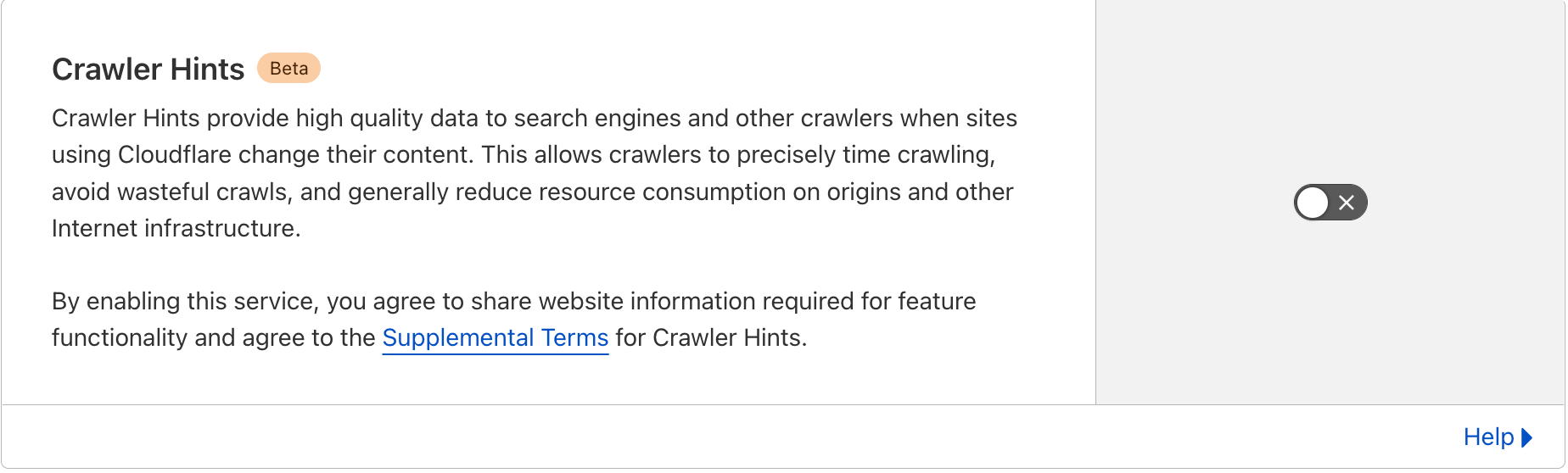
By enabling Crawler Hints on your website, with the simple click of a button, Cloudflare will take care of signaling to these search engines when your content has changed via the IndexNow API. You don’t need to do anything else!

Crawler Hints is free to use and available to all Cloudflare customers. If you’d like to see how Crawler Hints can benefit how your website is indexed by the world’s biggest search engines, please feel free to opt-into the service by:

  1. Sign in to your Cloudflare Account.
  2. In the dashboard, navigate to the Cache tab.
  3. Click on the Configuration section.
  4. Locate the Crawler Hints and enable.
Crawler Hints supports Microsoft’s IndexNow in helping users find new content

Upon enabling Crawler Hints, Cloudflare will share when content on your site has changed and needs to be re-crawled with search engines using the IndexNow protocol (this blog can help if you’re interested in finding out more about how the mechanism works).

What’s Next?

Going forward, because the benefits are so substantial for site owners, search operators, and the environment, we plan to start defaulting Crawler Hints on for all our customers. We’re also hopeful that Google, the world’s largest search engine and most wasteful user of Internet resources, will adopt IndexNow or a similar standard and lower the burden of search crawling on the planet.

When we think of helping to build a better Internet, this is exactly what comes to mind: creating and supporting standards that make it operate better, greener, faster. We’re really excited about the work to date, and will continue to work to improve the signaling to ensure the most valuable information is being sent to the search engines in a timely manner. This includes incorporating additional signals such as etags, last-modified headers, and content hash differences. Adding these signals will help further inform crawlers when they should reindex sites, and how often they need to return to a particular site to check if it’s been changed. This is only the beginning. We will continue testing more signals and working with industry partners so that we can help crawlers run efficiently with these hints.

And finally: if you’re on Cloudflare, and you’d like to be part of this revolution in how search engines operate on the web (it’s free!), simply follow the instructions in the section above.
Introducing Smart Edge Revalidation

Post Syndicated from Alex Krivit original https://blog.cloudflare.com/introducing-smart-edge-revalidation/

Introducing Smart Edge Revalidation

Introducing Smart Edge Revalidation

Today we’re excited to announce Smart Edge Revalidation. It was designed to ensure that compute resources are synchronized efficiently between our edge and a browser. Right now, as many as 30% of objects cached on Cloudflare’s edge do not have the HTTP response headers required for revalidation. This can result in unnecessary origin calls. Smart Edge Revalidation fixes this: it does the work to ensure that these headers are present, even when an origin doesn’t send them to us. The advantage of this? There’s less wasted bandwidth and compute for objects that do not need to be redownloaded. And there are faster browser page loads for users.

So What Is Revalidation?

Introducing Smart Edge Revalidation

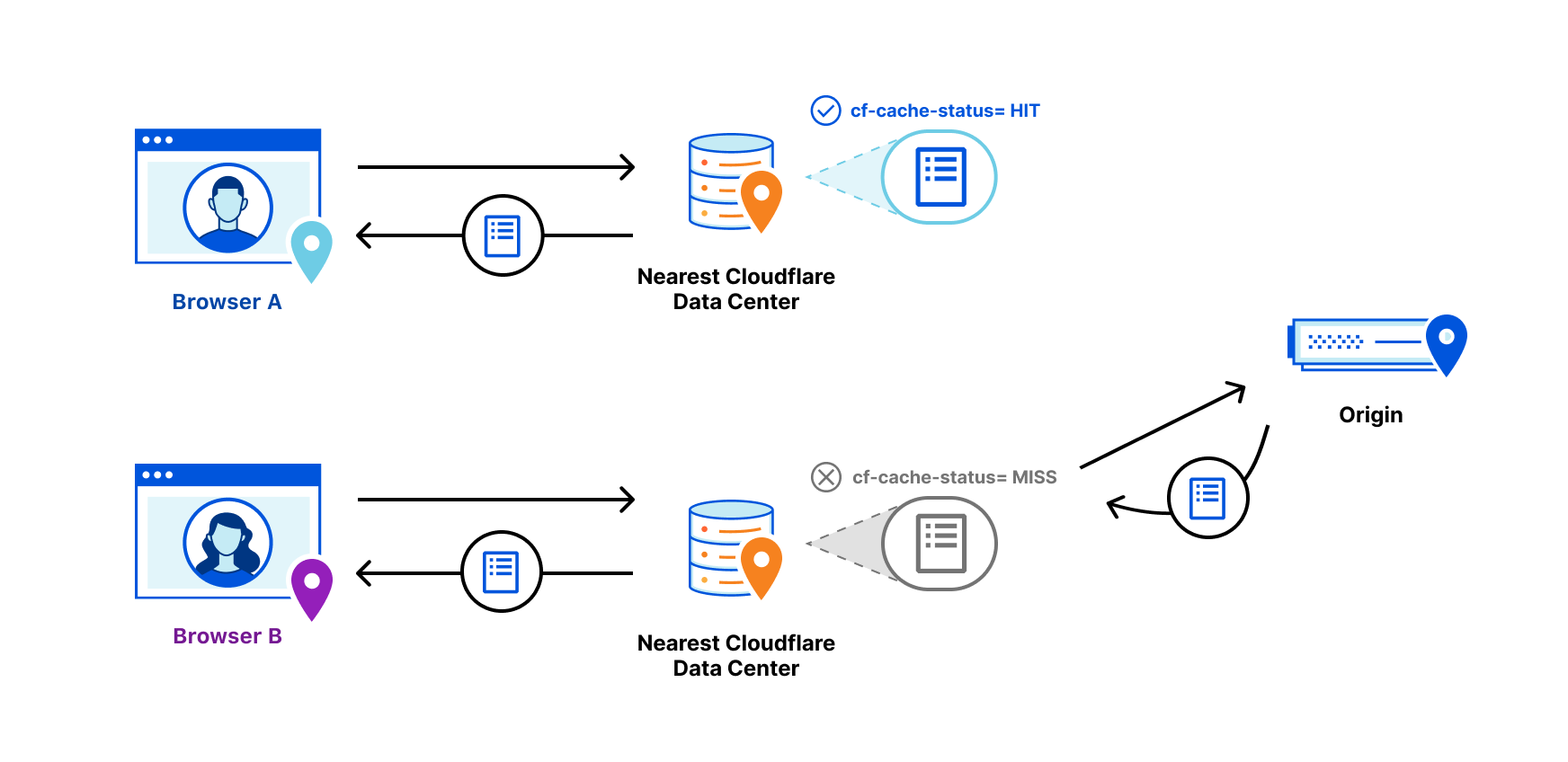
Revalidation is one part of a longer story about efficiently serving objects that live on an origin server from an intermediary cache. Visitors to a website want it to be fast. One foundational way to make sure that a website is fast for visitors is to serve objects from cache. In this way, requests and responses do not need to transit unnecessary parts of the Internet back to an origin and, instead, can be served from a data center that is closer to the visitor. As such, website operators generally only want to serve content from an origin when content has changed. So how do objects stay in cache for as long as necessary?

One way to do that is with HTTP response headers.

When Cloudflare gets a response from an origin, included in that response are a number of headers. You can see these headers by opening any webpage, inspecting the page, going to the network tab, and clicking any file. In the response headers section there will generally be a header known as “Cache-Control.” This header is a way for origins to answer caching intermediaries’ questions like: is this object eligible for cache? How long should this object be in cache? And what should the caching intermediary do after that time expires?

How long something should be in cache can be specified through the max-age or s-maxage directives. These directives specify a TTL or time-to-live for the object in seconds. Once the object has been in cache for the requisite TTL, the clock hits 0 (zero) and it is marked as expired. Cache can no longer safely serve expired content to requests without figuring out if the object has changed on the origin or if it is the same.

If it has changed, it must be redownloaded from the origin. If it hasn’t changed, then it can be marked as fresh and continue to be served. This check, again, is known as revalidation.

We’re excited that Smart Edge Revalidation extends the efficiency of revalidation to everyone, regardless of an origin sending the necessary response headers

How is Revalidation Accomplished?

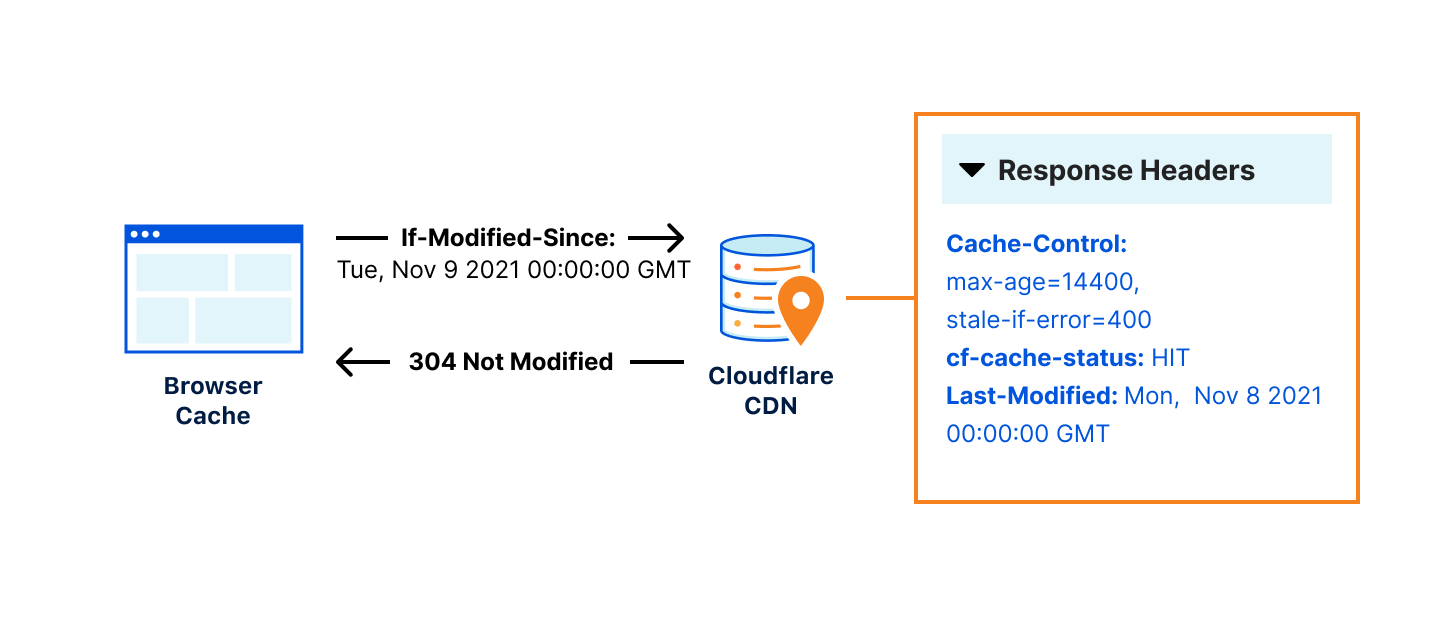
Two additional headers, Last-Modified and ETag, are set by an origin in order to distinguish different versions of the same URL/object across modifications. After the object expires and the revalidation check occurs, if the ETag value hasn’t changed or a more recent Last-Modified timestamp isn’t present, the object is marked “revalidated” and the expired object can continue to be served from cache. If there has been a change as indicated by the ETag value or Last-Modified timestamp, then the new object is downloaded and the old object is removed from cache.

Revalidation checks occur when a browser sends a request to a cache server using If-Modified-Since or If-None-Match headers. These request headers are questions sent from the browser cache about when an object has last changed that can be answered via the ETag or Last-Modified response headers on the cache server. For example, if the browser sends a request to a cache server with If-Modified-Since: Tue, 8 Nov 2021 07:28:00 GMT the cache server must look at the object being asked about and if it has not changed since November 8 at 7:28 AM, it will respond with a 304 status code indicating it’s unchanged. If the object has changed, the cache server will respond with the new object.

Introducing Smart Edge Revalidation

Sending a 304 status code that indicates an object can be reused is much more efficient than sending the entire object. It’s like if you ran a news website that updated every 24 hours. Once the content is updated for the day, you wouldn’t want to keep redownloading the same unchanged content from the origin and instead, you would prefer to make sure that the day’s content was just reused by sending a lightweight signal to that effect, until the site changes the next day.

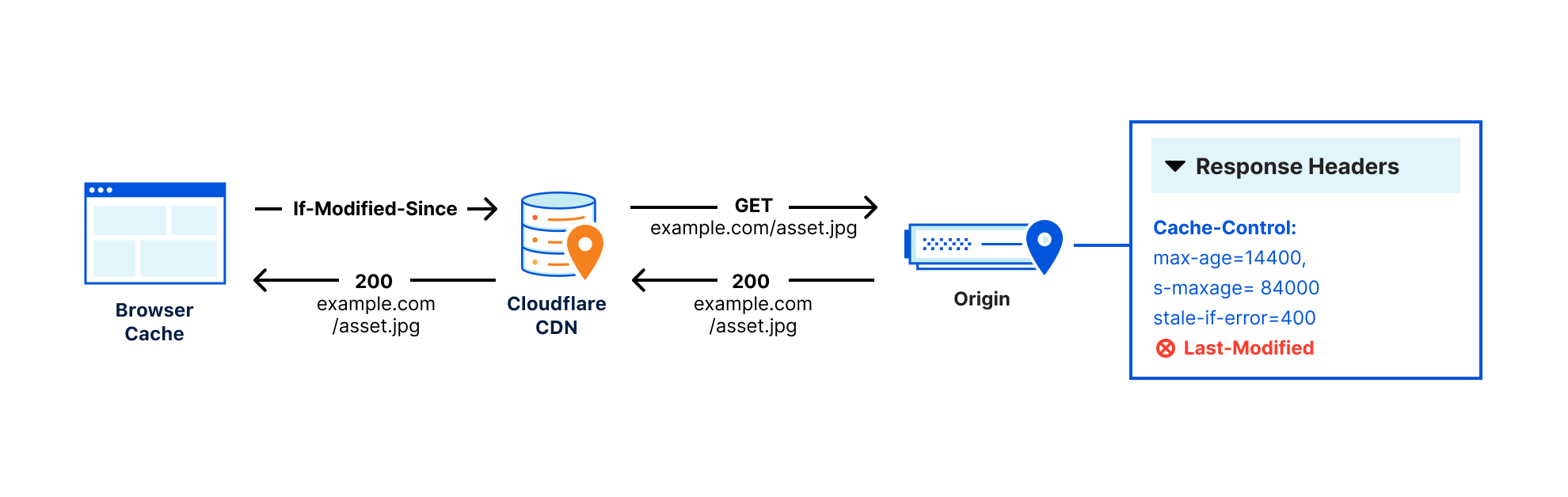
The problem with this system of browser questions and revalidation responses is that sometimes origins don’t set ETag or Last-Modified headers, or they aren’t configured by the website’s admin, making revalidation impossible. This means that every time an object expires, it must be redownloaded regardless of if there has been a change or not, because we have to assume that the asset has been updated, or else risk serving stale content.

Introducing Smart Edge Revalidation

This is an incredible waste of resources which costs hundreds of GB/sec of needless bandwidth between the edge and the visitor. Meaning browsers are downloading hundreds of GB/sec of content they may already have. If our baseline of revalidation is around 10% of all traffic and in initial tests, Smart Edge Revalidation increased revalidation just under 50%, this means that without a user needing to configure anything, we can increase total revalidations by around 5%!

Such a large reduction in bandwidth use also comes with potential environmental benefits. Based on Cloudflare’s carbon emissions per byte, the needless bandwidth being used could amount to 2000+ metric tons CO2e/year, the equivalent of the CO2 emissions from more than 400 cars in a year.

Revalidation also comes with a performance improvement because it usually means a browser is downloading less than 1KB of data to check if the asset has changed or not, while pulling the full asset can be 100sKB. This can improve performance and reduce the bandwidth between the visitor and our edge.

How Smart Edge Revalidation Works

When both Last-Modified and Etag headers are absent from the origin server response, Smart Edge Revalidation will use the time the object was cached on Cloudflare’s edge as the Last-Modified header value. When a browser sends a revalidation request to Cloudflare using If-Modified-Since or If-None-Match, our edge can answer those revalidation questions using the Last-Modified header generated from Smart Edge Revalidation. In this way, our edge can ensure efficient revalidation even if the headers are not sent from the origin.

Smart Edge Revalidation will be enabled automatically for all Cloudflare customers over the coming weeks. If this behavior is undesired, you can always ensure that Smart Edge Revalidation is not activated by confirming your origin is sending ETag or Last-Modified headers when you want to indicate changed content. Additionally, you could have your origin direct your desired revalidation behavior by making sure it sets appropriate cache-control headers.

Smart Edge Revalidation is a win for everyone: visitors will get more content faster from cache, website owners can serve and revalidate additional content from Cloudflare efficiently, and the Internet will get a bit greener and more efficient.

Smart Edge Revalidation is the latest announcement to join the list of ways we’re making our network more sustainable to help build a greener Internet — check out posts from earlier this week to learn about our climate commitments, Green Compute with Workers, Carbon Impact Report, Pages x Green Web Foundation partnership, and crawler hints.

Introducing: Smarter Tiered Cache Topology Generation

Post Syndicated from Alex Krivit original https://blog.cloudflare.com/introducing-smarter-tiered-cache-topology-generation/

Introducing: Smarter Tiered Cache Topology Generation

Introducing: Smarter Tiered Cache Topology Generation

Caching is a magic trick. Instead of a customer’s origin responding to every request, Cloudflare’s 200+ data centers around the world respond with content that is cached geographically close to visitors. This dramatically improves the load performance for web pages while decreasing the bandwidth costs by having Cloudflare respond to a request with cached content.

However, if content is not in cache, Cloudflare data centers must contact the origin server to receive the content. This isn’t as fast as delivering content from cache. It also places load on an origin server, and is more costly compared to serving directly from cache. These issues can be amplified depending on the geographic distribution of a website’s visitors, the number of data centers contacting the origin, and the available origin resources for responding to requests.

To decrease the number of times our network of data centers communicate with an origin, we organize data centers into tiers so that only upper-tier data centers can request content from an origin and then they spread content to lower tiers. This means content that loads faster for visitors, is cheaper to serve, and reduces origin resource consumption.

Today, I’m thrilled to announce a fundamental improvement to Argo Tiered Cache we’re calling Smart Tiered Cache Topology. When enabled, Argo Tiered Cache will now dynamically select the single best upper tier for each of your website’s origins while providing tiered cache analytics showing how your custom topology is performing.

Smarter Tiered Cache Topology Generation

Tiered Cache is part of Argo, a constellation of products that analyzes and optimizes routing decisions across the global Internet in real-time by processing information from every Cloudflare request to determine which routes to an origin are fast, which are slow, and what the optimum path from visitor to content is at any given moment. Previously, Argo Tiered Cache would use a static collection of upper-tier data centers to communicate with the origin. With the improvements we’re announcing today, Tiered Cache can now dynamically find the single best upper tier for an origin using Argo performance and routing data. When Argo is enabled and a request for particular content is made, we collect latency data for each request to pick the optimal path. Using this latency data, we can determine how well any upper-tier data center is connected with an origin and can empirically select the best data center with the lowest latency to be the upper tier for an origin.

Argo Tiered Cache

Taking one step back, tiered caching is a practice where Cloudflare’s network of global data centers are subdivided into a hierarchy of upper tiers and lower tiers. In order to control bandwidth and number of connections between an origin and Cloudflare, only upper tiers are permitted to request content from an origin and must propagate that information to the lower tiers. In this way, Cloudflare data centers first talk to each other to find content before asking the origin. This practice improves bandwidth efficiency by limiting the number of data centers that can ask the origin for content, reduces origin load, and makes websites more cost-effective to operate. Argo Tiered Cache customers only pay for data transfer between the client and edge, and we take care of the rest. Tiered caching also allows for improved performance for visitors, because distances and links traversed between Cloudflare data centers are generally shorter and faster than the links between data centers and origins.

Introducing: Smarter Tiered Cache Topology Generation

Previously, when Argo Tiered Cache was enabled for a website, several of Cloudflare’s largest and most-connected data centers were determined to be upper tiers and could pull content from an origin on a cache MISS. While utilizing a topology consisting of numerous upper-tier data centers may be globally performant, we found that cost-sensitive customers generally wanted to find the single best upper tier for their origin to ensure efficient data transfer of their content to Cloudflare’s network. We built Smart Tiered Cache Topology for this reason.

How to enable Smart Tiered Cache Topology

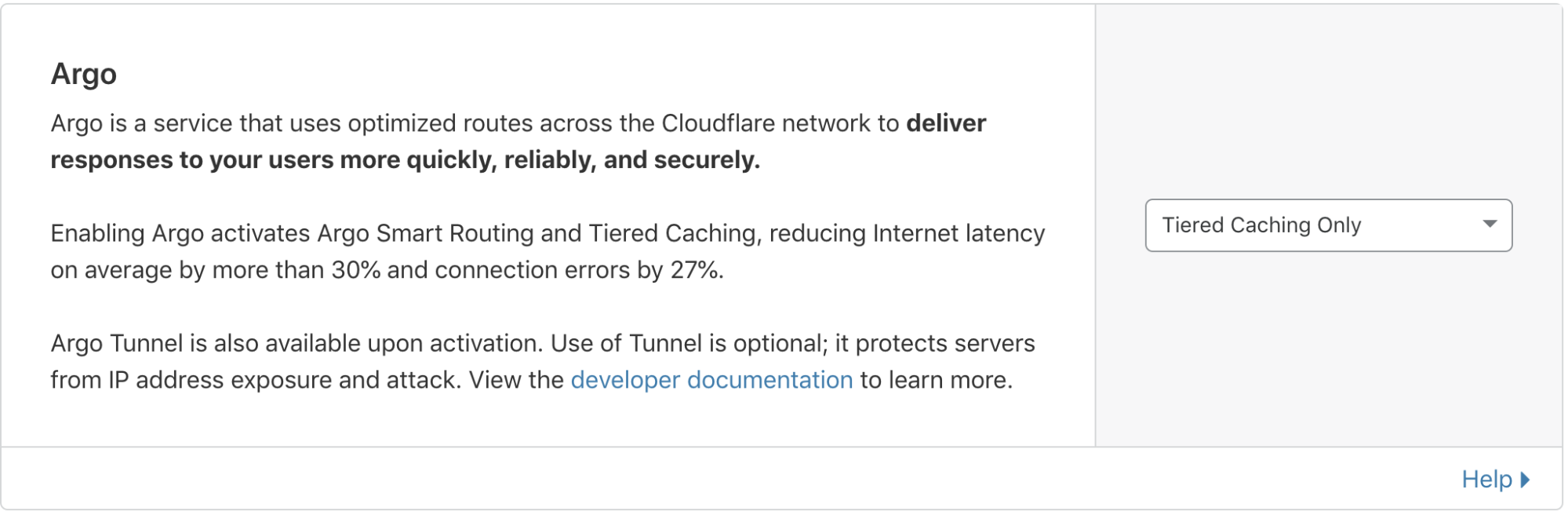
When you enable Argo Tiered Cache, Cloudflare now by default concentrates connections to origin servers so they come from a single data center. This is done without needing to work with our Customer Success or Solutions Engineering organization to custom configure the best single upper tier. Argo customers can generate this topology by:

  • Logging into your Cloudflare account.
  • Navigating to the Traffic tab in the dashboard.
  • Ensuring you have Argo enabled.
  • From there, Non-Enterprise Argo customers will automatically be enrolled in Smart Tiered Cache Topology without needing to make any additional changes.

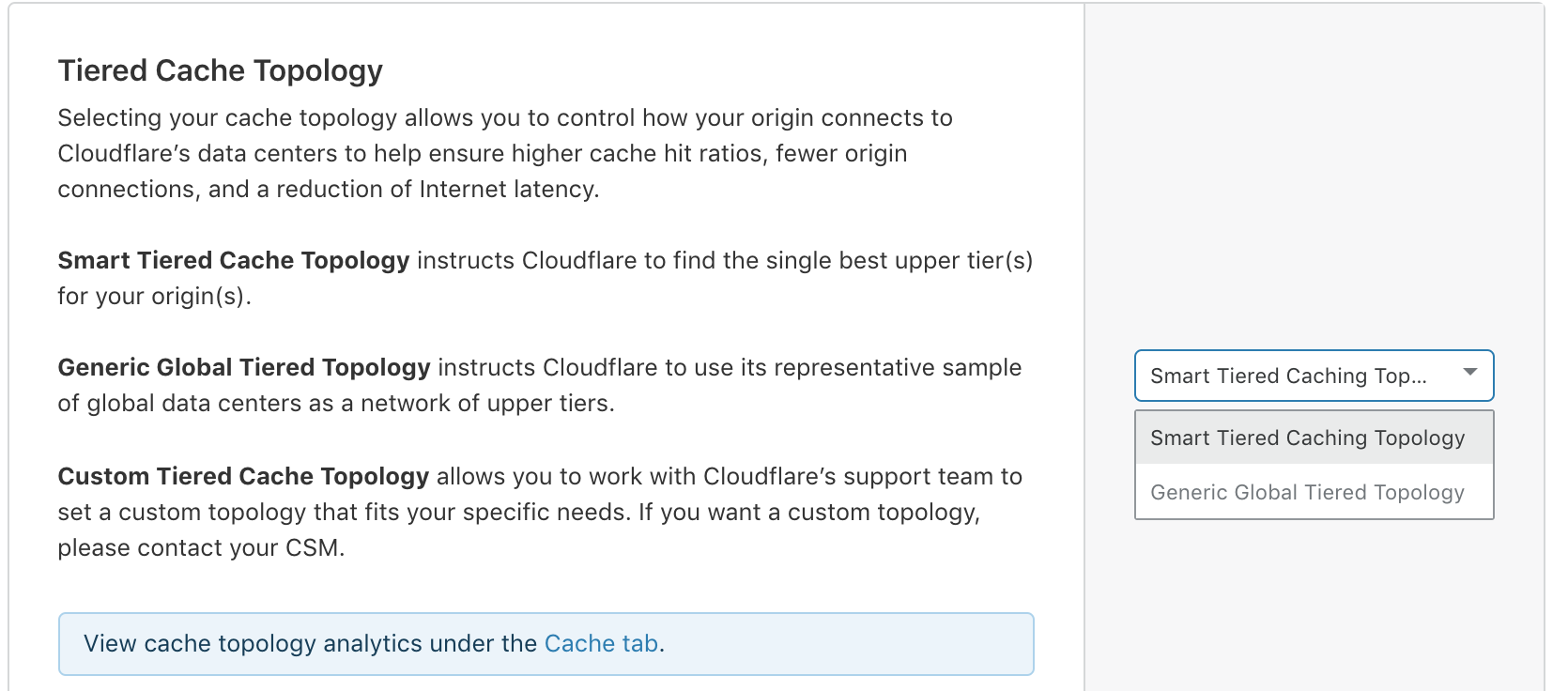
Enterprise customers can select the type of topology they’d like to generate.

Introducing: Smarter Tiered Cache Topology Generation

Self-serve Argo customers are automatically enrolled in Smart Tiered Cache Topology

Introducing: Smarter Tiered Cache Topology Generation

Enterprise customers can determine the tiered cache topology that works best for them.

More data, fewer problems

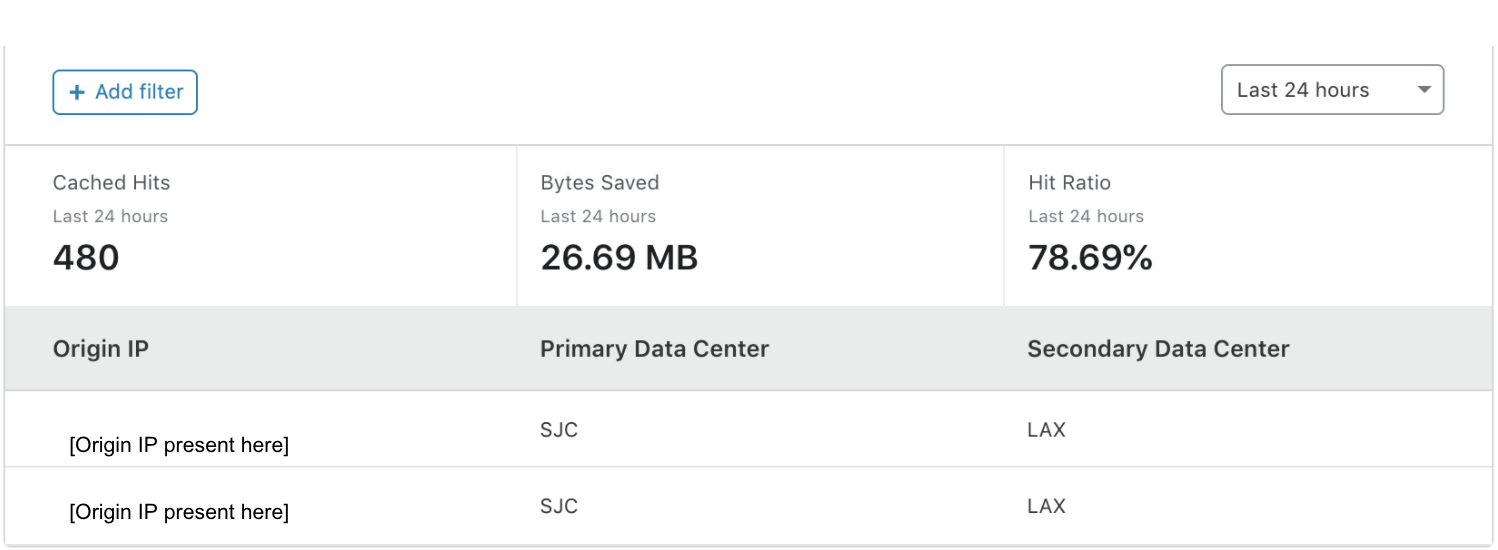
Once enabled, in addition to performance and cost improvements, Smart Tiered Cache Topology also delivers summary analytics for how the upper tiers are performing so that you can monitor the cost and performance benefits your website is receiving. These analytics are available in the Cache Tab of the dashboard in the Tiered Cache section. The “Primary Data Center” and “Secondary Data Center” fields show you which data centers were determined to be the best upper tier and failover for your origin. “Cached Hits” and the “Hit Ratio” shows you the proportion of requests that were served by the upper tier and how many needed to be forwarded on to the origin for a response. “Bytes Saved” indicates the total transfer from the upper-tier data center to the lower tiers, showing the total bandwidth saved by having Cloudflare’s lower tier data centers ask the upper tiers for the content instead of the origin.

Introducing: Smarter Tiered Cache Topology Generation

Smart Tiered Cache Topology works with Cloudflare’s existing products to deliver you a seamless, easy, and performant experience that saves you money and provides you useful information about how your upper tiers are working with your origins. Smart Tiered Cache Topology stands on the shoulders of some of the most resilient and useful products at Cloudflare to provide even more benefits to webmasters.

If you’re interested in seeing how Argo and Smart Tiered Cache Topology can benefit your web property, please login to your Cloudflare account and find more information in the Traffic tab of the dashboard here.

Tiered Cache Smart Topology

Post Syndicated from Brian Bradley original https://blog.cloudflare.com/tiered-cache-smart-topology/

Tiered Cache Smart Topology

Tiered Cache Smart Topology

A few years ago, we released Argo to help make the Internet faster and more efficient. Argo observes network conditions and finds the optimal route across the Internet for origin server requests, avoiding congestion along the way.

Tiered Cache is an Argo feature that reduces the number of data centers responsible for requesting assets from the origin. With Tiered Cache active, a request in South Africa won’t go directly to an origin in North America, but, instead, look in a large, nearby data center to see if the data requested is cached there first. The number and location of the data centers used by Tiered Cache is controlled by a piece of configuration called the topology. By default, we use a generic topology for every customer that strikes a balance between cache hit ratios and latency that is suitable for most users.

Today we’re introducing Smart Topology, which maximizes cache hit ratios by building on Argo’s internal infrastructure to identify the single best data center for making requests to the origin.

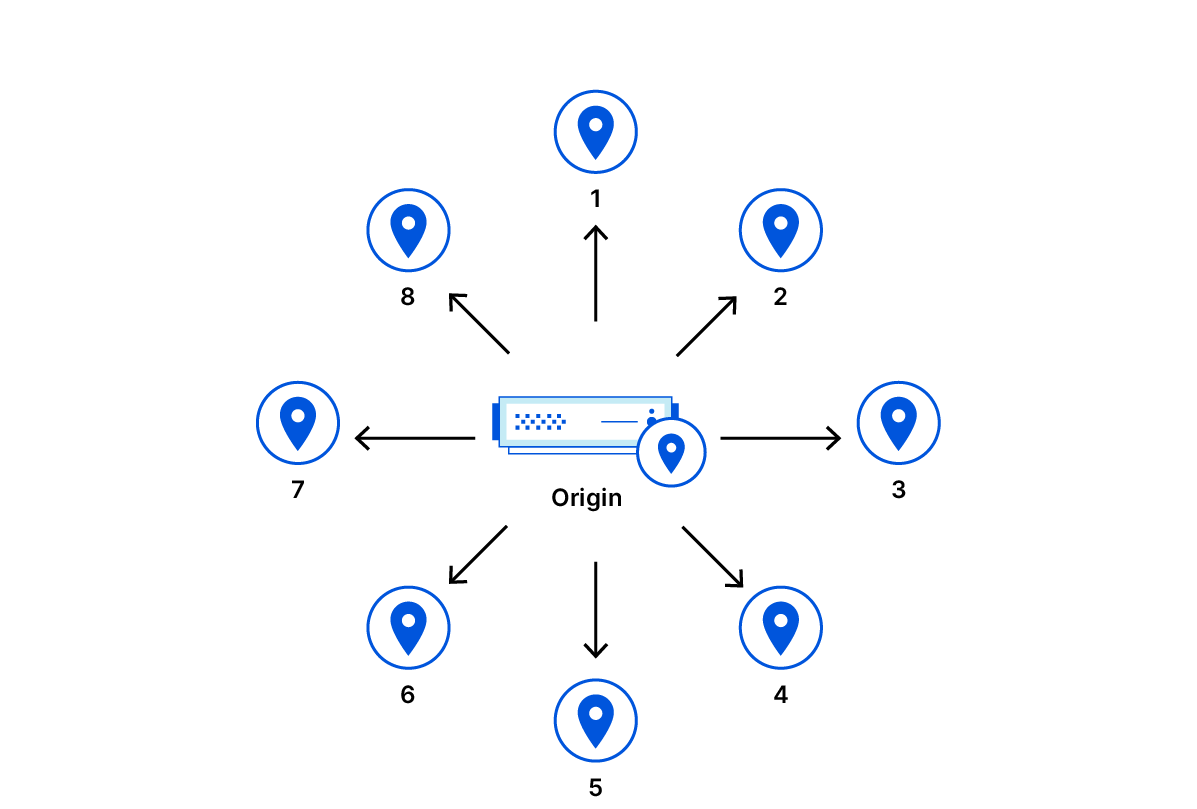
Standard Cache

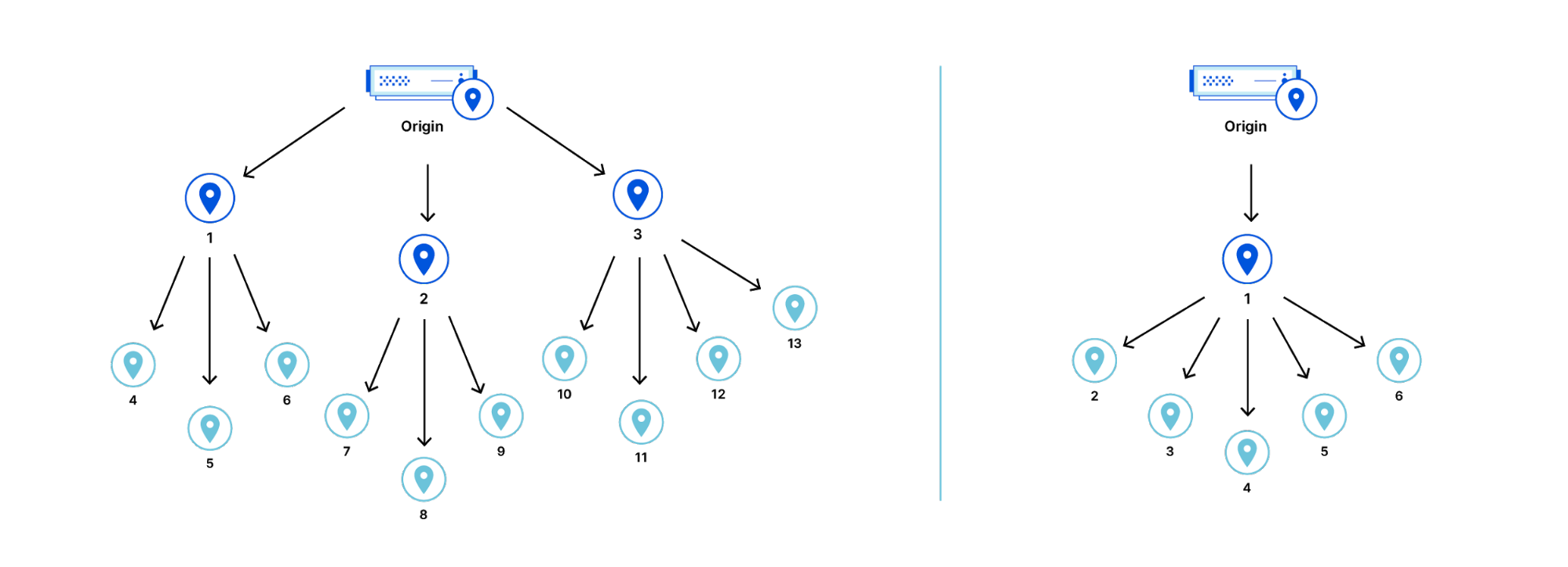
The standard method for caching assets is to let each data center be a reverse proxy for the origin server. In this scheme, a miss in any data center causes a request to the origin for an asset. A request to the origin for one asset could be made as many times as there are data centers.

Tiered Cache Smart Topology

A cache miss in any data center will result in a request being sent to the origin server even if the asset is cached in some other data center. This is because the data centers are completely oblivious of each other.

Theoretically, a request for the asset would have to be sent to every data center in order to reduce the cache misses to the minimum possible. However, sending every request to every data center is not practical.

The minimum possible cache hit latency is achieved if the asset is moved into the nearest cache before the request for it is made, but this kind of prediction is generally not possible. Instead, a good heuristic is to move the asset into the nearest cache after the first cache miss.

However, the asset has to be copied from somewhere and it isn’t possible to know where in the network it might be without querying each data center.

To avoid querying each data center, a copy of the asset has to be stored in a known location after the first cache miss so it is available to other data centers. This is precisely what Tiered Cache does.

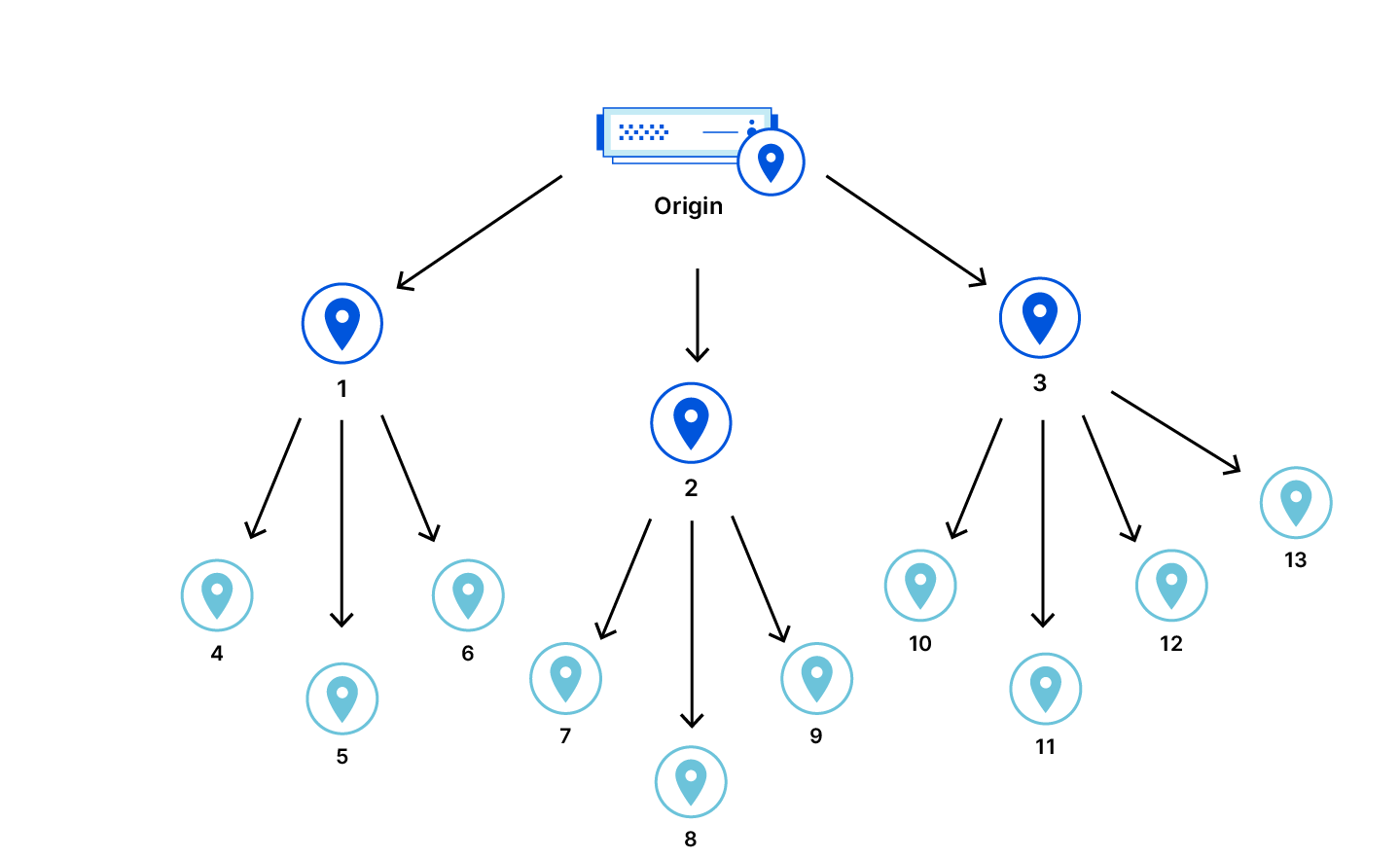
Tiered Cache

Tiered Cache improves cache hit ratios by allowing some data centers to serve as caches for others, before the latter has to make a request to the origin. With Tiered Cache, certain data centers are reverse proxies to the origin for other data centers.

Tiered Cache Smart Topology

If the proxied data centers make requests for the same asset, the asset will already be cached in the proxying data center and can be retrieved from there rather than from the origin. Fewer requests to the origin are made overall.

Custom Topology

In Tiered Cache, the topology describes which data center should serve as a proxy for others.

For customers, devising an optimal topology is a challenge requiring optimization and continuous maintenance. The best topology is a configuration based on information that is privately held by the customer and other information held only by Cloudflare.

For instance, knowing the desired balance of latency versus cache hit ratio is information only the customer has, but how to best make use of the Internet is something we would know. Enterprise customers usually have dedicated infrastructure teams that work with our solutions engineers to manually optimize and maintain their tiered cache topology.

Not every customer would want to personalize their topology. For this reason a generic topology exists.

Generic Topology

The generic topology is designed to achieve good latency and cache efficiency for any origin, regardless of location. A balance is struck between two constraints —  cache efficiency and  latency.

The generic topology has multiple proxying data centers that are distributed around the world in order to ensure that requests that result in a cache miss do not take a very long detour before going to the origin. There is a balance between the number of proxying data centers and the cache hit ratio, because the proxying data centers are oblivious to each other.

If a proxying data center is taken offline, the proxied data centers either use a fallback (if the fallback is online) or revert to behaving like Tiered Cache is disabled.

To achieve the best balance for general usage, the generic topology instructs the smaller data centers to be proxied by the larger data centers in the same geographic region.

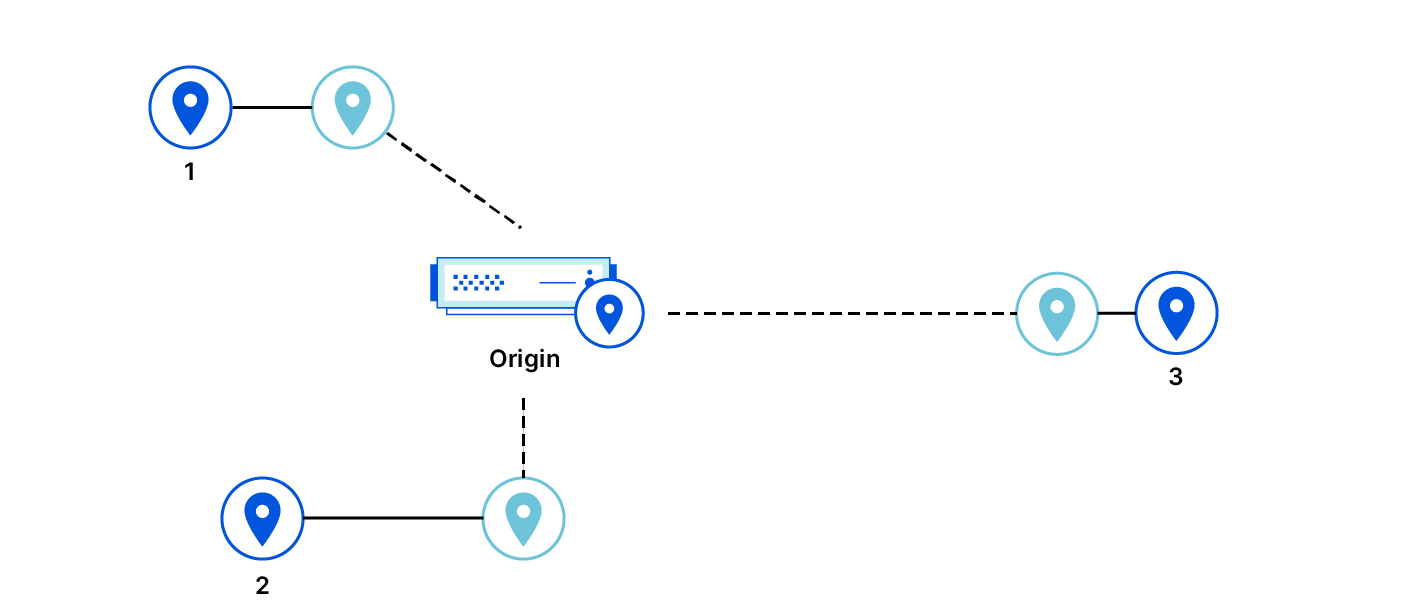
Smart Topology

Smart Topology assumes the origin is in one place and then automatically configures itself to be optimal once the customer just flips a switch in the dashboard. In order to actually do this, Cloudflare needs to be able to determine which data center has the lowest latency to the origin without making the customer tell Cloudflare where the origin is.

Methods for Latency Determination

There are a few ways to determine which data center has the lowest latency with respect to the origin.

IP geolocation
Physical distance can be used as an approximation for latency, but Smart Topology was not built this way for a couple of reasons. First, even the best commercial IP geo database doesn’t have the required coverage and accuracy. Second, even with perfect accuracy, physical distance is a questionable approximation of Internet latency.

Probing
Latency to an IP address can be determined exactly by probing that address. The probe can just be the time required to perform the TCP handshake. Each data center probes the origin so that the latencies can be directly measured and the minimum can be found. Except for edge cases involving Anycast and TCP termination, we can assume that the latency to an IP address is the same as the latency to the origin server behind that IP address.

Topology Selection Algorithm

The goal of the topology selection algorithm is to minimize cache misses and latency. The topology chooses a single proxying data center in order to maximize the cache hit ratio. The proxying data center is chosen to be close to the origin so that the latencies of cache misses in the proxied data centers are not much worse than they would be with tiered cache turned off.

The choice should eventually become stable. Stability is important because each time the choice changes, cache misses in proxied data centers are likely to cause cache misses in the new proxying data center. Capacity is important because when a data center goes offline, it can cause a large number of cache misses. Minimizing latency to the origin is important to ensure that the network is used efficiently.

The data center selection algorithm is rather like a leaderboard of the fastest data center for each origin. As data is collected, a faster data center can knock others off a given origin’s leaderboard. This competition is based on the 24 hour median latency and is held each hour. Only a subset of data centers deemed large enough are permitted to compete.

Eventually, the choice for proxying data centers becomes stable. Over time, data centers produce competing records for each origin and less competitive records in the leaderboard are replaced as necessary. Thus, latencies for any origin on the leaderboard can only monotonically decrease. There are always physical limits in the real world, so eventually the ideal data center will set a record that is too good to beat.

Also, the leaderboard actually includes both the lowest latency data center and the second lowest latency data center. The second lowest latency data center serves as a fallback if the preferred data center is taken offline for maintenance.

Anycast Networks
We are measuring the latency to the origin IP address and assuming that it represents the latency to the origin server, but this can break down in certain cases. A few cloud providers other than Cloudflare also use Anycast technology to provide their services. In Anycast, multiple machines can share an IP address regardless of where they are connected to the Internet, and the Internet will typically route packets destined for that address to the closest machine. If an Anycast network is used to proxy an origin server, then the apparent latency to the IP address for the origin server is actually the latency to the edge of the Anycast network rather than the latency to the origin server. The real latency to the origin server cannot be determined by probing.

Tiered Cache Smart Topology

The algorithm would fail to select the single best proxying data center if the latencies are not representative of the actual latency between data center and origin. Selecting the wrong data center would adversely affect latencies for requests to the origin, and could be expensive.

For instance, imagine a cloud provider provides an IP address that actually routes to multiple data centers all over the world. Packets are routed through private infrastructure to the correct destination once they enter the network. The lowest latency data center to this Anycast IP address could potentially even be on a different continent than the actual origin server. Therefore, the apparent latency cannot actually be trusted as a true measure of actual latency to the origin.

The data center selection algorithm assumes that the origin is in a single geographic location and can be probed to determine latency from each data center. These networks break one or both of these assumptions, so a procedure had to be developed in order to detect them. First, it is assumed that the IP appears in a single geographic location and is not proxied by such a network. The latency to the origin is bounded by the speed of light through fiber. Although the distance between any data center and the origin server is not known, the distances between data centers is known by Cloudflare.

Tiered Cache Smart Topology

Imagine putting the origin server as a pitstop in that journey. Then, the theoretical minimum possible observable pair of latencies between the origin server and any two data centers can be computed. We have the latency probe data from both of these data centers and the origin, so we can check to see whether the observed latency is lower than what is possible.

The original assumption was that the origin IP address identifies an origin server that is in one location and the latency to that IP address is the latency to the origin server. If the observed latencies are faster than light then clearly the assumption is false. Smart Topology falls back to the generic topology when the original assumption does not hold. To be extra sure, we check this constraint on a bunch of data centers around the world and fall back if there is even a single physically impossible observation.

The Big Picture

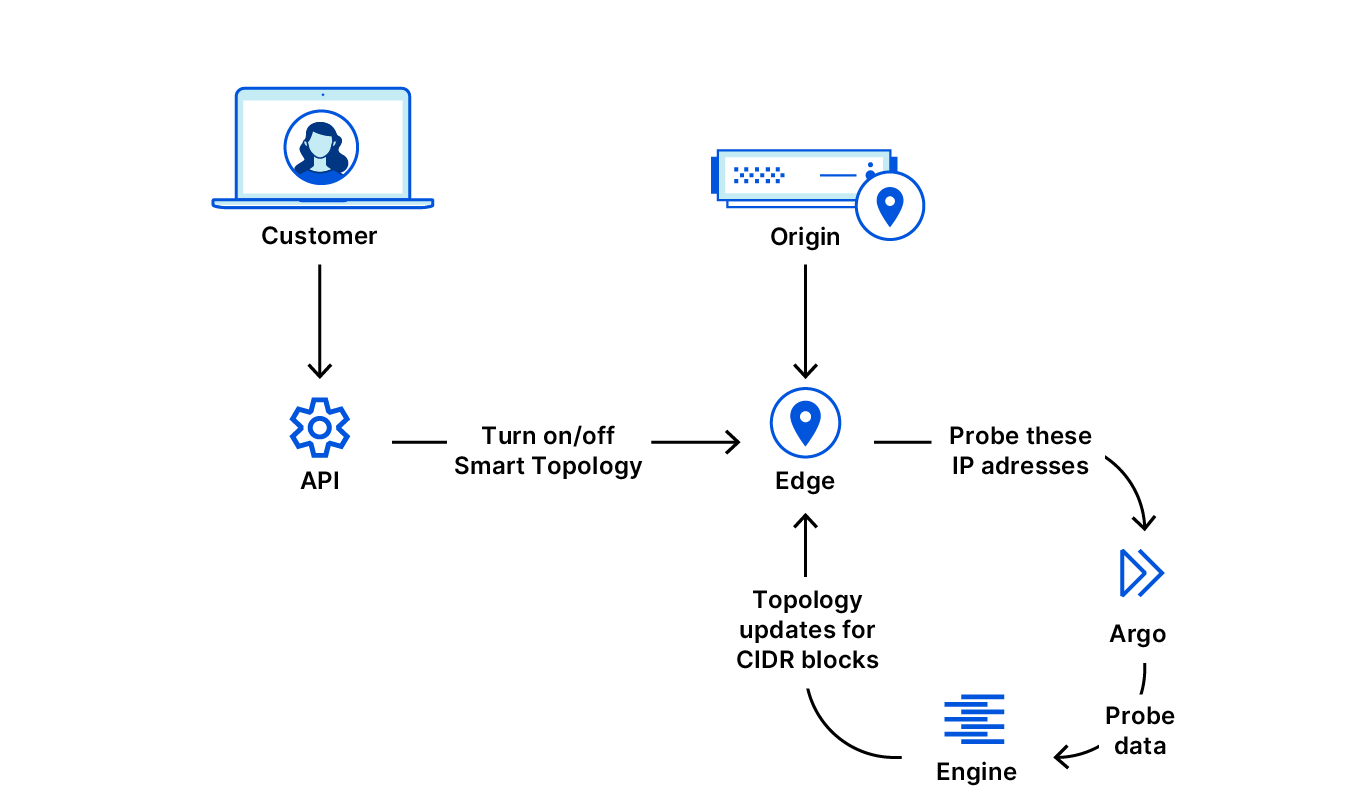
When Smart Topology is enabled many Cloudflare systems work together to ensure the correct data center is eventually used to request assets from the origin.

Tiered Cache Smart Topology

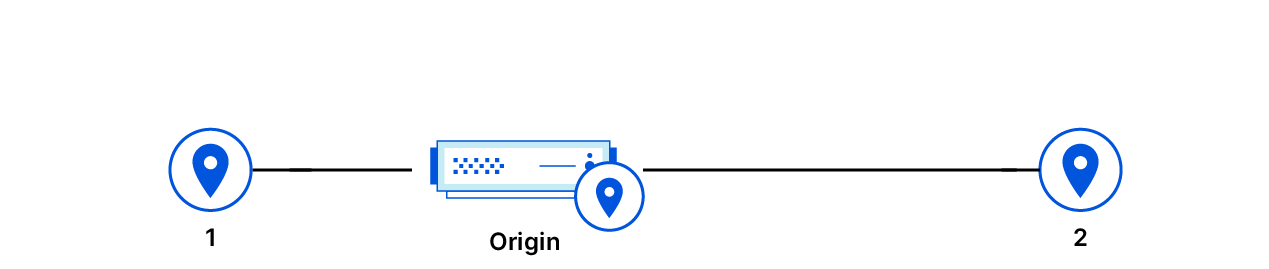
When the customer enables Tiered Cache Smart Topology, one of a few things can happen from the perspective of the origin. If a proxying data center has already been assigned to the CIDR block that encompasses the origin IP, the preferred or fallback data center is used to request assets from the origin. Otherwise, the generic topology is used to determine which proxying data centers to use to pull assets from the origin. The latency to the proxying data center should only decrease as the choice for proxying data center is updated over time.

Conclusion

Developing this technology offered a lot of opportunities to exercise great engineering and build an impactful product. It was not done in a vacuum; we used infrastructure that Cloudflare had already built, and we moved along that exponential gradient of using existing progress to make more progress. Building this framework opens a lot of doors to future progress too; for instance, in the future, we can explore ways to select the ideal proxying data center even for origins behind Anycast networks that hide the true latency to the origin.