Tag Archives: Gradle

Scaling ArchUnit with Nebula ArchRules

Post Syndicated from Netflix Technology Blog original https://netflixtechblog.com/scaling-archunit-with-nebula-archrules-b4642c464c5a

By John Burns and Emily Yuan

Introduction

At Netflix, we operate using a polyrepo strategy with tens of thousands of Java repositories. This means that we need to have ways of sharing common build logic across these repositories. On the JVM Ecosystem team within Java Platform, we build tooling such as the Nebula suite of Gradle plugins to provide standard ways to build projects, keep dependencies up-to-date, and publish artifacts reliably across the Java ecosystem. Our mission also entails providing build-time feedback to the developer when they deviate from the paved road, or when their code base contains technical debt.

Case Study

After a Netflix incident relating to a library releasing a backwards-incompatible change, our team was asked to provide some tooling and practices to improve the Java library lifecycle management. This was not a simple case of a library making a reckless breaking change. The code removed had been deprecated for years. Library authors often struggle to know when it is safe to remove deprecated code, or refactor code that is not meant to be used by downstream applications. Fleet-wide migrations, such as upgrading major Spring Boot versions, also involve deprecated code removal. To help with this, we established a suite of API lifecycle annotations:

  • @Deprecated from the Java standard library
  • @Public A custom annotation to use on APIs meant to be used downstream
  • @Experimental A custom annotation for new APIs which may not yet be stable
  • All other APIs are assumed to be “internal”

Library authors can annotate their APIs with these annotations. However, how will they know which downstream projects are using their API incorrectly, based on these?

As we sought to improve the paved road for JVM-based libraries at Netflix, we needed a good way of identifying this kind of technical debt, not only for the benefit of the Java Platform-provided libraries, but any team delivering shared libraries to the organization. For this, we looked at ArchUnit.

ArchUnit is a popular OSS library (3.5k stars, 84 contributors) used to enforce “architectural” code rules as part of a JUnit suite. It is used internally by Gradle, Spring, and is provided as part of the Spring Modulith platform. The rules engine, which is built directly on top of ASM, can be used for a wide variety of use cases. It is powerful enough to be a general purpose static analysis tool with the following distinctive features:

1. Works cross-language (JVM), because it uses ASM/bytecode, not AST parsing.

2. Exposes a builder API pattern that makes it easy to write rules

3. Also has a lower level API ideal for writing more complex custom rules.

The limitation of ArchUnit is that it is designed to be used as part of a JUnit suite in a single repository. The Nebula ArchRules plugins give organizations the ability to share and apply rules across any number of repositories. Rules can be sourced from OSS libraries or private internal libraries. This makes the plugin generally useful for any JVM+Gradle engineering organization.

Why ArchUnit?

Before we go into how ArchRules works, it is good to understand why we would want to use ArchUnit in this way instead of other static analysis tools.

AST vs Bytecode

Some tools, such as PMD, process rules against an AST (abstract syntax tree). An AST is a structured representation of source code. This kind of tool will have rules that are syntax dependent. Rules that need to support multiple JVM languages, such as Kotlin or Scala, often need to be rewritten for each language. It also allows code which should be found to be hidden under syntactic sugar not anticipated by the rule author. ArchUnit uses ASM to analyze actual compiled bytecode, which means it doesn’t matter how that code was produced. What is analyzed is the actual code that will be run.

Rule Authorship

Tools like PMD and Spotbugs are not optimized for custom rule authorships. Most usage of these tools run built-in provided rules, or add in pre-made third party plugins. Take a look at what a custom rule for PMD might look like:

<![CDATA[
//AllocationExpression/ClassOrInterfaceType[
@Image='DateTime' and (
(count(..//Name[@Image='DateTimeZone.UTC'])<=0)
and
(count(..//Name[@Image='DateTimeZone.forID'])<=0)
) or (
(
(count(..//Name[@Image='DateTimeZone.UTC'])>0)
or
(count(..//Name[@Image='DateTimeZone.forID'])>0)
) and (../Arguments/ArgumentList and count(../Arguments/ArgumentList/Expression) = 1)
)
]
]]>

This rule ensures that DateTimes are not instantiated without an explicit zone. This is a raw string meant to be used within PMD’s xpath parser. There is no IDE guidance on crafting it. To test it, a whole separate PMD process needs to be wired up to interpret the rule and evaluate it against a source file. Let’s see how a similar rule would look with ArchUnit:

ArchRuleDefinition.priority(Priority.MEDIUM)
.noClasses()
.should()
.callConstructorWhere(
// constructor does not have a zone arguement
target(doesNot(have(rawParameterTypes(DateTimeZone.class))))
// constructor is for DateTime
.and(targetOwner(assignableTo(DateTime.class)))
)

This is type-safe Java code with a fluent API. It is also simple to unit test, as ArchUnit has a method to pass a rule object and class references to evaluate the rule against those classes.

Class Relations

Because ArchUnit processes the entire classpath with ASM, it retains a graph of the class data, allowing rules to easily traverse class relationships and call sites. This allows rules to have much more context about the code it is evaluating.

Rules Libraries

The first step was to build the ability to write ArchUnit rules which can be shared and published. In order to do this, we have the ArchRules Library Plugin. This plugin adds an additional source set to your Gradle project called archRules. In this source set, you can create a class which implements the ArchRulesService interface. This interface has a single abstract method which returns a Map<String, ArchRule>. The keys of this map are the names of your rules, and the ArchRule is the rule you would like to define using the standard ArchUnit API. Here is an example:

public class GuavaRules implements ArchRulesService {
static final ArchRule OPTIONAL = ArchRuleDefinition.priority(Priority.MEDIUM)
.noClasses()
.should()
.dependOnClassesThat()
.haveFullyQualifiedName("com.google.common.base.Optional")
.because("Java Optional is preferred over Guava Optional");

@Override
public Map<String, ArchRule> getRules() {
Map<String, ArchRule> rules = new HashMap<>();
rules.put("guava optional", OPTIONAL);
return rules;
}
}

This code and its dependencies will not be bundled with your main code. It is bundled into a separate Jar with the arch-rules classifier. When publishing, your library will publish this jar as a separate variant with the usage attribute set to arch-rules. This means that in order for downstream projects to use these rules, they must use Gradle Module Metadata for dependency resolution. There are 2 flavors of rules Libraries: Standalone rules libraries, bundled rule libraries.

Standalone Rule Libraries

A Standalone Rule library contains no main code: only archRules. These are useful for defining rules for code you don’t own, such as Core Java APIs or OSS libraries. They are also useful for generic rules that can apply to any code, such as “don’t use code marked as @Deprecated”. We maintain a collection of OSS Standalone rule libraries which anyone is free to use, and serve as examples of the types of rules you may want to write yourself. However, the real power of ArchRules is in “bundled rule libraries”.

Bundled Rule Libraries

A bundled rule library is a library with both main and archRules sources. The main source set will contain useful library code, whatever it may be. The archRules will contain rules specific to the usage of that library. For example, rules scoped to that library’s package, or referencing that library’s specific API. Whenever possible, we recommend writing rules in this bundled way. That is because the ArchRules Runner Plugin will be able to automatically detect these rules and run them in only the source sets that use this library as a dependency. An example of this can be seen in our Nebula Test library.

In any case, the library plugin will automatically generate a service loader registration entry for your ArchRulesService so that the runner can discover your rules.

Running Rules

The ArchRules Runner Plugin allows rules to be evaluated against your code. Standalone rule libraries can be evaluated against all source sets by adding them to the archRules configuration in your build. For example:

dependencies {
archRules("your:rules:1.0.0")
}

As mentioned before, bundled rules will be evaluated automatically. To do this, the runner plugin creates a separate configuration for each of your source sets. In each of these configurations, the archRules classpath is combined with the runtimeClasspath with the arch-rules variant selected. This configuration is the classpath used when the ServiceLoader discovers implementations of ArchRulesService. In the following example, we have a Project which uses a test helper library as a testImplementation dependency, and also adds a standalone rules library to the archRules configuration. The test runtime classpath will only contain the implementation jar for the helper library, but the arch rules runtime will contain the archrules jar for the bundled rules and standalone rules. This all happens automatically.
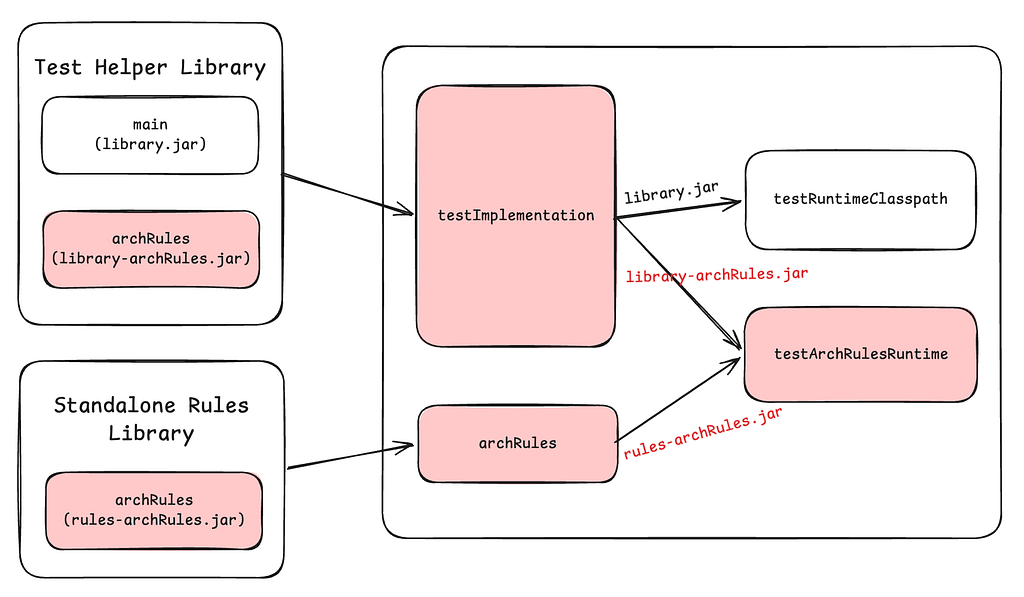
Gradle configurations used by ArchRules

Once the rules classpath is determined, the runner plugin will create a Gradle work action to evaluate rules against that specific source set. This action runs with classpath isolation using the *archRuleRuntime configuration. Within this action, a ServiceLoader is used to discover rule definitions. The action ends by writing a binary serialization of rule violations to a file for reporting.

In a project running rules, you also have the ability to customize rule configurations using the archRules extension. For example, you can override a rule’s priority level:

archRules {
ruleClass("com.netflix.nebula.archrules.deprecation") {
priority("HIGH")
}
}

Other customizations include disabling running rules on certain source sets and configuring the failure threshold (i.e., high priority failures will cause the build to fail).

Reporting

The ArchRules runner plugin has two built-in reports: JSON and console. The json report will collect the output from all source sets within a project and create a single json file with all of the data. The console report also collects the output from all source sets within a project, but it prints to the console an easy to read report, for example:

Console Report output

Note that failure details feature a detailed plain English description, along with a pointer to the exact line of code in violation.

For custom reporting, you can either use the JSON file, or create your own task that reads the binary files. Take a look at the source code for the ArchRules runner plugin’s report tasks for an example of how to do this.

Case Study Solution

Going back to our original problem, using ArchRules, we were able to deliver a platform for library authors to track the usage of their APIs. They write ArchRules to detect usage of the annotations, scoped to their library’s package, such as:

ArchRuleDefinition.priority(Priority.MEDIUM)
.noClasses().that(resideOutsideOfPackage(packageName + ".."))
.should()
.dependOnClassesThat(resideInAPackage(packageName + "..").and(are(deprecated())))
.orShould().accessTargetWhere(targetOwner(resideInAPackage(packageName + ".."))
.and(target(is(deprecated())).or(targetOwner(is(deprecated())))))
.allowEmptyShould(true)
.because("Deprecated APIs are subject to removal");

NB: the deprecated() predicate comes from nebula-archrules.

Our internal Nebula standard Gradle wrapper and plugin suite automatically enable the ArchRules runner on every project, and provides a custom reporter which sends the report data to our Internal Developer Portal on every main-branch CI build. This way, library authors can easily see a report of all downstream consumers using their experimental, deprecated, or non-public APIs, giving them confidence to make “breaking” changes, knowing that it will not actually break downstream consumers. If their changes are currently blocked by downstream usage, they can easily see exactly which projects are reporting those usages.

OSS Rule Libraries

While the most powerful way to use ArchRules is for you to write your own rules, we have built some OSS rule libraries that anyone is free to use, or reference as examples.

Nullability

These rules enforce proper nullability annotation in Java, for example, that every public class is marked with JSpecify’s @NullMarked. It is smart enough to exclude Kotlin code, as Kotlin has built-in nullability.

Gradle Plugin Best Practices

Writing Gradle plugins can be hard, especially since there are many APIs and patterns that should not be used anymore. These rules help enforce current best practices when writing Gradle plugins.

Joda / Guava Rules

These rule libraries discourage the use of Joda Time and Guava classes (respectively) as these have been superseded by java.time and standard library enhancements.

Security Rules

These rules help mitigate CVEs by detecting usage of known vulnerable APIs. Ideally, we keep dependencies up to date to mitigate CVEs. But sometimes that is not immediately feasible, and in those cases, a compile time check to ensure the specific vulnerable API is not used is often good enough.

Conclusion

We are now running 358 (and counting) rules across over 5,000 repositories detecting over nearly 1 million issues. About 1,000 of these issues are for “High” priority rules. Being able to run these rules on this scale allows us to quickly gain insight into our large fleet of microservices, and identify the areas carrying the most critical technical debt. This makes it easier to focus and prioritize our efforts.

Going forward, we will be exploring how to tie auto-remediation solutions into the ArchRules findings. ArchUnit currently provides very specific and detailed information about failures in reports, which makes a very strong input signal to an auto remediation tool. We will explore deterministic solutions such as OpenRewrite and non-deterministic solutions such as LLMs. Pairing the easy rule authorship and deterministic results of ArchUnit with an auto-remediation tool that can correctly interpret the results to solve the issue at hand will be a very powerful combination.

We also will investigate how to get ArchRule failure information surfaced in the IDE as inspections.

If you have questions or feedback about Nebula ArchRules, reach out to us by posting in the #nebula channel on the Gradle Community Slack.


Scaling ArchUnit with Nebula ArchRules was originally published in Netflix TechBlog on Medium, where people are continuing the conversation by highlighting and responding to this story.

How Grab is Blazing Through the Super App Bazel Migration

Post Syndicated from Grab Tech original https://engineering.grab.com/how-grab-is-blazing-through-the-super-app-bazel-migration

Introduction

At Grab, we build a seamless user experience that addresses more and more of the daily lifestyle needs of people across South East Asia. We’re proud of our Grab rides, payments, and delivery services, and want to provide a unified experience across these offerings.

Here is couple of examples of what Grab does for millions of people across South East Asia every day:

Grab Service Offerings

The Grab Passenger application reached super app status more than a year ago and continues to provide hundreds of life-changing use cases in dozens of areas for millions of users.

With the big product scale, it brings with it even bigger technical challenges. Here are a couple of dimensions that can give you a sense of the scale we’re working with.

Engineering and product structure

Technical and product teams work in close collaboration to outserve our customers. These teams are combined into dedicated groups to form Tech Families and focus on similar use cases and areas.

Grab consists of many Tech Families who work on food, payments, transport, and other services, which are supported by hundreds of engineers. The diverse landscape makes the development process complicated and requires the industry’s best practices and approaches.

Codebase scale overview

The Passenger Applications (Android and iOS) contain more than 2.5 million lines of code each and it keeps growing. We have 1000+ modules in the Android App and 700+ targets in the iOS App. Hundreds of commits are merged by all the mobile engineers on a daily basis.

To maintain the health of the codebase and product stability, we run 40K+ unit tests on Android and 30K+ unit tests on iOS, as well as thousands of UI tests and hundreds of end-to-end tests on both platforms.

Build time challenges

The described complexity and scale do not come without challenges. A huge codebase propels the build process to the ultimate extreme- challenging the efficiency of build systems and hardware used to compile the super app, and creating out of the line challenges to be addressed.

Local build time

Local build time (the build on engineers’ laptop) is one of the most obvious challenges. More code goes in the application binary, hence the build system requires more time to compile it.

ADR local build time

The Android ecosystem provides a great out-of-the-box tool to build your project called Gradle. It’s flexible and user friendly, and  provides huge capabilities for a reasonable cost. But is this always true? It appears to not be the case due to multiple reasons. Let’s unpack these reasons below.

Gradle performs well for medium sized projects with say 1 million line of code. Once the code surpasses that 1 million mark (or so), Gradle starts failing in giving engineers a reasonable build time for the given flexibility. And that’s exactly what we have observed in our Android application.

At some point in time, the Android local build became ridiculously long. We even encountered cases  where engineers’ laptops simply failed to build the project due to hardware resources limits. Clean builds took by the hours, and incremental builds easily hit dozens of minutes.

iOS local build time

Xcode behaved a bit better compared to Gradle. The Xcode build cache was somehow bearable for incremental builds and didn’t exceed a couple of minutes. Clean builds still took dozens of minutes though. When Xcode failed to provide the valid cache, engineers had to rerun everything as a clean build, which killed the experience entirely.

CI pipeline time

Each time an engineer submits a Merge Request (MR), our CI kicks in running a wide variety of jobs to ensure the commit is valid and doesn’t introduce regression to the master branch. The feedback loop time is critical here as well, and the pipeline time tends to skyrocket alongside the code base growth. We found ourselves on the trend where the feedback loop came in by the hours, which again was just breaking the engineering experience, and prevented  us from delivering the world’s best features to our customers.

As mentioned, we have a large number of unit tests (30K-40K+) and UI tests (700+) that we run on a pre-merge pipeline. This brings us to hours of execution time before we could actually allow MRs to land to the master branch.

The number of daily commits, which is by the hundreds, adds another stone to the basket of challenges.

All this clearly indicated the area of improvement. We were missing opportunities in terms of engineering productivity.

The extra mile

The biggest question for us to answer was how to put all this scale into a reasonable experience with minimal engineering idle time and fast feedback loop.

Build time critical path optimization

The most reasonable thing to do was to pay attention to the utilization of the hardware resources and make the build process optimal.

This literally boiled down to the simplest approach:

  1. Decouple building blocks
  2. Make building blocks as small as possible

This approach is valid for any build system and applies  for both iOS and Android. The first thing we focused on was to understand what our build graph looked like, how dependencies were distributed, and which blocks were bottlenecks.

Given the scale of the apps, it’s practically not possible to manage a dependency tree manually, thus we created a tool to help us.

Critical path overview

We introduced the Critical Path concept:

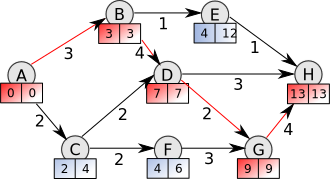
The critical path is the longest (time) chain of sequential dependencies, which must be built one after the other.

Critical Path
Critical Path build

Even with an infinite number of parallel processors/cores, the total build time cannot be less than the critical path time.

We implemented the tool that parsed the dependency trees (for both Android and iOS), aggregated modules/target build time, and calculated the critical path.

The concept of the critical path introduced a number of action items, which we prioritized:

  • The critical path must be as short as possible.
  • Any huge module/target on the critical path must be split into smaller modules/targets.
  • Depend on interfaces/bridges rather than implementations to shorten the critical path.
  • The presence of other teams’ implementation modules/targets in the critical path of the given team is a red flag.
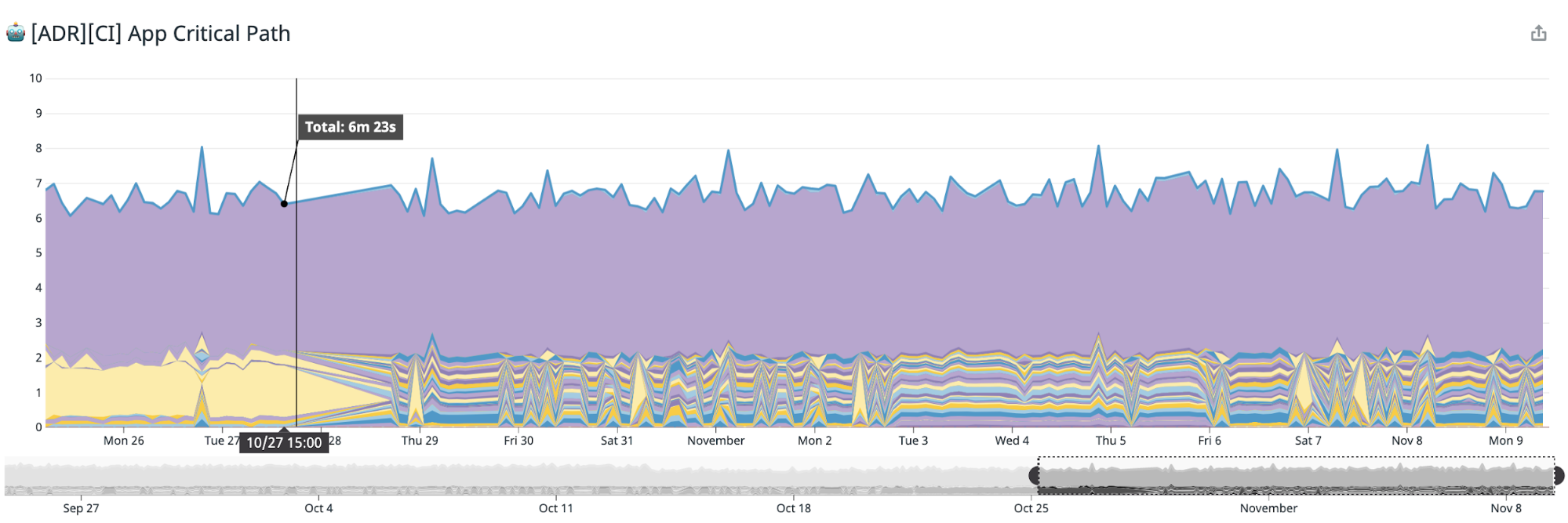
Stack representation of the Critical Path build time

Project’s scale factor

To implement the conceptually easy action items, we ran a Grab-wide program. The program has impacted almost every mobile team at Grab and involved 200+ engineers to some degree. The whole implementation took 6 months to complete.

During this period of time, we assigned engineers who were responsible to review the changes, provide support to the engineers across Grab, and monitor the results.

Results

Even though the overall plan seemed to be good on paper, the results were minimal – it just flattened the build time curve of the upcoming trend introduced by the growth of the codebase. The estimated impact was almost the same for both platforms and gave us about a 7%-10% cut in the CI and local build time.

Open source plan

The critical path tool proved to be effective to illustrate the projects’ bottlenecks in a dependency tree configuration. It is currently widely used by mobile teams at Grab to analyze their dependencies and cut out or limit an unnecessary impact on the respective scope.

The tool is currently considered to be open-sourced as we’d like to hear feedback from other external teams and see what can be built on top of it. We’ll provide more details on this in future posts.

Remote build

Another pillar of the  build process is the hardware where the build runs. The solution is  really straightforward – put more muscles on your build to get it stronger and to run faster.

Clearly, our engineers’ laptops could not be considered fast enough. To have a fast enough build we were looking at something with 20+ cores, ~200Gb of RAM. None of the desktop or laptop computers can reach those numbers within reasonable pricing. We hit a bottleneck in hardware. Further parallelization of the build process didn’t give any significant improvement as all the build tasks were just queueing and waiting for the resources to be released. And that’s where cloud computing came into the picture where a huge variety of available options is ready to be used.

ADR mainframer

We took advantage of the Mainframer tool. When the build must run, the code diff is pushed to the remote executor, gets compiled, and then the generated artifacts are pushed back to the local machine. An engineer might still benefit from indexing, debugging, and other features available in the IDE.

To make the infrastructure mature enough, we’ve introduced Kubernetes-based autoscaling based on the load. Currently, we have a stable infrastructure that accommodates 100+ Android engineers scaling up and down (saving costs).

This strategy gave us a 40-50% improvement in the local build time. Android builds finished, in the extreme case, x2 faster.

iOS

Given the success of the Android remote build infrastructure, we have immediately turned our attention to the iOS builds. It was an obvious move for us – we wanted the same infrastructure for iOS builds. The idea looked good on paper and was proven with Android infrastructure, but the reality was a bit different for our iOS builds.

Our  very first roadblock was that Xcode is not that flexible and the process of delegating build to remote is way more complicated compared to Android. We tackled a series of blockers such as running indexing on a remote machine, sending and consuming build artifacts, and even running the remote build itself.

The reality was that the remote build was absolutely possible for iOS. There were  minor tradeoffs impacting engineering experience alongside obvious gains from utilizing cloud computing resources. But the problem is that legally iOS builds are only allowed to be built on an Apple machine.

Even if we get the most powerful hardware – a macPro –  the specs are still not ideal and are unfortunately not optimized for the build process. A 24 core, 194Gb RAM macPro could have given about x2 improvement on the build time, but when it had to  run 3 builds simultaneously for different users, the build efficiency immediately dropped to the baseline value.

Android remote machines with the above same specs are capable of running up to 8 simultaneous builds. This allowed us to accommodate up to 30-35 engineers per machine, whereas iOS’ infrastructure would require to keep this balance at 5-6 engineers per machine. This solution didn’t seem to be scalable at all, causing us to abandon the idea of the remote builds for iOS at that moment.

Test impact analysis

The other battlefront was the CI pipeline time. Our efforts in dependency tree optimizations complemented with comparably powerful hardware played a good part in achieving a reasonable build time on CI.

CI validations also include the execution of unit and UI tests and may easily take 50%-60% of the pipeline time. The problem was getting worse as the number of tests was constantly growing. We were to face incredibly huge tests’ execution time in the near future. We could mitigate the problem by a muscle approach – throwing more runners and shredding tests – but it won’t make finance executives happy.

So the time for smart solutions came again. It’s a known fact that the simpler solution is more likely to be correct. The simplest solution was to stop running ALL tests. The idea was to run only those tests that were impacted by the codebase change introduced in the given MR.

Behind this simple idea, we’ve found a huge impact. Once the Test Impact Analysis was applied to the pre-merge pipelines, we’ve managed to cut down the total number of executed tests by up to 90% without any impact on the codebase quality or applications’ stability. As a result, we cut the pipeline for both platforms by more than 30%.

Today, the Test Impact Analysis is coupled with our codebase. We are looking to  invest some effort to make it available for open sourcing. We are excited to be  on this path.

The end of the Native Build Systems

One might say that our journey was long and we won the battle for the build time.

Today, we hit a limit to the native build systems’ efficiency and hardware for both Android and iOS. And it’s clear to us that in our current setup, we would not be able to scale up while delivering high engineering experience.

Let’s move to Bazel

To introduce another big improvement to the build time, we needed to make some ground-level changes. And this time, we focused on the  build system itself.

Native build systems are designed to work well for small and medium-sized projects, however they have not been as successful in large scale projects such as the Grab Passenger applications.

With these assumptions, we considered options and found the Bazel build system to be a good contender. The deep comparison of build systems disclosed that Bazel was promising better results almost in all key areas:

  • Bazel enables remote builds out of box
  • Bazel provides sustainable cache capabilities (local and remote). This cache can be reused across all consumers – local builds, CI builds
  • Bazel was designed with the big codebase as a cornerstone requirement
  • The majority of the tooling may be reused across multiple platforms

Ways of adopting

On paper, Bazel was awesome and shining. All our playground investigations showed positive results:

  • Cache worked great
  • Incremental builds were incredibly fast

But the effort to shift to this new build system was huge. We made sure that we foresee all possible pitfalls and impediments. It took us about 5 months to estimate the impact and put together a sustainable proof of concept, which reflected the majority of our use cases.

Migration limitations

After those 5 months of investigation, we got the endless list of incompatible features and major blockers to be addressed. Those blockers touched even such obvious things as indexing and the jump to definition IDE feature, which we used to take for granted.

But the biggest challenge was the need to keep the pace of the product release. There was no compromise of stopping the product development even for a day. The way out appeared to be a hybrid build concept. We figured out how to marry native and Bazel build systems to live together in harmony. This move gave us a chance to start migrating target by target, project by project moving from the bottom to top of the dependency graph.

This approach was a valid enabler, however we were still faced with a challenge of our app’s  scale. The codebase of over 2.5 million of LOC cannot be migrated overnight. The initial estimation was based on the idea of manually migrating the whole codebase, which would have required us to invest dozens of person-months.

Team capacity limitations

This approach was immediately pushed back by multiple teams arguing with the priority and concerns about the impact on their own product roadmap.

We were left with not much  choice. On one hand, we had a pressingly long build time. And on the other hand, we were asking for a huge effort from teams. We clearly needed to get buy-ins from all of our stakeholders to push things forward.

Getting buy-in

To get all needed buy-ins, all stakeholders were grouped and addressed separately. We defined key factors for each group.

Key factors

C-level stakeholders:

  • Impact. The migration impact must be significant – at least a 40% decrease on the build time.
  • Costs. Migration costs must be paid back in a reasonable time and the positive impact is extended to  the future.
  • Engineering experience. The user experience must not be compromised. All tools and features engineers used must be available during migration and even after.

Engineers:

  • Engineering experience. Similar to the criteria established at the C-level factor.
  • Early adopters engagement. A common  core experience must be created across the mobile engineering community to support other engineers in the later stages.
  • Education. Awareness campaigns must be in place. Planned and conducted a series of tech talks and workshops to raise awareness among engineers and cut the learning curve. We wrote hundreds of pages of documentation and guidelines.

Product teams:

  • No roadmap impact. Migration must not affect the product roadmap.
  • Minimize the engineering effort. Migration must not increase the efforts from engineering.

Migration automation (separate talks)

The biggest concern for the majority of the stakeholders appeared to be the estimated migration effort, which impacted the cost, the product roadmap, and the engineering experience. It became evident that we needed to streamline the process and reduce the effort for migration.

Fortunately, the actual migration process was routine in nature, so we had opportunities for automation. We investigated ideas on automating the whole migration process.

The tools we’ve created

We found that it’s relatively easy to create a bunch of tools that read the native project structure and create an equivalent Bazel set up. This was a game changer.

Things moved pretty smoothly for both Android and iOS projects. We managed to roll out tooling to migrate the codebase in a single click/command (well with some exceptions as of now. Stay tuned for another blog post on this). With this tooling combined with the hybrid build concept, we addressed all the key buy-in factors:

  • Migration cost dropped by at least 50%.
  • Less engineers required for the actual migration. There was no need to engage the wide engineering community as a small group of people can manage the whole process.
  • There is no more impact on the product roadmap.

Where do we stand today

When we were in the middle of the actual migration, we decided to take a pragmatic path and migrate our applications in phases to ensure everything was under control and that there were no unforeseen issues.

The hybrid build time is racing alongside our migration progress. It has a linear dependency on the amount of the migrated code. The figures look positive and we are confident in achieving our impact goal of decreasing at least 40% of the build time.

Plans to open source

The automated migration tooling we’ve created is planned to be open sourced. We are doing a bit better on the Android side decoupling it from our applications’ implementation details and plan to open source it in the near future.

The iOS tooling is a bit behind, and we expect it to be available for open-sourcing by the end of Q1’2021.

Is it worth it all?

Bazel is not a silver bullet for the build time and your project. There are a lot of edge cases you’ll never know until it punches you straight in your face.

It’s far from industry standard and you might find yourself having difficulty hiring engineers with such knowledge. It has a steep learning curve as well. It’s absolutely an overhead for small to medium-sized projects, but it’s undeniably essential once you start playing in a high league of super apps.

If you were to ask whether we’d go this path again, the answer would come in a fast and correct way – yes, without any doubts.


Authored by Sergii Grechukha on behalf of the Passenger App team at Grab. Special thanks to Madushan Gamage, Mikhail Zinov, Nguyen Van Minh, Mihai Costiug, Arunkumar Sampathkumar, Maryna Shaposhnikova, Pavlo Stavytskyi, Michael Goletto, Nico Liu, and Omar Gawish for their contributions.


Join us

Grab is more than just the leading ride-hailing and mobile payments platform in Southeast Asia. We use data and technology to improve everything from transportation to payments and financial services across a region of more than 620 million people. We aspire to unlock the true potential of Southeast Asia and look for like-minded individuals to join us on this ride.

If you share our vision of driving South East Asia forward, apply to join our team today.