Tag Archives: InsightVM

What’s New in InsightVM: Q4 2020 in Review

Post Syndicated from Rapid7 original https://blog.rapid7.com/2021/01/06/whats-new-in-insightvm-q4-2020-in-review/

What’s New in InsightVM: Q4 2020 in Review

Here at Rapid7, we’re pretty proud of the work that goes into keeping InsightVM a leader in the vulnerability risk management space. We’re constantly investing in and improving InsightVM capabilities so our customers have no trouble seeing and proving value. That said, here’s our roundup of the new and improved features we’ve updated in Q4.

[NEW] Fewer false alarms and faster reporting with InsightVM’s new false positive investigation tool

You can now investigate vulnerability findings as potential false positives directly from your Security Console. If your investigation determines that the finding could indeed be a false positive, you can send the results to Rapid7 for analysis with just one click. For more details, see our help documentation and blog post.

What’s New in InsightVM: Q4 2020 in Review

[NEW] Improvements made to the Goals and SLAs wizard

We’re excited to announce that creating a goal or SLA in InsightVM just became a lot simpler. Instead of following a four-step process, we’ve gotten it down to three: use, sort, and define your data, establish the conditions you want to meet, and save your goal using our three-step wizard. This new context-sensitive workflow allows you to create meaningful goals faster and with fewer steps. For more details, see our help documentation and blog post.

What’s New in InsightVM: Q4 2020 in Review

[NEW] Creation of Insight Platform accounts for non-admin users

The Rapid7 Insight platform provides data collection, visibility, analytics, and automation to establish a shared point of view between security, IT operations, and DevOps teams. Insight platform accounts are now available for non-admin users of InsightVM. This allows access to InsightVM through insight.rapid7.com. To complete the activation process, check out our help documentation. At the conclusion of this activation process, your Insight account will be used to authenticate your access to InsightVM’s cloud capabilities.

[IMPROVED] More dashboard controls for admins

Administrators now have full visibility on all user-created dashboards in their organization and can delete them if necessary. Simply navigate to the Dashboard Library to see a list of InsightVM dashboards created by other users. The ability for Admins to now delete user-created dashboards eases the pain of managing dashboards across the organization. This is especially beneficial for if an employee leaves – you’ll now have an easy way to manage/remove orphaned dashboards. For more information on managing dashboards in InsightVM, see our help documentation.

[NEW] New Snyk vulnerability content for container assessment

We know many development teams these days are taking advantage of containerized software applications that may contain all of the necessary code, runtime, system tools, and libraries needed to run an application. Despite the benefits of efficiency from a development standpoint, containers may present risks that are often difficult for security teams to identify. This can be attributed to multiple factors, including how fast things change in containerized environments and the types of packages found within these environments.

InsightVM now integrates with Snyk, a leading provider of software composition analysis (SCA) in containerized applications. Snyk provides deep visibility into Open Source Software (OSS) vulnerabilities. With this new integration, InsightVM can consume Java vulnerability content from Snyk Intel Vulnerability DB. No customer action is needed to leverage this integration. Behind the scenes, InsightVM is consuming content from Snyk, building vulnerability checks around this content, and delivering it as checks within the Container Security feature in InsightVM. For more details, see our blog post.

What’s New in InsightVM: Q4 2020 in Review

[NEW] Scope and schedule reports with the new report creation wizard

We’ve made it easier to collect, analyze, and report InsightVM data all in one place. Using our Report Creation Wizard powered by Query Builder, you can create customized reports and opt to run recurring reports on a schedule. You can share directly with stakeholders to help you communicate about your work and gain insight into your organization’s vulnerability management program. For more information, see our help documentation.

[NEW] Audit logging for Custom Policy Builder

As organizations continue to harden their policies through customizations, it becomes extremely important to keep track of all these changes, because these customizations may significantly impact an organization’s overall compliance. You can now configure Custom Policy Builder to send audit logs that capture every policy update implemented by your users. These audit logs record which changes were made to a policy, when those changes were applied, and who was responsible for them. Use this new functionality to allow another user or an auditor to view the change history of any policy when needed. For more details, see our help documentation and blog post.

What’s New in InsightVM: Q4 2020 in Review

Not an InsightVM customer? Watch a demo of our award-winning vulnerability management solution.

Watch Now

Shifting Security Right: How Cloud-Based SecOps Can Speed Processes While Maintaining Integrity

Post Syndicated from Aaron Wells original https://blog.rapid7.com/2021/01/04/shifting-security-right-how-cloud-based-secops-can-speed-processes-while-maintaining-integrity/

Shifting Security Right: How Cloud-Based SecOps Can Speed Processes While Maintaining Integrity

When it comes to offloading security controls to the cloud, it may seem counterintuitive to the notion of “securing” things. But, when we consider the efficiency to be gained by shifting right with some security controls, it makes sense to send more granular, ground-up responsibilities to a trusted managed services cloud partner. This could help to increase development-and-deployment velocity, without compromising the integrity of your bespoke process.  

Building a true DevSecOps ecosystem is probably a common goal for most teams. However, uncommonality most often enters the picture in the forms of both technical and organizational roadblocks. Let’s take a look at some key insights from a 2020 SANS Institute survey on current industry efforts to more closely integrate DevOps and SecOps—and how you can plot your best path forward.

NEVER MISS A BLOG

Get the latest stories, expertise, and news about security today.

The security landscape

In more traditional environments, security teams often feel they’ve been left behind by the pace of DevOps. Vulnerabilities are introduced faster than SecOps can likely find them. The shift is with teams that are building continuous delivery frameworks, with compliance checks at every stage of the game. It becomes a matter of defending the environment as it’s being built.

Currently, about 74% of organizations are deploying changes more than once per month, according to SANS. Often, these are weekly or daily instances. So, velocity is increasing, primarily out of a need to get customers what they need, faster. Traditional change approvals and security controls are becoming more guardrail-style checks. The challenge, however, lies in optimizing the process and keeping it as secure as possible.

Increasing cloud adoption

From a security perspective, transitioning to a cloud provider’s responsibility model can better match the pace of DevOps and increase delivery speed. When both of these velocities are increasing, albeit responsibly, that’s better for business.

  • Cloud-hosted VM platforms allow teams to spin up processes more quickly compared to a traditional setup.
  • Adoption is accelerating for cloud-hosted container services and serverless platforms because providers are doing more provisioning, patching, and upgrading for many existing execution environments.
  • More organizations are running on cloud-hosted VMs versus container services and serverless platforms, but that could change because the latter two options allow you to further reduce your responsibility model.

Multi-cloud motivations

About 92% of organizations run on at least one public cloud provider. But for about 60% of those companies, the main motivations behind spreading services out between multiple providers are not quite as technical as one might imagine.

Mergers and acquisitions can cause obvious complexity, as companies link up and potentially run similar processes in different cloud environments like AWS, Azure, or GCP. There are also decision-makers and teams that prioritize a task-based approach and pick the best environment to get a particular job done. The benefits of a multi-cloud environment could then become drawbacks, as security becomes more difficult to plan for and understand. And no one wants complexity in an approach that is essentially supposed to offload responsibilities and make things easier.

Risk doesn’t translate for SecOps

As more DevOps teams increase their use of JavaScript, traditional security controls don’t support the popular format as well as other legacy languages. In this situation, there is greater risk. However, an older web app that hasn’t been updated in a while could be the tip of the iceberg in terms of the technical debt sitting out there.

Apps built on older languages like Java, .NET, and C++ could leave exposures open as teams roll over to newer languages. So, this situation also presents risk. Security teams may not even be aware they’re in the dark about vulnerabilities those legacy apps present, as they try to keep pace with DevOps.

The future of shifting left

When it comes to security testing phases, there’s still a heavy tendency toward QA. More is being done to integrate those protocols in the process, but the sea change of baking testing into earlier phases largely has yet to occur.  

  • Over the next decade, teams will likely adopt more cloud-based integration tools like AWS CodePipeline, Microsoft Azure DevOps, GitHub Actions, and GitLab CI. In these instances, the cloud provider is managing more for you, minimizing attack surfaces and providing more built-in security. GitHub and GitLab, in particular, are trending toward greater baked-in security.
  • Jenkins has been the continuous integration tool of choice for about the last decade. However, the 24/7 nature of running on-premises or in the cloud to manage builds, releases, and patches can increase the attack surface.
  • When it comes to container orchestration tools, cloud-managed services like AWS Fargate and Azure Container are beginning to pull even with cloud-hosted services like Docker and Kubernetes. It’s becoming more attractive to outsource control-point and hardening responsibilities, so that security can shift further left into containers; it simplifies testing and helps ease deployment.

The future of shifting right

Security-testing responsibility lies with actual security teams about 65% of the time. Yet, managing corrective actions lies with development teams about 63% of the time, according to SANS. These numbers indicate largely siloed actions blocking the path to a true DevSecOps approach.

The biggest success measurement of DevSecOps is the time it takes to fix an issue. Aligning teams to tackle an issue in a speedy manner can make or break. Additionally, identifying post-deployment issues can help to improve shift-left controls to prevent those issues from ever escaping into production.

A 100% cross-functional effort most likely will not be achieved by every organization. However, moving closer to this goal could help strengthen teams, boost morale, and feed back key learnings to ultimately increase the speed of success.

In conclusion

Ironically, the biggest challenge of all isn’t technical in nature. Red tape within organizations can present challenges like lack of buy-in from management, insufficient budget (open-source tools can help here!), and siloed efforts. Additionally, a shortage of skilled workers could reinforce the same old  decision-making patterns at those management levels.  

When it comes to closely aligning teams and getting more time back to innovate, it’s often a cyclical dance of shifting right to improve your efforts in shifting left. For example, can you move further right into the cloud rather than building do-it-yourself, comprehensive solutions to security? Offloading could help to create more controls for enforcing security in tandem with DevOps.

No one wants to compromise the integrity of deploying on time, particularly as it relates to customers and your company’s bottom line. Co-sponsored by Rapid7, this recent SANS webinar presents an in-depth look at key statistics from a recent survey of companies and their advancements—or lack thereof—in DevSecOps.

For more insights, access the full 2020 SANS Institute survey on Extending DevSecOps Security Controls into the Cloud.

Set New InsightVM Goals and Share with Your Team for Increased Visibility and More Efficient Execution

Post Syndicated from Naveen Bibinagar original https://blog.rapid7.com/2020/12/22/set-new-insightvm-goals-and-share-with-your-team-for-increased-visibility-and-more-efficient-execution/

Set New InsightVM Goals and Share with Your Team for Increased Visibility and More Efficient Execution

Since 2018, thousands of enterprises have utilized InsightVM’s Goals and SLAs feature to build their organization-specific security goals. Through Goals and SLAs, security teams ensure that they’re making progress toward their goals and service-level agreements (SLAs) at an appropriate pace, and that they’re maintaining compliance with the standards set for their program. Not only do Goals and SLAs enable our customers to deliver impact, but they are also super easy to set up. In fact, with the newly redesigned Goals 2.0 wizard, the average customer creates a new goal in less than five minutes.

Creating goals in InsightVM may be easy, but we know that executing on those goals can be challenging, especially when multiple, cross-functional stakeholders are involved. To help you with these challenges, we have enhanced the Goals and SLAs feature by enabling Goal Owners to share goals with other stakeholders. In doing so, Goal Owners and the teams they work with can more efficiently execute on goals, and visibility of goals can be shared more widely. Want more details on how this updated functionality can deliver value to your organization? Keep reading!

Not an InsightVM customer? Watch our on-demand demo.

Watch Now

Achieve recognition

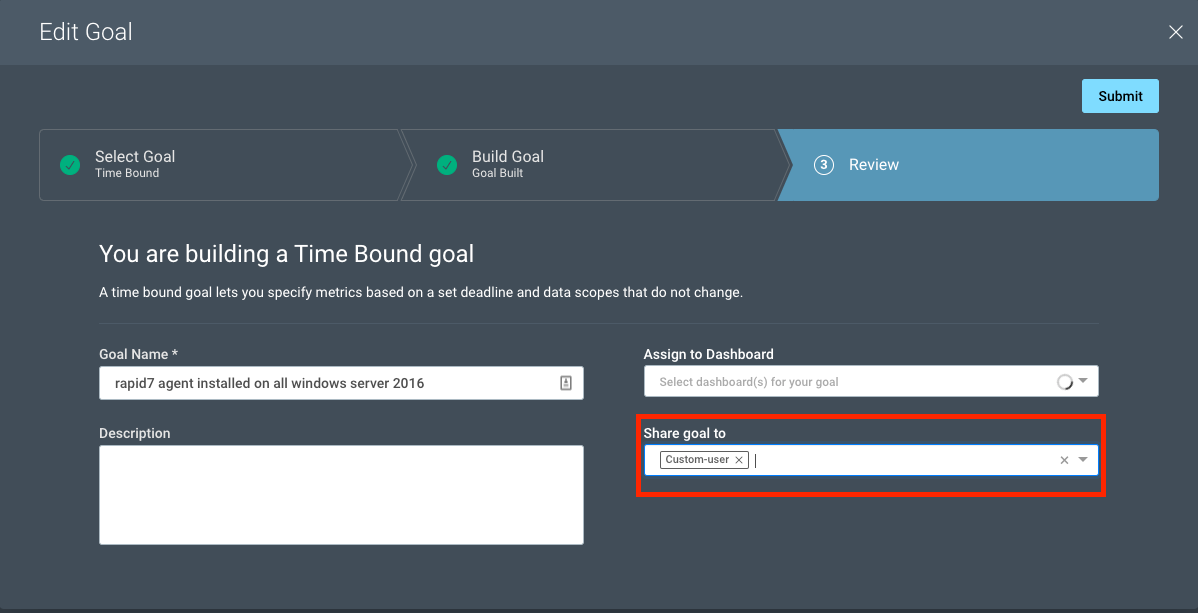
A Goal Owner can now share their goal directly with other stakeholders, such as a fellow team member or manager, through Step 3 of the Goal Wizard, called “Review.” Goals can be shared during the creation of a goal or after a goal has already been created.

Set New InsightVM Goals and Share with Your Team for Increased Visibility and More Efficient Execution

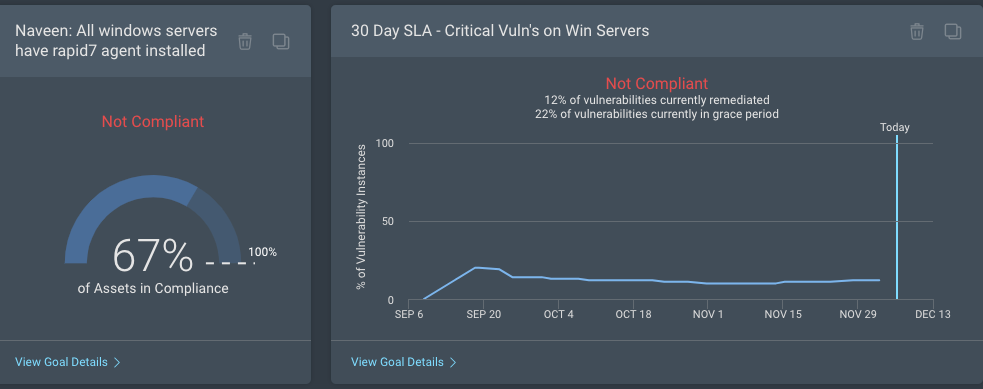
It is common for Goal Owners to assign their created goals to a Live Dashboard for easy tracking. If a Goal Owner chooses to share a goal with another stakeholder, any shared dashboard containing that goal card will automatically be made available to that stakeholder, increasing awareness and recognition of the goal and any progress made toward it.

Increase visibility and productivity

As mentioned earlier, the success of a goal depends on multiple people collaborating from different teams. A security manager is responsible for translating their CISO’s key risk indicators into security performance metrics that can be monitored on a continuous basis. The same security manager is also responsible for working with many teams, such as global risk management, information security, and remediation teams, to execute on security program goals. It’s absolutely imperative that every team member involved each has the same view into the security program goals to avoid the typical back-and-forths and long turnarounds. By sharing goals among stakeholders, the security team can collaborate with other cross-functional teams in a more effective manner.

Set New InsightVM Goals and Share with Your Team for Increased Visibility and More Efficient Execution

Reduce noise and build focus

Until now, all InsightVM users were able to create a goal. After extensive user research and feedback, we have come to an understanding that security managers are typically responsible for coming up with goals, and it almost always leads to better performance when every team member is executing on the same goals.

We are now offering a new platform permission, “Remediation Projects and Goals and SLAs,” on the InsightVM security console that will allow security administrators to fine-tune their users’ permissions, thereby limiting the ability of some users to create goals. The users without goal permissions can still receive a shared goal and continue to execute on goals, but they will not have the permission to create goals.

Set New InsightVM Goals and Share with Your Team for Increased Visibility and More Efficient Execution

For more details, see our updated help documentation.

NEVER MISS A BLOG

Get the latest stories, expertise, and news about security today.