Tag Archives: Platform security

Staying Evergreen: How we automated secure access and repo hygiene in a shared org

Post Syndicated from Greg Mohler original https://github.blog/engineering/platform-security/staying-evergreen-how-we-automated-secure-access-and-repo-hygiene-in-a-shared-org/


Working with outside collaborators can add more work for a repository owner. You need to confirm who still needs access, change permissions as projects evolve, and archive repositories once they’ve served their purpose.

To keep up, repository owners need to track collaborators, deadlines, and follow-ups for each repository. As a project grows, that manual housekeeping becomes harder to keep up with and easier to defer.

We faced this problem in a shared organization where GitHub employees (“Hubbers”) collaborate with customers and partners on product trials and professional services engagements. Our answer was Evergreen, a GitHub App built with native GitHub features. The workflows below exhibit a pattern you can adapt for your own organization.

Meet Evergreen

Evergreen is a GitHub App that automates organization hygiene through two workflows:

  1. Outside collaborator access reviews. Every quarter, each repo’s outside collaborators are reviewed. Keep who you need, and everyone else is removed.
  2. Stale repository detection and archival. Repos with no human activity past a threshold get flagged, warned, and (if still untouched) archived.

Two design principles shaped everything:

Fail secure. If nobody responds to an access review, we don’t leave access in place and hope for the best. We revoke it. The safe outcome is the default outcome.

Never destroy anything. Evergreen will never delete a repository or its contents. Archived repos are recoverable, and every access change is written into the repo’s tracking issue, so reverting a mistake is as easy as a copy-paste to Copilot.

How it works: One brain, many hands

Under the hood, Evergreen is a small Go webhook server running in a container. But the interesting part is the choreography. Every moving piece is a stock GitHub feature: a GitHub App, scheduled actions, webhooks, issues, custom properties, and plain files in a repo. Nothing exotic to reinvent.

A controller that keeps time

A dedicated controller repo acts as Evergreen’s clock and its memory. Four scheduled GitHub Actions workflows fire repository_dispatch events on a quarterly cadence, and the app wakes up and does the work:

Day Workflow What happens
1st Stale repo review Flag repos with no recent human activity, open a warning issue
8th Access review Snapshot outside collaborators, open a checklist issue per repo
16th Stale repo cleanup Archive repos still stale after the grace period
23rd Access cleanup Auto‑revoke access for any review left unanswered

Reviews open two weeks before their cleanup runs, and there’s a hard grace period baked in so a stray manual run can never fast‑forward the guillotine. Each workflow also supports workflow_dispatch, so we can trigger any step by hand as needed.

State you can git blame

Evergreen tracks every repo’s status as a JSON file (one per repository) committed to the controller repo under state/repos/<repo_id>.json. The snapshot of who had access, when the review opened, the deadline, who decided, and what happened all lives there. Here’s a completed review where a Hubber kept Alice’s access and let Bob’s lapse:

{
  "repo_id": 123456789,
  "full_name": "the-org/acme-trial",
  "last_seen_at": "2026-04-13T00:05:00Z",
  "access_review": {
    "deadline": "2026-04-27T00:00:00Z",
    "status": "renewed",
    "collaborators_at_open": [
      { "login": "alice", "name": "Alice Example", "permission": "admin" },
      { "login": "bob", "name": "Bob Example", "permission": "write" }
    ],
    "renewed_logins": ["alice"],
    "decided_by": "carol-hubber",
    "decided_at": "2026-04-15T16:42:10Z",
    "tracking_issue": { "repo_id": 123456789, "number": 42 }
  },
  "staleness": {
    "last_activity_at": "2026-04-15T16:42:10Z",
    "warned_at": null,
    "archive_deadline": null,
    "status": "active",
    "tracking_issue": null
  }
}

The best part: because state is just files in git, the commit history is the audit trail. Want to know why someone lost access last spring? git log the state file. There’s no separate database or bespoke audit pipeline to track.

Issue‑ops, everywhere it matters

Evergreen does its talking through issues inside each repository. When an access review kicks off, every repo gets a checklist issue:

Screenshot of an access review issue titled “[ACTION REQUIRED] Access Review – 2026-04-13.” Outside collaborators Alice Example, with admin access, and Bob Example, with write access, have unchecked boxes. Instructions say to select anyone who should keep access, then close the issue. A warning states that if no action is taken by April 27, all listed access will be automatically revoked.

The interaction model is delightfully simple: check the boxes for who stays, then close the issue. That’s it. When the issue closes, Evergreen listens for the issues.closed webhook event, reads the checkboxes, retains the checked collaborators, and revokes the rest, then posts a receipt comment listing exactly what it kept and what it removed.
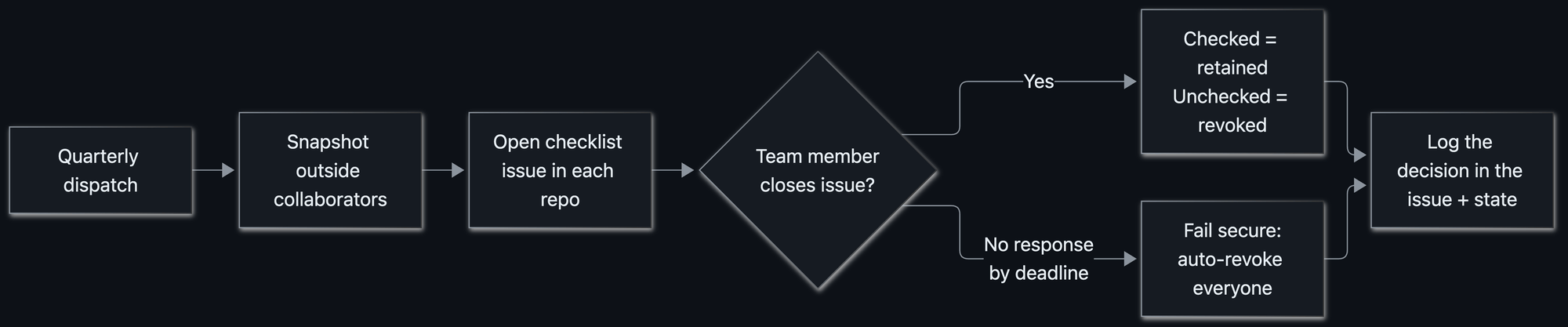
Quarterly outside-collaborator access review flowchart. A dispatch snapshots outside collaborators and opens a checklist issue in each repository. If a team member closes the issue, checked collaborators retain access and unchecked collaborators have access revoked. If no one responds by the deadline, everyone’s access is automatically revoked. Both paths log the decision in the issue and state.

Only the right humans can pull the lever

Closing an access review issue is a privileged action, so Evergreen guards it. If someone who isn’t a Hubber closes an issue, the app quietly reopens it and posts a note explaining why. Decisions only count when they come from the people authorized to make them.

Informing the right people

Here’s a subtle problem: we know the people who need to respond to a review are Hubbers, but we didn’t always know which Hubber(s) owned a given repository.

Evergreen resolves the right people to notify through a fallback chain:

  1. If a repo sets an evergreen_repo_owner custom property (a @user or @org/team), use it.
  2. Otherwise, look at recent issue and commit authors and cc the ones who are on the access review team, i.e., the Hubbers actually working in that repo.

The result: the right owners get pinged automatically, without anyone maintaining a spreadsheet of “who owns what.”

Fail secure, and fail closed

When a review deadline passes with no response, cleanup revokes every collaborator in the snapshot. We were careful about a subtle edge case: what if some removals succeed while others hit a transient API error? Marking the review “done” while a removal is still outstanding would be a quiet inconsistency, and we didn’t want that.

So Evergreen fails closed. If any removal fails, the review stays pending and the issue stays open, and the next run retries the stragglers. It only records “revoked” once every removal actually succeeded. And whatever gets removed is written into the issue, so restoring access is a matter of re‑adding the handles it listed.

The user experience: automation that feels considerate

Automated housekeeping has a reputation for being the office smoke alarm: loud, easy to ignore, and usually going off while you’re cooking something perfectly fine. We worked hard to make Evergreen feel like the opposite:

  • It comes to you. The work happens as an issue in your repo.
  • It tags the right people. No “who owns this?” archaeology.
  • It’s crystal clear about the ask. Every issue states what to do, the exact deadline, and precisely what happens if you ignore it.
  • It nudges before it acts. A reminder comment lands before the deadline: no surprise revocations.
  • It has an escape hatch. Org owners (Hubbers) can opt out by setting a custom property (evergreen_exempt_from_access_review or evergreen_exempt_from_archive).

Rolling it out carefully

Automation that manages access and archives repositories deserves a careful rollout, especially into a large, active org (ours has 1,400+ Hubbers, and many more customers and partners). We wanted the very first run to be a complete non‑event. A few practices got us there:

Dry‑run first. Evergreen ships with a DRY_RUN mode that logs every write it would make without touching a single collaborator or repo. We ran it against the real org and read the logs like tea leaves until we trusted the decisions it wanted to make.

Overcommunicate. Before flipping the switch, we broadcast what was coming, when, and what people needed to do, so the first issue anyone saw wasn’t a surprise. We found that when you’re telling a large group the same thing for the seventh time, it’s often when many are still hearing it for the first time.

Watch everything with Splunk. Evergreen emits structured logfmt logs to a dedicated Splunk index. That observability is how we caught edge cases in the wild (empty collaborator lists, unusual permissions, repos with issues disabled) and tightened the logic before they mattered.

Respect the platform’s speed limits. When you open issues and post comments across every repo in a big org, you slam into GitHub’s secondary rate limits for content creation: 80 requests/minute and 500/hour. While this is a thoughtful preventative control to avoid system abuse, it requires a bit of intention when automating IssueOps at large scale.

So Evergreen paces itself by construction. It processes repos in batches, spaces out each content‑creating call by a couple of seconds, and sleeps between batches to let the rolling window clear, and it only counts the repos that actually create content, so a quiet quarter where nothing’s eligible still runs fast. We opted for proactive avoidance over reactive back‑off.

Lessons we’re taking with us

  • Make the safe path the default path. Fail secure, then make responding easy enough that failing secure rarely triggers.
  • Use the primitives you already have. Issues, webhooks, custom properties, and git history did the work of a bespoke UI, a job queue, and an audit database.
  • Meet people where they work. An issue in your repo beats a dashboard you’ll never open.
  • Logs are a revert button. Writing every change into the issue turned “oops” into “paste these three handles into a Copilot session.”
  • Respect the limits. At org scale, rate limits aren’t an edge case: they’re the design constraint.

Keep your org evergreen

Routine hygiene is the kind of work that’s easy to defer and perfect to automate. The trick isn’t heroic cleanup sprints: it’s making the boring, safe thing happen on a schedule, with a friendly face and an undo button.

That’s Evergreen. And because it’s built entirely from native GitHub features, you can stand up the same pattern yourself.

Ready to make repository hygiene routine? Start with one recurring access or archival task, then use GitHub Apps, actions, issues, and custom properties to automate the problem away.

The post Staying Evergreen: How we automated secure access and repo hygiene in a shared org appeared first on The GitHub Blog.
Post-quantum security for SSH access on GitHub

Post Syndicated from brian m. carlson original https://github.blog/engineering/platform-security/post-quantum-security-for-ssh-access-on-github/


Today, we’re announcing some changes that will improve the security of accessing Git data over SSH.

What’s changing?

We’re adding a new post-quantum secure SSH key exchange algorithm, known alternately as sntrup761x25519-sha512 and [email protected], to our SSH endpoints for accessing Git data.

This only affects SSH access and doesn’t impact HTTPS access at all.

It also does not affect GitHub Enterprise Cloud with data residency in the United States region.

Why are we making these changes?

These changes will keep your data secure both now and far into the future by ensuring they are protected against future decryption attacks carried out on quantum computers.

When you make an SSH connection, a key exchange algorithm is used for both sides to agree on a secret. The secret is then used to generate encryption and integrity keys. While today’s key exchange algorithms are secure, new ones are being introduced that are secure against cryptanalytic attacks carried out by quantum computers.

We don’t know if it will ever be possible to produce a quantum computer powerful enough to break traditional key exchange algorithms. Nevertheless, an attacker could save encrypted sessions now and, if a suitable quantum computer is built in the future, decrypt them later. This is known as a “store now, decrypt later” attack.

To protect your traffic to GitHub when using SSH, we’re rolling out a hybrid post-quantum key exchange algorithm: sntrup761x25519-sha512 (also known by the older name [email protected]). This provides security against quantum computers by combining a new post-quantum-secure algorithm, Streamlined NTRU Prime, with the classical Elliptic Curve Diffie-Hellman algorithm using the X25519 curve. Even though these post-quantum algorithms are newer and thus have received less testing, combining them with the classical algorithm ensures that security won’t be weaker than what the classical algorithm provides.

These changes are rolling out to github.com and non-US resident GitHub Enterprise Cloud regions. Only FIPS-approved cryptography may be used within the US region, and this post-quantum algorithm isn’t approved by FIPS.

When are these changes effective?

We’ll enable the new algorithm on September 17, 2025 for GitHub.com and GitHub Enterprise Cloud with data residency (with the exception of the US region).

This will also be included in GitHub Enterprise Server 3.19.

How do I prepare?

This change only affects connections with a Git client over SSH. If your Git remotes start with https://, you won’t be impacted by this change.

For most uses, the new key exchange algorithm won’t result in any noticeable change. If your SSH client supports [email protected] or sntrup761x25519-sha512 (for example, OpenSSH 9.0 or newer), it will automatically choose the new algorithm by default if your client prefers it. No configuration change should be necessary unless you modified your client’s defaults.

If you use an older SSH client, your client should fall back to an older key exchange algorithm. That means you won’t experience the security benefits of using a post-quantum algorithm until you upgrade, but your SSH experience should continue to work as normal, since the SSH protocol automatically picks an algorithm that both sides support.

If you want to test whether your version of OpenSSH supports this algorithm, you can run the following command: ssh -Q kex. That lists all of the key exchange algorithms supported, so if you see sntrup761x25519-sha512 or [email protected], then it’s supported.

To check which key exchange algorithm OpenSSH uses when you connect to GitHub.com, run the following command on Linux, macOS, Git Bash, or other Unix-like environments:

$ ssh -v [email protected] exit 2>&1 | grep 'kex: algorithm:'

For other implementations of SSH, please see the documentation for that implementation.

What’s next?

We’ll keep an eye on the latest developments in security. As the SSH libraries we use begin to support additional post-quantum algorithms, including ones that comply with FIPS, we’ll update you on our offerings.

The post Post-quantum security for SSH access on GitHub appeared first on The GitHub Blog.

Finding leaked passwords with AI: How we built Copilot secret scanning

Post Syndicated from Ashwin Mohan original https://github.blog/engineering/platform-security/finding-leaked-passwords-with-ai-how-we-built-copilot-secret-scanning/


In October 2024, we announced the general availability of Copilot secret scanning, leveraging AI to detect generic passwords in users’ codebases. This post describes how Copilot secret scanning works under the hood, the challenges we ran into when developing it, and the framework we use for testing and iteration.

What is Copilot secret scanning?

Copilot secret scanning is a feature of GitHub Secret Protection, which protects millions of repositories on GitHub by detecting hundreds of pattern types through our partner program. The precision of these detections is paramount for security teams and developers when dealing with security alerts. Historically, our detection approach has relied on regular expressions, which is an effective method for identifying secrets with strict, provider-minted formats. However, this method struggles with the nuanced and varied structures of generic passwords, often generating excessive noise for security teams and developers.

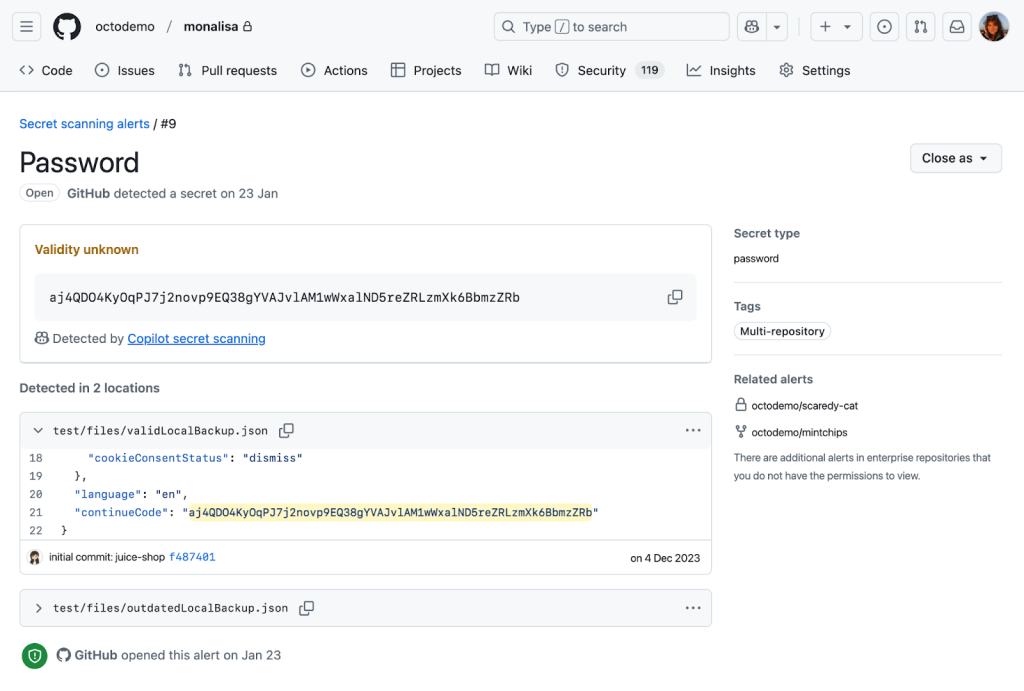
We now detect generic passwords with GitHub Copilot, using AI to analyze context—such as the usage and location of a potential secret—to limit noise and deliver relevant alerts that are critical to the health and security of your repositories.

A secret scanning alert for a password detected by Copilot secret scanning.

Getting to the point where we were confident in our password precision was a journey over many test cases, prompt iterations, and model changes. Let’s dive in to explore what we learned along the way and find out where we’re going.

The private preview highlighted a problem early on: unconventional file types and structures

At the core of Copilot secret scanning lies a request to a large language model (LLM), expressed through an LLM prompt consisting of:

  • General information about the type of vulnerability, in this case passwords.
  • The source code location and contents of the file where we believe the vulnerability may exist.
  • A strict JSON format specification for the model output, to allow for automated processing.

Our first iteration of the prompt used the few-shot prompting technique, which provides the LLM with example inputs and outputs to demonstrate how to perform the task. We wanted a resource-effective model to run the detections at scale and landed on GPT-3.5-Turbo. In parallel, we developed a basic offline evaluation framework, including manually curated test cases with both positive and negative findings, to help us validate that our approach was sound before deploying it to customers.

We deployed this first iteration to our private preview participants and immediately noticed a problem. While it worked reasonably well at identifying credentials in our offline evaluation, it would fail spectacularly in some customer repositories. The model had difficulty interpreting file types and structures not typically seen in the conventional coding languages and patterns that LLMs train on.

This experience revealed the complexity of the problem and the limiting nature of LLMs. We had to reevaluate our approach.

The road to public preview: Improving offline evaluation and prompting

In response to these initial results, we enhanced the offline evaluation framework in a few key ways. First, we added reports from private preview participants to increase the diversity of our test cases. Next, we enhanced the framework so that we could visually identify and analyze deviations resulting from model or prompt changes. This allowed us to better see the impact of customizing different steps in our prompting strategy. Finally, we leveraged the GitHub Code Security team’s evaluation processes to create a data collection pipeline, and used GPT-4 to create our own test cases based on learnings from existing secret scanning alerts in open source repositories.

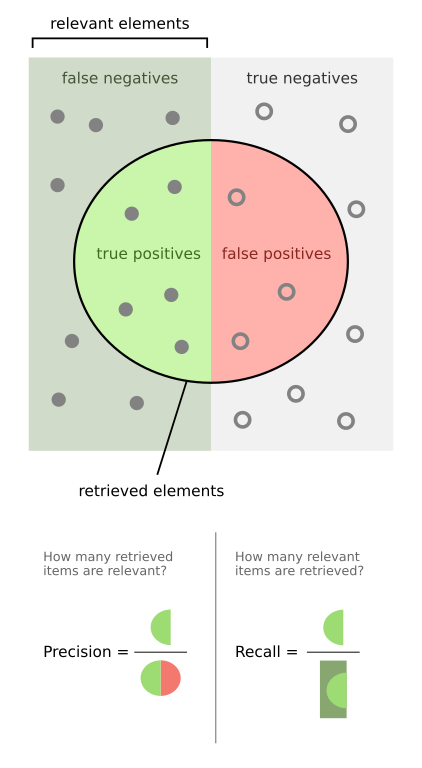
This improved offline evaluation and gave us the breadth needed to measure both precision and recall. Precision is the ability to find secrets more accurately, with concerns to the false positive rate, while recall is the ability to find secrets more reliably, with concerns to the false negative rate.

A diagram illustrating the difference between precision and recall.
Walber, CC BY-SA 4.0, via Wikimedia Commons

From here, we ran a series of experiments to evaluate detection quality:

  • What if we tried a different model?
  • What if we ran the prompt multiple times and somehow combined the responses?
  • What if we ran two different prompts on two different models in sequence?
  • How do we better handle the nondeterministic nature of LLM responses?

More specifically, we started experimenting with a few different mechanisms to improve our detection with the LLM.

We tried voting (asking the model the same question many times), which allowed for more deterministic responses but had no material impact on our precision.

We also tried using a larger model (GPT-4) trained on a larger set of parameters as a confirming scanner, to validate the accuracy of candidates found by GPT-3.5-Turbo. This helped improve precision without reducing our recall, but was also more resource intensive.

We also tried a few different prompting strategies, such as Fill-in-the-Middle, Zero-Shot, and Chain-of-Thought. We ended up collaborating with our colleagues at Microsoft and used their MetaReflection technique, a novel offline reinforcement learning technique that allows experiential learnings from past trials to come up with a hybrid Chain of Thought (CoT) and few-shot prompt that improves precision with a small penalty in recall.

We ultimately ended up using a combination of all these techniques and moved Copilot secret scanning into public preview, opening it widely to all GitHub Secret Protection customers. This brings us to our next hurdle: scale.

Scaling out capacity for a public preview

Secret scanning not only scans incoming Git pushes, but also your entire Git history on all branches. With each new customer, the necessary resources increase linearly. Rather than simply expanding LLM capacity, we focused on striking the most effective balance between value and cost to ensure optimal performance and efficiency. Before tackling how we managed the resources, we tried to find ways to reduce resource usage itself by:

  • Identifying and excluding a class of changes from scanning (such as media files or language files that contain “test,” “mock,” or “spec” in the filepath), because we expected they would never contain credentials or they would be incomprehensible to the model.
  • Experimenting with newer models, such as GPT-4-Turbo and GPT-4o-mini, that were expected to be less resource intensive without compromising on performance and latency.
  • Experimenting with different context windows to find one that reduced resources without significantly increasing latency for the LLM to respond to our queries.
  • Making improvements to how we tokenize the content we want to scan, including retaining some memory of previous tokenizations while processing new parts of a file.

While some of these efforts proved fruitful, such as limiting the content we scanned, other efforts were less effective. For example, breaking down content into smaller pieces didn’t have much of an impact, while using a more powerful model did.

Ultimately, the most impactful change came from creating a workload-aware request management system that allowed us to maximize and equitably share LLM capacity against the variety of different workloads we run during scans.

In building the system, we noticed a fundamental problem that needed addressing in our capacity management: assigning specific rate limits to individual workloads (such as scanning incoming Git commits or scanning the full history) was suboptimal. As each workload was tied to specific traffic patterns—Git commits, for example, tend to correlate with working hours, while full history scanning correlates with discrete events like a security manager or administrator enabling the feature on a new organization—it was easy to land in a situation where an individual workload could run into rate limits within its operational context, leaving additional resources available elsewhere unused.

We drew significant inspiration from existing solutions in this space, such as Doorman, GitHub’s own Freno, and various other weighted, fair-priority, queue-related algorithms. We came up with an algorithm that allows us to set a range of limits for each workload, preventing the workload from completely overwhelming the LLM, while allowing it to tap into resources from other workloads going unused at the moment. This strategy was so effective at maximizing utilization that we ended up using it within Copilot Autofix and security campaigns as well.

Mirror testing our way to general availability

Achieving confidence in detection quality was crucial for moving Copilot secret scanning to general availability. We implemented a mirror testing framework that ran our prompt and filtering changes against a subset of repositories that participated in our public preview. Rescanning these repositories with our latest improvements allowed us to assess the change in real alert volumes and false positive resolutions, without impacting users.

We found a huge drop in detections and false positives with very few missing real passwords. In some cases, we saw a 94% reduction in false positives across organizations! This before-and-after comparison indicated that all the different changes we made during private and public preview led to increased precision without sacrificing recall, and that we were ready to provide a reliable and efficient detection mechanism to all GitHub Secret Protection customers.

Lessons for the future

Copilot secret scanning is now detecting passwords on nearly 35% of all GitHub Secret Protection repositories. We’re continuing to monitor performance and apply lessons learned as we leverage the tooling we created along the way:

  • A focus on precision: Security and development teams need accurate and actionable alerts without the noise—this is always our primary goal.
  • Including diverse test cases: We continue to incorporate examples based on learnings from customer feedback into our test bed as we refine our detection capabilities.
  • Effective resource management: We always need to balance scalability with performance.
  • Collaborative innovation: Partnering with other GitHub and Microsoft teams helps us push the boundaries of what Copilot can achieve.

These learnings are also shared across Copilot Autofix, which continues to expand coverage for code scanning alerts and helps development teams remediate code scanning alerts quickly.

Since our general availability launch, enablement for Copilot secret scanning has been included in security configurations, allowing you to control which repositories are detecting secrets across your organizations or enterprise. We’re dedicated to continuous improvement through ongoing monitoring, mirror testing, and approach refinement based on customer feedback and detection trends. Copilot secret scanning serves as a critical component for robust application security and will evolve to meet the dynamic needs of our users.

Copilot secret scanning is a feature of GitHub Secret Protection, which offers enterprise-ready solutions for preventing accidental secret exposure in your repositories. GitHub Secret Protection is available to purchase starting April 1, 2025.

The post Finding leaked passwords with AI: How we built Copilot secret scanning appeared first on The GitHub Blog.