Post Syndicated from Idriss Laouali Abdou original https://aws.amazon.com/blogs/devops/ship-infrastructure-faster-with-cloudformation-and-cdk-pre-deployment-validation-on-every-stack-operation/
AWS CloudFormation helps you model and provision cloud infrastructure as code using JSON or YAML templates, or through tools like the AWS Cloud Development Kit (CDK). Whether you create stacks directly, use change sets for preview, or deploy through CI/CD pipelines and AI agents, fast feedback on template errors is critical to development velocity.
Previously, CloudFormation introduced pre-deployment validation during change set creation, catching property syntax errors, resource name conflicts, and S3 bucket emptiness constraints before execution.
Today, we are announcing that pre-deployment validation now runs automatically on every CreateStack and UpdateStack operation, so every deployment path benefits from pre-deployment checks with no configuration required. We are also introducing three new validation checks (Service Quotas limit exceeded, AWS Config Recorder conflicts, and ECR repository delete readiness), a new DisableValidation parameter for operation-level control, and the cdk validate command that leverages CloudFormation pre-deployment validation as part of the CDK developer experience.
In this blog post, we will walk you through how these capabilities work in practice. You will learn how to:
- Catch property syntax errors and resource name conflicts on CreateStack and UpdateStack before any resources are provisioned
- Review new WARN-mode validations (service quotas, Config Recorder, ECR delete readiness) during change set creation
- Use
cdk validateto get a validation report with construct-level source tracing - Control validation behavior with the
DisableValidationparameter when you need to skip checks
Key Capabilities
- Pre-deployment validation on all stack operations: Property syntax validation and resource name conflict detection (Resource Already Exists) now run in hard-fail mode on CreateStack and UpdateStack, in addition to CreateChangeSet. Errors are caught before any resources are provisioned.
- Three new validation types: Service Quota validation, AWS Config Recorder conflict detection, and ECR Repository delete readiness checks are now available as warnings during change set creation.
- CDK validate command: The
cdk validatecommand leverages CloudFormation pre-deployment validation and provides a report with construct-level source tracing that maps errors back to your CDK code. - DisableValidation parameter: Operation-level control to skip pre-deployment validation when you need to prioritize deployment speed or bypass a known issue.
How It Works
Understanding Validation Modes
CloudFormation pre-deployment validation operates in two modes that determine how validation failures are handled:
- FAIL mode stops the stack operation when validation detects errors, ensuring problematic templates cannot proceed to deployment. This applies to property syntax errors and resource name conflicts on CreateStack, UpdateStack, and CreateChangeSet operations.
- WARN mode allows the operation to proceed despite validation findings, providing warnings that you can review and address before execution. This applies to service quota limits, AWS Config Recorder conflicts, and ECR repository delete readiness checks on CreateChangeSet.
What happens when validation fails:
- CreateStack: Operation stops before any resources are provisioned.
- UpdateStack: Operation stops, stack remains in its current state with no resources modified.
- CreateChangeSet: Change set is not executable. Change set status shows FAILED.
The following scenarios demonstrate how pre-deployment validation works across different stack operations.
Scenario 1: Property Validation on CreateStack
CloudFormation evaluates each resource property definition before provisioning begins. The following template contains several common resource property errors:
Template (dashboard-stack.yaml)
AWSTemplateFormatVersion: "2010-09-09"
Description: Dashboard stack with property validation errors

Resources:
  Dashboard04:
    Type: "AWS::CloudWatch::Dashboard"
    Properties:
      DashboardName: "MyDashboard"

  LogStream08:
    Type: "AWS::Logs::LogStream"
    Properties:
      LogGroupName: "/aws/my-app"
      LogStreamName:                        # Expected string, found JSONArray
        - "stream-1"
        - "stream-2"

  MetricFilter03:
    Type: "AWS::Logs::MetricFilter"
    Properties:
      LogGroupName: "/aws/my-app"
      SomeUnsupportedProperty: "value"      # Unsupported property
      MetricTransformations:
        - MetricName: "ErrorCount"
          MetricNamespace: "MyApp"
          MetricValue: "1"
Step 1: Create Stack
aws cloudformation create-stack \
    --stack-name "dashboard-stack" \
    --template-body file://dashboard-stack.yaml
The command returns the stack ARN and operation begins. Pre-deployment validation runs automatically before any resources are provisioned.
Step 2: Check Validation Results
Use the describe-events API to review validation results:
aws cloudformation describe-events \
    --stack-name "dashboard-stack"
Example output:
The stack creation stopped before any resources were provisioned. Each validation error includes the logical resource ID, resource type, and a precise status reason describing the property issue.
{
    "OperationEvents": [
        {
            "EventId": "ed0f6cc4-3f85-4ad9-abc3-1f9aad2ab931",
            "StackId": "arn:aws:cloudformation:us-west-1:1234:stack/dashboard-stack/6877f3c0-73e6-11f1-a1e1-02ff57e5af93",
            "OperationId": "68790530-73e6-11f1-a1e1-02ff57e5af93",
            "OperationType": "CREATE_STACK",
            "EventType": "VALIDATION_ERROR",
            "LogicalResourceId": "MetricFilter03",
            "PhysicalResourceId": "",
            "ResourceType": "AWS::Logs::MetricFilter",
            "Timestamp": "2026-06-29T18:14:49.255000+00:00",
            "ValidationFailureMode": "FAIL",
            "ValidationName": "PROPERTY_VALIDATION",
            "ValidationStatus": "FAILED",
            "ValidationStatusReason": "Unsupported property [SomeUnsupportedProperty]",
            "ValidationPath": "/Resources/MetricFilter03/Properties/SomeUnsupportedProperty"
        },
        {
            "EventId": "4f9f12ce-498c-4d79-af31-730238b85139",
            "StackId": "arn:aws:cloudformation:us-west-1:1234:stack/dashboard-stack/6877f3c0-73e6-11f1-a1e1-02ff57e5af93",
            "OperationId": "68790530-73e6-11f1-a1e1-02ff57e5af93",
            "OperationType": "CREATE_STACK",
            "EventType": "VALIDATION_ERROR",
            "LogicalResourceId": "LogStream08",
            "PhysicalResourceId": "",
            "ResourceType": "AWS::Logs::LogStream",
            "Timestamp": "2026-06-29T18:14:49.255000+00:00",
            "ValidationFailureMode": "FAIL",
            "ValidationName": "PROPERTY_VALIDATION",
            "ValidationStatus": "FAILED",
            "ValidationStatusReason": "Property [LogStreamName] expected type: String, found: JSONArray",
            "ValidationPath": "/Resources/LogStream08/Properties/LogStreamName"
        },
    ]
}
Console Experience
In the CloudFormation console, navigate to your stack’s Events tab and click the operation ID (or the link in the banner or status reason column) to open the Operation view page. The page will open directly on the Deployment validations tab to see the validation results table:
- LogStream08 (AWS::Logs::LogStream) – FAIL: Property [LogStreamName] expected string, found: JSONArray
- MetricFilter03 (AWS::Logs::MetricFilter) – FAIL: Unsupported property [SomeUnsupportedProperty]
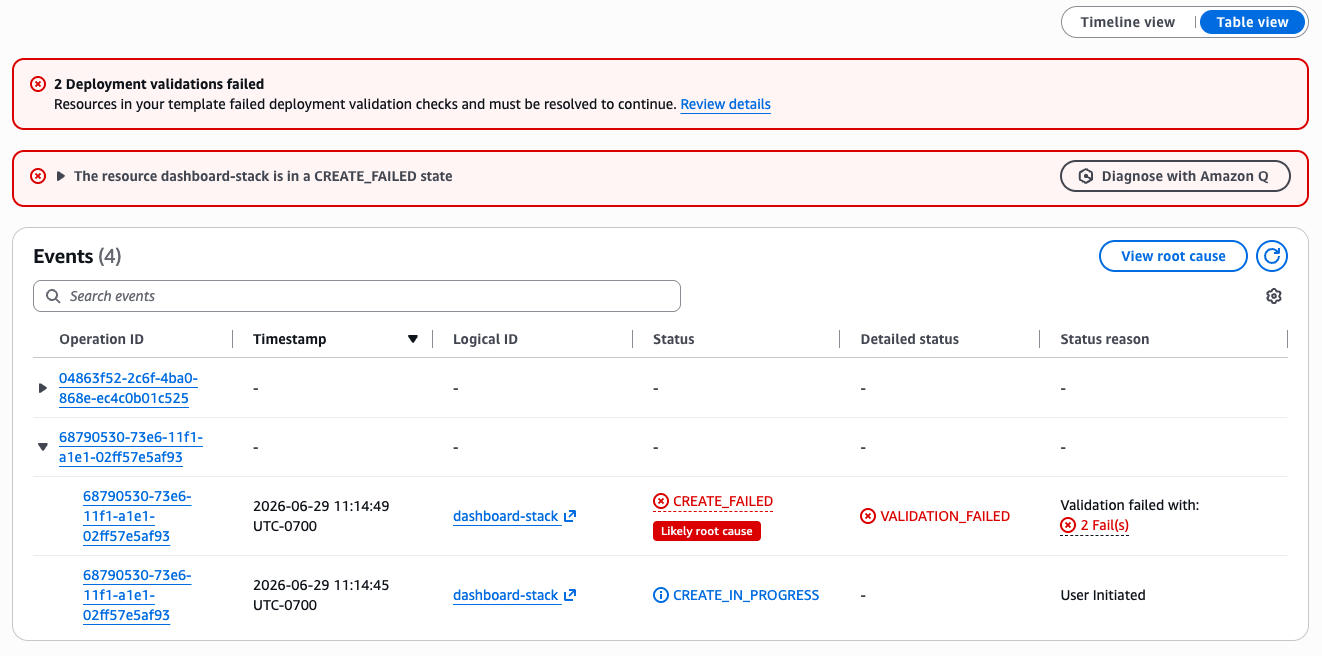
Figure 1: Deployment validations tab showing property validation failures on CreateStack
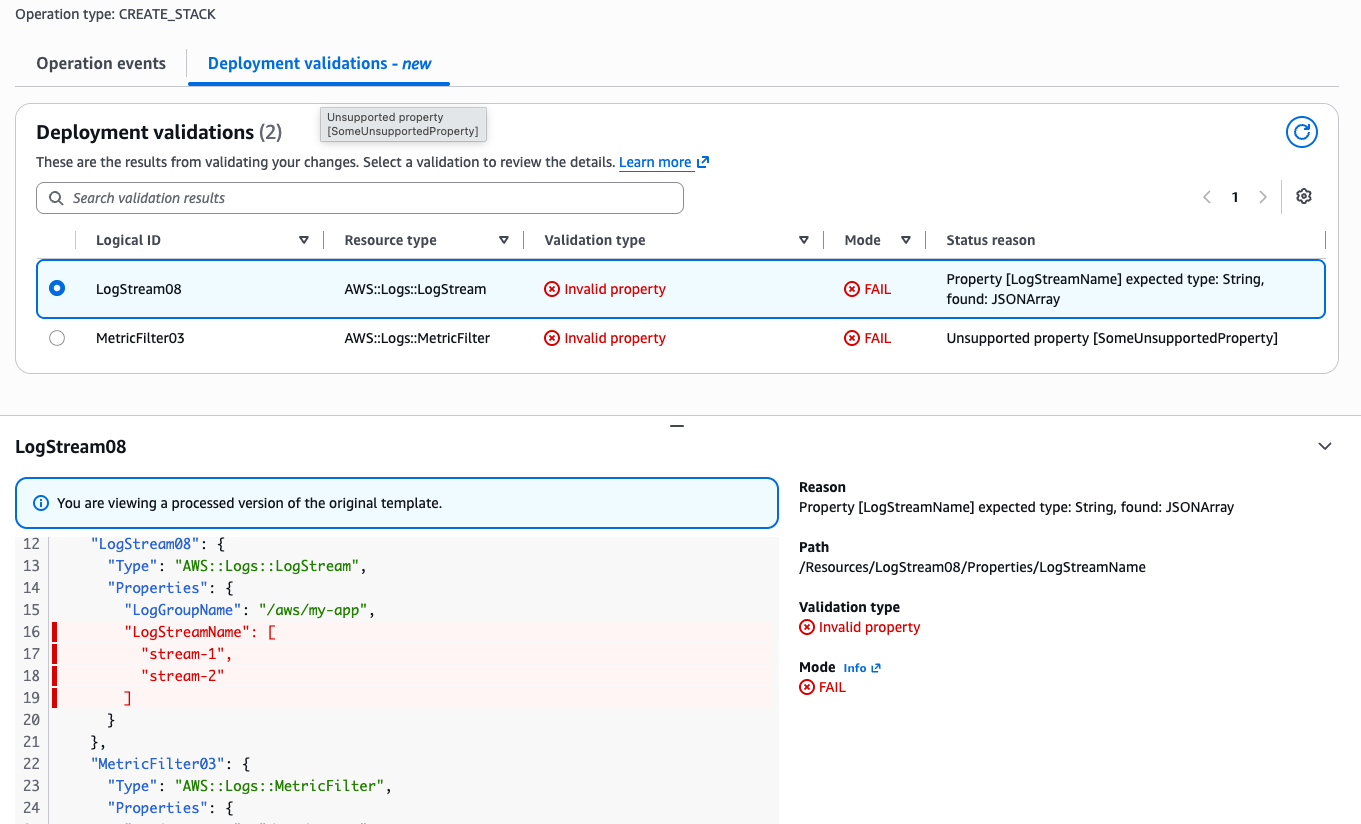
Figure 2: Deployment validations tab showing property validation failures on CreateStack
Scenario 2: Resource Name Conflict on UpdateStack
Resource name conflict detection (RAE) identifies when your template specifies a resource name that already exists in your account. This validation now runs on CreateStack and UpdateStack operations in addition to CreateChangeSet.
Template (update-bucket.yaml)
AWSTemplateFormatVersion: "2010-09-09"
Description: Update stack adding a bucket with a conflicting name

Resources:
  ExistingFunction:
    Type: "AWS::Lambda::Function"
    Properties:
      FunctionName: "my-existing-function"
      Runtime: "python3.12"
      Handler: "index.handler"
      Role: !Sub "arn:aws:iam::${AWS::AccountId}:role/lambda-role"
      Code:
        ZipFile: |
          def handler(event, context):
              return {"statusCode": 200}

  ConflictingBucket:
    Type: "AWS::S3::Bucket"
    Properties:
      BucketName: "production-data-bucket"   # Already exists in the account
Update Stack
aws cloudformation update-stack \
     --stack-name "my-app-stack" \
     --template-body file://update-bucket.yaml
Validation output (via describe-events):
{
    "OperationEvents": [
        ...
        {
            "EventId": "bde0f986-3b47-48d8-91bc-f384195f842a",
            "StackId": "arn:aws:cloudformation:us-west-1:1234:stack/my-app-stack-blog-test/164ff580-73e5-11f1-ab70-026546ec19e3",
            "OperationId": "65e641d0-73e5-11f1-abdb-06073274cc09",
            "OperationType": "UPDATE_STACK",
            "EventType": "VALIDATION_ERROR",
            "LogicalResourceId": "ConflictingBucket",
            "PhysicalResourceId": "",
            "ResourceType": "AWS::S3::Bucket",
            "Timestamp": "2026-06-29T18:07:36.139000+00:00",
            "ValidationFailureMode": "FAIL",
            "ValidationName": "NAME_CONFLICT_VALIDATION",
            "ValidationStatus": "FAILED",
            "ValidationStatusReason": "Resource of type 'AWS::S3::Bucket' with identifier 'production-data-bucket-blog-test-208004920468' already exists.",
            "ValidationPath": "/Resources/ConflictingBucket"
        },
        ...
    ]
}
The update stops before any resources are modified. You can either rename the resource in your template or remove the existing resource that causes the conflict.
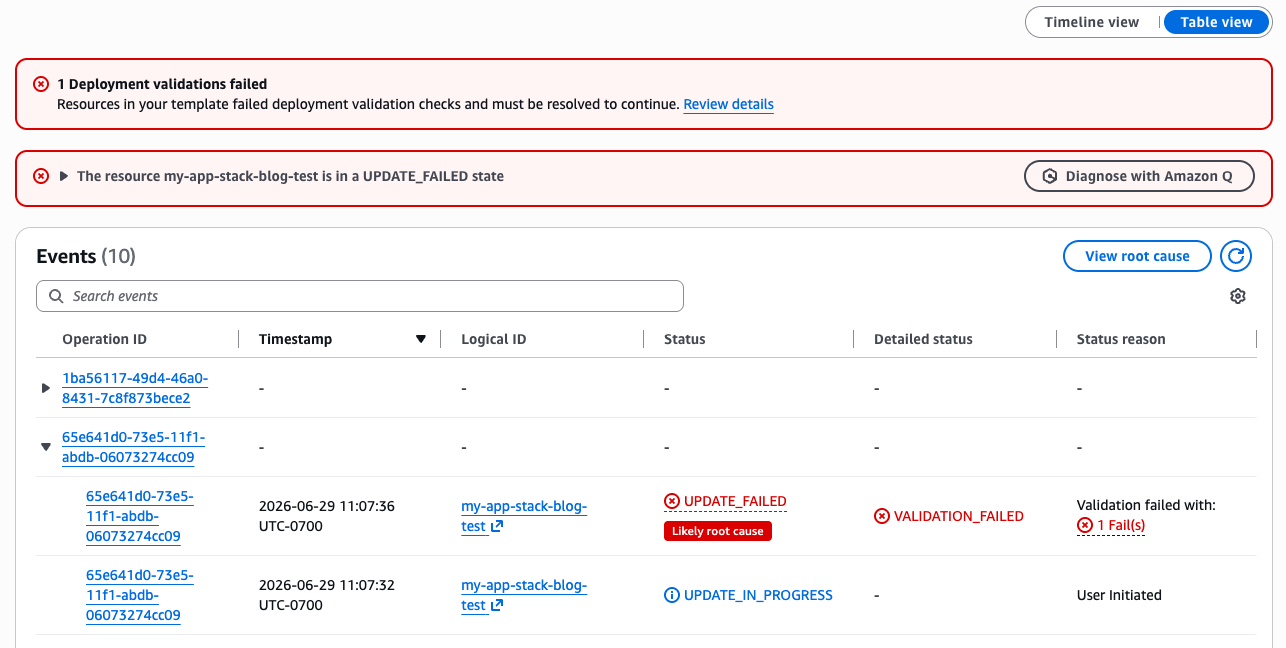
The deployment validation view below provide moe detail about the error, include status reason and path to the resource.
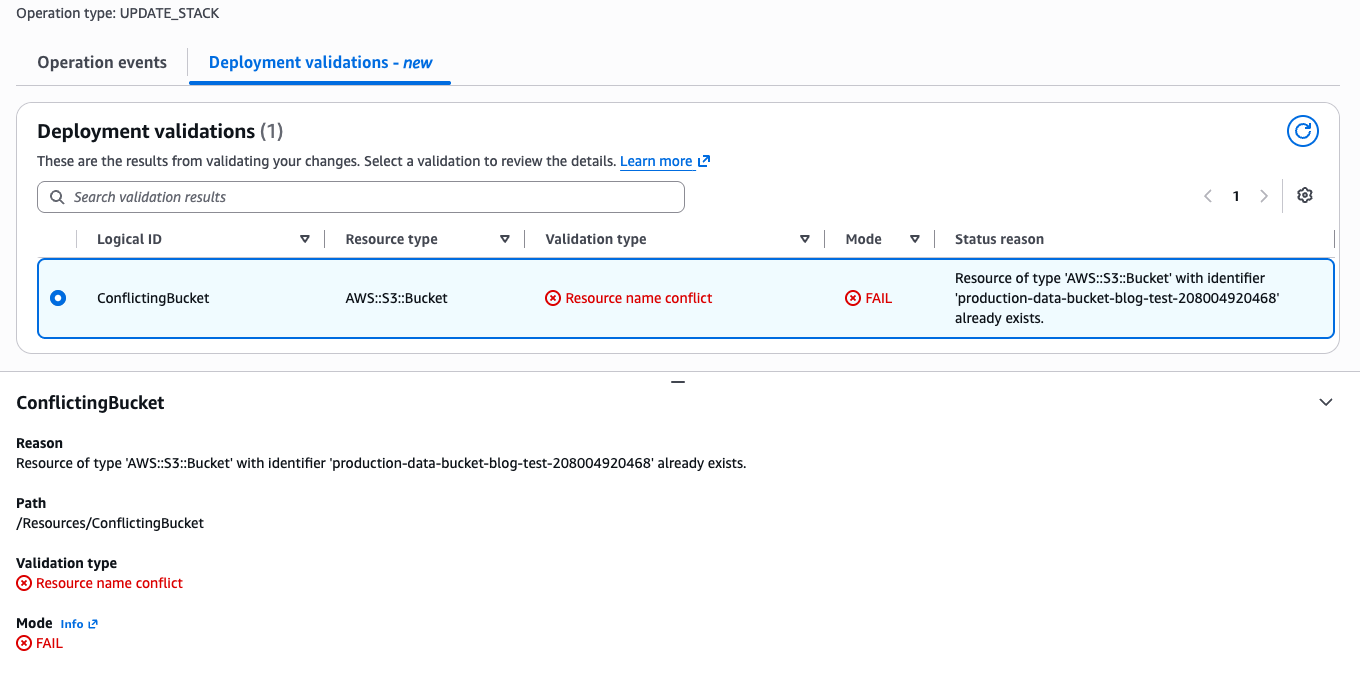
Figure 3: Resource Name Conflict on UpdateStack
Scenario 3: Service Quota Warning on CreateChangeSet
Service Quota validation is one of three new warning-mode validations available during change set creation. It checks whether creating or updating resources would exceed your AWS service quotas.
Create Change Set
aws cloudformation create-change-set \
    --stack-name "vpc-stack" \
    --change-set-name "add-subnets" \
    --template-body file://vpc-with-many-subnets.yaml
Validation output:
{
    "EventId": "3ba6f27b-4d3c-4e73-bac2-8d8cbf71a6d3",
    "StackId": "arn:aws:cloudformation:us-west-1:1234:stack/vpc-quota-test/492a84d0-73ee-11f1-a714-02e5a60ac85d",
    "OperationId": "b55e1e8f-28d1-4cbe-a6c3-59c92707e180",
    "OperationType": "CREATE_CHANGESET",
    "EventType": "VALIDATION_ERROR",
    "LogicalResourceId": "VPC1",
    "PhysicalResourceId": "",
    "ResourceType": "AWS::EC2::VPC",
    "Timestamp": "2026-06-29T19:11:12.727000+00:00",
    "ValidationFailureMode": "WARN",
    "ValidationName": "SERVICE_QUOTA_VALIDATION",
    "ValidationStatus": "FAILED",
    "ValidationStatusReason": "Service quota will be exceeded: AWS::EC2::VPC current usage 1/5, creating 6 would exceed limit",
    "ValidationPath": "/Resources/VPC1"
}
Because this validation operates in WARN mode, the change set is created successfully. You can review the warning, request a quota increase through the Service Quotas console, and then proceed with execution. The two other new warning validations (AWS Config Recorder conflict detection and ECR Repository delete readiness) follow the same pattern.
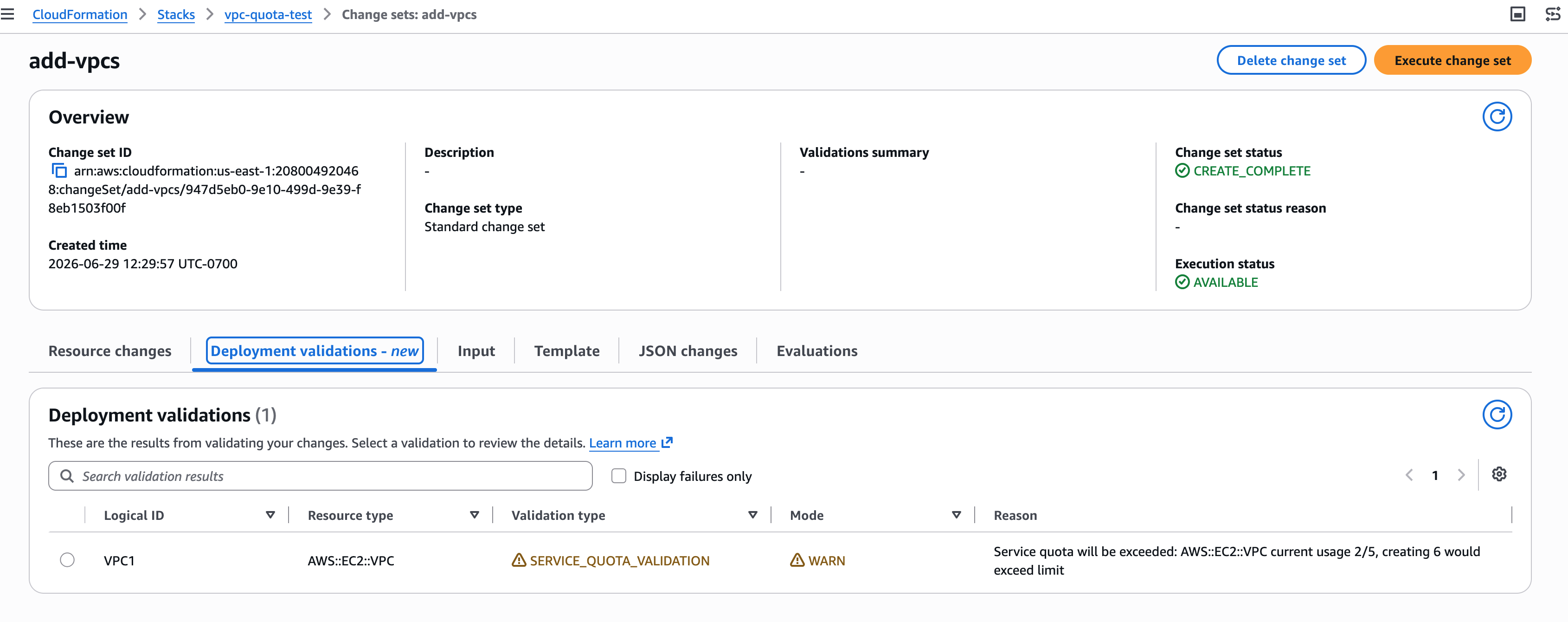
Figure 4: Service Quota Warning on CreateChangeSet
Scenario 4: CDK Validate Experience
The cdk validate command provides a unified validation experience that combines multiple validation sources into a single report with construct-level source tracing. Under the hood, cdk validate synthesizes your CDK app, creates a change set to invoke server-side pre-deployment validation, collects the results via DescribeEvents, and produces a report that maps errors back to your CDK source code with construct-level tracing.
Each error traces back to the specific construct and source file location in your CDK code, not just the CloudFormation logical resource ID. This construct-level tracing is what makes cdk validate uniquely valuable: you see the exact line in your code that needs to change.
Scenario 5: Controlling Validation with DisableValidation
Pre-deployment validation is enabled by default on all stack operations. If you need to skip validation for a specific operation, use the DisableValidation parameter.
When to disable validation:
- When you have already validated your template through other means (
cdk validate, cfn-lint, CI/CD checks) - When you need to minimize operation latency for time-sensitive deployments
CLI usage:
# Skip validation on create-stack
aws cloudformation create-stack \
    --stack-name "my-stack" \
    --template-body file://template.yaml \
    --disable-validation

# Skip validation on update-stack
aws cloudformation update-stack \
    --stack-name "my-stack" \
    --template-body file://template.yaml \
    --disable-validation
Important: Disabling validation means common errors will not be caught until resource provisioning is attempted. Use this option only when you understand the trade-off between deployment speed and early error detection.
AI Agents and Automated Workflows
Pre-deployment validation gives AI agents and automation tools the fast feedback loop they need to self-correct. When an agent provisions infrastructure and the template has an error, validation returns a structured error in seconds rather than waiting minutes for a full provision-and-rollback cycle to complete. The agent can parse the error, fix the template, and retry immediately.
With cdk validate, agents get construct-level source tracing that maps errors directly to the line of CDK code that needs to change, enabling fully automated fix-and-retry loops without human intervention.
To get started with the agent experience, install the CloudFormation agent skill from the AWS Agent Toolkit. This skill gives AI agents the ability to create stacks, validate templates, and iterate on errors using pre-deployment validation feedback.
Getting Started
Pre-deployment validation runs automatically on all CreateStack, UpdateStack, and CreateChangeSet operations with no configuration required. To start benefiting:
- Create or update a stack as you normally would. Validation runs automatically.
- Review validation results using the DescribeEvents API, the CloudFormation Console Events tab (click the operation ID, then the Deployment validations tab), or the
cdk validatecommand. - Fix identified issues in your template and retry the operation.
- Optionally disable validation using
--disable-validationfor specific operations
Required IAM permissions for validation checks
Validation on CreateStack and UpdateStack (property syntax validation and resource name conflict detection) requires no additional IAM permissions beyond what is needed for the stack operation itself. For the new validation checks available during change set creation, your IAM role needs the following additional permissions:
Service Quota Check:
cloudwatch:GetMetricDatalambda:GetAccountSettingsservicequotas:GetServiceQuotaec2:DescribeSecurityGroupsiam:GetAccountSummary
Config Recorder Check:
config:ListConfigurationRecorders
S3 Bucket Empty Check:
s3:ListBucketV2
ECR Repository Delete Readiness Check:
ecr:ListImages
If these permissions are not granted, the corresponding validation checks will be skipped without blocking the operation.
For CDK users:
# Run unified validation before deploying
cdk validate
Best Practices
- Use
cdk validateas your primary pre-deployment check. It leverages CloudFormation pre-deployment validation in a single command, giving you comprehensive coverage before any deployment is attempted. - Place CreateChangeSet as the first pipeline stage. For pipelines that use change sets, this ensures pre-deployment validation fires at the pipeline entry point. CDK Pipelines integrates this by default.
- Let validation run by default. The few seconds of validation time pay for themselves by preventing full provision-and-rollback cycles that take minutes or longer.
- Use DisableValidation intentionally. Reserve it for cases where you have already validated through other means or need to bypass a known false positive. Do not disable validation globally.
- Integrate validation into PR/CI workflows. Run
cdk validateorcfn-lintas part of your pull request checks to catch errors before code is merged, preventing invalid templates from reaching deployment pipelines. - Monitor validation warnings. WARN-mode validations (service quota, Config Recorder, ECR delete readiness) indicate potential issues that may cause failures at execution time. Address them proactively.
Conclusion
Pre-deployment validation on all stack operations represents a significant step forward in CloudFormation’s shift-left validation strategy. By catching common deployment errors in seconds before any resources are provisioned, this capability eliminates unnecessary rollback cycles and accelerates development workflows across the board.
Combined with the cdk validate command, which provides a unified validation experience with construct-level tracing, and the DisableValidation parameter for operation-level control, teams now have a complete toolkit for managing the trade-off between validation coverage and deployment speed. AI agents and automated pipelines benefit from structured, machine-readable feedback that enables immediate self-correction, turning what were once multi-minute debugging cycles into second-level iteration loops.
Pre-deployment validation is available in all AWS Regions where CloudFormation is supported. No configuration or opt-in is required. To learn more, visit the Validate stack deployments User Guide.