Post Syndicated from Ben Peterson original https://aws.amazon.com/blogs/devops/audit-trails-for-autonomous-agents-with-aws-devops-agent/
Autonomous agents need audit trails. AWS DevOps Agent (DevOps Agent) investigates production incidents and proposes or applies fixes on your behalf. Every operation and security review then raises the same two questions: what did the agent do, and how do you understand its impact?
AWS DevOps Agent maintains an immutable, step-by-step record of its own reasoning and actions. This post shows how to capture the agent’s full operational trail using the agent journal, recommendations, Amazon EventBridge lifecycle events, and AWS CloudTrail. We then wire them into an audit pipeline built on Amazon EventBridge, AWS Lambda, and Amazon Simple Storage Service (Amazon S3).
By the end, you will have deployable audit patterns that show, for any investigation the agent runs, what it concluded, what it recommended, when it ran, and whether the fix landed.
Why auditing an autonomous agent is different
CloudTrail records the API calls made in your account, but an autonomous agent adds reasoning that CloudTrail doesn’t capture. “The agent ran a metric query” is far less valuable than “the agent concluded the Lambda was timing out because its security group blocks egress to the database.” The latter is a decision, and that’s what an agent audit needs to capture.
The four surfaces
AWS DevOps Agent exposes four surfaces. Two capture the agent’s output, what it found and what it advises, and two capture context: when it ran, and who configured the agent and its permissions.
The agent journal
The agent journal (API) is the heart of the audit trail. For every execution, AWS DevOps Agent records an ordered, immutable log of its reasoning step, sub-agent it dispatches, observations, findings, and root-cause summary. Journal entries cannot be modified once written, making them resistant to prompt injection and trustworthy as an audit record.
Each record carries a recordType: symptom, observation, finding, and investigation_summary / investigation_summary_md are what matters for audit. This is the surface you archive per investigation.
Recommendations polling
Recommendations (API) are cross-incident preventative advice. The agent generates these on a schedule through a goal, and each recommendation carries a status and a version. Each evaluation run writes new records rather than updating the previous run’s, so advice that persists week over week appears as a series of records. The superseded ones remain at whatever status they last held. “The agent recommended X, the same failure recurred Y weeks later, and here is every version of that advice in between” is something you reconstruct from the archived snapshots, because the API returns current and superseded records together. Recommendations have no Amazon EventBridge event. You capture them by polling on a schedule.
Amazon EventBridge lifecycle events
Amazon EventBridge is how you capture lifecycle transitions in real time. A successful investigation produces Created, In Progress, and Completed events. Each carries the execution_id you need to fetch the journal and a summary_record_id pointing at the root-cause summary. Investigations can also end as Failed, Timed Out, or Canceled, and mitigations emit their own parallel set.
AWS CloudTrail
CloudTrail records API calls made to the AWS DevOps Agent service and stamps agent-initiated service calls: invokedBy: aidevops.amazonaws.com. It doesn’t capture the agent’s investigation reads, the metric and log queries it runs while diagnosing an incident in your account’s trail. Use CloudTrail for control-plane accountability, and the journal for behavioral audit.
IAM: Action boundary
As with anything in AWS, the agent can only do what its AWS Identity and Access Management (IAM) role permits. During an investigation, AWS DevOps Agent assumes an Agent Space role. That role’s policies are the hard ceiling on its capabilities. You can inspect it directly:
The AWS-managed AIOpsAssistantPolicy is attached to the default role. As of policy version 15, 848 of its actions are reads except 6 read-oriented query lifecycle operations. The only actions that change anything come from a companion policy: support:CreateCase and a service-linked-role creation scoped to the Amazon Resource Name (ARN) of a single role.
Keep that role least-privilege, and your audit surface stays small by construction. If you enable agent actions, a later section covers the write path which uses a separate actions role.
The reference architecture
The agent produces output that arrives two different ways, and this shapes how you capture each:
| Agent output | Delivery | How you capture it | Latency |
| Investigation lifecycle | Push: Amazon EventBridge events | React to events (rules + targets) | Seconds |
| Recommendations | Pull: no event emitted. Generated on goal cadence | Poll list-recommendations on a schedule |
depends on your poll frequency |
The journal itself has no dedicated event, but the terminal lifecycle event carries the execution_id you need to fetch it. The journal is push-triggered, pull-retrieved: the event tells you when to look, and the API gives you what to archive.
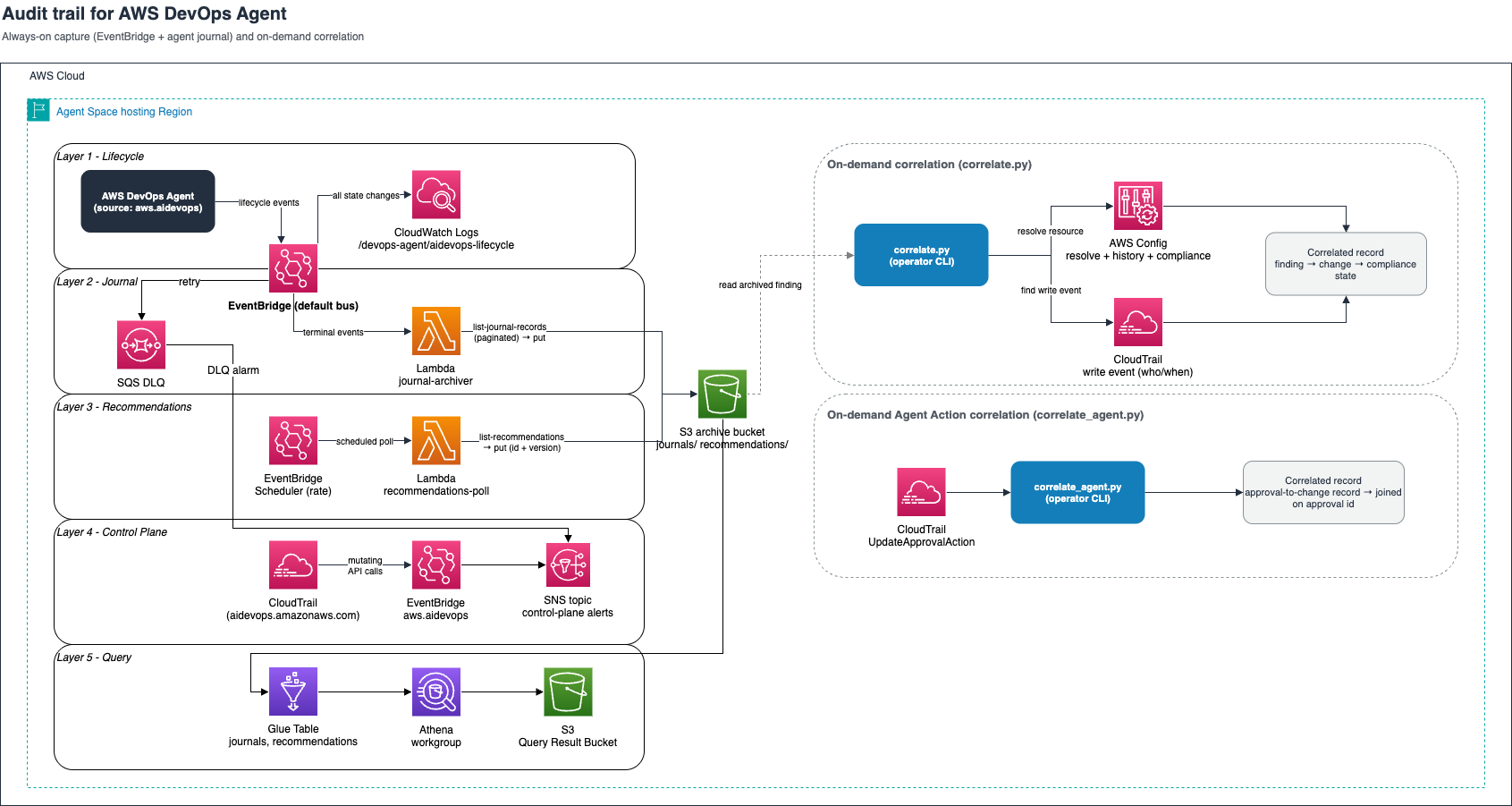
Figure 1: Reference architecture for auditing AWS DevOps Agent across five capture layers
Layer 1: Lifecycle capture. One Amazon EventBridge rule matching {"source":["aws.aidevops"]}, targeting an Amazon CloudWatch Logs (CloudWatch Logs) group directly. This durably records every lifecycle transition. Start here for operational visibility. If your primary goal is behavioral audit rather than operational visibility, deploy layer 2 alongside it.
Layer 2: Behavior capture. A second rule matches only terminal events and invokes a Lambda function. The function reads the execution_id from the event, calls list-journal-records, and writes the journal to Amazon S3. Subscribe to each terminal investigation and mitigation type. This is the layer that captures the agent’s decisions for the long term, including agent-based mitigations.
Layer 3: Recommendations snapshot. Because recommendations are generated on a schedule and have no event, capture them with an Amazon EventBridge Scheduler rule that invokes a Lambda function on a cadence (start daily). The function calls list-recommendations and writes each to Amazon S3, keyed on recommendation ID and version. It also calls list-goals in the same invocation, because a recommendation carries no field saying whether it is still current and the owning goal is the only thing that does. The journal captures what the agent found, and this layer captures what it advised and what you did about it.
Layer 4: Control-plane alerting. On your existing organization trail, alert on mutating aidevops.amazonaws.com events including UpdateApprovalAction, which is produced on elevated actions. This is your tripwire for changes to the agent itself.
Layer 5: Query. AWS Glue Data Catalog tables and an Amazon Athena (Athena) workgroup over the archived journals, recommendations, and goals.
Querying the archive: AWS Glue and Athena
The sample implementation overlays an AWS Glue Data Catalog and an Athena workgroup on the Amazon S3 archive. Three external tables cover the full archive. The journals table uses Athena partition projection, and Hive-partitioned by agent space and date:
Volume of recommendations is low (tens to hundreds of objects), so a flat external table over the recommendations/ prefix is sufficient. Athena recurses subdirectories by default, picking up every versioned snapshot.
The result bucket has Amazon S3 Object Lock but Object Lock prevents Athena from managing its own query-result objects. The query layer deploys a dedicated results bucket with a seven-day lifecycle rule for ephemeral query outputs.
Access control
Use IAM to control access. Investigation journals contain the agent’s full reasoning about your infrastructure. Scope your IAM permissions on the Athena workgroup, AWS Glue database, and on the archive bucket itself since bucket read access bypasses Athena entirely. Scope all three to your audit and operations teams.
To find all findings from the past 7 days for a specific resource:
The Athena workgroup integrates with Amazon Quick or any business intelligence tool that speaks JDBC/ODBC. Additional examples are available in the sample repository.
Closing the loop: Correlating findings to actual changes
The capture layers record what the agent found and what it recommended. But did the recommended fix actually land? This requires connecting the agent’s output to the real infrastructure change that followed.
The sample implementation includes correlate.py, an on-demand operator CLI that takes an archived finding or recommendation, resolves the resource it references, and reports what changed, when, and who did it. The correlation is heuristic by looking at resource identity and a tight time window in minutes to produce reliable attribution. This is why the sample implementation pairs it with a deterministic engine for agent-initiated actions.
It works by pivoting through two services:
- AWS Config resolves the resource identity by using
select-resource-config, then pulls its configuration timeline fromget-resource-config-history. This shows the before/after state of the resource around the time of the agent’s finding. - CloudTrail looks up the write event that caused the change: who called what API, from where, and when. This attributes the change to a principal.
The output is a correlated record: the agent found X, the resource changed from state A to state B, and that change was made by principal Y at time T.
Because CloudTrail indexes resources by different identifiers depending on the service, you require a strategy registry. Examples are in the following table:
| Resource type | How CloudTrail indexes it | Lookup strategy |
| S3 bucket | Bucket name | By name |
| Lambda function | Function name | By name |
| Amazon Relational Database Service (Amazon RDS) instance/cluster | Full ARN (not the DB ID) | Build ARN from template |
| Amazon Elastic Compute Cloud (Amazon EC2) security group | Group ID as ResourceName |
By name, with a resource-type scan as fallback |
A naive “look up by resource name” works for Amazon S3 and Lambda but returns zero results for Amazon RDS (RDS). The strategy registry encodes the right ID per resource type.
Correlating agent actions
When an operator approves an elevated action, the service stamps the approval ID into the credential it mints, so the executed call carries that ID inside its own principal ARN (op.system.apr.<approvalId>). The sample implementation includes correlate_agent.py that uses this. Because the ID is present on both sides, the correlation is a join. The engine checks the executed call against the argumentPins the operator was shown at approval time, so you can prove the agent’s behavior.
| . | correlate.py |
correlate_agent.py |
| Pivots on | A resource the agent named | Agent’s approval ID |
| Correlation | heuristic | deterministic |
| Answers | Who changed? | Who approved, and did it match? |
| Dependency | CloudTrail and AWS Config |
CloudTrail |
Production considerations
Understand the data volume. Journal size scales with investigation complexity. As an example:
| Scenario | Journal size | API calls (pagination) | Notes |
| Minimal (single-service, shallow investigation) | ~65 KB | 2–3 pages | Quick symptom to finding arc |
| Typical (multi-signal, 1–2 findings) | 250–340 KB | 65–106 calls | Typical investigations |
| Exhaustive (account-wide, high-priority) | ~428 KB | 150+ calls | Full cross-service correlation |
At 100 investigations/month at 300 KB average, you are storing roughly 30 MB/month of journal data.
Concurrency per agent space. By default, you can run three concurrent investigations per agent space. Additional requests queue as PENDING_START and start when a slot opens. The archival pipeline is unaffected because each terminal event triggers its own Lambda invocation. Refer to the AWS DevOps Agent Quotas page for future updates.
Paginate the journal. The journal API is server-paginated: pass limit, follow nextToken until it’s empty. A real incident’s journal can span several pages. Always loop.
Design for at-least-once delivery. Amazon EventBridge can deliver an event more than once. Key the Amazon S3 object on execution_id so a redelivery overwrites rather than duplicates, and attach an Amazon Simple Queue Service (Amazon SQS) dead-letter queue (DLQ) so a dropped terminal event is not lost.
Deploy per AWS Region and per account. Events land on the default bus in each Agent Space’s hosting account and Region. If you run agent spaces in multiple accounts, you must aggregate events to a central monitoring account for unified visibility. Refer to Amazon EventBridge cross-account document for further details.
Make the archive immutable. Enable Amazon S3 Object Lock and versioning. The sample implementation defaults to GOVERNANCE mode but for stronger compliance posture, use COMPLIANCE mode.
Warning: COMPLIANCE mode is irreversible. After it’s set, no principal (including the account root user) can delete or modify locked objects before their retention period expires. The only way out is closing the AWS account, and Object Lock itself can’t be disabled once enabled. Choose COMPLIANCE mode deliberately. If you use GOVERNANCE mode, enable CloudTrail data events on the bucket.
Encrypt your data. The sample implementation uses SSE-S3. If your compliance framework requires you to control and audit decryption events, use SSE-KMS with customer managed key.
The full loop
Here’s what a complete audit trail looks like for a single incident through resolution.
Step 1: Investigation. The agent investigates a failing Lambda function, concludes its security group restricts necessary egress, and writes the finding to the journal. Layer 2 archives the journal to Amazon S3.
Step 2: Recommendation. On its goal cadence, the agent generates a recommendation: “Update the security group egress rules to allow…” Layer 3 polls and captures it as recommendations/rec-a1b2c3.../v1.json with status PROPOSED. A later poll captures v2.json as the status changes.
Step 3: Engineer applies the fix. An engineer runs the suggested command. AWS Config records the new configuration item, and CloudTrail records the API call with principal, source IP, and timestamp.
Step 4: Correlation.
The agent found the problem, recommended the fix, and you can prove who applied it and when.
Step 5: A new investigation. A later investigation examines the same Lambda function, still erroring. The agent compares new advice against advice it has already given, and that comparison is semantic. But it compares against the recommendations currently attached to the goal, not against everything it has ever advised, and when the comparison is uncertain it keeps the two separate. Older advice drops out of that comparison set over time. Because you archived every recommendation and every finding with their resource identifiers, you can now compare across the full history:
The archive diagnosed the cause of the cause. Two recommendations, raised separately, on one resource, in one view. The agent’s own comparison covers the advice currently attached to the goal. The archive covers all of it. That is the feedback loop the audit trail adds.
Agent Actions changes Step 3’s actor, and the agent applies the fix directly. In the recommendation path, the human runs the command. In the elevated-action path, the human approves a specific call, and the agent executes it under a single-use session. correlate_agent.py uses a single-use session named for the approval (op.system.apr.<approvalId>), with invokedBy: aidevops.amazonaws.com rather than a time-window heuristic.
Operating the pipeline: Common failures
Always design for failure. Here are some common failures and how to detect and recover.
| Failure | Symptom | Detection | Recovery |
| Lambda timeout | No archive in Amazon S3. Event in DLQ | DLQ ApproximateNumberOfMessagesVisible alarm |
Increase timeout above the 2-minute default. Replay DLQ message which is idempotent on the execution_id key |
| Missed recommendation poll | Gap in recommendations/ prefix with a version number skipped |
Periodic reconciliation: compare Amazon S3 keys against list-recommendations response |
Re-run poll Lambda manually (idempotent) |
| Amazon EventBridge delivery failure | Missing lifecycle event in Layer 1 logs | Layer 2 archive exists without matching Layer 1 log entry | No data loss since journal already archived. Gap is in lifecycle visibility only |
| Amazon S3 write failure | Lambda errors spike. DLQ grows | Lambda error rate metric and DLQ alarm | Fix IAM/bucket policy. Replay DLQ (all messages are idempotent) |
| AWS Config recorder stopped | correlate.py returns no configuration history |
AWS Config recorder status alarm | Re-enable recorder. Note: historical gap is permanent for the stopped period |
| Journal API throttled | Partial archive. Lambda retries exhaust timeout | Lambda error logs showing throttling exceptions | Implement exponential backoff in the pagination loop. Increase timeout |
| Approval recorded but not executing | Approval exists in CloudTrail with no corresponding write | Join approvals to execution on the approval ID | None needed |
The highest value alarm is on the DLQ message count. A non-empty DLQ means a terminal event triggered, but the journal was not archived. Terminal events aren’t re-emitted, and the DLQ retains messages for 14 days. After that, the record is lost. The sample implementation ships this alarm at a threshold of 1, wired to an Amazon Simple Notification Service topic.
Run a reconciliation check weekly or monthly. Compare the execution_id values in the Layer 1 lifecycle log against the set of keys in the Amazon S3 journals/ prefix. Any ID in the logs but not in Amazon S3 represents a missed archive.
Limitations
Automated correlation – The current design requires a human to run correlate.py. Extend to a Lambda function that triggers on each new journal archive, cross-references the finding’s resource identifiers against the recommendations table, and alerts when a new finding touches a resource that was the subject of a prior recommendation.
Schema evolution – The Athena table definitions depend on the journal’s recordType values and content structure. If new record types appear, queries can return incomplete results without raising an error. Monitor for unknown recordType values. A query that returns zero findings for a week of active investigations is a signal that the schema moved.
Conclusion
Adopting an autonomous agent is a trust decision, and trust needs evidence. AWS DevOps Agent gives you the raw material: a journal of its reasoning, a real-time lifecycle event stream, a control-plane audit in CloudTrail, and an action boundary you can read straight from IAM. The pattern in this post assembles those into a durable, low-maintenance audit trail using services you already run.
The archive is more than compliance paperwork. With a persistent record of every finding and every recommendation, you can correlate across investigations and recommendations the agent no longer has in view, and against the present state of your infrastructure. That feedback loop is the difference between trusting the agent and understanding it.
Start with Layer 1. A single Amazon EventBridge rule to a log group gives you visibility into every investigation within minutes. Add the journal-archiving Lambda when you are ready to retain the agent’s decisions for the long term. Add the correlation layer when you want to prove that recommendations were acted on and catch the ones that created new problems.
Clone the sample repo to get started. It covers prerequisites, deploy steps, codebases, and teardown instruction. If you want the agent’s mitigations to become code, Automated incident remediation with AWS DevOps Agent and Kiro CLI builds a pipeline.