All posts by Boyko Radulov

A guide to capacity planning for Airflow worker pool in Amazon MWAA

Post Syndicated from Boyko Radulov original https://aws.amazon.com/blogs/big-data/a-guide-to-capacity-planning-for-airflow-worker-pool-in-amazon-mwaa/

In our previous post, A guide to Airflow worker pool optimization in Amazon MWAA, we explored when adding workers to your Amazon Managed Workflows for Apache Airflow (Amazon MWAA) environment actually solves performance issues, and when it doesn’t. We walked through patterns like high CPU utilization and long queue times where scaling may be appropriate, and anti-patterns like misconfigured Airflow settings and memory leaks where adding workers only masks the real problem. The key takeaway was clear: optimize first, scale second, and always let data drive the decision.

But what happens after you’ve done the optimization work? Your DAGs are efficient, your configurations are tuned, and your environment is running well. Then the business comes knocking: new regulatory requirements, additional data pipelines, expanded reporting. The workload is about to grow, and this time, you genuinely need more capacity.

This is where capacity planning comes in. Knowing how many workers to provision, before the new workload hits production, is the difference between a smooth rollout and a 5 AM SLA breach. In this post, we walk through a practical capacity planning framework for Amazon MWAA worker pools. Using a real-world financial services scenario, we show how to assess your current capacity, project future needs, calculate the right number of base workers, and set up monitoring to keep your environment healthy as workloads evolve.

Scenario: A financial services company needs to plan capacity for a 25% directed acyclic graph (DAG) increase to support new regulatory reporting requirements.

Current vs projected state

The following table compares the current and expected state after adding 25% more DAGs.


Metric Current Projected Change
1 DAGs 20 25 25%
2 Peak Tasks (5-7 AM) 80 104 +24 tasks
3 Environment Class mw1.medium mw1.medium No change
4 Base Workers 8 11 +3 workers
5 Tasks per Worker 10 (mw1.medium default) 10 No change
6 Available Capacity 80 slots (8 × 10) 110 slots (11 × 10) +30 slots
7 Peak Utilization 100% (80/80 slots) ⚠ 95% (104/110 slots) Improved
8 Critical SLA 7 AM market open 7 AM market open No tolerance

Capacity planning goal: Reduce utilization from 100% to 95% to maintain service level agreement (SLA) compliance and handle unexpected spikes.

Understanding current capacity: The environment currently runs 8 base workers, providing 80 concurrent task slots (8 workers × 10 tasks per worker). During the 5-7 AM peak with 80 concurrent tasks, this represents 100% utilization, a risky level that leaves no headroom for unexpected spikes or volatility.
With the planned addition of 5 new regulatory reporting DAGs, peak concurrent tasks will grow to 104. To maintain healthy operations with adequate buffer, we need to increase to 11 base workers (110 slots), resulting in 95% peak utilization with 6 slots of breathing room.

Why 100% utilization is risky: Running at 100% task utilization means:

  • Zero buffer for unexpected spikes
  • Any additional task causes immediate queuing
  • No room for market volatility or data volume increases
  • High risk of SLA breaches during unpredictable events

Best practice: Maintain at least 5-15% headroom (85-95% utilization) for production workloads with critical SLAs.

Why this sizing:

  • Current: 80 tasks ÷ 80 slots = 100% utilization (at capacity – risky!)
  • Projected: 104 tasks ÷ 110 slots = 95% utilization (healthy with buffer)
  • Buffer: 6 slots (5% headroom) protects against unexpected volatility spikes
  • SLA protection: Adequate headroom prevents queuing during normal operations

Capacity analysis

Every team asks the same critical question: “How many workers do I need?” The process is to identify your peak concurrent tasks from Amazon CloudWatch metrics, dividing by your environment’s tasks-per-worker capacity, and adding a 5%-15% safety buffer.

Step 1: Identifying peak concurrent tasks from Amazon CloudWatch

To determine your peak workload, you need to analyze RunningTasks and QueuedTasks CloudWatch metrics for your Amazon MWAA environment. Navigate to Amazon CloudWatch and query the following key metrics:

Primary metrics for capacity planning:

  • RunningTasks: Number of tasks currently executing across all workers. This shows your actual concurrent task load.
  • QueuedTasks: Number of tasks waiting for available worker slots. High values indicate insufficient capacity.
  • AvailableWorkers: Current number of active workers in your environment.

How to find peak concurrent tasks:

  1. Open the Amazon CloudWatch Console.
    • Choose Metrics.
    • Choose the MWAA namespace.
  2. Select your environment name.
  3. Add the RunningTasks metric.
  4. Set time range to last 7-30 days.
  5. Change statistic to Maximum.
  6. Identify the highest value during your peak hours (for example, 5-7 AM).

Example query:
Note: The following query is conceptual and does not directly translate to Amazon CloudWatch-specific language. Please refer to the Query your CloudWatch metrics with CloudWatch Metrics Insights for more information.

SELECT MAX(RunningTasks) AS PeakConcurrentTasks
FROM MWAA_Metrics
WHERE Environment = 'prod-airflow'
  AND timestamp BETWEEN '2024-10-01' AND '2024-10-31'
  AND HOUR(timestamp) BETWEEN 5 AND 7;

In our scenario, this analysis revealed 80 concurrent tasks during the 5-7 AM window. With the planned 25% DAG increase, we project this will grow to 104 concurrent tasks.

Step 2: Calculate required workers

To calculate the number of required workers without queuing any tasks, use the following formula: Peak concurrent tasks ÷ Tasks per worker × Safety buffer = Required workers

In the projected scenario with 104 tasks at peak hours, using mw1.medium environment with default concurrency configuration and having a 5% safety buffer, we need 11 workers

  • 104 peak tasks ÷ 10 tasks per worker × 1.06 buffer = 11 workers required to handle your workload without queuing during busiest periods.

Capacity monitoring and triggers

There are a few important Amazon CloudWatch metrics to monitor for environment health.

Key metrics to monitor

Monitor these five critical Amazon CloudWatch metrics to detect capacity issues:

  • QueuedTasks (>10 for >5 minutes indicates insufficient capacity)
  • RunningTasks (consistently at maximum suggests the need for more workers)
  • AdditionalWorkers (active for more than 6 hours daily signals the permanent worker problem)
  • Worker CPU (>85% sustained requires environment class upgrade or workload optimization)
  • Task Duration (+15% increase means reduced effective capacity per worker).

These metrics provide early warning signals to adjust capacity before SLA breaches occur.


Metric Threshold Action
1 QueuedTasks >10 for >5 minutes Investigate capacity
2 RunningTasks Consistently at max Increase base workers
3 AdditionalWorkers Active >6 hours daily Increase base workers
4 Worker CPU >85% sustained Upgrade environment class
5 Task Duration +15% increase Review capacity per worker

Amazon CloudWatch monitoring queries

Note: The following queries are conceptual and do not directly translate to Amazon CloudWatch-specific language. Please refer to the Query your CloudWatch metrics with CloudWatch Metrics Insights for more information.

  • Queue depth during peak hours
    SELECT AVG(QueuedTasks)
    FROM MWAA_Metrics
    WHERE Environment = 'prod-airflow'
      AND timestamp BETWEEN '05:00' AND '07:00'
    GROUP BY 5m;

  • Worker utilization efficiency
    SELECT AVG(RunningTasks) / AVG(AvailableWorkers * 5) * 100 AS UtilizationPercent
    FROM MWAA_Metrics
    WHERE Environment = 'prod-airflow';

  • Detect permanent worker problem
    SELECT DATE(timestamp) AS date,
           AVG(AdditionalWorkers) AS avg_additional,
           MAX(AdditionalWorkers) AS max_additional
    FROM MWAA_Metrics
    WHERE AdditionalWorkers > 0
    GROUP BY DATE(timestamp)
    HAVING AVG(AdditionalWorkers) > 5;

Setting up alerts

You can configure these alarms to identify problems as soon as they are introduced.

Recommended Amazon CloudWatch alarms:

  1. High queue depth alert
    • Metric: QueuedTasks
    • Threshold: > 10 for 2 consecutive 5-minute periods
    • Action: Notify operations team
  2. Permanent worker detection
    • Metric: AdditionalWorkers
    • Threshold: > 0 for 6+ hours
    • Action: Review capacity planning
  3. SLA risk alert
    • Metric: QueuedTasks during 5-7 AM window
    • Threshold: > 5 tasks
    • Action: Page on-call engineer

When to revisit capacity planning

Conduct quarterly scheduled reviews to analyze trends and project growth. Also run immediate trigger-based assessments when:

  • DAG count increases >10% (or more than your safety buffer)
  • Performance degrades
  • Cost anomalies appear (indicating permanent workers)
  • Any SLA breach occurs.

This dual approach provides proactive capacity management while enabling rapid response to emerging issues.


Trigger Frequency Action
1 Scheduled Review Quarterly Analyze trends, project growth
2 DAG Growth >10% increase Recalculate capacity needs
3 Performance Degradation As observed Immediate capacity assessment
4 Cost Anomalies Monthly Check for permanent workers
5 SLA Breaches Any occurrence Emergency capacity review

Decision matrix

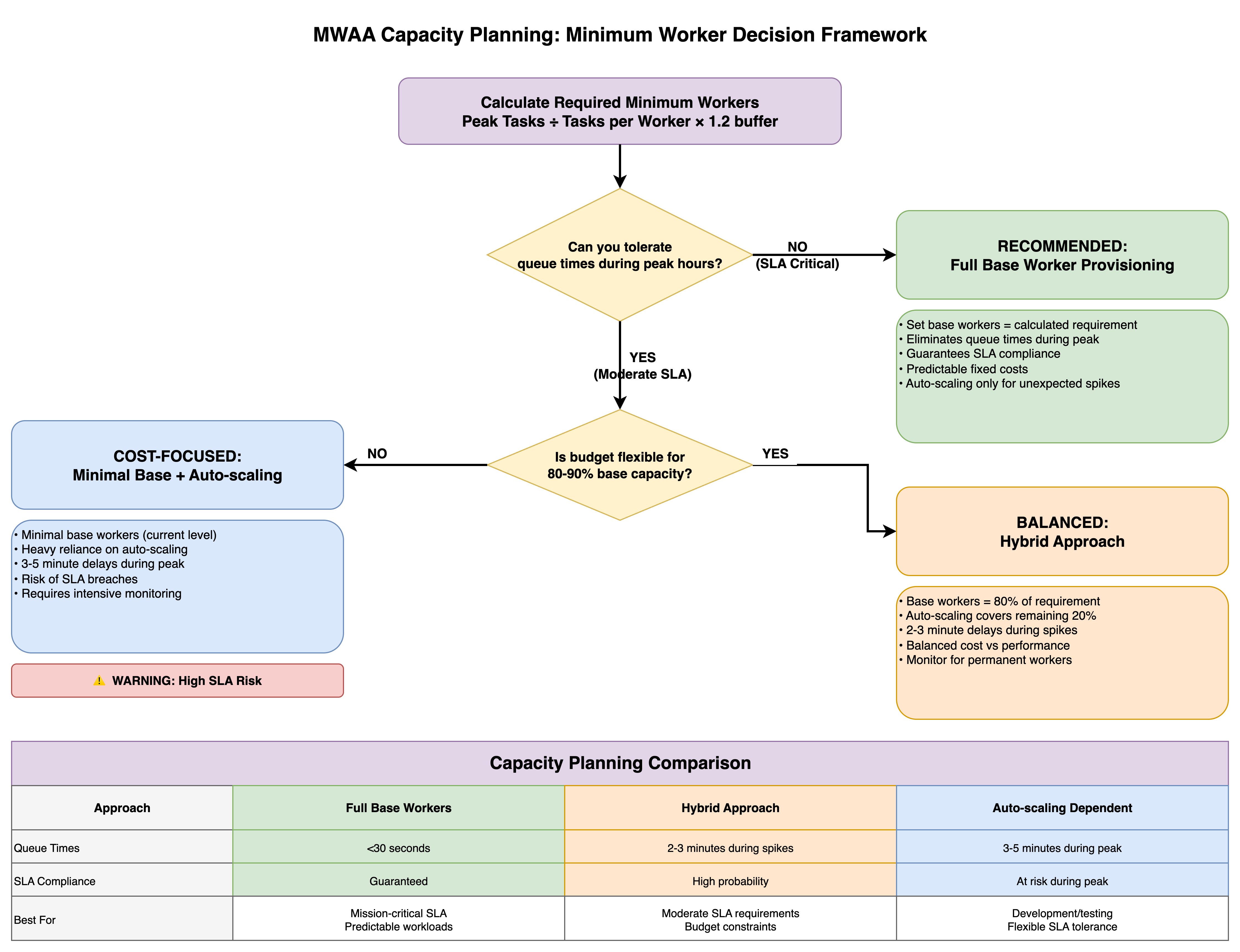
The framework presents three capacity planning approaches, each optimized for different organizational priorities.

The Full Base Worker Provisioning strategy (the conservative path) sets base workers equal to the calculated requirement, eliminating queue times during peak periods and guaranteeing SLA compliance with predictable fixed costs, while automatic scaling handles only unexpected spikes—ideal for mission-critical workloads with strict SLA requirements.

The Minimal Base + Automatic Scaling approach (the cost-focused path) maintains minimal base workers at current levels and relies heavily on automatic scaling, accepting 3-5 minute delays during peak periods and SLA breach risks in exchange for lower baseline costs, though this requires intensive monitoring and carries explicit warnings about high SLA risk.

The Hybrid Approach (the balanced path) provisions base workers at 80% of the calculated requirement with automatic scaling covering the remaining 20%, resulting in 2-3 minute delays during spikes while balancing cost against performance—suitable for moderate SLA requirements with some budget constraints.

The comparison table contrasts queue times (under 30 seconds versus 2-3 minutes versus 3-5 minutes), SLA compliance levels (guaranteed versus high probability versus at-risk during peak), and ideal use cases (mission-critical predictable workloads versus moderate SLA requirements with budget constraints versus development environments with flexible SLA tolerance), enabling teams to make informed provisioning decisions aligned with their operational requirements and financial constraints.
Key takeaway

Effective capacity planning prevents both under-provisioning (SLA breaches) and over-provisioning (cost overruns).

Capacity planning principles

  1. Calculate capacity needs BEFORE adding workload – Use peak task projections with 5-15% safety buffer
  2. Size minimum workers for peak demand – Don’t rely on automatic scaling for predictable loads
  3. Use automatic scaling only for unexpected spikes – Treat as safety net, not primary capacity
  4. Target 85-95% utilization during peak hours – Ensures headroom for unexpected growth
  5. Plan 5-15% headroom for unexpected growth – Production often differs from testing
  6. Monitor AdditionalWorkers metric – If active >6 hours daily, increase base workers
  7. Review quarterly + trigger-based assessments – Regular reviews plus immediate action on issues
  8. Balance cost and performance based on SLA criticality – Business impact justifies infrastructure investment

Success metrics

  • Queue efficiency: Average queue time <30 seconds during peak
  • SLA compliance: >99.5% of critical tasks complete on time
  • Resource utilization: 85-95% during peak hours (optimal efficiency)
  • Cost predictability: <10% variance in monthly worker costs

Conclusion

Capacity planning is not a one-time exercise. It’s an ongoing discipline. The framework we’ve outlined gives you a repeatable process: measure your current peak utilization through CloudWatch metrics, project growth based on incoming workloads, calculate the required workers with an appropriate safety buffer, and monitor continuously to catch drift before it becomes an outage.

The financial services scenario in this post illustrates a common reality: running at 100% utilization during peak hours leaves zero room for the unexpected. By sizing to 95% peak utilization with a modest buffer, the team gained the headroom needed to absorb volatility without risking their 7 AM market-open SLA.

Whether you choose full base worker provisioning for mission-critical pipelines, a hybrid approach for moderate SLA requirements, or lean on automatic scaling for development workloads, the right strategy depends on your business context, not a one-size-fits-all rule. Pair your capacity plan with the CloudWatch alarms and review triggers we covered, and you’ll catch capacity gaps early.

Combined with the optimization-first approach from Part 1, you now have a complete toolkit: diagnose before you scale, optimize before you provision, and plan before you deploy. Your MWAA environment and your on-call engineers will thank you.

To get started, visit the Amazon MWAA product page and the Amazon MWAA console page.

If you have questions or want to share your MWAA capacity planning, leave a comment.
About the authors

Boyko Radulov

Boyko Radulov

Boyko is a Senior Cloud Support Engineer at Amazon Web Services (AWS), Amazon MWAA and AWS Glue Subject Matter Expert. He works closely with customers to build and optimize their workloads on AWS while reducing the overall cost. Beyond work, he is passionate about sports and travelling.

Kamen Sharlandjiev

Kamen Sharlandjiev

Kamen is a Principal Big Data and ETL Solutions Architect, Amazon MWAA and AWS Glue ETL expert. He’s on a mission to make life easier for customers who are facing complex data integration and orchestration challenges. His secret weapon? Fully managed AWS services that can get the job done with minimal effort. Follow Kamen on LinkedIn to keep up to date with the latest Amazon MWAA and AWS Glue features and news.

Venu Thangalapally

Venu Thangalapally

Venu is a Senior Solutions Architect at AWS, based in Chicago, with deep expertise in cloud architecture, data and analytics, containers, and application modernization. He partners with financial service industry customers to translate business goals into secure, scalable, and compliant cloud solutions that deliver measurable value. Venu is passionate about using technology to drive innovation and operational excellence.

Harshawardhan Kulkarni

Harshawardhan Kulkarni

Harshawardhan is a Partner Technical Account Manager at AWS, Amazon MWAA Subject Matter Expert. Based in Dublin Ireland, he partners with Enterprise Customers across EMEA to help navigate complex workflows and orchestration challenges while ensuring best practice implementation. Outside of work, he enjoys traveling and spending time with his family.

Andrew McKenzie

Andrew McKenzie

Andrew is a Data Engineer and Educator who uses deep technical expertise from his time at AWS. As a former Amazon MWAA Subject Matter Expert, he now focuses on building data solutions and teaching data engineering best practices.

A guide to Airflow worker pool optimization in Amazon MWAA

Post Syndicated from Boyko Radulov original https://aws.amazon.com/blogs/big-data/a-guide-to-airflow-worker-pool-optimization-in-amazon-mwaa/

Optimizing the Airflow worker pool configuration in Amazon Managed Workflows for Apache Airflow (Amazon MWAA), the AWS fully managed Apache Airflow service, is an important yet often overlooked strategy for scaling workflow operations. Tasks queued for longer periods can create the illusion that additional workers are the solution, when in reality the root cause might lie elsewhere. The decision to scale isn’t always straightforward. DevOps engineers and system administrators frequently face the challenge of determining whether adding more workers will solve their performance issues or only increase operational cost without addressing the root cause.

This post explores different patterns for worker scaling decisions in Amazon MWAA, focusing on the task pool mechanism and its relationship to worker allocation. By examining specific scenarios and providing a practical decision framework, this post helps you determine whether adding workers is the right solution for your performance challenges, and if so, how to implement this scaling effectively.

Main patterns

This section discusses the most frequently seen problems that raise the question if adding additional workers would improve the health of your environment.

High CPU

Airflow serves as a workflow management platform that coordinates and schedules tasks to be run on external processing services. It acts as a central orchestrator that can trigger and monitor tasks across various data processing systems like AWS Glue, AWS Batch, Amazon EMR, and other specialized data processing tools. Rather than processing data itself, Airflow’s strength lies in managing complex workflows and coordinating jobs between different systems and services.

In Analytics and Big Data environments, there is a prevalent misconception that saturated resources automatically warrant adding more capacity. However, for Amazon MWAA, understanding your workflow characteristics and optimization opportunities should precede scaling decisions.

As you scale up your workflows, resource utilization of the Airflow clusters naturally increases. When workers consistently operate at full capacity, it may seem intuitive to add additional compute resources. However, this approach often masks underlying inefficiencies rather than resolving them.

For example, in Amazon MWAA if you are running a single task that is consuming 100% of the available CPU on your Amazon MWAA worker, adding additional workers will not resolve the problem as the task is not optimized nor split into smaller parts. As such, increasing the number of minimum workers will not bring the expected effect but will only increase the operating costs.

When your Amazon MWAA workers are consistently running above 90% CPU or Memory utilization, you’ve reached a critical decision point. Before taking actions, it is essential to understand the root cause. You have three primary options:

  1. Scale horizontally by adding additional workers to distribute the load.
  2. Scale vertically by upgrading to a larger environment class for more resources per worker.
  3. Optimize your DAGs and scheduling patterns to be more efficient and consume fewer resources.

Each approach addresses different underlying issues, and choosing the right path depends on identifying whether you are facing a capacity constraint, resource-intensive task design, or workflow inefficiency. For guidance on optimization strategies, please refer to Performance tuning for Apache Airflow on Amazon MWAA.

To monitor the CPUUtilization and MemoryUtilization on the workers, refer to the Accessing metrics in the Amazon CloudWatch console and choose the corresponding metrics.

  1. Select a time window long enough to show usage patterns.
  2. Set period to 1 Minute.
  3. Set statistics to Maximum.

Long queue time

Sometimes Airflow tasks are stuck in a queued state for a long time, which prevents DAGs from completing on time.

In Amazon MWAA, each environment class comes with configured minimum and maximum worker nodes. Each worker provides a pre-configured concurrency, which is the number of tasks that can run simultaneously on each worker at any given time. The behavior is controlled through celery.worker_autoscale=(max,min).

For example, if you have minimum 4 mw1.small workers, with default Airflow configuration, you will be able to run 20 concurrent tasks (4 workers x 5 max_tasks_per_worker). If your system suddenly requires more than 20 tasks to execute concurrently, this will result in an autoscaling event. Amazon MWAA will decide how to scale your workers efficiently, and trigger the process. The autoscaling process, however, requires additional time to provision new workers resulting in additional tasks in queued status. To mitigate this queuing issue, consider the following:

  1. If the CPU utilization on the workers is low, increasing the max value in celery.worker_autoscale=(max,min) can reduce the time tasks stay in queued state as each worker will be able to process more tasks concurrently. Airflow worker can take tasks up to the defined task concurrency regardless of the availability of its own system resources. As a result, the base worker may reach 100% CPU/Memory utilization before Autoscaling takes effect.
  2. If you do not want to increase the task concurrency on the workers, increasing the minimum worker count can also be beneficial because having more available workers allows a higher number of tasks to run concurrently.

Scheduling delays

Adding new DAGs can not only affect your system resources, but it can also create uneven scheduling patterns. Some DAGs may experience delayed execution because of resource competition, even when the overall environment metrics appear healthy. This scheduling skew often manifests as inconsistent task pickup times, where certain workflows consistently wait longer in the queue while others execute promptly.

When Amazon CloudWatch metrics show increasing variance in task scheduling times, particularly during periods of high DAG activity, it signals the need for environment optimization. This scenario requires careful analysis of execution patterns and resource utilization to determine if:

  1. While adding workers can help distribute the workload, this solution is most effective when the high utilization is primarily because of task execution load rather than DAG parsing or scheduling overhead. Adding more minimum workers will allow you to execute more tasks in parallel. For example, if you observe the value of AWS/MWAA/ApproximateAgeOfOldestTask to be steadily increasing, it means that the workers are not able to consume the messages from the queue fast enough. Additionally, you can also monitor the AWS/MWAA/QueuedTasks to identify similar patterns.
  2. Upgrading the environment class would provide better scheduling capacity. If the Scheduler is showing signs of strain or if you’re seeing high resource utilization across all components, upgrading to a larger environment class might be the most appropriate solution. This provides more resources to both the Scheduler and Workers, allowing for better handling of increased DAG complexity and volume. To validate the same, use AWS/MWAA/CPUUtilization and AWS/MWAA/MemoryUtilization in the Cluster metrics and choose Scheduler, BaseWorker and AdditionalWorker metrics.
  3. Restructuring DAG schedules would reduce resource contention.

The key is to understand your workflow patterns and identify whether the scheduling delays are because of insufficient worker capacity or other environmental constraints.

Anti patterns

This section showcases the most common anti patterns which make MWAA users think that adding more workers will improve performance.

Underutilized workers

When evaluating Amazon MWAA performance bottlenecks, it’s important to distinguish resource constraints and DAG design inefficiencies before scaling the environment.

Sometimes the Amazon MWAA environment has the capacity to run 100 tasks concurrently but your queue metrics (AWS/MWAA/RunningTasks) show only 20 tasks active most of the time with no tasks remaining in queued state. In such scenarios, you are advised to check Amazon CloudWatch for consistently low CPU and memory usage on existing workers during peak workload times. If this is confirmed, it is usually an indication of inefficiencies in DAG design, scheduling patterns, or Airflow configuration.

You have two primary options to address this:

1. Downsize: If you do not expect your workload to increase, it is safe to assume you have over-provisioned your cluster. Start by removing any extra workers first and finally resolve to downsizing your environment class.

2. Optimize: Fine tune your DAG scheduling and airflow configuration through Pools and Airflow configuration for concurrency to increase the throughput of your system.

Misconfigured Airflow configurations that create artificial bottlenecks

In Apache Airflow, performance bottlenecks often occur because of configuration settings, not actual resource constraints. At such times, DAG executions get delayed not because of insufficient compute, but because of incorrect concurrency configuration.

Efficient use of Amazon MWAA requires reviewing not only resource utilization for Workers and Schedulers but also concurrency configurations for artificially created bottlenecks. Sometimes one restrictive configuration prevents the scaling benefits of larger environment or additional workers. Always audit Airflow configurations if performance seems limited even when system metrics suggest spare capacity.

Important consideration: Amazon Managed Workflows for Apache Airflow (Amazon MWAA) does not automatically update the worker concurrency configuration when you change the environment class. This behavior is important to understand when scaling your environment. If you initially create an mw1.small environment, where each worker can handle up to 5 concurrent tasks by default. When you upgrade to a medium environment class (which supports 10 concurrent tasks per worker by default), the concurrency setting remains at 5 for in-place updated environments. You must manually update the concurrency configuration to take full advantage of the increased capacity available in the medium environment class.

Because of this you need to also update the Airflow configurations that control concurrency whenever you update the environment class. To update the concurrency setting after upgrading your environment class, modify the celery.worker_autoscale configuration in your Apache Airflow configuration options. This makes sure your workers can process the maximum number of concurrent tasks supported by your new environment class.

Other times, an Amazon MWAA environment can be constrained by max_active_runs or DAG concurrency controls instead of actual resource limits. These configuration-based throttles prevent tasks from running, even when the worker instances have available compute to handle the workload.

There is an important distinction between the two. Configuration limits act as artificial caps on parallelism, while true resource limits indicate that workers are fully utilizing their CPU or memory capacity. Understanding which type of constraint affects your environment helps you determine whether to adjust configuration settings or scale your infrastructure.

Adjusting Airflow configurations such as Pools, concurrency, max_active_runs solves performance problems without scaling workers. Some of the configurations you can use to control this behavior:

  1. max_active_runs_per_dag (DAG level): Controls how many DAG runs for a given DAG are allowed at the same time. If set to 2, only 2 DAG runs can run concurrently, even if there is plenty of worker capacity left. Extra runs queue, making the DAG executions slow even though workers are idle.
  2. max_active_tasks:Controls the concurrency field in a DAG definition (or setting at environment level) limits the number of tasks from the DAG running at any moment, regardless of overall system capacity or number of workers.
  3. Pools:Pools restrict how many tasks of a certain type (often resource heavy) can run at once. A pool with only 3 slots will throttle any tasks above 3 assigned to that pool, leaving workers idle.
  4. Execution timeouts and retries: If not tuned, failed tasks might fill up slots unnecessarily, stuck tasks can block worker slots and slow queue processing.
  5. Scheduling intervals and dependencies: Overlapping or inefficient scheduling may cause idle periods or excess contention for resources, affecting real throughput.

How Airflow configurations can override each other

Airflow has multiple layers of concurrency and scheduling controls. Some at the environment level, some at the DAG/task level, and others for pools. Sometimes more restrictive settings override more permissive ones, resulting in unexpected queue buildup.

DAG level vs Environment level: If “max_active_runs_per_dag” (DAG level) is lower than the environment-level “max_active_runs_per_dag” or system wide concurrency, the DAG setting is used, throttling tasks even if the environment could do more.

Task level overrides: Individual task definitions can have their own parameters like “max_active_tis_per_dag” which can cap runs per task and create a bottleneck if set lower than global settings.

Order of precedence: The most restrictive relevant configuration at any level (Environment, DAG, Task) effectively sets the upper bound for parallel task execution.

Setting Location Setting Effect on task throughput
Environment Level parallelism Max total tasks running on Scheduler
DAG Level max_active_runs Max simultaneous DAG runs
Task Level concurrency Max concurrent task for that DAG

Performance issues often resemble resource exhaustion, but actually derive from overly restrictive configurations. Audit all the preceding parameters carefully. You can loosen restrictive values step by step and monitor their effect before deciding to scale your cluster further. This approach ensures optimal and cost-efficient usage of your cloud resources without paying for idle capacity.

Slow resource depletion from memory leaks

A common scenario for memory leak or slow resource depletion in Amazon MWAA is when DAGs and tasks begin to fail or slow down over time. Scaling workers or increasing environment size does not resolve the underlying issue. This happens because the root cause is not a lack of capacity but rather an application-level leak that causes persistent exhaustion.

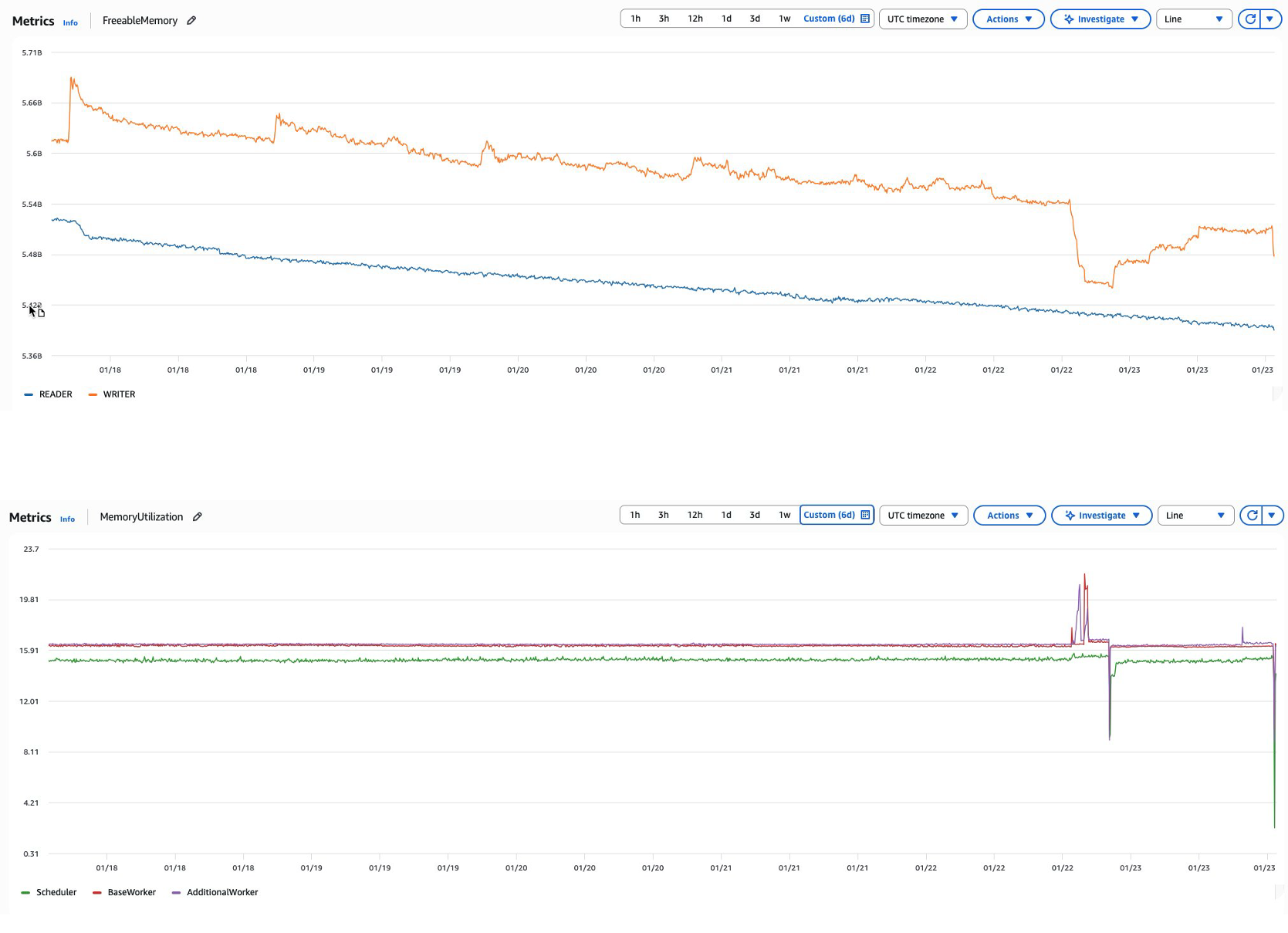
For example, as Airflow continuously runs tasks and parses DAGs over time, memory consumption can steadily increase across the environment. This might manifest as an Amazon MWAA metadata database experiencing declining FreeableMemory metrics despite consistent or even reduced workloads. When this occurs, database query performance gradually declines as memory resources become constrained for scheduler/worker & metadata database, ultimately affecting overall environment responsiveness since Airflow depends heavily on its metadata database for critical operations. This scenario is similar to how an application might create database connections without properly closing them, leading to resource exhaustion over time.

Graph: Declining FreeableMemory and MemoryUtilization

Common causes:

  1. Connection pool exhaustion: DAGs that fail to properly close database connections can lead to connection pool exhaustion and memory leaks in the database.
  2. Resource-intensive operations: Complex, long-running queries or XCOM operations against the metadata database can consume excessive memory.
  3. Inefficient DAG design: DAGs with numerous top-level Python calls can trigger database queries during DAG parsing. For instance, using variable.get() calls at the DAG level rather than at the task level creates unnecessary database load.

Recommended solutions:

  1. Implement Amazon CloudWatch monitoring: Establish Amazon CloudWatch alarms for FreeableMemory with appropriate thresholds to detect issues early.
  2. Regular database maintenance: Perform scheduled database clean-up operations to purge historical data that is no longer needed.
  3. Optimize DAG code: Refactor DAGs to move database operations like variable.get() from the DAG level to the task level to reduce parsing overhead.
  4. Connection management: Make sure all database connections are properly closed after use to prevent connection pool exhaustion.

By following the preceding recommendations you can maintain healthy memory utilization for the metadata database and maintain optimal performance of your Amazon MWAA environment without needing to scale workers.

Conclusion

The decision to add workers in Amazon MWAA environments requires careful consideration of multiple factors beyond simple task queue metrics. In this post, we showed that while adding workers can address certain performance challenges, it’s often not the optimal first response to system bottlenecks.

Key considerations before scaling workers include:

  1. Root cause analysis
    • Verify whether high CPU/memory usage stems from task optimization issues.
    • Examine if queuing problems result from configuration constraints rather than resource limitations.
    • Investigate potential memory leaks or resource depletion patterns.
  2. Configuration optimization
    • Review and adjust Airflow parameters (concurrency settings, pools, timeouts).
    • Understand the interaction between different configuration layers.
    • Optimize DAG design and scheduling patterns.

The most successful Amazon MWAA implementations follow a systematic approach: first optimizing existing resources and configurations, then scaling workers only when justified by data-driven capacity planning. This approach ensures cost-effective operations while maintaining reliable workflow performance.

Remember that worker scaling is only one tool in the Amazon MWAA optimization toolkit. Long-term success depends on building a comprehensive performance management strategy that combines proper monitoring, proactive capacity planning, and continuous optimization of your Airflow workflows.

In the next post, we discuss capacity planning and the steps you need to perform before adding additional DAGs in your environment so that you can plan for the additional load and make sure you have enough headroom.

To get started, visit the Amazon MWAA product page and the Performance tuning for Apache Airflow on Amazon MWAA page.

If you have questions or want to share your MWAA scaling experiences, leave a comment below.

About the authors

Boyko Radulov

Boyko Radulov

Boyko is a Senior Cloud Support Engineer at Amazon Web Services (AWS), Amazon MWAA and AWS Glue Subject Matter Expert. He works closely with customers to build and optimize their workloads on AWS while reducing the overall cost. Beyond work, he is passionate about sports and travelling.

Kamen Sharlandjiev

Kamen Sharlandjiev

Kamen is a Principal Big Data and ETL Solutions Architect, Amazon MWAA and AWS Glue ETL expert. He’s on a mission to make life easier for customers who are facing complex data integration and orchestration challenges. His secret weapon? Fully managed AWS services that can get the job done with minimal effort. Follow Kamen on LinkedIn to keep up to date with the latest Amazon MWAA and AWS Glue features and news.

Venu Thangalapally

Venu Thangalapally

Venu is a Senior Solutions Architect at AWS, based in Chicago, with deep expertise in cloud architecture, data and analytics, containers, and application modernization. He partners with financial service industry customers to translate business goals into secure, scalable, and compliant cloud solutions that deliver measurable value. Venu is passionate about using technology to drive innovation and operational excellence.

Harshawardhan Kulkarni

Harshawardhan Kulkarni

Harshawardhan is a Partner Technical Account Manager at AWS, Amazon MWAA Subject Matter Expert. Based in Dublin Ireland, he partners with Enterprise Customers across EMEA to help navigate complex workflows and orchestration challenges while ensuring best practice implementation. Outside of work, he enjoys traveling and spending time with his family.

Andrew McKenzie

Andrew McKenzie

Andrew is a Data Engineer and Educator who uses deep technical expertise from his time at AWS. As a former Amazon MWAA Subject Matter Expert, he now focuses on building data solutions and teaching data engineering best practices.