All posts by David Johnson

The Storage Fix DevOps Has Been Waiting For

Post Syndicated from David Johnson original https://www.backblaze.com/blog/the-storage-fix-devops-has-been-waiting-for/

A decorative images showing a hybrid cloud environment.

Developer operations (DevOps) engineers sit at the intersection of development and operations. Their job is to keep pipelines humming, environments consistent, and deployments on schedule, all while juggling uptime, costs, and compliance.

This balancing act leaves little tolerance for surprises. Unfortunately, storage from major cloud providers often delivers exactly that. Built to cover every use case from backups to analytics to streaming, general-purpose storage prioritizes breadth over focus. The result is complexity:

  • Tiering rules that shift data unexpectedly
  • Pricing models that change with every access pattern
  • Dependencies that ripple across services

For DevOps, this type of one-size-fits-all system means hidden costs, shifting performance, and integration headaches right when predictability matters most.

The good news: you don’t need to overhaul your entire stack to regain control. Adding a specialized, always-hot storage layer can resolve DevOps engineers’ biggest storage headaches without forcing major workflow changes.

This post is the second in our three-part series on how specialized storage helps every member of a cloud-native team, including developers, DevOps engineers, and site reliability engineers (SREs). Today, we’ll focus on the payoffs for DevOps engineers.

Storage that works the way DevOps does

For DevOps engineers, storage issues often show up in the middle of critical workflows. A change meant to speed deployments triggers cascading adjustments. A spike in access patterns turns into sprawling invoices and finance tickets. A misaligned rule blocks data right when pipelines need it most.

In the sections below, we’ll dig into how these problems derail day-to-day operations, and how purpose-built cloud storage removes the friction so DevOps teams can stay focused on building and delivering.

Free ebook: Why object storage is essential for AI workloads

Unlock faster development and simpler workflows—without surprise costs. Get our free ebook “Cloud Storage for the Cloud-Native Era.”

Get the Ebook

Migration without migraines

Swapping a storage layer usually comes with the fear of broken pipelines, incompatible APIs, or weeks of retraining. And the big three cloud providers compound this by tying services together so tightly that even small changes can ripple through deployments

That means a tweak meant to improve storage can unexpectedly force adjustments in compute, networking, or identity and access management (IAM). Now, you’re slowing down releases instead of speeding them up.

Specialized storage avoids this trap. With drop-in S3 compatibility and no tier juggling, adding it to your stack requires little more than updating an endpoint and credentials. Pipelines keep running, Terraform and Kubernetes scripts stay intact, and deployments continue smoothly, so storage upgrades feel like routine maintenance, not full migrations.

Invoices without inquisitions

Engineers shouldn’t have to be accountants. But with major cloud providers, storage costs often spike without warning when charges are tied to shifting access patterns, such as frequent reads, writes, or transfers. 

The result is sprawling invoices packed with egress fees, API surcharges, and delete penalties. Finance teams see the bill and demand answers. DevOps teams could spend hours untangling storage math instead of improving automation or hardening pipelines. Every unexplained charge turns into a ticket, and every ticket drags engineers away from engineering.

Specialized storage removes this ordeal. Flat, transparent pricing and no hidden penalties make costs easy to predict and explain. That clarity keeps tickets low and escalations rare. DevOps teams can walk into finance reviews with confidence, backed by numbers that are simple to explain.

Engineering without entanglements

Major cloud provider environments come with a maze of tiers, lifecycle policies, IAM rules, and cross-service dependencies. Managing these isn’t a one-time task; it’s a cycle of effort that eats into engineering time:

  • Writing: Defining lifecycle policies and IAM rules to control when data moves between tiers or who can access it.
  • Testing: Validating every rule to make sure it doesn’t archive active data, block critical access, or violate compliance requirements.
  • Maintaining: Updating policies as workloads evolve, with new buckets, new services, or shifting security mandates.
  • Troubleshooting: Debugging typos, misaligned automations, or unexpected interactions that can lead to outages, delays, or surprise costs.

For DevOps, every new policy is another layer of overhead and another chance for something to break. 

Specialized storage ends this cycle. With no lifecycle rules to script or tiers to monitor, you don’t have to spend hours debugging brittle policies. That reclaimed time goes back into what matters: strengthening automation, refining observability, and improving the pipelines your developers depend on.

Growth without gridlock

DevOps isn’t just about keeping today’s pipelines running; it’s also about ensuring infrastructure won’t collapse under tomorrow’s demands.

As organizations layer on AI/ML pipelines, streaming services, or analytics workloads, data volumes surge and access patterns become less predictable. General-purpose storage often struggles under these conditions, throttling performance and forcing DevOps engineers into troubleshooting slowdowns and capacity crunches whenever workloads outpace storage. 

Specialized storage meets these challenges. Its high throughput and penalty-free design scale with demand, so performance holds steady even as workloads expand. Whether supporting AI training jobs or streaming analytics, your infrastructure grows without bottlenecks—and without turning DevOps into crisis management.

Rethink your storage, not your stack

The demands on DevOps engineers aren’t slowing down. They’re expected to deliver speed, reliability, and cost control, all at once. The wrong storage layer makes that harder; the right one makes it easier.

Backblaze B2 was built to make DevOps engineers’ lives easier: 

  • Minimal changes: S3-compatible APIs work with Terraform, Kubernetes, ArgoCD, and more.
  • Predictable costs: Transparent pricing and little-to-no egress fees.
  • Simplified operations: Always-hot access, no tier juggling, no lifecycle headaches.
  • Future-ready: High throughput and AI-ready integrations.

You don’t have to rebuild your stack to gain these benefits. Just swap the storage endpoint, redeploy, and get back to engineering.

Tired of troubleshooting tiers or decoding invoices? There’s a simpler path forward. Explore how Backblaze B2 fits into your DevOps workflows, and how much smoother things run when storage isn’t slowing you down.

The post The Storage Fix DevOps Has Been Waiting For appeared first on Backblaze Blog | Cloud Storage & Cloud Backup
Why Cloud-Native Developers Need a Specialized Storage Layer

Post Syndicated from David Johnson original https://www.backblaze.com/blog/why-cloud-native-developers-need-a-specialized-storage-layer/

A decorative image showing several cubes on a gradient background.

Cloud-native developers move fast. Continuous integration and continuous development/deployment (CI/CD) pipelines, containerized environments, and growing performance demands leave little room for delays. Even small bottlenecks can slow momentum, and a common source of slowdown is storage.

Most cloud-native teams default to storage from major cloud providers because it’s convenient and deeply integrated with other services, such as compute, networking, and machine learning (ML). But that convenience isn’t always optimized for development velocity. These platforms prioritize flexibility for a wide range of use cases, not the consistency and speed that fast-moving dev teams need. 

Here’s the good news: Adding a specialized, always-hot storage layer can reduce friction and unlock faster, smoother development—without changing the tools you already use.

This post kicks off a three-part series on how specialized cloud storage benefits every member of a cloud-native team: developers, DevOps engineers, and SREs. 

First up: the developer.

Free ebook: Why object storage is essential for AI workloads

How do you balance scalability with performance while staying on budget? This ebook explores how object storage enhances every stage of the pipeline from collection to training to deployment, and provides real-world use cases.

Get the Ebook

When storage slows you down and how to fix it

When storage underperforms, it disrupts your development loop. Cold-tier delays, unpredictable time to first byte (TTFB), and inconsistent throughput take time away from building and shipping applications, or from supporting AI/ML workloads that depend on fast, consistent data access.

In the sections below, we look at how these issues show up in practice and how specialized cloud storage can help remove the roadblocks to faster development.

Build-test loops without the bottleneck

Fast feedback loops are the heartbeat of cloud-native development. Every delay in retrieving files, artifacts, or dependencies drags out build-test cycles and can also slow AI/ML workloads that rely on quick, repeated access to large datasets.

Delays often come from the way cloud providers structure tiered storage. Data is divided into hot, cool, and cold tiers. While cooler tiers cost less, they’re built for retention, not speed. When builds depend on files stored in these tiers, retrieving them adds latency.

Lifecycle policies compound this by automatically moving files into cooler tiers if they haven’t been accessed for a set period. When developers need those files again, they first have to retrieve them from a slower tier, adding latency and sometimes fees.

A specialized, always-hot storage layer eliminates these delays by removing tiers and retrieval hurdles altogether. All data stays instantly accessible, so artifacts and dependencies are always ready the moment they’re needed. Builds run without waiting for restores, tests execute without interruption, and feedback loops stay tight.

Consistent throughput, no tuning required

With general-purpose storage from major cloud providers, consistent performance doesn’t come out of the box. Developers are left to manage it themselves, often through manual tweaks such as file-size tuning or other trial-and-error adjustments.

But tuning only goes so far. Even if developers adjust file sizes or request patterns, those tweaks can’t overcome the built-in delays of tiered storage systems. To compensate, many teams add caching layers or complex configurations. Those workarounds may patch performance gaps in the short term, but they create their own set of burdens:

  • Extra rules and scripts: Moving data between tiers or maintaining caches often requires custom automation.
  • Added complexity: Each workaround becomes another system to monitor and maintain, increasing the risk of errors.
  • Slower workflows: Rather than focusing on development, teams burn time managing storage mechanics.

Specialized storage eliminates the need for tuning or caching altogether. With high-throughput performance available from the start, developers don’t have to waste time building or maintaining workarounds. No scripts, no caches, and no trial-and-error.

Predictable performance under real workloads

General-purpose cloud storage can stumble when workloads scale. Because storage is tightly coupled with compute, networking, and access controls in big cloud providers’ environments, conflicts between these layers can slow requests or, in some cases, cause downtime. 

These mismatches happen for several reasons:

  • Competing goals: Major cloud providers build storage to handle many use cases at once, but that broad design isn’t optimized for any one workload. Compute jobs, in particular, demand consistent speed. The result is a mismatch: infrastructure built for broad efficiency can struggle to deliver reliable performance when applications scale in production, or when AI pipelines push storage and compute simultaneously.
  • Complex rules: In big cloud provider environments, storage doesn’t operate in isolation. Access controls, security policies, and service dependencies pile up across layers, and they don’t always work in sync. A permission, routing choice, or automation can create unexpected bottlenecks when combined with other rules.
  • Network constraints: High egress and cross-region transfer fees discourage data from moving freely between services or locations. Teams may delay or limit transfers to avoid unexpected costs, but that hesitation creates bottlenecks when workloads need to pull data across clouds or regions.

Together, these issues create hidden instability. Performance that seems fine in testing can falter in production as heavier workloads expose bottlenecks and small delays ripple through applications. 

Specialized storage removes this uncertainty by eliminating the hidden conflicts that come from tightly coupled, general-purpose systems. With reliable, low-latency access that stays steady even under production load, teams don’t have to scramble to fix surprises mid-release. 

It’s time to rethink the storage layer

You don’t need to rip and replace your entire cloud strategy to get better performance. You just need to be strategic about which layers serve which purposes.

For cloud-native developers, that means choosing storage that keeps pace with your workflows, so you can move fast, stay in flow, and focus on code instead of configuration.

Backblaze B2 was built with developers in mind:

  • Always-hot access to every object.
  • S3-compatible APIs that work with your existing tools.
  • Enterprise-grade reliability with the best price to performance in the industry.

Because it plugs directly into the tools you already use, you can add Backblaze B2 to your stack without rewriting workflows or retraining teams. Instead of working around storage, you finally get storage that works with you.

Tired of babysitting your storage or coding around its quirks? There’s a better way. Explore how Backblaze B2 fits into your cloud-native stack, and how much faster things can move when builds run without bottlenecks, performance stays consistent, and new features ship without delay.

The post Why Cloud-Native Developers Need a Specialized Storage Layer appeared first on Backblaze Blog | Cloud Storage & Cloud Backup
Cloud Storage Myths Debunked, Part Four: Managing Multiple Clouds Is Too Complicated

Post Syndicated from David Johnson original https://www.backblaze.com/blog/cloud-storage-myths-debunked-part-four-managing-multiple-clouds-is-too-complicated/

A decorative image showing multiple types of storage media.

Today’s myth feels familiar, because it’s exactly what major cloud providers want you to believe:

Multi-cloud? Sounds like a recipe for chaos. Best stick with one and avoid the hassle.

On the surface, it sounds reasonable. The “big three” clouds promote their all-in-one ecosystems as seamless and unified. One provider, one bill, one console. That should make life easier, right?

Not so fast. The promise of simplicity often hides a different reality: deep complexity, rigid architecture, and vendor lock-in. For many cloud-native teams, what’s pitched as convenience ends up costing time, money, and agility.

This is the final post in our blog series debunking persistent myths about cloud storage. (You can read the first, second, and third articles in the series to get up-to-date.) And, if you’ve ever been told that multi-cloud is messy or risky, this one’s for you.

New Cloud Native Times Call for New Cloud Storage Approaches

Learn more about how the open cloud supports faster development, improved workflows, and reduced cost complexity in our free ebook, “New Cloud Native Times Call for New Cloud Storage Approaches.”

Get the Ebook

Integrated ≠ simple

The idea that one provider equals less overhead is seductive. But in practice, integration can mean entanglement. Instead of reducing operational drag, it creates a tightly woven web of interdependent services and proprietary systems, which makes changes slow and expensive.

The all-in-one trap

Big cloud providers’ platforms are sprawling by design. They’re built to meet every need under one roof. However, the supposed benefit of simplicity falls apart once you actually start using that provider’s full range of services. 

When it comes to storage alone, teams must navigate:

  • Multi-tier systems (hot, cool, cold) with different costs, speeds, and access methods, each requiring its own performance and cost configuration.
  • Complex lifecycle policies and scripts to automate data movement between tiers.
  • Intricate IAM setups to manage roles, policies, and permissions across services.
  • Proprietary APIs and tooling that create migration headaches and limit portability.
  • Console UIs and behaviors that change depending on region or storage class, adding to the learning curve.
  • Deep interdependencies across services, where a small change in storage can ripple through compute, networking, and security layers.

What starts as a unified experience quickly becomes a maze of shifting rules and unstable configurations. And the more deeply your architecture relies on these moving parts, the more frustrating your operations become.

Frustration, not flexibility

Not only is it tedious to manage all of this, but it can be risky. Miss a lifecycle rule, and you might incur unexpected fees. Misconfigure access policies, and you could lose visibility into or even access to your own data.

These aren’t edge cases. They’re everyday realities in cloud-native environments where time is tight, systems are complex, and DevOps teams are stretched thin. Here’s what that might look like in practice:

  • A developer spins up a test environment without realizing data is landing in a high-cost tier.
  • An SRE responds to a latency issue, only to discover the data lives in cold storage and restoring it generates retrieval costs and delays.
  • A backup job fails silently because of a permissions misconfiguration buried deep in nested IAM roles.

And when something breaks, support isn’t always fast or personal. Unless you’re a top-tier customer, you’re likely working through ticketing systems, documentation loops, or community forums.

These moments don’t just cause frustration—they drain time, inflate costs, and hinder your team’s ability to move fast with confidence.

Complexity isn’t a multi-cloud problem. It’s a design problem.

Let’s revisit the myth: Multi-cloud is too complicated.

It’s an understandable concern, but one that’s often based on frustration inside a major cloud provider’s ecosystem. When teams talk about complexity, they’re usually describing the friction that comes from navigating sprawling services, managing brittle configurations, and troubleshooting opaque policies within one provider.

The real issue isn’t how many clouds you use. It’s how much complexity one provider can introduce when you try to adapt, integrate, or scale. Vendor-specific tooling, tightly coupled services, and unpredictable costs create the illusion of simplicity—until you need to do something the platform didn’t anticipate.

That’s not a multi-cloud problem. That’s a design problem.

Making multi-cloud work for you

For many teams, multi-cloud isn’t a grand strategy, but something that happens organically. AI workloads move to GPU providers. Content gets delivered through specialized CDNs. Backups shift to more cost-effective and geographically separated storage. Whether by design or necessity, most modern architectures already span multiple clouds.

So the smarter question isn’t “Should we avoid it?” It’s “How do we make it sustainable without adding unnecessary complexity?”

That’s where Backblaze B2 comes in.

Backblaze B2 is purpose-built to make multi-cloud not only possible, but practical—for DevOps, SREs, and developers alike. It’s focused, interoperable, and refreshingly straightforward:

  • Always-hot storage: No tier juggling. No lifecycle scripts. Just fast, consistent access.
  • S3-compatible APIs: Seamlessly integrates with the tools and platforms you already use, such as Terraform, Kubernetes, ArgoCD, boto3, and more.
  • Streamlined IAM and UI: Control access and monitor usage without wading through layers of enterprise-grade configuration.
  • Free egress: Move data where you need it and when you need to, without the surprise charges that make multi-cloud cost-prohibitive.

Many teams start small with offloading archives, mirroring backup buckets, or feeding GPU pipelines for AI training. As modular architectures grow, Backblaze B2 scales with them, but without the rigidity or lock-in.

In fact, a 2025 Enterprise Strategy Group study found that many operational tasks, such as storage deployments, storage management, and integration with the hardware and software that they already used took up to 92% less time.

The simple interface contrasted sharply with other Cloud Service Providers’ interfaces that have confusing navigation and multiple options to sort through.

—Enterprise Strategy Group, “Analyzing the Economic Benefits of the Backblaze B2 Cloud Storage Platform,” May 2025.

Multi-cloud doesn’t have to be messy. With the right storage layer, it becomes your cleanest, most strategic advantage.

Want to dig even deeper?

Download the full ebook New Cloud-Native Times Call for New Cloud Storage Approaches to explore how modular, interoperable strategies are changing the cloud-native game.

The post Cloud Storage Myths Debunked, Part Four: Managing Multiple Clouds Is Too Complicated appeared first on Backblaze Blog | Cloud Storage & Cloud Backup
Cloud Storage Myths Debunked, Part Three: Onboarding Specialized Providers Is Too Hard

Post Syndicated from David Johnson original https://www.backblaze.com/blog/cloud-storage-myths-debunked-part-three-onboarding-specialized-providers-is-too-hard/

An illustration of computer screens.

Here’s a myth we hear again and again:

Integrating a new storage provider is too complicated. Migrating data, retraining teams, and reconfiguring tools will take too long and create too much risk.

It’s understandable. Data migrations have a reputation for being messy and disruptive. And let’s be honest, nobody wants to babysit infrastructure when there are products to build. For many teams, just the thought of switching cloud providers feels like a detour they don’t have time for.

But in reality, that fear is often bigger than the actual lift. If your workflows already use standard tooling like S3-compatible APIs, switching to a specialized provider is more like a well-marked exit than a hard left turn.

This is the third post in our series debunking persistent myths about cloud storage—check out the first and second posts—and why a best-of-breed, interoperable approach is actually less disruptive than sticking with legacy hyperscaler models.

New Cloud Native Times Call for New Cloud Storage Approaches

Learn more about how the open cloud supports faster development, improved workflows, and reduced cost complexity in our free ebook, “New Cloud Native Times Call for New Cloud Storage Approaches.”

Get the Ebook

Migration anxiety vs. reality

“Storage migration” can sound like it requires weeks of planning and an army of engineers. But if your apps are already using S3-compatible workflows, most of the heavy lifting is already done.

If you know S3, you’re already ready

Many specialized storage providers now support S3-compatible APIs, allowing teams to keep the tools, scripts, and services they already know, such as Terraform, Kubernetes, ArgoCD, boto3, and MinIO.

And because your teams are already familiar with the S3 API and related tools, retraining isn’t a hurdle. The same skills, scripts, and automation frameworks carry forward, keeping onboarding time minimal. In fact, most teams are surprised by how little they need to change to get started.

That means:

  • No need to learn a new SDK or storage interface
  • No retraining your DevOps team
  • No rewriting automation pipelines or batch jobs

In most cases, all it takes is updating your endpoint URL and refreshing credentials. The mental model stays the same, the tools stay the same, and your workflows continue as-is.

You don’t need to rip and replace

Downtime concerns are one of the biggest sources of hesitation when switching providers. But in practice, migrations to S3-compatible cloud storage providers rarely require full cutovers or risky, all-or-nothing switchovers. With a bit of planning, most teams handle migrations incrementally:

  • Start by migrating lower-risk datasets, such as backups or archives.
  • Validate configurations and permissions as data lands in the new system.
  • Slowly expand to production datasets as confidence grows.

Better yet, you don’t have to move everything at once. Many teams adopt phased transitions, running some buckets side-by-side or writing to both systems during the handoff to minimize risk. With a bit of planning and the right migration tools and guidance, you can keep operations stable while gradually shifting workloads at a comfortable pace.

Metadata isn’t a blocker

Migrating files without metadata continuity can break downstream systems, especially if your applications rely on timestamps or version tracking.

Fear not. S3-compatible cloud storage providers can preserve metadata during migration, including timestamps. That means your historical data stays intact and compliant with internal policies or regulatory needs, and you won’t need to reset or alter your data management policies.

Moving isn’t the risk. Staying locked in is.

Let’s flip the narrative. The real risk isn’t switching; it’s staying stuck.

Major cloud provider ecosystems are designed for lock-in. The deeper you go, the harder it becomes to leave. Features that look like conveniences, such as integrated IAM policies, tiered storage, and custom APIs, often become entanglements over time.

Each of these layers is built to reinforce reliance:

  • IAM rules tie access tightly to the provider’s own tooling.
  • Tiered storage creates dependencies on lifecycle rules and retrieval thresholds. 
  • Custom APIs mean even basic storage functions can require provider-specific logic.

And as you expand your usage—adding compute, networking, and security services—everything becomes interdependent. What starts as convenience evolves into constraint. Even small changes to your stack can trigger cascading reviews, system audits, or full reconfigurations.

The result? Innovation slows. Costs creep up. Flexibility disappears.

With a specialized provider, you break that cycle.

Specialized Doesn’t Mean Complicated

Specialized storage doesn’t complicate onboarding. It streamlines it. Solutions like Backblaze B2 are purpose-built to make this shift smooth and sustainable, without the trade-offs or surprises you might expect from switching providers.

  • S3 compatibility allows for seamless integration with the tools and workflows your team already uses.
  • Granular control means you can choose the tools and providers that work best for your architecture, not the ones bundled into a vendor’s ecosystem.
  • Metadata continuity is supported through features like custom upload timestamps, preserving file context during migration.
  • Transparent pricing ensures there are no hidden egress fees, transaction charges, or retention penalties to catch you off guard.
  • Hands-on support helps you plan, validate, and scale your migration with confidence and minimal disruption.

Breaking out of a single-vendor ecosystem may feel intimidating, but it’s often the fastest way to simplify operations, improve performance, and regain control over your cloud strategy.

The best part? Once you’ve made the move, you’re free to experiment. Multi-cloud strategies become more accessible. Your architecture becomes more modular. And your team can focus on building, not babysitting infrastructure.

Next Up: In the final post in this series, we’ll tackle Myth #4: Managing multiple clouds is complicated. (Spoiler: It doesn’t have to be.)

Want to dig even deeper? Download the full whitepaper New Cloud-Native Times Call for New Cloud Storage Approaches.

The post Cloud Storage Myths Debunked, Part Three: Onboarding Specialized Providers Is Too Hard appeared first on Backblaze Blog | Cloud Storage & Cloud Backup
Cloud Storage Myths Debunked, Part Two: Storage Isn’t a Big Enough Problem to Remediate

Post Syndicated from David Johnson original https://www.backblaze.com/blog/cloud-storage-myths-debunked-part-two-storage-isnt-a-big-enough-problem-to-remediate/

A decorative image showing devices on a cloud background.

Today’s myth might sound familiar:

Storage is a minor cost, so it’s not worth switching from major cloud providers.

It’s easy to see how this thinking takes hold. In many cloud-native projects, storage can be the last concern. Compute, networking, and database services often drive most of the costs. Storage? That’s just where your data sits.

But hidden fees, unpredictable retrieval charges, and surprising performance constraints make storage far more impactful than many teams realize—especially for cloud-native workflows.

This post is the second in our blog series unpacking four of the most common myths and misconceptions about specialized cloud storage—see the first post here—and why an interoperable, best-of-breed approach can enhance and streamline cloud-native app development.

New Cloud Native Times Call for New Cloud Storage Approaches

Learn more about how the open cloud supports faster development, improved workflows, and reduced cost complexity in our free ebook, “New Cloud Native Times Call for New Cloud Storage Approaches.”

Get the Ebook

Underestimate the importance of storage at your peril

Major cloud providers offer plenty of storage options, but the real costs aren’t always clear up front. 

The charges you don’t see coming

Between egress charges, API call fees, transaction costs, and minimum retention charges, even small changes in how your application moves or retrieves data can quickly inflate your bill.

What looked affordable at launch can snowball into sticker shock once traffic increases or new workloads start driving more data in and out of storage. A single spike in user activity or analytics queries can trigger thousands (or millions) of storage transactions, each billed individually.

These expenses add up fast, and they’re tough to predict.

The egress trap

Egress charges might be one of the best-kept open secrets among the “big three” cloud providers. Every time data leaves their environment—whether to a CDN, another cloud, or end users—egress fees kick in. And they aren’t trivial.

Frequent data transfers, a hallmark of cloud-native architectures, can quietly devour budgets. The big dogs know this. Once your data is deep in their ecosystem, pulling it out becomes financially painful.

This creates a subtle but powerful form of vendor lock-in, making it harder to shift workloads or storage to more specialized providers.

Vendor lock-in, by design

Major cloud providers bundle storage, compute, networking, and a long list of services into tightly coupled ecosystems. On paper, that integration offers convenience. In practice, it creates real friction if you ever want to move.

Even when using open standards like the S3 API, migrating workloads can require new tooling, careful planning, and extensive testing. Under tight deadlines, the mere prospect of switching providers can feel too risky to attempt.

It’s not just inertia; it’s engineered friction designed to keep you tethered.

Complex storage slows down everything

Bundling storage inside a big cloud provider’s stack might seem efficient, but it often creates fragile setups that slow teams down. Configurations get complicated fast:

  • Hot and cold storage tiers
  • Lifecycle rules
  • IAM policies
  • Interdependent compute pipelines

Every added layer increases the odds that something breaks, pulling engineers into troubleshooting instead of building.

Latency-sensitive workloads such as real-time analytics or streaming services are especially vulnerable. Even small missteps can ripple through the user experience.

And when those issues hit, teams scramble to patch things up, burning time and resources that could be better spent moving products forward.

AI workloads bring storage costs into sharp focus

AI-powered applications, from model training to updating retrieval-augmented generation (RAG) pipelines, put heavy demands on storage. These workloads hammer systems with high-throughput reads and writes.

Each refresh or update adds to your bill:

  • Delete penalties
  • Retention minimums
  • API call surcharges

When teams start rationing runs, batching updates, or delaying refreshes just to control costs, innovation slows.

Specialized storage keeps costs predictable and workloads agile

Unlike the “big three” cloud providers, who often hide complexity behind convenience, specialized cloud storage providers like Backblaze B2 take a more transparent approach:

  • Clear, predictable pricing means no surprise egress fees, retrieval costs, API charges, or deletion penalties.
  • Always-hot storage eliminates the need for lifecycle policies and tier management.
  • Open architecture means you stay in control—no proprietary hooks, no walled gardens, and no painful unwinding if your needs change down the road.

For cloud-native teams, this isn’t just a storage swap; it’s an operational upgrade. Streamlined management, lower risk, and transparent costs mean teams can focus on shipping new products and features, not decoding their storage bills.

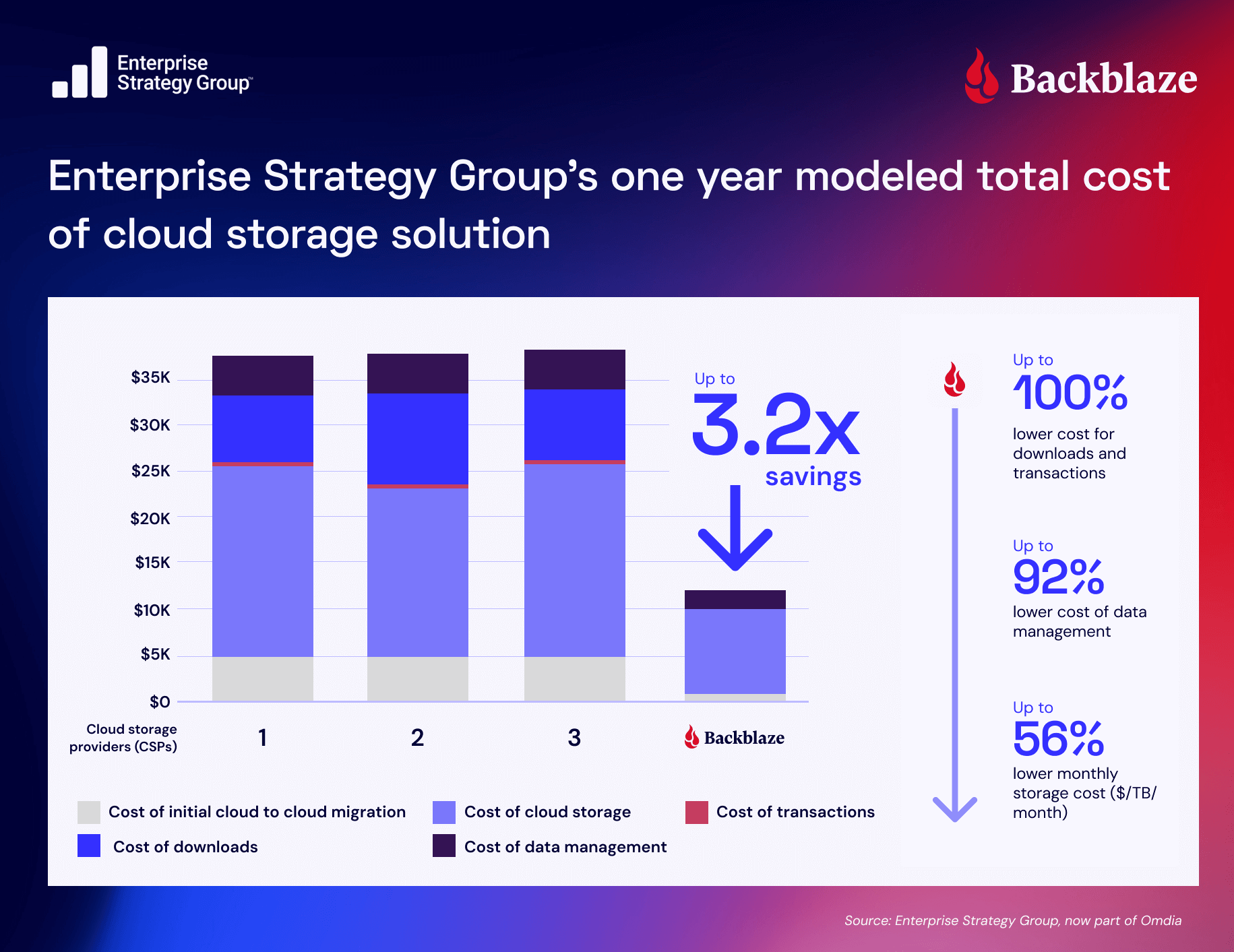
In fact, Enterprise Strategy Group released a comprehensive analysis of the economic benefits of Backblaze B2 in May 2025. The analysis concluded that Backblaze B2’s storage costs (monthly storage cost + cost of downloads + cost of transactions) were 3.1x to 3.2x lower than alternative cloud storage providers.

Simple, transparent, affordable pricing enabled Backblaze B2 users to spend far less on storage and use the savings to innovate and grow.
—Enterprise Strategy Group

What’s next for you and storage?

If you liked this article, check out the first in the series, “Cloud Storage Myths Debunked: Hyperscaler Storage Is Good Enough for Cloud-Native Apps.” And, stay tuned for the next post in this series, where we’ll tackle myth #3, addressing whether onboarding specialized providers is too hard. (It’s easier than you think.)

Want to dig even deeper? Download the full ebook “New Cloud-Native Times Call for New Cloud Storage Approaches.”

The post Cloud Storage Myths Debunked, Part Two: Storage Isn’t a Big Enough Problem to Remediate appeared first on Backblaze Blog | Cloud Storage & Cloud Backup

Cloud Storage Myths Debunked: Hyperscaler Storage Is Good Enough for Cloud-Native Apps

Post Syndicated from David Johnson original https://www.backblaze.com/blog/cloud-storage-myths-debunked-hyperscaler-storage-is-good-enough-for-cloud-native-apps/

A decorative image showing servers.

The big cloud providers already offer everything you need, including storage. So, why complicate things, right?
At first glance, that sounds convincing. Hyperscalers like AWS, Azure, and Google Cloud offer massive service catalogs, global infrastructure, and a wide range of storage options. For many teams, they seem like a convenient one-stop shop.

But in practice, things aren’t nearly as straightforward.

While hyperscalers offer extensive storage capabilities, their multi-tier systems prioritize versatility over optimization. The result? Hidden costs and performance headaches that cloud-native teams can’t afford to ignore.

The claim that hyperscaler storage meets all cloud-native needs because of scale and functionality is a stubborn myth, one of many that still permeate the development landscape.

This post kicks off a blog series tackling these myths and misconceptions about specialized cloud storage and what a best-of-breed, interoperable approach to storage and infrastructure entails.

New Cloud Native Times Call for New Cloud Storage Approaches

Learn more about how the open cloud supports faster development, improved workflows, and reduced cost complexity in our free ebook, “New Cloud Native Times Call for New Cloud Storage Approaches.”

Get the Ebook

Reading the fine print of hyperscaler storage

On the surface, hyperscaler storage looks comprehensive and capable. But dig a little deeper, and some underlying cracks start to show.

Premium performance isn’t the default

Hyperscalers can deliver high performance, but not without tradeoffs: 

  • They charge more. Premium tiers designed for workloads like analytics or streaming can cost five to eight times more than interoperable solutions.
  • They prioritize themselves. When hyperscalers face high-performance demands (e.g., AI workloads competing for GPUs and storage bandwidth), they tend to prioritize their own data centers. Smaller teams might have to navigate opaque processes to request higher performance, and their access to advanced optimizations can be limited. 
  • They play favorites. File size adds yet another layer of difficulty. Many hyperscaler storage systems handle large files more efficiently than small ones because of I/O overhead. Hyperscalers may help their biggest customers fine-tune configurations, but most are left to troubleshoot bottlenecks on their own.

Juggling tiers (and hoping nothing gets dropped)

Hot, cool, and cold storage options may look flexible on paper, but they require separate access controls, replication rules, and performance tuning. Teams are left juggling interfaces like AWS Identity and Access Management (IAM), scripting policies, and managing tooling just to keep systems functional.

And the more storage types you manage, the greater the chance for human error. A misplaced lifecycle rule or a mistyped IAM permission can result in:

  • Unexpected data unavailability
  • Delayed retrievals
  • Accidental deletions

When complexity undermines reliability

Keeping storage tied tightly to hyperscaler infrastructure may seem efficient—but it often results in brittle setups. Misaligned storage, compute, and access layers can lead to latency issues or even full-blown downtime.

Performance-sensitive applications like real-time analytics or video streaming suffer most. Even a small delay can ripple through the user experience and cause customer churn. To patch gaps, teams often layer on caches, fine-tuning, or quick fixes that only add technical debt.

Who has time to babysit storage?

Developers, DevOps, and site reliability engineers (SREs) are always racing to ship features, scale services, and maintain uptime. For cloud-native teams, optimizing storage isn’t usually at the top of anyone’s to-do list.

Let’s face it: proactively analyzing storage access patterns and configuring tiering rules takes time that cloud-native teams often don’t have. Many teams therefore operate reactively and address storage issues only after performance degrades or surprise bills arrive.

Support tickets don’t feel your pain

Finally, there’s support. Unless you’re a premium customer paying for top-tier service contracts, you’re often stuck with ticketing systems and community forums. That might suffice for routine issues, but when storage problems impact production workloads, waiting for responses through standard channels adds unnecessary stress and delays.

When one size doesn’t fit your cloud

Unlike hyperscaler storage that takes a one-size-fits-all approach, specialized cloud storage solutions directly tackle these challenges. Backblaze B2 is purpose-built to simplify storage for cloud-native teams:

  • A single, high-performance tier gives you instant access to all your data, with no tier juggling or lifecycle policies.
  • Predictable, transparent pricing means no unexpected fees or surprise retrieval charges.
  • S3-compatible APIs simplify integration, allowing you to plug Backblaze B2 directly into your existing cloud-native stack.

For cloud-native teams who value speed, simplicity, and cost control, specialized storage isn’t a complication; it’s a simplification. You get the performance you need, without the complexity you don’t.

Stay tuned for the next post in this series where we tackle Myth #2: Storage isn’t a big enough problem to remediate. (Spoiler: It is.)

The post Cloud Storage Myths Debunked: Hyperscaler Storage Is Good Enough for Cloud-Native Apps appeared first on Backblaze Blog | Cloud Storage & Cloud Backup

AI in the Open Cloud: Optimizing Storage for AI/ML Workloads

Post Syndicated from David Johnson original https://www.backblaze.com/blog/ai-in-the-open-cloud-optimizing-storage-for-ai-ml-workloads/

A decorative image showing a cloud and data graphs.

In a recent survey, a staggering 82% of IT leaders reported experiencing performance issues with their AI workloads within the past year, primarily due to bandwidth and data processing limitations. At the same time, 93% agreed that there’s a greater expectation within their organizations for IT leaders to minimize time-to-revenue for their AI-driven IT infrastructure.

These statistics highlight the predicament that most AI infrastructure and operations teams face today: the challenge of balancing scalability with performance while staying on budget with two of their most expensive operational expense (OpEx) line item costs. Organizations are looking for their AI initiatives to pay off, while IT teams struggle to overcome the unique data challenges they face across the AI model/workload lifecycle—including scalability, performance, and cost management.

Ebook: “Why Object Storage Is Ideal for AI Workflows”

Want to take a deeper dive into the world of object storage? Check out our latest ebook, “Why Object Storage is Ideal for AI Workloads,” and discover the advantages this architecture has to offer across the model lifecycle.

Get the Ebook

Choosing the Right Cloud-Based Object Storage Provider for AI Data: There’s A Lot to Consider

Choosing the right object storage provider is one of the most consequential decisions infrastructure teams make when building AI‑powered applications. A mis-step can introduce hidden costs, brittle performance, and operational friction that put the brakes on time‑to‑insight and undermine ROI. Selecting or transitioning between cloud-based object storage providers demands careful consideration, as capabilities can vary significantly. 

To ensure your AI infrastructure is robust and cost-effective, thoroughly evaluate providers based on several critical factors:

Low latency & high throughput

Performance is critical when selecting a cloud-based object storage provider for AI data. Low latency and high throughput in particular are key as they ensure rapid data access and processing. Low latency minimizes delays in distributing data to GPU clusters, dramatically enhancing training and inference efficiency. Meanwhile, high throughput prevents bottlenecks and improves overall system performance when working with the massive datasets typical of AI applications. 

Reliability & uptime

Reliability is foundational. Even minor downtime can severely impact productivity, halt critical AI processes, and delay strategic objectives. Providers must offer clear service level agreements (SLAs) ensuring high availability, typically at 99.9% uptime or higher. Redundant architectures, data replication across regions, and reliable backup strategies are essential to maintain continuous and uninterrupted data access. Finally, when selecting a cloud-based object storage solution, data durability is table stakes.

Transparent & predictable pricing

Budget predictability is crucial for infrastructure planning and growth forecasting. Complex pricing structures, minimum retention periods, hidden fees for data transfers (egress), API requests, and retrieval charges can quickly erode cost-effectiveness. Providers should offer clear, simple pricing structures with explicit, predictable costs for all services involved. Ideally, charges for common activities such as data retrieval, ingress, and transactions should be minimized or eliminated to facilitate efficient AI workflows without unexpected budget impacts.

Data accessibility

Rapid, consistent data accessibility is non-negotiable for AI applications, especially during model training and inference, where delays can significantly degrade performance and outcomes. Providers offering “cold” storage tiers may appear economical upfront but introduce retrieval latency that could hamper time-sensitive applications. Opting for “hot” or always-on storage tiers ensures data remains immediately accessible without incurring delays, essential for high-performance AI workloads. Data portability is another important consideration for AI workloads, as the ability to freely transfer data to the GPU cloud (or clouds) of your choosing greatly increases flexibility and reduces the risk of lock-in.

Scalability and elasticity

AI initiatives typically experience fluctuating data storage demands, requiring infrastructure that can seamlessly scale with growth. Effective providers offer a scalable storage model capable of handling rapid expansions in data volume without performance degradation or significant architectural changes. Elastic scalability ensures that infrastructure teams can effortlessly manage peaks in data collection, processing, and model training demands.

Security and compliance

Security considerations cannot be overstated, particularly when dealing with sensitive or regulated data. Providers must demonstrate rigorous security standards, including data encryption (at rest and in transit), comprehensive access controls, detailed audit logs, and certifications such as SOC 2 compliance. These measures collectively ensure data integrity, protect against breaches, and ensure compliance with regulatory standards.

Leveraging the open cloud: Making data storage a critical part of your AI workflows

The open cloud is a cloud architecture and philosophy rooted in interoperability, data portability, and freedom from vendor lock-in. Unlike proprietary cloud ecosystems that tether customers to a single provider’s toolsets, APIs, and infrastructure, the open cloud is designed to enable seamless integration across platforms, tools, and environments. It supports open standards and APIs, gives users full control over their data, and allows organizations to choose best-in-class services without being locked into a single ecosystem.

In practical terms, the open cloud supports flexible data movement across public clouds, private clouds, and on-prem environments. It gives organizations the autonomy to mix and match services (e.g., compute from one provider, storage from another) and shift workloads as business or technical needs evolve—without punitive costs or excessive reconfiguration.

As organizations accelerate AI adoption, the open cloud offers clear, strategic advantages across every phase of the AI lifecycle—from data ingestion and preprocessing to training, tuning, and inference.

How Backblaze can help

The Backblaze B2 Cloud Storage platform facilitates smooth integration across various AI tools and platforms, and with Backblaze B2 Overdrive, you get a product designed to move exabyte-scale datasets at up to terabit speeds without the eye-watering price tag. 

  • S3 compatibility: Backblaze’s S3-compatible API ensures easy integration with existing applications and frameworks like TensorFlow and PyTorch. 
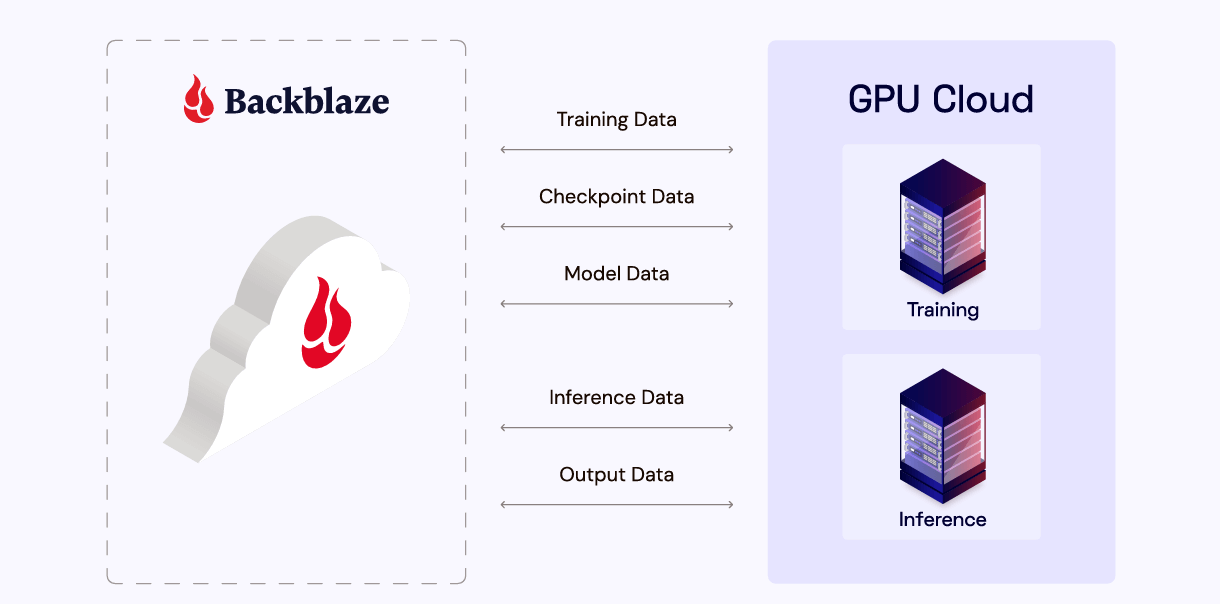
  • GPU compute environments: Backblaze partners with GPU providers like Vultr and PureNodal, enabling efficient data processing for training models on high-performance hardware without egress fees. 
  • MLOps platforms: Its compatibility with MLOps workflows allows users to streamline model lifecycle management while leveraging Backblaze’s reliable storage backbone. Together, these integrations simplify the AI deployment process and ensure maximum flexibility across cloud environments.

What makes B2 Overdrive different?

B2 Overdrive gets you all the above, plus it offers a specialized solution at a fraction of competitors’ costs. Here’s what you get:

  • Up to 1Tbps throughput: In other words, the kind of speed that lets you move petabytes of data fast without complex architecture. 
  • Unlimited free egress: Move as much data as you want, whenever you want, to wherever you want. Egress is totally free. 
  • Private networking support: Transfer data at maximum speed through secure private networking connections to your infrastructure.

It’s built on the foundation of our always-hot cloud storage infrastructure, with no minimum file size requirements, no deletion fees, and powerful features like Event Notifications so you can build responsive and automated workflows. We’ll be sharing some of the innovations under the hood in the coming months—so, stay tuned to our series on the engineering behind performance.

The post AI in the Open Cloud: Optimizing Storage for AI/ML Workloads appeared first on Backblaze Blog | Cloud Storage & Cloud Backup

Where and Why Object Storage Excels Throughout the AI Model Lifecycle

Post Syndicated from David Johnson original https://www.backblaze.com/blog/where-and-why-object-storage-excels-throughout-the-ai-model-lifecycle/

A decorative image showing a multi-paned screen backed up by a cloud.

No single technology has changed the way we use data quite like AI. From massive training sets to constant streams of checkpoint and inference data, AI applications are data intensive, to say the least.
Thankfully, there’s an answer. Object storage—with its scalability, flexibility, and cost-effectiveness—is uniquely suited to AI at every stage of the model lifecycle.

In this blog post, we’ll take a quick look at what object storage is, why it’s a perfect fit for AI workloads, and how Backblaze B2 Cloud Storage offers unique advantages for AI teams looking to innovate quickly, easily, and cost-effectively.

What is object storage?

Think of object storage as a giant, organized bucket for all your files. Instead of stuffing things into folders or breaking them into blocks, you just drop each file (an “object”), with a unique tag and some helpful notes (metadata), into your storage solution.

Unlike traditional file or block storage, object storage uses a flat address space. Each object is assigned a unique identifier and can be tagged with rich metadata, making it easy to search, retrieve, and manage at scale.

Because of this unique architecture, object storage is ideal for handling unstructured data—such as images, video, audio, text, and sensor data—which is the meat and potatoes of most modern AI workflows. Also, being cloud-based, object storage is inherently designed for massive scalability and accessibility over the internet (often via S3 API).

Ebook: “Why Object Storage Is Ideal for AI Workflows”

Want to take a deeper dive into the world of object storage? Check out our latest ebook, “Why Object Storage is Ideal for AI Workloads,” and discover the advantages this architecture has to offer across the model lifecycle.

Get the Ebook

Understanding AI’s data storage needs at each stage of the model lifecycle

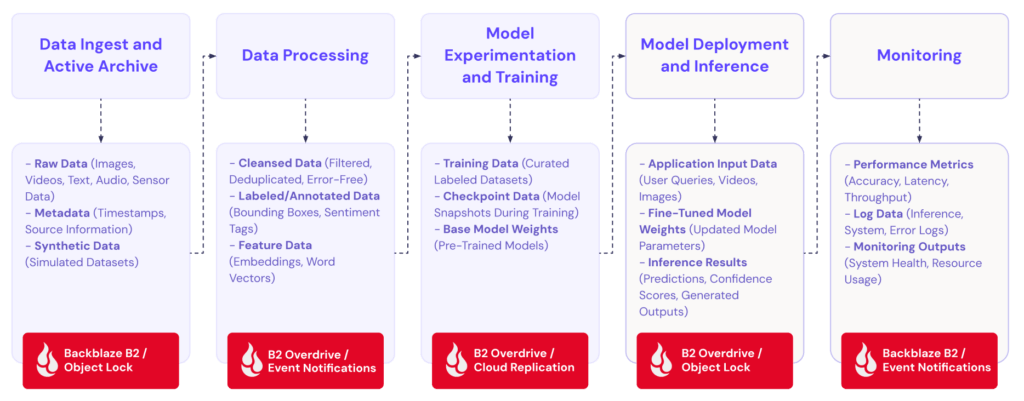
Before diving into the benefits of object storage, let’s first define and outline the AI model lifecycle. While some may slice and dice it a little differently, generally speaking, we can break the AI model lifecycle down into the following stages:

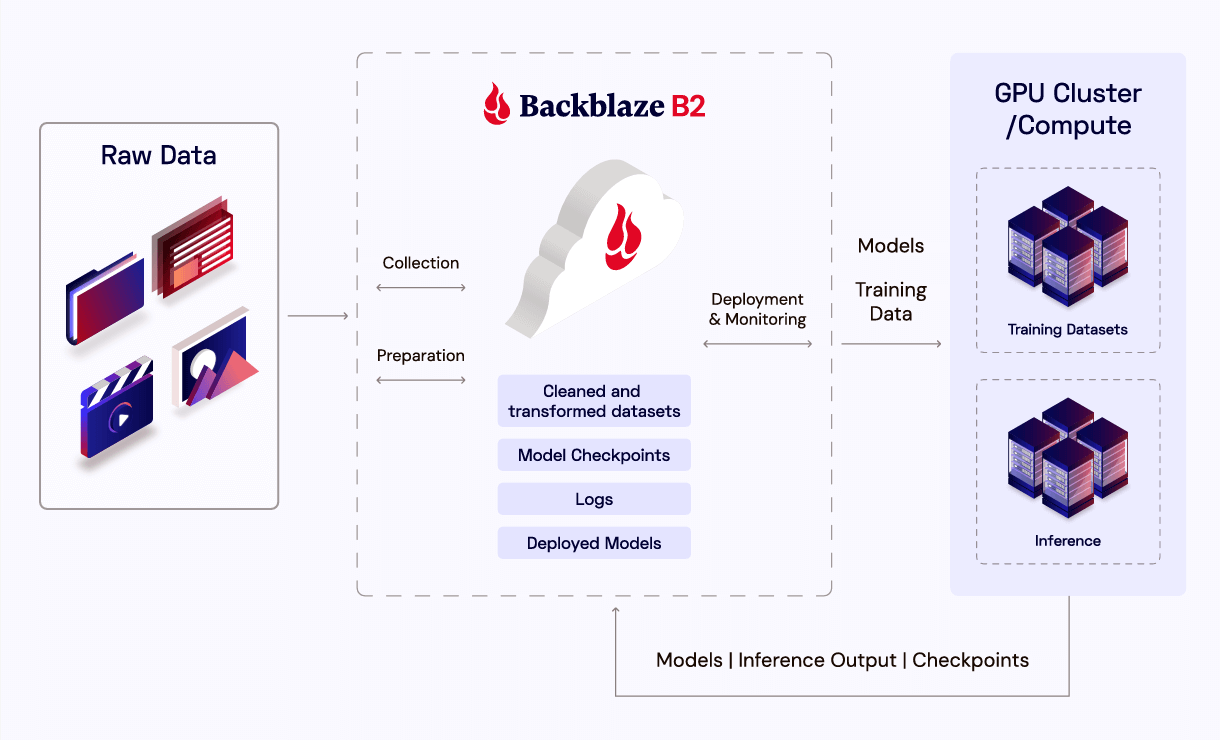
  • Data ingestion and collection: Massive, often petabyte-scale datasets are gathered from a diversity of sources.
  • Data preparation and storage: Raw data is cleaned, labeled, transformed, and stored for future retrieval and processing.
  • Model training: Data is fed into AI training algorithms, typically deployed across many nodes in a GPU cluster—usually requiring high throughput, parallel access, and lengthy processing times.
  • Deployment and inference: Trained models are deployed into live applications where they take in new data and make inferences based on that data.
  • Monitoring and archiving: Continuous monitoring generates substantial amounts of log data and performance metrics that must be versioned, stored, and archived for compliance or retraining purposes.

As you can see, each stage of the model lifecycle presents its own unique set of data demands—with each one requiring plenty of planning, work, and preparation. And at every one of these stages, matters of scale, speed, accessibility, and cost are mission-critical to a project’s success. 

Where object storage excels: Scalability for data ingestion and collection

Object storage offers virtually unlimited scalability for large, and ever-expanding datasets, making it an ideal solution for the earliest stages of AI development. With no need to create volumes or file systems, organizations can quickly start uploading data to object storage. In addition to this seamless scalability, object storage also shines in its ability to support a diverse range of structured and unstructured data types without the need for rigid hierarchies. In this way, AI teams can ingest all sorts of data to support whatever their unique application needs; and do it quickly and efficiently.

Flexible data preparation and storage

Cloud-based object storage systems are excellent for maintaining easily-accessible, version-controlled datasets that allow for lightning fast iteration and collaboration. Capabilities like version recovery (which allows teams to easily revert datasets to previous states with simple API calls) and concurrent access (which gives multiple team members the ability to work on the same datasets simultaneously without conflicts) are also key to the data preparation and storage phase of AI development.

Reliable, high-performance data storage for model training

For the model training stage of the AI lifecycle, object storage supports parallel access and high throughput, both of which are absolutely essential for GPU-intensive training workloads. Reliable shuttling of large datasets to GPU clusters, wherever they may be, is key for keeping things efficient. Meanwhile, streamlined storage of model checkpoints from those clusters gives teams peace of mind in knowing that a mid-training failure state will not place them all the way back at square one.

Plus, lifecycle management features allow completed or outdated training datasets to be automatically archived—reducing clutter and optimizing storage costs, all while keeping active training data easily accessible.

Efficient versioning for deployment and inference

AI models are always a work in progress. Once deployed and operational, they have to be routinely evaluated and tuned. To that end, object storage makes it easy to store and retrieve a range of valuable information, including model checkpoints, test results, and inference data.

Built-in versioning and object immutability features support reproducibility and audit trails, so you can always trace which data and models produced which results. Together, these capabilities make for robust and effective lifecycle management, significantly boosting reliability and compliance.

Cost-effectiveness and durability for monitoring and archiving

When in the field, continuous monitoring of AI models generates a whole lot of log data and performance metrics. Object storage automates the management of these resources through customizable lifecycle rules, automatically deleting or archiving out-of-date inference logs based on predefined timelines (e.g., after 30–180 days).

This significantly reduces the need for manual oversight, conserves engineering resources, and ensures that relevant performance data remains accessible for compliance and regulatory auditing.

Meanwhile, with the right vendor, object storage solutions can offer competitive pricing models—sometimes including the separation of compute from storage—to ensure cost-effectiveness throughout the late stages of the AI lifecycle. Finally, high durability (of 11 nines or more) and redundancies protect models and datasets which become increasingly valuable over time.

Backblaze B2: Cost-effective, high-performance object storage for your AI workloads

Backblaze B2 Cloud Storage takes all the inherent advantages of cloud-based object storage for AI workloads and amplifies them—through competitive, transparent pricing; reliable, high performance; and seamless integration and support to ensure your project is not only efficient and affordable, but most importantly, successful

  • Competitive, transparent pricing: One-fifth of the cost of most hyperscalers’ solutions, with no hidden costs and three times your total storage volume in free egress included. Plus, fully-transparent, predictable pricing models ensure your organization is fully aware and prepared for the costs associated with your applications. 
  • High performance and reliability: Upload speeds up to 30% faster than AWS S3 for many workloads, plus a 99.9% uptime SLA with 11 nines of durability, ensure always-hot, instantly accessible data for demanding AI workloads. 
  • Seamless adoption and integration, accompanied by expert support: With features like Universal Data Migration and no hidden delete fees, B2 Cloud Storage uniquely streamlines cost-effective data management for AI. Backblaze B2 also boasts S3 API compatibility for true plug-and-play functionality with leading AI and machine learning ops (MLOps) tools and technologies.

Plus, our truly agnostic solution allows organizations to freely and easily connect to any compute or GPU environment (or environments), free of vendor lock-in and fees. And in case you want some support along the way, our team of dedicated solution engineers are available to tailor and fine-tune your architecture and operations to best suit whatever the unique needs of your AI project may be. 

Optimize your AI lifecycle with cloud object storage from Backblaze B2

Data is one of the most important, and most challenging, aspects of AI development. And with their unprecedented data demands, traditional block and file storage systems frequently come up short in supporting modern AI applications. At the same time, legacy cloud storage solutions come with enormous burdens of cost, inflexibility, and the ever-looming threat of lock-in.

Cloud-based object storage offers the perfect solution to all these challenges—with the right mixture of performance, efficiency, and cost-effectiveness that AI projects need.It’s so-well-suited, in fact, that we’ve written an entire white paper on the subject! So, if you’re interested in taking a deeper dive into the topic, check out our ebook, Why Object Storage is Ideal for AI Workloads, today.

The post Where and Why Object Storage Excels Throughout the AI Model Lifecycle appeared first on Backblaze Blog | Cloud Storage & Cloud Backup

5 Cloud Storage Best Practices for AI Workloads

Post Syndicated from David Johnson original https://www.backblaze.com/blog/5-cloud-storage-best-practices-for-ai-workloads/

A decorative image showing various technology icons surrounding a globe.

As organizations race to innovate in AI, efficient, scalable, and cost-effective cloud storage has become key to their success. Whether you’re training massive models or deploying real-time inference pipelines, following best practices for AI storage will help you maximize performance, minimize costs, and ensure the integrity and availability of your most valuable AI asset—data.

In this blog, we’re going to take a look at five of those best practices, to help you get the most  out of your cloud storage solution when working with AI.

Ebook: “Why Object Storage Is Ideal for AI Workflows”

Wondering what type of data architecture makes the most sense for your AI initiatives? Check out our latest ebook, “Why Object Storage is Ideal for AI Workloads,” and learn all the advantages this approach to cloud storage offers across the entire model lifecycle.

Get the Ebook

1. Understand Your Data Lifecycle

You’ve assembled your training data set, loaded it into fast storage next to your GPU compute, and hit the button to start your training. What happens when the training run is complete? If you’re just going to delete that data set, then great—enter rm -r and simply move on.

If not, though, you’ll need to carefully consider the ongoing costs of storage. Leaving that dataset where it is will likely cost you many times over what you’d spend archiving it to a more cost-effective location. By fully understanding and mapping your data lifecycle—and distinguishing between active (e.g., during model training), and inactive data (e.g., archived/dated model versions)—you can manage your storage costs much more efficiently.

2. Check In Your Checkpoints

Training AI models is a delicate, resource-intensive process. Hardware failures, software bugs, and even power outages can derail week-long training runs, wasting precious time and compute resources. 

The two most important steps you can take to avoid these kinds of snags are: 

  • Frequent checkpointing: This means regularly saving a model’s state so you can pick the training process back up from the last checkpoint, rather than starting all over again at square one. 
  • Backup checkpoint data to the cloud: Storing checkpoint data on only local drives alone can be very risky. If the local storage fails, your checkpoints—and all the progress they represent—could be lost. That’s why you should always back up checkpoint data to secure cloud storage solutions as well. This dual approach ensures both speed (for quick recovery) and durability (for disaster recovery), letting you and your team rest easy knowing your hard work is being protected.

3. Keep Your Model Safe

With that same spirit in mind, don’t forget that your models require safekeeping, too. It takes a lot of time and money to train AI models, so protecting them—whether from hardware failure, human error, ransomware attack, or other threats—is absolutely paramount. To safeguard your models:

  • Use your cloud provider’s object lock to prevent accidental or malicious deletion.
  • Implement regular, automated backups of both model binaries and associated metadata.
  • Store critical models in geographically redundant locations for disaster recovery.

These few simple steps can go a very long way to ensuring that your valuable, hard-earned models remain safe and functional, even when things take a turn for the worse.

4. Don’t Lock Your Data Behind a Paywall

Let’s imagine you’re planning your next training run. When looking at cloud providers, you discover that you can realize significant savings by switching GPU compute providers. The only problem is, your current provider will charge you an arm and a leg to move the data to where it needs to be. There’s still a net gain from moving, but you lose significant margin by paying this exorbitant “exit toll,” known as an egress fee.  This is why, before committing to a storage provider, you should carefully review its pricing structures and fees, including the following:

  • Calculate the total cost of moving your data, not just storing it.
  • Consider multi-cloud strategies or providers that offer free or low-cost egress for AI workloads.

By understanding these costs upfront, you retain the flexibility to optimize your infrastructure as business needs evolve, and avoid the all-too-common trap of hidden fees.

5. Do the Mirroring Math: The Replication Equation

Let’s imagine you’ve found yourself a cost-effective storage option with a specialized cloud object storage provider. Even after finding the right solution with the right pricing structure and performance, there are considerations to be made. No matter how quickly you can download the data, if compute and data are in different locations there’s no escaping the fact that your GPUs might be spinning idle waiting for that data to arrive.

To avoid this predicament, break out your calculator and do the “mirroring math”:

  • Calculate the time and cost required to replicate (mirror) data to a location near your GPUs before training starts.
  • Weigh the benefits of lower storage costs against the potential delays and additional storage expenses during training.
  • For large or frequently accessed datasets, it may be worth pre-staging data in high-throughput storage close to your compute.

Ask yourself: Is it faster and/or cheaper to replicate the data upfront to be in close proximity to your GPUs, or does the time required to mirror the data and the additional storage cost during the training run outweigh the benefits? Intelligent data placement—balancing cost, performance, and proximity—ensures your AI workloads run efficiently and cost-effectively.

Building a Future-Proof AI Storage Strategy

The relentless pace of AI innovation demands a storage strategy that is agile, scalable, and cost-effective. Thankfully, the above five best practices can go quite a long way to ensuring the long-term success of your AI project

By understanding the entirety of your data lifecycle—checkpointing wisely, securing your models, avoiding data lock-in, and optimizing data placement—your team is laying the groundwork for sustained AI success. No matter what industry you’re in, these best practices will help to control costs, accelerate innovation, maintain compliance, and protect your team’s most valuable digital assets, in both the near and long term.

Ready to take a deeper dive dive into the topic of storage and AI? Check out our latest ebook, “Why Object Storage is Essential for AI Workloads.

The post 5 Cloud Storage Best Practices for AI Workloads appeared first on Backblaze Blog | Cloud Storage & Cloud Backup
Hyperscale Doesn’t Mean Hyper-Resilient

Post Syndicated from David Johnson original https://www.backblaze.com/blog/hyperscale-doesnt-mean-hyper-resilient/

A decorative image showing clouds connected by digital lines.

Last week, a misconfiguration in Google Cloud’s API infrastructure led to a major global outage. Not long before that, IBM Cloud suffered its second significant disruption in a matter of weeks. The incidents impacted everything from enterprise infrastructure to consumer-facing apps—Gmail, Spotify, Cloudflare, and countless internal systems built on top of these platforms.

Understandably, much of the coverage has focused on what went wrong. But the more important question might be: Why does something like this ripple so far and wide in a system supposedly built for resilience?

Single points of failure in a multi-service world

One might assume that as cloud providers scale, their reliability scales with them. However, these outages reveal a critical distinction: the difference between data-layer resilience and control-plane fragility.

The problem is, that robust data layer can be rendered useless if the “front door” is locked. Hyperscale cloud platforms have grown so interdependent and complex that a fault in one layer can bring vast swaths of unrelated services to a halt. This is the risk of vertical integration: When one vendor provides compute, storage, networking, and identity, a simple bug or misconfiguration can cascade through thousands of applications, not because the applications are fragile, but because they’ve all tied themselves to the same operational backbone. 

Redundancy, or the illusion of it?

In theory, cloud architecture encourages redundancy. But in practice, many companies—even those using multi-cloud strategies—tend to consolidate key services like authentication and orchestration with a single vendor. When that vendor’s services go down, it doesn’t matter that your data is replicated across three availability zones in the same data center. If you can’t log in to access it, your redundancy becomes purely theoretical.

After last week’s outages, some companies may re-evaluate their cloud strategy—but it’s not as easy as flipping a switch. True diversification is complex, requiring time, engineering resources, and a cultural shift toward designing for failure.

The reality: Fewer assumptions, more contingencies

The knee-jerk reaction to events like these is often to demand better SLAs, more transparency, or faster recovery times. Those are valid asks. But they might miss the deeper lesson: Assumptions about uptime and “X-nines” reliability are only helpful until the moment they aren’t. What users need are not just better guarantees, but clearer paths to self-determination when things break.

That might look like:

  • Designing for graceful degradation. What can your service do when its cloud provider is partially offline?
  • Reconsidering dependencies. Are you tying core logic to a provider’s proprietary APIs, or abstracting where possible?
  • Asking harder questions during vendor selection. Not just, “Can it scale?” but “What happens when it fails?”

Case study: Sardius Media bakes in redundancy

Sardius Media, a global video platform, built cloud redundancy into its DNA. Every piece of media is replicated across multiple S3 compatible storage providers—including Backblaze B2—using a proprietary “race” mechanism that always delivers the fastest, most reliable storage experience for end users. This architecture keeps files available, resilient, and protected, even if one provider has an outage.

  • No single point of failure: Content lives across multiple clouds
  • Best performance: Requests race to the fastest provider in real time
  • Durability, affordability, and global reach—Backblaze B2 wins the race up to 80% of the time globally
  • Sardius Media’s strategy proves that open, multi-provider storage isn’t just theory—it’s operational resilience in action.

What does that mean for you?

The answer isn’t to abandon the cloud, but to get smarter about how you use it. This means architecting systems that don’t just have data redundancy, but true operational independence.

Maybe that means replicating data to providers who specialize rather than consolidate. Or maybe it just means revisiting architectures that have become too reliant on invisible scaffolding.

What’s clear is this: reliability isn’t a feature you buy from the cloud. It’s a design philosophy that must be shared.

The post Hyperscale Doesn’t Mean Hyper-Resilient appeared first on Backblaze Blog | Cloud Storage & Cloud Backup

The Hidden Costs of AI: Why Your Cloud Bill is Exploding

Post Syndicated from David Johnson original https://www.backblaze.com/blog/the-hidden-costs-of-ai-why-your-cloud-bill-is-exploding/

A decorative image showing buildings of many sizes.

AI workloads don’t play by the same rules as your average enterprise app, and if you’ve looked at your cloud bill lately, you probably know that already. They have unique demands that make them especially vulnerable to hidden AI storage costs. Think: massive parallel GPU training, nonstop data shuffling, and frequent checkpointing.

The problem? Most cloud pricing models weren’t built for this kind of action. They were designed when workloads were a lot more predictable. So, when you run AI workloads on storage models built by hyperscalers, the costs add up quickly, and often invisibly. 

Download the ebook

Struggling to keep AI storage costs under control? Download our free ebook to discover how to optimize cloud storage for AI workloads—without compromising performance.

Get the Ebook ➔ 

Here are five reasons your cloud bill for AI workloads could spiral out of control:

1. Death by API call: Soaring costs in AI training pipelines.

AI workloads are packed with transactions. Every ingest of raw data, training round, inference batch, or logging step triggers API calls—PUTs, GETs, LISTs, and COPYs. If you’re training a foundational model like Deepseek v3 or Llama 2, you could be making millions of small transactions a day just by uploading all the raw data you require for training.

Each transaction might cost a fraction of a cent—but they add up. 

Example: Let’s assume a model needs 1 trillion pretraining tokens. Different data sources contribute varying numbers of tokens per file. For this exercise, let’s assume the following token counts:

  • Web pages: ~1,000 tokens/page (e.g., blog posts, articles)
  • Books: ~100,000 tokens/book (avg. 300 page novel)
  • Code repositories: ~500 tokens/file (e.g., GitHub scripts)
  • News articles: ~800 tokens/article
  • Academic papers: ~5,000 tokens/paper

A typical large language model (LLM) training mix might look like this:

Source % of tokens Tokens contribution Files required (approx.)
Web pages 40% 400B tokens 400M files
Books 20% 200B tokens 2M files
Code 15% 150B tokens 300M files
News articles 15% 150B tokens 187.5M files
Academic papers 10% 100B tokens 20M files
Total 100% 1T tokens ~909.5M files

If you’re ingesting 909.5 million files to AWS S3 at $0.005 per 1,000 PUTs (pricing as of April 2025), then you’d be charged:

  • 909,500,000 ÷ 1,000 = 909,500 units
  • 909,500 × $0.005 = $4,547.50

That’s $4,547.50 in just PUT transaction fees—for just collecting all the data you need for training. And that’s not counting GETs, LISTs, or any other operations that are necessary to support the full AI data pipeline.

2. The small file tax: How small files drive up AI cloud storage costs

Models trained on image slices, text tokens, or time-series data can create millions of small files. These not only trigger excessive API calls, but also suffer from the following: 

  • Some providers bill you by minimum object size (e.g., rounding all small files up to 128KB).
  • Every small object can trigger a full-priced transaction.
  • Frequent access means you’re paying for reads, not just storage.

This mismatch means your dataset of 100 million 10KB files could behave (and cost) like a much larger, high-churn workload.

3. Why cold storage fails for AI data workloads

Deep archive tiers may be cheap upfront, but they’re a poor fit for iterative AI workflows. Need to rehydrate training data to rerun a model? Get ready to wait hours and pay per retrieval. Need to delete? You could get hit with minimum retention penalties, and pay for that data as if you held onto it for 60, 90, or even 180 days. 

AI workflows are iterative. You’re not archiving log files; you’re experimenting, fine-tuning, and reprocessing constantly. Cold storage is rarely compatible with that.

4. Egress fees: The hidden cost of moving AI training data

Egress is a silent killer. It’s the fee you pay every time you move data out of cloud storage. In AI workflows, that’s often necessary for:

  • Sending training data to a GPU cluster.
  • Validating models on a local system.
  • Migrating to another provider.
  • Collaborating with partners across clouds or regions.

These fees scale linearly with data volume, which is a problem when your AI pipeline is pulling terabytes or petabytes per day. 

5. AI data lifecycle rules can backfire

You might set up lifecycle rules to move infrequently accessed data to cheaper tiers—sounds smart, right?

Except:

  • Lifecycle transitions often come with per-object fees.
  • Accessing those objects later triggers retrieval fees, or breaks performance expectations.
  • Deleting or overwriting too early triggers penalties.

And all of this assumes you even know your data’s “temperature” in advance—which, in AI workflows, changes day to day.

Smarter AI Storage

Your AI pipeline isn’t just a compute problem: It’s a data movement and storage orchestration engine. And that’s exactly where traditional cloud pricing models fall short. 

If your cloud bill is blowing up, it’s probably not just because you kicked off another training run. It’s the millions of GET requests, the silent egress charges, and those archive tier retrievals you didn’t plan for.

The good news? Once you know where the hidden costs are, you can start building smarter.

The post The Hidden Costs of AI: Why Your Cloud Bill is Exploding appeared first on Backblaze Blog | Cloud Storage & Cloud Backup

Vendor Lock-in Kills AI Innovation. Here’s How to Fix It.

Post Syndicated from David Johnson original https://www.backblaze.com/blog/vendor-lock-in-kills-ai-innovation-heres-how-to-fix-it/

A decorative image showing a hammer smashing a drive.

Everyone’s chasing the next breakthrough in AI, pouring money into bigger models and faster chips. But there’s one innovation killer no one’s talking about, and it isn’t compute limits—it’s vendor lock-in.

While you’re optimizing your algorithms, your infrastructure is quietly draining your budget and tying your roadmap to someone else’s agenda. Open cloud providers help you create an ecosystem where data flows freely, innovation isn’t throttled, and every component works harmoniously to drive progress. Yet, for many organizations, vendor lock-in with hyperscalers costs more than just dollars: it comes at the expense of the freedom to innovate on your own terms.

Today, I’m talking through how AI organizations end up locked in with hyperscalers and how to avoid that trap.

Download the ebook

Struggling to keep AI storage costs under control? Download our free ebook to discover how to optimize cloud storage for AI workloads—without compromising performance.

Get the Ebook ➔ 

The three pillars of AI infrastructure

At its heart, AI infrastructure rests on three essential pillars:

  • Compute: The engines powering your models and training processes.
  • Data management: The systems that capture, store, and organize the massive volumes of data your projects depend on.
  • Integration and flexibility: The ability to move data seamlessly between various platforms and cloud environments without being tied to a single provider.

When any of these pillars are compromised by vendor lock-in, the consequences are immediate and costly: 

  • Can you freely move workloads between environments? 
  • Are you paying premium prices for basic data transfers? 
  • Is your team spending more time managing infrastructure than building innovative solutions? 

These challenges directly hinder your team’s ability to deliver the AI breakthroughs your organization expects.

Understanding vendor lock-in

Vendor lock-in occurs when an organization becomes overly dependent on a single vendor’s products or services, making it difficult—or costly—to switch to alternative solutions. This dependency can manifest in several ways:

  • Proprietary technologies: When a vendor’s system uses exclusive formats or interfaces, integrating new tools becomes challenging.
  • Complex pricing: Long-term agreements with rigid terms and hidden fees may restrict flexibility and force you to absorb unexpected costs.
  • Ecosystem dependence: Relying on one provider’s suite of services can limit your ability to adopt innovative, best-of-breed solutions from other vendors.

In practice, vendor lock-in can hurt innovation by restricting your options, slowing down the pace at which you can adopt new technologies, and diverting resources to manage and maintain a closed system rather than driving creative breakthroughs.

The hidden costs of vendor lock-in

Imagine scaling your AI project only to discover, as Decart did, that egress fees essentially hold your data hostage. Their team needed to train models across multiple GPU clusters simultaneously—a scenario that would have incurred crippling costs with their previous provider. Or consider Grass Network, who found their ability to serve Fortune 1000 clients fundamentally undermined by their cloud vendor’s pricing structure, with egress and deletion fees that made their business model unsustainable at scale.

The pattern is clear: Organizations trapped in vendor-locked systems end up diverting precious resources—both financial and human—away from innovation and toward infrastructure management. This results in delayed training cycles, slower model iterations, and missed market opportunities as engineering talent gets consumed by working around limitations rather than building competitive advantages.

A holistic look at open AI infrastructure

While compute power and advanced analytics often grab headlines, the true strength of an AI system lies in the seamless integration of all its components. An open AI infrastructure can deliver:

  • Enhanced agility: With a flexible, multi-cloud approach, you can rapidly adopt new tools and technologies without being bound by a single provider’s limitations.
  • Optimized performance: When data flows effortlessly between compute clusters, storage systems, and analytics platforms, every part of your infrastructure can perform at its peak.
  • Cost efficiency: Transparent pricing and predictable billing ensure that hidden fees—like those associated with storage tiers and egress—don’t eat into your budget.
  • Future-proofing: By avoiding proprietary ecosystems, you build an infrastructure that is resilient and adaptable, giving you the freedom to experiment and innovate.

Rethinking storage as the strategic backbone

Among all the components, storage plays a uniquely critical role—it’s the circulatory system that keeps your data moving throughout the AI workflow. The right storage foundation doesn’t just warehouse data; it becomes a strategic asset that enables multi-cloud workflows, maintains cost predictability, and prevents vendor lock-in by allowing seamless integration with different compute engines, GPU clusters, and software platforms. Forward-thinking organizations are increasingly viewing storage not as a commodity, but as the linchpin of AI infrastructure strategy.

Backblaze B2: A foundation for multi cloud storage

Within this framework, Backblaze B2 serves as a robust storage foundation that transforms how AI teams approach multi-cloud workflows. Rather than trying to be everything to everyone, B2 Cloud Storage focuses exclusively on being the best at what matters most for your data: performance, scalability, and predictability.

It effortlessly scales from terabytes to petabytes, accommodating everything from raw training data to archived model outputs without performance degradation. S3 compatibility means it integrates easily with virtually any AI pipeline or tool. Perhaps most importantly, it keeps costs transparent and predictable with straightforward pricing that eliminates the “sticker shock” that plagues many AI projects.

A reliable, independent storage layer doesn’t just help you sidestep the pitfalls of vendor lock-in—it fundamentally changes how your team approaches innovation by removing the technical and financial barriers that traditionally constrain experimentation.

See the open cloud in action

Your company’s data is a powerful resource—learn how to harness it with an AI agent designed to generate meaningful insights. In this deep dive, Backblaze’s Pat Patterson and Jeronimo De Leon will demonstrate how to build an AI agent that can query, analyze, and generate insights from company-specific data—all powered by cost-efficient, scalable cloud storage.

Watch the Demo ➔ 

Charting a new course for innovation

Breaking free from vendor lock-in isn’t merely about cutting costs—it’s about reclaiming control over your entire AI infrastructure and accelerating your path to results. When every component, from compute to storage and integration, is designed to be open and flexible, your organization gains the freedom to experiment, iterate, and push the boundaries of what’s possible.

The most successful AI teams we’ve observed are those building on strong, multi-cloud-friendly foundations where data flows without friction or penalty. They’re the ones asking tough questions about their infrastructure choices today to ensure maximum flexibility tomorrow.

The post Vendor Lock-in Kills AI Innovation. Here’s How to Fix It. appeared first on Backblaze Blog | Cloud Storage & Cloud Backup
5 Ways Event Notifications Strengthens Your Backup Strategy Automatically

Post Syndicated from David Johnson original https://www.backblaze.com/blog/5-ways-event-notifications-strengthens-your-backup-strategy-automatically/

A decorative image showing a cloud with diagrammed icons around it.

“Our backups are good, right?”

If you’re responsible for backup operations, you’ve probably heard this question more times than you can count. While the answer should be a simple “yes,” staying on top of backup activities often involves checking multiple systems, reviewing logs, and maintaining manual tracking processes.

Today, I’m sharing five ways you can implement Backblaze Event Notifications into your data protection strategy to keep you and your team informed. If you’re interested in Event Notifications for other use cases, check out our posts for media production and application workflows.

Event Notifications for IT backup: Simplified automation

Event Notifications monitors your B2 Cloud Storage buckets for data changes that you designate—like completed backups, file deletions, or policy violations—and delivers real-time alerts where you want them. These alerts can trigger automated actions in any system that accepts webhooks, from PagerDuty to Zendesk to Slack channels and more.

Think of it as your storage system’s notification service: instead of discovering changes during routine recovery verification checks, you get instant awareness when something happens to the data in your buckets.

What are webhooks?

Webhooks, if you’re not familiar, are a way for applications to communicate with each other by sending data automatically based on specific events, e.g., HTTP POST requests with a JSON payload. What sets Backblaze Event Notifications apart is that it works with any service that accepts webhooks. This means you can integrate backup monitoring into your existing tools and processes, rather than being locked into specific vendors’ ecosystems.

5 ways to stay in the know with your backup strategy

Here are specific, practical ways you can take advantage of Event Notifications for immediate benefits to your backup and archive workflows.

1. Backup verification and reporting

When your backup software writes files to B2 Cloud Storage, Event Notifications helps verify successful completion of backup jobs. Each time a backup file lands in a bucket, you’ll receive a notification with key details like file size, timestamp, and backup job name. By feeding this data directly into communication tools like Slack, you can maintain comprehensive logs of backup activity without manual checks.

Backup monitoring workflow

Gone are the days of discovering backup issues hours or days later during routine reviews—you’ll know exactly when backups are uploaded. Teams can configure custom alerts for backup size thresholds, receive immediate confirmation of successful backups, and, with the help of Zapier, you can enable an alert when Event Notifications did not trigger, indicating a backup was not uploaded during a specified window.

2. Security and compliance monitoring

Event Notifications can help protect your backup data from unauthorized changes. Security teams can establish automated alerts for suspicious activities like mass deletions or modifications. These alerts integrate with your existing security information and event management (SIEM) systems to provide unified threat monitoring.

Security alert workflow

Beyond threat detection, Event Notifications enables preemptive policy enforcement. Teams can configure automatic notifications that guide employees when their actions might conflict with backup policies—like modifying file names, moving files, or even deletion. For persistent policy conflicts, managers can receive automated escalation alerts to address potential training needs or process gaps. This systematic approach helps maintain backup integrity through education and awareness before issues occur, rather than just detecting violations after the fact.

3. Storage management automation

Storage management becomes more efficient when Event Notifications feeds activity data directly to your management tools. As files are uploaded to and removed from your buckets over time, Event Notifications provides valuable data that helps you analyze storage utilization trends and backup data growth patterns.

Data usage monitoring workflow

This constant flow of information empowers teams to anticipate capacity needs and optimize resource allocation. Moving from reactive to proactive storage management helps control costs by notifying you when backups become larger on average.

4. Cross-bucket backup monitoring

Organizations using Cloud Replication or managing backups across multiple buckets gain valuable oversight through Event Notifications. This capability tracks file replication between regions and monitors backup activity across your entire footprint, giving you a comprehensive view of your distributed backup strategy. Teams can spot replication delays or issues immediately, rather than waiting for scheduled status checks.

Cloud Replication notification workflow

Understanding how data moves and grows across different locations ensures your distributed backup strategy performs as designed. Event Notifications makes it possible to track successful replications, monitor consistency between primary and replica buckets, and receive immediate alerts about any issues. This visibility is especially valuable for organizations maintaining geographic redundancy or managing complex multi-site backup strategies.

5. Integration with IT workflows

Event Notifications connects seamlessly with existing IT tools and processes through standard webhooks. Backup events can automatically flow into ticketing systems like Jira Service Management, monitoring dashboards like Grafana, or team communication channels like Microsoft Teams and Mattermost. This integration means teams can manage backup operations through familiar tools and processes, without needing to constantly switch between different interfaces or learn new systems.

Data integration workflow

The result is streamlined operations without the need for separate backup monitoring systems, ensuring backup activities receive proper attention within normal IT procedures. Teams can create ServiceNow tickets for failed backups, update Jira boards with backup status, or send notifications to Teams channels—all automatically and in real-time.

Why Event Notifications makes sense for backup teams

Managing backup operations has traditionally meant juggling multiple monitoring tools and hoping you catch issues before they impact recovery capabilities. Event Notifications transforms this approach by providing:

  • Automated awareness: Replace manual checks with instant visibility into bucket changes.
  • Enhanced security: Track backup data access and modifications as they happen.
  • Simplified monitoring: Feed backup activity data directly to your management tools.
  • Better operations: Free up time to focus on improving backup strategies rather than monitoring them.
  • Flexible integration: Adapt backup monitoring to fit your existing processes, not the other way around.

How it works with your environment

Unlike traditional backup monitoring solutions that often require specific software for notification handling, Event Notifications works with any service that accepts webhooks. This fundamental difference means you aren’t locked into specific vendors’ ecosystems or forced to use particular monitoring tools.

Event Notifications is designed for reliability with at-least-once delivery, ensuring critical backup events are never missed. This reliability is especially important for teams building automated workflows that require consistency and transparency in their backup monitoring.

The pricing model is straightforward and predictable: Backblaze B2 Reserve customers receive unlimited notifications at no additional cost, while pay-as-you-go customers get 2,500 notifications free each day and pay just $0.004 per 10,000 additional calls. This transparent pricing applies regardless of which services you’re connecting to, enabling teams to build comprehensive backup monitoring without worrying about unpredictable costs.

Ready to automate your backup monitoring?

If you’re working with a Backblaze account manager, Event Notifications are already enabled—just ask them for setup guidance. Other existing customers can contact our Support team to request access.

New to Backblaze? Contact our Sales team to learn how Event Notifications can strengthen your backup operations.
Once enabled, visit the Event Notifications section in your B2 Cloud Storage buckets to configure your alerts. For detailed setup instructions and best practices, check out our Event Notifications documentation.

The post 5 Ways Event Notifications Strengthens Your Backup Strategy Automatically appeared first on Backblaze Blog | Cloud Storage & Cloud Backup
Is Your Data Really Safe? How to Test Your Backups

Post Syndicated from David Johnson original https://www.backblaze.com/blog/is-your-data-really-safe-how-to-test-your-backups/

A decorative image showing icons related to backing up and restoring data.

Ransomware is now a billion dollar industry, and one of the best things any business can do to protect its bottom line is to back up. But, it’s important to remember that backups are only the first step in the process—when you are affected by a ransomware attack, natural disaster, or even human error, you’ll then need to restore. 

As your business scales and becomes more complex, so does your backup and restore process. You’ll have more types of data to restore, on more networks and devices, with more people involved at every step of the way. 

The best way to make sure your backups are effective? Test them regularly. Let’s talk about why and how. 

Good reasons to test your backups

By regularly testing your backups, you can improve your chances of a successful recovery and minimize the impact of data loss. Here are several reasons why regular backup testing is crucial:

  1. Data integrity verification: Testing ensures that your backups are accurate and complete. A failed test might reveal corrupted files or missing data that could lead to significant losses.
  2. Recovery process validation: By simulating the recovery process, you can identify potential bottlenecks or issues in your restoration procedures. This ensures that you can quickly and effectively recover your data in case of a disaster.
  3. Disaster readiness assessment: Regular testing helps you assess your overall disaster recovery plan. It reveals any weaknesses or gaps that need to be addressed to ensure business continuity and to meet recovery time objectives.
  4. Compliance adherence: Many industries have strict data retention and backup requirements. Testing helps you demonstrate compliance with these regulations. 
  5. Cyber insurance standards: Cyber insurance adoption is increasingly important for businesses, and many cyber insurance providers focus both on helping their clients prepare for ransomware attacks and recovery after the fact. As a result, many require regular backup verification testing and reporting. 
  6. Peace of mind: Knowing that your backups are reliable and tested can provide peace of mind and reduce stress during a crisis.
  7. Early detection of issues: Testing can uncover problems with your backup software, hardware, or processes early on, allowing you to address them before they lead to more significant consequences.

In short, regular backup testing not only confirms that your data is properly backed up, but also ensures that you’re meeting recovery point objectives (RPO), have key features like immutability configured properly, and supports overall business objectives.

Ransomware and backups

In addition to the above reasons, it’s important to note the growing trend for ransomware bad actors to specifically target backups. Veeam’s 2024 Ransomware Trends Report shows that 96% of attacks focus on backup repositories with the bad actors successfully affecting the backups in 76% of cases. Elsewhere, Sophos reports in instances where backups were compromised, ransomware demands doubled, and recovery costs were eight times higher. 

How to test your backups

Testing device backups is crucial to ensure data integrity and recoverability in case of loss or damage. Here are some effective methods:

1. Manual restoration tests

  • Regularly restore files: Select random files from your backup and restore them to a different location. Verify that the restored files are identical to the original files.
  • Test system restore: If your backup includes system images, periodically restore them to a separate partition or virtual machine to ensure they function correctly.

2. Automated testing tools

  • Backup software features: Many backup solutions offer built-in testing features. These tools can automatically verify the integrity of your backups and alert you to any issues. Restore services like Cloud Instant Backup Recovery can also provide valuable insight and support before, during, and after ransomware events. 
  • Third-party verification tools: Consider using specialized tools designed for backup verification. These tools can provide more in-depth analysis and reporting.

3. Simulated disaster scenarios 

  • Create a test environment: Set up a simulated disaster environment, such as a corrupted hard drive or a system failure.
  • Attempt recovery: Try to restore your data from the backup to the simulated environment. This will help you assess the effectiveness of your backup and recovery procedures.

4. Cloud-based backup testing for different recovery scenarios

  • Restore workstations: If you use cloud backup for your workstations, test restoring your files to a new device. This will show the functionality of the cloud backup service and ensure that your data can be accessed and restored successfully.
  • Restore server or network data: In addition to endpoints, you’ll also want to restore your servers or networks to different business locations. This lets you pressure test the cost of restores to account for things like hidden fees, and to ensure functions like immutability are properly configured.   

5. Regular backup verification

  • Check file integrity: Regularly verify the integrity of your backup files using checksums or hash functions. This will help detect any corruption or damage that may have occurred.
  • Review backup logs: Monitor your backup logs for any errors or warnings that might indicate issues with the backup process.

By following these methods, you can ensure that your device backups are reliable and that you can recover your data effectively in case of a disaster.

The human element

Don’t forget that this includes things like establishing where and how you’ll communicate if, for instance, company email is offline. It’s also important to designate incident managers to streamline decision making and ensure that essential personnel have the access and permissions they need. 

How cloud storage can help

Store your backup data in readily accessible, hot storage. This minimizes retrieval times during a disaster, enabling faster recovery of critical applications and data. 

By implementing a robust backup strategy that incorporates the 3-2-1 backup rule (or, the more robust, and increasingly enterprise standard 3-2-1-1-0 method), immutability, version control, and cloud storage, you can ensure the protection of your critical data against various threats. And, by testing frequently, you can rely on the fact that those backups—and your team—are ready to get your business back online as soon as possible.

The post Is Your Data Really Safe? How to Test Your Backups appeared first on Backblaze Blog | Cloud Storage & Cloud Backup

Five Tips for Creating a Predictable Cloud Storage Budget

Post Syndicated from David Johnson original https://www.backblaze.com/blog/calculate-cost-cloud-storage/

A decorative image showing buildings, data, and icons indicating cost.

Editor’s Note

This post has been updated since it was originally published.

With spending on public cloud services expected to double by 2028, many businesses are looking for ways to cut cloud costs—or at least gain predictability in their spend. Forecasting cloud storage costs should be straightforward once you know what to look for.

Here are five tips you can use when doing your due diligence on the cloud storage vendors you are considering. The goal is to create a cloud storage forecast that you can rely on each and every month.

Tip 1: Navigate tiered pricing structures carefully

Many cloud providers still use tiered pricing structures, which can be misleading if not carefully understood. For example:

AWS S3 Storage Pricing Example

For this post, we’re comparing with hypothetical data stored in AWS S3’s U.S. East Region (N. Virginia) using pricing available at the time of publishing. Note that many factors may affect your final price, including selecting a different region, choosing a different storage tier, etc.

  • First 50 TB/month = $0.023 per GB
  • Next 450 TB/month = $0.022 per GB
  • Over 500 TB/month = $0.021 per GB

In order to receive lower pricing, you have to reach a specific amount of data stored. But, the lower rate only applies to data above the threshold for that tier. In other words, you don’t get a discount on the cumulative amount—each pricing tier is reflected in the data you’re storing. 

The mistake sometimes made is estimating your entire storage cost based on the level for the total data stored. For example, if you had 600TB of storage, you could wrongly calculate as follows:

600,000GB x $0.021 = $12,600/month

When, in fact, you should do the following:

(50,000GB x $0.023) + (450,000GB x $0.022) + (100,000GB x $0.021) = $13,150/month

That was just for storage. Make sure you consider the tiered pricing tables for data retrieval, and API transactions as well.

Tip 2: Don’t choose the wrong storage class

Many cloud providers, especially hyperscalers, now offer a wider array of storage classes than ever before. The idea is that you can trade service capabilities for lower costs. If you don’t need immediate access to your files or don’t want data replication or 11 nines of durability, you can choose to downgrade your service and gain cost savings. The biggest problem with this method is that you have to know what you are going to do with your data to pick the right service—as well as correctly anticipate future business needs—because mistakes can get very expensive. For example:

  • You choose a low cost, cold storage tier that takes hours or days to restore your data. What can go wrong? You need some files back immediately (if, for example, your backups are corrupted by ransomware) and you end up paying 10-20 times the cost to expedite your restore.
  • You choose one storage class and decide you want to upload some data to a compute-based application or to another region—features not part of your current service. The good news? You can usually move the data. The bad news? Even if you’re transferring within the same cloud storage company’s infrastructure, you’re often charged a transfer fee to move the data because you didn’t choose the right storage class when you started. These fees often eradicate any “savings” you had gotten from the lower priced tier.

Basically, if your needs change as they pertain to the data you have stored, you will pay more than you expect to get your data where you need it to be.

Tip 3: Don’t pay for deleted (or modified) files

Some cloud storage companies have a minimum amount of time you are charged for storage for each file uploaded. Typically this minimum period is between 30 and 90 days. You are charged even if you delete the file before the minimum period. For example (assuming a 90 day minimum period), if you upload a file today and delete the file tomorrow, you still have to pay for storing that deleted file for the next 88 days.

This “feature” often extends to files deleted due to versioning. If you set your system to keep three versions of each file, with older versions automatically deleted, you end up paying for those deleted versions for the full minimum duration.

In a typical backup workflow, let’s say you are using a cloud storage service to store your files and your backup program is set to a 30 day retention. That means you will be perpetually paying for an additional 60 days worth of storage (for files that were pruned at 30 days). In other words, you would be paying for a 90 day retention period even though you only have 30 days worth of backups.

Tip 4: Beware of hidden minimums

As the cloud storage market has matured, pricing models have become more complicated. To create an accurate budget, it’s crucial to understand all potential cost components, including some that might not be immediately obvious. Here are two key areas to examine:

  1. Minimum monthly charges: Some providers charge a set fee regardless of how little you store. For instance, you might pay for 1TB even if you only use 100GB.
  2. Minimum file sizes: Some services round up small files to a minimum billable size, often 128KB. While this might seem insignificant, it can add up quickly if you have millions of small files.

Tip 5: Be suspicious of the fine print

Misdirection is the art of getting you to focus on one thing so you don’t focus on other things going on. Practiced by magicians and some cloud storage companies, the idea is to get you to focus on certain features and capabilities without delving below the surface into the fine print. (And, sometimes the prices this technique generates feels like someone has pulled a rabbit out of a hat—to your company’s detriment.)

Read the fine print and as you scroll through the multi-page pricing tables and linked pages of all of the rules that shape how you can use a given cloud storage service. Stop and ask, “What are they trying to hide?” If you find phrases like: “We reserve the right to limit your egress traffic,” or “New users get free usage tier for 12 months,” or “Provisioned requests should be used when you need a guarantee that your retrieval capacity will be available when you need it,” take heed. 

And, even if it seems like you can turn the tables and use things like free credits in the short term, remember that you’ll want to have a plan for your long-term infrastructure when those credits run out as well. 

How to build a predictable cloud storage budget

As organizations increasingly rely on cloud storage for everything from day-to-day operations to long-term data archiving, the ability to accurately forecast and control these costs can significantly impact overall IT budgets and business planning.

The first place to start is data storage as it’s generally the easiest for a company to calculate. For a given month, you can calculate your data volume as follows:

Data stored = current data + new data – deleted data

Take that total and multiple by the monthly storage rate and you’ll get your monthly storage costs. 

Things can get more complicated if your business regularly uploads and downloads data. The data stored at the end of the month should get you at least in the ballpark. But, creating a predictable cloud storage budget requires a holistic understanding of your data needs, usage patterns, and the pricing structures of your chosen provider. It’s not just about estimating how much data you’ll store, but also how you’ll interact with that data over time. Will you be frequently accessing and modifying files, or primarily using the storage for long-term archiving? Are there seasonal fluctuations in your data storage or retrieval patterns? These factors can all influence your overall costs, and we’ll walk through a scenario to show that next.

Let’s do the math

To illustrate how to calculate your cloud storage costs, let’s work through an example using current Backblaze B2 pricing. We’ll focus on a single month for a growing business that is backing up business data to the cloud and verifying their backups have zero errors during recovery:

  • Initial storage at the beginning of the month: 100TB
  • New data added during the month: 10TB
  • Data deleted during the month: 5TB
  • Downloads during the month (egress): 75TB

Backblaze has built a cloud storage calculator that computes costs for all of the major cloud storage providers. Using this calculator, we find that Amazon S3 would cost $2,675 to store this data for a month, while Backblaze B2 would charge just $630.

Using those numbers for storage and assuming you download 75TB a month for backup validation testing, you get a total monthly cost of $8,725 for Amazon S3; Backblaze B2 would be $630 a month. 

The additional cost you see from AWS S3 is from download costs, also known as egress fees, and they can certainly take a toll on your budget. Backblaze offers free egress up to three times the amount you have stored so you can move data when and where you prefer.

The chart below provides the breakdown of the expected cost.

Backblaze B2 Amazon S3
Storage $630 $2,675
Egress Free* $6,050
Totals: $630 $8,725

*Up to 3x of average monthly data stored, then $0.01/GB for additional egress.

Of course each month you will add and delete storage, so you’ll have to account for that in your forecast. And, as we mentioned above, there may also be other fees like minimum storage duration fees or API transaction fees. Using the cloud storage calculator noted above, you can get a reasonable estimate of your total cost over the budget forecasting period.

Finally, you can use the Backblaze B2 storage calculator to address potential use cases that are outside of your normal operations, such as if you delete a large project from your storage or you need to download a large amount of data. Running the calculator for these types of actions lets you obtain a solid estimate for their effect on your budget before they happen and lets you plan accordingly.

Understanding cloud storage pricing gives you options

Creating a predictable cloud storage forecast is key to taking full advantage of all of the value in cloud storage. Organizations like Austin City Limits, Amplify, and Runbiz were able to move to the cloud because they could reliably predict their cloud storage cost with Backblaze B2. You don’t have to let pricing tiers, hidden costs, and fine print stop you. Backblaze makes predicting your cloud storage costs easy.

The post Five Tips for Creating a Predictable Cloud Storage Budget appeared first on Backblaze Blog | Cloud Storage & Cloud Backup