All posts by David Victoria

Use Amazon SageMaker custom tags for project resource governance and cost tracking

Post Syndicated from David Victoria original https://aws.amazon.com/blogs/big-data/use-amazon-sagemaker-custom-tags-for-project-resource-governance-and-cost-tracking/

Amazon SageMaker announced a new feature that you can use to add custom tags to resources created through an Amazon SageMaker Unified Studio project. This helps you enforce tagging standards that conform to your organization’s service control policies (SCPs) and helps enable cost tracking reporting practices on resources created across the organization.

As a SageMaker administrator, you can configure a project profile with tag configurations that will be pushed down to projects that currently use or will use that project profile. The project profile is set up to pass either required key and value tag pairings or pass the key of the tag with a default value that can be modified during project creation. All tags passed to the project will result in the resources created by that project being tagged. This provides you with a governance mechanism that enforces that project resources have the expected tags across all projects of the domain.

The first release of custom tags for project resources is supported through an application programming interface (API), through Amazon DataZone SDKs. In this post, we look at use cases for custom tags and how to use the AWS Command Line Interface (AWS CLI) to add tags to project resources.

What we hear from customers

As customers continue to build and collaborate using AWS tools for model development, generative AI, data processing, and SQL analytics, they see the need to bring control and visibility into the resources being created. To support connectivity to these AWS tools from SageMaker Unified Studio projects, many different types of resources across AWS services need to be created. These resources are created through AWS CloudFormation stacks (through project environment deployment) by the Amazon SageMaker service. From customers we hear the following use cases:

  • Customers need to enforce that tagging practices conform to company policies through the use of AWS controls, such as SCPs, for resource creation. These controls block the creation of resources unless specific tags are placed on the resource.
  • Customers can also start with policies to enforce that the correct tags are placed when resources are created with the additional goal of standardizing on resource reporting. By placing identifiable information on resources when created, they enforce consistency and completeness when performing cost attribution reporting and observability.

Customer Swiss Life uses SageMaker as a single solution for cataloging, discovery, sharing, and governance of their enterprise data across business domains. They require all resources have a set of mandatory tags for their finance group to bill organizations across their company for the AWS resources created.

“The launch of project resource tags for Amazon SageMaker allows us to bring visibility to the costs incurred across our accounts. With this capability we are able to meet the resource tagging guidelines of our company and have confidence in attributing costs across our multi-account setup for the resources created by Amazon SageMaker projects.”

– Tim Kopacz, Software Developer at Swiss Life

Prerequisites

To get started with custom tags, you must have the following resources:

  • A SageMaker Unified Studio domain.
  • An AWS Identity and Access Management (IAM) entity with privileges to make AWS CLI calls to the domain.
  • An IAM entity authorized to make changes to the domain IAM provisioning role. If SageMaker created this for you, it will be called AmazonSageMakerProvisioning-<accountId>. The provisioning role provisions and manages resources defined in the selected blueprints in your account.

How to set up project resource tags

The following steps outline how you can configure custom tags for your SageMaker Unified Studio project resources:

  1. (Optional) Update the SageMaker provisioning role to permit specific tag keys.
  2. Create a new project profile with project resource tags configured.
  3. Create a new project with project resource tags.
  4. Update an existing project with project resource tags.
  5. Validate that the resources are tagged.

(Optional) Update a SageMaker provisioning role to permit tag key values

The AmazonSageMakerProvisioning-<accountId> role has an AWS managed policy with condition aws:TagKeys allowing tags to be created by this role only if the tag key begins with AmazonDataZone. For this example, we will change the tag key to begin with different strings. Skip to Create a new project profile with project resource tags configured if you don’t need tag keys to have a different structure (such as begins with, contains, and so on)

  1. Open the AWS Management Console and go to IAM.
  2. In the navigation pane, choose Roles.
  3. In the list, choose AmazonSageMakerProvisioning-<accountId>.
  4. Choose the Permissions tab.
  5. Choose Add permissions, and then choose Create inline policy.
  6. Under Policy editor, select JSON.
  7. Enter the following policy. Add the strings under the condition aws:TagKeys. In this example, tag keys beginning with ACME or tag keys with the exact match of CostCenter will be created by the role.
    {
        "Version": "2012-10-17",
        "Statement": [
            {
                "Sid": "CustomTagsUnTagPermissions",
                "Effect": "Allow",
                "Action": [
                    "codecommit:UntagResource",
                    "iam:UntagRole",
                    "logs:UntagResource",
                    "athena:UntagResource",
                    "redshift-serverless:UntagResource",
                    "scheduler:UntagResource",
                    "bedrock:UntagResource",
                    "neptune-graph:UntagResource",
                    "quicksight:UntagResource",
                    "glue:UntagResource",
                    "airflow:UntagResource",
                    "secretsmanager:UntagResource",
                    "lambda:UntagResource",
                    "emr-serverless:UntagResource",
                    "elasticmapreduce:RemoveTags",
                    "sagemaker:DeleteTags",
                    "ec2:DeleteTags"
                ],
                "Resource": "*",
                "Condition": {
                    "StringEquals": {
                        "aws:ResourceAccount": "${aws:PrincipalAccount}"
                    },
                    "ForAllValues:StringLike": {
                        "aws:TagKeys": [
                            "AmazonDataZone*",
                            "ACME*",
                            "CostCenter"
                        ]
                    },
                    "Null": {
                        "aws:ResourceTag/AmazonDataZoneProject": "false"
                    }
                }
            },
            {
                "Sid": "CustomTagsTaggingPermissions",
                "Effect": "Allow",
                "Action": [
                    "cloudformation:TagResource",
                    "codecommit:TagResource",
                    "iam:TagRole",
                    "glue:TagResource",
                    "athena:TagResource",
                    "lambda:TagResource",
                    "redshift-serverless:TagResource",
                    "logs:TagResource",
                    "secretsmanager:TagResource",
                    "sagemaker:AddTags",
                    "emr-serverless:TagResource",
                    "neptune-graph:TagResource",
                    "bedrock:TagResource",
                    "elasticmapreduce:AddTags",
                    "airflow:TagResource",
                    "scheduler:TagResource",
                    "quicksight:TagResource",
                    "emr-containers:TagResource",
                    "logs:CreateLogGroup",
                    "athena:CreateWorkGroup",
                    "scheduler:CreateScheduleGroup",
                    "cloudformation:CreateStack",
                    "ec2:*"
                ],
                "Resource": "*",
                "Condition": {
                    "ForAnyValue:StringLike": {
                        "aws:TagKeys": [
                            "AmazonDataZone*",
                            "ACME*",
                            "CostCenter"
                        ]
                    },
                    "StringEquals": {
                        "aws:ResourceAccount": "${aws:PrincipalAccount}"
                    }
                }
            }
        ]
    }

It’s possible to scope down the specific AWS service tag and un-tag permissions based on which blueprints or capabilities are being used.

Create a new project profile with project resource tags configured

Use the following steps to create a new SQL Analytics project profile with custom tags. The example uses AWS CLI commands.

  1. Open the AWS CloudShell console.
  2. Create a project profile using the following CLI command.
    1. The project-resource-tags parameter consists of key (tag key), value (tag value), and isValueEditable (boolean indicating if the tag value can be modified during project creation or update).
    2. The allow-custom-project-resource-tags parameter set to true permits the project creator to create additional key-value pairs. The key needs to conform to the inline policy of the AmazonSageMakerProvisioning-<accountId> role.
    3. The project-resource-tags-description parameter is a description field for project resource tags. The max character limit is 2,048. The description needs to be passed in every time create-project-profile or update-project-profile is called.
    aws datazone create-project-profile \
      --name "SQL Analytics with Project Resource Tags" \
      --description "Analyze your data in SageMaker Lakehouse using SQL" \
      --domain-identifier "$DOMAIN_ID" \
      --region "$REGION" \
      --status ENABLED \
      --project-resource-tags '[
        {
            "key": "ACME-Application",
            "value": "SageMaker",
            "isValueEditable": false
        },
        {
            "key": "CostCenter",
            "value": "123",
            "isValueEditable": true
        }
      ]' \
      --allow-custom-project-resource-tags \
      --environment-configurations '[
        {
            "name": "Tooling",
            "description": "Configuration for the Tooling Environment",
            "environmentBlueprintId": "",
            "deploymentMode": "ON_CREATE",
            "deploymentOrder": 0,
            "awsAccount": {
            "awsAccountId": "$ACCOUNT"
        },
        "awsRegion": {
            "regionName": "$REGION"
        },
            "configurationParameters": {
                "parameterOverrides": [
                    {
                        "name": "enableSpaces",
                        "value": "false",
                        "isEditable": false
                    },
                    {
                        "name": "maxEbsVolumeSize",
                        "isEditable": false
                    },
                    {
                        "name": "idleTimeoutInMinutes",
                        "isEditable": false
                    },
                    {
                        "name": "lifecycleManagement",
                        "isEditable": false
                    },
                    {
                        "name": "enableNetworkIsolation",
                        "isEditable": false
                    }
                ]
            }
        },
        {
            "name": "Lakehouse Database",
            "description": "Creates databases in Amazon SageMaker Lakehouse for storing tables in S3 and Amazon Athena resources for your SQL workloads",
            "environmentBlueprintId": "",
            "deploymentMode": "ON_CREATE",
            "deploymentOrder": 1,
            "awsAccount": {
                "awsAccountId": "$ACCOUNT"
            },
            "awsRegion": {
            "regionName": "$REGION"
            },
            "configurationParameters": {
                "parameterOverrides": [
                    {
                        "name": "glueDbName",
                        "value": "glue_db",
                        "isEditable": true
                    }
                ]
            }
        },
        {
            "name": "OnDemand RedshiftServerless",
            "description": "Enables you to create an additional Amazon Redshift Serverless workgroup for your SQL workloads",
            "environmentBlueprintId": "",
            "deploymentMode": "ON_DEMAND",
            "awsAccount": {
            "awsAccountId": "$ACCOUNT"
            },
            "awsRegion": {
                "regionName": "$REGION"
            },
            "configurationParameters": {
                "parameterOverrides": [
                    {
                        "name": "redshiftDbName",
                        "value": "dev",
                        "isEditable": true
                        },
                        {
                        "name": "redshiftMaxCapacity",
                        "value": "512",
                        "isEditable": true
                        },
                        {
                        "name": "redshiftWorkgroupName",
                        "value": "redshift-serverless-workgroup",
                        "isEditable": true
                        },
                        {
                        "name": "redshiftBaseCapacity",
                        "value": "128",
                        "isEditable": true
                        },
                        {
                        "name": "connectionName",
                        "value": "redshift.serverless",
                        "isEditable": true
                        },
                        {
                        "name": "connectToRMSCatalog",
                        "value": "false",
                        "isEditable": false
                        }
                    ]
                }
            },
            {
                "name": "OnDemand Catalog for Redshift Managed Storage",
                "description": "Enables you to create additional catalogs in Amazon SageMaker Lakehouse for storing data in Redshift Managed Storage",
                "environmentBlueprintId": "",
                "deploymentMode": "ON_DEMAND",
                "awsAccount": {
                "awsAccountId": "$ACCOUNT"
                },
                "awsRegion": {
                    "regionName": "$REGION"
                },
                "configurationParameters": {
                    "parameterOverrides": [
                        {
                            "name": "catalogName",
                            "isEditable": true
                        },
                        {
                            "name": "catalogDescription",
                            "value": "RMS catalog",
                            "isEditable": true
                        }
                    ]
                }
            }
      ]'

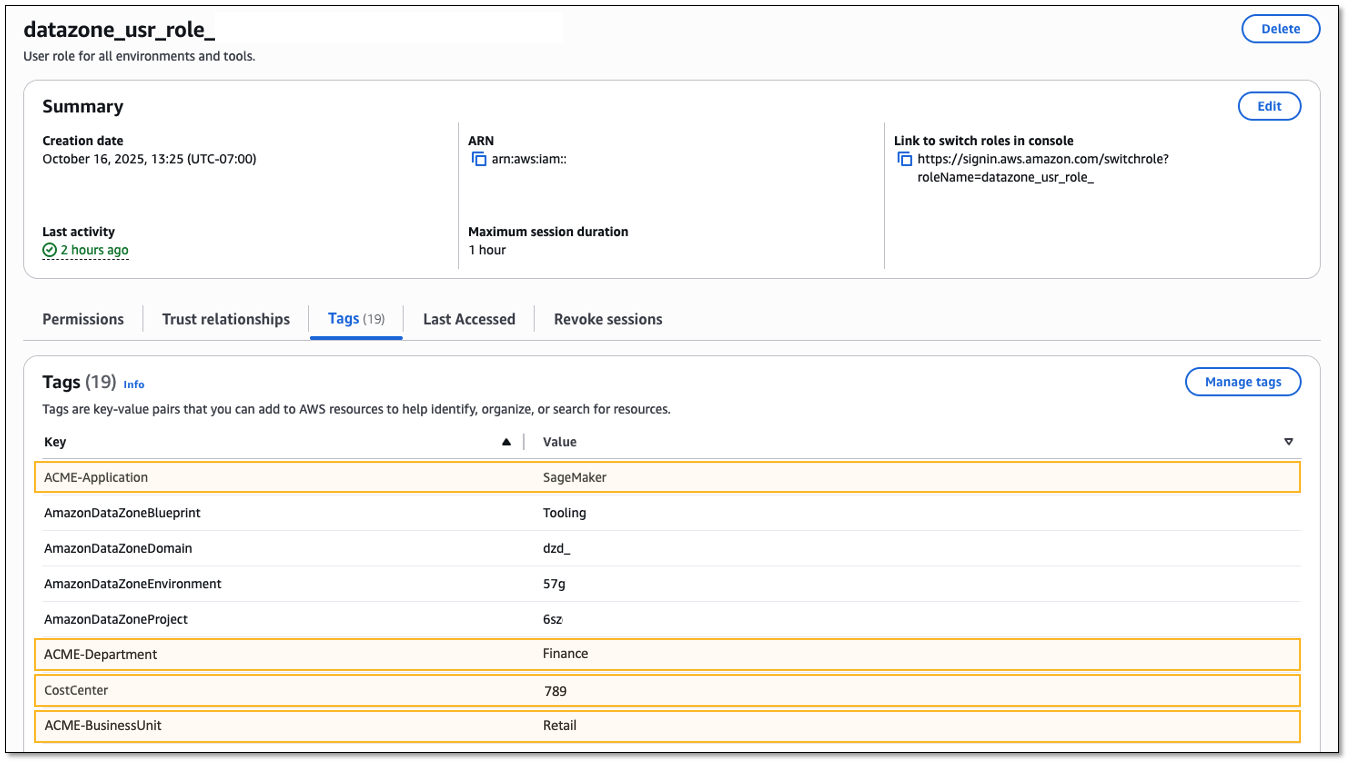
This project profile will have the tag ACME-Application = SageMaker placed on all projects associated to the project profile and cannot be modified by the project creator. The tag CostCenter = 123 can have the value modified by the project creator because the isValueEditable property is set to true.

Grant permissions for users to use the project profile during project creation. In the Authorization section of the project profile set either Selected users or groups or Allow all users and groups.

The use of the allow-custom-project-resource-tags parameter means the project creator can add their own tags (key-value pair). The key must conform to the condition check in the policy of the provisioning role (AmazonSageMakerProvisioning-<accountId>). If the allow-custom-project-resource-tagsparameter is changed to false after a project created tags, tags created by the project will be removed during the next project update.

Updates to the project profile

Updates to project resource tags are possible through the update-project-profile command. The command will replace all values in the project-resource-tags section so be sure to include the exhaustive set of tags. Updates to the project profile are reflected in projects after running the update-project command or when a new project is created using the project profile. The following example adds a new tag, ACME-BusinessUnit = Retail.

There are three ways to work with the project-resource-tags parameter when updating the project profile.

  • Passing a non-empty list of project resource tags will replace the tags currently configured on the project profile.
  • Passing an empty list of project resource tags will clear out all previously configured tags:
    • --project-resource-tags '[]'
  • Not including the project resource tag parameter will keep previously configured tags as-is.
aws datazone update-project-profile \
  --domain-identifier "$DOMAIN_ID" \
  --identifier "$PROJECT_PROFILE_ID" \
  --region "$REGION" \
  --project-resource-tags '[
    {
        "key": "ACME-Application",
        "value": "SageMaker",
        "isValueEditable": false
    },
    {
        "key": "CostCenter",
        "value": "123",
        "isValueEditable": true
    },
    {
        "key": "ACME-BusinessUnit",
        "value": "Retail",
        "isValueEditable": false
    }
  ]'

Create a new project with project resource tags

The following steps walk you through creating a new project that inherits tags from the project profile and lets the project creator modify one of the tag values.

  1. Create a project using the following example CLI command.
  2. Modify the CostCenter tag value using the --resource-tags parameter. Tags configured on the project profile where the isValueEditable attribute is false will be pushed to the project automatically.
    aws datazone create-project \
      --domain-identifier "$DOMAIN_ID" \
      --region "$REGION" \
      --name "$PROJECT_NAME" \
      --description "New project with tags" \
      --project-profile-id "$PROJECT_PROFILE_ID" \
      --resource-tags '{
            "CostCenter": "456"
        }'

Update existing project with project resource tags

For existing projects associated to the project profile, you must update the project for the new tags to be applied.

  1. Update the project using the following example CLI command.
  2. In this scenario, an editable value needs to be updated and a new tag added. Tag CostCenter will have its default value overwritten as “789” and the new ACME-Department = Finance tag will be added.
    aws datazone update-project \
      --domain-identifier "$DOMAIN_ID" \
      --identifier "$PROJECT_ID" \
      --project-profile-version "latest" \
      --region "$REGION" \
      --resource-tags '{
            "CostCenter": "789",
            "ACME-Department": "Finance"
        }' 

Project level tags (those not configured from the project profile) need to be passed during project update to be preserved. For tags with isValueEditable = true configured from the project profile, any override previously set needs to be applied or the value will revert to the default from the project profile.

Validating resources are tagged

Validate that tags are placed correctly. An example resource that is created by the project is the project IAM role. Viewing the tags for this role should show the tags configured from the project profile.

  1. Open SageMaker Unified Studio to get the project role from the Project details section of the project. The role name begins with datazone_usr_role_.
  2. Open the IAM console.
  3. In the navigation pane, choose Roles.
  4. Search for the project IAM role.
  5. Select the Tags tab.

Conclusion

In this post, we discussed tagging related use cases from customers and walked through getting started with custom tags in Amazon SageMaker to place tags on the resources created by the project. By giving administrators a way to configure project profiles with standardized tag configurations, you can now help ensure consistent tagging practices across all SageMaker Unified Studio projects while maintaining compliance with SCPs. This feature addresses two critical customer needs: enforcing organizational tagging standards through automated governance mechanisms and enabling accurate cost attribution reporting across multi-service deployments.

To learn more, visit Amazon SageMaker, then get started with Project resource tags.

About the authors

David Victoria

David Victoria

David is a Senior Technical Product Manager with Amazon SageMaker at AWS. He focuses on improving administration and governance capabilities needed for customers to support their analytics systems. He is passionate about helping customers realize the most value from their data in a secure, governed manner.

Rohit Srikanta

Rohit Srikanta

Rohit is a Senior Software Engineer at AWS. He works on building and scaling services within Amazon SageMaker. He focuses on developing robust and scalable distributed systems and is passionate about solving complex engineering challenges to deliver maximum customer value.

Ahan Malli

Ahan Malli

Ahan is a Software Development Engineer at AWS. He works on the core data and governance layer behind Amazon SageMaker. He’s passionate about building scalable distributed systems and streamlining developer workflows. When he’s not coding, you can find him traveling or hiking Pacific Northwest trails.

Use the Amazon DataZone upgrade domain to Amazon SageMaker and expand to new SQL analytics, data processing, and AI uses cases

Post Syndicated from David Victoria original https://aws.amazon.com/blogs/big-data/use-the-amazon-datazone-upgrade-domain-to-amazon-sagemaker-and-expand-to-new-sql-analytics-data-processing-and-ai-uses-cases/

Amazon DataZone and Amazon SageMaker announced a new feature that allows an Amazon DataZone domain to be upgraded to the next generation of SageMaker, making the investment customers put into developing Amazon DataZone transferable to SageMaker. All content created and curated through Amazon DataZone such as assets, metadata forms, glossaries, subscriptions, and so on are available to users through Amazon SageMaker Unified Studio after the upgrade.

As an Amazon DataZone administrator, you can choose which of your domains to upgrade to SageMaker through a user interface driven experience. You can use the upgraded domain to use your existing Amazon DataZone implementation in the new SageMaker environment and expand to new SQL analytics, data processing and AI uses cases. Additionally, after the upgrade, both Amazon DataZone and SageMaker portals remain accessible. This provides administrators flexibility with user rollout of SageMaker while providing business continuity for users operating within Amazon DataZone. By upgrading to SageMaker, users can build on their investment from Amazon DataZone by using the SageMaker unified platform, which serves as a central hub for all data, analytics, and AI needs.

SageMaker delivers an integrated experience for analytics and AI with unified access to all your data. Collaborate and build faster from a unified studio using familiar Amazon Web Services (AWS) tools for model development, generative AI, data processing, and SQL analytics, accelerated by Amazon Q Developer, the most capable generative AI assistant for software development. Access all your data whether it’s stored in data lakes, data warehouses, or third-party or federated data sources, with governance built in to meet enterprise security needs.

What we hear from customers

Customers have successfully used Amazon DataZone, enabling data analysts, data engineers, and machine learning teams to collaborate around a shared data catalog. With generative AI moving to center stage, these organizations now aim to address a wider range of use cases, from interactive notebook exploration to prompt engineering for generative-AI projects. Upgrading their Amazon DataZone domains to SageMaker Unified Studio brings everyone together in one place. Data analysts, data engineers, machine learning (ML) specialists, and AI innovators can create integrated solutions on the same governed data while using the tools that best match their work. For example, one of our customers, HEMA, uses Amazon DataZone as a single solution for cataloging, discovery, sharing, and governance of their enterprise data across business domains. They are moving to SageMaker to enable more machine learning and generative AI use cases.

“The launch of the domain upgrade feature allows us to take the investment from our production Amazon DataZone deployment and utilize it in Amazon SageMaker. Organizationally, we are doing more in the generative AI space and with Amazon SageMaker we can accomplish new use cases that leverage the assets curated through Amazon DataZone. With this feature we also love that both portals remain open at the same time so that we can thoughtfully transition user populations to Amazon SageMaker.”

– Tommaso Paracciani, Head of Data & Cloud Platforms at HEMA.

“We’ve invested a lot in building our data management platform for production and logistics, using Amazon DataZone, to accelerate our digital transformation. Evolving our data management solution to use Amazon SageMaker Unified Studio means Data Analysis, Data Engineering, Machine Learning & Generative AI features can now be done from the same place. With the domain upgrade feature, it allows us to onboard to Amazon SageMaker faster by utilizing the work done from Amazon DataZone“

– Volkswagen AG

Upgrade your Amazon DataZone domain to SageMaker Unified Studio

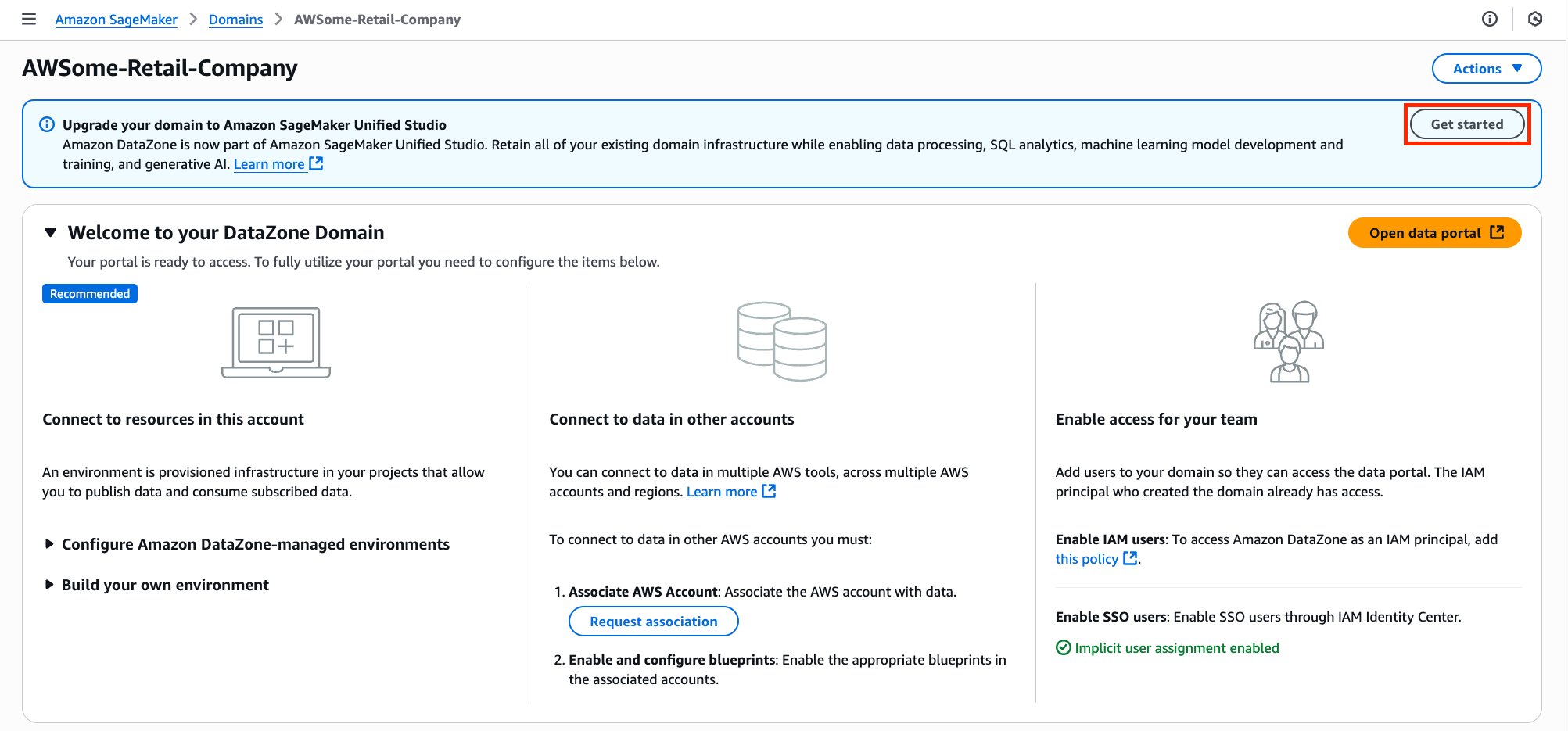
  1. On your Amazon DataZone domain home page, a banner appears at the top announcing the new domain upgrade feature. Choose Get started on this banner to open the upgrade wizard.

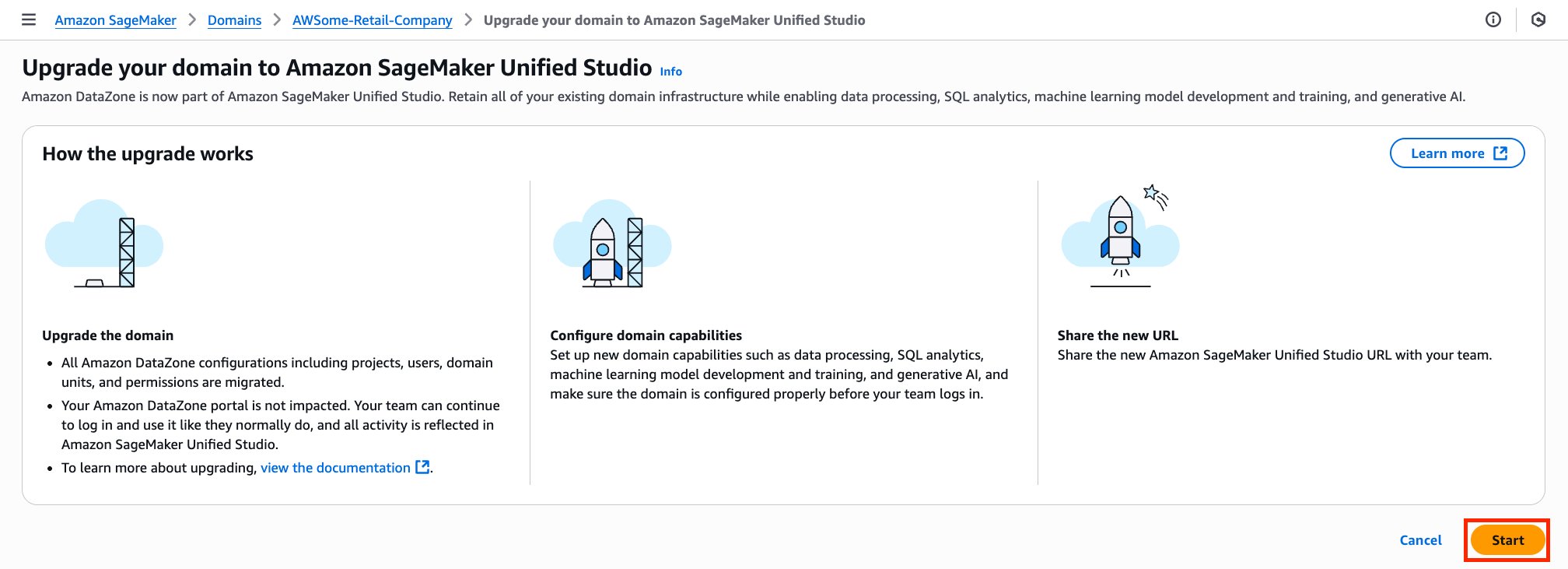
  1. A summary page explains the actions the upgrade wizard will perform and what to expect while it runs. Read the information carefully, then choose Start to begin the upgrade.

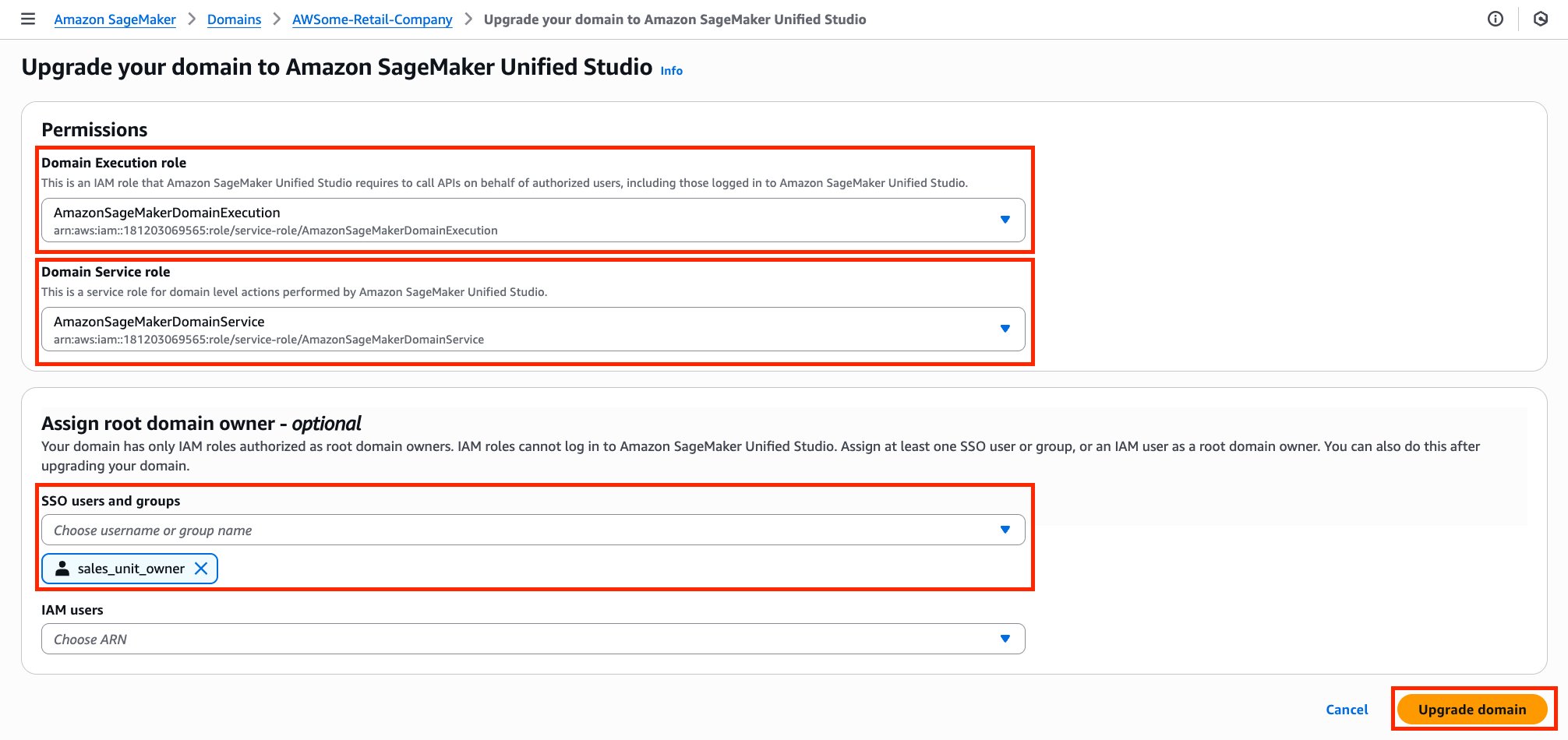
  1. On the configuration screen, specify the AWS Identity and Access Management (IAM) roles and ownership for your new SageMaker Unified Studio domain:
    1. Domain execution role – The runtime role the domain assumes for SageMaker operations.
    2. Domain service role – Authorizes the service to create and manage domain resources.
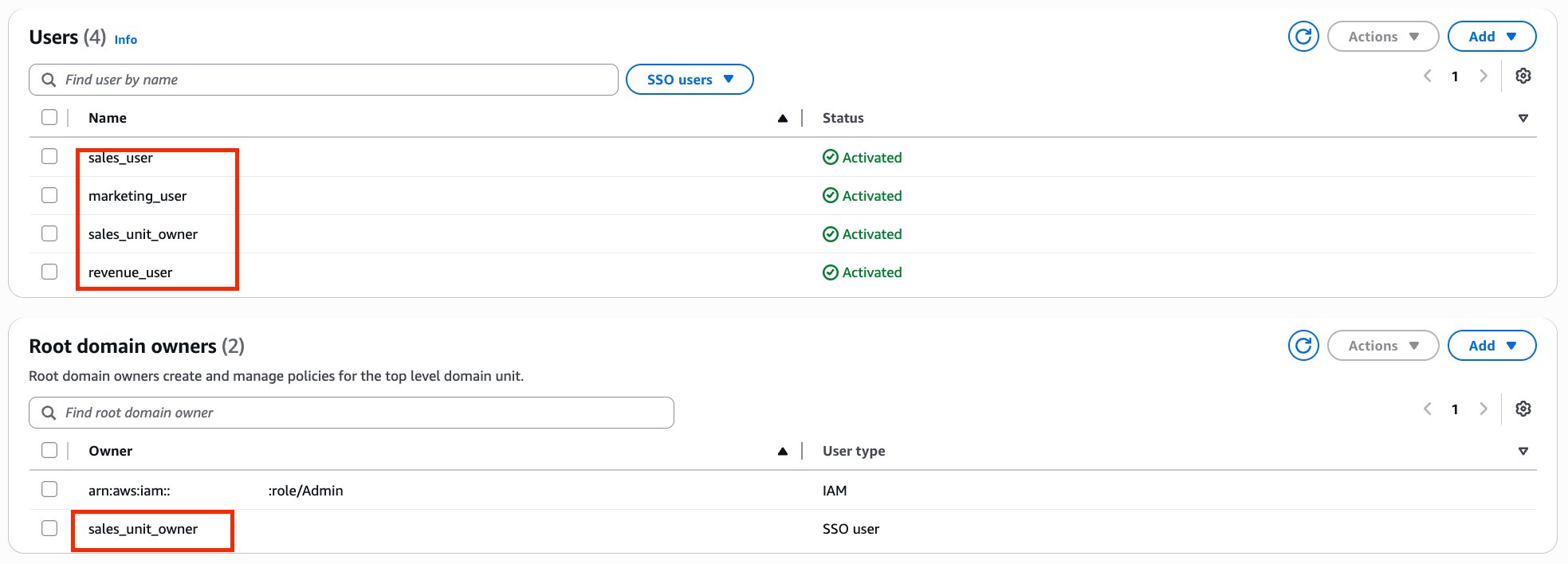
    3. Root domain owner (optional) – Designates the administrators of the upgraded root domain. IAM roles cannot sign in to the SageMaker Unified Studio UI. It is helpful to have a root domain owner who can sign in to the UI to modify authorization policies for the root domain.

After selecting the appropriate roles—and, if applicable, a root owner—choose Upgrade domain to launch the upgrade.

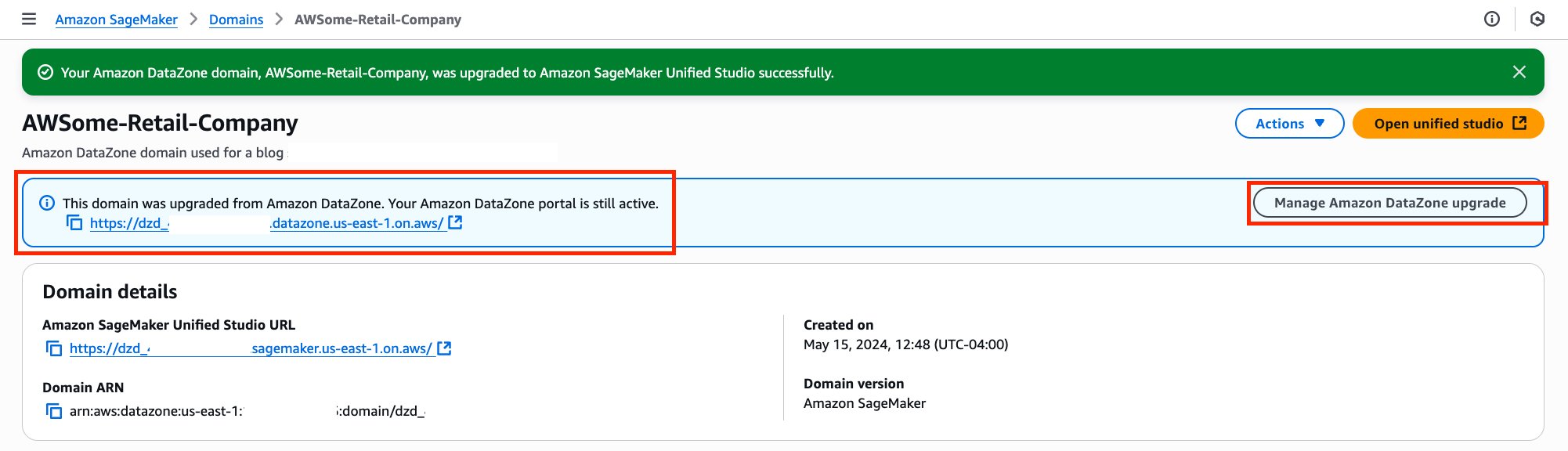
  1. When the upgrade finishes, a confirmation banner appears at the top of the domain detail page with two items:
    1. The Amazon DataZone portal URL
    2. The Manage Amazon DataZone upgrade button. Here you can see the Amazon DataZone URL, information about the upgrade, and an option to roll back the upgrade to Amazon DataZone.

  1. Scroll to the Users section of the SageMaker Unified Studio console. All identities that belonged to your original Amazon DataZone domain—along with the root domain owner you assigned in Step 3—now appear in the new domain automatically. No additional setup is required.

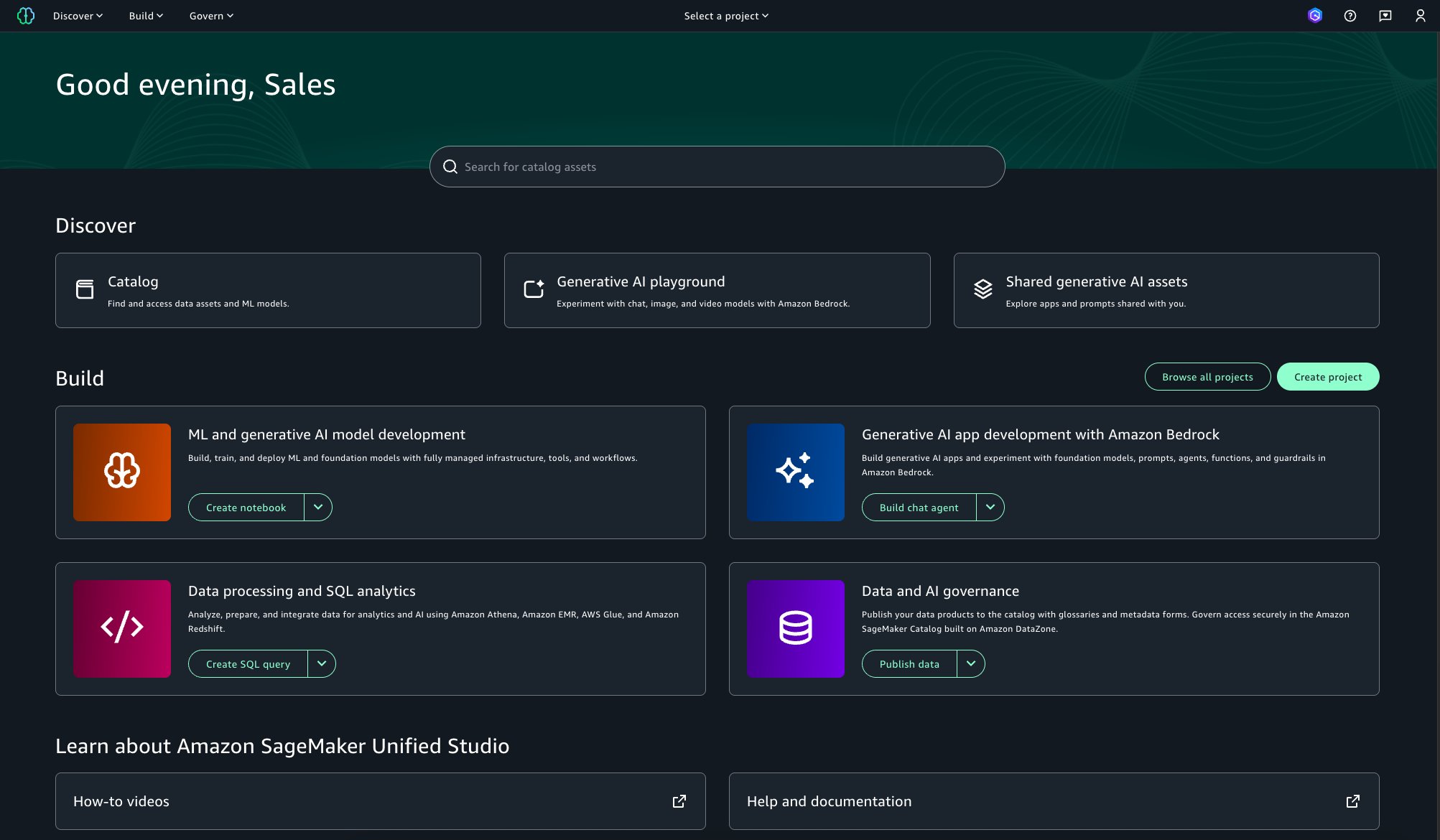
  1. Use the URL provided in Step 4 to open SageMaker Unified Studio, then sign in with your existing credentials. You’ll land on the SageMaker Unified Studio home page, confirming that you’re now working in your upgraded domain.

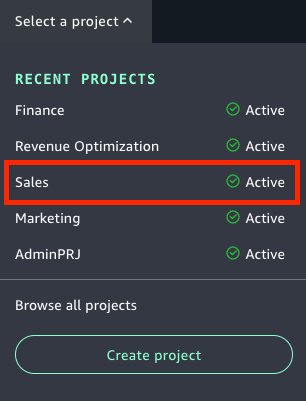
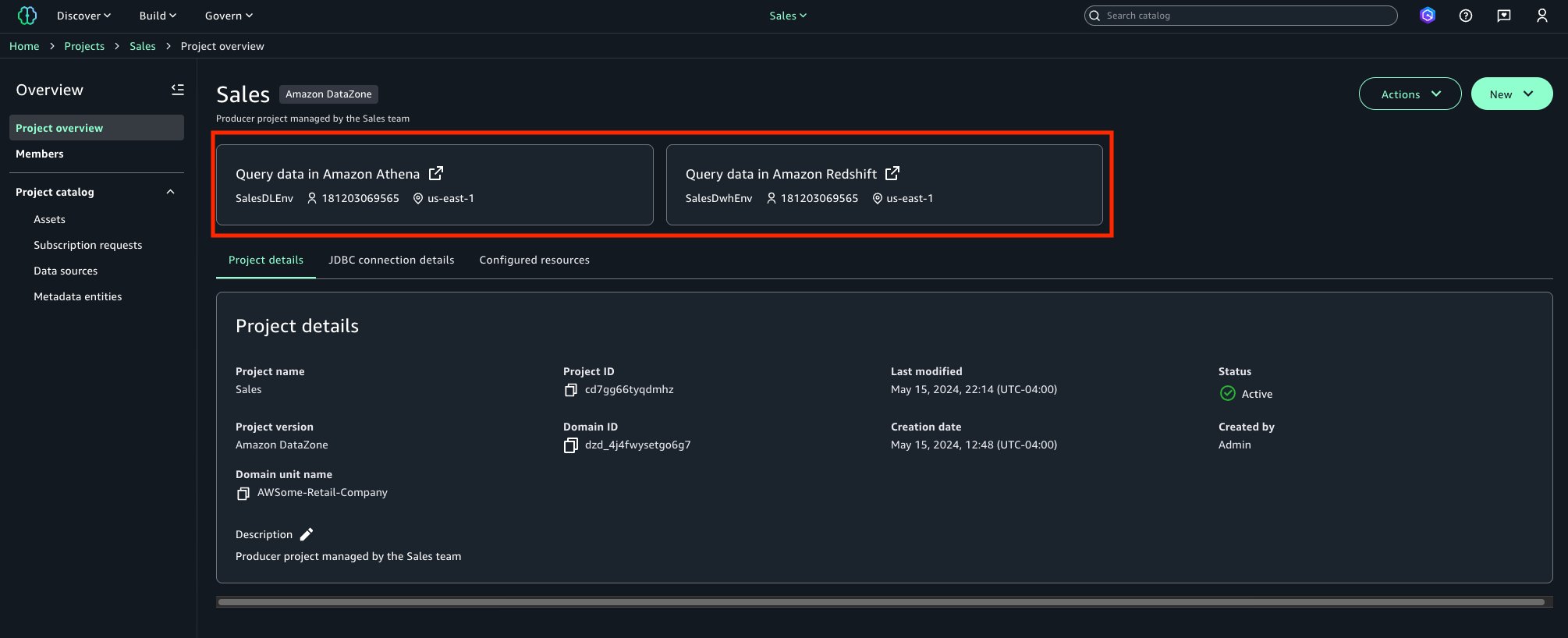
  1. In the Projects list, choose a project that existed in your original Amazon DataZone domain and that the current user can access. Select its name to open it and confirm that every asset and permission transferred correctly to SageMaker Unified Studio.

  1. Inside the project, you can view two key areas:
    • Project Environments – Verify that every environment linked to the project has been migrated.
    • Overview – Confirm the project’s general information, including owner, description, and status.

Checking both sections helps ensure that the project moved to SageMaker Unified Studio as expected.

Conclusion

In this post, we discussed the new capability in Amazon DataZone that allows a domain to be upgraded to the next generation of Amazon SageMaker. The investment customers put into developing Amazon DataZone is now transferable to SageMaker. All content created and curated through Amazon DataZone such as assets, metadata forms, glossaries, subscriptions, and so on are available to users through SageMaker Unified Studio after the upgrade. By upgrading to SageMaker, customers build on their investment from Amazon DataZone by using the SageMaker unified platform.

To learn more, visit the domain upgrade documentation.


About the authors

David Victoria is a Senior Technical Product Manager with Amazon SageMaker at AWS. He focuses on improving administration and governance capabilities needed for customers to support their analytics systems. He is passionate about helping customers realize the most value from their data in a secure, governed manner.

Leonardo David Gomez Virahonda is a Principal Analytics Specialist Solutions Architect at AWS, with a strong focus on data governance. He helps organizations across industries implement effective governance strategies using AWS services like Amazon DataZone, AWS Glue, Lake Formation, and SageMaker Catalog. Leonardo’s work spans metadata management, data lineage, access control, and compliance—empowering customers to make their data secure, discoverable, and ready for analytics and AI. He regularly shares best practices through technical blogs, enablement content, and sessions at AWS events like re:Invent and regional Summits.
Organize content across business units with enterprise-wide data governance using Amazon DataZone domain units and authorization policies

Post Syndicated from David Victoria original https://aws.amazon.com/blogs/big-data/organize-content-across-business-units-with-enterprise-wide-data-governance-using-amazon-datazone-domain-units-and-authorization-policies/

Amazon DataZone has announced a set of new data governance capabilities—domain units and authorization policies—that enable you to create business unit-level or team-level organization and manage policies according to your business needs. With the addition of domain units, users can organize, create, search, and find data assets and projects associated with business units or teams. With authorization policies, those domain unit users can set access policies for creating projects and glossaries, and using compute resources within Amazon DataZone.

As an Amazon DataZone administrator, you can now create domain units (such as Sales or Marketing) under the top-level domain and assign domain unit owners to further manage the data team’s structure. Amazon DataZone users can log in to the portal to browse and search the catalog by domain units, and subscribe to data produced by specific business units. Additionally, authorization policies can be configured for a domain unit permitting actions such as who can create projects, metadata forms, and glossaries within their domain units. Authorized portal users can then log in to the Amazon DataZone portal and create entities such as projects and create metadata forms using the authorized projects.

Amazon DataZone enables you to discover, access, share, and govern data at scale across organizational boundaries, reducing the undifferentiated heavy lifting of making data and analytics tools accessible to everyone in the organization. With Amazon DataZone, data users like data engineers, data scientists, and data analysts can share and access data across AWS accounts using a unified data portal, allowing them to discover, use, and collaborate on this data across their teams and organizations. Additionally, data owners and data stewards can make data discovery simpler by adding business context to data while balancing access governance to the data in the UI.

In this post, we discuss common approaches to structuring domain units, use cases that customers in the healthcare and life sciences (HCLS) industry encounter, and how to get started with the new domain units and authorization policies features from Amazon DataZone.

Approaches to structuring domain units

Domains are top-level entities that encompass multiple domain units as sub-entities, each with specific policies. Organizations can adopt different approaches when defining and structuring domains and domain units. Some strategies align these units with data domains, whereas others follow organizational structures or lines of business. In this section, we explore a few examples of domains, domain units, and how to organize data assets and products within these constructs.

Domains aligned with the organization

Domain units can be built using the organizational structure, lines of businesses, or use cases. For example, HCLS organizations typically have a range of domains that encompass various aspects of their operations and services. Customers are using domains and domain units to improve searchability and findability of data assets within an organized tree-like structure, and enable individual organizational units to control their own authorization policies.

One of the core benefits of organizing entities as domain units is to enable search and self-service access across various domain units. The following are some common domain units within the HCLS sector:

  • Commercials – Commercial aspects of products or services related to the life sciences and activities such as market analysis, product positioning, pricing, distribution, and customer engagement. There could be several child domain units, such as contract research organization.
  • Research and development – Pharmaceutical and medical device development. Some examples of child domain units include drug discovery and clinical trials management.
  • Clinical services – Hospital and clinic management. Examples of child domain units include physician and nursing services.
  • Revenue cycle management – Patient billing and claims processing. Examples of child domain units include insurance and payer relations.

The following are common domains and domain units that apply across industries:

  • Supply chain and logistics – Procurement and inventory management.
  • Regulatory compliance and quality assurance – Compliance with industry specific regulations, quality management systems, and accreditation.
  • Marketing – Strategies, techniques, and practices aimed at promoting products, services, or ideas to potential customers. Some examples of child domain units are campaigns and events.
  • Sales – Sales process, key performance indicators (KPIs), and metrics.

For example, one of our customers, AWS Data Platform, uses Amazon DataZone to provide secure, trusted, convenient, and fast access to AWS business data.

“At AWS, our vision is to provide customers with reliable, secure, and self-service access to exabyte-scale data while ensuring data governance and compliance. With Amazon DataZone domain units, we are able to organize a vast and growing number of datasets to align with the organizational structure of the customers my teams serve internally. This simplifies data discovery and helps us organize business units’ data in a hierarchical manner for data-driven decision-making at AWS. Amazon DataZone authorization policies coupled with domain units enable a powerful yet flexible way of decentralizing data governance and helps tailor access policies to individual business units. With these features, we are able to reduce the undifferentiated heavy lift while building and managing data products.”

– Arnaud Mauvais, Director of Software Development at AWS.

Domains aligned with data ownership

The term data domain is crucial within the realm of data governance. It signifies a distinct field or classification of data that an organization oversees and regulates. Data domains form a foundational pillar in data governance frameworks. The concept of data domains plays a pivotal role in data governance, empowering organizations to systematically structure, administer, and harness their data assets. This strategic approach aligns data resources with business goals, fostering informed decision-making processes.

You can either define each data domain as a top-level domain or define a top-level data domain (for example, Organization) with several child domain units, such as:

  • Customer data – This domain unit includes all data related to customers, such as customer profiles. Several other child domain units with policies can be built within customer domain units, such as customer interactions and profiles.
  • Financial data – This domain unit encompasses data related to financial information.
  • Human resources data – This domain unit includes employee-related data.
  • Product data – This domain unit covers data related to products or services offered by the organization.

Authorization policies for domains and domain units

Amazon DataZone domain units provide you with a robust and flexible data governance solution tailored to your organizational structure. These domain units empower individual business lines or teams to establish their own authorization policies, enabling self-service governance over critical actions such as publishing data assets and utilizing compute resources within Amazon DataZone. The authorization policies enabled by domain units allow you to grant granular access rights to users and groups, empowering them to manage domain units, project memberships, and creation of content such as projects, metadata forms, glossaries and custom asset types.

Domain governance authorization policies help organizations maintain data privacy, confidentiality, and integrity by controlling and limiting access to sensitive or critical data. They also support data-driven decision-making by making sure authorized users have appropriate access to the information they need to perform their duties. Similarly, authorization policies can help organizations govern the management of organizational domains, collaboration, and metadata. These policies can help define roles like data governance owner, data product owners, and data stewards.

Additionally, these policies facilitate metadata management, glossary administration, and domain ownership, so data governance practices are aligned with the specific needs and requirements of each business line or team. By using domain units and their associated authorization policies, organizations can decentralize data governance responsibilities while maintaining a consistent and controlled approach to data asset and metadata management. This distributed governance model promotes ownership and accountability within individual business lines, fostering a culture of data stewardship and enabling more agile and responsive data management practices.

Use cases for domain units

Amazon DataZone domain units help customers in various industries securely and efficiently govern their data, collaborate on important data management initiatives, and help in complying with relevant regulations. These capabilities are particularly valuable for customers in industries with strict data privacy and security requirements, such as HCLS, financial services, and the public sector. Amazon DataZone domain units enable you to maintain control over your data while facilitating seamless collaboration and helping you adhere to regulations like Health Insurance Portability and Accountability Act (HIPAA), General Data Protection Regulation (GDPR), and others specific to your industry.

The following are key benefits of Amazon DataZone domain units for HCLS customers:

  • Secure and compliant data sharing – Amazon DataZone domain units help provide a secure mechanism for you to share sensitive data, such as protected health information (PHI) and personally identifiable information (PII). This helps organizations with regulatory requirements maintain the privacy and security of their data.
  • Scalable and flexible data management – Amazon DataZone domain units offer a scalable and flexible data management solution that enables you to manage and curate your data, while also enabling efficient data discovery and access.
  • Streamlined collaboration and governance – The platform provides a centralized and controlled environment for teams to collaborate on data-driven projects. It enables effective data governance, allowing you to define and enforce policies, provide clarity on who has access to data, and maintain control over sensitive information.
  • Granular authorization policies – Amazon DataZone domain units allow you to define and enforce fine-grained authorization policies, maintain tight control over your data, and streamline data-driven collaboration and governance across your teams.

Solution overview

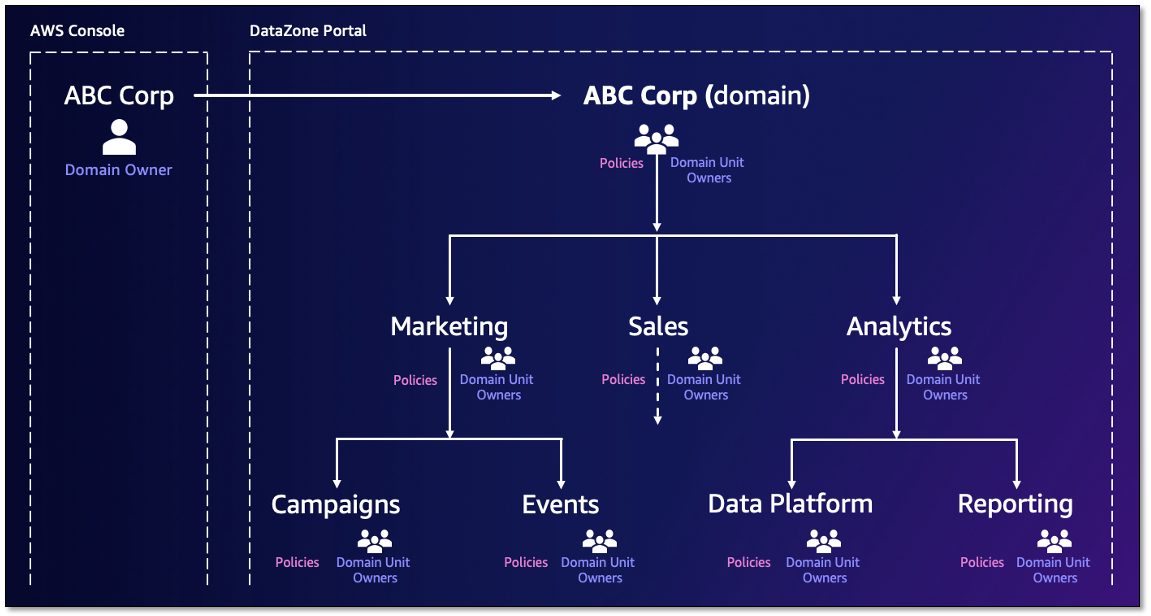
On the AWS Management Console, the administrator (AWS account user) creates the Amazon DataZone domain. As the creator of the domain, they can choose to add other single sign-on (SSO) and AWS Identity and Access Management (IAM) users as owners to manage the domain. Under the domain, domain units (such as Sales, Marketing, and Finance) can be created to reflect a hierarchy that aligns with the organization’s data ecosystem. Ownership of these domain units can be assigned to business leaders, who may expand a hierarchy representing their data teams and later set policies that enable users and projects to perform specific actions. With the domain structure in place, you can organize your assets under appropriate domain units. The organization of assets to domain units starts with projects being assigned to a domain unit at time of creation and assets then being cataloged within the project. Catalog consumers then browse the domain hierarchy to find assets related to specific business functions. They can also search for assets using a domain unit as a search facet.

Domain units set the foundation for how authorization policies permit users to perform actions in Amazon DataZone, such as who can create and join projects. Amazon DataZone creates a set of managed authorization policies for every domain unit, and domain unit owners create grants within a policy to users and projects.

There are two Amazon DataZone entities that have policies created on them. The first is a domain unit where the owners can decide who may perform actions such as creating domains, projects, joining projects, creating metadata forms, and so on. The policies have an option to cascade the grant down through child domain units. These policies are managed through the Amazon DataZone portal, and their grants can be applied to two principal types:

  • User-based policies – These policies grant users (IAM, SSO, and SSO groups) permission to perform an action (such as create domain units and projects, join projects, and take ownership of domain units and projects)
  • Project-based policies – These policies grant a project permission to perform an action (such as create metadata forms, glossaries, or custom asset types)

The second Amazon DataZone entity is a blueprint (defines the tools and services for Amazon DataZone environments), where a data platform user (AWS account user) who owns the Amazon DataZone blueprint can decide which projects use their resources through environment profile creation on the Amazon DataZone portal. There are two approaches to specify which projects can use the blueprint to create an environment profile:

  • Account users can use domain units as a delegation mechanism to pass the trust of using the blueprint to a business leader (domain unit owner) on the Amazon DataZone portal
  • Account users can directly grant a specific project permission to use the blueprint

These policies can be managed through the console and Amazon DataZone portal.

The following figure is an example domain structure for the ABC Corp domain. Domain units are created under the ABC Corp domain with domain unit owners assigned. Authorization policies are applied for each domain unit and dictate the actions users and projects can perform.

For more information about Amazon DataZone components, refer to Amazon DataZone terminology and concepts.

In the following sections, we walk through the steps to get started with the data management governance capabilities in Amazon DataZone.

Create an Amazon DataZone domain

With Amazon DataZone, administrators log in to the console and create an Amazon DataZone domain. Additional domain unit owners can be added to help manage the domain. For more information, refer to Managing Amazon DataZone domains and user access.

Create domain units to represent your business units

To create a domain unit, complete the following steps:

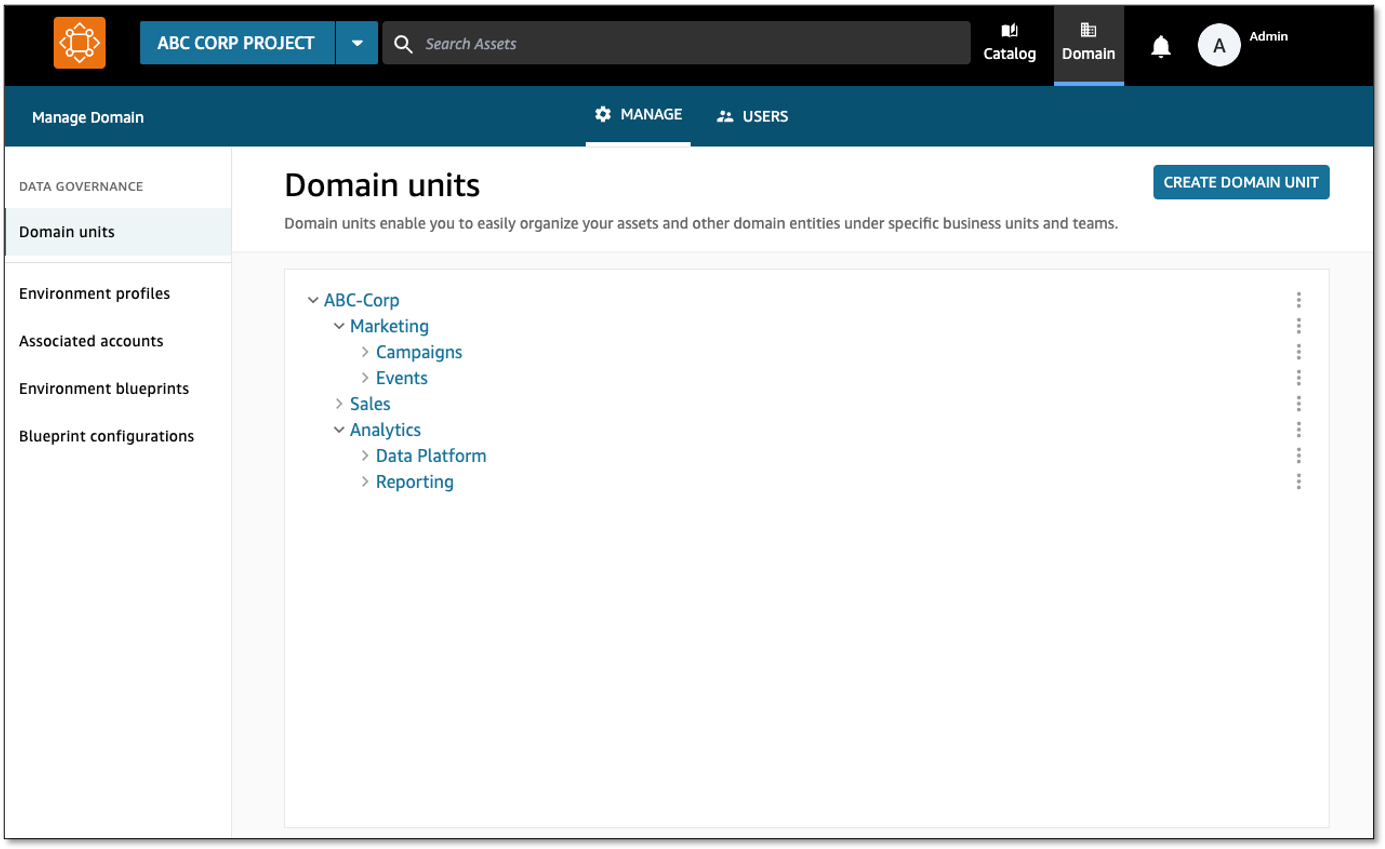
  1. Log in to the DataZone data portal and choose Domain in toolbar to view your domain units.
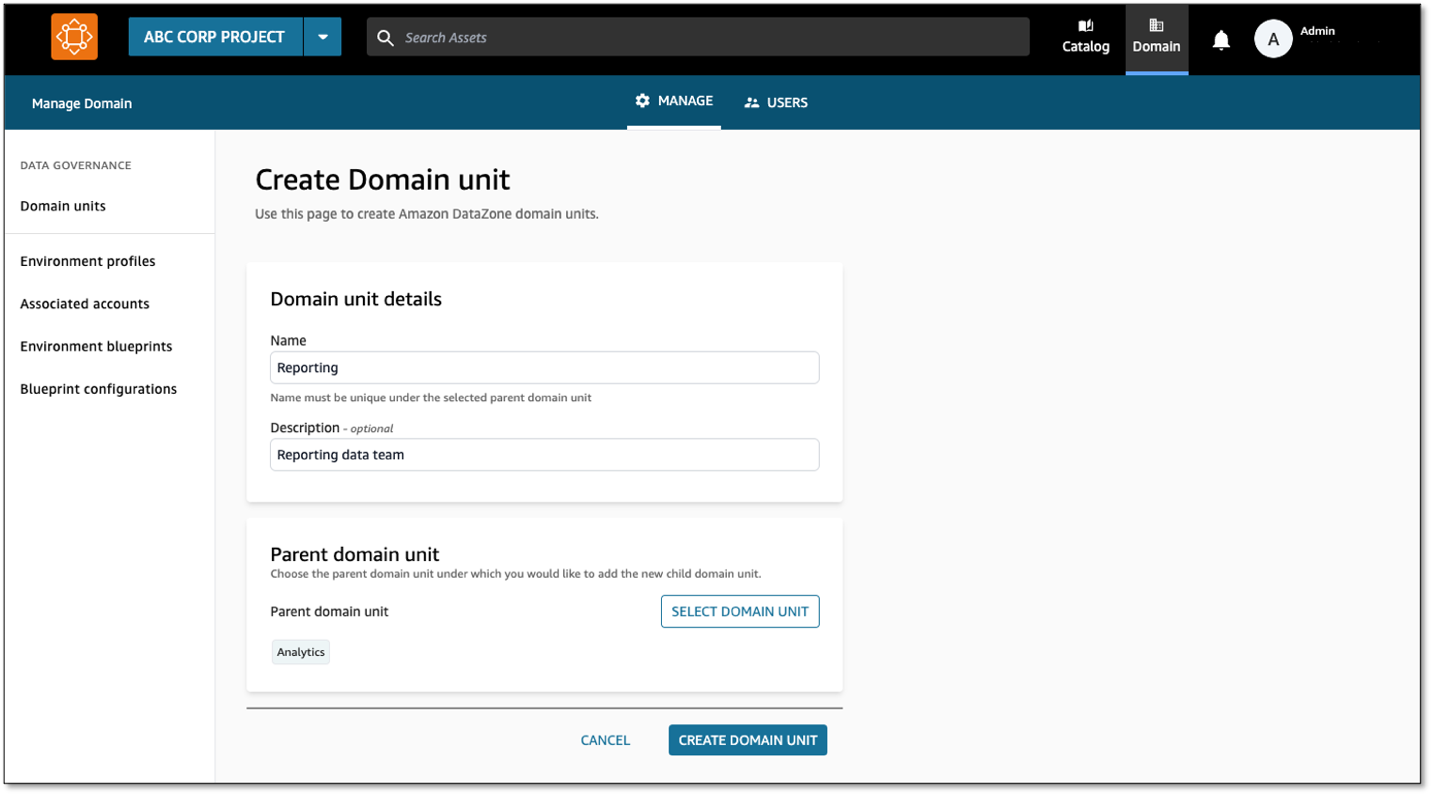
  2. As the domain unit owner, choose Create Domain Unit.
  3. Provide your domain unit details (representing different lines of business).
  4. You can create additional domain units in a nested fashion.
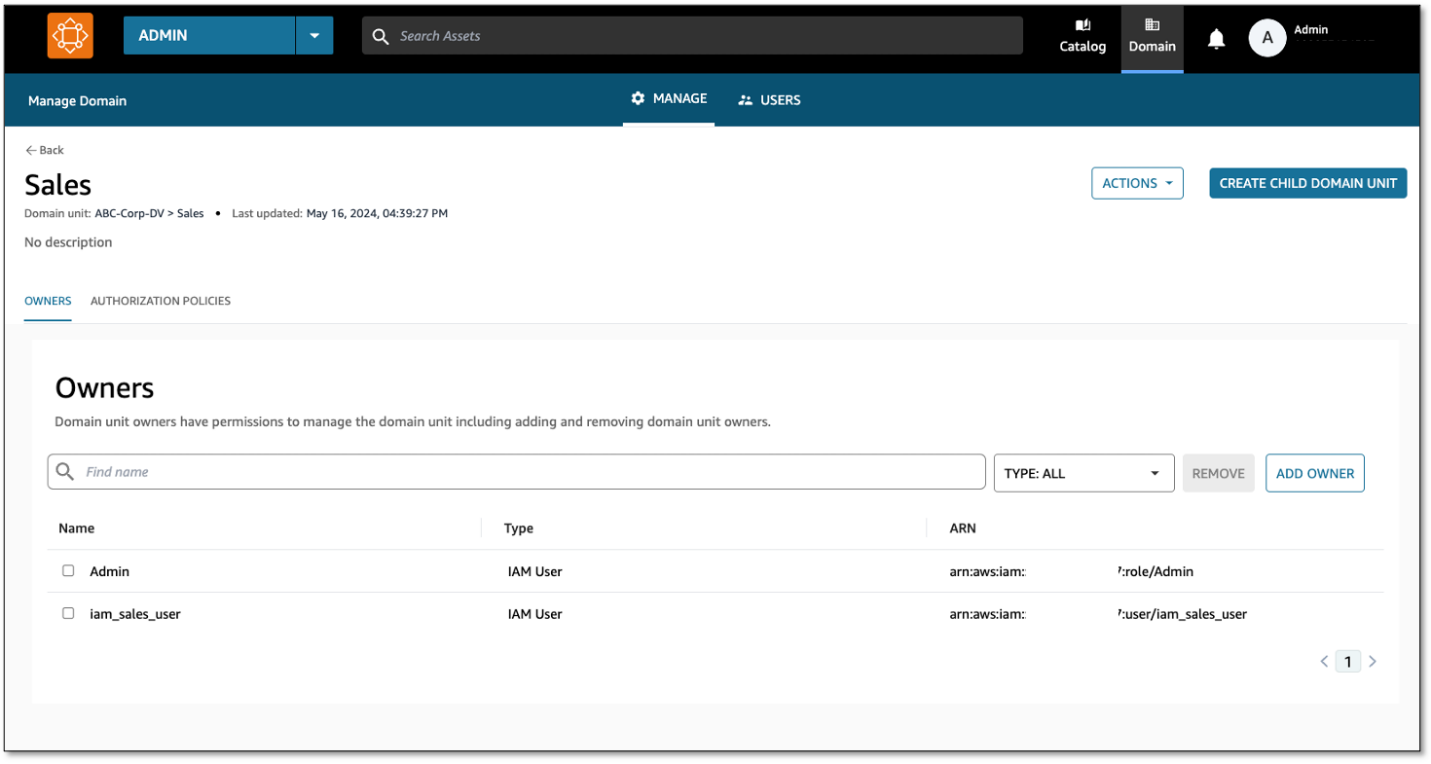
  5. For each domain unit, assign owners to manage the domain unit and its authorization policies.

Apply authorization policies so domain units can self-govern

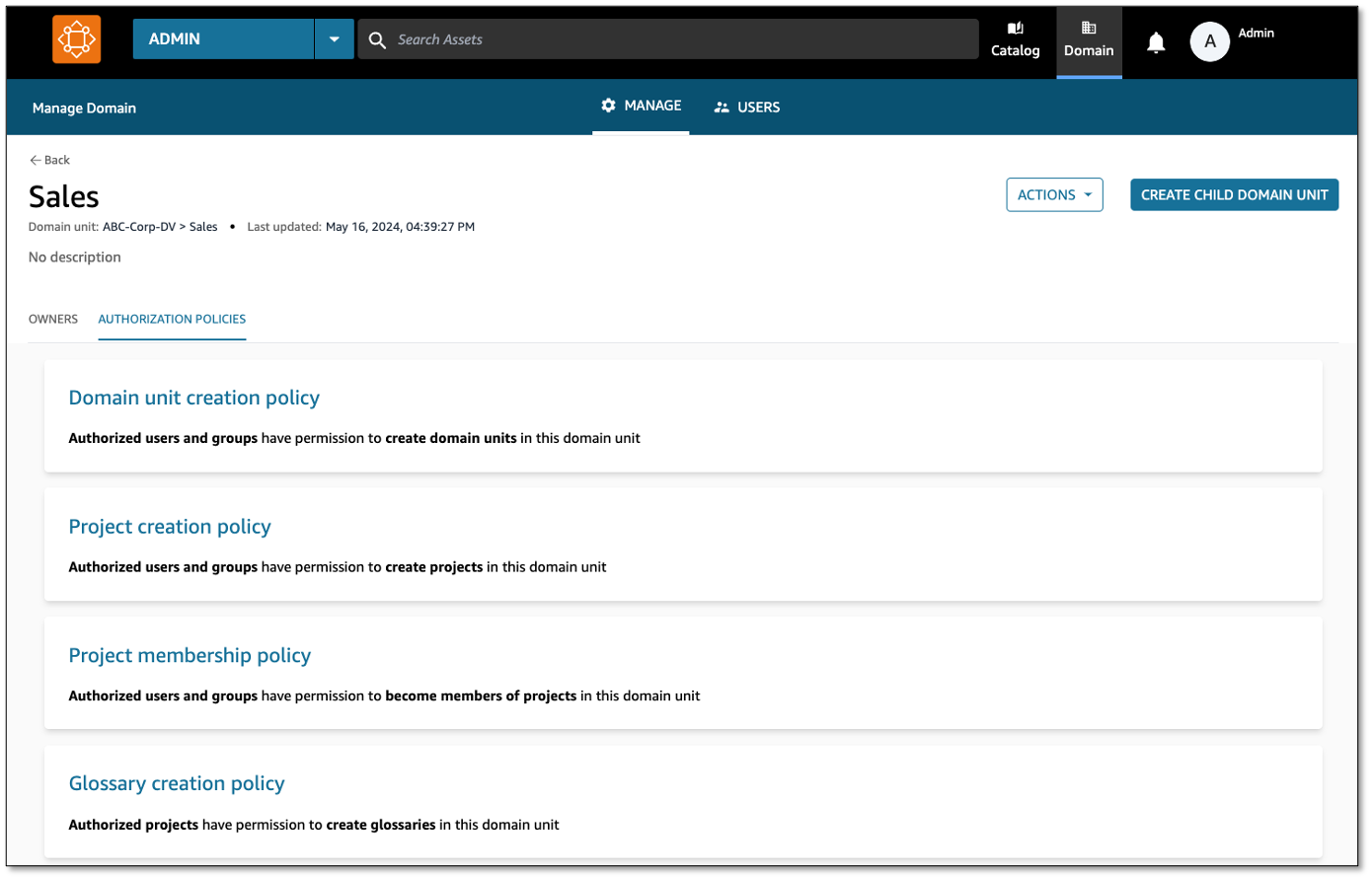
Amazon DataZone managed authorization policies are available for every domain unit, and domain unit owners can grant access through that policy to users and projects. Policies are either user-based (granted to users) or project-based (granted to projects).

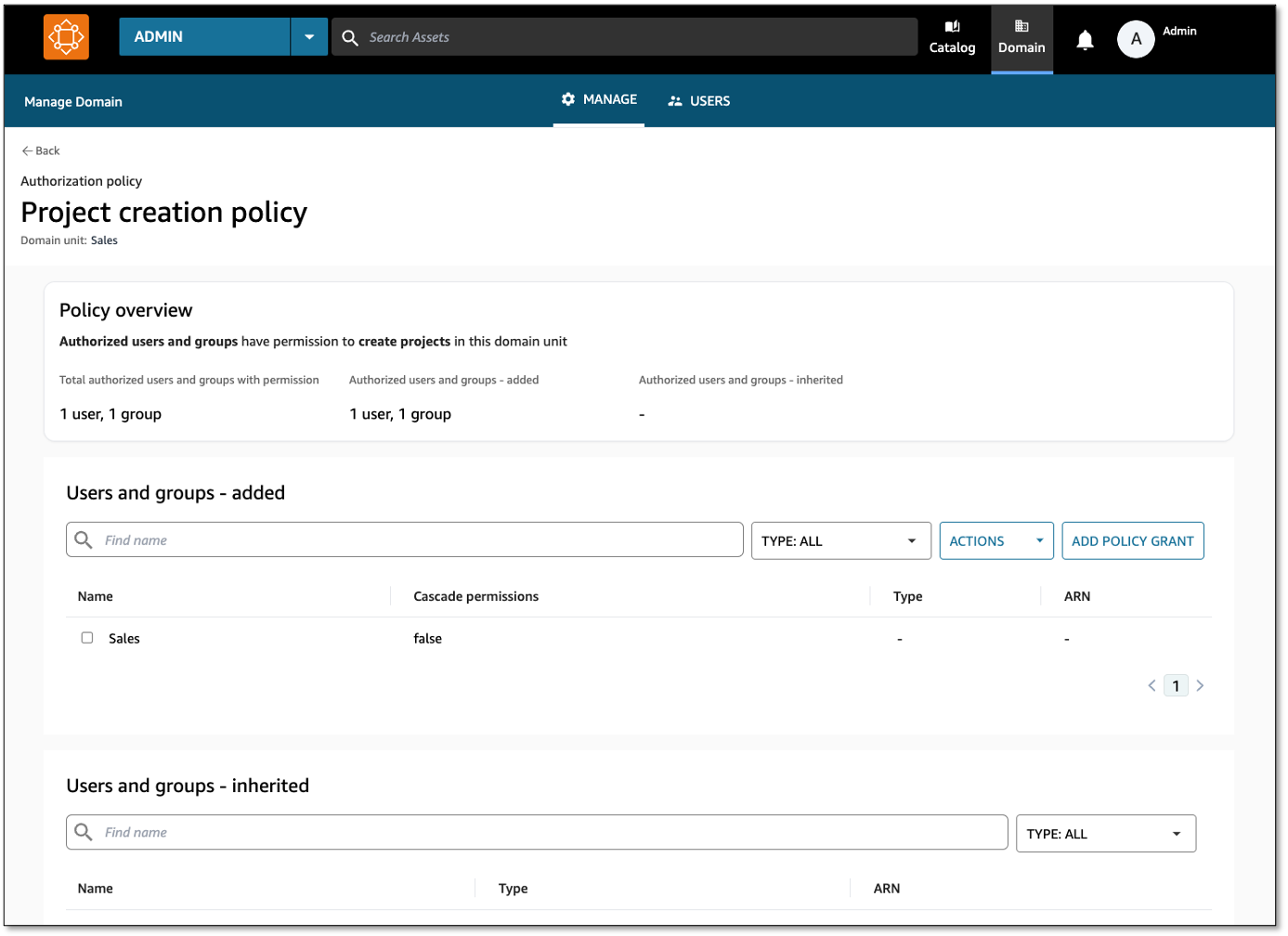
  1. On the Authorization Policies tab of a domain unit, grant authorization policies to users or projects permitting them to perform certain actions. For this example, we choose Project creation policy for the Sales domain.
  2. Choose Add Policy Grant to add either select users and groups, all users, or all groups.

With this, a Sales team member can log in to the data portal and create projects under the Sales domain.

Conclusion

In this post, we discussed common approaches to structuring domain units, use cases that customers in the HCLS industry encounter, and how to get started with the new domain units and authorization policies features from Amazon DataZone.

Domain units provide clean separation between data areas, making the discoverability of data efficient for users. Authorization policies, in combination with domain units, provide the governance layer controlling access to the data and provide control over how the data is cataloged. Together, Amazon DataZone domain units and authorization policies make organization and governance possible across your data.

Amazon DataZone domain units and authorization policies are available in all AWS Regions where Amazon DataZone is available. To learn more, refer to Working with domain units.


About the Authors

David Victoria is a Senior Technical Product Manager with Amazon DataZone at AWS. He focuses on improving administration and governance capabilities needed for customers to support their analytics systems. He is passionate about helping customers realize the most value from their data in a secure, governed manner. Outside of work, he enjoys hiking, traveling, and making his newborn baby laugh.

Nora O Sullivan is a Senior Solutions Architect at AWS. She focuses on helping HCLS customers choose the right AWS services for their data and analytics needs so they can derive value from their data. Outside of work, she enjoys golfing and discovering new wines and authors.

Navneet Srivastava, a Principal Specialist and Analytics Strategy Leader, develops strategic plans for building an end-to-end analytical strategy for large biopharma, healthcare, and life sciences organizations. Navneet is responsible for helping life sciences organizations and healthcare companies deploy data governance and analytical applications, electronic medical records, devices, and AI/ML-based applications while educating customers about how to build secure, scalable, and cost-effective AWS solutions. His expertise spans across data analytics, data governance, AI, ML, big data, and healthcare-related technologies.