All posts by Itay Meller

Simplify multi-tenant encryption with a cost-conscious AWS KMS key strategy

Post Syndicated from Itay Meller original https://aws.amazon.com/blogs/architecture/simplify-multi-tenant-encryption-with-a-cost-conscious-aws-kms-key-strategy/

Organizations face diverse challenges when it comes to managing encryption keys. While some scenarios demand strict separation, there are compelling use cases where a centralized approach can streamline operations and reduce complexity. In this post, our focus is on a software-as-a-service (SaaS) provider scenario, but the principles we discuss can be adopted by large organization facing similar key management challenges.

Managing encryption across a multi-tenant, multi-service architecture presents a significant challenge. Many organizations find themselves struggling with the complexity and costs associated with provisioning separate AWS Key Management Service (AWS KMS) customer managed keys for each tenant and service. This approach, while secure, often leads to growing operational overhead and increased AWS KMS usage costs over time.

But what if there was a more efficient way?

In this post, we unveil a strategy that uses a single customer managed key (symmetric) per tenant across services. By the end of this post, you’ll learn:

  • How to implement a scalable, secure, and cost-effective encryption model
  • Techniques for using one customer managed key per tenant across multiple services and environments
  • Methods for encrypting tenant data in Amazon DynamoDB and other storage types while maintaining tenant isolation

Multi-tenant encryption requirements for SaaS providers

Data isolation is fundamental to multi-tenant SaaS architectures, serving both compliance requirements and customer confidence. Many SaaS providers need to encrypt sensitive information—from API keys and credentials to personal data—across storage solutions such as DynamoDB and Amazon Simple Storage Service (Amazon S3).

While these storage services provide default encryption at rest, they typically use a single shared key across data items. Consider DynamoDB in a shared pool model, where one table contains data from multiple tenants. In this setup, the tenant data is encrypted using the same AWS KMS Key, regardless of ownership.

KMS key represents a container for top-level key material and is uniquely defined within the KMS, for more information on the different keys involved when encrypting or decrypting data using KMS, see AWS KMS key hierarchy.

This shared-key approach often proves insufficient for SaaS providers operating under strict security and compliance frameworks. Some customers require:

  • Bring your own key (BYOK) capabilities
  • Logical isolation of their data through dedicated encryption keys

To meet these requirements, providers can implement customer-specific AWS KMS managed keys, helping to ensure that each customer’s sensitive data remains isolated and inaccessible to other tenants.

Alternatively, providers might consider a silo model with separate tables for each customer. However, this approach introduces its own challenges—as the tenant base grows, managing numerous individual tables becomes increasingly complex and service quota limits might become a constraint.

Managing growth: KMS key management at scale

When scaling a SaaS platform, empowering teams to develop services independently is crucial. A quick way to scale is to have each team develop independently using a dedicated account. This often leads to a decentralized approach where each service manages its own KMS keys per customer. However, this autonomy comes with hidden costs as your customer base and service portfolio expand.

The challenge of key proliferation

As the company grows, the number of keys multiplies with each new customer and service addition. This proliferation creates several organizational challenges:

  • Cost impact: A single AWS KMS key costs $1 monthly, increasing to a maximum of $3 per month with two or more key rotations.
  • Operational complexity: Managing many KMS keys across environments and accounts is error-prone and hard to scale.
  • Organizational waste: Duplicate efforts across teams because each develops and maintains their own code for managing customer key lifecycles.
  • Governance overhead: It becomes difficult to enforce consistent policies or track KMS key usage across multiple AWS accounts.

A streamlined approach

The solution lies in implementing a centralized key management strategy. One KMS key per tenant, maintained in a central AWS account. This approach effectively addresses the cost, operational, and governance challenges while maintaining security.

In the following sections, we explore how to implement this centralized approach and securely share KMS keys across various services and AWS accounts.

Solution overview: Centralizing tenant key management

At the heart of our solution lies a centralized tenant key management service (shown as Service A in the following figure). This service handles every aspect of customer KMS key lifecycle—from creation during tenant onboarding to managing aliases, access policies and deletion.

The service achieves secure, scalable key usage across the organization through cross-account AWS Identity and Access Management (IAM) access. It grants other services (for example, the customer-facing service in Account B in the following figure) a permission to perform specific encryption operations using tenant-specific KMS keys through role delegation. This implementation follows AWS best practices for cross-account access, utilizing IAM and AWS Security Token Service (AWS STS) role assumption as described in the AWS documentation and this blog post.
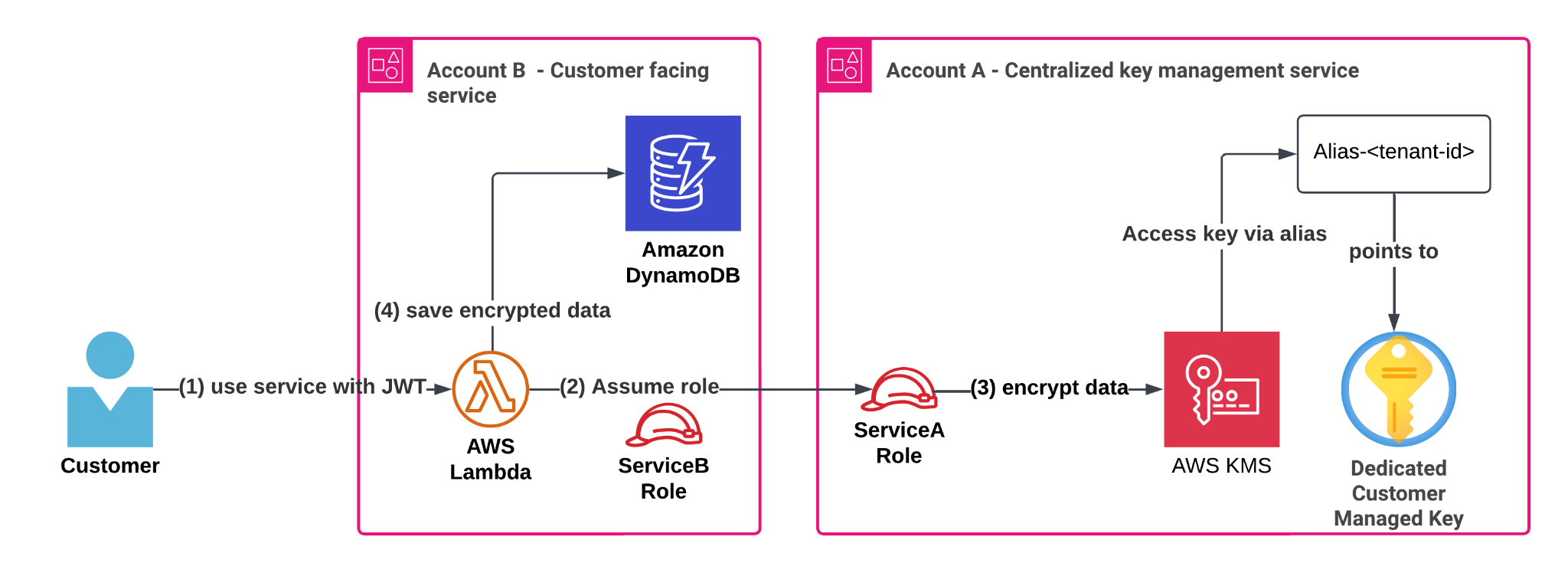
Architecture diagram showing centralizing tenant key management flow with JWT authentication, role assumption ,data encryption and saving in DynamoDB

Centralized key management in practice: Encrypting customer data

Let’s examine how this works in practice with a common scenario:

  • Service A: Our centralized tenant key management service in Account A
  • Service B: A customer-facing workload running in Account B

When a customer interacts with Service B, it needs to store sensitive information securely, whether that’s secrets, API keys, or license information in a DynamoDB table. Instead of relying on shared KMS keys or default encryption, Service B encrypts data using the customer’s dedicated KMS key managed by Service A. The process works through AWS Identity and Access Management (IAM) role delegation. Service B temporarily assumes a role (ServiceARole) in Account A, receiving fine-grained, scoped down permissions for the specific tenant’s KMS key. With these temporary credentials, Service B can perform client-side encryption operations on sensitive information using the AWS SDK or the AWS Encryption SDK.

In this blog post, we used Boto3. For more advanced use-cases requiring data key caching or keyrings, use the AWS Encryption SDK.

Solution walkthrough

Let’s expand the technical aspects of the solution depicted above. Assumptions and definitions:

  • Incoming requests include an authentication header with a JSON Web Token (JWT) that includes data identifying the current tenant’s ID. These tokens are signed by an identity provider, making sure that the JWT cannot be modified, and the tenant identity can be trusted.
  • Account A: Centralized key management service.
  • Account B: Business service that serves customer requests.
  • alias/customer-<tenant-id> is the format of the aliases in account A. Each alias points to the KMS key of the corresponding customer identified by value of <tenant-id>. Service A creates these aliases during tenant onboarding and deletes them during tenant offboarding.
  • ServiceARole: A role in Account A that can encrypt and decrypt a KMS key that has an alias prefixed with alias/customer-*. The permissions are scoped down further using session policies when ServiceBRole assumes ServiceARole.
  • ServiceBRole: A role in Account B that can assume ServiceARole in Account A to gain access to the customer’s KMS key. This will be the AWS Lambda function’s execution role.

Note that Service B’s compute layer in this case is a Lambda function, but the solution works for other compute architectures. Let’s go over the flow in more detail:

Use service with JWT

A customer who belongs to a tenant signs in to the SaaS solution and is given a JWT that identifies its tenants with a tenant ID (<tenant-id>). The customer makes an action in ServiceB and sends sensitive information.

ServiceB handles the request (in a Lambda function), verifies the JWT token and wants to:

    1. Encrypt the customer’s sensitive data
    2. Save the encrypted data along with other data in the DynamoDB table

Assume role

In this example, the Lambda function uses its execution role credentials to assume the ServiceA role in the ServiceA account. Another way to grant cross-account access to KMS keys is by using KMS grants, to learn more, see Allowing users in other accounts to use a KMS key.

Let’s review the ServiceRoleA IAM policy:

Grants encrypt and decrypt access to a KMS key using the alias/customer-* pattern.

{
  "Version": "2012-10-17",
  "Statement": [
    {
      "Sid": "AllowKMSByAlias",
      "Effect": "Allow",
      "Action": [
        "kms:Encrypt",
        "kms:Decrypt",
        "kms:GenerateDataKey*"
      ],
      "Resource": "*",
      "Condition": {
        "StringLike": {
          "kms:RequestAlias": "alias/customer-*"
        }
      }
    }
  ]
}

To encrypt tenant secrets securely and at scale, we grant application roles cross-account access to KMS keys—but only through their alias, which maps to a tenant identifier present in their JWT authentication token, enforcing strong isolation.

You can control access to KMS keys based on the aliases that are associated with each KMS key. To do so, use the kms:RequestAlias and kms:ResourceAliases condition keys as specified in the Use aliases to control access to KMS keys.

In addition, the trust relationship policy of the ServiceARole allows the ServiceBRole in account B to assume it:

{
  "Version": "2012-10-17",
  "Statement": [
    {
      "Effect": "Allow",
      "Principal": {
        "AWS": "arn:aws:iam::<ACCOUNT_B_ID>:role/ServiceBRole"
      },
      "Action": "sts:AssumeRole"
    }
  ]
}

Depending on your environment, you can add additional conditions to this trust policy to further reduce the scope of who can assume this role. For more information, see IAM and AWS STS condition context keys.

Then, each KMS customer managed key will have the following policy. For example, a KMS key for a customer with <tenant-id>: 123 will have a policy that restricts access to the key using the specific customer alias and only through ServiceRoleA.

{
  "Version": "2012-10-17",
  "Id": "TenantKeyPolicy",
  "Statement": [
    {
      "Sid": "AllowServiceARoleViaAlias",
      "Effect": "Allow",
      "Principal": {
        "AWS": "arn:aws:iam::<ACCOUNT_A_ID>:role/ServiceARole"
      },
      "Action": [
        "kms:Encrypt",
        "kms:Decrypt",
        "kms:GenerateDataKey*"
      ],
      "Resource": "*",
      "Condition": {
        "StringLike": {
          "kms:RequestAlias": "alias/customer-123"
        }
      }
    }
  ]
}

The following is a Python code example demonstrating how Service B dynamically assumes a role in Account A to encrypt data for a specific tenant using a session-scoped IAM policy that allows access only to that tenant’s KMS key alias.

This pattern follows the same principles outlined in Isolating SaaS Tenants with Dynamically Generated IAM Policies. The idea is to generate and attach a tenant-specific IAM policy at runtime, granting the minimum required permissions to operate on tenant-owned resources—in this case, a KMS key alias. The credentials will allow the Lambda function to use only the KMS key that belongs to a customer (identified by tenant_id).

We will call the assume_role_for_tenant for every tenant.

The condition of "StringEquals" - "kms:RequestAlias": alias is the magical AWS STS sauce, it restricts ServiceB to use the current tenant’s alias in its encryption SDK calls and relies on alias authorization

import boto3
def assume_role_for_tenant(tenant_id: str):
    alias = f"alias/customer-{tenant_id}"
    # Session policy scoped to only the specific alias
    session_policy = {
        "Version": "2012-10-17",
        "Statement": [
            {
                "Effect": "Allow",
                "Action": [
                    "kms:Encrypt",
                    "kms:Decrypt",
                    "kms:GenerateDataKey*"
                ],
                "Resource": "*",
                "Condition": {
                    "StringEquals": {
                        "kms:RequestAlias": alias
                    }
                }
            }
        ]
    }
    # Assume ServiceARole in Account A with inline session policy
    sts = boto3.client("sts")
    assumed = sts.assume_role(
        RoleArn="arn:aws:iam::<ACCOUNT_A_ID>:role/ServiceARole",
        RoleSessionName=f"Tenant{tenant_id}Session",
        Policy=json.dumps(session_policy)
    )
    return assumed["Credentials"]

Encrypt data and save in DynamoDB

Now, what remains to do is use the assumed role credentials and use AWS SDK to encrypt the sensitive customer data and store it in the DynamoDB table.

# Use temporary credentials to create a KMS client
    creds = assume_role_for_tenant(tenant_id, plaintext)
    kms = boto3.client(
        "kms",
        region_name="us-east-1",
        aws_access_key_id=creds["AccessKeyId"],
        aws_secret_access_key=creds["SecretAccessKey"],
        aws_session_token=creds["SessionToken"]
    )
    # Encrypt using the alias
    response = kms.encrypt(
        KeyId= f"alias/customer-{tenant_id}"
        Plaintext=plaintext
    )
    # store response["CiphertextBlob"] in DynamoDB table

This post doesn’t address isolation between different services, only between tenants. If such service isolation is required, you can use encryption context, an optional set of non-secret key/value pairs that can contain additional contextual information about the data, for example the service identifier. This helps ensure that services can only encrypt or decrypt data using the relevant service encryption context.

Benefits of centralized key management

Let’s examine how this solution addresses our earlier challenges.

Tenant isolation by design

Despite reducing the total number of KMS keys, we maintain strict tenant isolation. Each customer’s sensitive data remains encrypted with their dedicated key, identified by a unique alias (alias/customer-<tenant-id>). Access control to the tenant key is tightly managed through IAM role delegation, following least privilege principles:

  • Service A exclusively controls the management of the tenants’ KMS keys.
  • Service B can only assume a role that grants restricted encrypt, decrypt, and GenerateDataKey access for the customer managed key designated by the alias: alias/customer-<tenant-id>.

Optimized cost management

Our approach significantly reduces costs by moving from multiple service-specific KMS keys per tenant to a single KMS key per tenant that is shared securely across services and environments. This behavior introduces a new centralized account (Account A) that provides access to encryption keys under the right circumstances. It is important to understand AWS STS limits, specifically for AssumeRole calls and consider temporary IAM credentials caching mechanisms if those limits become a bottleneck. Additionally, if KMS limits are a bottleneck, consider using data key caching by using the AWS Encryption SDK.

Streamlined operations and governance

By centralizing key management in Service A, you can achieve:

  • Consistent KMS key lifecycle management across the organization
  • Improved audit capabilities using AWS CloudTrail to better understand key access patterns by service
  • Reduced operational overhead
  • Simplified compliance monitoring

The only additional complexity is the initial cross-account role delegation setup between Service A and other services. After being established, this framework can be scaled to accommodate new tenants and services.

It’s best to encapsulate the assume-role logic, policy generation, and AWS SDK client initialization within a shared organization-wide SDK. This abstraction reduces cognitive load for developers and minimizes the risk of misconfigurations. You can take it a step further by exposing high-level utility functions such as encrypt_tenant_data() and decrypt_tenant_data(), hiding the underlying complexity while promoting secure and consistent usage patterns across teams.

Conclusion

In this post, we explored an efficient approach to managing encryption keys in a multi-tenant SaaS environment through centralization. We examined common challenges faced by growing SaaS providers, including key proliferation, rising costs, and operational complexity across multiple AWS accounts and services. The solution, centralizing key management, uses AWS best practices for IAM role delegation and cross-account access, enabling organizations to maintain security and compliance while reducing operational overhead. By implementing this approach, SaaS providers or large organizations facing similar challenges can effectively manage their encryption infrastructure as they scale, without compromising on security or increasing complexity.


About the authors

Remote access to AWS: A guide for hybrid workforces

Post Syndicated from Itay Meller original https://aws.amazon.com/blogs/security/remote-access-to-aws-a-guide-for-hybrid-workforces/

Amazon Web Services (AWS) customers can enable secure remote access to their cloud resources, supporting business operations with both speed and agility. As organizations embrace flexible work environments, employees can safely connect to AWS resources from various locations using different devices. AWS provides comprehensive security solutions that help organizations maintain strong protection of corporate resources, manage appropriate access controls, and meet compliance requirements while enabling productive remote work environments.

Because there are different types of workloads—from Amazon Elastic Compute Cloud (Amazon EC2) instances to web applications—running in the AWS Cloud, there are correspondingly multiple remote access use cases for using or operating these workloads. For example, access to an EC2 instance and its operating system to perform operations such as troubleshooting, log analysis, and data retrieval. Other use cases require access to web applications such as Jenkins, Salesforce, or the Kubernetes UI deployed on AWS.

To support these use cases, AWS provides multiple services and features that help you address access patterns using different approaches. One of the key challenges that you might face when implementing remote access solutions is understanding the tradeoffs of the different approaches and solutions. This post is designed to help you decide which remote access approach is best for your use-case.

Use cases

In this post, we address the following use cases:

Challenges associated with remote access

  • Cost: The cost of a remote access solution is a key factor for businesses.
  • Increased exposure surface: Securing a VPC with several EC2 instances, S3 buckets, and a database is a different task than securing the identities, devices, and communications channels used for remote access to the infrastructure.
  • Increased risk: Susceptibility to social engineering threats. Humans accessing workloads are the weakest link in any security program, introducing risks to data and infrastructure that otherwise wouldn’t have existed.
  • User experience (UX): The UX is a key factor in remote access. Lacking a well-designed UX can introduce risks by making it difficult to conduct day-to-day operations or respond quickly to incidents that affect users at scale.

A solution to mitigate the risks associated with remote access is to not provide it at certain levels, and you might sometimes choose this approach. In these cases, access to workloads that must be secure is only possible from trusted locations (such as company offices) and managed devices (such as company-issued laptops). For the remainder of this post, we talk about approaches and solutions available for you when you need to provide remote access from various locations and devices.

The different approaches

Before diving deeper into the services and features, let’s explore the different approaches for providing remote access to your users (shown in Figure 1). The main differentiator among them is where the trust boundary lies.

Figure 1: The different approaches along with the corresponding solutions

Figure 1: The different approaches along with the corresponding solutions

  • Network-based approach: Users are given access to your network through VPCs and are granted broad access to the actual target resource, web application, or EC2 instances. The trust boundary in this case is the VPC.
  • Host-based approach: Users have access to the host running the application. This is commonly used for operator access. The trust boundary is the host.
  • Application-based approach: Users access the application using their corporate credentials. This is commonly the case for software as a service (SaaS) applications. The trust boundary is the application.
  • End-user computing approach: End-user computing (EUC) is a combination of technologies, policies, and processes that gives users secure, remote access to applications, desktops, and data that they need to get their work done. Desktops are operated centrally in the cloud and interacted with using streamed pixels to users’ devices. This approach shifts the trust boundary from the user device to desktops and data residing in the cloud.

These approaches aren’t mutually exclusive and occasionally overlap or can be combined in a zero trust model. Zero trust is centered on the idea that access to resources shouldn’t be based solely on the network location but on authentication and authorization of each request using multiple factors; including the user identity, device, and location, among others.

The trust boundary primarily depends on the criticality of the target resource, the risk tolerance of the organization, and the complexity of the implementation. Wider trust boundaries (such as in a network-based approach) increase the exposed surface area—because the whole network is exposed to trusted users and access to the network grants access to all the resources inside it—but are the simplest to implement. Tighter trust boundaries (such as a zero trust model) considerably reduce the exposed surface area but require implementing multiple factors that feed into the authorization context.

For example, organizations might provide network-based access from trusted devices to operators for a VPC with web-servers and databases, but only allow end-user computing based access for contractors or third-party users using non-corporate devices, also known as bring your own device (BYOD).

When selecting your remote access solution, you need to consider the desired trust boundary, authentication, authorization, user experience, access visibility and cost, which we explore in the following sections.

Network-based approach

The network-based approach is popular when users need access to multiple resources residing in specific networks in a straightforward manner, while keeping the networks disconnected from the public internet. When providing access at the network level, managing security configurations such as authorization, authentication, and auditing happens at the resource (application or machine) and client device, introducing challenges at scale.

AWS Client VPN is a fully managed service that you can use to securely connect users to VPCs from virtually any location using OpenVPN-based clients. Users can authenticate using your organization’s identity provider (IdP) in combination with certificate-based authentication. The service supports authorization rules that act as firewall rules to grant users access to specific CIDR blocks based on membership in an Active Directory group or a group defined in a SAML-based IdP. Additionally, you can use client connect handlers to run custom authorization logic based on device, user, and connection attributes.

After the required infrastructure is set up, users can connect to the target VPC and access EC2 instances or web applications at the network level inside their authorization scope. The UX is as straightforward as connecting using client software installed on the user’s device and authenticating using corporate authentication policies. A client VPN provides visibility into users’ connections to the VPN through connection logs, which are streamed to an Amazon CloudWatch log group. Connection logging provides visibility into each user’s initial VPN connection; getting visibility into what happened during the connection requires gathering the data from the target resource, network, or the user’s device.

After the user is authenticated and authorized, their device gains network access to the relevant VPC—and potentially other VPCs that are peered—or is connected through AWS Transit Gateway to that VPC. This can potentially provide network access to resources and networks outside the scope of the user.

A client VPN-based solution should be implemented when the network is the intended trust boundary around resources (for example, at the subnet or security group level) and group-level access control is sufficient. See Get started with AWS Client VPN.

Host-based approach

Providing access to hosts isn’t always necessary. One way to mitigate risks related to unauthorized host access is to not allow it and rely on fully automated operations instead. In practice, operators and developers still require access to hosts for visibility, tuning the operating system settings, applying patches, or manually restarting a service.

For access to EC2 instances, you can use features such as AWS Systems Manager Session Manager or EC2 Instance Connect Endpoint. Both of these features provide access to a host without exposing it to the internet, and because they use AWS Identity and Access Management (IAM), they authenticate, authorize, and log every session request made to AWS CloudTrail, and provide capabilities such as IAM Conditions (for example, aws:SourceIp) to apply conditional access, often minimizing the need for a network-based approach.

These two features mainly differ in the way they operate. Session Manager requires an agent, which is installed by default on several Amazon Machine Images (AMIs). The agent establishes an outbound connection—through the internet or a VPC endpoint—to the service endpoints, so you don’t have to modify the host’s inbound security group rules. It allows SSH connections tunneled over a proxy connection and provides in-session logging providing visibility into users’ commands within a session.

EC2 Instance Connect doesn’t require that you install an agent; it allows a secure native SSH connection, using short-lived SSH keys. As such, it requires that inbound connections from the EC2 Instance Connect service on port 22 be allowed on the host’s security group.

Most customers use Session Manager unless they don’t want to have an agent installed on the virtual machine or require a native SSH experience.

End-user computing approach

End-user computing services like the Amazon WorkSpaces Family or Amazon AppStream 2.0 stream desktops and applications as encrypted pixels to remote users while keeping data safely within your Amazon Virtual Private Cloud (Amazon VPC) and connected private networks. Unauthorized access to the client device is exposed only to encrypted pixels, which essentially moves the trust boundary from the device accessing the resources to the virtual desktop running in the cloud.

You can dive deeper into the differences between these different services in Unified access to AWS End User Computing services.

These services are particularly popular among customers who want to minimize the user’s device as the trust boundary. This can improve operational efficiency, especially when dealing with untrusted devices or highly sensitive data, because you significantly narrow the scope of what needs to be protected. This can also reduce the use (and costs) of expensive hardware.

The idea is that a user first authenticates using credentials provided by the corporate Active Directory or a SAML federation to the corporate identity provider. After the user is authenticated and authorized, an encrypted streaming session begins and the client is remotely operating a desktop or application that’s deployed in an Amazon VPC, with an elastic network interface (ENI) deployed to the customer’s managed VPC.

When adopting end-user computing for remote access, you can choose the UX and the cost structure that best fit your use case (for example, persistent access to a desktop or on-demand access to specific applications). You can also select different compute and storage options depending on the desired performance.

AWS End User Computing provides different machine types to accommodate different UX requirements and with different pricing models depending on the consumption model being used.

For more information, see Getting Started with Amazon Workspaces and Getting Started with AppStream 2.0.

Application-based approach

IAM Identity Center is primarily known for simplifying user access to AWS accounts within an organization at scale. It also provides single sign-on (SSO) access to supported web applications, giving users seamless access to these applications after they sign in using their directory credentials. Identity Center supports two application types:

If you use customer managed applications that support SAML 2.0 and OAuth 2.0, you can federate your IdP to IAM Identity Center through SAML 2.0 and use Identity Center to manage user access to those applications.

For organizations operating AWS environments at scale with multiple accounts, using IAM Identity Center is the recommended service to provide access to web applications and is provided at no additional cost.

Combining multiple approaches in a zero trust model

The zero trust model combines multiple factors including the user identity, device, location, and others, to evaluate and grant access requests. One way that you can implement this model to provide remote access to workloads deployed in a VPC is to use AWS Verified Access. With Verified Access, you can provide secure access to corporate applications without a client VPN and support TCP-based connections to a VPC, be it to web applications or EC2 or RDS instances. Authentication can be done using an existing IdP or AWS IAM Identity Center and a device management service that can provide additional information to improve authorization decisions based on context from the device. Those authorization decisions are expressed as Cedar policies that you author based on your access requirements. The service provides extensive logging for each web request, so you can investigate anomalies and view information about the access that was granted. For more information, see Get Started with Amazon Verified Access.

Understanding the tradeoffs

To select the right solution for your workforce, work backwards from the use case. Start by identifying and classifying the asset inventory and mapping the users accessing it and their access patterns.

Things to consider based on the classification:

  • Visibility: Determine the level of visibility into remote access activities and the type of information that you’ll need to detect and recover from a security event or to comply with regulatory and compliance requirements.
  • Authentication and authorization: Determine if your existing IAM mechanisms are sufficient. You might need to identify a temporary access management system or include information coming from user devices to address risks of compromised employees.
  • Network access: Know your users and what type of network access, if any, they need. When considering network access, include the potential risks of overly permissive access.
  • Cost: To determine costs, you need to know how many users and resources will be supported by remote access. Also, how many connections you expect and for how much time. Use that information to help determine the total cost of ownership of your solution.
  • Endpoint security: For each resource, understand risks associated with providing access to it from a user’s device. Know what mechanisms you have (or can implement) to detect threats and unauthorized access or provide additional context for the authorization decision granting access to a resource.
  • User experience: Compare the cost of a streamed user experience to one that’s locally installed to see if any additional cost is balanced by the improved security of the streamed UX.

The following provides an overview of the different solutions and the factors that can help you make an informed decision.

Solution Use cases Trust Boundary Provides access to Protocol User experience Authentication Authorization Visibility Cost
Client VPN
  • User access to internal applications
  • Operator access to IP resources in VPC
Network VPCs, subnets, security groups IP Client based,native
  • Single sign-on (SAML-based)
  • Active Directory
  • Mutual (certificate based)
  • Per CIDR (Authorization rules)
  • Lambda Authorizer for custom code
Connection logging (CloudWatch) Connection time and endpoint association
AWS Session Manager
  • Operator access to EC2 or on-premises instances
Host EC2 Instances: Linux, Windows, or MacOS (EC2 only) SSH or RDP Native
  • IAM
  • IAM
CloudTrail, or in-session logging using CloudWatch and Amazon S3) No additional cost for accessing EC2 instances
EC2 Instance Connect Endpoint
  • Operator access to EC2 instances
Host EC2 Instances: Linux or Windows SSH or RDP Native
  • IAM
  • IAM
CloudTrail No additional cost
IAM Identity Center
  • User access to SAML 2.0 and OAuth 2.0 applications
Application Web applications HTTP(S) Native
  • IAM Identity Center
  • IAM Identity Center
CloudTrail No additional cost
Amazon Verified Access
  • User accesses web or TCP-based applications deployed in a VPC
Amazon Verified Access
  • Web applications
  • TCP resources
HTTP(S) or TCP Native
  • IAM Identity Center or OIDC
  • Custom using Cedar policies
  • Allows device signals
Per request logging Per application or bandwidth
Amazon Workspaces
  • User accesses a virtual persistent desktop in a VPC
Cloud desktop Persistent virtual desktop WSP or PCoIP Client based, or non-native
  • Identity provider
  • Group membership
CloudTrail Per instance
Amazon AppStream 2.0
  • User accesses a virtual desktop in a VPC
Cloud desktop Non persistent virtual desktops and applications NICE DCV Client based or non-native
  • Identity provider
  • Group membership
CloudTrail Per instance

Conclusion

In this post, you learned about different approaches and solutions for providing remote access for your organization’s workforce. This included tactical recommendations on how to find the remote access solution that suits your needs best based on factors such as costs, user experience, and risk. By understanding those tradeoffs, you can now map out the different use-cases based on your infrastructure and threat model and build a remote access strategy to meet your needs. As you experiment and adopt the different tools, careful planning is required when designing and deploying the services. For example, which account to deploy the service to or how to provision access to the services. Use resources such as the AWS Security Reference Architecture (AWS SRA) and the individual service documentation pages to help guide your journey.

If you have feedback about this post, submit comments in the Comments section below.

Itay Meller

Itay Meller

Itay is a Security Specialist Solutions Architect at AWS, with a strong background in cybersecurity R&D and leadership roles across various security-focused companies. With deep expertise in cloud security, Itay helps organizations securely adopt and scale their AWS environments by addressing complex security and compliance challenges.

Maxim Raya

Maxim Raya

Maxim is a Security Specialist Solutions Architect at AWS. In this role, he helps clients accelerate their cloud transformation by increasing their confidence in the security and compliance of their AWS environments.