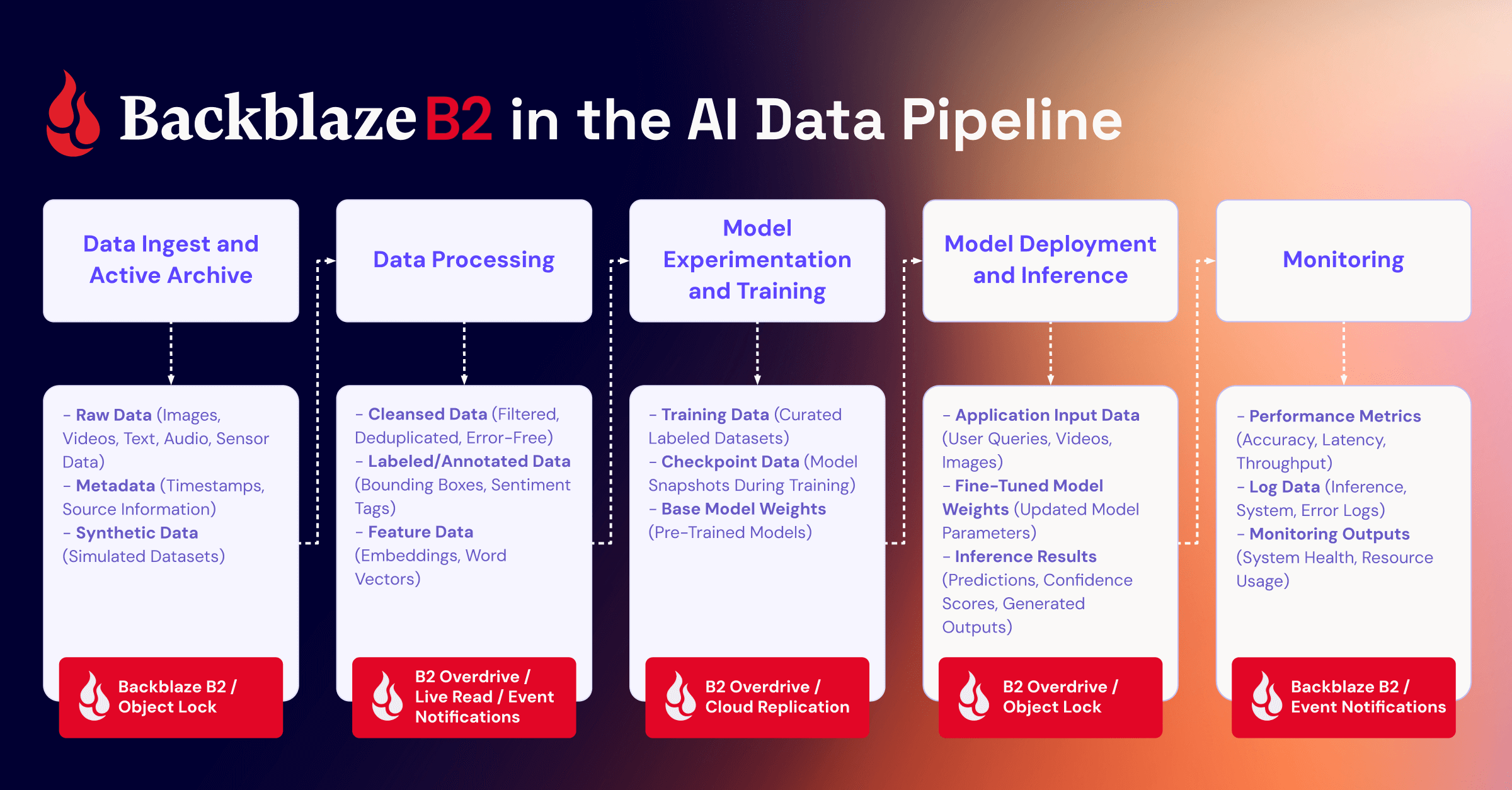
AI agents are getting very good at making things: reports, code builds, images, videos, datasets, customer exports, and backups. But generating a file is only half the job. The agent still needs somewhere durable to put it. That’s where B2 comes in.
Today, we’re introducing the Backblaze B2 MCP Server: an open source server that gives AI agents a safe, standard way to operate cloud object storage.
Introducing the Backblaze B2 MCP Server
Model Context Protocol (MCP) provides a common way for AI agents to discover and use external tools. The Backblaze B2 MCP Server applies that model to Backblaze B2 Cloud Storage, connecting MCP-compatible clients to a focused set of storage operations.
The server is open source and designed so the tools presented to the agent reflect the permissions of the connected B2 application key.
And that last point is important. The MCP server does not invent a new permission model or grant an agent blanket access to your account. If the key can only read from one bucket, the agent’s usable tool set and reach are constrained accordingly. If the key does not permit an operation, the agent cannot use the MCP server to bypass that boundary.
Why launch an MCP server?
Storage has always met developers in two places: the API and the console. Agent tools are becoming a third, and increasingly the one where work starts. Our view is that infrastructure should be available inside the tool someone already has open, at the moment they need it.
That spans a wide range of work: everyday tasks that produce outputs which need to be stored, AI workflows that read and write data as they run, and applications that require storage to handle files. A report or an export has to land somewhere durable. An application built around agents needs somewhere to put user uploads, generated assets, and datasets. Customers have also asked us how their own agents can administer their storage.
MCP is what lets one implementation serve all of it. An MCP server provides these storage tools directly to the AI agents people use for everyday tasks and for coding, so the same credentials, scoping, transfer path, and destructive operation policy apply everywhere your team works. B2 is available inside the tools your teams already have open.
See it in action
Suppose an agent has prepared a customer export. Instead of handing it a general-purpose credential and writing the surrounding storage logic yourself, you could ask:
“Prepare a private destination for this customer export. Keep it for 30 days and give me a secure way to upload it.”
Depending on the application key’s permissions and the server’s policy settings, the agent can:
Create a private bucket or select an existing one the key can access.
Apply lifecycle or retention settings, depending on whether the export should expire automatically or be protected from deletion.
Generate a short-lived upload URL.
Verify that the export arrived.
Return a short-lived download URL to the intended recipient.
For a large export, the bytes move directly to B2 using the short-lived URL; they do not need to pass through the model conversation or the MCP server. That keeps bulk data on the right path and leaves the agent responsible for orchestrating the work, not hauling the payload.
Now imagine a follow-up request: “Delete that export.” The B2 MCP Server can require confirmation before the action proceeds or block destructive operations entirely, depending on how the server is configured. The same principle applies to changes that weaken protection, such as clearing retention or introducing lifecycle rules that schedule deletion.
The result is a useful division of labor: The agent can set up the storage, move the file, and verify the outcome, while the B2 MCP server enforces the connected key’s limits and configured policy.
Built for real storage work
The B2 MCP Server includes up to 40 tools across the B2 Native API, B2’s S3 Compatible API, and purpose-built storage analytics. You do not need to expose all of them to every agent. The available surface adjusts to the connected key and the server’s policy settings.
Manage storage. Create and configure buckets, list and manage objects, define lifecycle rules, work with retention and legal holds, and use Object Lock where the workflow calls for stronger protection.
Move large files directly. Generate short-lived upload and download URLs, or use multipart transfers for large objects, so bulk data stays out of the model and MCP server.
Limit access. Connect a scoped B2 application key so the agent can see and use only the buckets and capabilities it needs. For normal storage work, a non-master key is the right starting point.
Gate destructive actions. Set the destructive-action policy to require confirmation, block the operation, or allow it in a trusted environment. Local use defaults to confirmation; hosted HTTP deployments default to blocking these calls.
Inspect usage. Find storage growth, identify egress leaders, locate the largest files in a bucket, and surface unfinished multipart uploads that may be consuming storage.
Safety starts with the key
An MCP server makes tools available to an agent; it should not make good access controls optional. With B2 MCP, the connected application key remains the first boundary. B2 application keys can be limited by bucket, capability, file prefix, and duration, giving developers a practical way to apply least privilege to agentic workflows.
The server adds another layer around operations that deserve friction. Destructive and protection-weakening actions can require an explicit confirmation or be refused before execution. For hosted deployments, the project includes additional controls and deployment guidance for credential handling, authentication, allowed hosts and origins, rate limits, and logging.
The goal is not to pretend an agent can never make a bad request. It is to give developers clear, enforceable boundaries around what the agent is allowed to do.
Already use B2? Your agents can use it too
If your application data, backups, media, or archives already live in B2, you do not need a separate storage product for agents. The MCP server works with standard B2 application keys and existing buckets.
You can connect an existing key, but in most agentic workflows it is worth creating a narrower key for the job. A reporting agent might need read access to a specific prefix. An export workflow might need permission to write to one private bucket and generate a short-lived download link. A cleanup agent might need list access but no delete capability until a human approves the action.
Try the B2 MCP Server
One-click install (Claude Desktop)
Download b2-mcp.mcpb from the latest release and double-click it. Claude Desktop opens, offers to install the extension, and prompts for your Application Key ID and Application Key (Region and master key optional) — no config file to edit, nothing pasted into the conversation. (If your system hasn’t associated .mcpb files with Claude Desktop yet, open Settings → Extensions and install it from there, or drag the file onto that window.)
Run with npx (any MCP client)
You need three things to get started:
A supported Node.js runtime.
A B2 application key. Use a non-master key and scope it as narrowly as the workflow allows.
An MCP-compatible client.
The fastest way to run the server is with npx:
`npx -y @backblaze-labs/b2-mcp`
For Claude Desktop, add the following block to claude_desktop_config.json, substitute your application key values, and restart the client:
Do not paste the application key into the model conversation. Keep it in the client configuration or your deployment’s secret-management layer.
Then try a deliberately simple first prompt: “List the buckets this key can access.”
For copy-and-paste setup instructions for Cursor, VS Code, Cline, Windsurf, Zed, Continue, Goose, Claude.ai, and hosted deployments, see the client setup guide.
See the B2 MCP Server in action. We’ll set it up, run a complete storage workflow, explain the safety boundaries, and answer your questions.
A safe way for agents to operate storage
Agents need more than somewhere to put files. They need a safe way to operate storage: to prepare the right destination, move data on the right path, verify the outcome, and stop when a request exceeds their permissions or policy.
The Backblaze B2 MCP Server brings those capabilities to the MCP clients developers are already using, while keeping B2 application keys and server-side safeguards in control. Try it with your existing B2 storage, or join the webinar to see the complete workflow.
Building generative media applications on object storage: What the strongest projects have in common
Between June 22 and August 3, 2026, 1,314 people entered hundreds of projects into a single brief: build a generative media app on Backblaze B2 object storage, orchestrated through the open-source Genblaze SDK, for a share of a $10,000 prize pool.
Almost every entry could generate an image, a video, or a soundtrack, and generate it well. What separated the strongest was the layer underneath: what gets written down, what can be proved later, and what happens when a file has to be checked, corrected, or locked against deletion.
Here’s a closer look at the five that went furthest, and the parts worth reusing. Every entry is browsable in the hackathon project gallery.
The brief, and why it was narrow on purpose
The brief was narrower than most hackathons get. Submissions couldn’t just be a working demo and a repo. Devpost required teams to explain, in writing, how their app actually used both Backblaze B2 and Genblaze, and to list every provider and model behind it. Judging ran against four criteria: real-world utility, production readiness, meaningful use of B2, and meaningful use of Genblaze.
That last pair is the constraint that did the work. “Meaningful use” rules out the default architecture, where a team generates an asset, drops the bytes in a bucket, and calls that storage. It forces a decision about what the storage layer is actually for. What follows is written the way a technical and creative director would walk five finished pipelines against exactly that rubric: who each app is actually for, whether it holds up past the demo, and how deep the storage and orchestration choices go.
The two primitives
Backblaze B2 is the ground every one of these apps had to build on: S3-compatible object storage, sized for the sheer volume of generated assets, thumbnails, metadata, and provenance records a media pipeline throws off, free to start with 10GB included.
Genblaze, Backblaze’s open-source orchestration SDK, is what feeds it: a unified Pipeline API spanning providers like OpenAI, Google, Runway, Luma, ElevenLabs, and Stability Audio, plus models served through platforms such as GMI Cloud and NVIDIA NIM, so a team can swap providers without rewriting its orchestration. Every run produces a canonical provenance manifest that can be embedded directly into the media file itself (an .mp4, a .png, an .mp3) and persisted to B2 or any S3-compatible store.
The hackathon also partnered with GMI Cloud, giving teams easy access to open-source generative models for image, video, audio, chat, reasoning, and multimodal work, which is why it turns up as a provider more than once below.
Two primitives, six weeks, hundreds of teams, and five very different examples of rigor.
A review room for AI video ads that doesn’t make you wait for the whole render.
firstframe builds a review room for the marketing and creative teams who commission AI-generated video ads: instead of waiting on a full multi-scene render before anyone can react, it streams the first finished scene as a live HLS playlist the moment it’s ready, appending segments as later scenes land. A reviewer starts giving notes while the ad is still being made, not after.
Every generated scene is scored by an actual vision model before a human ever sees it, so obviously broken output gets caught and retried automatically rather than shipped to a reviewer’s inbox. A failover step swaps in a backup model only on a genuine provider error, never on an ordinary slow response, and once a scene clears review its master file and manifest are locked against deletion for thirty days: a guarantee the code proves by trying to delete a locked file and catching the rejection. Automated QA paired with a tamper-evident record of what was approved is what turns a generation pipeline into something a brand could actually sign off on.
On B2, the bucket’s folder structure doubles as a workflow: a scene moves through incoming, running, provenance, approved, and rejected prefixes as it clears review. Once a scene is approved, its master file and manifest get a real thirty-day write-once hold using B2’s Object Lock in Governance mode, and the code proves that isn’t just decorative by trying to delete a locked object by its version ID and catching the rejection B2 throws back. A reviewer’s application key is scoped to the readFiles capability with a name prefix restricting it to the approved folder alone. Four separate lifecycle rules cover the bucket’s different prefixes: stalled uploads in incoming have their multipart parts cancelled after 24 hours, while rejected, in-progress, and approved objects each age out on their own separate timers. The video segments themselves land in B2 as ffmpeg finishes each one, with the playlist rewritten after every segment, which makes B2 a live broadcast target rather than an archive that fills up after the fact. Reads go out as path-style presigned URLs, working around a known issue where virtual-host-style presigning fails on a private B2 bucket. B2’s own Event Notifications, five signed webhook rules, keep the review room in sync in real time, with a fallback to plain polling if an account’s Event Notifications API isn’t enabled. The app also watches B2’s own transaction cap and backs off to local disk instead of crashing when a call gets rejected for exceeding it.
On Genblaze, generation runs through an AgentLoop scored by a ThresholdEvaluator. The judge is a real vision model, an NVIDIA NIM llama-3.2-90b-vision-instruct instance grading the actual rendered keyframes, not a fixed retry count. Two pipeline branches, audio and video, fan into a single compositor node instead of running as a straight chain, a fallback_models failover is wired in and confirmed to trigger only on a genuine model error rather than a timeout, and every run carries two layers of lineage: a shared run id across scenes and loop iterations, plus a second, custom chain id layered on top of that. The team even embedded the manifest directly inside the delivered MP4, so a separate verification command can re-download and re-hash every asset the file claims exists. Along the way they filed three pull requests and an issue against Genblaze itself.
firstframe puts B2’s feature set to work in front of the reviewer. Object Lock in Governance mode, scoped application keys, lifecycle rules, Event Notifications, and presigned URLs are all load-bearing parts of the review workflow, doing visible work on every scene that moves through it. That’s architecture built to be trusted, not just to work.
A campaign generator built to double-check its own storage, re-verifying every asset the moment it’s read back.
beavous is built for the marketers and small commerce teams who need a full paid-social campaign out of a single product photo: not one hero image, but four creative concepts, sixteen cropped aspect ratios for every placement, on-label ad copy, and a portrait video reel, packaged as a verified ZIP pulled straight from B2.
A public API hands off to a private worker behind a task queue, and every campaign is namespaced to an organization so tenants stay isolated from each other. When a generation gets rejected, the app doesn’t start over. It chains a correction onto the original attempt, which is closer to how a real creative review actually works than a one-shot retry.
On B2, keys are organized hierarchically by organization and campaign rather than by content hash, because the product is multi-tenant by design. Every upload and download goes through a presigned URL, and the database never stores a raw link, only an object key and a hash. Every time an asset is read back, beavous re-downloads it and re-hashes the bytes independently, rather than trusting a manifest check alone. B2 is treated as the single, sole system of record for every generated asset: a clean, one-source-of-truth design with nothing else to keep in sync.
On Genblaze, three custom providers handle Gemini image generation, Gemini video, and Veo image-to-video, each with its own tiered pricing registered on the model. The more interesting move is a correction chain: when a generation gets rejected, its manifest becomes the parent of the next attempt, an explicit correction lineage most one-shot generation pipelines skip entirely. Prompts are marked private so the text never lands in the public manifest, only a hashed reference to it does, and before any manifest is trusted as a correction parent it gets independently re-verified, not assumed correct just because it was the app’s own write.
beavous’s answer to “do you trust your own storage” is simple: no, never. Check it again, every time. That’s a slower design than trusting your own write, and a more honest one.
A build system for generative media that can prove its own reuse, recovery, and release integrity, live, against B2.
takegraph is built for teams running a production, not a single generation: the kind of project where a script tweak halfway through shouldn’t mean re-rendering everything from scratch. It treats the whole thing like a software build: a content-addressed dependency graph that, when a spec changes, recomputes fingerprints, rebuilds only what’s actually invalidated, and reuses everything else.
A team can also re-download and re-hash the actual bytes behind any reuse, recovery, or release straight from B2, live, checking integrity themselves instead of trusting a log. That kind of self-auditing separates a pipeline meant to run unattended for months from one built to survive a single demo.
On B2, content-addressed keys use a two-level hash split so directory listings stay fast at scale, B2’s own Event Notifications (HMAC-SHA256-signed webhooks) feed a background process, and a separate reconciler periodically re-checks everything by hand in case a webhook is ever missed, coordinated across workers with a database lock so only one reconciler runs at a time. Unvalidated uploads land in a quarantine prefix backed by a real lifecycle rule that expires it automatically, and a bad key gets rejected outright rather than silently rewritten. Two least-privilege application keys, one for day-to-day work and one for releases, are each scoped to a single bucket, and CORS rules on the work bucket exist specifically to support presigned browser uploads. Verification (re-download, re-hash, prove it) is a feature of the product, not an internal tool.
On Genblaze, takegraph builds a real pipeline around the idea: a dedicated run builder, a content-addressable storage sink, manifests, and observability events tied to every step. The team kept its media-generation side lean, calling straight through the GMI Cloud connector for image and video (one of the hackathon’s partner platforms), and pointed all of its custom engineering at the layer that makes the whole pitch work: the storage and consistency system underneath.
takegraph turns storage verification into the product itself: reuse, recovery, and release integrity are things a user can ask the system to prove, live, rather than take on faith. That’s B2 treated as a system of record in the fullest sense: self-healing, event-driven, and built to survive a missed webhook without anyone noticing.
A comic studio with a provider for every model it needed, and a manifest for every frame it drew.
Ninth is built for indie comic authors and motion-comic creators working on a small budget, who revise a scene a dozen times before it’s right and can’t afford to pay for a fresh generation on every pass. Describe a story, and it writes, draws, casts, and stages it panel by panel on an editable timeline, then bakes the result to an MP4.
An edit doesn’t force a re-generation: assets are pulled from a semantic library whenever something close enough already exists, and everything the AI produces (timing, layer position, camera, bubble placement, even the artwork itself) stays editable in place afterward. That reuse-first design is backed by 126 regression tests and a render path that shares its engine with the live editor, so what a creator previews is exactly what gets exported.
Its B2 layer favors verified durability: flat content-addressed keys and a manifest per run, plus real, working endpoints for audit, restore, and backfill that report exactly what’s on B2 versus what’s only on local disk, and rebuild the difference with a SHA-256 check on every recovered file.
On Genblaze, Ninth wrote seven or eight custom providers, covering nearly every model it reached for: Azure’s image model, Gemini’s aspect ratios, Veo keyframes, Gemini’s video interpolation model, ElevenLabs music, and two separate structured-text providers. Each one exists for the same reason: to keep that artifact inside a pipeline and give it a manifest, so a generated frame always carries a record of the run and the prompt that made it.
Ninth’s mention is for discipline: the project that took “every generated frame should be reproducible and recoverable” most literally, and built the tooling to prove it on demand.
A spatial twin that gives a person’s spoken correction the same provenance as a model’s output.
Spatialize is built for venue and accessibility teams who need to rehearse a step-free route through a space before anyone sets foot in it: it turns a flat floor plan into a voice-navigable spatial twin, extracting validated 3D geometry from the plan image, then answering spoken questions with route guidance grounded in that geometry.
Because the underlying use case is safety-adjacent, nothing the model proposes is trusted outright. Every extracted floor plan, and every voice-driven edit to it, has to pass the same deterministic geometry validator before it’s accepted, so a plausible-looking but wrong route never quietly makes it into a rehearsal. When that validator rejects an attempt, it hands back the exact error, and the next attempt corrects specifically that, not a blind retry.
On B2, Spatialize favors resilience: every read goes through a short-lived, presigned link, and if B2 isn’t configured at all, the app quietly falls back to a local, path-safe store instead of failing to boot. It runs two storage paths side by side (its own hierarchical object store for run and scene state, and a separate Genblaze storage sink dedicated to generated-media provenance), keeping application state and generation history cleanly apart.
Under the hood, an agentic loop drives the floor-plan extraction, evaluated at each attempt by that same deterministic validator rather than an LLM’s opinion. Three custom text-to-speech providers form a genuine fallback ladder: a cloud model first, a lightweight third-party API next, and a self-hosted, zero-credential model as the last resort, so a narration request degrades gracefully rather than failing outright. The standout idea: a voice-driven edit to the scene creates a new version tagged as a human change, with the actual transcript kept as evidence, so every point in the final scene traces back to either a model’s manifest or a person’s own words.
Spatialize’s real achievement is conceptual: it gives a spoken correction the same seriousness as a model’s output, tracing every point in the final scene back to either a manifest or a transcript. That’s provenance thinking applied somewhere most generative pipelines never point it.
Same brief, different rigor
Every winning project found its own discipline. What they share is how many different, equally valid kinds of rigor a small team can bring to the same two primitives in six weeks. firstframe made B2’s write-once guarantee visible to a reviewer in real time. beavous made re-verification a habit instead of an afterthought. takegraph made its storage layer heal itself. Ninth made every one of its seven custom providers answerable to the same manifest. Spatialize made a human correction as provable as a model’s.
None of that shows up until a team stops treating storage and orchestration as plumbing and starts treating them as part of the design. firstframe’s win sits at the intersection of both: the same rigor that scores a generated frame with a vision model also locks the finished one against deletion.
What you can build on
Strip the five projects back and the same handful of moves keep appearing, none of which need a hackathon, a large team, or a novel model:
Object Lock in Governance mode turns “approved” from a database flag into a storage-level fact, and firstframe proves the hold is real by attempting the delete by version ID and catching the rejection B2 returns.
Bucket prefixes (incoming, running, approved, rejected) give you queue semantics without a queue, with a separate lifecycle rule per prefix so stalled multipart uploads and dead rejects expire on their own timers.
Re-download and re-hash on read, the way beavous does, because a non-deterministic pipeline produces a lot of near-identical artifacts and hashing is how you know which one you’re holding.
Event Notifications as the fast path, a periodic reconciler as the source of truth, so a dropped webhook costs you latency instead of correctness.
Content-addressed keys with a two-level hash split keep directory listings fast at scale and make reuse cheap: same fingerprint, same bytes, no second generation to pay for.
Application keys scoped one per role, like a reviewer key limited to the readFiles capability with a name prefix restricting it to the approved folder.
Correction lineage instead of retries: the rejected run’s manifest becomes the parent of the next attempt and carries the specific error forward. beavous and Spatialize arrived at this independently, which suggests it’s the general shape rather than a niche trick.
All of it is available today. B2 starts free with 10GB, and Object Lock, lifecycle rules, Event Notifications, scoped application keys, and presigned URLs are in the API from day one. Genblaze gives you one Pipeline API across OpenAI, Google, Runway, Luma, ElevenLabs, and Stability Audio, plus models served through GMI Cloud and NVIDIA NIM, and a canonical provenance manifest out of every run that embeds straight into the .mp4, .png, or .mp3 you ship.
A good first project is smaller than any of these five. Take a pipeline you already have, write a manifest for every run, persist it to B2, and add one endpoint that re-downloads and re-hashes an asset to prove the manifest is honest. That’s a weekend of work, and everything above is a variation on it. Genblaze is open source, and three of the pull requests behind firstframe are already in it.
For more ideas, the full project gallery has every entry from the hackathon, and there’s a lot in there beyond the five covered here.
The generative AI wave is moving from text into media. ChatGPT taught a generation of developers how to wire up an LLM. The next chapter is harder and more interesting: video, image, audio, and multimodal workflows that combine them. New models for each of these are landing every few weeks, from established labs and from teams nobody had heard of a quarter ago. The quality keeps climbing, and the catalog keeps expanding.
That pace is good news, but it asks more of the apps that depend on it. A pipeline that hard-codes today’s best video model is going to feel dated in a month. The apps that come out ahead will be the ones built on reactive architectures: pipelines that stream progress as events, fan out concurrent work, fall back when a provider stalls, and let you swap in a new model with a single line of code.
That’s where the moat is now. If you’re building an AI media product, the differentiation is in the pipeline: which models you call, in what order, how you fall back when one is slow, how you keep latency tolerable, where the assets land, and how you prove what was generated. The teams winning this space treat the orchestration layer as their core IP. The frontend on top is the easy part.
We’re looking for builds that solve real-world use cases. Show us what becomes possible when the pipeline stops being a bottleneck.
What we’re running
The Backblaze Generative Media Hackathon is an online competition for developers building generative media apps. $10,000 in cash prizes, 10 GB of free Backblaze B2 storage to start with, and GMI Cloud credits for the first 270 eligible participants.
Grand Prize: $7,000
Second Place: $2,000
Third Place: $1,000
Registration and submissions run June 22 through August 3, 2026 (5 pm ET). Winners are announced August 12.
The stack
Backblaze B2, Genblaze, and GMI Cloud are the three pieces of a media pipeline that’s both easy to vibe code and serious enough to take to production.
Backblaze B2 is S3-compatible object storage for the generated assets, the metadata, the provenance manifests, the thumbnails, and the logs. Durable URLs that never expire. Event Notifications fire downstream work without polling. Object Lock makes your provenance records tamper-evident. Lifecycle Rules handle cleanup so intermediate artifacts don’t pile up.
Genblaze is our open-source Python SDK for orchestrating generative media workflows. One Pipeline API spans OpenAI, Google, Runway, Luma, Decart, ElevenLabs, Stability Audio, NVIDIA NIM, GMI Cloud, and others. Every run produces a SHA-256-verified provenance manifest. Swap providers with a one-line change. New models drop every couple of months, and your app doesn’t need a rewrite each time.
GMI Cloud is a unified inference platform for open source AI. Image, video, audio, chat, reasoning, and multimodal models behind a single API key. If you want to try five video models in a weekend, this is the easiest way.
What to build
Anything that turns a generative AI capability into something a real person would actually use. Some directions:
AI video generation or editing apps
Image generation, remixing, or transformation tools
Audio, music, or voice generation workflows
Multimodal apps that combine text, image, video, and audio
AI media libraries for storing, organizing, and searching generated assets
Provenance-aware workflows that track how each piece of media was generated
Agentic media pipelines that generate, evaluate, retry, and store outputs
Tools for creators, marketers, educators, entertainers, or developers
Judges will weigh real-world utility, production readiness, and how meaningfully your app uses B2 and Genblaze. We’re looking for projects where the pipeline is doing real work. Apps that handle multiple providers, recover from errors, track provenance, and store assets reliably.
How to enter
Visit the hackathon page on Devpost for registration details, eligibility requirements, prizes, submission guidelines, and important dates:
Build your generative AI media application using Backblaze B2 and Genblaze, then submit your project before the deadline.
If you want a head start on what a Genblaze + B2 app looks like in code, two reference repos already exist. genblaze-gen-media-multi-provider-sample chains five providers into one prompt-to-MP4 pipeline. genblaze-gmicloud-pipeline is a deep multi-model composition inside one provider.
A year ago, a good video model was a novelty. Today there are at least six worth using, and most of the teams we talk to are wiring up two or three of them into the same product, alongside image models, voice synthesis, and music generation. The hard question isn’t whether you can generate this kind of media. It’s how to build a pipeline that handles five providers without falling over.
That’s why we built Genblaze, an open-source Python SDK from Backblaze for building generative media pipelines: one API across video, image, and audio providers, swappable models, durable object storage, and a SHA-256-verified provenance manifest on every run.
The pipeline is becoming the moat
Models are commoditizing. New video, image, and audio releases drop every couple of months, and each one tends to be the best at one specific thing and middling at the rest. Nobody we work with is betting on a single provider anymore. They build a portfolio and configure fallbacks.
The pipeline is what stays. It’s where you’ve figured out which model handles which shot type and which voice fits which brand. It’s where retry logic and output guards live, and where your audit trail comes from. That work survives the next model release. The prompts you tuned for last quarter’s hero model don’t.
For a pipeline to actually be durable, though, it has to be reactive. Hard-coding one provider, blocking on every step, and returning a single synchronous result is fine for a demo. In production it ages out in weeks. The pipelines that hold up stream progress as events, fan out concurrent work, handle backpressure from slow providers, and let you add a new model with a one-line change.
That’s what Genblaze is designed to be. One pipeline object, every provider behind the same surface, and a new model is one more .step().
A workflow that uses five providers
Here’s a concrete example: producing a short brand film from a one-paragraph brief.
1. Storyboard frames. Lock the visual direction with Seedream 5.0 Lite or FLUX via GMI Cloud, or Imagen on Google.
2. Animate the approved frame. Kling image-to-video on GMI Cloud, Veo on Google, Runway Gen-4 Turbo, or Luma Ray-2. They’re good at different shot types, so we usually try two and pick. Setting chain=True on the pipeline passes the image from step one into the video step automatically.
3. Score and sound design. Music from Stability AI’s Stable Audio or GMI Cloud’s MiniMax. Ambient effects and voiceover from ElevenLabs. LMNT for low-latency text to speech (TTS) when responsiveness matters.
4. Upscale. There’s an upscale step type built in. Route the rendered video through a Replicate upscaler like Real-ESRGAN to hit delivery resolution.
5. Classify and tag. Use a vision-capable chat() call to tag scenes, run brand safety checks, or generate accessibility metadata. Gemini 2.5, GPT-4o, or Llama 3.2 Vision on GMI Cloud all handle this.
That’s five providers across five different model types, defined in one pipeline. The same retry behavior, fallback chains, and provenance manifest apply to every step.
from genblaze_core import Pipeline, Modality from genblaze_gmicloud import ( GMICloudImageProvider, GMICloudVideoProvider, GMICloudAudioProvider, ) from genblaze_replicate import ReplicateProvider from genblaze_google import GeminiChatProvider
Swap any step for a different provider and nothing else in the pipeline has to change.
Provenance
Every run produces a canonical, hash-bound manifest that records the provider, model, prompt, parameters, timestamps, and the URI of every asset it produced. You can embed it directly into the output file (.mp4, .png, .jpg, .webp, .mp3, .wav are all supported by the matching media handler), or persist it as a sidecar JSON.
The hash is deterministic, so anyone downstream can verify the file by calling manifest.verify(). The same manifest is replayable: genblaze replay manifest.json reconstructs the run with the same parameters. And because every manifest carries a parent_run_id, you can trace a v3 video back through v2 and v1, including the fork where you tried Runway instead of Kling.
If you’re building customer-facing pipelines, this is what gets you from “we generated this” to “here’s the proof.”
Storage
Assets and manifests land wherever you want. We default to Backblaze B2, which the SDK wires up with ObjectStorageSink(S3StorageBackend.for_backblaze("my-bucket")) and which gives you durable URLs that don’t expire and don’t need credentials to fetch. The same sink works against any S3-compatible store: AWS S3, Cloudflare R2, MinIO.
A few B2 features pair particularly well with this kind of pipeline.
Event Notifications fire to a webhook, queue, or function endpoint when an asset or manifest lands. That gives you a clean way to kick off downstream encoding, indexing, or moderation without polling.
Object Lock lets you write manifests under a retention policy that nobody (not even the account root) can overwrite until the window expires. Combined with the SHA-256 hash inside the manifest, you’ve got cryptographic integrity and storage-layer immutability.
Lifecycle rules handle the cleanup. Final assets and manifests stay around as long as you want them to. Storyboard iterations, rejected takes, and pre-upscale renders prune themselves on whatever schedule you set.
Partnering with GMI Cloud: a unified AI inference platform for open source
GMI Cloud is a unified AI inference platform for open source. It supports LLM, image, video, and multimodal inference through one consistent API. The catalog covers Seedance, Kling, Veo, and Wan for video; Seedream and FLUX for image; MiniMax for music; ElevenLabs voices; and Llama, DeepSeek, and Qwen for chat and multimodal. One API key reaches all of it.
The genblaze-gmicloud adapter maps GMI’s image, video, audio, and chat endpoints onto the pipeline surface and tracks their catalog as new models ship. The first sample app below uses it heavily.
Two sample apps
genblaze-gmicloud-pipeline goes deep on a single provider. A prompt becomes an anchor image via seedream-5.0-lite. You iterate by passing the current image to flux-kontext-pro for reference-based refinement. Once you approve a frame, the app fans out concurrently to three video models (Kling-Image2Video-V2.1-Master, wan2.6-i2v, pixverse-v5.6-i2v). Manifests get written to B2 next to the assets, and the Genblaze integration sits in a single ~100-line file.
genblaze-gen-media-multi-provider-sample is the workflow above end to end. One sentence becomes a narrated, scored, captioned MP4. gpt-4.1-nano writes the storyboard, Imagen 4 produces the keyframes, Decart Lucy or GMI Cloud Kling animates them, NVIDIA Magpie TTS narrates, GMI Cloud MiniMax scores, and ffmpeg composes the final video. Five providers, one pipeline, every artifact ending up in B2 with a verifiable manifest.
That umbrella installs genblaze-core plus the B2/S3 storage backend, which is enough for a working provenance pipeline. Add genblaze[gmicloud], genblaze, or genblaze[all] to pull in providers.
Where this goes
Most of the interesting work in generative media is happening above the models now, in the pipelines that string them together. Whatever model you’re using today probably won’t be your favorite in six months. The orchestration around it is what lasts.
Every computer vision model is a reflection of the data it was trained on. The precision of the labels, the consistency across annotators, the coverage of edge cases. Get the data right and the model performs. Get it wrong and no amount of architecture or compute will compensate.
AI-assisted annotation tools have made it possible to label at a speed and scale that was unthinkable a few years ago. Teams that used to spend weeks on manual labeling now generate annotations automatically and refine them. That acceleration opens up real opportunity, but it also raises the bar for the infrastructure underneath the annotation pipeline. The architecture needs to keep pace with the volume of data now moving through it.
We have spent the last decade building AI workflows and one pattern shows up consistently: the teams that treat annotation as infrastructure from day one outperform the ones that bolt it on later. The difference is not just tooling. It is the architectural decisions underneath, particularly around storage, that determine whether an annotation operation scales or stalls.
Annotation within the ML pipeline
A production ML pipeline spans data ingestion, preprocessing, training, serving, and monitoring. Annotation sits within the data layer, but it is the stage where several consequential storage decisions converge: how raw data is stored, who can access it, how long it is retained, and how it flows between labeling, training, and evaluation. Getting storage right at this layer strengthens every stage downstream.
Data gravity. A single autonomous driving project can produce terabytes of camera and LiDAR data before a single label is applied. This data needs to live somewhere durable and accessible before, during, and after annotation. It rarely moves once it lands.
Collaboration. Labeling teams may be internal, external, or a mix. Quality reviewers need the same data access as annotators. The data layer has to support concurrent access across roles and geographies without creating bottlenecks or redundant copies.
Lifecycle persistence. Labeled datasets are reused across training runs, refined as models improve, and versioned as labeling standards evolve. Storage needs to retain raw data alongside annotations for months or years.
Regulatory constraints. In healthcare, automotive, and defense, access controls around training data are subject to compliance requirements. Encryption, scoped credentials, and auditability are non-negotiable.
The teams that design for these requirements upfront build data operations that scale cleanly across the entire pipeline.
CVAT as the annotation layer
CVAT (Computer Vision Annotation Tool) started as an internal tool at Intel in 2017, was open sourced in 2018, and spun out as CVAT.ai Corporation in 2022. Millions of users use it today, and for good reason.
Annotation breadth. CVAT covers the full range of label types: bounding boxes, polygons, polylines, keypoints, skeletons, cuboids, brush-based masks, and tags. It handles images, video, and 3D point clouds natively, so teams working across object detection, segmentation, and pose estimation stay on one platform instead of stitching separate tools together.
AI-assisted labeling. Beyond SAM 3 and YOLO, CVAT supports custom models through its AI Agents framework, which lets teams plug their own inference endpoints directly into the labeling workflow. For video, SAM 2-powered tracking propagates annotations across frames. The shift from manual annotation to review-and-correct workflows is where the real throughput gains happen.
Deployment flexibility. CVAT ships in three editions: Community (free, self-hosted), Online (managed SaaS), and Enterprise (on-premises with SSO, RBAC, and audit logging). You can start hosted and move to self-hosted as data governance needs evolve.
Pipeline integration. CVAT exposes a REST API with a Python SDK and CLI, so annotation tasks can be created, populated, and exported programmatically. For teams building CI/CD-style retraining loops, this is what makes CVAT a pipeline component rather than a standalone manual step.
Backblaze B2: The storage layer that compounds
Annotation tools get the attention, but the storage layer is where the architecture compounds over time. CVAT supports native cloud storage integration through S3-compatible buckets, and Backblaze B2 fits directly into that connector. Configure your B2 endpoint, bucket name, and application key credentials, and CVAT treats it as native cloud storage.
This architecture decouples compute from storage. CVAT handles annotation logic while B2 owns durability and access, and you can scale, migrate, or replace either independently. Because B2 is S3-compatible, other stages of the ML pipeline, from training scripts to data validation to orchestration, access the same data directly from the same bucket CVAT writes to. No intermediate exports. No dataset copies drifting out of sync.
Retention is where the storage decision pays off most. Annotation datasets have long lifecycles, and footprints accumulate fast across concurrent projects. B2’s storage economics let teams hold large datasets across the full model development lifecycle without cost becoming the limiting factor. This is especially relevant for video-heavy projects and multi-sensor datasets where raw data runs into tens of terabytes.
Access control matters too. B2 application keys can be scoped to individual buckets or file prefixes with granular permissions and optional expiration, so access boundaries stay clean across annotators, labeling services, and downstream training pipelines. The CVAT integration guide for Backblaze B2 walks through the full setup, and the CVAT cloud storage documentation covers access permissions, manifest files, and endpoint routing.
Building the pipeline that scales into what’s next
The teams building the best computer vision models are not just choosing better algorithms. They are investing in the annotation infrastructure that feeds those algorithms: the right labeling platform, the right storage architecture, and the right cost structure to sustain it all as data grows.
This becomes even more critical as the field moves toward world models. NVIDIA’s Cosmos platform has already been downloaded over two million times. World Labs launched Marble for commercial 3D world generation. DeepMind’s Genie 3 produces interactive 3D environments in real time. Yann LeCun left Meta to start AMI Labs with the explicit goal of building AI systems that understand physics, not just predict text. These systems need training data that goes far beyond today’s labeled images: synchronized multi-sensor captures, physics-aware video, dense 3D point cloud annotations. The data volumes and annotation complexity will dwarf what most teams work with today, and the infrastructure underneath will need to handle it.
The annotation pipeline you build now is the one that will carry you into that future. Both layers are worth getting right early.
OpenClaw crossed 250,000 GitHub stars in 60 days, surpassing React’s decade-long record to become the most-starred software project on GitHub. At GTC 2026, NVIDIA CEO Jensen Huang declared it “the operating system for personal AI” and told the room: “For the CEOs, the question is, what’s your OpenClaw strategy?”
At NVIDIA’s Hack for Impact hackathon at GTC, I built and watched engineers build autonomous agents on NemoClaw, OpenClaw, and Nemotron. Wildfire detection ingesting NASA satellite data. Crime pattern analysis across police jurisdictions. Energy grid anomaly forecasting.
The same architectural question surfaced in every project: agents that collect and generate data at scale need a deliberate strategy for archiving, retaining, and surfacing that data. Without one, agent-produced artifacts become dark data, generated but inaccessible, unversioned, and invisible to the rest of the organization. That question only gets more consequential in production.
Beyond NemoClaw’s runtime governance: Architecting for data persistence
NVIDIA’s NemoClaw wraps OpenClaw with security through OpenShell, a runtime that sandboxes each agent at the kernel level. Network requests, file access, and inference calls are governed by declarative YAML policy, enforced outside the agent’s process so the agent itself can never override them.
OpenClaw agents create workspace files (SOUL.md, USER.md, IDENTITY.md) that define the agent’s personality, preferences, and behavioral context. Inside a NemoClaw sandbox, this state lives in a Kubernetes Persistent Volume Claim inside an embedded K3s cluster, and the community is already asking for better backup and restore workflows on the NemoClaw GitHub repo.
At fleet scale, with dozens of agents each maintaining persistent memory, conversation history, and skill artifacts, a durable storage layer beneath the runtime is what keeps agent state from becoming disposable. What that layer looks like depends on the type of data your agents produce.
The agentic data layer
Two categories of data define the storage requirements for autonomous agents.
Operational artifacts
Autonomous agents generate reports, analyses, transformed datasets, alerts, and increasingly, multimodal outputs like processed video, audio, and images. Inside NemoClaw’s sandbox, filesystem access is confined to /sandbox and /tmp, both ephemeral by design.
Cloud storage decouples the artifact from the runtime, enables scoped access via URLs, and plugs into every major orchestration framework. Bucket-level permissions and scoped application keys extend governance into the storage layer, so each agent or agent class gets write access only to its designated output path.
Lineage matters here too: Each artifact should trace back to which agent, model, inputs, and policy produced it. Our GTC project, FireWatch, used Backblaze B2 exactly this way, uploading wildfire risk reports with a bucket-scoped key, generating shareable URLs, and embedding them directly in stakeholder alert emails.
State and compliance data
Agent memory, skill artifacts, and audit logs from policy decisions all require durable, long-term retention. NemoClaw’s privacy router splits inference between local and cloud models based on policy, generating routing metadata that compliance teams will want to retain and query. Cloud storage brings high durability, append-only immutability for audit trails, and lifecycle policies for tiered retention as data ages.
We built an open source OpenClaw plugin (openclaw-b2-backup) around this: Encrypted snapshots of agent config, memory, and sessions pushed to B2 on a daily cron, before compaction events, and on gateway shutdown. Three fields to configure, rollback from chat, one-command migration to a new machine.
The agent landscape is expanding. The storage pattern is consistent.
The open-source, autonomous AI agent ecosystem now spans at least 16 variants, each optimized for a different deployment context: NanoClaw for container-isolated security, ZeroClaw for edge deployment in a 3.4MB Rust binary, IronClaw for regulated industries through Trusted Execution Environments, managed platforms like ClawCloud and Maxclaw, and Qwen-Agent from Alibaba for the Chinese developer ecosystem.
Whether self-hosted or managed, all of them produce artifacts that need to persist beyond the runtime. Teams building autonomous agents for their organizations will need durable output sharing, state backup, and cross-agent data access regardless of which runtime they choose.
What enterprise AI leaders should build toward
Architect your agent data orchestration on cloud storage. As organizations scale from initial agent deployments to multi-team production workloads, data volume grows with every agent added, every week they run, and every modality they process. Agents gather, generate, and transform data continuously. Cloud storage gives you a durable layer for managing that lifecycle: ingestion and collection, versioned outputs, long-term archival, lifecycle policies for retention, and portability across agent platforms as your organization’s runtime choices evolve. Establishing this now, while the ecosystem is still forming, is the strategic move.
Automate agent state backup as part of your deployment standard. Agents building context across customer data, internal systems, and team workflows for weeks carry real operational value. Automated workspace snapshots protect that investment, create a disaster recovery path, and enable migration across environments.
Design for lineage and audit from day one. Policy decisions, tool invocations, inference routing, and multimodal processing chains all generate metadata. For enterprises operating under SOC 2, HIPAA, or GDPR, storing lineage and audit data alongside your artifacts in cloud storage means your compliance posture is ready before the audit, not after.
NemoClaw brought governance to the agentic stack. If your organization is deploying autonomous agents today, data orchestration and lineage are your next architectural decisions. Get them right early, and your agents scale with durable state, shareable outputs, and auditable history from day one.
Modern infrastructure teams increasingly interact with their systems through automation and AI-assisted tooling. Terminal-native agents like Claude Code are beginning to act less like chatbots and more like operational collaborators, able to inspect environments, run commands, and help maintain infrastructure.
Today we’re releasing a new open-source tool designed for that workflow: the Backblaze B2 Cloud Storage Skill for Claude.
This GitHub repository provides a structured skill that allows Claude-based agents to safely interact with Backblaze B2 Cloud Storage through the B2 CLI. Instead of manually running storage audits, searching buckets, or reviewing lifecycle rules, you can ask an AI assistant to help perform those tasks directly in your development environment.
The result is simple and powerful: An open source natural language interface for inspecting and managing B2 Cloud Storage, built with guardrails.
What is the B2 Cloud Storage Skill for Claude?
The B2 Cloud Storage Skill for Claude is an open-source repository that enables AI-assisted management of B2 buckets using the official Backblaze B2 CLI.
The project includes three primary components:
1. A Claude Skill Definition
The skill file provides structured instructions that teach Claude how to safely interact with B2 Cloud Storage. It defines the commands the assistant can use, outlines safe operational practices, and establishes restrictions around sensitive data and destructive actions.
This allows Claude to perform storage operations while respecting operational safeguards.
2. A Storage Audit Script
The repository includes a Python script that analyzes the contents of a bucket and produces a structured report. The audit can:
Summarize storage usage by directory prefix
Analyze file types and extensions
Identify files older than 90 days
Flag objects larger than 100MB
Detect potential duplicates based on filename
The result is a quick operational snapshot of a bucket’s structure and usage patterns—useful for cost awareness, lifecycle planning, and housekeeping.
The skill supports per-project configuration through a .claude/b2-config.json file. This allows developers to specify a default bucket, a working prefix, or a project-specific credential file.
In practice, that means different repositories or services can point to different storage buckets without changing global CLI configuration.
How to use it
The skill is designed to work in environments where Claude Code or similar agent-based developer tools can execute terminal commands.
A typical workflow looks like this:
Install and configure the B2 CLI.
Authorize the CLI with a B2 application key.
Add the skill repository to your Claude environment.
Optionally configure a project-specific bucket.
Once configured, you can ask Claude to perform storage tasks directly from your terminal.
Examples include:
Audit the contents of this bucket.
List files older than 90 days.
Show the largest objects in this prefix.
Check the bucket’s lifecycle rules.
Find duplicate filenames across directories.
Under the hood, the assistant is running standard B2 CLI commands and the included audit script. The skill simply provides the structure that allows an AI agent to use those tools correctly.
This approach keeps the operational layer transparent: Everything ultimately resolves to normal CLI commands you can run (and double check) yourself.
Why it matters
Cloud storage environments grow quietly.
Buckets accumulate logs, backups, generated assets, and intermediate files over time. Without periodic inspection, those collections can become difficult to understand or maintain.
Historically, storage audits have been manual exercises: writing scripts, exporting listings, or running ad-hoc commands.
AI-assisted tooling changes that interaction model.
Instead of constructing queries, operators can ask for insights:
Where is the storage concentrated?
Which files are stale?
Are lifecycle policies doing their job?
Are there large objects that should be archived or removed?
The B2 Cloud Storage Skill bridges the gap between AI-assisted workflows and real storage infrastructure.
Just as importantly, the repository is designed with safety in mind. The skill restricts commands that could expose credentials, requires dry-runs before deletion operations, and warns when actions could change bucket visibility.
In other words, it treats AI as an operational assistant—not an autonomous administrator.
Open source and extensible
The repository is intentionally lightweight and open.
It’s meant to serve as both a practical tool and a starting point for developers exploring how AI agents can interact with storage infrastructure.
Possible extensions include:
Automated lifecycle policy recommendations
Deeper storage analytics
Integration with monitoring pipelines
Custom audit rules for specific workloads
If you’re experimenting with AI-assisted operations—or simply want a faster way to inspect your B2 Cloud Storage—this skill provides a practical place to start.
You can explore the repository and try it yourself here:
There’s a new open-source plugin that snapshots your OpenClaw config, memory, and sessions to B2. It’s designed to be as simple as possible: Three fields to configure. Rollback from chat. Migrate to a new machine in one restart.
Let’s get into how and why you might want to use it.
OpenClaw keeps everything local. That’s great until it isn’t.
Your config, sessions, memory databases, hooks, cron jobs—everything that makes your OpenClaw instance yours lives on one machine with no built-in redundancy. Compaction can rewrite session transcripts and cause memory loss. A bad config edit or an accidental deletion means rebuilding from scratch: re-onboarding channels, re-pairing devices, re-teaching your agent who you are.
openclaw-b2-backup adds automatic encrypted backups to Backblaze B2 without changing how you use OpenClaw.
Three fields and you’re done
Setup is intentionally minimal:
openclaw plugins install openclaw-b2-backup
Then open ~/.openclaw/openclaw.json and add your B2 credentials to the entry the installer created:
Restart the gateway, and you’re done. Region is auto-detected from your application key. Encryption is on by default. The first backup runs at midnight, and then daily after that. You can change the schedule to weekly or any cron expression you like.
Free tier friendly: Backblaze B2 includes 10GB of free storage. A typical OpenClaw state directory is 50–500 MB, so even with 10 encrypted snapshots retained, you’ll comfortably stay within the free tier.
Backups that actually happen
The hardest part of any backup system is remembering to run it. This plugin takes care of that with multiple automatic triggers:
A daily cron job (configurable) runs a full incremental push at midnight.
Every time you shut down the gateway, a final push runs before exit—so you always have a snapshot of your latest state.
And, before compaction fires (the thing that rewrites your session transcripts and can cause memory loss), the plugin automatically pushes a snapshot. That last one is the one you’ll be most grateful for.
There’s a 5-minute debounce on the compaction trigger, so rapid-fire compactions don’t queue up a dozen pushes.
Rolling back from chat
The plugin registers a b2_rollback tool with your agent, which means you can manage backups conversationally. Just tell your agent:
“Show me my B2 backup snapshots”
And it’ll list all available snapshots with timestamps. To restore one:
“Roll back to the snapshot from before compaction”Before any restore, the plugin automatically creates a safety snapshot of your current state. Safety snapshots are stored separately and never auto-pruned, so you can always recover from a bad rollback. It’s an undo for your undo.
Moving to a new machine
This was one of the most requested use cases: Getting your entire OpenClaw setup onto a new machine without manually copying files and hoping you got everything.
Install the plugin on your new machine, add the same B2 credentials, and restart. The plugin detects the empty state directory, finds your existing snapshots in B2, and automatically restores the latest one. Same memory, same sessions, same config, same personality. No manual file copying.
openclaw plugins install openclaw-b2-backup
# Add your B2 config to openclaw.json
openclaw gateway restart
# Plugin detects empty state + existing snapshots → auto-restores latest
Security by default
Everything is AES-256-GCM encrypted before it leaves your machine. Each file gets a random salt and IV, so identical files produce different ciphertext. The encryption key is derived from your B2 application key via scrypt—no separate key to manage or lose.
Manifests (which contain only file paths and SHA-256 hashes) stay unencrypted so incremental diffing works regardless of encryption. Credentials and auth profiles are excluded from sync by design—secrets stay per-machine, and you re-auth on new machines.
Best practice: Use a B2 application key scoped to a single bucket for least-privilege access. The plugin works perfectly with bucket-scoped keys—region is auto-detected from the authorize response.
Zero external dependencies
The plugin has no external runtime dependencies beyond croner for scheduling. The B2 client is a hand-rolled AWS Signature V4 implementation using only node:crypto. No AWS SDK, no S3 library, no heavyweight dependencies to audit or keep updated.
It runs entirely inside the gateway process—no external scripts, no separate cron daemon, no stopping the gateway to take backups.
Get started
The plugin is open source (under the MIT license) and available now:
We’re approaching a fascinating inflection point in AI development. Research from Epoch AI indicates that high-quality text data will be fully exhausted by 2026 to 2028. As recently as January, OpenAI co-founder Ilya Sutskever said at a conference that all the useful data online had already been used to train models. Over 35% of top websites now block AI scrapers. OpenAI is cutting deals with publishers like The Financial Times because freely available training data is running out.
So what comes next? Multimodal data: video, images, audio, sensor readings. Data that captures how the physical world actually operates, not just how we describe it in text.
Nvidia CEO Jensen Huang highlighted this shift when discussing Tesla’s AI advantage. He noted that the company has a “phenomenal position” because Tesla is collecting massive amounts of real-world data through its AI-enabled factories and autonomous vehicles.”
This real-world data, what some call “world data,” is multimodal at its core. It includes video from cameras capturing spatial relationships and motion, sensor telemetry recording physical interactions, images showing object states, and audio capturing environmental context. Video is particularly valuable because it captures temporal dynamics, depth perception, and how objects interact over time, insights that static text or images alone cannot provide.
Here’s the insight most organizations miss: you’re already generating this data.
Your organization is already producing multimodal data
Every single day, your organization produces massive amounts of multimodal data, including:
Zoom calls with video, audio, and screen shares
Security camera footage
Customer service interactions combining chat logs, voice recordings, website screen recordings and product images
Marketing teams creating videos, graphics, and campaign documents
Sales demos mixing presentations, product screenshots, and recorded conversations
And that’s just the short list.
The problem isn’t scarcity. It’s how multimodal data gets siloed, deleted, or stored in ways that make it unusable for AI applications. Video sits in one system and transcripts in another, with metadata scattered across databases. Most organizations treat this as operational exhaust rather than the strategic asset it represents.
Organizations that start systematically leveraging their multimodal data today will have capabilities tomorrow that generic models can never match.
The challenge: Multimodal infrastructure complexity
Building AI systems that work across images, video, audio, and text traditionally requires stitching together a fragmented technology stack. Videos live in object storage. Structured data sits in relational databases. Vector embeddings need specialized vector databases. Custom ETL pipelines handle transformations. Orchestration code coordinates everything. You need separate systems for caching, versioning, and lineage tracking.
This “data plumbing” consumes more engineering time than actual AI development. A straightforward workflow like building a searchable video archive with object detection and similarity search requires coordinating five or more systems and writing hundreds of lines of orchestration code.
The complexity creates a barrier that prevents most organizations from leveraging their multimodal data effectively, even when the underlying AI models are accessible through APIs. That’s the gap that Pixeltable solves.
How Pixeltable simplifies multimodal data workloads
Pixeltable replaces the fragmented multi-system architecture typically required for AI applications with a single declarative table interface. Instead of coordinating databases, file storage, vector databases, APIs, and orchestration tools separately, you work with tables where multimodal data lives alongside your transformations and AI operations.
The approach is straightforward. Store multimodal data in tables, define transformations as computed columns, and query everything together. Pixeltable handles the orchestration, caching, and model execution automatically.
Connect to data in-place
Point Pixeltable at your existing object stores like AWS S3 or Backblaze B2 Cloud Storage without moving or duplicating data. Your files stay where they are, organized into queryable, versioned tables. No separate databases or vector stores needed.
Define workflows declaratively
Transformations, model inference, and custom logic become Python computed columns. Extract frames from video, run object detection, generate embeddings, define it once and Pixeltable auto-orchestrates execution, manages dependencies, and handles incremental updates when new data arrives.
Query across everything
Leverage semantic search co-located with metadata. Raw data and AI-generated results in one interface. Build RAG systems with auto-synced embedding indexes that eliminate separate vector database management.
Focus on logic, not infrastructure
Full versioning for reproducibility. Automatic incremental processing means only necessary computations run when data changes. The same code works in development and production without rewrites.
For a practical example, explore our companion Github notebook Multimodal Data Processing with Pixeltable and Backblaze B2. It demonstrates how to extract and transform video frames using Pixeltable, then store the processed results in Backblaze B2 Cloud Storage with automatic URL generation.
Powering multimodal AI with Pixeltable and Backblaze B2
At Backblaze, we understand how essential multimodal data has become for AI development. Our collaboration with Pixeltable integrates B2 Cloud Storage directly into their open-source framework, giving organizations a simple and scalable foundation for managing complex AI workloads.
Pixeltable’s declarative design works seamlessly with Backblaze B2 across the entire AI data lifecycle. Whether you are processing video for model training, running inference on image streams, or building retrieval-augmented generation systems with multimodal embeddings, Backblaze B2 provides reliable S3 compatible storage that Pixeltable can reference directly without data duplication.
We are working closely with the Pixeltable team on a handful of initiatives to make multimodal workflows easier to deploy and scale. For those exploring this integration, we provide an example that demonstrates how Pixeltable and Backblaze B2 work together across the multimodal AI pipeline.
The data that fuels multimodal AI already exists across most organizations, from meeting recordings to customer interactions, video archives, and sensor logs. With Pixeltable and Backblaze B2, the infrastructure to harness that data effectively is now within reach.
While taking some time for paternity leave in a small village in the middle of Bulgaria, I used my baby’s nap times to dive deeper into vibe coding to see just how fast and close these AI tools can get you to building real, production-ready apps. It led to a serious of articles, LinkedIn posts, and product experiments, all focused on understanding and sharing my insights on the state of programming and product design that leverage AI.
Which brings me to what I actually built during those nap times—three different applications using a variety of AI tools. Rather than focusing on polished user interfaces, I focused on backend functionality and core business logic. I discovered that debugging the frontend and getting it to look how I wanted consumed far more time than implementing core backend features. So, many of these vibe-coded apps work nicely on the backend, but need more polish on the frontend. Let’s dig in.
Tools reviewed
Vibe coding means building software by describing what you want in natural language and letting AI generate the code. I tested tools across three categories to see how they enable this new way of building.
The first application tackled a common productivity challenge: transforming vague aspirations into actionable SMART goals. The system implements a conversational AI interface that guides users through goal refinement, then automatically generates structured milestones and tasks.
Key features:
Chat with AI to transform vague goals into structured SMART goals
Auto-generate actionable milestones and tasks based on your refined goals
To-do list interface for tracking progress and completion
Persistent goal storage with progress visualization
Tech stack:
React frontend for conversational UI generated by GitHub Spark
Firebase Functions for serverless backend processing
OpenAI API for goal and task creation
Firebase Firestore for persistent goal and task storage
Initially I prototyped across Lovable, Replit, Bolt and GitHub Spark to see what each would generate. I eventually used the code GitHub Spark generated for a cleaner React component structure. Check it out here: https://tickgoals.com
While catching up on email, I noticed my inbox was filled with newsletters that I’d often just skim or summarize, so I built a tool to handle this automatically. The app provides users with personalized email addresses for newsletter subscriptions, then presents content in a newsfeed interface to easily scroll through with AI summarization.
Key features:
Personal @newsvibe.me email addresses for newsletter subscriptions.
Instagram-style scrollable feed displaying all your newsletters.
AI-powered summarization to get quick overviews of content.
Automatic extraction of links and key information from newsletters.
Subscription management dashboard with usage analytics.
Tech stack:
Cloudflare pages for frontend hosting.
Maileroo for email processing and parsing.
Supabase for user management and content storage.
Python backend deployed on Render for newsletter and summarization processing.
OpenAI API for content summarization.
Stripe integration for subscription management.
I split this project into separate frontend and backend repos, and found it blazing fast to build out all the backend functionality first before tackling the frontend.
Welcome AI has been my side project since 2017, initially focused on competitive analysis of AI tools. I’ve rebuilt it multiple times, with the latest iteration using retrieval augmented generation (RAG) for content. But, content curation still required manual review, either by me or community contributors, so I built an agent to automate the entire process, identifying, categorizing, and synthesizing AI news into a publication-ready newsletter. View a generated newsletter here. Subscribe at https://newsletter.welcome.ai/
Key Features:
Automatically identifies and filters AI-related news from RSS feeds and newsletters
Categorizes stories by topic and summarizes key points
Writes complete newsletter copy with insights and summaries
Curates the top stories and case studies for featured content sections
Generates HTML formatting and generates a feature image for the top story
Tech Stack:
Python news feed processing
OpenAI Agent SDK and APIs
GitHub Actions for automated workflow execution
Supabase for content management and curation state
This was purely a backend project to test and experiment with the OpenAI Agent SDK, though I diverged from it toward more direct large language model (LLM) tasks by the end.
Lessons learned
At a high level, you can definitely see how these tools are going to dramatically speed up development, especially for getting to minimum viable product (MVP) or prototype. You should only need a day or two to get something up and test market traction, especially with prompt app builders.
I found Claude Opus/Claude Code worked best for backend code within the IDE, while Gemini Pro was particularly good at frontend landing page development. Coding agents that make multiple changes across multiple files simultaneously, like those in Cursor, Copilot Agent, or ChatGPT Codex, still felt a bit daunting. I experienced chunks of code being deleted a few times, so I spent considerable time reviewing changes or reverting them.
Prompt app builders like Lovable, Replit, GitHub Spark, and Bolt can get you pretty far, but you can eventually hit a wall where the AI starts breaking more than it fixes, or you need to integrate third-party services that require direct code access. With one project, I started in a prompt builder then moved to an IDE for refinement.
High-level, here are some tips that should help in your vibe coding journey.
Before starting: Set instructions and rules
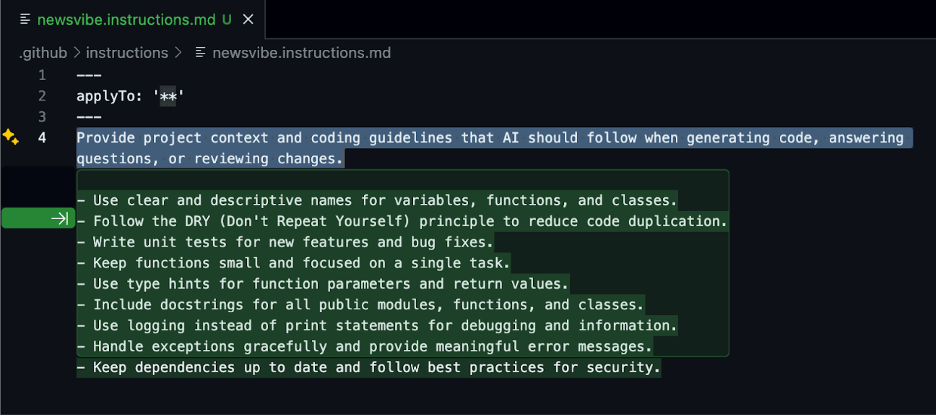
Like custom instructions in ChatGPT, each tool benefits from coding guidelines: Claude Code uses CLAUDE.md, Copilot uses configured instructions, and Cursor has rules (templates at https://cursor.directory/rules).
Both Claude Code and Cursor support MCP (Model Context Protocol) for enhanced integrations (Cursor MCP directory: https://cursor.directory/mcp). Some tools can also index documentation folders for deeper context. Set these up first for better code generation.
Start with a complete product requirements document (PRD)
Before writing any code, spend time iterating with an LLM to generate a thorough PRD. This back-and-forth refinement process goes a long way in providing the context your AI coding tools need. Capture everything: user workflows, UI specifications, technical requirements, and success metrics. Save this in your README.md as your north star.
Prompt app builders like GitHub Spark generate PRDs first from your initial prompt, so the more complete and refined it is, the better.
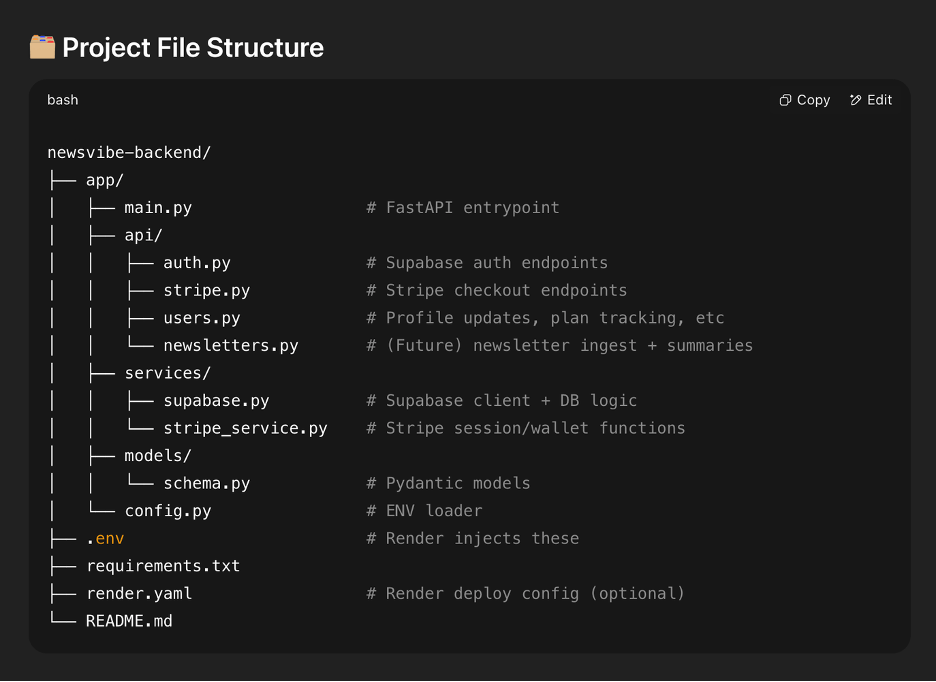
Define your project structure upfront
Work with the LLM to create a structure that follows best practices but stays simple for what you’re building. An MVP doesn’t need enterprise architecture. Map out where components, services, and APIs belong, and include this in your initial prompt.
Monitor new file generation closely as AI tools can suggest new files when not needed. When this happens, correct it immediately. Keep the structure as simple as possible. Break up files that are doing too many things, as this makes them harder to read and update later.
Add context markers throughout your code
Include file paths and descriptions at the top of each file. This helps the AI maintain context when making changes. Add detailed logging at critical points to track what’s happening when things break. Watch for function renames, LLMs often change function names unnecessarily when updating code, breaking references elsewhere.
Always check current API documentation
LLMs can generate outdated code. OpenAI and Pinecone have changed their import syntax, but AI tools still produce the old versions. Have the LLM search for the latest docs, or check them yourself. Knowing how your services currently work helps you catch these mistakes immediately.
One feature, one conversation
Multitasking with AI means juggling code review while it generates more changes. Keep each conversation focused on a single feature unless features are directly related. When the LLM offers to optimize unrelated areas, decline. If the AI gets stuck repeating failed solutions, start fresh rather than fighting it.
Wisdom of the crowds
When stuck, get code reviews from other LLMs since they can catch different issues. But always review their output carefully. LLMs can duplicate functions across files or, worse, delete essential code. In Agent mode especially, I’ve seen them remove core functionality unrelated to the current task. Give specific instructions about where functions belong and double-check nothing critical disappeared.
Vibe Coding = Product Management + Engineering
The most significant shift with AI-assisted development isn’t the speed; it’s the role change. You’re no longer just implementing; you’re defining what to build, how it should work, and why it matters.
This is the multi-skilled professional evolution I mentioned earlier. When “We’re All Programmers Now,” it means domain experts can build their own solutions, but it also means programmers must become domain experts in product thinking. Success with vibe coding requires clear product vision to articulate requirements, technical knowledge to guide the AI correctly, and relentless focus on user problems.
You become the conductor orchestrating AI capabilities while maintaining the judgment to build what people actually need. The future belongs to these blended roles: product managers who understand engineering deeply enough to guide AI tools, and engineers who think like product managers. These T-shaped and M-shaped professionals operate fluidly across domains. This is how we compress innovation cycles from weeks to days: by eliminating the translation layer between idea and implementation.
When you think about cloud infrastructure for AI, you immediately think of GPUs and other high-performance compute resources, and how your cloud architecture should be optimized to make the most of these expensive compute plans. But compute isn’t the only cloud product category you need to monitor to both scale your application and maintain a sustainable cloud infrastructure budget.
What ultimately fuels AI? Data—lots and lots of data. As part of a healthy AI pipeline, several versions of the same dataset need to be stored in a centralized repository, or multiple repositories if your strategy requires splitting data into cold vs. hot storage to reduce storage costs. For text-based LLMs, storage costs are minimal compared to compute resources. But as AI innovation increasingly relies on video and other media, both the base storage cost and data retrieval fees can make cloud bills spiral out of control.
In this blog, we’re taking a look at the AI data pipeline, where object storage sits in each stage, and how leveraging both Backblaze B2 and B2 Overdrive helps both increase performance and reduce costs for AI applications.
Data ingest and active archive: Data is gathered from multiple designated sources (including APIs, internet of things (IoT) sensors, relational databases, etc.) and ingested into a centralized repository or multiple repositories.
Data processing: The raw data is transformed and enriched based on the model’s data parameters. This can range from relatively simple text cleanup to adding annotations and metadata. Feature engineering is performed to extract or construct meaningful attributes. All data is then converted into numerical representations (e.g., embeddings, vectors) suitable for model training and inference.
Model experimentation and training: Processed data is used to train models by learning underlying patterns. Iterative experiments in a test environment evaluate, tune, and improve model performance and accuracy.
Model deployment and inference: New data is prepared in the same way as during training and sent to the deployed model to generate predictions, support decision-making, and deliver personalized outputs.
Monitoring: Continuous monitoring tracks model performance, detects data drift, and flags potential bias, ensuring the model remains accurate and reliable over time.
Keep in mind that data ingestion and processing isn’t always sequential, such as when data is collected and ingested, but corruption is detected during processing. Ideally, your pipeline is configured with validation gates so that corrupt data is identified and handled before proceeding to downstream steps like testing, training, and production deployment.
When using cloud object storage as your data repository, one factor of selecting a plan (like cold versus hot storage) is the specific type of data ingestion that’s being utilized based on both the data source and AI model’s specific needs.
Batch ingestion is better suited for mid to lower performance storage, as this is typically used for historical datasets or a set schedule of pre-determined data updates, such as jobs pulling from relational databases or CSV uploads once a day or once per week.
Streaming ingestion is well-suited for hot storage to support a continuous stream of real-time (or near-real-time) data processing, such as from social media feeds and high-volume e-commerce AI helper agents.
Hybrid ingestion uses a combination of batch and streaming ingestion to handle both historical and real-time data requirements for AI models.
Where does cloud object storage sit in the AI data pipeline?
Everywhere. All scalable data pipelines lead to object storage.
Why?Data ingestion and active archive are the major areas where object storage fulfills an important purpose. When training AI models, especially in production, data scalability for multiple and diverse data types is a hard requirement. But object storage plays a key role in the other pipeline stages:
Data processing: Stores versioned outputs from data labeling, feature engineering, and cleaning processes.
Model experimentation and training: Provides high-throughput access to training datasets and stores model checkpoints.
Model deployment and inference: Stores serialized model artifacts with API-based retrieval for serving predictions at scale.
Monitoring: Stores synthetic outputs from generative models, logs, feedback, and performance metrics for analysis and reuse.
For both AI data performance and cost optimization, selecting an object storage product or tier is far from one-size-fits-all. You can strategically allocate your data to B2 Cloud Storage or B2 Overdrive, with your most essential model data stored in B2 Overdrive. Here’s a high-level diagram of what Backblaze B2 product to use for each stage, including examples of the data stored at each stage.
Learn more at Ai4 in August
Want to learn more? Backblaze is heading to Las Vegas for Ai4 August 11–13! In addition to booking a meeting to speak with our storage experts and stopping by our booth to pick up some swag, I’m excited to talk more about the AI data pipeline during my talk. If you’re attending Ai4, add The AI Pipeline Starts with Storage: Architecting Scalable Data Foundations to your conference agenda.
Can’t attend live in Vegas? Reach out to our Sales team to talk about your specific use case and how B2 Overdrive can help propel your data.
To provide the best experiences, we use technologies like cookies to store and/or access device information. Consenting to these technologies will allow us to process data such as browsing behavior or unique IDs on this site. Not consenting or withdrawing consent, may adversely affect certain features and functions.
Functional
Always active
The technical storage or access is strictly necessary for the legitimate purpose of enabling the use of a specific service explicitly requested by the subscriber or user, or for the sole purpose of carrying out the transmission of a communication over an electronic communications network.
Preferences
The technical storage or access is necessary for the legitimate purpose of storing preferences that are not requested by the subscriber or user.
Statistics
The technical storage or access that is used exclusively for statistical purposes.The technical storage or access that is used exclusively for anonymous statistical purposes. Without a subpoena, voluntary compliance on the part of your Internet Service Provider, or additional records from a third party, information stored or retrieved for this purpose alone cannot usually be used to identify you.
Marketing
The technical storage or access is required to create user profiles to send advertising, or to track the user on a website or across several websites for similar marketing purposes.