All posts by Karthik Prabhakar

Top 10 best practices for Amazon EMR Serverless

Post Syndicated from Karthik Prabhakar original https://aws.amazon.com/blogs/big-data/top-10-best-practices-for-amazon-emr-serverless/

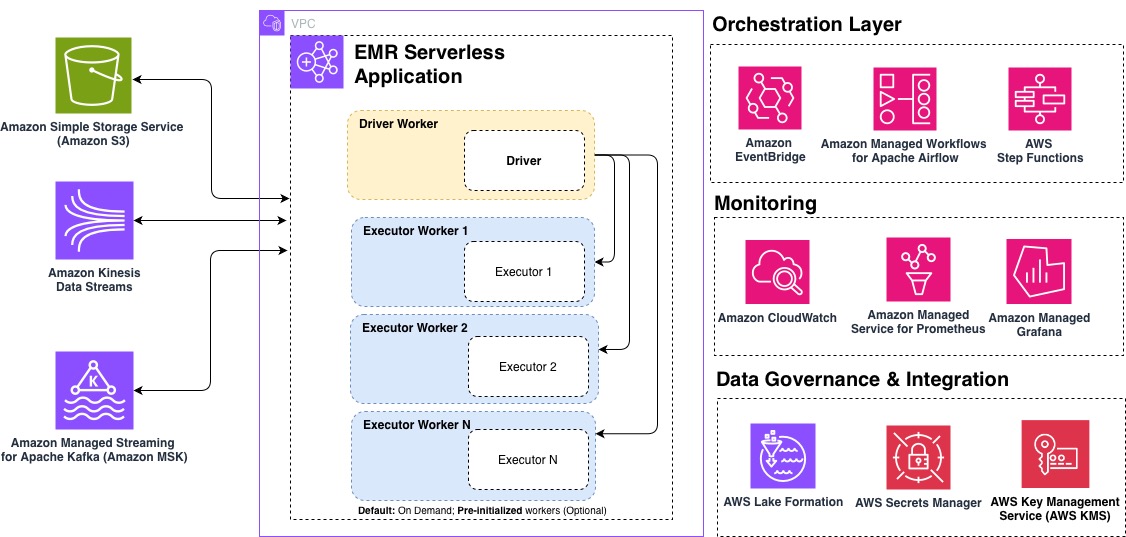
Amazon EMR Serverless is a deployment option for Amazon EMR that you can use to run open source big data analytics frameworks such as Apache Spark and Apache Hive without having to configure, manage, or scale clusters and servers. EMR Serverless integrates with Amazon Web Services (AWS) services across data storage, streaming, orchestration, monitoring, and governance to provide a comprehensive serverless analytics solution.

In this post, we share the top 10 best practices for optimizing your EMR Serverless workloads for performance, cost, and scalability. Whether you’re getting started with EMR Serverless or looking to fine-tune existing production workloads, these recommendations will help you build efficient, cost-effective data processing pipelines. The following diagram illustrates an end-to-end EMR Serverless architecture, showing how it integrates into your analytics pipelines.

1. Define applications one time, reuse multiple times

EMR Serverless applications function as cluster templates that instantiate when jobs are submitted and can process multiple jobs without being recreated. This design significantly reduces startup latency for recurring workloads and simplifies operational management.

Typical workflow for EMR on EC2 transient cluster:

Typical workflow for EMR Serverless:

Applications feature a self-managing lifecycle that provisions resources to be available when needed without manual intervention. They automatically provision capacity when a job is submitted. For applications without pre-initialized capacity, resources are released immediately after job completion. For applications with pre-initialized capacity configured, those pre-initialized workers will stop after exceeding the configured idle timeout (15 minutes by default). You can adjust this timeout at the application level using AutoStopConfig configuration in the CreateApplication or UpdateApplication API. For example, if your jobs run every 30 minutes, increasing the idle timeout can eliminate startup delays between executions.

Most workloads are suited for on-demand capacity provisioning, which automatically scales resources based on your job requirements without incurring charges when idle. This approach is cost-effective and suitable for typical use cases including extract, transform, and load (ETL) workloads, batch processing jobs, and scenarios requiring maximum job resiliency.

For specific workloads with strict instant-start requirements, you can optionally configure pre-initialized capacity. Pre-initialized capacity creates a warm pool of drivers and executors that are ready to run jobs within seconds. However, this performance advantage comes with a tradeoff of added cost because pre-initialized workers incur continuous charges even when idle until the application reaches the Stopped state. Additionally, pre-initialized capacity restricts jobs to a single Availability Zone, which reduces resiliency.

Pre-initialized capacity should only be considered for:

  • Time-sensitive jobs with sub second service level agreement (SLA) requirements where startup latency is unacceptable
  • Interactive analytics where user experience depends on instant response
  • High-frequency production pipelines running every few minutes

In most other cases, on-demand capacity provides the best balance of cost, performance, and resiliency.

Beyond optimizing your applications’ use of resources, consider how you organize them across your workloads. For production workloads, use separate applications for different business domains or data sensitivity levels. This isolation improves governance and prevents resource contention between critical and noncritical jobs.

2. Choose AWS Graviton Processors for better price performance

Selecting the right underlying processor architecture can significantly impact both performance and cost. Graviton ARM-based processors offer significant performance improvement compared to x86_64.

EMR Serverless automatically updates to the latest instance generations as they become available, which means your applications benefit from the newest hardware improvements without requiring additional configuration.

To use Graviton with EMR Serverless, specify ARM64 with the architecture parameter during application creation using the CreateApplication or with the UpdateApplication API for existing applications:

aws emr-serverless create-application \
  --name my-spark-app \
  -- SPARK \
  --architecture ARM64 \
  --release-label emr-7.12.0

Considerations when using Graviton:

  • Resource availability – For large-scale workloads, consider engaging with your AWS account team to discuss capacity planning for Graviton workers.
  • Compatibility – Although many commonly used and standard libraries are compatible with Graviton (arm64) architecture, you will need to validate that third-party packages and libraries used are compatible.
  • Migration planning – Take a strategic approach to Graviton adoption. Build new applications on ARM64 architecture by default and migrate existing workloads through a phased transition plan that minimizes disruption. This structured approach will help optimize cost and performance without compromising reliability.
  • Perform benchmarks – It’s important to note that exact price performance will vary by workload. We recommend performing your own benchmarks to gauge specific results for your workload. For more details, refer to Achieve up to 27% better price-performance for Spark workloads with AWS Graviton2 on Amazon EMR Serverless.

3. Use defaults, right-size workers if needed

Workers are used to execute the tasks for your workload. While EMR Serverless defaults are optimized out of the box for a majority of use cases, you may need to right-size your workers to improve processing time and optimize cost efficiency. When submitting EMR Serverless jobs, it’s recommended to define Spark properties to configure workers, including memory size (in GB) and number of cores.

EMR Serverless configures the default worker size of 4 vCPUs, 16 GB memory, and 20 GB disk. Although this generally provides a balanced configuration for most jobs, you might want to adjust the size based on your performance requirements. Even when configuring pre-initialized workers with specific sizing, always set your Spark properties at job submission. This allows your job to use the specified worker sizing rather than default properties when it scales beyond pre-initialized capacity. When right-sizing your Spark workload, it’s important to identify the vCPU:memory ratio for your job. This ratio determines how much memory you allocate per virtual CPU core in your executors. Spark executors need both CPU and memory to process data effectively, and the optimal ratio varies based on your workload characteristics.

To get started, use the following guidance, then refine your configuration based on your specific workload requirements.

Executor configuration

The following table provides recommended executor configurations based on common workload patterns:

Workload type Ratio CPU Memory Configuration
Compute intensive 1:2 16 vCPU 32 GB spark.emr-serverless.executor.cores=16spark.emr-serverless.executor.memory=32G
General purpose 1:4 16 vCPU 64 GB spark.emr-serverless.executor.cores=16spark.emr-serverless.executor.memory=64G
Memory intensive 1:8 16 vCPU 108 GB spark.emr-serverless.executor.cores=16spark.emr-serverless.executor.memory=108G

Driver configuration

The following table provides recommended driver configurations based on common workload patterns:

Workload type Ratio CPU Memory Configuration
General purpose 1:4 4 vCPU 16 GB spark.emr-serverless.driver.cores=4spark.emr-serverless.driver.memory=16G
Apache Iceberg workloads 1:8(Large driver for metadata lookups) 8 vCPU 60 GB spark.emr-serverless.driver.cores=8spark.emr-serverless.driver.memory=60G

To further monitor and tune your configuration, monitor your workload’s resource consumption using Amazon CloudWatch job worker-level metrics to identify constraints. Track CPU utilization, memory usage, and disk utilization metrics, then use the following table to fine-tune your configuration based on observed bottlenecks.

Metrics observed Workload type Suggested action
1 High memory (>90%), Low CPU (<50%) Memory-bound workload Increase vCPU:memory ratio
2 High CPU (>85%), low memory (<60%) CPU-bound workload Increase vCPU count, maintain 1:4 ratio (For example, if using 8 vCPU, use 32 GB memory)
3 High storage I/O, normal CPU or memory with long shuffle operations Shuffle-intensive Enable serverless storage or shuffle-optimized disks
4 Low utilization across metrics Over-provisioned Reduce worker size or count
5 Consistent high utilization (>90%) Under-provisioned Scale up worker specifications
6 Frequent GC pauses** Memory pressure Increase memory overhead (10 –15%)

**You can identify frequent garbage collect (GC) pauses using the Spark UI under the Executors tab. There will be a GC time column that should generally be less than 10% of task time. Alternatively, the driver logs might frequently contain GC (Allocation Failure)] messages.

4. Control scaling boundary with T-shirt sizing

By default, EMR Serverless uses dynamic resource allocation (DRA), which automatically scales resources based on workload demand. EMR Serverless continuously evaluates metrics from the job to optimize for cost and speed, removing the need for you to estimate the exact number of workers required.

For cost optimization and predictable performance, you can configure an upper scaling boundary using one of the following approaches:

  1. Setting the spark.dynamicAllocation.maxExecutors parameter at the job level
  2. Setting the application-level maximum capacity

Rather than trying to fine-tune spark.dynamicAllocation.maxExecutors to an arbitrary value for each job, you can think about setting this configuration as t-shirt sizes that represent different workload profiles:

Workload size Use cases spark.dynamicAllocation.maxExecutors
Small Exploratory queries, development 50
Medium Regular ETL jobs, reports 200
Large Complex transformations, large-scale processing 500

This t-shirt sizing approach simplifies capacity planning and helps you balance performance with cost efficiency based on your workload category, rather than attempting to optimize each individual job.

For EMR Serverless releases 6.10 and above, the default value for spark.dynamicAllocation.maxExecutors is infinity, but for earlier releases, it’s 100.

EMR Serverless automatically scales workers up or down based on the workload and parallelism required at every stage of the job. This automatic scaling is continuously evaluating metrics from the job to optimize for cost and speed, which removes the need for you to estimate the number of workers that the application needs to run your workloads.

However, in some cases, if you have a predictable workload, you might want to statically set the number of executors. To do so, you can disable DRA and specify the number of executors manually:

spark.dynamicAllocation.=false
spark.executor.instances=10

5. Provision appropriate storage for EMR Serverless jobs

Understanding your storage options and sizing them appropriately can prevent job failures and optimize execution times. EMR Serverless offers multiple storage options to handle intermediate data during job execution. The storage option selected will depend on the EMR release and use case. The storage options available in EMR Serverless are:

Storage type EMR release Disk size range Use case Benefits
Serverless Storage (recommended) 7.12+ N/A (auto-scaling) Most Spark workloads, especially data-intensive workloads
  • No storage costs
  • auto-scaling
  • Reduces disk failures
  • Up to 20% cost reduction
Standard Disks 7.11 and lower 20–200 GB per worker Small to medium workloads processing datasets under 10 TB
  • Simple configuration
  • 20 GB default suitable for most workloads,
  • 200 GB max for optimal throughput
Shuffle-Optimized Disks 7.1.0+ 20–2,000 GB per worker Large-scale ETL workloads processing multi-TB
  • High IOPS and throughput
  • Up to 2 TB capacity per worker

By matching your storage configuration to your workload characteristics, you’ll enable EMR Serverless jobs to run efficiently and reliably at scale.

6. Multi-AZ out-of-the-box with built-in resiliency

EMR Serverless applications are multi-AZ from the start when pre-initialized capacity isn’t enabled. This built-in failover capability provides resilience against Availability Zone disruptions without manual intervention. A single job will operate within a single Availability Zone to prevent cross-AZ data transfer costs and subsequent jobs will be intelligently distributed across multiple AZs. If EMR Serverless determines that an AZ is impaired, it will submit new jobs to a healthy AZ, enabling your workloads to continue running despite AZ impairment.

To fully benefit from EMR Serverless multi-AZ functionality verify the following:

  • Configure a network connection to your VPC with multiple subnets across Availability Zones selected
  • Avoid pre-initialized capacity which restricts applications to a single AZ
  • Make sure there are sufficient IP addresses available in each subnet to support the scaling of workers

In addition to multi-AZ, with Amazon EMR 7.1 and higher, you can enable job resiliency, which allows your jobs to be automatically retried in case errors are encountered. If there are multiple Availability Zones configured, it will also be retried in a different AZ. You can enable this feature for both batch and streaming jobs, though retry behavior differs between the two.

Configure job resiliency by specifying a retry policy that defines the maximum number of retry attempts. For batch jobs, the default is no automatic retries (maxAttempts=1). For streaming jobs, EMR Serverless retries indefinitely with built-in thrash prevention that stops retries after five failed attempts within 1 hour. You can configure this threshold between 1–10 attempts. For more information, refer to Job resiliency.

In the event that you need to cancel your job, you can specify a grace period to allow your jobs to shut down cleanly rather than the default behavior of immediate termination. This can also include custom shutdown hooks if you need to perform custom cleanup actions.

By combining multi-AZ support, automatic job retries, and graceful shutdown periods, you create a robust foundation for EMR Serverless workloads that can tolerate interruptions and maintain data integrity without manual intervention.

7. Secure and extend connectivity with VPC integration

By default, EMR Serverless can access AWS services such as Amazon Simple Storage Service (Amazon S3), AWS Glue, Amazon CloudWatch Logs, AWS Key Management Service (AWS KMS), AWS Security Token Service (AWS STS), Amazon DynamoDB, and AWS Secrets Manager. If you want to connect to data stores within your VPC, such as Amazon Redshift or Amazon Relational Database Service (Amazon RDS), you must configure VPC access for the EMR Serverless application.

When configuring VPC access for your EMR Serverless application, keep these key considerations in mind to gain optimal performance and cost efficiency:

  • Plan for sufficient IP addresses – Each worker uses one IP address within a subnet. This includes the workers that will be launched when your job is scaling out. If there aren’t enough IP addresses, your job might not be able to scale, which could result in job failure. Verify you have adhered to best practices for subnet planning for optimal performance.
  • Set up Gateway endpoints for Amazon S3 for applications in a private subnets – Running EMR Serverless in a private subnet without VPC endpoints for Amazon S3 will route your Amazon S3 traffic through NAT gateways, resulting in additional data transfer charges. VPC endpoints for S3 will keep this traffic within your VPC, reducing costs and improving performance for Amazon S3 operations.
  • Manage AWS Config costs for network interfaces – EMR Serverless generates an elastic network interface record in AWS Config for each worker, which can accumulate costs as your workloads scale. If you don’t require AWS Config tracking for EMR Serverless network interfaces, consider using resource-based exclusions or tagging strategies to filter them out while maintaining AWS Config coverage for other resources.

For more details, refer Configuring VPC access for EMR Serverless applications.

8. Simplify job submission and dependency management

EMR Serverless supports flexible job submission through the StartJobRun API, which accepts the full spark-submit syntax. For runtime environment configuration, use the spark.emr-serverless.driverEnv and spark.executorEnv prefixes to set environment variables for driver and executor processes. This is particularly useful for passing sensitive configuration or runtime-specific settings.

For Python applications, package dependencies using virtual environments by creating a venv, packaging it as a tar.gz archive, or uploading to Amazon S3 using spark.archives with the appropriate PYSPARK_PYTHON environment variable. This allows Python dependencies to be available across driver and executor workers.

For improved control under high load, enable job concurrency and queuing (available in EMR 7.0.0+) to limit the number of jobs that can be executed concurrently. With this feature, jobs submitted that exceed the concurrency limit are queued until resources become available.

You can configure Job concurrency and queue settings using the SchedulerConfiguration property using the CreateApplication or UpdateApplication API.

--scheduler-configuration '{"maxConcurrentRuns": 5, "queueTimeoutMinutes": 30}'

9. Use EMR Serverless configurations to enforce limits

EMR Serverless automatically scales resources based on workload demand, providing optimized defaults that work well for most use cases without requiring Spark configuration tuning. To manage costs effectively, you can configure resource limits that align with your budget and performance requirements. For advanced use cases, EMR Serverless also provides configuration options so you can fine-tune resource consumption and achieve the same efficiency as cluster-based deployments. Understanding these limits helps you balance performance with cost efficiency for your jobs.

Limit type Purpose How to configure
Job-level Control resources for individual jobs spark.dynamicAllocation.maxExecutors or spark.executor.instances
Application-level Limit resources per application or business domain Set maximum capacity when creating the application or while updating.
Account-level Prevent abnormal resource spikes across all applications Auto-adjustable service quota Max concurrent vCPUs per account; request increases via Service Quotas console

These three layers of limits work together to provide flexible resource management at different scopes. For most use cases, configuring job-level limits using the t-shirt sizing approach is sufficient, while application and account-level limits provide additional guardrails for cost control.

10. Monitor with CloudWatch, Prometheus, and Grafana

Monitoring EMR Serverless workloads simplifies the process of debugging, performing cost optimization, and performance tracking. EMR Serverless offers three tiers of monitoring that work together: Amazon CloudWatch, Amazon Managed Service for Prometheus, and Amazon Managed Grafana.

  1. Amazon CloudWatchCloudWatch integration is enabled by default and publishes metrics to the AWS/EMRServerless namespace. EMR Serverless sends metrics to CloudWatch every minute at the application level, as well as job, worker-type, and capacity-allocation-type levels. Using CloudWatch, you can configure dashboards for enhanced observability into workloads or configure alarms to alert for job failures, scaling anomalies, and SLA breaches. Using CloudWatch with EMR Serverless provides insights to your workloads so you can catch issues before they impact users.
  2. Amazon Managed Service for Prometheus – With EMR Serverless release 7.1+, you can enable Prometheus for detailed Spark engine metrics to push metrics to Amazon Managed Service for Prometheus. This unlocks executor-level visibility, including memory usage, shuffle volumes, and GC pressure. You can use this to identify memory-constrained executors, detect shuffle-heavy stages, and find data skew.
  3. Amazon Managed Grafana – Grafana connects to both CloudWatch and Prometheus data sources, providing a single pane of glass for unified observability and correlation analysis. This layered approach helps you correlate infrastructure issues with application-level performance problems.

Key metrics to track:

  • Job completion times and success rates
  • Worker utilization and scaling events
  • Shuffle read/write volumes
  • Memory usage patterns

For more details, refer to Monitor Amazon EMR Serverless workers in near real time using Amazon CloudWatch.

Conclusion

In this post, we shared 10 best practices to help you maximize the value of Amazon EMR Serverless by optimizing performance, controlling costs, and maintaining reliable operations at scale. By focusing on application design, right-sized workloads, and architectural choices, you can build data processing pipelines that are both efficient and resilient.

To learn more, refer to the Getting started with EMR Serverless guide.


About the Authors

Karthik Prabhakar

Karthik Prabhakar

Karthik is a Data Processing Engines Architect for Amazon EMR at Amazon Web Services (AWS). He specializes in distributed systems architecture and query optimization, working with customers to solve complex performance challenges in large-scale data processing workloads. His focus spans engine internals, cost-optimization strategies, and architectural patterns that enable customers to run petabyte-scale analytics efficiently.

Neil Mukerje

Neil Mukerje

Neil is a Principal Product Manager at Amazon Web Services.

Amber Runnels

Amber Runnels

Amber is a Senior Analytics Specialist Solutions Architect at Amazon Web Services (AWS) specializing in big data and distributed systems. She helps customers optimize workloads within AWS data offerings to achieve a scalable, high-performing, and cost-effective architecture. Aside from technology, she’s passionate about exploring the many places and cultures this world has to offer, reading novels, and building terrariums.

Parul Saxena

Parul Saxena

Parul is a Senior Big Data Specialist Solutions Architect at Amazon Web Services (AWS). She helps customers and partners build highly optimized, scalable, and secure solutions. She specializes in Amazon EMR, Amazon Athena, and AWS Lake Formation, providing architectural guidance for complex big data workloads and assisting organizations in modernizing their architectures and migrating analytics workloads to AWS.

Amazon EMR Serverless eliminates local storage provisioning, reducing data processing costs by up to 20%

Post Syndicated from Karthik Prabhakar original https://aws.amazon.com/blogs/big-data/amazon-emr-serverless-eliminates-local-storage-provisioning-reducing-data-processing-costs-by-up-to-20/

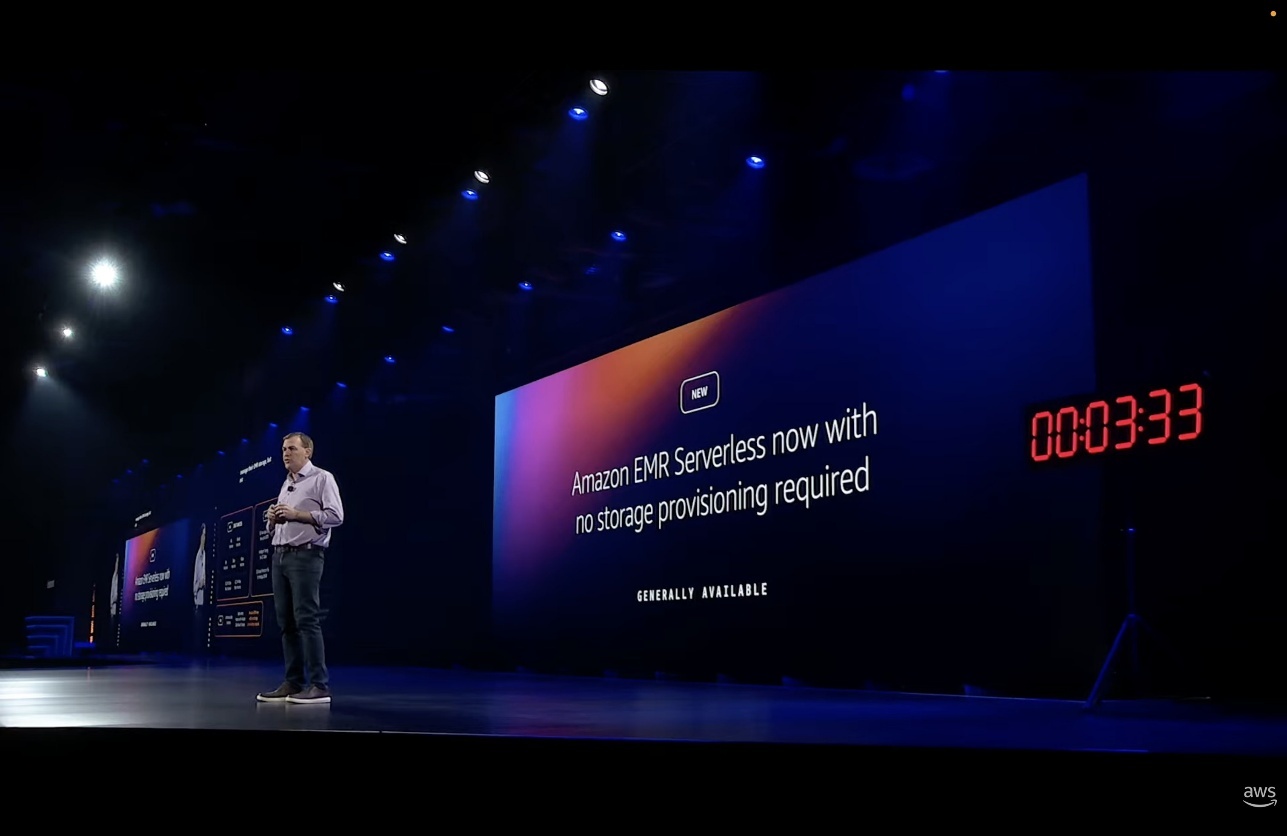
At AWS re:Invent 2025, Amazon Web Services (AWS) announced serverless storage for Amazon EMR Serverless, a new capability that eliminates the need configure local disks for Apache Spark workloads. This reduces data processing costs by up to 20% while eliminating job failures from disk capacity constraints.

With serverless storage, Amazon EMR Serverless automatically handles intermediate data operations, such as shuffle, on your behalf. You pay only for compute and memory—no storage charges. By decoupling storage from compute, Spark can release idle workers immediately, reducing costs throughout the job lifecycle. The following image shows the serverless storage for EMR Serverless announcement from the AWS re:Invent 2025 keynote:

The challenge: Sizing local disk storage

Running Apache Spark workloads requires sizing local disk storage for shuffle operations—where Spark redistributes data across executors during joins, aggregations, and sorts. This requires analyzing job histories to estimate disk requirements, leading to two common problems: overprovisioning wastes money on unused capacity, and under provisioning causes job failures when disk space runs out. Most customers overprovision local storage to ensure jobs complete successfully in production.

Data skew compounds this further. When one executor handles a disproportionately large partition, that executor takes significantly longer to complete while other workers sit idle. If you didn’t provision enough disk for that skewed executor, the job fails entirely—making data skew one of the top causes of Spark job failures. However, the problem extends beyond capacity planning. Because shuffle data couples tightly to local disks, Spark executors pin to worker nodes even when compute requirements drop between job stages. This prevents Spark from releasing workers and scaling down, inflating compute costs throughout the job lifecycle. When a worker node fails, Spark must recompute the shuffle data stored on that node, causing delays and inefficient resource usage.

How it works

Serverless storage for Amazon EMR Serverless addresses these challenges by offloading shuffle operations from individual compute workers onto a separate, elastic storage layer. Instead of storing critical data on local disks attached to Spark executors, serverless storage automatically provisions and scales high-performance remote storage as your job runs.

The architecture provides several key benefits. First, compute and storage scale independently—Spark can acquire and release workers as needed across job stages without worrying about preserving locally stored data. Second, shuffle data is evenly distributed across the serverless storage layer, eliminating data skew bottlenecks that occur when some executors handle disproportionately large shuffle partitions. Third, if a worker node fails, your job continues processing without delays or reruns because data is reliably stored outside individual compute workers.

Serverless storage is provided at no additional charge, and it eliminates the cost associated with local storage. Instead of paying for fixed disk capacity sized for maximum potential I/O load—capacity that often sits idle during lighter workloads—you can use serverless storage without incurring storage costs. You can focus your budget on compute resources that directly process your data, not on managing and overprovisioning disk storage.

Technical innovation brings three breakthroughs

Serverless storage introduces three fundamental innovations that solve Spark’s shuffle bottlenecks: multi-tier aggregation architecture, purpose-built networking, and true storage-compute decoupling. Apache Spark’s shuffle mechanism has a core constraint: each mapper independently writes output as small files, and each reducer must fetch data from potentially thousands of workers. In a large-scale job with 10,000 mappers and 1,000 reducers, this creates 10 million individual data exchanges. Serverless storage aggregates early and intelligently—mappers stream data to an aggregation layer that consolidates shuffle data in memory before committing to storage. Whereas individual shuffle write and fetch operations might show slightly higher latency due to network round-trips compared to local disk I/O, the overall job performance improves by transforming millions of tiny I/O operations into a smaller number of large, sequential operations.

Traditional Spark shuffle creates a mesh network where each worker maintains connections to potentially hundreds of other workers, spending significant CPU on connection management rather than data processing. We built a custom networking stack where each mapper opens a single persistent remote procedure call (RPC) connection to our aggregator layer, eliminating the mesh complexity. Although individual shuffle operations might show slightly higher latency due to network round trips compared to local disk I/O, overall job performance improves through better resource utilization and elastic scaling. Workers no longer run a shuffle service—they focus entirely on processing your data.

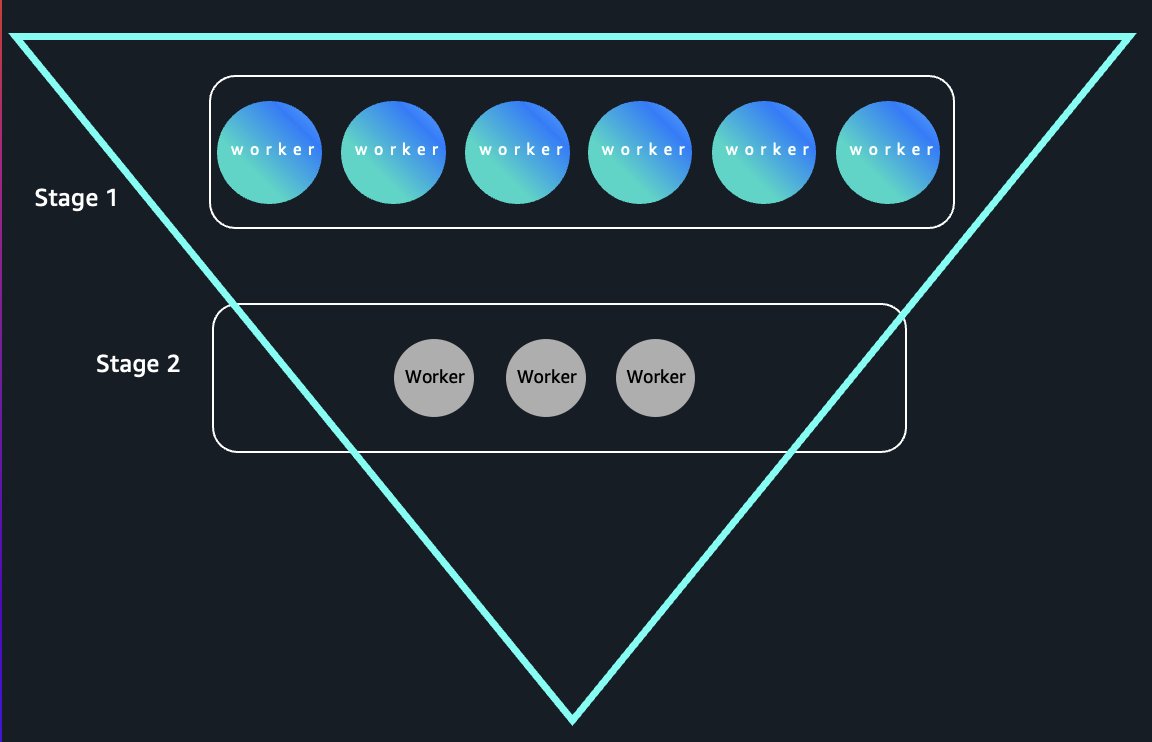
Traditional Amazon EMR Serverless jobs store shuffle data on local disks, coupling data lifecycle to worker lifecycle—idle workers can’t terminate without losing shuffle data. Serverless storage decouples these entirely by storing shuffle data in AWS managed storage with opaque handles tracked by the driver. Workers can terminate immediately after completing tasks without data loss, enabling elastic scaling. In funnel-shaped queries where early stages require massive parallelism that narrows as data aggregates, we’re seeing up to 80% compute cost reduction in benchmarks by releasing idle workers instantly. The following diagram illustrates instant worker release in funnel-shaped queries.

Our aggregator layer integrates directly with AWS Identity and Access Management (IAM), AWS Lake Formation, and fine-grained access control systems, providing job-level data isolation with access controls that match source data permissions.

Getting started

Serverless storage is available in multiple AWS Regions. For the current list of supported Regions, refer to the Amazon EMR User Guide.

New applications

Serverless storage can be enabled for new applications starting with Amazon EMR release 7.12. Follow these steps:

  1. Create an Amazon EMR Serverless application with Amazon EMR 7.12 or later:
aws emr-serverless create-application \
  --type "SPARK" \
  --name my-application \
  --release-label emr-7.12.0 \
  --runtime-configuration '[{
      "classification": "spark-defaults",
        "properties": {
          "spark.aws.serverlessStorage.enabled": "true"
        }
    }]' \
  --region us-east-1
  1. Submit your Spark job:
aws emr-serverless start-job-run \
  --application-id <application-id> \
  --execution-role-arn <execution-role-arn> \
  --job-driver '{
    "sparkSubmit": {
      "entryPoint": "s3://<bucket>/<your_script.py>",
      "sparkSubmitParameters": "--conf spark.executor.cores=4 --conf spark.executor.memory=20g --conf spark.driver.cores=4 --conf spark.driver.memory=8g --conf spark.executor.instances=10"
    }
  }'

Existing applications

You can enable serverless storage for existing applications on Amazon EMR 7.12 or later by updating your application settings.

To enable serverless storage using AWS Command Line Interface (AWS CLI), enter the following command:

aws emr-serverless update-application \
  --application-id <application-id> \
  --runtime-configuration '[{
      "classification": "spark-defaults",
        "properties": {
          "spark.aws.serverlessStorage.enabled": "true"
        }
    }]'

To enable serverless storage using Amazon EMR Studio UI, navigate to your application in Amazon EMR Studio, go to Configuration, and add the Spark property spark.aws.serverlessStorage.enabled=true in the spark-defaults classification.

Job-level configuration

You can also enable serverless storage for specific jobs, even when it’s not enabled at the application level:

aws emr-serverless start-job-run \
  --application-id <application-id> \
  --execution-role-arn <execution-role-arn> \
  --job-driver '{
    "sparkSubmit": {
      "entryPoint": "s3://<bucket>/<your_script.py>",
      "sparkSubmitParameters": "--conf spark.executor.cores=4 --conf spark.executor.memory=20g --conf spark.aws.serverlessStorage.enabled=true"
    }
  }'

(Optional) Disabling serverless storage

If you prefer to continue using local disks, you can disable serverless storage by omitting the spark.aws.serverlessStorage.enabled configuration or setting it to false at either the application or job level:

spark.aws.serverlessStorage.enabled=falseTo use traditional local disk provisioning, configure the appropriate disk type and size for your application workers.

Monitoring and cost tracking

You can monitor elastic shuffle usage through standard Spark UI metrics and track costs at the application level in AWS Cost Explorer and AWS Cost and Usage Reports. The service automatically handles performance optimization and scaling, so you don’t need to tune configuration parameters.

When to use serverless storage

Serverless storage delivers the most value for workloads with substantial shuffle operations—typically jobs that shuffle more than 10 GB of data (and less than 200 G per job, the limitation as of this writing). These include:

  • Large-scale data processing with heavy aggregations and joins
  • Sort-heavy analytics workloads
  • Iterative algorithms that repeatedly access the same datasets

Jobs with unpredictable shuffle sizes benefit particularly well because serverless storage automatically scales capacity up and down based on real-time demand. For workloads with minimal shuffle activity or very short duration (under 2–3 minutes), the benefits might be limited. In these cases, the overhead of remote storage access might outweigh the advantages of elastic scaling.

Security and data lifecycle

Your data is stored in serverless storage only while your job is running and is automatically deleted when your job is completed. Because Amazon EMR Serverless batch jobs can run for up to 24 hours, your data will be stored for no longer than this maximum duration. Serverless storage encrypts your data both in transit between your Amazon EMR Serverless application and the serverless storage layer and at rest while temporarily stored, using AWS managed encryption keys. The service uses an IAM based security model with job-level data isolation, which means that one job can’t access the shuffle data of another job. Serverless storage maintains the same security standards as Amazon EMR Serverless, with enterprise-grade security controls throughout the processing lifecycle.

Conclusion

Serverless storage represents a fundamental shift in how we approach data processing infrastructure, eliminating manual configuration, aligning costs to actual usage, and improving reliability for I/O intensive workloads. By offloading shuffle operations to a managed service, data engineers can focus on building analytics rather than managing storage infrastructure.

To learn more about serverless storage and get started, visit the Amazon EMR Serverless documentation.


About the authors

Karthik Prabhakar

Karthik Prabhakar

Karthik is a Data Processing Engines Architect for Amazon EMR at AWS. He specializes in distributed systems architecture and query optimization, working with customers to solve complex performance challenges in large-scale data processing workloads. His focus spans engine internals, cost optimization strategies, and architectural patterns that enable customers to run petabyte-scale analytics efficiently.

Ravi Kumar

Ravi Kumar

Ravi is a Senior Product Manager Technical at Amazon Web Services, specializing in exabyte-scale data infrastructure and analytics platforms. He helps customers unlock insights from structured and unstructured data using open-source technologies and cloud computing. Outside of work, Ravi enjoys exploring emerging trends in data science and machine learning.

Matt Tolton

Matt Tolton

Matt is a Senior Principal Engineer at Amazon Web Services.

author name

Neil Mukerje

Neil is a Principal Product Manager at Amazon Web Services.

Achieve up to 27% better price-performance for Spark workloads with AWS Graviton2 on Amazon EMR Serverless

Post Syndicated from Karthik Prabhakar original https://aws.amazon.com/blogs/big-data/achieve-up-to-27-better-price-performance-for-spark-workloads-with-aws-graviton2-on-amazon-emr-serverless/

Amazon EMR Serverless is a serverless option in Amazon EMR that makes it simple to run applications using open-source analytics frameworks such as Apache Spark and Hive without configuring, managing, or scaling clusters.

At AWS re:Invent 2022, we announced support for running serverless Spark and Hive workloads with AWS Graviton2 (Arm64) on Amazon EMR Serverless. AWS Graviton2 processors are custom-built by AWS using 64-bit Arm Neoverse cores, delivering a significant leap in price-performance for your cloud workloads.

This post discusses the performance improvements observed while running Apache Spark jobs using AWS Graviton2 on EMR Serverless. We found that Graviton2 on EMR Serverless achieved 10% performance improvement for Spark workloads based on runtime. AWS Graviton2 is offered at a 20% lower cost than the x86 architecture option (see the Amazon EMR pricing page for details), resulting in a 27% overall better price-performance for workloads.

Spark performance test results

The following charts compare the benchmark runtime with and without Graviton2 for a EMR Serverless Spark application (note that the charts are not drawn to scale). We observed up to 10% improvement in total runtime and 8% improvement in geometric mean for the queries compared to x86.

The following table summarizes our results.

Metric Graviton2 x86 %Gain
Total Execution Time (in seconds) 2,670 2,959 10%
Geometric Mean (in seconds) 22.06 24.07 8%

Testing configuration

To evaluate the performance improvements, we use benchmark tests derived from TPC-DS 3 TB scale performance benchmarks. The benchmark consists of 104 queries, and each query is submitted sequentially to an EMR Serverless application. EMR Serverless has automatic and fine-grained scaling enabled by default. Spark provides Dynamic Resource Allocation (DRA) to dynamically adjust the application resources based on the workload, and EMR Serverless uses the signals from DRA to elastically scale workers as needed. For our tests, we chose a predefined pre-initialized capacity that allows the application to scale to default limits. Each application has 1 driver and 100 workers configured as pre-initialized capacity, allowing it to scale to a maximum of 8000 vCPU/60000 GB capacity. When launching the applications, as default we use x86_64 to get baseline numbers and Arm64 for AWS Graviton2, and the application had VPC networking enabled.

The following table summarizes the Spark application configuration.

Number of Drivers Driver Size Number of Executors Executor Size Ephemeral Storage Amazon EMR release label
1 4 vCPUs, 16 GB Memory 100 4 vCPUs, 16 GB Memory 200 G 6.9

Performance test results and cost comparison

Let’s do a cost comparison of the benchmark tests. Because we used 1 driver [4 vCPUs, 16 GB memory] and 100 executors [4 vCPUs, 16 GB memory] for each run, the total capacity used is 4*101=192 vCPUs, 16*101=1616 GB memory, 200*100=20000 GB storage. The following table summarizes the cost.

Test Total time (Seconds) vCPUs Memory (GB) Ephemeral (Storage GB) Cost
x86_64 2,958.82 404 1616 18000 $26.73
Graviton2 2,670.38 404 1616 18000 $19.59

The calculations are as follows:

  • Total vCPU cost = (number of vCPU * per vCPU rate * job runtime in hour)
  • Total GB = (Total GB of memory configured * per GB-hours rate * job runtime in hour)
  • Storage = 20 GB of ephemeral storage is available for all workers by default—you pay only for any additional storage that you configure per worker

Cost breakdown

Let’s look at the cost breakdown for x86:

  • Job runtime – 49.3 minutes = 0.82 hours
  • Total vCPU cost – 404 vCPUs x 0.82 hours job runtime x 0.052624 USD per vCPU = 17.4333 USD
  • Total GB cost – 1,616 memory-GBs x 0.82 hours job runtime x 0.0057785 USD per memory GB = 7.6572 USD
  • Storage cost – 18,000 storage-GBs x 0.82 hours job runtime x 0.000111 USD per storage GB = 1.6386 USD
  • Additional storage – 20,000 GB – 20 GB free tier * 100 workers = 18,000 additional storage GB
  • EMR Serverless total cost (x86): 17.4333 USD + 7.6572 USD + 1.6386 USD = 26.7291 USD

Let’s compare to the cost breakdown for Graviton 2:

  • Job runtime – 44.5 minutes = 0.74 hours
  • Total vCPU cost – 404 vCPUs x 0.74 hours job runtime x 0.042094 USD per vCPU = 12.5844 USD
  • Total GB cost – 1,616 memory-GBs x 0.74 hours job runtime x 0.004628 USD per memory GB = 5.5343 USD
  • Storage cost – 18,000 storage-GBs x 0.74 hours job runtime x 0.000111 USD per storage GB = 1.4785 USD
  • Additional storage – 20,000 GB – 20 GB free tier * 100 workers = 18,000 additional storage GB
  • EMR Serverless total cost (Graviton2): 12.5844 USD + 5.5343 USD + 1.4785 USD = 19.5972 USD

The tests indicate that for the benchmark run, AWS Graviton2 lead to an overall cost savings of 27%.

Individual query improvements and observations

The following chart shows the relative speedup of individual queries with Graviton2 compared to x86.

We see some regression in a few shorter queries, which had little impact on the overall benchmark runtime. We observed better performance gains for long running queries, for example:

  • q67 average 86 seconds for x86, 74 seconds for Graviton2 with 24% runtime performance gain
  • q23a and q23b gained 14% and 16%, respectively
  • q32 regressed by 7%; the difference between average runtime is <500 milliseconds (11.09 seconds for Graviton2 vs. 10.39 seconds for x86)

To quantify performance, we use benchmark SQL derived from TPC-DS 3 TB scale performance benchmarks.

If you’re evaluating migrating your workloads to Graviton2 architecture on EMR Serverless, we recommend testing the Spark workloads based on your real-world use cases. The outcome might vary based on the pre-initialized capacity and number of workers chosen. If you want to run workloads across multiple processor architectures, (for example, test the performance on x86 and Arm vCPUs) follow the walkthrough in the GitHub repo to get started with some concrete ideas.

Conclusion

As demonstrated in this post, Graviton2 on EMR Serverless applications consistently yielded better performance for Spark workloads. Graviton2 is available in all Regions where EMR Serverless is available. To see a list of Regions where EMR Serverless is available, see the EMR Serverless FAQs. To learn more, visit the Amazon EMR Serverless User Guide and sample codes with Apache Spark and Apache Hive.

If you’re wondering how much performance gain you can achieve with your use case, try out the steps outlined in this post and replace with your queries.

To launch your first Spark or Hive application using a Graviton2-based architecture on EMR Serverless, see Getting started with Amazon EMR Serverless.


About the authors

Karthik Prabhakar is a Senior Big Data Solutions Architect for Amazon EMR at AWS. He is an experienced analytics engineer working with AWS customers to provide best practices and technical advice in order to assist their success in their data journey.

Nithish Kumar Murcherla is a Senior Systems Development Engineer on the Amazon EMR Serverless team. He is passionate about distributed computing, containers, and everything and anything about the data.