All posts by Roberto Migli

Access AWS services programmatically using trusted identity propagation

Post Syndicated from Roberto Migli original https://aws.amazon.com/blogs/security/access-aws-services-programmatically-using-trusted-identity-propagation/

With the introduction of trusted identity propagation, applications can now propagate a user’s workforce identity from their identity provider (IdP) to applications running in Amazon Web Services (AWS) and to storage services backing those applications, such as Amazon Simple Storage Service (Amazon S3) or AWS Glue. Since access to applications and data can now be granted directly to a workforce identity, a seamless single sign-on experience can be achieved, eliminating the need for users to be aware of different AWS Identity and Access Management (IAM) roles to assume to access data or use of local database credentials.

While AWS managed applications such as Amazon QuickSight, AWS Lake Formation, or Amazon EMR Studio offer a native setup experience with trusted identity propagation, there are use cases where custom integrations must be built. You might want to integrate your workforce identities into custom applications storing data in Amazon S3 or build an interface on top of existing applications using Java Database Connectivity (JDBC) drivers, allowing these applications to propagate those identities into AWS to access resources on behalf of their users. AWS resource owners can manage authorization directly in their AWS applications such as Lake Formation or Amazon S3 Access Grants.

This blog post introduces a sample command-line interface (CLI) application that enables users to access AWS services using their workforce identity from IdPs such as Okta or Microsoft Entra ID.

The solution relies on users authenticating with their chosen IdP using standard OAuth 2.0 authentication flows to receive an identity token. This token can then be exchanged against AWS Security Token Service (AWS STS) and AWS IAM Identity Center to access data on behalf of the workforce identity that was used to sign in to the IdP.

Finally, an integration with the AWS Command Line Interface (AWS CLI) is provided, enabling native access to AWS services on behalf of the signed-in identity.

In this post, you will learn how to build and use the CLI application to access data on S3 Access Grants, query Amazon Athena tables, and programmatically interact with other AWS services that support trusted identity propagation.

To set up the solution in this blog post, you should already be familiar with trusted identity propagation and S3 Access Grants concepts and features. If you are not, see the two-part blog post How to develop a user-facing data application with IAM Identity Center and S3 Access Grants (Part 1) and Part 2. In this post we guide you through a more hands-on setup of your own sample CLI application.

Architecture and token exchange flow

Before moving into the actual deployment, let’s talk about the architecture of the CLI and how it facilitates token exchange between different parties.

Users, such as developers and data scientists, run the CLI on their machine without AWS security credentials pre-configured. To perform a token exchange of the OAuth 2.0 credentials vended by a source IdP towards IAM Identity Center by using the CreateTokenWithIAM API, AWS security credentials are required. To fulfill this requirement, the solution uses IAM OpenID Connect (OIDC) federation to first create an IAM role session using the AssumeRoleWithWebIdentity API with the initial IdP token—because this API doesn’t require credentials—and then uses the resulting IAM role to request the necessary single sign-on OIDC token.

The process flow is shown in Figure 1:
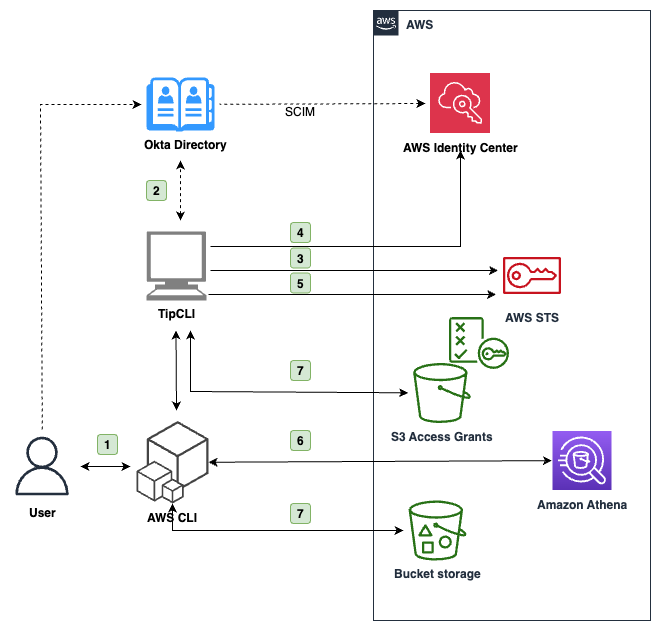
Figure 1: Architecture diagram of the application

Figure 1: Architecture diagram of the application

At a high level, the interaction flow shown in Figure 1 is the following:

  1. The user interacts with the AWS CLI, which uses the CLI as a source credential provider.
  2. The user is asked to sign in through their browser with the source IdP they configured in the CLI, for example Okta.
  3. If the authorization is successful, the CLI receives a JSON Web Token (JWT) and uses it to assume an IAM role through OIDC federation using AssumeRoleWithWebIdentity.
  4. With this temporary IAM role session, the CLI exchanges the IdP token token with the IAM Identity Center customer managed application on behalf of the user for another token using the CreateTokenWithIAM API.
  5. If successful, the CLI uses the token returned from Identity Center to create an identity-enhanced IAM role session and returns the corresponding IAM credentials to the AWS CLI.
  6. The AWS CLI uses the credentials to call AWS services that support the trusted identity propagation that has been configured in the Identity Center customer managed application. For example, to query Athena. See Specify trusted applications in the Identity Center documentation to learn more.
  7. If you need access to S3 Access Grants, the CLI also provides automatic credentials requests to S3 GetDataAccess with the identity-enhanced IAM role session previously created.

Because both the Okta OAuth token and the identity-enhanced IAM role session credentials are short lived, the CLI provides functionality to refresh authentication automatically.

Figure 2 is a swimlane diagram of the requests described in the preceding flow and depicted in Figure 1.
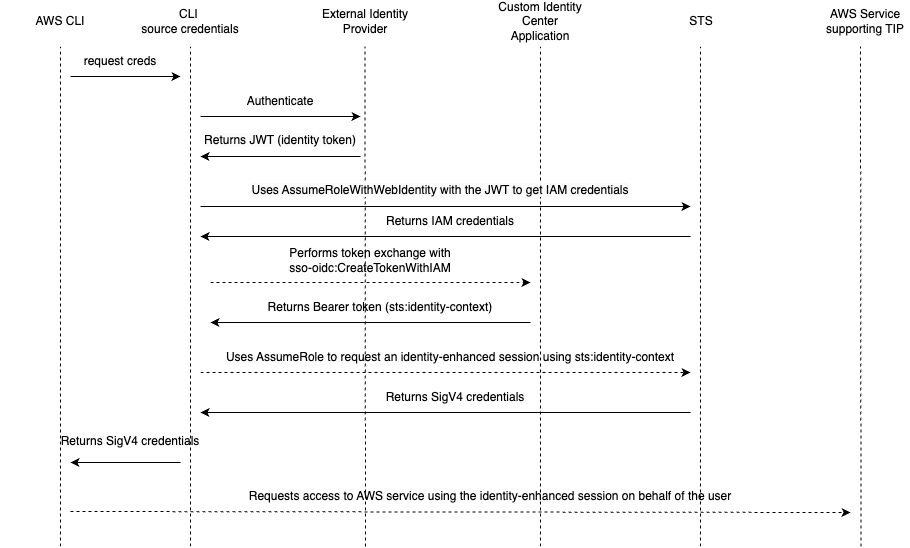
Figure 2: Swimlane diagram of the application token exchange. Dashed lines show SigV4 signed requests

Figure 2: Swimlane diagram of the application token exchange. Dashed lines show SigV4 signed requests

Account prerequisites

In the following procedure, you will use two AWS accounts: one is the application account, where required IAM roles and OIDC federation will be deployed and where users will be granted access to Amazon S3 objects. This account already has S3 Access Grants and an Athena workgroup configured with IAM Identity Center. If you don’t have these already configured, see Getting started with S3 Access Grants and Using IAM Identity Center enabled Athena workgroups.

The other account is the Identity Center admin account which has IAM Identity Center set up with users and groups synchronized through SCIM with your IdP of choice, in this case Okta directory. The application also supports Entra ID and Amazon Cognito.

You don’t need to have permission sets configured with IAM Identity Center, because you will grant access through a customer managed application Identity Center. Users authenticate with the source IdP and don’t interact with an AWS account or IAM policy directly.

To configure this application, you’ll complete the following steps:

  1. Create an OIDC application in Okta
  2. Create a customer managed application in IAM Identity Center
  3. Install and configure the application with the AWS CLI

Create an OIDC application in Okta

Start by creating a custom application in Okta, which will act as the source IdP, and configuring it as a trusted token issuer in IAM Identity Center.

To create an OIDC application

  1. Sign in to your Okta administrator panel, go to the Applications section in the navigation pane, and choose Create App Integration. Because you’re using a CLI, select OIDC as the sign-in method and Native Application as the application type. Choose Next.

    Figure 3: Okta screen to create a new application

    Figure 3: Okta screen to create a new application

  2. In the Grant Type section, the authorization code is selected by default. Make sure to also select Refresh Token. The CLI application uses the refresh tokens if available to generate new access tokens without requiring the user to re-authenticate. Otherwise, the users will have to authenticate again when the token expires.
  3. Change the sign-in redirect URIs to http://localhost:8090/callback. The application uses OAuth 2.0 Authorization Code with PKCE Flow and waits for confirmation of authentication by listening locally on port 8090. The IdP will redirect your browser to this URL to send authentication information after successful sign-in.
  4. Select the directory groups that you want to have access to this application. If you don’t want to restrict access to the application, choose Allow Everyone. Leave the remaining settings as-is.

    Note: You must also assign and authorize users in AWS to allow access to the downstream AWS services.

    Figure 4: Configure the general settings of the Okta application

    Figure 4: Configure the general settings of the Okta application

  5. When done, choose Save and your Okta custom application will be created and you will see a detail page of your application. Note the Okta Client ID value to use in later steps.

Create a customer managed application in IAM Identity Center

After setting everything up in Okta, move on to creating the custom OAuth 2.0 application in IAM Identity Center. The CLI will use this application to exchange the tokens issued by Okta.

To create a customer managed application

  1. Sign in to the AWS Management Console of the account where you already have configured IAM Identity Center and go to the Identity Center console.
  2. In the navigation pane, select Applications under Application assignments.
  3. Choose Add application in the upper
  4. Select I have an application I want to set up and select the OAuth 2.0 type.
  5. Enter a display name and description.
  6. For User and group assignment method, select Do not require assignments (because you already configured your user and group assignments to this application in Okta). You can leave the Application URL field empty and select Not Visible under Application visibility in AWS access portal, because you won’t access the application from the Identity Center AWS access portal URL.
  7. On the next screen, select the Trusted Token Issuer you set up in the prerequisites, and enter your Okta client ID from the Okta application you created in the previous section as the Aud claim. This will make sure your Identity Center custom application only accepts tokens issued by Okta for your Okta custom application.

    Note: Automatically refresh user authentication for active application sessions isn’t needed for this application because the CLI application already refreshes tokens with Okta.

    Figure 5: Trusted token issuer configuration of the custom application

    Figure 5: Trusted token issuer configuration of the custom application

  8. Select Edit the application policy and edit the policy to specify the application account AWS Account ID as the allowed principal to perform the token exchange. You will update the application policy with the Amazon Resource Name (ARN) of the correct role after deploying the rest of the solution.
  9. Continue to the next page to review the application configuration and finalize the creation process.

    Figure 6: Configuration of the application policy

    Figure 6: Configuration of the application policy

  10. Grant the application permission to call other AWS services on the users’ behalf. This step is necessary because the application will use a custom application to exchange tokens that will then be used with specific AWS services. Select the Customer managed tab, browse to the application you just created, and choose Specify trusted applications at the bottom of the page.
  11. For this example, select All applications for service with same access, and then select Athena, S3 Access Grants, and Lake Formation and AWS Glue data catalog as trusted services because they’re supported by the sample application. If you don’t plan to use your CLI with S3 or Athena and Lake Formation, you can skip this step.

    Figure 7: Configure application user propagation

    Figure 7: Configure application user propagation

You have completed the setup within IAM Identity Center. Switch to your application account to complete the next steps, which will deploy the backend application.

Application installation and configuration with the AWS CLI

The sample code for the application can be found on GitHub. Follow the instructions in the README file to install the command-line application. You can use the CLI to generate an AWS CloudFormation template to create the required IAM roles for the token exchange process.

To install and configure the application

  1. You will need your Okta OAuth issuer URI and your Okta application client ID. The issuer URI can be found by going to your Okta Admin page, and on the left navigation pane, go to the API page under the Security section. Here you will see your Authorization servers and their Issuer URI. The application client ID is the same as you used earlier for the Aud claim in IAM Identity Center.
  2. In your CLI, use the following commands to generate and deploy the CloudFormation template:
    tip-cli configure generate-cfn-template https://dev-12345678.okta.com/oauth2/default aBc12345dBe6789FgH0 > ~/tip-blog-iam-roles-cfn.yaml
    aws cloudformation deploy --template-file ~/tip-blog-iam-roles-cfn.yaml --stack-name tip-blog-iam-stack --capabilities CAPABILITY_IAM

  3. After the template is created, update the customer managed application policy you configured in step 2 to allow only the IAM role that CloudFormation just created to use the application. You can find this in your CloudFormation console, or by using aws cloudformation describe-stacks --stack-name tip-blog-iam-stack in your terminal.
  4. Configure the CLI by running tip-cli configure idp and entering the IAM roles’ ARN and Okta information.
  5. Test your configuration by running the tip-cli auth command to start the authorization with the configured IdP by opening your default browser and requesting to sign in. In the background, the application will wait for Okta to callback the browser on port 8090 to retrieve the authentication information, and if successful request an Okta OAuth 2.0 token.
  6. You can then run tip-cli auth get-iam-credentials to exchange the token through your trusted IAM role and your Identity Center application for a set of identity-enhanced IAM role session credentials. These expire in 1 hour by default, but you can configure the expiration period by configuring the IAM role used to create the identity-enhanced IAM session accordingly. After you test the setup, you won’t need the CLI anymore because authentication, token refresh, and credentials refresh will be managed automatically through the AWS CLI.

Note: Follow the README instructions on configuring your AWS CLI to use the tip-cli application to source credentials. The advantage of the solution is that the AWS CLI will automatically handle the refresh of tokens and credentials using this application.

Now that the AWS CLI is configured, you can use it to call AWS services representing your Okta identity. In the following examples, we configured the AWS CLI to use the application to source credentials for the AWS CLI profile my-tti-profile.

For example, you can query Athena tables through workgroups configured with trusted identity propagation and authorized through Lake Formation:

QUERY_EXECUTION_ID=$(aws athena start-query-execution \
    --query-string "SELECT * FROM db_tip.table_example LIMIT 3" \
    --work-group "tip-workgroup" \
    --profile my-tti-profile \
    --output text \
    --query 'QueryExecutionId')

aws athena get-query-results \
    --query-execution-id $QUERY_EXECUTION_ID \
    --profile my-tti-profile \
    --output text

The IAM role used by the backend application to create the identity-enhanced IAM session is allowed by default to use only Athena and Amazon S3. You can extend it to allow access to other services, such as Amazon Q Business. After you create an Amazon Q Business application and assign users to it, you can update the custom application you created earlier in IAM Identity Center and enable trusted identity propagation to your Amazon Q Business application.

You can then, for example, retrieve conversations of the user for an Amazon Q business application with ID a1b2c3d4-5678-90ab-cdef-EXAMPLE11111 as follows:

aws qbusiness list-conversations --application-id a1b2c3d4-5678-90ab-cdef-EXAMPLE11111 --profile my-tti-profile

The application also provides simplified access to S3 Access Grants. After you have configured the AWS CLI as documented in the README file, you can access S3 objects as follows:

aws s3 ls s3://<my-test-bucket-with-path> --profile my-tti-profile-s3ag

In this example, the AWS CLI uses the custom credential source to request data access to a specific S3 URI to the account instance of S3 Access Grants you want to target. If there’s a matching grant for the requested URI and your user identity or group, S3 Access Grants will return a new set of short-lived IAM credentials. The tip-cli application will cache these credentials for you and prompt you to refresh them whenever needed. You can review the list of credentials generated by the application with the command tip-cli s3ag list-credentials, and clear them with the command tip-cli s3ag clear-credentials.

Conclusion

In this post we showed you how a sample CLI application using trusted identity propagation works, enabling business users to bring their workforce identities for delegated access into AWS without needing IAM credentials or cloud backends.

You set up custom applications within Okta (as the directory service) and IAM Identity Center and deployed the required application IAM roles and federation into your AWS account. You learned the architecture of this solution and how to use it in an application.

Through this setup, you can use the AWS CLI to interact with AWS services such as S3 Access Grants or Athena on behalf of the directory user without the having to configure an IAM user or credentials for them.

The code used in this post is also published as an AWS Sample, which can be found on GitHub and is meant to serve as inspiration for integrating custom or third-party applications with trusted identity propagation.

 
If you have feedback about this post, submit comments in the Comments section below. If you have questions about this post, contact AWS Support.

Roberto Migli

Roberto Migli
Roberto is a Principal Solutions Architect at AWS. He supports global financial services customers, focusing on security and identity and access management. In his free time, he enjoys building electronic gadgets, learning about space, and spending time with his family.

Alessandro Fior

Alessandro Fior
Alessandro is a Sr. Data Architect at AWS Professional Services. He is passionate about designing and building modern and scalable data platforms that boost companies’ efficiency in extracting value from their data.

Bruno Corijn

Bruno Corijn
Bruno is a Cloud Infrastructure Architect at AWS based out of Brussels, Belgium. He works with Public Sector customers to accelerate and innovate in their AWS journey, bringing a decade of experience in application and infrastructure modernisation. In his free time he loves to ride and tinker with bikes.

Simplify workforce identity management using IAM Identity Center and trusted token issuers

Post Syndicated from Roberto Migli original https://aws.amazon.com/blogs/security/simplify-workforce-identity-management-using-iam-identity-center-and-trusted-token-issuers/

AWS Identity and Access Management (IAM) roles are a powerful way to manage permissions to resources in the Amazon Web Services (AWS) Cloud. IAM roles are useful when granting permissions to users whose workloads are static. However, for users whose access patterns are more dynamic, relying on roles can add complexity for administrators who are faced with provisioning roles and making sure the right people have the right access to the right roles.

The typical solution to handle dynamic workforce access is the OAuth 2.0 framework, which you can use to propagate an authenticated user’s identity to resource services. Resource services can then manage permissions based on the user—their attributes or permissions—rather than building a complex role management system. AWS IAM Identity Center recently introduced trusted identity propagation based on OAuth 2.0 to support dynamic access patterns.

With trusted identity propagation, your requesting application obtains OAuth tokens from IAM Identity Center and passes them to an AWS resource service. The AWS resource service trusts tokens that Identity Center generates and grants permissions based on the Identity Center tokens.

What happens if the application you want to deploy uses an external OAuth authorization server, such as Okta Universal Directory or Microsoft Entra ID, but the AWS service uses IAM Identity Center? How can you use the tokens from those applications with your applications that AWS hosts?

In this blog post, we show you how you can use IAM Identity Center trusted token issuers to help address these challenges. You also review the basics of Identity Center and OAuth and how Identity Center enables the use of external OAuth authorization servers.

IAM Identity Center and OAuth

IAM Identity Center acts as a central identity service for your AWS Cloud environment. You can bring your workforce users to AWS and authenticate them from an identity provider (IdP) that’s external to AWS (such as Okta or Microsoft Entra), or you can create and authenticate the users on AWS.

Trusted identity propagation in IAM Identity Center lets AWS workforce identities use OAuth 2.0, helping applications that need to share who’s using them with AWS services. In OAuth, a client application and a resource service both trust the same authorization server. The client application gets an OAuth token for the user and sends it to the resource service. Because both services trust the OAuth server, the resource service can identify the user from the token and set permissions based on their identity.

AWS supports two OAuth patterns:

  • AWS applications authenticate directly with IAM Identity Center: Identity Center redirects authentication to your identity source, which generates OAuth tokens that the AWS managed application uses to access AWS services. This is the default pattern because the AWS services that support trusted identity propagation use Identity Center as their OAuth authorization server.
  • Third-party, non-AWS applications authenticate outside of AWS (typically to your IdP) and access AWS resources: During authentication, these third-party applications obtain an OAuth token from an OAuth authorization server outside of AWS. In this pattern, the AWS services aren’t connected to the same OAuth authorization server as the client application. To enable this pattern, AWS introduced a model called the trusted token issuer.

Trusted token issuer

When AWS services use IAM Identity Center as their authentication service, directory, and OAuth authorization server, the AWS services that use OAuth tokens require that Identity Center issues the tokens. However, most third-party applications federate with an external IdP and obtain OAuth tokens from an external authorization server. Although the identities in Identity Center and the external authorization server might be for the same person, the identities exist in separate domains, one in Identity Center, the other in the external authorization server. This is required to manage authorization of workforce identities with AWS services.

The trusted token issuer (TTI) feature provides a way to securely associate one identity from the external IdP with the other identity in IAM Identity Center.

When using third-party applications to access AWS services, there’s an external OAuth authorization server for the third-party application, and IAM Identity Center is the OAuth authorization server for AWS services; each has its own domain of users. The Identity Center TTI feature connects these two systems so that tokens from the external OAuth authorization server can be exchanged for tokens from Identity Center that AWS services can use to identify the user in the AWS domain of users. A TTI is the external OAuth authorization server that Identity Center trusts to provide tokens that third-party applications use to call AWS services, as shown in Figure 1.

Figure 1: Conceptual model using a trusted token issuer and token exchange

Figure 1: Conceptual model using a trusted token issuer and token exchange

How the trust model and token exchange work

There are two levels of trust involved with TTIs. First, the IAM Identity Center administrator must add the TTI, which makes it possible to exchange tokens. This involves connecting Identity Center to the Open ID Connect (OIDC) discovery URL of the external OAuth authorization server and defining an attribute-based mapping between the user from the external OAuth authorization server and a corresponding user in Identity Center. Second, the applications that exchange externally generated tokens must be configured to use the TTI. There are two models for how tokens are exchanged:

  • Managed AWS service-driven token exchange: A third-party application uses an AWS driver or API to access a managed AWS service, such as accessing Amazon Redshift by using Amazon Redshift drivers. This works only if the managed AWS service has been designed to accept and exchange tokens. The application passes the external token to the AWS service through an API call. The AWS service then makes a call to IAM Identity Center to exchange the external token for an Identity Center token. The service uses the Identity Center token to determine who the corresponding Identity Center user is and authorizes resource access based on that identity.
  • Third-party application-driven token exchange: A third-party application not managed by AWS exchanges the external token for an IAM Identity Center token before calling AWS services. This is different from the first model, where the application that exchanges the token is the managed AWS service. An example is a third-party application that uses Amazon Simple Storage Service (Amazon S3) Access Grants to access S3. In this model, the third-party application obtains a token from the external OAuth authorization server and then calls Identity Center to exchange the external token for an Identity Center token. The application can then use the Identity Center token to call AWS services that use Identity Center as their OAuth authorization server. In this case, the Identity Center administrator must register the third-party application and authorize it to exchange tokens from the TTI.

TTI trust details

When using a TTI, IAM Identity Center trusts that the TTI authenticated the user and authorized them to use the AWS service. This is expressed in an identity token or access token from the external OAuth authorization server (the TTI).

These are the requirements for the external OAuth authorization server (the TTI) and the token it creates:

  • The token must be a signed JSON Web Token (JWT). The JWT must contain a subject (sub) claim, an audience (aud) claim, an issuer (iss), a user attribute claim, and a JWT ID (JTI) claim.
    • The subject in the JWT is the authenticated user and the audience is a value that represents the AWS service that the application will use.
    • The audience claim value must match the value that is configured in the application that exchanges the token.
    • The issuer claim value must match the value configured in the issuer URL in the TTI.
    • There must be a claim in the token that specifies a user attribute that IAM Identity Center can use to find the corresponding user in the Identity Center directory.
    • The JWT token must contain the JWT ID claim. This claim is used to help prevent replay attacks. If a new token exchange is attempted after the initial exchange is complete, IAM Identity Center rejects the new exchange request.
  • The TTI must have an OIDC discovery URL that IAM Identity Center can use to obtain keys that it can use to verify the signature on JWTs created by your TTI. Identity Center appends the suffix /.well-known/openid-configuration to the provider URL that you configure to identify where to fetch the signature keys.

Note: Typically, the IdP that you use as your identity source for IAM Identity Center is your TTI. However, your TTI doesn’t have to be the IdP that Identity Center uses as an identity source. If the users from a TTI can be mapped to users in Identity Center, the tokens can be exchanged. You can have as many as 10 TTIs configured for a single Identity Center instance.

Details for applications that exchange tokens

Your OAuth authorization server service (the TTI) provides a way to authorize a user to access an AWS service. When a user signs in to the client application, the OAuth authorization server generates an ID token or an access token that contains the subject (the user) and an audience (the AWS services the user can access). When a third-party application accesses an AWS service, the audience must include an identifier of the AWS service. The third-party client application then passes this token to an AWS driver or an AWS service.

To use IAM Identity Center and exchange an external token from the TTI for an Identity Center token, you must configure the application that will exchange the token with Identity Center to use one or more of the TTIs. Additionally, as part of the configuration process, you specify the audience values that are expected to be used with the external OAuth token.

  • If the applications are managed AWS services, AWS performs most of the configuration process. For example, the Amazon Redshift administrator connects Amazon Redshift to IAM Identity Center, and then connects a specific Amazon Redshift cluster to Identity Center. The Amazon Redshift cluster exchanges the token and must be configured to do so, which is done through the Amazon Redshift administrative console or APIs and doesn’t require additional configuration.
  • If the applications are third-party and not managed by AWS, your IAM Identity Center administrator must register the application and configure it for token exchange. For example, suppose you create an application that obtains an OAuth token from Okta Universal Directory and calls S3 Access Grants. The Identity Center administrator must add this application as a customer managed application and must grant the application permissions to exchange tokens.

How to set up TTIs

To create new TTIs, open the IAM Identity Center console, choose Settings, and then choose Create trusted token issuer, as shown in Figure 2. In this section, I show an example of how to use the console to create a new TTI to exchange tokens with my Okta IdP, where I already created my OIDC application to use with my new IAM Identity Center application.

Figure 2: Configure the TTI in the IAM Identity Center console

Figure 2: Configure the TTI in the IAM Identity Center console

TTI uses the issuer URL to discover the OpenID configuration. Because I use Okta, I can verify that my IdP discovery URL is accessible at https://{my-okta-domain}.okta.com/.well-known/openid-configuration. I can also verify that the OpenID configuration URL responds with a JSON that contains the jwks_uri attribute, which contains a URL that lists the keys that are used by my IdP to sign the JWT tokens. Trusted token issuer requires that both URLs are publicly accessible.

I then configure the attributes I want to use to map the identity of the Okta user with the user in IAM Identity Center in the Map attributes section. I can get the attributes from an OIDC identity token issued by Okta:

{
    "sub": "00u22603n2TgCxTgs5d7",
    "email": "<masked>",
    "ver": 1,
    "iss": "https://<masked>.okta.com",
    "aud": "123456nqqVBTdtk7890",
    "iat": 1699550469,
    "exp": 1699554069,
    "jti": "ID.MojsBne1SlND7tCMtZPbpiei9p-goJsOmCiHkyEhUj8",
    "amr": [
        "pwd"
    ],
    "idp": "<masked>",
    "auth_time": 1699527801,
    "at_hash": "ZFteB9l4MXc9virpYaul9A"
}

I’m requesting a token with an additional email scope, because I want to use this attribute to match against the email of my IAM Identity Center users. In most cases, your Identity Center users are synchronized with your central identity provider by using automatic provisioning with the SCIM protocol. In this case, you can use the Identity Center external ID attribute to match with oid or sub attributes. The only requirement for TTI is that those attributes create a one-to-one mapping between the two IdPs.

Now that I have created my TTI, I can associate it with my IAM Identity Center applications. As explained previously, there are two use cases. For the managed AWS service-driven token exchange use case, use the service-specific interface to do so. For example, I can use my TTI with Amazon Redshift, as shown in Figure 3:

Figure 3: Configure the TTI with Amazon Redshift

Figure 3: Configure the TTI with Amazon Redshift

I selected Okta as the TTI to use for this integration, and I now need to configure the audclaim value that the application will use to accept the token. I can find it when creating the application from the IdP side–in this example, the value is 123456nqqVBTdtk7890, and I can obtain it by using the preceding example OIDC identity token.

I can also use the AWS Command Line Interface (AWS CLI) to configure the IAM Identity Center application with the appropriate application grants:

aws sso put-application-grant \
    --application-arn "<my-application-arn>" \
    --grant-type "urn:ietf:params:oauth:grant-type:jwt-bearer" \
    --grant '
    {
        "JwtBearer": { 
            "AuthorizedTokenIssuers": [
                {
                    "TrustedTokenIssuerArn": "<my-tti-arn>", 
                    "AuthorizedAudiences": [
                        "123456nqqVBTdtk7890"
                    ]
                 }
            ]
       }
    }'

Perform a token exchange

For AWS service-driven use cases, the token exchange between your IdP and IAM Identity Center is performed automatically by the service itself. For third-party application-driven token exchange, such as when building your own Identity Center application with S3 Access Grants, your application performs the token exchange by using the Identity Center OIDC API action CreateTokenWithIAM:

aws sso-oidc create-token-with-iam \  
    --client-id "<my-application-arn>" \ 
    --grant-type "urn:ietf:params:oauth:grant-type:jwt-bearer" \
    --assertion "<jwt-from-idp>"

This action is performed by an IAM principal, which then uses the result to interact with AWS services.

If successful, the result looks like the following:

{
    "accessToken": "<idc-access-token>",
    "tokenType": "Bearer",
    "expiresIn": 3600,
    "idToken": "<jwt-idc-identity-token>",
    "issuedTokenType": "urn:ietf:params:oauth:token-type:access_token",
    "scope": [
        "sts:identity_context",
        "openid",
        "aws"
    ]
}

The value of the scope attribute varies depending on the IAM Identity Center application that you’re interacting with, because it defines the permissions associated with the application.

You can also inspect the idToken attribute because it’s JWT-encoded:

{
    "aws:identity_store_id": "d-123456789",
    "sub": "93445892-f001-7078-8c38-7f2b978f686f",
    "aws:instance_account": "12345678912",
    "iss": "https://identitycenter.amazonaws.com/ssoins-69870e74abba8440",
    "sts:audit_context": "<sts-token>",
    "aws:identity_store_arn": "arn:aws:identitystore::12345678912:identitystore/d-996701d649",
    "aud": "20bSatbAF2kiR7lxX5Vdp2V1LWNlbnRyYWwtMQ",
    "aws:instance_arn": "arn:aws:sso:::instance/ssoins-69870e74abba8440",
    "aws:credential_id": "<masked>",
    "act": {
      "sub": "arn:aws:sso::12345678912:trustedTokenIssuer/ssoins-69870e74abba8440/c38448c2-e030-7092-0f0a-b594f83fcf82"
    },
    "aws:application_arn": "arn:aws:sso::12345678912:application/ssoins-69870e74abba8440/apl-0ed2bf0be396a325",
    "auth_time": "2023-11-10T08:00:08Z",
    "exp": 1699606808,
    "iat": 1699603208
  }

The token contains:

  • The AWS account and the IAM Identity Center instance and application that accepted the token exchange
  • The unique user ID of the user that was matched in IAM Identity Center (attribute sub)

AWS services can now use the STS Audit Context token (found in the attribute sts:audit_context) to create identity-aware sessions with the STS API. You can audit the API calls performed by the identity-aware sessions in AWS CloudTrail, by inspecting the attribute onBehalfOf within the field userIdentity. In this example, you can see an API call that was performed with an identity-aware session:

"userIdentity": {
    ...
    "onBehalfOf": {
        "userId": "93445892-f001-7078-8c38-7f2b978f686f",
        "identityStoreArn": "arn:aws:identitystore::425341151473:identitystore/d-996701d649"
    }
}

You can thus quickly filter actions that an AWS principal performs on behalf of your IAM Identity Center user.

Troubleshooting TTI

You can troubleshoot token exchange errors by verifying that:

  • The OpenID discovery URL is publicly accessible.
  • The OpenID discovery URL response conforms with the OpenID standard.
  • The OpenID keys URL referenced in the discovery response is publicly accessible.
  • The issuer URL that you configure in the TTI exactly matches the value of the iss scope that your IdP returns.
  • The user attribute that you configure in the TTI exists in the JWT that your IdP returns.
  • The user attribute value that you configure in the TTI matches exactly one existing IAM Identity Center user on the target attribute.
  • The aud scope exists in the token returned from your IdP and exactly matches what is configured in the requested IAM Identity Center application.
  • The jti claim exists in the token returned from your IdP.
  • If you use an IAM Identity Center application that requires user or group assignments, the matched Identity Center user is already assigned to the application or belongs to a group assigned to the application.

Note: When an IAM Identity Center application doesn’t require user or group assignments, the token exchange will succeed if the preceding conditions are met. This configuration implies that the connected AWS service requires additional security assignments. For example, Amazon Redshift administrators need to configure access to the data within Amazon Redshift. The token exchange doesn’t grant implicit access to the AWS services.

Conclusion

In this blog post, we introduced the trust token issuer feature of IAM Identity Center and what it offers, how it’s configured, and how you can use it to integrate your IdP with AWS services. You learned how to use TTI with AWS-managed applications and third-party applications by configuring the appropriate parameters. You also learned how to troubleshoot token-exchange issues and audit access through CloudTrail.

If you have feedback about this post, submit comments in the Comments section below. If you have questions about this post, start a new thread on the AWS IAM Identity Center re:Post or contact AWS Support.

Roberto Migli

Roberto Migli

Roberto is a Principal Solutions Architect at AWS. Roberto supports global financial services customers, focusing on security and identity and access management. In his free time, he enjoys building electronic gadgets, learning about space, and spending time with his family.

Ron Cully

Ron Cully

Ron is a Principal Product Manager at AWS where he leads feature and roadmap planning for workforce identity products at AWS. Ron has over 20 years of industry experience in product and program management in networking and directory related products. He is passionate about delivering secure, reliable solutions that help make it simple for customers to migrate directory-aware applications and workloads to the cloud.

Rafael Koike

Rafael Koike

Rafael is a Principal Solutions Architect supporting enterprise customers in the Southeast and is a Storage SME. Rafael has a passion to build, and his expertise in security, storage, networking, and application development has been instrumental in helping customers move to the cloud quickly and securely.