All posts by Ruy Cavalcanti

Multi-Region keys: A new approach to key replication in AWS Payment Cryptography

Post Syndicated from Ruy Cavalcanti original https://aws.amazon.com/blogs/security/multi-region-keys-a-new-approach-to-key-replication-in-aws-payment-cryptography/

In our previous blog post (Part 1 of our key replication series), Automatically replicate your card payment keys across AWS Regions, we explored an event-driven, serverless architecture using AWS PrivateLink to securely replicate card payment keys across AWS Regions. That solution demonstrated how to build a custom replication framework for payment cryptography keys.

Based on customer feedback requesting a more automated, no-code approach, we’re excited to announce an additional option to this capability with Multi-Region keys for AWS Payment Cryptography in Part 2 of our series.

By using this new feature, you can automatically synchronize payment cryptography keys from a primary Region to other Regions that you select, improving resilience and availability of payment applications. You can also choose between account-level replication or key-level replication, giving more flexibility in how to manage payment keys across Regions.

Multi-Region keys: Overview and benefits

The new Multi-Region key replication feature for AWS Payment Cryptography offers you flexible control over your key replication strategy through the following primary capabilities:

  • Control whether keys are replicated
  • Select specific Regions for key replication
  • Manage replication configuration changes
  • Configure either account-level or key-level replication to meet business needs

Multi-Region keys help deliver several benefits for global payment operations, including:

  • Improved availability: Access your payment keys even if a Region becomes unavailable
  • Disaster recovery: Maintain business continuity with replicated keys across Regions
  • Global operations: Support payment processing across multiple geographic regions
  • Simplified management: Centralized control with distributed availability
  • Consistent key IDs: The same key ID across Regions simplifies application development

Configuration options

Payment Cryptography provides two distinct methods for configuring Multi-Region key replication, giving flexibility to implement a strategy that best fits your organization’s needs. You can choose between a broad, account-level approach or a more granular, key-level method.

Account-level

With account-level configuration, AWS automatically replicates exportable symmetric keys created in your Payment Cryptography account from your designated primary Region to other Regions you specify. This simplifies key management in multi-Region deployments, provides consistent key availability in the Regions that you specify, and reduces the operational overhead of key management.

To configure account-level replication using the AWS Command Line Interface (AWS CLI), use the new enable-default-key-replication-regions API to set the Regions where AWS will replicate your keys. To remove Regions from your default replication list, use the disable-default-key-replication-regions API.

Note: Only symmetric keys created after the account-level replication is enabled will be replicated.

Key-level replication

By using key-level replication, you can achieve more granular control by:

  • Designating specific keys as multi-Region keys
  • Defining custom replication targets for each multi-Region key
  • Maintaining Region-specific keys when needed

Note: Within each Region, Payment Cryptography maintains redundancy of your keys across multiple Availability Zones for high availability. Multi-Region key replication extends across geographic boundaries, giving you additional resilience against Regional outages while maintaining control over where your keys are stored.

You can specify replication Regions during key creation using the --replication-regions parameter, using the AWS CLI, with the create-key or import-key APIs. For existing keys, you can use the new add-key-replication-regions and remove-key-replication-regions APIs to manage which regions receive your replicated keys.

Important: When you specify replication Regions during key creation, these settings take precedence over default replication Regions configured at the account level.

How it works

Figure 1 shows the process when you replicate a key in Payment Cryptography.

  1. The key is created in your designated primary Region
  2. Payment Cryptography automatically replicates the key material asynchronously to the specified replica Regions
  3. The replicated keys maintain the same key ID across Regions; only the Region portion of the Amazon Resource Name (ARN) changes
  4. The key in the primary Region is marked with MultiRegionKeyType: PRIMARY
  5. Keys in replica Regions are marked with MultiRegionKeyType: REPLICA and include a reference to the primary Region
  6. When deleting a key, its deletion cascades from the primary to replica Regions
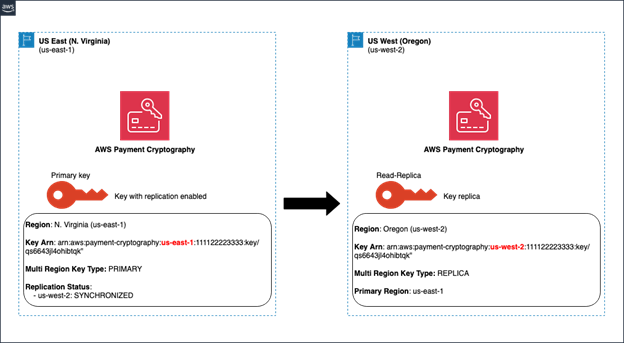
Figure 1: Representation of key replication from us-east-1 to us-west-2

Figure 1: Representation of key replication from us-east-1 to us-west-2

Example: Creating a multi-Region key at key level

The following is an example of creating a card verification key (CVK) in the primary Region (us-east-1) with replication to us-west-2:

aws payment-cryptography create-key \
--exportable \
--key-attributes KeyAlgorithm=TDES_2KEY,\
KeyUsage=TR31_C0_CARD_VERIFICATION_KEY,\
KeyClass=SYMMETRIC_KEY,KeyModesOfUse='{Generate=true,Verify=true}' \
--region us-east-1 \
--replication-regions us-west-2

The response shows the key being created with replication in progress:

{
  "Key": {
    "KeyArn": "arn:aws:payment-cryptography:us-east-1:111122223333:key/qs6643jl4ohibtqk",
    "KeyAttributes": {
      "KeyUsage": "TR31_C0_CARD_VERIFICATION_KEY",
      "KeyClass": "SYMMETRIC_KEY",
      "KeyAlgorithm": "TDES_2KEY",
      "KeyModesOfUse": {
        "Encrypt": false,
        "Decrypt": false,
        "Wrap": false,
        "Unwrap": false,
        "Generate": true,
        "Sign": false,
        "Verify": true,
        "DeriveKey": false,
        "NoRestrictions": false
      }
    },
    "KeyCheckValue": "CC5EE2",
    "KeyCheckValueAlgorithm": "ANSI_X9_24",
    "Enabled": true,
    "Exportable": true,
    "KeyState": "CREATE_COMPLETE",
    "KeyOrigin": "AWS_PAYMENT_CRYPTOGRAPHY",
    "CreateTimestamp": "2025-08-21T15:25:54.475000-03:00",
    "UsageStartTimestamp": "2025-08-21T15:25:54.287000-03:00",
    "MultiRegionKeyType": "PRIMARY",
    "ReplicationStatus": {
      "us-west-2": {
        "Status": "IN_PROGRESS"
      }
    },
    "UsingDefaultReplicationRegions": false
  }
}

After replication completes, the status updates to SYNCHRONIZED:

aws payment-cryptography get-key \
--key-identifier arn:aws:payment-cryptography:us-east-1:111122223333:key/qs6643jl4ohibtqk \
--region us-east-1

{
    "Key": {
        "KeyArn": "arn:aws:payment-cryptography:us-east-1:111122223333:key/qs6643jl4ohibtqk",
        "KeyAttributes": {
            "KeyUsage": "TR31_C0_CARD_VERIFICATION_KEY",
            "KeyClass": "SYMMETRIC_KEY",
            "KeyAlgorithm": "TDES_2KEY",
            "KeyModesOfUse": {
                "Encrypt": false,
                "Decrypt": false,
                "Wrap": false,
                "Unwrap": false,
                "Generate": true,
                "Sign": false,
                "Verify": true,
                "DeriveKey": false,
                "NoRestrictions": false
            }
        },
        "KeyCheckValue": "CC5EE2",
        "KeyCheckValueAlgorithm": "ANSI_X9_24",
        "Enabled": true,
        "Exportable": true,
        "KeyState": "CREATE_COMPLETE",
        "KeyOrigin": "AWS_PAYMENT_CRYPTOGRAPHY",
        "CreateTimestamp": "2025-08-21T15:25:54.475000-03:00",
        "UsageStartTimestamp": "2025-08-21T15:25:54.287000-03:00",
        "MultiRegionKeyType": "PRIMARY",
        "ReplicationStatus": {
            "us-west-2": {
                "Status": "SYNCHRONIZED"
            }
        },
        "UsingDefaultReplicationRegions": false
    }
}

You can then access the key in the replica Region (us-west-2) using the same key ID and changing only the Region name:

aws payment-cryptography get-key \
--key-identifier arn:aws:payment-cryptography:us-west-2:111122223333:key/qs6643jl4ohibtqk \
--region us-west-2

The response shows the replica key with a reference to the primary Region:

{
    "Key": {
        "KeyArn": "arn:aws:payment-cryptography:us-west-2:111122223333:key/qs6643jl4ohibtqk",
        "KeyAttributes": {
            "KeyUsage": "TR31_C0_CARD_VERIFICATION_KEY",
            "KeyClass": "SYMMETRIC_KEY",
            "KeyAlgorithm": "TDES_2KEY",
            "KeyModesOfUse": {
                "Encrypt": false,
                "Decrypt": false,
                "Wrap": false,
                "Unwrap": false,
                "Generate": true,
                "Sign": false,
                "Verify": true,
                "DeriveKey": false,
                "NoRestrictions": false
            }
        },
        "KeyCheckValue": "CC5EE2",
        "KeyCheckValueAlgorithm": "ANSI_X9_24",
        "Enabled": true,
        "Exportable": true,
        "KeyState": "CREATE_COMPLETE",
        "KeyOrigin": "AWS_PAYMENT_CRYPTOGRAPHY",
        "CreateTimestamp": "2025-08-21T15:25:54.475000-03:00",
        "UsageStartTimestamp": "2025-08-21T15:25:54.287000-03:00",
        "MultiRegionKeyType": "REPLICA",
        "PrimaryRegion": "us-east-1"
    }
}

Things to consider

When using multi-Region keys, several important aspects should be considered. Multi-Region key replication supports only symmetric keys with the exportable attribute enabled, and asymmetric keys are not supported. For billing purposes, AWS bills per key per Region, which means replicating to three Regions incurs costs for the primary key plus costs for each key in the replica Regions.

Key aliases and tags require separate management in each Region because they are not part of the replication process. While primary keys support modifications and updates, replica keys are read-only copies that support only cryptographic operations. Modifications must be made to the key in the primary Region, and Payment Cryptography automatically propagates these changes to the replica Regions. Monitor the replication status to confirm successful synchronization of these changes.

The deletion process for multi-Region keys follows specific behavior patterns that are important to understand. When a primary key is scheduled for deletion, associated replica keys are deleted immediately. The primary key enters a pending deletion state with a minimum 3-day waiting period, during which the deletion can be canceled. However, if you restore the primary key by canceling its deletion, you will need to re-enable replication to recreate the replica keys in your desired Regions. After the 3-day waiting period expires, the primary key is permanently deleted and becomes unrecoverable. Note that deleting a replica key affects only that specific Region and does not impact the primary key or other replica keys.

Multi-Region key replication operates with eventual consistency. When creating new keys or making changes to existing keys, these updates might not appear immediately across all Regions. Applications should be designed to handle this eventual consistency model and not assume immediate availability of keys or key changes in replica Regions. If your application requires strong consistency, implement polling mechanisms using the GetKey API to verify that changes have been synchronized before proceeding with key operations.

Logging and monitoring

Payment Cryptography logs API activity through AWS CloudTrail, which now includes new events and attributes specific to Multi-Region key replication.

New CloudTrail event

The service logs a new event type called SynchronizeMultiRegionKey, which appears in primary and replica Regions.

Primary Region events:

Two SynchronizeMultiRegionKey events are logged in the primary Region for each replication Region defined:

One event related to a key export process.

{
    "eventVersion": "1.11",
    "userIdentity": {
        "accountId": "111122223333",
        "invokedBy": "payment-cryptography.amazonaws.com"
    },
    "eventTime": "2025-08-21T18:25:56Z",
    "eventSource": "payment-cryptography.amazonaws.com",
    "eventName": "SynchronizeMultiRegionKey",
    "awsRegion": "us-east-1",
    "sourceIPAddress": "payment-cryptography.amazonaws.com",
    "userAgent": "payment-cryptography.amazonaws.com",
    "requestParameters": null,
    "responseElements": null,
    "eventID": "fbae27f1-f2ad-49d1-ab05-d460b0b4ca25",
    "readOnly": false,
    "eventType": "AwsServiceEvent",
    "managementEvent": true,
    "recipientAccountId": "111122223333",
    "serviceEventDetails": {
        "keyArn": "arn:aws:payment-cryptography:us-east-1:111122223333:key/qs6643jl4ohibtqk",
        "replicationRegion": "us-west-2",
        "replicationType": "ExportKeyReplica"
    },
    "eventCategory": "Management"
}

One event related to a key import process.

{
    "eventVersion": "1.11",
    "userIdentity": {
        "accountId": "111122223333",
        "invokedBy": "payment-cryptography.amazonaws.com"
    },
    "eventTime": "2025-08-21T18:25:56Z",
    "eventSource": "payment-cryptography.amazonaws.com",
    "eventName": "SynchronizeMultiRegionKey",
    "awsRegion": "us-east-1",
    "sourceIPAddress": "payment-cryptography.amazonaws.com",
    "userAgent": "payment-cryptography.amazonaws.com",
    "requestParameters": null,
    "responseElements": null,
    "eventID": "5c06716f-88ea-4315-b633-5dde83d7232c",
    "readOnly": false,
    "eventType": "AwsServiceEvent",
    "managementEvent": true,
    "recipientAccountId": "111122223333",
    "serviceEventDetails": {
        "keyArn": "arn:aws:payment-cryptography:us-east-1:111122223333:key/qs6643jl4ohibtqk",
        "replicationRegion": "us-west-2",
        "replicationType": "ImportKeyReplica"
    },
    "eventCategory": "Management"
}

Replica Region events:

One SynchronizeMultiRegionKey event is logged as an import key process in each replicated Region.

{
    "eventVersion": "1.11",
    "userIdentity": {
        "accountId": "111122223333",
        "invokedBy": "payment-cryptography.amazonaws.com"
    },
    "eventTime": "2025-08-21T18:25:56Z",
    "eventSource": "payment-cryptography.amazonaws.com",
    "eventName": "SynchronizeMultiRegionKey",
    "awsRegion": "us-west-2",
    "sourceIPAddress": "payment-cryptography.amazonaws.com",
    "userAgent": "payment-cryptography.amazonaws.com",
    "requestParameters": null,
    "responseElements": null,
    "eventID": "0a952017-dd89-435e-8959-5de7b43c86d5",
    "readOnly": false,
    "eventType": "AwsServiceEvent",
    "managementEvent": true,
    "recipientAccountId": "111122223333",
    "serviceEventDetails": {
        "keyArn": "arn:aws:payment-cryptography:us-west-2:111122223333:key/qs6643jl4ohibtqk",
        "replicationRegion": "us-west-2",
        "replicationType": "ImportKeyReplica"
    },
    "eventCategory": "Management"
}

New CloudTrail event attributes

New attributes were included in the service key management APIs. The following are examples of the CreateKey API highlighting the new attributes.

One CreateKey event in the primary Region:

{
    "eventVersion": "1.11",
...
    "eventTime": "2025-08-21T18:25:54Z",
    "eventSource": "payment-cryptography.amazonaws.com",
    "eventName": "CreateKey",
    "awsRegion": "us-east-1",
...
    "requestParameters": {
        "keyAttributes": {
            "keyUsage": "TR31_C0_CARD_VERIFICATION_KEY",
            "keyClass": "SYMMETRIC_KEY",
            "keyAlgorithm": "TDES_2KEY",
            "keyModesOfUse": {
                "encrypt": false,
                "decrypt": false,
                "wrap": false,
                "unwrap": false,
                "generate": true,
                "sign": false,
                "verify": true,
                "deriveKey": false,
                "noRestrictions": false
            }
        },
        "exportable": true,
        "replicationRegions": [
            "us-west-2"
        ]
    },
    "responseElements": {
        "key": {
            "keyArn": "arn:aws:payment-cryptography:us-east-1:111122223333:key/qs6643jl4ohibtqk",
            "keyAttributes": {
                "keyUsage": "TR31_C0_CARD_VERIFICATION_KEY",
                "keyClass": "SYMMETRIC_KEY",
                "keyAlgorithm": "TDES_2KEY",
                "keyModesOfUse": {
                    "encrypt": false,
                    "decrypt": false,
                    "wrap": false,
                    "unwrap": false,
                    "generate": true,
                    "sign": false,
                    "verify": true,
                    "deriveKey": false,
                    "noRestrictions": false
                }
            },
            "keyCheckValue": "CC5EE2",
            "keyCheckValueAlgorithm": "ANSI_X9_24",
            "enabled": true,
            "exportable": true,
            "keyState": "CREATE_COMPLETE",
            "keyOrigin": "AWS_PAYMENT_CRYPTOGRAPHY",
            "createTimestamp": "Aug 21, 2025, 6:25:54 PM",
            "usageStartTimestamp": "Aug 21, 2025, 6:25:54 PM",
            "multiRegionKeyType": "PRIMARY",
            "replicationStatus": {
                "us-west-2": {
                    "status": "IN_PROGRESS"
                }
            },
            "usingDefaultReplicationRegions": false
        }
    },
...
}

One CreateKey event in a replica Region:

{
    "eventVersion": "1.11",
    "userIdentity": {
...
        "invokedBy": "payment-cryptography.amazonaws.com"
    },
    "eventTime": "2025-08-21T18:25:54Z",
    "eventSource": "payment-cryptography.amazonaws.com",
    "eventName": "CreateKey",
    "awsRegion": "us-west-2",
    "sourceIPAddress": "payment-cryptography.amazonaws.com",
    "userAgent": "payment-cryptography.amazonaws.com",
    "requestParameters": {
        "keyAttributes": {
            "keyUsage": "TR31_C0_CARD_VERIFICATION_KEY",
            "keyClass": "SYMMETRIC_KEY",
            "keyAlgorithm": "TDES_2KEY",
            "keyModesOfUse": {
                "encrypt": false,
                "decrypt": false,
                "wrap": false,
                "unwrap": false,
                "generate": true,
                "sign": false,
                "verify": true,
                "deriveKey": false,
                "noRestrictions": false
            }
        },
        "exportable": true,
        "enabled": true
    },
    "responseElements": {
        "key": {
            "keyArn": "arn:aws:payment-cryptography:us-west-2:111122223333:key/qs6643jl4ohibtqk",
            "keyAttributes": {
                "keyUsage": "TR31_C0_CARD_VERIFICATION_KEY",
                "keyClass": "SYMMETRIC_KEY",
                "keyAlgorithm": "TDES_2KEY",
                "keyModesOfUse": {
                    "encrypt": false,
                    "decrypt": false,
                    "wrap": false,
                    "unwrap": false,
                    "generate": true,
                    "sign": false,
                    "verify": true,
                    "deriveKey": false,
                    "noRestrictions": false
                }
            },
            "keyCheckValue": "CC5EE2",
            "keyCheckValueAlgorithm": "ANSI_X9_24",
            "enabled": true,
            "exportable": true,
            "keyState": "CREATE_COMPLETE",
            "keyOrigin": "AWS_PAYMENT_CRYPTOGRAPHY",
            "usageStartTimestamp": "Aug 21, 2025, 6:25:54 PM"
        }
    },
...
}

Getting started

To start using Multi-Region key replication in Payment Cryptography:

  1. Determine your primary Region.
  2. Determine your replica Regions and if you will use account-level or key-level configuration.
  3. Create new exportable symmetric keys or update existing keys to use the Multi-Region key replication feature.
  4. Update your applications to use the consistent key IDs across Regions.

Conclusion

The new Multi-Region key replication feature in Payment Cryptography enhances our automatic key replication capabilities, providing improved resilience and simplified management for global payment applications. This feature helps make sure your payment cryptography keys are available when and where you need them, with the flexibility to choose between account-level or key-level replication strategies.

For more information about AWS Payment Cryptography, visit https://aws.amazon.com/payment-cryptography/.

 
If you have feedback about this post, submit comments in the Comments section below. If you have questions about this post, contact AWS Support.
 

Ruy Cavalcanti
Ruy Cavalcanti

Ruy is a Senior Security Architect for the Latin American financial industry at AWS. He has worked in IT and Security for over 19 years, helping customers create secure architectures and solve data protection and compliance challenges. When he’s not architecting secure solutions, he enjoys jamming on his guitar, cooking Brazilian-style barbecue, and spending time with his family and friends.
Mark Cline
Mark Cline

Mark is a Principal Product Manager in AWS Payments, where he brings over 15 years of financial services experience across a variety of use cases and disciplines. He works with leading banks, financial institutions, and technology providers to alleviate heavy lifting in the payment system, allowing customers to focus on innovation. When he’s not simplifying payments, you can find him coaching little league or out on a run.

Automatically replicate your card payment keys across AWS Regions

Post Syndicated from Ruy Cavalcanti original https://aws.amazon.com/blogs/security/automatically-replicate-your-card-payment-keys-across-aws-regions/

In this blog post, I dive into a cross-Region replication (CRR) solution for card payment keys, with a specific focus on the powerful capabilities of AWS Payment Cryptography, showing how your card payment keys can be securely transported and stored.

In today’s digital landscape, where online transactions have become an integral part of our daily lives, ensuring the seamless operation and security of card payment transactions is of utmost importance. As customer expectations for uninterrupted service and data protection continue to rise, organizations are faced with the challenge of implementing robust security measures and disaster recovery strategies that can withstand even the most severe disruptions.

For large enterprises dealing with card payments, the stakes are even higher. These organizations often have stringent requirements related to disaster recovery (DR), resilience, and availability, where even a 99.99 percent uptime isn’t enough. Additionally, because these enterprises deliver their services globally, they need to ensure that their payment applications and the associated card payment keys, which are crucial for securing card data and payment transactions, are securely replicated and stored across AWS Regions.

Furthermore, I explore an event-driven, serverless architecture and the use of AWS PrivateLink to securely move keys through the AWS backbone, providing additional layers of security and efficiency. Overall, this blog post offers valuable insights into using AWS services for secure and resilient data management across AWS Regions.

Card payment key management

If you examine key management, you will notice that card payment keys are shared between devices and third parties today the same as they were around 40 years ago.

A key ceremony is the process held when parties want to securely exchange keys. It involves key custodians responsible for transporting and entering, key components that have been printed on pieces of paper into a hardware security module (HSM). This is necessary to share initial key encryption keys.

Let’s look at the main issues with the current key ceremony process:

  • It requires a secure room with a network-disconnected Payment HSM
  • The logistics are difficult: Three key custodians in the same place at the same time
  • Timewise, it usually takes weeks to have all custodians available, which can interfere with a project release
  • The cost of the operation which includes maintaining a secure room and the travel of the key custodians
  • Lost or stolen key components

Now, let’s consider the working keys used to encrypt sensitive card data. They rely on those initial keys to protect them. If the initial keys are compromised, their associated working keys are also considered compromised. I also see companies using key management standards from the 1990s, such as ANSI X9.17 / FIPS 171, to share working keys. NIST withdrew the FIPS 171 standard in 2005.

Analyzing the current scenario, you’ll notice security risks because of the way keys are shared today and sometimes because organizations are using deprecated standards.

So, let’s get card payment security into the twenty-first century!

Solution overview

AWS Payment Cryptography is a highly available and scalable service that currently operates within the scope of an individual Region. This means that the encryption keys and associated metadata are replicated across multiple Availability Zones within that Region, providing redundancy and minimizing the risk of downtime caused by failures within a single Region.

While this regional replication across multiple Availability Zones provides a higher level of availability and fault tolerance compared to traditional on-premises HSM solutions, some customers with stringent business continuity requirements have requested support for multi-Region replication.

By spanning multiple Regions, organizations can achieve a higher level of resilience and disaster recovery capabilities because data and services can be replicated and failover mechanisms can be implemented across geographically dispersed locations.

This Payment Cryptography CRR solution addresses the critical requirements of high availability, resilience, and disaster recovery for card payment transactions. By replicating encryption keys and associated metadata across multiple Regions, you can maintain uninterrupted access to payment services, even in the event of a regional outage or disaster.

Note: When planning your replication strategy, check the available Payment Cryptography service endpoints.

Here’s how it works:

  1. Primary Region: Encryption keys are generated and managed in a primary Region using Payment Cryptography.
  2. Replication: The generated encryption keys are securely replicated to a secondary Region, creating redundant copies for failover purposes.
  3. Failover: In the event of a regional outage or disaster in the primary Region, payment operations can seamlessly failover to a secondary Region, using the replicated encryption keys to continue processing transactions without interruption.

This cross-Region replication approach enhances availability and resilience and facilitates robust disaster recovery strategies, allowing organizations to quickly restore payment services in a new Region if necessary.

Figure 1: Cross-Region replication (CRR) solution architecture

Figure 1: Cross-Region replication (CRR) solution architecture

The elements of the CRR architecture are as follows:

  1. Payment Cryptography control plane events are sent to an AWS CloudTrail trail.
  2. The CloudTrail trail is configured to send logs to an Amazon CloudWatch Logs log group.
  3. This log group contains an AWS Lambda subscription filter that filters the following events from Payment Cryptography: CreateKey, DeleteKey and ImportKey.
  4. When one of the events is detected, a Lambda function is launched to start key replication.
  5. The Lambda function performs key export and import processes in a secure way using TR-31, which uses an initial key securely generated and shared using TR-34. This initial key is generated when the solution is enabled.
  6. Communication between the primary (origin) Region and the Payment Cryptography service endpoint at the secondary (destination) Region is done through an Amazon Virtual Private Cloud (Amazon VPC) peering connection, over VPC interface endpoints from PrivateLink.
  7. Metadata information is saved on Amazon DynamoDB tables.

Walkthrough

The CRR solution is deployed in several steps, and it’s essential to understand the underlying processes involved, particularly TR-34 (ANSI X9.24-2) and TR-31 (ANSI X9.143-2022), which play crucial roles in ensuring the secure replication of card payment keys across Regions.

  1. Clone the solution repository from GitHub.
  2. Verify that the prerequisites are in place.
  3. Define which Region the AWS Cloud Development Kit (AWS CDK) stack will be deployed in. This is the primary Region that Payment Cryptography keys will be replicated from.
  4. Enable CRR. This step involves the TR-34 process, which is a widely adopted standard for the secure distribution of symmetric keys using asymmetric techniques. In the context of this solution, TR-34 is used to securely exchange the initial key-encrypting key (KEK) between the primary and secondary Regions. This KEK is then used to encrypt and securely transmit the card payment keys (also called working keys) during the replication process. TR-34 uses asymmetric cryptographic algorithms, such as RSA, to maintain the confidentiality, integrity and authenticity of the exchanged keys.

    Figure 2: TR-34 import key process

    Figure 2: TR-34 import key process

  5. Create, import, and delete keys in the primary Region to check that keys will be automatically replicated. This step uses the TR-31 process, which is a standard for the secure exchange of cryptographic keys and related data. In this solution, TR-31 is employed to securely replicate the card payment keys from the primary Region to the secondary Region, using the previously established KEK for encryption. TR-31 incorporates various cryptographic algorithms, such as AES and HMAC, to protect the confidentiality and integrity of the replicated keys during transit

    Figure 3: TR-31 import key process

    Figure 3: TR-31 import key process

  6. Clean up when needed.

Detailed information about key blocks can be found on the related ANSI documentation. To summarize, the TR-31 key block specification and the TR-34 key block specification, which is based on the TR-31 key block specification, consists of three parts:

  1. Key block header (KBH) – Contains attribute information about the key and the key block.
  2. Encrypted data – This is the key (initial key encryption key for TR-34 and working key for TR-31) being exchanged.
  3. Signature (MAC) – Calculated over the KBH and encrypted data.

Figure 4 presents the entire TR-31 and TR-34 key block parts. It is also called key binding method, which is the technique used to protect the key block secrecy and integrity. On both key blocks, the key, its length, and padding fields are encrypted, maintaining the key block secrecy. Signing of the entire key block fields verifies its integrity and authenticity. The signed result is appended to the end of the block.

Figure 4: TR-31 and TR-34 key block formats

Figure 4: TR-31 and TR-34 key block formats

By adhering to industry-standard protocols like TR-34 and TR-31, this solution helps to ensure that the replication of card payment keys across Regions is performed in a secure manner that delivers confidentiality, integrity, and authenticity. It’s worth mentioning that Payment Cryptography fully supports and implements these standards, providing a solution that adheres to PCI standards for secure key management and replication.

If you want to dive deep into this key management processes, see the service documentation page on import and export keys.

Prerequisites

The Payment Cryptography CRR solution will be deployed through the AWS CDK. The code was developed in Python and assumes that there is a python3 executable in your path. It’s also assumed that the AWS Command Line Interface (AWS CLI) and AWS CDK executables exist in the path system variable of your local computer.

Download and install the following:

It’s recommended that you use the latest stable versions. Tests were performed using the following versions:

  • Python: 3.12.2 (MacOS version)
  • jq: 1.7.1 (MacOS version)
  • AWS CLI: aws-cli/2.15.29 Python/3.11.8 Darwin/22.6.0 exe/x86_64 prompt/off
  • AWS CDK: 2.132.1 (build 9df7dd3)

To set up access to your AWS account, see Configure the AWS CLI.

Note: Tests and commands in the following sections where run on a MacOS operating system.

Deploy the primary resources

The solution is deployed in two main parts:

  1. Primary Region resources deployment
  2. CRR setup, where a secondary Region is defined for deployment of the necessary resources

This section will cover the first part:

Figure 5: Primary Region resources

Figure 5: Primary Region resources

Figure 5 shows the resources that will be deployed in the primary Region:

  1. A CloudTrail trail for write-only log events.
  2. CloudWatch Logs log group associated with the CloudTrail trail. An Amazon Simple Storage Service (Amazon S3) bucket is also created to store this trail’s log events.
  3. A VPC, private subnets, a security group, Lambda functions, and VPC endpoint resources to address private communication inside the AWS backbone.
  4. DynamoDB tables and DynamoDB Streams to manage key replication and orchestrate the solution deployment to the secondary Region.
  5. Lambda functions responsible for managing and orchestrating the solution deployment and setup.

Some parameters can be configured before deployment. They’re located in the cdk.json file (part of the GitHub solution to be downloaded) inside the solution base directory.

The parameters reside inside the context.ENVIRONMENTS.dev key:

{
  ...
  "context": {
    ...
    "ENVIRONMENTS": {
      "dev": {
        "origin_vpc_cidr": "10.2.0.0/16",
        "origin_vpc_name": "origin-vpc",
        "origin_subnets_mask": 22,
        "origin_subnets_prefix_name": "origin-subnet-private"
      }
    }
  }
}

Note: You can change the parameters origin_vpc_cidr, origin_vpc_name and origin_subnets_prefix_name.

Validate that there aren’t VPCs already created with the same CIDR range as the one defined in this file. Currently, the solution is set to be deployed in only two Availability Zones, so the suggestion is to keep the origin_subnet_mask value as is.

To deploy the primary resources:

  1. Download the solution folder from GitHub:
    $ git clone https://github.com/aws-samples/automatically-replicate-your-card-payment-keys.git && cd automatically-replicate-your-card-payment-keys

  2. Inside the solution directory, create a python virtual environment:
    $ python3 -m venv .venv

  3. Activate the python virtual environment:
    $ source .venv/bin/activate

  4. Install the dependencies:
    $ pip install -r requirements.txt

  5. If this is the first time deploying resources with the AWS CDK to your account in the selected AWS Region, run:
    $ cdk bootstrap

  6. Deploy the solution using the AWS CDK:
    $ cdk deploy

    Expected output:

    Do you wish to deploy these changes (y/n)? y  
    apc-crr: deploying... [1/1]  
    apc-crr: creating CloudFormation changeset...
     ✅  apc-crr
    ✨  Deployment time: 307.88s
    Stack ARN:
    arn:aws:cloudformation:<aws_region>:<aws_account>:stack/apc-crr/<stack_id>
    ✨  Total time: 316.06s

  7. If the solution is correctly deployed, an AWS CloudFormation stack with the name apc-crr will have a status of CREATE_COMPLETE status. You can check that by running the following command:
    $ aws cloudformation list-stacks --stack-status CREATE_COMPLETE

    Expected output:

    {
        "StackSummaries": [
            {
                "StackId": "arn:aws:cloudformation:us-east-1:111122223333:stack/apc-crr/5933bc00-f5c1-11ee-9bb2-12ef8d00991b",
                "StackName": "apc-crr",
                "CreationTime": "2024-04-08T16:02:07.413000+00:00",
                "LastUpdatedTime": "2024-04-08T16:02:21.439000+00:00",
                "StackStatus": "CREATE_COMPLETE",
                "DriftInformation": {
                    "StackDriftStatus": "NOT_CHECKED"
                }
            },
            {
                "StackId": "arn:aws:cloudformation:us-east-1:111122223333:stack/CDKToolkit/781e5390-e528-11ee-823a-0a6d63bbc467",
                "StackName": "CDKToolkit",
                "TemplateDescription": "This stack includes resources needed to deploy AWS CDK apps into this environment",
                "CreationTime": "2024-03-18T13:07:27.472000+00:00",
                "LastUpdatedTime": "2024-03-18T13:07:35.060000+00:00",
                "StackStatus": "CREATE_COMPLETE",
                "DriftInformation": {
                    "StackDriftStatus": "NOT_CHECKED"
                }
            }
        ]
    }

Set up cross-Region replication

Some parameters can be configured before initiating the setup. They’re located in the enable-crr.json file in the ./application folder.

The contents of the enable-crr.json file are:

{
  "enabled": true,
  "dest_region": "us-east-1",
  "kek_alias": "CRR_KEK_DO-NOT-DELETE_",
  "key_algo": "TDES_3KEY",
  "kdh_alias": "KDH_SIGN_KEY_DO-NOT-DELETE_",
  "krd_alias": "KRD_SIGN_KEY_DO-NOT-DELETE_",
  "dest_vpc_name": "apc-crr/destination-vpc",
  "dest_vpc_cidr": "10.3.0.0/16",
  "dest_subnet1_cidr": "10.3.0.0/22",
  "dest_subnet2_cidr": "10.3.4.0/22",
  "dest_subnets_prefix_name": "apc-crr/destination-vpc/destination-subnet-private",
  "dest_rt_prefix_name": "apc-crr/destination-vpc/destination-rtb-private"
}

You can change the dest_region, dest_vpc_name, dest_vpc_cidr, dest_subnet1_cidr, dest_subnet2_cidr, dest_subnets_prefix_name and dest_rt_prefix_name parameters.

Validate that there are no VPCs or subnets already created with the same CIDR ranges as are defined in this file.

To enable CRR and monitor its deployment process

  1. Enable CRR.

    From the solution base folder, navigate to the application directory:

    $ cd application

    Run the enable script.

    $ ./enable-crr.sh

    Expected output:

    START RequestId: 8aad062a-ff0b-4963-8ca0-f8078346854f Version: $LATEST  
    Setup has initiated. A CloudFormation template will be deployed in us-west-2.  
    Please check the apcStackMonitor log to follow the deployment status.  
    You can do that by checking the CloudWatch Logs Log group /aws/apc-crr/apcStackMonitor in the Management Console,  
    or by typing on a shell terminal: aws logs tail "/aws/lambda/apcStackMonitor" --follow  
    You can also check the CloudFormation Stack in the Management Console: Account 111122223333, Region us-west-2  
    END RequestId: 8aad062a-ff0b-4963-8ca0-f8078346854f  
    REPORT RequestId: 8aad062a-ff0b-4963-8ca0-f8078346854f  Duration: 1484.53 ms  Billed Duration: 1485 ms  Memory Size: 128 MB Max Memory Used: 79 MB  Init Duration: 400.95 ms

    This will launch a CloudFormation stack to be deployed in the AWS Region that the keys will be replicated to (secondary Region). Logs will be presented in the /aws/lambda/apcStackMonitor log (terminal from step 2).

    If the stack is successfully deployed (CREATE_COMPLETE state), then the KEK setup will be invoked. Logs will be presented in the /aws/lambda/apcKekSetup log (terminal from step 3).

    If the following message is displayed in the apcKekSetup log, then it means that the setup was concluded and new working keys created, deleted, or imported will be replicated.

    Keys Generated, Imported and Deleted in <Primary (Origin) Region> are now being automatically replicated to <Secondary (Destination) Region>

    There should be two keys created in the Region where CRR is deployed and two keys created where the working keys will be replicated. Use the following commands to check the keys:

    $ aws payment-cryptography list-keys --region us-east-1

    Command output showing the keys generated in the primary Region (us-east-1 in the example):

    {
        "Keys": [
            {
                "Enabled": true,
                "KeyArn": "arn:aws:payment-cryptography:us-east-1:111122223333:key/oevdxprw6szesmfx",
                "KeyAttributes": {
                    "KeyAlgorithm": "RSA_4096",
                    "KeyClass": "PUBLIC_KEY",
                    "KeyModesOfUse": {
                        "Decrypt": false,
                        "DeriveKey": false,
                        "Encrypt": false,
                        "Generate": false,
                        "NoRestrictions": false,
                        "Sign": false,
                        "Unwrap": false,
                        "Verify": true,
                        "Wrap": false
                    },
                    "KeyUsage": "TR31_S0_ASYMMETRIC_KEY_FOR_DIGITAL_SIGNATURE"
                },
                "KeyState": "CREATE_COMPLETE"
            },
            {
                "Enabled": true,
                "Exportable": true,
                "KeyArn": "arn:aws:payment-cryptography:us-east-1:111122223333:key/ey63g3an7u4ifz7u",
                "KeyAttributes": {
                    "KeyAlgorithm": "TDES_3KEY",
                    "KeyClass": "SYMMETRIC_KEY",
                    "KeyModesOfUse": {
                        "Decrypt": true,
                        "DeriveKey": false,
                        "Encrypt": true,
                        "Generate": false,
                        "NoRestrictions": false,
                        "Sign": false,
                        "Unwrap": true,
                        "Verify": false,
                        "Wrap": true
                    },
                    "KeyUsage": "TR31_K0_KEY_ENCRYPTION_KEY"
                },
                "KeyCheckValue": "7FB069",
                "KeyState": "CREATE_COMPLETE"
            }
        ]
    }
    
    $ aws payment-cryptography list-keys --region us-west-2

    The following is the command output showing the keys generated in the secondary Region (us-west-2 in the example):

    {
        "Keys": [
            {
                "Enabled": true,
                "Exportable": true,
                "KeyArn": "arn:aws:payment-cryptography:us-west-2:111122223333:key/4luahnz4ubuioq4s",
                "KeyAttributes": {
                    "KeyAlgorithm": "RSA_2048",
                    "KeyClass": "ASYMMETRIC_KEY_PAIR",
                    "KeyModesOfUse": {
                        "Decrypt": true,
                        "DeriveKey": false,
                        "Encrypt": true,
                        "Generate": false,
                        "NoRestrictions": false,
                        "Sign": false,
                        "Unwrap": true,
                        "Verify": false,
                        "Wrap": true
                    },
                    "KeyUsage": "TR31_D1_ASYMMETRIC_KEY_FOR_DATA_ENCRYPTION"
                },
                "KeyCheckValue": "56739D06",
                "KeyState": "CREATE_COMPLETE"
            },
            {
                "Enabled": true,
                "Exportable": true,
                "KeyArn": "arn:aws:payment-cryptography:us-west-2:111122223333:key/5gao3i6qvuyqqtzk",
                "KeyAttributes": {
                    "KeyAlgorithm": "TDES_3KEY",
                    "KeyClass": "SYMMETRIC_KEY",
                    "KeyModesOfUse": {
                        "Decrypt": true,
                        "DeriveKey": false,
                        "Encrypt": true,
                        "Generate": false,
                        "NoRestrictions": false,
                        "Sign": false,
                        "Unwrap": true,
                        "Verify": false,
                        "Wrap": true
                    },
                    "KeyUsage": "TR31_K0_KEY_ENCRYPTION_KEY"
                },
                "KeyCheckValue": "7FB069",
                "KeyState": "CREATE_COMPLETE"
            }
        ]
    }

  2. Monitor the resources deployment in the secondary Region. Open a terminal to tail the apcStackMonitor Lambda log and check the deployment of the resources in the secondary Region.
    $ aws logs tail "/aws/lambda/apcStackMonitor" --follow

    The expected output is:

    2024-03-05T15:18:17.870000+00:00 2024/03/05/apcStackMonitor[$LATEST]6e6762b029cb4f7d8963c3206226deac INIT_START Runtime Version: python:3.11.v29  Runtime Version ARN: arn:aws:lambda:us-east-1::runtime:2fb93380dac14772d30092f109b1784b517398458eef71a3f757425231fe6769  
    2024-03-05T15:18:18.321000+00:00 2024/03/05/apcStackMonitor[$LATEST]6e6762b029cb4f7d8963c3206226deac START RequestId: 1bdd37b4-e95b-43bd-a49b-9da55e603845 Version: $LATEST  
    2024-03-05T15:18:18.933000+00:00 2024/03/05/apcStackMonitor[$LATEST]6e6762b029cb4f7d8963c3206226deac Stack creation in progress. Status: CREATE_IN_PROGRESS  
    2024-03-05T15:18:24.017000+00:00 2024/03/05/apcStackMonitor[$LATEST]6e6762b029cb4f7d8963c3206226deac Stack creation in progress. Status: CREATE_IN_PROGRESS  
    2024-03-05T15:18:29.108000+00:00 2024/03/05/apcStackMonitor[$LATEST]6e6762b029cb4f7d8963c3206226deac Stack creation in progress. Status: CREATE_IN_PROGRESS  
    ...  
    2024-03-05T15:21:32.302000+00:00 2024/03/05/apcStackMonitor[$LATEST]6e6762b029cb4f7d8963c3206226deac Stack creation in progress. Status: CREATE_IN_PROGRESS  
    2024-03-05T15:21:37.390000+00:00 2024/03/05/apcStackMonitor[$LATEST]6e6762b029cb4f7d8963c3206226deac Stack creation completed. Status: CREATE_COMPLETE  
    2024-03-05T15:21:38.258000+00:00 2024/03/05/apcStackMonitor[$LATEST]6e6762b029cb4f7d8963c3206226deac Stack successfully deployed. Status: CREATE_COMPLETE  
    2024-03-05T15:21:38.354000+00:00 2024/03/05/apcStackMonitor[$LATEST]6e6762b029cb4f7d8963c3206226deac END RequestId: 1bdd37b4-e95b-43bd-a49b-9da55e603845  
    2024-03-05T15:21:38.354000+00:00 2024/03/05/apcStackMonitor[$LATEST]6e6762b029cb4f7d8963c3206226deac REPORT RequestId: 1bdd37b4-e95b-43bd-a49b-9da55e603845Duration: 200032.11 ms Billed Duration: 200033 ms  Memory Size: 128 MB Max Memory Used: 93 MB  Init Duration: 450.87 ms

  3. Monitor the setup of the KEKs between the primary and secondary Regions. Open another terminal to tail the apcKekSetup Lambda log and check the setup of the KEK between the key distribution host (Payment Cryptography in the primary Region) and the key receiving devices (Payment Cryptography in the secondary Region).

    This process uses the TR-34 norm.

    $ aws logs tail "/aws/lambda/apcKekSetup" -–follow

    The expected output is:

    2024-03-12T14:58:18.954000+00:00 2024/03/12/apcKekSetup[$LATEST]ea4c6a7c85ac42da8a043aa8626d2897 INIT_START Runtime Version: python:3.11.v29  Runtime Version ARN: arn:aws:lambda:us-west-2::runtime:2fb93380dac14772d30092f109b1784b517398458eef71a3f757425231fe6769  
    2024-03-12T14:58:19.399000+00:00 2024/03/12/apcKekSetup[$LATEST]ea4c6a7c85ac42da8a043aa8626d2897 START RequestId: a9b60171-dfaf-433a-954c-b0a332d22f50 Version: $LATEST  
    2024-03-12T14:58:19.596000+00:00 2024/03/12/apcKekSetup[$LATEST]ea4c6a7c85ac42da8a043aa8626d2897 ##### Step 1. Generating Key Encryption Key (KEK) - Key that will be used to encrypt the Working Keys  
    2024-03-12T14:58:19.850000+00:00 2024/03/12/apcKekSetup[$LATEST]ea4c6a7c85ac42da8a043aa8626d2897 ##### Step 2. Getting APC Import Parameters from us-east-1  
    2024-03-12T14:58:21.680000+00:00 2024/03/12/apcKekSetup[$LATEST]ea4c6a7c85ac42da8a043aa8626d2897 ##### Step 3. Importing the Root Wrapping Certificates in us-west-2  
    2024-03-12T14:58:21.826000+00:00 2024/03/12/apcKekSetup[$LATEST]ea4c6a7c85ac42da8a043aa8626d2897 ##### Step 4. Getting APC Export Parameters from us-west-2  
    2024-03-12T14:58:23.193000+00:00 2024/03/12/apcKekSetup[$LATEST]ea4c6a7c85ac42da8a043aa8626d2897 ##### Step 5. Importing the Root Signing Certificates in us-east-1  
    2024-03-12T14:58:23.439000+00:00 2024/03/12/apcKekSetup[$LATEST]ea4c6a7c85ac42da8a043aa8626d2897 ##### Step 6. Exporting the KEK from us-west-2  
    2024-03-12T14:58:23.555000+00:00 2024/03/12/apcKekSetup[$LATEST]ea4c6a7c85ac42da8a043aa8626d2897 ##### Step 7. Importing the Wrapped KEK to us-east-1  
    2024-03-12T14:58:23.840000+00:00 2024/03/12/apcKekSetup[$LATEST]ea4c6a7c85ac42da8a043aa8626d2897 ##### Initial Key Exchange Successfully Completed.  
    2024-03-12T14:58:23.840000+00:00 2024/03/12/apcKekSetup[$LATEST]ea4c6a7c85ac42da8a043aa8626d2897 Keys Generated, Imported and Deleted in us-west-2 are now being automatically replicated to us-east-1  
    2024-03-12T14:58:23.840000+00:00 2024/03/12/apcKekSetup[$LATEST]ea4c6a7c85ac42da8a043aa8626d2897 Keys already present in APC won't be replicated. If you want to, it must be done manually.  
    2024-03-12T14:58:23.844000+00:00 2024/03/12/apcKekSetup[$LATEST]ea4c6a7c85ac42da8a043aa8626d2897 END RequestId: a9b60171-dfaf-433a-954c-b0a332d22f50  
    2024-03-12T14:58:23.844000+00:00 2024/03/12/apcKekSetup[$LATEST]ea4c6a7c85ac42da8a043aa8626d2897 REPORT RequestId: a9b60171-dfaf-433a-954c-b0a332d22f50 Duration: 4444.78 ms  Billed Duration: 4445 ms  Memory Size: 5120 MB  Max Memory Used: 95 MB  Init Duration: 444.73 ms

Testing

Now it’s time to test the solution. The idea is to simulate an application that manages keys in the service. You will use AWS CLI to send commands directly from a local computer to the Payment Cryptography public endpoints.

Check if the user or role being used has the necessary permissions to manage keys in the service. The following AWS Identity and Access Management (IAM) policy example shows an IAM policy that can be attached to the user or role that will run the commands in the service.

{
      "Version": "2012-10-17",
      "Statement": [
            {
               "Effect": "Allow",
               "Action": [
                  "payment-cryptography:CreateKey",
                  "payment-cryptography:ImportKey",
                  "payment-cryptography:DeleteKey"
               ],
               "Resource": [
                  "*"
               ]
            }   
      ]
   }

Note: As an add-on, you can change the *(asterisk) to the Amazon Resource Name (ARN) of the created key.

For information about IAM policies, see the Identity and access management for Payment Cryptography documentation.

To test the solution

  1. Prepare to monitor the replication processes. Open a new terminal to monitor the apcReplicateWk log and verify that keys are being replicated from one Region to the other.
    $ aws logs tail "/aws/lambda/apcReplicateWk" --follow

  2. Create, import, and delete working keys. Start creating and deleting keys in the account and Region where the CRR solution was deployed (primary Region).

    Currently, the solution only listens to the CreateKey, ImportKey and DeleteKey commands. CreateAlias and DeleteAlias commands aren’t yet implemented, so the aliases won’t replicate.

    It takes some time for the replication function to be invoked because it relies on the following steps:

    1. A Payment Cryptography (CreateKey, ImportKey, or DeleteKey) log event is delivered to a CloudTrail trail.
    2. The log event is sent to the CloudWatch Logs log group, which invokes the subscription filter and the Lambda function associated with it is run.

    CloudTrail typically delivers logs within about 5 minutes of an API call. This time isn’t guaranteed. See the AWS CloudTrail Service Level Agreement for more information.

    Example 1: Create a working key

    Run the following command:

    aws payment-cryptography create-key --exportable --key-attributes KeyAlgorithm=TDES_2KEY,\
    KeyUsage=TR31_C0_CARD_VERIFICATION_KEY,KeyClass=SYMMETRIC_KEY, \
    KeyModesOfUse='{Generate=true,Verify=true}'

    Command output:

    {
        "Key": {
            "CreateTimestamp": "2022-10-26T16:04:11.642000-07:00",
            "Enabled": true,
            "Exportable": true,
            "KeyArn": "arn:aws:payment-cryptography:us-east-1:111122223333:key/hjprdg5o4jtgs5tw",
            "KeyAttributes": {
                "KeyAlgorithm": "TDES_2KEY",
                "KeyClass": "SYMMETRIC_KEY",
                "KeyModesOfUse": {
                    "Decrypt": false,
                    "DeriveKey": false,
                    "Encrypt": false,
                    "Generate": true,
                    "NoRestrictions": false,
                    "Sign": false,
                    "Unwrap": false,
                    "Verify": true,
                    "Wrap": false
                },
                "KeyUsage": "TR31_C0_CARD_VERIFICATION_KEY"
            },
            "KeyCheckValue": "B72F",
            "KeyCheckValueAlgorithm": "ANSI_X9_24",
            "KeyOrigin": "AWS_PAYMENT_CRYPTOGRAPHY",
            "KeyState": "CREATE_COMPLETE",
            "UsageStartTimestamp": "2022-10-26T16:04:11.559000-07:00"
        }
    }

    From the terminal where the /aws/lambda/apcReplicateWk log is being tailed, the expected output is:

    2024-03-05T15:57:13.871000+00:00 2024/03/05/apcReplicateWk[$LATEST]66dae4eef2bf42f6afd0e4cc70b48606 INIT_START Runtime Version: python:3.11.v29   Runtime Version ARN: arn:aws:lambda:us-east-1::runtime:2fb93380dac14772d30092f109b1784b517398458eef71a3f757425231fe6769  
    2024-03-05T15:57:14.326000+00:00 2024/03/05/apcReplicateWk[$LATEST]66dae4eef2bf42f6afd0e4cc70b48606 START RequestId: c7670e9b-6db0-494e-86c4-4c64126695ee Version: $LATEST  
    2024-03-05T15:57:14.327000+00:00 2024/03/05/apcReplicateWk[$LATEST]66dae4eef2bf42f6afd0e4cc70b48606 This is a WK! Sync in progress...  
    2024-03-05T15:57:14.717000+00:00 2024/03/05/apcReplicateWk[$LATEST]66dae4eef2bf42f6afd0e4cc70b48606 ##### Step 1. Exporting SYMMETRIC_KEY arn:aws:payment-cryptography:us-east-1:111122223333:key/hjprdg5o4jtgs5tw from us-east-1 using alias/CRR_KEK_DO-NOT-DELETE_6e3606a32690 Key Encryption Key  
    2024-03-05T15:57:15.044000+00:00 2024/03/05/apcReplicateWk[$LATEST]66dae4eef2bf42f6afd0e4cc70b48606 ##### Step 2. Importing the Wrapped Key to us-west-2  
    2024-03-05T15:57:15.661000+00:00 2024/03/05/apcReplicateWk[$LATEST]66dae4eef2bf42f6afd0e4cc70b48606 Imported SYMMETRIC_KEY key: arn:aws:payment-cryptography:us-west-2:111122223333:key/bykk4cwnbyfu3exo as TR31_C0_CARD_VERIFICATION_KEY in us-west-2  
    2024-03-05T15:57:15.794000+00:00 2024/03/05/apcReplicateWk[$LATEST]66dae4eef2bf42f6afd0e4cc70b48606 END RequestId: c7670e9b-6db0-494e-86c4-4c64126695ee  
    2024-03-05T15:57:15.794000+00:00 2024/03/05/apcReplicateWk[$LATEST]66dae4eef2bf42f6afd0e4cc70b48606 REPORT RequestId: c7670e9b-6db0-494e-86c4-4c64126695ee        Duration: 1468.13 ms    Billed Duration: 1469 ms        Memory Size: 128 MB     Max Memory Used: 78 MB  Init Duration: 454.02 ms

    Example 2: Delete a working key:

    Run the following command:

    aws payment-cryptography delete-key \
    --key-identifier arn:aws:payment-cryptography:us-east-1:111122223333:key/hjprdg5o4jtgs5tw

    Command output:

    {
        "Key": {
            "KeyArn": "arn:aws:payment-cryptography:us-east-2:111122223333:key/kwapwa6qaifllw2h",
            "KeyAttributes": {
                "KeyUsage": "TR31_C0_CARD_VERIFICATION_KEY",
                "KeyClass": "SYMMETRIC_KEY",
                "KeyAlgorithm": "TDES_2KEY",
                "KeyModesOfUse": {
                    "Encrypt": false,
                    "Decrypt": false,
                    "Wrap": false,
                    "Unwrap": false,
                    "Generate": true,
                    "Sign": false,
                    "Verify": true,
                    "DeriveKey": false,
                    "NoRestrictions": false
                }
            },
            "KeyCheckValue": "",
            "KeyCheckValueAlgorithm": "ANSI_X9_24",
            "Enabled": false,
            "Exportable": true,
            "KeyState": "DELETE_PENDING",
            "KeyOrigin": "AWS_PAYMENT_CRYPTOGRAPHY",
            "CreateTimestamp": "2023-06-05T12:01:29.969000-07:00",
            "UsageStopTimestamp": "2023-06-05T14:31:13.399000-07:00",
            "DeletePendingTimestamp": "2023-06-12T14:58:32.865000-07:00"
        }
    }

    From the terminal where the /aws/lambda/apcReplicateWk log is being tailed, the expected output is:

    2024-03-05T16:02:56.892000+00:00 2024/03/05/apcReplicateWk[$LATEST]66dae4eef2bf42f6afd0e4cc70b48606 START RequestId: d557cb28-6974-4888-bb7b-9f8aa4b78640 Version: $LATEST  
    2024-03-05T16:02:56.894000+00:00 2024/03/05/apcReplicateWk[$LATEST]66dae4eef2bf42f6afd0e4cc70b48606 This is not CreateKey or ImportKey!  
    2024-03-05T16:02:57.621000+00:00 2024/03/05/apcReplicateWk[$LATEST]66dae4eef2bf42f6afd0e4cc70b48606 arn:aws:payment-cryptography:us-west-2: 111122223333:key/bykk4cwnbyfu3exo deleted from us-west-2.  
    2024-03-05T16:02:57.691000+00:00 2024/03/05/apcReplicateWk[$LATEST]66dae4eef2bf42f6afd0e4cc70b48606 END RequestId: d557cb28-6974-4888-bb7b-9f8aa4b78640  
    2024-03-05T16:02:57.691000+00:00 2024/03/05/apcReplicateWk[$LATEST]66dae4eef2bf42f6afd0e4cc70b48606 REPORT RequestId: d557cb28-6974-4888-bb7b-9f8aa4b78640        Duration: 802.89 ms     Billed Duration: 803 ms Memory Size: 128 MB     Max Memory Used: 79 MB

    See the service documentation for more information about key management operations.

Clean up

You can disable the solution (keys will stop being replicated, but the resources from the primary Region will remain deployed) or destroy the resources that were deployed.

Note: Completing only Step 3, destroying the stack, won’t delete the resources deployed in the secondary Region or the keys that have been generated.

  1. Disable the CRR solution.

    The KEKs created during the enablement process will be disabled and marked for deletion in both the primary and secondary Regions. The waiting period before deletion is 3 days.

    From the base directory where the solution is deployed, run the following commands:

    $ source .venv/bin/activate
    $ cd application
    $ ./disable-crr.sh

    Expected output:

    START RequestId: bc96659c-3063-460a-8b29-2aa21b967c9a Version: $LATEST  
    Deletion has initiated...  
    Please check the apcKekSetup log to check if the solution has been successfully disabled.  
    You can do that by checking the CloudWatch Logs Log group /aws/apc-crr/apcKekSetup in the Management Console,  
    or by typing on a shell terminal: aws logs tail "/aws/lambda/apcKekSetup" --follow  
      
    Please check the apcStackMonitor log to follow the stack deletion status.  
    You can do that by checking the CloudWatch Logs Log group /aws/apc-crr/apcStackMonitor in the Management Console,  
    or by typing on a shell terminal: aws logs tail "/aws/lambda/apcStackMonitor" --follow  
    END RequestId: bc96659c-3063-460a-8b29-2aa21b967c9a  
    REPORT RequestId: bc96659c-3063-460a-8b29-2aa21b967c9a  Duration: 341.94 ms Billed Duration: 342 ms Memory Size: 128 MB Max Memory Used: 76 MB  Init Duration: 429.87 ms

  2. Monitor the Lambda functions logs.

    Open two other terminals.

    1. On the first terminal, run:
      $ aws logs tail "/aws/lambda/apcKekSetup" --follow

    2. On the second terminal, run:
      $ aws logs tail "/aws/lambda/apcStackMonitor" --follow

    Keys created during the exchange of the KEK will be deleted and the logs will be presented in the /aws/lambda/apcKekSetup log group.

    Expected output:

    2024-03-05T16:40:23.510000+00:00 2024/03/05/apcKekSetup[$LATEST]1c97946d8bc747b19cc35d9b1472ff8d INIT_START Runtime Version: python:3.11.v28  Runtime Version ARN: arn:aws:lambda:us-east-1::runtime:7893bafe1f7e5c0681bc8da889edf656777a53c2a26e3f73436bdcbc87ccfbe8  
    2024-03-05T16:40:23.971000+00:00 2024/03/05/apcKekSetup[$LATEST]1c97946d8bc747b19cc35d9b1472ff8d START RequestId: fc10b303-f028-4a94-a2cf-b8c0a762ea16 Version: $LATEST  
    2024-03-05T16:40:23.971000+00:00 2024/03/05/apcKekSetup[$LATEST]1c97946d8bc747b19cc35d9b1472ff8d Disabling CRR and Deleting KEKs  
    2024-03-05T16:40:25.276000+00:00 2024/03/05/apcKekSetup[$LATEST]1c97946d8bc747b19cc35d9b1472ff8d Keys and aliases deleted from APC.  
    2024-03-05T16:40:25.294000+00:00 2024/03/05/apcKekSetup[$LATEST]1c97946d8bc747b19cc35d9b1472ff8d DB status updated.  
    2024-03-05T16:40:25.297000+00:00 2024/03/05/apcKekSetup[$LATEST]1c97946d8bc747b19cc35d9b1472ff8d END RequestId: fc10b303-f028-4a94-a2cf-b8c0a762ea16  
    2024-03-05T16:40:25.297000+00:00 2024/03/05/apcKekSetup[$LATEST]1c97946d8bc747b19cc35d9b1472ff8d REPORT RequestId: fc10b303-f028-4a94-a2cf-b8c0a762ea16 Duration: 1326.39 ms  Billed Duration: 1327 ms  Memory Size: 5120 MB  Max Memory Used: 94 MB  Init Duration: 460.29 ms

    Second, the CloudFormation stack will be deleted with its associated resources.
    Logs will be presented in the /aws/lambda/apcStackMonitor Log group.

    Expected output:

    2024-03-05T16:40:25.854000+00:00 2024/03/05/apcStackMonitor[$LATEST]2cb4c9044a08474894ff5fa81940dbec START RequestId: 6b0b8207-19ae-40a1-b889-c92f8a5c243c Version: $LATEST  
    2024-03-05T16:40:26.486000+00:00 2024/03/05/apcStackMonitor[$LATEST]2cb4c9044a08474894ff5fa81940dbec De-provisioning Resources in the Destination Region. StackName: apc-setup-orchestrator-77aecbcf-1e4f-4e2a-8faa-6e3606a32690  
    2024-03-05T16:40:26.805000+00:00 2024/03/05/apcStackMonitor[$LATEST]2cb4c9044a08474894ff5fa81940dbec Stack deletion in progress. Status: DELETE_IN_PROGRESS  
    2024-03-05T16:40:31.889000+00:00 2024/03/05/apcStackMonitor[$LATEST]2cb4c9044a08474894ff5fa81940dbec Stack deletion in progress. Status: DELETE_IN_PROGRESS  
    2024-03-05T16:40:36.977000+00:00 2024/03/05/apcStackMonitor[$LATEST]2cb4c9044a08474894ff5fa81940dbec Stack deletion in progress. Status: DELETE_IN_PROGRESS  
    2024-03-05T16:40:42.065000+00:00 2024/03/05/apcStackMonitor[$LATEST]2cb4c9044a08474894ff5fa81940dbec Stack deletion in progress. Status: DELETE_IN_PROGRESS  
    2024-03-05T16:40:47.152000+00:00 2024/03/05/apcStackMonitor[$LATEST]2cb4c9044a08474894ff5fa81940dbec Stack deletion in progress. Status: DELETE_IN_PROGRESS  
    ...  
    2024-03-05T16:44:10.598000+00:00 2024/03/05/apcStackMonitor[$LATEST]2cb4c9044a08474894ff5fa81940dbec Stack deletion in progress. Status: DELETE_IN_PROGRESS  
    2024-03-05T16:44:15.683000+00:00 2024/03/05/apcStackMonitor[$LATEST]2cb4c9044a08474894ff5fa81940dbec Stack deletion in progress. Status: DELETE_IN_PROGRESS  
    2024-03-05T16:44:20.847000+00:00 2024/03/05/apcStackMonitor[$LATEST]2cb4c9044a08474894ff5fa81940dbec Stack deletion completed. Status: DELETE_COMPLETE  
    2024-03-05T16:44:21.043000+00:00 2024/03/05/apcStackMonitor[$LATEST]2cb4c9044a08474894ff5fa81940dbec Resources successfully deleted. Status: DELETE_COMPLETE  
    2024-03-05T16:44:21.601000+00:00 2024/03/05/apcStackMonitor[$LATEST]2cb4c9044a08474894ff5fa81940dbec END RequestId: 6b0b8207-19ae-40a1-b889-c92f8a5c243c  
    2024-03-05T16:44:21.601000+00:00 2024/03/05/apcStackMonitor[$LATEST]2cb4c9044a08474894ff5fa81940dbec REPORT RequestId: 6b0b8207-19ae-40a1-b889-c92f8a5c243cDuration: 235746.42 ms Billed Duration: 235747 ms  Memory Size: 128 MB Max Memory Used: 94 MB

  3. Destroy the CDK stack.
    $ cd ..
    $ cdk destroy

    Expected output:

    Are you sure you want to delete: apc-crr (y/n)? y  
    apc-crr: destroying... [1/1]  
     ✅  apc-crr: destroyed

  4. Delete all remaining working keys from the primary Region. If keys generated in the primary Region weren’t deleted before disabling the solution, then they’ll also exist in the secondary Region. To clean up keys in both Regions, get the key ARNS that have a status of CREATE_COMPLETE and delete them.
    $ aws payment-cryptography list-keys --region <Primary (Origin) Region>
    
    $ aws payment-cryptography delete-key \
    --key-identifier <key arn> --region <Primary (Origin) Region>
    
    $ aws payment-cryptography list-keys --region <Secondary (Destination) Region>
    
    $ aws payment-cryptography delete-key \
    --key-identifier <key arn> --region <Secondary (Destination) Region>

Security considerations

While using this Payment Cryptography CRR solution, it is crucial that you follow security best practices to maintain the highest level of protection for sensitive payment data:

  • Least privilege access: Implement strict access controls and follow the principle of least privilege, granting access to payment cryptography resources only to authorized personnel and services.
  • Encryption in transit and at rest: Make sure that sensitive data, including encryption keys and payment card data, is encrypted both in transit and at rest using industry-standard encryption algorithms.
  • Audit logging and monitoring: Activate audit logging and continuously monitor activity logs for suspicious or unauthorized access attempts.
  • Regular key rotation: Implement a key rotation strategy to periodically rotate encryption keys, reducing the risk of key compromise and minimizing potential exposure.
  • Incident response plan: Develop and regularly test an incident response plan to promote efficient and coordinated actions in the event of a security breach or data compromise.

Conclusion

In the rapidly evolving world of card payment transactions, maintaining high availability, resilience, robust security, and disaster recovery capabilities is crucial for maintaining customer trust and business continuity. AWS Payment Cryptography offers a solution that is tailored specifically for protecting sensitive payment card data.

By using the CRR solution, organizations can confidently address the stringent requirements of the payment industry, safeguarding sensitive data while providing continued access to payment services, even in the face of regional outages or disasters. With Payment Cryptography, organizations are empowered to deliver seamless and secure payment experiences to their customers.

To go further with this solution, you can modify it to fit your organization architecture by, for example, adding replication for the CreateAlias command. This will allow the Payment Cryptography keys alias to also be replicated between the primary and secondary Regions.

References

 
If you have feedback about this post, submit comments in the Comments section below. If you have questions about this post, contact AWS Support.

Ruy Cavalcanti
Ruy Cavalcanti

Ruy is a Senior Security Architect for the Latin American financial market at AWS. He has worked in IT and Security for over 19 years, helping customers create secure architectures and solve data protection and compliance challenges. When he’s not architecting secure solutions, he enjoys jamming on his guitar, cooking Brazilian-style barbecue, and spending time with his family and friends.