All posts by Shelley Jones

Everything we launched during Agents Week

Post Syndicated from Shelley Jones original https://blog.cloudflare.com/agents-week-review-august-2026/

At the beginning of Agents Week, Rita shared that agents represent the next evolution of computing: not only as a new application of AI but also as a new class of software that’s shaping how people interact with technology, and how software interacts with the Internet. Over the last year or so, we set out to explore what this shift means for developers and customers building AI-native apps and the infrastructure needed to support them. As agents become more capable and autonomous, the challenges extend beyond the models themselves — to identity, communication, orchestration, memory, observability, and security.

Over the past week we’ve shared how we’re bringing those pieces together across the Cloudflare platform to serve an Agentic Internet. Each day we presented new tools, products, and ideas toward building for an Internet where humans and agents cooperate instead of collide.

Monday, August 3

Monday focused on the foundations for building and running intelligent, autonomous apps — the runtime and infrastructure agents rely on.

Tuesday, August 4

Tuesday introduced the Agent Development Lifecycle (ADLC) and the primitives that take agentic software from prototype to production.

Wednesday, August 5

Wednesday extended Zero Trust from users and devices to agents themselves — and we shared how we’re running it internally at Cloudflare. 

Thursday, August 6

Thursday defined the Agentic Internet, and how website owners, publishers, and agents can all contribute to an Internet that works for people and agents alike.

Friday, August 7

Friday put a lens on what’s actually happening: what agents are really doing on the web, where AI is running in your apps, who’s contributing to the ecosystems, and new tools for analyzing Internet data.

Agents Week is done, but we aren’t

Five days on, the answer to Rita’s question of “What does your agent need from an Agent Cloud?” is starting to take shape. It needs an execution layer and primitives to run on, a development lifecycle that increasingly writes itself, secure access for the people and agents doing the work, an Agentic Internet, and the humans and communities keeping all of it grounded. There's plenty still to come, but the shape of what’s next is becoming clearer: an Internet that natively supports the humans it was built for and the agents now acting on their behalf.

Our work doesn’t stop here. Keep an eye on our changelog for the latest updates. And if you’re building any part of this with us, we’d love to hear from you! Come find us on X or Discord.

Store and retrieve your logs on R2

Post Syndicated from Shelley Jones original https://blog.cloudflare.com/store-and-retrieve-logs-on-r2/

Store and retrieve your logs on R2

Store and retrieve your logs on R2

Following today’s announcement of General Availability of Cloudflare R2 object storage, we’re excited to announce that customers can also store and retrieve their logs on R2.

Cloudflare’s Logging and Analytics products provide vital insights into customers’ applications. Though we have a breadth of capabilities, logs in particular play a pivotal role in understanding what occurs at a granular level; we produce detailed logs containing metadata generated by Cloudflare products via events flowing through our network, and they are depended upon to illustrate or investigate anything (and everything) from the general performance or health of applications to closely examining security incidents.

Until today, we have only provided customers with the ability to export logs to 3rd-party destinations – to both store and perform analysis. However, with Log Storage on R2 we are able to offer customers a cost-effective solution to store event logs for any of our products.

The cost conundrum

We’ve unpacked the commercial impact in a previous blog post, but to recap, the cost of storage can vary broadly depending on the volume of requests Internet properties receive. On top of that – and specifically pertaining to logs – there’s usually more expensive fees to access that data whenever the need arises. This can be incredibly problematic, especially when customers are having to balance their budget with the need to access their logs – whether it’s to mitigate a potential catastrophe or just out of curiosity.

With R2, not only do we not charge customers egress costs, but we also provide the opportunity to make further operational savings by centralizing storage and retrieval. Though, most of all, we just want to make it easy and convenient for customers to access their logs via our Retrieval API – all you need to do is provide a time range!

Logs on R2: get started!

Why would you want to store your logs on Cloudflare R2? First, R2 is S3 API compatible, so your existing tooling will continue to work as is. Second, not only is R2 cost-effective for storage, we also do not charge any egress fees if you want to get your logs out of Cloudflare to be ingested into your own systems. You can store logs for any Cloudflare product, and you can also store what you need for as long as you need; retention is completely within your control.

Storing Logs on R2

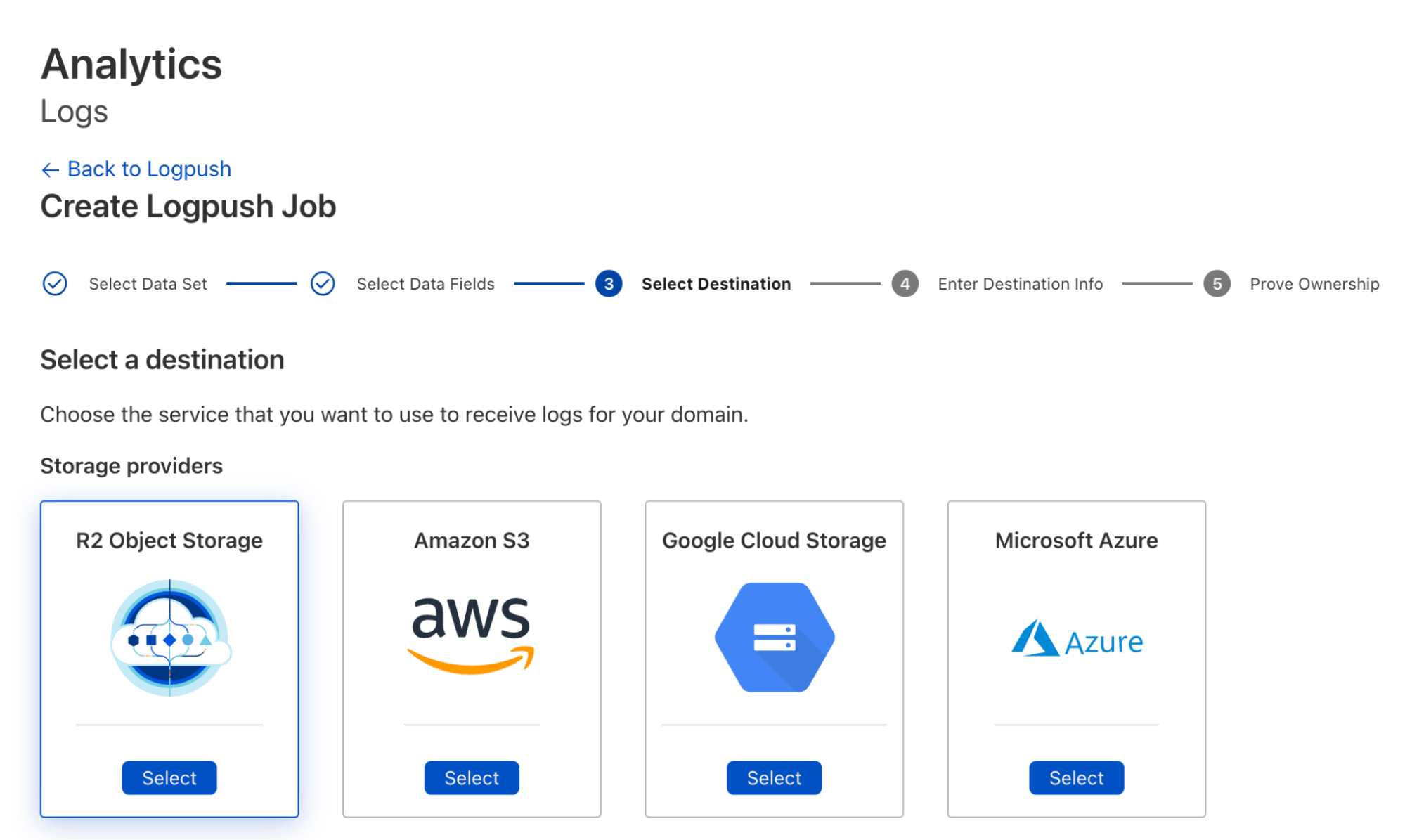
To create Logpush jobs pushing to R2, you can use either the dashboard or Cloudflare API. Using the dashboard, you can create a job and select R2 as the destination during configuration:

Store and retrieve your logs on R2

To use the Cloudflare API to create the job, do something like:

curl -s -X POST 'https://api.cloudflare.com/client/v4/zones/<ZONE_ID>/logpush/jobs' \
-H "X-Auth-Email: <EMAIL>" \
-H "X-Auth-Key: <API_KEY>" \
-d '{
 "name":"<DOMAIN_NAME>",
"destination_conf":"r2://<BUCKET_PATH>/{DATE}?account-id=<ACCOUNT_ID>&access-key-id=<R2_ACCESS_KEY_ID>&secret-access-key=<R2_SECRET_ACCESS_KEY>",
 "dataset": "http_requests",
"logpull_options":"fields=ClientIP,ClientRequestHost,ClientRequestMethod,ClientRequestURI,EdgeEndTimestamp,EdgeResponseBytes,EdgeResponseStatus,EdgeStartTimestamp,RayID&timestamps=rfc3339",
 "kind":"edge"
}' | jq .

Please see Logpush over R2 docs for more information.

Log Retrieval on R2

If you have your logs pushed to R2, you could use the Cloudflare API to retrieve logs in specific time ranges like the following:

curl -s -g -X GET 'https://api.cloudflare.com/client/v4/accounts/<ACCOUNT_ID>/logs/retrieve?start=2022-09-25T16:00:00Z&end=2022-09-25T16:05:00Z&bucket=<YOUR_BUCKET>&prefix=<YOUR_FILE_PREFIX>/{DATE}' \
-H "X-Auth-Email: <EMAIL>" \
-H "X-Auth-Key: <API_KEY>" \ 
-H "R2-Access-Key-Id: R2_ACCESS_KEY_ID" \
-H "R2-Secret-Access-Key: R2_SECRET_ACCESS_KEY" | jq .

See Log Retrieval API for more details.

Now that you have critical logging infrastructure on Cloudflare, you probably want to be able to monitor the health of these Logpush jobs as well as get relevant alerts when something needs your attention.

Looking forward

While we have a vision to build out log analysis and forensics capabilities on top of R2 – and a roadmap to get us there – we’d still love to hear your thoughts on any improvements we can make, particularly to our retrieval options.

Get setup on R2 to start pushing logs today! If your current plan doesn’t include Logpush, storing logs on R2 is another great reason to upgrade!