One of our favorite ask-me-anything questions for company meetings or panels at security conferences is the classic: “What keeps you up at night?”
For a CISO, that question is maybe a bit of a nightmare in itself. It does not have one single answer; it has dozens. It’s the constant tension between enabling a globally distributed workforce to do their best work, and ensuring that “best work” does not inadvertently open the door to a catastrophic breach.
We often talk about the “zero trust journey,” but the reality is that the journey is almost certainly paved with friction. If security is too cumbersome, users find creative (and dangerous) ways around it. If it’s seamless at the cost of effectiveness, it might not be secure enough to stop a determined adversary.
Today, we are excited to announce two new tools in Cloudflare’s SASE toolbox designed to modernize remote access by eliminating the “dark corners” of your network security without adding friction to the user experience: mandatory authentication and Cloudflare’s own multi-factor authentication (MFA).
Addressing the gap between installation and enforcement
When you deploy the Cloudflare One Client, you gain incredible visibility and control. You can apply policies for permitted destinations, define the Internet traffic that routes through Cloudflare, and set up traffic inspection at both the application and network layer. But there has always been a visibility challenge from when there is no user actually authenticated.
This gap occurs in two primary scenarios:
A new device: Cloudflare One Client is installed via mobile device management (MDM), but the user has not authenticated yet.
Re-authentication grey zone: The session expires, and the user, either out of forgetfulness or a desire to bypass restrictions, does not log back in.
In either case, the device is now unknown. This is dangerous. You lose visibility, and your security posture reverts to whatever the local machine allows.
Introducing mandatory authentication
To close this loop, we are introducing mandatory authentication. When enabled via your MDM configuration, the Cloudflare One Client becomes the gatekeeper of Internet access from the moment the machine boots up.
If a user is not actively authenticated, the Cloudflare One client will:
Block all Internet traffic by default using the system firewall.
Allow traffic from the device client’s authentication flow using a process-specific exception.
Prompt users to authenticate, guiding them through the process, so they don’t have to hunt for the right buttons.
By making authentication a prerequisite for connectivity, you ensure that every managed device is accounted for, all the time.
Note: mandatory authentication will become available in our Cloudflare One client on Windows initially, with support for other platforms to follow.
When one source of trust is not enough
Most organizations have moved toward single sign-on (SSO) as their primary security anchor. If you use Okta, Entra ID, or Google, you likely require MFA at the initial login. That’s a great start, but in a modern threat landscape, it is no longer the finish line.
The hard truth is that identity providers (IdPs) are high-value targets. If an attacker successfully compromises a user’s SSO session, perhaps through a sophisticated session hijacking or social engineering, they effectively hold the keys to every application behind that SSO.
Cloudflare’s independent MFA: a secondary root of trust
This is where Cloudflare’s MFA can help. Think of this as a “step-up MFA” that lives at the network edge, independent of your IdP.
By remaining separate from your IdP, this introduces another authority that has to “sign off” on any user trying to access a protected resource. That means even if your primary IdP credentials are compromised or spoofed, an attacker will hit a wall when trying to access something like your production database—because they do not have access to the second factor.
Cloudflare Access will offer a few different means of providing MFA:
Biometrics (i.e., Windows Hello, Apple Touch ID, and Apple Face ID)
Security key (WebAuthn and FIDO2 as well as PIV for SSH with Access for Infrastructure)
Time-based one-time password (TOTP) through authenticator apps
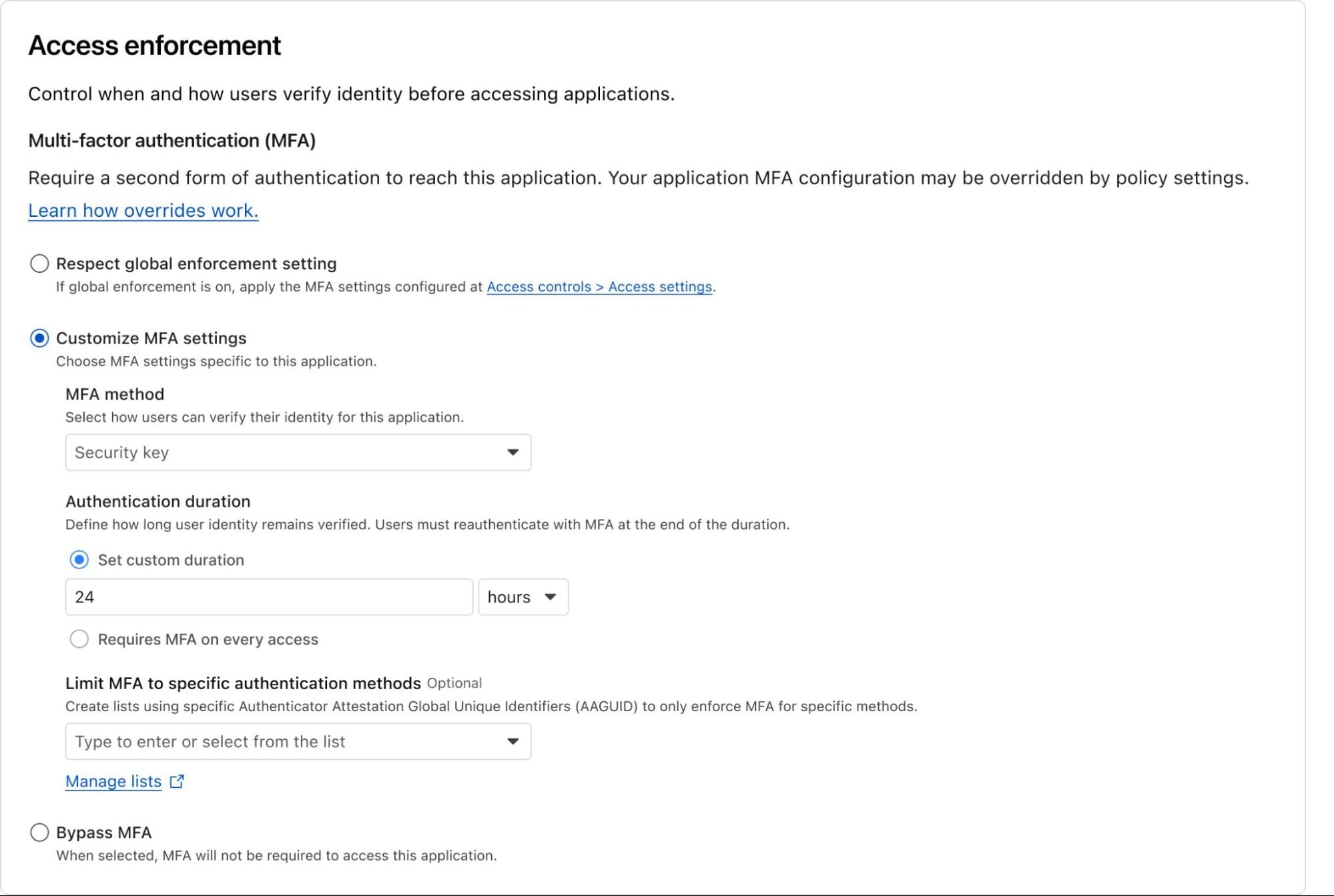
Administrators will have the flexibility to define how users must authenticate and how often. This can be configured not only at a global level (i.e., establish mandatory MFA for all Access applications), but also with more granular controls for specific applications or policies. For example, your organization may decide to allow lower assurance MFA methods for chat apps, but require a security key for access to source code.
Or, you could enforce strong MFA to sensitive resources for third-parties like contractors, who otherwise may use a personal email or social identity like LinkedIn. You can also easily add modern MFA methods to legacy apps that don’t otherwise support it natively, without touching a line of code.
End users will be able to enroll an MFA device easily through their App Launcher.
Example of what customizing MFA settings for an Access policy may look like. Note: This is a mockup and may change.
Cloudflare’s independent MFA is in closed beta with new customers being onboarded each week. You can request access here to try out this new feature!
Helping CISOs sleep at night
Security is often a game of “closing the loop.” By ensuring that devices are registered and authenticated before they can touch the open Internet and by requiring an independent second layer of verification for your most precious assets, we are making the “blast radius” of a potential attack significantly smaller.
These features don’t just add security; they add certainty. Certainty that your policies are being enforced and certainty that a single compromised password won’t lead to a total breach.
We are moving beyond simple access control and into a world of continuous, automated posture enforcement. And we’re just getting started.
Ready to lock down your fleet? You can get started today with Cloudflare One for free for up to 50 users.
We’re excited to see how you use these tools to harden your perimeter and simplify your users’ day-to-day workflows. As always, we’d love to hear your feedback! Join us in the Cloudflare Community or reach out to your account team to share your thoughts.
Most security teams spend their days playing a high-stakes game of Whac-A-Mole. A user’s credentials get phished, or they accidentally download a malicious file, and suddenly you’re in incident response mode.
We built our SASE platform, Cloudflare One, to stop that cycle. By placing Access and Gateway in front of your applications and Internet traffic, we gave you the tools to decide who gets in and where they can go.
Today, we’re making those decisions smarter. You can now incorporate User Risk Scores directly into your zero trust network access (ZTNA) policies. Instead of just checking “Who is this user?” and “Is their device healthy?”, you can now ask, “How has this user been behaving lately?” and adjust their access in real time.
Step 1: From “what” to “how”
For years, traditional corporate access was binary. You either had the right login and the right certificate, or you didn’t. But identity is fluid. A legitimate user can become a risk if their account is compromised or if they start exhibiting “insider threat” behaviors — like impossible travel, multiple failed login attempts, or triggering data loss prevention rules by moving sensitive data.
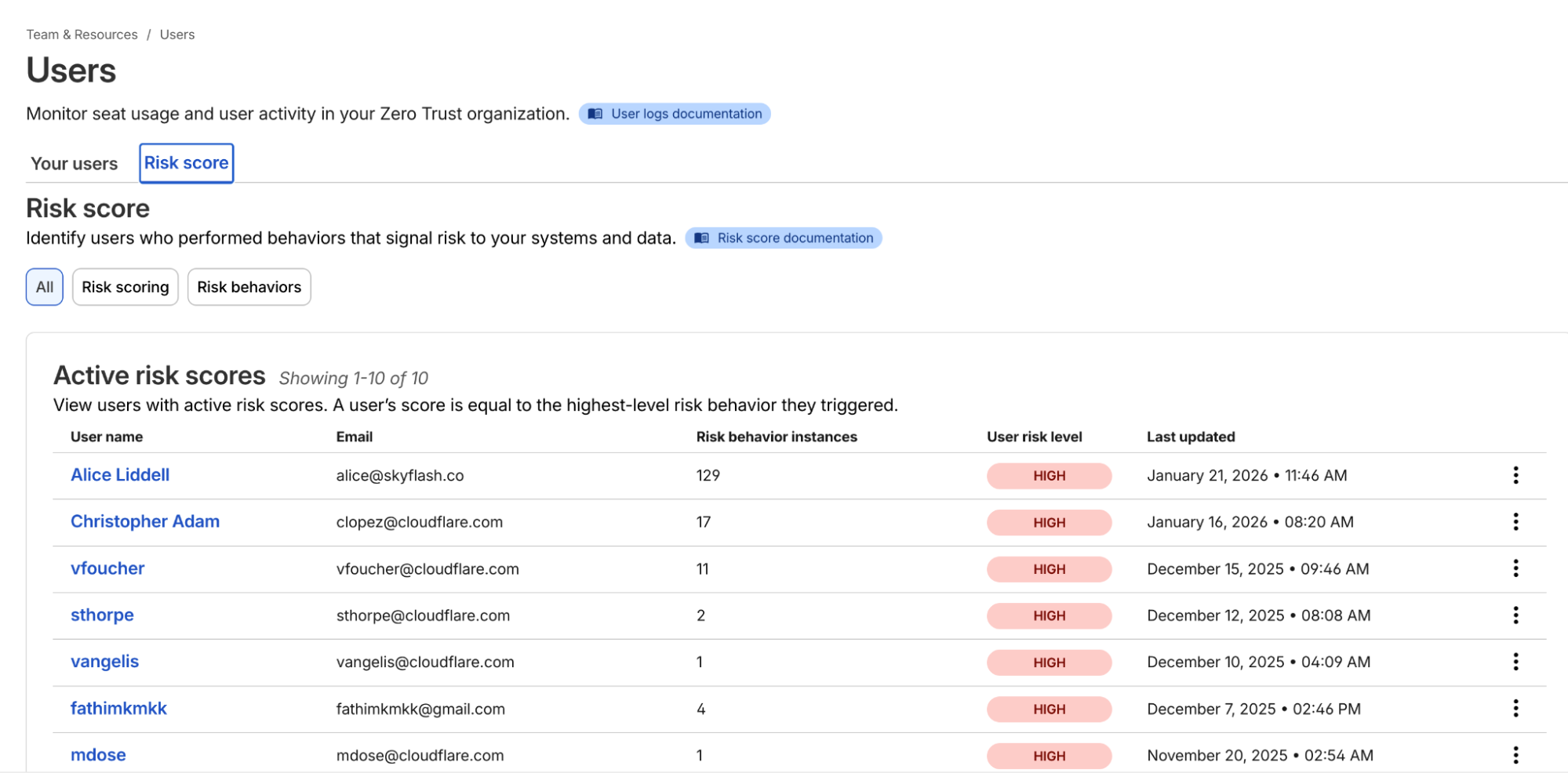
Cloudflare One now continuously calculates a risk score for every user in your organization based on these behaviors.
Example list of users and their risk scores
Once you’ve onboarded your team to Cloudflare One, you can navigate to the Team & Resources > Users > Risk Score section of the dashboard. Here, you can define which behaviors matter to you. For example, you might decide that impossible travel has a “high” risk level, while using a device in need of an update is “medium.”
Cloudflare’s risk engine continuously evaluates telemetry from across the SASE platform. For internal signals, the engine monitors logs from Cloudflare Access (e.g., successful/failed logins, geographic context) and Cloudflare Gateway (e.g., malware hits, risky browsing categories, or sensitive data triggers in DLP).
For third-party signals, we’ve built service-to-service integrations with partners like CrowdStrike and SentinelOne. These integrations allow Cloudflare to ingest external telemetry, such as CrowdStrike’s device posture attributes, and map it to a user’s profile.
The calculation logic is designed to be deterministic:
Selection: Administrators choose which specific “risk behaviors” (impossible travel, DLP violations, and more) to enable for their organization.
Aggregation: The engine identifies all risk events associated with a user.
Scoring: A user’s risk score is determined by the highest risk level (low, medium, or high) of any enabled behavior triggered during that period.
Reset: If an admin investigates and clears an incident, they can manually reset the user’s score, which preserves the history but resets their access based on risk data gathered going forward.
Step 2: Easily apply adaptive access
Knowing a user is risky is step one. Doing something about it — automatically — is step two.
In the past, if a security analyst saw a suspicious user, they’d have to manually revoke sessions or move the user into a “restricted” group in their Identity Provider (IdP). That takes time — time an attacker uses to move laterally.
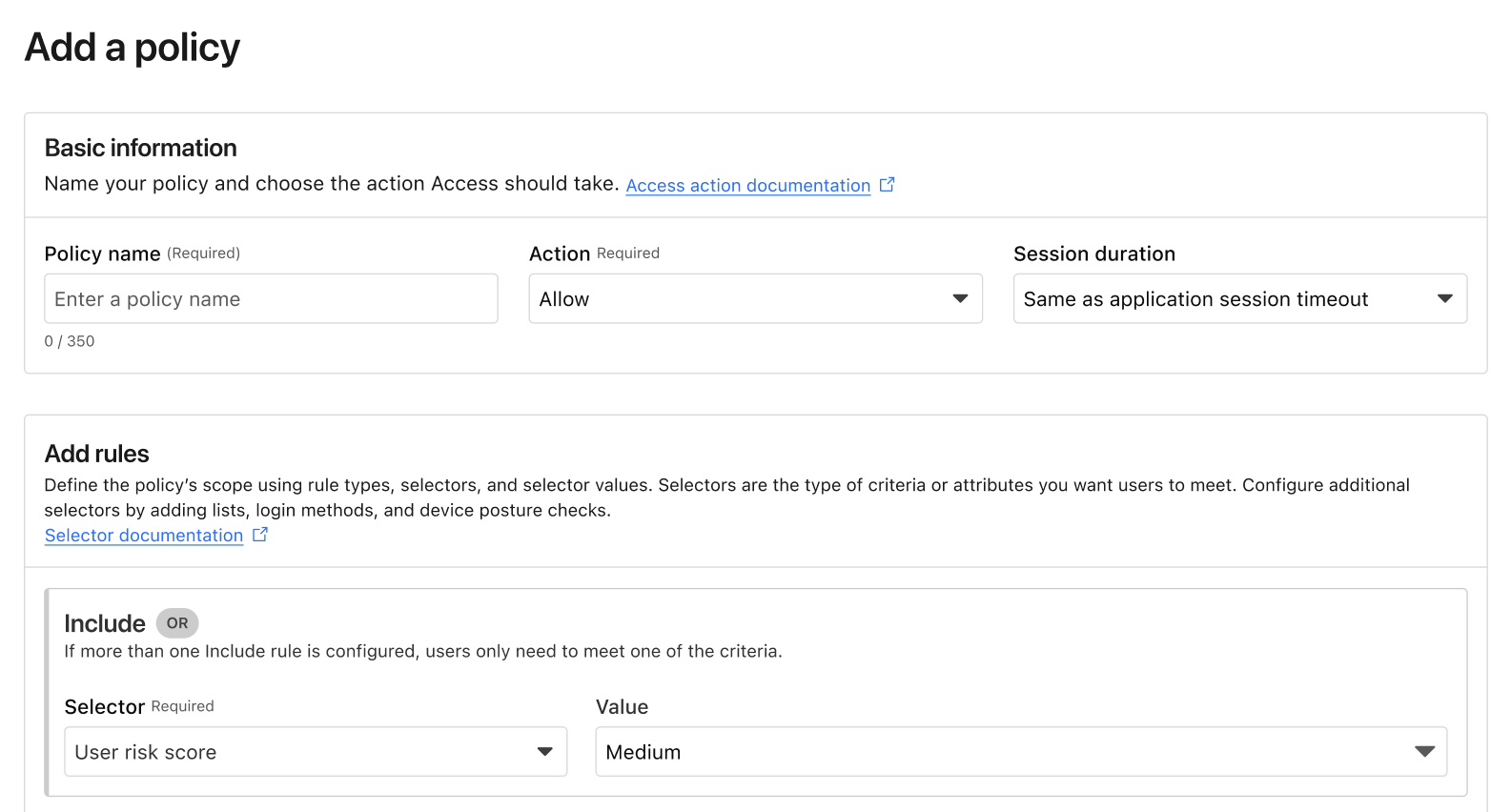
Now, you can build Adaptive Access policies. When you create or edit an Access policy, you’ll find a new selector: User Risk Score.
Example of the new User Risk Score selector in an Access policy.
This allows you to create global or application-specific rules such as: “If a user’s risk score is high, they cannot access the Finance Portal,” or “If a user’s risk score is medium, they must use a physical security key to log in.” Such rules ensure corporate operations are not interrupted while additional layers of security are applied.
Step 3: Closing the loop
The best part of this system is that it’s dynamic. If a user’s risk score drops after being reviewed and cleared by an investigator, their access is automatically restored based on your policy. Today, risk-based access can revoke access in the middle of an active session when risk score increases. In the future, we will explore expanding this to enforce step-up MFA in the middle of an active session when the risk score changes as well.
We’ve also made sure this works with the tools you already use. If you use Okta, Cloudflare can share these risk signals back to Okta, ensuring that a user flagged on the network is also restricted at the front door of your SSO. This integration uses the Shared Signals Framework, which enables the sharing of risk signals across platforms.
Move faster, stay secure
We built Cloudflare One so that security teams could stop being the “department of no” and start being the department of “yes, and safely.” Incorporating user risk scores into your Access policies is the next step in that journey. It moves your security from a static snapshot at login to a continuous, living conversation with your network architecture.
If you’re already a Cloudflare customer, you can start exploring these risk signals in your dashboard today. If you’re still wrestling with legacy VPNs or manual security reviews, we’d love to help you flip the switch.
You can get started for free for up to 50 users — no sales call required. For larger organizations looking to integrate third-party signals like CrowdStrike or SentinelOne into their global policies, our team is ready to walk you through a ZTNA pilot.
Trust is the most expensive vulnerability in modern security architecture. In recent years, the security industry has pivoted toward a zero trust model for networks — assuming breach and verifying every request. Yet when it comes to the people behind those requests, we often default back to implicit trust. We trust that the person on the Zoom call is who they say they are. We trust that the documents uploaded to an HR portal are genuine.
That trust is now being weaponized at an unprecedented scale.
In our 2026 Cloudflare Threat Report, we highlight a rapidly accelerating threat vector: the rise of “remote IT worker” fraud. Often linked to nation-states, including North Korea, these are not just individual bad actors. They are organized operations running laptop farms: warehouses of devices remotely accessed by workers using stolen identities to infiltrate companies, steal intellectual property (IP), and funnel revenue illicitly.
These attackers have evolved and continue to do so with advancements in artificial intelligence (AI). They use generative AI to pass interviews and deepfake tools to fabricate flawless government IDs. Traditional background checks and standard identity providers (IdPs) are no longer enough. Bad actors are exploiting an identity assurance gap, which exists because most zero trust onboarding models verify devices and credentials, not people.
To close this gap, Cloudflare is partnering with Nametag, a pioneer in workforce identity verification, to bring identity-verified onboarding and continuous identity assurance to our SASE platform, Cloudflare One.
Your biggest insider threat was scheming from the start
The challenge with insider risk is that companies naturally want to trust their employees. By the time malicious actors are detected by traditional data loss prevention (DLP) or user entity behavior analytics (UEBA) tools, they are already inside the perimeter. They have valid credentials, a corporate laptop, and access to sensitive repositories.
The “remote IT worker” scheme exploits the gap between hiring and onboarding. Attackers use stolen or fabricated identities to get hired. Once the laptop is shipped to a “mule” address (typically a domestic laptop farm located in the country of the remote worker’s alleged employment), it is racked and connected to a keyboard, video, and mouse (KVM) switch. The remote actor then logs in via VPN (or perhaps remote desktop), appearing to be a legitimate employee.
Because the credentials are valid and the device is corporate-issued, standard zero trust network access (ZTNA) policies often see this traffic as “safe” — when in fact it’s an enormous risk to your business.
Enter identity-verified zero trust
Cloudflare Access already serves as the aggregation layer for your security policies — checking attributes such as device posture, location, and user group membership before granting access to applications, infrastructure, or MCP servers. Through our partnership with Nametag, we are adding a critical new layer: workforce identity verification.
Previously, IT departments had no choice but to assume trust throughout the new user onboarding process. They could either ship a laptop to an address provided by the new hire and then send their initial credentials to their personal email, or require them to come in person –– costly and impractical in a world of distributed workforces and contractors.
Nametag replaces assumed trust with verified identity, ensuring that the person receiving, configuring, and connecting a device to protected resources is a real person, a legitimate person, and the right person throughout the entire process. This integration allows organizations to uncover and stop bad actors, including North Korean IT workers, before they gain access to any internal resources or data.
How it works
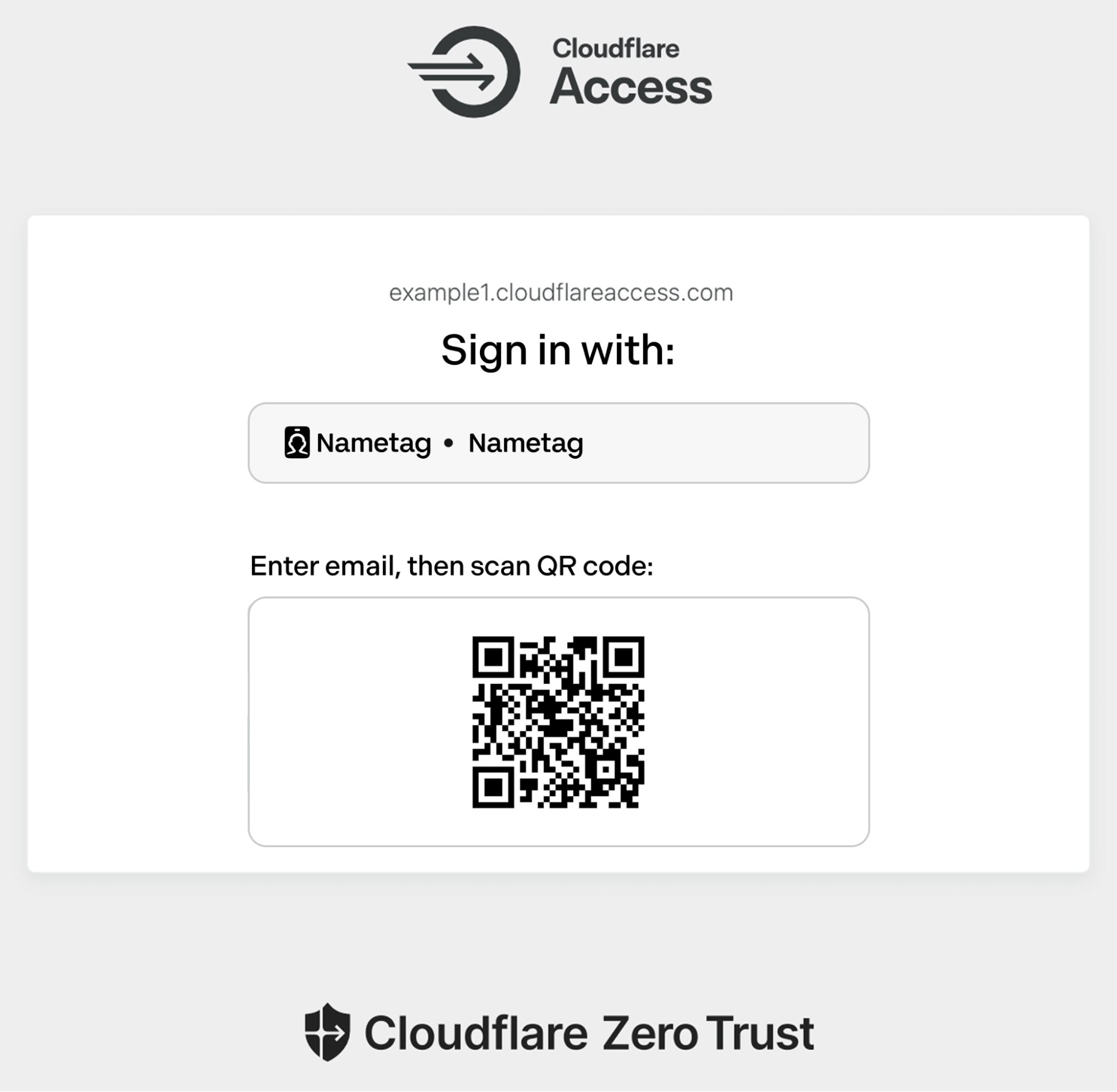
Nametag is integrated using OpenID Connect (OIDC). You can configure it as an IdP within Cloudflare Access or chain it as an external evaluation factor alongside your primary identity provider (like Okta or Microsoft Entra ID).
Example of the Cloudflare Access login page prompting for a user to authenticate using Nametag.
Here is an example workflow for a high-security onboarding scenario:
Trigger: A new user attempts to access their initial onboarding portal (protected by Cloudflare Access).
Challenge: Instead of just asking for a username and password, Cloudflare directs the user to Nametag for authentication via OIDC.
Verification: The user enters their new work email address, then snaps a quick selfie and scans their government-issued photo ID using their phone.
Attestation: Nametag’s Deepfake Defense™ identity verification engine leverages advanced cryptography, biometrics, AI and other features to ensure that the user is both a real person and the right person. Nametag’s technology uniquely prevents bad actors from using deepfake IDs and selfies in sophisticated injection attacks or presentation attacks (e.g., holding up a printed photo).
Enforcement: If that check is successful, Nametag returns an ID token to Cloudflare to complete the OIDC flow. Cloudflare then grants or denies access to the application based on the user’s identity and the Access policies.
All of this happens before the user can access email, code repositories, or other internal resources.
Verifying your identity with Nametag takes under 30 seconds to complete. No biometrics are stored after this interaction.
A layered defense
This partnership complements Cloudflare’s existing suite of insider threat protections. Today, you can:
Scan for data exfiltration using our API-driven DLP.
Nametag provides the missing link: identity assurance. It moves us from knowing what account is logging in, to knowing exactly who is behind the keyboard.
In an era where AI can fake a face and a voice, cryptographic proof of identity is the only way to safely trust your workforce.
Beyond onboarding: continuous verification
While stopping bad actors at the door is critical, the threat landscape is dynamic. Legitimate credentials can be sold, and legitimate employees can be compromised.
To protect against that present and ever-evolving risk, Cloudflare Access now incorporates user risk scores so security teams can build context-aware policies. If a user’s risk score suddenly increases from low to high, access can be revoked to any (or all) applications.
In the future, you’ll be able to enforce step-up verification based on signals such as user risk score, in the middle of an active session. Rather than hitting the “big red button” and potentially disrupting a user who does have a legitimate reason for accessing the production billing system from an usual location, you will instead be able to challenge the user to verify with Nametag or by using Cloudflare’s independent MFA with strong authentication methods. If the user is a session hijacker or a bot, they will be unable to pass these checks.
This capability will also extend to self-service IT workflows. Password resets and MFA device registration are prime targets for social engineering (e.g., the MGM Resorts help desk attacks). By placing Nametag behind Cloudflare Access for these specific portals, you eliminate the possibility of a support agent being socially engineered into resetting a password for an attacker.
Defend against the future, now
Security cannot rely on assumptions. As AI tools lower the barrier to entry for sophisticated fraud, your defenses must evolve to verify the human element with cryptographic certainty. The “remote IT worker” threat is not a hypothetical scenario—it is an active campaign targeting organizations globally.
You don’t need to overhaul your entire infrastructure to stop it. You can layer these protections on top of your existing IdP and applications immediately.
Cloudflare One is free for up to 50 users, allowing you to pilot identity-verified onboarding flows or protect high-risk internal portals right now.
Get started:Sign up for Cloudflare One to begin building your policy engine.
Deploy the integration: Follow the step-by-step guide to connect Nametag to Cloudflare Access in minutes.
Understand the risk: Read the full Cloudflare Threat Report to see the data behind the rise in insider threats and AI impersonation.
Don’t wait for a breach to verify your workforce. Start implementing a SASE architecture that trusts nothing — not even the face on the screen — without verification.
As Generative AI revolutionizes businesses everywhere, security and IT leaders find themselves in a tough spot. Executives are mandating speedy adoption of Generative AI tools to drive efficiency and stay abreast of competitors. Meanwhile, IT and Security teams must rapidly develop an AI Security Strategy, even before the organization really understands exactly how it plans to adopt and deploy Generative AI.
IT and Security teams are no strangers to “building the airplane while it is in flight”. But this moment comes with new and complex security challenges. There is an explosion in new AI capabilities adopted by employees across all business functions — both sanctioned and unsanctioned. AI Agents are ingesting authentication credentials and autonomously interacting with sensitive corporate resources. Sensitive data is being shared with AI tools, even as security and compliance frameworks struggle to keep up.
While it demands strategic thinking from Security and IT leaders, the problem of governing the use of AI internally is far from insurmountable. SASE (Secure Access Service Edge) is a popular cloud-based network architecture that combines networking and security functions into a single, integrated service that provides employees with secure and efficient access to the Internet and to corporate resources, regardless of their location. The SASE architecture can be effectively extended to meet the risk and security needs of organizations in a world of AI.
Cloudflare’s SASE Platform is uniquely well-positioned to help IT teams govern their AI usage in a secure and responsible way — without extinguishing innovation. What makes Cloudflare different in this space is that we are one of the few SASE vendors that operate not just in cybersecurity, but also in AI infrastructure. This includes: providing AI infrastructure for developers (e.g. Workers AI, AI Gateway, remote MCP servers, Realtime AI Apps) to securing public-facing LLMs (e.g. Firewall for AI or AI Labyrinth), to allowing content creators to charge AI crawlers for access to their content, and the list goes on. Our expertise in this space gives us a unique view into governing AI usage inside an organization. It also gives our customers the opportunity to plug different components of our platform together to build out their AI and AI cybersecurity infrastructure.
This week, we are taking this AI expertise and using it to help ensure you have what you need to implement a successful AI Security Strategy. As part of this, we are announcing several new AI Security Posture Management (AI-SPM) features, including:
All of these new AI-SPM features are built directly into Cloudflare’s powerful SASE platform.
And we’re just getting started. In the coming months you can expect to see additional valuable AI-SPM features launch across the Cloudflare platform, as we continue investing in making Cloudflare the best place to protect, connect, and build with AI.
What’s in this AI security guide?
In this guide, we will cover best practices for adopting generative AI in your organization using Cloudflare’s SASE (Secure Access Service Edge) platform. We start by covering how IT and Security leaders can formulate their AI Security Strategy. Then, we show how to implement this strategy using long-standing features of our SASE platform alongside the new AI-SPM features we launched this week.
This guide below is divided into three key pillars for dealing with (human) employee access to AI – Visibility, Risk Management and Data Protection — followed by additional guidelines around deploying agentic AI in the enterprise using MCP. Our objective is to help you align your security strategy with your business goals while driving adoption of AI across all your projects and teams.
And we do this all using our single SASE platform, so you don’t have to deploy and manage a complex hodgepodge of point solutions and security tools. In fact, we provide you with an overview of your AI security posture in a single dashboard, as you can see here:
AI Security Report in Cloudflare’s SASE platform
Develop your AI Security Strategy
The first step to securing AI usage is to establish your organization’s level of risk tolerance. This includes pinpointing your biggest security concerns for your users and your data, along with relevant legal and compliance requirements. Relevant issues to consider include:
Do you have specific sensitive data that should not be shared with certain AI tools? (Some examples include personally identifiable information (PII), personal health information (PHI), sensitive financial data, secrets and credentials, source code or other proprietary business information.)
Are there business decisions that your employees should not be making using assistance from AI? (For instance, the EU AI Act AI prohibits the use of AI to evaluate or classify individuals based on their social behavior, personal characteristics, or personality traits.)
Are you subject to compliance frameworks that require you to produce records of the generative AI tools that your employees used, and perhaps even the prompts that your employees input into AI providers? (For example, HIPAA requires organizations to implement audit trails that records who accessed PHI and when, GDPR requires the same for PII, SOC2 requires the same for secrets and credentials.)
Do you have specific data protection requirements that require employees to use the sanctioned, enterprise version of a certain generative AI provider, and avoid certain AI tools or their consumer versions? (Enterprise AI tools often have more favorable terms of service, including shorter data retention periods, more limited data-sharing with third-parties, and/or a promise not to train AI models on user inputs.)
Do you require employees to completely avoid the use of certain AI tools, perhaps because they are unreliable, unreviewed or headquartered in a risky geography?
Are there security protections offered by your organization’s sanctioned AI providers and to what extent do you plan to protect against misconfigurations of AI tools that can result in leaks of sensitive data?
What is your policy around the use of autonomous AI agents? What is your strategy for adopting the Model Context Protocol (MCP)? (The Model Context Protocol is a standard way to make information available to large language models (LLMs), similar to the way an application programming interface (API) works. It supports agentic AI that autonomously pursues goals and takes action.)
While almost every organization has relevant compliance requirements that implicate their use of generative AI, there is no “one size fits all” for addressing these issues.
Some organizations have mandates to broadly adopt AI tools of all stripes, while others require employees to interact with sanctioned AI tools only.
Some organizations are rapidly adopting the MCP, while others are not yet ready for agents to autonomously interact with their corporate resources.
Some organizations have robust requirements around data loss prevention (DLP), while others are still early in the process of deploying DLP in their organization.
Even with this diversity of goals and requirements, Cloudflare SASE provides a flexible platform for the implementation of your organization’s AI Security Strategy.
Build a solid foundation for AI Security
To implement your AI Security Strategy, you first need a solid SASE deployment.
SASE provides a unified platform that consolidates security and networking, replacing a fragmented patchwork of point solutions with a single platform that controls application visibility, user authentication, Data Loss Prevention (DLP), and other policies for access to the Internet and access to internal corporate resources. SASE is the essential foundation for an effective AI Security Strategy.
SASE architecture allows you to execute your AI security strategy by discovering and inventorying the AI tools used by your employees. With this visibility, you can proactively manage risk and support compliance requirements by monitoring AI prompts and responses to understand what data is being shared with AI tools. Robust DLP allows you to scan and block sensitive data from being entered into AI tools, preventing data leakage and protecting your organization’s most valuable information. Our Secure Web Gateway (SWG) allows you to redirect traffic from unsanctioned AI providers to user education pages or to sanctioned enterprise AI providers. And our new integration of MCP tooling into our SASE platform helps you secure the deployment of agentic AI inside your organization.
If you’re just starting your SASE journey, our Secure Internet Traffic Deployment Guide is the best place to begin. For this guide, however, we will skip these introductory details and dive right into using SASE to secure the use of Generative AI.
Gain visibility into your AI landscape
You can’t protect what you can’t see. The first step is to gain visibility into your AI landscape, which is essential for discovering and inventorying all the AI tools that your employees are using, deploying or experimenting with in your organization.
Discover Shadow AI
Shadow AI refers to the use of AI applications that haven’t been officially sanctioned by your IT department. Shadow AI is not an uncommon phenomenon – Salesforce found that over half of the knowledge workers it surveyed admitted to using unsanctioned AI tools at work. Use of unsanctioned AI is not necessarily a sign of malicious intent; employees are often just trying to do their jobs better. As an IT or Security leader, your goal should be to discover Shadow AI and then apply the appropriate AI security policy. There are two powerful ways to do this: inline and out-of-band.
SWG helps you get a clear picture of both sanctioned and unsanctioned AI and chat applications. By reviewing your detected usage, you’ll gain insight into which AI apps are being used in your organization. This knowledge is essential for building policies that support approved tools, and block or control risky ones. This feature requires you to deploy the WARP client in Gateway proxy mode on your end-user devices.
You can review your company’s AI app usage using our new Application Library and Shadow IT dashboards. These tools allow you to:
Review traffic from user devices to understand how many users engage with a specific application over time.
Denote application’s status (e.g., Approved, Unapproved) inside your organization, and use that as input to a variety of SWG policies that control access to applications with that status.
Shadow IT dashboard showing utilization of applications of different status (Approved, Unapproved, In Review, Unreviewed).
Discover employee usage of AI, out-of-band
Even if your organization doesn’t use a device client, you can still get valuable data on Shadow AI usage if you use Cloudflare’s integrations for Cloud Access Security Broker (CASB) with services like Google Workspace, Microsoft 365, or GitHub.
Cloudflare CASB provides high-fidelity detail about your SaaS environments, including sensitive data visibility and suspicious user activity. By integrating CASB with your SSO provider, you can see if your users have authenticated to any third-party AI applications, giving you a clear and non-invasive sense of app usage across your organization.
An API CASB integration with Google Workspace, showing findings filtered to third party integrations. Findings discover multiple LLM integrations.
Implement an AI risk management framework
Now that you’ve gained visibility into your AI landscape, the next step is to proactively manage that risk. Cloudflare’s SASE platform allows you to monitor AI prompts and responses, enforce granular security policies, coach users on secure behavior, and prevent misconfigurations in your enterprise AI providers.
Detect and monitor AI prompts and responses
If you have TLS decryption enabled in your SASE platform, you can gain new and powerful insights into how your employees are using AI with our new AI prompt protection feature.
AI Prompt Protection provides you with visibility into the exact prompts and responses from your employees’ interactions with supported AI applications. This allows you to go beyond simply knowing which tools are being used and gives you insight into exactly what kind of information is being shared.
This feature also works with DLP profiles to detect sensitive data in prompts. You can also choose whether to block the action or simply monitor it.
Log entry for a prompt detected using AI prompt protection.
Build granular AI security policies
Once your monitoring tools give you a clear understanding of AI usage, you can begin building security policies to achieve your security goals. Cloudflare’s Gateway allows you to create policies based on application categories, application approval status, users, user groups, and device status. For example, you can:
create policies to explicitly allow approved AI applications while blocking unapproved AI applications;
limit access to certain applications to specific users or groups that have specific device security posture;
build policies to enable prompt capture (with AI prompt protection) for specific high-risk user groups, such as contractors or new employees, without affecting the rest of the organization; and
put certain applications behind Remote Browser Isolation (RBI), to prevent end users from uploading files or pasting data into the application.
Gateway application status policy selector
All of these policies can be written in Cloudflare Gateway’s unified policy builder, making it easy to deploy your AI Security Strategy across your organization.
Control access to internal LLMs
You can use Cloudflare Access to control your employees’ access to your organization’s internal LLMs, including any proprietary models you train internally and/or models that your organization runs on Cloudflare Worker’s AI.
Cloudflare Access allows you to gate access to these LLMs using fine-grained policies, including ensuring users are granted access based on their identity, user group, device posture, and other contextual signals. For example, you can use Cloudflare Access to write a policy that ensures that only certain data scientists at your organization can access a Workers AI model that is trained on certain types of customer data.
Manage the security posture of third-party AI providers
As you define which AI tools are sanctioned, you can develop functional security controls for consistent usage. Cloudflare newly supports API CASB integrations with popular AI tools like OpenAI (ChatGPT), Anthropic (Claude), and Google Gemini. These “out-of-band” integrations provide immediate visibility into how users are engaging with sanctioned AI tools, allowing you to report on posture management findings include:
Misconfigurations related to sharing settings.
Best practices for API key management.
DLP profile matches in uploaded attachments
Riskier AI features (e.g. autonomous web browsing, code execution) that are toggled on
OpenAI API CASB Integration showing riskier features that are toggled on, security posture risks like unused admin credentials, and an uploaded attachment with a DLP profile match.
Layer on data protection
Robust data protection is the final pillar that protects your employee’s access to AI..
Prevent data loss
Our SASE platform has long supported Data Loss Prevention (DLP) tools that scan and block sensitive data from being entered into AI tools, to prevent data leakage and protect your organization’s most valuable information. You can write policies that detect sensitive data while adapting to organization-specific traffic patterns, and use Cloudflare Gateway’s unified policy builder to apply these to your users’ interactions with AI tools or other applications. For example, you could write a DLP policy that detects and blocks the upload of a social security number (SSN), phone number or address.
As part of our new AI prompt protection feature, you can now also gain a semantic understanding of your users’ interactions with supported AI providers. Prompts are classified inline into meaningful, high-level topics that include PII, credentials and secrets, source code, financial information, code abuse / malicious code and prompt injection / jailbreak. You can then build inline granular policies based on these high-level topic classifications. For example, you could create a policy that blocks a non-HR employee from submitting a prompt with the intent to receive PII from the response, while allowing the HR team to do so during a compensation planning cycle.
Our new AI prompt protection feature empowers you to apply smart, user-specific DLP rules that empower your teams to get work done, all while strengthening your security posture. To use our most advanced DLP feature, you’ll need to enable TLS decryption to inspect traffic.
The above policy blocks all ChatGPT prompts that may receive PII back in the response for employees in engineering, marketing, product, and finance user groups.
Secure MCP — and Agentic AI
MCP (Model Context Protocol) is an emerging AI standard, where MCP servers act as a translation layer for AI agents, allowing them to communicate with public and private APIs, understand datasets, and perform actions. Because these servers are a primary entry point for AI agents to engage with and manipulate your data, they are a new and critical security asset for your security team to manage.
Cloudflare already offers a robust set of developer tools for deploying remote MCP servers—a cloud-based server that acts as a bridge between a user’s data and tools and various AI applications. But now our customers are asking for help securing their enterprise MCP deployments.
That is why we’re making MCP security controls a core part of our SASE platform.
Control MCP Authorization
MCP servers typically use OAuth for authorization, where the server inherits the permissions of the authorizing user. While this adheres to least-privilege for the user, it can lead to authorization sprawl — where the agent accumulates an excessive number of permissions over time. This makes the agent a high-value target for attackers.
Cloudflare Access now helps you manage authorization sprawl by applying Zero Trust principles to MCP server access. A Zero Trust model assumes no user, device, or network can be trusted implicitly, so every request is continuously verified. This approach ensures secure authentication and management of these critical assets as your business adopts more agentic workflows.
Centralize management of MCP servers
Cloudflare MCP Server Portal is a new feature in Cloudflare’s SASE platform that centralizes the management, security, and observation of an organization’s MCP servers.
MCP Server Portal allows you to register all your MCP servers with Cloudflare and provide your end users with a single, unified Portal endpoint to configure in their MCP client. This approach simplifies the user experience, because it eliminates the need to configure a one-to-one connection between every MCP client and server. It also means that new MCP servers dynamically become available to users whenever they are added to the Portal.
Beyond these usability enhancements, MCP Server Portal addresses the significant security risks associated with MCP in the enterprise. The current decentralized approach of MCP deployments creates a tangle of unmanaged one-to-one connections that are difficult to secure. The lack of centralized controls creates a variety of risks including prompt injection, tool injection (where malicious code is part of the MCP server itself), supply chain attacks and data leakage.
MCP Server Portals solve this by routing all MCP traffic through Cloudflare, allowing for centralized policy enforcement, comprehensive visibility and logging, and a curated user experience based on the principle of least privilege. Administrators can review and approve MCP servers before making them available, and users are only presented with the servers and tools they are authorized to use, which prevents the use of unvetted or malicious third-party servers.
An MCP Server Portal in the Cloudflare Dashboard
All of these features are only the beginning of our MCP security roadmap, as we continue advancing our support for MCP infrastructure and security controls across the entire Cloudflare platform.
Implement your AI security strategy in a single platform
As organizations rapidly develop and deploy their AI security strategies, Cloudflare’s SASE platform is ideally situated to implement policies that balance productivity with data and security controls.
Our SASE has a full suite of features to protect employee interactions with AI. Some of these features are deeply integrated in our Secure Web Gateway (SWG), including the ability to write fine-grained access policies, gain visibility into Shadow IT and introspect on interactions with AI tools using AI prompt protection. Apart from these inline controls, our CASB provides visibility and control using out-of-band API integrations. Our Cloudflare Access product can apply Zero Trust principles while protecting employee access to corporate LLMs that are hosted on Workers AI or elsewhere. We’re newly integrating controls for securing MCP that can also be used alongside Cloudflare’s Remote MCP Server platform.
And all of these features are integrated directly into Cloudflare’s SASE’s unified dashboard, providing a unified platform for you to implement your AI security strategy. You can even gain a holistic view of all of your AI-SPM controls using our newly-released AI-SPM overview dashboard.
AI security report showing utilization of AI applications.
As one the few SASE vendors that also offer AI infrastructure, Cloudflare’s SASE platform can also be deployed alongside products from our developer and application security platforms to holistically implement your AI security strategy alongside your AI infrastructure strategy (using, for example, Workers AI, AI Gateway, remote MCP servers, Realtime AI Apps, Firewall for AI, AI Labyrinth, or pay per crawl .)
Cloudflare is committed to helping enterprises securely adopt AI
Ensuring AI is scalable, safe, and secure is a natural extension of Cloudflare’s mission, given so much of our success relies on a safe Internet. As AI adoption continues to accelerate, so too does our mission to provide a market-leading set of controls for AI Security Posture Management (AI-SPM). Learn more about how Cloudflare helps secure AI or start exploring our new AI-SPM features in Cloudflare’s SASE dashboard today!
Collect custom metrics from your in-house applications and forward them to your Zabbix instance by utilizing the Zabbix sender command-line tool.
As you scale up our monitoring, you will inevitably encounter a situation where a particular metric can be quite complex to collect with native monitoring techniques.
We built Cloudflare Access™ as a tool to solve a problem we had inside of Cloudflare. We rely on a set of applications to manage and monitor our network. Some of these are popular products that we self-host, like the Atlassian suite, and others are tools we built ourselves. We deployed those applications on a private network. To reach them, you had to either connect through a secure WiFi network in a Cloudflare office, or use a VPN.
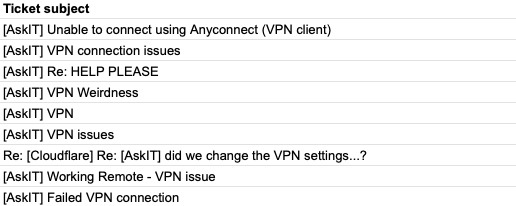
That VPN added friction to how we work. We had to dedicate part of Cloudflare’s onboarding just to teaching users how to connect. If someone received a PagerDuty alert, they had to rush to their laptop and sit and wait while the VPN connected. Team members struggled to work while mobile. New offices had to backhaul their traffic. In 2017 and early 2018, our IT team triaged hundreds of help desk tickets with titles like these:
While our IT team wrestled with usability issues, our Security team decided that poking holes in our private network was too much of a risk to maintain. Once on the VPN, users almost always had too much access. We had limited visibility into what happened on the private network. We tried to segment the network, but that was error-prone.
Around that time, Google published its BeyondCorp paper that outlined a model of what has become known as Zero Trust Security. Instead of trusting any user on a private network, a Zero Trust perimeter evaluates every request and connection for user identity and other variables.
We decided to create our own implementation by building on top of Cloudflare. Despite BeyondCorp being a new concept, we had experience in this field. For nearly a decade, Cloudflare’s global network had been operating like a Zero Trust perimeter for applications on the Internet – we just didn’t call it that. For example, products like our WAF evaluated requests to public-facing applications. We could add identity as a new layer and use the same network to protect applications teams used internally.
We began moving our self-hosted applications to this new project. Users logged in with our SSO provider from any network or location, and the experience felt like any other SaaS app. Our Security team gained the control and visibility they needed, and our IT team became more productive. Specifically, our IT teams have seen ~80% reduction in the time they spent servicing VPN-related tickets, which unlocked over $100K worth of help desk efficiency annually. Later in 2018, we launched this as a product that our customers could use as well.
By shifting security to Cloudflare’s network, we could also make the perimeter smarter. We could require that users login with a hard key, something that our identity provider couldn’t support. We could restrict connections to applications from specific countries. We added device posture integrations. Cloudflare Access became an aggregator of identity signals in this Zero Trust model.
As a result, our internal tools suddenly became more secure than the SaaS apps we used. We could only add rules to the applications we could place on Cloudflare’s reverse proxy. When users connected to popular SaaS tools, they did not pass through Cloudflare’s network. We lacked a consistent level of visibility and security across all of our applications. So did our customers.
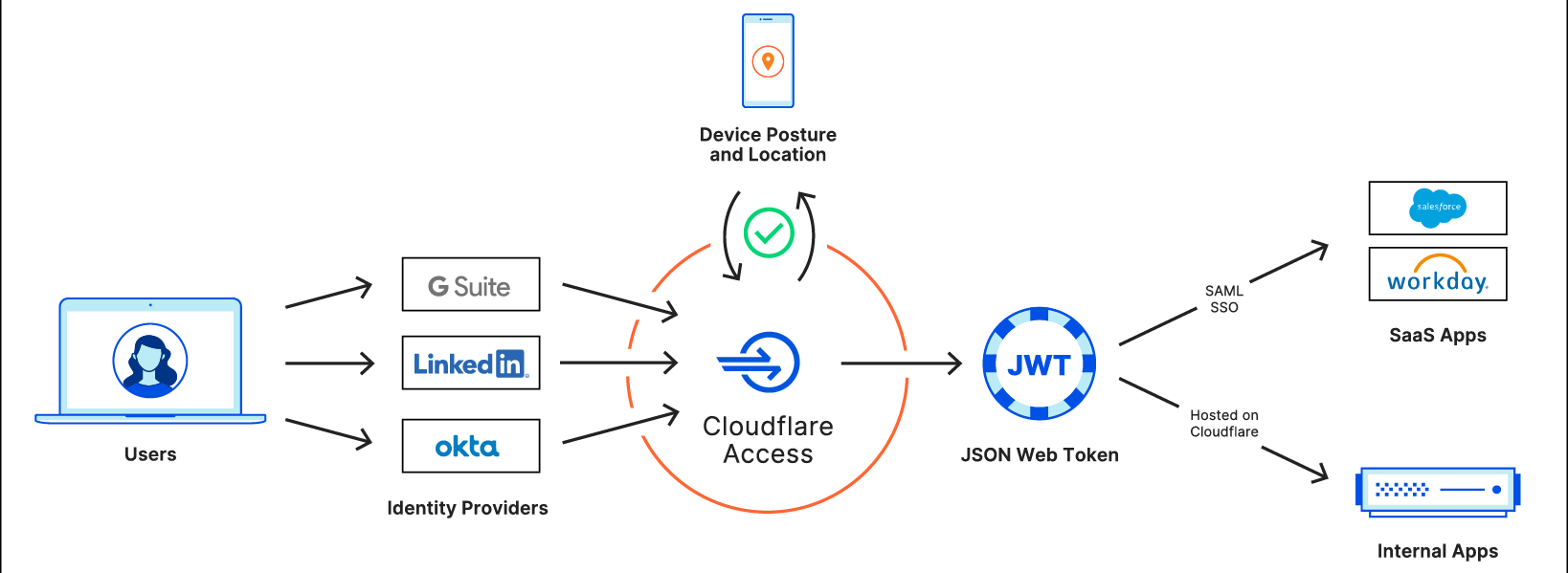
Starting today, our team and yours can fix that. We’re excited to announce that you can now bring the Zero Trust security features of Cloudflare Access to your SaaS applications. You can protect any SaaS application that can integrate with a SAML identity provider with Cloudflare Access.
Even though that SaaS application is not deployed on Cloudflare, we can still add security rules to every login. You can begin using this feature today and, in the next couple of months, you’ll be able to ensure that all traffic to these SaaS applications connects through Cloudflare Gateway.
Standardizing and aggregating identity in Cloudflare’s network
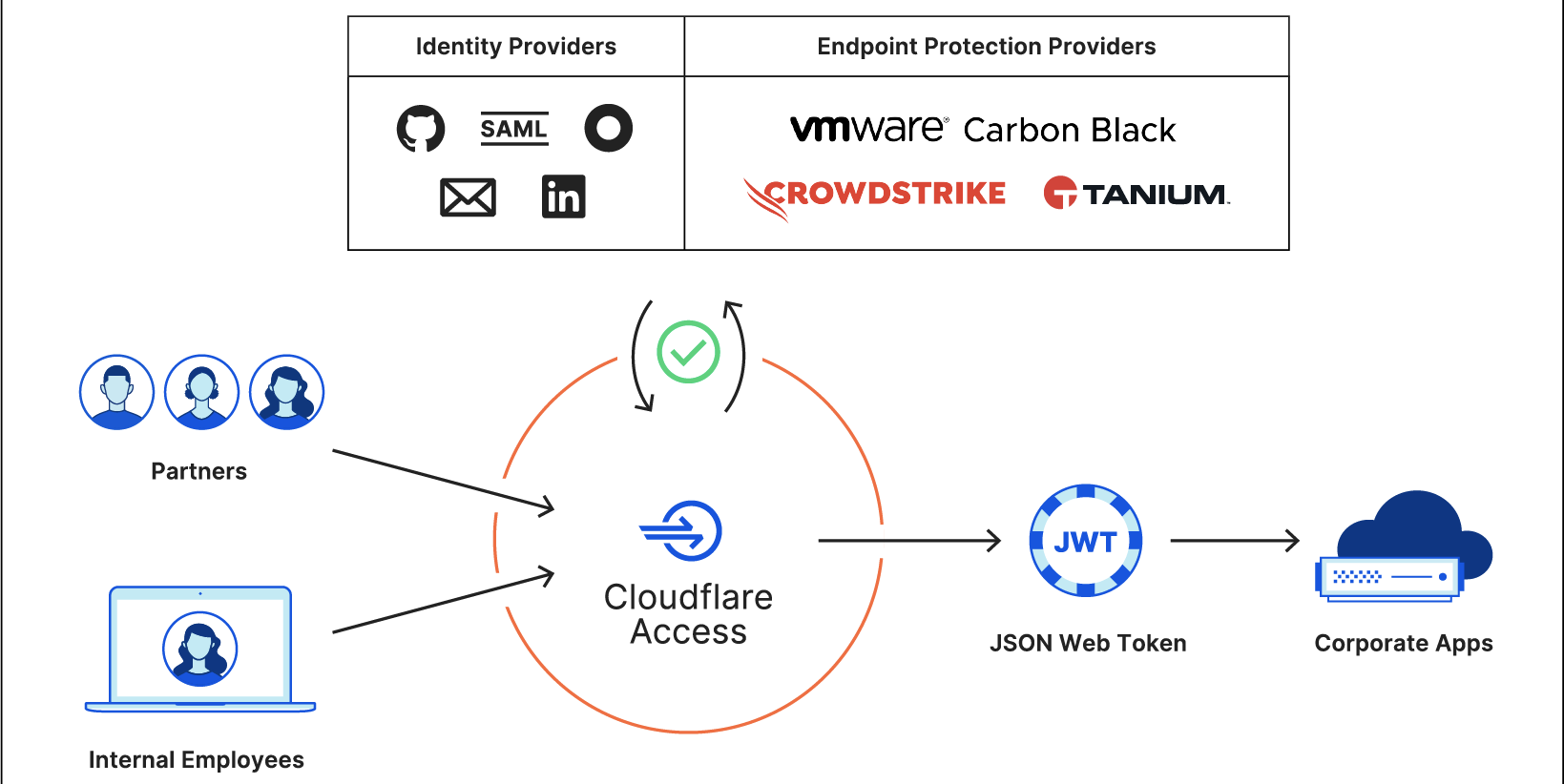
Support for SaaS applications in Cloudflare Access starts with standardizing identity. Cloudflare Access aggregates different sources of identity: username, password, location, and device. Administrators build rules to determine what requirements a user must meet to reach an application. When users attempt to connect, Cloudflare enforces every rule in that checklist before the user ever reaches the app.
The primary rule in that checklist is user identity. Cloudflare Access is not an identity provider; instead, we source identity from SSO services like Okta, Ping Identity, OneLogin, or public apps like GitHub. When a user attempts to access a resource, we prompt them to login with the provider configured. If successful, the provider shares the user’s identity and other metadata with Cloudflare Access.
A username is just one part of a Zero Trust decision. We consider additional rules, like country restrictions or device posture via partners like Tanium or, soon, additional partners CrowdStrike and VMware Carbon Black. If the user meets all of those criteria, Cloudflare Access summarizes those variables into a standard proof of identity that our network trusts: a JSON Web Token (JWT).
A JWT is a secure, information-dense way to share information. Most importantly, JWTs follow a standard, so that different systems can trust one another. When users login to Cloudflare Access, we generate and sign a JWT that contains the decision and information about the user. We store that information in the user’s browser and treat that as proof of identity for the duration of their session.
Every JWT must consist of three Base64-URL strings: the header, the payload, and the signature.
The header defines the cryptographic operation that encrypts the data in the JWT.
The payload consists of name-value pairs for at least one and typically multiple claims, encoded in JSON. For example, the payload can contain the identity of a user.
The signature allows the receiving party to confirm that the payload is authentic.
We store the identity data inside of the payload and include the following details:
User identity: typically the email address of the user retrieved from your identity provider.
Authentication domain: the domain that signs the token. For Access, we use “example.cloudflareaccess.com” where “example” is a subdomain you can configure.
amr: If available, the multifactor authentication method the login used, like a hard key or a TOTP code.
Country: The country where the user is connecting from.
Audience: The domain of the application you are attempting to reach.
Expiration: the time at which the token is no longer valid for use.
Some applications support JWTs natively for SSO. We can send the token to the application and the user can login. In other cases, we’ve released plugins for popular providers like Atlassian and Sentry. However, most applications lack JWT support and rely on a different standard: SAML.
Converting JWT to SAML with Cloudflare Workers
You can deploy Cloudflare’s reverse proxy to protect the applications you host, which puts Cloudflare Access in a position to add identity checks when those requests hit our edge. However, the SaaS applications you use are hosted and managed by the vendors themselves as part of the value they offer. In the same way that I cannot decide who can walk into the front door of the bakery downstairs, you can’t build rules about what requests should and shouldn’t be allowed.
When those applications support integration with your SSO provider, you do have control over the login flow. Many applications rely on a popular standard, SAML, to securely exchange identity data and user attributes between two systems. The SaaS application does not need to know the details of the identity provider’s rules.
Cloudflare Access uses that relationship to force SaaS logins through Cloudflare’s network. The application itself thinks of Cloudflare Access as the SAML identity provider. When users attempt to login, the application sends the user to login with Cloudflare Access.
That said, Cloudflare Access is not an identity provider – it’s an identity aggregator. When the user reaches Access, we will redirect them to the identity provider in the same way that we do today when users request a site that uses Cloudflare’s reverse proxy. By adding that hop through Access, though, we can layer the additional contextual rules and log the event.
We still generate a JWT for every login providing a standard proof of identity. Integrating with SaaS applications required us to convert that JWT into a SAML assertion that we can send to the SaaS application. Cloudflare Access runs in every one of Cloudflare’s data centers around the world to improve availability and avoid slowing down users. We did not want to lose those advantages for this flow. To solve that, we turned to Cloudflare Workers.
The core login flow of Cloudflare Access already runs on Cloudflare Workers. We built support for SaaS applications by using Workers to take the JWT and convert its content into SAML assertions that are sent to the SaaS application. The application thinks that Cloudflare Access is the identity provider, even though we’re just aggregating identity signals from your SSO provider and other sources into the JWT, and sending that summary to the app via SAML.
Integrate with Gateway for comprehensive logging (coming soon)
Cloudflare Gateway keeps your users and data safe from threats on the Internet by filtering Internet-bound connections that leave laptops and offices. Gateway gives administrators the ability to block, allow, or log every connection and request to SaaS applications.
However, users are connecting from personal devices and home WiFi networks, potentially bypassing Internet security filtering available on corporate networks. If users have their password and MFA token, they can bypass security requirements and reach into SaaS applications from their own, unprotected devices at home.
To ensure traffic to your SaaS apps only connects over Gateway-protected devices, Cloudflare Access will add a new rule type that requires Gateway when users login to your SaaS applications. Once enabled, users will only be able to connect to your SaaS applications when they use Cloudflare Gateway. Gateway will log those connections and provide visibility into every action within SaaS apps and the Internet.
Every identity provider is now capable of SAML SSO
Identity providers come in two flavors and you probably use both every day. One type is purpose-built to be an identity provider, and the other accidentally became one. With this release, Cloudflare Access can convert either into a SAML-compliant SSO option.
Corporate identity providers, like Okta or Azure AD, manage your business identity. Your IT department creates and maintains the account. They can integrate it with SaaS Applications for SSO.
The second type of login option consists of SaaS providers that began as consumer applications and evolved into public identity providers. LinkedIn, GitHub, and Google required users to create accounts in their applications for networking, coding, or email.
Over the last decade, other applications began to trust those public identity provider logins. You could use your Google account to log into a news reader and your GitHub account to authenticate to DigitalOcean. Services like Google and Facebook became SSO options for everyone. However, most corporate applications only supported integration with a single SAML provider, something public identity providers do not provide. To rely on SSO as a team, you still needed a corporate identity provider.
Cloudflare Access converts a user login from any identity provider into a JWT. With this release, we also generate a standard SAML assertion. Your team can now use the SAML SSO features of a corporate identity provider with public providers like LinkedIn or GitHub.
Multi-SSO meets SaaS applications
We describe Cloudflare Access as a Multi-SSO service because you can integrate multiple identity providers, and their SSO flows, into Cloudflare’s Zero Trust network. That same capability now extends to integrating multiple identity providers with a single SaaS application.
Most SaaS applications will only integrate with a single identity provider, limiting your team to a single option. We know that our customers work with partners, contractors, or acquisitions which can make it difficult to standardize around a single identity option for SaaS logins.
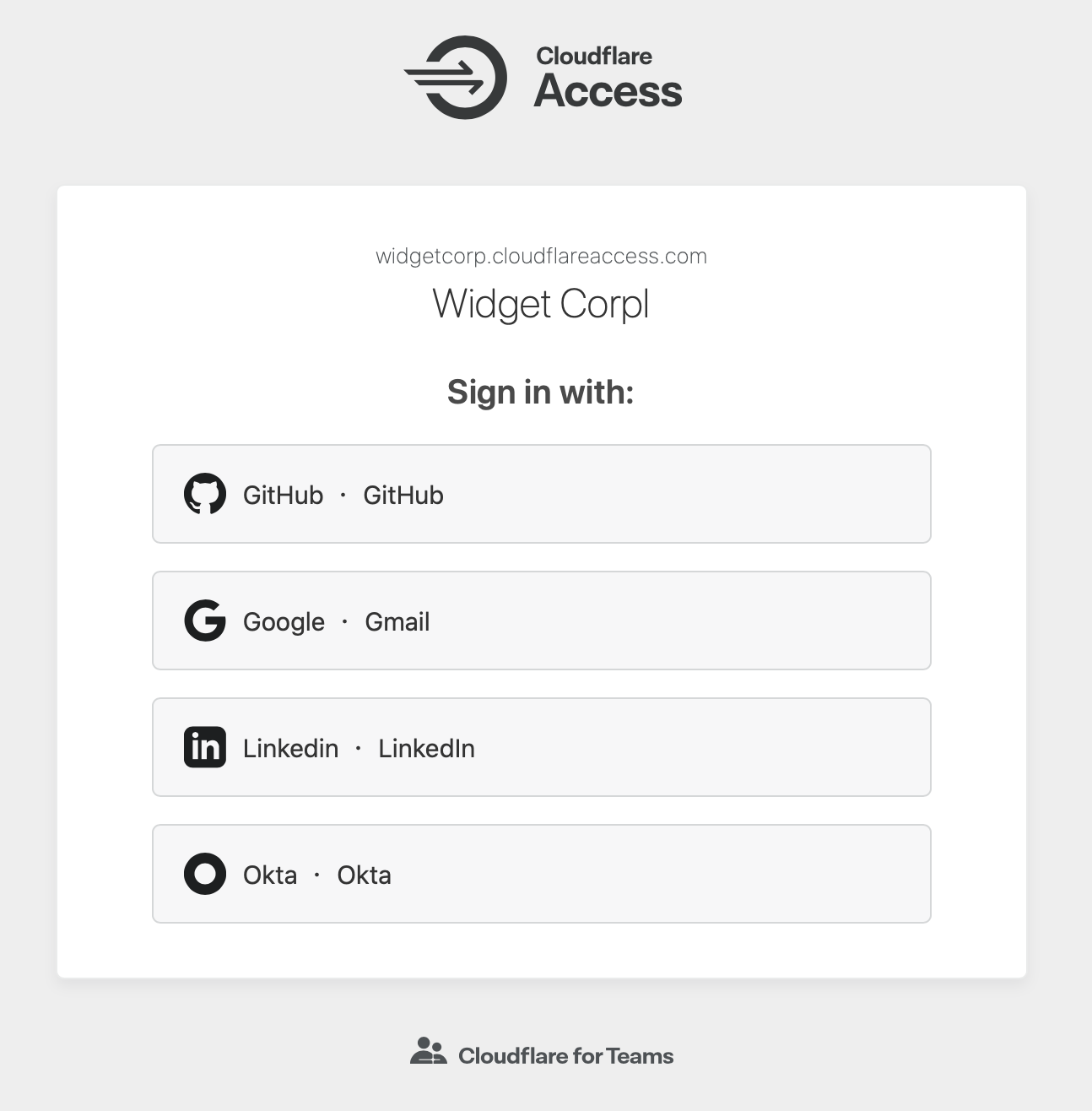
Cloudflare Access can connect to multiple identity providers simultaneously, including multiple instances of the same provider. When users are prompted to login, they can choose the option that their particular team uses.
We’ve taken that ability and extended it into the Access for SaaS feature. Access generates a consistent identity from any provider, which we can now extend for SSO purposes to a SaaS application. Even if the application only supports a single identity provider, you can still integrate Cloudflare Access and merge identities across multiple sources. Now, team members who use your Okta instance and contractors who use LinkedIn can both SSO into your Atlassian suite.
All of your apps in one place
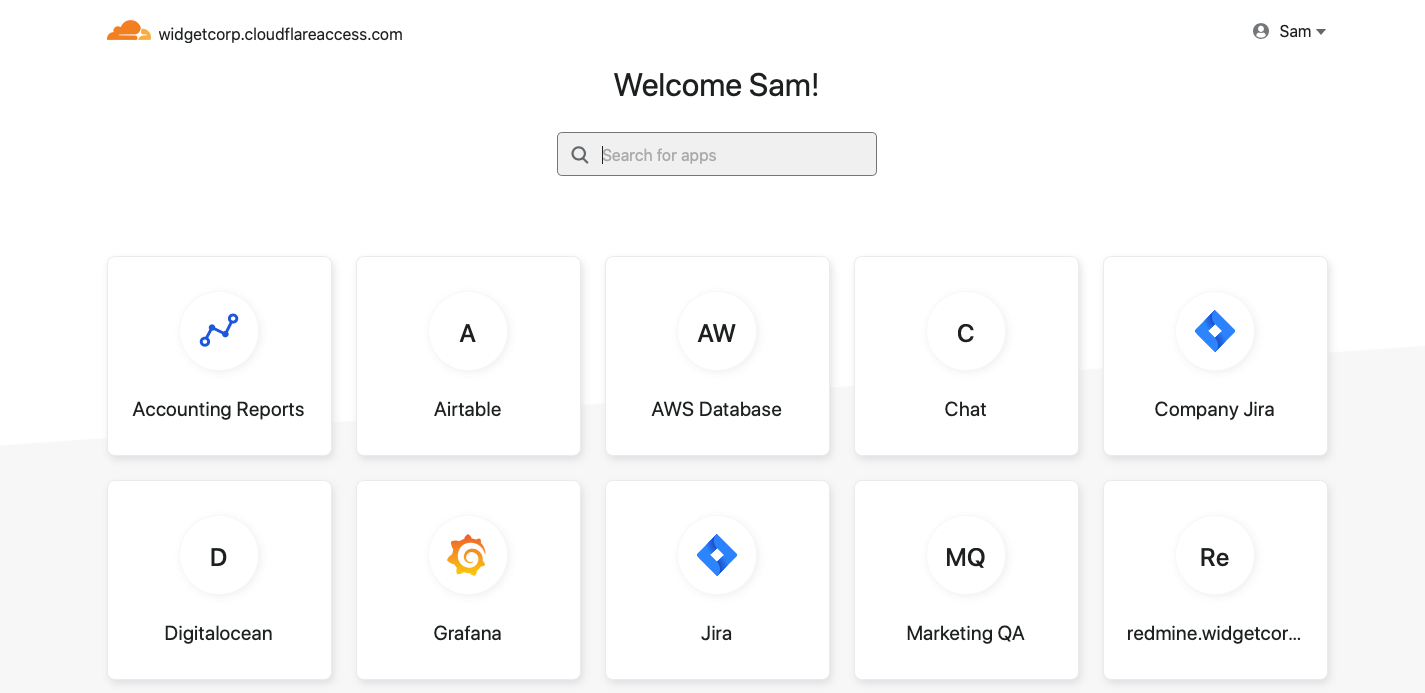
Cloudflare Access released the Access App Launch as a single destination for all of your internal applications. Your team members visit a URL that is unique to your organization and the App Launch displays all of the applications they can reach. The feature requires no additional administrative configuration; Cloudflare Access reads the user’s JWT and returns only the applications they are allowed to reach.
That experience now extends to all applications in your organization. When you integrate SaaS applications with Cloudflare Access, your users will be able to discover them in the App Launch. Like the flow for internal applications, this requires no additional configuration.
How to get started
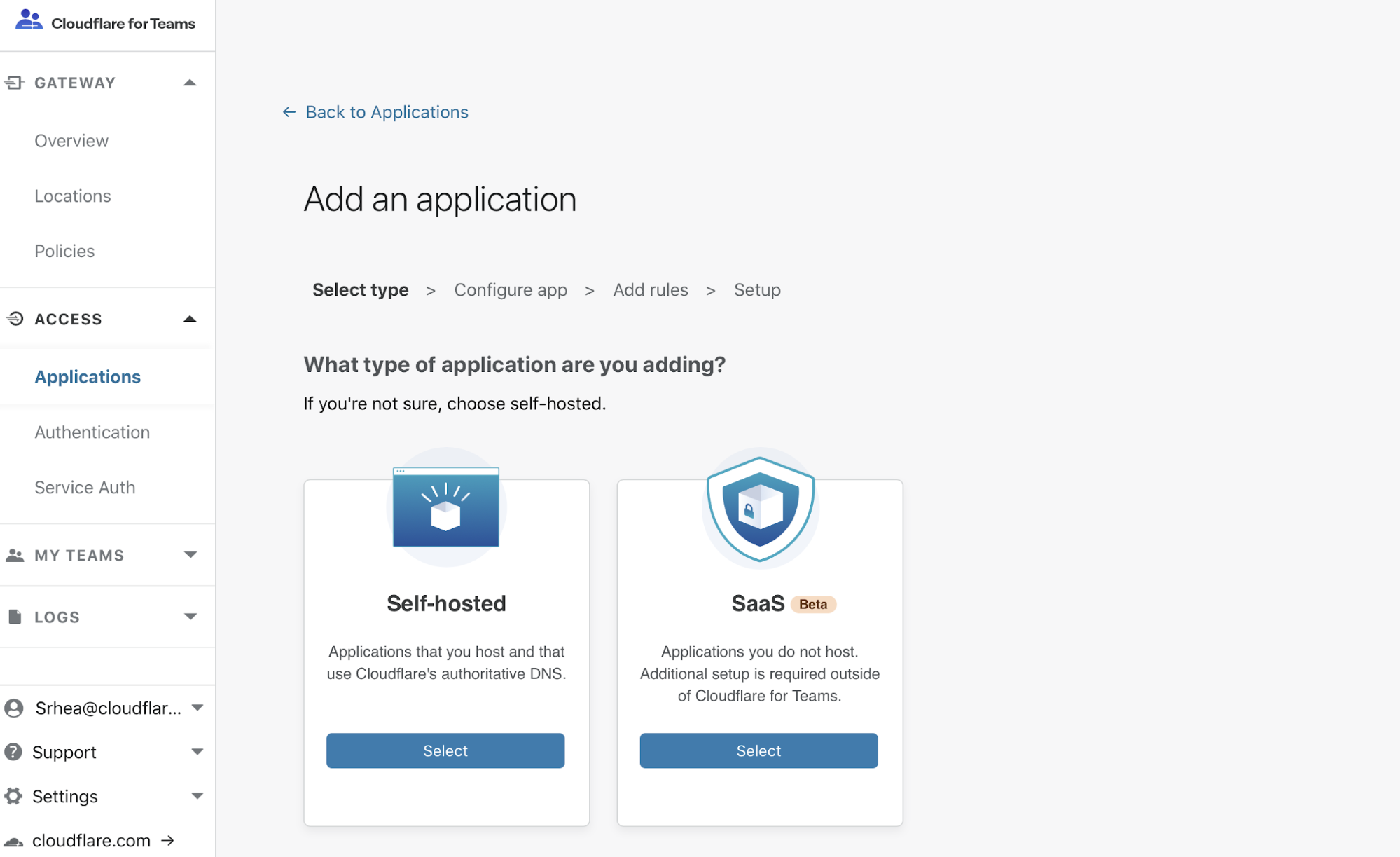
To get started, you’ll need a Cloudflare Access account and a SaaS application that supports SAML SSO. Navigate to the Cloudflare for Teams dashboard and choose the “SaaS” application option to start integrating your applications. Cloudflare Access will walk through the steps to configure the application to trust Cloudflare Access as the SSO option.
Do you have an application that needs additional configuration? Please let us know.
Protect SaaS applications with Cloudflare for Teams today
We will begin expanding the Gateway beta program to integrate Gateway’s logging and web filtering with the Access for SaaS feature before the end of the year.
The collective thoughts of the interwebz
Manage Consent
To provide the best experiences, we use technologies like cookies to store and/or access device information. Consenting to these technologies will allow us to process data such as browsing behavior or unique IDs on this site. Not consenting or withdrawing consent, may adversely affect certain features and functions.
Functional
Always active
The technical storage or access is strictly necessary for the legitimate purpose of enabling the use of a specific service explicitly requested by the subscriber or user, or for the sole purpose of carrying out the transmission of a communication over an electronic communications network.
Preferences
The technical storage or access is necessary for the legitimate purpose of storing preferences that are not requested by the subscriber or user.
Statistics
The technical storage or access that is used exclusively for statistical purposes.The technical storage or access that is used exclusively for anonymous statistical purposes. Without a subpoena, voluntary compliance on the part of your Internet Service Provider, or additional records from a third party, information stored or retrieved for this purpose alone cannot usually be used to identify you.
Marketing
The technical storage or access is required to create user profiles to send advertising, or to track the user on a website or across several websites for similar marketing purposes.