Tag Archives: Amazon Managed Workflows for Apache Airflow (Amazon MWAA)

Building complex workflows with Amazon MWAA, AWS Step Functions, AWS Glue, and Amazon EMR

Post Syndicated from Dipankar Ghosal original https://aws.amazon.com/blogs/big-data/building-complex-workflows-with-amazon-mwaa-aws-step-functions-aws-glue-and-amazon-emr/

Amazon Managed Workflows for Apache Airflow (Amazon MWAA) is a fully managed service that makes it easy to run open-source versions of Apache Airflow on AWS and build workflows to run your extract, transform, and load (ETL) jobs and data pipelines.

You can use AWS Step Functions as a serverless function orchestrator to build scalable big data pipelines using services such as Amazon EMR to run Apache Spark and other open-source applications on AWS in a cost-effective manner, and use AWS Glue for a serverless environment to prepare (extract and transform) and load large amounts of datasets from a variety of sources for analytics and data processing with Apache Spark ETL jobs

For production pipelines, a common use case is to read data originating from a variety of sources. This data requires transformation to extract business value and generate insights before sending to downstream applications, such as machine learning algorithms, analytics dashboards, and business reports.

This post demonstrates how to use Amazon MWAA as a primary workflow management service to create and run complex workflows and extend the directed acyclic graph (DAG) to start and monitor a state machine created using Step Functions. In Airflow, a DAG is a collection of all the tasks you want to run, organized in a way that reflects their relationships and dependencies.

Architectural overview

The following diagram illustrates the architectural overview of the components involved in the orchestration of the workflow. This workflow uses Amazon EMR to preprocess data and starts a Step Functions state machine. The state machine transforms data using AWS Glue.

The state machine transforms data using AWS Glue.

The workflow includes the following core components:

  1. Airflow Scheduler triggers the DAG based on a schedule or manually.
  2. DAG uses PythonOperator to create an EMR cluster and waits for the cluster creation process to complete.
  3. DAG uses a custom operator EmrSubmitAndMonitorStepOperator to submit and monitor the Amazon EMR step.
  4. DAG uses PythonOperator to stop the EMR cluster when the preprocessing tasks are complete.
  5. DAG starts a Step Functions state machine and monitors it for completion using PythonOperator.

You can build complex ETL pipelines with Step Functions separately and trigger them from an Airflow DAG.

Prerequisites

Before starting, create an Amazon MWAA environment. If this is your first time using Amazon MWAA, see Introducing Amazon Managed Workflows for Apache Airflow (MWAA).

Take a note of the Amazon Simple Storage Service (Amazon S3) bucket that stores the DAGs. It’s located on the environment details page on the Amazon MWAA console.

Take a note of the Amazon Simple Storage Service (Amazon S3) bucket that stores the DAGs.

Also note the AWS Identity and Access Management (IAM) execution role. This role should be modified to allow MWAA to read and write from your S3 bucket, submit an Amazon EMR step, start a Step Functions state machine, and read from the AWS Systems Manager Parameter Store. The IAM role is available in the Permissions section of the environment details.

The IAM role is available in the Permissions section of the environment details.

The solution references Systems Manager parameters in an AWS CloudFormation template and scripts. For information on adding and removing IAM identity permissions, see Adding and removing IAM identity permissions. A sample IAM policy is also provided in the GitHub repository amazon-mwaa-complex-workflow-using-step-functions.

For this post, we use the MovieLens dataset. We concurrently convert the MovieLens CSV files to Parquet format and save them to Amazon S3 as part of preprocessing.

Setting up the state machine using Step Functions

Our solution extends the ETL pipeline to run a Step Functions state machine from the Airflow DAG. Step Functions lets you build visual workflows that enable fast translation of business requirements into technical requirements. With Step Functions, you can set up dependency management and failure handling using a JSON-based template. A workflow is a series of steps, such as tasks, choices, parallel runs, and timeouts with the output of one step acting as input into the next. For more information about other use cases, see AWS Step Functions Use Cases.

The following diagram shows the ETL process set up through a Step Functions state machine.

The following diagram shows the ETL process set up through a Step Functions state machine.

In the workflow, the Process Data step runs an AWS Glue job, and the Get Job Status step periodically checks for the job completion. The AWS Glue job reads the input datasets and creates output data for the most popular movies and top-rated movies. After the job is complete, the Run Glue Crawler step runs an AWS Glue crawler to catalog the data. The workflow also allows you to monitor and respond to failures at any stage.

Creating resources

Create your resources by following the installation instructions provided in the amazon-mwaa-complex-workflow-using-step-functions README.md.

Running the ETL workflow

To run your ETL workflow, complete the following steps:

  1. On the Amazon MWAA console, choose Open Airflow UI.
  2. Locate the mwaa_movielens_demo DAG.
  3. Turn on the DAG.

Turn on the DAG.

  1. Select the mwaa_movielens_demo DAG and choose Graph View.

This displays the overall ETL pipeline managed by Airflow.
This displays the overall ETL pipeline managed by Airflow.

  1. To view the DAG code, choose Code.

To view the DAG code, choose Code.

The code for the custom operator can be found in the amazon-mwaa-complex-workflow-using-step-functions GitHub repo. 

  1. From the Airflow UI, select the mwaa_movielens_demo DAG and choose Trigger DAG.
  2. Leave the Optional Configuration JSON box blank.

Leave the Optional Configuration JSON box blank.

When the Airflow DAG runs, the first task calls the PythonOperator to create an EMR cluster using Boto3. Boto is the AWS SDK for Python. It enables Python developers to create, configure, and manage AWS services, such as Amazon Elastic Compute Cloud (Amazon EC2) and Amazon S3. Boto provides object-oriented API, as well as low-level access to AWS services.

The second task waits until the EMR cluster is ready and in the Waiting state. As soon as the cluster is ready, the data load task runs, followed by the data preprocessing tasks, which are started in parallel using EmrSubmitAndMonitorStepOperator. Concurrency in the current Airflow DAG is set to 3, which runs three tasks in parallel. You can change the concurrency of Amazon EMR to run multiple Amazon EMR steps in parallel.

When the data preprocessing tasks are complete, the EMR cluster is stopped and the DAG starts the Step Functions state machine to initiate data transformation.

The final task in the DAG monitors the completion of the Step Functions state machine.

The DAG run should complete in approximately 10 minutes.

Verifying the DAG run

While the DAG is running, you can view the task logs.

  1. From Graph View, select any task and choose View Log.

From Graph View, select any task and choose View Log.

  1. When the DAG starts the Step Functions state machine, verify the status on the Step Functions console.

When the DAG starts the Step Functions state machine, verify the status on the Step Functions console.

  1. You can also monitor ETL process completion from the Airflow UI.

You can also monitor ETL process completion from the Airflow UI.

  1. On the Airflow UI, verify the completion from the log entries.

On the Airflow UI, verify the completion from the log entries.

Querying the data

After the successful completion of the Airflow DAG, two tables are created in the AWS Glue Data Catalog. To query the data with Amazon Athena, complete the following steps:

  1. On the Athena console, choose Databases.
  2. Select the mwaa-movielens-demo-db database.

You should see the two tables. If the tables aren’t listed, verify that the AWS Glue crawler run is complete and that the console is showing the correct Region.

  1. Run the following query:
    SELECT * FROM "mwaa-movielens-demo-db"."most_popular_movies" limit 10;

The following screenshot shows the output.

The following screenshot shows the output.

Cleaning up

To clean up the resources created as part of our CloudFormation template, delete the mwaa-demo-foundations stack. You can either use the AWS CloudFormation console or the AWS Command Line Interface (AWS CLI).

Conclusion

In this post, we used Amazon MWAA to orchestrate an ETL pipeline on Amazon EMR and AWS Glue with Step Functions. We created an Airflow DAG to demonstrate how to run data processing jobs concurrently and extended the DAG to start a Step Functions state machine to build a complex ETL pipeline. A custom Airflow operator submitted and then monitored the Amazon EMR steps synchronously.

If you have comments or feedback, please leave them in the comments section.


About the Author

Dipankar GhosalDipankar Ghosal is a Sr Data Architect at Amazon Web Services and is based out of Minneapolis, MN. He has a focus in analytics and enjoys helping customers solve their unique use cases. When he’s not working, he loves going hiking with his wife and daughter.
Introducing Amazon Managed Workflows for Apache Airflow (MWAA)

Post Syndicated from Danilo Poccia original https://aws.amazon.com/blogs/aws/introducing-amazon-managed-workflows-for-apache-airflow-mwaa/

As the volume and complexity of your data processing pipelines increase, you can simplify the overall process by decomposing it into a series of smaller tasks and coordinate the execution of these tasks as part of a workflow. To do so, many developers and data engineers use Apache Airflow, a platform created by the community to programmatically author, schedule, and monitor workflows. With Airflow you can manage workflows as scripts, monitor them via the user interface (UI), and extend their functionality through a set of powerful plugins. However, manually installing, maintaining, and scaling Airflow, and at the same time handling security, authentication, and authorization for its users takes much of the time you’d rather use to focus on solving actual business problems.

For these reasons, I am happy to announce the availability of Amazon Managed Workflows for Apache Airflow (MWAA), a fully managed service that makes it easy to run open-source versions of Apache Airflow on AWS, and to build workflows to execute your extract-transform-load (ETL) jobs and data pipelines.

Airflow workflows retrieve input from sources like Amazon Simple Storage Service (S3) using Amazon Athena queries, perform transformations on Amazon EMR clusters, and can use the resulting data to train machine learning models on Amazon SageMaker. Workflows in Airflow are authored as Directed Acyclic Graphs (DAGs) using the Python programming language.

A key benefit of Airflow is its open extensibility through plugins which allows you to create tasks that interact with AWS or on-premise resources required for your workflows including AWS Batch, Amazon CloudWatch, Amazon DynamoDB, AWS DataSync, Amazon ECS and AWS Fargate, Amazon Elastic Kubernetes Service (EKS), Amazon Kinesis Firehose, AWS Glue, AWS Lambda, Amazon Redshift, Amazon Simple Queue Service (SQS), and Amazon Simple Notification Service (SNS).

To improve observability, Airflow metrics can be published as CloudWatch Metrics, and logs can be sent to CloudWatch Logs. Amazon MWAA provides automatic minor version upgrades and patches by default, with an option to designate a maintenance window in which these upgrades are performed.

You can use Amazon MWAA with these three steps:

  1. Create an environment – Each environment contains your Airflow cluster, including your scheduler, workers, and web server.
  2. Upload your DAGs and plugins to S3 – Amazon MWAA loads the code into Airflow automatically.
  3. Run your DAGs in Airflow – Run your DAGs from the Airflow UI or command line interface (CLI) and monitor your environment with CloudWatch.

Let’s see how this works in practice!

How to Create an Airflow Environment Using Amazon MWAA
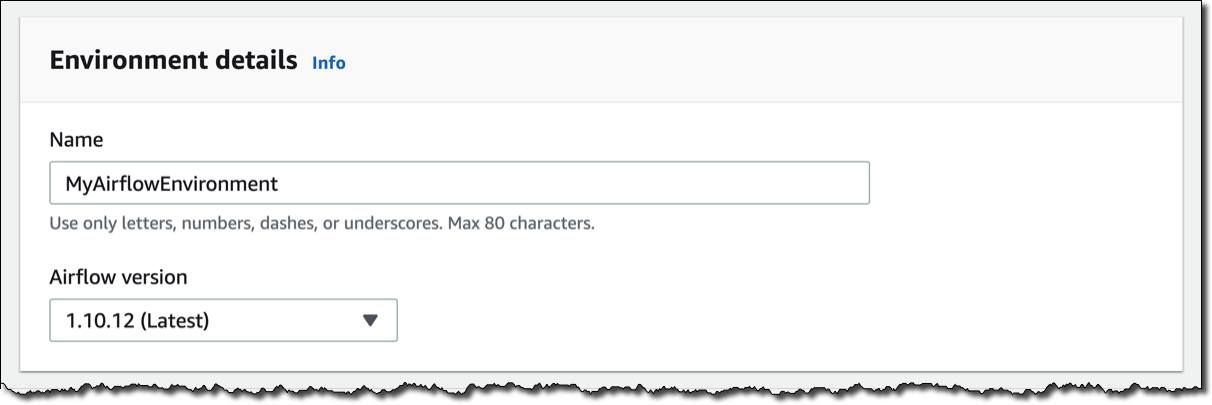
In the Amazon MWAA console, I click on Create environment. I give the environment a name and select the Airflow version to use.

Then, I select the S3 bucket and the folder to load my DAG code. The bucket name must start with airflow-.

Optionally, I can specify a plugins file and a requirements file:

  • The plugins file is a ZIP file containing the plugins used by my DAGs.
  • The requirements file describes the Python dependencies to run my DAGs.

For plugins and requirements, I can select the S3 object version to use. In case the plugins or the requirements I use create a non-recoverable error in my environment, Amazon MWAA will automatically roll back to the previous working version.


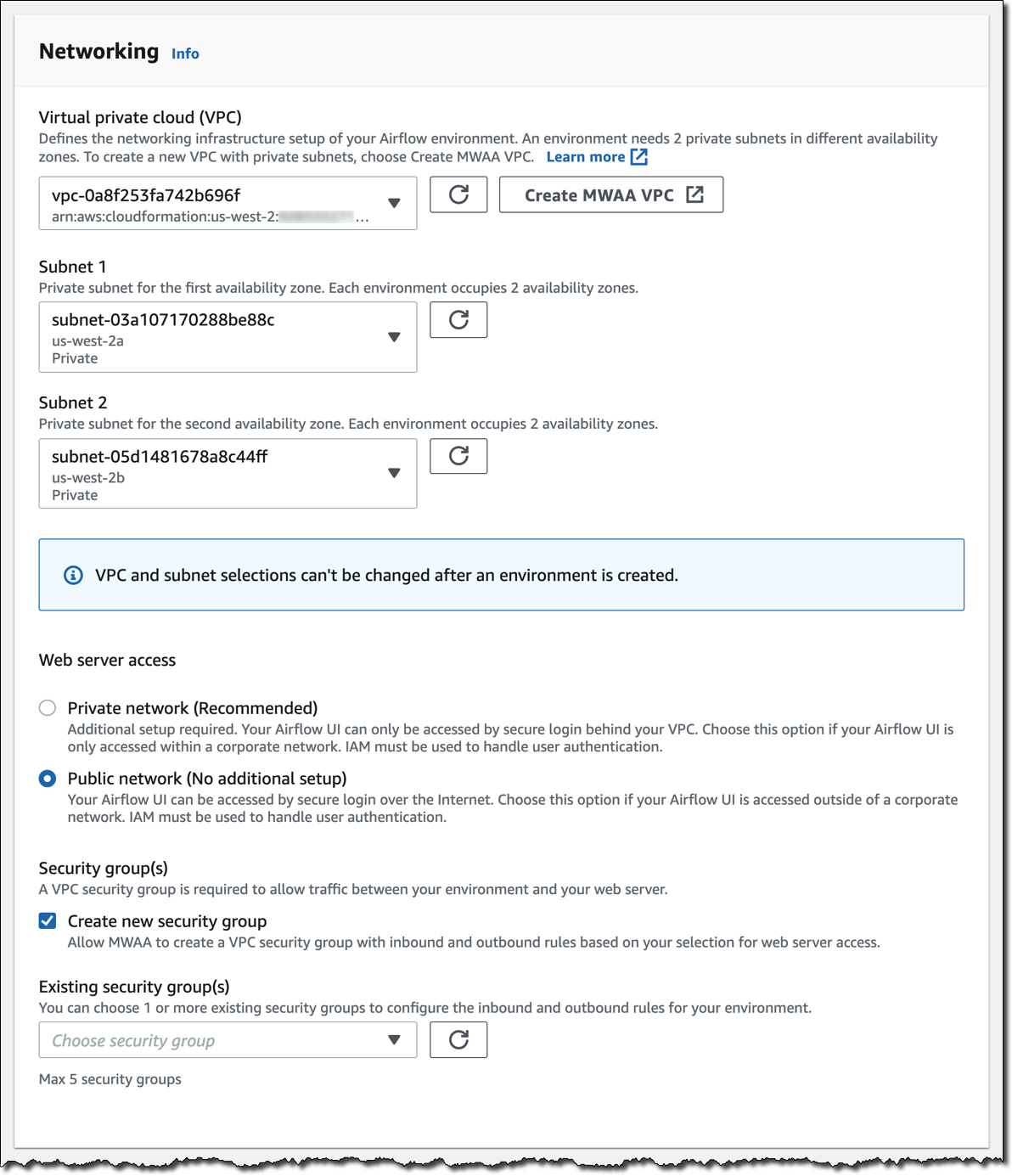
I click Next to configure the advanced settings, starting with networking. Each environment runs in a Amazon Virtual Private Cloud using private subnets in two availability zones. Web server access to the Airflow UI is always protected by a secure login using AWS Identity and Access Management (IAM). However, you can choose to have web server access on a public network so that you can login over the Internet, or on a private network in your VPC. For simplicity, I select a Public network. I let Amazon MWAA create a new security group with the correct inbound and outbound rules. Optionally, I can add one or more existing security groups to fine-tune control of inbound and outbound traffic for your environment.

Now, I configure my environment class. Each environment includes a scheduler, a web server, and a worker. Workers automatically scale up and down according to my workload. We provide you a suggestion on which class to use based on the number of DAGs, but you can monitor the load on your environment and modify its class at any time.

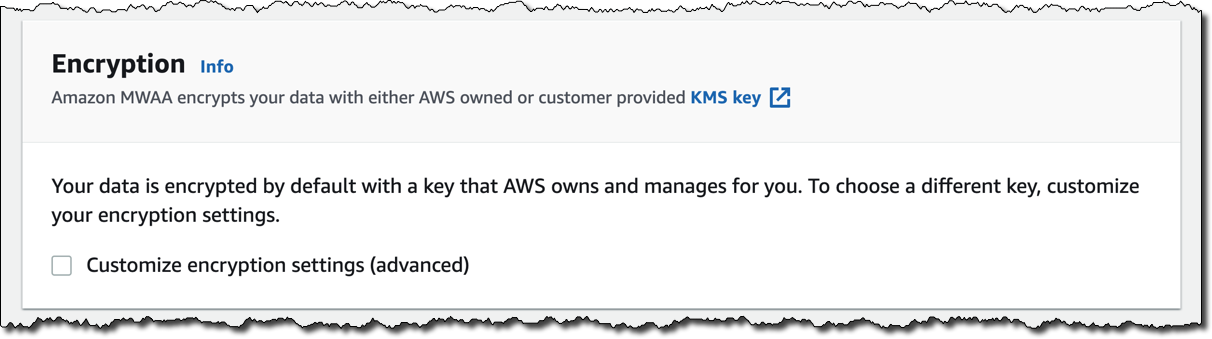
Encryption is always enabled for data at rest, and while I can select a customized key managed by AWS Key Management Service (KMS) I will instead keep the default key that AWS owns and manages on my behalf.

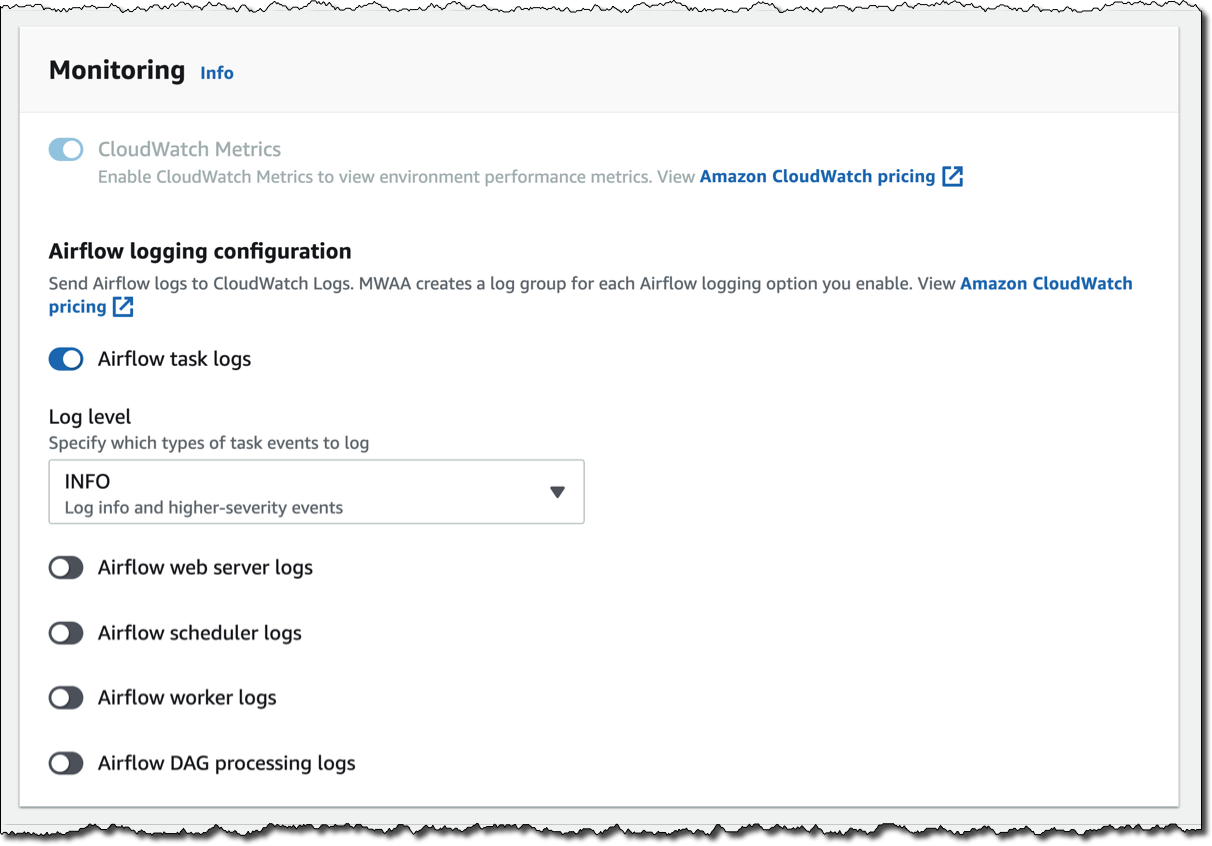
For monitoring, I publish environment performance to CloudWatch Metrics. This is enabled by default, but I can disable CloudWatch Metrics after launch. For the logs, I can specify the log level and which Airflow components should send their logs to CloudWatch Logs. I leave the default to send only the task logs and use log level INFO.

I can modify the default settings for Airflow configuration options, such as default_task_retries or worker_concurrency. For now, I am not changing these values.

Finally, but most importantly, I configure the permissions that will be used by my environment to access my DAGs, write logs, and run DAGs accessing other AWS resources. I select Create a new role and click on Create environment. After a few minutes, the new Airflow environment is ready to be used.

Using the Airflow UI
In the Amazon MWAA console, I look for the new environment I just created and click on Open Airflow UI. A new browser window is created and I am authenticated with a secure login via AWS IAM.

There, I look for a DAG that I put on S3 in the movie_list_dag.py file. The DAG is downloading the MovieLens dataset, processing the files on S3 using Amazon Athena, and loading the result to a Redshift cluster, creating the table if missing.

Here’s the full source code of the DAG:

from airflow import DAG
from airflow.operators.python_operator import PythonOperator
from airflow.operators import HttpSensor, S3KeySensor
from airflow.contrib.operators.aws_athena_operator import AWSAthenaOperator
from airflow.utils.dates import days_ago
from datetime import datetime, timedelta
from io import StringIO
from io import BytesIO
from time import sleep
import csv
import requests
import json
import boto3
import zipfile
import io
s3_bucket_name = 'my-bucket'
s3_key='files/'
redshift_cluster='redshift-cluster-1'
redshift_db='dev'
redshift_dbuser='awsuser'
redshift_table_name='movie_demo'
test_http='https://grouplens.org/datasets/movielens/latest/'
download_http='http://files.grouplens.org/datasets/movielens/ml-latest-small.zip'
athena_db='demo_athena_db'
athena_results='athena-results/'
create_athena_movie_table_query="""
CREATE EXTERNAL TABLE IF NOT EXISTS Demo_Athena_DB.ML_Latest_Small_Movies (
  `movieId` int,
  `title` string,
  `genres` string 
)
ROW FORMAT SERDE 'org.apache.hadoop.hive.serde2.lazy.LazySimpleSerDe'
WITH SERDEPROPERTIES (
  'serialization.format' = ',',
  'field.delim' = ','
) LOCATION 's3://pinwheeldemo1-pinwheeldagsbucketfeed0594-1bks69fq0utz/files/ml-latest-small/movies.csv/ml-latest-small/'
TBLPROPERTIES (
  'has_encrypted_data'='false',
  'skip.header.line.count'='1'
); 
"""
create_athena_ratings_table_query="""
CREATE EXTERNAL TABLE IF NOT EXISTS Demo_Athena_DB.ML_Latest_Small_Ratings (
  `userId` int,
  `movieId` int,
  `rating` int,
  `timestamp` bigint 
)
ROW FORMAT SERDE 'org.apache.hadoop.hive.serde2.lazy.LazySimpleSerDe'
WITH SERDEPROPERTIES (
  'serialization.format' = ',',
  'field.delim' = ','
) LOCATION 's3://pinwheeldemo1-pinwheeldagsbucketfeed0594-1bks69fq0utz/files/ml-latest-small/ratings.csv/ml-latest-small/'
TBLPROPERTIES (
  'has_encrypted_data'='false',
  'skip.header.line.count'='1'
); 
"""
create_athena_tags_table_query="""
CREATE EXTERNAL TABLE IF NOT EXISTS Demo_Athena_DB.ML_Latest_Small_Tags (
  `userId` int,
  `movieId` int,
  `tag` int,
  `timestamp` bigint 
)
ROW FORMAT SERDE 'org.apache.hadoop.hive.serde2.lazy.LazySimpleSerDe'
WITH SERDEPROPERTIES (
  'serialization.format' = ',',
  'field.delim' = ','
) LOCATION 's3://pinwheeldemo1-pinwheeldagsbucketfeed0594-1bks69fq0utz/files/ml-latest-small/tags.csv/ml-latest-small/'
TBLPROPERTIES (
  'has_encrypted_data'='false',
  'skip.header.line.count'='1'
); 
"""
join_tables_athena_query="""
SELECT REPLACE ( m.title , '"' , '' ) as title, r.rating
FROM demo_athena_db.ML_Latest_Small_Movies m
INNER JOIN (SELECT rating, movieId FROM demo_athena_db.ML_Latest_Small_Ratings WHERE rating > 4) r on m.movieId = r.movieId
"""
def download_zip():
    s3c = boto3.client('s3')
    indata = requests.get(download_http)
    n=0
    with zipfile.ZipFile(io.BytesIO(indata.content)) as z:       
        zList=z.namelist()
        print(zList)
        for i in zList: 
            print(i) 
            zfiledata = BytesIO(z.read(i))
            n += 1
            s3c.put_object(Bucket=s3_bucket_name, Key=s3_key+i+'/'+i, Body=zfiledata)
def clean_up_csv_fn(**kwargs):    
    ti = kwargs['task_instance']
    queryId = ti.xcom_pull(key='return_value', task_ids='join_athena_tables' )
    print(queryId)
    athenaKey=athena_results+"join_athena_tables/"+queryId+".csv"
    print(athenaKey)
    cleanKey=athena_results+"join_athena_tables/"+queryId+"_clean.csv"
    s3c = boto3.client('s3')
    obj = s3c.get_object(Bucket=s3_bucket_name, Key=athenaKey)
    infileStr=obj['Body'].read().decode('utf-8')
    outfileStr=infileStr.replace('"e"', '') 
    outfile = StringIO(outfileStr)
    s3c.put_object(Bucket=s3_bucket_name, Key=cleanKey, Body=outfile.getvalue())
def s3_to_redshift(**kwargs):    
    ti = kwargs['task_instance']
    queryId = ti.xcom_pull(key='return_value', task_ids='join_athena_tables' )
    print(queryId)
    athenaKey='s3://'+s3_bucket_name+"/"+athena_results+"join_athena_tables/"+queryId+"_clean.csv"
    print(athenaKey)
    sqlQuery="copy "+redshift_table_name+" from '"+athenaKey+"' iam_role 'arn:aws:iam::163919838948:role/myRedshiftRole' CSV IGNOREHEADER 1;"
    print(sqlQuery)
    rsd = boto3.client('redshift-data')
    resp = rsd.execute_statement(
        ClusterIdentifier=redshift_cluster,
        Database=redshift_db,
        DbUser=redshift_dbuser,
        Sql=sqlQuery
    )
    print(resp)
    return "OK"
def create_redshift_table():
    rsd = boto3.client('redshift-data')
    resp = rsd.execute_statement(
        ClusterIdentifier=redshift_cluster,
        Database=redshift_db,
        DbUser=redshift_dbuser,
        Sql="CREATE TABLE IF NOT EXISTS "+redshift_table_name+" (title	character varying, rating	int);"
    )
    print(resp)
    return "OK"
DEFAULT_ARGS = {
    'owner': 'airflow',
    'depends_on_past': False,
    'email': ['[email protected]'],
    'email_on_failure': False,
    'email_on_retry': False 
}
with DAG(
    dag_id='movie-list-dag',
    default_args=DEFAULT_ARGS,
    dagrun_timeout=timedelta(hours=2),
    start_date=days_ago(2),
    schedule_interval='*/10 * * * *',
    tags=['athena','redshift'],
) as dag:
    check_s3_for_key = S3KeySensor(
        task_id='check_s3_for_key',
        bucket_key=s3_key,
        wildcard_match=True,
        bucket_name=s3_bucket_name,
        s3_conn_id='aws_default',
        timeout=20,
        poke_interval=5,
        dag=dag
    )
    files_to_s3 = PythonOperator(
        task_id="files_to_s3",
        python_callable=download_zip
    )
    create_athena_movie_table = AWSAthenaOperator(task_id="create_athena_movie_table",query=create_athena_movie_table_query, database=athena_db, output_location='s3://'+s3_bucket_name+"/"+athena_results+'create_athena_movie_table')
    create_athena_ratings_table = AWSAthenaOperator(task_id="create_athena_ratings_table",query=create_athena_ratings_table_query, database=athena_db, output_location='s3://'+s3_bucket_name+"/"+athena_results+'create_athena_ratings_table')
    create_athena_tags_table = AWSAthenaOperator(task_id="create_athena_tags_table",query=create_athena_tags_table_query, database=athena_db, output_location='s3://'+s3_bucket_name+"/"+athena_results+'create_athena_tags_table')
    join_athena_tables = AWSAthenaOperator(task_id="join_athena_tables",query=join_tables_athena_query, database=athena_db, output_location='s3://'+s3_bucket_name+"/"+athena_results+'join_athena_tables')
    create_redshift_table_if_not_exists = PythonOperator(
        task_id="create_redshift_table_if_not_exists",
        python_callable=create_redshift_table
    )
    clean_up_csv = PythonOperator(
        task_id="clean_up_csv",
        python_callable=clean_up_csv_fn,
        provide_context=True     
    )
    transfer_to_redshift = PythonOperator(
        task_id="transfer_to_redshift",
        python_callable=s3_to_redshift,
        provide_context=True     
    )
    check_s3_for_key >> files_to_s3 >> create_athena_movie_table >> join_athena_tables >> clean_up_csv >> transfer_to_redshift
    files_to_s3 >> create_athena_ratings_table >> join_athena_tables
    files_to_s3 >> create_athena_tags_table >> join_athena_tables
    files_to_s3 >> create_redshift_table_if_not_exists >> transfer_to_redshift

In the code, different tasks are created using operators like PythonOperator, for generic Python code, or AWSAthenaOperator, to use the integration with Amazon Athena. To see how those tasks are connected in the workflow, you can see the latest few lines, that I repeat here (without indentation) for simplicity:

check_s3_for_key >> files_to_s3 >> create_athena_movie_table >> join_athena_tables >> clean_up_csv >> transfer_to_redshift
files_to_s3 >> create_athena_ratings_table >> join_athena_tables
files_to_s3 >> create_athena_tags_table >> join_athena_tables
files_to_s3 >> create_redshift_table_if_not_exists >> transfer_to_redshift

The Airflow code is overloading the right shift >> operator in Python to create a dependency, meaning that the task on the left should be executed first, and the output passed to the task on the right. Looking at the code, this is quite easy to read. Each of the four lines above is adding dependencies, and they are all evaluated together to execute the tasks in the right order.

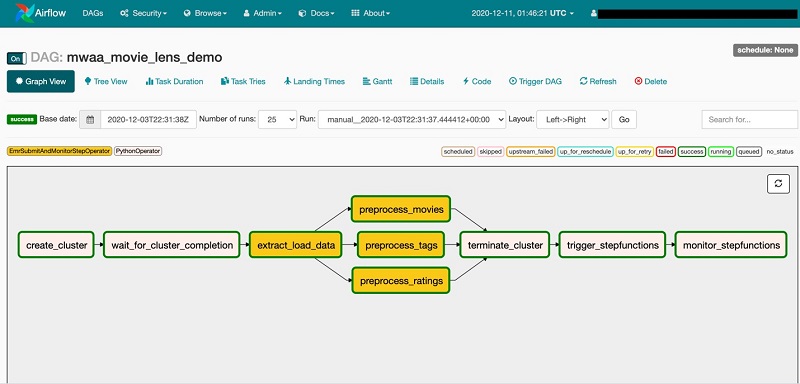
In the Airflow console, I can see a graph view of the DAG to have a clear representation of how tasks are executed:

Available Now
Amazon Managed Workflows for Apache Airflow (MWAA) is available today in US East (Northern Virginia), US West (Oregon), US East (Ohio), Asia Pacific (Singapore), Asia Pacific (Toyko), Asia Pacific (Sydney), Europe (Ireland), Europe (Frankfurt), and Europe (Stockholm). You can launch a new Amazon MWAA environment from the console, AWS Command Line Interface (CLI), or AWS SDKs. Then, you can develop workflows in Python using Airflow’s ecosystem of integrations.

With Amazon MWAA, you pay based on the environment class and the workers you use. For more information, see the pricing page.

Upstream compatibility is a core tenet of Amazon MWAA. Our code changes to the AirFlow platform are released back to open source.

With Amazon MWAA you can spend more time building workflows for your engineering and data science tasks, and less time managing and scaling the infrastructure of your Airflow platform.

Learn more about Amazon MWAA and get started today!

— Danilo