To scale up to the needs of our customers, we’ve adopted ways to efficiently deliver our services through our everyday superapp – whether it’s through continuous process improvements or coding best practices. For one, libraries have made it possible for us to increase our development velocity. In the Passenger App Android team, we’ve a mix of libraries – from libraries that we’ve built in-house to open source ones.
Every week, we release a new version of our Passenger App. Each update contains on average between five to ten library updates. In this article, we will explain how we keep all libraries used by our app up to date, and the different actions we take to avoid defect leaks into production.
How many libraries are we using?
Before we add a new library to a project, it goes through a rigorous assessment process covering many parts, such as security issue detection and usability tests measuring the impact on the app size and app startup time. This process ensures that only libraries up to our standards are added.
In total, there are more than 170 libraries powering the SuperApp, including 55 AndroidX artifacts and 22 libraries used for the sole purpose of writing automation testing (Unit Testing or UI Testing).
Who is responsible for updating
While we do have an internal process on how to update the libraries, it doesn’t mention who and how often it should be done. In fact, it’s everyone’s responsibility to make sure our libraries are up to date. Each team should be aware of the libraries they’re using and whenever a new version is released.
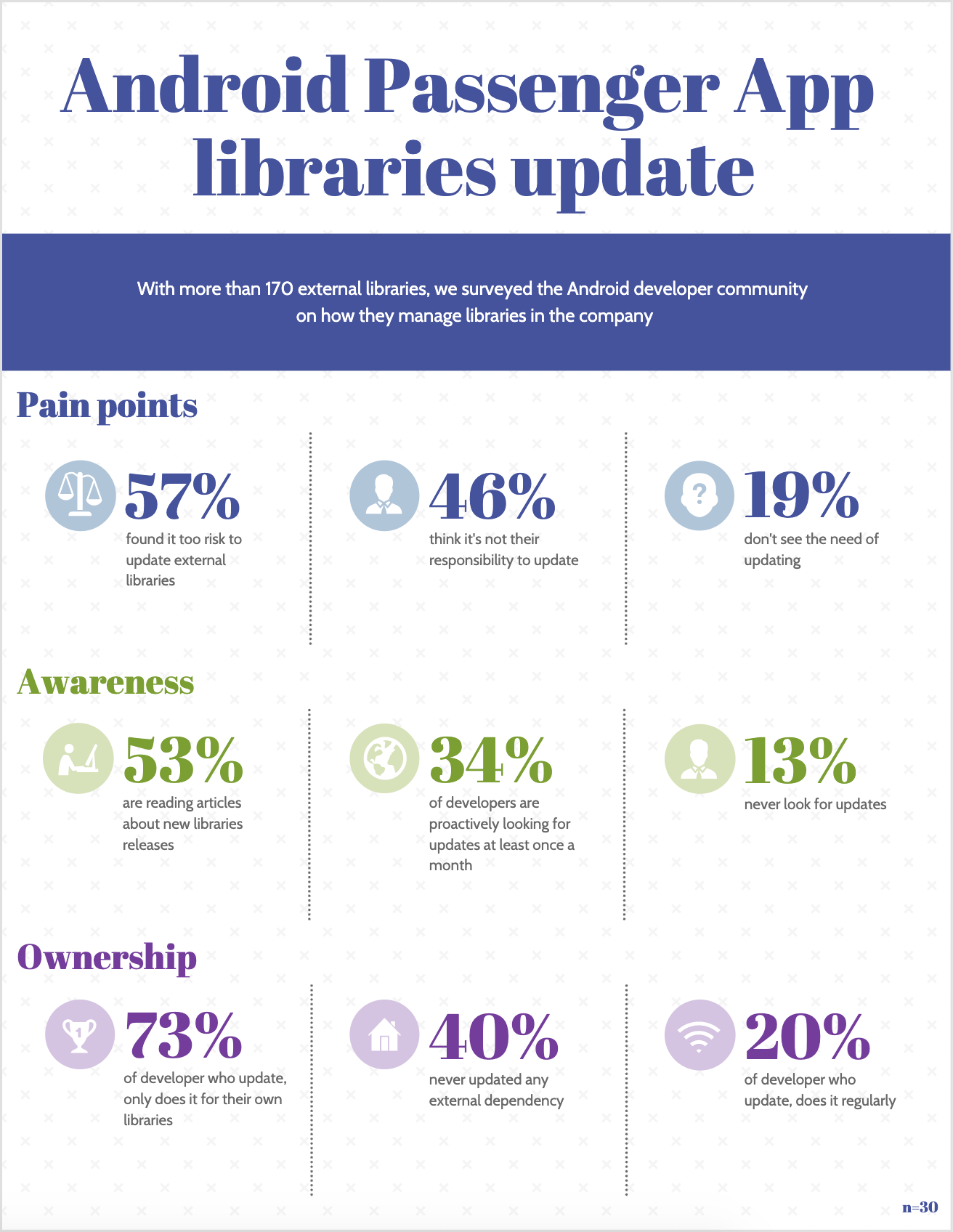
However, this isn’t really the case. We’ve a few developers taking ownership of the libraries as a whole and trying to maintain it. With more than 170 external libraries, we surveyed the Android developer community on how they manage libraries in the company. The result can be summarized as follow:
Survey Results
While most developers are aware of updates, they don’t update a library because the risk of defects leaking into production is too high.
Risk management
The risk is to have a defect leaking into production. It can cause regressions on existing features or introduce new crashes in the app. In a worst case scenario, if this isn’t caught before publishing, it can force us to make a hotfix and a certain number of users will be impacted.
Before updating (bump) a library, we evaluate two metrics:
the usage of this library in the codebase.
the number of changes introduced in the library between the current version and the targeted version.
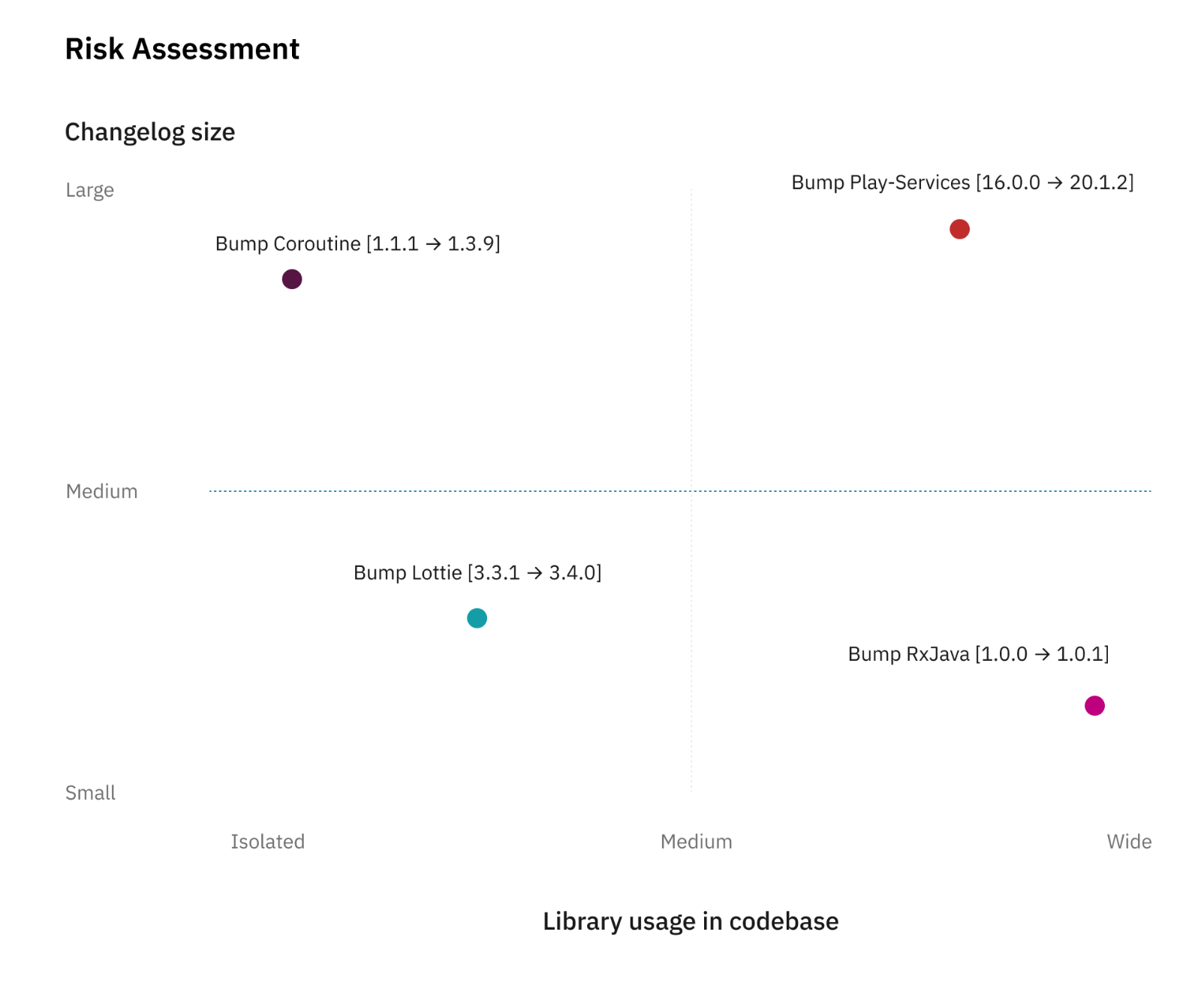
The risk needs to be assessed between the number of usages of a certain library and the size of the changes. The following chart illustrate this point.
Risk Assessment Radar
This arbitrary scale helps us in deciding if we will require additional signoff from the QA team. If the estimation places the item on the bottom-left corner, the update will be less risky while if it’s on the top-right corner, it means we should follow extra verification to reduce the risk.
A good practice to reduce the risks of updating a library is to update it frequently, decreasing the diffs hence reducing the scope of impact.
Reducing the risk
The first thing we’re doing to reduce the risk is to update our libraries on a weekly basis. As described above, small changes are always less risky than large changes even if the usage of this partial library is wide. By following incremental updates, we avoid accumulating potential issues over a longer period of time.
For example, the Android Jetpack and Firebase libraries follow a two-week release train. So every two weeks, we check for new updates, read the changelogs, and proceed with the update.
In case of a defect detected, we can easily revert the change until we figure out a proper solution or raise the issue to the library owner.
Automation
To reduce risk on any merge request (not limited to library update), we’ve spent a tremendous amount of effort on automating tests. For each new feature we’ve a set of test cases written in Gherkin syntax.
Automation is implemented as UI tests that run on continuous integration (CI) for every merge request. If those tests fail, we won’t be able to merge any changes.
To further elaborate, let’s take this example: Team A developed a lot of features and now has a total of 1,000 test cases. During regression testing before each release, only a subset of those are executed manually based on the impacted area. With automation in place, team A now has 60% of those tests executed as part of CI. So, when all the tests successfully pass, we’re already 60% confident that no defect is detected. This tremendously increases our confidence level while reducing manual testing.
QA signoff
When the update is in the risk threshold area and the automation tests are insufficient, the developer works with QA engineers on analyzing impacted areas. They would then execute test cases related to the impacted area.
For example, if we’re updating Facebook library, the impacted area would be the “Login with Facebook” functionality. QA engineers would then run test cases related to social login.
A single or multiple team can be involved. In some cases, QA signoff can be required by all the teams if they’re all affected by the update.
This process requires a lot of effort from different teams and can affect the current roadmap. To avoid falling into this category, we refine the impacted area analysis to be as specific as possible.
Update before it becomes mandatory
Google updates the Google Play requirements regularly to ensure that published apps are fully compatible with the latest Android version.
For example, starting 1st November 2020 all apps must target API 29. This change causes behavior changes for some API. New behavior has to be supported and verified for our code, but also for all the libraries we use. Libraries bundled inside our app are also affected if they’re using Android API. However, the support for newer API is done by each library maintainer. By keeping our libraries up to date, we ensure compatibility with the latest Android API.
Key takeaways
Keep updating your libraries. If they’re following a release plan, try to match it so it won’t accumulate too many changes. For every new release at Grab, we ship a new version each week, which includes between 5 to 10 libraries bump.
For each update, identify the potential risks on your app and find the correct balance between risk and effort required to mitigate this. Don’t overestimate the risk, especially if the changes are minimal and only include some minor bug fixing. Some library updates don’t even change any single line of code and are only documentation updates.
Invest in robust automation testing to create a high confidence level when making changes, including potentially large changes like a huge library bump.
Authored by Lucas Nelaupe on behalf of the Grab Android Development team. Special thanks to Tridip Thrizu and Karen Kue for the design and copyediting contributions.
Join us
Grab is more than just the leading ride-hailing and mobile payments platform in Southeast Asia. We use data and technology to improve everything from transportation to payments and financial services across a region of more than 620 million people. We aspire to unlock the true potential of Southeast Asia and look for like-minded individuals to join us on this ride.
If you share our vision of driving South East Asia forward, apply to join our team today.
Over the last few years Netflix has been developing a mobile app called Prodicle to innovate in the physical production of TV shows and movies. The world of physical production is fast-paced, and needs vary significantly between the country, region, and even from one production to the next. The nature of the work means we’re developing write-heavy software, in a distributed environment, on devices where less than ⅓ of our users have very reliable connectivity whilst on set, and with a limited margin for error. For these reasons, as a small engineering team, we’ve found that optimizing for reliability and speed of product delivery is required for us to serve our evolving customers’ needs successfully.
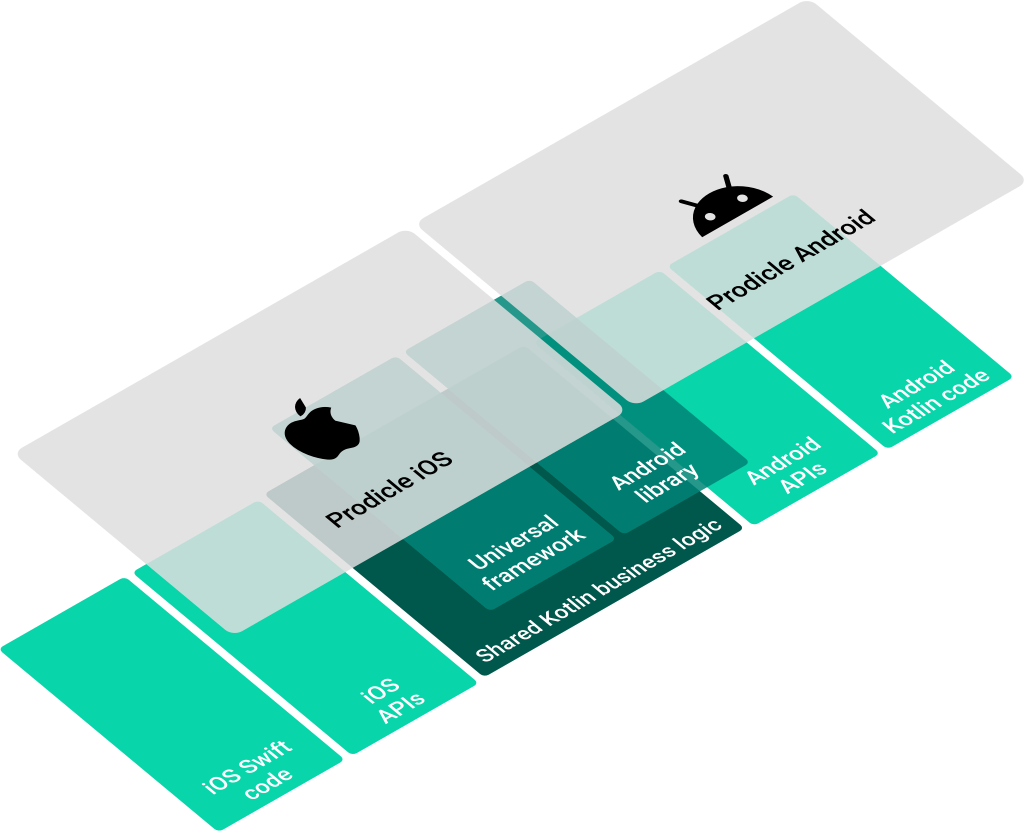
The high likelihood of unreliable network connectivity led us to lean into mobile solutions for robust client side persistence and offline support. The need for fast product delivery led us to experiment with a multiplatform architecture. Now we’re taking this one step further by using Kotlin Multiplatform to write platform agnostic business logic once in Kotlin and compiling to a Kotlin library for Android and a native Universal Framework for iOS via Kotlin/Native.
Kotlin Multiplatform
Kotlin Multiplatform allows you to use a single codebase for the business logic of iOS and Android apps. You only need to write platform-specific code where it’s necessary, for example, to implement a native UI or when working with platform-specific APIs.
Kotlin Multiplatform approaches cross-platform mobile development differently from some well known technologies in the space. Where other technologies abstract away or completely replace platform specific app development, Kotlin Multiplatform is complementary to existing platform specific technologies and is geared towards replacing platform agnostic business logic. It’s a new tool in the toolbox as opposed to replacing the toolbox.
This approach works well for us for several reasons:
Our Android and iOS studio apps have a shared architecture with similar or in some cases identical business logic written on both platforms.
Almost 50% of the production code in our Android and iOS apps is decoupled from the underlying platform.
Our appetite for exploring the latest technologies offered by respective platforms (Android Jetpack Compose, Swift UI, etc) isn’t hampered in any way.
So, what are we doing with it?
Experience Management
As noted earlier, our user needs vary significantly from one production to the next. This translates to a large number of app configurations to toggle feature availability and optimize the in-app experience for each production. Decoupling the code that manages these configurations from the apps themselves helps to reduce complexity as the apps grow. Our first exploration with code sharing involves the implementation of a mobile SDK for our internal experience management tool, Hendrix.
At its core, Hendrix is a simple interpreted language that expresses how configuration values should be computed. These expressions are evaluated in the current app session context, and can access data such as A/B test assignments, locality, device attributes, etc. For our use-case, we’re configuring the availability of production, version, and region specific app feature sets.
Poor network connectivity coupled with frequently changing configuration values in response to user activity means that on-device rule evaluation is preferable to server-side evaluation.
This led us to build a lightweight Hendrix mobile SDK — a great candidate for Kotlin Multiplatform as it requires significant business logic and is entirely platform agnostic.
Implementation
For brevity, we’ll skip over the Hendrix specific details and touch on some of the differences involved in using Kotlin Multiplatform in place of Kotlin/Swift.
Build
For Android, it’s business as usual. The Hendrix Multiplatform SDK is imported via gradle as an Android library project dependency in the same fashion as any other dependency. On the iOS side, the native binary is included in the Xcode project as a universal framework.
Developer ergonomics
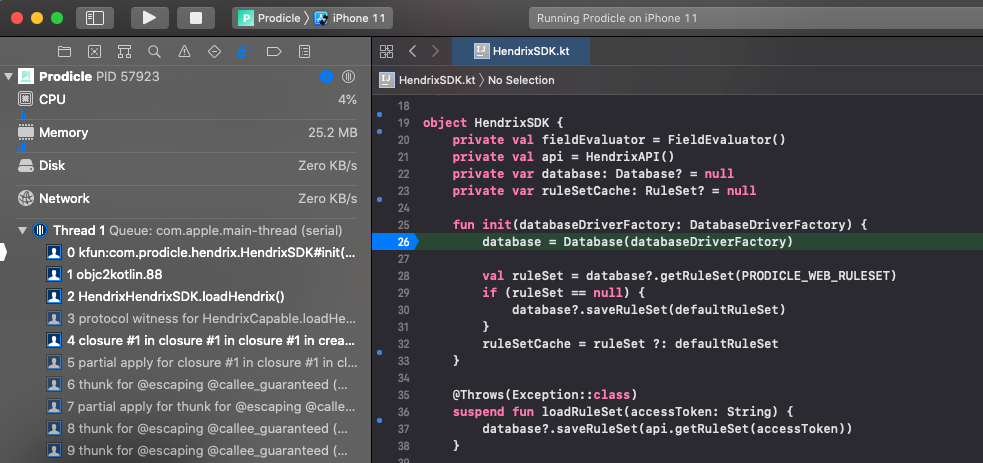
Kotlin Multiplatform source code can be edited, recompiled, and can have a debugger attached with breakpoints in Android Studio and Xcode (including lldb support). Android Studio works out of the box, Xcode support is achieved via TouchLabs’ xcode-kotlin plugin.
Debugging Kotlin source code from Xcode.
Networking
Hendrix interprets rule set(s) — remotely configurable files that get downloaded to the device. We’re using Ktor’s Multiplatform HttpClient to embed our networking code within the SDK.
Disk cache
Of course, network connectivity may not always be available so downloaded rule sets need to be cached to disk. For this, we’re using SQLDelight along with it’s Android and Native Database drivers for Multiplatform persistence.
Final thoughts
We’ve followed the evolution of Kotlin Multiplatform keenly over the last few years and believe that the technology has reached an inflection point. The tooling and build system integrations for Xcode have improved significantly such that the complexities involved in integration and maintenance are outweighed by the benefit of not having to write and maintain multiple platform specific implementations.
Opportunities for additional code sharing between our Android and iOS studio apps are plentiful. Potential future applications of the technology become even more interesting when we consider that Javascript transpilation is also possible.
We’re excited by the possibility of evolving our studio mobile apps into thin UI layers with shared business logic and will continue to share our learnings with you on that journey.
As Android developers, we usually have the luxury of treating our backends as magic boxes running in the cloud, faithfully returning us JSON. At Netflix, we have adopted the Backend for Frontend (BFF) pattern: instead of having one general purpose “backend API”, we have one backend per client (Android/iOS/TV/web). On the Android team, while most of our time is spent working on the app, we are also responsible for maintaining this backend that our app communicates with, and its orchestration code.
Recently, we completed a year-long project rearchitecting and decoupling our backend from the centralized model used previously. We did this migration without slowing down the usual cadence of our releases, and with particular care to avoid any negative effects to the user experience. We went from an essentially serverless model in a monolithic service, to deploying and maintaining a new microservice that hosted our app backend endpoints. This allowed Android engineers to have much more control and observability over how we get our data. Over the course of this post, we will talk about our approach to this migration, the strategies that we employed, and the tools we built to support this.
Background
The Netflix Android app uses the falcor data model and query protocol. This allows the app to query a list of “paths” in each HTTP request, and get specially formatted JSON (jsonGraph) that we use to cache the data and hydrate the UI. As mentioned earlier, each client team owns their respective endpoints: which effectively means that we’re writing the resolvers for each of the paths that are in a query.
As an example, to render the screen shown here, the app sends a query that looks like this:
paths: ["videos", 80154610, "detail"]
A path starts from a root object, and is followed by a sequence of keys that we want to retrieve the data for. In the snippet above, we’re accessing the detail key for the video object with id 80154610.
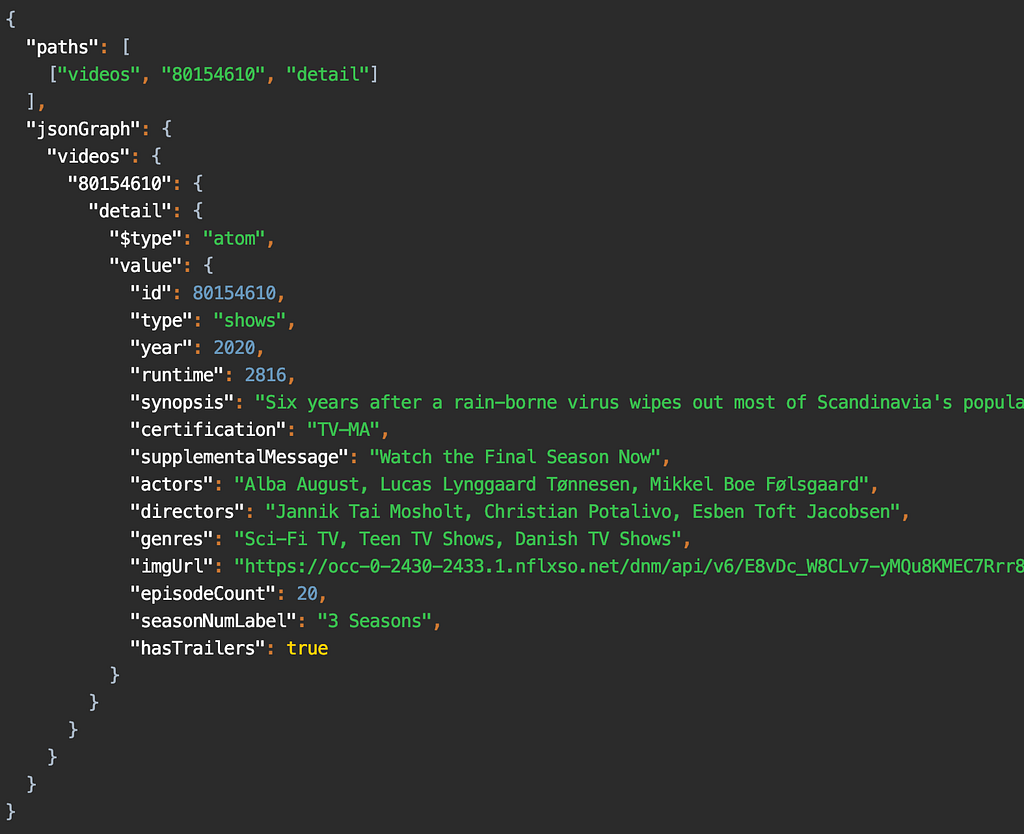
For that query, the response is:
Response for the query [“videos”, 80154610, “detail”]
In the Monolith
In the example you see above, the data that the app needs is served by different backend microservices. For example, the artwork service is separate from the video metadata service, but we need the data from both in the detail key.
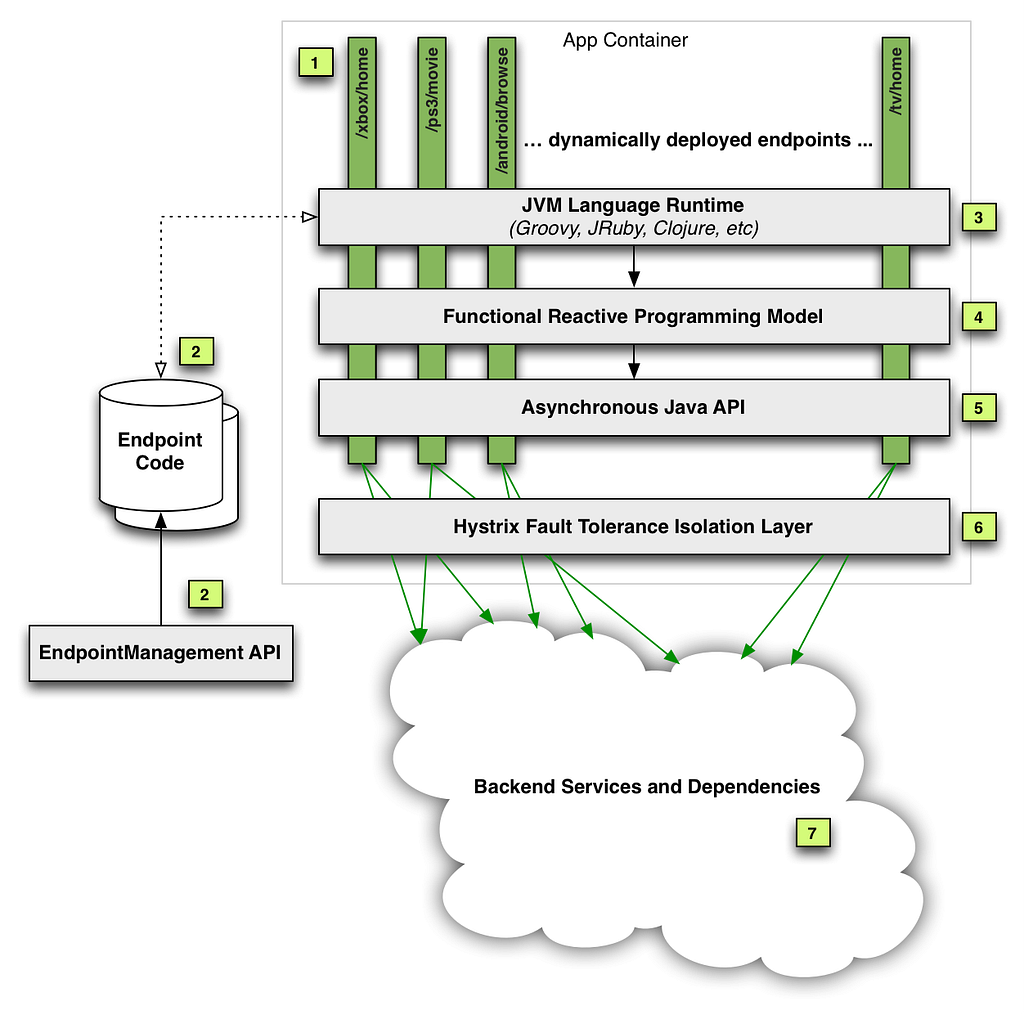
We do this orchestration on our endpoint code using a library provided by our API team, which exposes an RxJava API to handle the downstream calls to the various backend microservices. Our endpoint route handlers are effectively fetching the data using this API, usually across multiple different calls, and massaging it into data models that the UI expects. These handlers we wrote were deployed into a service run by the API team, shown in the diagram below.
As you can see, our code was just a part (#2 in the diagram) of this monolithic service. In addition to hosting our route handlers, this service also handled the business logic necessary to make the downstream calls in a fault tolerant manner. While this gave client teams a very convenient “serverless” model, over time we ran into multiple operational and devex challenges with this service. You can read more about this in our previous posts here: part 1, part 2.
The Microservice
It was clear that we needed to isolate the endpoint code (owned by each client team), from the complex logic of fault tolerant downstream calls. Essentially, we wanted to break out the client-specific code from this monolith into its own service. We tried a few iterations of what this new service should look like, and eventually settled on a modern architecture that aimed to give more control of the API experience to the client teams. It was a Node.js service with a composable JavaScript API that made downstream microservice calls, replacing the old Java API.
Java…Script?
As Android developers, we’ve come to rely on the safety of a strongly typed language like Kotlin, maybe with a side of Java. Since this new microservice uses Node.js, we had to write our endpoints in JavaScript, a language that many people on our team were not familiar with. The context around why the Node.js ecosystem was chosen for this new service deserves an article in and of itself. For us, it means that we now need to have ~15 MDN tabs open when writing routes 🙂
Let’s briefly discuss the architecture of this microservice. It looks like a very typical backend service in the Node.js world: a combination of Restify, a stack of HTTP middleware, and the Falcor-based API. We’ll gloss over the details of this stack: the general idea is that we’re still writing resolvers for paths like [videos, <id>, detail], but we’re now writing them in JavaScript.
The big difference from the monolith, though, is that this is now a standalone service deployed as a separate “application” (service) in our cloud infrastructure. More importantly, we’re no longer just getting and returning requests from the context of an endpoint script running in a service: we’re now getting a chance to handle the HTTP request in its entirety. Starting from “terminating” the request from our public gateway, we then make downstream calls to the api application (using the previously mentioned JS API), and build up various parts of the response. Finally, we return the required JSON response from our service.
The Migration
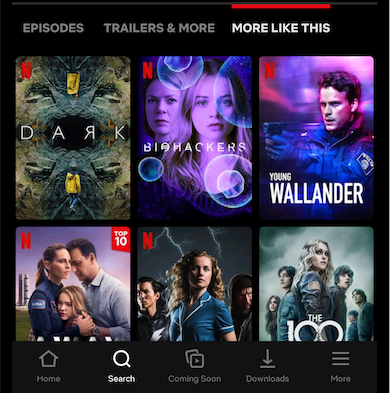
Before we look at what this change meant for us, we want to talk about how we did it. Our app had ~170 query paths (think: route handlers), so we had to figure out an iterative approach to this migration. Let’s take a look at what we built in the app to support this migration. Going back to the screenshot above, if you scroll a bit further down on that page, you will see the section titled “more like this”:
As you can imagine, this does not belong in the video details data for this title. Instead, it is part of a different path: [videos, <id>, similars]. The general idea here is that each UI screen (Activity/Fragment) needs data from multiple query paths to render the UI.
To prepare ourselves for a big change in the tech stack of our endpoint, we decided to track metrics around the time taken to respond to queries. After some consultation with our backend teams, we determined the most effective way to group these metrics were by UI screen. Our app uses a version of the repository pattern, where each screen can fetch data using a list of query paths. These paths, along with some other configuration, builds a Task. These Tasks already carry a uiLabel that uniquely identifies each screen: this label became our starting point, which we passed in a header to our endpoint. We then used this to log the time taken to respond to each query, grouped by the uiLabel. This meant that we could track any possible regressions to user experience by screen, which corresponds to how users navigate through the app. We will talk more about how we used these metrics in the sections to follow.
Fast forward a year: the 170 number we started with slowly but surely whittled down to 0, and we had all our “routes” (query paths) migrated to the new microservice. So, how did it go…?
The Good
Today, a big part of this migration is done: most of our app gets its data from this new microservice, and hopefully our users never noticed. As with any migration of this scale, we hit a few bumps along the way: but first, let’s look at good parts.
Migration Testing Infrastructure
Our monolith had been around for many years and hadn’t been created with functional and unit testing in mind, so those were independently bolted on by each UI team. For the migration, testing was a first-class citizen. While there was no technical reason stopping us from adding full automation coverage earlier, it was just much easier to add this while migrating each query path.
For each route we migrated, we wanted to make sure we were not introducing any regressions: either in the form of missing (or worse, wrong) data, or by increasing the latency of each endpoint. If we pare down the problem to absolute basics, we essentially have two services returning JSON. We want to make sure that for a given set of paths as input, the returned JSON is always exactly the same. With lots of guidance from other platform and backend teams, we took a 3-pronged approach to ensure correctness for each route migrated.
Functional Testing Functional testing was the most straightforward of them all: a set of tests alongside each path exercised it against the old and new endpoints. We then used the excellent Jest testing framework with a set of custom matchers that sanitized a few things like timestamps and uuids. It gave us really high confidence during development, and helped us cover all the code paths that we had to migrate. The test suite automated a few things like setting up a test user, and matching the query parameters/headers sent by a real device: but that’s as far as it goes. The scope of functional testing was limited to the already setup test scenarios, but we would never be able to replicate the variety of device, language and locale combinations used by millions of our users across the globe.
Replay Testing Enter replay testing. This was a custom built, 3-step pipeline:
Capture the production traffic for the desired path(s)
Replay the traffic against the two services in the TEST environment
Compare and assert for differences
It was a self-contained flow that, by design, captured entire requests, and not just the one path we requested. This test was the closest to production: it replayed real requests sent by the device, thus exercising the part of our service that fetches responses from the old endpoint and stitches them together with data from the new endpoint. The thoroughness and flexibility of this replay pipeline is best described in its own post. For us, the replay test tooling gave the confidence that our new code was nearly bug free.
Canaries Canaries were the last step involved in “vetting” our new route handler implementation. In this step, a pipeline picks our candidate change, deploys the service, makes it publicly discoverable, and redirects a small percentage of production traffic to this new service. You can find a lot more details about how this works in the Spinnaker canaries documentation.
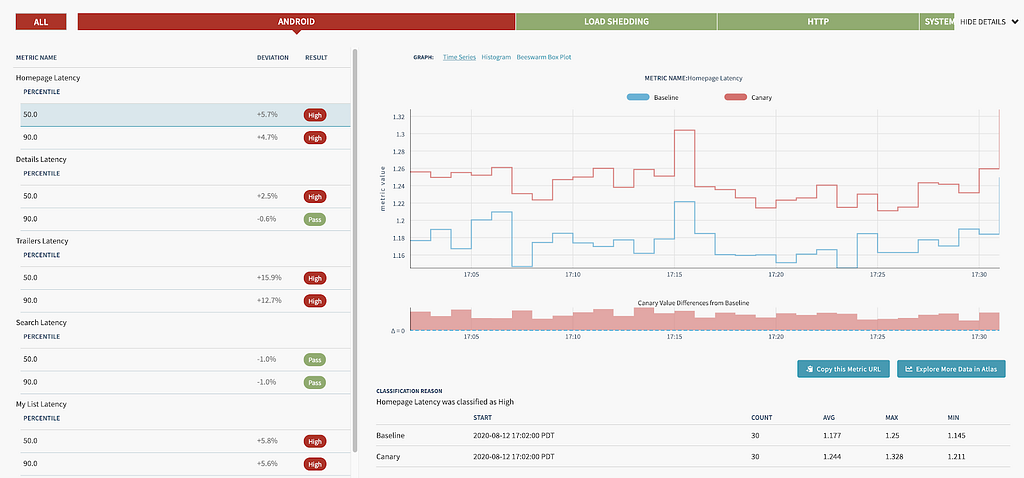
This is where our previously mentioned uiLabel metrics become relevant: for the duration of the canary, Kayenta was configured to capture and compare these metrics for all requests (in addition to the system level metrics already being tracked, like server CPU and memory). At the end of the canary period, we got a report that aggregated and compared the percentiles of each request made by a particular UI screen. Looking at our high traffic UI screens (like the homepage) allowed us to identify any regressions caused by the endpoint before we enabled it for all our users. Here’s one such report to get an idea of what it looks like:
Each identified regression (like this one) was subject to a lot of analysis: chasing down a few of these led to previously unidentified performance gains! Being able to canary a new route let us verify latency and error rates were within acceptable limits. This type of tooling required time and effort to create, but in the end, the feedback it provided was well worth the cost.
Observability
Many Android engineers will be familiar with systrace or one of the excellent profilers in Android Studio. Imagine getting a similar tracing for your endpoint code, traversing along many different microservices: that is effectively what distributed tracing provides. Our microservice and router were already integrated into the Netflix request tracing infrastructure. We used Zipkin to consume the traces, which allowed us to search for a trace by path. Here’s what a typical trace looks like:
A typical zipkin trace (truncated)
Request tracing has been critical to the success of Netflix infrastructure, but when we operated in the monolith, we did not have the ability to get this detailed look into how our app interacted with the various microservices. To demonstrate how this helped us, let us zoom into this part of the picture:
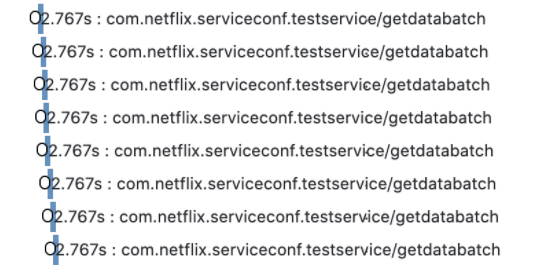
Serialized calls to this service adds a few ms latency
It’s pretty clear here that the calls are being serialized: however, at this point we’re already ~10 hops disconnected from our microservice. It’s hard to conclude this, and uncover such problems, from looking at raw numbers: either on our service or the testservice above, and even harder to attribute them back to the exact UI platform or screen. With the rich end-to-end tracing instrumented in the Netflix microservice ecosystem and made easily accessible via Zipkin, we were able to pretty quickly triage this problem to the responsible team.
End-to-end Ownership
As we mentioned earlier, our new service now had the “ownership” for the lifetime of the request. Where previously we only returned a Java object back to the api middleware, now the final step in the service was to flush the JSON down the request buffer. This increased ownership gave us the opportunity to easily test new optimisations at this layer. For example, with about a day’s worth of work, we had a prototype of the app using the binary msgpack response format instead of plain JSON. In addition to the flexible service architecture, this can also be attributed to the Node.js ecosystem and the rich selection of npm packages available.
Local Development
Before the migration, developing and debugging on the endpoint was painful due to slow deployment and lack of local debugging (this post covers that in more detail). One of the Android team’s biggest motivations for doing this migration project was to improve this experience. The new microservice gave us fast deployment and debug support by running the service in a local Docker instance, which has led to significant productivity improvements.
The Not-so-good
In the arduous process of breaking a monolith, you might get a sharp shard or two flung at you. A lot of what follows is not specific to Android, but we want to briefly mention these issues because they did end up affecting our app.
Latencies
The old api service was running on the same “machine” that also cached a lot of video metadata (by design). This meant that data that was static (e.g. video titles, descriptions) could be aggressively cached and reused across multiple requests. However, with the new microservice, even fetching this cached data needed to incur a network round trip, which added some latency.
This might sound like a classic example of “monoliths vs microservices”, but the reality is somewhat more complex. The monolith was also essentially still talking to a lot of downstream microservices: it just happened to have a custom-designed cache that helped a lot. Some of this increased latency was mitigated by better observability and more efficient batching of requests. But, for a small fraction of requests, after a lot of attempts at optimization, we just had to take the latency hit: sometimes, there are no silver bullets.
Increased Partial Query Errors
As each call to our endpoint might need to make multiple requests to the api service, some of these calls can fail, leaving us with partial data. Handling such partial query errors isn’t a new problem: it is baked into the nature of composite protocols like Falcor or GraphQL. However, as we moved our route handlers into a new microservice, we now introduced a network boundary for fetching any data, as mentioned earlier.
This meant that we now ran into partial states that weren’t possible before because of the custom caching. We were not completely aware of this problem in the beginning of our migration: we only saw it when some of our deserialized data objects had null fields. Since a lot of our code uses Kotlin, these partial data objects led to immediate crashes, which helped us notice the problem early: before it ever hit production.
As a result of increased partial errors, we’ve had to improve overall error handling approach and explore ways to minimize the impact of the network errors. In some cases, we also added custom retry logic on either the endpoint or the client code.
Final Thoughts
This has been a long (you can tell!) and a fulfilling journey for us on the Android team: as we mentioned earlier, on our team we typically work on the app and, until now, we did not have a chance to work with our endpoint with this level of scrutiny. Not only did we learn more about the intriguing world of microservices, but for us working on this project, it provided us the perfect opportunity to add observability to our app-endpoint interaction. At the same time, we ran into some unexpected issues like partial errors and made our app more resilient to them in the process.
As we continue to evolve and improve our app, we hope to share more insights like these with you.
The planning and successful migration to this new service was the combined effort of multiple backend and front end teams.
On the Android team, we ship the Netflix app on Android to millions of members around the world. Our responsibilities include extensive A/B testing on a wide variety of devices by building highly performant and often custom UI experiences. We work on data driven optimizations at scale in a diverse and sometimes unforgiving device and network ecosystem. If you find these challenges interesting, and want to work with us, we have an open position.
To provide the best experiences, we use technologies like cookies to store and/or access device information. Consenting to these technologies will allow us to process data such as browsing behavior or unique IDs on this site. Not consenting or withdrawing consent, may adversely affect certain features and functions.
Functional
Always active
The technical storage or access is strictly necessary for the legitimate purpose of enabling the use of a specific service explicitly requested by the subscriber or user, or for the sole purpose of carrying out the transmission of a communication over an electronic communications network.
Preferences
The technical storage or access is necessary for the legitimate purpose of storing preferences that are not requested by the subscriber or user.
Statistics
The technical storage or access that is used exclusively for statistical purposes.The technical storage or access that is used exclusively for anonymous statistical purposes. Without a subpoena, voluntary compliance on the part of your Internet Service Provider, or additional records from a third party, information stored or retrieved for this purpose alone cannot usually be used to identify you.
Marketing
The technical storage or access is required to create user profiles to send advertising, or to track the user on a website or across several websites for similar marketing purposes.