Tag Archives: Cloudflare Gateway

Introducing WARP for Desktop and Cloudflare for Teams

Post Syndicated from Kyle Krum original https://blog.cloudflare.com/warp-for-desktop/

Introducing WARP for Desktop and Cloudflare for Teams

Introducing WARP for Desktop and Cloudflare for Teams

Cloudflare launched ten years ago to keep web-facing properties safe from attack and fast for visitors. Cloudflare customers owned Internet properties that they placed on our network. Visitors to those sites and applications enjoyed a faster experience, but that speed was not consistent for accessing Internet properties outside the Cloudflare network.

Over the last few years, we began building products that could help deliver a faster and safer Internet to everyone, not just visitors to sites on our network. We started with the first step to visiting any website, a DNS query, and released the world’s fastest public DNS resolver, 1.1.1.1. Any Internet user could improve the speed to connect to any website simply by changing their resolver.

While making the Internet faster for users, we also focused on making it more private. We built 1.1.1.1 to accelerate the last mile of connections, from user to our edge or other destinations on the Internet. Unlike other providers, we did not build it to sell ads.

Last year we went one step further to make the entire connection from a device both faster and safer when we launched Cloudflare WARP. With the push of a button, users could connect their mobile device to the entire Internet using a WireGuard tunnel through a Cloudflare data center near to them. Traffic to sites behind Cloudflare became even faster and a user’s experience with the rest of the Internet became more secure and private.

We brought that experience to desktops in beta earlier this year, and are excited to announce the general availability of Cloudflare WARP for desktop users today. The entire Internet can now be more secure and private regardless of how you connect.

Bringing the power of WARP to security teams everywhere

WARP made the Internet faster and more private for individual users everywhere. But as businesses embraced remote work models at scale, security teams struggled to extend the security controls they had enabled in the office to their remote workers. Today, we’re bringing everything our users have come to expect from WARP to security teams. The release also enables new functionality in our Cloudflare Gateway product.

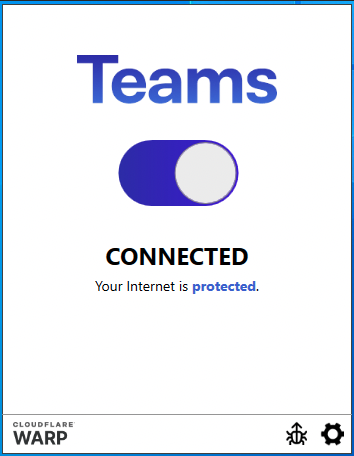
Customers can use the Cloudflare WARP application to connect corporate desktops to Cloudflare Gateway for advanced web filtering. The Gateway features rely on the same performance and security benefits of the underlying WARP technology, now with security filtering available to the connection.

The result is a simple way for enterprises to protect their users wherever they are without requiring the backhaul of network traffic to a centralized security boundary. Instead, organizations can configure the WARP client application to securely and privately send remote users’ traffic through a Cloudflare data center near them. Gateway administrators apply policies to outbound Internet traffic proxied through the client, allowing organizations to protect users from threats on the Internet, and stop corporate data from leaving their organization.

Privacy, Security and Speed for Everyone

WARP was built on the philosophy that even people who don’t know what “VPN” stands for should be able to still easily get the protection a VPN offers. For those of us unfortunately very familiar with traditional corporate VPNs, something better was needed. Enter our own WireGuard implementation called BoringTun.

The WARP application uses BoringTun to encrypt all the traffic from your device and send it directly to Cloudflare’s edge, ensuring that no one in between is snooping on what you’re doing. If the site you are visiting is already a Cloudflare customer, the content is immediately sent down to your device. With WARP+ we use Argo Smart Routing to to devise the shortest path through our global network of data centers to reach whomever you are talking to.

Introducing WARP for Desktop and Cloudflare for Teams

Combined with the power of 1.1.1.1 (the world’s fastest public DNS resolver), WARP keeps your traffic secure, private and fast. Since nearly everything you do on the Internet starts with a DNS request, choosing the fastest DNS server across all your devices will accelerate almost everything you do online. Speed isn’t everything though, and while the connection between your application and a website may be encrypted, DNS lookups for that website were not. This allowed anyone, even your Internet Service Provider, to potentially snoop (and sell) on where you are going on the Internet.

Cloudflare will never snoop or sell your personal data. And if you use DNS-over-HTTPS or DNS-over-TLS to our 1.1.1.1 resolver, your DNS request will be sent over a secure channel. This means that if you use the 1.1.1.1 resolver then in addition to our privacy guarantees an eavesdropper can’t see your DNS requests. Don’t take our word for it though, earlier this year we published the results of a third-party privacy examination, something we’ll keep doing and wish others would do as well.

For Gateway customers, we are committed to privacy and trust and will never sell your personal data to third parties. While your administrator will have the ability to audit your organization’s traffic, create rules around how long data is retained, or create specific policies about where they can go, Cloudflare will never sell your personal data or use your personal data to retarget you with advertisements. Privacy and control of your organization’s data is in your hands.

Now integrated with Cloudflare Gateway

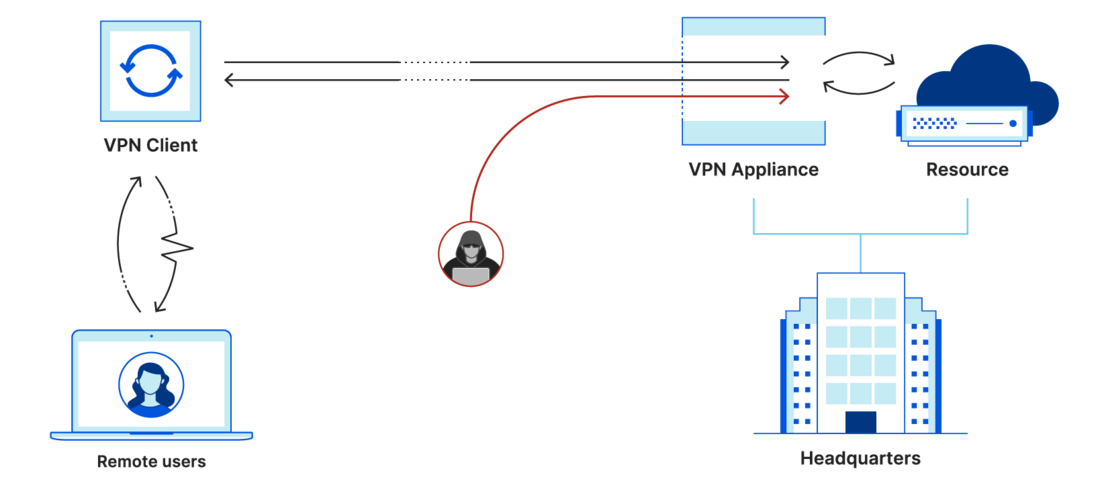
Traditionally, companies have used VPN solutions to gate access to corporate resources and keep devices secure with their filtering rules. These connections quickly became a point of failure (and intrusion vector) as organizations needed to manage and scale up VPN servers as traffic through their on premise servers grew. End users didn’t like it either. VPN servers were usually overwhelmed at peak times, the client was bulky and they were rarely made with performance in mind. And once a bad actor got in, they had access to everything.

Introducing WARP for Desktop and Cloudflare for Teams
Traditional VPN architecture‌‌

In January 2020, we launched Cloudflare for Teams as a replacement to this model. Cloudflare for Teams is built around two core products. Cloudflare Access is a Zero Trust solution allowing organizations to connect internal (and now, SaaS) applications to Cloudflare’s edge and build security rules to enforce safe access to them. No longer were VPNs a single entry point to your organization; users could work from anywhere and still get access. Cloudflare Gateway’s first features focused on protecting users from threats on the Internet with a DNS resolver and policy engine built for enterprises.

The strength and power of WARP clients, used today by millions of users around the world, will enable incredible new use cases for security teams:

  • Encrypt all user traffic – Regardless of your users’ location, all traffic from their device is encrypted with WARP and sent privately to the nearest WARP endpoint. This keeps your users and your organizations protected from whomever may be snooping. If you still used a traditional VPN on top of Access to encrypt user traffic, that is no longer needed.
  • WARP+ – Cloudflare offers a premium WARP+ service for customers who want additional speed benefits. That now comes packaged into Teams deployments. Any Teams customer who deploys the Teams client applications will automatically receive the premium speed benefits of WARP+.
  • Gateway for remote workers – Until today, Gateway required that you keep track of all your users’ IP addresses and build policies per location. This made it difficult to enforce policy or provide malware protection when a user took their device to a new location. With the client installed, these policies can be enforced anywhere.
  • L7 Firewall and user based policies – Today’s announcement of Cloudflare Gateway SWG and Secure DNS allows your organization to enforce device authentication to your Teams account, enabling you to build user-specific policies and force all traffic through the firewall.
  • Device and User auditing – Along with user and device policies, administrators will also be able to audit specific user and device traffic. Used in conjunction with logpush, this will allow your organization to do detailed level tracing in case of a breach or audit.
Introducing WARP for Desktop and Cloudflare for Teams

Enroll your organization to use the WARP client with Cloudflare for Teams

We know how hard it can be to deploy another piece of software in your organization, so we’ve worked hard to make deployment easy. To get started, just navigate to our sign-up page and create an account. If you already have an active account, you can bypass this step and head straight to the Cloudflare for Teams dashboard where you’ll be dropped directly into our onboarding flow. After you have signed up and configured your team, setup a Gateway policy and then choose one of the three ways to install the clients to enforce that policy from below:

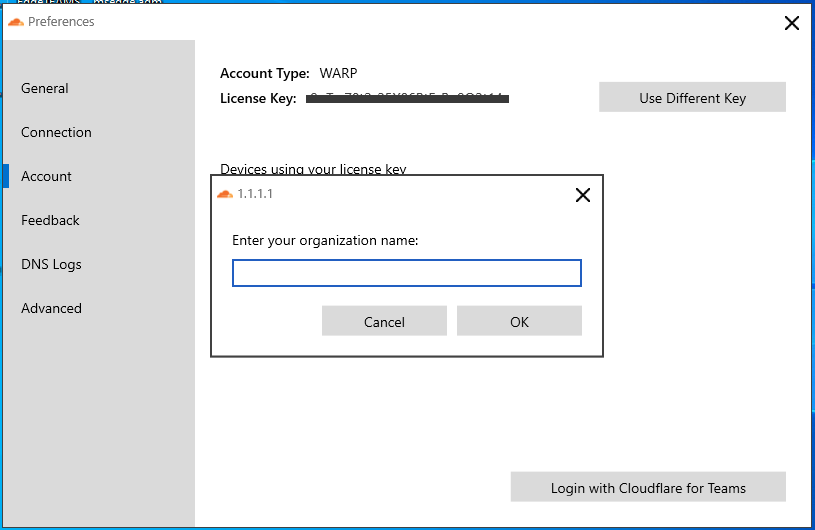
Self Install
If you are a small organization without an IT department, asking your users to download the client themselves and type in the required settings is the fastest way to get going.

Introducing WARP for Desktop and Cloudflare for Teams
Manually join an organization‌‌

Scripted Install
Our desktop installers support the ability to quickly script the installation. In the case of Windows, this is as easy as this command line:

Cloudflare_WARP_Release-x64.msi /quiet ORGANIZATION="<insert your org>" SERVICE_MODE="warp" ENABLE="true" GATEWAY_UNIQUE_ID="<insert your gateway DoH domain>" SUPPORT_URL=”<mailto or http of your support person>"

Managed Device
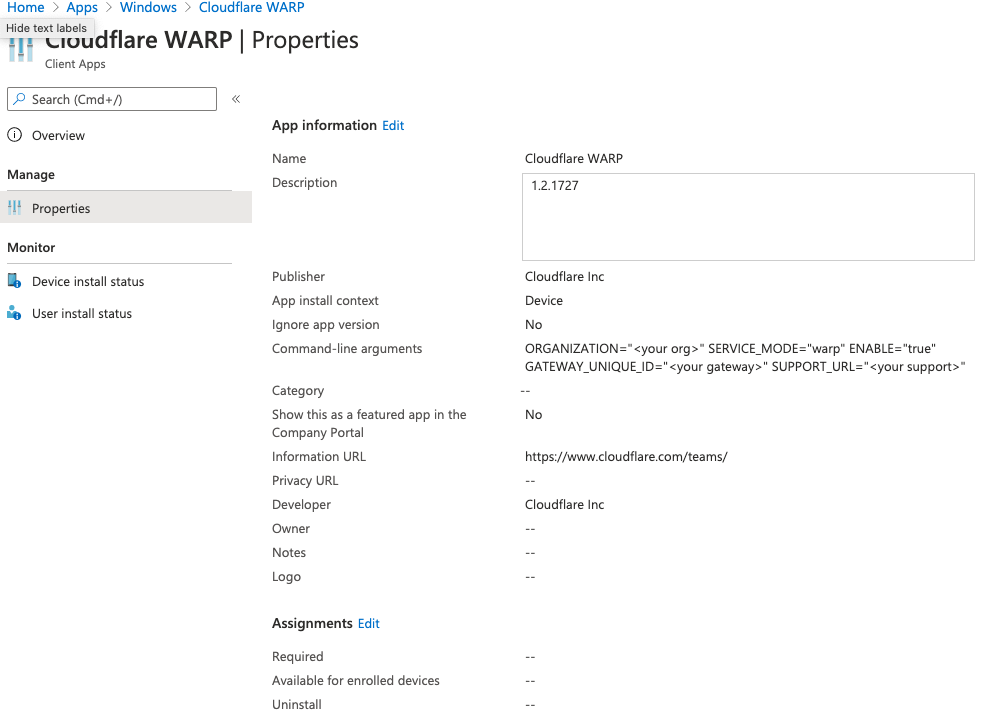
Organizations with MDM tools like Intune or JAMF can deploy WARP to their entire fleet of devices from a single operation. Just as you preconfigure all other device settings, WARP can be set so that all end users need to do is login with your team’s identity provider by clicking on the Cloudflare WARP client after it has been deployed.

Introducing WARP for Desktop and Cloudflare for Teams
Microsoft Intune Configuration

For a complete list of the installation options, required fields and step by step instructions for all platforms see the WARP Client documentation.

What’s coming next

There is still more we want to build for both our consumer users of WARP and our Cloudflare for Teams customers. Here’s a sneak peek at some of the ones we are most excited about (and allowed to share):

  • New partner integrations with CrowdStrike and VMware Carbon Black (Tanium available today) will allow you to build even more comprehensive Cloudflare Access policies that check for device health before allowing users to connect to applications
  • Split Tunnel support will allow you or your organization to specify applications, sites or IP addresses that should be excluded from WARP. This will allow content like games, streaming services, or any application you choose to work outside the connection.
  • BYOD device support, especially for mobile clients. Enterprise users that are not on the clock should be able to easily toggle off “office mode,” so corporate policies don’t limit personal use of their personal devices.
  • We are still missing one major operating system from our client portfolio and Linux support is coming.

Download now

We are excited to finally share these applications with our customers. We’d especially like to thank our Cloudflare MVP’s, the 100,000+ beta users on desktop, and the millions of existing users on mobile who have helped grow WARP into what it is today.

You can download the applications right now from https://one.one.one.one

Cloudflare Gateway now protects teams, wherever they are

Post Syndicated from Pete Zimmerman original https://blog.cloudflare.com/gateway-swg/

Cloudflare Gateway now protects teams, wherever they are

Cloudflare Gateway now protects teams, wherever they are

In January 2020, we launched Cloudflare for Teams—a new way to protect organizations and their employees globally, without sacrificing performance. Cloudflare for Teams centers around two core products – Cloudflare Access and Cloudflare Gateway.

In March 2020, Cloudflare launched the first feature of Cloudflare Gateway, a secure DNS filtering solution powered by the world’s fastest DNS resolver. Gateway’s DNS filtering feature kept users safe by blocking DNS queries to potentially harmful destinations associated with threats like malware, phishing, or ransomware. Organizations could change the router settings in their office and, in about five minutes, keep the entire team safe.

Shortly after that launch, entire companies began leaving their offices. Users connected from initially makeshift home offices that have become permanent in the last several months. Protecting users and data has now shifted from a single office-level setting to user and device management in hundreds or thousands of locations.

Security threats on the Internet have also evolved. Phishing campaigns and malware attacks have increased in the last six months. Detecting those types of attacks requires looking deeper than just the DNS query.

Starting today, we’re excited to announce two features in Cloudflare Gateway that solve those new challenges. First, Cloudflare Gateway now integrates with the Cloudflare WARP desktop client. We built WARP around WireGuard, a modern, efficient VPN protocol that is much more efficient and flexible than legacy VPN protocols.

Second, Cloudflare Gateway becomes a Secure Web Gateway and performs L7 filtering to inspect traffic for threats that hide below the surface. Like our DNS filtering and 1.1.1.1 resolver, both features are powered by everything we’ve learned by offering Cloudflare WARP to millions of users globally.

Securing the distributed workforce

Our customers are largely distributed workforces with employees split between corporate offices and their homes. Due to the pandemic, this is their operating environment for the foreseeable future.

The fact that users aren’t located at fixed, known locations (with remote workers allowed by exception) has created challenges for already overworked IT staff:

  1. VPNs are an all-or-nothing approach to providing remote access to internal applications. We address this with Cloudflare Access and our Zero Trust approach to security for internal applications and now SaaS applications as well.
  2. VPNs are slow and expensive. However, backhauling traffic to a centralized security boundary has been the primary approach to enforcing corporate content and security policies to protect roaming users. Cloudflare Gateway was created to tackle this problem for our customers.

Until today, Cloudflare Gateway has provided security for our customers through DNS filtering. While this provides a level of security and content control that’s application-agnostic, it still leaves our customers with a few challenges:

  1. Customers need to register the source IP address of all locations that send DNS queries to Gateway, so their organization’s traffic can be identified for policy enforcement. This is tedious at best, if not intractable for larger organizations with hundreds of locations.
  2. DNS policies are relatively coarse, with enforcement performed with an all-or-nothing approach per domain. Organizations lack the ability to, for example, allow access to a cloud storage provider but block the download of harmful files from known-malicious URLs.
  3. Organizations that register IP addresses frequently use Network Address Translation (NAT) traffic in order to share public IP addresses across many users. This results in a loss of visibility into DNS activity logs at the individual user level. So while IT security admins can see that a malicious domain was blocked, they must leverage additional forensic tools to track down a potentially compromised device.

Starting today, we are taking Cloudflare Gateway beyond a secure DNS filtering solution by pairing the Cloudflare for Teams client with a cloud L7 firewall. Now our customers can toss out another hardware appliance in their centralized security boundary and provide enterprise-level security for their users directly from the Cloudflare edge.

Protecting users and preventing corporate data loss

DNS filtering provides a baseline level of security across entire systems and even networks, since it’s leveraged by all applications for Internet communications. However, application-specific protection offers granular policy enforcement and visibility into whether traffic should be classified as malicious.

Today we’re excited to extend the protection we offer through DNS filtering by adding an L7 firewall that allows our customers to apply security and content policies to HTTP traffic. This provides administrators with a better tool to protect users through granular controls within HTTP sessions, and with visibility into policy enforcement. Just as importantly, it also gives our customers greater control over where their data resides. By building policies, customers can specify whether to allow or block a request based on file type, on whether the request was to upload or download a file, or on whether the destination is an approved cloud storage provider for the organization.

Enterprises protect their users’ Internet traffic wherever they are by connecting to Cloudflare with the Cloudflare for Teams client. This client provides a fast, secure connection to the Cloudflare data center nearest them, and it relies on the same Cloudflare WARP application millions of users connect through globally. Because the client uses the same WARP application under the hood, enterprises can be sure it has been tested at scale to provide security without compromising on performance. Cloudflare WARP optimizes network performance by leveraging WireGuard for the connection to the Cloudflare edge.

The result is a secure, performant connection for enterprise users wherever they are without requiring the backhaul of network traffic to a centralized security boundary. By connecting to Cloudflare Gateway with the Cloudflare for Teams client, enterprise users are protected through filtering policies applied to all outbound Internet traffic–protecting users as they navigate the Internet and preventing the loss of corporate data.

Cloudflare Gateway now supports HTTP traffic filtering based on a variety of criteria including:

Criteria Example
URL, path, and/or query string https://www.myurl.com/path?query
HTTP method GET, POST, etc.
HTTP response code 500
File type and file name myfilename.zip
MIME type application/zip
URL security or content category Malware, phishing, adult themes

To complement DNS filtering policies, IT admins can now create L7 firewall rules to apply granular policies on HTTP traffic.

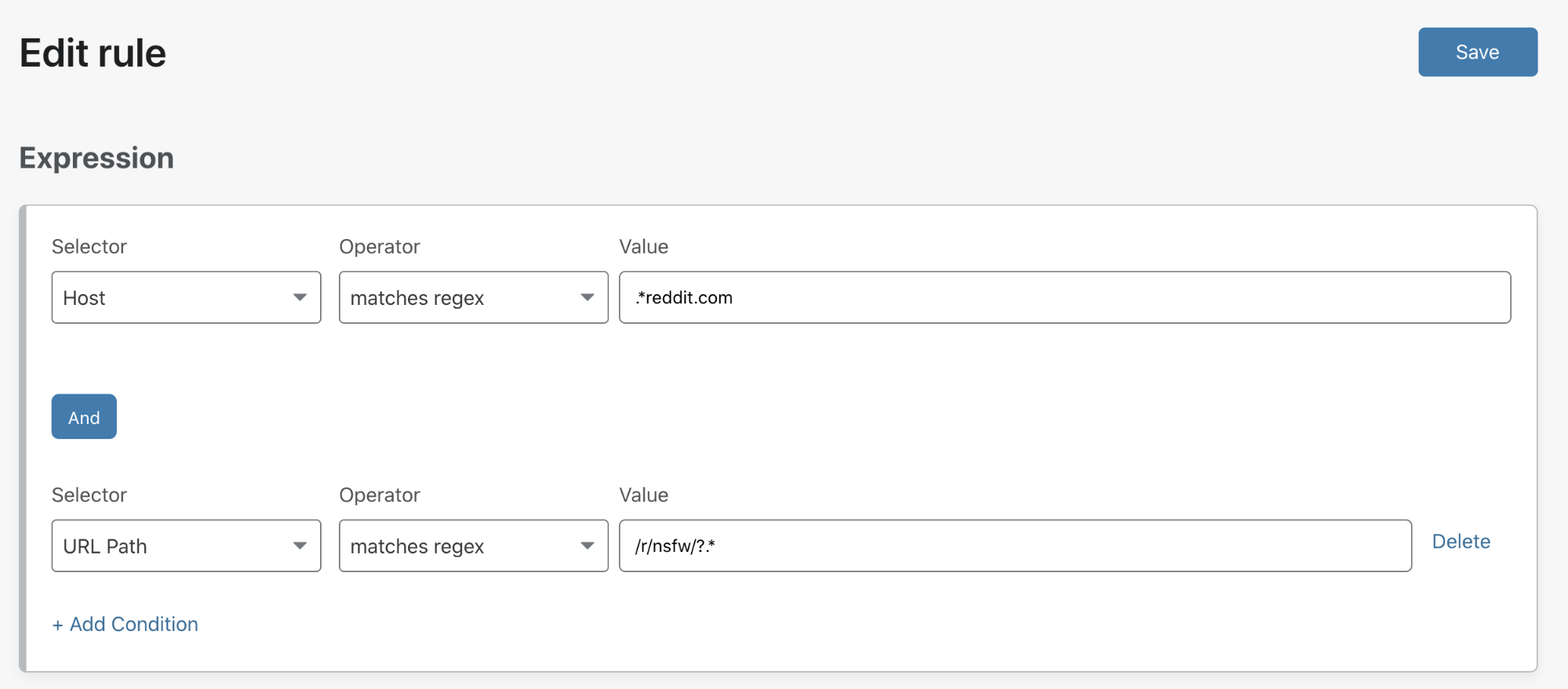
For example, an admin may want to allow users to navigate to useful parts of Reddit, but block undesirable subreddits.

Cloudflare Gateway now protects teams, wherever they are

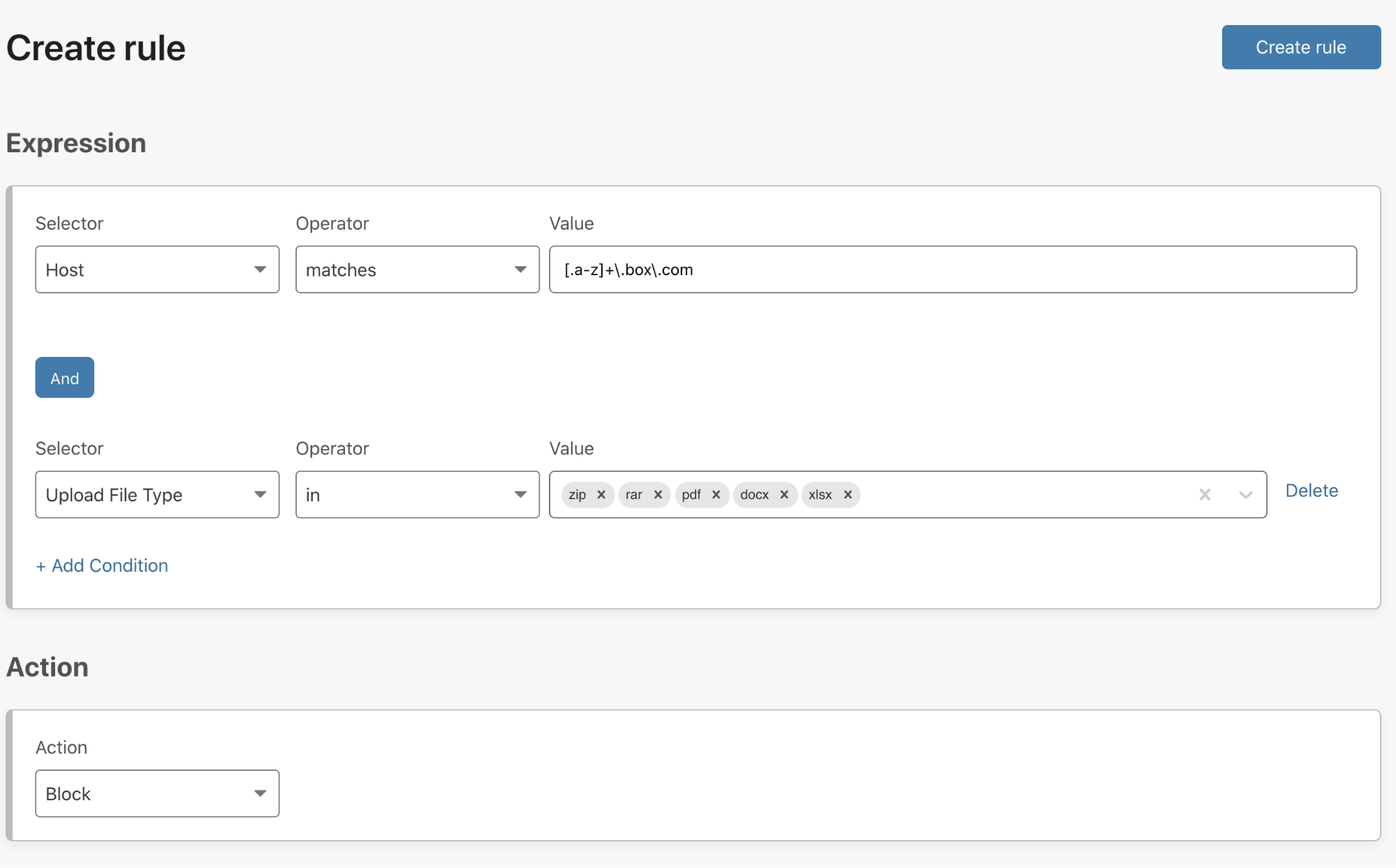
Or to prevent data loss, an admin could create a rule that allows users to receive content from popular cloud storage providers but not upload select file types from corporate devices.

Cloudflare Gateway now protects teams, wherever they are

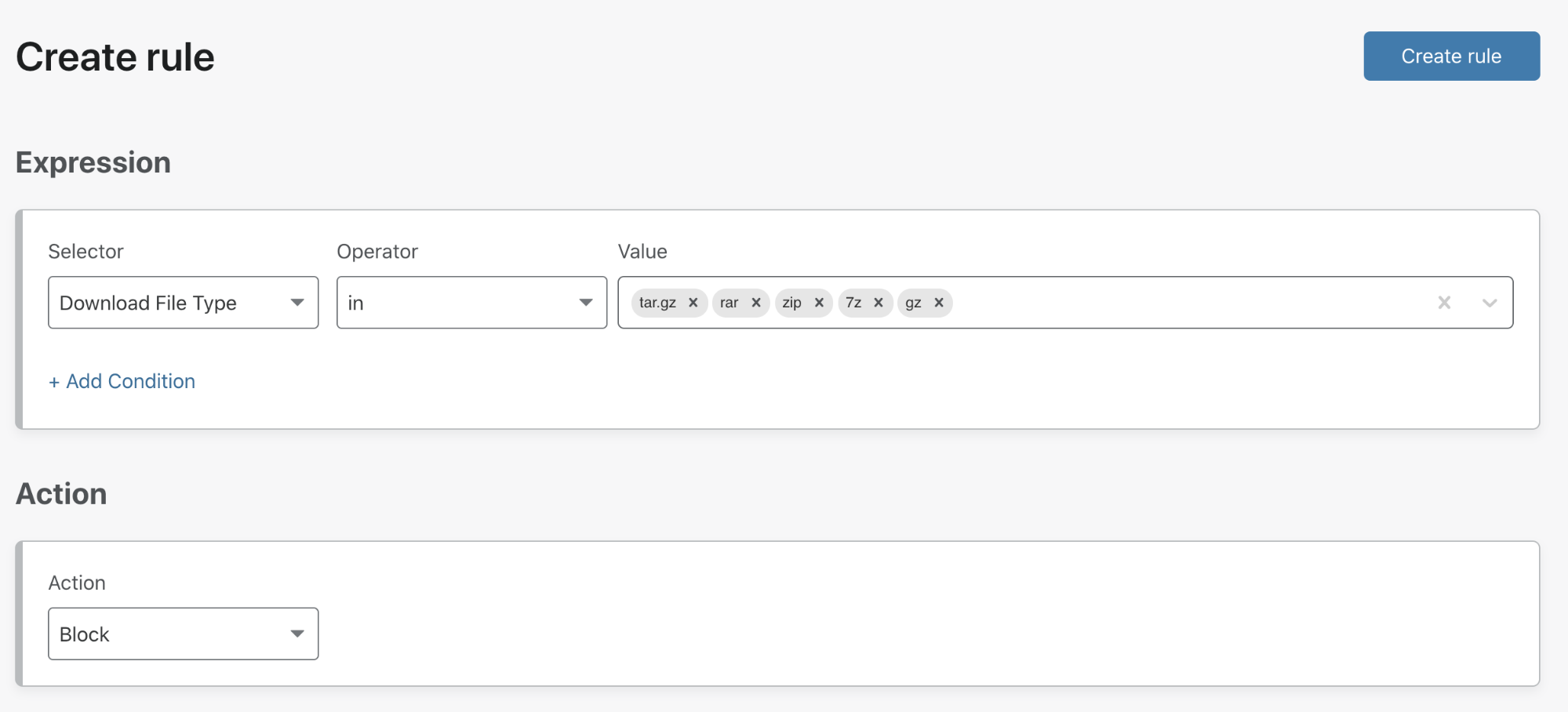
Another admin might want to prevent malicious files from being smuggled in through zip file downloads, so they may decide to configure a rule to block downloads of compressed file types.

Cloudflare Gateway now protects teams, wherever they are

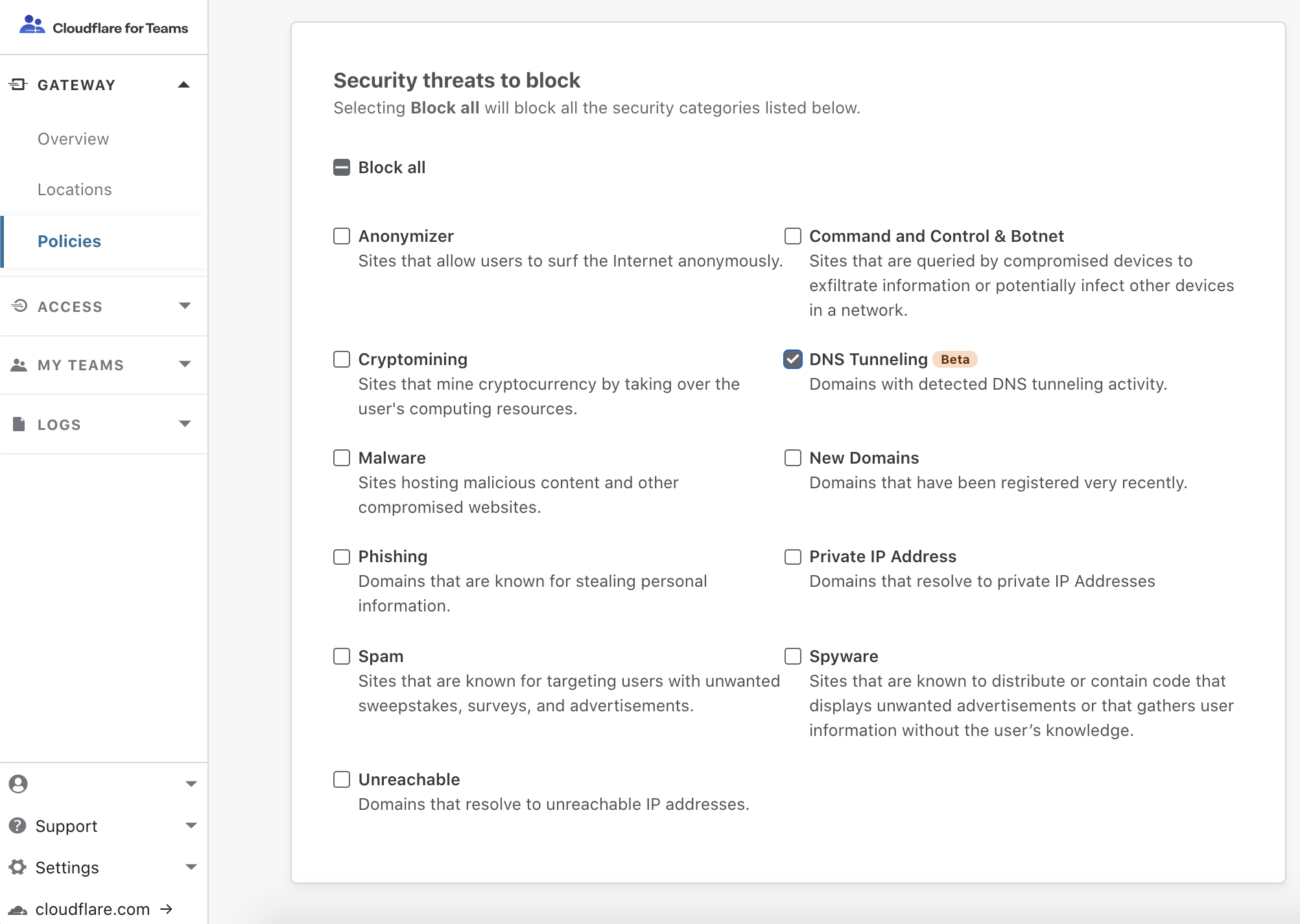
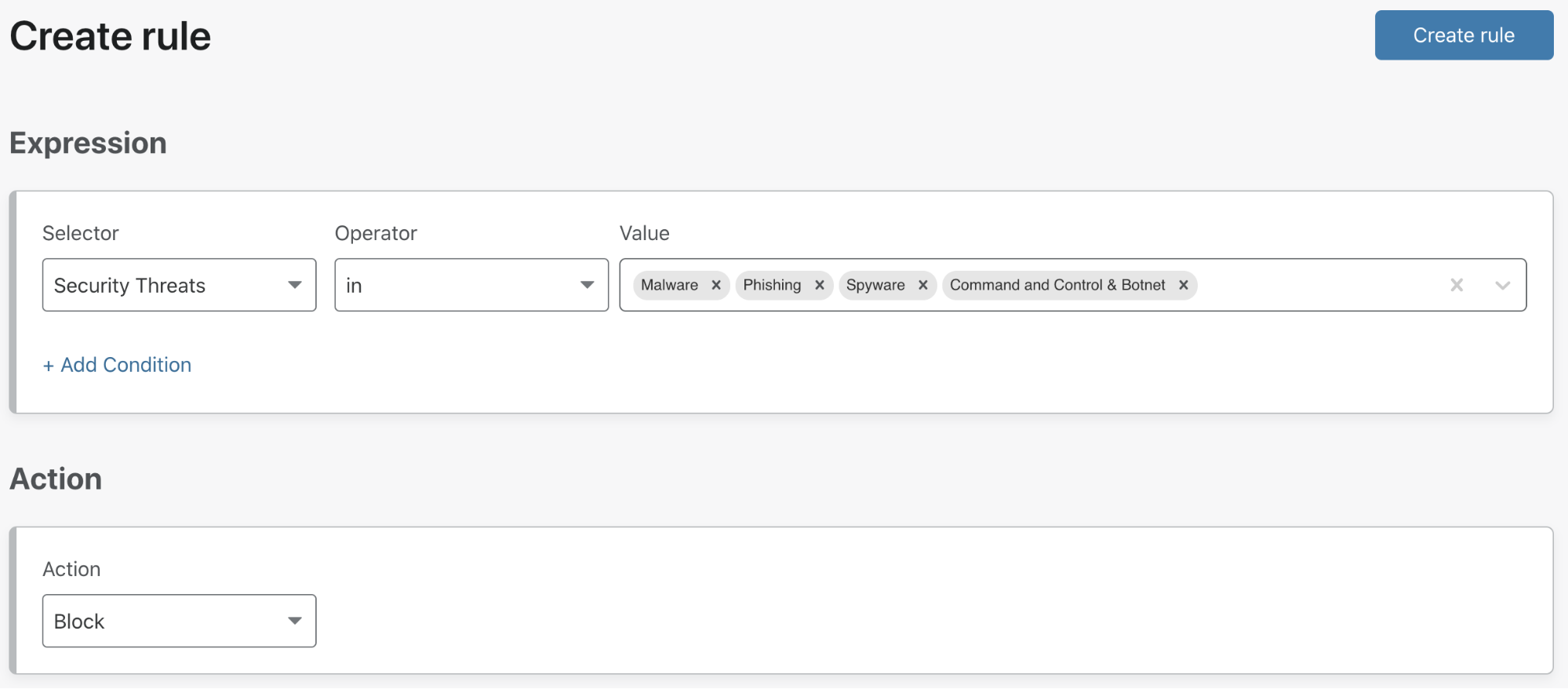
Having used our DNS filtering categories to protect internal users, an admin may want to simply block security threats based on the classification of full URLs. Malware payloads are frequently disseminated from cloud storage and with DNS filtering an admin has to choose whether to allow or deny access to the entire domain for a given storage provider. URL filtering gives admins the ability to filter requests for the exact URLs where malware payloads reside, allowing customers to continue to leverage the usefulness of their chosen storage provider.

Cloudflare Gateway now protects teams, wherever they are

And because all of this is made possible with the Cloudflare for Teams client, distributed workforces with roaming clients receive this protection wherever they are through a secure connection to the Cloudflare data center nearest them.

Cloudflare Gateway now protects teams, wherever they are

We’re excited to protect teams as they browse the Internet by inspecting HTTP traffic, but what about non-HTTP traffic? Later this year, we will extend Cloudflare Gateway by adding support for IP, port, and protocol filtering with a cloud L4 firewall. This will allow administrators to apply rules to all Internet-bound traffic, like rules that allow outbound SSH, or rules that determine whether to send HTTP traffic arriving on a non-standard port to the L7 firewall for HTTP inspection.

At launch, Cloudflare Gateway will allow administrators to create policies that filter DNS and HTTP traffic across all users in an organization. This creates a great baseline for security. However, exceptions are part of reality: a one-size-fits-all approach to content and security policy enforcement rarely matches the specific needs of all users.

To address this, we’re working on supporting rules based on user and group identity by integrating Cloudflare Access with a customer’s existing identity provider. This will let administrators create granular rules that also leverage context around the user, such as:

  • Deny access to social media to all users. But if John Doe is in the marketing group, allow him to access these sites in order to perform his job role.
  • Only allow Jane Doe to connect to specific SaaS applications through Cloudflare Gateway, or a certain device posture.

The need for policy enforcement and logging visibility based on identity arises from the reality that users aren’t tied to fixed, known workplaces. We meet that need by integrating identity and protecting users wherever they are with the Cloudflare for Teams client.

What’s next

People do not start businesses to deal with the minutiae of information technology and security. They have a vision and a product or service they want to get out in the world, and we want to get them back to doing that. We can help eliminate the hard parts around implementing advanced security tools that are usually reserved for larger, more sophisticated organizations, and we want to make them available to teams regardless of size.

The launch of both the Cloudflare for Teams client and L7 firewall lays the foundation for an advanced Secure Web Gateway with integrations including anti-virus scanning, CASB, and remote browser isolation—all performed at the Cloudflare edge. We’re excited to share this glimpse of the future our team has built—and we’re just getting started.

Get started now

All of these new capabilities are ready for you to use today. The L7 firewall is available in Gateway standalone, Teams Standard, and Teams Enterprise plans. You can get started by signing up for a Gateway account and following the onboarding directions.

Zero Trust For Everyone

Post Syndicated from Abe Carryl original https://blog.cloudflare.com/teams-plans/

Zero Trust For Everyone

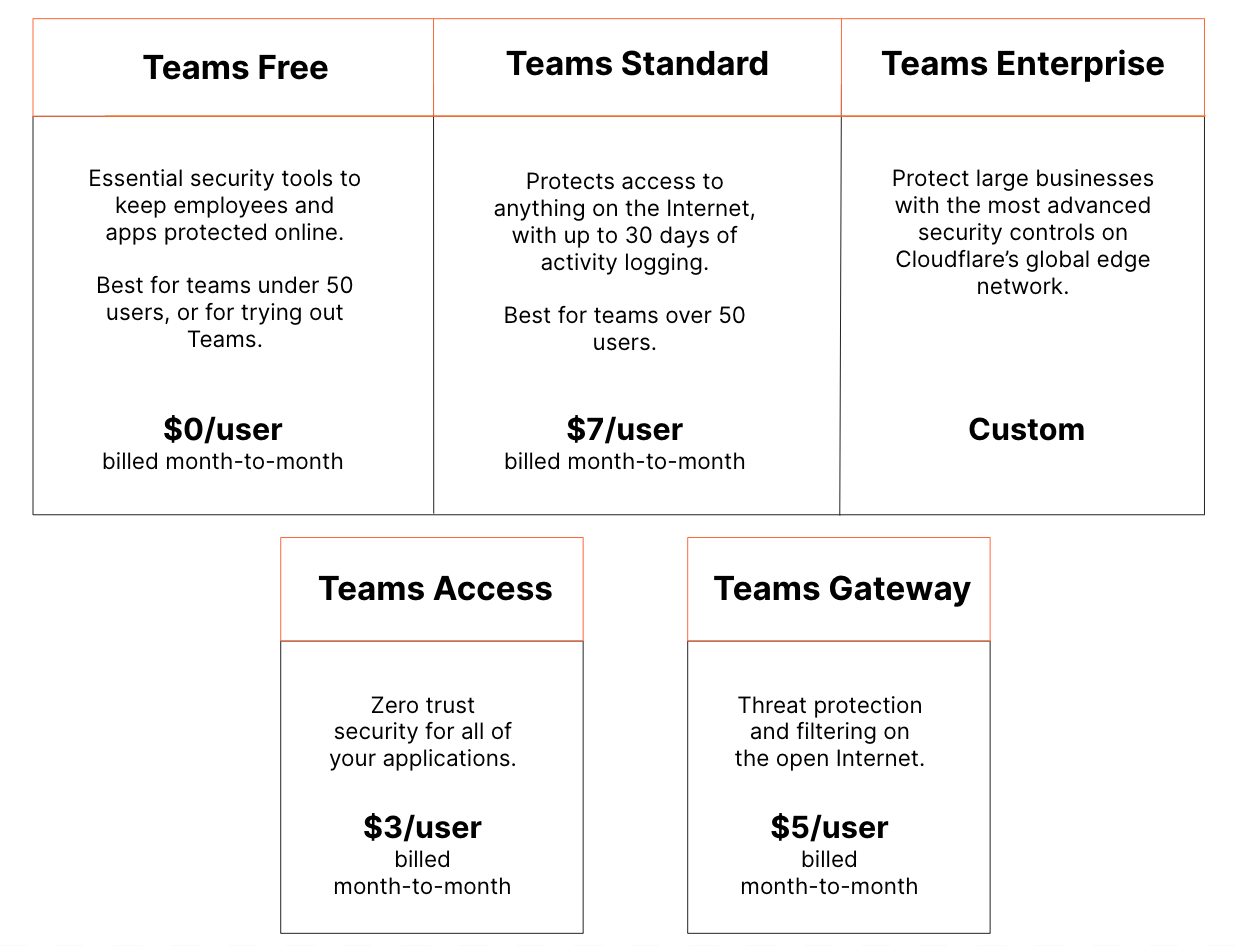
We launched Cloudflare for Teams to make Zero Trust security accessible for all organizations, regardless of size, scale, or resources. Starting today, we are excited to take another step on this journey by announcing our new Teams plans, and more specifically, our Cloudflare for Teams Free plan, which protects up to 50 users at no cost. To get started, sign up today.

If you’re interested in how and why we’re doing this, keep scrolling.

Our Approach to Zero Trust

Cloudflare Access is one-half of Cloudflare for Teams – a Zero Trust solution that secures inbound connections to your protected applications. Cloudflare Access works like a bouncer, checking identity at the door to all of your applications.

The other half of Cloudflare for Teams is Cloudflare Gateway which, as our clever name implies, is a Secure Web Gateway protecting all of your users’ outbound connections to the Internet. To continue with this analogy, Cloudflare Gateway is your organization’s bodyguard, securing your users as they navigate the Internet.

Together, these two solutions provide a powerful, single dashboard to protect your users, networks, and applications from malicious actors.

Zero Trust For Everyone

A Mission-Driven Solution

At Cloudflare, our mission is to help build a better Internet. That means a better Internet for everyone, regardless of size, scale, or resources. With Cloudflare for Teams, our part in this mission is to keep your team members secure from unknown threats and your applications safe from attack, so that your team can focus on your business.

Earlier this year, shortly after we launched Cloudflare for Teams, organizations suddenly had to change the way they worked. Users left offices, and the security provided by those offices, to work from home. This accelerated the pace of IT transformation from years to days, or even hours.

To alleviate that burden, we provided Cloudflare for Teams for everyone at no cost, and with no restrictions until September 1, 2020. We also offered free one-on-one onboarding to make adoption seamless, and used those sessions to improve the product for our current users as well.

Moving forward, users will continue to work from home, and applications will continue to move away from managed data centers. While our initial free program is no longer available, our team wanted to find a new way to continue helping organizations of any size adjust to this new security model that seems to be here to stay.

The New Free Plan

Today, we are launching the Cloudflare for Teams Free plan, which brings the features of enterprise Zero Trust products and Secure Web Gateways to small teams as well.

Cloudflare for Teams Free offers robust Zero Trust security features for both internal and SaaS applications, and supports integration with a myriad of social and enterprise identity providers like AzureAD or Github. Our Free plan also includes DNS content and security filtering for multiple network locations, complete with 24 hour log retention. By offering Cloudflare for Teams Free, our goal is to empower you to take your first step on a journey to Zero Trust with us.

Zero Trust For Everyone

What You Can Do with Teams Free

With up to 50 seats of Access and Gateway, we’ve seen that the possibilities are endless. In fact, here are some of our favorite ways users are already getting the most out of Cloudflare for Teams Free today.

  • Collaborate on your startup. Build your product without worrying about security. Use Access to protect your development environment.
  • Secure your home Wi-Fi network. Point your home Wi-Fi router’s traffic to Gateway, and set up simple filtering rules to block malware and phishing attacks.
  • Protect the backend of your personal website. Lock down your WordPress admin panel pages, and invite collaborators to work on your blog by using Access’ one-time-pin feature.
  • Safeguard a guest Wi-Fi network. Shield a retail location with Gateway by enforcing your Acceptable Use Policy on your network.

Standalone and Standard

In addition to our new Cloudflare for Teams Free plan, we’re also making it easier to continue your Zero Trust journey by offering enhanced features in our standalone Cloudflare Access or Cloudflare Gateway plans.

With standalone Access, you can easily scale up or down with as many users as you need at any time for $3 per user.

Similarly, with Gateway standalone, you can safely and securely deploy DNS or HTTP security controls from 1 up to 20 different locations for $5 per user without compromising on reliability or performance.

Last but not least, we’re excited to finally give users a way to bundle with Teams Standard, which brings together everything from Access and Gateway under one simple plan at $7 per user.

Getting Started

To get started, just navigate to our sign-up page and create an account. If you already have an active account, you can head straight to the Cloudflare for Teams dashboard, where you’ll be dropped directly into our self-guided onboarding flow. From here, you’re just three steps away from deploying Access or Gateway but, in our opinion, you can’t go wrong kicking off with either.

What is Cloudflare One?

Post Syndicated from Rustam Lalkaka original https://blog.cloudflare.com/cloudflare-one/

What is Cloudflare One?

Running a secure enterprise network is really difficult. Employees spread all over the world work from home. Applications are run from data centers, hosted in public cloud, and delivered as services. Persistent and motivated attackers exploit any vulnerability.

Enterprises used to build networks that resembled a castle-and-moat. The walls and moat kept attackers out and data in. Team members entered over a drawbridge and tended to stay inside the walls. Trust folks on the inside of the castle to do the right thing, and deploy whatever you need in the relative tranquility of your secure network perimeter.

The Internet, SaaS, and “the cloud” threw a wrench in that plan. Today, more of the workloads in a modern enterprise run outside the castle than inside. So why are enterprises still spending money building more complicated and more ineffective moats?

Today, we’re excited to share Cloudflare One™, our vision to tackle the intractable job of corporate security and networking.

What is Cloudflare One?

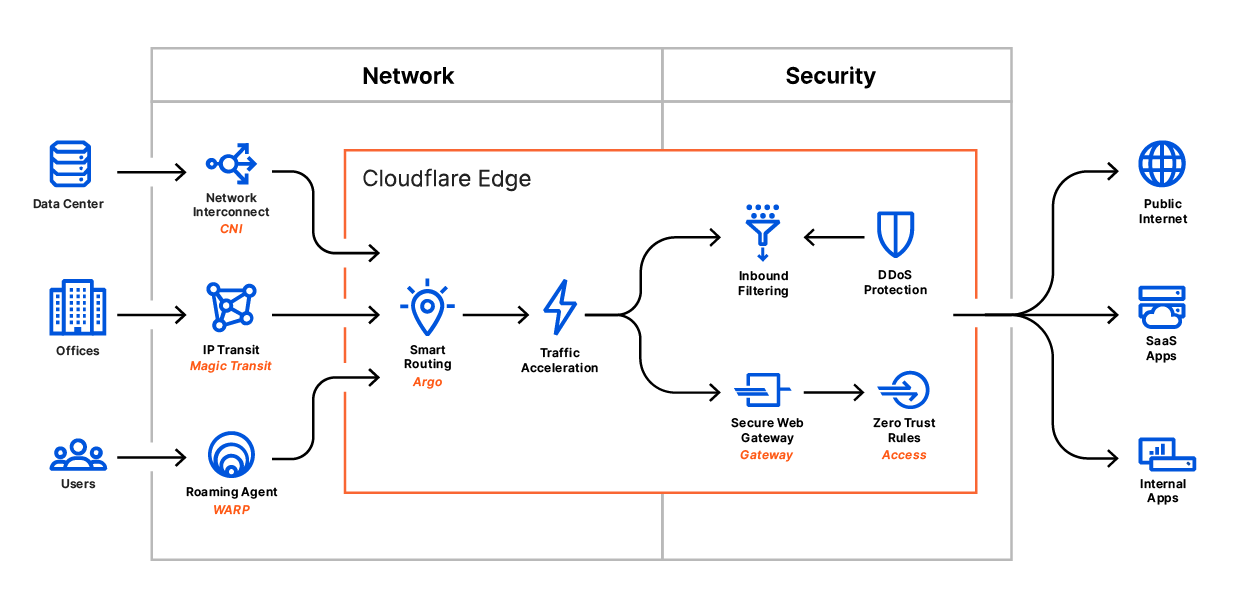
Cloudflare One combines networking products that enable employees to do their best work, no matter where they are, with consistent security controls deployed globally.

Starting today, you can begin replacing traffic backhauls to security appliances with Cloudflare WARP and Gateway to filter outbound Internet traffic. For your office networks, we plan to bring next-generation firewall capabilities to Magic Transit with Magic Firewall to let you get rid of your top-of-shelf firewall appliances.

With multiple on-ramps to the Internet through Cloudflare, and the elimination of backhauled traffic, we plan to make it simple and cost-effective to manage that routing compared to MPLS and SD-WAN models. Cloudflare Magic WAN will provide a control plane for how your traffic routes through our network.

You can use Cloudflare One today to replace the other function of your VPN: putting users on a private network for access control. Cloudflare Access delivers Zero Trust controls that can replace private network security models. Later this week, we’ll announce how you can extend Access to any application – including SaaS applications. We’ll also preview our browser isolation technology to keep the endpoints that connect to those applications safe from malware.

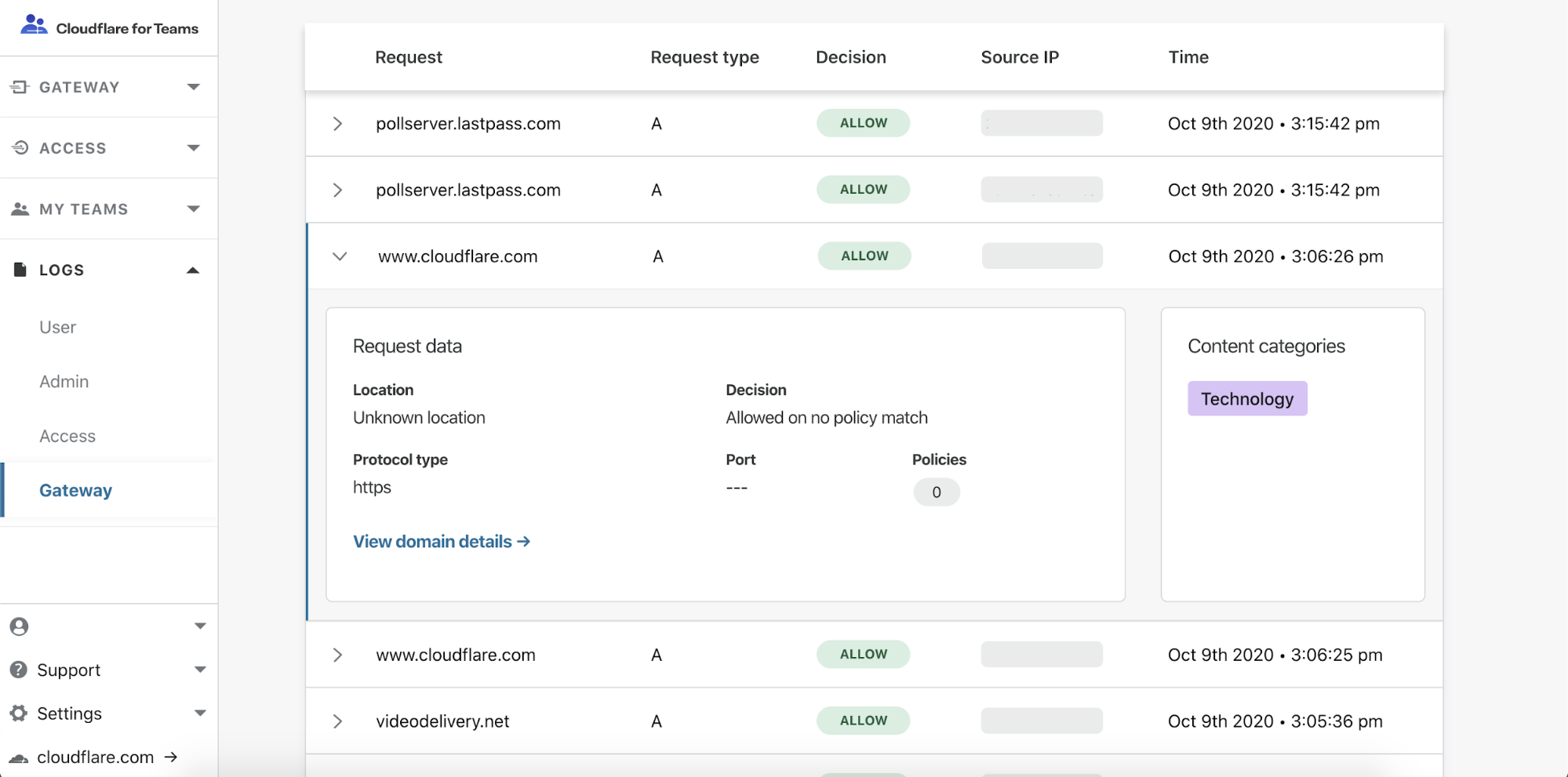
Finally, the products in Cloudflare One focus on giving your team the logs and tools to both understand and then remediate issues. As part of our Gateway filtering launch this week we’re including logs that provide visibility into the traffic leaving your organization. We’ll be sharing how those logs get smarter later this week with a new Intrusion Detection System that detects and stops intrusion attempts.

What is Cloudflare One?

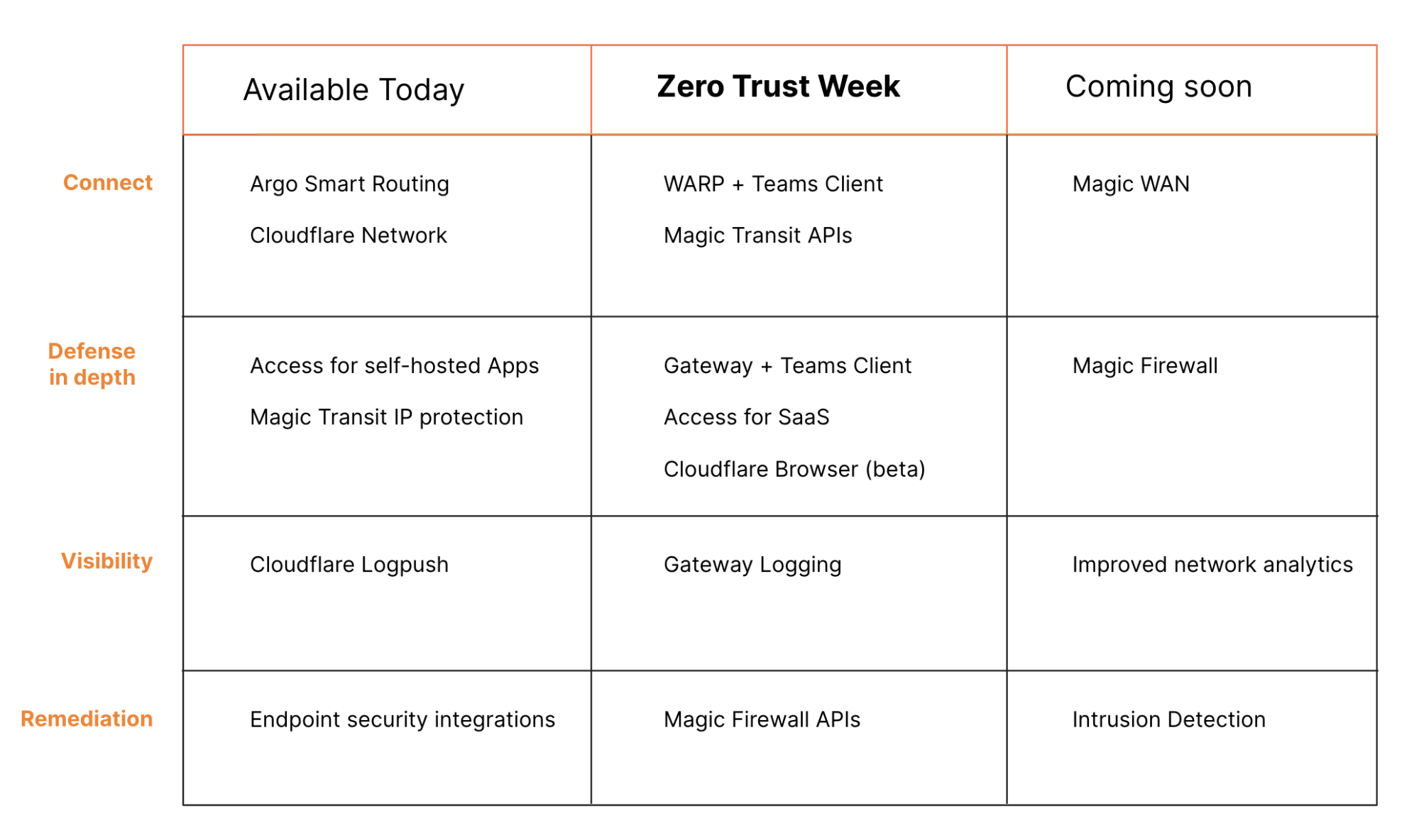
Many of those components are available today, some new features are arriving this week, and other pieces will be launching soon. All together, we’re excited to share this vision and for the future of the corporate network.

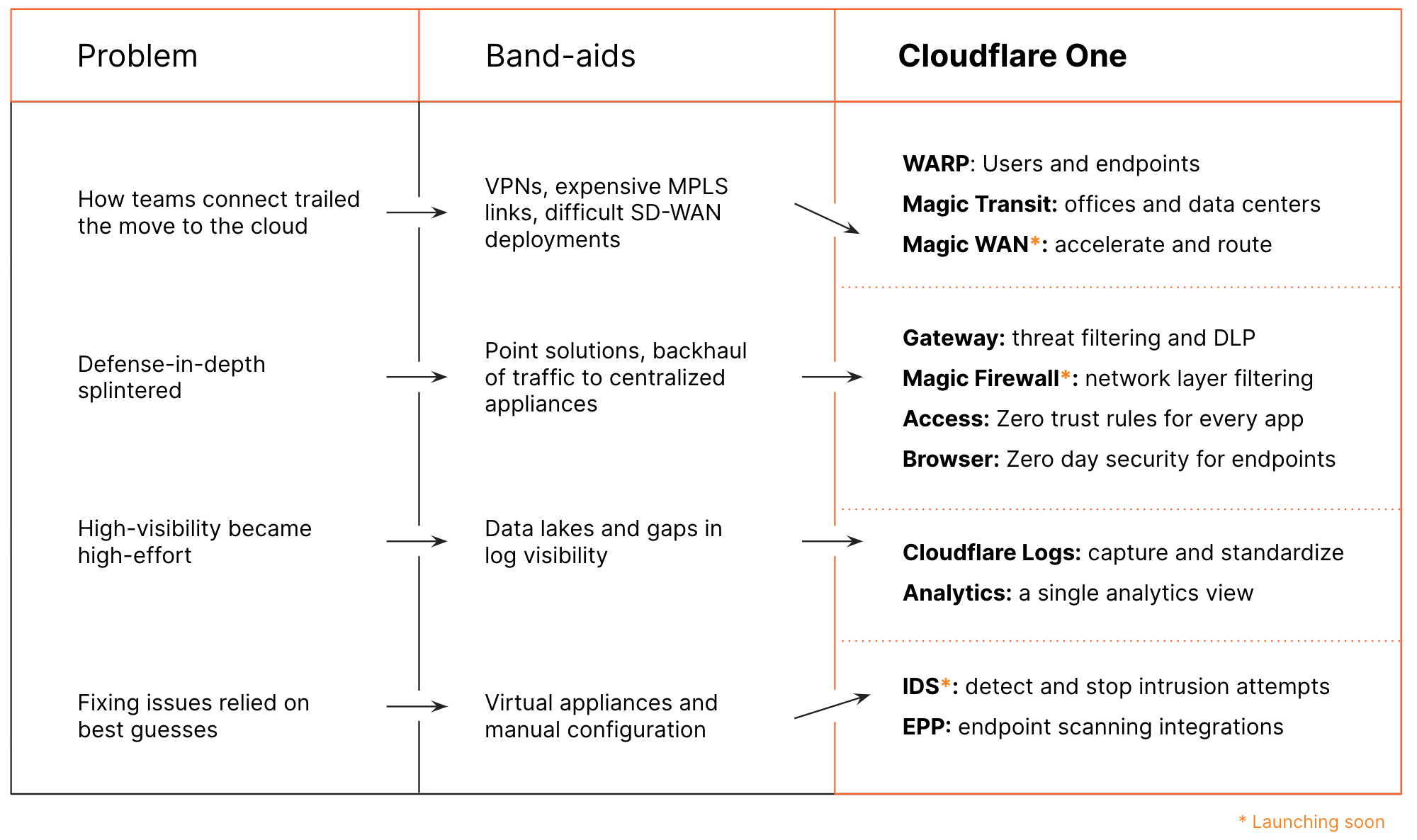
Problems in enterprise networking and security

The demands placed on a corporate network have changed dramatically. IT has gone from a back-office function to mission critical. In parallel with networks becoming more integral, users spread out from offices to work from home. Applications left the datacenter and are now being run out of multiple clouds or are being delivered by vendors directly over the Internet.

Direct network paths became hairpin turns

Employees sitting inside of an office could connect over a private network to applications running in a datacenter nearby. When team members left the office, they could use a VPN to sneak back onto the network from outside the walls. Branch offices hopped on that same network over expensive MPLS links.

When applications left the data center and users left their offices, organizations responded by trying to force that scattered world into the same castle-and-moat model. Companies purchased more VPN licenses and replaced MPLS links with difficult SD-WAN deployments. Networks became more complex in an attempt to mimic an older model of networking when in reality the Internet had become the new corporate network.

Defense-in-depth splintered

Attackers looking to compromise corporate networks have a multitude of tools at their disposal, and may execute surgical malware strikes, throw a volumetric kitchen sink at your network, or any number of things in between. Traditionally, defense against each class of attack was provided by a separate, specialized piece of hardware running in a datacenter.

Security controls used to be relatively easy when every user and every application sat in the same place. When employees left offices and workloads left data centers, the same security controls struggled to follow. Companies deployed a patchwork of point solutions, attempting to rebuild their topside firewall appliances across hybrid and dynamic environments.

High-visibility required high-effort

The move to a patchwork model sacrificed more than just defense-in-depth — companies lost visibility into what was happening in their networks and applications. We hear from customers that this capture and standardization of logs has become one of their biggest hurdles. They purchased expensive data ingestion, analysis, storage, and analytics tools.

Enterprises now rely on multiple point solutions that one of the biggest hurdles is the capture and standardization of logs. Increasing regulatory and compliance pressures place more emphasis on data retention and analysis. Splintered security solutions become a data management nightmare.

Fixing issues relied on best guesses

Without visibility into this new networking model, security teams had to guess at what could go wrong. Organizations who wanted to adopt an “assume breach” model struggled to determine what kind of breach could even occur, so they threw every possible solution at the problem.

We talk to enterprises who purchase new scanning and filtering services, delivered in virtual appliances, for problems they are unsure they have. These teams attempt to remediate every possible event manually, because they lack visibility, rather than targeting specific events and adapting the security model.

How does Cloudflare One fit?

Over the last several years, we’ve been assembling the components of Cloudflare One. We launched individual products to target some of these problems one-at-a-time. We’re excited to share our vision for how they all fit together in Cloudflare One.

Flexible data planes

Cloudflare launched as a reverse proxy. Customers put their Internet-facing properties on our network and their audience connected to those specific destinations through our network. Cloudflare One represents years of launches that allow our network to process any type of traffic flowing in either the “reverse” or “forward” direction.

In 2019, we launched Cloudflare WARP — a mobile application that kept Internet-bound traffic private with an encrypted connection to our network while also making it faster and more reliable. We’re now packaging that same technology into an enterprise version launching this week to connect roaming employees to Cloudflare Gateway.

Your data centers and offices should have the same advantage. We launched Magic Transit last year to secure your networks from IP-layer attacks. Our initial focus with Magic Transit has been delivering best-in-class DDoS mitigation to on-prem networks. DDoS attacks are a persistent thorn in network operators’ sides, and Magic Transit effectively diffuses their sting without forcing performance compromises. That rock-solid DDoS mitigation is the perfect platform on which to build higher level security functions that apply to the same traffic already flowing across our network.

Earlier this year, we expanded that model when we launched Cloudflare Network Interconnect (CNI) to allow our customers to interconnect branch offices and data centers directly with Cloudflare. As part of Cloudflare One, we’ll apply outbound filtering to that same connection.

Cloudflare One should not just help your team move to the Internet as a corporate network, it should be faster than the Internet. Our network is carrier-agnostic, exceptionally well-connected and peered, and delivers the same set of services globally. In each of these on-ramps, we’re adding smarter routing based on our Argo Smart Routing technology, which has been shown to reduce latency by 30% or more in the real-world. Security + Performance, because they’re better together.

A single, unified control plane

When users connect to the Internet from branch offices and devices, they skip the firewall appliances that used to live in headquarters altogether. To keep pace, enterprises need a way to secure traffic that no longer lives entirely within their own network. Cloudflare One applies standard security controls to all traffic – regardless of how that connection starts or where in the network stack it lives.

Cloudflare Access starts by introducing identity into Cloudflare’s network. Teams apply filters based on identity and context to both inbound and outbound connections. Every login, request, and response proxies through Cloudflare’s network regardless of the location of the server or user. The scale of our network and its distribution can filter and log enterprise traffic without compromising performance.

Cloudflare Gateway keeps connections to the rest of the Internet safe. Gateway inspects traffic leaving devices and networks for threats and data loss events that hide inside of connections at the application layer. Launching soon, Gateway will bring that same level of control lower in the stack to the transport layer.

You should have the same level of control over how your networks send traffic. We’re excited to announce Magic Firewall, a next-generation firewall for all traffic leaving your offices and data centers. With Gateway and Magic Firewall, you can build a rule once and run it everywhere, or tailor rules to specific use cases in a single control plane.

We know some attacks can’t be filtered because they launch before filters can be built to stop them. Cloudflare Browser, our isolated browser technology gives your team a bulletproof pane of glass from threats that can evade known filters. Later this week, we’ll invite customers to sign up to join the beta to browse the Internet on Cloudflare’s edge without the risk of code leaping out of the browser to infect an endpoint.

Finally, the PKI infrastructure that secures your network should be modern and simpler to manage. We heard from customers who described certificate management as one of the core problems of moving to a better model of security. Cloudflare works with, not against, modern encryption standards like TLS 1.3. Cloudflare made it easy to add encryption to your sites on the Internet with one click. We’re going to bring that ease-of-management to the network functions you run on Cloudflare One.

One place to get your logs, one location for all of your security analysis

Cloudflare’s network serves 18 million HTTP requests per second on average. We’ve built logging pipelines that make it possible for some of the largest Internet properties in the world to capture and analyze their logs at scale. Cloudflare One builds on that same capability.

Cloudflare Access and Gateway capture every request, inbound or outbound, without any server-side code changes or advanced client-side configuration. Your team can export those logs to the SIEM provider of your choice with our Cloudflare Logpush service – the same pipeline that exports HTTP request events at scale for public sites. Magic Transit expands that logging capability to entire networks and offices to ensure you never lose visibility from any location.

We’re going beyond just logging events. Available today for your websites, Cloudflare Web Analytics converts logs into insights. We plan to keep expanding that visibility into how your network operates, as well. Just as Cloudflare has replaced the “band-aid boxes” that performed disparate network functions and unified them into a cohesive, adaptable edge, we intend to do the same for the fragmented, hard to use, and expensive security analytics ecosystem. More to come on this soon.Smarter, faster remediation

Data and analytics should surface events that a team can remediate. Log systems that lead to one-click fixes can be powerful tools, but we want to make that remediation automatic.

Launching into a closed preview later this week, Cloudflare Intrusion Detection System (IDS) will proactively scan your network for anomalous events and recommend actions or, better yet, take actions for you to remediate problems. We plan to bring that same proactive scanning and remediation approach to Cloudflare Access and Cloudflare Gateway.

Run your network on our globally scaled network

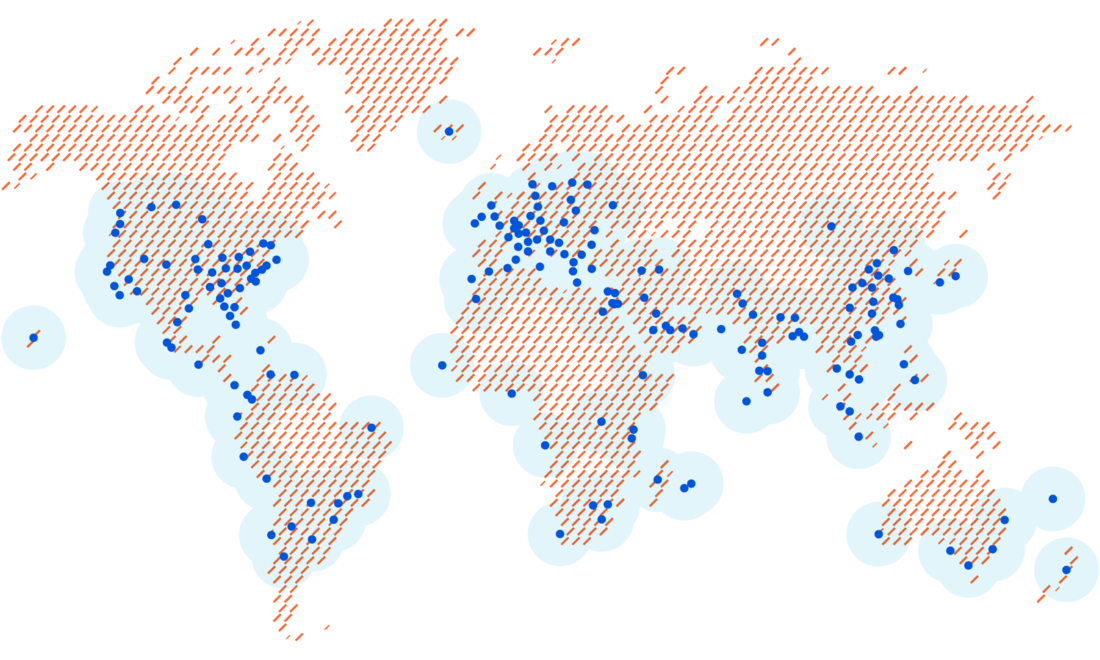
Over 25 million Internet properties rely on Cloudflare’s network to reach their audiences. More than 10% of all websites connect through our reverse proxy, including 16% of the Fortune 1000. Cloudflare accelerates traffic for huge chunks of the Internet by delivering services from datacenters around the world.

We deliver Cloudflare One from those same data centers. And critically, every datacenter we operate delivers the same set of services, whether that is Cloudflare Access, WARP, Magic Transit, or our WAF. As an example, when your employees connect through Cloudflare WARP to one of our data centers, there is a real chance they never have to leave our network or that data center to reach the site or data they need. As a result, their entire Internet experience becomes extraordinarily fast, no matter where they are in the world.

We expect that performance bonus to become even more meaningful as browsing moves to Cloudflare’s edge with Cloudflare Browser. The isolated browsers running in Cloudflare’s data centers can request content that sits just centimeters away. Even further, as more web properties rely on Cloudflare Workers to power their applications, entire workflows can stay inside of a data center within 100 ms of your employees.

What’s next?

While many of these features are available today, we’re going to be launching several new features over the next several days as part of Cloudflare’s Zero Trust week. Stay tuned for announcements each day this week that add new pieces to the Cloudflare One featureset.

What is Cloudflare One?