Ransomware and other disruptive attacks rarely succeed because of a single catastrophic failure. More often, they succeed because a system was designed for availability and scale, but not for persistent, adaptive adversaries testing for weak points from the outside.
For infrastructure and architecture leaders, that creates a practical challenge: how do you build systems that remain performant, cost-efficient, and operable while also standing up to attackers who are probing your environment for opportunities through traffic abuse, credential attacks, vulnerability exploitation, and social engineering?
The answer is not a single tool or framework. It is an architectural mindset: assume adversaries exist, assume controls will be tested, and design systems that continue operating safely under pressure.
Security starts with architecture, not alerts
One of the most common mistakes organizations make is treating security as something layered onto infrastructure after it is built. In practice, resilience comes from decisions made much earlier:
How traffic is handled under stress.
How systems and services are segmented.
How identity and access are enforced.
How quickly vulnerabilities are surfaced and validated.
How failure is contained when something goes wrong.
This is what separates reactive security from resilient architecture. The strongest environments are not the ones with the most dashboards; they are the ones built so that no single weakness can easily cascade into a broader incident.
Designing the perimeter to buy time, not perfection
Even in a world shaped by zero trust, the perimeter still matters, especially for availability.
Large-scale traffic floods, automated scanning, and API abuse are often the opening move. These events may not be the full attack, but they can create noise, consume resources, and open the door for more targeted follow-on activity. Infrastructure teams need defenses that can:
Absorb unexpected traffic without cascading failures
Distinguish abusive patterns from legitimate use
Prevent noisy attacks from turning into operational incidents
These defenses can never provide perfect prevention; cybercriminals can attack with too much sophistication and velocity. Rather, the goal is resilience. Good perimeter design buys time, preserves service availability, and prevents external pressure from becoming internal disruption.
Modern environments change too quickly for occasional reviews to be enough.
Attackers do not work on quarterly schedules, and neither should defensive programs. A stronger model is continuous vulnerability discovery: using multiple signals to understand what is exposed, what is exploitable, and what actually matters.
That can include a mix of:
Threat intelligence on active exploitation trends
External research programs such as bug bounties
Regular penetration testing
Internal testing and automated vulnerability scanning
Each of these presents different types of risk. Together, they reduce blind spots and help teams prioritize fixes based on real-world likelihood and impact, not just severity scores on paper.
Limiting blast radius is an architectural responsibility
A useful security question is not only “How do we stop every attack?” but also “What happens if one control fails?”
That shift changes how teams think about system design. It places greater emphasis on:
Hardening critical systems
Enforcing strict access controls
Separating environments and services
Reducing unnecessary trust relationships
Containing failure before it spreads
This is where architecture has an outsized role. Detection matters, but containment matters just as much. Systems built with clear boundaries are easier to defend and easier to recover operationally when incidents happen.
Identity is part of infrastructure
Many attacks do not begin with sophisticated exploits. They begin with compromised credentials, reused passwords, phishing, or other attempts to gain access through people rather than code.
That is why identity should be treated as a core infrastructure layer, not a separate administrative concern.
Strong identity practices often include:
Long, high-entropy passwords
Multi-factor authentication
Checks for compromised credentials
Clear access policies tied to real job needs
These controls reflect a simple truth: humans are part of the system. Security controls need to be strong enough to resist abuse and usable enough to work at scale.
Security as a system, not a checklist
No single control creates resilience on its own.
What matters is how controls reinforce one another: how traffic protections support availability, how vulnerability discovery informs remediation, how segmentation reduces impact, and how identity controls protect critical paths.
For infrastructure and architecture leaders, the takeaway is straightforward: the most resilient systems are not built on assumptions of safety. They are built on the expectation that adversaries will look for openings and that defenses need to hold up under real pressure.
That is why security works best as an architectural decision, not just an operational one.
A practical Backblaze perspective
At Backblaze, this is the lens we use when thinking about protection against bad actors: not as a single feature or isolated control, but as a layered systems problem that spans network protections, vulnerability discovery, access controls, and operational resilience. The important point is not any one safeguard in isolation. It is the way those safeguards work together so that a single weakness is less likely to become a customer-impacting event.
Download the ebook on building an affordable, resilient disaster recovery strategy that matters when ransomware strikes.
Disaster recovery (DR) is a top-line priority for enterprise organizations facing increasingly complex threats—sophisticated ransomware attacks, widespread cloud outages, and regulatory risks. The ability to recover quickly and maintain business continuity isn’t just a technical necessity—it’s a competitive imperative.
Today, I’m breaking down foundational strategies for enterprise DR readiness. You’ll find practical guidance on infrastructure design, site strategy, backup best practices, and more to help you take immediate action.
Get the full guide
Our “Essential Guide to Disaster Recovery Planning” offers a comprehensive framework for designing a DR plan that protects your business across multiple threat vectors.
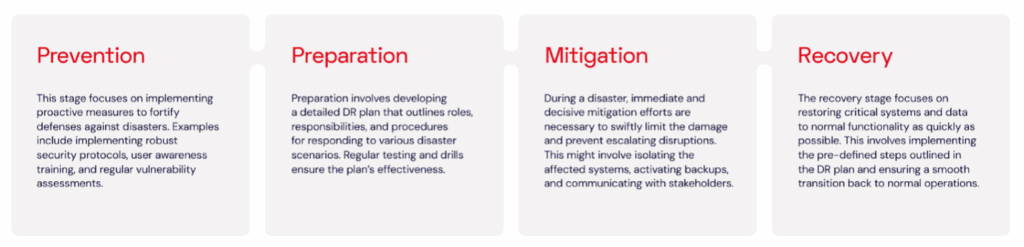
Comprehensive DR requires a multi-tiered approach. Your DR strategy should encompass four critical stages: prevention, preparation, mitigation, and recovery.
Choose the right infrastructure: Beyond legacy limitations
Many enterprises still rely on legacy storage technologies like tape, which create delays in restoration and introduce hardware failure risks. Shifting to cloud-first infrastructure reduces these vulnerabilities while unlocking scalability and location diversity. It also supports immutability features—critical for ransomware resilience—and simplifies compliance with evolving regulations.
Cloud platforms also unlock new options for data governance and sovereignty. Enterprises operating across regions or industries governed by strict data residency laws can configure cloud storage to maintain compliance while reducing operational overhead.
As enterprise backup and archive needs grow, it becomes vital to distinguish between long-term cold storage and actively accessible data. With clear infrastructure planning, organizations can streamline operations and ensure faster recovery without overspending on high-performance systems for archival workloads.
What is Object Lock?
Object Lock is the feature in cloud platforms that enables immutability. With immutability, your data cannot be changed, deleted, or encrypted. This is the ultimate protection against ransomware.
DR site temperatures: Hot, warm, or cold?
Depending on your recovery time objective (RTO), different types of recovery sites offer different benefits:
Hot sites: Fully mirrored and ready for instant failover—great for mission-critical apps but expensive.
Warm sites: Pre-configured but not fully live—strike a balance between cost and speed.
Cold sites: Infrastructure is ready but requires manual configuration—most affordable, but slowest to recover.
Enterprises evaluating DR readiness should consider whether their current configuration meets their recovery time goals—and whether they’re optimizing for the right workloads. Comparing hot, warm, and cold site models can help strike the right balance between performance and budget.
Build vs. buy vs. cloud: Finding the right fit
Selecting a DR site is fundamental to your strategy. There are four main approaches to establishing a DR site: building your own, buying services from a co-location provider, buying public cloud storage, or leveraging a disaster recovery as a service (DRaaS) solution. Each approach offers distinct advantages and drawbacks.
Building an on-premises DR site
Pros: It provides complete control over the DR environment, offering greater customization and security.
Cons: Significant upfront investment in hardware, software, and facility infrastructure and management. Requires ongoing maintenance and staffing costs. Limited scalability to accommodate future growth.
Buying co-located DR storage
Pros: It offers a cost-effective alternative to building your own site. Co-location providers manage aspects of the physical infrastructure, reducing your IT team’s workload.
Cons: Less control over the environment compared to an on-premises solution. May require additional investment for network connectivity and configuration. Potential vendor lock-in with specific co-location providers.
Buying public cloud-based DR storage
Pros: Highly scalable and cost-effective. CSPs manage the physical infrastructure, reducing your IT team’s workload. Features like Object Lock help address security concerns versus on-premises storage.
Cons: Retrieving large volumes of data may be slow due to bandwidth constraints.
Buying disaster recovery as a service (DRaaS)
Pros: Highly scalable and cost-effective solution. Eliminates the need for upfront infrastructure investment. DRaaS providers manage the entire DR environment and provide technical support, freeing up your IT staff.
Cons: Reliance on a third-party provider for critical data and infrastructure. Potential concerns over network latency and vendor lock-in. Security considerations require a careful evaluation of the cloud provider’s practices.
Backup vs. replication: Know the difference
Replication copies data in real-time, but that also means it can copy infected or corrupted data. Backups, on the other hand, offer point-in-time recoveries so you can restore data even after a ransomware attack.
The optimal approach to DR depends on your specific needs.
For frequently accessed data requiring near-instantaneous recovery, consider a combination of hot site methodology and real-time data replication. This offers the fastest failover, but can come at a higher cost.
For critical data with acceptable downtime, a warm site with replicated immutable backups at a secondary location (either on-premises or in the cloud) provides a good balance between cost and recovery time. While requiring some manual intervention, it offers protection against malware replicating to the DR site.
For less critical data or archival purposes, cold storage with periodic backups is a cost-effective option. Backups offer a historical record and are less susceptible to malware infection compared to replicated data, particularly if Object Lock is enabled for immutability.
SaaS outages are a threat you can’t ignore
Although built for high availability, SaaS apps don’t guarantee protection against data loss. Tools like Microsoft 365 and Google Workspace are built for uptime, not recovery. Misconfigurations, insider threats, and accidental deletions remain common risks. Enterprises should take control of their own retention policies with dedicated SaaS backup strategies, including regular point-in-time snapshots and recovery testing.
Additionally, planning for SaaS outages should include identifying local alternatives for core business functions. Can teams temporarily revert to offline workflows? Are key contacts available outside of email or Slack? Defining fallback protocols ensures that productivity doesn’t grind to a halt even if your primary tools go dark.
Assembling your incident response team
The incident response team (IRT) is the backbone of your DR response and is responsible for leading the recovery efforts during a disaster. Here’s a breakdown of possible key IRT roles:
Incident commander: Oversees the entire incident response process, making critical decisions and delegating tasks to team members.
Technical lead: Provides technical expertise, directing recovery efforts for IT infrastructure and data restoration.
Communications lead: Handles external and internal communication, ensuring timely updates for stakeholders and mitigating potential reputational damage.
Documentation lead: Maintains the DR runbook, ensuring its accuracy and updating it with post-incident findings.
Legal counsel: Provides legal guidance and ensures compliance with relevant regulations during the response and recovery process.
Objectives, priorities, and KPIs: The compass of your DR strategy
A robust DR strategy starts with clearly defined objectives and priorities. These guide your approach and decision-making during a disaster recovery event. Your strategy should prioritize rapid recovery of critical systems and applications to minimize operational downtime and resume normal functions swiftly.
Prioritization: Not all data (or systems) are created equal
Prioritizing your critical business applications depends on a deep understanding of your business. Collaborate with internal partners to identify critical business applications that are essential for ongoing operations. Not all applications require immediate restoration. Prioritize systems based on their impact on core business functions.
Documentation is key
A popular mantra for DR specialists is “Test the plan; don’t plan the test.” Your DR plans must be clearly documented as working recipes for application and data recovery, including dependencies and prerequisites. Document the recovery procedures for each critical application, outlining the steps required to bring them back online. This ensures your IT team can efficiently restore essential services during a disaster.
Primary DR objectives
Minimize data loss: The primary objective is to minimize data loss through regular backups and secure storage practices.
Ensure business continuity: The DR plan aims to rapidly recover operation of critical functions during a disaster, minimizing disruption to the business goals.
Optimize costs: Application and data recovery needs to balance speed and costs to ensure recoverability without unnecessarily increasing IT spending.
Compliance considerations
Compliance regulations might influence your DR priorities. Understand any industry-specific regulations or data privacy laws that might dictate specific data protection and recovery timeframes.
Collaborative RTO and RPO setting
Working with internal partners to set RTOs and RPOs ensures alignment across the organization.
Recovery Time Objective (RTO) defines the acceptable timeframe for restoring critical applications to a functional state.
The Recovery Point Objective (RPO) defines the maximum tolerable amount of data loss acceptable in the event of a disaster.
Stakeholders need to understand the realistic trade-offs involved in setting RTOs and RPOs, balancing the need for quick recovery with resource and cost limitations. Achieving extremely short RTOs, such as recovery within minutes, might require substantial investments in advanced infrastructure, redundant systems, and skilled personnel. Setting achievable RTOs and RPOs that effectively balance the need for swift recovery with the financial limitations of the organization requires open communication and collaboration.
Restore vs. recovery: Understanding the nuances
It’s important to distinguish between data restoration and system recovery. Data restoration specifically involves retrieving data from backups. On the other hand, system recovery encompasses the comprehensive restoration of data, applications, configurations, and user accounts to fully restore system functionality.
Your RTOs should focus on the time it takes to bring an application to a usable state, not just the time to recover the data.
Setting expectations
Employees might have unrealistic expectations regarding recovery times during a disaster. Educate the organization on the DR process and the inherent complexities involved.
Developing measurable KPIs
Tracking your progress Key performance indicators (KPIs) are your guiding metric for measuring the effectiveness of your DR strategy. Here are some key DR-related KPIs to consider:
RTO achievement rate: Tracks the percentage of times critical applications are restored within the established RTO.
RPO achievement rate: Measures the percentage of data recovered that meets the defined RPO.
DR plan testing frequency: Monitors how often the DR plan is tested to ensure its effectiveness.
Mean time to recovery (MTTR): Tracks the average time taken to recover critical applications after a disaster.
Data loss rate: Measures the amount of data lost during a disaster compared to the established RPO.
These KPIs provide valuable insights into your DR preparedness and help identify areas for improvement.
Strengthen your RTO and RPO goals with the cloud
Recovery time objectives (RTOs) and recovery point objectives (RPOs) are the backbone of any DR plan. Yet many organizations set unrealistic targets without fully accounting for infrastructure, bandwidth, or cost constraints.
Establishing tiers of RTO and RPO based on data type or application criticality helps organizations avoid overengineering. Not every workload needs sub-hour recovery—archived legal files or marketing collateral may tolerate 24+ hour RTOs. Grouping systems into priority tiers ensures efficient use of budget and infrastructure while keeping SLAs aligned to business risk.
Improving these metrics often comes down to using the right storage architecture. By offloading backup workloads to cost-effective cloud storage with integrated immutability and replication, enterprises can improve RTO and RPO without the overhead of traditional DR environments.
A proactive, iterative approach
A DR plan isn’t a one-time project—it’s a living process that should evolve with the business. Every test, every incident, and every infrastructure change is an opportunity to improve.
Strong DR programs rely on frequent validation, leadership alignment, role clarity, and avoiding common missteps. As IT leaders face new threats and shifting architectures, resiliency comes from readiness—not just recovery.
Testing is everything
Even the most comprehensive DR plans can falter if they aren’t regularly validated. Testing ensures that backup data is restorable, that systems behave as expected under stress, and that team roles are clearly understood.
Testing also gives stakeholders across departments a shared language for discussing DR. Finance understands the cost implications of downtime, Legal sees the impact of non-compliance, and Security can stress-test assumptions about containment and escalation. When testing is multidisciplinary, recovery isn’t just possible—it’s predictable.
Organizations that incorporate routine DR drills and testing into their operations tend to recover faster and more confidently. Effective exercises can include walk-throughs, tabletop simulations, and full-scale failover tests. The goal isn’t just compliance—it’s ensuring the organization can execute when it matters most.
Cost transparency and budgeting for DR
Budget uncertainty often limits the scope and effectiveness of DR plans. Legacy vendors may impose hidden fees for egress, API operations, or early deletion, making it difficult to forecast the total cost of a recovery event. Cloud-native solutions with transparent pricing models allow IT and finance teams to plan confidently.
Establishing a clear TCO framework—including hardware, licensing, testing, and human resources—can help justify DR investments and avoid budget shortfalls when they matter most. DR isn’t just insurance—it’s a measurable part of digital operational excellence.
Final thoughts
Disaster recovery isn’t optional—it’s essential. With threats ranging from cyberattacks to cloud outages, every organization needs a plan that’s tested, documented, and designed for rapid recovery.
Backblaze B2 helps you implement affordable, scalable, and secure DR strategies with:
Immutable backups
Flexible recovery options
Transparent pricing (no egress fees)
Seamless integrations with backup tools like Veeam, MSP360, and more
Your disaster recovery (DR) plan is only as strong as your last test. Yet, many enterprises treat DR like a fire extinguisher—useful in theory, but rarely checked. Regular backup testing and disaster recovery drills are essential to ensure your plan works when it counts.
Let’s break down how to test your DR plan effectively and build a framework for continuous improvement.
Step 1: Building a disaster recovery testing framework
Your DR plan isn’t complete until it includes a clear, repeatable testing schedule. Here’s how to structure it:
Testing frequency: Establish a regular testing schedule. The optimal frequency depends on your company’s size and risk profile. A minimum of annual testing is recommended, with more frequent testing (every three-six months) beneficial for larger enterprises.
Testing types: Incorporate various testing methodologies into your plan. This might include:
Tabletop exercises: Simulate disaster scenarios through facilitated discussions, allowing your team to identify communication gaps and areas for improvement in the DR plan.
Walk-throughs: Step through specific recovery procedures outlined in the plan with your incident response team, ensuring team members understand their roles and responsibilities.
Limited scope DR drills: Simulate a disaster scenario with a specific system or application outage, testing recovery procedures for that particular environment.
Full-scale DR drills: Conduct comprehensive tests that simulate a full-blown disaster, involving all critical systems, applications, and personnel.
By rotating through these disaster recovery testing approaches, you’ll catch vulnerabilities before a real crisis does.
Step 2: Involve the right people (not just IT)
A solid DR plan isn’t just an IT function, it’s a team sport. Bring in key personnel from various departments (IT, legal, finance, etc.) to review your DR plan. You might discover potential oversights or areas for improvement that you may have missed with their diverse perspectives.
Step 3: Practice makes prepared
Regularly conduct DR drills and exercises to put your plan into action. DR drills should feel real. That means:
Involving your team. These exercises should involve all members of your IRT, including IT specialists, communication experts, and management representatives, simulating real-world response scenarios and fostering teamwork within the team.
Learning from every test. The primary objective of testing is to identify weaknesses and improve your DR plan. Track everything: timing, response quality, communication breakdowns.
Conducting a retrospective. Use your DR exercises and drills to analyze successes and failures, identify areas for improvement in the DR plan and update your plan based on the lessons learned.
Encourage open discussion and feedback from all participants, including the IRT and potentially impacted stakeholders.
Identify areas where the plan fell short or where communication could be improved.
Apply these insights to fortify your DR plan and improve your company’s overall disaster preparedness.
Step 4: Make the plan accessible
Ensure your DR plan is readily accessible to your IRT members, even during a disaster. Consider storing it in a secure, cloud-based location accessible from various devices and internet connections. Ensure you can access your plan even if your primary environment is down.
Step 5: Leverage the cloud for DR testing
Consider cloud-based solutions for DR testing and recovery. This eliminates the need for ongoing infrastructure investment dedicated solely to testing purposes. Leveraging tools like cloud storage and virtualized infrastructure services provide flexible, affordable options.
Here are some key benefits of cloud-based DR testing:
Cost-effectiveness: Cloud platforms offer on-demand resources, eliminating the need for dedicated infrastructure and associated costs.
Scalability: Cloud resources can be easily scaled up or down to meet your specific testing needs.
Repeatability: Cloud environments allow for replicating test scenarios consistently, facilitating effective training and process improvement.
Final thoughts: Test, Learn, Refine, Repeat
Disaster recovery isn’t a one-and-done process. Every test is a chance to learn, refine, and prepare better for the next incident. Businesses that test regularly not only reduce downtime—they build trust with their teams, customers, and stakeholders.
Creating clear goals is inevitably part of any business strategy. You’ve likely heard of the acronym SMART—specific, measurable, actionable, realistic, and time-bound—when it comes to goal setting. As a business leader in information technology or a related business unit, you’re responsible for developing sound goals for business technology, data protection, and disaster recovery.
Two key metrics that feed into those strategies are your recovery time objective (RTO) and recovery point objective (RPO). Like all the other goals your business sets, the RTO and RPO should also be SMART goals.
So, how can you set meaningful RTO and RPO objectives for your business? And how can the cloud help you achieve or improve on those objectives? Today I’ll talk about how to smarten up these objectives to lead to better business continuity (BC) and a more effective disaster recovery (DR) plan.
The Essential Guide to Disaster Recovery Planning
Read more about how to build a disaster recovery plan for your organization.
Why do RTO and RPO matter?
RTO and RPO are two fundamental inputs to a comprehensive disaster recovery plan. They also very much guide how you’ll structure your backup strategy and engineer your backup architecture.
RTO is a business metric that states the maximum length of time a business can tolerate for recovery. It’s important to note the difference between recovery and restoration of data here. Restoring data is just one part of a recovery.
Recovery means systems are back up and running—fully functional—with users (employees, customers, etc.) able to utilize them in the same manner as before the data incident occurred.
RPO measures the maximum amount of data a company can afford to lose (or is willing to lose), measured in units of time. For instance, an RPO of 12 hours means that the company can accept the risk (financial risk, risk to the brand, etc.) of having lost 12 hours worth of data. So, if you run backups every 11 hours, you will be able to meet your RPO.
How to set RTO and RPO
Creating these objectives is a business decision—not an IT decision. If you’re an IT leader, your job is to work with your internal stakeholders to fully understand the business and the criticality of various applications and services in order to help define the RTO and RPO.
Put another way: The decision about what standard to meet is a shared responsibility. And those standards (recovery time, file durability, etc.) are the targets that IT and infrastructure providers teams must meet.
RTO and RPO may be different from one system to another. Some applications are more important than others.
Keep in mind that it’s likely that department heads will all say their services are the most important to immediately recover. But if everything is deemed critical, then nothing is.
Discuss how data loss and time to recovery impact the business in quantifiable details—revenue lost, number of customers affected, etc.—in order to truly prioritize systems and set appropriate RTOs and RPOs.
Making your RTOs and RPOs SMART
Remember that your objectives should be SMART:
Specific: Think through how granular your RTOs and RPOs should be. In addition to different RTOs and RPOs per application, you may also need different RTOs and RPOs per scenario. For example, the RTO for a ransomware attack is much different than that for hardware failure.
Measurable: One good way of measuring the efficacy of your RTOs and RPOs is by conducting DR testing. Run fire drills and conduct tabletop exercises. Practice restoring data. These inputs will help you understand if your objectives are meaningful and obtainable.
Actionable: Document your RTO and RPO in your DR plans and ensure they align with any business continuity risk management plans or goals around maximum allowable risk tolerance. You may also want to document the assumptions and inputs that formed the RTO and RPO. For instance, how much revenue is lost when a given system is down? Explain how that factor drives your RTO.
Realistic: Don’t let your stakeholders set unachievable objectives. If there is an ask for a very low RTO and/or RPO, help your stakeholder understand exactly what it will take—and how much it will cost—to implement that objective.
Time-bound: The RTO can be defined in seconds up to weeks. The shorter the RTO, the more expensive the investment will be to meet it.
Remember that you’re always balancing RTO and RPO against an unachievable “perfect” state. For instance, you would likely need multiple failover hot sites with replicated data to meet an RTO of seconds of downtime.
RTO is a forward-looking measurement; RPO is a backward-looking measurement that essentially represents the frequency of your backups.
A short RPO means more recent backup data is needed, and, yes, that also means greater investment. RPOs measured in seconds may require high-speed backup technology like continuous replication.
How to discuss RTO and RPO with business leaders
Discussing technical concepts with internal stakeholders can be challenging. To guide the objective-setting discussion with stakeholders, use the following questions as a guide:
Where and how do you store data?
How often does your data change?
What would a minute of downtime cost your department, in terms of revenue, risk, loss of productivity, impact to customers, etc.?
What are the compliance or industry requirements for maintaining sensitive data?
Do you have a way of manually transacting business if service is down?
Your IT department may already be well aware of many of these goals, but it’s good to do a fresh and full inventory of data and data management procedures. For example, even with the rise of shared drives, many employees still save important data locally. Or, there may be business-critical data being saved in services like Microsoft 365 or Kubernetes—and those services are often not adequately backed up.
How do RTO and RPO affect backup strategy?
Your RPO is often more directly related to backup strategy, although RTO certainly informs backup strategy. If you need a very low RPO (i.e., the business can tolerate very little data loss), you must plan to run backups more frequently. This ensures you always have very recent data to recover.
RTO, however, relates more to systems and infrastructure—again, because the objective is about recovery and not just restoring data. RTO will drive investment decisions around backup and DR architecture.
Your backup strategy or tech stack should not dictate either your RTO or your RPO.
First, you should define your RTO and RPO, and then you must determine if changes in backup policy are needed or if you need to update any backup systems in order to reach desired RTOs and RPOs.
Your RTO will drive decisions around backup and DR infrastructure; your RPO will drive decisions around frequency of backup and type of backup.
How does the cloud help companies meet RTO and RPO goals?
Using a public cloud for backup and archive can help you achieve your desired RTO and/or RPO. An obvious example is using cloud to replace LTO tape backup. Tape backup has some of the worst (maybe the worst) RTOs and RPOs. It takes an extraordinarily long time to recover from tape, and backups are likely not as frequent as they should be because tape is often not properly maintained. Migrating your tape backups to a public cloud like Backblaze B2 Cloud Storage is still cost-effective and it will drastically improve RTO and RPO.
If you’re using a hyperscaler like AWS, you may have had to cut back on frequency of backup or needed retention periods due to exorbitant fees. Shifting your backups to Backblaze B2 can help you achieve your goals: Backblaze B2 is one-fifth the cost of AWS S3, you can afford to run and save more frequent backups, thus lowering your overall RPO.
Replication is another technology that can help reduce RTOs. Many enterprise businesses will already have a failover site, but keeping an extra copy of your data in the cloud ensures you can still meet your desired RTO in the case of a DR site or production facility takeout. This is exactly what brought SaaS platform Centerbase to Backblaze.
More commonly, if it’s inordinately expensive to own your own DR site, you can store your backups in Backblaze B2 and utilize Cloud Replication for added redundancy.
RTO and RPO and your business
Ultimately, you should frame your RTO and RPO in terms of business impact. Then, reverse engineer your backup and DR infrastructure to support those objectives. Next, identify the storage systems for your data based on its business criticality and desired RTO and RPO.
Depending on your business goals, you’ll likely use cloud storage services, on-premises storage, or some combination of the two. Regardless of the type of business you run, demonstrating that you have an airtight DR plan with SMART RTO and RPO goals will instill confidence in your business partners, help with cyber insurance eligibility, and shore up your organization’s ability to withstand data disasters.
A well-defined disaster recovery (DR) plan relies heavily on a coordinated incident response team. Think of your incident response team like a pit crew. It’s easy to assume you’ll have a good race when everything is performing smoothly, but the real test comes when something goes wrong—maybe a tire blows or the engine overheats. In those moments, success isn’t about having the best tools in the garage; it’s about having the right team, working together, to quickly solve problems and get back on track.
When your team is facing a disaster recovery scenario, whether it’s a cyber attack, natural disaster, outage, or data breach, the speed and coordination of your team determines how quickly and how well you can move forward. In this post, I’m breaking down how to assemble a team that can respond with precision, minimize downtime, and keep your organization running smoothly when unexpected issues arise.
Establishing key team members, roles, and hierarchy
The incident response team (IRT) is the backbone of your DR response and is responsible for leading the recovery efforts during a disaster. Here’s a breakdown of possible key IRT roles:
Incident commander: Oversees the entire incident response process, making critical decisions and delegating tasks to team members.
Communications lead: Handles external and internal communication, ensuring timely updates for stakeholders and mitigating potential reputational damage.
Documentation lead: Maintains the DR runbook, ensuring its accuracy and updating it with post-incident findings.
Legal counsel: Provides legal guidance and ensures compliance with relevant regulations during the response and recovery process.
Building redundancy
Building redundancy in your IRT allows you to account for team member absences. This includes IT leadership; don’t assume you’ll be in the office when a disaster happens. Assign backup personnel for critical roles within the team to ensure continuity in the event of unforeseen circumstances.
Establish a clear succession plan for leadership roles within the IRT. This ensures a smooth transition if the primary incident commander or other key personnel become unavailable during a disaster.
Establishing a reporting hierarchy
Clearly define a reporting hierarchy within the IRT, outlining who reports to whom and the escalation process for making critical decisions. A clear chain of command during a crisis prevents confusion and delays that could result in prolonged downtime and increased risks.
The importance of clear communication
A critical component of any DR plan is clear communication to employees and executives regarding their specific roles during a security incident. This ensures that the assigned team leader can coordinate a unified response. Remember to include guidelines about incident escalation, as well as agreed-upon methods of communication (e.g., email, direct messaging, video calls, etc.).
Executive sponsorship: Beyond awareness
Executive buy-in is paramount for a successful DR strategy. While awareness of the impact of ransomware attacks has grown over the years, contextualizing DR plans with historical financial impacts, downtime implications, and reputational risk associated with such attacks can help to communicate why DR is a top-line priority.
Tip: Educating executives
Framing the DR plan in terms of cost avoidance, user downtime minimization, and reputational risk mitigation can resonate better with executives. Quantify the potential financial losses from data breaches and system outages to garner executive support for DR initiatives.
Beyond cell phones: Communication channels
Disasters can disrupt traditional communication methods like cell phone service. Develop alternative communication channels for the IRT, such as designated email threads, satellite phones, or pre-arranged conference call bridges. It is imperative to include this information and contact details in your DR runbook for immediate accessibility during crises.
By establishing a well-defined team structure with clear roles, communication protocols, and redundancy measures, enterprise businesses can ensure a coordinated and efficient response to data disasters.
A well-prepared team leads to a resilient recovery
Your DR strategy is only as effective as the team behind it. By defining clear roles, building in redundancy, and establishing a reporting hierarchy, IT leaders can eliminate confusion and accelerate recovery efforts. Moreover, securing executive sponsorship and ensuring clear communication strengthens your ability to respond effectively. DR isn’t just about the plan on paper. It’s about how you execute that plan and set your team up for success.
I’ve heard the horror stories, and I’m sure you have too. A company thinks they’re covered because they have replication running, only to realize too late that replication doesn’t protect against data corruption or ransomware. In a disaster scenario, every copy of their critical data is compromised. And then comes the dreaded question: Do we have a backup?
Many teams—even those with seasoned IT professionals—misunderstand the fundamental difference between backup and replication for disaster recovery (DR). Replication is about availability, or keeping systems running with minimal downtime. Backup is about recoverability, or ensuring you can go back to a known good state.
This post breaks down replication, backup, and their respective roles in disaster recovery in a way that’s easy to share with your team, helping to prevent costly misunderstandings.
What is data replication?
Data replication involves copying and synchronizing data between your primary site and the DR destination in real-time or near real-time. It offers fast failover capabilities as the replicated data at the DR site is constantly updated. However, if malware infects your primary site, it might also replicate to the DR site, rendering the backup compromised.
What is data backup?
Data backup involves creating full and incremental copies of your data and storing them in a separate location from your primary system, typically on a scheduled basis, to prevent loss, corruption, or disasters. A couple key points:
Incremental backups capture changes in data, thus offering a point-in-time recovery option.
Ideally, backups are immutable, meaning they can’t be altered, in order to protect against malware and ransomware by making files and images read-only for safe recovery.
Air-gapped and offline backups can further help resist malware and ransomware attacks by creating a virtual or physical separation from the production network.
Cloud-based backups are a great option for addressing these requirements while offering affordable scaling options as the environment grows.
Replicating backups
A hybrid approach involves replicating your backups to a secondary location, offering a balance between data protection and recovery time. This can be between on-premises and cloud environments, or across multiple cloud targets.
While replicating backups offers additional protection and accessibility for online recovery, the backup images are still subject to ransomware infection. Using immutable backups helps prevent the spread of the infection to recovery sites and backup repositories.
Data backups paired with replication can be an ideal strategy. Full and incremental backups with point-in-time snapshots can provide regular recovery points with replicated copies for remote recovery and additional protection.
Cloud Replication
Backblaze B2 Cloud Replication enables your data to be automatically copied from one location to another for redundancy, compliance, and fast local access. Create 2x backups for a stronger disaster recovery posture. Replicating your Backblaze data is easy and free—no service or egress fees—just the standard Backblaze B2 Cloud Storage rates.
Disaster recovery and backups: Factors to consider when choosing the right approach
The optimal approach to disaster recovery backup and when and how you use replication depends on your specific needs.
For frequently accessed data requiring near-instantaneous recovery, consider a combination of a hot site methodology and real-time data replication. This offers the fastest failover, but can come at a higher cost.
For critical data with acceptable downtime, a warm site with replicated immutable backups at a secondary location (either on-premises or in the cloud) provides a good balance between cost and recovery time. While requiring some manual intervention, it offers protection against malware replicating to the DR site.
For less critical data or archival purposes, cold storage with periodic backups is a cost-effective option. Backups offer a historical record and are less susceptible to malware infection compared to replicated data, particularly if Object Lock is enabled for immutability.
Data replication is important, but it should not be seen as a substitute for backups. Backups offer a required safety net, providing a point-in-time recovery option even if the replicated data is compromised. Selecting the right disaster recovery backup strategy depends on a careful evaluation of your company’s specific needs, budget, and risk tolerance.
By understanding the pros and cons of each option, you can make an informed decision that ensures optimal protection for your critical data in the face of unforeseen disruptions.
To provide the best experiences, we use technologies like cookies to store and/or access device information. Consenting to these technologies will allow us to process data such as browsing behavior or unique IDs on this site. Not consenting or withdrawing consent, may adversely affect certain features and functions.
Functional
Always active
The technical storage or access is strictly necessary for the legitimate purpose of enabling the use of a specific service explicitly requested by the subscriber or user, or for the sole purpose of carrying out the transmission of a communication over an electronic communications network.
Preferences
The technical storage or access is necessary for the legitimate purpose of storing preferences that are not requested by the subscriber or user.
Statistics
The technical storage or access that is used exclusively for statistical purposes.The technical storage or access that is used exclusively for anonymous statistical purposes. Without a subpoena, voluntary compliance on the part of your Internet Service Provider, or additional records from a third party, information stored or retrieved for this purpose alone cannot usually be used to identify you.
Marketing
The technical storage or access is required to create user profiles to send advertising, or to track the user on a website or across several websites for similar marketing purposes.